An Implementation Guide for AS/400 Security and Auditing:
Including C2, Cryptography, Communications,
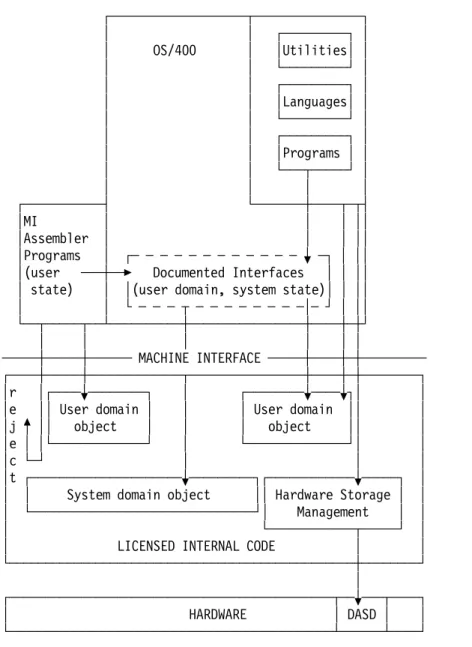
and PC Connectivity
Document Number GG24-4200-00
June 1994
International Technical Support Organization Rochester Center
Take Note!
Before using this information and the product it supports, be sure to read the general information under “Special Notices” on page xxiii.
First Edition (June 1994)
This edition applies to Version 2, Release 3 and Version 3, Release 1 of Operating System/400, Program Number 5738-SS1 and 5763-SS1 for use with the Application System/400.
Order publications through your IBM representative or the IBM branch office serving your locality. Publications are not stocked at the address given below.
An ITSO Technical Bulletin Evaluation Form for reader′s feedback appears facing Chapter 1. If the form has been removed, comments may be addressed to:
IBM Corporation, International Technical Support Center Dept. 977, Building 663-3
3605 Highway 52N
Rochester, Minnesota 55901-7829
When you send information to IBM, you grant IBM a non-exclusive right to use or distribute the information in any way it believes appropriate without incurring any obligation to you.
Abstract
This document describes implementing AS/400 security and how the different security elements fit together. This will help you understand the comprehensive AS/400 security options available to secure your system and data.
It includes information about Auditing, C2 Security, Cryptography,
Communications, PC Support, and OfficeVision/400. This document can be used by the new and the experienced AS/400 administrator or auditor. It contains information about security facilities and structures as well as implementation tips and recommendations.
If it is your responsibility to advise AS/400 customers in security issues and provide them with the latest information about Cryptography, C2, Level 50, and the new auditing product, IBM Security/400 (5764-006), then this document is for you.
A B (426 pages)
Contents
Abstract . . . iii
Special Notices . . . xxiii
Preface . . . xxv
How This Document is Organized . . . xxv
Related Publications . . . xxvi
International Technical Support Organization Publications . . . xxix
Acknowledgments . . . xxxi
Chapter 1. Overview Of OS/400 and Security Facilities . . . 1-1 1.1 Basic AS/400 Terminology . . . 1-1 1.1.1 System Object Structure . . . 1-1 Objects . . . 1-1 Object Types . . . 1-1
Libraries . . . 1-2 Object Names . . . 1-3
Document Library Objects . . . 1-3 Document Library Object Names . . . 1-4 Files . . . 1-4 Object Structure Summary . . . 1-6 1.1.2 Work Management . . . 1-6 Jobs . . . 1-7 Job Queues . . . 1-7 Subsystems . . . 1-8 Output Queues . . . 1-8 Message Queues . . . 1-9 1.1.3 Configuration Descriptions . . . 1-9 1.1.4 Programs and Commands . . . 1-9 Control Language (CL) . . . 1-10 Application Program Interface (API) . . . 1-10 1.2 AS/400 Security Architecture . . . 1-10 1.2.1 S/36 and S/38 Compatibility . . . 1-10 1.2.2 System Integrity . . . 1-10 1.2.3 Single-Level Storage . . . 1-11
1.3 AS/400 Security System Values . . . 1-11 1.4 AS/400 Users and Groups . . . 1-11
1.4.1 User Profiles . . . 1-11 1.4.2 Special Authorities . . . 1-11 1.4.3 User Classes . . . 1-12 1.4.4 IBM-Supplied User Profiles . . . 1-12 1.4.5 Group Profiles . . . 1-13 1.4.6 Limited Capability . . . 1-13 1.5 AS/400 Object Protection . . . 1-13 1.5.1 Authorities . . . 1-13 1.5.2 *PUBLIC Authority . . . 1-15 1.5.3 Authorization Lists . . . 1-15 1.5.4 Adopted Authority . . . 1-15 1.5.5 Audit Journal . . . 1-15 1.5.6 Authority Holder . . . 1-16 1.6 Physical Security . . . 1-16
1.6.1 The History Log (QHST) . . . 1-16 1.6.2 Cryptographic Support . . . 1-16
Chapter 2. System Values and Network Attributes . . . 2-1 2.1 System Values . . . 2-1 2.1.1 General Security System Values . . . 2-1 2.1.2 Other Related System Values . . . 2-4 2.1.3 System Values for Passwords . . . 2-5 2.1.4 Auditing System Values . . . 2-5 2.2 Security Level 40 and 50 . . . 2-6 2.2.1 Internal System Structures Access . . . 2-6
2.2.2 System Object Access Control . . . 2-8 Special Object Attributes and Types . . . 2-8 Callable Application Program Interfaces . . . 2-9 Protecting a Program′s Associated Space . . . 2-9 Protecting a Job′s Address Space . . . 2-9 Enhanced Hardware Storage Protection . . . 2-9 2.2.3 Additional Level 40 and 50 Features . . . 2-9 Validation of Programs Being Restored . . . 2-10 Job Description Authorization . . . 2-10
Signon Without Password . . . 2-11 2.3 Enabling Security Level 40 . . . 2-11
2.4 Disabling Security Level 40 . . . 2-11 2.5 Additional Level 50 Features . . . 2-12 2.5.1 Restricting User Domain Objects . . . 2-12 2.5.2 Parameter Validation . . . 2-12 2.5.3 Restricting Message Handling . . . 2-12 2.6 Enabling Security Level 50 . . . 2-13 2.7 Disabling Security Level 50 . . . 2-13 2.8 Network Attributes . . . 2-13 2.9 System Values and Network Attributes Recommendations . . . 2-14
System Values for Auditing . . . 2-14 System Values for Passwords . . . 2-14 Other Security-Related System Values . . . 2-15 Security-Related Network Attributes Values . . . 2-17
Chapter 3. User Profiles and Group Profiles . . . 3-1 3.1 Individual User Profiles . . . 3-1 3.1.1 Password . . . 3-2 Password Change Required Within Certain Intervals . . . 3-2
Prevent Reuse of the Same Password . . . 3-2 Use of Non-trivial Words of a Reasonable Length . . . 3-2
3.1.2 Special Authority . . . 3-3 *ALLOBJ Special Authority . . . 3-3 *SECADM Special Authority . . . 3-3 *JOBCTL Special Authority . . . 3-3 *SPLCTL Special Authority . . . 3-3 *SAVSYS Special Authority . . . 3-4 *SERVICE Special Authority . . . 3-4 *AUDIT Special Authority . . . 3-4 *IOSYSCFG Special Authority . . . 3-4
3.1.3 User Class . . . 3-5 3.1.4 Initial Program . . . 3-5 3.1.5 Initial Menu . . . 3-5 3.1.6 Limited Capabilities . . . 3-5
3.2 User Auditing . . . 3-6 3.2.1 Object Auditing . . . 3-7
3.2.2 Action Auditing . . . 3-7 3.3 IBM-Supplied User Profiles . . . 3-7 3.3.1 Changing Passwords for Dedicated Service Tools (DST) . . . 3-8 Operating System Install Security . . . 3-8 3.3.2 Default Owner (QDFTOWN) User Profile . . . 3-8 3.4 Group Profiles . . . 3-9 3.4.1 Group Ownership of Objects . . . 3-10 3.4.2 Planning Group Profiles . . . 3-10 3.5 Group Profiles and Performance . . . 3-11
3.6 Restoring User Profiles Considerations . . . 3-11 3.7 *SERVICE Users Considerations when Using Communication Line Trace 3-11
Chapter 4. Resource Protection . . . 4-1 4.1 Who Can Access Information . . . 4-1 4.2 How a User Can Access Information . . . 4-1 4.2.1 Commonly Used Authorities . . . 4-2 4.3 What Information Can Be Accessed . . . 4-3 4.3.1 Library Security . . . 4-3
4.3.2 Authorization List Security . . . 4-4 Authorization Lists Compared to Group Profiles . . . 4-4
4.4 Authority for New Objects in a Library . . . 4-4 4.4.1 Create Authority (CRTAUT) Risks . . . 4-5 4.5 Object Ownership . . . 4-5 4.5.1 Adopted Authority . . . 4-5 Potential Exposures . . . 4-5 4.5.2 Authority Holder . . . 4-6 Authority Holder Risks . . . 4-6 4.6 *PUBLIC Authority . . . 4-6 4.7 Protection Strategies . . . 4-7 4.7.1 Library Security . . . 4-7 4.7.2 Object Security . . . 4-7 4.7.3 Menu Security . . . 4-7 4.7.4 Overall Recommendations . . . 4-7 4.7.5 Recommended Protection Techniques . . . 4-8 Individual or Group Authorization . . . 4-8 Individual or Group Ownership . . . 4-8 4.7.6 Authorization Lists . . . 4-8 4.7.7 Logical Files . . . 4-9
4.8 Authorization Search Sequence . . . 4-9 4.9 Output Distribution . . . 4-9
4.9.1 Security in Output Queues . . . 4-9 Possible Exposure . . . 4-9 Methods of Protection . . . 4-9 4.9.2 How to Secure a Typical Printing Environment . . . 4-12 Shared Output Queue . . . 4-13 Non-Shared Output Queue . . . 4-13 4.10 *SAVSYS Special Authority Considerations . . . 4-14 4.10.1 Other Save and Restore Considerations . . . 4-15 4.11 Securing Commands Related to Access Control . . . 4-16
Chapter 5. Authorization Lists . . . 5-1 5.1 Creating an Authorization List . . . 5-2 5.2 Adding Users to an Authorization List . . . 5-3
5.3 Assigning Objects to an Authorization List . . . 5-3 5.4 Display Users and Objects on an Authorization List . . . 5-5
5.5 Authorization List Implementation Detail . . . 5-6 5.6 Save/Restore Considerations . . . 5-7 5.7 Recovering from a Damaged Authorization List . . . 5-8 5.7.1 Recovering the Authorization List . . . 5-8 5.7.2 Recovering the Association of Objects to the Authorization List . . 5-8 5.8 Authority Search . . . 5-9 5.9 Performance Advantages of Authorization Lists . . . 5-9 5.10 Comparing Authorization Lists to Group Profiles . . . 5-11 5.11 Limitations of Authorization Lists . . . 5-12
5.12 Managing Authorization Lists Between Systems . . . 5-12 5.12.1 ALLAUTL1 - List All Objects on AUTL . . . 5-13 5.12.2 FIXAUTL1 - Add Objects to AUTL . . . 5-14 5.12.3 Command Definitions . . . 5-16 ALLAUTL -- Build List of Objects on Authorization Lists . . . 5-16 FIXAUTL -- Attach Objects to Authorization Lists . . . 5-16 5.13 Summary . . . 5-16
Chapter 6. Audit Journal . . . 6-1
6.1 Audit Journal Events . . . 6-1 6.2 Creating the QAUDJRN Journal . . . 6-2
6.3 System Values That Control Auditing . . . 6-3 6.3.1 Auditing Control (QAUDCTL) . . . 6-3 6.3.2 Auditing End Action (QAUDENDACN) . . . 6-3 6.3.3 Auditing Force Level (QAUDFRCLVL) . . . 6-3 6.3.4 Auditing Level (QAUDLVL) . . . 6-3 Action Auditing . . . 6-3 6.3.5 Auditing for New Objects (QCRTOBJAUD) . . . 6-4 6.4 Using the Audit Journal to Report on System Activity . . . 6-4 6.4.1 QAUDJRN Journal . . . 6-5
6.4.2 Audit Journal Flow . . . 6-5 6.4.3 Journal Entry Types for QAUDJRN . . . 6-6 6.4.4 Completeness of Audit Journal Entries . . . 6-6 6.4.5 Converting Security Audit Journal Entries . . . 6-7 6.4.6 Display Audit Log Command . . . 6-12 6.4.7 Audit Reports by Journal Entry Type . . . 6-12 Authority Failure (AF) . . . 6-13 Full or Sample Audits . . . 6-13 Password and User Profile (PW) . . . 6-14
Authority Changes (CA) . . . 6-15 Changes to User Profiles (CP) . . . 6-15
System Value Change (SV) . . . 6-16 Ownership Changes (OW) . . . 6-16 DST Password Reset Journal Entries (DS) . . . 6-17 Changed Programs that Adopt Authority (PA) . . . 6-17 Deleting an Object (DO) . . . 6-17 6.5 Specific User and Object Auditing . . . 6-18 6.5.1 Specific User Action Auditing . . . 6-18 AUDLVL on the User Profile . . . 6-18 OBJAUD on the User Profile . . . 6-18
6.5.2 Object Auditing . . . 6-19 6.5.3 Document Library Object Auditing . . . 6-19 6.5.4 Auditing QSECOFR Activity . . . 6-20
Chapter 7. Security Design For Performance . . . 7-1 7.1 Architecture . . . 7-1
7.1.1 Object Structure . . . 7-3 7.1.2 Private Authority . . . 7-4 7.1.3 Authority Lookup . . . 7-5 7.1.4 Authority Search Order . . . 7-9 7.2 Security Design Options . . . 7-9 7.2.1 Public Authority . . . 7-9 7.2.2 Library Security . . . 7-11 7.2.3 Object Ownership . . . 7-12 7.3 Conclusion . . . 7-13
Chapter 8. C2 Overview and Considerations . . . 8-1 8.1 What Is C2 Security Certification? . . . 8-1 8.1.1 Changes to OS/400 for C2 . . . 8-2 8.1.2 What Are the TCSEC Security Levels? . . . 8-2 8.2 Implementation of C2 on a System . . . 8-2 8.3 Performance Impacts of C2 and Level 50 . . . 8-4 8.3.1 Impact on Daily Operations . . . 8-4 8.4 Recommendations . . . 8-4
Chapter 9. AS/400 Cryptography . . . 9-1
Manuals . . . 9-1 9.1 Introduction to Cryptographic Support . . . 9-1 9.2 IBM Common Cryptographic Architecture Services/400 (CCAS/400) . . 9-1 9.3 Description of Cryptographic Functions . . . 9-2 9.4 IBM Common Cryptographic Architecture Services/400 Components . . 9-5 9.4.1 PRPQ 5799-FBR or 5799-XBY . . . 9-5 9.4.2 The Cryptographic Processor . . . 9-5 Cryptographic Adapter . . . 9-7 9.4.3 Other Optional Products . . . 9-7
4754 IBM Security Interface Unit . . . 9-7 IBM Personal Security Card (PSC, Smart Card) . . . 9-9 IBM PS/2 . . . 9-10 9.5 Planning and Documentation . . . 9-11 Planning . . . 9-11 Documentation . . . 9-12 9.6 Initial Startup with SIU and PSCs . . . 9-12 9.6.1 Configure the PSC Data Blocks . . . 9-12 9.6.2 Initialize the Cryptographic Adapter (INZCS Command) . . . 9-14
Things to Remember about INZCS . . . 9-16 9.7 Start of the Cryptographic Support (STRCS Command) . . . 9-16
9.8 Keys . . . 9-18 9.9 Example of How Cryptography Works . . . 9-19 9.10 Public Key Algorithm (PKA) . . . 9-20 9.11 Other Cryptographic Facilities Available on the AS/400 . . . 9-21
Chapter 10. Communications Security in SNA . . . 10-1 10.1 Architectures . . . 10-1 10.1.1 Systems Network Architecture . . . 10-2 10.2 SNA Communications Security . . . 10-3
10.2.1 Introduction . . . 10-3 10.2.2 Configuring AS/400 Communications . . . 10-3 Network Interface Description (NWID) . . . 10-4 Line Description . . . 10-5
Controller Description . . . 10-7 Device Description . . . 10-8
Mode Descriptions . . . 10-9 Class of Service . . . 10-10 Remote Location Name . . . 10-10 Subsystems . . . 10-10 10.2.3 Base Level SNA Security . . . 10-11 10.3 APPC and APPN . . . 10-11 10.3.1 APPC Security . . . 10-13 10.3.2 Session Level Security . . . 10-14 Session Level Security in APPC . . . 10-14
Session Level Security in APPN . . . 10-15 10.3.3 Conversation Level Security . . . 10-16 Password Protection . . . 10-16 The Conversation . . . 10-16
Chapter 11. Security in IBM Communications Applications . . . 11-1 11.1 Security in IBM Supplied Communications Applications . . . 11-2 11.2 Distributed Host Command Facility (DHCF) . . . 11-3 11.2.1 Recommendations for HCF/DHCF . . . 11-3
11.3 Network Routing Facility (NRF) . . . 11-4 11.3.1 Recommendations for NRF . . . 11-4
11.4 SNA Primary LU2 (3270 Type Terminal) Support (SPLS) . . . 11-4 11.4.1 Recommendations for SPLS . . . 11-4 11.5 Distributed Data Management (DDM) . . . 11-4 11.5.1 DDM Location Security . . . 11-5 11.5.2 DDM Conversations . . . 11-6 11.5.3 Submit Remote Command . . . 11-7 11.5.4 DDM Access Parameter (DDMACC) . . . 11-7 11.5.5 Recommendations for DDM . . . 11-8 11.6 Distributed Relational Database Architecture (DRDA) . . . 11-8
11.6.1 Recommendations for DRDA . . . 11-9 11.7 Display Station Pass-Through (DSPT) . . . 11-9 11.7.1 DSPT User Identification . . . 11-10 11.7.2 DSPT Virtual Configuration Descriptions . . . 11-10 11.7.3 DSPT System Value QRMTSIGN . . . 11-12 11.7.4 Recommendations for DSPT . . . 11-13 11.8 NetView/DM and Distributed Systems Networking Executive . . . 11-15 11.8.1 Configuring NDM and DSNX . . . 11-15 11.8.2 Recommendations for QDSNX . . . 11-16
11.9 SNA Distribution Services (SNADS) . . . 11-16 11.9.1 Configuring for SNADS . . . 11-17
System Distribution Directory . . . 11-17 11.9.2 Submit Network Job Command . . . 11-18 11.9.3 Recommendations for SNADS . . . 11-20 11.10 Transmission Control Protocol/Internet Protocol (TCP/IP) . . . 11-20 11.10.1 Configuring for AS/400 TCP/IP . . . 11-21 11.10.2 TCP/IP Port Security . . . 11-21 11.10.3 TCP/IP File Transfer . . . 11-21 11.10.4 Simple Mail Transfer Protocol (SMTP) . . . 11-23 11.10.5 TELNET Client . . . 11-23
11.10.6 TELNET Server . . . 11-23 11.11 TCP/IP File Server Support/400 . . . 11-23 11.11.1 File Server Support/400 Features . . . 11-24 11.11.2 FSS/400 User Profiles . . . 11-24
11.11.3 Recommendations for FSS/400 . . . 11-25 11.12 AS/400 3270 Device Emulation . . . 11-25
11.12.1 Job Streams . . . 11-26 11.13 Remote Job Entry (RJE) . . . 11-26 11.13.1 Recommendations for RJE . . . 11-26 11.14 Electronic Customer Support (ECS) . . . 11-27 11.14.1 Recommendations for ECS . . . 11-27 11.15 User-Written Applications and File Transfer Support . . . 11-28 11.15.1 Intersystem Communications Function . . . 11-28 ICF File Security . . . 11-29 Security Information in User Applications . . . 11-29
File Transfer Support (FTS) . . . 11-29 11.15.2 CPI Communications (CPI-C) . . . 11-30 11.15.3 CICS/400 . . . 11-31 11.15.4 Open Systems Interconnection (OSI) . . . 11-31 OSI Communications Subsystem/400 . . . 11-31 User Application programs . . . 11-32 OSI Message Services/400 . . . 11-32 OSI File Services/400 . . . 11-32 11.16 Pre-start Jobs on the Target System . . . 11-34
11.17 Summary for AS/400 Communications Security . . . 11-34
Chapter 12. PC Support . . . 12-1 12.1.1 Introduction . . . 12-1 12.1.2 IBM PC Support/400 Functions . . . 12-2 12.1.3 PC Support Connection . . . 12-3 OS/2 Special Security Considerations . . . 12-3 12.2 Using Security System Values with PC Support . . . 12-4 12.3 PC Support Conversations . . . 12-7 12.3.1 Substitution of Passwords . . . 12-8 12.3.2 Handling PC Support Start Requests . . . 12-8
12.3.3 Common and Specific User IDs . . . 12-10 12.3.4 Security Recommendations for PC Support Users . . . 12-11 12.4 PC Support Functions from a Security Point of View . . . 12-11 12.4.1 Work Station Function . . . 12-11 12.4.2 Transfer Functions . . . 12-11 12.4.3 Shared Folders . . . 12-12 12.4.4 Message Function . . . 12-13 12.4.5 Submit Remote Command Function . . . 12-13 12.4.6 PC Support Organizer and Limited Capabilities Users . . . 12-14
12.4.7 Summary of PC Support Conversations . . . 12-14 12.5 Controlling Usage of PC Support Functions . . . 12-14
12.5.1 PC Support Exit Programs . . . 12-15 Example of DDMACC Exit Program . . . 12-16 Example of PCSACC Exit Program . . . 12-16 12.5.2 PC Support Server Programs . . . 12-18 12.5.3 Security in Cooperative Environments . . . 12-19 12.6 PC Viruses in AS/400 Folders . . . 12-20 12.6.1 Detecting a PC Virus . . . 12-20 12.6.2 Preventing a Virus . . . 12-21 Using Exit Programs . . . 12-21
12.7 Detecting Modifications of PC Programs . . . 12-23 12.7.1 Using the Last-Changed-Date . . . 12-23 12.7.2 Obtaining the Last-Changed-Date . . . 12-23 12.7.3 Obtaining the External Name . . . 12-23
12.7.4 Producing a Report . . . 12-24 12.8 How PC Viruses Can Spread . . . 12-24
12.8.1 Reducing the Risk of PC Viruses . . . 12-25 12.9 Recommendations Summary . . . 12-25 12.9.1 Keyboard Lock . . . 12-26
Chapter 13. OfficeVision/400 . . . 13-1 13.1 Overview of Document Library Services Security . . . 13-1 13.1.1 Terms and Definitions for Document Library Services . . . 13-1 13.2 Document Library Services Security . . . 13-2 Securing Folders and Documents . . . 13-2
Creating New Objects . . . 13-3 Work on Behalf of Another User . . . 13-3 Group Profiles . . . 13-3 13.2.1 Creating Folders . . . 13-3 The *ROOT folder . . . 13-3 Creating First-Level Folders . . . 13-4 13.2.2 Object Ownership . . . 13-4 Recommendations for Object Ownership . . . 13-4 13.2.3 Authorization Lists . . . 13-4
13.2.4 Access to Document Library Objects . . . 13-5 Recommendations for Accessing DLOs . . . 13-7
13.2.5 Authority . . . 13-8 Recommendations for Authority . . . 13-8 13.2.6 Access Codes . . . 13-8 Recommendations for Access Codes . . . 13-9 13.2.7 Working on Behalf of Another User . . . 13-9 Recommendations for Working on Behalf of Other Users . . . 13-9 13.3 Overview of OfficeVision/400 Security . . . 13-9 13.3.1 Terms and Definitions for Office . . . 13-10 13.3.2 Changing User Profiles through Office Enrollment Menu . . . 13-10
Changing the QSECOFR Profile . . . 13-11 Changing a User Profile . . . 13-11 Changing a User Profile that Is a Member of a Group Profile . . . 13-11 Recommendations for Changing User Profiles . . . 13-12 13.3.3 Enrolling Users . . . 13-12 Indirect Users . . . 13-13 Enrollment Considerations . . . 13-13 Recommendations for Enrolling Users . . . 13-15 13.3.4 Limiting Office User Options . . . 13-15
Creating a Word Processing-Only Environment . . . 13-15 Combining OfficeVision/400 with Application Programs . . . 13-17
Exposures of the Decision Support Menu . . . 13-17 13.3.5 Procedures for Saving Office Objects . . . 13-18 Recommendations for Procedures to Save Office Objects . . . 13-20 How to Find or Enter Names . . . 13-20 13.3.6 Access to Objects Outside Office from Inside Office . . . 13-21 Recommendations for Accessing External Office Objects . . . 13-22 13.3.7 Distribution Lists . . . 13-22 Recommendations for Distribution Lists . . . 13-22 13.3.8 Shared Folders . . . 13-22
13.4 AS/400 Local Functions . . . 13-23 13.4.1 Create Folders . . . 13-23 Recommendations for Creating Folders . . . 13-26 13.4.2 Creating and Revising Documents . . . 13-26
Recommendations for Creating and Revising Documents . . . 13-28 13.4.3 Sending Messages, Notes and Documents . . . 13-28
13.4.4 Receiving Messages, Notes, and Documents . . . 13-30 Recommendations for Receiving Messages, Notes and Documents . 13-31 13.4.5 Sending a Message . . . 13-31 Recommendations for Sending Messages . . . 13-32 13.4.6 Receiving a Message . . . 13-32 Recommendations for Receiving Messages . . . 13-33 13.4.7 Sending Notes . . . 13-33 13.4.8 Receiving Notes . . . 13-33 13.4.9 Sending Documents . . . 13-33
13.4.10 Receiving Documents . . . 13-33 13.4.11 Calendars . . . 13-33 13.5 AS/400 Exchanging Distributions with Remote Systems . . . 13-34 13.5.1 Sending Messages . . . 13-35 13.5.2 Receive Messages . . . 13-36 13.5.3 Sending Notes . . . 13-36 13.5.4 Receive Notes . . . 13-38 13.5.5 Sending Documents . . . 13-38 13.6 Conclusion on Security in OfficeVision/400 . . . 13-39
Chapter 14. Auditing the AS/400 . . . 14-1
14.1 Security Auditing . . . 14-1 14.2 Auditing Environment . . . 14-2 14.3 Gaining a General Understanding of the Company . . . 14-2 14.4 Audit and Control Concepts . . . 14-3 14.4.1 Audit Objectives . . . 14-3 14.4.2 What is Included in the Audit . . . 14-3 14.4.3 Guidelines for Auditing . . . 14-3 14.4.4 Control Concepts . . . 14-3 14.4.5 The Flow of Information . . . 14-4
Register a New User . . . 14-4 Register a User Who Leaves . . . 14-4 14.4.6 Applications and Ownership . . . 14-5 14.4.7 Program Maintenance and Development . . . 14-5 14.4.8 The Source Files . . . 14-6 14.4.9 Philosophy . . . 14-6 14.4.10 Audit Strategies . . . 14-6 14.5 AS/400 Security Controls . . . 14-7 14.5.1 Physical Security . . . 14-8
Machine Room . . . 14-8 UPS (Uninterruptable Power Supply) . . . 14-8
AS/400 Keylock . . . 14-8 Workstation/Terminal . . . 14-8 Backup Tapes . . . 14-8 14.5.2 Logical Security Controls . . . 14-8 Security-Related System Values and Network Attributes . . . 14-8 User Profiles and Group Profiles . . . 14-9 Authorization Lists . . . 14-9 Audit Journal . . . 14-10 14.6 Using OS/400 Facilities to Audit . . . 14-10
14.6.1 Day-to-Day Monitoring . . . 14-10 Status Monitoring . . . 14-11 Event Monitoring . . . 14-12 14.6.2 Periodic Reviews . . . 14-14
Physical Security . . . 14-14 System Status and Options . . . 14-14
User and Group Definition and Maintenance . . . 14-16 Access Authorization . . . 14-26 14.7 Securing an AS/400 . . . 14-33 14.7.1 Find the Status . . . 14-34 14.7.2 Implementing Better Security . . . 14-34 14.7.3 Daily Auditing . . . 14-35 14.8 The Auditors Menu . . . 14-35 The Foundation Menu . . . 14-35 The Roof Menu . . . 14-36
The Windows and Doors Menu . . . 14-36 The Fence and Gate Menu . . . 14-36
Chapter 15. IBM Security/400 . . . 15-1 15.1.1 IBM Security/400 History . . . 15-1 15.1.2 IBM Security/400 Components . . . 15-1 Auditor . . . 15-1 Remove Inactive User . . . 15-2 Use SECADM Profile . . . 15-2
Universal Access *NONE . . . 15-2 Systematic Logon Reporting . . . 15-2
15.1.3 Installation Instructions . . . 15-2 15.2 AUDITOR . . . 15-3 15.2.1 AUDITOR Detailed Description . . . 15-3 15.2.2 AUDITOR - Interactive Environment . . . 15-6 15.2.3 AUDITOR - Batch Environment . . . 15-6 15.2.4 AUDITOR - Locating and Printing Reports . . . 15-7 15.2.5 Auditor - File Authority Report (FILA1P, FILA2P) . . . 15-7 15.2.6 Auditor - Library Authority Report (LIBA1P, LIBA2P) . . . 15-8 15.2.7 Auditor - Command Authority Report (CMDA1P, CMDA2P) . . . . 15-9
15.2.8 Auditor - User Profile Authority Report (PRFA1P, PRFA2P) . . . . 15-11 15.2.9 Auditor - Job Description Authority Report (JOBDFULL,
JOBDDELTA) . . . 15-12 15.2.10 Auditor - Adopted Authority Report (PGMADOPT, PGMDELTA) 15-13 15.2.11 Auditor - System Value/Network Attribute Report (SYSA1P,
SYSA2P) . . . 15-15 15.2.12 Auditor - Authorization List Report (AUTA1P, AUTA2P) . . . 15-16 15.2.13 Auditor - List All User Profiles (USRA1P) . . . 15-17 15.2.14 Auditor - List All User Profiles by User Class (USRA1P) . . . 15-18
15.2.15 Auditor - List All User Profiles by Special Authority (USRA1P) . 15-19 15.2.16 Auditor - QAUDJRN Reports (QPQPRFIL) . . . 15-20
15.2.17 General Performance Considerations . . . 15-24 Auditor . . . 15-24 Remove Inactive User . . . 15-24 Use SECADM Profile . . . 15-24 Universal Access *NONE . . . 15-24 Systematic Logon Reporting . . . 15-25 15.3 Tailoring IBM Security/400 . . . 15-25 15.3.1 Remove Inactive User . . . 15-25 15.3.2 Use SECADM Profile . . . 15-26
15.3.3 Use Universal Access *NONE . . . 15-26 15.3.4 Systematic Logon Reporting . . . 15-26 15.3.5 Auditor . . . 15-27 15.3.6 Translation Considerations . . . 15-27
Appendix A. QSYSMSG Message Queue . . . A-1 QSYSMSG Receiving Program Example . . . A-2
Appendix B. Sample Password Validation Program . . . B-1
Appendix C. Security Officer′s Password . . . C-1
Appendix D. Program Used with DDMACC on Network Attributes . . . D-1
Appendix E. Example Exit Program for QRMTSIGN System Value . . . E-1
Appendix F. User Communications Application Programming Steps . . . . F-1
Appendix G. Network User Profiles . . . G-1
Appendix H. Security Checklist . . . H-1
Appendix I. Security Tools in Library QUSRTOOL . . . I-1
Appendix J. Trusted Network Interpretation (TNI) . . . J-1
J.1 Definitions of TNI Terms . . . J-1 J.2 Interpretation of TCSEC . . . J-3
J.2.1 Evaluation of Network Security Services . . . J-6 J.3 Evaluation of Network . . . J-7 J.3.1 Single Trusted System View . . . J-7 J.3.2 Interconnected Accredited AIS View . . . J-9
Index . . . X-1
Figures
1-1. OS/400 Object Structure . . . 1-2 1-2. Physical and Logical Files . . . 1-5 1-3. Object Structure Summary . . . 1-6 1-4. Object Authority Elements . . . 1-14 2-1. OS/400 Internal System Structure Access . . . 2-7 3-1. Display of the DSPUSRPRF Command . . . 3-6
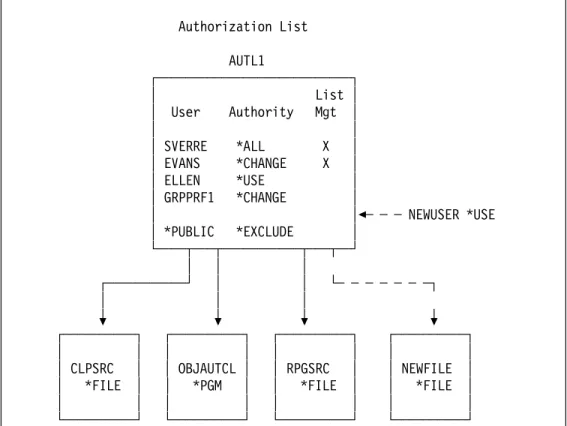
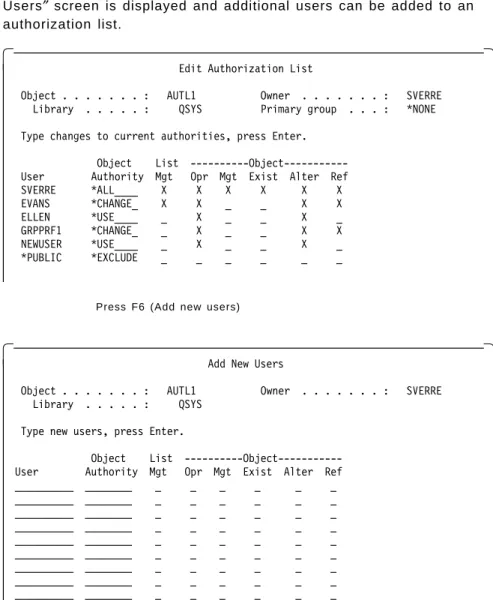
3-2. Display of the CHGUSRAUD Command . . . 3-7 4-1. Authorization List versus Group Profile . . . 4-4 4-2. Create Output Queue Command . . . 4-11 4-3. Example of a Printing Environment . . . 4-14 5-1. Authorization List and Objects . . . 5-1 5-2. EDTAUTL AUTL(AUTL1) . . . 5-4 5-3. EDTOBJAUT OBJ(CLPSRC) OBJTYPE(*FILE) . . . 5-5 5-4. DSPAUTL AUTL(AUTL1) and DSPAUTLOBJ AUTL(AUTL1) . . . 5-6 5-5. Implementation of Authorization Lists . . . 5-7
5-6. Comparison in Number of Authorizations . . . 5-10 5-7. List All Objects in Authorization Lists . . . 5-13
5-8. Add Objects to Authorization Lists . . . 5-14 5-9. Build List of Objects on Authorization Lists . . . 5-16 5-10. Attach Objects to Authorization Lists . . . 5-16 6-1. Overview of OS/400 Security Auditing Structure . . . 6-1 6-2. Audit Journal Events . . . 6-2 6-3. Audit Journal Flow . . . 6-5 6-4. Receiver Attribute Panel . . . 6-7 6-5. QJORDJE2 Record Format . . . 6-8 6-6. Query Selections to Report Security Related Events . . . 6-9
6-7. Query Report of Security Related Events . . . 6-10 6-8. Query Selections to Report Authority Changes Made by QSECOFR 6-11 6-9. Detailed Query Report of Authority Changes Made by QSECOFR 6-11 6-10. DSPAUDLOG Report . . . 6-12 6-11. Query Definition for Authority Failure . . . 6-14 6-12. Authority Failure Report . . . 6-14 6-13. Invalid Password Attempts Report . . . 6-15 6-14. Authority Changes Report . . . 6-15 6-15. User Profile Changes Report . . . 6-16
6-16. System Value Changes Report . . . 6-16 6-17. Deleted Objects Report . . . 6-17
6-18. Edited Query Definition for QSECOFR Command Report . . . 6-21 6-19. Sample output for QSECOFR command Report . . . 6-22 7-1. Contrast of Traditional Systems to AS/400 . . . 7-2 7-2. Access checks by CL Program . . . 7-3 7-3. Object Structure and Object Header . . . 7-3 7-4. Three Forms of Authority . . . 7-5 7-5. Sample Authority Lookup Report . . . 7-6 7-6. Access Checks by Library and Object . . . 7-11 9-1. Micro-Channel 4755 Cryptographic Adapter (Model 4755-014) . . . 9-7
9-2. Security Interface Unit, Signature Verification Pen, and Personal
Security Card . . . 9-8 9-3. Security Interface Unit Power Switch . . . 9-9 9-4. Security Interface Unit Voltage Selection Switch . . . 9-9 9-5. Using a PS/2 to Configure PSCs . . . 9-13
9-6. Transport of Data from PSCs to the AS/400 . . . 9-15 9-7. Change of the Master Keys within the Cryptographic Adapter . . 9-17
9-8. Example of Encryption/Decryption Environment . . . 9-19 10-1. SNA Layers - Function and Analogy . . . 10-2 10-2. The Add Connection List Entry (ADDCNNLE) Command. . . 10-5 10-3. Example of a Mode Description (MODD) . . . 10-9 10-4. Default Communications Subsystem Entries in QBASE . . . 10-11 10-5. Distinction Between LU 6.2 Sessions in APPN and Non-APPN
Networks . . . 10-13 10-6. Location Password (Bind Validation) on the APPC Device
Description . . . 10-14
10-7. Location Password (Bind Validation) on the APPN Remote
Location Configuration List . . . 10-15 11-1. Specific Communications Subsystem Entry in QCMN . . . 11-6 11-2. Start Display Station Pass-Through Command (STRPASTHR) . . 11-10 11-3. System Distribution Directory . . . 11-17 11-4. Example of Network Job Table Entries (WRKNETJOBE) . . . 11-19 12-1. Example of an Inactive Jobs Monitoring Program for
QINACTITV/QINACTMSGQ. . . . 12-6 12-2. Using Pipelining when Starting the Router . . . 12-10
12-3. Example Exit Program to Reject PC Support RMTCMD Command 12-16 12-4. Example Security File 1 for Virtual Print . . . 12-16
12-5. Example Content of Security File 1 for Virtual Print . . . 12-17 12-6. Example Security File 2 for Transfer Requests . . . 12-17 12-7. Example Content of Security File 2 for Transfer Requests . . . 12-17 12-8. Example PCSACC Exit Program . . . 12-18 12-9. Program to Check for PC Program Modifications . . . 12-22 13-1. Authority Testing for Command DSPDOC . . . 13-7 13-2. Possible allocation of Access Codes . . . 13-8 13-3. Enroll Office User Display . . . 13-12 13-4. Change System Information Menu . . . 13-13
13-5. Change Enrollment Information Menu . . . 13-14 13-6. User-Created Menu with the Word Processing Option Only . . . . 13-16 13-7. Work with Documents in Folders Screen . . . 13-17 13-8. Message Returned to Office User . . . 13-18 13-9. Display Document Menu . . . 13-20 13-10. Check Document Library Object Menu . . . 13-21 13-11. Folder Authority . . . 13-24 13-12. Change Document Authority Screen . . . 13-25 13-13. Display Authorization List Screen . . . 13-25
13-14. Change Folder Authority Screen . . . 13-27 13-15. Change Document Authority Screen with Personal Document . . 13-27
13-16. Select Distribution Lists Menu . . . 13-28 13-17. Send a Message Menu . . . 13-29 13-18. Change Defaults Menu when Sending a Note . . . 13-29 13-19. Work with Mail Menu, User′s Own Mail Log . . . 13-30 13-20. Work with Mail Menu, Working on Other User′s Behalf . . . 13-31 13-21. Display Messages Screen with Personal Message . . . 13-32 13-22. Additional Message Information Screen with Personal Message 13-32 13-23. Display Messages Screen with Network Message . . . 13-35 13-24. Display Messages Screen with Network Confirmation . . . 13-37
13-25. Additional Message Information for Network Confirmation . . . . 13-37 13-26. Display Messages Screen with Network Rejection . . . 13-38 14-1. Effective Security Level . . . 14-11 14-2. Report of All Security-Related System Values . . . 14-15
14-3. RPG Program to Report Special Authorities of Group Profiles . . 14-17 14-4. Special Authorities of Group Profiles and their Associated Users 14-19 14-5. Control Language Program to Produce *ALL Profile OUTFILE . . 14-21 14-6. Query Definition to Report on User Profiles and Their Authorities 14-22 14-7. Report on User Profiles and Their Authorities . . . 14-23 14-8. Query Definition Showing all Privileged User Profiles . . . 14-24 14-9. Report Showing all Privileged User Profiles . . . 14-25 14-10. Program to Show All Authorization Lists in the System . . . 14-27 14-11. Query Definition on All Authorization Lists . . . 14-28 14-12. Report on All Authorization Lists . . . 14-29 14-13. Control Language Program to Display Program Adopts . . . 14-30
14-14. Query Definition Showing Program Adopts . . . 14-31 14-15. Report Showing Program Adopts . . . 14-32 15-1. Sample FILA1P Report . . . 15-7 15-2. Sample LIBA1P Report . . . 15-8 15-3. Sample CMDA1P Report . . . 15-10 15-4. Sample PRFA1P Report . . . 15-11 15-5. Sample JOBDFULL Report . . . 15-12 15-6. Sample PGMADOPT Report. . . 15-14 15-7. Sample SYSA1P Report . . . 15-15
15-8. Sample AUTA1P Report . . . 15-16 15-9. Sample USRA1P Report . . . 15-18
15-10. Sample USRA2P Report . . . 15-19 15-11. Sample USRA3P Report . . . 15-20 A-1. Example of Sample Program to Receive Messages from QSYSMSG. A-2 B-1. Sample Password Validation CL Program . . . B-1 B-2. Data Description Specifications . . . B-2 D-1. Example Program for DDMACC Network Attribute . . . D-1 D-2. DDMACC Parameter on Network Attributes . . . D-2 D-3. Remote Location List Entry for the DDM Remote Locations . . . D-2 E-1. Example Exit Program for QRMTSIGN System Value . . . E-2
E-2. QRMTSIGN System Value for DSPT Exit Program . . . E-3 E-3. Remote Location List Entry for the DSPT Remote Locations . . . . E-3 F-1. ICF Programming . . . F-2 I-1. Overview of QUSRTOOL Creation Process . . . I-1 J-1. Example of Accreditation Range . . . J-10 J-2. Example of Interconnection Rule . . . J-11 J-3. Cascading Problem . . . J-12
Tables
1-1. Subsystems Shipped by IBM . . . 1-8 2-1. State and Domain Access Rules at Security Levels 40 and 50 . . . 2-8 2-2. OS/400 Job Description and User Profile Authorization . . . 2-11 2-3. Message Handling at Security Level 50 . . . 2-12 2-4. System Values for Auditing . . . 2-14 2-5. System Values for Passwords . . . 2-14
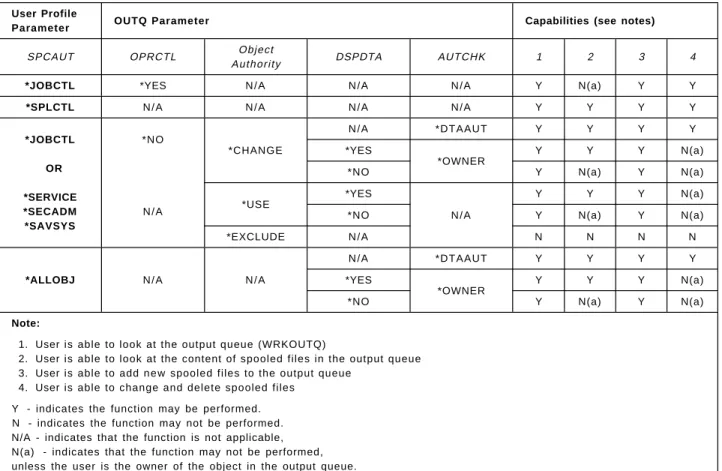
2-6. Other System Values for Security . . . 2-16 2-7. Security-Related Network Attributes . . . 2-17 3-1. Default Special Authorities by User Class . . . 3-5 3-2. Security Levels of Dedicated Service Tools . . . 3-8 4-1. Object Authority Types . . . 4-2 4-2. Data Authority Types . . . 4-2 4-3. Authority Combinations . . . 4-3 4-4. User Profile and Output Queue Parameters Affecting Security . . 4-10 4-5. Output Queue Security . . . 4-12
4-6. Authority for Key Save and Restore Commands . . . 4-15 5-1. Comparison of Authorization Lists and Group Profiles . . . 5-11
6-1. Values for the OBJAUD Parameter on the User Profile . . . 6-19 6-2. Values for the OBJAUD Parameter on the Object . . . 6-19 6-3. Auditing Performed for Object Access . . . 6-19 6-4. Values for the AUDDLO Parameter on the Object . . . 6-20 6-5. Auditing Performed for Document Library Object Access . . . 6-20 7-1. Number of Authority Lookup Operations . . . 7-6 7-2. Models B and C CPU Overhead for Authority Lookup Operations . 7-7 7-3. Model D CPU Overhead for Authority Lookup Operations . . . 7-7 7-4. Models E and F CPU Overhead for Authority Lookup Operations . 7-8
7-5. Authority Lookup in Different Cases . . . 7-13 8-1. Settings Required on a C2 System . . . 8-2 8-2. Settings that Must Be Able to Be Implemented . . . 8-4 9-1. Example of Bit Patterns in Characters . . . 9-3 9-2. Comparison of Cryptographic Features . . . 9-22 10-1. Security Related Parameters on the Line Descriptions . . . 10-6 10-2. Security Related Parameters in the Controller Description . . . . 10-7 10-3. Security Related Parameters in the Device Description . . . 10-8 10-4. Security Related Parameters in Device Descriptions by Device
Type . . . 10-9 10-5. Bind Validation Between Communicating AS/400s . . . 10-16
11-1. Possible Values for DDMACC on the Network Attributes . . . 11-7 11-2. System Value QRMTSIGN . . . 11-12 11-3. Possible Values for JOBACN on the System Network Attributes . 11-18 11-4. Consequences of Sending Files to the AS/400 Using FTP . . . 11-22 12-1. Subsystem Communications Entry for PC Support . . . 12-8 12-2. Security User Profile Parameters Related to Non-WSF PC Support
Functions . . . 12-9 12-3. PC Support Server Programs . . . 12-19 13-1. The Result of Using the Command DSPDOC . . . 13-6
13-2. Parameters for the Command SAVDLO . . . 13-19 13-3. Document Format Conversion Between S/36 and AS/400 . . . 13-35 13-4. Document Format Conversion Between PROFS and AS/400 . . . 13-35 14-1. List of Critical System Objects . . . 14-12 15-1. File Authority Report - Generated 02/01/94 . . . 15-7
15-2. Library Report - Report Generated on 02/01/94 . . . 15-9 15-3. Command Authority Report - Report Generated on 02/01/94 . . . 15-10
15-4. User Profile Report - Report Generated on 02/01/94 . . . 15-11 15-5. Job Description Report - Report Generated on 02/01/94 . . . 15-12 15-6. Program Adopt Authority Report - Report Generated on 02/01/94 15-14 15-7. System Value/Network Attribute Report - Report . . . 15-15 15-8. Authorization List Report - Report Generated on 02/01/94 . . . . 15-17 15-9. Reports Produced from QAUDJRN Based on Journal Entry Type 15-23 I-1. Security Tools in Library QUSRTOOL . . . I-2 J-1. Relationship of Evaluation Criteria and Classes . . . J-4 J-2. Evaluation of Network Security Service . . . J-7
J-3. Component Type Maximum and Minimum Class . . . J-8 J-4. Composed Components and Composition Rating . . . J-8
Special Notices
This publication is intended to help auditors and system administrators to develop, implement and audit a solid security system for the AS/400. The information in this publication is not intended as the specification of any programming interfaces that are provided by OS/400. See the PUBLICATIONS section of the IBM Programming Announcement for OS/400 and IBM Security/400 for more information about what publications are considered to be product documentation.
References in this publication to IBM products, programs or services do not imply that IBM intends to make these available in all countries in which IBM operates. Any reference to an IBM product, program, or service is not intended to state or imply that only IBM′s product, program, or service may be used. Any functionally equivalent program that does not infringe any of IBM′s intellectual property rights may be used instead of the IBM product, program or service. Information in this book was developed in conjunction with use of the equipment specified, and is limited in application to those specific hardware and software products and levels.
IBM may have patents or pending patent applications covering subject matter in this document. The furnishing of this document does not give you any license to these patents. You can send license inquiries, in writing, to the IBM Director of Licensing, IBM Corporation, 208 Harbor Drive, Stamford CT USA 06904.
The information contained in this document has not been submitted to any formal IBM test and is distributed AS IS. The use of this information or the implementation of any of these techniques is a customer responsibility and depends on the customer′s ability to evaluate and integrate them into the customer′s operational environment. While each item may have been reviewed by IBM for accuracy in a specific situation, there is no guarantee that the same or similar results will be obtained elsewhere. Customers attempting to adapt these techniques to their own environments do so at their own risk.
Any performance data contained in this document was determined in a
controlled environment, and therefore, the results that may be obtained in other operating environments may vary significantly. Users of this document should verify the applicable data for their specific environment.
The following terms, which are denoted by an asterisk (*) in this publication, are trademarks of the International Business Machines Corporation in the United States and/or other countries:
The following terms, which are denoted by a double asterisk (**) in this publication, are trademarks of other companies:
ACF/VTAM Application System/400
AS/400 CICS/400
ES/9000 I B M
M i c r o Channel MVS/ESA
NetView OfficeVision/400
Operating System/400 OS/2
OS/400 PS/2
SQL/400
DEC VT220 Digital Equipment Corporation
UNIX UNIX System Laboratories, Inc.
Preface
This document is intended to provide a guide to implementing an effective security environment for AS/400 systems. It contains information, tips, techniques, and hints on designing a complete security scheme. Items addressed include the following: physical security, resource security, system level security, performance considerations, and auditing considerations. Where possible, specific implementation examples and coding examples are provided.
The recommendations, tips, techniques, and hints provide system security administrators and security auditors information and tools to assist them in implementing effective security procedures and develop their auditing techniques.
How This Document is Organized
The document is organized as follows:
• Chapter 1, “Overview Of OS/400 and Security Facilities”
Provides an overview of the AS/400 architecture and security facilities, including terminology, system level protection, object level protection, and physical security.
• Chapter 2, “System Values and Network Attributes”
This provides an overview of, and recommendations for security related system values and network attributes.
• Chapter 3, “User Profiles and Group Profiles”
This chapter provides a detailed description of user profiles and group profiles and their parameters. It also discusses auditing at a user level (both user and group profiles), IBM supplied user profiles, and dynamic change of group profiles.
• Chapter 4, “Resource Protection”
This chapter provides a detailed description of how to protect your
resources. Details and recommendations are made on the usage of group profiles, authorization lists, object ownership, spool output, and *SAVSYS special authority.
• Chapter 5, “Authorization Lists”
This chapter details authorization lists and their usage in a secure environment. It also addresses save and restore considerations with authorization lists.
• Chapter 6, “Audit Journal”
This chapter provides a detailed description of the security audit journal, QAUDJRN, which is designed to record security related activity.
• Chapter 7, “Security Design For Performance”
This chapter provides information for designing an AS/400 security environment with regard to performance. It contains recommendations to assist a system administrator in the design of security.
• Chapter 8, “C2 Overview and Considerations”
This chapter provides an overview of the C2 security standard as it relates to the AS/400. It also provides an overview of what steps are required to implement a C2 security scheme on an AS/400 system.
• Chapter 9, “AS/400 Cryptography”
This chapter provides an overview of cryptography features of the AS/400, including the new hardware cryptographic facility introduced in V2R3. • Chapter 10, “Communications Security in SNA”
This chapter provides a description of SNA security related issues with AS/400 in an APPN communications environment.
• Chapter 11, “Security in IBM Communications Applications”
This chapter provides an analysis of security related issues in several of the common AS/400 communications application environments. Applications addressed include the following: DHCF, NRF, SPLS, DDM, DRDA, DSPT, DSNX, SNADS, TCP/IP, FFS/400, 3270EML, RJE, ECS, OSI and user-written applications.
• Chapter 12, “PC Support”
This chapter provides details of security related issues unique to PC Support/400. It offers recommendations on how to secure your PC Support environment across various networking environments.
• Chapter 13, “OfficeVision/400”
This chapter provides a general discussion of security related issues unique to OfficeVision/400.
• Chapter 14, “Auditing the AS/400”
This chapter provides details on how to use the native AS/400 auditing tools and system commands to assist an auditor or system security administrator to determine the security posture of an individual system or network of systems.
• Chapter 15, “IBM Security/400”
This chapter provides an overview of the product IBM Security/400 and its function to assist and auditor or system security administrator to determine the security posture of an individual system.
Related Publications
The publications listed in this section are considered suitable for a more detailed discussion of the topics covered in this document. They are divided into V2R3 (and earlier), V3R1, and others.
V2R3 and earlier:
• Application System/400: Security Reference
• Application System/400: Basic Security Guide, SC41-0047 • Application System/400 Guide to Enabling C2, SC41-0103
• Application System/400 Programming: Basic Backup and Recovery Guide, SC41-0036
• Application System/400 Programming: Advanced Backup and Recovery Guide, SC41-8079
• Application System/400: System Operator′s Guide, SC41-8082 • Application System/400 Programming: Control Language Reference,
SC41-0030
• PC Support/400: User′s Guide for DOS, SC41-8199
• PC Support/400: DOS Installation and Administration Guide, SC41-0006 • PC Support/400: User′s Guide for OS/2, SC41-8300
• PC Support/400: OS/2 Installation and Administration Guide, SC41-0007 • PC Support/400: Technical Reference for DOS and OS/2, SC41-8091 • PC Support/400: Application Program Interface Reference, SC41-8254 • Application System/400 Communications Management Guide, SC41-0024
ment
• Application System/400 Distributed Database Guide, SC41-0025 • Application System/400: DDM User′s Guide, SC41-9600
• Application System/400 Communictions: Distribution Services Network Guide, SC41-9588
• Application System/400 Communictions: Remote Work Station Guide, SC41-0002
• Application System/400 Communications: 3270 Device Emulation Guide, SC41-9602
• Remote Job Entry (RJE) Guide, SC09-1373
• Application System/400 Transmission Control Protocol/Internet Guide, SC41-9875
• Application System/400 Programming: Work Management Guide, SC41-8078 • Application System/400 Programming: System Programmer′s Interface
Reference, SC41-8223
• Application System/400 Programming: Performance Tools/400 Guide, SC41-8084-01
• Application System/400 Cryptographic Support/400 User′s Guide, SC41-8080 • Application System/400 Planning For and Setting Up OfficeVision/400,
SC41-9626
• Application System/400 Office Services Concepts and Programmer′s Guide, SC41-9758
V3R1 (available during third quarter, 1994): • Security - Basic, SC41-3301
• Security - Reference, SC41-3302 • Security - Enabling for C2, SC41-3303 • Backup and Recovery - Basic, SC41-3304 • Backup and Recovery - Advanced, SC41-3305 • System Operation, SC41-3203
• CL Reference, SC41-3722
• Client Access/400 DOS Ext Memory Setup, SC41-3500
• Client Access/400 DOS Ext Memory User Guide, SC41-3501 • Client Access/400 OS/2 Setup, SC41-3520
• Client Access/400 OS/2 User Guide, SC41-3521
• Client Access/400 DOS, OS/2 Technical Reference, SC41-3563 • Client Access/400 DOS, OS/2 API Reference, SC41-3562 • Communications Management, SC41-3406
• Distributed Data Management, SC41-3307 • Distributed Database Programming, SC41-3702 • SNA Distribution Services, SC41-3410
• Remote Work Station Support, SC41-3402 • 3270 Device Emulation Support, SC41-3408 • Remote Job Entry (RJE) Guide, SC09-1903 • TCP/IP Configuration and Reference, SC41-3420 • Work Management, SC41-3306
• System API Reference, SC41-3801 • Performance Tools/400, SC41-3340 • Cryptographic Support/400, SC41-3342
• Planning for and Setting Up OfficeVision/400, SH21-0695 • Office Services Concepts and Programmer′s Guide, SH21-0703
Others:
• Centralized Security Administration In An AS/400 Peer Network, GG24-3719 • Application System/400 TCP/IP Configuration and Operation Redbook,
GG24-3442
• The IBM AS/400 as a TCP/IP Network File Server, GG24-4092 • VM-AS/400 Connectivity and Functional Use, GG24-3430
• Trusted Network Interpretation of The Trusted Computer System Evaluation Criteria, Version 1, July 1987, NCSC-TG-005, published by the National Computer Security Center.
Additional publications for cryptography:
The following publications must be ordered if cryptography will be used: • Application System/400 Common Cryptographic Architecture Services/400
Installation and Operator′s Guide, SC41-0102
• IBM TSS Concepts and Programming Guide: Volume I, Access Controls and DES Cryptography, GC31-3937
• IBM TSS Programming Reference: Volume I, Access Controls and DES Cryptography, SC31-2934
• IBM TSS Concepts and Programming Guide: Volume II, Public-key Cryptography, GC31-2889
• IBM TSS Programming Reference: Volume II, Public-key Cryptography, SC31-2888
• IBM TSS General Information and Planning Guide, GA34-2137 • IBM Workstation Security Services Installation and Operating Guide,
SA34-2141
• IBM Workstation Security Services Licensed Program Specifications, GC31-2720
The following manual is considered suitable for a general introduction to AS/400 terminology and concepts:
AS/400 Concepts And Facilities, SX09-1259
International Technical Support Organization Publications
• Backup Recovery and Media Services/400 Implementation Tips and Techniques, GG24-4300
• Add others at publication time
A complete list of International Technical Support Organization publications, with a brief description of each, may be found in:
Bibliography of International Technical Support Organization Technical Bulletins, GG24-3070.
To get listings of redbooks online, VNET users may type:
TOOLS SENDTO WTSCPOK TOOLS REDBOOKS GET REDBOOKS CATALOG
How to Order Redbooks
IBM employees may order redbooks and CD-ROMs using PUBORDER. Customers in the USA may order by calling 1-800-879-2755 or by faxing 1-800-284-4721. Visa and Master Cards are accepted. Outside the USA, customers should contact their IBM branch office.
You may order individual books, CD-ROM collections, or customized sets, called GBOFs, which relate to specific functions of interest to you.
Below is a list of ITSO publications (known as redbooks) that are currently available which relate to the AS/400.
AS/400 redbooks are also available on CD-ROM, by adding feature code #8053 to your OS/400 software profile.
• System/36 to AS/400 System Migration, GG24-3249-01 • System/36 to AS/400 Application Migration, GG24-3250-01
• AS/400: System/38 Application Migration to AS/400, GG24-3251-00 • AS/400 Communication Migration, GG24-3253--00
• AS/400 Office in a DIA/SNADS Network, GG24-3268-00
• Converting S/36 Environment Application to Native, GG24-3304-01 • AS/400 Communications Problem Determination, GG24-3305-00 • SQL/400: A Guide for Implementation OS/400 V2R2, GG24-3321-03
• AS/400 - S/370 Connectivity, GG24-3336-00
• AS/400, S/38 and PS/2 as T2.1 Nodes in a Subarea Network, GG24-3420-00 • Writing SAA Applications for AS/400, GG24-3438-00
• IBM AS/400 TCP/IP Operation and Configuration, GG24-3442-02 • IBM AS/400 in Large Networks: A Case Study, GG24-3447-00 • AS/400 Communications Definitions Examples, GG24-3449-00
• AS/400 Object Distribution Facility and SNA RSCS PROFS, GG24-3479-00 • IBM AS/400 ISDN Connectivity, GG24-3517-00
• OfficeVision/400 and AS/400 Query Applications in a Multilingual Environment, GG24-3579--00
• AS/400 V2R3 Systems Management, GG24-3614-02 • OfficeVision/400 in a DIA/SNADS Network, GG24-3625-00
• PC Support/400 Implementation and Performance, GG24-3636-00 • AS/400 Audit and Security Enhancements in OS/400, GG24-3639-00 • WAF/400 5363 Optical Subsystem Configuration and Installation,
GG24-3680-00
• OfficeVision/400 Printing, GG24-3697-00 • AS/400 Printing II, GG24-3704-00
• AS/400 APPN with PS/2 APPN, 3174 APPN, 5394 and Subareas, GG24-3717-00 • AS/400 CPI Communications Selected Topics, GG24-3722-00
• AS/400 Performance Management V2R2, GG24-3723-01
• Multimedia Examples with the AS/400 Using AVC, GG24-3743-00 • Getting Started with AS/400 OSI, GG24-3758-00
• AS/400 Communication Definition Examples Volume 2, GG24-3763-00 • Installation Considerations for National Language, GG24-3790-00
• Artificial Intelligence and AS/400: Neural Networks and Knowledge Based Systems, GG24-3793-00
• Facsimile Support/400 Implementation, GG24-3797-00 • Application Development on the AS/400, GG24-3806-00
• PC Support/400 Asynchronous and SDLC Configuration Examples, GG24-3808-00
• 5494 & OS/2 ES: Connecting Remote User Groups, GG24-3828-00
• AS/400 Automation Using NetView and SNA MS Transport, GG24-3841-00 • DOS PCS/400 in OS/2 V2 Virtual DOS Machine, GG24-3856-00
• WAF/400 Administration and User Examples, GG24-3866-00 • OfficeVision/400 Application Enabler, GG24-3868-00
• Cooperative Processing and GUI in an AS/400 Environment, GG24-3877-00 • OfficeVision/400 Application Programming Interfaces V2R2, GG24-3885-00 • OfficeVision/400 Integration with CallPath/400 and Fax Support, GG24-3896-00
• AS/400 Performance Capacity Planning V2R2, GG24-3908-00 • AS/400 System Availability and Recovery for V2R2, GG24-3912-00 • AS/400 Network Routing Facility, GG24-3918-00
• AD/CYCLE Code/400, ADM/400 and ADS/400, GG24-3928-00 • OfficeVision/400 V2 Technical Tips and Techniques, GG24-3937-00 • CICS/400 Migration from Mainframe CICS, GG24-4006-00
• Using DOS PC Support/400 with Novell NetWare 3.11 and NetWare for SAA 1.3, GG24-4013-00
• Ultimedia Video Delivery System/400, GG24-4020-00
• AS/400 Client Series - Products and Positioning, GG24-4027-01 • IBM AS/400 Printing III, GG24-4028-00
• Performance Benchmarking for the AS/400, GG24-4030-00 • AS/400 and RISC System/6000 Connectivity, GG24-4039-00 • Current-OV/400 Workgroup Program, GG24-4050-00
• Using V2R3 DOS and OS/2 PC Support under OS/2 2.1, GG24-4070-00 • Apple Macintosh and the AS/400, GG24-4071-00
• OfficeVision/400 Application Enabler Version 2 Release 3, GG24-4072-00 • The IBM AS/400 as a TCP/IP Network File Server, GG24-4092-00
• ENVY/400 Hints and Tips, GG24-4094-00 • Introduction to ENVY/400, GG24-4126-00
• AS/400 Integrated Language Environment, GG24-4148-00 • CICS/400 V2R3 Task Book, GG24-4182-00
• AS/400 V2R3 Software Life Cycle Mgmt with ADM/400, GG24-4187-00
• OfficeVision/400: Printer Setup in an OfficeVision Environment, GG24-4283-00 • AS/400 Client Series Handbook, GG24-4285-00
• BRM Services/400 Implementation Tips and Techniques, GG24-4300-00
Acknowledgments
The advisor for this project was:
Craig Tamlin
International Technical Support Center, Rochester Center
The authors of this document are:
Wayne O. Evans, AS/400 Security Consulting & Education Harri Levänen, IBM Finland
Hiro Nishihara, International Technical Support Center, Rochester Bent Philipson, IBM Denmark
Jorge Salvador B., IBM Ecuador Sverre Selbach, IBM Norway Sue Van Riper, IBM Rochester I/S Jeff Wang (Wang Jiunn Jye), IBM Taiwan
The authors of the previous version documents are:
Örjan Jönsson, IBM Sweden
Martin Kotlenga, Coopers and Lybrand, USA Fred Shuback, Coopers and Lybrand, USA Pia Tøt, IBM Denmark
Jay Ehrenreich, Coopers and Lybrand, USA J. R. Mattiucci, Coopers and Lybrand, USA
Dan Naidoo, Information Services Management, South Africa Santiago Moya, IBM Argentina
Nik Ariff N Omar, IBM Malaysia Bernd Wagner, IBM Germany
This publication is the result of a residency conducted at the International Technical Support Center, Rochester Center.
Thanks to the following people for the invaluable advice and guidance provided in the production of this document:
Carol Woodbury, IBM Application Systems, Rochester MN. Paul Brown, IBM Application Systems, Rochester MN. Janet Krueger, IBM Application Systems, Rochester MN. Dick Locker, IBM Application Systems, Rochester MN. Jelan Heidelberg, IBM Application Systems, Rochester MN. Terry Hennessy, IBM Application Systems, Rochester MN. John Griffith, IBM Application Systems, Rochester MN. Jeff Uehling, IBM Application Systems, Rochester MN. Aleesa Kobi, IBM Application Systems, Rochester MN. Kathy Konkel, IBM Application Systems, Rochester MN. Jim Powell, Keane Inc., Rochester MN.
Chapter 1. Overview Of OS/400 and Security Facilities
The Application System/400* (AS/400*) has a very sophisticated and modern architectural base. While it has evolved from the System/36 and the System/38, it contains many facilities that AS/400 customers are only now utilizing to the maximum capability.
Like the AS/400, its operating system, Operating System/400* (OS/400*), has evolved from the S/36 and S/38, and offers a very sophisticated and powerful computing base.
This chapter is an overview for readers who are not regular AS/400 users. It offers an overview of OS/400 architectures and relevant object structures, and then highlights OS/400 security features.
1.1 Basic AS/400 Terminology
This section introduces basic AS/400 terminology. Understanding these terms and concepts are essential to understanding AS/400 security. For a more information on these, refer to the AS/400 Concepts And Facilities manual.
1.1.1 System Object Structure
There are a few basic concepts that will enable you to quickly start work with the AS/400 system. These are described below.
Objects
Everything on the system that contains some form of information and can be accessed via the standard OS/400 interface is represented as an object. An object is made up of a set of attributes that describe the object and some form of data. The attributes of an object include its name, type, size, the date it was created, a short description, and the name of the library in which it is stored. Every object on the system has an owner, who plays an important part in the security functions. The owner of an object can grant or revoke access of other users. A user cannot be deleted before all objects that are owned by the user are deleted or assigned to another user.
The data component of an object is the collection of information that is stored in the object. The data part of a program is the instructions that make up the program. The data portion of a file is the collection of records that make up the file. The term ″object″ is used to refer to a number of different items that can be stored in the system, regardless of what the items are.
Object Types
Different object types have different operational characteristics. These differences make each object type unique. For example, because a file is an object that contains data, its operational characteristics differ from those of a program, which contains instructions.
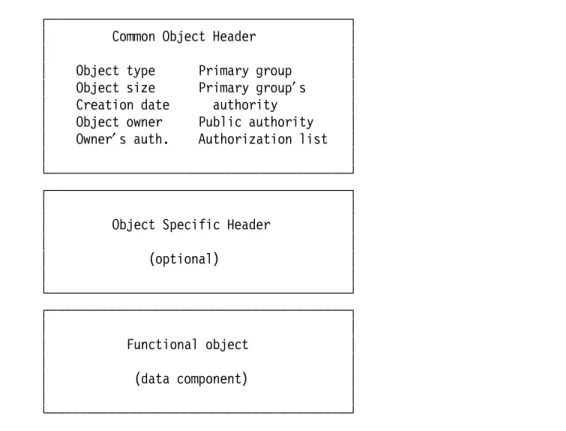
Objects are arranged with a common object header and a type-dependant functional portion. For example, a program object header would contain a description of the object, including the type (program), and the owner (the user who created the program). The functional part of the program object contains
information that governs the way the object can be used. This allows the system to perform operations collectively on all objects, as well as permitting each object to be tailored for its own purposes. Figure 1-1 on page 1-2 shows the common object structure.
┌──────────────────────────────────────────┐
│
Common Object Header
│
│
│
│
Object type
Primary group
│
│
Object size
Primary group
′
s
│
│
Creation date
authority
│
│
Object owner
Public authority
│
│
Owner
′
s auth.
Authorization list
│
│
│
└──────────────────────────────────────────┘
┌──────────────────────────────────────────┐
│
│
│
Object Specific Header
│
│
│
│
(optional)
│
│
│
└──────────────────────────────────────────┘
┌──────────────────────────────────────────┐
│
│
│
Functional object
│
│
│
│
(data component)
│
│
│
└──────────────────────────────────────────┘
Figure 1-1. OS/400 Object Structure. The structure of an object is made up of three primary parts: the common object header, the object specific header, which is optional, and the functional object (data component).
There are over 60 different object types. Some examples are: files, commands, documents, programs, libraries, controller descriptions, device descriptions, user profiles, and job queues. Each object type has an abbreviated form preceded by an asterisk, to signify this as a reserved word. For example a file is referred to as an object of type *FILE. For the purposes of security, each individual object may be secured, tailoring user access to the function of the system.
In addition, certain object types may have many attributes which further differentiate the types. For example, an object type of program (*PGM) could have an attribute of RPG, CBL, C, or CLP, for instance. An object type of file (*FILE) could have an attribute of PF, LF, DSPF, DDMF, or SAVF, and so on. Each of these attributes allow deeper levels of sub-typing for particular specialized function.
Libraries
A library is an object that is used to group related objects and to locate objects by name. Thus, a library is like a directory to a group of objects. Libraries can be used to group the objects into any meaningful collection. Objects can be grouped according to security, backup, processing, or any other user requirements.
Some libraries come with the AS/400 system and are standard parts of the system. The QSYS library contains the base operating system components, as well as other libraries. It is special in that it is the only library that can contain other libraries. Users can create other libraries. IBM Program Products usually have their own libraries. Users should avoid adding objects to IBM libraries. Library access rules govern the use of commands, programs, files or any object you may want to use. You must have access to the library as well as the object you want to use. The system will look for the object in the libraries specified in the library search path (called a library list, abbreviated to *LIBL), or you can refer to an object by specifically stating a library and the object name.
Object Names
Each object has a name. The object name and the object type are used to identify an object. The object name is explicitly assigned by the system for system-supplied objects, or by the user when creating an object. The object type is determined by the command used to create the object. Several objects can have the same name so long as their object types differ, or as long as they exist in different libraries.
Object names can be qualified using the name of the library where that object exists. The combination of the object name and the library name is called the qualified name of the object. An unqualified name contains only the name of the object, and is useful only when the object and type are unique on the system or within the object′s library list.
The object name in the following examples is always MASTFILE; the different library names and object types identify the following objects uniquely:
ACCTPAY/MASTFILE *FILE - file MASTFILE in library ACCTPAY ACCTPAY/MASTFILE *PGM - program MASTFILE in library ACCTPAY ACCTPAY/MASTFILE *MENU - menu MASTFILE in library ACCTPAY ACCTREC/MASTFILE *FILE - file MASTFILE in library ACCTREC These four objects may all exist at once without naming or type conflicts.
Document Library Objects
Within the OfficeVision/400 and PC Support/400 products, two main object types are used: documents (*DOC) and folders (*FLR). Collectively these are termed Document Library Objects (DLOs). These are most commonly created using OfficeVision/400 or PC programs accessing the AS/400 with the PC Support/400 product, although they can be created and used outside of these products.
A folder is an object that is used as a directory for documents or other folders. For example, a user of a personal computer could store personal computer programs, files and documents created with his PC programs in folders on an AS/400 system.
Folders can be filed within another folder. Folders within folders can be considered to be like drawers in a filing cabinet. The filing cabinet itself is the root directory, (as it is termed on a PC), and the drawers are considered as sub-directories. The AS/400 folder structure was designed like the directory structure on a PC, so that PC users could easily use AS/400 folders for storing their objects. These objects can be shared with OfficeVision/400 users, as this same folder structure is used to store OfficeVision/400 documents.
Users can access the documents and folders through the PC Support and OfficeVision/400 interface. However, all documents and folders are actually located in the IBM supplied library QDOC. The library name QDOC is never specified by the user when accessing documents and folders; this is simply a storage mechanism.
Document Library Object Names
A document or folder name can be 1 to 12 characters long, including an optional extension. If no extension is included, a document or folder name can have a maximum of 8 characters. If an extension is included, the extension must start with a period and can have up to 3 additional characters.
Folder names should not begin with a Q because the IBM-supplied folder names begin with Q. The following are examples of permitted names for Document Library Objects:
LTR001.DOC
LETTERS/LTR001.DOC
PAYROLL/LETTERS/LTR001.DOC
APPMAIL/PAYROLL/LETTERS/LTR001.DOC
The “/” is used to separate folder names in the path and the document name.
Files
Files are commonly secured objects on any computer system. On the AS/400, there are twelve categories of files:
PF Physical files (for data records and program source)
LF Logical files (for relational database functions)
SAVF Save files (for online save/restore)
DDMF Distributed Data Management (DDM) files
DSPF Display file (for I/O to the screen)
PRTF Printer file (spool file definition)
DKTF Diskette (for I/O to diskette)
TAPF Tape files (for I/O to tape)
CMNF Communications files
BSCF BSC communications files
MXDF Mixed files
ICFF ICF communications files
Typically, discussions of security are related to physical and logical files, as these are used by application programs and contain application data. Most often, the other file types do not present the same security exposure.
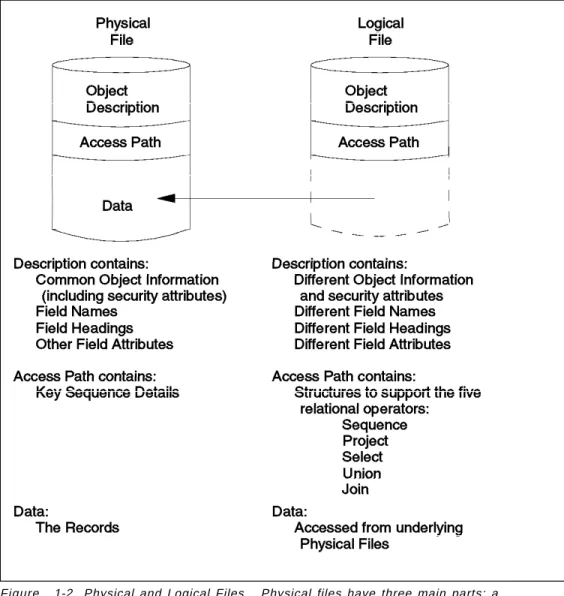
Physical Files: A physical file contains both the description of the data fields of the file, and the data itself. The record description is maintained in a separate portion of the object from the data. Before any records can be written in a file, the file must be created with the record description.
Logical files: Logical Files, or views, as they are called in SQL/400*, do not actually contain data, but describe how records contained in one or more physical files are to be presented. They define an alternate record layout or access path for the file.
Figure 1-2. Physical and Logical Files. Physical files have three main parts: a description, an access path and data. Logical files have two parts: a description, an access path, and it also contains pointers to data fields that are in physical files. Programs using logical files treat them exactly the same as if they were physical files. File Members: A physical file may contain members, which are groups of records. Records are made up of many fields. Database files - files with
transaction and master file data - often consist of only one member. In contrast, a file holding source program statements usually contains several members, one per source program.
Authorities for a file apply to all the members in the file. The members are not seen as having individual authorities. However, individual authorities are actually stored with each member. All these ″extra″ authorities can affect the performance of system save and restore operations, but they have no impact on the normal user. There are no commands to individually manipulate the
member authorities.
Object Structure Summary
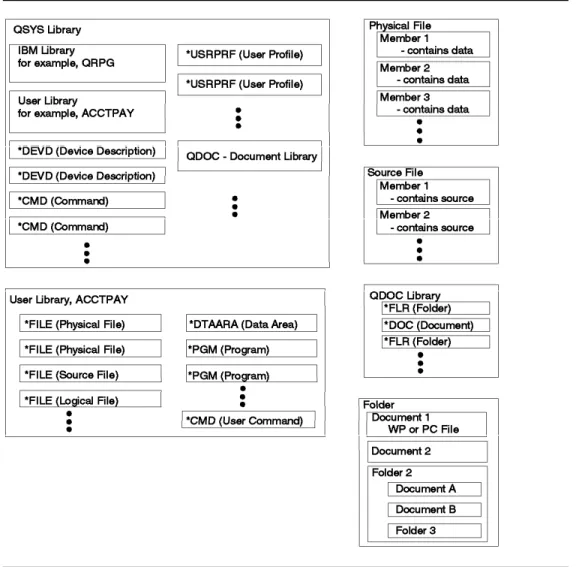
Figure 1-3. Object Structure Summary. This figure shows how the previously mentioned objects relate to each other as they reside on the AS/400 system.
1.1.2 Work Management
Work management supports the commands and operating system functions necessary to control system operations and the daily workload on the system. It controls resources for applications, such as workstations, and storage, so that the system can support multiple applications and system tasks.
All the work done on the system is submitted though the work management functions. When OS/400 is installed, it includes a work management
environment that supports interactive, batch, and communications jobs. The operating system can be tailored to create an individual, user-defined work management environment.
Jobs
The AS/400 system uses the term job to refer to your workstation session as well as any ″batch″ jobs or ″system″ jobs that may be in the system. There are five types of jobs relevant to security:
• Interactive job
• User or operator submitted batch job • Communications job
• Autostart job • Prestart job
The security implications of each of these are discussed below.
Interactive Job: An interactive job is started when a user signs on to a work station. That is, a workstation session is called an interactive job. The user is identified to the system with a User Profile, and the authentication is tested through password checking (at security levels 20 and above).
Batch Job: A workstation user or operator can submit a batch job. The user profile under which the batch job executes can be the same as the profile of the submitting user, or it can be a different user profile. In order to use a different user profile, the submitting user must be authorized to use a job description, an object containing the job execution attributes, which includes the other user profile name. Alternatively, the user can submit a job under a different user profile by specifying a profile name on the user profile parameter of the Submit Job command. In both cases, the submitter must be authorized to the user profile. These techniques allow good control over job submission on behalf of other users.
Communications Job: A communications job is started when another system issues a request over a communications line. Many techniques are available to control the attachment of a proper user profile to that job. These are discussed in detail in Chapt