LEARNING WITH LAPTOPS:
A MULTI-METHOD CASE STUDY*
DOUGLAS GRIMES MARK WARSCHAUER University of California, Irvine
ABSTRACT
This article examines the implementation of a one-to-one laptop program in three diverse schools in California. The program was carried out in one largely Hispanic low socio-economic junior high, one largely Asian Asian-American high-SES K-8 school, and in the gifted program in a medium-SES elementary school. Interviews, observations, surveys, and analysis of student work indicated that the program helped facilitate writing-intensive, information-rich, multimodal, and student-centered instruction. Analysis of test scores in English and mathematics indicate that laptop students failed to keep up with non-laptop students in the first year of implementation but made strong gains in the second year of implementation. Explanations for these outcomes are discussed.
Technology has been seen as a major means of improving U.S. education since the 1980s. The reasons for infusing technology into education go far beyond the obvious need to have a technology-proficient workforce in order to be econom-ically competitive. A review of 28 key policy documents over a 20-year period
*Funding for the study has been provided by the Ada Byron Research Center for Diversity in Computing & Information Technology (ABRC).
305 Ó2008, Baywood Publishing Co., Inc. doi: 10.2190/EC.38.3.d
suggests that other goals have also shaped educational technology policy in the United States, including helping students collect and make sense of complex data, catalyzing reform toward more process-oriented, constructivist, and inquiry-based instruction, and “dramatically broadening the scope and timeliness of information resources available to the classroom” (Culp, Honey, & Mandinach, 2003, p. 5).
Toward these ends, schools have experienced a dramatic infusion of new information and communication technologies. The overall student-computer ratio in the United States has fallen from an estimated 168.0 in 1983 (Anderson & Ronnkvist, 1999) to 3.8 in 2005 (Market Data Retrieval, 2005). High-speed Internet access has become the norm in U.S. schools, and purchases of other digital equipment, including printers, video projectors, and digital white boards, are also on a steady rise (Market Data Retrieval, 2005).
In spite of the proliferation of computers in schools, the policy goals mentioned remain as elusive as ever. U.S. reading and mathematics test scores at the high school level are no higher now than they were 30 years ago (National Assessment of Educational Progress, 2005), inquiry-based learning is declining in schools due to pressures of standardized testing (see, for example, Cordes, 2004), and the U.S. workforce remains woefully under-prepared (Eisen, 2003). A brief review of the literature on related educational technology efforts is in order, followed by an introduction to recent literature on the assessment of 21st century skills.
PRIOR RESEARCH
Recent studies by Becker (2000), Cuban (2003), and Warschauer, Knobel, and Stone (2004) help explain why the large infusions of educational technology have not achieved policy goals. Basically, in spite of greatly reduced student-computer ratios, computers are still seldom used in the classroom, and most use occurs in non-academic subjects (Becker, 2000; Cuban, 2003). Teachers are discouraged from using technology more frequently by the challenges of scheduling shared computer laboratories or mobile carts, the difficulties posed by unequal access to computers at home, and the broader organizational structures and incentives of schooling (Cuban, 2003; Warschauer et al., 2004).
Technology proponents have responded by advocating one-to-one computer programs, in which all students are provided a laptop for use throughout the school day and, in most such programs, at home (for overviews, see Johnstone, 2003; Rockman, 2003; Warschauer, 2006). One-to-one laptop programs arguably offer the greatest potential of educational technologies to date in that they place the most power and versatility in students’ hands, while wireless network connec-tions open vast new vistas for communication and collaboration. Such one-to-one programs have existed in the United States since Microsoft’sAnytime Anywhere Learningprogram in the mid-1990s (see history in Johnstone, 2003). Although that particular program ended within a few years, other one-to-one laptop pro-grams have steadily expanded. Today, the largest such propro-grams are in Maine,
where all middle schools and a large number of high schools provide laptops to students; in Henrico County, Virginia, where all middle and high school students use laptops; and most recently, in New Orleans, Louisiana, where 4,000 high school students will receive laptops (Maxwell, 2007). Other large pilot programs have been started in Texas, Florida, New Hampshire, and California.
The potential attractiveness of such programs must be weighed against their considerable cost. For this reason, educational administrators and policy-makers are anxiously awaiting evidence of the benefits of one-to-one laptop programs for teaching and learning. Preliminary evidence indicates heterogeneous patterns of implementation; many one-to-one programs have been strongly endorsed by teachers, parents, and students (Laptops for Learning Task Force, 2004), but others have been dropped due to high cost and high breakage rates (Hu, 2007) and lack of demonstrated results, particularly in regard to standardized test scores (see discussion in Silvernail, 2005).
A review of 30 studies on one-to-one programs published or presented at conferences between 2001 and 2005 found few outcome studies that were systematic or methodologically rigorous, and fewer that analyzed results from culturally and linguistically diverse schools (Penuel, 2005). Prior laptop learning studies that are of the highest quality are sometimes narrow in scope, often focusing on one-to-one laptop use in a single school (see, for example, Russell, Bebell, & Higgins, 2004; Windschitl & Sahl, 2002).
Two more recent studies proved more in-depth qualitative research on one-to-one laptop programs. Zucker and McGhee (2005) studied the largest one-to-one laptop program in a single school district, Henrico County, Virginia. Their study is particularly useful in its analysis of implementation challenges and the variability of use in different classrooms in the same subject. It focuses on mathematics and science instruction, and does not address language arts or social science, the subjects of greatest computer use in our study. Another study concluded that the laptop programs in two middle schools contributed to learning that was more learner-centered, collaborative, and easy to assess than conven-tional instruction (Dunleavy, Dexter, & Heinecke, 2007).
Both of these recent studies relied mostly on interviews and observations, as well as focus groups in the Zucker and McGhee (2005) study. Both reported generally positive findings, including greater access to online information, and increased student engagement and self-paced learning. Both studies noted the organizational and pedagogical challenges of making laptops a centerpiece of teaching and learning. Although both studies are rich with case-study detail, neither study made use of surveys or standardized tests. Hence they provide no data for quantitative comparisons across diverse geographic, demographic, and technological contexts, and they are less comprehensive in their coverage of teachers and students than survey-based studies.
Assessing the impacts of technology on student outcomes is complex, and the U.S. Department of Education and the National Science Foundation have spent
tens of millions of dollars attempting to for that purpose (Zucker & McGhee, 2005, p. 29). Although there is great debate on assessment methods, there is general agreement that the optimum choice depends on the skills to be assessed. A growing consensus argues that in addition to the core subjects addressed by the NCLB, assessment should address the “21st century skills” increasingly demanded in a global economy and electronically networked society. These include global awareness, critical thinking and problem solving skills, communi-cation and collaboration skills, creativity and innovation skills, and information and communications technology literacy (Partnership for 21st Century Skills, 2006). Current high-stakes tests are clearly inadequate for this task: “Most K-12 assessments in widespread use today—whether they be of 21st century skills and content or of traditional core subject areas—measure a student’s knowledge of discrete facts, not a student’s ability to apply knowledge in complex situations” (p. 1). These 21st century skills can be broadly divided into at least two types: content knowledge (e.g., knowledge of digital technologies) and so-called “soft” skills, such as communication, collaboration, creativity, and critical thinking. (For examples, see NCREL, 2003; Partnership for 21st Century Skills, 2006.) Although content knowledge can be measured with standardized tests, “soft” skills are much more difficult to assess objectively. Hence, the organizations just cited provide situated examples rather than standardized tests or other quan-titative assessments.
Perhaps even more relevant is the requirement for external validity: in order to apply the lessons from one school district to another, the commonalities and differences of both must be known. We have therefore attempted to supplement quantitative findings with sufficient qualitative detail for readers to draw their own inferences about the applicability across specific cases. Our use of statistics is purely descriptive, not inferential.
METHODOLOGY
The present study attempts to help fill several of the gaps in research on one-to-one computer programs in four ways. First, we chose a multi-site study in order to allow cross-case analysis of schools with diverse student populations. Second, we combine quantitative content-centric assessment in the form of state tests with qualitative human-centric descriptions of implementation. This frees us from the limitations of either a naturalistic or a positivistic approach alone, and allows us to connect findings across epistemological and methodological boundaries. Third, our quantitative research is longitudinal; it follows the same students for two school years (three annual tests), rather than a different group of students each year. Fourth, we provide a broader spectrum of qualitative findings than prior studies. For example, Penuel noted that only three of approximately fifteen studies that reported positive outcomes on student motivation or engage-ment relied on more than a single self-report item (Penuel, 2005, p. 11). Our
surveys of teachers and students contained many questions on student motivation and engagement. We then triangulated the survey data with data from teacher interviews, student focus groups, classroom observations, and written documents.
Our study covers what we believe was the largest one-to-one laptop imple-mentation at the time in California, in a semi-urban school district in California with some 1,000 students participating in the laptop program. The fact that the program was in a highly diverse school district improves the likelihood of com-parability with other schools in California and across the country. The research team was invited into a close partnership with the district, which allowed us to gather an unusually broad amount of quantitative and qualitative data about the program.
Our qualitative investigation took place during the first year of the program, the 2004 to 2005 school year, and our analysis of test score results covered the first two school years (2004 to 2006). The fact that our research examines only the early phase of the program implementation offers both limitations and benefits for this study. An obvious limitation is that implementations of tech-nology invariably take a long time to be effective (see Kling, 2000); it is thus difficult to assess long-term impact from a program’s first or second year. However, an intense examination of early implementation has the advantages of shedding light on the discontinuities between teaching with and without laptops. It also sheds light on the particular challenges that students, teachers, and schools go through to learn to integrate laptops into instruction.
The study was organized around three main research questions:
1. How did implementation of the laptop program change teaching and learning patterns in the schools?
2. How did teachers and students evaluate the laptop program?
3. What measurable impact did the laptop program have on students’ test scores?
A team of eight faculty, graduate students, and undergraduate students carried out research at the school over the course of a year (see acknowledgments), with the two co-authors synthesizing the qualitative data for this article and also carrying out the subsequent quantitative analysis of test score data. Unlike other multi-site, multi-method case studies of laptop programs (e.g., Silvernail & Lane, 2004; Walker, Rockman, & Chessler, 2000), no funding for the study was pro-vided by either the educational institutions involved or by the information tech-nology industry. Rather, a collaborative partnership was formed, with the school district inviting the research team to conduct an in-depth evaluation and publish a report for the district. In exchange, the research team was free to also consider broader research issues and to publish and present findings in a variety of venues.
The study took place in Farrington School District, a semi-urban school district in Southern California, with a large number of White, Hispanic, and Asian-American students. (The name of the district, schools, and all individuals are
pseudonyms.) A pilot laptop program was launched in 2004-2005 at three schools in the district, Nancy Junior High, Flower K-8, and Henry Elementary. Nancy Junior High is a large, grade 7-8 school in a low socio-economic (SES) community, with 66% Hispanic students. The laptop program was launched in the seventh grade, with all 554 students at that grade level receiving laptops. Flower K-8 is a new science- and technology-focused school in a high-SES neighborhood, with 65% Asian or Asian-American students. The program was launched in the third-to-seventh grades, encompassing all 395 students in those grades. Henry Elementary is a quiet suburban school in an economically diverse neighborhood, with 53% White students. The laptop program at that school was launched in two Gifted and Talented Education (GATE) classes, one at the grade 3/4 level and one at the grade 5/6 level, encompassing 62 students. At Nancy, laptops were acquired by the school with federal funds and provided to students for the cost of insurance. At Flower and Henry, parents were invited to purchase laptops, and school-provided laptops were made available to low-income students. All families in the Henry GATE program and more than 99% of families at Flower chose to participate; the remaining students at Flower transferred to other schools.
The research team was given full access to the laptop program, including the opportunity to observe any class in the program and interview any teacher or student (pending the permission of the teacher and of the student and parent, consent for which was almost always granted).
Interview and observation protocols were developed and the following data were collected and analyzed:
1. Surveys: Anonymous online surveys were conducted of all teachers and students in the laptop program following approximately six months of program implementation. There were 32 multiple choice and short answer questions on the teacher survey and 35 on the student survey. Questions addressed how the laptops were used and how they appeared to contribute to or distract from student learning. The response rate for the three surveys was 100% for teachers (35 out of 35) and 86.8% for students (878 out of 1011).
2. Observations:A total of 157 hours of classes were observed at the three schools during the second and third trimesters of implementation. Obser-vations were generally conducted on a pre-arranged basis with individual instructors, but numerous drop-in visits were also conducted with teacher approval. Detailed field notes were taken during observations as to instruc-tional procedures, laptop use, student and teacher attitudes, problems that occurred, and any other relevant matters.
3. Interviews: Interviews were conducted with the district superintendent, the principals at each of the three schools, 28 classroom teachers, and 10 students during the second and third trimesters of implementation. Interviews lasted from 15 to 60 minutes, and in most cases the individuals
were interviewed two or more times during the school year. Interviewees were assured that their comments would be kept anonymous. All interviews were audio-recorded and transcribed. Interviews focused on assessment of the laptop program and its potential and problems. In addition to these formal interviews, informal discussions were held during observations at schools or at open house events. In some cases these brief discussions were also recorded with permission of the participants, who included teachers and parents.
4. Documents and Records:Teachers who were observed were asked to pro-vide examples of rubrics, lesson plans, and instructional materials related to the laptop program, and most did so. A total of 10 diverse individual case study students were selected at the two largest schools in the program, and copies of their student work were collected with permission of their parents. District reports and presentations regarding the laptop program were collected. The district provided aggregate test score data for three consecutive annual state tests, encompassing the year before the laptop program (spring of 2004) and the first two years of the program (spring of 2005 and 2006). For this study, we used the results of the California Standards Test (CST), a standardized examination given annually to California’s public school students.
Qualitative data analysis approximately followed the principles of grounded theory as understood by Strauss and Corbin (1998), except that we did not attempt to infer causal relationships. All the interview transcripts and obser-vation field notes were entered into a qualitative data analysis software pro-gram (HyperResearch). We inductively developed 190 codes from the data and categorized salient text and numeric data in terms of one or more codes (e.g., “technical problems,” “student engagement,” “inappropriate content,” “autono-mous learning”). All codes were sorted by cases, with each case representing a different school, thus allowing for within-school and across-school analyses. Codes were aggregated into overall themes related to laptop use and response of participants.
The research team met on a regular basis to discuss findings and ensure consistency of interpretation. In analyzing the data, special attention was paid to frequency of occurrence, perceived salience to participants, consistency of data within and across cases, countervailing findings, and relevance to widely accepted learning objectives. Reflective notes taken during observations, and discussions of data at team meetings, helped inform the selection of codes and aggregation and interpretation of data. Member checks with teachers, students, and administrators were used to help test out data interpretations as they were developed.
No qualitative data was gathered from non-laptop classrooms or schools. However, by interviewing and surveying students and teachers about the per-ceived differences between laptop and non-laptop instruction, and triangulating
their opinions with observations, documents, and test score results, we were able to make some preliminary comparisons of teaching and learning between laptop and non-laptop classrooms.
Quantitative analysis of test score data was accomplished after the second year of the laptop program. The sample included all students in the district who took the California Standards Test from the spring of 2004 through the spring 2006.T-tests were used to compare changes in scores for the English language arts (ELA) and mathematics tests for students who were in the laptop programs both years with students who were not in it either year.
FINDINGS
The findings are presented in three sections to correspond to the three research questions.
Teaching and Learning
We found that laptops were used regularly at all three schools. For the most part, laptops were used on a daily basis in language arts, science, and social studies instruction. Laptop use in mathematics instruction was less frequent. Total amount of laptop use varied among the three schools due to differences in context. Flower, a new school with a science and technology focus, had hired teachers with a special interest in using technology and laptops in the classroom, and even the architecture of the school’s building was designed to encourage collaboration among groups of teachers and students. Laptop use at Flower was constant and extensive. At Henry the laptop program took place in the school’s gifted program, featuring two teachers who had a previous high interest in using technology in instruction. Again, laptop use was constant and extensive.
At Nancy teachers were neither hired nor selected based on their interest in technology; rather, all seventh-grade teachers were assigned to participate in the laptop program (with the option of transferring to another school if they did not want to teach with laptops). In addition, students at Nancy had comparatively less access to computers and the Internet at home and thus less prior experience with computers than did students at the other two schools. In addition, Nancy had the greatest percentage of English language learners (encompassing 25.3% of the school population) and students in Special Education (8.5%, compared to 4.2% at Flower) among the three schools. The concentration of these special needs populations posed greater challenges to teachers in learning to integrate laptops into instruction. Finally, the Nancy program was the largest of the three— the number of laptop students at Nancy was 20% greater than at Flower and Henry combined—which posed a number of administrative challenges. For all these reasons, the learning curves at the school, teacher, and student level were
steeper at Nancy than at the other two schools. Implementation was slower, and total use was less.
Our follow-up research in the year of the program revealed increased breakage rates as the laptops aged, with substantially above-average breakage rates in the low-SES school. The district now maintains approximately a 5% reserve of “loaner” laptops for breakdowns and other contingencies; for every 100 laptops assigned to students, they allocate approximately five for reserves.
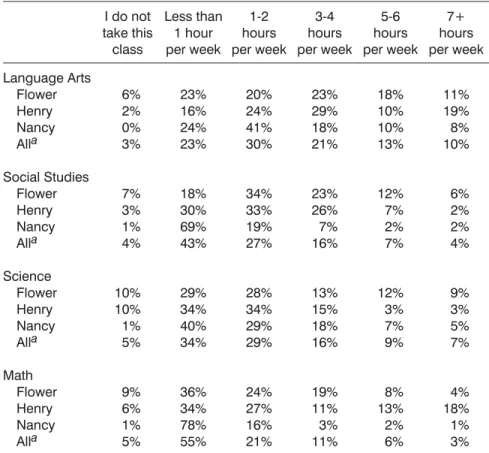
Students’ self-reported time using laptops for educational purposes in the four major subject areas at school and home in each of the three schools is seen in Table 1.
Table 1. Student Responses to: “How often do you use your laptop for each of your classes, either in class or preparing homework for class?”
I do not take this class Less than 1 hour per week 1-2 hours per week 3-4 hours per week 5-6 hours per week 7+ hours per week Language Arts Flower Henry Nancy Alla Social Studies Flower Henry Nancy Alla Science Flower Henry Nancy Alla Math Flower Henry Nancy Alla 6% 2% 0% 3% 7% 3% 1% 4% 10% 10% 1% 5% 9% 6% 1% 5% 23% 16% 24% 23% 18% 30% 69% 43% 29% 34% 40% 34% 36% 34% 78% 55% 20% 24% 41% 30% 34% 33% 19% 27% 28% 34% 29% 29% 24% 27% 16% 21% 23% 29% 18% 21% 23% 26% 7% 16% 13% 15% 18% 16% 19% 11% 3% 11% 18% 10% 10% 13% 12% 7% 2% 7% 12% 3% 7% 9% 8% 13% 2% 6% 11% 19% 8% 10% 6% 2% 2% 4% 9% 3% 5% 7% 4% 18% 1% 3% Note: Numbers in this and other tables may not add up to 100% due to rounding. The number of responses in the above questions ranged from 805 to 850, inclusive. Of the 863 survey participants who identified their gender, 52% stated male and 48% female.
We estimated the number of hours students used their laptops for each subject by taking the mid-point of the hour ranges above (e.g., 1.5 hours for 1-2 hours per week) and extending the end points by 0.5 (.5 for less than 1 hour and 7.5 for 7+ hours). By this measure computers were used most often in ELA, fol-lowed by science, technology, social studies, and mathematics in that order. Laptop use in ELA classes averaged 2.8 hours per week, and 1.2 hours per week in mathematics classes.
Teachers also estimated the percentage of class time they used laptops. Five junior high ELA teachers reportedly used laptops an average of 70% of class time. In comparison, six junior high mathematics teachers reported using laptops an average of 23% of class time. These estimates are consistent with the preceding calculations based on estimated number of hours used per week.
Overall, we noted four positive changes that took place in the laptop classrooms, which we describe under the labels ofwriting,information literacy, multimedia skills, andautonomy.
Writing
Writing has been termed “the neglected ‘R’” (National Commission on Writing in America’s Schools and Colleges, 2003), a vital skill in today’s knowledge economy, but one that is poorly taught in schools. Our findings suggest that a laptop program can have an important affect on facilitating the teaching and learning of writing, especially after the first-year adjustments.
Writing and revising school papers was one of the most common uses of laptops in the three schools. A total of 98% of students indicated that they used laptops to write papers at school, with 59% reporting that they did so several times a week or more. A total of 85% of students also used laptops to write papers at home.
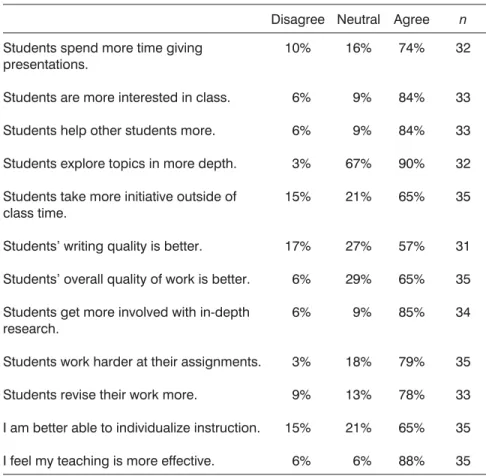
Laptops were used in all stages of the writing process, including gathering background information on the Internet, planning writing using graphic organizers, writing first drafts, and revising. The use of laptops appeared to have several major advantages for the teaching of writing. First, students were more inclined to revise their work, an important habit for becoming a good writer; 78% of teachers reported that students revised more (Table 2), and all the students we interviewed confirmed that they were more inclined to revise when using their laptops.
Second, writing completed on a laptop was much easier to assess and provide feedback. Teachers reported that, due to easier readability, they could much more quickly read, assess, and reply to a paper written on a computer than one written by hand, and thus provide feedback on more writing than they ordinarily could do. In addition, the district made use of an automated writing evaluation software program, MY Access! (see discussion of this and similar programs in Warschauer & Ware, 2006), which compared students essays with hundreds of
already-graded essays on the same prompt, and returned both numerical scores and editorial feedback. Several teachers explained to us that they found the combination of computer and teacher feedback especially helpful. As they explained, students could write multiple drafts and submit them to MY Access!, turning a final draft in to the teacher for more personal feedback.
Third, many teachers reported that their students wrote more with laptops, explaining that students enjoyed writing on computer or found it easier than to write by hand. Some of the increased writing practice may be due to the use of
Table 2. Teacher Responses to: “Compare teaching with laptops to your prior experience teaching without laptops.”
Disagree Neutral Agree n Students spend more time giving
presentations.
Students are more interested in class. Students help other students more. Students explore topics in more depth. Students take more initiative outside of class time.
Students’ writing quality is better. Students’ overall quality of work is better. Students get more involved with in-depth research.
Students work harder at their assignments. Students revise their work more.
I am better able to individualize instruction. I feel my teaching is more effective.
10% 6% 6% 3% 15% 17% 6% 6% 3% 9% 15% 6% 16% 9% 9% 67% 21% 27% 29% 9% 18% 13% 21% 6% 74% 84% 84% 90% 65% 57% 65% 85% 79% 78% 65% 88% 32 33 33 32 35 31 35 34 35 33 35 35 Note: As previously mentioned, the 5-point Likert scale on the survey has been con-solidated here. Responses of “moderately agree” and “strongly agree” were combined, as were “moderately disagree” and “strongly disagree.” Of the 35 respondents, 13 were male and 22 female.
automated writing evaluation software; all of the seven teachers in our survey who used My Access! more than 15 minutes a week reported that students wrote more with the program.
Fourth, computers allowed students to write in a greater variety of formats and genres for authentic purposes. For example, students designed and wrote brochures about their school to present to incoming students; worked together to produce newspaper texts, either in response to particular pieces of literature or to analyze historical events; and wrote and mailed formal letters to colleges and employers seeking career information.
A teacher at Henry summarized the enthusiasm of many of the English lan-guage arts teachers we interviewed for using computers to teach writing. As he explained,
They are writing more, it’s better quality, it’s produced faster. I think the laptops facilitate the writing because there is less fatigue involved than with cursive or print. They have the Internet right there to pull up graphics, they have AppleWorks drawings to illustrate their stories, so I think the laptop is a great facilitator of writing. I’ll give my students prompts to write a short story. . . . [Previously] the stories were 2-3 pages, but this year their short stories are 8-10 pages long.
Of course the actual amount of writing and the approach to revision and correction varied from classroom to classroom. Though most teachers said their students were writing more, one indicated she assigned fewer essays this year due to the dual complexity of introducing laptops and focusing on preparation for state tests. In addition, how much students revised depended greatly on individual teacher approaches. Some teachers encouraged multiple revisions for greater mastery of an effective writing process. Other teachers encouraged more frequent one-time submissions, so that students could practice the kind of writing that takes place on standardized tests.
Finally, one factor that inhibited writing by computer in a number of cases was some students’ weak keyboarding skills. This was more commonly the case at Nancy than at Flower or Henry, presumably due in part to students’ lesser amount of experience with technology in home environments. In addition, all Flower sixth and seventh grade students studied keyboarding at the beginning of the year as part of a mandated technology course, whereas the course that teaches keyboarding at Nancy was optional.
A teacher at Flower who previously taught in a nearby school with mobile laptops carts summarized for us how much better it was to teach writing in a one-to-one program:
[The difference is] huge. If you look at your week, and my day was Wednesday [for mobile laptop use], in that setting you throw everything out because I’ve got my iBooks here today. If you don’t start and finish something, it’s going to be another week before you get the iBooks. And you
don’t know what happens to those computers during the rest of the week. There were cases where kids dumped files. Maybe you had a student that didn’t finish something. The next week they get that computer, and their stuff is gone. There were lots of mishaps when you only have the computer once a week. Here, it’s so much easier to use. They can write 15 minutes a day if you want, and continue writing at home. They can work on it a little bit any time and finish it later.
Information Literacy
Information literacy is the ability to locate, recognize, evaluate, and synthesize information across a wide range of media using electronic resources and other technology (NCREL & the Metiri Group, 2003). Its importance in today’s global economic and cultural life is widely recognized (Becker, 2005; Bloom, Burrowes, Lafleur, & Squires, 1997; Zuboff, 1989), as is the fact that it is undertaught in the classroom (NCREL, 2003; Partnership for 21st Century Skills, 2006). Consequently, promoting greater information literacy and research skills has been a major component of educational reform initiatives (see, for example, NCREL, 2003; Partnership for 21st Century Skills, 2006). Our study suggests that introduction of laptops has an important impact on students’ access to and use of information and data in instruction and research.
A total of 63% of students we surveyed indicated they used the laptops to browse or search the Internet several times a week or more at school. This was consistent with what teachers reported in their surveys and with what we observed in classrooms. We witnessed online information access by students for three main purposes: to provide background knowledge, to facilitate “just in time” learning, and to support research projects.
A major difficulty in completing challenging academic tasks is presented by insufficient background knowledge. Teachers frequently guided students to textual, audio, and visual background information on the Web in preparation for reading a difficult author or a complex social studies topic. In some cases, students systematically sought such background information prior to tackling topics through online search activities called WebQuests (“an inquiry-oriented activity in which some or all of the information that learners interact with comes from resources on the Internet,” Dodger, 1997). In other cases, teachers led their students to background information at the point of need, as illustrated in an example explained by a language arts teacher at Nancy:
We were going to read an Emily Dickinson poem, and they could just not grasp what was happening. It was just an eight-line poem, but they still weren’t getting it. So we did a quick search and saw pictures about her and her dad, and read about how she lost her father and led this strange isolated life . . . and they grasped the poem.
This point also illustrates a second type of information literacy we observed, the support “just-in-time” learning (i.e., providing information or instruction at the exact point of time that it is needed). Learners are much better able to remember and use information if they receive it at the point of need (Gee, 2003; Novak, Patterson, Gavrin, & Christian, 1999). In the laptop classes we observed, students frequently gathered information as they needed it in response to current events or topics that arose in lessons. For example, following the December 2005 East Asian tsunami, students at Nancy went to CNN.com to gather information about early warning systems.
The third use of online information was in the service of research projects. We witnessed students carrying out a broad range of research projects related to literature, social studies, history, current events, health, and science. For example, a social studies teacher at Flower explained to us that in the past she would lecture about the bubonic plague, but with laptops students instead investigated the plague online using textual resources and maps that indicated how the plague spread. They then integrated these online resources into a research presentation.
Similarly, health teachers at Nancy had their students carry out research projects on tobacco advertising and on school violence. In both of these cases, students made use of a wealth of online information—such as examples of tobacco ads and current data on school violence—that would have been difficult to access through any other means. As the teacher explained to us:
[Without laptops and the Internet] it would have been hard for students to research because most of that information is either recent or compiled through various agencies and it would have been really, really time con-suming to do that research in any other way. I don’t think there would have been a way, other than me researching it and printing it out for them.
Laptops also allowed students to better gather and analyze their own data as part of the research process. This principally took place in science and mathematics instruction, as students analyzed data with spreadsheets. The most interesting example we witnessed of data collection and analysis was at Flower, which had purchased a set of scientific probes that can be attached to the laptops for gathering and uploading of data related to temperature, voltage, light, force, motion, and chemical composition. In one lesson we observed, students worked in groups to measure each other’s heart rates in various states (sitting, standing, jumping) and upload the data to computers where it was plotted into graphs. In the process, they developed and tested hypotheses about the affect of various combinations of activity and rest on heart rate.
A total of 82% of the teachers we surveyed agreed that students “get more involved with in-depth research” in the laptop classroom. Our observations confirm that view.
Multimedia Skills
The ability to work with multiple and diverse media is critical in today’s world (Kress, 2003; New London Group, 1996). Yet the media-poor environment of most schools contrasts to the richer and more rewarding multimedia experiences that many youth have at home (Gee, 2004). A third major impact of the laptop program was to provide students a much greater opportunity to learn with multiple media and modes.
The three main ways that students used multimedia were for instruction, interpretation, and production of knowledge. Teachers used multimedia to help students understand difficult concepts, for example, through online access to maps, video, simulations, and audio (thus overlapping with some of the above categories, especially accessing online information). For example, a science teacher of a sheltered course (in which students need extra English language support) used an online video of protein synthesis and mitosis to help students understand concepts they were having difficulty grasping from their textbooks.
Students in several classrooms used Apple’s GarageBand software as an inter-pretive tool. They worked in teams to compose music that they felt reflected the meaning of a poem, short story, or other reading. Teachers we interviewed felt this was especially effective in helping students think more deeply about what they read. As a teacher at Henry explained:
The laptops really help develop a lot of high thinking skills, more complex analysis. For example, in this GarageBand poetry project, they had to be very thoughtful and think rhetorically. It wasn’t a matter of this was the answer to the question, but what was the emotion going on in the poem. Through the project, they thought more deeply about the poem.
The third and most frequent student use of multimedia was for project pro-duction. Students frequently used Apple’s Keynote or iMovie software for research projects and other creative work, as seen in the following examples:
• Third-grade students at Flower took a field trip downtown and then pro-duced an iMovie based on the historic sites they visited and photographed. The project allowed them to personalize the historic information and thus better learn it.
• Seventh-grade language arts students at Nancy created a music trailer in iMovie as an advertisement for a novel they had read. The project required them to interpret the significance and impact of the novel and consider how to communicate that to an audience.
• Fifth and sixth grade students at Henry created iMovies on the Bill of Rights. Students worked in groups assigned to one of the ten amendments, with each group creating an iMovie illustrating the underlying concept. This made the Bill of Rights much more meaningful to them than simply memorizing it.
In our prior research projects at non-laptop schools in California (Warschauer et al., 2004), we also witnessed a good deal of multimedia production, albeit usually with presentation software (e.g., PowerPoint) rather than video software (i.e., iMovie). However, since students at those schools only had occasional access to computers, the projects often overly focused on basic computer skills (e.g., how to operate the PowerPoint program). In contrast, in the Farrington district laptop classrooms, children learned the basic computer skills early in the year; in the remainder of the year the projects thus focused more on academic content and communication skills, rather than on learning the software. And when new students transferred into schools, other students assisted them until they caught up with the requisite computer skills.
Autonomy
A fourth major impact of the laptop program was to promote greater student autonomy. This occurred as both teachers and students took advantage of the wealth of computer power and access to resources available to students through their individual Internet-connected laptops.
At the most basic level, teachers could allow more individualized learning. For example, one teacher at Flower regularly created a “Tic Tac Toe” sheet of nine follow-up activities for each reading assignment to promote comprehension skills, language development, and writing ability. Making use of their computers and the Internet, students had a great deal of flexibility as to which and how many of the nine follow-up activities to complete.
At a more complex level, students could use these same computing resources to pursue in-depth projects. Illustrative of this are two mathematics projects carried out by a third/fourth grade class at Henry Elementary. In one of the projects students went online to find the California mathematics standards for second grade, worked in groups to design and create games that could help teach these standards, and videotaped themselves providing instruction to the second grade class on how to play the games. In the second project, students were given fictitious thousand dollar accounts to buy holiday gifts for their friends and family. The students then went online and did comparison shopping from nine different stores, calculated tax according to appropriate parameters, designed their own checks and made simulated purchases, created and updated charts with information about their purchases, made graphs of their spending patterns, designed and produced a poster board on the project incorporating their diverse materials, and wrote reports about the project. The teacher explained that he had attempted to carry out this holiday math project in previous years, but that, “I basically had to hand feed them a lot of the information.” Now armed with laptops, they were able to approach holiday shopping from a variety of perspectives and go into the topic in more depth.
Finally, the use of laptops throughout the day and at home provided students a means for independently organizing and maintaining their schoolwork and study materials and studying more autonomously in and out of school. For example, students created digital flash cards using Keynote, recorded their homework assignments with the iCal calendar program, took notes with a word processor, and organized and transported their school-related material on their laptops, thus providing better access to autonomous study outside of school. A total of 65% of the teachers surveyed said that their students took more initiative outside of class time in the laptop program, and 75% of students said they did more homework since the laptop program started. Interestingly, almost all the students in our sample (some 92%) had at least one additional family computer at home besides the laptop. But they seemed to prefer having one dedicated portable laptop computer for all their schoolwork, and, in some ways, this helped provide a sense of home-school continuity and greater academic identity. As a Flower parent explained to us in an interview:
One of the best things about my daughter being involved in the laptop program was the degree of independence and ownership that she developed with her taking care of her own work. Traditionally, kids have the binders. They have the organizers that are assigned. You sit down at the kitchen table and you do homework under the supervision of mom and dad checking on it. With her laptop, she’s able to personalize some of her work, program her laptop. It’s hers. She knows it inside and out. She’s the one that logs onto the computer. She takes care of her work on her own. It hasn’t left parents out of it because she has that desire to share with us, “Look at what I’ve done, look at the project I’m working on.” But it’s her laptop. She’s the one that carries it all. There’s just a sense of personalization with her laptop where it’s hers. The independence that I’ve seen in her and her work this year is much better than I thought.
Such individual and personalized study is an often-overlooked benefit of laptop programs, and one that is not easily replicable in other technology-intensive educational environments. Even the best array of shared-use computers, such as laptop carts or desktop computers in classrooms or computer labs, will not allow students to have what one of our seventh-grade interviewees termed as her own “portable study guide.”
An administrator in the district and parent of a student at Flower school summarized the feelings of many in the district we interviewed about the impact of the laptop program on student autonomy.
I see my daughter spending time and energy and excitement on projects that I have never seen before. I’ve told several people, I think she spent like 17 hours one weekend working on a presentation that she was going to be doing Monday at the harbor. Her class was going down to the oceanography institute down at the harbor and she had been made a leader of several groups
of kids and it was her job to be sort of the editor and compiler of all of their materials and put it into one cohesive report, but they then would share with other kids from other schools when they got down there. And the number of times that she would bring it over to me and say, “Oh here, Dad, I am doing this, I am doing that, and this is what I am going to be doing” were phenomenal. That whole weekend she was held up and working on it trying to get it to the point where she was satisfied with it.
Teacher and Student Opinions
Survey and interview data indicate that the laptop program was very well regarded by teachers and students involved in the program. We will briefly address the opinions of both groups. Our surveys used a 5-point Likert scale, which has been reduced to a 3-point scale to simplify the discussion below.
Teacher Opinions
The overwhelming majority of participating teachers indicated their support for the laptop program. Fully 88% of respondents expressed agreement with the statement, “I recommend that the laptop program be continued at my school.” A total of 9% teachers were neutral on this question, and only 3% (representing 1 out of 34 respondents to this question) disagreed. A total of 82% of teachers recommended that other schools adopt similar laptop programs. Teachers viewed numerous advantages to the laptop program, including the fact that it raises student interest in class (84% agreement), that it results in students helping each other more (84% agreement), and that students in the laptop program explore topics in more depth (90% agreement). Teachers also believed that students using laptops produce higher quality work (65% agreement), get more involved in in-depth research (85%), and work harder on laptops (79%). Their main frustration with the laptop program was due to technical problems, with some 59% agreeing that frequent technical problems hinder learning. Of this total, 50% of respondents (17 teachers) moderately agreed with this statement, while 9% of respondents (three teachers) strongly agreed, suggesting that only a few teachers considered the impact of technical problems to be severe. A large number (79%) also felt that additional typing instruction would help students benefit more from the laptop program. Further details on teachers’ beliefs of the advan-tages and disadvanadvan-tages of the laptop program are seen in Tables 2 and 3.
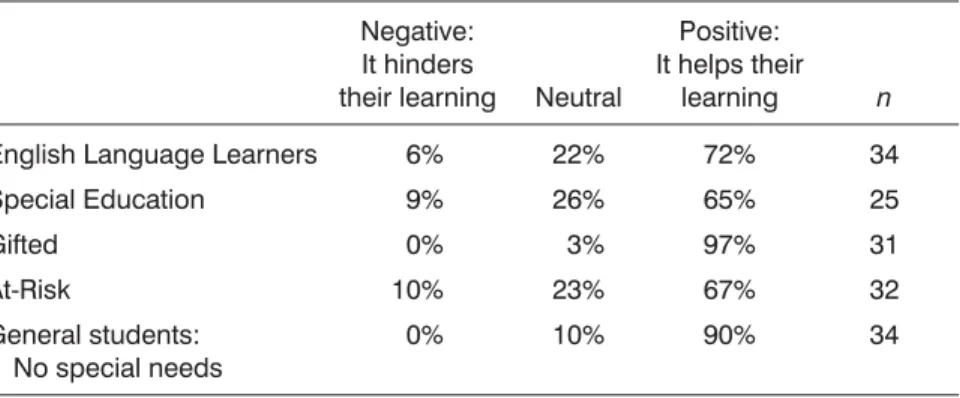
Teachers also believed that the laptop program was beneficial to all groups of learners, whether they are English language learners, in Special Education programs, in gifted programs, considered at-risk learners, or in the general student population (see Table 4).
One third grade teacher summed up her experience, “It has been one of the best experiences of my teaching career. I could not go back to the old way of doing things.” Several other teachers wrote similarly positive summary appraisals
Table 3. Teacher Responses to: “Do you agree or disagree with the following statements about teaching with laptops.”
Disagree Neutral Agree n I recommend that the laptop program
be continued at my school.
I recommend that other schools adopt one-to-one laptop programs.
Frequent technical problems hinder learning.
My students would benefit more from their laptops if they had more typing instruction.
It is difficult to integrate computer activities into my lessons.
There are too many classroom manage-ment problems.
Class periods are too short to take full advantage of laptops. 3% 6% 30% 3% 58% 65% 42% 9% 12% 12% 18% 21% 24% 9% 88% 82% 59% 79% 21% 12% 48% 35 35 35 35 35 35 35
Table 4. Teacher Responses to “For each category of students, please indicate whether you think the laptop program
assists their learning.” Negative:
It hinders
their learning Neutral
Positive: It helps their
learning n English Language Learners
Special Education Gifted At-Risk General students: No special needs 6% 9% 0% 10% 0% 22% 26% 3% 23% 10% 72% 65% 97% 67% 90% 34 25 31 32 34
of the program, and none expressed a similar degree of regret or resentment about the program in response to a survey question about challenges they had encountered. However, teachers’ overall positive sentiments toward the program were tempered with caveats about conditions necessary for its success, notably the need for timely technical support and “loaner” laptops; the need to monitor inappropriate use, such as computer games and unsuitable Websites; and the need for ongoing professional development to help teachers integrate laptops into instruction.
Student Opinions
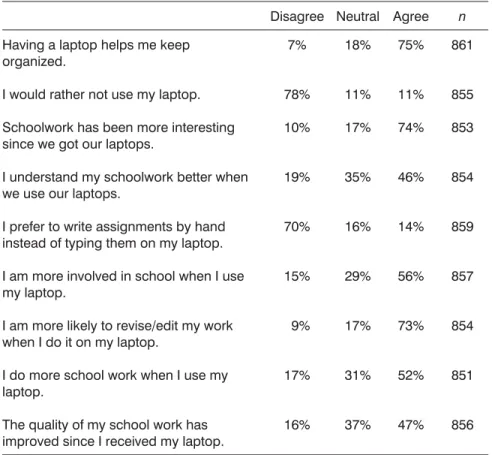
Data from surveys, interviews, and observations all indicated that students at the three schools’ shared teachers’ positive evaluations of the laptop program. A total of 74% of students agreed that “schoolwork has been more interesting since we got our laptops” and only 11% agreed with “I would rather not use my laptop.” More information on student opinions of the laptop program is included in Table 5.
Students’ open-ended responses to survey questions about the best aspects of the laptop program and those aspects worthy of improvement provided further detail about their opinions of the program.
When asked about the best things about the laptop program, a considerable number of students commented on the laptop as a study tool. One, for example, said, “The best thing about the laptop program is that I do better in school because I have somewhere to write my notes.” Another added, “It helps you be more organized and focused to do your work.” A third explained, “The best thing about the laptop program is that all our files are saved and organized.”
Other students commented on the value of the online information and research. As one said, “The best thing about the laptop program is that you can go on the Internet to find information.” Another added, “The best thing about the laptop program is that we get to do more research . . . unlike in regular elementary classes, [where] you have to share so many computers and there are not enough.”
Other students commented on the value of computer-based project work; their interest in digital audio, photography, and video; the importance to their future of getting experience with technology, and the sheer joy of working with new digital media. This last point was put forth very succinctly by a fifth-grade student at Henry who simply said, “Hey, it’s a laptop. Doesn’t get better than that.”
As for their suggestions for improvement, students had very diverse views, ranging from less administrative control (so they could play more games), to more administrative control (so their classmates would not play games), to provision of Internet access at home, and to a desire for lighter-weight laptops.
Test Outcomes
We now compare performance on the California Standards Test for in the laptop program and their peers in the same district without laptops.
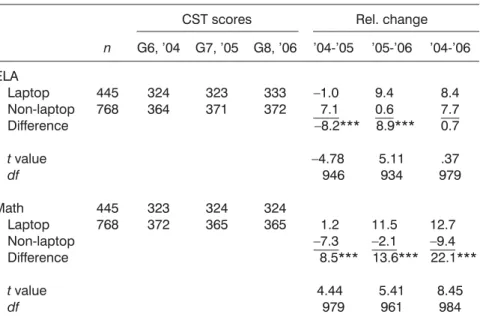
The CST is offered every spring. Our calculations counted only students who took it in the three consecutive years of 2004, 2005, and 2006. The 2004 test, prior to the laptop program, provided a baseline for score changes in the first two year years of the laptop program. Students in the laptop program in both 2005 and 2006 were compared with district students who were outside the laptop program. Junior high school students constituted the majority of students in the laptop program. Their results, separated into English language arts and mathematics scores, are seen in Table 6, which indicates how much the laptop and non-laptop students’ mean scores rose or fell each year. The “Difference”
Table 5. Student Responses to: “Do you agree or disagree with the following statements?”
Disagree Neutral Agree n Having a laptop helps me keep
organized.
I would rather not use my laptop. Schoolwork has been more interesting since we got our laptops.
I understand my schoolwork better when we use our laptops.
I prefer to write assignments by hand instead of typing them on my laptop. I am more involved in school when I use my laptop.
I am more likely to revise/edit my work when I do it on my laptop.
I do more school work when I use my laptop.
The quality of my school work has improved since I received my laptop.
7% 78% 10% 19% 70% 15% 9% 17% 16% 18% 11% 17% 35% 16% 29% 17% 31% 37% 75% 11% 74% 46% 14% 56% 73% 52% 47% 861 855 853 854 859 857 854 851 856
row is the difference between score changes for laptop and non-laptop students (i.e., the relative gain or loss for the laptop students compared to their peers without laptops).
Several of the year-to-year differences are noteworthy. First, laptop students’ ELA scores declined relative to non-laptop students in the first year (–8.2 points), and recovered in the second year (8.9 points). Although both of the single-year changes were significant statistically (p < .001), there was no significant differ-ence over two years. Mathematics scores of laptop students improved relative to their non-laptop peers both years. Although the differences were highly signifi-cant statistically each year, the effect size was modest, only .50, and cannot be attributed to the laptop program because the laptops were used less in mathematics than in ELA, social science, and science classes.
Figure 1 compares the state score trends over two years for both junior high and elementary grades. The differences we just described between laptop and non-laptop score gains in junior high are shown by dashed lines. Similar dif-ferences for elementary grades three through five are shown by dotted lines. (Sixth graders have been excluded because the students were in an elementary grade the first year of the laptop program and a secondary grade during the second year of the laptop program.)
Table 6. Junior High State Test Scores, Laptop and Non-Laptop Students
CST scores Rel. change n G6, ’04 G7, ’05 G8, ’06 ’04-’05 ’05-’06 ’04-’06 ELA Laptop Non-laptop Difference tvalue df Math Laptop Non-laptop Difference tvalue df 445 768 445 768 324 364 323 372 323 371 324 365 333 372 324 365 –1.0 7.1 –8.2*** –4.78 946 1.2 –7.3 8.5*** 4.44 979 9.4 0.6 8.9*** 5.11 934 11.5 –2.1 13.6*** 5.41 961 8.4 7.7 0.7 .37 979 12.7 –9.4 22.1*** 8.45 984 ***Indicatesp< .001 int-test. A Wilcoxon-Mann-Whitney test also gavep< .001.
Figure 1. State s core gains: Differences between laptop and n on-laptop students (elementary a nd junior high schools).
At the elementary level, the second year trend was slightly upward in ELA and slightly downward in mathematics. However, the number of elementary students in the program was not large enough to demonstrate statistically sig-nificant results, and the effect sizes were small.
We also compared junior high data for Nancy and Flower schools to investi-gate the possibility of a disparity in gains that might be related to socioeconomic status. ELA changes in the first declined at the low-SES school, Nancy, relative to the high-SES school, Flower; they rebounded the second year, so that over the two-year period, there was no significant difference in mean gains in ELA scores between the two schools. The second year rebound was more dramatic in mathematics; although math scores at Nancy slipped relative to Flower the first year, they rebounded so strongly the second year that Flower finished the two-year period with a significant gain in mathematics scores compared to Flower (p< .001,t= 8.3,df= 1211, effect size = –.59).
DISCUSSION
Although the laptop program introduced little change in curriculum content, it led to major changes in content delivery in most classes. The initial decline in ELA scores for laptop students vis-à-vis their non-laptop peers may have been due to the complexity of introducing such a fundamental change in the basic tools of learning, rather than any inherent disadvantage of using laptops. Our qualitative data indicated that first-year implementation was more challenging in the low-SES school. Mean test score gains showed a first-year decline and second-year catch-up in the low-SES school vis-à-vis the high-SES school, but the results were statistically significant only in mathematics, not ELA, where laptop use was greater. Further research is needed to support hopes for laptop programs to help close the achievement gap between low- and high-SES students.
Our interviews, observations, and surveys indicated that laptop use promoted all of the National Educational Technology Standards (ISTE NETS Project, 2007), as well as other skills and attitudes that have been characterized as 21st century literacies, including increased autonomy, productivity, and collabora-tion. These tentative results are consistent with views that laptops are most beneficial in subjects and grade levels where higher-order thinking skills are required (Warschauer, 2006). Other educational technology implementations have also sought to promote these skills (see, for example, Sandholtz, Ringstaff, & Dwyer, 1997), but dispassionate research suggests that they are not well taught in the typical K-12 classroom (Cuban, 2001; Warschauer et al., 2004).
Three limitations need to be considered in interpreting the test score data. First, as this study involved just three laptop schools, some of the findings noted above could well be due to other idiosyncratic differences rather than to effects of the laptop program. For example, one of the schools in the program, Nancy Junior High, changed principals after the first year of implementation,
which could have affected test score outcomes. Only studies involving larger numbers of schools over longer periods of time can help clarify whether the findings presented here are typical or atypical.
A second and related point is that where test score gains were seen (in mathematics), causal connections cannot be drawn because it was not feasible to randomly assign students and teachers to the laptop program. In addition, since laptops were used less frequently in mathematics than in other subjects, it may be the case that improved test scores were due to other factors rather than laptop use.
Third, standardized test scores provide a far from ideal measure for evaluating the benefits of a laptop program. Much of the perceived benefits of laptop use, such as in promoting information literacy or multimedia skills, are not well reflected in current versions of standardized tests (see discussion in Silvernail, 2005), nor do such paper-and-pencil tests capture well the kinds of computer-based writing skills students develop using laptops (see studies by Russell, Higgins, & Hoffman, 2004; Russell & Plati, 2002). Nevertheless, we felt it of value to analyze test score results because school administrators are held account-able for them and perceived impact on test scores thus effect adoption and use of technology in schools.
Fourth, we relied heavily on self-report data, which is subject to systematic bias, including teachers trying to present an educational innovation in a favorable light if they know their administrators are deeply vested in its success. We attempted to control for such bias through careful question design, comprehensive sampling, triangulation with other sources of data to identify contradictions.
In spite of the aforementioned limitations, this study suggests that a one-to-one laptop program can have substantive effects on teaching and learning processes, facilitating the kinds of writing-intensive, information-rich, multimodal, and student-centered instruction that educational reformers have long called for. Test score results are consistent with a hypothesis of a slightly disruptive implemen-tation effect in the first-year and a catch-up effect in the second year. Both effects appeared to be amplified in the low-SES school in the program, likely due to the more challenging implementation there in the first year.
As with any case study, caution is in order when attempting to generalize the findings to other contexts. Administrators and information technology staff at the subject school district exhibited exemplary planning and care in preparing teachers for the transition to laptops and in providing on-site technical support. Due to widespread support from teachers, students, and parents, they have expanded their laptop program, now in its fifth year since the initial pilot project. Other districts that attempt to replicate their successes without similar efforts in professional training and technical support are unlikely to reap similar benefits.
Two areas for future research strike us as particularly important. First are qualitative studies to address innovative management techniques for laptop pro-grams, such as means of reducing computer distractions and motivating students to care for their laptops. Second are longer-term longitudinal quantitative studies
of students throughout their K-12 careers. The value of such studies will be greatly enhanced if they make use of new assessment tools capable of measuring critical thinking, creativity, collaboration, and other 21st-century skills.
ACKNOWLEDGMENTS
Research for this article was carried out with the assistance of Paige Ware of Southern Methodist University, and of Michele Rousseau, Kurt Suhr, Vanitha Chandrasekhar, Bryan Ventura, and Julia Nyberg, all of the University of California, Irvine. We also appreciate the assistance of the administrators, teachers, and students of Farrington School District.
REFERENCES
Anderson, R. E., & Ronnkvist, A. (1999).The presence of computers in American schools. Teaching, Learning, and Computing: 1998 Survey Report. Irvine, CA: Center for Research on Information Technology and Organizations.
Becker, G. S. (2005). The age of human capital. In E. P. Lazear (Ed.),Education in the twenty-first century.Stanford, CA: Hoover Press.
Becker, H. J. (2000). Who’s wired and who’s not: Children’s access to and use of computer technology. The Future of Children, 10—Children and Computer Technology, 2, 44-75.
Bloom, M., Burrows, M., Lafleur, B., & Squires, R. (1997). The economic benefits of improving literacy skills in the workplace. Publications Information Center, Conference Board of Canada.
Cordes, S. (2004). Statewide accountability environments and their effect on teachers’ practices.Unpublished doctoral dissertation, University of California, Irvine. Cuban, L. (2001). How can I fix it?: Finding solutions and managing dilemmas: An
educator’s road map. New York: Teachers College Press, Columbia University. Cuban, L. (2003).Oversold and underused: Computers in the classroom. Cambridge, MA:
Harvard University Press.
Culp, K. M., Honey, M., & Mandinach, E. (2003). A retrospective on twenty years of education technology policy: Washington, DC: U.S. Department of Education, Office of Educational Technology.
Dodge, B. (1997). Some thoughts about WebQuests. Retrieved Nov. 25, 2007, http://www.webquest.sdsu.edu/about_webquests.html
Dunleavy, M., Dexter, S., & Heinecke, W. F. (2007). What added value does a 1:1 student to laptop ratio bring to technology-supported teaching and learning? Journal of Computer Assisted Learning, 23, 440-452.
Eisen, P. (2003). Skills for a 21st century workforce: Can we meet the challenge. In M. A. Fox (Ed.),Pan-organizational summit on the U.S. science and engineering workforce: Meeting summary(pp. 134-147). Washington, DC: National Academies Press.
Gee, J. P. (2003).What video games have to teach us about learning and literacy.New York: Palgrave Macmillan.
Gee, J. P. (2004).Situated language and learning: A critique of traditional schooling. New York: Routledge.
Hu, W. (2007, May 4). Some schools drop laptop programs. New York Times, www.nytimes.com/2007/05/04/education/04laptop.html
ISTE NETS Project. (2007). National educational technology standards for students. Washington, DC: International Society for Technology in Education.
Johnstone, B. (2003).Never mind the laptops: Kids, computers, and the transformation of learning. Lincoln, NE: iUniverse.
Kling, R. (2000). Learning about information technologies and social change: The con-tribution of social informatics.The Information Society, 16, 217-232.
Kress, G. (2003).Literacy in the new media age. London and New York: Routledge. Laptops for Learning Task Force. (2004).Laptops for learning.Florida: Florida
Depart-ment of Education.
Market Data Retrieval. (2005).The K-12 technology review 2005. Shelton, CT: Market Data Retrieval.
Maxwell, L. A. (2007). New Orleans equips high school students with laptops [Electronic version].Edweek. Retrieved November 11, 2007,
http://www.http://www.edweek.org/ew/articles/2007/10/B1/10nolaptop.h27.html National Assessment of Educational Progress. (2005). NAEP 2004 trends in academic
progress three decades of student performance in reading and mathematics. Washington, DC: U.S. Department of Education, Institute of Education Sciences. National Commission on Writing in America’s Schools and Colleges. (2003). The
neglected “R”: The need for a writing revolution.
NCREL. (2003).enGauge 21st century skills: Literacy in the digital age.Naperville, IL: North Central Regional Educational Laboratory and the Metiri Group.
New London Group. (1996). A pedagogy of multiliteracies: Designing social futures. Harvard Educational Review, 66(1), 60-92.
Novak, G. M., Patterson, E. T., Gavrin, A. D., & Christian, W. (1999).Just in time teaching. Upper Saddle River, NJ: Prentice-Hall.
Partnership for 21st Century Skills. (2006).Assessment of 21st century skills.
Penuel, W. R. (2005).Research: What it says about 1 to 1 learning. Cupertino: Apple Computer.
Rockman, S. (2003, Fall). Learning from laptops.Threshold Magazine, pp. 24-28. Russell, M., Bebell, D., & Higgins, J. (2004). Laptop learning: A comparison of teaching
and learning in upper elementary classrooms equipped with shared carts of laptops and permanent 1:1 laptops.Journal of Educational Computing Research, 30(4), 313-330. Russell, M., Higgins, J., & Hoffman, T. (2004).Examining the effect of text editor and robust word processor on student writing performance.Boston, MA: TASC Publi-cations, Lynch School of Education, Boston University.
Russell, M., & Plati, T. (2002). Does it matter with what I write?: Comparing performance on paper, computer and portable writing devices.Current Issues in Education, 5(4), online journal no print edition. http://cie.asu.edu/volume5/number4
Sandholtz, J. H., Ringstaff, C., & Dwyer, D. C. (1997).Teaching with technology: Creating student-centered classrooms. New York: Teachers College Press.
Silvernail, D. L. (2005).Does Maine’s middle school laptop program improve learning? A review of evidence to date.Gorham, ME: Center for Education Policy, Applied Research, & Evaluation.
Silvernail, D. L., & Lane, D. M. (2004). The impact of Maine’s one-to-one laptop program on middle school teachers and students: Phase one summary evidence.Maine Education Policy Research Institute, University of Southern Maine.
Strauss, A. L., & Corbin, J. M. (1998).Basics of qualitative research: Techniques and procedures for developing grounded theory. Thousand Oaks, CA: Sage Publications. Walker, L., Rockman, S., & Chessler, M. (2000). A more complex picture: Laptop use and
impact in the context of changing home and school access. [Electronic Version] from http://www.elob.org/
Warschauer, M. (2006).Laptops and literacy: Learning in the wireless classroom. New York: Teachers’ College Press.
Warschauer, M., Knobel, M., & Stone, L. (2004). Technology and equity in schooling: Deconstructing the digital divide.Educational Policy, 18(4), 562-588.
Warschauer, M., & Ware, P. (2006). Automated writing evaluation: Defining the classroom research agenda.Language Teaching Research, 10(2), 1-24.
Windschitl, M., & Sahl, K. (2002). Tracing teachers’ use of technology in a laptop computer school: The interplay of teacher beliefs, social dynamics, and institutional culture.American Educational Research Journal, 39(1), 165-205.
Zuboff, S. (1989).In the age of the smart machine: The future of work and power.New York: Basic Books.
Zucker, A. A., & McGhee, R. (2005).A study of one-to-one computer use in mathematics and science instruction at the secondary level in Henrico County Public Schools. Washington, DC: SRI International.
Direct reprint requests to: Dr. Douglas Grimes UCI Dept. of Informatics 5042 Donald Bren Hall Irvine, CA 92697-3440 e-mail: [email protected]