Porting a 3D Tablet Interface onto a
Wall-Sized Display
Abstract
We describe our work-in-progress on deriving guidelines for porting tablet interfaces onto wall-sized touchscreen displays. As the first case study we have ported the 3D user interface of a virtual city model originally designed for a single-user tablet display. We discuss the challenges encountered and solutions adopted in the process of converting the 3D interface originally designed for a private single-user tablet onto a public multi-user wall-sized display.
Author Keywords
High-resolution displays; wall sized displays; style guides;
ACM Classification Keywords
H.5.2 User Interfaces
Introduction
The increasing popularity of large high-resolution displays is well documented [15, 16]. In particular, 3D mapping [8] and public information displays [1] have become popular application domains for wall-sized displays. Various studies have demonstrated the advantages of large displays in these contexts. For instance, research suggests that they provide better performance in orientation tasks [4, 5] and reduce gender bias in navigating virtual environments [3, 9]. Regrettably, even if a systematic approach would be desirable, at the moment the process of designing an Copyright is held by the author/owner(s).
CHI’13, April 27 – May 2, 2013, Paris, France. ACM 978-1-4503-1952-2/13/04.
Daniele Zanni University of Oulu Department of Computer Science and Engineering Finland
[email protected] Toni Alatalo
University of Oulu Department of Computer Science and Engineering Finland
[email protected] Jorge Goncalves University of Oulu Department of Computer Science and Engineering Finland
Timo Ojala University of Oulu Department of Computer Science and Engineering Finland
[email protected] Leena Arhippainen University of Oulu
Center for Internet Excellence Finland
application for a wall-sized display takes a huge amount of time and resources. In fact, along with numerous benefits, high-resolution displays present significant usability challenges, which are usually dealt on case by case basis [3, 14].
With the increasing affordability and availability of touchscreen displays, the first commercial solutions to build wall-sized displays using touch input have emerged. Compared to gesture and pen input based solutions [2, 6, 10], a touch based display is generally more familiar to contemporary users. People nowadays interact with touchscreen displays of any size, from the private screen of their smartphone to the large public displays which may be set in the urban fabric [17]. At the same time tablets are rapidly becoming the primary device of choice for millions of people around the world and millions of applications have been developed and released for tablet devices.
In this context we consider to be worthwhile to
investigate the challenges of porting the interface of an application specifically designed for a tablet to a wall-sized display. In particular, we are interested in applications which are potentially meaningful for large displays such as 3D mapping. Addressing these challenges would potentially accelerate the
development of applications for large displays, given the enormous application base already available for smaller devices such tablets.
We describe how we have adapted the 3D interface of a virtual city model originally designed for tablet devices onto a wall-sized, high-resolution display equipped with touchscreen. While some of the identified challenges are common to any large display and they are therefore
addressed in the literature, some challenges are specific to the chosen application.
Apparatus
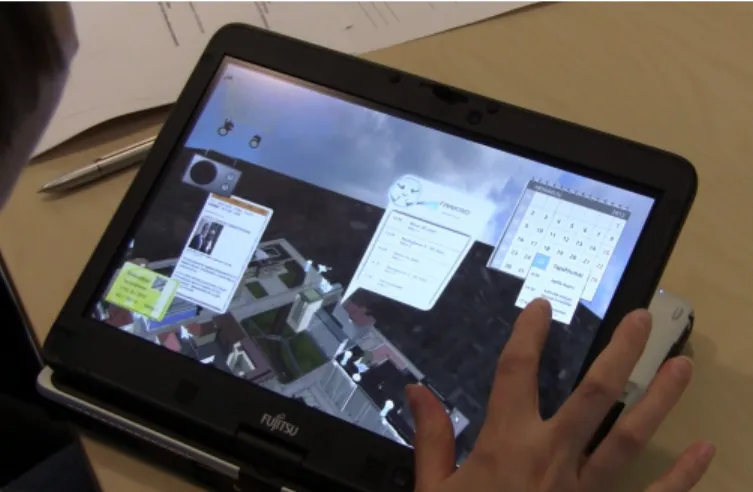
The application chosen for this case study is Service Fusion [12] developed by the Center for Internet Excellence (CIE) in Oulu, Finland atop the realXtend Tundra SDK [18][19]. Service Fusion is a 3D mapping application which integrates various real-world online services into the 3D interface of the virtual model of the City of Oulu [20] (Figure 1). For example, the user can either buy movie tickets at the cinema or check out what music is being played in the bars and pubs at the city center. In our opinion, such service, originally designed for a single user on a private tablet
manipulated with 12” touch-screen, would benefit from porting onto a public, wall-sized display. The wall-sized display can easily accommodate several (3 to 5) people interacting with the application simultaneously.
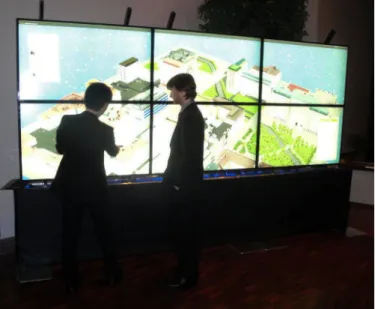
Our wall-sized display dubbed ‘UBI-wall’ is constructed from six MultiTaction LCD cells of 55” in size and full HD resolution of 1920x1080 pixels [11]. They are arranged in a 3x2 tiled array configuration, resulting in a display of total size of 3.73x1.43 m including 16 mm bezel. The cell array is elevated by a 75 cm tall stand (Figure 2).
Figure 2 The porting of the Service Fusion application on the UBI-wall exhibited at the University of Oulu Donor Club's establishment dinner.
The touchscreen technology is implemented with backlight emitter IR cameras achieving up to 200 fps tracking speed and 2 mm positional accuracy. The cells are connected to the three graphics card (GeForce GTX 670, 2048 MB) of a single control computer (Intel® Core™ i7-3770 CPU @ 3.40 GHz × 8 and 16 GB RAM)
running Ubuntu Linux OS and Ogre3D open source graphics rendering engine.
To perform the porting we chose to initially install the application “as is”, addressing the encountered issues case by case, and at the same time trying to infer general guidelines which could be applied to other similar interfaces being ported to a large screen.
Porting
Upon installing the application on the UBI-wall some issues became immediately obvious:
• The drag-and-drop gesture so essential in the
original Service Fusion application is not a good fit for large walls as already discussed in [1, 8]. In our case users would even have to walk during a single drag-and-drop in certain circumstances.
• The camera view configuration used on the
tablet does not utilize the high-resolution display properly. The empty corners at the end of the virtual model, which appear relatively small on the tablet, resulted in whole cells left unused.
• Text and contextual information, specified to
be readable on the small tablet, scaled up proportionally on the high-resolution display, hiding part of the city or being placed at unreachable positions.
• Small errors in the models, which usually are
not noticeable on the tablet, became very apparent on the large wall.
Next we discuss various solutions employed in the porting. Our approach is similar to [13], so that only a subset of original features is preserved after removing those potentially causing interaction issues.
Local interactions
On our UBI-wall all interactions are local in the sense that they take place within particular proximity of the location where the user initiates the action. This modification resulted in losing all the advanced
functionalities of the original application which required drag-and-drop actions (i.e. buying something by dragging it into a shopping cart). Actions requiring tapping remained available (e.g. touching hotspot icons offers information on the selected venue), even for multiple users at the same time.
Contextual information
Any contextual information resulting from a tap needs to be adjusted and repositioned to be small enough not to hide too much of the city view and to be easily reachable. This allows people to stand still while focusing on a certain location. Multiple people can stand in front of different parts of the wall and use the application without interfering each other. Single static view
The overall 3D view of the city model has been fixed and attached to a static camera. In the original application the user can pan the view horizontally or vertically. However, this is not suitable for the multi-user scenario as it would not be desirable to have someone panning the view while someone else is interacting with another portion of the model. This approach is opposite to each user having a dedicated,
separate viewport interacting with the screen [2]. In our scenario each user focuses on a particular local area of the model. When a user is interested in a specific part of the city, instead of manipulating the view, it is enough to walk to the corresponding part of the wall. People interested in the same place can gather together and perhaps start discussions about it. This solution has, however, some limitations when dealing with larger areas of the city or when required to view the 3D model from different angles. In this case, if controls for panning the whole view would be provided, some sort of coordination among the people by the wall on changing the view would be required. Even if such solution could be implemented, it might be problematic, as the people at the wall at any given moment could be total strangers with differing interests and needs. Flat view projection
The view has been configured so that the screen estate on the wall is used effectively. The current 3D model of the city center consists of only 9 blocks in a 3x3 array. Eventually, we have been able to fit almost the whole model on the UBI-wall while keeping a relatively close view, where details such as shop signs are visible. This allowed the use of a static camera and hence the multi-user simultaneous interaction described above. The chosen view configuration was not trivial to come up with, however. The initial solution of simply lowering the camera to fill the screen with more of the scene did not give good results. The resulting view covered only a small part of the city and had substantial perspective distortion near the edges that hampered interaction. Such limitations are generally acceptable in a single user case, where the user’s focus is typically in the center whereas the sides are considered as an ambient view of the surroundings with the peripheral vision.
Further, the single user can be allowed to pan the camera view to move around in the interface. On the UBI-wall, however, we wanted to have high uniform quality everywhere, but we were not able to find a suitable view by testing various view angles either, such as different camera pitch. The adopted solution consists of modifying the field-of-view of the camera used in the projection. This is analogous to zooming in with a real camera, instead of moving closer. With the quite extremely narrow field of view (FOV) of 18 degrees (compared to the tablet’s FOV of 45 degree) and a relatively high camera position we got a flat projection which is very uniform across the whole view. This way we have been able to both fit the required area of the city in the view, and have a uniform projection where any part of the wall can be used for user interactions similarly.
Discussion
A clear limitation of this work is that much of the porting rationale is specific to the Service Fusion application and only some of the techniques are generally applicable. The issue with the drag-and-drop gesture was the most limiting factor during the porting, as it effectively determined which functions could (not) be possible on the UBI-wall. While this issue has been discussed in literature, we have not found any proposed solutions for realizing panning in a multi-user scenario. The decision of fixing the view is the most simple to adopt, even if it may not the only possibility. Our experience with different FOVs, even if not generally applicable, is certainly useful in porting 3D mapping applications, which is one of the popular application domains for wall-sized displays. An obvious continuum of our work is to enable some of the removed
functionalities in the multi-user scenario when
applicable and to identify potential new functionalities.
References
[1] Wisneski C, Ishii H, Dahley A. Gorbet, M.G., Brave, S., Ullmer, B. and Yarin, P. Ambient displays: Turning architectural space into an interface between people and digital information. Proc. CoBuild 1998, 22-32. [2] Stødle, D., Hagen T. S, Bjørndalen, J.M. and Anshus, J.A. Gesture-based, touch-free multi-user gaming on wall-sized, high-resolution tiled displays. Journal of Virtual Reality and Broadcasting 5, 10 (2008), 177-189.
[3] Tan, D.S., Czerwinski, M., and Robertson, G. Women go with the (optical) flow. Proc. CHI 2003, 209-215.
[4] Tan, D.S., Gergle, D., Scupelli, P.G. and Pausch, R. Physically large displays improve path integration in 3D virtual navigation tasks. Proc. CHI 2004, 439-446. [5] Tan, D.S, Gergle, D., Scupelli, P. and Pausch, R. With similar visual angles, large displays improve spatial performance. Proc. CHI 2003, 217-224. [6] Guimbretière, F., Stone M., and Winograd, T. Fluid interaction with high-resolution wall-size displays. Proc UIST 2001, 21-30.
[7] Robertson, G., Czerwinski M., Baudisch, P., Meyers, B., Robbins, D., Smith, G. and Tan, D. The large-display user experience. IEEE Computer Graphics and Applications 25, 4 (2005) 44-51.
[8] Engelhardt, J. The 3D future is now. Geospatial Solutions 14, 10 (2004), 32-36.
[9] Czerwinski, M. Tan, D. and Robertson, G. Women take a wider view. Proc. CHI 2002, 195-202.
[10] Nancel, M., Wagner, J., Pietruga, E., Chapuis, O. and Mackay, W. Mid-air pan-and-zoom on wall-sized displays. Proc. CHI 2011, 177-186.
[11] MultiTaction Ltd.
http://www.multitaction.com.
[12] Hickey, S., Pakanen, M., Arhippainen, L., Kuusela, E. and Karhu, A. Service Fusion: an interactive 3D user interface. Proc. MUM 2012, article no. 53.
[13] Isenberg, P., Carpendale, S., Bezerianos A., Henry N., Fekete J. D. CoCoNutTrix: Collaborative retrofitting for information visualization. IEEE Computer Graphics and Applications 29, 5 (2009), 44-57.
[14] Molnar, S., Cox M., Ellsworth D. and Fuchs, H. A sorting classification of parallel rendering. IEEE Computer Graphics and Applications 14, 4 (1994), 23-32.
[15] Ni, T., Schmidt, G.S., Staadt O.G., Livingston, M.A., Ball, R. and May, R. A survey of large high-resolution display technologies, techniques, and applications. Proc. VR 2006, 223-236.
[16] Funkhouser, T., Li, K. Large-format displays. IEEE Computer Graphics and Applications 20, 4 (2000), 20-21.
[17] Ojala, T., Kostakos, V., Kukka, H., Heikkinen, T., Lindén, T., Jurmu, M., Hosio, S., Kruger, F., and Zanni, D. Multipurpose interactive public displays in the wild: Three years later. Computer 45, 5 (2012), 42-49. [18] realxtend Open Source Platform for the 3D Internet. http://www.realxtend.org/.
[19] Alatalo, T. An entity-component model for extensible virtual worlds. IEEE Internet Computing 15, 5 (2011), 30-37.
[20] Oulu3Dlive.