VMware vCloud
®
Architecture Toolkit
Operating a VMware vCloud
Version 2.0.1 October 2011
© 2011 VMware, Inc. All rights reserved. This product is protected by U.S. and international copyright and intellectual property laws. This product is covered by one or more patents listed at
VMware is a registered trademark or trademark of VMware, Inc. in the United States and/or other jurisdictions. All other marks and names mentioned herein may be trademarks of their respective companies.
VMware, Inc 3401 Hillview Ave Palo Alto, CA 94304
Contents
1.
Overview
... 7
1.1 Audience ... 7
1.2 Scope ... 7
2.
Operating a VMware vCloud
... 8
2.1 vCloud Operations Framework ... 9
3.
Organizing for vCloud Operations
... 11
3.1 vCloud Center of Excellence ... 11
3.2 Role of vCloud Center of Excellence in Standardization ... 12
3.3 vCloud Service Management ... 13
3.4 vCloud Operations Management ... 14
3.5 vCloud Infrastructure Management... 15
4.
vCloud Service Management
... 19
4.1 Service Catalog Management ... 19
4.2 Service Level Management ... 23
5.
vCloud Operations Management
... 27
5.1 Configuration Management ... 27
5.2 Orchestration Management ... 31
5.3 Availability Management ... 33
5.4 Continuity Management ... 35
6.
vCloud Infrastructure Management
... 38
6.1 Security and Compliance Management ... 38
6.2 Capacity Management ... 41
6.3 Performance Management ... 42
6.4 Monitoring ... 43
Appendix A: vCloud Director Cell Monitoring
... 45
Appendix B: Compliance Considerations
... 53
Appendix C: Capacity Planning
... 62
Appendix D: Capacity Management
... 69
Appendix E: Integrating with Existing Enterprise System Management
79
Appendix F: Business Continuity
... 86
Appendix G: Upgrade Checklists
... 90
List of Figures
Figure 1. Cloud Computing Layers ... 8Figure 2. vCloud Operations Framework ... 9
Figure 3. vCloud Operations Framework Mapped to Service Layers ... 10
Figure 4. vCloud Center of Excellence Ecosystem ... 12
Figure 5. Service Catalog Evolution ... 21
Figure 6. Example Organization with Public vCloud IaaS and Private vCloud PaaS/SaaS Layers ... 24
Figure 7. Configuration Management Interrelationships ... 28
Figure 8. Architectural Example Drawing ... 39
Figure 9. One Primary Function per Server ... 53
Figure 10. Log Collection in the vCloud Environment ... 56
Figure 11. Architecture of vCloud Components and Log Collection ... 57
Figure 12. Infrastructure Layers ... 60
Figure 13. vCloud Director Extension Overview ... 79
Figure 14. vCenter Orchestrator as a vCloud Director Extension... 82
Figure 15. vCenter Orchestrator AMQP Subscription Policy ... 83
List of Tables
Table 1. Public Catalog Benefits ... 20
Table 2. Sample vApp Offerings ... 22
Table 3. vCloud vApp Requirements Checklist... 36
Table 4. MBeans Used to Monitor vCloud Cells ... 45
Table 5. Audit Concerns Within the vCloud ... 53
Table 6. vCloud Component Logs ... 58
Table 7. Other Component Logs ... 58
Table 8. vSphere Host Variables ... 63
Table 9. Determining Redundancy Overhead... 64
Table 10. Network Capacity Planning Items ... 68
Table 11. Capacity Monitoring Metrics ... 70
Table 12. Organization Virtual Datacenter Units of Consumption ... 72
Table 13. Recommended Organization Virtual Datacenter Capacity Thresholds ... 73
Table 14. Sample Organization Virtual Datacenter Resource Allocation ... 73
Table 15. Organization Virtual Datacenter Trending Information ... 75
Table 16. Organization Virtual Datacenter Capacity Trending Variables ... 76
Table 17. Sample Organization Virtual Datacenter Trending Information ... 77
Table 18. Approve a vApp workflow ... 84
1. Overview
Operating a VMware vCloud provides practical operations-focused, organizational, process, and supporting technology considerations and guidance based on the vCloud Operations Framework. The goal is to provide customers with the information they need to realize the benefits of proceeding along the journey of VMware vCloud®
The documents,
adoption and providing Infrastructure-as-a-Service (IaaS) using a service-focused, comprehensive operational framework. Both service providers and enterprises can use the guidelines in this document, with some variations depending on point of view.
Architecting a VMware vCloud, Operating a VMware vCloud, and Consuming a VMware vCloud
• Architecting a VMware vCloud provides best practices, design considerations, and design patterns for constructing a vCloud environment from its constituent components.
are designed to work together throughout the lifecycle of a VMware vCloud computing implementation with VMware technologies. By using all three documents together, combined with a private or public service definition, you can gain a comprehensive view of VMware vCloud computing.
• Operating a VMware vCloud includes best practices and considerations for operating and maintaining a vCloud environment. It covers the people, process, and technology involved in running a vCloud environment.
• Consuming a VMware vCloud covers the various considerations for the consumer when choosing to leverage vCloud computing resources.
This document is not a substitute for VMware product documentation, nor does it provide detailed implementation procedures for installing a vCloud.
1.1 Audience
This document is intended for, but not limited to, IT personnel responsible for or involved in the service, operations, and infrastructure management of one or more vCloud instances to deliver Infrastructure as a Service. It is assumed that the reader has knowledge of and familiarity with VMware vSphere®
1.2 Scope
concepts.
This document focuses on considerations for operating a vCloud from the perspectives of the
2. Operating a VMware vCloud
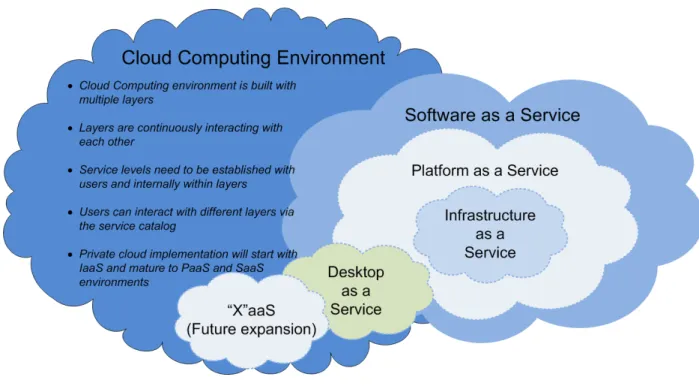
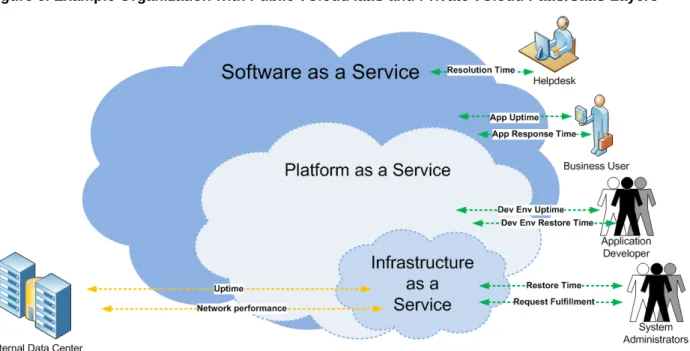
Cloud computing is an approach to computing that leverages the efficient pooling of on-demand, self-managed virtual infrastructures, consuming them as a service. The NIST standard defines three such service layers within a cloud. Key cloud computing principles, along with the service layer paradigm are illustrated in Figure 1.
Figure 1. Cloud Computing Layers
VMware defines the existing service layers as:
• Software as a Service (SaaS) – Business-focused services presented directly to users via a service catalog.
• Platform as a Service (PaaS) – Technology-focused services presented for application development and deployment presented directly to application developers via a service catalog.
• Infrastructure as a Service (IaaS) – Services providing infrastructure “containers” for various uses in order to provide better agility, automation, and delivery of components.
Additional service layers will be added as other services, such as Desktop as a Service, become a reality. Companies embark on the journey to adopt cloud computing to realize increased quality of service, business agility, and operating cost efficiency.
• Quality of service is achieved by providing standardized service offerings with associated availability levels and service management. Customers can expect the provision of a reliable VMware vCloud® service with predictable service levels so that end users are provided with the service they require in the manner they require within expected timeframes. To provide standardized, repeatable service, IT must introduce their own operational efficiencies to make sure that they are in control of the
• Business agility is achieved by changing the way that IT thinks about managing services. Some end-user control must be provided so that IT does not become a bottleneck when provisioning services, but IT must retain some control to prevent the environment from becoming unmanageable. To provide business agility and speed to market, automation is key to the success of the vCloud. Automation of time-consuming, error-prone, and complex tasks is recommended to provide the reliable, rapid service expected from the vCloud.
• Increased cost efficiency can be realized by decreasing operational expenses. To achieve this, the current operational cost and burden of managing IT (approximately 70% operational expenses and 30% capital expenses) must change, especially as IT becomes more like a service provider providing Infrastructure as a Service. Reducing operational expenses can only be accomplished by enhancing IT operational processes for cloud computing, implementing the tools to support and automate the enhanced operational processes, and optimizing the organizational structure to most effectively align with managing the cloud computing infrastructure and IT services offered.
2.1 vCloud Operations Framework
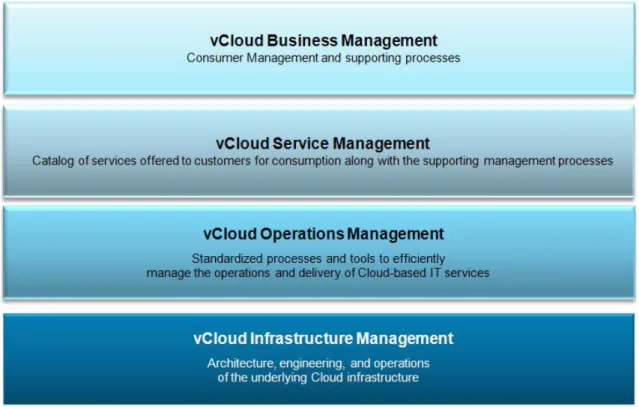
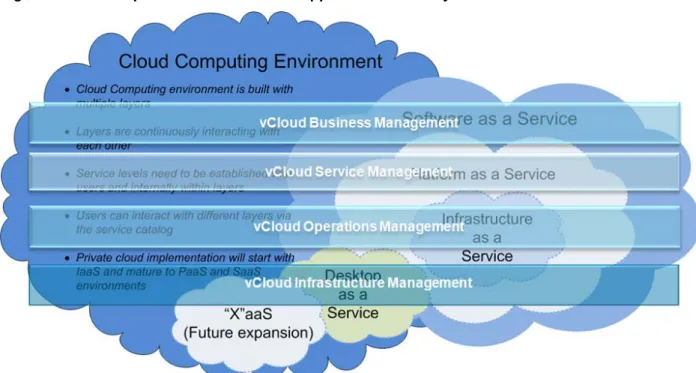
The underlying VMware vCloud Operations Framework within which organizational structure and critical processes can be defined is shown in Figure 2.
The vCloud Operations Framework consists of the following layers:
• vCloud Business Management – Addresses the source of business drivers and requirements for vCloud services to be offered, along with management of the businesses’ or line of business’ consumers and its supporting processes.
• vCloud Service Management – Converts the business drivers and requirements into vCloud service definitions, manages service development and transition, creates and reports on Service Level Agreements back to the business and its consumers, and manages the service catalog lifecycle.
• vCloud Operations Management – Defines, develops, and delivers standardized IT Service
Management processes and tools to support them, to manage the operations and delivery of vCloud services.
• vCloud Infrastructure Management – Architects, deploys, and manages the underlying vCloud infrastructure upon which the vCloud services are deployed and delivered.
These layers are required regardless of the specific vCloud service layer being addressed. Figure 3. vCloud Operations Framework Mapped to Service Layers
3. Organizing for vCloud Operations
One of the truly transformative aspects of vCloud computing is its impact on the IT organization. By definition, vCloud computing provides on-demand service delivery. As a result, the IT organization has to become service-driven. Delivering a vCloud-based service impacts all three layers of the VMware vCloud Operations Framework: vCloud Service Management, vCloud Operations Management, and vCloud Infrastructure Management. The VMware approach to addressing this impact is to use the vCloud Center of Excellence (vCOE) model.
3.1 vCloud Center of Excellence
The vCloud Center of Excellence model is an extension of the VMware Center of Excellence model that has been used by many organizations of various sizes to facilitate the adoption of VMware technology and to reduce the complexity of managing a VMware virtual infrastructure. The vCloud Center of Excellence model defines cross-domain vCloud Infrastructure Management accountability and responsibility within team roles across an organization. These team roles enable an organization to consistently measure, account for, and improve the effectiveness of its vCloud infrastructure management even if its IT Service Management roles and responsibilities are distributed across multiple IT functional areas. The vCloud Center of Excellence model also involves the proactive inclusion of vCloud
Infrastructure Management champions
The vCloud Center of Excellence is a focused “virtual” team of vCloud Infrastructure Management specialists and an ecosystem of related functional groups which, taken together, form a vCloud Center of Excellence extended team as shown in
who represent related functional teams that are critical to providing vCloud Infrastructure Management in support of vCloud service offerings.
Figure 4. It serves as the focal point for all decisions involving vCloud Infrastructure Management, including infrastructure architecture, implementation, and
management. The team is tasked with creating, reviewing, and publishing vCloud Infrastructure
Management guidelines and documentation, as well as effecting policy and process change for internal use. To reach an operationally mature level, you must establish a formal vCloud Center of Excellence with aligned roles and responsibilities.
Figure 4. vCloud Center of Excellence Ecosystem
As shown in Figure 4, the vCloud Center of Excellence ecosystem includes the other two layers of the vCloud Operations Framework, vCloud Service Management and vCloud Operations Management. It also includes the other core IT teams: Enterprise Architecture, Facilities, Infrastructure (network, storage, servers), and the Security team. The organizational structure of Enterprise Architecture, Facilities, Core Infrastructure, and Security are not addressed in this document.
3.2 Role of vCloud Center of Excellence in Standardization
In a traditional organization, IT is driven by multiple business units. The business units control IT funding and each business unit (BU) can enforce separate policies and procedures for their infrastructure. This approach leads to disjointed architectures and a lack of standardization. IT groups that support such an environment struggle to achieve agreed service levels, leading to end-user frustration, IT support inefficiencies, and possibly even financial liabilities. The implementation of a vCloud changes this paradigm. A vCloud is built as a shared resource that requires enforcement of consistent standards across the entire IT organization. To define and enforce these standards, all policies and procedures associated with the vCloud should be driven by the vCloud Center of Excellence team rather than from business units. This shift poses a significant challenge for organizations who try to move into a vCloud-appropriate operating model. The vCloud Center of Excellence needs to negotiate with different business groups and rely on executive sponsorship and support during this transition. More rigorous standards need to apply across the whole organization.
One recommended approach is to align with the organizations’ phased development approach, adding a new vCloud architecture review and signoff by the vCloud Center of Excellence during the analysis and design phase for all new projects. Other recommendations include running vCloud-specific assessments on applications that are being considered for migration to the vCloud. Assessments determine gaps and set expectations with business units on expected changes. The key to success is the ability to balance agility to meet business needs with stringent enforcement of defined standards within the vCloud.
3.2.1 Layers of Standardization
The vCloud is a shared resource running on infrastructure supported by the vCloud Center of Excellence and core infrastructure teams. As the vCloud Center of Excellence sets standards for the vCloud, core infrastructure teams may develop standards for the infrastructure that supports the vCloud. For example, the storage team may create standards for how new logical unit number (LUN) storage is presented for vCloud consumption. This layer of abstraction allows the storage team to have the flexibility to choose the most cost-effective SAN vendor and, if required, support a multi-vendor environment.
3.2.2 Measurement with Industry Benchmarks
Cloud technology is evolving at a rapid pace. After a vCloud is established within an organization a continuous improvement cycle needs to be set up annually to make sure that the organization’s vCloud is not lacking any current industry standards or benchmarks. The vCloud Center of Excellence is
responsible for running this assessment and presenting the results, including recommendations for remediation, back to the leadership team.
3.3 vCloud Service Management
vCloud Service Management is critical to providing vCloud service offerings and is the entry point into IT from vCloud Business Management. The following are roles and responsibilities that are involved with vCloud Service Management:
• vCloud Service Portfolio Management:
o Manages the portfolio of vCloud services and works with organizational leadership to develop the vCloud service offering strategy used to determine what services should be included in the overall portfolio.
o Proactively identifies and defines potential vCloud service offerings based on demand information gathered from vCloud Business Management or other sources such as requests coming in through the Service Desk.
• vCloud Service Owner:
o Responsible for overall delivery of their vCloud service offering.
o Provides the required information to Service Catalog Management to correctly set up the service catalog offering.
o Works with Service Level Management to review Service Level Agreements and Operating Level Agreements to make sure that they are achievable. Also, negotiates updated Service Level Agreements and Operating Level Agreements as the service offering is updated.
o Leads development and enhancement efforts and works with vCloud Service Development Management on their vCloud service offering based on new requirements from vCloud Business Management.
o Liaises between IT Business Management and vCloud Center of Excellence.
• vCloud Service Development Management:
o Defines a vCloud service offering based on the requirements provided by vCloud Business Management after it’s determined that a particular vCloud Service Offering is to be included in the vCloud Service Portfolio. This involves translating vCloud Business Management requirements into requirements that are used by vCloud Infrastructure Management to create deployment templates.
o Manages any additional efforts required to populate deployment templates, such as working with Application Development Managers who may provide an application for a vCloud service offering.
o Works with vCloud Business Management and Financial Management to determine a price for a vCloud service offering, and determine whether multiple prices are appropriate if the vCloud service offering is provided in multiple service tiers.
o Creates, collects, and maintains any vCloud service offering development documentation.
• vCloud Service Level Management:
o Defines the Service Level Agreement (SLA) associated with a vCloud service offering or a tier of service such as provided by a particular provider virtual datacenter.
o Makes sure that the service levels are met through corresponding Operating Level Agreements with vCloud Operations Management and vCloud Infrastructure Management.
o Regularly monitors and reports on service level attainment.
• vCloud Service Catalog Management – Manages the vCloud service offering catalog and makes sure that all of the information contained in the catalog is accurate and up-to-date.
These roles and responsibilities can be satisfied by a single person or multiple people. The decision to employ one or multiple people depends on the number of vCloud service offerings. If the number of vCloud service offerings is large enough to justify multiple people, or as the number of vCloud service offerings grows and multiple people are needed, the recommended distribution is:
• A single vCloud Service Portfolio Manager.
• A single vCloud Service Catalog Manager.
• A single vCloud Service Level Manager.
• Multiple vCloud Service Owners, each responsible for vCloud service development and working with other teams to make sure that the agreed vCloud service levels for their vCloud service offering or suite of vCloud service offerings are maintained.
As key members of the vCloud Center of Excellence ecosystem, they also act as vCloud champions. In this role, they interact closely and regularly with the vCloud Center of Excellence as well as championing vCloud to the business and other teams with which they interact in the organization at large.
3.4 vCloud Operations Management
To realize the operating expense savings benefit offered by vCloud computing, vCloud Operations Management must be responsible for developing and executing standardized, automated processes and tools optimized to efficiently manage the operations and delivery of vCloud service offerings. The key terms are standardized, automated, optimized, and service
• An unwavering service-oriented focus for operations resources (both people and tools), as opposed to the traditional technical infrastructure focus.
. Though vCloud computing does not require a radical reorganization of how ITSM operations are provided, it does require each role to have:
• The goal of standardizing and automating the processes required to execute their responsibilities to the highest possible degree.
• An understanding of the impact vCloud computing has on their area of responsibility, and responsibility for optimizing their area for vCloud computing.
The areas within vCloud Operations Management impacted by or impactful on vCloud include: • Provisioning Management. • Change Management. • Capacity Management. • Availability Management. • Performance Management. • Orchestration Management. • Event Management.
• Incident and Problem Management.
• Configuration and Asset Management.
• Continuity Management.
Due to the increased focus on automation, in addition to the traditional IT Service Management areas, one new role and associated set of responsibilities should be included. That role is Orchestration Management
• Being the orchestration expert within vCloud Operations.
(or Automation Management). Orchestration Management is a cross-domain role within vCloud Operations and the person in this role is responsible for:
• Working with Enterprise Architecture to develop the operation’s orchestration strategy.
• Working with the other vCloud Operations roles to design, develop, test, and deploy their specific process automation workflows.
• Developing and maintaining process automation workflow documentation.
• Working with Event Management and vCloud Infrastructure Management to establish workflow monitoring and, to the extent possible, automate responses to events.
• Providing Level 3 process automation workflow incident resolution.
Like the vCloud Service Level Management team, members of the vCloud Operations Management team are key members of the vCloud Center of Excellence ecosystem and also act as vCloud champions. In this role, they interact closely and regularly with the vCloud Center of Excellence as well as championing vCloud to the other teams with which they interact in the organization.
3.5 vCloud Infrastructure Management
vCloud Infrastructure Management is responsible for architecture, deployment, and operations of the underlying vCloud infrastructure, and gains the most by reorganizing. Traditional Infrastructure
Management is siloed by infrastructure domain with very little cross-domain interaction unless required for a particular project or deployment. Virtualization provided the most recent and compelling opportunity for Infrastructure Management to break from this traditional approach. If Infrastructure Management broke from the traditional approach, adapting to vCloud computing should be reasonably straightforward. If they did not, they must now break with the traditional approach to successfully support vCloud computing. This reorganization takes the form of the vCloud Center of Excellence core team. Generally, the vCloud Center of Excellence encompasses responsibility for both the VMware vSphere and vCloud layers of the infrastructure. For the purpose of the following descriptions, vCloud encompasses the vSphere
infrastructure as well.
The primary roles for members of the vCloud Center of Excellence core team are described in the following sections.
3.5.1 Executive Sponsor
• Provides clear messaging, leadership, and guidance to the entire IT organization and affected organizations about the vCloud Center of Excellence.
• Drives the cross-domain alignment required for establishing a successful, functioning vCloud Center of Excellence extended team. This level of sponsorship is key to breaking down organizational barriers and mandating integrated process design and implementation across the affected organizations. Cross-domain alignment and integrated process implementation are absolutely required to sustain a vCloud infrastructure at the level required to support vCloud-based service offerings and associated service levels.
3.5.2 vCloud Center of Excellence Leader
• Provides leadership and guidance to vCloud Center of Excellence members.
• Has a direct line of communication to the executive sponsors.
• Has visibility into the planned vCloud-based service offering portfolio as well as any portfolio changes.
• Is responsible and accountable for making sure that the vCloud infrastructure can support and continue to support the vCloud-based service offerings and service levels.
• Actively promotes awareness of the impact the vCloud infrastructure has on service offering and service level support and delivery.
• Facilitates integration of the vCloud infrastructure into existing IT Service Management processes.
• Coordinates and assists with planning vCloud infrastructure initiatives.
• Provides guidance to change management for changes related to the vCloud infrastructure; may authorize low risk, low impact changes to the vCloud infrastructure.
• Facilitates development and maintenance of vCloud infrastructure capacity forecasts.
• Manages the acquisition and installation of vCloud infrastructure components.
• Maintains relationships with the vCloud Center of Excellence extended team members and provides subject matter expertise to team members as required.
• Is involved in managing vendor relationships for vCloud infrastructure components.
3.5.3 vCloud Center of Excellence Architect
• Responsible for development and maintenance of vCloud infrastructure architecture and design documents and blueprints.
• Works closely with storage and network groups to architect and design vCloud infrastructure extensions.
• Works with enterprise architects to make sure that the vCloud infrastructure architecture is aligned with company architectural standards and strategies.
• Responsible for architecting and designing the vCloud layer in support of the planned vCloud-based service offering portfolio and any portfolio changes.
• Responsible for working with the IT Security team to make sure any architecture or design decisions address security and compliance.
• Responsible for architecting or designing solutions for vCloud infrastructure integration points with extended team systems.
• Provides subject matter expertise to support design, build, configuration, and validation processes.
• Maintains awareness of VMware software patches and their impact on the environment.
• Develops and maintains operational guidelines for the maintenance and support of the vCloud infrastructure.
• Mentors vCloud Center of Excellence core and extended team members.
• Assists with the incident and problem management processes to resolve issues related to vCloud infrastructure.
• Develops software and hardware upgrade plans.
• Develops and maintains the availability policy for the vCloud infrastructure in coordination with Availability Management and Service Level Management.
3.5.4 vCloud Center of Excellence Analyst
• Responsible for the development and maintenance of the vCloud infrastructure capacity forecast.
• Responsible for the day-to-day capacity and resource management of the vCloud infrastructure.
• Works with the IT Security team to make sure that the vCloud infrastructure aligns with IT security and compliance policies.
• Initiates requests for new vCloud infrastructure components.
• Assists with Incident and Problem Management processes for issues related to vCloud infrastructure capacity and performance.
• Assists with Change Management process as applied to the vCloud infrastructure.
• Responsible for maintaining the vCloud infrastructure Configuration Management data.
• Responsible for validating billing metering data collected for the vCloud-based service offerings.
3.5.5 vCloud Center of Excellence Administrator
• Installs and configures vCloud infrastructure components.
• Executes the validation plan when deploying new infrastructure components.
• Works with vCloud Center of Excellence extended team members to configure vCloud infrastructure components.
• Responsible for auditing vCloud infrastructure component configuration consistency.
• Develops and maintains vSphere and vCloud internal user access roles.
• Creates, configures, and administers vCloud provider-related objects.
• Works with the IT Security team to implement vCloud-related security and compliance policies.
• Works with Service Level Management to determine maintenance windows for the vCloud infrastructure.
• Tests and installs vCloud infrastructure patches.
• Confirms that the vCloud infrastructure is correctly instrumented for monitoring and logging purposes.
• Responsible for working with other teams to implement any required vCloud integration with their systems.
• Works with Orchestration Management to implement the vCloud infrastructure-impacting workflows. These roles and responsibilities require a unique set of skills so, at a minimum, each role should be filled by a different person. The number of people in each role, with the exception of the vCloud Center of Excellence Leader, depends on the scale and scope of the vCloud infrastructure.
4. vCloud Service Management
4.1 Service Catalog Management
The purpose of a service catalog is to provide a clearly defined set of services available to customers for consumption in a vCloud environment. Ideally, the service catalog is offered from a “one stop shop” where a customer can select the services they require with minimal intervention or manual activity. An initial vCloud service catalog should align with the vCloud provider’s goals, but should aim for simplicity while at the same time integrating with capacity planning and cost transparency. Regular reviews of the service catalog should be performed with adjustments made in line with any increased functionality provided by future releases of VMware vCloud®
4.1.1 vCloud Service Catalog Components
Director™ (VCD), vSphere, or any additional supporting products.
The service catalog for the vCloud supported by VCD offers a number of different service components to the end customer. The combination of all of these components creates the service as a whole. At a minimum, the vCloud provider must offer:
• Organization – This is the container
• Organization virtual datacenters – These are the boundaries for running the virtual machines within the IaaS service. They are configured with sizing information depending on the customers’
requirements, and have an appropriate SLA assigned to them. A minimum of one organization virtual datacenter is required for a customer to offer a service, but additional organization virtual datacenters can be requested if required.
for the customer’s IaaS with attributes that hold basic, default service configuration information. Typically, only one organization container is purchased per customer.
In addition to these core vCloud components, it is possible for the vCloud provider to establish a standard set of offerings within the vCloud service catalog to provide vApps (standardized groupings of
preconfigured virtual machines) and media (installable software packages) to end customers. These offerings are grouped into the following types of VCD catalogs:
• Public catalogs – These contain vApps and media (for installation of software) that are offered to the end customer by the vCloud provider.
• Organization catalogs – These also contain vApps and media, but are only available within an individual organization, and can only be shared with individuals within that particular customer organization. Organization catalogs are created, controlled, and owned by individuals within the customer organization.
The benefits associated with offering vApps and media via public catalogs as part of vCloud provider’s overall service catalog are listed in Table 1.
Table 1. Public Catalog Benefits
Qualities Description
Supportability By offering a discrete set of services, it is much simpler to provide a reliable demand pipeline and, in turn, provide the capacity to support that pipeline. By providing standardized vApps, it becomes simpler to manage the overall environment.
Agility Standard offerings provide for the simple selection of virtual machine configurations (vApps) and enable quick provisioning using vCloud Director.
4.1.2 vCloud Service Catalog Evolution
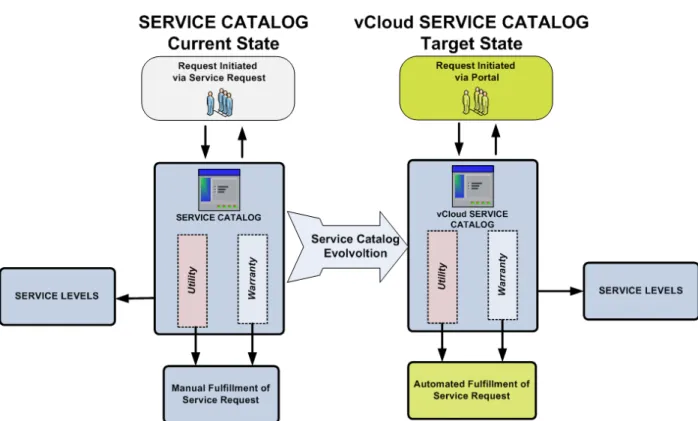
To improve the vCloud service catalog process and to help realize vCloud benefits as many service offerings as possible should be made available directly to the end user with automated provisioning. Typically, in the virtualization world, the initial process for procurement of virtual machines follows the model that is applied to physical infrastructure. Though this works, it is not the most efficient mechanism for providing services, and vCloud benefits cannot be fully realized unless this process is changed. A logical representation of the evolution of the vCloud service catalog from this current state to the desired end state is illustrated in Figure 5.
Figure 5. Service Catalog Evolution
In the Service Catalog current state, when a new service is requested, a Service Request is raised that is used to select and provision an offering from the service catalog. This request includes not only the utility (vApp or organization virtual datacenter) to be provided to the customer, but also includes the required service level (this is provided by the virtual datacenter in which the vApp is to be provisioned as well as any built-in availability features within the vApp itself). After the service has been ordered, the end customer must wait for staff to fulfill the Service Request for the virtual machines that will provide the service to be provisioned.
To satisfy the self-service, on-demand attribute of vCloud computing, the customer should be able to connect to a portal, select the required service offering, and have it automatically provisioned. This removes the manual task of selecting from the service catalog, and also removes the delay in the provisioning processes. This process is shown as the vCloud Service Catalog target state in Figure 5. VCD provides the ability to manage these requests from the service catalog. For vApps, an organization administrator can determine who within the organization has rights to request and provision vApps, thus providing end-to-end self-service. With VCD, not only can the end user select and provision the vApp, but the user can also specify in which organization virtual datacenter it is deployed. Because organization virtual datacenters are associated with provider virtual datacenters, the end user is effectively selecting the service level they require.
The evolution to the target vCloud service catalog can be accomplished as follows:
1. Continue with the Service Request process until the vCloud service catalog is available on the portal. 2. Enable appropriate IT staff to perform vCloud service catalog requests with automated provisioning,
including required approvals, on behalf of the end user.
3. Add the ability for end users to access the vCloud service catalog and request services that result in automated provisioning, including required approvals, of the corresponding vApps.
4.1.3 Standardization of vCloud Offerings into the Service Catalog
Standardization of the service offerings is essential to achieving a scalable, cost efficient vCloud environment. Typically, compute resource-based service offerings (CPU, memory, and storage) are a baseline for vCloud consumption and should be standardized as much as possible regardless of whether they apply to organization virtual datacenters or vApps (and their associated virtual machines).
Compute resources for organization virtual datacenters available in the service catalog should be standardized into various sizes. Additionally, the required compute resource configurations vary
depending on the selected VCD allocation model (Allocation Pool, Pay-as-You-Go, or Reservation Pool), because attributes such as CPU speed and CPU/memory guarantee vary. Combining these two
components means the service catalog could offer a number of differently sized organization virtual datacenters for each type of allocation model.
Similarly, to create a vApp catalog item (public or organization), there should be as much standardization as possible. Initially, from a compute resource point of view, standard sized virtual machines should be created to enable a pick list
In addition to the basic compute offerings of the virtual machines within the vApps, it is necessary to develop the service catalog to include vApp software configurations. These could be basic groupings of compute resources or could be expanded over time to offer more advanced services. Sample vApp offerings are shown in
of machines for vApp creation. These standardized virtual machines could vary in resource size for CPU, memory and storage; for example, Standard, Standard Plus, Advanced, Premium, and Premium Plus. As a vApp comprises a number of individual virtual machines, the appropriately sized virtual machines can be selected from the pick list during the vApp catalog creation process.
Table 2. Table 2. Sample vApp Offerings
vApp Configuration
2-Tier Standard Compute 1 x Standard RHEL Web virtual machine 1 x Standard Windows Server 2008 Application virtual machine
3-Tier Standard Compute, Advanced Database 1 x Standard RHEL Web virtual machine 1 x Standard RHEL Application virtual machine 1 x Advanced MySQL Database virtual machine 3-Server Standard Plus Compute (not necessarily
tiered)
3 x Standard Plus Windows Server 2008 Application virtual machine
4.1.4 Establish Service Levels for vCloud Services in the Service Catalog
To provide an appropriate level of service depending on the vCloud customers’ requirements, services should be further differentiated by their corresponding service levels. These service levels can be defined by offering availability and recoverability attributes such as Recovery Time Objective (RTO), Recovery Point Objective (RPO), and incident response times. These attributes can be applied to the different components within the service catalog.
Within a vApp, it is possible to design for different service levels via the virtual machines contained in the vApp. For example, a vApp could contain multiple Web servers to provide resilience in the event of server failure, and thus a lower RTO for the service.
As virtual datacenters provide abstracted physical and virtual resources, different service levels can be defined by using (or not using) the underlying hardware technology (server capabilities, storage array technologies, storage protocols, replication, and so on) and virtualization technology (HA, DRS, VMware vSphere® vMotion®
Taken together, the vApps offered and the capabilities of the virtual datacenters on which they can be deployed make for a powerful and complete vCloud service catalog.
, and others).
4.2 Service Level Management
Service Level Management defines the SLA associated with a vCloud service offering or a tier of service, makes sure that the service levels are met through corresponding OLAs, and regularly monitors and reports on service level attainment.
4.2.1 Definition of Service
IT services
4.2.2 Service Types
can be defined as a set of related activities or workflows that serve a defined business purpose, supported by a combination of people, process, and technology components. Generally, IT services are offered to users through a service catalog.
Service types include business user services and technology services. 4.2.2.1. Business User Services
Services are generally directly consumed by end users and are available as part of the organization’s enterprise service catalog.
4.2.2.2. Technology Services
Technology services are not consumed directly by users, but enable infrastructure automation that enhances an IT organization's ability to better support business needs.
4.2.3 Service Interrelationships
To optimally provide vCloud business user services, all types of technology services need to be
seamlessly integrated. Generally, this is accomplished using a workflow engine called the orchestration layer. Invoking a business user service may automatically trigger one or a combination of technology services. The rules governing these workflows need to be preconfigured and preapproved for control. They are also needed to provide an agreed to level of service to the business user. This agreed to level of service is known as a Service Level Agreement (SLA).
4.2.4 Definition of Service Level Agreement
A service level is a predetermined agreement between the service consumer and the service provider that measures the quality and performance of the available services. SLAs can be of multiple types, from measuring pure server uptime to measuring response time for technology components, process
workflows, users, and so on.
There are services running at every layer of the vCloud stack, so service consumers may be business users or internal IT groups who access the vCloud primarily for technology and infrastructure services. In cases where SLAs are established for base technology services that are not consumed directly by business users, but are needed to make sure that downstream operations and infrastructure components support the business users’ SLAs, these agreements are referred to as Operational Level Agreements
4.2.5 vCloud Layers and SLAs
(OLAs).
A typical vCloud computing environment consists of multiple layers (IaaS, PaaS, SaaS, and so on.). Based on business requirements, every customer chooses how to implement the vCloud stack. Options include creating a private vCloud, using a public vCloud provider, or creating a hybrid vCloud model in which both private and public vCloud resources are used. The enabler for this flexibility is the ability of an organization to guarantee the availability and performance at every vCloud layer. This is achieved by signing SLAs externally with service providers, and for a private vCloud, creating SLAs and OLAs internally.
4.2.5.1. Example
The following is a use case example for an organization with an IaaS layer hosted by a public vCloud provider, but PaaS and SaaS layers are maintained internally.
Note
The SLAs listed are for illustration purposes only and are merely a subset of the total number of SLAs created within an organization in such a case.SLAs for this example are:
• IaaS Layer:
o Uptime/Availability SLA signed with the external vCloud service provider.
o Network performance SLA signed with the external service provider.
o Request Fulfillment SLA – Measure of response time for provisioning and access configuration requests.
o Restore time SLA.
• PaaS Layer:
o Uptime/Availability SLA for development environment.
o Uptime/Availability SLA for critical development environment components.
o Restore time SLA for development environment.
• SaaS Layer:
o Uptime/Availability SLA specific to an application.
o Application response time SLA – Measure of how the application is performing for the business users.
o Time to resolution SLA – Time to recover an application in case of a failure. Given this example, the following are some key takeaways:
• SLAs are relevant at all levels within a vCloud stack. SLAs are required to provide efficiency and accountability at every layer, for both external providers and internal IT groups. Managing SLAs within every layer also helps isolate systemic problems and eliminates delays.
• SLAs can be between external vendors or providers of vCloud services or between internal IT groups. An organization can choose whether to implement a private, public, or hybrid cloud. At every layer, SLAs give organizations this flexibility by guaranteeing availability and quality of service.
• There are interrelationships between SLAs set up at different vCloud layers. A change in quality of service or breach of an SLA at a lower vCloud layer may impact multiple SLAs in a higher vCloud layer. In this example, if there is a breach of a performance SLA that results in the external vCloud provider’s inability to support OS performance needs, this breach has a ripple effect at the SaaS layer, decreasing application performance and response time for business users.
• SLAs need to be continuously managed and evaluated to maintain quality of service within a vCloud. Business needs are continuously evolving, resulting in changing vCloud business requirements. SLAs must be continuously updated to reflect current business requirements.
Consider the impact of adding another 1000 users to a particular application. Given this new demand the application criticality is increased and the application is classified as mission critical. This
business change means that SLAs supporting the application may need to be updated to provide increased uptime and availability. This may lead to increased demands at the IaaS layer, so SLAs with the external IaaS provider may have to be expanded.
4.2.6 vCloud SLA Considerations
Some example vCloud SLA considerations are:
• Uptime/Availability SLA:
o Business hours – For what timeframe does the SLA pertain? These are generally divided into tiers depending on business criticality (9 to 5, 24 by 7).
o Are maintenance windows (configuration changes, capacity changes, OS and application patch management) included or excluded from availability SLAs?
o Single versus multi-virtual machine vApps – Do multi-virtual machine vApps need to be treated as a single entity from a SLA perspective?
• End User Response Time SLA – This is generally focused on end-to-end response time as perceived by the business user. This may require implementing remote simulators to measure and monitor response time.
• Recovery (system, data) SLA – What Recovery Time Objectives and Recovery Point Objectives need to be met?
o Are backups required?
o Is high availability required?
o Is fault tolerance required within the management cluster?
o Is automated disaster recovery failover required within certain time parameters?
• Privacy SLA (data security, access and control):
o Do data privacy requirements (encryption, others) exist?
o Are there regulatory requirements?
o Are specific roles and permission groups required?
5. vCloud Operations Management
vCloud Operations Management includes Configuration Management, Orchestration Management, Availability Management, and Continuity Management.
5.1 Configuration Management
Configuration Management is a key process for realizing vCloud operational benefits. Configuration Managers track configuration items using a configuration management system.
5.1.1 Configuration Management Definition
Configuration Management is the process responsible for defining and maintaining information about components of an IT service—these components are referred to as configuration items
5.1.2 Value of Configuration Management in a vCloud
(CIs) and are managed end-to-end throughout their lifecycle. The goal of configuration management is to understand the historical, planned, and current state of configuration items, their interrelationships, and their impact on an IT service.
To fully realize the benefits of vCloud computing from an operations perspective, configuration management is the key. The configuration management process is administered in an organization through a set of tools and databases collectively known as a Configuration Management System
Figure 7
(CMS). The CMS acts as the definitive source of record for all components and their interrelationships within a vCloud environment. The CMS provides the visibility IT needs to manage the multilayered vCloud environments. Configuration management is the enabler for critical vCloud functions, from automated provisioning, discovery, and maintenance, to helping effectively plan and implement changes in the environment.
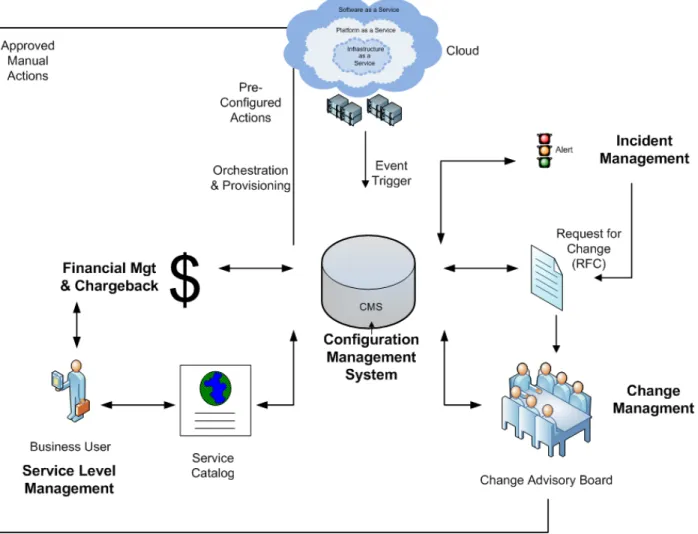
shows interrelationships between a Configuration Management System and other critical IT Service Management processes.
Figure 7. Configuration Management Interrelationships
The following sections provide a detailed review and explain how configuration management supports a vCloud in an IT organization.
5.1.2.1. Configuration Management in Relation to Orchestration and Provisioning in a vCloud In the vCloud environment users request new resources (virtual machines, vApps) that are provisioned directly from the service catalog. The enabler for this automated provisioning is the CMS. After a request is received from a user via the service catalog the orchestration engine interacts with the CMS. For example, to confirm available capacity, it determines configuration data for provisioning as well as access and security restrictions, and commissions the new virtual machine. The CMS is then informed of this new virtual machine and begins its lifecycle management.
5.1.2.2. Configuration Management in a Multilayer Environment
A vCloud environment, as opposed to a traditional IT environment, is built of independent vCloud layers. These layers can be built internally or created by the use of internal and external service providers. To manage this new dynamic environment, the CMS role becomes even more critical. The CMS needs to have capabilities to expand and understand all of the internal and external components of an IT service. Therefore, a CMS needs integration and reconciliation abilities with multiple sources and needs to be service-centric to show dependencies for how different components (internal or external) can impact an IT service.
5.1.2.3. Configuration Management Needs to Be Self-Aware
A vCloud environment is dynamic. The mobility of workloads and resources within the vCloud makes tracking components a challenge. A CMS platform for a vCloud needs automated discovery and mapping functions to make it self-aware. Tighter integration with virtual vCloud infrastructures allows for real time views of a service to be created. This allows the IT organization to organize their vCloud infrastructures better with more predictive planning capabilities.
5.1.2.4. Configuration Management in relation to Change Management
A vCloud has dynamic functions that require their own set of change considerations. These changes need to be preapproved by change management, and stored as configuration data within the CMS to be used by the orchestration layer to execute.
CMS also remains central to the change management process itself, providing the visibility required by the change advisory board to access the impact of a change in the environment.
5.1.2.5. Configuration Management in Relation to a Service
A CMS needs to be service-centric, with graphical views showing IT service dependencies. The CMS should also be used to store service-related information such as expected service levels and key stakeholder information. As IT organizations evolve to be more service oriented the CMS role in relation to service-related data increases. It will include not only component information, but information about service dependencies and tools that enable outage simulations to understand impacts. The CMS is responsible for predictive and trending analysis of not only technical components, but for an IT service as a unit.
5.1.2.6. Configuration Management in Relation to Physical vCloud Infrastructure
A vCloud is comprised of multiple service layers (SaaS, PaaS, IaaS, and possibly others). All of these vCloud layers are supported by a set of core physical infrastructure components (server, storage, network, and so on). As the vCloud automatically allocates resources, the CMS needs to understand the impact of the changes to the physical core infrastructure. The role of the CMS within the capacity
management function is to protect against over-allocation of resources in order to maintain stability and quality of service within a vCloud.
5.1.3 vCloud Configuration Management Considerations
As the vCloud continues to evolve so does configuration management. Newer configuration management systems are emerging in the market. Organizations that are moving to a vCloud model need to
continuously reassess the capabilities of existing configuration management systems in relation to the vCloud. Opportunities for process improvement and automation need to be reviewed during every assessment iteration. The following are some considerations to help evaluate CMS capabilities:
• vCloud-aware considerations for a CMS:
o Is it capable of modeling logical business services within a vCloud?
o Does it understand both physical and virtual components?
o Can it map dependencies between components?
o Can it auto-discover applications?
o Does it have an understanding of vCloud data models? For example, provider virtual data centers, organization networks, vApps, and so on.
• Flexibility and configuration considerations within a CMS:
o Does it have a dashboard that displays IT services and their components?
o Can it integrate with multiple data sources through pluggable connectors?
o Does it have a reconciliation capability?
o Does is allow for CI mapping?
o Does it allow for dependency mapping?
o Can it manage the various lifecycle states of vCloud components? For example, Dev, UAT, Prod, EOL.
• End-to-end automation:
o Is it capable of integrating with orchestration engines?
o Is it capable of integrating with vCloud financial management and chargeback systems?
o Does it have built in commission and decommission processes?
o Is it capable of integrating with Asset Management for the allocation and recovery of licenses?
5.1.4 Typical vCloud Configuration Items (CIs)
The following list is starting point for recommended configuration items that should be represented in a CMS for an Infrastructure as a Service vCloud environment.
• VMware vCenter™ Server.
• vCenter Database.
• Datacenter.
• Cluster.
• Resource pool/provider virtual datacenter.
• Organization virtual datacenter.
• Organization network.
• External network.
• VMware ESXi™ host.
• Virtual machine.
• Virtual distributed switch.
• Port group.
• vApp.
For each configuration item there is an attribute or relationship entry. Each CI has a CI ID, a CI type field, and a CI status field.
5.2 Orchestration Management
Orchestration Management is responsible for gathering and understanding service orchestration workflow requirements, managing their development, testing, and release, and interacting with the vCoE to
integrate infrastructure-related automation workflows
5.2.1 Orchestration Management Definition
Orchestration Management
5.2.2 Value of Orchestration Management in a vCloud
is the process responsible for governance and control over the orchestration workflows and the resulting automation within the vCloud. The goal of Orchestration Management is to understand the impact of orchestration workflows on an organization’s vCloud, the approvers of and those who benefit from the orchestration, and the interrelations between orchestration and traditional IT service management processes.
Orchestration abilities make a vCloud dynamic. This key feature adds to vCloud agility, elasticity, and self- healing properties. Along with the benefits, elasticity also raises some risks. A successful vCloud
implementation must focus on delivering consistent quality of services. Orchestration Management adds the layer of control required to achieve this consistency within a vCloud. Another aspect of control is the ability to protect and secure the vCloud. Unwarranted actions within a vCloud cannot be tolerated, so orchestration workflows and actions need to be tightly controlled to protect the vCloud.
The following sections provide information about how orchestration should be controlled in a vCloud. Orchestration is a relatively new feature, and as organizations mature in their management of vCloud environments the role of orchestration management becomes more and more relevant.
5.2.2.1. Orchestration Workflow Creation Control in a vCloud
Before implementing orchestration workflows within a vCloud environment some basic questions need to be answered:
• Who approved the orchestration workflow?
• Why do we need it?
• What impact does this orchestration workflow have on the vCloud environment?
• Who needs to be informed when this workflow is executed?
These questions need to be answered for all orchestration workflows that are built into the vCloud. VMware recommends that two separate teams be involved during development of orchestration
workflows. The first team is the Orchestration Management team that focuses on business requirements gathering and business unit negotiations. The second team is the vCloud Center of Excellence team that focuses on technical development of workflows. This provides for the implementation of consistent standards across all orchestration workflows within an organization.
Development of orchestration workflows is very complex. Orchestration engages with multiple internal and external systems in a vCloud environment, so a complete development lifecycle must be followed with dedicated support from the application and business teams.
VMware recommends that appropriate testing be completed at every stage of development, including unit, system, and integration testing before moving orchestration workflows into production. As part of development testing, operational testing that includes performance and scalability scenarios for end-to-end automation processes must also be completed. In many cases, orchestration workflows themselves may be able to withstand new loads, but external or downstream systems may experience a performance impact. A clear roll-back procedure must be established for exceptions to protect against impacting production functions.
5.2.2.2. Orchestration Workflow Execution Control in a vCloud
A vCloud is a dynamic environment where continuous changes are made to improve the quality of services that run on it. Orchestration plays a key part in this agility, allowing for automated actions to be performed as required by vCloud. Orchestration management focuses on vCloud impacts, and avoids adding inflexibility in the environment. VMware recommends that there be control on the execution of orchestration workflows developed for vCloud, with error handling built into the workflows. If there are workflow execution issues, notifications need to be sent to the operations team with appropriate escalations and tiering for alerts.
5.2.2.3. Orchestration Management in Relation to Change Management
Orchestration leads to change in a vCloud environment. As orchestration becomes more mature complex manual tasks are automated. Workflows that lead to changes in business services that directly impact users need to be analyzed in detail before implementation. The Change Advisory Board (CAB) needs to preapprove actions on production applications. Additional controls may also be set, allowing for
notification back to the CAB on execution of critical business that impacts orchestration workflows. This must be done in accordance with an organization's change control policies. Business impact should be the main driver for discussion between the orchestration team and CAB. Simple orchestration actions that impact vCloud internal background operations (for example, capacity-related actions), but which do not directly impact a business application or service, should be allowed more flexibility by the CAB and may not need approval.
5.2.2.4. Orchestration Management in Relation to Configuration Management
Orchestration can be used to provision new vApps within a vCloud. Orchestration needs to integrate with and provide status on new or updated configuration items (CIs) to the Configuration Management System (CMS) to provide consistency. Also, the CMS can trigger auto scaling actions for vApps executed by an orchestration workflow to provide quality of service.
Another aspect of the relationship between orchestration and configuration management is the understanding of the physical layer that supports the vCloud environment. In mature implementations, orchestration can interact with the configuration management layer to understand gaps within the physical layer and remediate as needed to maintain environment stability (for example, adding new storage capacity).
5.2.2.5. Orchestration Management in Relation to Security
vCloud-based services are focused on business users, allowing them to request new services directly via the service catalog. Orchestration is critical to such automation, and should have an API to communicate with external systems. Orchestration adds flexibility within a vCloud. With flexibility comes a requirement to add controls such that there are no security risks or exposure for the organization. Because the
orchestration workflows have access rights to multiple systems, the orchestration workflow code needs to be protected. Encryption controls such as Set Digital Rights management need to be enabled while moving workflow code packages within servers. Also, access to the orchestration servers must be limited. VMware recommends that the vCloud Center of Excellence exclusively control and manage access on these servers.
5.2.2.6. Orchestration Management in Relation to Audit and Compliance
As noted, orchestration workflows enable vCloud to be more dynamic. Automated actions enhance key vCloud functions such as provisioning and self-service. Though enhanced automation is very beneficial, it poses a challenge to an organization that is bound by tight audit, regulatory, and compliance rules. VMware recommends that orchestration engines running the orchestration workflows are centralized within an organization. Centralized error handing and logging is recommended for all workflows.
Reporting features that checkpoint all workflow actions must be enabled for audit compliance. Centralized orchestration engines also enhance an organization’s problem management and root-cause analysis capabilities.
Some of the recommended orchestration management principles cannot currently be fully automated and require manual configuration actions based on individual client needs. VMware continues to improve existing libraries and as vCloud implementations mature, more packaged orchestrations with control and governance features should be available for clients to download.
5.3 Availability Management
Availability Management
5.4.2
focuses on making sure that the level of availability provided for all vCloud service offerings meets or exceeds the agreed service level requirements in a cost-effective manner. Managing availability within a vCloud environment depends on VMware vCloud Director component availability as well as the resilience of the underlying infrastructure. VCD works transparently with VMware vCenter Server to provision and deploy virtual machines on hosts. Therefore, it is imperative to architect redundancy and protect the infrastructure components. Provisioned virtual machines can be protected by VMware vSphere High Availability (HA). Virtual machines can also be protected using backup tools within the guest OS or vStorage API (vStorage APIs for Data Protection (VADP)-based) applications. See Section , Backup and Restore of vApps, for additional information.
At this time, virtual machines provisioned by VCD cannot be protected by VMware Fault Tolerance (FT) or VMware vCenter Site Recovery Manager™ (SRM).
5.3.1 Uptime SLAs
VMware vCloud components support a 99.9% uptime SLA “out-of-the-box.” This may be sufficient for noncritical applications or applications that are inherently highly available. For vCloud, uptime SLAs typically require verification that:
• End customer workloads are running.
• End customer workloads are accessible (via the vCloud portal and API, as well as through remote access protocols).
In some cases a provider (either an external service provider or internal IT) may want to increase the vCloud uptime SLA. VMware can only control the resiliency of its vCloud platform components and provide recommendations to mitigate single points of failure (SPOF) in the underlying infrastructure. A provider can eliminate SPOF by providing redundancy. For example:
• Redundant power sourced from multiple feeds, with multiple whips to racks, as well as sufficient backup battery and generator capacity.
• Redundant network components.
• Redundant storage components:
o Storage design needs to be able to handle the I/O load as well. Customer workloads may not be accessible under high disk latency, file locks, and so forth.
o Storage design should also be tied to business continuity and disaster recovery plans, possibly including array-level backups.
• Redundant server components (multiple independent power supplies, network interface cards (NICs) and, if appropriate, host bus adaptors (HBAs).
• Sufficient compute resources for a minimum of N+1 redundancy within a vSphere high availability cluster including sufficient capacity for timely recovery.
• Redundant databases and management.
Appropriate change, incident, problem and capacity management processes must also be well defined and enforced to make sure that poor operational processes do not result in unnecessary downtime. In addition to a redundant infrastructure, employees or contractors responsible for operating and maintaining the environment and the supporting infrastructure must be adequately trained and skilled.
For more detailed information about increasing vCloud component resiliency, refer to the “vCloud Availability Considerations” section of Architecting a VMware vCloud.
5.4 Continuity Management
Continuity Management for vCloud focuses on making sure that the vCloud-based service offerings, as well as the infrastructure upon which they are hosted, can be resumed within an agreed timeframe in the case of a disruption of service—regardless of whether the outage is at the vApp level or an entire vCloud environment instance. In this context, VMware defines two components to Continuity Management: Disaster Recovery (strategic), and vApp Backup and Restore (tactical).
5.4.1 Disaster Recovery
Disaster Recovery (DR) focuses on the recovery of systems and infrastructure after an incident that interrupts normal operations. A disaster can be defined as partial or complete unavailability of resources and services, including software, the virtualization layer, the vCloud layer, and the workloads running in the resource groups. Different approaches and technologies are supported, but there are at least two areas that require disaster recovery: the management cluster and consumer resources. Different approaches and technologies are supported.
5.4.1.1. Management Cluster Disaster Recovery
Good practices at the infrastructure level lead to easier disaster recovery of the management cluster. This includes technologies such as HA and DRS for reactive and proactive protection at the primary site. VMware vCenter Heartbeat™ can also be used to protect vCenter Server, specifically, at the primary site. For multi-site protection of virtual machines, VMware vCenter Site Recovery Manager is a VMware solution that works well for this use case, because the management virtual machines are not part of a vCloud instance of any type (they run the vCloud instances).
5.4.1.2. vCloud Consumer Resources Disaster Recovery
The vCloud infrastructure can be failed over to an alternate site, but vCenter Site Recovery Manager is not supported. Manual procedures can be applied as long as vApp metadata is saved, configuration information is matched between the primary site and the recovery site, and the documented steps are validated.
Though SRM is vCenter Server-aware, SRM is not vCloud Director-aware. Without the collaboration between vCloud Director and SRM, the underlying mechanisms that work to synchronize virtual machines cannot work to keep vCloud Director in sync as well—thus, the recovery of vCloud Director can be problematic. Though it is possible to architect a solution where one site’s total environment (100% of the operational parameters of that site including IP addressing, start-up order of dependent systems and the like) can be duplicated to another site, it would be very difficult to implement and maintain.