OpenStack Caf´e: A Novel Time-based User-centric Resource Management
Framework in the Cloud
Alan Y. S. Tan, Ryan K. L. Ko, Grace P. Y. Ng Cyber Security Lab, Dept. of Computer Science
University of Waikato Hamilton, New Zealand
Email: [email protected], [email protected], [email protected]
Abstract—Mechanisms used by many current state of the art cloud frameworks for managing users’ access to cloud resources adopt an “authenticate-and-forget” approach; users with a valid account can access and use cloud resources for an indefinite amount of time. This arrangement introduces prob-lems such as resource hogging in resource limited cloud setups (e.g. private clouds). Caf´e is a novel time-based user-centric framework for managing resource usage. Caf´e uses a time-slot approach to manage users’ access to cloud resources. Caf´e features: an interface for users to request time-slots to access cloud resources at specific times and manage their bookings; automatic management of user access rights; automatic releas-ing of used cloud resources back into the common resource pool. Through these features, Caf´e can help administrators manage large groups of users with different requirements efficiently. More importantly, Caf´e addresses issues such as resource hogging, thereby increasing the utilisation rate of cloud resources in resource limited cloud setups.
Keywords-Cloud computing, resource management, user ac-cess management
I. INTRODUCTION
Unlike public clouds such as Amazon Web Services’ EC2 [1] and Google’s Cloud platform [2], private clouds-usually owned by organisations for internal purposes-have finite re-sources. In the case of public clouds, revenue generated from users can be reinvested to expand the cloud infrastructure. However, in private cloud settings, users, who are mostly members of the organisation hosting the private cloud, are usually not expected to pay to use resources from the private cloud.
Without the need to pay for what they use, users tend to be more careless with resource utilisation. In a finite resource cloud setting, users who forget to release resources that are no longer needed or who choose to hold on to resources allocated to them for other usage beyond the agreed time or task [3]; deprive other users of the resources they need. These actions are considered resource hogging acts. Hence, there is a need to control user access to cloud resources more stringently.
Table I shows a comparison of the types of user access controls implemented by various commonly used cloud management frameworks. While there may exist other cloud
management frameworks, to the best of our knowledge, the frameworks listed in Table I comprises of the frameworks used by the majority of cloud users (including both users who host cloud systems and those who use cloud services). In the following points, we briefly explain the first three columns of the table:
• Account Authentication: mechanisms that authenticate and grant users permission to use cloud resources based on having a valid account
• Object-based Access Control: policy-based mecha-nisms that control user access at the object level (e.g. bucket or file directories)
• Resource Quota Control: policy-based mechanisms that limit the amount of cloud resources an account can access
One can observe that the user access controls all share one common point; once granted access, users have access to the target cloud resources for an infinite amount of time. These user access control models, however, do not address the resource hogging issue mentioned above. Hence there is a need for solutions that control and limit access granted to users for the use of cloud resources. Control and limitation are needed to ensure that, once allocated, cloud resources can be ‘cycled’ between the resource pool and different users.
In this technical paper, we describe the design and imple-mentation of our time-based user-centric resource manage-ment system, Caf´e [14]. Caf´e can limit user access to cloud resources to a finite length of time. The objectives of Caf´e are:
• to restrict user access to cloud resources to a finite amount of time in order to constrain users from holding on to resources over a prolonged period of time. • to automate the management of users’ access to cloud
resources for large groups of users so as to help reduce the effort required by administrators to manage the private cloud infrastructure.
The Caf´e concept is inspired by the operational model of Internet caf´es; i.e., access to cloud resources is divided into time-slots, which are fixed duration of time periods.
Table I: Comparison of various user access control models in various cloud management frameworks
Account Authentication Object-based Access Control Resource Quota Control Time-based Access Control
Google Cloud Storage [4] 3 3 Monitoring only 7
Google Compute Engine [5] 3 7 3 7
Amazon EC2 [6] 3 3 Monitoring only Temporary Security Credentials [7]
Microsoft Azure Cloud [8] 3 7 Monitoring only 7
Open Cirrus [9] 3 3 Monitoring only 7
Eucalyptus [10] 3 7 Monitoring only Access-list control[11]
OpenNebula [12] 3 7 3 7
OpenStack [13] 3 7 3 7
Users indicate the time and duration of access to cloud resources by booking the relevant time-slots through Caf´e. The bookings are then submitted, in the form of booking requests, to the cloud system administrators for approval. Once approved, Caf´e will automatically manage user access for the administrators. This process includes the granting and revoking of access to cloud resources at the start and end of each session and the releasing of allocated cloud resources back into the resource pool after a session has ended.
We implement and integrate Caf´e with OpenStack [15], an open-source cloud resource provisioning platform as a proof of concept with the following features:
1) online user account creation for OpenStack;
2) a time-slot booking system for users to request access to cloud resources and for administrators to plan and manage users’ access;
3) automatic management of users’ access to resources using a time-based approach;
4) automatic release of used resources (release of cloud resource back to the resource pool) after the end of each user session.
This paper is structured as follows: in Section II, we describe the use-cases that motivated the design and imple-mentation of Caf´e. Sections III and IV show how Caf´e works and its implementation respectively. Finally, we discuss future work for Caf´e in Section V and conclude the paper in Section VI.
II. USE-CASESCENARIOS
In this section, we describe two use-cases which illustrate the motivation behind Caf´e. While the use-cases revolve around scenarios which we were facing, our communication with developers from the OpenStack community also re-vealed that other research organisations such as CERN [16] face similar problems and may benefit from our system. As such, we are currently working with a group of developers from the OpenStack community on exploring the possibility of integrating Caf´e into OpenStack’s public release. A. Use-case 1: Students
In higher learning institutions such as universities, it is common to have groups of students requesting access to computers at various times (e.g. access to laboratories and the computing environment for projects and lessons). Cloud computing is used to provide these students with
a “personalised computing” environment by provisioning a virtual machine for each student [17], [18]. However, to actively host a virtual machine for each student concurrently requires the institution to run and maintain large cloud infrastructures, which can be costly.
The alternative is to maintain an infrastructure with a lower resource capacity and to interleave the access to resources for groups of students with different access time requirements. However, managing users’ access requires administrators to put in an amount of effort that scales with the number of users requiring access.
In such scenarios, Caf´e’s time-slot booking system allows students to request access to resources by booking the relevant time-slots on the system. Once approved by the administrator, Caf´e will automatically monitor the booking schedule and grant/revoke user access to the resources. Thereafter, based on users’ bookings, the automated resource management helps ease the administrator’s job of maintain-ing the system.
B. Use-case 2: Researchers
Typical computer-based experiments are run several times over a period of time, for results verification. Each run is usually interwoven with results analysis before starting the next experimental run. However, access to resources is usu-ally requested for the entire period of the experiment runs or the research project. Figure 1 illustrates such a scenario. The solid line illustrates resources being allocated to researchers, while the dotted line shows when the resources are being used. As usually resources are only consumed during the experimental run periods and not the result analysis periods, this resulted in pockets of idle time, where resources are allocated but not being used (striped area).
As Figure 1 illustrates, resources left idling during these
Figure 1: Comparison of typical computer-based experiment process and utilisation of cloud resources
pockets of time can be put to better use. Those resources can be allocated to other users. Taking a time-slot approach to resource access management easily enables researchers indicate the time period during which access to resources is required. Caf´e’s automatic granting and revoking of resource access to users can help lessen the inconvenience of their having to request multiple access periods.
III. CAFE´- TIME-BASEDRESOURCEMANAGEMENT PLATFORM FORCLOUD
In this section, we first describe how Caf´e works before describing the implementation of Caf´e in Section IV. A. Overview of Caf´e
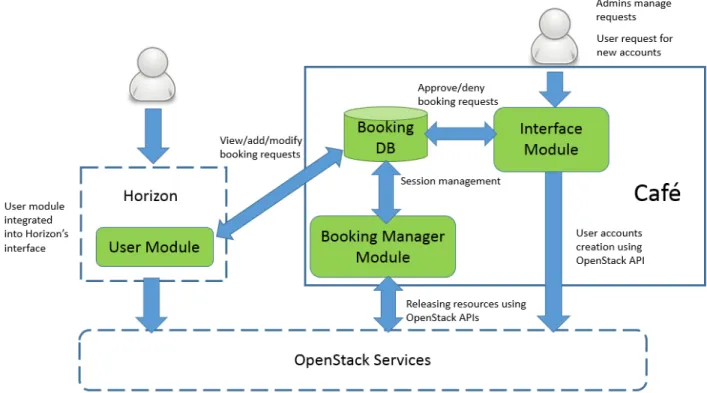
Caf´e consists of several modules: theinterface module, which handles user account creation and approval of booking requests; the booking manager, which handles the auto-matic releasing of allocated resources after the end of a user session and user session management; thebooking database which stores all booking requests. These modules together form Caf´e, a time-based user-centric resource management platform. The current Caf´e prototype is designed to run on top of OpenStack. Caf´e provides features for managing user access to resources while OpenStack provides the cloud resource provisioning and management capabilities.
Caf´e makes use of several Application Programming Interfaces (APIs) provided by OpenStack to handle tasks such as creating user accounts, suspension of virtual ma-chines, and granting and revoking of user access rights to use cloud resources managed by OpenStack. We have also integrated Caf´e’s user module-which provides the features that allow users to manage and make new booking requests-into OpenStack’s web interface module, Horizon. The integration allows users to use features provided by both Caf´e (booking request) and OpenStack (virtual machine provisioning) seamlessly. We discuss these features in details in Section IV. Figure 4 illustrates the interaction between Caf´e’s modules and OpenStack’s modules.
Next, we present how Caf`e functions from three perspec-tives: those of the user, the administrator and the backend management system.
B. Users
Users have access to two sets of features: account creation, and time-slot booking and management.
Figure 2: User account creation page
Figure 3: Module for users to manage their booking requests integrated into Horizon as a tab
Users can request for a new account through the “Create new user” link located at the OpenStack web login page. Users will be directed to a user account creation page where they are required to fill in essential details, such as contact email, password and account type as shown, in Figure 2.
Account type is used to control the amount of resource allocated to the user and to help the administrator with resource allocation. Each different type of account will have its own resource quota. The form also checks whether the email is from a valid domain (current prototype requires new users to have a valid email from the defined organisation) and whether another user account with the same email already exists. Once validated, the user will be directed to a “request received confirmation page” and the request is then sent to the administrator for approval. The user name is extracted from the email provided by removing the characters after ‘@’ (e.g. the account request shown in Figure 2 will result in an account with the user name of “newuser” being created upon approval.).
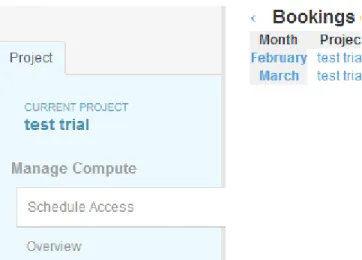
The second set of features made available to the user are the booking and management of time-slots for cloud resource access. The features are available once an account has been created for a new user. These features are accessible under the “Schedule Access” tab on the left side of the panel, as shown in Figure 3, upon logging into OpenStack through the Horizon interface.
Users can view the status of their booking requests and the time-slots booked using the “View Bookings” link located at the top of the page, as shown in Figure 5. Users can also edit their requests by clicking on the respective “Time” portion of the booking details displayed for each request. When a booking request is being modified, the system will set the status to “pending” and submit it to the administrator for approval, just as it does when a new booking request is being submitted. Once a modification has been made, users are no longer able to access the cloud resources at the time indicated in the originally booked time-slot.
Figure 4: Architecture of Caf´e, a time-based user-centric resource management platform for cloud management frameworks Bookings” link located at the top bar of the “Schedule
Access” tab, as shown in Figure 5. Users indicate their desired time-slot for accessing cloud resources by specifying the date, start time, and end time. Multiple bookings can also be made through the “Occurrences” option. Upon submission, the request, along with the booking details, will be updated into the booking database pending approval from the administrator. We describe how a booking request can be made in detail in Section IV-C. The “View Bookings” page will also be updated with the new booking, and display a “Pending” status to indicate the request is under consideration by the administrator.
Once a booking request has been approved, users can log back in to the Horizon interface at the stipulated time and start using the cloud resources allocated to them (as determined by the account type specified at the user account creation page). During the time when access is granted,
Figure 5: User’s View Booking page
users can perform actions such as virtual machine creation and termination using the allocated resources, through the features provided by OpenStack. We do not go into the details of how users can provision out a virtual machine as these functions are handled by OpenStack and are beyond the scope of Caf´e.
C. Administrators
Caf´e’s interface module provides the administrative fea-tures. Administrators can approve requests for new user accounts, time-slot booking requests, and manage account types through the module’s front end interface. Adminis-trators navigate between the groups of features by clicking on the “User Accounts”, “Booking Requests” or “Account Types” links at the main page, as shown in Figure 6.
The account request management page, shown in Figure 7, is the front end interface where administrators can approve or deny pending requests for new user accounts. All pending requests for new accounts will be shown in the main body of this page upon accessing the page. Approving and denying of requests is done by first checking the check box beside
Figure 7: Approving new user account requests in the “User Accounts” page
the respective requests and then selecting the relevant action from the “Action” drop down box on the top bar.
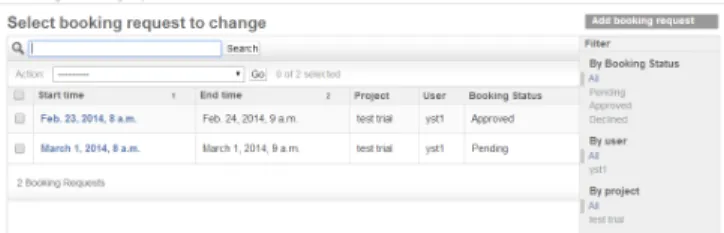
Approving and denying of users’ booking requests for time-slots can be done on the booking request management page, shown in Figure 8, and this function is accessed through the “Booking Requests” link on the main page. The approving and denying of users’ booking requests are done in a manner similar to managing requests for user accounts. The filter function located on the right-hand side allows administrators to filter requests shown by status, users, or projects. This functionality allows administrators to sort through the multiplicity of requests quickly if large number of requests are being made.
Lastly, administrators can add, modify, or delete account types through the “Account Types” page, shown in Figure 9, which is accessible via the “Account Types” link found on the main page. The account type determines the resource (e.g. vCPU, RAM) quota allocated to each user.
By clicking on the account types, administrators can modify quota limits or delete the account type. New account types can also be added by clicking the “Add Account Type” button at the top right corner of the page. Doing so will bring up a page where the quota values for each resource type accessible by users can be entered. Account types allow administrators to manage the amount of resources different groups of users can access.
D. Caf´e’s Back end Management System
Caf´e’s back end management system, the booking man-ager module, automatically manages the granting and revok-ing of user access rights at the start and end of user sessions, and also the releasing of allocated resources.
The module regularly polls the database to check whether a session is about to start or end. It does so by first retrieving details of approved user booking requests, with reference to the current time. The module then retrieves the user’s ID for sessions that are about to begin, and the user ID and project ID for sessions that are about to end.
Figure 8: Approving users’ booking requests in the ‘Booking Requests’ page
Figure 9: ‘Account Types’ page for managing account types
For sessions that are starting, permission to use allocated cloud resources is granted by modifying the user access list maintained by Keystone, OpenStack’s authentication module. A pre-defined role with the required permission, “booked”, is assigned to users using the Keystone API.
For sessions which are about to end, the module needs to perform two tasks: removing the “booked” role for relevant users from the user access list, and suspending active virtual machine instances for those users. The removal of the “booked” role from the relevant users is done in a similar manner to that for granting user permission to use the resources, except in that the Keystone API is called to remove the role from the user in the user access list. This action effectively revokes the permission to use the resources managed by OpenStack from the users.
All active virtual machine instances belonging to the user whose session has ended are placed into “suspend” mode to prevent users from accessing active virtual machines through other means. Suspending the virtual machines also returns used resources to the resource pool, therefore, allowing other users to use the cloud resources. The other reason for placing the virtual machines in “suspend” mode instead of terminating them is so that users can resume using those virtual machines in the future. This mode caters for users such as those described in Section II-B.
IV. IMPLEMENTATIONDETAILS
In this section, we address the implementation of the features described in Section III. We adopt Python version 2.6.6 as the main programming language for the implemen-tation of Caf´e. This choice is to allow better integration with OpenStack, as OpenStack is also implemented using Python. A. OpenStack
OpenStack [15] is an open-sourced framework that han-dles the orchestration of virtual machines and manage-ment of the underlying resources required for virtualisation. This framework includes the computing (Nova), networking (Neutron), storage (Swift/Cinder), authentication (Keystone) and web interfacing (Horizon) aspects of virtual machine provisioning. However, current releases of OpenStack do not manage user access to resources in detail. User access to cloud resources is managed via a login authentication only. With a valid account, users have access to allocated resources for an indefinite length of time.
Caf´e fills the gaps in OpenStack by providing a time-based approach for managing user access to resources. Caf´e’s focus is on providing an additional level of detail for
managing users’ access to resources, and, as such, it uses functionalities from OpenStack to suspend a user’s active virtual machines at the end of a session and to create new user accounts. We describe these features in more detail in the following subsections.
B. Interface Module
As mentioned in Section III, the interface module provides the interface for users to request new accounts and adminis-trators to perform administrative duties in the Caf´e system. The module is divided into the front end component, which consists of all the web interfaces for users to access features presented in Section III-B and the back end component, which executes the features provided through the front end. The front end component was discussed in detail in Section III. It consists of the web pages for user account and account type creation and for administrators to approve and deny the various user requests. The front end is built using the django framework [19]. Django was chosen for its ability to allow developers to deploy full scale websites (with separate administrative panels) quickly and extend the website dynamically.
The back end component executes the creation of user accounts and management of account types. It is also re-sponsible for updating the booking database with the new status for users’ booking requests, based on the decision of the administrators.
Creation of new accounts is carried out using OpenStack’s Keystone APIs. Once approved by the administrator, the back end component will invoke the account creation API and pass the details gathered from the users to the Keystone module. Keystone will then create a new user account and insert it into OpenStack’s database. Account type creation, modification, and deletion are done in a similar manner, except that the API used comes from OpenStack’s Nova module and that the details passed to the module are the new quota values for the account type.
When the administrator approves or denies a booking request, the back end component will update the respective booking request in accord with the new status. This update is done by connecting to Caf´e’s booking database and issuing the corresponding SQL statements for the update of records. C. User Module
The user module, where users manage and make new booking requests, is integrated into Horizon. This integration is achieved by implementing the module ()Schedule Access) as a tab in the Horizon interface. The integration is illustrated in the previous figure, Figure 3.
Upon accessing the “View Bookings”, link a retrieve de-tails function will retrieve and display dede-tails of all booking requests from the booking database based on the user’s ID. In the event where users modify their existing booking requests, an update function will change the status of the
booking request to “pending”. The function will then update the respective booking request in the booking database with the new booking details and status.
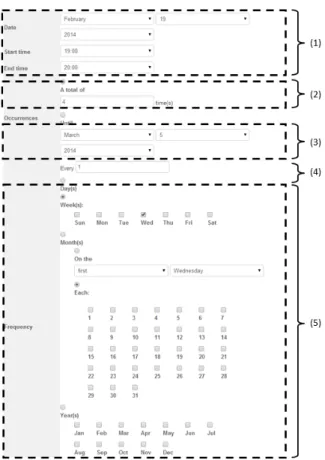
The time-slot booking page, shown in Figure 10, is used to gather the required details from users when a new booking request is initiated. Each booking request consists of the user’s ID, the project ID, the start and end time of the time-slot(s) requested, and the day/date. Users can request access over multiple time-slots in each booking request, as long as the duration is continuous (e.g. 7pm to 9pm). In the current Caf´e implementation, each time-slot is set at a 15-minute interval. We argue this timescale gives users more flexibility when asking for access time to cloud resources. Users will not be obliged to book for longer period of time than they actually require (e.g. if a user requires only half an hour, he or she would be forced to book an hour of access if each time-slot were an hour).
Users may opt to make bookings on single or multiple days. This option is activated by providing the relevant information in the various segments of the form shown in Figure 10. The form consists of the following segments:
1) start date with start and end time of a time-slot; 2) total bookings to make;
3) end date for multiple bookings; 4) frequency for multiple bookings; 5) unit for multiple bookings.
To make a single booking request for a single day, a user simply fills in the start and end time of the time-slot and the start date (1) and indicates a total of 1 booking in (2). Upon submitting, a single booking request with a “pending” status will be generated. The request will then be inserted into the booking database to await approval.
Multiple booking requests can be made by booking the same time-slot over several days. To generate multiple booking requests, a user first indicates the start date and the desired start and end time for the time-slot in (1). Next, the user can either choose to make a fixed number of booking requests by indicating a value in (2) or specify just the end date in (3) and leave it to the system to calculate the number of booking requests to make.The user will next have to indicate the frequency of the bookings in (4) and the unit for the interval of bookings in (5). Note that users can choose to fill in only either (2) or (3). An example of a multiple booking request would be:”Starting from February 19 2014, from 19:00 to 20:00 (1), for a total of 4 bookings (2), at every (4) Wednesday of the week (5).” The sample booking request will generate a total of 4 booking requests.
Once done, the user module calculates and generates the required number of booking requests, sets their status to “pending”, and updates the booking database.
D. Session Management
Thebooking managermodule manages the sessions dur-ing which users are granted access to cloud resources. This
Figure 10: Page for making a booking request task can be divided into two categories: session management and resource cleaning.
Session management involves the granting and revoking of users’ permission to access the cloud resources at the time stipulated in their approved time-slots. In the current implementation of Caf´e, control of users’ permission to access cloud resources is done through a role-based user control access list maintained by Keystone. A pre-defined role “booked” with the relevant permission created for the purpose of assigning access permission to users.
The process starts with the booking manager checking the booking database at fixed intervals for sessions that are about to start or end. It does so by comparing the start and end time of each booking request with the “approved” status with the current system time.
The booking manager first retrieves the user ID detail from all approved booking requests with a start time equiv-alent to the current system time. Based on the user ID, it assigns the “booked” role to the relevant users by modifying the user control access list. This task is accomplished through the use of Keystone’s API. All users with “booked” roles are then able to start using the allocated cloud resources when they next log in.
The reverse occurs for sessions which are ending. Sessions that are ending are identified by looking at the end time of each booking request in the booking database. The booking manager then extracts the user ID and the project ID associated with the identified booking request. The user
ID is used in the removal of the “booked” role from the user control access list, using the Keystone API.
The project ID is used by the booking manager to release back into the resource pool all used resources belonging to users whose sessions have ended. A list of virtual machines (identified uniquely using ID numbers) provisioned by the users is retrieved from the OpenStack database, using the project ID and the user ID. Based on this list, each virtual machine on the list is suspended using the Nova API. Sus-pending the virtual machines not only returns the resources used in the provisioning of the virtual machine back into the resource pool, but also preserves the content of the virtual machine so that the same user can re-use it in the future.
V. FUTUREWORK
Current implementation of Caf´e provides the core func-tionality for a time-based resource management platform that works in tandem with OpenStack to manage the use of cloud resources. We plan to work on the following areas so as to improve the Caf´e system:
Migration to Havana: We plan to work on supporting the new version of OpenStack,Havana[20], the key reason being that Havana supports creating and setting resource quota at the user account level. Currently, resource quota can be set at the project level only (resource quota is shared among users within the same project). This limitation makes it difficult for Caf´e to cater to users with special requirements, in terms of the amount of resources required. With account based quota setting, the amount of resources accessible by individual users can be controlled and users do not have to share resource quota with other users within the same project.
Automatic cleaning up of past booking requests: Cur-rent Caf´e implementation does not handle the removal of his-torical booking requests from the booking database. Admin-istrators are required to manually remove them through the administrative interface. An automated script that archives or removes historical booking requests will help prevent the database from growing out of proportion.
Integration of administrative interface into Horizon: Caf´e’s interface module is currently implemented as a sep-arate interface from Horizon. One reason for this situation was Horizon’s policy of not allowing users to access the in-terface without a valid user account. This restriction becomes a problem when integrating the “create new user account” functionality, as users do not have a valid account at that point. Hence, we plan to explore how the interface module can be fully integrated into Horizon’s interface, so as to provide a seamless user experience when using Caf´e (i.e. administrators do not have to switch between Horizon and Caf´e’s interface.).
Implementation of a calendar-style interface for book-ing of time-slots: We also plan to implement a calendar-style interface for users to manage their booking requests.
Such an interface would provide users with a graphical overview of dates. A calendar-style interface will also allow the overlaying of booking requests made previously. We foresee that this function would help users better plan their booking requests.
VI. CONCLUSION
In this paper, we present the design and implementation of Caf´e, a time-based user-centric resource management plat-form for cloud frameworks. We argue that Caf´e’s novel time-based approach to limiting users’ access to cloud resources can help address issues such as resource hogging in a cloud environment. Addressing these problems can help increase the utilisation rate of cloud resources further, especially in private clouds where resources are limited and the number of users to cloud resource ratio may increase over time.
As of the current implementation, administrators have to rely on the OpenStack and Caf´e administrator interfaces to keep track of the total resources being allocated and the various approved bookings in the system. Our next step will be to look at designing an interface where administrators can keep track of these information in one centralised interface. Such an interface will help administrators make better decisions when approving/denying requests.
We are currently in the midst of deploying Caf´e into our cloud test bed at the University of Waikato. This test bed and the Caf´e system will be trialled when the next university semester starts. Caf´e will be used to manage students’ access to the cloud test bed and to run various courses. During this time, we hope to be able to evaluate Caf´e and make further improvements to the system.
ACKNOWLEDGEMENT
The authors would like to thank TSG of Faculty of Com-puting and Mathematical Sciences for the support rendered in this project.
REFERENCES
[1] Amazon Web Services, “Amazon EC2,” http://aws.amazon. com/ec2/ (Accessed: 18/02/2014).
[2] Google, “Google Cloud Platform,” https://cloud.google.com/ [Accessed: 18/02/2104].
[3] C. K. Leong, “Capacity Planning for Your Virtual Data Center and Cloud - Part 3 March 2013,” https://infocus.emc.com/choong\ kengleong/ capacity-planning-for-your-virtual-data-center-and-cloud-part-3/ [Accessed: 18/02/2014].
[4] Google, “Google Cloud Storage - Access Control,” https://developers.google.com/storage/docs/accesscontrol #managingaccess [Accessed:19/02/2014].
[5] Google, “Google Compute Engine,” https://developers. google.com/compute/docs/resource-quotas [Accessed: 19/02/2014].
[6] Amazon Web Services, “AWS Identity and Access Man-agement (IAM),” http://aws.amazon.com/iam/ [Accessed: 19/02/2014].
[7] Amazon Web Service, “AWS Security Token Service,” http: //docs.aws.amazon.com/STS/latest/UsingSTS/Welcome.html [Accessed: 19/02/2014].
[8] Microsoft, “Windows Azure,” http://www.windowsazure. com/en-us/documentation/ [Accessed:19/02/2014].
[9] A. Avetisyan, R. Campbell, I. Gupta, M. Heath, S. Ko, G. Ganger, M. Kozuch, D. O’Hallaron, M. Kunze, T. Kwan, K. Lai, M. Lyons, D. Milojicic, H. Y. Lee, Y. C. Soh, N. K. Ming, J.-Y. Luke, and H. Namgoong, “Open Cirrus: A Global Cloud Computing Testbed,”Computer, vol. 43, no. 4, pp. 35– 43, 2010.
[10] Eucalyptus, “Eucalyptus Documentation - Managing Access,” https://www.eucalyptus.com/docs/eucalyptus/3.4/index.html\
#admin-guide/managing auth.html [Accessed: 19/02/2014]. [11] Eucalyptus, “Eucalyptus Documentation - Sample Policies,”
https://www.eucalyptus.com/docs/eucalyptus/3.4/index.html\
#admin-guide/policies samples.html [Accessed: 19/02/2014]. [12] OpenNebula, “OpenNebula - Users and Groups,”
http://docs.opennebula.org/4.4/administration/users and groups/index.html [Accessed: 19/02/2014].
[13] OpenStack, “OpenStack Cloud Software,” http://www.openstack.org/software/openstack-shared-services/ [Acccessed: 19/02/2014].
[14] R. K. L. Ko, A. Y. S. Tan, and G. P. Y. Ng, “’Time’ for Cloud? Design and Implementation of a Time-Based Cloud Resource Management System,” in Proceedings of the 7th IEEE International Conference on Cloud Computing (CLOUD’14), 2014.
[15] OpenStack, “Openstack - Open-source software for building private and public clouds,” http://www.openstack.org/ [Ac-cessed: 17/12/12013].
[16] A. Tselishchev, P. Tedesco, E. Ormancey, and C. Isnard, “CERN Computing Resources Lifecycle Management,” Jour-nal of Physics:Conference Series, vol. 331, 2011.
[17] J. Yap, “Desktop virtualisation ups school’s operational efficiency April 2012,” http://www.zdnet.com/desktop-
virtualization-ups-schools-operational-efficiency-2062304506/ [Accessed: 18/02/2014].
[18] P. Korzeniowski, “Desktop Virtualisation Saves School District $250,000 August 2010,” http://www.networkcomputing.com/end-to-end-apm-tech-center/desktop-virtualization-saves-school-dist/229501279/ [Accessed: 18/02/2014].
[19] Django Software FounGoogle, “django - The Web framework for perfectionists with deadlines,” https://www.djangoproject.com/ [Accessed: 19/02/2014]. [20] OpenStack, “OpenStack Havana,” https://www.openstack.org/