
I
nstitute for
S
oftware
R
esearch
University of California, Irvine
Anita Sarma
University of California, Irvine [email protected]
A Survey of Collaborative Tools
in Software Development
March 2005
ISR Technical Report # UCI-ISR-05-3
Institute for Software Research ICS2 210 University of California, Irvine Irvine, CA 92697-3425 www.isr.uci.edu
A Survey of Collaborative Tools
in Software Development
Anita Sarma
Institute for Software Research
Donald Bren School of Information and Computer Sciences University of California, Irvine
ISR Technical Report # UCI-ISR-05-3
March 22, 2005
Abstract: Collaboration is at the heart of software development. Virtually all
software development requires collaboration among developers within and outside their project teams, to achieve a common objective. A number of classification frameworks exist that can be used to classify collaborative tools. In addition to placing the various tools in context, developers can use these kind of frameworks to select the right mix of tools for their situation. Each classification framework has a different focus: some provide a detailed taxonomy to compare tools in a particular area, some classify tools based on the functionality of the tools, some classify tools based on the high-level approach to collaboration that the tools take, and so on. However, currently no framework exists that classifies tools based on the user effort required to collaborate effectively. This however is also a critical component in choosing the “right” set of tools for a team.
In this survey, we take a look at collaborative tools from the perspective of user effort. For the purposes of this paper, we define user effort as the time expended in setting up the tools, monitoring the tools, and interpreting the information from the tools. While we cannot quantify the efforts required of each tool in detail, it is clear that there is a natural ordering among different groups of tools. We propose a framework that identifies these groups and highlights this ordering. Based on this framework, our survey organizes the individual tools into tiers.
1 INTRODUCTION
A Survey of Collaborative Tools
in Software Development
Anita Sarma
Institute for Software Research
Donald Bren School of Information and Computer Sciences University of California, Irvine
ISR Technical Report # UCI-ISR-05-3
March 22, 2005
1
Introduction
Collaboration is at the heart of software development. Virtually all software devel-opment requires collaboration among developers within and outside their project teams, to achieve a common objective. It has in fact been shown that about 70% of a software engineer’s time is spent on collaborative activities [219]. Indeed, col-laboration in software development has been studied by researchers in the fields of Software Engineering and Computer Supported Cooperative Work (CSCW) since the 1980s and has produced a wide range of collaborative tools.
Enabling software developers to collaborate effectively and effortlessly is a difficult task. The collaboration needs of the team depend to a large extent on environmental factors such as, the organizational structure of the team, the domain for which the software is produced, the product structure, and individual team members. Accordingly, research in collaborative development has produced a host of tools, each typically focussing on a different aspect of collaboration. Most teams have their favorite repertoire of tools that has been built from historical use. These tools may not always be the best suited for the team, but the team still uses them nevertheless as the inertia and cost of trying out new tools surpasses the benefits. A number of classification frameworks exist that can be used to classify collaborative tools. In addition to placing the various tools in context, developers can use these frameworks to select the right mix of tools fit for their needs. Each classification
1 INTRODUCTION
framework has a different focus: some provide a detailed taxonomy to compare tools in a particular area [44], some classify tools based on the functionality of the tools [93], some classify tools based on the high-level approach to collaboration that the tools take [218], and so on. However, currently no framework exists that classifies tools based on the user effort required to collaborate effectively. This however is also a critical component in choosing the “right” set of tools for a team.
In this survey, we take a look at collaborative tools from the perspective of user effort. For the purposes of this paper, we define user effort as the time spent in setting up the tools, monitoring the tools, and interpreting the information from the tools. While we cannot quantify the efforts required of each tool in detail, it is clear that there is a natural ordering among different groups of tools. We propose a framework that identifies these groups and highlights this ordering. Based on this framework, our survey organizes the individual tools into tiers.
Our framework is in the form of a pyramid consisting of five vertical layers and three horizontal strands. The five layers in the pyramid are: (1)functional, (2)defined, (3)proactive, (4)passive, and (5) seamless. Tools that are at a higher layer in the pyramid provide more sophisticated automated support, thereby reducing the user effort required in collaborating. Each level, thus, represents an improvement in the way a user is supported in their day-to-day collaborative activities. The three strands in the pyramid are: communication, artifact management, and task management. These three dimensions, we believe, are critical needs crosscutting all aspects of collaboration.
The remainder of this paper is organized as follows. In Section 2, we discuss a few existing representative classification frameworks. Section 3 presents the details of our framework. The five layers of the pyramid are discussed in Sections 4 through 8, with the functional layer discussed in Section 4; the defined layer discussed in Section 5; theproactive layer discussed in Section 6; the passivelayer discussed in Section 7; and the seamlesslayer discussed in Section 8. We present our obser-vations in Section 9 and conclude in Section 10.
2 RELATED WORK
2
Related Work
Group collaboration among software developers has been studied by researchers in software engineering and CSCW since the 1980s. Research in these areas has produced a wide range of collaborative tools (e.g., tools that support communication, task allocation, decision making). To better understand the functionalities of these tools and how they compare with each other, a number of classification frameworks have been proposed by others. In this section, we take a brief look at some of the representative frameworks.
2.1 Space and Time Categorization
Grudin modified the DeSanctis and Gallupe space and time classification frame-work [58] to create a 3x3 matrix (Figure 1). The original frameframe-work was a 2x2 matrix that classified tools based on the temporality and the location of the teams (e.g., does the tool support asynchronous communication for collocated or distributed teams). Grudin improved DeSanctis and Gallupe’s framework by further distinguishing the tools based on the predictability of the actions that they support [93]. Grudin’s framework, then, is a 3x3 matrix that classifies tools based on the temporality of activities, location of the teams, and the predictability of the actions.
Different but predictable Different but predictable Different and unpredictable Different and unpredictable Meeting
facilitation Work shifts Team rooms Same Same Telephone, video , desktop conferencing Email Collaborative writing Interactive multicast seminars Computer board Workflow
Pl
a
ce
Time
2 RELATED WORK
Figure 1 represents the space and time framework, each cell illustrating some repre-sentative applications for the particular space and time categorization. The rows in the matrix represent whether applications support collocated or distributed teams. The top, the middle, and the bottom row of the matrix represent activities that can be carried out at a single place, in several places that are known to the participants (email exchanges), and in numerous places not all of which are known to participants (message posted in a newsgroup), respectively. The columns in the matrix depict whether applications support synchronous or asynchronous collaboration. The left, the middle, and the right column of the matrix represent activities that can be car-ried out “in real time” (a meeting), at different times that are highly predictable (when one sends an email to a colleague expecting it to be read within a day or so), and at different times that are unpredictable (open-ended collaborative writing projects), respectively.
2.2 Workflow
Research in workflow advocates the use of models and systems to define the way an organization performs work [165]. A workflow system is based on a workflow model that divides the overall work procedure of an organization into discrete steps with explicit specifications of how a unit of work flows through the different steps. Workflow languages (e.g., E-net modelling [164], Information-control net (ICN) [70], PIF [134]) implement the workflow model by providing constructs for defining each
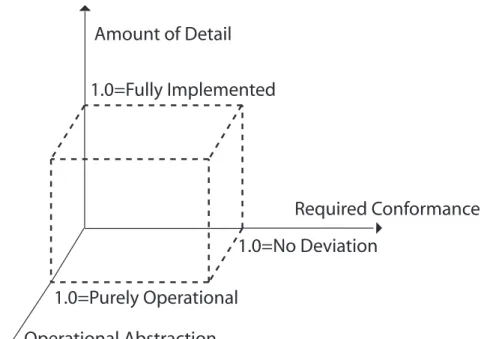
Amount of Detail
Operational Abstraction
Required Conformance
1.0=Purely Operational
1.0=Fully Implemented
1.0=No Deviation
2 RELATED WORK
step (computation language) and how the unit of work flows between the steps (coordination language).
Gary Nutt [165] created a three dimensional model domain space that is based on how a workflow model models a work procedure. As illustrated in Figure 2, the three dimensions in the model space are: (1) x axis − the amount of conformance that is required by the organization for which the process is a model, (2) y axis − the level of detail of the description of the process, and (3) z axis−the operational nature of the model (whether the model describes how the process works rather than what is required from it). In this domain, models that represent only structured or explicit work [191, 31] are in the sub-space approximating x→1, y→1, and z→1, whereas systems intended to address unstructured work belong to a subspace where x→0, y→0, and z→0. All other process types fit in elsewhere in the 3D space (e.g., descriptive and analytic workflow models [70, 73] can be placed in the plane defined by 0≤x≤1, 0≤y≤1, and z=1; conventional workflow enactment systems [31, 155, 146] can be characterized by the line segment x=1, y→1, and z=1).
2.3 Interdisciplinary Theory of Coordination
Malone and Crowston [141] use coordination theory to investigate how people in other disciplines manage the dependencies that arise in collaboration. They define coordination as managing dependencies between activities and provide a framework for classifying collaborative tools by identifying the coordination processes the tools use to manage the different kinds of dependencies. Malone and Crowston take a broad outlook and study coordination at an interdisciplinary level, with the objec-tive of finding similarities in concepts and processes in different disciplines (e.g., economics, computer science, organization theory). These similarities would then allow ideas to be transported across the discipline boundaries, which in turn would help in enriching the existing processes in each discipline. For example, the way or-ganization theory handles resource allocation (hierarchial resource allocation, where managers at each level decide how the resources are allocated) can be modelled to handle resource allocation in software development teams.
Malone and Crowston identified the coordination processes used by different disci-plines to manage dependencies between activities. They then created a taxonomy of collaborative tools, illustrated in Table 1, based on processes that the tools sup-port in software development. Rows 1 through 4 in the table identify processes for managing typical dependencies between developers and resources in a software development team. For example, task assignment needs to ensure that tasks are as-signed to developers who have the required expertise (row 1), the interdependencies between tasks should be considered while creating tasks and subtasks (row 4), and so on. In addition to the processes for managing the coordination dependencies, communication and group decision making play an important role in collaboration and have been added to the framework (rows 5 and 6). For instance, in case of
2 RELATED WORK
Process Example systems
Managing shared resources (task assignment and prioritization)
Coordinator [225], Information Lens [142]
Managing producer/consumer re-lationships (sequencing prerequi-sites)
Polymer [45]
Managing simultaneity
con-straints (synchronizing)
Meeting scheduling tools [14]
Managing task/ subtask relation-ship (goal decomposition)
Polymer [45]
Group decision making gIBIS [41], Sibyl [133], electronic meeting
rooms [57, 58]
Communication Electronic mail, computer conferencing (e.g.,
Lotus, 1989) electronic meeting rooms [57, 58], Information lens [142], collaborative au-thoring tools [78, 71]
Table 1: A Taxonomy of Collaborative Tools Based on the Process They Sup-port [141].
shared resources, a group needs to decide how to allocate the resources; in manag-ing task / subtask dependencies, a group mustdecide how to segment tasks; and so on.
2.4 Formal versus Informal Approach to Collaboration
The formal versus informal coordination model [218], illustrated in Figure 3, clas-sifies tools based on their high level approach to collaboration. This framework classifies tools into three categories, namely tools that follow formal process-based approaches, tools that provide informal awareness-based coordination support, and tools that combine these two approaches.
Tools that follow formal process-based approach provide coordination by breaking the entire software development effort into discrete steps. At the end of each step, developers are required to synchronize their work to maintain consistency. In this approach the tool is responsible for the coordination protocols that the developers are required to follow (e.g., the check-in/check-out model of SCM systems, workflow systems). The chief advantages of the formal process-based approach are, that they are group centric and scalable. Their drawback is that the insulation provided by the workspaces quickly turns into isolation, as developers are not aware of the activities of others that may affect their work.
2 RELATED WORK Conceptual Visualization Formal process based coordi-nation Informal awareness based coordination Continuous coordination Scalable; Control; Insulation from other activities; Group-centri Strengths Weaknesses Flexible; Promotes synergy; Raises awareness; User-centric Resynchronization problems; Insulation becomes isolation Not scalable; Requires extensive human intermediation Expected to be the strengths of both formal and informal coordination
To be discovered by the current research
Figure 3: Formal vs. Informal Approach [218].
explicitly or implicitly disseminating information (e.g., artifacts that have changed, activities of other developers) to the members of a team. It is the responsibility of the members of the team to interpret this information and pro-actively self-coordinate. Usually this leads to some kind of informal agreement according to which developers plan their activities. While this approach is user-centric and gives the users control and flexibility in defining their coordination protocols, it requires extensive human intermediation and is not scalable.
Neither the formal process-based approach nor the informal awareness-based ap-proach is completely satisfactory. The weaknesses further compound when con-fronted with the reality of coordination needs in distributed settings. To overcome this problem, van der Hoek et al. [218] propose an integrated approach, called con-tinuous coordination, that supports collaborative work by combining the strengths of both the formal and informal coordination approaches. Applications that fol-low this approach would be highly flexible and be able to continuously adapt their coordination support to the needs of the task at hand. Research in continuous co-ordination, however is new and has not yet produced any prototype applications, therefore the strengths in the table are expected and the weaknesses have still to be discovered.
2.5 Summary
Each of the frameworks discussed above approaches collaboration from a differ-ent perspective: Grudin classifies collaboration tools based on whether they can support synchronous or asynchronous communication for distributed or collocated teams; Nutt classifies workflow systems based on the characteristics of the underly-ing workflow model; Malone and Crowston focus on coordination processes that can
2 RELATED WORK
be shared between multiple disciplines; and van der Hoek et al. classify applications based on their high-level approach to collaboration.
What is interesting to observe, however, is that none of these frameworks classify tools based on the user’s effort required to collaborate effectively. In fact, all of the frameworks look at coordination tools from a functionality point of view. For exam-ple, the space and time categorization tells us which tools can support collaboration at real time or which tools can support distributed collaboration; the formal versus informal framework informs us which tools follow the formal process-based approach and which the informal awareness-based approach. These frameworks do not specify the expected kind of user effort that is required in using a particular kind of tool for collaboration. In this survey, we introduce a new classification framework that revolves around different classes of user effort required to collaborate effectively. We discuss our framework in the next section.
3 CLASSIFICATION FRAMEWORK
3
Classification Framework
Our classification framework is based on two principal characteristics of collabora-tive tools, namely: (1) the level of coordination support provided to users, and (2) the focus of a tool on one of the three essential elements of collaboration: commu-nication, artifact management, and task management. Our classification framework combines these two characteristics to form a pyramid, as illustrated in Figure 4. We distinguish five levels of coordination support and three different foci of tools. The five levels of coordination support are organized vertically and we call them “layers” from here on. The foci of the tools are organized horizontally, and we call them “strands” from now on.
Layers are based on the “level of coordination support” provided by the tools. By this, we mean that tools at a higher layer provide better automated support (and therefore less user effort) than tools in layers below it. Each layer, thus, represents an improvement in the way a user is supported in their day-to-day collaborative activities. We identify five layers: (1)functional, (2) defined, (3)proactive, (4) passive, and (5)seamless.
Strands in the pyramid represent the three elements that we consider intrinsic to collaboration, namely: (1) communication among team members, (2) artifact man-agement, and (3) task management. Research in collaboration has typically focused on one of the strands at a time. By including all three strands in our pyramid, we are able to create a common ground for classifying the tools that stem from different approaches.
As we move up the layers in the pyramid, the level of support provided by collabora-tion tools increases while at the same time the user effort in enabling collaboracollabora-tion decreases. Tools at the higher layers in the pyramid provide advanced automated support to users, can handle large and complex team structures, and reduce action and information overload on users as compared to tools at the lower layers. We envi-sion that the layers are not isolated, but functionally build upon each other. Layers become stronger than when functioning in isolation, i.e., when combined with the functionalities of the layers below it.
As we progress up the pyramid, the distinction among the strands becomes increas-ingly blurred. The communication strand slowly but surely moves over into the territory of the artifact management strand. So does the task management strand, until all three strands merge in the highest layer of the pyramid. This merging rep-resents insights from ethnographic studies [92, 124] which found that, to coordinate their activities, users combine different cues and resources from the environment in which they operate. Researchers and tool builders alike have recognized this, and have broadened their focus to encompass support for more than one strand in their tools.
Continuous coordination, collaborative architecture, seamless development environments,
Asynchronous communication Access to common set of artifacts, isolated workspaces and version control
Parallel development, roles and access rights Passive awareness of
development activites and developers, manage
information overload
Task allocation and assignment
Email, SCM (pessimistic), basic project management tools, bugtrackers
Communication archival along with artifacts
Communication F unctional Collocation benefits to distributed development Organizational memory, knowledge acquisition and dissemination, social navigation
Advanced SCM functionality (merging), Instant messaging, visualization systems, recommendation sytems, GDSS
Workflow, SCM (optimistic), process environments, MUDs bugtrackers
Prescribed and defined coordination support
Artifact Management Task Management
Advanced conflict detection
Awareness tools, collocation benefits (screen sharing, war rooms, tangible user interfaces), event notification services, social callgraphs
Collaborative development environments, collaborative architectures D efined Proactive Passive Seamless
Fine grained versioning, conflict resolution Instant Messaging,
monitoring changes to artifacts
Research areas that have focused on capabilities at a particular layer F ig u re 4 : C la ss ifi ca ti o n F ra m ew o rk .
3 CLASSIFICATION FRAMEWORK
At this point, the pyramid is not complete. We have left the top of the pyramid open to signify further research. We do not know if the seamlesslayer will be the last layer in the pyramid or if it will split into additional layers. This is subject to future research as we have barely begun to scratch the surface of this layer.
3.1 Layers
Tools in the functional layer enable collaborative development, but do so with minimal technical support. Development teams at this level are small and work with the bare minimum in tool support; developers can get by in collaboration, but much manual effort is still required. For example, generally tools at this level allow different developers to access the same set of artifacts or communicate using email, but developers at this level are chiefly responsible for the actual coordination activity of who changed which artifacts and at what time. Teams relying on tools at this level depend on the developers’ knowledge of the product structure, of which developer has been and is currently working on which changes, and of how the various changes relate to each other.
As teams become larger in size, the bare bones coordination support offered at the functionallayer is insufficient. Developers in large teams often must make changes to the same artifacts in parallel, because it is more difficult to make non-overlapping task allocations in large teams. Tools at thedefinedlayer provide exactly this kind of support by guiding users with a well-defined set of prescribed steps. For instance, tools in office automation or workflow help divide the development process into discrete steps, help specify which developer should change which artifacts, and help in directing what the changes to an artifact should be. These systems are “good”, as developers can now rely on the system to support their coordination activities, (e.g., the system automatically routes the final checked-in code to the “test” team), but at the same time they are “bad” as developers have to strictly follow the prescribed steps and have little flexibility.
Tools at the proactive layer allow developers more control over the coordination steps. Specifically, developers can be proactive in obtaining the information with which they can fine tune the coordination steps to suit their project. For example, using tools such as CVS-watch [20] and Coven [37], users can monitor changes to artifacts of interest in order to avoid potential conflicts. Once the tools inform users of such changes, they can either merge the changes using automated merge tools [151] or not take any action at the moment. Developers with tools at this layer clearly have control over the overall coordination process, but in order to achieve this flexibility they have to be actively involved in the process.
Tools at the passive layer reduce the effort required to obtain the information necessary to tailor their development process. At this layer, users can configure the tools to view relevant, timely information. Some of the tools provide default modes
3 CLASSIFICATION FRAMEWORK
requiring little to no configuration, yet provide important information at opportune times. Typically, the information is peripherally displayed in an unobtrusive manner, to create a subtle “awareness” of what activities are occurring in parallel. For instance, tools such as Palant´ır [194], JAZZ [36], and others [97, 109, 170] provide passive workspace awareness by displaying which developers are changing which artifacts. Developers can now realize which changes would affect them and with whom they should coordinate their activities. Tools at the passive layer allow developers to concentrate on their current development activity, knowing that they will be notified if there are pertinent changes. However, a drawback of the tools at this layer is that users have to typically run multiple applications, because each of these tools provides a different set of information (process support mechanism, awareness mechanism, conflict resolution mechanism, and so on) and each typically is a stand alone tool.
At the final layer in our pyramid, the seamless layer, developers no longer have to switch contexts while accessing different sets of information, as tools at this layer are built such that they can be integrated seamlessly to provide continuous coordination [218]. Research in environments such as Oz [19] and Serendipity [95] are investigating exactly these kinds of integration, providing a single tool for seamless task management, artifact management and communication (see Section 3.2 for each of these strands). Research in this area is still very much in progress, but the hope is that eventually there will be environments that allow developers to seamlessly use all necessary collaboration facilities within their development environment.
As we move up the hierarchy, tools change from supporting the minimal needs that barely enable coordination to providing full-featured, seamless coordination support that places a minimal burden onto the user. We note that this change has gradually occurred over time, but that layer development has not been strictly historical. Sometimes, research has jumped a level (as in the case of Portholes [64], see section 7.1.1) and sometimes research has returned to a lower level to spark evolution at a higher level (as in research in social navigation, see section 6.3.3, where research on email allowed subsequent development of recommendation systems [163, 166]).
We recognize that environmental factors impact research in collaboration. For ex-ample, a change in the problem domain or the team structure often creates different coordination needs. We consider two environmental factors, namely product struc-ture and organizational strucstruc-ture, as factors that have shaped the collaboration capabilities of tools at each layer. An example of a change in product structure leading to new capabilities was the fact that programming evolved to include inter-faces (promoting stronger separation of concerns), which has allowed easier impact analysis. An example of a change in organizational structure was the emergence of distributed teams that are geographically separated. This created a need for workspace and presence awareness tools that operate across time and distances. We describe the effect of these factors and the context as we introduce each layer.
3 CLASSIFICATION FRAMEWORK
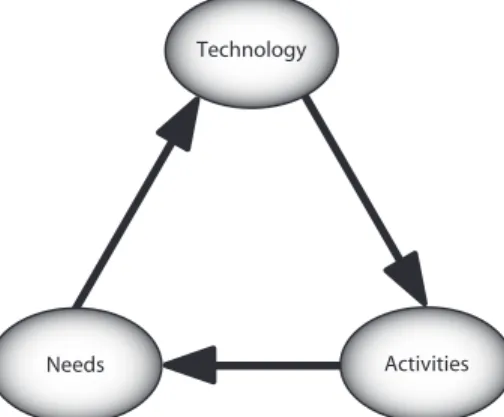
Technology
Needs Activities
Figure 5: Three level interaction.
While creating the hierarchy of layers, we also consider experiences from tool us-age that have influenced the needs for the tools at each layer. For example, when users become experienced with their current tools they feel the need for advanced features. By the same token, the approach taken by the tools in solving a particular need creates a newer set of needs that have to be addressed. This is illustrated by the relationship between needs, technology, and usage of technology in Figure 51 . Typically, researchers identify a set of needs and then create the technology that addresses those needs. Oftentimes the technological solution or the way users inter-act with the technology creates a newer set of needs. A new generation of tools is then created to address these additional set of needs, continuing the cycle.
For example, to address the coordination needs of a large software development team, SCM tools created workspaces [20, 44, 51]. These workspaces allow developers to make changes in private, and after completing their tasks, synchronize their changes with the repository. On the one hand, the isolation created by workspaces is “good”, because it allows developers to make changes without being affected by others. On the other hand, this isolation is “bad”, since it inhibits developers from being aware of their co-developers’ activities. This was confirmed in a study of a software development organization, which revealed that developers planned their activities based on the activities of their colleagues [89, 90]. The users gained this information by querying the SCM repository to find out which artifacts had been checked out by whom. Another study [55] investigated the informal convention of using email that augmented the formal development process already in use. These activities around the repository clearly imply the need for workspace awareness. Such research is now in progress [194, 36, 157].
1
3 CLASSIFICATION FRAMEWORK
3.2 Strands
The Cambridge dictionary defines collaboration as: “two or more people working together to create or achieve the same thing” [179]. In the domain of software development, collaboration involves the coordination of developers to create and maintain software artifacts. Broadly speaking, collaborative support in software tools must involve support for: (1) communication among team members, (2) ar-tifact management, and (3) task management. We use these three aspects, which we call “strands”, throughout the remainder of the paper as vertical slices of the pyramid.
Communication: Teams use communication to keep each other up to date with
the tasks that have been completed, to communicate changes in schedules, to ask questions or provide solutions to problems, to schedule meetings, and numerous other purposes. When an organization does not have a good communication in-frastructure, developers might hesitate to ask questions to colleagues whom they do not know, not communicate changes to an artifact that others might depend on, not be able to keep track of past communication, and so on. This lack of good communication in teams often leads to project delays.
Artifact Management: Artifacts in software systems are highly interdependent
on each other. This interdependence implies that changes to software artifacts, be it code or other artifacts produced during the life cycle (e.g., a requirements specification, a design), need to be managed to ensure the correct behavior of the program. In large projects, it becomes impossible for developers to manage changes to software artifacts on their own. Developers therefore increasingly depend on tool support to version their code, coordinate parallel development, resolve conflicts, and integrate code, among other things.
We place artifact management as the central strand in our framework, since col-laboration in software engineering primarily involves coordination of development activities around a set of software artifacts. As we move up the pyramid, we note that the distinction among the strands becomes blurred and that the other two strands slowly but surely intrude into the territory of artifact management. As we stated before, this is an explicit choice, namely to illustrate the change in research focus wherein research is increasingly drawing on all three strands to provide tool support. For example, in theproactive layer of the pyramid, developers can mon-itor changes to artifacts. In the event of a change, the system notifies developers who had registered interest on the artifact. Here, we see that “when” the communi-cation is triggered or “who” the communicommuni-cation is sent to, depends on the artifacts in question.
Task Management: Task management in software development involves, among
others, decomposing the project into smaller units, identifying developers with ex-pertise, assigning tasks to developers, and creating a development schedule. In large
3 CLASSIFICATION FRAMEWORK
projects, task management is a time-consuming and difficult task. Managers of large teams typically rely on project management tools to assign and monitor tasks. For instance, workflow systems split the development process into discrete steps and specify which developer should make what change to which artifact. Task alloca-tion in large projects is seldom clean and managers rely on automated tool support to continuously coordinate the activities of developers with overlapping task re-sponsibilities. For example, concurrent changes to the same artifact have to merged before they can be placed in the repository.
In the following sections, we discuss each layer and each of the three strands cross-cutting a given layer. We begin with the functional layer and its communica-tion, artifact management, and task management strands. This pattern is repeated through the first four layers of the pyramid (Sections 4 through 7).
4 THE FUNCTIONAL SUPPORT LAYER
4
The Functional Support Layer
Thefunctionallayer is the first layer in the pyramid and forms its base. It depicts the basic level of automated collaboration support provided by tools. Previous to the tools in this layer, collaboration was managed manually. The tools at this layer were promoted by the type of organization and product structure prevalent at that time. From the organizational and product structure point of view, tools primarily needed to support collaboration for small, “flat” teams working with structured programming languages.
Based on the aforementioned criteria, tools at this layer provide basic automated support for developers to communicate with each other, access and modify a common set of artifacts, and enable managers to allocate and monitor tasks. These tools form the transition from “no automated support” for collaboration to the “minimal automated support” necessary to allow a team to function.
4.1 Communication
Communication is one of the key factors in coordinating the activities of team mem-bers and has a big impact on how successful the team can be [123, 33]. Traditionally, face-to-face meetings were the typical means of communication in a team, with re-ports and memos being used for archival purposes.
As personal computers became popular, face-to-face communication was increas-ingly replaced by electronic communication, primarily email. Email was widely adopted as it allowed developers to asynchronously communicate over distances, refer to previous replies, reply to a group, record communication with little extra effort, and so on. Email has largely become popular because of its low learning curve and the ability to resolve problems without having to schedule meetings. Currently, there are a number of email clients, both commercial and open source [104, 142]. In addition to email, the open source community relies heavily on news groups and discussion forums for their communication needs. While email is more directive and chiefly used for point-to-point communications, news groups and discussion forums are more open and allow interested people to subscribe to the list [26, 66]. Dis-cussions in these forums usually start when someone in the list posts a question or an interesting solution, that is then followed by discussion among other sub-scribers. Often times, complex solutions are attained in these discussion forums without members ever meeting face-to-face or sending personal email.
The open source community is an excellent example of a software development community that primarily depends on the tools in the functional layer for their collaboration support. Most of the team members never even meet each other face-to-face. The core development teams in open source projects are relatively small
4 THE FUNCTIONAL SUPPORT LAYER
[181] and use email or discussion forums for most of their communication needs. Successful projects produced by the open source community have demonstrated that groups can successfully collaborate by relying solely on the tools infunctional layer [154].
4.2 Artifact Management
The basic support for managing artifacts in a collaborative software development environment involves: access to a common set of artifacts, private workspaces that allow developers to work uninterrupted on their tasks, and version control. Software configuration management (SCM) systems provide exactly this kind of functional-ity [215, 183]. Developers can check-out artifacts, in which they are interested, from a central repository into a private workspace. There, they can make changes without any interference from other developers. Once the changes are complete, they can check-in the artifact back into the repository, making the artifacts and the changes available to the rest of the team.
SCM systems also version artifacts such that changes can be made incrementally and rolled back should the need arise. The SCM repository creates a new version (a new identifier) for the artifact when it is checked-in. Versions are not directly accessible, but have to be checked out from the repository. This process ensures that artifacts in the repository cannot be changed directly and that changed artifacts are always given a new version number. SCM systems thus support the development process by maintaining the software artifacts, recording the history of the artifacts, providing a stable working context for changing the artifacts, and allowing a team to coordinate their changes to its artifacts [76].
The check-out/check-in model of SCM systems, as characterized by systems, such as SCCS [187], RCS [214], and DSEE [131], is mainly pessimistic in nature. In this model, once an artifact has been checked-out by a developer, it is locked by the repository and is not available for modifications by others, until the changes are checked back into the repository by the original developer and the lock is released by the repository. Pessimistic SCM systems ensure that there are no conflicting changes to the same artifact, but only ensure this by severely limiting the amount of parallel work.2
SCM systems were the first applications that handled artifact management and based on their success they have become the de facto system for managing software artifacts, especially code [74]. Some systems, such as BSCW [6] and Orbits [143], that manage artifacts by leveraging repositories. However, these tools are not as popular or widely used as SCM systems. We discuss some of these systems later, based on their advanced functionality in addition to basic artifact management.
2
RCS does allow merging (rcsmerge [214]), but this is a functionality that we will discuss in Section 6.
4 THE FUNCTIONAL SUPPORT LAYER
4.3 Task Management
In the functionallayer, task management involves task allocation and task moni-toring. Managers allocate tasks based on expertise of developers and in a manner to avoid duplication of work or conflicting efforts [67]. Once tasks are assigned, man-agers continuously monitor the progress of team members to ensure that individual tasks are executed on time, to coordinate the activities of team members where responsibilities overlap, and to keep the overall development effort on schedule. In the past this was a purely manual activity, with schedules on paper, meetings to assign tasks, status meetings for monitoring progress, and so on. The tools in thefunctionallayer of the pyramid provide managers with rudimentary task man-agement support. Early versions of nowadays well established project manman-agement tools like Milos [85], Autoplan [62], and MS-project [35] provided basic project plan-ning and scheduling tools.
At this layer, we also include tools such as, email, basic SCM systems, and rudi-mentary bug tracking systems as they too help in scheduling and monitoring task assignments. Besides its critical role in communication among individual develop-ers, email has come to play a central role in task management. It has been found that senior managers spend a majority of their time answering email [66, 18]. Email has become a popular management tool as it facilitates managerial activities like: assigning tasks, scheduling meetings with the help of calendering systems that track when a developer is busy, and placing reminders for themselves by flagging impor-tant email or with to-do lists [16].
Pessimistic SCM systems (e.g., RCS [214], SCCS [187]) and bug tracking systems (e.g., Mantis [144], Bugzilla [30]) serve as coordination tools for project management by allowing managers to monitor changes to artifacts. For example, a manager can query a SCM repository to detect which software artifacts are currently locked by which developers, bug trackers can be used to detect which bug reports have been closed and which are still open, and so on. Pessimistic SCM systems can also prevent task duplication considerably, as in this model only one developer can work on an artifact at any given time. This ensures that developers are always working with the latest changes in the repository and therefore will not duplicate efforts that have already been coded. As stated before, the open source community is a successful example of software development teams that mainly depend on email, SCM systems and bug trackers for their collaboration needs.
5 THE DEFINED LAYER
5
The Defined Layer
The tools discussed in the previous layer, the functionallayer, provide only rudi-mentary automated support for collaborative groups. They are sufficient for teams that are small, have minimum overlapping of tasks, and low interdependencies in functionalities. The structure of the teams changed as the field of software engineer-ing matured and demand for software burgeoned, with different disciplines relyengineer-ing on software for their applications (e.g., medical community, automobile industry, telecommunication industry). Teams became larger in size and more structured in nature. Moreover, in order to stay competitive and reduce the development time and cost, parallel development was encouraged.
The tools at thefunctionallayer can not handle these changed collaboration needs. Well-defined software processes are needed to coordinate the activities of members in a large team. The second layer in the pyramid, thedefinedlayer, historically builds on thefunctionallayer and includes tools that support such well-defined software processes to help in collaboration. The tools at this layer prescribe defined steps that advise developers which steps they are required to take and who to communicate which artifact with.
The birth of object oriented programming, in some ways, accelerated parallel devel-opment, as programs could now be broken down into smaller modules with different developers working on each module. Concepts like encapsulation allow modulariza-tion with well-defined interfaces that can then be integrated back [172].
Tools at thedefined layer are characterized by their support for larger teams with clearly defined processes. An interesting observation regarding the systems discussed at this layer is that they primarily focus on task management. This is in accordance with the theme of this layer: prescribing defined coordination steps to help the team in effectively collaborating.
5.1 Communication
Email as the sole communication medium for large teams is inadequate, given the overwhelming number of email that are sent in a typical team. In such teams, email users quickly become inundated with the volume of email they receive per day and often end up scanning only the subject headers [86, 17]. Many times, users have to retrieve previously discarded email, email that seemed unimportant then. Retrieving old email, that may have been important, remains a daunting task in spite of the sort mechanisms and filters provided by email clients [142].
Communication that is recorded along with the artifact is easier to retrieve at a later stage than when archived separately (as in email). Artifacts such as project schedules and bug reports play a crucial role in coordinating the development
activ-5 THE DEFINED LAYER
ities [30]. Artifacts playing an important role in coordination is depicted by the slow migration of the communication strand into the artifact management strand at this layer (See Figure 4). Moreover communication records that are tightly associated with artifacts, such as bug reports [30] or check-in comments in SCM systems, allow better access mechanisms since artifact storage usually leverages access and query mechanisms of underlying database systems.
In addition to one-to-one communication, meetings are the next most common com-munication medium, but scheduling face-to-face meetings to bring the entire team together in a room often proves to be difficult. It is now a common practice to either teleconference or video-conference with team members who cannot be physi-cally present in the same room [105, 108]. Some companies even have mobile units with conferencing facilities that allow developers to attend meetings when they are travelling. In addition to the tele/video conferences, users can use the internet to remotely login and use streaming video and audio to participate in meetings. De-signers at the Jet Propulsion Laboratories frequently use web based conference calls to participate in design meetings with their design teams that are geographically separated [145].
We see that, at this layer, the technology has shifted from just email and infor-mal communication conventions to communication that is recorded along with the artifacts as supported by process based environments.
5.2 Artifact Management
As discussed earlier, parallel development became necessary to reduce overall devel-opment time, which in turn made concurrent access to artifacts necessary. Coordi-nating parallel access to multiple artifacts is too complicated to handle manually. Teams need automated support to keep track of: which developers have access to which artifacts, which developer is working on which artifacts, which versions have been created that need to be integrated, and so on.
Parallel development can be either synchronous or asynchronous in nature. Group-ware applications support synchronous editing, the majority of which deal with col-laborative editing. These colcol-laborative editors allow multiple users to simultaneously access and edit documents (e.g., text documents, software code, design drawings). To take a few examples, GROVE is a textual multi-user outlining tool [71]; ShrEdit is a multi-user text editor [150]; DistEdit is a toolkit for implementing distributed group editors [125]; and Flesce is a toolkit for shared software coding [60]. These editors ensure the consistency of simultaneous changes either by using locks or by ordering the editing events. Most of these editors also support shared views and shared telepointers (MMM [22], GroupSketch [87]). Shared views allow different users to see a part of the document in exactly the same manner as the other user using the WYSIWIS (What You See Is What I See) metaphor [203]. Shared
tele-5 THE DEFINED LAYER
pointers allow multiple cursors, one for each user, which are shown at all sites and updated in real time. The user interfaces of these applications are tightly coupled such that the views of the users are updated to reflect the action of every user. Some of these systems also provide support for speech and communication (GroupKit - a real time conferencing toolkit [188]).
SCM systems support asynchronous editing (primarily software code), where devel-opers edit artifacts in their private workspace and then synchronize their changes with the repository [215]. SCM systems like CVS [20], Telelogic CM/Synergy [213], and Rational ClearCase [3] are optimistic in nature and allow concurrent changes to a common set of artifacts. Unlike the pessimistic SCM systems discussed in the previous section (Section 4.3), optimistic SCM systems do not place locks on arti-facts when they are checked-out. The repository allows a developer to check-out an already checked-out artifact as long as the changes are later synchronized in the repository. In the optimistic model, developers who complete their changes first have the opportunity to check-in their code. The next person who tries to check-in has to ensure that their changes integrate with the latest version in the repository. Typically, this is supported by automated merge facilities [151]. Some SCM sys-tems also can provide access rights to developers such that different developers have different privileges based on their role in the project [76, 51].
Overall, the level of support has risen from providing basic support in artifact man-agement to managing parallel development and means of integrating these changes. The tools at the functional layer provided the basic infrastructure using which developers could access and modify artifacts that were stored in central repository. Tools at the defined layer provide enhanced support in artifact management and allow both synchronous and asynchronous parallel development.
5.3 Task Management
Task management is at the heart of this layer. Task management is where one really manages the steps in the process from creating project schedules to coordinating ac-tivities of developers. Historically there have been two approaches: workflow and process engineering. Both these approaches break the development process into steps and prescribe the computation required at each step and the coordination protocol between the steps. While initially they seem similar they are really complemen-tary to each other. Workflow focuses on the unit of work that flows between the steps [165], whereas process engineering focuses on the development steps [171, 173].
5.3.1 Workflow
The concepts and technologies involved in workflow systems evolved from work in the 1970s on office information systems. Workflow systems are mainly useful for
5 THE DEFINED LAYER
domains that have standard procedures, for example office automation or inventory control. A workflow system is built upon a workflow model that describes the characteristics of the target system. The workflow model characterizes the target system by focusing on the critical characteristics of the system while ignoring the non critical ones.
The characteristics that a model considers critical depends to a large extent on the purpose of the model. For example, a model of a purchasing procedure created for teaching new employees the current procedure will focus on describing how autho-rizations are obtained, how people in purchasing interact with vendors, and so on. On the other hand, if the model is to be used to analyze the staffing requirements of the purchasing department, characteristics such as the distribution of purchase requests, and the amount of time required to identify a vendor would be critical [165]. The workflow model divides the work procedure in an organization into discrete steps with explicit specifications of what actions are to be taken at which step and how the unit of work flows through the different steps. A workflow language that describes the model, thus, contains constructs to define a set of steps to represent units of work. It does so with two languages, a sequential computation language [206, 135, 228] that provides an interpretation for each step, and a coordination language (E-nets [164], ICNs [70], Petri nets [119]) that defines how the unit of work flows among the steps. A workflow model is created in a workflow modeling system such as IBM Flow-mark [155, 135], Filenet Visual Workflo [68], or PIF [134]). These modelling systems are editing environments that provide facilities for creating and browsing a repre-sentation model (describing how a particular step is accomplished for the benefit of human users), for applying algorithms to an analysis model (quantifying the vari-ous aspects of a step’s execution), and for collaborative interaction and information archival for design models (capturing requirements, constraints, relationships, and algorithms for implementing an individual component).
Once a workflow model has been formulated it needs to be enacted, an operation in which the model is encoded into a set of directives that will be executed either by humans or computers in a workflow management system. Workflow enactment systems establish the order in which steps should be executed for each work unit and identify the software modules that would implement each step in a workflow management system (e.g., FlowPath [31], FlowMark [135, 155], and InConcert [146]).
5.3.2 Process-centered Software Engineering Environments
Process-centered Software Engineering Environments (PSEEs) are environments that provide a process model (a representation of the process) to support devel-opment activities. These environments support the process designer in analyzing the existing process, designing a process model, and enacting the model to create
5 THE DEFINED LAYER
directives that are then executed by the team and the computer system.
The heart of the process environment is the process model, as it is the model that determines the accuracy of the process, its flexibility, and whether the process can deal with exceptions. The process model describes the process to be used to carry out a development task, the roles and responsibilities of developers, and the inter-action of tools needed to complete the tasks. Process models are usually expressed in a formal notation, so that they can support process analysis, process simulation, and process enactment. Different paradigms exist that different process modeling languages follow, such as state oriented notations (Petri nets [177]), rule-based lan-guages [77], or logic lanlan-guages [77].
Once the process model is defined, the environment enacts the model and provides a variety of services, such as, among others, automation of routine tasks, invocation and control of software development tools, and enforcement of mandatory rules and practices. Several PSEEs are currently available, each with a slightly different focus. We illustrate a few representative environments here.
• OIKOS: OIKOS is a research project [160] whose main goal is to ease the construction of a PSEE. It is an environment to specify, design, and implement PSEEs. It also helps in the comprehension and documentation of software processes. It has been developed in Prolog [40] and is built in two separate languages, Limbo [4] is for the requirement specification and Pate [5] for its implementation.
• EPOS [42] has chiefly been designed to provide flexible and evolving process assistance to multiple software developers involved in software development and maintenance. Its process model is expressed in SPELL [43], an object-oriented, concurrent, and reflexive modelling language. It has its own ver-sioned database called EPOS-DB which is used to store the process models. • The SPADE project [12] was created as an environment for software process
analysis, design, and enactment. SPADE adopts extended Petri-nets [177, 161] and augments them with specific object-oriented constructs to support product modelling.
• Arcadia[212] was built with the goal to create an environment that was tightly integrated yet flexible and extensible enough to support experimentation with alternate software processes and tools. The environment is comprised of two complementary parts. The variant part consists of process programs and the tools and objects used and defined by these programs. The other, fixed part, or infrastructure, supports the creation, execution, and changes to the con-stituents to the variant part. The infrastructure part is composed of a process programming language and interpreter (Appl/A [103]), object management system (PGraphite [224], Cactis [114]), and user interface management sys-tem (Chiron [227]).
5 THE DEFINED LAYER
In addition to a well defined coordination process, managing changes to software artifacts is an integral component in software development [215]. The importance of SCM has been widely recognized by the software development community (“Indeed, SCM is one of the few successful applications of automated process support” [74]). Its importance is also reflected in particular in the Capability Maturity Model (CMM) developed by the Software Engineering Institute (SEI) [175]. CMM defines levels of maturity in order to assess software development processes in organizations. Here SCM is seen as one of the key elements for moving from “initial” (undefined process) to “repeatable” (project management and quality assurance being the other two).
5.3.3 Summary
To summarize, workflow and process environments have changed the picture as with respect to the previous layer from bare bones support in task management to sophisticated systems that prescribe the development steps and the coordination protocol required. Tools at thefunctionallayer provided only rudimentary support in task scheduling and task assignment. Compared to them, the tools at thedefined layer are sophisticated system that prescribe the ideal development process for an organization and provide directives to enact it.
6 PROACTIVE
6
Proactive
While tools at thedefinedlayer are useful and effective in breaking the development process into smaller steps and coordinating developers’ activities between the steps, developers using these tools soon realized that these systems made the development process very rigid. As a result of the prescribed rules of coordination, developers no longer had any flexibility in the development process. To work around these strict rules, developers often cheated the system by creating their own ad-hoc coordination processes. For instance, it was found in a study [55] at NASA/Ames, that developers followed an informal convention where in they sent email to the developers’ mailing list before checking-in their code. This email described their changes and its impact on others thereby preparing others for the change. In another study [89], it was found that developers in a software development company used the information about who has currently checked-out what artifacts to coordinate their activities outside of the provided and otherwise used SCM system. A flexible coordination infrastructure was thus needed, one that recommends the desired coordination steps, but is flexible enough to allow developers to change the process if necessary. Tools at the third layer of the pyramid, theproactive layer, satisfy this need and allow developers to be proactive by giving them more control over the development process that they follow. These tools primarily allow developers to obtain informa-tion regarding the state of the project to help them detect potential conflicts. The critical advance in tools at this layer is that developers are no longer bound by strict rules, but have the flexibility to take decisions to change the process if necessary.
6.1 Communication
In accordance with the theme of this layer, the communication tools at this layer allow developers to be more proactive. They achieve this by: (1) allowing developers to communicate with their colleagues in real-time, such that they no longer have to wait for the other party to reply, and (2) by allowing developers to monitor changes to their project space, such that they are informed when other developers change artifacts of interest.
6.1.1 Synchronous Communication
In asynchronous communication, such as email, users do not have any control over when their colleagues would reply. Sometimes email discussions can stretch over days, with each party asking questions and waiting for answers. This waiting time can be eliminated with synchronous communication, such as Instant Messaging (IM). Here, similar to email, users have to initiate a conversation and wait for the other party to respond, but once the person responds, users can immediately start
con-6 PROACTIVE
versing in real-time. Since IM is akin to having a conversation, it is much easier and faster to discuss the issues involved with a particular problem and resolve it. Compared to email, IM is much more informal, which allows users to quickly draft messages and not worry about formalities [162, 26].
Users generally configure the IM environments to indicate whether it is an appropri-ate time for others to approach them or not [162]. Most IM environments provide a standard set of status messages, such as away, idle, and busy for this purpose. Some environments (e.g., Yahoo) allow users to personalize the status messages to make them better suited to the current situation (e.g.,in a meeting,on the phone). Researchers are currently investigating the effect of embedding emotions in IM en-vironments [121, 184], such that users can better express their mood, which in turn would reflect their emotional availability.
Instant messaging has been widely used for informal communication over the in-ternet, but only recently has been adopted by businesses as acceptable means of communication [104]. Researchers are now studying the effects of IM on employee productivity [104] and interruption management techniques to help developers man-age the continuous interruption caused by IM [56, 50]. IM environments also allow users to archive their IM conversations that can then be later investigated. Cur-rently IM archives are not widely used yet, but it is a resource that might be tapped in the future. JAZZ [36], an awareness tool, is integrated with an IDE that allows developers to start chats from the IDE and in the context of the code that they are involved in. JAZZ then annotates the part of the code that was discussed with the relevant chat message.
6.1.2 User Initiated Artifact Monitoring
The tools at the previous layer mostly coordinated development activities by iso-lating developers in private workspaces and synchronizing their changes at specific synchronization points. Even though this isolation was needed, it often lead to con-flicting changes. Developers thus felt the need to break this isolation and be aware of development activities around them, such that they could detect potential conflicts before they become large and difficult to resolve.
Tools at this layer allow developers to monitor the artifacts that they are interested in, but only if they explicitly register interest (tools at the next layer can provide semi-automated monitoring, see Section 7.1.2). In the event of a change to an artifact, the tool notifies those developers who have registered interest in the artifact. Being notified of changes as they are occurring allows developers to gain an overall understanding of their project, with respect to what changes are being made to which artifacts and by which developer. This awareness helps developers understand others’ changes and how that might affect them. Even though these tools require manual registering of interest they are an advancement over tools at the previous
6 PROACTIVE
layer, where developers had no flexibility and were prescribed what steps to follow, when to follow, and how to follow.
Since Software Configuration Management (SCM) systems continuously log which developer has accessed or modified which artifact in the repository, these systems are well suited for providing capabilities for monitoring artifacts. Whereas SCM systems of the previous generation (tools at the defined layer) allowed developers to access information regarding which developers are changing which artifacts by manually querying the repository, SCM tools at this layer (e.g., Coven [37], CVS-watch [20]), allow developers to obtain this information at real-time by registering their interest on specific artifacts with the repository. Clearly, registering interest in artifacts is an advantage only if it is easy to set the monitors or is a one-time effort, otherwise it amounts to expensive user effort and will never get adopted by the development community [92]. An interesting observation is that the next layer, thepassivelayer, is the epitome of this, because in the passive layer we place tools that aim to have no set up time whatsoever.
Most of the tools that build on SCM systems monitor artifacts that are stored in the repository. Developers thus know when an artifact has been checked-out for modification and when changes have been completed. However, they have no idea of what changes are taking place in the workspace. Being aware of changes as they are taking place in the workspace can be more important and timely in avoiding conflicts, than when changes have already been made [97]. Only recently has research in SCM started investigating monitoring changes at the workspace level [195, 170]. There are a number of CSCW applications that provide workspace awareness, but they usually present this information in a passive format and we place those tools in the next layer.
Some systems, like COOP/Orm [140, 139] and State treemaps [157], do not support notification of changes, but allow developers to monitor changes to artifacts by presenting them, as part of their regular interaction, with a view of parallel activity in an easy to understand graphical format. We notice that these notifications of changes are currently a very active mechanism in SCM. We could add the CSCW tools that have similar features, but it turns out that most of these tools tend to be more passive in nature and we therefore will discuss them in the next layer. For example, in BSCW [6] there are query mechanisms akin to the SCM tools, but it also provides some automated visualizations that display the information when a user browses the repository.
6.1.3 Summary
To summarize, tools at the previous layer provided the process infrastructure that defined the coordination protocols that developers were required to follow (who to coordinate with and when). Developers were required to strictly follow these
6 PROACTIVE
prescribed steps. We note that the tools at this layer allow developers to be flexible and represent the intertwining of the strands. Developers can be more flexible in the way they handled their development process by using the communication tools of this layer (e.g., IM and artifact change monitors). Developers no longer have to depend on asynchronous communication media, but can directly chat with their colleagues to quickly resolve problems. Another instance of this flexibility is that developers can break the isolation promoted by workspaces and monitor development activities in their project. Even though tools at this layer require users to explicitly set up the monitors and actively investigate the notifications, they are still an advancement from the isolation enforced by tools at the previous layer.
6.2 Artifact Management
Tools that support artifact management at the proactive layer allow developers to avoid conflicts either by versioning artifacts at a lower granularity (smaller than the source file level) or by allowing developers to share intermediate changes. In addition to these mechanisms, which help developers avoid conflicts, tools at this layer provide sophisticated conflict resolution support to help developers resolve conflicts that cannot be avoided. We once again focus our discussion on SCM tools, as SCM systems have been the forerunners in artifact management (“Product management forms the core functionality of SCM systems” [74]).
6.2.1 Fine-Grained Versioning
SCM systems of the previous generation (e.g., RCS [214], SCCS [187], CVS [20]) version artifacts at the “source file” level, the file being the smallest unit in the repository. But versioning at the file level often is not the best solution [139, 74]. In pessimistic SCM systems (RCS, SCCS) artifacts are locked to avoid conflicting changes to the same artifact. Since the lock is applied to the entire source file, developers who intend to make changes to non-conflicting sections of the file have to wait for the lock on the file to be released. In large teams, waiting for locks can quickly become a bottleneck, increasing the time and cost of development. Even though optimistic SCM systems (CVS [20], Subversion [216]) do not suffer from bottlenecks due to locking, versioning at the file level still makes it fairly cumbersome to extract change histories of smaller units (e.g., a particular method or function) from the version history of the source file containing the method/funtion.
Fine-grained versioning avoids these bottlenecks and difficulties in allowing access to smaller software constituents. Most software artifacts can be broken down into smaller units. For example, software programs are composed of functions that can be further broken down into declarations and statements; text documents are composed of sections and paragraphs; and so on. Software changes usually affect more than
6 PROACTIVE
one file [176], but “it is often the case that a change affects only a small part of a document” [139]. Owing to encapsulation of concerns in methods, changes to software artifacts are usually contained in smaller logical units, and most of the times developers only change a specific method and do not touch other parts of the program [140]. Empirical data collected by Perry et al. further supports this observation [176].
Fine-grained versioning of artifacts takes advantage of this characteristic and allows multiple developers to change different parts of the same artifact (e.g., methods, collections of statements). Systems such as Coven [37], COOP/Orm [139], and Desert/Poem [182] provide fine-grained versioning. Each of these systems version and manage configurations directly in terms of functions, methods, or classes in the source code with the goal to increase software reuse and collaborative program-ming [136].
6.2.2 Conflict Management
Task allocation can seldom ensure that task responsibilities do not overlap. This overlapping of task responsibilities, more often than not, results in conflicting changes. Tools in areas such as CSCW and Workflow attempt to avoid conflicts by locking artifacts. SCM systems that allow parallel development attempt to alleviate this problem by supporting fine-grained versioning and providing awareness of parallel activities. However, conflicting changes are still very much a reality and organiza-tions lose time and money in resolving them [176]. Considerable research on conflict detection and resolution has been done in the area of SCM [151, 44], since developers are required to merge their changes and resolve any conflicts before they can check-in their artifacts check-into the repository. These merge tools can be classified along two dimensions, the ancestry of the artifact considered and the semantic level at which merging is performed.
Three main merging techniques, based on whether the tool considers the parent of the version or not, exist. Raw merging simply applies a set of changes in a different context. For example, consider a change c2 that was originally performed
indepen-dently of a previous change c1 to an artifact. In raw merging,c2 is later combined
with c1 to produce a new version. Source Code Control System (SCCS [187])
sup-ports raw merging. Two-way merging compares two versions of an artifact a1 and a2 and merges them into a single versiona3. It displays the differences to the user,
who then has to select the appropriate alternative incase of a conflict. A two-way merge tool can merely detect differences, and cannot resolve them automatically (Unix diff [116]). Three-way merging compares two versions of an artifact in a sim-ilar fashion to two-way merging, but consults a common baseline if a difference is detected. If a change has been applied in only one version, the change is incorpo-rated automatically, otherwise a conflict is detected, which then needs to be resolved manually. Compared to two-way merging, this resolves a number of ‘supposed’
![Figure 1: Space and Time Categorization [93].](https://thumb-us.123doks.com/thumbv2/123dok_us/382385.2542320/5.918.170.700.652.997/figure-space-and-time-categorization.webp)
![Table 1: A Taxonomy of Collaborative Tools Based on the Process They Sup- Sup-port [141].](https://thumb-us.123doks.com/thumbv2/123dok_us/382385.2542320/8.918.137.731.138.475/table-taxonomy-collaborative-tools-based-process-sup-sup.webp)
![Figure 3: Formal vs. Informal Approach [218].](https://thumb-us.123doks.com/thumbv2/123dok_us/382385.2542320/9.918.136.732.123.395/figure-formal-vs-informal-approach.webp)
![Figure 6: COOP/Orm merge UI [9].](https://thumb-us.123doks.com/thumbv2/123dok_us/382385.2542320/33.918.163.700.119.463/figure-coop-orm-merge-ui.webp)
![Figure 7: Multi-Pane Interface of Augur [82].](https://thumb-us.123doks.com/thumbv2/123dok_us/382385.2542320/35.918.166.699.381.801/figure-multi-pane-interface-of-augur.webp)
![Figure 8: Evolution Matrix Showing Code Structure of MooseFinder [129].](https://thumb-us.123doks.com/thumbv2/123dok_us/382385.2542320/36.918.163.699.285.603/figure-evolution-matrix-showing-code-structure-moosefinder.webp)
![Figure 9: The Three-Layer Model of Orbit [143].](https://thumb-us.123doks.com/thumbv2/123dok_us/382385.2542320/44.918.281.577.727.994/figure-the-three-layer-model-of-orbit.webp)