Integrating Mobile Storage into Database Systems Courses
Qusay H. Mahmoud, Shaun Zanin, Thanh Ngo
School of Computer Science
University of Guelph, Guelph, ON, N1G 2W1 Canada
{qmahmoud,szanin,tngo01}@uoguelph.ca
ABSTRACT
The proliferation of smartphones and tablet computers is the newest paradigm shift occurring in the field of computing education. Mobile devices create serious resource and performance constraints that developers must keep in mind when creating applications for these platforms. In order to ensure that future developers have the knowledge required to create quality software solutions, academic institutions must seek to integrate mobile devices into their curricula. This paper presents an approach to integrate mobile application development in database systems courses, in the form of a short module designed to cover the approaches for persistent storage available on mobile devices. The Centre for Mobile Education and Research (CMER) has developed material, released as part of the CMER Academic Kit, including hands-on labs and assignments that instructors can freely download and integrate into their courses.
Categories and Subject Descriptors
[Computing Milieux]: Computer and Information Science Education – computer science education, curriculum, human factors, literacy.
General Terms
Experimentation, Human Factors, Design, Documentation.
Keywords
Database courses, mobile application development.
1.
INTRODUCTION
Most computing curricula offer, at minimum, a single course covering database theory and its practical use. Topics covered include different types of database systems, relational algebra and calculus, and query languages such as SQL. While providing an excellent introduction to the subject, these courses are starting to become deficient in their ability to prepare students for industry positions. The primary cause of this is the lack of integration of mobile devices, which have unique limitations, and the variety of methods of accessing data from such devices, presenting a barrier that many instructors are unwilling to challenge.
As technology advances, computing programs must constantly update their courses as well to use the latest tools and technology in order to better prepare students for the industry. One approach instructors have found to be effective in teaching database courses is via practical coursework [10]. An example of a common approach to proving students with hands-on learning experience is to have them work on a project in which they develop an application, either stand-alone or Web-based, that interacts with the most commonly available database system [2, 3, 4, 5]. Not only do students gain a better understanding of the concepts they have learned in class by applying them into the project, but they have also gained experience working with tools that are being used in the industry [9]. Another approach that is gaining popularity is the idea of integrating mobile devices, such as smartphones or tablets, and mobile application development, into the classroom in order to increase student participation and interest [6, 7, 8, 9]. For example, mobile devices could be used by students to interact with their instructor during a lecture, by answering questions during class as seen in [9]. Many students have a smartphone which they use for phone calls, email, Web browsing and day planner. Many of the applications that they use on their devices focus on the social side of computing – instant messaging, social networking sites, Twitter, etc; gaming is also becoming more popular [11]. The continuing trend of users preferring portable devices, such as laptops, over stationary ones, applies to students as well [10]. This means that more of them are buying wireless laptop and tablet computers.
Many academic computing labs, however, are still mainly composed of cabled desktop computers, or terminals connected to a large server. This represents a huge gap in terms of the technology which most students are most likely to use on a day-to-day basis. While learning how to develop applications on larger systems is very important, it nonetheless creates a disconnect between the real world and the academic ‘ivory tower’. To overcome this barrier, there is a need to integrate small mobile computing devices into computer courses, while still maintaining the core computing concepts, and development knowledge required for targeting traditional systems. A course whose material covers databases would be an effective place to integrate this new knowledge. Storage on mobile devices relies on many different components, both local and remote. This provides an instructor with a unified platform from which they could demonstrate core ideas, rather than worrying Permission to make digital or hard copies of all or part of this work for
personal or classroom use is granted without fee provided that copies are not made or distributed for profit or commercial advantage and that copies bear this notice and the full citation on the first page. To copy otherwise, or republish, to post on servers or to redistribute to lists, requires prior specific permission and/or a fee.
SIGITE’12, October 11–13, 2010, Calgary, AB, Canada. Copyright 2012 ACM 1-58113-000-0/00/0010 …$15.00.
about students having to learn a new language or operating system API in order to complete their project.
The rest of this paper is organized as follows. Section 2 provides ideas for enhancing the learning experience through mobile devices. Section 3 presents an overview of a selection of mobile devices and their storage features. Section 4 presents some examples, from CMER Academic Kit, to be used in a database course. Finally, Section 5 concludes the paper and offers ideas for future work.
2.
MOBILE DEVICES AND LEARNING
Mobile devices, such as smartphones and tablet computers are becoming widely used on university campuses. The rapid increase is partially the result of mobile devices becoming increasingly sophisticated over time (as per Moore’s law). Some of the major advancements include the integration of technologies such as advanced, standards compliant web browsers, enhanced multimedia codecs and players, and applications with high-bandwidth real-time traffic, such as video conferencing.
Similar to how there are several platforms for desktop environments such as Windows and Unix, there are also many platforms for mobile devices, including Java ME, BlackBerry OS, Windows Phone Mobile, iOS, Android, and others. This heterogeneous mobile world requires the examination of the storage options which exist on these systems. Of interest to instructors is that each platform, in many cases, has produced slightly different results for the same problem set; examining these existing options provides an excellent way for students to see the different approaches available for information management. In addition, student developers are required to take many more factors into account, such as limited memory, increased latency in accessing storage, limited CPU power, etc. Creating applications for mobile devices teaches students some of the fundamental programming approaches which are used in developing embedded systems.
Mobile devices can also be used to enhance the learning experience which students undergo in the course. Often, the instructor can make or break a student’s experience in a course. Their skill, ability, charisma, etc., can drastically change how students perceive the topic which is being taught. An interactive mode of presentation during the instructor’s lectures can help establish a rapport with the class. Mobile devices in the classroom, literally, can, help facilitate this. An example would be an interactive question/ answer quiz for bonus marks in the classroom. An instructor could give students an assignment to develop this application at the beginning of the course, which the students would then use in-class, later in the module, order to answer bonus questions (a program running on a server could receive the student’s responses). This is only one example of how mobile devices enhance teaching, not only through new technical concepts and techniques, but they can
be used to make a course entertaining and offer an enriching learning experience.
There have been practical examples of using mobile devices in a classroom, in order to enhance students’ knowledge of the material. One approach is to create a segment of the course which requires students to develop an app in order to participate. A practical example of this has already been implemented, with successful results [6,7]. Students were required to develop a client in order to retrieve a detailed table of term marks over the course of the term. Students were given a specification of how to invoke and utilize the service, and how the results would be formatted upon return. This made it a relatively simple task for them to implement a client in order to access their marks, and also provided them with a sense of satisfaction since they had implemented a practical project with real world results.
3.
STORAGE ON MOBILE DEVICES
Most standalone and Web applications utilize some form of database system for managing various amounts of data in a structured environment. For mobile clients, the use of databases doesn’t necessarily change but the type of database does. There are many opportunities for an instructor willing to explore the integration of mobile devices within a database systems course. Each of the mobile platforms (e.g. BlackBerry, Android, iOS, and others) have several options available to allow interaction with local and remote database systems in order to store and retrieve data on the device. Examples of local databases include Personal Information Management (PIM) data such as contacts and address book entries, or remotely accessible ones, such as a user’s score in an online game.
In this section we provide an overview of the various options available for storing data on mobile devices, and in particular on BlackBerry, Android, and iOS devices.
3.1 HTML5
HTML5 has become a great way for developers to build cross-platform mobile applications using standard Web technologies. HTML5 applications for mobile devices usually cannot access the file system on a device directly, without some kind of an API bridge between JavaScript and Native API calls. It does, however, give an option for long-term storage: the localStorageAPI. The localStorage object stores a key-value pair, using strings. Usually, a developer would not be able to store more complex data types, such as objects, in this. However, it is possible using the JSON.stringify() method to store data. This method converts the object into a string that retains a hierarchical format, and saves the values of all member variables in an object. It is important to note that there is a size limit of approximately 5 megabytes for the localStorage object. The second kind of storage which is available to HTML5 applications is the IndexedDB, which provides an implementation of a relational database to the app. It is currently only
implemented in Mozilla/Netscape-based. It provides a JavaScript API, which is constructed so that it can have a query-based language framework constructed over it.
One area that developers must be aware of the HTML5 standard is that different platforms use engines to implement the HTML5 standard. Like the IndexedDB example listed above, devices might not always share the same feature set. However, three of the major device platforms use the WebKit framework. These include BlackBerry, Android, and iOS. Developers targeting the Windows Phone 7 should investigate the performance differences between WebKit and Microsoft’s Trident framework.
Different implementations of WebKit can have large performance discrepancies between the different mobile platforms. As an example, consider the different implementations of WebKit present on Chrome for Android and Safari for iOS. While using the same rendering engine, Android was significantly faster on some of the industry-standard benchmarks, such as the WebKit’s SunSpider [13].
3.2 SQLite
SQLite is one of the most popular storage options available on the market today. It is a versatile library which encapsulates SQL functionality, but stores it in a local file, rather than a remotely hosted database. It allows for databases up to a terabyte in size, and permits strings and blobs of up to a gigabyte [12]. It is written in ANSI C, and permits full database functionality, all encapsulated in one source file, which allows for easy integration with any project; it is also a cross-platform library.
Many popular applications use SQLite to store everything from user profiles to configuration settings. It is also well suited for testing and development purposes as well. Given its popularity on multiple platforms, it is important that students be given exposure to it on at least one mobile platform, especially if instructors want to prepare them for work outside of academia.
Beyond mobile devices, SQLite offers another side benefit to database course instructors: a safe testing platform for student projects. Rather than make students set up their own SQL server, host one, or risk a production server which hosts other services, SQLite offers a realistic way to teach students SQL with both minimal setup and risk. SQLite conforms, for the most part, with the SQL92 standard [12], ensuring that students will learn the fundamentals of writing queries for database access.
3.3 Cloud Storage
The label ”cloud storage” is a broad collection of different web services. These include Apple’s iCloud, Google Drive, Dropbox, and many others. Services like these provide an excellent opportunity for any course instructor to provide students with a set of unique problems in assignments and projects. While these “cloud storage solutions” provide a
huge amount of easily accessible space, the latency for accessing these resources is comparatively very high versus local access. Programming assignments which emphasize asynchronous calls to remote databases could easily be developed on this play form.
There are many options available for cloud storage; it can be very overwhelming to pick just one to focus on for mobile development. Two services in particular standout as great choices in the context of a module in a larger academic course: Amazon S3 and Dropbox. Amazon S3 is a widely used service, and provides many features and functionalities for a developer to choose from. The knowledge students would gain from projects based on the utilization of S3 would be immediately applicable for real-world scenarios. In addition, there are Linux distributions, such as Ubuntu Cloud, which provide system API calls that easily authenticate with these services. Dropbox is a well-known service that many students currently use. It provides a very good, easy-to-use web API that is deployable in a matter of hours with mobile devices. For a database systems course, either would be a valid focus; the choice would be a result of what the instructor wanted to focus on.
3.4 Device-Specific Storage
The storage options discussed in the previous subsections are supported by all mobile platforms, including BlackBerry, Android, and iOS; however, it is important for instructors and students alike to take note of some of the variations which exist across the implementations of these features on each platform.
BlackBerry devices support the storage options mentioned above, but also provide certain features which enhance their functionality. In addition, BlackBerry devices provide access to a private and shared file system. Research in Motion has released a unique tool in the WebWorks package, a framework which is compatible with both the BB7 and QNX-based Playbook and upcoming BlackBerry 10 devices, that allows for an HTML5 application to go beyond just being a web tool to becoming an application which is able to take advantage of a full range of native device capabilities. It does this by hosting the site locally and packaging it as a separate, stand-alone application. This reduces the run-time required for loading and executing HTML5 based applications. This enhancement of the already-powerful HTML5 standard (as discussed earlier) gives instructors even more options to use in their courses. Lastly, the QNX kernel (on which the PlayBook and BlackBerry 10 devices are based) is largely POSIX compliant; popular database servers may be able to be compiled to run natively on a mobile device.
On Android, several options are available for storing data on Android-powered devices, including: Shared Preferences: a lightweight mechanism for storing primitive data (such as strings) in key-value pairs, essentially acting as a lightweight hash table which persists between application
runs. Private and shared directories for regular file I/O are available; of more interest to instructors would be features such as the SQLite database, allowing application-specific relational databases to be used to store records locally. Network IO is also present; both server sockets and client sockets are available. Like the BlackBerry, Android has support for HTML5 built into its native widget system. Using a WebView widget, a developer can quickly integrate web content into their application. However, it is better suited to remote content, and requires a small amount of setup by the developer manually. Android does allow the passing of Java objects to an HTML5 application however, giving access to a rich API, which can be called from a web interface.
On iOS devices, developers have several options for storage. The first is called “Core Data,” which is a data modeling framework that uses object-oriented Cocoa Touch applications that are based on Model View Controller (MVC) design pattern. It provides a general-purpose data management solution for handling data from any application. The core data library uses a built-in SQLite engine present in iOS. Developers of iOS applications can also use XML files to store an application’s settings and user preferences. A parser is provided as part of the standard platform API to be used for storing and retrieving objects. In addition to XML, the default Safari browser is compliant with many of the HTML5 APIs, including the localStorage object mentioned earlier.
4.
TEACHING MODULE
Course instructors today often find it difficult to effectively integrate all the material they would like to teach into their courses. Finding a balance between pure theory and practical application of these ideas to real world scenarios can also be hard to achieve. To this end, one of the objectives of the Centre for Mobile Education and Research (CMER) is to help course instructors integrate mobile devices and mobile application development into their courses, by providing modular resources which instructors can use in lectures, hands-on labs, assignments, and projects. They are designed to be applicable to the real world, featuring the most important aspects of the latest technologies, while focusing on open standards which have backward (and forward) compatibility. The materials which CMER provides also let students work with specific mobile operating systems, giving course instructors a chance to expose students to some of the technologies they will have to use in an applied setting.
The CMER Academic Kit [1] provides instructor and student resources in the form of slides, hands-on labs, and ideas for assignments and projects. Concrete teaching modules for integrating mobile devices and mobile application development into courses such as software engineering, databases, and game development are also provided.
The teaching module for a database systems course is designed to be used for two to three week sessions, and provides the instructor with lecture slides, hands-on labs, assignments and project ideas. The process of integrating a teaching module into a core course accomplishes two goals: the key focus of the course doesn’t change, and it adds greater flexibility to the course by exposing students to different and currently existing technologies which are used in enterprise development today.
Database systems is a core course in the computing curriculum that should cover topics such as the relational model, SQL, transactions, and designing and building database-driven applications. In the mobile context, this is mainly accomplished through the lab and assignment packages which are included in the CMER Academic Kit. They can be used as a single standalone example in a course, or they can be integrated together into a cohesive whole which can be used by course instructors to provide students with a range of database and storage-related activities on mobile devices. Examples of some o the materials contained within the CMER Academic Kit for the database course are as follows.
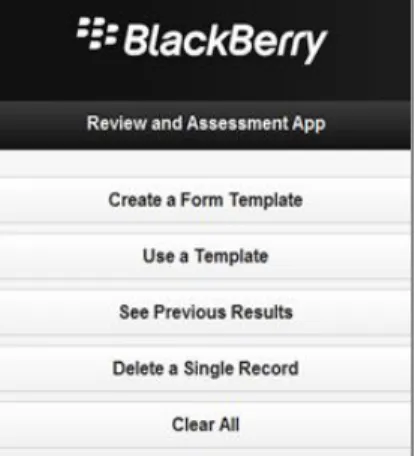
The “Review and Assessment App,” shown in Figure 1, provide students with a great example of how to use the HTML5 localStorage object to make locally persistent data using only a webpage and JavaScript. It makes use of the localStorage to store a structures object by converting it to the JSON file format and placing it in the localStorage object as a string. It restores the object for viewing by the user later when they want to enter data into the form template which they created. This application would be an excellent “homework” problem or lab exercise. It provides students not only with an example that can be easily understood, but also goes over some of the pitfalls which developers must remember when using JavaScript objects with the HTML5 system; an example being techniques to restore data into an already existing object which has methods, using the hash-like array addressing which is available in JavaScript.
In addition to the above, many unique challenges this form of storage incurs, learning how to synchronize data across different machines efficiently and ensuring that all the versions of a particular file are, consistently, accessible on different devices would be a great skill for students to have when they get into industry. The unique characteristics of databases on mobile devices are an important area for course instructors to cover during a module such as this one. Programming labs, which emphasize asynchronous, optimized approaches to database request, could easily be developed. A sample is provided in CMER’s educational module, available at http://cmer.uoguelph.ca/kit.html.
Figure 2: An example of the Dropbox lab exercise
Another example is the Dropbox access application, as shown in Figure 2, allowing users to view their folders on a Dropbox account. This original example is setup to poll a directory for its contents every time the user changes from one to the next. The students’ job is to optimize the amount of bandwidth being used and to reduce application latency. The solution which the students are required to create maps just a directory and caches the results. When the user goes back to a directory which they have already viewed previously, it presents them the contents of the directory, but using the information which has been cached rather than making another request to the server. In addition, the students are required to implement a refreshing feature, where after x minutes, the cache is marked as invalid and the directory is retrieved from the user’s account the next time the user opens it. Keeping track of which folders have been cached could be implemented using the SQLite functionality present on Android. Examples such as this provide the students with the practical, hands-on approach mentioned earlier, while introducing them to database concepts and good programming practices.
5.
CONCLUSION AND FUTURE WORK
This paper brings to light the possible ways in which to integrate mobile devices and mobile application development into a database course. Our reasoning for doing so are that students become more engaged in the learning process with the inclusion of mobile devices. The approach introduced is supported by a module containing hands on labs and sample assignments. These labs are geared for all levels of students.
The authors encourage all course instructors who are teaching database-related courses to begin to integrate mobile devices into their courses. Experience in this growing field will be extremely important for the next generation of software developers, either in industry or academia. All of the samples discussed here are available at: http://cmer.uoguelph.ca/kit.html.
6.
ACKNOWLEDGMENT
The Centre for Mobile Education and Research (CMER) is funded in part by Research In Motion.
7.
REFERENCES
[1] Mahmoud, Q.H., Ngo, T., Niazi, R., Popowicz, P., Sydoryshyn, R., Wilks, M., and Dietz, D.: An Academic kit for Integrating Mobile Devices into the CS Curriculum. Proceedings of the 14th Annual ACM SIGCSE Conference on Innovation and Technology in CS Education, Paris, France, July 2009, pp. 40-44.
[2] Moore, M., Binkerd, C., Fant, S.: Teaching Web-Based Database Application Development - an Inexpensive Approach: Journal of Computing Sciences in Colleges, Vol. 17, No. 4, March 2002, pp. 58 – 63.
[3] Teaching Databases at Southampton University: http://www.ics.heacademy.ac.uk/events/presentations/300_tho mas.pdf. Accessed on March 9, 2009.
[4] Bi, Y., Beidler, J.: Teaching Database Systems With Web Applications Team Projects: Journal of Computing Sciences in Colleges, Vol. 23, No. 3, January 2008, pp. 82 – 88. [5] Ramakrishna, M.V.: A Learning by Doing Model for
Teaching Advanced Databases: Proceedings of the Australasian conference on Computing education, Melbourne, Australia, 2000, pp. 203-207.
[6] Mahmoud, Q.H., and Dyer, A.: Integrating BlackBerry Wireless Devices into Computing Programming and Literacy Courses: Proc. of the 45th Annual Southeast Conference, Winston-Salem, NC, USA, March 2007, pp. 495-500. [7] Mahmoud, Q.H., “Integrating Mobile Devices into the
Computer Science Curriculum”. The 38th Annual Frontiers in Education Conference (FIE 2008), Saratoga Springs, NY, USA, October 22-25, 2008., pp. S3E-17-S3E-22.
[8] BlackBerry Wireless Devices in Computer Science Education: http://cmer.cis.uoguelph.ca/pubs/CMER-white-paper.pdf. Accessed on March 9, 2009.
[9] Csete, J., Wong, Y.H., Vogel, D.: Mobile Devices In and Out of the Classroom. Proc. of World Conference on Educational Multimedia, Hypermedia and Telecommunications 2004, Chesapeake, VA, USA, pp. 4729-4736.
[10]Schonfeld, Erick: Forrester Predicts Tablets will Outsell Netbooks by 2012, Desktops by 2012: http://techcrunch.com/2010/06/17/forrester-tablets-outsell-netbooks/. Accessed July 30, 2012.
[11]ComScore Press Release, April 2012. http://www.comscore.com/Press_Events/Press_Releases/2012 /4/European_Mobile_Gaming_Gets_Social. Accessed on July 30, 2012.
[12]SQLite, http://www.sqlite.org/features.html. Accessed on August 2, 2012.
[13]Nickinson, Phil Chrome vs. Safari - Galaxy Nexus vs. iPhone 4S, Feb 09 2012. http://www.androidcentral.com/chrome-vs-safari-galaxy-nexus-vs-iphone-4s?style_mobile=0. Accessed on August 2nd, 2012.