Client-Library™ Migration Guide
Open Client™
12.5.1
DOCUMENT ID: DC36065-01-1251-01
LAST REVISED: July 2003
Copyright © 1989-2003 by Sybase, Inc. All rights reserved.
This publication pertains to Sybase software and to any subsequent release until otherwise indicated in new editions or technical notes. Information in this document is subject to change without notice. The software described herein is furnished under a license agreement, and it may be used or copied only in accordance with the terms of that agreement.
To order additional documents, U.S. and Canadian customers should call Customer Fulfillment at (800) 685-8225, fax (617) 229-9845. Customers in other countries with a U.S. license agreement may contact Customer Fulfillment via the above fax number. All other international customers should contact their Sybase subsidiary or local distributor. Upgrades are provided only at regularly scheduled software release dates. No part of this publication may be reproduced, transmitted, or translated in any form or by any means, electronic, mechanical, manual, optical, or otherwise, without the prior written permission of Sybase, Inc.
Sybase, the Sybase logo, AccelaTrade, ADA Workbench, Adaptable Windowing Environment, Adaptive Component Architecture, Adaptive Server, Adaptive Server Anywhere, Adaptive Server Enterprise, Adaptive Server Enterprise Monitor, Adaptive Server Enterprise Replication, Adaptive Server Everywhere, Adaptive Server IQ, Adaptive Warehouse, Anywhere Studio, Application Manager, AppModeler, APT Workbench, APT-Build, APT-Edit, APT-Execute, APT-FORMS, APT-Translator, APT-Library, AvantGo, AvantGo Application Alerts, AvantGo Mobile Delivery, AvantGo Mobile Document Viewer, AvantGo Mobile Inspection, AvantGo Mobile Marketing Channel, AvantGo Mobile Pharma, AvantGo Mobile Sales, AvantGo Pylon, AvantGo Pylon Application Server, AvantGo Pylon Conduit, AvantGo Pylon PIM Server, AvantGo Pylon Pro, Backup Server, BizTracker, ClearConnect, Client-Library, Client Services, Convoy/DM, Copernicus, Data Pipeline, Data Workbench, DataArchitect, Database Analyzer, DataExpress, DataServer, DataWindow, DB-Library, dbQueue, Developers Workbench, Direct Connect Anywhere, DirectConnect, Distribution Director, e-ADK, E-Anywhere, e-Biz Integrator, E-Whatever, EC Gateway, ECMAP, ECRTP, eFulfillment Accelerator, Embedded SQL, EMS, Enterprise Application Studio, Enterprise Client/Server, Enterprise Connect, Enterprise Data Studio, Enterprise Manager, Enterprise SQL Server Manager, Enterprise Work Architecture, Enterprise Work Designer, Enterprise Work Modeler, eProcurement Accelerator, EWA, Financial Fusion, Financial Fusion Server, Gateway Manager, GlobalFIX, ImpactNow, Industry Warehouse Studio, InfoMaker, Information Anywhere, Information Everywhere, InformationConnect, InternetBuilder, iScript, Jaguar CTS, jConnect for JDBC, Mail Anywhere Studio, MainframeConnect, Maintenance Express, Manage Anywhere Studio, M-Business Channel, M-Business Network, M-Business Server, MDI Access Server, MDI Database Gateway, media.splash, MetaWorks, My AvantGo, My AvantGo Media Channel, My AvantGo Mobile Marketing, MySupport, Net-Gateway, Net-Library, New Era of Networks, ObjectConnect, ObjectCycle, OmniConnect, OmniSQL Access Module, OmniSQL Toolkit, Open Biz, Open Client, Open ClientConnect, Open Client/Server, Open Client/Server Interfaces, Open Gateway, Open Server, Open ServerConnect, Open Solutions, Optima++, PB-Gen, PC APT Execute, PC Net Library, PocketBuilder, Pocket PowerBuilder, Power++, power.stop, PowerAMC, PowerBuilder, PowerBuilder Foundation Class Library, PowerDesigner, PowerDimensions, PowerDynamo, PowerJ, PowerScript, PowerSite, PowerSocket, Powersoft, PowerStage, PowerStudio, PowerTips, Powersoft Portfolio, Powersoft Professional, PowerWare Desktop, PowerWare Enterprise, ProcessAnalyst, Rapport, Report Workbench, Report-Execute, Replication Agent, Replication Driver, Replication Server, Replication Server Manager, Replication Toolkit, Resource Manager, RW-DisplayLib, S-Designor, SDF, Secure SQL Server, Secure SQL Toolset, Security Guardian, SKILS, smart.partners, smart.parts, smart.script, SQL Advantage, SQL Anywhere, SQL Anywhere Studio, SQL Code Checker, SQL Debug, SQL Edit, SQL Edit/TPU, SQL Everywhere, SQL Modeler, SQL Remote, SQL Server, SQL Server Manager, SQL SMART, SQL Toolset, SQL Server/CFT, SQL Server/DBM, SQL Server SNMP SubAgent, SQL Station, SQLJ, STEP, SupportNow, S.W.I.F.T. Message Format Libraries, Sybase Central, Sybase Client/Server Interfaces, Sybase Financial Server, Sybase Gateways, Sybase MPP, Sybase SQL Desktop, Sybase SQL Lifecycle, Sybase SQL Workgroup, Sybase User Workbench, SybaseWare, Syber Financial, SyberAssist, SyBooks, System 10, System 11, System XI (logo), SystemTools, Tabular Data Stream, TradeForce, Transact-SQL, Translation Toolkit, UltraLite.NET, UNIBOM, Unilib, Uninull, Unisep, Unistring, URK Runtime Kit for UniCode, Viewer, Visual Components, VisualSpeller, VisualWriter, VQL, WarehouseArchitect, Warehouse Control Center, Warehouse Studio, Warehouse WORKS, Watcom, Watcom SQL, Watcom SQL Server, Web Deployment Kit, Web.PB, Web.SQL, WebSights, WebViewer, WorkGroup SQL Server, XA-Library, XA-Server and XP Server are trademarks of Sybase, Inc. 03/03
Unicode and the Unicode Logo are registered trademarks of Unicode, Inc.
All other company and product names used herein may be trademarks or registered trademarks of their respective companies. Use, duplication, or disclosure by the government is subject to the restrictions set forth in subparagraph (c)(1)(ii) of DFARS 52.227-7013 for the DOD and as set forth in FAR 52.227-19(a)-(d) for civilian agencies.
Contents
About This Book ... vii
CHAPTER 1 Understanding Client-Library ... 1
What is Client-Library? ... 1
Comparing the client interfaces... 2
What is unique about Client-Library? ... 3
Tight integration with Open Server ... 3
Client interface to server-side cursors ... 3
Client interface to dynamic SQL ... 4
Asynchronous mode... 4
Multithreaded application support ... 5
Support for network-based security and directory services... 6
User-defined datatypes and conversion routines ... 7
Localization mechanisms ... 8
Streamlined interface ... 8
What’s new in Client-Library... 8
CHAPTER 2 Evaluating an Application for Migration ... 11
Questions to consider ... 11
Will the application benefit from migration?... 11
How much effort will the migration require? ... 12
Summary ... 14
CHAPTER 3 Planning for Migration ... 15
Get software ... 15
Learn about Client-Library... 16
Familiarize yourself with example programs ... 16
Isolate DB-Library code... 17
Consider application redesign ... 17
Unified results handling ... 17
Cursors ... 18
Array binding ... 18
Contents
Multithreading... 19
Check your estimate of the migration effort ... 19
Plan for testing ... 19
Develop a schedule... 20
Check your environment ... 20
CHAPTER 4 Comparing DB-Library and Client-Library Infrastructures ... 21
Utility routines... 21
Header files ... 22
Control structures ... 22
Control structure properties... 23
The CS_CONTEXT structure ... 24
The CS_CONNECTION structure ... 25
The CS_COMMAND structure ... 26
Connection and command rules... 26
Other structures ... 26
CS_DATAFMT ... 26
CS_IODESC... 27
CS_LOCALE ... 27
CS_BLKDESC... 27
CHAPTER 5 Converting DB-Library Application Code... 29
Initialization and cleanup code ... 30
Comparing call sequences ... 30
Example: Client-Library initialization and cleanup... 32
Code that opens a connection ... 34
Comparing call sequences ... 34
Client-Library enhancements ... 35
Migrating LOGINREC code ... 36
Example: Opening a Client-Library connection ... 36
Error and message handlers ... 39
Sequenced messages... 39
Replacing server message handlers ... 39
Replacing DB-Library error handlers... 41
Code that sends commands ... 43
Sending language commands... 43
Sending RPC commands ... 46
TDS passthrough ... 50
Code that processes results... 50
Program structure for results processing ... 51
Retrieving data values... 56
Obtaining Results Statistics... 62
Contents
CHAPTER 6 Advanced Topics ... 67
Client-Library’s array binding ... 67
Using Array Binding... 67
Array Binding Example ... 68
Client-Library cursors ... 68
Comparing DB-Library and Client-Library cursors ... 68
Rules for Processing Cursor Results ... 69
Comparing Cursor Routines ... 70
Comparing Client-Library cursors to Browse Mode Updates .. 72
Using Array Binding with Cursors... 73
Client-Library cursor example ... 73
Asynchronous programming ... 74
DB-Library’s Limited Asynchronous Support... 74
Client-Library asynchronous support... 74
Using ct_poll ... 75
Bulk copy interface... 78
Bulk-Library initialization and cleanup ... 78
Transfer routines ... 78
Other differences from DB-Library bulk copy ... 79
Text/Image interface ... 79
Retrieving text or image data ... 79
DB-Library’s text timestamp ... 80
Client-Library’s CS_IODESC structure... 80
Sending text or image data ... 82
Text and image examples ... 84
Localization ... 85
CS_LOCALE Structure... 86
Localization precedence... 86
A P P E N D I X A Mapping DB-Library Routines to Client-Library Routines ... 87
Mapping DB-Library routines to Client-Library routines ... 87
About This Book
This book, the Open Client Client-Library Migration Guide, contains information on how to migrate Open Client™ DB-Library™ applications to Open Client Client-Library™.
Audience This book has a dual audience:
• Managers or other decision makers who will decide whether to migrate a particular DB-Library application to Client-Library. • Experienced DB-Library programmers who will perform the
migration.
How to use this book The following table describes the chapters in this book:
Table 1: Chapters in this book
Return code error checking in code fragments
This book contains a number of code fragments taken from the set of migration example programs that Sybase provides on the World Wide Web.
The example fragments in this book use the EXIT_ON_FAIL() example macro, which is as follows. Macros similar to this can simplify return code error checking. However, this macro is not appropriate for every situation.
Chapter Contents
Chapter 1, “Understanding Client-Library” Introduces Client-Library and explains what is unique about Client-Library
Chapter 2, “Evaluating an Application for Migration”
Provides guidelines to help you decide whether to migrate a DB-Library application to Client-Library
Chapter 3, “Planning for Migration” Contains practical information on planning for migration
Chapter 4, “Comparing DB-Library and Client-Library Infrastructures”
Compares the DB-Library and Client-Library infrastructures
Chapter 5, “Converting DB-Library Application Code”
Explains how to accomplish basic DB-Library tasks using Client-Library
Chapter 6, “Advanced Topics” Contains information on more advanced Client-Library features
Appendix A, “Mapping DB-Library Routines to Client-Library Routines”
/*
** Define a macro that exits if a function return code indicates ** failure. Accepts a CS_CONTEXT pointer, a Client-Library ** or CS-Library return code, and an error string. If the ** return code is not CS_SUCCEED, the context will be ** cleaned up (if it is non-NULL), the error message is ** printed, and we exit to the operating system.
*/
#define EXIT_ON_FAIL(context, ret, str) \ { if (ret != CS_SUCCEED) \
{ \
fprintf(stderr, \
"Fatal error: %s\n", str); \ if (context != (CS_CONTEXT *) NULL) \ { \
(CS_VOID) ct_exit(context, CS_FORCE_EXIT); \ (CS_VOID) cs_ctx_drop(context); \
} \
exit(ERROR_EXIT); \ } }
Conventions DB-Library and Client-Library routine syntax is shown in a bold, monospace font:
CS_RETCODE ct_init(context, version)
CS_CONTEXT *context; CS_INT version;
Program text and computer output are shown in a monospace font: ct_init(mycontext, CS_VERSION_100);
Routine names and Transact-SQL® keywords are written in a narrow, bold font:
ct_init, the select statement. World Wide Web
access The migration example programs can be found on the Sybase World Wide Web page (http://www.sybase.com). The README file provided with the migration examples contains a descriptive list of the example files.
Related documents Sybase documents Client-Library and DB-Library in a variety of references and guides. Table 2 lists Client-Library and DB-Library manuals.
About This Book
Table 2: Client-Library and DB-Library documentation
Other sources of
information Use the Sybase Getting Started CD, the Sybase Technical Library CD and the Technical Library Product Manuals Web site to learn more about your product: • The Getting Started CD contains release bulletins and installation guides
in PDF format, and may also contain other documents or updated information not included on the Technical Library CD. It is included with your software. To read or print documents on the Getting Started CD you need Adobe Acrobat Reader (downloadable at no charge from the Adobe Web site, using a link provided on the CD).
• The Technical Library CD contains product manuals and is included with your software. The DynaText reader (included on the Technical Library CD) allows you to access technical information about your product in an easy-to-use format.
Refer to the Technical Library Installation Guide in your documentation package for instructions on installing and starting the Technical Library.
Document name Description
Open Client Client-Library/C Reference Manual
Reference manual for Client-Library.
Open Client Client-Library/C Programmer’s Guide
Basic information on programming with Client-Library.
Open Client and Open Server Common Libraries Reference Manual
Reference manual for CS-Library and Bulk-Library.
Open Client DB-Library/C Reference Manual
Reference manual for DB-Library.
Open Client/Server Programmer’s Supplement
Platform-specific information for coding Open Client/Server applications. Includes:
• Compile and link instructions for Client-Library applications • Information on compiler
certifications
• Information on how to configure your environment to run applications
Open Client/Server Configuration Guide Information on configuring your environment to run Open Client or Open Server applications.
• The Technical Library Product Manuals Web site is an HTML version of the Technical Library CD that you can access using a standard Web browser. In addition to product manuals, you will find links to
EBFs/Updates, Technical Documents, Case Management, Solved Cases, newsgroups, and the Sybase Developer Network.
To access the Technical Library Product Manuals Web site, go to Product Manuals at http://www.sybase.com/support/manuals/.
Sybase certifications
on the Web Technical documentation at the Sybase Web site is updated frequently.
❖ Finding the latest information on product certifications 1 Point your Web browser to Technical Documents at
http://www.sybase.com/support/techdocs/.
2 Select Products from the navigation bar on the left. 3 Select a product name from the product list and click Go.
4 Select the Certification Report filter, specify a time frame, and click Go. 5 Click a Certification Report title to display the report.
❖ Creating a personalized view of the Sybase Web site (including support pages)
Set up a MySybase profile. MySybase is a free service that allows you to create a personalized view of Sybase Web pages.
1 Point your Web browser to Technical Documents at http://www.sybase.com/support/techdocs/.
2 Click MySybase and create a MySybase profile. Sybase EBFs and
software maintenance
❖ Finding the latest information on EBFs and software maintenance 1 Point your Web browser to the Sybase Support Page at
http://www.sybase.com/support.
2 Select EBFs/Maintenance. Enter user name and password information, if prompted (for existing Web accounts) or create a new account (a free service).
3 Select a product.
About This Book
5 Click the Info icon to display the EBF/Maintenance report, or click the product description to download the software.
If you need help Each Sybase installation that has purchased a support contract has one or more designated people who are authorized to contact Sybase Technical Support. If you cannot resolve a problem using the manuals or online help, please have the designated person contact Sybase Technical Support or the Sybase subsidiary in your area.
C H A P T E R 1
Understanding Client-Library
This chapter introduces Client-Library and explains the unique features of Client-Library.
What is Client-Library?
Client-Library is an applications programming interface (API) for use in writing client applications.
Client-Library was introduced with System 10™ and provides generic building blocks for constructing distributed client applications, including non-database applications.
Although Sybase supports several other client interfaces, including DB-Library, ODBC, and Embedded SQL™, Client-Library offers powerful advantages to the application programmer:
• It is both query-language-independent and database-independent, enabling application programmers to create a wide range of powerful, flexible applications.
• It shares type definitions, defines, and data element descriptions with Sybase’s Open Server™ Server-Library interface, enabling
application programmers to integrate client functionality into Server-Library applications.
• It provides an asynchronous interface, enabling application programmers to develop applications that simultaneously perform multiple work requests.
• It allows programmers to set configuration properties in a runtime configuration file, without making changes to the application itself.
Topic Page
What is Client-Library? 1
Comparing the client interfaces 2
Comparing the client interfaces
Client-Library is the API of choice for new Sybase customers and customers writing new applications. For customers with existing DB-Library
applications, choosing to migrate to Client-Library depends on whether the applications need access to new Sybase functionality and how much effort the migration requires.
Comparing the client interfaces
The following table compares Sybase’s client interfaces:
Table 1-1: Comparing Sybase’s client interfaces
Client-Library DB-Library Embedded SQL ODBC
Available Client/Server features
All All except native cursors, data stream messaging, network-based security services, and dynamic SQL database commands
All except data stream messaging and registered procedure notifications Similar to DB-Library; different implementations may provide different feature sets, or may implement the same feature differently Query-language independent? Yes No No No Supports non-database development? Yes No Yes No
Interface style Synchronous or asynchronous
Synchronous, asynchronous on VMS only.
Synchronous Synchronous
Chief advantages Powerful, generic, portable
Simple, portable Simple, portable, and an international standard Simple, widely available Chief disadvantages Learning curve associated with a new interface Sybase-specific, does not support all generic client/server services
Less flexible than call-level interfaces
Lack of a single conformance test suite for all implementations results in a mixed level of function support
CHAPTER 1 Understanding Client-Library
What is unique about Client-Library?
Of Sybase’s client interfaces, Client-Library is the only one that supports the following features:
• Tight integration with Open Server • Client interface to server-side cursors • Client interface to dynamic SQL • Asynchronous mode of operation • Multithreaded application support
• Support for network-based directory and security services • User-defined datatypes and conversion routines
• New localization mechanisms • A streamlined interface
Tight integration with Open Server
Client-Library and Server-Library share public type definitions, macros, and data element descriptions. In addition, both Client-Library and Server-Library applications use CS-Library routines to allocate common data structures, handle localization, and convert data values.
This tight integration allows Server-Library and gateway applications to include Client-Library-based functionality.
Client interface to server-side cursors
Cursors are a powerful data management tool. They allow client applications to update individual result rows while processing a result set. A server-side cursor, sometimes called a “native cursor,” is a cursor that exists on Sybase® Adaptive Server Enterprise™.
Client-Library fully supports server-side cursors, providing a call-level interface that allows client applications to declare, open, and manipulate server-side cursors.
What is unique about Client-Library?
DB-Library does not support server-side cursors. Instead, it supports a type of cursor emulation known as “client-side cursors.” Client-side cursors do not correspond to actual Adaptive Server cursors. Instead, DB-Library buffers rows internally and performs all necessary keyset management, row positioning, and concurrency control to manage the cursor.
Client-Library’s cursor functionality replaces DB-Library’s row buffering functionality, which carries a memory and performance penalty because each row in the buffer is allocated and freed individually.
Client interface to dynamic SQL
Dynamic SQL allows applications to create compiled SQL statements (called “prepared statements”) on the server and execute them at will. The statements can include placeholder variables whose values can be supplied at runtime by application end users. The client application can query the server for the formats of the statement’s input values, if any.
Client-Library fully supports dynamic SQL, providing a call-level interface that implements the ANSI-standard embedded SQL prepare, execute, and execute immediate statements. Client-Library also allows applications to get descriptions of prepared-statement input and output.
Client applications typically use dynamic SQL to allow end users to customize SQL statements at runtime. For example, an application might prepare a SQL query retrieving all known information about a particular customer. This query is prepared as a dynamic SQL statement with a placeholder variable: the customer’s name. At runtime, the application’s end user supplies the customer’s name and executes the prepared statement.
Asynchronous mode
Client-Library’s asynchronous mode allows applications to constructively use time that might otherwise be spent waiting for certain types of operations to complete. Typically, reading from or writing to a network or external device is much slower than straightforward program execution.
When asynchronous behavior is enabled, all Client-Library routines that could potentially block program execution behave asynchronously. That is, they either:
CHAPTER 1 Understanding Client-Library
• Return immediately with information that an asynchronous operation is already pending.
Applications can learn of operation completions using one of two models: • Non-polling (interrupt-driven)
• Polling
Non-polling (interrupt-driven)
The non-polling model is available on platforms that support interrupt-driven I/O or multithreading. These platforms include all UNIX and Windows NT platforms.
When an asynchronous operation completes, Client-Library automatically triggers the programmer-installed completion callback routine. The
completion callback routine typically notifies the application’s main code of the asynchronous routine’s completion.
Polling
The polling model is available on all platforms. If portability is a concern, polling is recommended.
In the polling model, an application calls ct_poll to determine if an asynchronous operation has completed. If it has, then ct_poll automatically triggers the programmer-installed completion callback routine.
Multithreaded application support
Client-Library version 11.1 and later provide reentrant libraries that support thread-safe applications on most platforms. In some situations, Client-Library developers can use a multithreaded design to improve response time or throughput. For example:
• An interactive Client-Library application can use one thread to query a server and another thread to manage the user interface. Such an application seems more responsive to the user because the user-interface thread is able to respond to user actions while the query thread is waiting for results.
What is unique about Client-Library?
• An application that uses several connections to one or more servers can run each connection within a dedicated thread. While one thread is waiting for command results, the other threads can be processing received results or sending new commands. Such an approach may increase throughput because the application spends less idle time while waiting for results. See the Client-Library chapter in the Open Client/Server Programmer’s Supplement for information on which system thread libraries, if any, can be linked with Client-Library on your platform.
See “Multithreaded Programming” in the Open Client Client-Library/C Reference Manual for information on coding Client-Library calls in a multithreaded application.
Support for network-based security and directory services
Client-Library and Server-Library version 11.1 and later allow applications to take advantage of distributed network security and directory services.
Security services
Using Sybase-supplied security drivers, client/server applications can be integrated with distributed network security software, such as Distributed Computing Environment (DCE) security, CyberSAFE Kerberos, or Microsoft LAN Manager. The application can then use network-based security features such as:
• Centralized user authentication: Application user names and passwords are maintained by the network security system, rather than on each Sybase server. Users log in to the network security system, and need not provide their password when logging in to servers.
• Secure connections over insecure networks: Client-Library and Server-Library can interact with the network security system to perform per-packet security services, such as encryption or integrity checking. These services allow applications to safely transmit confidential data and commands over a communication medium that may not be physically secure, such as a wireless service or a leased line.
CHAPTER 1 Understanding Client-Library
Directory services
Network-based directory software, such as DCE’s Cell Directory Services, provides an alternative to maintaining several interfaces files. Using a Sybase-supplied directory driver, applications communicate with the directory-provider software to look up the network addresses for a named Sybase server.
Where to go for more information
See the Open Client/Server Configuration Guide for information on what directory and security drivers are available on your system and how they are configured.
See the following sections in the Open Client Client-Library/C Reference Manual for descriptions of how applications are coded to use network-based directory and security services:
• “Directory Services” topics section • “Security Features” topics section
User-defined datatypes and conversion routines
Applications often need to use user-defined types. Client-Library makes it easy for applications to both create and convert user-defined datatypes:
• In Client-Library applications, user-defined types are C-language types. To create them, an application simply declares them. (Don’t confuse Client-Library user-defined types with Adaptive Server user-defined types, which are database column datatypes created with the system stored procedure sp_addtype.)
• To convert user-defined types to and from other user-defined types and standard Client-Library types, you can write custom conversion routines and add code to install them in Client-Library. Once the conversion routines are installed, Client-Library calls your custom routines to transparently handle all conversions.
CS-Library routines related to user-defined types include:
• cs_set_convert – installs a custom conversion routine to convert between standard Open Client and user-defined datatypes.
• cs_will_convert – indicates whether conversion of a datatype is supported. • cs_setnull – defines a null substitution value for a user-defined datatype.
What’s new in Client-Library
Localization mechanisms
An internationalized application can run in multiple language environments with no change. In each environment, the application localizes—that is, determines what language, character set, and datetime and money formats to use—through the use of external information, such as an external configuration file or environment variable.
Client-Library includes powerful localization mechanisms that make it easy to develop internationalized applications:
• The locales file maps locale names to language/character-set/sort-order combinations.
• Applications can check the value of environment variables at runtime to determine what locale to use.
• Applications can use different locales for different parts of an application. For example, an internationalized sales application that runs in French in France and Italian in Italy might generate reports for the London office using a U.S. English locale.
Streamlined interface
Client-Library is a streamlined interface. Both Client-Library and CS-Library together have fewer than 64 routines, while DB-Library has more than 200. (Bulk copy routines are excluded from both counts.)
In addition, Client-Library provides a unified results-processing model in which applications use the same routines to process all types of results. Client-Library’s size and consistent design make it easier to use.
What’s new in Client-Library
Version 12.5.1 provides the following new features:
• Date and time datatypes. See “Commands” in Chapter 2 in the Open Client Client-Library/C Reference Manual.
• Extend High Availability failover to Embedded SQL™. See the “High-availability failover” section in Chapter 2 in the Open Client Client-Library/C Reference Manual.
CHAPTER 1 Understanding Client-Library
• Identity Update option. See ct_options in “Routines” in Chapter 3 in the Open Client Client-Library/C Reference Manual.
• Support for the Chinese character set to follow the standard GB18030-2000. For additional information on directory services, see the chapters of the configuration guide for your platform.
• Upgrade to Secure Socket Layer (SSL) 3.1.5. For additional information on security services, see the release bulletin for version 12.5.1 and the chapters of the Open Client/Server Configuration Guide for your platform.
• BCP support for character set expansion when character set conversion is requested on the client’s side. See the bcp utility in Appendix A of the Open Client/Server Programmer’s Supplemental Guide for your platform. To allow these features, you must set the cs_context structure with version CS_VERSION_125, using cs_ctx_alloc, as follows:
retcode = cs_ctx_alloc (CS_VERSION_125, context); if (retcode != CS_SUCCEED)
C H A P T E R 2
Evaluating an Application for
Migration
This chapter provides guidelines to help you decide whether to migrate a DB-Library application to Client-Library.
Questions to consider
There are two primary questions to keep in mind when deciding whether to migrate a DB-Library application to Client-Library:
• Will the application benefit from migration? • How much effort will the migration require?
After answering these questions, decide whether or not to migrate by balancing the benefits against the required effort.
Will the application benefit from migration?
Applications that need enhancement or access to new Sybase features generally benefit from migration:
• Client-Library supports all current Sybase server features and includes a number of valuable features of its own. (For more information, see “What is unique about Client-Library?” on page 3.) • Client-Library supports threadsafe applications with reentrant
libraries, while DB-Library does not.
Topic Page
Questions to consider 11
Questions to consider
• Client-Library supports network-based directory and security services while DB-Library does not. (See “Support for network-based security and directory services” on page 6.)
• Client-Library will support future Sybase features, including message-based communication, support for remote clients, and object-oriented technology. DB-Library will not support these features.
Applications that do not need enhancement or access to new Sybase features will not benefit from migration.
How much effort will the migration require?
In order to understand how much effort a given DB-Library-to-Client-Library migration will take, you need to examine the DB-Library application in terms of what tasks it performs and what routines it uses.
Some DB-Library tasks, such as sending a SQL command to a server, are straightforward in both libraries.
Other tasks, such as using Open Server registered procedures, are more complex in Client-Library.
The following table classifies typical DB-Library application tasks according to the degree of effort required to duplicate the same application functionality with Client-Library:
Table 2-1: DB-Library tasks ranked by migration effort required
DB-Library task
Partial list of related routines Degree of effort required for migration Notes Sending a Transact-SQL language command to a server dbcmd, dbfcmd, dbsqlexec
Less than average Sending language commands is straightforward in Client-Library. Sending an RPC command to a server. dbrpcinit, dbrpcparam, dbrpcsend
Less than average Sending RPC commands is straightforward in Client-Library.
Inserting and retrieving text and image data from a server
dbreadtext, dbwritetext, dbtxtptr, dbtxtimestamp
Less than average Client-Library handles text and image data more gracefully than DB-Library.
Manipulating datetime values
dbdatename, dbdatepart, dbdatezero
Average Client-Library does not provide direct equivalents for these routines. Instead, use cs_dt_crack and cs_dt_info.
CHAPTER 2 Evaluating an Application for Migration
Automatic result row formatting
dbprhead, dbprrow, dbspr1row, dbsprhead
Average Client-Library does not provide equivalent routines, which can easily be replaced by application code such as that found in the
exutils.c Client-Library example
program.
Applications that use these routines for debugging purposes can use ct_debug instead. Bulk copy operations Bulk copy routines Average DB-Library’s bcp_ routines
include built-in file I/O routines, which read and write host data files and format files, and write error files.
Client-Library applications use Bulk-Library, which does not include file I/O routines. Use pointers to result data
instead of binding the data
dbdata, dbadata Average Currently, Client-Library applications are required to bind results to memory in the application’s data space. Row buffering DBCURROW,
DBFIRSTROW, DBLASTROW, dbsetrow
More than average Client-Library provides cursor and array-binding functionality as an alternative to row buffering. Using cursors to replace row buffering may require some application design work.
Registered procedures dbnpcreate,
dbnpdefine, dbregdrop
More than average Client-Library does not provide equivalent routines.
Client-Library applications must send RPC commands to invoke the Open Server system registered procedures
sp_regcreate and sp_regdrop to create and drop registered procedures.
Read and write Adaptive Server pages
dbreadpage, dbwritepage
Do not convert Client-Library does not support this functionality.
DB-Library task
Partial list of related routines
Degree of effort required for
Summary
Summary
When trying to determine whether a given migration is worth the effort, remember that because Client-Library is a generic interface, applications that use it are in an excellent position to take advantage of new Sybase and industry technologies.
If your application is still evolving—that is, if it will probably change in order to meet future needs—it is a good candidate for migration.
Two-phase commit Two-phase commit routines
Do not convert Client-Library does not provide equivalent routines. Instead, Client-Library supports transaction monitors to control transactions.
The Sybase World Wide Web site (http://www.sybase.com) provides an example program that performs two-phase commit with Client-Library. The illustrated technique relies on the use of undocumented Adaptive Server system stored procedures. As with any undocumented interface, Sybase does not guarantee support or maintenance of this interface. DB-Library task
Partial list of related routines
Degree of effort required for
C H A P T E R 3
Planning for Migration
This chapter contains practical information on planning for migration.
Get software
Both Client-Library and DB-Library are packaged as part of the Software Developer’s Kit.
The kit contains the following software components: • Production libraries
These are runtime libraries for production DB-Library and Client-Library applications. On Windows systems, the libraries are import libraries and DLLs. On UNIX systems, they are static and
shared-object libraries. • Development libraries
These libraries contain debug symbols and trace code for the Client-Library routine ct_debug.
• Bulk-Library, ESQL/C and ESQL/COBOL • Include files
• Example programs
Topic Page
Get software 15
Learn about Client-Library 16
Isolate DB-Library code 17
Consider application redesign 17
Learn about Client-Library
Client-Library includes a number of sophisticated example programs that illustrate Client-Library features. For more information on these example programs, see the Open Client/Server Programmer’s Supplement for your platform.
• Net-Library drivers
Learn about Client-Library
The more you understand about Client-Library before starting to code, the smoother the migration process will be.
Resources for learning about Client-Library include:
• Sybase Education’s Client-Library class, “Open Client Using Client Library.” For more information, call Sybase Education at 1-800-8-SYBASE.
• The Client-Library sample programs included with the software. • The Open Client Client-Library/C Programmer’s Guide. This book
contains basic information on how to structure Client-Library programs. • The following chapters contain information on how to perform specific
DB-Library application tasks using Client-Library:
• Chapter 4, “Comparing DB-Library and Client-Library Infrastructures”
• Chapter 5, “Converting DB-Library Application Code” • Chapter 6, “Advanced Topics”
In particular, Chapter 5, “Converting DB-Library Application Code,” contains side-by-side comparisons of DB-Library and Client-Library call sequences for common application tasks.
Familiarize yourself with example programs
Sybase provides a set of migration example programs that are available on the Sybase World Wide Web site to help you understand how to convert DB-Library code to Client-DB-Library.
CHAPTER 3 Planning for Migration
Isolate DB-Library code
If possible, isolate DB-Library code from the rest of your application code before you begin the migration. DB-Library code located in separate routines or modules is easier to evaluate, easier to replace, and the converted code will be easier to debug after migration.
If you make code changes to isolate the DB-Library code, test the application to make sure the changed code works correctly before you introduce Client-Library functionality.
Consider application redesign
Migration offers an excellent opportunity to redesign an application to take advantage of Client-Library features that DB-Library does not support. You may want to consider redesigning your application to take advantage of new Adaptive Server features as well.
The following sections discuss specific opportunities for redesign.
Unified results handling
DB-Library does not use a unified-results handling model. Instead, applications retrieve different types of results by calling different routines: • Regular row result columns are bound with dbbind, but compute row result
columns are bound with dbaltbind.
• Regular and compute row data is fetched with dbnextrow, but stored procedure return parameters are retrieved with dbretdata.
In Client-Library, all types of fetchable data are bound with ct_bind and fetched with ct_fetch.
Client-Library’s unified results handling model allows applications to consolidate results handling code.
For more information on Client-Library’s results handling model, see “Code that processes results” on page 50.
Consider application redesign
Cursors
Client-Library (server-side) cursors replace several types of DB-Library functionality:
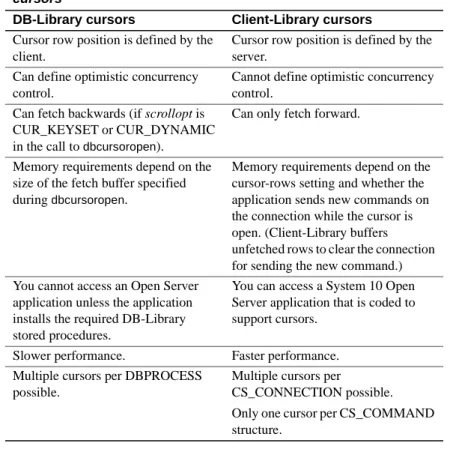
• DB-Library cursors
Client-Library cursors are faster than DB-Library cursors. However, Client-Library cursors offer fewer scrolling options than DB-Library cursors.
• DB-Library browse mode
Although Client-Library supports browse mode, cursors provide the same functionality in a more portable and flexible manner.
DB-Library applications that use cursors or browse mode can benefit from redesign to use Client-Library cursors.
For more information on Client-Library cursors, see “Client-Library cursors” on page 68.
Array binding
Client-Library’s array binding allows an application to bind a result column to an array of program variables. Multiple rows’ worth of column values are then fetched with a single call to ct_fetch.
Array binding can increase application performance, especially when result sets are large (more than 20 rows) and contain only a few small columns (total row size of less than 512 bytes).
Array sizes of 4 to 16 are most effective; larger array sizes do not increase throughput significantly.
DB-Library applications that use row buffering can often use Client-Library array binding instead.
For more information on Client-Library’s array binding, see “Client-Library’s array binding” on page 67.
Asynchronous mode
Client-Library’s asynchronous mode allows applications to perform potentially blocking operations asynchronously.
CHAPTER 3 Planning for Migration
This can be an enormous benefit to end-user applications using a GUI interface, because it allows application users to proceed with other work while waiting for blocked operations to complete.
Synchronous DB-Library applications are often improved by redesign as asynchronous Client-Library applications.
For more information on Client-Library’s asynchronous mode, see “Asynchronous programming” on page 74.
Multithreading
Multithreading can improve response time in interactive applications and may improve throughput in batch-processing applications. For more information, see “Multithreaded application support” on page 5.
Check your estimate of the migration effort
Now that you understand Client-Library, know how much and what sort of DB-Library code your application contains, and have decided what parts, if any, of your application to redesign, reevaluate your previous estimate of the migration effort.
Redesign does add to migration time, but it is generally worth the effort.
Plan for testing
Develop a test plan and create a test environment before beginning the migration.
Make sure you can compare test results from the Client-Library application with those from the DB-Library application.
Develop a schedule
Develop a schedule
When scheduling migration tasks, it can be useful to first categorize them by degree of difficulty and then schedule them accordingly.
Sybase recommends scheduling the easiest migration tasks first, the most difficult tasks second, and the medium-level tasks third.
Do not leave the most difficult tasks for last if you are on a tight schedule.
Check your environment
Verify that your migration environment is complete and correctly configured: • Is Client-Library installed?
• Are your servers at the correct version? If you will be using System 10 features, such as cursors, you must have version 10 or later servers installed.
• Are your servers set up to support your application? For example, if you intend to use implicit cursors, you must be using version 12.5 or later. Are they configured for the right number of connections? Do they have the right databases installed?
• Do the Client-Library example programs run correctly? If they do not, fix any problems with your environment before continuing.
• Is your test environment set up?
After completing the planning steps outlined in this chapter, you are ready to code. Chapters 4, 5, and 6 of this book contain information essential to this coding stage:
• Chapter 4, “Comparing DB-Library and Client-Library Infrastructures,” compares header files, utility routines, and data structures.
• Chapter 5, “Converting DB-Library Application Code,” explains how basic DB-Library programming tasks can be accomplished with Client-Library.
• Chapter 6, “Advanced Topics,” discusses more advanced programming tasks.
C H A P T E R 4
Comparing DB-Library and
Client-Library Infrastructures
This chapter compares the DB-Library and Client-Library infrastructures.
Utility routines
DB-Library utility routines are included as part of DB-Library, while utility routines for Client-Library applications are provided by CS-Library.
Note dblib based bcp calls are not supported against DOL or XNL tables. This is something that developers need to consider as a factor.
CS-Library is a shared Open Client/Server library that includes routines for use in both Client-Library and Open Server Server-Library
applications.
CS-Library includes routines to support the following:
• Datatype conversion – cs_convert can replace calls to dbconvert. • Arithmetic operations – cs_calc can replace many different dbmny
calls.
• Character-set conversion – cs_locale and cs_convert can replace calls to dbload_xlate and dbxlate.
• Datetime operations – cs_dt_crack can replace dbdtcrack calls. • Sort-order operations – cs_strcmp can replace dbstrsort calls.
Topic Page
Utility routines 21
Header files 22
Control structures 22
Header files
• Localized error messages – cs_strbuild can replace dbstrbuild calls. CS-Library is documented in the Open Client and Open Server Common Libraries Reference Manual.
Header files
DB-Library uses the sybfront.h, sybdb.h, and syberror.h header files. Client-Library uses the ctpublic.h header file:
• ctpublic.h includes cspublic.h, which is CS-Library’s header file. • cspublic.h includes:
• cstypes.h, which contains type definitions for Client-library datatypes • csconfig.h, which contains platform-dependent datatypes and
definitions
• sqlca.h, which contains a typedef for the SQLCA structure
When migrating your application, replace DB-Library header file names with the Client-Library header file name (ctpublic.h).
Note Because ctpublic.h includes cspublic.h, which in turn includes all other required header files, the application itself needs only to include ctpublic.h.
Control structures
DB-Library uses two main control structures: LOGINREC and DBPROCESS. Client-Library uses three control structures: CS_CONTEXT,
CS_CONNECTION, and CS_COMMAND.
• The CS_CONTEXT structure defines an application context, or operating environment.
• The CS_CONNECTION structure defines a client/server connection within an application context. Multiple connections are allowed per context.
CHAPTER 4 Comparing DB-Library and Client-Library Infrastructures
• The CS_COMMAND structure defines a command space within a connection. Multiple command structures are allowed per connection. The CS_CONTEXT structure has no real DB-Library equivalent but stores information similar to that stored in DB-Library hidden global variables. Together, the CS_CONNECTION and CS_COMMAND structures roughly correspond to the DBPROCESS structure.
Unlike DB-Library structures, Client-Library control structures are truly hidden: The structure names are defined in Client Library’s public header files, but the fields are not.
Note In this document, CS_CONTEXT structures are also called “context structures,” CS_CONNECTION structures are also called “connection structures,” and CS_COMMAND structures are also called “command structures.”
Control structure properties
Client-Library control structures have properties. Some property values determine how Client-Library behaves, while others are just information associated with the control structure.
For example:
• CS_TIMEOUT is a CS_CONTEXT structure property. Its value determines how long Client-Library waits for a server response before raising a timeout error. DB-Library applications specify a timeout value with dbsettime, and the timeout value is a hidden DB-Library global variable.
• CS_NETIO is a CS_CONNECTION structure property. Its value determines whether network I/O is synchronous, fully asynchronous, or deferred asynchronous. DB-Library has no similar concept. A DB-Library application calls different routines to get synchronous or asynchronous behavior.
Control structures
• CS_USERNAME is a CS_CONNECTION structure property. Its value specifies the user name to log in to the server. The Client-Library application sets the username before opening a connection with ct_connect. With the connection open, the property is read-only. A DB-Library application specifies a packet size by calling the DBSETLUSER macro to change the contents of the LOGINREC structure; when dbopen is called, the LOGINREC password becomes the DBPROCESS username.
• CS_USERDATA is a CS_CONNECTION structure property and a CS_COMMAND structure property. Its value is the address of user data that is associated with a particular connection or command structure. The use of the CS_USERDATA property is similar to the use of dbgetuserdata and dbsetuserdata in a DB-Library application.
Inherited property values
Every CS_COMMAND structure has a parent CS_CONNECTION structure, and every CS_CONNECTION structure has a parent CS_CONTEXT structure.
When a structure is allocated, it inherits all applicable property values from its parent.
For example, a new CS_CONNECTION structure will inherit its parent CS_CONTEXT’s CS_NETIO value. If the parent CS_CONTEXT is set up to use synchronous network I/O, the new CS_CONNECTION will also be synchronous.
Inherited property values can be changed after a structure is allocated.
Setting property values
Client-Library, CS-Library, and Server-Library all include routines to set and retrieve property values.
The CS_CONTEXT structure
The CS_CONTEXT structure defines an application context, or operating environment.
Although an application can have multiple CS_CONTEXT structures, typical applications have only one.
CHAPTER 4 Comparing DB-Library and Client-Library Infrastructures
Applications use the CS_CONTEXT structure to define Client-Library behavior at the highest level:
• CS_CONTEXT structure properties replace DB-Library hidden global variables. For example, a call to dbsettime in a DB-Library application changed a global timeout value. In a Client-Library application, setting the CS_TIMEOUT property affects only the child connections of that particular CS_CONTEXT structure.
• Message and error handlers that are installed for a CS_CONTEXT structure are inherited by all CS_CONNECTIONs allocated within that CS_CONTEXT.
• CS_CONTEXT can include locale information such as locale name, language, and date order.
The CS_CONNECTION structure
The CS_CONNECTION structure defines a connection from a client application to a remote server.
Applications use the CS_CONNECTION structure to define Client-Library behavior at the connection level, and to store and retrieve information about a connection:
• CS_CONNECTION properties customize connection behavior. For example, an application can set the CS_TDS_VERSION connection property to request that a connection use a certain Tabular Data Stream (TDS) protocol version.
• A CS_CONNECTION inherits message and error handlers from its parent context, but an application can override these default handlers by installing new ones.
Client-Library’s CS_CONNECTION structure has several advantages over DB-Library’s DBPROCESS:
• Message and error handlers can be installed on a per-connection basis. • Login information is bound to the connection: Login parameters become
read-only properties after the connection is established.
• A Client-Library connection can simultaneously support an active cursor and another command.
Other structures
The CS_COMMAND structure
The CS_COMMAND structure defines a command space within a client/server connection.
Applications use CS_COMMAND structures to send commands to servers and process the results of those commands.
Connection and command rules
Applications can have multiple command structures active on the same connection only when using Client-Library cursors. Client-Library cursors allow the application to send new commands while processing rows returned by the cursor.
When processing the results of a command other than a Client-Library cursor open command, the application cannot send additional commands over the same connection until the results of the original command have been completely processed or canceled.
See Chapter 7, “Using Library Cursors,” in the Open Client Client-Library/C Programmer’s Guide for more information.
Other structures
In addition to its three basic control structures, Client-Library uses other structures: • CS_DATAFMT • CS_IODESC • CS_LOCALE • CS_BLKDESC
CS_DATAFMT
Applications use the CS_DATAFMT structure to describe data values and program variables to Client-Library routines.
CHAPTER 4 Comparing DB-Library and Client-Library Infrastructures
For example:
• ct_bind requires a CS_DATAFMT structure describing a destination variable.
• ct_describe fills a CS_DATAFMT structure describing a result data item. • ct_param requires a CS_DATAFMT structure describing an input
parameter.
• cs_convert requires CS_DATAFMT structures describing source and destination data.
For information on how to use a CS_DATAFMT with ct_bind or ct_describe, see the Open Client Client-Library/C Reference Manual. For information on how to use a CS_DATAFMT with cs_convert, see the Open Client and Open Server Common Libraries Reference Manual.
CS_IODESC
Applications typically use the CS_IODESC structure when manipulating text or image data.
The CS_IODESC structure defines an I/O descriptor for a column in the current row of a result set. This structure contains the column’s text timestamp and other information about the column data.
For more information on how to use a CS_IODESC, see “Client-Library’s CS_IODESC structure” on page 80.
CS_LOCALE
Applications use the CS_LOCALE structure to supply custom localization information at the context, connection, or data element level.
For more information on how to use a CS_LOCALE structure, see “CS_LOCALE Structure” on page 86.
CS_BLKDESC
Other structures
For more information on how to use a CS_BLKDESC, see “Bulk-Library initialization and cleanup” on page 78.
C H A P T E R 5
Converting DB-Library
Application Code
Converting a DB-Library program to its Client-Library equivalent generally involves the following steps:
1 Replace DB-Library header file names with the Client-Library header file name (see “Header files” on page 22).
2 Plan the code conversion. Client application code can be split roughly into the categories covered in this chapter:
• Initialization and cleanup code • Code that opens a connection • Error and message handlers • Code that sends commands • Code that processes results
Each section shows equivalent DB-Library and Client-Library program logic. Before beginning the conversion, read these sections to ensure that you understand Client-Library fundamentals. Other, more advanced features are discussed in Chapter 6, “Advanced Topics.”
3 Perform the conversion:
Replace or remove DB-Library declarations, as appropriate. Replace DB-Library function calls with their Client-Library or CS-Library equivalents, changing program logic as necessary. Table A-1 on page 87 lists DB-Library routines and their Client-Library equivalents.
Note The code fragments in this chapter use an EXIT_ON_FAIL example macro. For information on this macro, see “Return code error checking in code fragments” on page vii.
Initialization and cleanup code
Initialization and cleanup code
Initialization sets up the programming environment for a DB-Library or Client-Library program. Cleanup closes connections and deallocates library data structures.
Comparing call sequences
The following table compares the DB-Library calls used for initialization and cleanup with their Client-Library equivalents. For Client-Library, the default version level supports all the features starting with 10.x.
For detailed descriptions of each routine, see the reference page for the routine.
Table 5-1: DB-Library vs. Client-Library—initialization and cleanup
DB-Library routines
DB-Library
functionality Client-Library routines
Client-Library functionality (none) cs_ctx_alloc( version, context) Allocate a CS_CONTEXT structure and specify the version level for desired CS-Library behavior. version can be CS_VERSION_100 CS_VERSION_110, CS_VERSION_120, or CS_VERSION_125. (none) cs_config( context, CS_SET, CS_MESSAGE_CB, handler, CS_UNUSED, NULL)
Install CS-Library error-handler callback function.
dbinit() Initialize
DB-Library.
ct_init( context, version)
Initialize Client-Library and specify the version level for desired behavior.
CHAPTER 5 Converting DB-Library Application Code dbsetversion( dbproc, version) (For DB-Library 10.0.x or later applications only.) Specify the version level for desired behavior. version can be DBVERSION_46 or
DBVERSION_100. Sybase recommends DBVERSION_100 to be able to use the features and code changes introduced in the updated versions. (none) dberrhandle( handler) Install DB-Library error callback function. ct_callback( context, NULL, CS_SET, CS_CLIENTMSG_CB, handler)
Install Client-Library error callback function.
See “Error and message handlers” on page 39. dbmsghandle( handler) Install DB-Library server message callback function. ct_callback( context, NULL, CS_SET, CS_SERVERMSG_CB, handler)
Install Client-Library server message callback function. See “Error and message handlers” on page 39.
(See Table 5-2: DB-Library
vs. Client-Library—opening a connection)
Open connection(s). (See Table 5-2: DB-Library
vs. Client-Library—opening a connection)
Open connection(s). Before you open the connection, set the required properties for the context/connection.
dbexit() Close and deallocate
all DBPROCESS structures and clean up any structures initialized by dbinit.
ct_exit( context,
option)
Exit Client-Library. Before exiting Client-Library, deallocate all open command and context structures.
option is normally
CS_UNUSED.
CS_FORCE_EXIT is useful when exiting because of an error.
DB-Library routines
DB-Library
functionality Client-Library routines
Client-Library functionality
Initialization and cleanup code
The Client-Library application must allocate and deallocate CS_CONTEXT structure. CS_CONTEXT serves as “handle” for basic application properties, such as the language and character set for error messages and the application’s default error and message callbacks. See “The CS_CONTEXT structure” on page 24 for more information.
Example: Client-Library initialization and cleanup
The following code fragment, taken from the ctfirst.c migration example program, illustrates Client-Library initialization and cleanup.
The fragment installs error handlers for CS-Library and Client-Library, as well as a Client-Library server message callback. For examples of a Client-Library error handler and a server message handler, see the “Callbacks” topics page in the Open Client Client-Library/C Reference Manual. For an example CS-Library error handler, see the Open Client/Server Common Libraries Reference Manual.
#define NORMAL_EXIT (0) #define ERROR_EXIT (-1)
CS_CONTEXT *context = (CS_CONTEXT *) NULL; CS_CONNECTION *conn;
CS_RETCODE ret; /*
** Step 1.
** Allocate a CS_CONTEXT structure and initialize Client-Libary. -- if (dbinit() == FAIL)
-- exit(ERREXIT); */
ret = cs_ctx_alloc(CS_VERSION_125, &context);
EXIT_ON_FAIL(context, ret, "Could not allocate context."); ret = ct_init(context, CS_VERSION_125);
EXIT_ON_FAIL(context, ret,
"Client-Library initialization failed."); /*
** Step 2.
** Install callback handlers for CS-Library errors,
Client-(none) cs_ctx_drop( context) Deallocate a CS_CONTEXT structure. DB-Library routines DB-Library
functionality Client-Library routines
Client-Library functionality
CHAPTER 5 Converting DB-Library Application Code
** Library errors, and CS-Library errors. **
-- dberrhandle(err_handler); -- dbmsghandle(msg_handler); */
/*
** cs_config() installs a handler for CS-Library errors. */
ret = cs_config(context, CS_SET, CS_MESSAGE_CB,
(CS_VOID *) cserror_cb, CS_UNUSED, NULL); EXIT_ON_FAIL(context, ret,
"Could not install CS-Library error handler."); /*
** ct_callback() installs handlers for Client-Library errors and ** server messages.
**
** ct_callback() lets you install handlers in the context or the ** connection. Here, we install them in the context so that they ** are inherited by connections that are allocated using this ** context.
*/
ret = ct_callback(context, NULL, CS_SET, CS_CLIENTMSG_CB, (CS_VOID *) clientmsg_cb);
EXIT_ON_FAIL(context,ret,
"Could not install Client-Library error handler."); ret = ct_callback(context, NULL, CS_SET, CS_SERVERMSG_CB, (CS_VOID *) servermsg_cb);
EXIT_ON_FAIL(context,ret,
"Could not install server message handler.");
... deleted code that connects and interacts with the server ... /*
** Clean up Client-Library. **
** ct_exit(context, CS_UNUSED) requests an "orderly" exit. ** This call fails if we have open connections. If it fails, ** EXIT_ON_FAIL() calls ct_exit(context, CS_FORCE_EXIT) to ** force cleanup of Client-Library.
*/
ret = ct_exit(context, CS_UNUSED);
EXIT_ON_FAIL(context, ret, "ct_exit(CS_UNUSED) failed."); /*
** Clean up CS-Library. cs_ctx_drop() always fails if ct_init() ** succeeded on the context but ct_exit() did not (or if
Code that opens a connection
*/
(CS_VOID) cs_ctx_drop(context); context = (CS_CONTEXT *) NULL; exit(NORMAL_EXIT);
Code that opens a connection
DB-Library applications use the LOGINREC and DBPROCESS structure to open a connection to the server. Client-Library uses the CS_CONNECTION hidden structure. See “The CS_CONNECTION structure” on page 25 for more information.
Comparing call sequences
The following table compares DB-Library routines used for opening a connection with their Client-Library equivalents:
Table 5-2: DB-Library vs. Client-Library—opening a connection
DB-Library routines
DB-Library
functionality Client-Library routines
Client-Library functionality
dblogin() Allocate a LOGINREC
for use in dbopen.
ct_con_alloc( context, connection) Allocate a CS_CONNECTION structure. DBSETLUSER( loginrec, username)
Set the username in the LOGINREC structure. ct_con_props( connection, CS_SET, CS_USERNAME, username, buflen, NULL)
Set the user name property in the connection structure.
DBSETLPWD( loginrec, password)
Set the user server password in the LOGINREC structure. ct_con_props( connection, CS_SET, CS_PASSWORD, password, buflen, NULL)
Set the user server password property in the connection structure.
CHAPTER 5 Converting DB-Library Application Code
Client-Library enhancements
Client-Library applications can also establish connections using network-based user authentication that is provided by a network-network-based security mechanism such as DCE, SSL or LDAP. In this case, the Client-Library application performs the following tasks instead of calling ct_con_props to set the user name and password:
• (Optional) Specifies a security mechanism for the connection by setting the CS_SEC_MECHANISM connection property. Most applications will use the default, which is defined by the Sybase security driver
configuration. DBSETLAPP(
loginrec, application)
Set the application name in the LOGINREC structure. ct_con_props( connection, CS_SET, CS_APPNAME, appname, buflen, NULL)
Set the application name property in the connection structure.
dbopen( loginrec, server)
Connect to a server (and allocate the DBPROCESS). ct_connect( connection, server_name, snamelen)
Connect to a server (with the pre-allocated connection structure).
dbloginfree( loginrec)
Free the LOGINREC structure.
None
language commands, RPC commands, and TDS passthrough calls
Send requests and process results using a DBPROCESS structure.
CS_COMMAND (See “Code that sends commands” on page 43)
Send requests and process results using a command structure.
dbclose( dbproc)
Close and deallocate a DBPROCESS structure.
ct_close( connection,
option)
Close a server connection.
option is normally
CS_UNUSED. CS_FORCE_CLOSE is useful when closing the connection because of an error. (none) ct_con_drop( connection) Deallocate a connection structure. DB-Library routines DB-Library
functionality Client-Library routines
Client-Library functionality