A User Study Design for Comparing the Security of Registration Protocols
Chris Karlof
J.D. Tygar
David Wagner
{
ckarlof, tygar, daw
}
@cs.berkeley.edu
University of California, Berkeley
Abstract
We present the design of a user study for comparing the security of two registration mechanisms for initializing credentials in machine authentication protocols, such as SiteKey. We discuss ethical and ecological validity chal-lenges we faced in designing our study.
1
Introduction
In October 2005, the Federal Financial Institutions Ex-amination Council (FFIEC) declared “single-factor au-thentication to be inadequate for high-risk transactions” [6]. In response, many institutions attempted to imple-ment two-factor authentication protocols by suppleimple-ment- supplement-ing password-based authentication withmachine authen-tication, which authenticates a user’s computer as op-posed to the user herself. Machine authentication sys-tems typically recognize a user’s computer with a pre-viously stored token, such as an HTTP cookie, cache cookie, Flash Local Shared Object, etc. To success-fully log in, the user must provide her password and the user’s browser must present a valid token. Web sites currently using machine authentication include Bank of America [3], ING Direct [12] and Vanguard [22].
The registration problem Since users may use more than one computer, machine authentication protocols must have a procedure to authorize multiple machines. We call this theregistration problem. In this paper, we present the design of a user study for comparing the security properties of two solutions to the registration problem: challenge questions and single-use email links. We discuss ethical and ecological validity challenges we faced in designing our study.
2
Two solutions to the registration problem
Challenge questions Many machine authentication systems currently usechallenge questionsto address the registration problem [3, 12, 22]. A challenge question is a user-specific question which an adversary is unlikely to be able to guess an answer [8, 17], e.g., “What is the name of your favorite teacher?” When a user creates her account, she provides the answers to one or more chal-lenge questions, and when she attempts to log in from an unregistered computer, the site prompts her to answer these questions. If the answers are correct, then the site sets a persistent authentication token on the computer that authorizes it for future access.
Email registration links An alternative solution to the registration problem is to use email. If a user attempts to access her account from an unregistered computer, the web site sends her an email containing a single-use HTTPS URL with a random, unpredictable component.1 After the user clicks on the link, the web site registers the user’s computer with a persistent authentication to-ken (e.g., a cookie) and invalidates the link. Several re-searchers have proposed using email in a similar way to help initialize authentication credentials [1, 2, 9, 10].
3
Study hypothesis
Our study compares the security of email-based reg-istration to the security of regreg-istration using challenge questions. Several researchers have persuasively argued that challenge questions are vulnerable to active man-in-the-middle (MITM) attacks [21, 24], where an attacker spoofs the target web site and requires visitors to an-swer their challenge questions to proceed. This attack is likely to be effective because the unsafe action a user
1We assume the user has previously given the web site her email address, e.g., during the account creation process.
must avoid during the attack is the same action she must take to legitimately register her computer, i.e., answer her challenge questions.
In contrast, with email registration links, the unsafe actions a user must avoid are different from the action she must take to legitimately register her computer, i.e., click on the registration link. Once a user clicks on a registration link and her browser sends it to the legitimate server, it becomes useless to an attacker.
In addition, a web site can include a reminder in the registration email of the only safe action (i.e., click on the link) and warn against the likely attacks. Although a web site using challenge questions can issue similar warnings, these warnings will likely be absent during an attack.
For these reasons, we hypothesize that using email registration links is more resistant to these types of MITM social engineering attacks than challenge ques-tions. To test this hypothesis, our study will compare the success of different simulated MITM attacks against email registration links and challenge questions.
4
Challenges
Our study faces an ecological validity challenge, to re-alistically simulate experiences users have in the real world. This raises a number of issues:
First, it is difficult to simulate the experience of risk for users without crossing ethical boundaries [16]. To address this, many experimenters employ role-playing, where users are asked to assume fictitious roles. How-ever, role-playing participants may act differently than they would in the real world. If users feel that nothing is at stake and there are no consequences to their actions, they may take risks that they would avoid if their own personal information was at stake.
Second, we must limit the effect of demand charac-teristics. Demand characteristics refer to cues which cause participants to try to guess the study’s purpose and change their behavior in some way, perhaps unintention-ally. For example, if they agree with the hypothesis of the study, they may change their behavior in a way which tries to confirm it. Since security is often not users’ pri-mary goal, demand characteristics are particularly chal-lenging for security studies. An experiment which inten-tionally or uninteninten-tionally influences users to pay undue attention to the security aspects of the tasks will reduce its ecological validity.
Third, we must minimize the impact of authority fig-ures during the study. Researchers have shown that peo-ple have a tendency to obey authority figures and the presence of authority figures causes study participants to display extreme behavior they would not normally engage in on their own. Classic examples of this are
Milgram’s “shocking” experiment [19] and the Stanford prison experiment [11]. For security studies, this ten-dency may underestimate the strength of some defense mechanisms and overestimate the success rate of some attacks. For example, if we simulate a social engineer-ing attack durengineer-ing the study, users may be more suscepti-ble to adversarial suggestions because they misinterpret these to be part of the experimenter’s instructions. They may fear looking incompetent or stubborn if they do not follow the instructions correctly. This problem may be exacerbated if there is an experimenter lurking nearby.
Fourth, we must identify an appropriate physical loca-tion for the experiment. The vast majority of previous security user studies simulating attacks have been con-ducted in a controlled laboratory environment. They are many advantages to a laboratory environment: the exper-imenter can control more variables, monitor more subtle user behavior, and debrief and interview participants im-mediately upon completion, while the study is still fresh in their minds. But a laboratory environment for a secu-rity study can cause users to evaluate risk differently than they would in the real world. A user may view the lab-oratory environment as safer because they feel that the experimenter “wouldn’t let anything bad happen”.
It may be tempting to ignore some or all of these issues in a comparative study such as ours. Since the effects of these factors will be present in both the control group (i.e., challenge question users) and the treatment group (i.e, email registration users), then one might conclude that ignoring these factors would not hinder a valid, real-istic comparison between the two groups.
This is a dangerous conclusion. It is not clear to what degree these issues affect various types of security-related mechanisms. In particular, there is no evidence that these issues have a similar magnitude of effect on challenge question users as on email registration users. Therefore, it is prudent to control these issues in our de-sign as much as possible.
5
Study design
In this section, we present our study design. Our design addresses the issues we discussed in the previous section. More specifically, we hope to:
• Create an experience of risk for users without using role-playing
• Avoid the effect of demand characteristics by creat-ing an engagcreat-ing non-security related task for users which obscures the true purpose of the experiment
• Balance users’ focus and awareness during the se-curity and non-sese-curity related tasks in a realistic way
• Limit the influence of authority figures and a labo-ratory environment by requiring each user to partic-ipate in her natural habitat with her own computer
5.1
Study overview
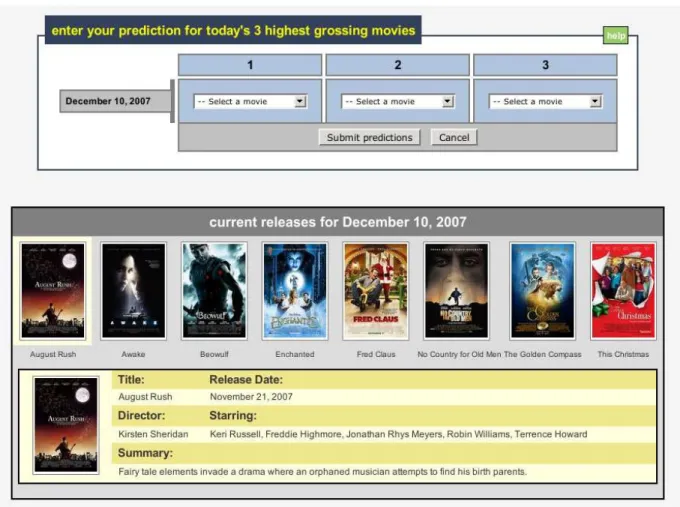
Our study employs deception to hide its true purpose. During the consent process, we tell users the project is examining how well individuals predict the outcome of certain events, and that this experiment focuses on how well individuals can predict high grossing movies. We tell each user she will log in to our web site over a seven day period and make a prediction of what she thinks will be the top three highest grossing movies each day. Each user logs in from her own computer, from anywhere, and at any time she wishes. We show a screenshot of our interface in Figure 1.
Each user receives $20 as base compensation, and we reward her up to an additional $3 per prediction depend-ing on the accuracy of her predictions. We tell each user that she must make seven predictions to complete the ex-periment, so the total maximum a user can receive is $41. Users receive their compensation via PayPal upon com-pletion.2
We plan to recruit approximately 200 users, divided into 5 groups. One group uses challenge questions for registration and the other four groups use different vari-ants of email registration links. We discuss the email registration groups further in Section 5.3.2. We show a summary of the different groups in Table 1.
5.2
Registration procedures
Each user creates an account at our site, with a username and password. We also ask for the user’s email address and PayPal email address, if different. On a user’s first login attempt, she is redirected to the page shown in Fig-ure 2 after she enters her username and password. This page informs her that she must register her computer be-fore she can use it to access her account at our web site. We wish to encourage users to register only private com-puters, so the site mentions that it is a generally a bad idea to register public computers and if the user is using one, then she should wait until later to register her private computer. However, we do nothing to prevent or detect a user registering a public computer, such as a library computer.
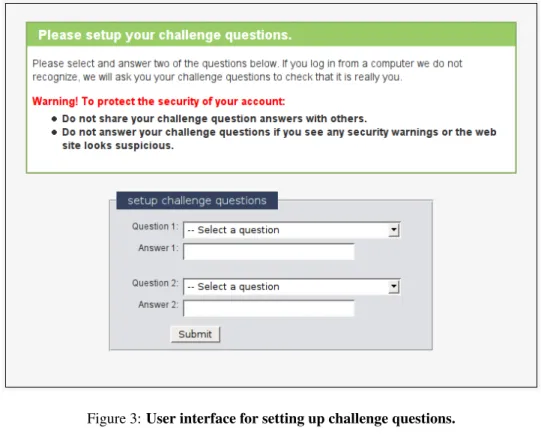
If the user chooses to register her computer, we redi-rect her to the registration page. If she is in the challenge question group, we prompt her to set up her challenge questions with the dialog shown in Figure 3. She must
2Although we do not verify users have valid PayPal accounts at the start of the study, each must explicitly acknowledge she either has one or is willing to get one.
select two questions and provide answers. After confirm-ing the answers, she enters her account and proceeds with her first prediction.
If she is part of an email registration group, then she sees a page informing her that she has been sent a reg-istration email, and she must click on the link saying “Click on this secure link to register your computer”. Af-ter clicking on the link, she can enAf-ter her account and make a prediction. We send registration emails in pri-marily HTML format, but also include a plain text al-ternative (using themultipart/alternative con-tent type) for users who have HTML viewing disabled in their email clients. We embed the same registration link in both parts, but include a distinguishing parameter in the link to record whether the user was presented with the HTML or plain text version of the email. We discuss how we use this information in Section 5.3.2. Screen-shots of registration emails are shown in Figures 6–9.
Both registration procedures set an HTTP cookie and a Flash Local Shared Object on the user’s computer to indicate the computer is registered. On subsequent login attempts from that computer, the user gains access to her account by simply entering her username and password. But if she logs in from a computer we don’t recognize, then we prompt her to answer her challenge questions (Figure 4) or send her a new registration link to click on, depending on the user’s group.
5.3
Simulated attacks
Although we tell users they must make seven predictions to complete the experiment, after each user makes her fifth prediction, we simulate a MITM attack against her the next time she logs in. After she enters her username and password, we will redirect her to an “attack” server. The attack server uses the same domain as the legitimate server, simulating a pharming attack where the adversary has compromised the DNS record for our site.
5.3.1 Challenge questions: Group 1
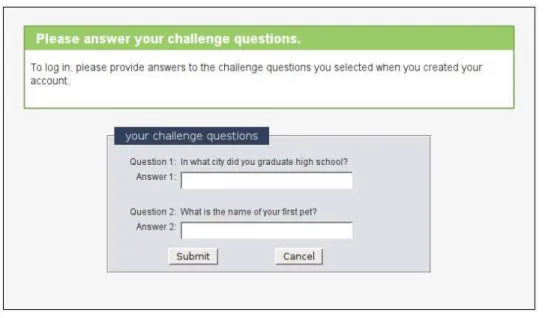
For the challenge question group, the attack simply tries to get users to answer their challenge questions by pre-senting the page shown in Figure 5. This is essentially the same page users see when they must answer their challenge questions under “normal” conditions, but with the warning and informative text removed.3 This attack: 1) is straightforward, 2) closely mimics the legitimate registration process, and 3) was previously disclosed in the security community as a major weakness of challenge questions [21, 24].
3Even if users select their challenge questions from a pool of possi-ble questions, a MITM attacker can easily determine a particular user’s questions by relaying communications between the legitimate site and the user [21, 24].
Group Registration method Attack description Warnings?
1 Challenge questions Solicit answers Only during legitimate registrations 2 Email Copy and paste link into text box In registration emails 3 Email Copy and paste link into text box No warnings 4 Email Forward email to attacker In registration emails 5 Email Forward email to attacker No warnings
Table 1: Summary of study groups.
5.3.2 Email: Groups 2-5
Simulating attacks against email registration is not as straightforward, in part because the attack must trick the user into doing something different than what she must do during a legitimate registration (i.e., click on the link). Ethical issues pose another challenge. To compromise email registration, a real world attacker might try to ex-ploit a browser vulnerability, convince the user to install malware, or hijack the user’s email account. Although these are typically effective attacks, ethical issues pre-vent us from attacking our users in this way.
Instead, we use social engineering attacks that attempt to steal and use a valid registration link before the user clicks on it, giving the attacker a valid registration token for the user’s account. Since this link has no value out-side the scope of the study, this limits the potential risk to users.
We identified two compelling and straightforward at-tacks of this type. Our first attack asks the user to copy and paste the registration URL from her email into a text box included in the attack web page. Our second attack asks the user to forward the registration email to an ad-dress with a similar looking domain. Although we have no evidence these are the most effective attack strategies, it is certainly necessary for an email registration scheme to resist these attacks in order to be considered secure.
We simulate the copy and paste attack against groups 2 and 3, and simulate the forwarding attack against groups 4 and 5. For both attacks we assume the attacker can cause a new registration email to be delivered to the user from the legitimate site.
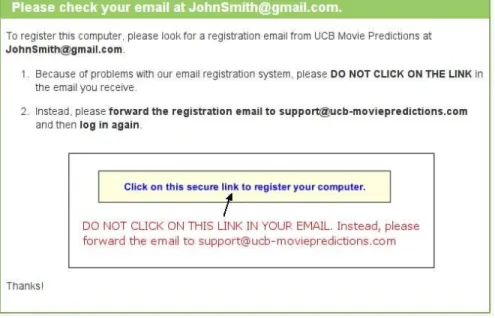
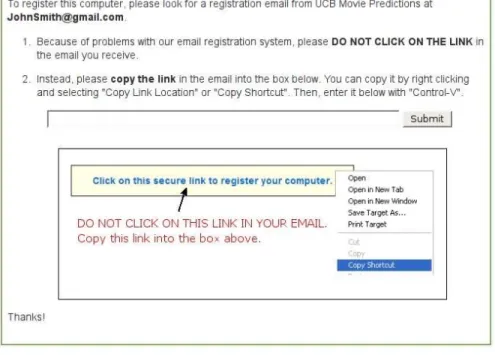
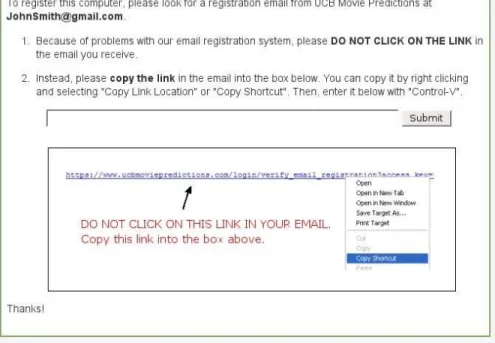
For both attacks, the attack page first tells the user that “because of problems with our email registration sys-tem” she should not click on the link in the email she receives. For the forwarding attack, it instructs the user to forward the email to the attacker’s email address. For the copy and paste attack, the attack page presents a text box with a “submit” button and instructs the user to copy and paste the registration link into the box.
Both attacks also present pictorial versions of the in-structions, with a screenshot of how the registration link appears in the email. To maximize the effectiveness of this picture, we give the attacker the advantage of know-ing the distribution of HTML and plain text registration
emails previously viewed by the user during the study (see Section 5.2). The attacker then displays the picto-rial instructions corresponding to the majority; in case of a tie it displays a screenshot of the HTML version. Screenshots of these attacks are shown in Figures 10–13.
Warnings Email registration has the advantage of be-ing able to remind users of safe actions and warn them against unsafe actions. To measure the effectiveness of these messages, we subdivide the email groups into two groups: those that receive warnings in registration emails (groups 2 and 4) and those that do not (groups 3 and 5). Those that receive warnings also see these warnings on legitimate registration pages. Screenshots of these ings are shown in Figures 6 and 8. Although these warn-ings specifically focus on the attacks we are simulating, and in the real world it may not be feasible to concisely warn users against all the possible attacks, a site can cer-tainly warn users against the most successful or common attacks they have observed in the past. See Table 1 for a summary of the four different email groups.
5.3.3 Attack success metrics
If a group 1 user answers her challenge questions cor-rectly, we consider the attack a success and the exper-iment ends. We assume the adversary is relaying the user’s responses in real time to the legitimate site, so if she enters an incorrect answer, the attack server prompts the user again.
If a group 2-5 user clicks on the registration link first, then we consider the attack a failure.4 If the user for-wards the email or submits the link first, then we consider the attack a success. Either way, the experiment ends.
For all users, attempts to navigate to other parts of the site redirect the user back to the attack page. If the user resists the attack for 30 minutes, then on her next login,
4Since these attacks simulate pharming attacks, the attacker would be able to intercept registration links and steal any registration tokens stored on the user’s computer. There are various proposals which can help defend registration links and persistent web objects against pharm-ing attacks [4, 13, 18], but we do not discuss the details here. Regard-less, the results of this study are applicable to a wide variety of social engineering attacks, including phishing.
the experiment ends and we consider the attack a fail-ure. The attack pages for groups 1-3 contain a Javascript key logger, in case a user begins to answer her challenge questions or enter the link, but then changes her mind and does not submit. If our key logger detects this, we con-sider the attack a success. We measure the “strength” of the registration mechanism in each group by calculating the percentage of the users which resist the attack.
6
Analysis of our study design
In this section, we discuss how well our design addresses the issues we identify in Section 4: simulating the experi-ence of risk, limiting the effect of demand characteristics, minimizing the impact of authority figures, and avoiding any unrealistic environmental influences.
We simulate the experience of risk by giving users password-protected accounts at our web site and creat-ing an illusion that money they “win” durcreat-ing the study is “banked” in these accounts. To suggest that there is a chance that the user’s compensation could be stolen if her account is hijacked, we provide an “account man-agement” page which allows the user to change the Pay-Pal email address associated with her account. However, these incentives have limitations. Users may still con-sider the overall risk to be low: the size of the compensa-tion may not be large enough to warrant extra attencompensa-tion, or they may recognize that a small university research study is unlikely to be the target of attack.
Informal testing suggests that predicting popular movies can be fun and engaging for users. In addition, the financial incentive for making accurate predictions will help focus the users’ attention away from the secu-rity aspects of the study. For these reasons, the effect of demand characteristics is sharply diminished in our study.
We minimize the impact of authority figures by requir-ing the users to participate remotely, from their own com-puters and at times of their choosing. Users never need to meet us or make any decisions in a laboratory envi-ronment. All instructions are sent through our web site and emails. Removing authority figures from the vicin-ity of users improves the validvicin-ity of our study. Similarly, by requiring users to interact with our web site outside a laboratory, we increase the chances users evaluate risks similarly to the way they do in the real world. Nonethe-less, we acknowledge that our study design is not perfect: there is some risk that users may interpret instructions from the simulated attackers as “orders” from us, the ex-perimenters.
Our study is ethical. The risk to users during the study is minimal, and for us to use a user’s data, she must ex-plicitly reconsent after a full debriefing on the true nature of the study. The study protocol described here was
ap-proved by the UC Berkeley’s Institutional Review Board on human experimentation.
7
Related work
Other researchers have attempted to design ethical and ecologically valid studies which simulate attacks against users. Several studies have attempted to evaluate how well individuals can identify phishing emails and pages [7, 14, 23]. However, these studies do not fully address the challenges we identified in Section 4. They were all conducted in a laboratory environment, and the users were either told the purpose of the experiment or asked to role-play a fictitious identity.
To help create the experience of risk, Schecter et al. asked real Bank of America SiteKey customers to log into their accounts from a laptop in a classroom [20]. Al-though SiteKey uses challenge questions, this study did not evaluate SiteKey’s use of them. Instead, this study focused on whether each user would enter her online banking password in the presence of clues indicating her connection was insecure. They simulated site-forgery at-tacks against each user by removing various security in-dicators (e.g., her personalized SiteKey image) and caus-ing certificate warncaus-ings to appear, and checked if each user would still enter her password. Since SiteKey will only display a user’s personalized image after her com-puter is registered, Schecter et al. first required each user to answer her challenge questions during a “warm-up” task to re-familiarize her with the process of logging into her bank account. No attack was simulated against the users during this task.
Requiring users to use their own accounts is certainly a good start for creating a sense of risk, but the degree to which the academic setting of the study affected the users’ evaluation of their actual risk is unclear. Although the experimenters were not in the same room as the users while they used the computer, the fact that they were nearby may have influenced the users to appear “helpful” and behave with less caution than they normally would.
Jagatic et al. [15] and Jakobsson et al. [16] designed phishing studies which remotely simulated phishing at-tacks against users without their prior consent. Although these experiments simulate real attacks and achieve a high level of ecological validity, not obtaining prior con-sent raises ethical issues. After learning that they were unknowing participants in one study [15], many users re-sponded with anger and some threatened legal action [5].
8
Conclusion
This paper presents the design of a user study to compare the security properties of two mechanisms for
address-ing the registration problem in machine authentication systems, identifies several ethical and ecological valid-ity challenges we faced in designing our study, and dis-cusses how we address them. In addition to teaching us more about the security properties of registration mech-anisms, we expect this work will help broaden our un-derstanding of the complex issues related to conducting these types of security studies.
Acknowledgements
This work is supported in part by the TRUST Project (National Science Foundation award number CCF-0424422) and the iCAST Project. The conclusions in this paper are our own and do not necessarily reflect those of the NSF, the US Government, or any other funding agency. The authors also thank Rachna Dhamija, Al-lan Schiffman, Marco Barreno, Adrian Mettler, Monica Chew, AJ Shankar, Bill McCloskey, and the anonymous reviewers for their useful comments.
References
[1] Ben Adida. BeamAuth: Two-Factor Web Au-thentication with a Bookmark. In Proceedings of the Fourteenth ACM Conference on Computer and Communications Security (CCS 07), pages 48–57, October 2007.
[2] Dirk Balfanz. Usable Access Control for the World Wide Web. In Proceedings of the 19th Annual Computer Security Applications Conference, pages 406–416, December 2003.
[3] Bank of America SiteKey: Online Banking Security. http://www.bankofamerica/ privacy/sitekey/.
[4] Tyler Close. Waterken YURL. http://www. waterken.com/dev/YURL/httpsy/. [5] Colleen Corley. Students Go ’Phishing’ for User
Info. http://www.idsnews.com/news/ story.aspx?id=29400&comview=1. [6] Federal Financial Institutions Examination
Coun-cil. Authentication in an Internet Banking En-vironment. http://www.ffiec.gov/pdf/ authentication_guidance.pdf, October 2005.
[7] Rachna Dhamija, J. D. Tygar, and Marti Hearst. Why Phishing Works. In Proceedings of the SIGCHI Conference on Human Factors in Comput-ing Systems, pages 581–590, 2006.
[8] Carl Ellison, Chris Hall, Randy Milbert, and Bruce Schneier. Protecting Secret Keys with Personal Entropy. Future Generation Computer Systems, 16(4):311–318, 2000.
[9] Simson Garfinkel. Email-based Identification and Authentication: An Alternative to PKI? IEEE Se-curity & Privacy Magazine, 1(6):20–26, 2003. [10] Peter Gutmann. Underappreciated Security
Mech-anisms. http://www.cs.auckland.ac. nz/˜pgut001/pubs/underappreciated. pdf.
[11] C. Haney, W.C. Banks, and P.G. Zimbardo. Study of Prisoners and Guards in a Simulated Prison.
Naval Research Reviews, 9:1–17, 1973.
[12] ING Direct Privacy Center. https://home. ingdirect.com/privacy/privacy_ security.asp?s=newsecurityfeature. [13] Collin Jackson and Adam Barth. ForceHTTPS:
Protecting High-Security Web Sites from Network Attacks. InProceedings of the 17th International World Wide Web Conference (WWW 2008), April 2008.
[14] Collin Jackson, Daniel R. Simon, Desney S. Tan, and Adam Barth. An Evaluation of Extended Val-idation and Picture-in-Picture Phishing Attacks. In
Proceedings of Usable Security (USEC’07), Febru-ary 2007.
[15] Tom Jagatic, Nathaniel Johnson, Markus Jakobs-son, and Filippo Menczer. Social Phishing. Com-munications of the ACM, 50(10):94–100, October 2007.
[16] Markus Jakobsson and Jacob Ratkiewicz. De-signing Ethical Phishing Experiments: A Study of (ROT13) rOnl Auction Query Features. In Proceed-ings of the 15th annual World Wide Web Conference (WWW 2006), pages 513–522, May 2006.
[17] Mike Just. Designing Authentication Systems with Challenge Questions. In Lorrie Faith Cranor and Simson Garfinkel, editors,Security and Usability: Designing Secure Systems That People Can Use, chapter 8, pages 143–155. O’Reilly, 2005.
[18] Chris Karlof, Umesh Shankar, J.D. Tygar, and David Wagner. Dynamic Pharming Attacks and Locked Same-origin Policies for Web Browsers. In Fourteenth ACM Conference on Computer and Communications Security (CCS 2007), pages 58– 72, October 2007.
[19] Stanley Milgram. Obedience to Authority: An Ex-perimental View. Harper Collins, 1974.
[20] Stuart Schechter, Rachna Dhamija, Andy Ozment, and Ian Fischer. Emperor’s New Security Indica-tors: An Evaluation of Website Authentication and the Effect of Role Playing on Usability Studies. In
Proceedings of the 2007 IEEE Symposium on Secu-rity and Privacy, pages 51–65, May 2007.
[21] Christopher Soghoian and Markus Jakob-sson. A Deceit-Augmented Man in the Middle Attack Against Bank of America’s SiteKey Service. http: //paranoia.dubfire.net/2007/04/
deceit-augmented-man-in-middle-attack. html, April 2007.
[22] Vanguard security center. https://www. vanguard.com/.
[23] Min Wu, Robert C. Miller, and Simson Garfinkel. Do Security Toolbars Actually Prevent Phishing Attacks? InProceedings of the SIGCHI Conference on Human Factors in Computing Systems, pages 601–610, 2006.
[24] Jim Youll. Fraud Vulnerabilities in SiteKey Security at Bank of America. cr-labs.com/ publications/SiteKey-20060718.pdf, July 2006.
A
Study design appendix
A.1
Use of SSL during the simulated
at-tacks
To comply with the privacy requirements of UC Berke-ley’s Institutional Review Board on human experimenta-tion, all user identifiers and other potential identifying in-formation sent over a public network must be encrypted. SSL is a straightforward way to address this requirement. We force SSL for all connections to our site and all our cookies have the Secureflag set. We have purchased a certificate for our domain which is accepted by major web browsers.
In a real world attack, a pharmer would most likely not be able to obtain a valid certificate for the target site and not initiate an SSL connection with users; otherwise, users would see a certificate warning. Since our hypothe-sis is that email registration is more secure than challenge questions, we must ensure that this artificial restriction does not bias the results against challenge questions. Our solution is to maximize the benefits of SSL for the chal-lenge question users and minimize the benefits of SSL for the email registration users. To do this, we assume a potential adversary attacking email registration has ob-tained a valid certificate for the target domain while a po-tential adversary attacking challenge question based reg-istration has not obtained a valid certificate. This means group 2-5 users do not see certificate warnings during the attack, but group 1 users do. We implement this by redi-recting group 1 users to a different Apache instance (at port 8090) with a self-signed certificate, while group 2-5 users continue to use the original Apache instance in “at-tack mode”. This means the “at“at-tack” domain shown in the URL bar for group 1 users will contain a port number, but the “attack” domain for group 2-5 users will not.
A.2
Debriefing and exit survey
After the experiment ends, we redirect each user to a page which debriefs her about the true purpose of the experiment and explains the reasons for deception. The debriefing page explains the concept of machine authen-tication and the different ways of registering computers. We then obtain reconsent from each user. If a user recon-sents, we redirect her to an exit survey.
Our exit survey starts with general demographic ques-tions such as gender, age range, and occupational area. The second section of the survey collects information on the user’s general computing background such as her pri-mary operating system, pripri-mary web browser, average amount of time she uses a web browser per week, what kind of financial transactions she conducts online, and how long she has conducted financial transactions online.
The final part of the survey asks more specific ques-tions about the user’s experiences during the study. One of our goals is to determine how much risk the user per-ceived while using our site. Since risk is subjective, we ask each user to think about the general security con-cerns she has while browsing the World Wide Web and the precautions she takes to protect herself when logging into web sites. Then, we ask her to rank how often and thoroughly she applies precautions when logging into the following types of web sites: banking, shopping, PayPal, web email, social networking, and our study site.
Our second goal is to probe each user’s thought pro-cess during the simulated attack. We ask her if she ever saw anything suspicious or dangerous during her inter-actions with our site, and if she did, what she did in re-sponse (if anything). On the next page, we show her a screenshot of the attack, and we ask her if she remem-bers seeing this page. If she did, we ask her whether she followed the instructions on the attack page and to explain the reasoning behind her decision.
Our final goal is to understand each user’s general im-pressions of machine authentication. We ask each user to describe how she thinks registration works and what security benefits she thinks it provides, if any. We also ask her to quantitatively compare the security and con-venience of using machine authentication in conjunction with passwords to using passwords alone.
Figure 1:User interface for making predictions at our study web site.
Figure 3:User interface for setting up challenge questions.
Figure 5:Screenshot of the attack against challenge questions.
Figure 6:HTML email sent to users to register an unregistered computer (with warnings).
Figure 8:Plain text email sent to users to register an unregistered computer (with warnings).
Figure 9:Plain text email sent to users to register an unregistered computer (without warnings).
Figure 11:Screenshot of the forwarding attack against email registration (targeting plain text emails).