User’s Guide for the
amsmath
Package
(Version 2.0)
American Mathematical Society
1999/12/13
ii CONTENTS
Contents
1 Introduction 1
2 Options for the amsmath package 2
3 Displayed equations 3
3.1 Introduction . . . 3
3.2 Single equations . . . 3
3.3 Split equations without alignment . . . 5
3.4 Split equations with alignment . . . 5
3.5 Equation groups without alignment . . . 6
3.6 Equation groups with mutual alignment . . . 6
3.7 Alignment building blocks . . . 7
3.8 Adjusting tag placement . . . 8
3.9 Vertical spacing and page breaks in multiline displays . . . 8
3.10 Interrupting a display . . . 9
3.11 Equation numbering . . . 9
4 Miscellaneous mathematical features 10 4.1 Matrices . . . 10
4.2 Math spacing commands . . . 11
4.3 Dots . . . 11
4.4 Nonbreaking dashes . . . 12
4.5 Accents in math . . . 12
4.6 Roots . . . 13
4.7 Boxed formulas . . . 13
4.8 Over and under arrows . . . 13
4.9 Extensible arrows . . . 13
4.10 Affixing symbols to other symbols . . . 13
4.11 Fractions and related constructions . . . 14
4.12 Continued fractions . . . 15
4.13 Smash options . . . 15
4.14 Delimiters . . . 15
5 Operator names 17 5.1 Defining new operator names . . . 17
5.2 \modand its relatives . . . 18
CONTENTS iii
7 Integrals and sums 19
7.1 Multiline subscripts and superscripts . . . 19
7.2 The\sidesetcommand . . . 19
7.3 Placement of subscripts and limits . . . 20
7.4 Multiple integral signs . . . 20
8 Commutative diagrams 20 9 Using math fonts 21 9.1 Introduction . . . 21
9.2 Recommended use of math font commands . . . 21
9.3 Bold math symbols . . . 22
9.4 Italic Greek letters . . . 23
10 Error messages and output problems 23 10.1 General remarks . . . 23
10.2 Error messages . . . 23
10.3 Warning messages . . . 29
10.4 Wrong output . . . 29
11 Additional information 30 11.1 Converting existing documents . . . 30
11.2 Technical notes . . . 30
11.3 Getting help . . . 30
11.4 Of possible interest . . . 31
Bibliography 31
1
—1—
Introduction
Theamsmathpackage is a LATEX package that provides miscellaneous
enhance-ments for improving the information structure and printed output of docuenhance-ments that contain mathematical formulas. Readers unfamiliar with LATEX should refer
to [7]. If you have an up-to-date version of LATEX, theamsmathpackage is
nor-mally provided along with it. Upgrading when a newer version of theamsmath package is released can be done via http://www.ams.org/tex/amsmath.html or ftp://ftp.ams.org/pub/tex/.
This documentation describes the features of theamsmathpackage and dis-cusses how they are intended to be used. It also covers some ancillary packages:
amsbsy amstext amscd amsxtra amsopn
These all have something to do with the contents of math formulas. For infor-mation on extra math symbols and math fonts, see [1] and http://www.ams. org/tex/amsfonts.html. For documentation of the amsthm package or AMS document classes (amsart, amsbook, etc.) see [3] or [2] and http://www.ams. org/tex/author-info.html.
If you are a long-time LATEX user and have lots of mathematics in what you
write, then you may recognize solutions for some familiar problems in this list ofamsmathfeatures:
• A convenient way to define new ‘operator name’ commands analogous to \sinand \lim, including proper side spacing and automatic selection of the correct font style and size (even when used in sub- or superscripts). • Multiple substitutes for theeqnarrayenvironment to make various kinds
of equation arrangements easier to write.
• Equation numbers automatically adjust up or down to avoid overprinting on the equation contents (unlikeeqnarray).
• Spacing around equals signs matches the normal spacing in theequation environment (unlikeeqnarray).
• A way to produce multiline subscripts as are often used with summation or product symbols.
• An easy way to substitute a variant equation number for a given equation instead of the automatically supplied number.
• An easy way to produce subordinate equation numbers of the form (1.3a) (1.3b) (1.3c) for selected groups of equations.
Theamsmathpackage is distributed together with some small auxiliary pack-ages:
amsmath Primary package, provides various features for displayed equations and other mathematical constructs.
2 2. OPTIONS FOR THEAMSMATHPACKAGE
amstext Provides a \text command for typesetting a fragment of text inside a display.
amsopn Provides\DeclareMathOperatorfor defining new ‘operator names’ like \sin and\lim.
amsbsy For backward compatibility this package continues to exist but use of the newerbmpackage that comes with LATEX is recommended instead.
amscd Provides aCDenvironment for simple commutative diagrams (no support for diagonal arrows).
amsxtra Provides certain odds and ends such as \fracwithdelimsand \ac-centedsymbol, for compatibility with documents created using version 1.1.
Theamsmathpackage incorporatesamstext,amsopn, andamsbsy. The fea-tures of amscd and amsxtra, however, are available only by invoking those packages separately.
—2—
Options for the
amsmath
package
Theamsmathpackage has the following options:
centertags (default) For a split equation, place equation numbers vertically centered on the total height of the equation.
tbtags ‘Top-or-bottom tags’: For a split equation, place equation numbers level with the last (resp. first) line, if numbers are on the right (resp. left). sumlimits (default) Place the subscripts and superscripts of summation
sym-bols above and below, in displayed equations. This option also affects other symbols of the same type—Q,`,N,L, and so forth—but exclud-ing integrals (see below).
nosumlimits Always place the subscripts and superscripts of summation-type symbols to the side, even in displayed equations.
intlimits Likesumlimits, but for integral symbols. nointlimits (default) Opposite ofintlimits.
namelimits (default) Likesumlimits, but for certain ‘operator names’ such as det, inf, lim, max, min, that traditionally have subscripts placed under-neath when they occur in a displayed equation.
nonamelimits Opposite ofnamelimits.
To use one of these package options, put the option name in the optional ar-gument of the\usepackagecommand—e.g.,\usepackage[intlimits]{amsmath}.
The amsmath package also recognizes the following options which are nor-mally selected (implicitly or explicitly) through the\documentclasscommand, and thus need not be repeated in the option list of the\usepackage{amsmath} statement.
3.2. SINGLE EQUATIONS 3
leqno Place equation numbers on the left. reqno Place equation numbers on the right.
fleqn Position equations at a fixed indent from the left margin rather than centered in the text column.
—3—
Displayed equations
3.1 Introduction
Theamsmathpackage provides a number of additional displayed equation struc-tures beyond the ones provided in basic LATEX. The augmented set includes:
equation equation* align align*
gather gather* flalign flalign*
multline multline* alignat alignat*
split
(Although the standardeqnarrayenvironment remains available, it is better to usealignor equation+splitinstead.)
Except forsplit, each environment has both starred and unstarred forms, where the unstarred forms have automatic numbering using LATEX’sequation
counter. You can suppress the number on any particular line by putting\notag before the\\; you can also override it with a tag of your own using\tag{hlabeli}, where hlabeli means arbitrary text such as $*$ or ii used to “number” the equation. There is also a \tag* command that causes the text you supply to be typeset literally, without adding parentheses around it. \tag and \tag* can also be used within the unnumbered versions of all the amsmathalignment structures. Some examples of the use of\tag may be found in the sample files testmath.texandsubeqn.tex provided with theamsmathpackage.
Thesplitenvironment is a special subordinate form that is used onlyinside
one of the others. It cannot be used insidemultline, however.
In the structures that do alignment (split, align and variants), relation symbols have an & before them but not after—unlike eqnarray. Putting the & after the relation symbol will interfere with the normal spacing; it has to go before.
3.2 Single equations
Theequationenvironment is for a single equation with an automatically gen-erated number. The equation*environment is the same except for omitting the number.1
1Basic LATEX doesn’t provide anequation*environment, but rather a functionally
4 3. DISPLAYED EQUATIONS
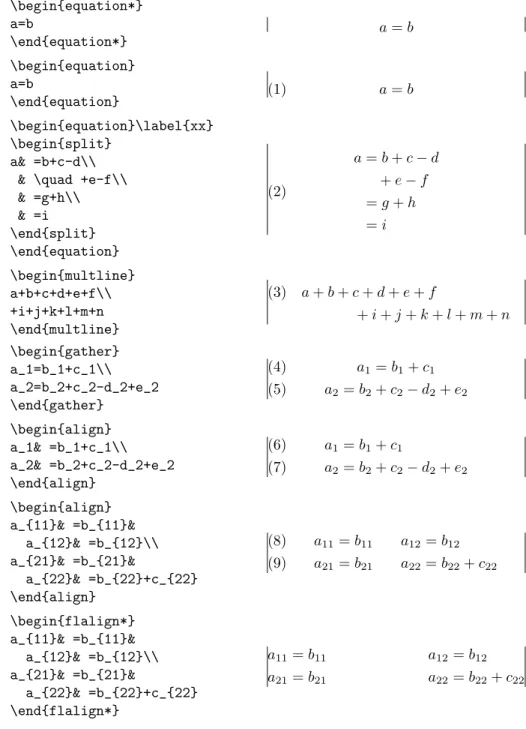
Table 3.1. Comparison of displayed equation environments (vertical lines in-dicating nominal margins)
\begin{equation*} a=b \end{equation*} a=b \begin{equation} a=b \end{equation} (1) a=b \begin{equation}\label{xx} \begin{split} a& =b+c-d\\ & \quad +e-f\\ & =g+h\\ & =i \end{split} \end{equation} a=b+c−d +e−f =g+h =i (2) \begin{multline} a+b+c+d+e+f\\ +i+j+k+l+m+n \end{multline} (3) a+b+c+d+e+f +i+j+k+l+m+n \begin{gather} a_1=b_1+c_1\\ a_2=b_2+c_2-d_2+e_2 \end{gather} a1=b1+c1 (4) a2=b2+c2−d2+e2 (5) \begin{align} a_1& =b_1+c_1\\ a_2& =b_2+c_2-d_2+e_2 \end{align} a1=b1+c1 (6) a2=b2+c2−d2+e2 (7) \begin{align} a_{11}& =b_{11}& a_{12}& =b_{12}\\ a_{21}& =b_{21}& a_{22}& =b_{22}+c_{22} \end{align} a11=b11 a12=b12 (8) a21=b21 a22=b22+c22 (9) \begin{flalign*} a_{11}& =b_{11}& a_{12}& =b_{12}\\ a_{21}& =b_{21}& a_{22}& =b_{22}+c_{22} \end{flalign*} a11=b11 a12=b12 a21=b21 a22=b22+c22
3.4. SPLIT EQUATIONS WITH ALIGNMENT 5
3.3 Split equations without alignment
Themultlineenvironment is a variation of theequationenvironment used for equations that don’t fit on a single line. The first line of amultlinewill be at the left margin and the last line at the right margin, except for an indention on both sides in the amount of\multlinegap. Any additional lines in between will be centered independently within the display width (unless thefleqnoption is in effect).
Like equation, multline has only a single equation number (thus, none of the individual lines should be marked with \notag). The equation number is placed on the last line (reqno option) or first line (leqno option); vertical centering as forsplitis not supported bymultline.
It’s possible to force one of the middle lines to the left or right with com-mands \shoveleft, \shoveright. These commands take the entire line as an argument, up to but not including the final\\; for example
(3.10) A B C D \begin{multline} \framebox[.65\columnwidth]{A}\\ \framebox[.5\columnwidth]{B}\\ \shoveright{\framebox[.55\columnwidth]{C}}\\ \framebox[.65\columnwidth]{D} \end{multline}
The value of\multlinegapcan be changed with the usual LATEX commands
\setlength or\addtolength.
3.4 Split equations with alignment
Likemultline, thesplitenvironment is forsingleequations that are too long to fit on one line and hence must be split into multiple lines. Unlikemultline, however, the split environment provides for alignment among the split lines, using&to mark alignment points. Unlike the otheramsmathequation structures, thesplitenvironment provides no numbering, because it is intended to be used
only inside some other displayed equation structure, usually anequation,align, or gatherenvironment, which provides the numbering. For example:
Hc= 1 2n n X l=0 (−1)l(n−l)p−2 X l1+···+lp=l p Y i=1 n i li ·[(n−l)−(ni−li)]ni−li· h (n−l)2− p X j=1 (ni−li)2 i . (3.11)
6 3. DISPLAYED EQUATIONS
\begin{equation}\label{e:barwq}\begin{split}
H_c&=\frac{1}{2n} \sum^n_{l=0}(-1)^{l}(n-{l})^{p-2}
\sum_{l _1+\dots+ l _p=l}\prod^p_{i=1} \binom{n_i}{l _i}\\ &\quad\cdot[(n-l )-(n_i-l _i)]^{n_i-l _i}\cdot
\Bigl[(n-l )^2-\sum^p_{j=1}(n_i-l _i)^2\Bigr]. \end{split}\end{equation}
Thesplitstructure should constitute the entire body of the enclosing struc-ture, apart from commands like\labelthat produce no visible material.
3.5 Equation groups without alignment
Thegatherenvironment is used for a group of consecutive equations when there is no alignment desired among them; each one is centered separately within the text width (see Table 3.1). Equations inside gather are separated by a \bslashcommand. Any equation in agathermay consist of a\begin{split} . . . \end{split}structure—for example:
\begin{gather} first equation\\ \begin{split}
second & equation\\ & on two lines \end{split}
\\
third equation \end{gather}
3.6 Equation groups with mutual alignment
Thealignenvironment is used for two or more equations when vertical align-ment is desired; usually binary relations such as equal signs are aligned (see Table 3.1).
To have several equation columns side-by-side, use extra ampersands to sep-arate the columns:
x=y X =Y a=b+c (3.12) x0=y0 X0 =Y0 a0=b (3.13) x+x0=y+y0 X+X0 =Y +Y0 a0b=c0b (3.14) \begin{align}
x&=y & X&=Y & a&=b+c\\ x’&=y’ & X’&=Y’ & a’&=b\\ x+x’&=y+y’ & X+X’&=Y+Y’ & a’b&=c’b \end{align}
3.7. ALIGNMENT BUILDING BLOCKS 7
\text inside analignenvironment:
x=y1−y2+y3−y5+y8−. . . by (3.21) (3.15) =y0◦y∗ by (4.1) (3.16) =y(0)y0 by Axiom 1. (3.17) \begin{align} x& = y_1-y_2+y_3-y_5+y_8-\dots
&& \text{by \eqref{eq:C}}\\ & = y’\circ y^* && \text{by \eqref{eq:D}}\\ & = y(0) y’ && \text {by Axiom 1.} \end{align}
A variant environment alignatallows the horizontal space between equations to be explicitly specified. This environment takes one argument, the number of “equation columns”: count the maximum number of &s in any row, add 1 and divide by 2. x=y1−y2+y3−y5+y8−. . . by (3.21) (3.18) =y0◦y∗ by (4.1) (3.19) =y(0)y0 by Axiom 1. (3.20) \begin{alignat}{2} x& = y_1-y_2+y_3-y_5+y_8-\dots
&\quad& \text{by \eqref{eq:C}}\\ & = y’\circ y^* && \text{by \eqref{eq:D}}\\ & = y(0) y’ && \text {by Axiom 1.} \end{alignat}
3.7 Alignment building blocks
Likeequation, the multi-equation environmentsgather,align, andalignedat are designed to produce a structure whose width is the full line width. This means, for example, that one cannot readily add parentheses around the entire structure. But variantsgathered,aligned, andalignedatare provided whose total width is the actual width of the contents; thus they can be used as a component in a containing expression. E.g.,
B0 =−∂×E, E0 =∂×B−4πj, ) Maxwell’s equations \begin{equation*} \left.\begin{aligned} B’&=-\partial\times E,\\ E’&=\partial\times B - 4\pi j, \end{aligned} \right\}
\qquad \text{Maxwell’s equations} \end{equation*}
8 3. DISPLAYED EQUATIONS
Like the array environment, these -ed variants also take an optional [t] or [b]argument to specify vertical positioning.
“Cases” constructions like the following are common in mathematics:
(3.21) Pr−j = (
0 ifr−j is odd, r! (−1)(r−j)/2 ifr−j is even.
and in theamsmath package there is a cases environment to make them easy to write:
P_{r-j}=\begin{cases}
0& \text{if $r-j$ is odd},\\
r!\,(-1)^{(r-j)/2}& \text{if $r-j$ is even}. \end{cases}
Notice the use of\text (cf.§6) and the nested math formulas.
3.8 Adjusting tag placement
Placing equation numbers can be a rather complex problem in multiline displays. The environments of the amsmath package try hard to avoid overprinting an equation number on the equation contents, if necessary moving the number down or up to a separate line. Difficulties in accurately calculating the profile of an equation can occasionally result in number movement that doesn’t look right. There is a\raisetagcommand provided to adjust the vertical position of the current equation number, if it has been shifted away from its normal position. To move a particular number up by six points, write \raisetag{6pt}. This kind of adjustment is fine tuning like line breaks and page breaks, and should therefore be left undone until your document is nearly finalized, or you may end up redoing the fine tuning several times to keep up with changing document contents.
3.9 Vertical spacing and page breaks in multiline displays
You can use the\\[hdimensioni]command to get extra vertical space between lines in all theamsmathdisplayed equation environments, as is usual in LATEX.
When the amsmath package is in use page breaks between equation lines are normally disallowed; the philosophy is that page breaks in such material should receive individual attention from the author. To get an individual page break inside a particular displayed equation, a\displaybreakcommand is provided. \displaybreak is best placed immediately before the \\ where it is to take effect. Like LATEX’s\pagebreak, \displaybreak takes an optional argument
between 0 and 4 denoting the desirability of the pagebreak. \displaybreak[0] means “it is permissible to break here” without encouraging a break; \display-breakwith no optional argument is the same as\displaybreak[4]and forces a break.
If you prefer a strategy of letting page breaks fall where they may, even in the middle of a multi-line equation, then you might put\allowdisplaybreaks[1] in the preamble of your document. An optional argument 1–4 can be used for
3.11. EQUATION NUMBERING 9
finer control: [1]means allow page breaks, but avoid them as much as possi-ble; values of 2,3,4 mean increasing permissiveness. When display breaks are enabled with\allowdisplaybreaks, the\\*command can be used to prohibit a pagebreak after a given line, as usual.
Note: Certain equation environments wrap their contents in an unbreakable box, with the consequence that neither \displaybreak
nor \allowdisplaybreaks will have any effect on them. These include
split,aligned,gathered, and alignedat. 3.10 Interrupting a display
The command \intertext is used for a short interjection of one or two lines of text in the middle of a multiple-line display structure (see also the \text command in §6). Its salient feature is preservation of the alignment, which would not happen if you simply ended the display and then started it up again afterwards. \intertext may only appear right after a \\ or \\* command. Notice the position of the word “and” in this example.
A1=N0(λ; Ω0)−φ(λ; Ω0), (3.22) A2=φ(λ; Ω0)−φ(λ; Ω), (3.23) and A3=N(λ;ω). (3.24) \begin{align} A_1&=N_0(\lambda;\Omega’)-\phi(\lambda;\Omega’),\\ A_2&=\phi(\lambda;\Omega’)-\phi(\lambda;\Omega),\\ \intertext{and} A_3&=\mathcal{N}(\lambda;\omega). \end{align} 3.11 Equation numbering 3.11.1 Numbering hierarchy
In LATEX if you wanted to have equations numbered within sections—that is,
have equation numbers (1.1), (1.2), . . . , (2.1), (2.2), . . . , in sections 1, 2, and so forth—you could redefine\theequation as suggested in the LATEX manual [7,
§6.3,§C.8.4]:
\renewcommand{\theequation}{\thesection.\arabic{equation}}
This works pretty well, except that the equation counter won’t be reset to zero at the beginning of a new section or chapter, unless you do it yourself using \setcounter. To make this a little more convenient, theamsmathpackage pro-vides a command \numberwithin. To have equation numbering tied to section numbering, with automatic reset of the equation counter, write
\numberwithin{equation}{section}
As its name implies, the\numberwithincommand can be applied to any counter, not just theequationcounter.
10 4. MISCELLANEOUS MATHEMATICAL FEATURES
3.11.2 Cross references to equation numbers
To make cross-references to equations easier, an\eqrefcommand is provided. This automatically supplies the parentheses around the equation number. I.e., if\ref{abc}produces 3.2 then\eqref{abc}produces (3.2).
3.11.3 Subordinate numbering sequences
The amsmath package provides also a subequations environment to make it easy to number equations in a particular group with a subordinate numbering scheme. For example
\begin{subequations} ...
\end{subequations}
causes all numbered equations within that part of the document to be numbered (4.9a) (4.9b) (4.9c) . . . , if the preceding numbered equation was (4.8). A\label command immediately after\begin{subequations}will produce a\refof the parent number 4.9, not 4.9a. The counters used by the subequations environ-ment are parentequation and equation and \addtocounter, \setcounter, \value, etc., can be applied as usual to those counter names. To get anything other than lowercase letters for the subordinate numbers, use standard LATEX
methods for changing numbering style [7,§6.3,§C.8.4]. For example, redefining \theequationas follows will produce roman numerals.
\begin{subequations}
\renewcommand{\theequation}{\theparentequation \roman{equation}} ...
—4—
Miscellaneous mathematical features
4.1 Matrices
Theamsmathpackage provides some environments for matrices beyond the basic array environment of LATEX. The pmatrix, bmatrix, Bmatrix, vmatrixand
Vmatrix have (respectively) ( ), [ ], { }, | |, and k k delimiters built in. For naming consistency there is amatrixenvironment sans delimiters. This is not entirely redundant with the array environment; the matrix environments all use more economical horizontal spacing than the rather prodigal spacing of the array environment. Also, unlike the array environment, you don’t have to give column specifications for any of the matrix environments; by default you can have up to 10 centered columns.2 (If you need left or right alignment in a column or other special formats you must resort toarray.)
2More precisely: The maximum number of columns in a matrix is determined by the
counterMaxMatrixCols(normal value = 10), which you can change if necessary using LATEX’s
4.3. DOTS 11
To produce a small matrix suitable for use in text, there is a smallmatrix environment (e.g., a b
c d
) that comes closer to fitting within a single text line than a normal matrix. Delimiters must be provided; there are no p,b,B,v,V versions ofsmallmatrix. The above example was produced by
\bigl( \begin{smallmatrix} a&b\\ c&d
\end{smallmatrix} \bigr)
\hdotsfor{hnumberi}produces a row of dots in a matrix spanning the given number of columns. For example,
a b c d e . . . .
\begin{matrix} a&b&c&d\\ e&\hdotsfor{3} \end{matrix}
The spacing of the dots can be varied through use of a square-bracket option, for example,\hdotsfor[1.5]{3}. The number in square brackets will be used as a multiplier (i.e., the normal value is 1.0).
(4.1) D1t −a12t2 . . . −a1ntn −a21t1 D2t . . . −a2ntn . . . . −an1t1 −an2t2 . . . Dnt , \begin{pmatrix} D_1t&-a_{12}t_2&\dots&-a_{1n}t_n\\ -a_{21}t_1&D_2t&\dots&-a_{2n}t_n\\ \hdotsfor[2]{4}\\ -a_{n1}t_1&-a_{n2}t_2&\dots&D_nt\end{pmatrix}
4.2 Math spacing commands
The amsmath package slightly extends the set of math spacing commands, as shown below. Both the spelled-out and abbreviated forms of these commands are robust, and they can also be used outside of math.
Abbrev. Spelled out Example Abbrev. Spelled out Example
no space ⇒⇐ no space ⇒⇐ \, \thinspace ⇒⇐ \! \negthinspace ⇒⇐ \: \medspace ⇒ ⇐ \negmedspace ⇒⇐ \; \thickspace ⇒ ⇐ \negthickspace ⇒⇐ \quad ⇒ ⇐ \qquad ⇒ ⇐
For the greatest possible control over math spacing, use \mspace and ‘math units’. One math unit, ormu, is equal to 1/18 em. Thus to get a negative\quad you could write \mspace{-18.0mu}.
4.3 Dots
For preferred placement of ellipsis dots (raised or on-line) in various contexts there is no general consensus. It may therefore be considered a matter of taste. By using the semantically oriented commands
12 4. MISCELLANEOUS MATHEMATICAL FEATURES
• \dotscfor “dots with commas”
• \dotsbfor “dots with binary operators/relations” • \dotsmfor “multiplication dots”
• \dotsifor “dots with integrals”
• \dotsofor “other dots” (none of the above)
instead of \ldots and \cdots, you make it possible for your document to be adapted to different conventions on the fly, in case (for example) you have to submit it to a publisher who insists on following house tradition in this respect. The default treatment for the various kinds follows American Mathematical Society conventions:
Then we have the series $A_1, A_2, \dotsc$, the regional sum $A_1 +A_2 +\dotsb $, the orthogonal product $A_1 A_2 \dotsm $, and the infinite integral
\[\int_{A_1}\int_{A_2}\dotsi\].
Then we have the seriesA1, A2, . . .,
the regional sumA1+A2+· · ·, the
orthogonal product A1A2· · ·, and
the infinite integral Z A1 Z A2 · · ·. 4.4 Nonbreaking dashes
A command\nobreakdashis provided to suppress the possibility of a linebreak after the following hyphen or dash. For example, if you write ‘pages 1–9’ as pages 1\nobreakdash--9then a linebreak will never occur between the dash and the 9. You can also use \nobreakdash to prevent undesirable hyphen-ations in combinhyphen-ations like$p$-adic. For frequent use, it’s advisable to make abbreviations, e.g.,
\newcommand{\p}{$p$\nobreakdash}% for "\p-adic"
\newcommand{\Ndash}{\nobreakdash--}% for "pages 1\Ndash 9" % For "\n dimensional" ("n-dimensional"):
\newcommand{\n}[1]{$n$\nobreakdash-\hspace{0pt}}
The last example shows how to prohibit a linebreak after the hyphen but allow normal hyphenation in the following word. (It suffices to add a zero-width space after the hyphen.)
4.5 Accents in math
In ordinary LATEX the placement of the second accent in doubled math accents
is often poor. With the amsmath package you will get improved placement of the second accent: Aˆˆ(\hat{\hat{A}}).
The commands \dddot and \ddddot are available to produce triple and quadruple dot accents in addition to the\dot and\ddotaccents already avail-able in LATEX.
To get a superscripted hat or tilde character, load theamsxtrapackage and use\sphator\sptilde. Usage isA\sphat(note the absence of the^character). To place an arbitrary symbol in math accent position, or to get under accents, see theaccentspackage by Javier Bezos.
4.10. AFFIXING SYMBOLS TO OTHER SYMBOLS 13
4.6 Roots
In ordinary LATEX the placement of root indices is sometimes not so good: √β
k
(\sqrt[\beta]{k}). In the amsmath package \leftroot and \uproot allow you to adjust the position of the root:
\sqrt[\leftroot{-2}\uproot{2}\beta]{k}
will move the beta up and to the right: √βk. The negative argument used with \leftroot moves the β to the right. The units are a small amount that is a useful size for such adjustments.
4.7 Boxed formulas
The command\boxed puts a box around its argument, like\fboxexcept that the contents are in math mode:
(4.2) η≤C(δ(η) + ΛM(0, δ))
\boxed{\eta \leq C(\delta(\eta) +\Lambda_M(0,\delta))}
4.8 Over and under arrows
Basic LATEX provides\overrightarrowand\overleftarrowcommands. Some
additional over and under arrow commands are provided by theamsmathpackage to extend the set:
\overleftarrow \underleftarrow \overrightarrow \underrightarrow \overleftrightarrow \underleftrightarrow
4.9 Extensible arrows
\xleftarrow and\xrightarrow produce arrows that extend automatically to accommodate unusually wide subscripts or superscripts. These commands take one optional argument (the subscript) and one mandatory argument (the su-perscript, possibly empty):
(4.3) A←n−−−−+µ−−1 B−−−−→n±i−1 T C
\xleftarrow{n+\mu-1}\quad \xrightarrow[T]{n\pm i-1}
4.10 Affixing symbols to other symbols
LATEX provides\stackrelfor placing a superscript above a binary relation. In
the amsmath package there are somewhat more general commands, \overset and \underset, that can be used to place one symbol above or below another symbol, whether it’s a relation or something else. The input \overset{*}{X} will place a superscript-size ∗ above the X:
∗
X; \underset is the analog for adding a symbol underneath.
14 4. MISCELLANEOUS MATHEMATICAL FEATURES
4.11 Fractions and related constructions
4.11.1 The \frac, \dfrac, and \tfraccommands
The \frac command, which is in the basic command set of LATEX, takes two
arguments—numerator and denominator—and typesets them in normal fraction form. The amsmath package provides also \dfrac and \tfrac as convenient abbreviations for{\displaystyle\frac ... }and{\textstyle\frac ... }.
(4.4) 1 klog2c(f) 1 klog2c(f) r 1 klog2c(f) r 1 klog2c(f) \begin{equation} \frac{1}{k}\log_2 c(f)\;\tfrac{1}{k}\log_2 c(f)\; \sqrt{\frac{1}{k}\log_2 c(f)}\;\sqrt{\dfrac{1}{k}\log_2 c(f)} \end{equation}
4.11.2 The \binom, \dbinom, and\tbinom commands
For binomial expressions such as nk
amsmathhas\binom,\dbinomand\tbinom:
(4.5) 2k− k 1 2k−1+ k 2 2k−2 2^k-\binom{k}{1}2^{k-1}+\binom{k}{2}2^{k-2}
4.11.3 The \genfrac command
The capabilities of\frac,\binom, and their variants are subsumed by a general-ized fraction command\genfracwith six arguments. The last two correspond to \frac’s numerator and denominator; the first two are optional delimiters (as seen in \binom); the third is a line thickness override (\binomuses this to set the fraction line thickness to 0—i.e., invisible); and the fourth argument is a mathstyle override: integer values 0–3 select respectively\displaystyle, \textstyle, \scriptstyle, and\scriptscriptstyle. If the third argument is left empty, the line thickness defaults to ‘normal’.
\genfrac{left-delim}{right-delim}{thickness}{mathstyle} {numerator}{denominator}
To illustrate, here is how\frac,\tfrac, and \binommight be defined. \newcommand{\frac}[2]{\genfrac{}{}{}{}{#1}{#2}}
\newcommand{\tfrac}[2]{\genfrac{}{}{}{1}{#1}{#2}} \newcommand{\binom}[2]{\genfrac{(}{)}{0pt}{}{#1}{#2}}
If you find yourself repeatedly using \genfrac throughout a document for a particular notation, you will do yourself a favor (and your publisher) if you define a meaningfully-named abbreviation for that notation, along the lines of \fracand\binom.
The primitive generalized fraction commands\over,\overwithdelims,\atop, \atopwithdelims, \above, \abovewithdelims produce warning messages if used with theamsmathpackage, for reasons discussed intechnote.tex.
4.14. DELIMITERS 15
4.12 Continued fractions
The continued fraction
(4.6) 1 √ 2 + 1 √ 2 +√ 1 2 +· · · can be obtained by typing
\cfrac{1}{\sqrt{2}+ \cfrac{1}{\sqrt{2}+
\cfrac{1}{\sqrt{2}+\dotsb }}}
This produces better-looking results than straightforward use of\frac. Left or right placement of any of the numerators is accomplished by using\cfrac[l] or \cfrac[r]instead of\cfrac.
4.13 Smash options
The command \smashis used to typeset a subformula with an effective height and depth of zero, which is sometimes useful in adjusting the subformula’s position with respect to adjacent symbols. With theamsmath package\smash has optional arguments tand b, because occasionally it is advantageous to be able to “smash” only the top or only the bottom of something while retaining the natural depth or height. For example, when adjacent radical symbols are unevenly sized or positioned because of differences in the height and depth of their contents,\smashcan be employed to make them more consistent. Compare √
x+√y+√zand√x+√y+√z, where the latter was produced by$\sqrt{x} + \sqrt{\smash[b]{y}} + \sqrt{z}$.
4.14 Delimiters 4.14.1 Delimiter sizes
The automatic delimiter sizing done by\leftand\righthas two limitations: First, it is applied mechanically to produce delimiters large enough to encompass the largest contained item, and second, the range of sizes is not even approxi-mately continuous but has fairly large quantum jumps. This means that a math fragment that is infinitesimally too large for a given delimiter size will get the next larger size, a jump of 3pt or so in normal-sized text. There are two or three situations where the delimiter size is commonly adjusted, using a set of commands that have ‘big’ in their names.
Delimiter text \left \bigl \Bigl \biggl \Biggl
size size \right \bigr \Bigr \biggr \Biggr
Result (b)(c d) (b) c d b c d bc d b c d b ! c d !
16 4. MISCELLANEOUS MATHEMATICAL FEATURES
The first kind of situation is a cumulative operator with limits above and below. With\left and\right the delimiters usually turn out larger than necessary, and using theBigor biggsizes instead gives better results:
X i ai X j xij p 1/p versus X i ai X j xij p1/p
\biggl[\sum_i a_i\Bigl\lvert\sum_j x_{ij}\Bigr\rvert^p\biggr]^{1/p} The second kind of situation is clustered pairs of delimiters where \left and \rightmake them all the same size (because that is adequate to cover the en-compassed material) but what you really want is to make some of the delimiters slightly larger to make the nesting easier to see.
((a1b1)−(a2b2)) ((a2b1) + (a1b2)) versus (a1b1)−(a2b2)
(a2b1) + (a1b2)
\left((a_1 b_1) - (a_2 b_2)\right) \left((a_2 b_1) + (a_1 b_2)\right) \quad\text{versus}\quad
\bigl((a_1 b_1) - (a_2 b_2)\bigr) \bigl((a_2 b_1) + (a_1 b_2)\bigr)
The third kind of situation is a slightly oversize object in running text, such as b0 d0
where the delimiters produced by \left and \rightcause too much line spreading. In that case\bigland\bigrcan be used to produce delimiters that are slightly larger than the base size but still able to fit within the normal line spacing: b
0
d0
.
In ordinary LATEX \big, \bigg, \Big, and \Bigg delimiters aren’t scaled
properly over the full range of LATEX font sizes. With theamsmathpackage they
are.
4.14.2 Vertical bar notations
The amsmath package provides commands \lvert, \rvert, \lVert, \rVert (compare \langle, \rangle) to address the problem of overloading for the vert bar character |. This character is currently used in LATEX documents to
represent a wide variety of mathematical objects: the ‘divides’ relation in a number-theory expression like p|q, or the absolute-value operation |z|, or the ‘such that’ condition in set notation, or the ‘evaluated at’ notation fζ(t)
t=0. The multiplicity of uses in itself is not so bad; what is bad, however, is that fact that not all of the uses take the same typographical treatment, and that the complex discriminatory powers of a knowledgeable reader cannot be replicated in computer processing of mathematical documents. It is recommended there-fore that there should be a one-to-one correspondence in any given document between the vert bar character | and a selected mathematical notation, and similarly for the double-bar command \|. This immediately rules out the use of|and \|for delimiters, because left and right delimiters are distinct usages
5.1. DEFINING NEW OPERATOR NAMES 17
that do not relate in the same way to adjacent symbols; recommended prac-tice is therefore to define suitable commands in the document preamble for any paired-delimiter use of vert bar symbols:
\providecommand{\abs}[1]{\lvert#1\rvert} \providecommand{\norm}[1]{\lVert#1\rVert}
whereupon the document would contain \abs{z}to produce|z|and\norm{v} to producekvk.
—5—
Operator names
5.1 Defining new operator names
Math functions such as log, sin, and lim are traditionally typeset in roman type to make them visually more distinct from one-letter math variables, which are set in math italic. The more common ones have predefined names,\log,\sin, \lim, and so forth, but new ones come up all the time in mathematical papers, so theamsmathpackage provides a general mechanism for defining new ‘operator names’. To define a math function\xxx to work like\sin, you write
\DeclareMathOperator{\xxx}{xxx}
whereupon ensuing uses of \xxx will produce xxx in the proper font and au-tomatically add proper spacing on either side when necessary, so that you get
AxxxB instead ofAxxxB. In the second argument of\DeclareMathOperator (the name text), a pseudo-text mode prevails: the hyphen character-will print as a text hyphen rather than a minus sign and an asterisk*will print as a raised text asterisk instead of a centered math star. (Compare a-b*c and a−b∗c.) But otherwise the name text is printed in math mode, so that you can use, e.g., subscripts and superscripts there.
If the new operator should have subscripts and superscripts placed in ‘limits’ position above and below as with lim, sup, or max, use the * form of the \DeclareMathOperatorcommand:
\DeclareMathOperator*{\Lim}{Lim}
See also the discussion of subscript placement in Section 7.3. The following operator names are predefined:
18 6. THE\TEXTCOMMAND
\arccos arccos \deg deg \lg lg \projlim proj lim
\arcsin arcsin \det det \lim lim \sec sec
\arctan arctan \dim dim \liminf lim inf \sin sin
\arg arg \exp exp \limsup lim sup \sinh sinh
\cos cos \gcd gcd \ln ln \sup sup
\cosh cosh \hom hom \log log \tan tan
\cot cot \inf inf \max max \tanh tanh
\coth coth \injlim inj lim \min min
\csc csc \ker ker \Pr Pr
\varlimsup lim \varinjlim lim −→ \varliminf lim \varprojlim lim ←− There is also a command\operatornamesuch that using \operatorname{abc}
in a math formula is equivalent to a use of\abcdefined by \DeclareMathOper-ator. This may be occasionally useful for constructing more complex notation or other purposes. (Use the variant\operatorname*to get limits.)
5.2 \mod and its relatives
Commands \mod, \bmod, \pmod, \pod are provided to deal with the special spacing conventions of “mod” notation. \bmodand\pmodare available in LATEX,
but with theamsmathpackage the spacing of\pmodwill adjust to a smaller value if it’s used in a non-display-mode formula. \modand\podare variants of\pmod preferred by some authors;\modomits the parentheses, whereas\podomits the “mod” and retains the parentheses.
(5.1) gcd(n, mmodn); x≡y (mod b); x≡y modc; x≡y (d) \gcd(n,m\bmod n);\quad x\equiv y\pmod b;
\quad x\equiv y\mod c;\quad x\equiv y\pod d
—6—
The
\text
command
The main use of the command \text is for words or phrases in a display. It is very similar to the LATEX command \mbox in its effects, but has a couple
of advantages. If you want a word or phrase of text in a subscript, you can type ..._{\text{word or phrase}}, which is slightly easier than the\mbox equivalent: ..._{\mbox{\scriptsize word or phrase}}. The other advantage is the more descriptive name.
7.2. THE\SIDESETCOMMAND 19
f_{[x_{i-1},x_i]} \text{ is monotonic,} \quad i = 1,\dots,c+1
—7—
Integrals and sums
7.1 Multiline subscripts and superscripts
The \substackcommand can be used to produce a multiline subscript or su-perscript: for example
\sum_{\substack{ 0\le i\le m\\ 0<j<n}} P(i,j) X 0≤i≤m 0<j<n P(i, j)
A slightly more generalized form is thesubarrayenvironment which allows you to specify that each line should be left-aligned instead of centered, as here:
\sum_{\begin{subarray}{l} i\in\Lambda\\ 0<j<n \end{subarray}} P(i,j) X i∈Λ 0<j<n P(i, j)
7.2 The \sidesetcommand
There’s also a command called\sideset, for a rather special purpose: putting symbols at the subscript and superscript corners of a large operator symbol such asPorQ. Note: this command is not designed to be applied to anything other
than sum-class symbols. The prime example is the case when you want to put a prime on a sum symbol. If there are no limits above or below the sum, you could just use \nolimits: here’s\sum\nolimits’ E_n in display mode:
(7.1) X0En
If, however, you want not only the prime but also something below or above the sum symbol, it’s not so easy—indeed, without\sideset, it would be downright difficult. With \sideset, you can write
\sideset{}{’}
\sum_{n<k,\;\text{$n$ odd}} nE_n
X0 n<k, nodd
nEn
The extra pair of empty braces is explained by the fact that \sideset has the capability of putting an extra symbol or symbols at each corner of a large operator; to put an asterisk at each corner of a product symbol, you would type
\sideset{_*^*}{_*^*}\prod
∗ ∗
Y∗
20 8. COMMUTATIVE DIAGRAMS
7.3 Placement of subscripts and limits
The default positioning for subscripts depends on the base symbol involved. The default for sum-class symbols is ‘displaylimits’ positioning: When a sum-class symbol appears in a displayed formula, subscript and superscript are placed in ‘limits’ position above and below, but in an inline formula, they are placed to the side, to avoid unsightly and wasteful spreading of the surrounding text lines. The default for integral-class symbols is to have sub- and superscripts always to the side, even in displayed formulas. (See the discussion of theintlimitsand related options in Section 2.)
Operator names such as sin or lim may have either ‘displaylimits’ or ‘limits’ positioning depending on how they were defined. The standard operator names are defined according to normal mathematical usage.
The commands\limitsand\nolimitscan be used to override the normal behavior of a base symbol:
X X,
Z Z
A
, limn→∞
To define a command whose subscripts follow the same ‘displaylimits’ behavior as \sum, put\displaylimitsat the tail end of the definition. When multiple instances of \limits,\nolimits, or\displaylimitsoccur consecutively, the last one takes precedence.
7.4 Multiple integral signs
\iint, \iiint, and \iiiint give multiple integral signs with the spacing be-tween them nicely adjusted, in both text and display style. \idotsint is an extension of the same idea that gives two integral signs with dots between them.
Z Z A f(x, y)dx dy Z Z Z A f(x, y, z)dx dy dz (7.2) Z Z Z Z A f(w, x, y, z)dw dx dy dz Z · · · Z A f(x1, . . . , xk) (7.3)
—8—
Commutative diagrams
Some commutative diagram commands like the ones inAMS-TEX are available as a separate package,amscd. For complex commutative diagrams authors will need to turn to more comprehensive packages like kuvio or XY-pic, but for simple diagrams without diagonal arrows the amscd commands may be more
9.2. RECOMMENDED USE OF MATH FONT COMMANDS 21
convenient. Here is one example.
SWΛ⊗T −−−−→j T y yEndP (S⊗T)/I (Z⊗T)/J \begin{CD} S^{{\mathcal{W}}_\Lambda}\otimes T @>j>> T\\ @VVV @VV{\End P}V\\
(S\otimes T)/I @= (Z\otimes T)/J
\end{CD}
In theCDenvironment the commands@>>>, @<<<,@VVV, and@AAA give respec-tively right, left, down, and up arrows. For the horizontal arrows, material between the first and second > or < symbols will be typeset as a superscript, and material between the second and third will be typeset as a subscript. Sim-ilarly, material between the first and second or second and third As or Vs of vertical arrows will be typeset as left or right “sidescripts”. The commands@= and @|give horizontal and vertical double lines. A “null arrow” command @. can be used instead of a visible arrow to fill out an array where needed.
—9—
Using math fonts
9.1 Introduction
For more comprehensive information on font use in LATEX, see the LATEX font
guide (fntguide.tex) orThe LATEX Companion [4]. The basic set of math font
commands in LATEX includes \mathbf, \mathrm,\mathcal,\mathsf,\mathtt,
\mathit. Additional math alphabet commands such as \mathbb for black-board bold,\mathfrakfor Fraktur, and\mathscrfor Euler script are available through the packagesamsfontsandeuscript(distributed separately).
9.2 Recommended use of math font commands
If you find yourself employing math font commands frequently in your document, you might wish that they had shorter names, such as \mbinstead of \mathbf. Of course, there is nothing to keep you from providing such abbreviations for yourself by suitable \newcommandstatements. But for LATEX to provide shorter
names would actually be a disservice to authors, as that would obscure a much better alternative: defining custom command names derived from the names of the underlying mathematical objects, rather than from the names of the fonts used to distinguish the objects. For example, if you are using bold to indicate vectors, then you will be better served in the long run if you define a ‘vector’ command instead of a ‘math-bold’ command:
22 9. USING MATH FONTS
\newcommand{\vect}[1]{\mathbf{#1}}
you can write \vect{a} + \vect{b} to produce a+b. If you decide several months down the road that you want to use the bold font for some other purpose, and mark vectors by a small over-arrow instead, then you can put the change into effect merely by changing the definition of\vect; otherwise you would have to replace all occurrences of\mathbfthroughout your document, perhaps even needing to inspect each one to see whether it is indeed an instance of a vector. It can also be useful to assign distinct command names for different letters of a particular font:
\DeclareSymbolFont{AMSb}{U}{msb}{m}{n}% or use amsfonts package \DeclareMathSymbol{\C}{\mathalpha}{AMSb}{"43}
\DeclareMathSymbol{\R}{\mathalpha}{AMSb}{"52}
These statements would define the commands\Cand\Rto produce blackboard-bold letters from the ‘AMSb’ math symbols font. If you refer often to the complex numbers or real numbers in your document, you might find this method more convenient than (let’s say) defining a \field command and writing \field{C},\field{R}. But for maximum flexibility and control, define such a \fieldcommand and then define\Cand\Rin terms of that command: \usepackage{amsfonts}% to get the \mathbb alphabet
\newcommand{\field}[1]{\mathbb{#1}} \newcommand{\C}{\field{C}}
\newcommand{\R}{\field{R}}
9.3 Bold math symbols
The\mathbfcommand is commonly used to obtain bold Latin letters in math, but for most other kinds of math symbols it has no effect, or its effects depend unreliably on the set of math fonts that are in use. For example, writing \Delta \mathbf{\Delta}\mathbf{+}\delta \mathbf{\delta}
produces ∆∆+δδ; the\mathbfhas no effect on the plus sign or the small delta. Theamsmathpackage therefore provides two additional commands, \bold-symboland\pmb, that can be applied to other kinds of math symbols. \bold-symbol can be used for a math symbol that remains unaffected by\mathbf if (and only if) your current math font set includes a bold version of that symbol. \pmbcan be used as a last resort for any math symbols that do not have a true bold version provided by your set of math fonts; “pmb” stands for “poor man’s bold” and the command works by typesetting multiple copies of the symbol with slight offsets. The quality of the output is inferior, especially for symbols that contain any hairline strokes. When the standard default set of LATEX math
fonts are in use (Computer Modern), the only symbols that are likely to require \pmb are large operator symbols like\sum, extended delimiter symbols, or the extra math symbols provided by theamssymbpackage [1].
The following formula shows some of the results that are possible: A_\infty + \pi A_0
10.2. ERROR MESSAGES 23
\boldsymbol{\pi} \mathbf{A}_{\boldsymbol{0}}
\sim\pmb{A}_{\pmb{\infty}} \pmb{+}\pmb{\pi} \pmb{A}_{\pmb{0}}
A∞+πA0∼A∞+πA0∼AAA∞∞∞+++πππAAA000
If you want to use only the\boldsymbol command without loading the whole amsmath package, the bm package is recommended (this is a standard LATEX
package, not an AMS package; you probably have it already if you have a 1997 or newer version of LATEX).
9.4 Italic Greek letters
For italic versions of the capital Greek letters, the following commands are provided: \varGamma Γ \varSigma Σ \varDelta ∆ \varUpsilon Υ \varTheta Θ \varPhi Φ \varLambda Λ \varPsi Ψ \varXi Ξ \varOmega Ω \varPi Π
—10—
Error messages and output problems
10.1 General remarks
This is a supplement to Chapter 8 of the LATEX manual [7] (first edition:
Chap-ter 6). For the reader’s convenience, the set of error messages discussed here overlaps somewhat with the set in that chapter, but please be aware that we don’t provide exhaustive coverage here. The error messages are arranged in alphabetical order, disregarding unimportant text such as ! LaTeX Error: at the beginning, and nonalphabetical characters such as \. Where examples are given, we show also the help messages that appear on screen when you respond to an error message prompt by enteringh.
There is also a section discussing some output errors, i.e., instances where the printed document has something wrong but there was no LATEX error during
typesetting.
10.2 Error messages
\begin{split} won’t work here.
Example:
! Package amsmath Error: \begin{split} won’t work here. ...
24 10. ERROR MESSAGES AND OUTPUT PROBLEMS
? h
\Did you forget a preceding \begin{equation}?
If not, perhaps the ‘aligned’ environment is what you want. ?
Explanation: Thesplitenvironment does not construct a stand-alone displayed equation; it needs to be used within some other environment such asequation orgather.
Extra & on this line
Example:
! Package amsmath Error: Extra & on this line.
See the amsmath package documentation for explanation. Type H <return> for immediate help.
...
l.9 \end{alignat} ? h
\An extra & here is so disastrous that you should probably exit and fix things up.
?
Explanation: In analignat structure the number of alignment points per line is dictated by the numeric argument given after\begin{alignat}. If you use more alignment points in a line it is assumed that you accidentally left out a newline command\\and the above error is issued.
Improper argument for math accent
Example:
! Package amsmath Error: Improper argument for math accent:
(amsmath) Extra braces must be added to
(amsmath) prevent wrong output.
See the amsmath package documentation for explanation. Type H <return> for immediate help.
...
l.415 \tilde k_{\lambda_j} = P_{\tilde \mathcal {M}} ?
Explanation: Non-simple arguments for any LATEX command should be enclosed
in braces. In this example extra braces are needed as follows: ... P_{\tilde{\mathcal{M}}}
Font OMX/cmex/m/n/7=cmex7 not loadable ...
10.2. ERROR MESSAGES 25
! Font OMX/cmex/m/n/7=cmex7 not loadable: Metric (TFM) file not found. <to be read again>
relax l.8 $a
b+b^2$ ? h
I wasn’t able to read the size data for this font, so I will ignore the font specification.
[Wizards can fix TFM files using TFtoPL/PLtoTF.] You might try inserting a different font spec;
e.g., type ‘I\font<same font id>=<substitute font name>’. ?
Explanation: Certain extra sizes of some Computer Modern fonts that were formerly available mainly through the AMSFonts distribution are considered part of standard LATEX (as of June 1994): cmex7–9, cmmib5–9, andcmbsy5–9.
If these extra sizes are missing on your system, you should try first to get them from the source where you obtained LATEX. If that fails, you could try getting
the fonts from CTAN (e.g., in the form of Metafont source files, directory /tex-archive/fonts/latex/mf, or in PostScript Type 1 format, directory /tex-archive/fonts/cm/ps-type1/bakoma).
If the font name begins with cmex, there is a special option cmex10 for the amsmath package that provides a temporary workaround. I.e., change the \usepackage to
\usepackage[cmex10]{amsmath}
This will force the use of the 10-point size of thecmexfont in all cases. Depend-ing on the contents of your document this may be adequate.
Math formula deleted: Insufficient extension fonts
Example:
! Math formula deleted: Insufficient extension fonts. l.8 $ab+b^2$
?
Explanation: This usually follows a previous errorFont ... not loadable; see the discussion of that error (above) for solutions.
Missing number, treated as zero
Example:
! Missing number, treated as zero. <to be read again>
a l.100 \end{alignat} ? h
26 10. ERROR MESSAGES AND OUTPUT PROBLEMS
(If you can’t figure out why I needed to see a number, look up ‘weird error’ in the index to The TeXbook.) ?
Explanation: There are many possibilities that can lead to this error. However, one possibility that is relevant for the amsmath package is that you forgot to give the number argument of analignatenvironment, as in:
\begin{alignat} a& =b& c& =d\\ a’& =b’& c’& =d’ \end{alignat}
where the first line should read instead \begin{alignat}{2}
Another possibility is that you have a left bracket character [ following a linebreak command \\in a multiline construction such asarray,tabular, or eqnarray. This will be interpreted by LATEX as the beginning of an ‘additional
vertical space’ request [7, §C.1.6], even if it occurs on the following line and is intended to be part of the contents. For example
\begin{array} a+b\\
[f,g]\\ m+n
\end{array}
To prevent the error message in such a case, you can add braces as discussed in the LATEX manual [7, §C.1.1]:
\begin{array} a+b\\
{[f,g]}\\ m+n
\end{array}
Missing \right. inserted
Example:
! Missing \right. inserted. <inserted text>
\right . l.10 \end{multline} ? h
I’ve inserted something that you may have forgotten. (See the <inserted text> above.)
With luck, this will get me unwedged. But if you
really didn’t forget anything, try typing ‘2’ now; then my insertion and my current dilemma will both disappear.
10.2. ERROR MESSAGES 27
Explanation: This error typically arises when you try to insert a linebreak inside a \left-\rightpair of delimiters in amultlineor splitenvironment: \begin{multline}
AAA\left(BBB\\ CCC\right) \end{multline}
There are two possible solutions: (1) instead of using \left and \right, use ‘big’ delimiters of fixed size (\bigl \bigr \biggl \biggr. . . ; see §4.14.1); or (2) use null delimiters to break up the \left-\right pair into parts for each line:
AAA\left(BBB\right.\\ \left.CCC\right)
The latter solution may result in mismatched delimiter sizes; ensuring that they match requires using \vphantom in the line that has the smaller delimiter (or possibly \smash in the line that has the larger delimiter). In the argument of \vphantomput a copy of the tallest element that occurs in the other line, e.g., xxx \left(\int_t yyy\right.\\
\left.\vphantom{\int_t} zzz ... \right) Paragraph ended before \xxx was complete
Example:
Runaway argument?
! Paragraph ended before \multline was complete. <to be read again>
\par l.100
? h
I suspect you’ve forgotten a ‘}’, causing me to apply this control sequence to too much text. How can we recover? My plan is to forget the whole thing and hope for the best. ?
Explanation: This might be produced by a misspelling in the\end{multline} command, e.g.,
\begin{multline} ...
\end{multiline}
or by using abbreviations for certain environments, such as\bal and\eal for \begin{align}and\end{align}:
\bal ... \eal
28 10. ERROR MESSAGES AND OUTPUT PROBLEMS
For technical reasons that kind of abbreviation does not work with the more complex displayed equation environments of the amsmath package (gather, align,split, etc.; cf.technote.tex).
Runaway argument?
See the discussion for the error message Paragraph ended before \xxx was complete.
Unknown option ‘xxx’ for package ‘yyy’
Example:
! LaTeX Error: Unknown option ‘intlim’ for package ‘amsmath’. ...
? h
The option ‘intlim’ was not declared in package ‘amsmath’, perhaps you misspelled its name. Try typing <return> to proceed.
?
Explanation: This means that you misspelled the option name, or the package simply does not have an option that you expected it to have. Consult the documentation for the given package.
Old form ‘\pmatrix’ should be \begin{pmatrix}.
Example:
! Package amsmath Error: Old form ‘\pmatrix’ should be \begin{pmatrix}.
See the amsmath package documentation for explanation. Type H <return> for immediate help.
...
\pmatrix ->\left (\matrix@check \pmatrix
\env@matrix l.16 \pmatrix
{a&b\cr c&d\cr} ? h
‘\pmatrix{...}’ is old Plain-TeX syntax whose use is ill-advised in LaTeX.
?
Explanation: When the amsmath package is used, the old forms of \pmatrix, \matrix, and \cases cannot be used any longer because of naming conflicts. Their syntax did not conform with standard LATEX syntax in any case.
Erroneous nesting of equation structures
Example:
! Package amsmath Error: Erroneous nesting of equation structures; (amsmath) trying to recover with ‘aligned’.
10.4. WRONG OUTPUT 29
Type H <return> for immediate help. ...
l.260 \end{alignat*}
\end{equation*}
Explanation: The structuresalign,alignat, etc., are designed for top-level use and for the most part cannot be nested inside some other displayed equation structure. The chief exception is that align and most of its variants can be used inside the gatherenvironment.
10.3 Warning messages
Foreign command \over [or \atop or \above]
Example:
Package amsmath Warning: Foreign command \over; \frac or \genfrac
(amsmath) should be used instead.
Explanation: The primitive generalized fraction commands of TEX—\over,\atop, \above—are deprecated when the amsmathpackage is used because their syn-tax is foreign to LATEX and amsmath provides native LATEX equivalents. See
technote.texfor further information. Cannot use ‘split’ here
Example:
Package amsmath Warning: Cannot use ‘split’ here;
(amsmath) trying to recover with ‘aligned’
Explanation: Thesplitenvironment is designed to serve as the entire body of an equation, or an entire line of analignorgatherenvironment. There cannot be any printed material before or after it within the same enclosing structure: \begin{equation}
\left\{ % <-- Not allowed \begin{split}
...
\end{split}
\right. % <-- Not allowed \end{equation}
10.4 Wrong output
10.4.1 Section numbers 0.1, 5.1, 8.1 instead of 1, 2, 3
This most likely means that you have the arguments for \numberwithin in reverse order:
\numberwithin{section}{equation}
That means ‘print the section number as equation number.section number and reset to 1 every time an equation occurs’ when what you probably wanted was the inverse
30 11. ADDITIONAL INFORMATION
10.4.2 The \numberwithincommand had no effect on equation num-bers
Are you looking at the first section in your document? Check the section num-bers elsewhere to see if the problem is the one described in§10.4.1.
—11—
Additional information
11.1 Converting existing documents 11.1.1 Converting from plain LATEX
A LATEX document will typically continue to work the same in most respects if
\usepackage{amsmath}is added in the document preamble. By default, how-ever, theamsmathpackage suppresses page breaks inside multiple-line displayed equation structures such aseqnarray,align, andgather. To continue allowing page breaks inside eqnarrayafter switching toamsmath, you will need to add the following line in your document preamble:
\allowdisplaybreaks[1]
To ensure normal spacing around relation symbols, you might also want to changeeqnarraytoalign,multline, orequation/splitas appropriate.
Most of the other differences in amsmath usage can be considered optional refinements, e.g., using
\DeclareMathOperator{\Hom}{Hom}
instead of\newcommand{\Hom}{\mbox{Hom}}.
11.1.2 Converting from AMS-LATEX 1.1
Seediffs-m.txt.
11.2 Technical notes
The filetechnote.texcontains some remarks on miscellaneous technical ques-tions that are less likely to be of general interest.
11.3 Getting help
Questions or comments regardingamsmathand related packages should be sent to:
American Mathematical Society Technical Support
Electronic Products and Services P. O. Box 6248
Providence, RI 02940
Phone: 800-321-4AMS (321-4267) or 401-455-4080 Internet: [email protected]
BIBLIOGRAPHY 31
If you are reporting a problem you should include the following information to make proper investigation possible:
1. The source file where the problem occurred, preferably reduced to mini-mum size by removing any material that can be removed without affecting the observed problem.
2. A LATEX log file showing the error message (if applicable) and the version
numbers of the document class and option files being used.
11.4 Of possible interest
Information about obtaining AMSFonts or other TEX-related software from the AMS Internet archive e-math.ams.org can be obtained by sending a request through electronic mail to: [email protected].
Information about obtaining theamsmathdistribution on diskette from the AMS is available from:
American Mathematical Society Customer Services
P. O. Box 6248 Providence, RI 02940
Phone: 800-321-4AMS (321-4267) or 401-455-4000 Internet: [email protected]
The TEX Users Group is a nonprofit organization that publishes a journal (TUGboat), holds meetings, and serves as a clearing-house of general informa-tion about TEX and TEX-related software.
TEX Users Group PO Box 2311
Portland, OR 97208-2311 USA
Phone: +1-503-223-9994 Email: [email protected]
Membership in the TEX Users Group is a good way to support continued de-velopment of free TEX-related software. There are also many local TEX user groups in other countries; information about contacting a local user group can be gotten from the TEX Users Group.
There is a Usenet newsgroup called comp.text.tex that is a fairly good source of information about LATEX and TEX in general. If you don’t know
about reading newsgroups, check with your local system administrator to see if newsgroup service is available at your site.
Bibliography
[1] AMSFonts version 2.2—user’s guide, Amer. Math. Soc., Providence, RI, 1994; distributed with the AMSFonts package.
32 BIBLIOGRAPHY
[2] Instructions for preparation of papers and monographs—AMS-LATEX, Amer.
Math. Soc., Providence, RI, 1996, 1999.
[3] Using theamsthm Package, Amer. Math. Soc., Providence, RI, 1999. [4] Michel Goossens, Frank Mittelbach, and Alexander Samarin, The LATEX
companion, Addison-Wesley, Reading, MA, 1994. [Note: The 1994 edition is not a reliable guide for theamsmathpackage unless you refer to the errata for Chapter 8—file compan.err, distributed with LATEX.]
[5] G. Gr¨atzer,Math into LATEX: An Introduction to LATEX and AMS-LATEX http://www.ams.org/cgi-bin/bookstore/bookpromo?fn=91&arg1= bookvideo&itmc=MLTEX, Birkh¨auser, Boston, 1995.
[6] Donald E. Knuth,The TEXbook, Addison-Wesley, Reading, MA, 1984. [7] Leslie Lamport, LATEX: A document preparation system, 2nd revised ed.,
Addison-Wesley, Reading, MA, 1994.
[8] Frank Mittelbach and Rainer Sch¨opf, The new font family selection—user interface to standard LATEX,TUGboat 11, no. 2 (June 1990), pp. 297–305.
[9] Michael Spivak,The joy of TEX, 2nd revised ed., Amer. Math. Soc., Provi-dence, RI, 1990.
Index
\!, 11 \,, 11 \:, 11 \;, 11 \\, 3, 5, 8, 9, 24, 26 \\*, 9 \|, 16 \above, 14, 29 \abovewithdelims, 14 \accentedsymbol, 2 accentspackage, 12 \addtocounter, 10 \addtolength, 5 align environment, 3, 5–7, 28–30 alignatenvironment, 7, 24, 26, 29 alignedenvironment, 7, 9 alignedatenvironment, 7, 9 \allowdisplaybreaks, 8, 9 amsartclass, 1 amsbookclass, 1 amsbsypackage, 1, 2 amscd package, 1, 2, 20 amsfontspackage, 21 AMSFonts collection, 25 amsmathpackage, i, 1–3, 5, 8–18, 22, 23, 25, 26, 28–32 amsopnpackage, 1, 2 amssymbpackage, 22 amstextpackage, 1, 2 amsthmpackage, 1, 32 amsxtrapackage, 1, 2, 12 \arccos, 18 \arcsin, 18 \arctan, 18 \arg, 18 array environment, 8, 10, 26 arrows extensible, 13 in commutative diagrams, 20 \atop, 14, 29 \atopwithdelims, 14 BaKoMa fonts, 25\big, \Big, \bigg, . . . delimiters, 16 \biggl, 27 \biggr, 27 \bigl, 27 \bigr, 27 \binom, 14 binomials, 14 bmpackage, 2, 23 Bmatrixenvironment, 10 bmatrixenvironment, 10 \bmod, 18 \boldsymbol, 22, 23 \boxed, 13 \bslash, 6 \C, 22 \cases, 28 casesenvironment, 8 CDenvironment, 2, 21 \cdots, 12 centertags option, 2 \cfrac, 15 cmbsy5, 25 cmex, 25 cmex10, 25 cmex7, 25 cmmib5, 25 comp.text.tex, 31 compan.err, 32 continued fractions, 15 \cos, 18 \cosh, 18 \cot, 18 \coth, 18 \csc, 18 \dbinom, 14 \ddddot, 12 \dddot, 12 \ddot, 12 \DeclareMathOperator, 2, 17, 18 33
34 INDEX \deg, 18 \det, 18 \dfrac, 14 diffs-m.txt, 30 \dim, 18 \displaybreak, 8, 9 displayed equations, 3 displayed equations centering, 3 \displaylimits, 20 displaymathenvironment, 3 \displaystyle, 14 \documentclass, 2 \dot, 12
dots,see ellipsis dots \dotsb, 12 \dotsc, 12 \dotsi, 12 \dotsm, 12 \dotso, 12 e-math.ams.org, 31 ellipsis dots in matrices, 11 eqnarrayenvironment, 1, 3, 26, 30 \eqref, 10 equation environment, 1, 3, 5, 7, 24, 30 equation numbers cross-references, 10 hierarchy, 9
left or right placement, 3 overriding, 3
subordinate numbering, 10 vertical placement, 2 equation*environment, 3 equations,see displayed equations euscriptpackage, 21 \exp, 18 \fbox, 13 fleqnoption, 3, 5 fntguide.tex, 21 \frac, 14, 15 fractions, 14 \fracwithdelims, 2
function names,seeoperator names gatherenvironment, 5–7, 24, 28–30 gatheredenvironment, 7, 9 \gcd, 18 \genfrac, 14 \hat, 12 \hdotsfor, 11 \hom, 18 horizontal space
around operator names, 17 in math mode, 11 \idotsint, 20 \iiiint, 20 \iiint, 20 \iint, 20 \inf, 18 \injlim, 18 integrals multiple, 20 placement of limits, 2 \intertext, 9 intlimitsoption, 2, 20 \ker, 18 kuviopackage, 20 \label, 6, 10 \langle, 16 \ldots, 12 \left, 15, 16, 27 \leftroot, 13 leqnooption, 3, 5 \lg, 18 \lim, 1, 2, 17, 18 \liminf, 18
limits,seesubscripts and superscripts \limits, 20 \limsup, 18 \ln, 18 \log, 17, 18 \lVert, 16 \lvert, 16 math fonts, 21
INDEX 35
math symbols, see math fonts \mathbb, 21, 22 \mathbf, 21, 22 \mathcal, 21 \mathfrak, 21 \mathit, 21 \mathrm, 21 \mathscr, 21 \mathsf, 21 \mathtt, 21 matrices, 10 ellipsis dots, 11 \matrix, 28 matrixenvironment, 10 \max, 18 \mbox, 18 \medspace, 11
Metafont source files, 25 \min, 18 \mod, 18 \mspace, 11 multlineenvironment, 3, 5, 27, 30 \multlinegap, 5 namelimits option, 2 \negmedspace, 11 \negthickspace, 11 \negthinspace, 11 \newcommand, 21 \nobreakdash, 12 nointlimits option, 2 \nolimits, 19, 20 nonamelimitsoption, 2 nosumlimits option, 2 \notag, 3, 5 \numberwithin, 9, 29, 30 operator names, 17 \operatorname, 18 \operatorname*, 18 \over, 14, 29 \overleftarrow, 13 \overleftrightarrow, 13 \overrightarrow, 13 \overset, 13 \overwithdelims, 14 page breaks, 8 \pagebreak, 8 \pmatrix, 28 pmatrixenvironment, 10 \pmb, 22 \pmod, 18 \pod, 18 PostScript fonts, 25 \Pr, 18 \projlim, 18 \qquad, 11 \quad, 11 \R, 22 \raisetag, 8 \rangle, 16 \ref, 10 reqnooption, 3, 5 \right, 15, 16, 27 \rVert, 16 \rvert, 16 \scriptscriptstyle, 14 \scriptstyle, 14 \sec, 18 \setcounter, 9, 10 \setlength, 5 \shoveleft, 5 \shoveright, 5 \sideset, 13, 19 \sin, 1, 2, 17, 18 \sinh, 18 smallmatrix environment, 11 \smash, 15, 27 \sphat, 12 split environment, 3, 5, 6, 9, 24, 27–30 \sptilde, 12 \stackrel, 13 subarrayenvironment, 19 subeqn.tex, 3 subequationsenvironment, 10 subscripts and superscripts, 13
multi-line, 19 on sums, 19
36 INDEX placement, 2 \substack, 19 \sum, 20, 22 sumlimitsoption, 2 \sup, 18
superscripts,see subscripts and su-perscripts tabularenvironment, 26 \tag, 3 \tag*, 3 \tan, 18 \tanh, 18 \tbinom, 14 tbtagsoption, 2 technote.tex, 14, 28–30 testmath.tex, 3
TEX Users Group, 31 \text, 2, 7–9, 18
text fragments inside math, 9, 18 \textstyle, 14 \tfrac, 14 \theequation, 9, 10 \thickspace, 11 \thinspace, 11 TUGboat, 31 \underleftarrow, 13 \underleftrightarrow, 13 \underrightarrow, 13 \underset, 13 \uproot, 13 \usepackage, 2, 25 \value, 10 \varDelta, 23 \varGamma, 23 \varinjlim, 18 \varLambda, 23 \varliminf, 18 \varlimsup, 18 \varOmega, 23 \varPhi, 23 \varPi, 23 \varprojlim, 18 \varPsi, 23 \varSigma, 23 \varTheta, 23 \varUpsilon, 23 \varXi, 23 Vmatrixenvironment, 10 vmatrixenvironment, 10 \vphantom, 27 \xleftarrow, 13 \xrightarrow, 13