Worcester Polytechnic Institute
Digital WPI
Masters Theses (All Theses, All Years) Electronic Theses and Dissertations
2004-08-25
Developing an Affordable Authoring Tool For
Intelligent Tutoring Systems
Sanket Dinesh Choksey
Worcester Polytechnic Institute
Follow this and additional works at:https://digitalcommons.wpi.edu/etd-theses
This thesis is brought to you for free and open access byDigital WPI. It has been accepted for inclusion in Masters Theses (All Theses, All Years) by an authorized administrator of Digital WPI. For more information, please [email protected].
Repository Citation
Choksey, Sanket Dinesh, "Developing an Affordable Authoring Tool For Intelligent Tutoring Systems" (2004).Masters Theses (All Theses, All Years). 978.
DEVELOPING AN AFFORDABLE AUTHORING TOOL FOR INTELLIGENT TUTORING SYSTEMS
By
Sanket D. Choksey
A Thesis
Submitted to the Faculty
of the
WORCESTER POLYTECHNIC INSTITUTE
in partial fulfillment of the requirements for the
Degree of Master of Science
in Computer Science By ______________________________ August 2004 APPROVED: ________________________________
Professor Neil T. Heffernan, Thesis Advisor
________________________________
Professor Gary Pollice, Thesis Reader
________________________________
Abstract
Intelligent tutoring systems (ITSs) are computer based tutoring systems that
provide individualized tutoring to the students. Building an ITS is recognized to be
expensive task in terms of cost and resources. Authoring tools provide a framework and
an environment for building the ITSs that help to reduce the resources like skills, time
and cost required to build an intelligent tutoring system.
In this thesis we have implemented the Cognitive Tutor Authoring Tools (CTAT)
and performed experiments to empirically determine the common programming errors
that authors tend to make while building an ITS and study what is hard in authoring an
ITS. The CTAT were used in a graduate class at Worcester Polytechnic Institute and also
at the 4th Summer school organized at the Carnegie Mellon University. Based on the
analysis of the experiments we suggest future work to reduce the debugging time and
thereby reduce the time required to author an ITS. We also implemented the model
tracing algorithm in JESS, evaluated its performance and compared to that of the model
tracing algorithm in TDK.
This research is funded by the Office of Naval Research (Grant # N00014-0301-0221).
Keywords: Cognitive Tutor, Authoring Tools, Intelligent Tutoring Systems, Model
Table of Contents
1
Introduction... 1
1.1 Intelligent tutoring systems ... 1
1.2 Model Tracing ... 3
1.3 Model tracing algorithm ... 3
2
Authoring tools ... 5
2.1 Related Work... 5
2.2 Cognitive Tutor Authoring Tools (CTAT) ... 7
2.3 Implementation of Model tracing algorithm in TDK ... 10
2.4 The need for a different production system ... 13
2.5 Model tracing algorithm using JESS ... 13
2.5.1 Pseudo code for the model tracing algorithm... 15
2.6 Debugging tool ... 19
3
Evaluation...28
3.1 Evaluation Study #1... 28 3.1.1 Condition 1 ... 30 3.1.2 Condition 2 ... 30 3.2 Evaluation Study #2... 32 3.2.1 Subjects ... 32 3.2.2 Data collection ... 323.3 Evaluation Study #3... 39 3.3.1 Subjects ... 39 3.3.2 Data collection ... 39 3.3.3 Methodology... 39 3.3.4 Results ... 40
4
Implementation ...47
5
Limitations...49
6
Conclusions and Future Work ...50
7
Appendix A ...51
7.1 JESS rules for multi-column addition tutor ... 51
8
Appendix B ...57
8.1 Description of JESS functions... 57
List of figures
Figure 1: Cognitive Tutor Authoring Tools ... 8
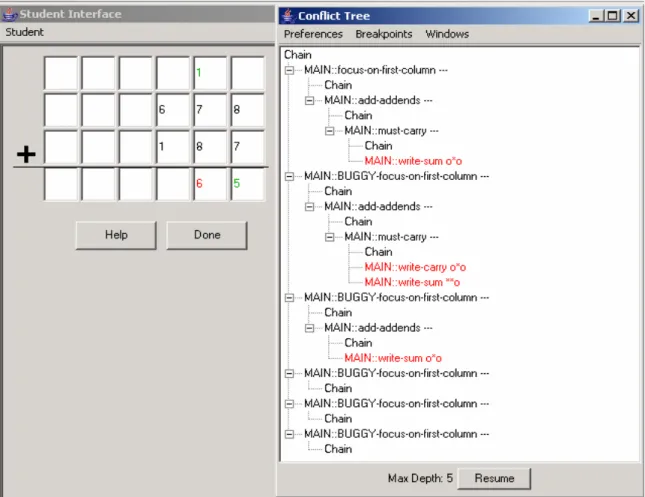
Figure 2: Cognitive Model Visualizer... 20
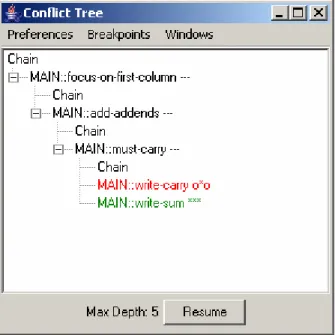
Figure 3: Student Interface displaying first two student actions ... 21
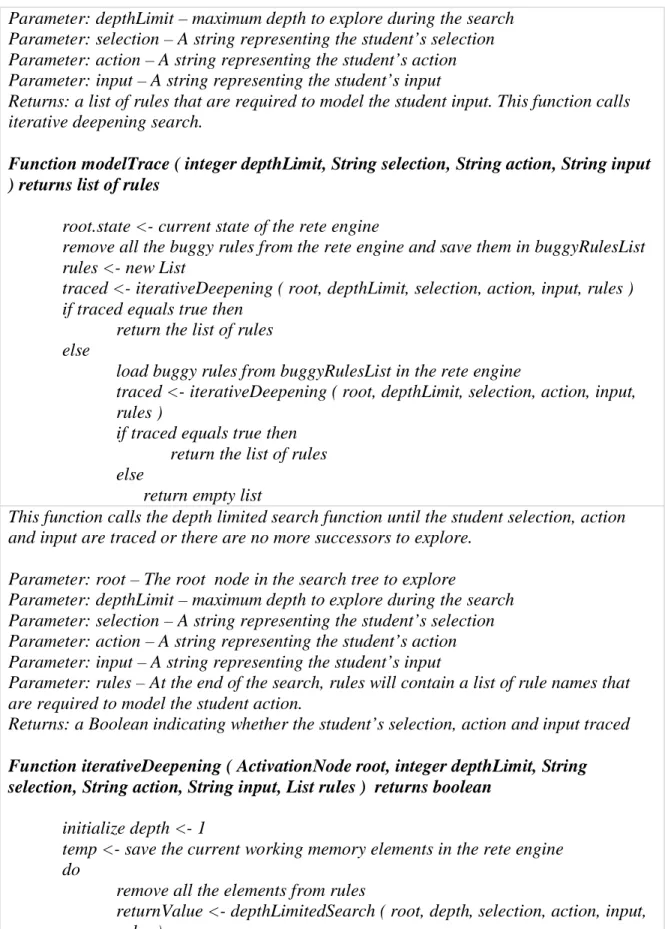
Figure 4: Conflict tree after student input 6 ... 22
Figure 5: Initiating WHY-NOT on focus-on-next-column ... 23
Figure 6: Rule instantiations generated by WHY-NOT for focus-on-next-column ... 23
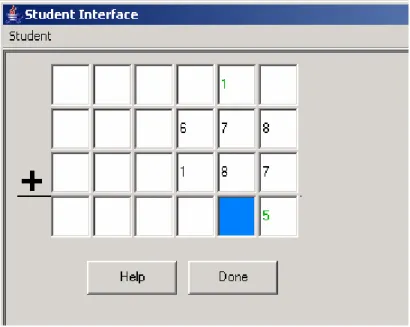
Figure 7: Conflict tree after the first student input "5" ... 24
Figure 8: Rule instantiations for write-sum... 25
Figure 9: Cognitive model visualizer displaying the visual cue’s ... 26
Figure 10: Detailed selection, action, input view ... 26
Figure 11: Interface for setting breakpoints ... 27
Figure 12: Interface for setting max depth for searching ... 27
Figure 13: Comparison of the two methods ... 29
Figure 14: Model tracing algorithm using TDK... 30
Figure 15: Model tracing algorithm using JESS... 31
Figure 16: Cumulative time spent writing a rule vs. debugging a rule for group 1... 41
Figure 17: Cumulative time spent writing a rule vs. debugging a rule for group 2... 42
Figure 18: Time Spent between evaluations vs. Code written for group 1... 43
List of Tables
Table 1: A sample TDK rule for model tracing... 12
Table 2: A sample JESS rule for model tracing ... 14
Table 3: special-tutor-fact... 15
Table 4: Pseudo code for model tracing algotithm ... 16
Table 5: Partial rule for problem 2... 34
Table 6: Partial output of WHY-NOT for problem 2 ... 35
Table 7: Number of rules written by each group in the 3rd and 4th Circle Summer Schools ... 40
Table 8: Distribution of time spent while implementing an ITS ... 41
Table 9: Description of the activities at evaluation points ... 43
1 Introduction
In this thesis we have implemented a set of authoring tools for intelligent tutoring
systems. This thesis makes a contribution by empirically identifying the common errors
authors make when creating cognitive models used in Intelligent Tutoring Systems. This
analysis feeds into a new type of debugging systems that will be designed in future. The
evaluation of the tools is based on the data collected during the use of the tools in a
graduate class at Worcester Polytechnic Institute and at the 4th Summer school held at
Carnegie Mellon University. This section gives an overview of the intelligent tutoring
systems (ITSs), explains why ITSs are required and also describes the model tracing
algorithm.
1.1 Intelligent tutoring systems
In a study conducted by Bloom (Bloom, 1984), comparing one-on-one tutoring
with classroom instruction, he found that, an average student taught using one-on-one
tutoring is “2 sigma” (2 standard deviations) above the average student taught using the
conventional classroom instruction methods. However individualized instruction is very
costly. Hence there is a need for an affordable and effective way to provide
individualized instruction to the students. Intelligent Tutoring Systems (ITSs) seem to be
an effective approach (Koedinger, K. R. & Anderson, J. R. 1993a). The mathematics
tutor built by Koedinger and his colleagues (Koedinger, K. R., Anderson, J. R., Hadley,
USA. Intelligent tutors have been successfully built to tutor a wide variety of domains
(Cerri, Gouarderes, Paraguacu 2002).
Model Tracing Tutors
The tutor referred to above built by Koedinger and his colleague is one of the
most successful ITS (both in terms of student learning and commercial success). The key
to the success of this tutor is the cognitive model of the student called the expert model
that is able to solve the task, and thereby enabling the tutor to give hints and error
messages to the student. The model tracing tutor has the expert model that is used to
trace student responses to ensure that the student is on a recognized solution path. Model
tracing tutors have proven to be amongst the most effective class of intelligent learning
environments (Anderson, Boyle Corbett, & Lewis, 1990; Koedinger & Anderson, 1993a;
Koedinger, Anderson, Hadley, & Mark, 1997).
Creating cognitive models requires expertise in both cognitive task analysis and
Artificial Intelligence (AI) programming. Due to these challenges developing an
intelligent tutoring system is difficult and time consuming. Current estimates are that
without using the authoring tools, over 200 hours of ITS development time may be
necessary to assemble an hour of instruction. (Murray, 1999; Anderson, 1993, p. 254.;
Woolf & Cunningham, 1987). Building an ITS is very costly. For instance, the most
successful ITS built so far, is for teaching mathematics to high school students
(Koedinger, Anderson, Hadley and Mark, 1997), used in over 1200 schools across the
USA. It is built by Carnegie Learning Inc and cost $15 million to build approximately 72
1.2 Model Tracing
The cognitive tutors based on the John Anderson’s ACT-R theory of cognition
(Anderson, 1993) employ a procedure called “model-tracing” (Anderson, & Pelletier,
1991) to follow a student’s action. Model tracing is a plan recognition technique that
interprets the student behavior by comparing the student actions with the expert model
and providing appropriate feedback when necessary. Specifically, model-tracing will take
a student’s input and identify which skills to give the student credit (or blame) for. The
primary goal in this process is to provide whatever guidance is needed for the student to
reach a successful conclusion to problem solving. The tutor can give hint messages to
students generated by running the expert model forward. In addition to maintaining the
student model, cognitive tutors use a process called “Knowledge Tracing” for selecting
problems intelligently depending on the system’s beliefs about what knowledge the
student has mastered (Corbett, Anderson, 1995).
1.3 Model tracing algorithm
Model tracing algorithm requires three inputs:
1. The state of the working memory: represented by a group of working memory
elements.
2. A set of production rules. Each production rule represents a cognitive step
performed by the student.
3. The students input that we wish to trace.
student input. If a sequence of rules is found then the student’s input is said to be
traced. Also each production rule has associated pedagogical messages attached to it, which are used to generate the hint and bug messages. A production rule is comprised
of a Left Hand Side (LHS) and Right Hand Side (RHS) separated by a separator
character. The general structure of the production rule for model tracing tutors is as
follows:
In this thesis, we have focused on the authoring tools to be able to build cognitive
tutors. Next chapter describes the authoring tools in general followed by the
Cognitive Tutor Authoring Tools (CTAT). Production Rule
Rule Name
Left Hand Side (LHS) A list of AND conditions
Separator Character
Right Hand Side (RHS) A list of actions
Optional:
• Generated student action info
2 Authoring tools
According to Murray (Murray, T. 1999), main goals of the authoring tools are to:
1. Reduce the time and cost required to build the intelligent tutoring systems
2. Make it possible for non-programmers (subject domain experts) to build the
tutors
3. Provide guidelines for good design principles in pedagogy
4. Provide a rapid development environment for creating and testing the tutors.
5. Helping the authors to better organize their knowledge
2.1 Related Work
Murray (Murray, T. 1999) surveyed 23 different authoring tools that have been
developed. Although research on authoring tools for ITSs is being done for over three
decades now, none of the authoring tools are commercially available. Authoring tools
related to CTAT are Demonstr8 (Murray, Ainsworth & Blessing (eds.), 2003),
Authorwaretm and Mason (Csizmadia, V. 2003). All the these systems are also authoring
tools for building ITSs. Each of them have same goal of reducing the time and resources
required to build an ITS but vary either in the type of domain, style of instruction or the
amount of intelligence in the tools.
Demonstr8 is a system that allows non cognitive scientists to build model tracing
tutors using programming by demonstration. The author starts by constructing the student
correctly, the final step is to demonstrate the productions. The author demonstrates the
skills that need to be tutored and Demonstr8 induces the underlying production rules
required to model the skill. The tools provide mechanism for the authors to fine tune the
induced productions. The authors can specify sub goals on the RHS of the rules. Murray,
Ainsworth & Blessing argue that sub goals are necessary to distinguish a particular action
in different context. In addition to specifying goals, the authors can indicate the skill that
is supported by a production rule. When the student is using the tutor, a skillometer is
displayed to the student which contains a list of skills being taught and the mastery level
of the student for each skill. Lastly the author can attach pedagogical messages to the
production rules that will be presented to the student when the student asks for a hint for
a specific production. Demonstr8 is just a prototype and has not been put to real use. Also
no study has been done to determine the effectiveness of the tools. Murray, Ainsworth &
Blessing conclude that programming by demonstration might restrict the expressiveness
of the tutor.
Macromedia Software’s Authorwaretm, a commercial authoring tool for building
Computer Aided Instruction (CAI), is used mainly for building interactive instructional
material instead of an ITS. It has great support for multimedia content and also supports
scripting. Murray argues that Authorwaretm lacks reusability and modularization. The
instruction cannot be individualized for each student and all possible student actions have
to be enumerated. It is difficult to generalize the tutors built using Authorwaretm. Also the
style of instruction is fixed and cannot be adapted for each student. The Authorwaretm
allows construction of instructional material that is visually appealing but has a shallow
Mason (Csizmadia, V. 2003), is an authoring tool for ITS’s with Hierarchical Domain
models. It has a tutorial model connected to a constraint based tutoring system. The
construction process consists of defining numerous components, such as: problem
structures (consisting of problem statements and the desired answers for them), question
templates for the strategies that generate pedagogical dialogue for tutoring students, and
diagnostic rules for launching the appropriate strategies for specific student errors. All of
these components are organized in a hierarchical fashion. There is no support for
constructing a graphical student interface. Mason is a specialized authoring tool limited
to hierarchical domains.
The next section describes the Cognitive Tutor Authoring Tools (CTAT) followed by
a description of the mode tracing algorithm and pseudo code for the same.
2.2 Cognitive Tutor Authoring Tools (CTAT)
Cognitive Tutor Authoring Tools (Koedinger, K. R., Aleven, V., & Heffernan, N. T.
2003) focuses on making cognitive tutor development easy and fast. CTAT is a suite of
tools that assist the author in design, development, implementing, testing, verifying and
maintaining cognitive models. Cognitive modeling is hard and requires PhD level
competence in cognitive psychology and AI. According to Koedinger et al the challenges
involved in cognitive modeling include a) cognitive task analysis and knowledge
acquisition b) advanced AI programming c) testing debugging and d) extending and
scaling up the model. The CTAT are intended to address these challenges and make it
cognitive modeling tools as they allow easy conversion of the cognitive models to model
tracing tutors.
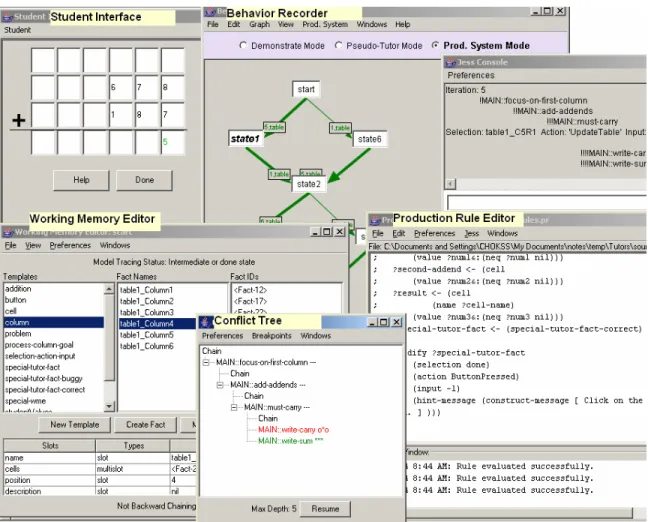
Figure 1: Cognitive Tutor Authoring Tools
CTAT as shown in Figure 1 consists of the following tools:
1. An Intelligent GUI Builder, which is used to create a graphical user interface for
the task. The author can use the interface to demonstrate a solution (correct and
incorrect actions) for the task. The interface is helpful in performing cognitive
task analysis.
3. A Working Memory Elements (WME) editor and Production Rule editor that are
used while implementing the production rules that comprise the cognitive model.
4. A debugging tool called the Cognitive Model Visualizer used while debugging
the production rules. Cognitive model visualizer is described in detail in the next
chapter.
The intelligent GUI builder is used to build the interface using special widgets that
can communicate their identity and behavior to other tools. Every widget on the interface
has a corresponding representation in the working memory that is generated
automatically when the tutor is run. The working memory consists of, (a) the
automatically generated elements corresponding to the interface widgets, (b) other user
defined elements that are not directly related to the interface widgets but are required to
implement the cognitive model and (c) automatically generated WME that are required
for model tracing. The production rules operate on the working memory elements. The
students interact directly with the widgets on the interface and the widgets communicate
their events to the production system and other tools via selection, action and input,
which are defined in the next section.
In a think aloud study (Newell, A., Simon, H., 1972, Ericsson, A., Simon, H., 1984)
the users are asked to “think aloud” as they are working on a given task. Think aloud
protocols of the novice and expert are collected to determine the difficulty factors for a
task and also better understand how humans solve a given task. Analyzing think aloud
protocols is an empirical way of performing the cognitive task analysis. It helps in
a tool in CTAT for collecting the think aloud protocols of the authors as they are
demonstrating the actions and that of students as they are solving the task.
2.3 Implementation of Model tracing algorithm in TDK
An earlier version of CTAT used Tutor development kit (TDK) as the underlying
production system for cognitive modeling. TDK uses Tertl (Anderson & Pellietier, 1991,
Pelletier, 1993), which is a production rule system that is written in LISP and is
optimized for building cognitive tutors. Pellietier (1993) choose not to use the Rete
(Forgy, C. L., 1982) pattern-matching algorithm because he said it had the following
drawback:
In order to reduce the number of comparisons that should be made during rule testing
Rete compiles a data structure for the rule base and stores the partial instantiation for the
rules. Hence the space usage can increase exponentially over time.
Other production systems do not allow explicit control over the order in which the
rules should be compared and fired. Tertl addresses these weaknesses by restricting the
expressiveness of the production rule conditions and allowing parameter passing in the
rules. Also in Tertl, in order for a working memory element to be in a production rule, it
must either have been passed in as a parameter, or referenced already earlier in the
production. (i.e., a variable must be bound to the working memory element before it can
be used). Thus the bound variable uniquely identifies the working memory element to be
tested. This reduces the number of working memory elements that need to be tested in
order to check whether the condition on the rule LHS is satisfied or not. This makes the
that particular WME type have to be tested for a match. Hence parameter passing
increases the efficiency of the Tertl production system considerably.
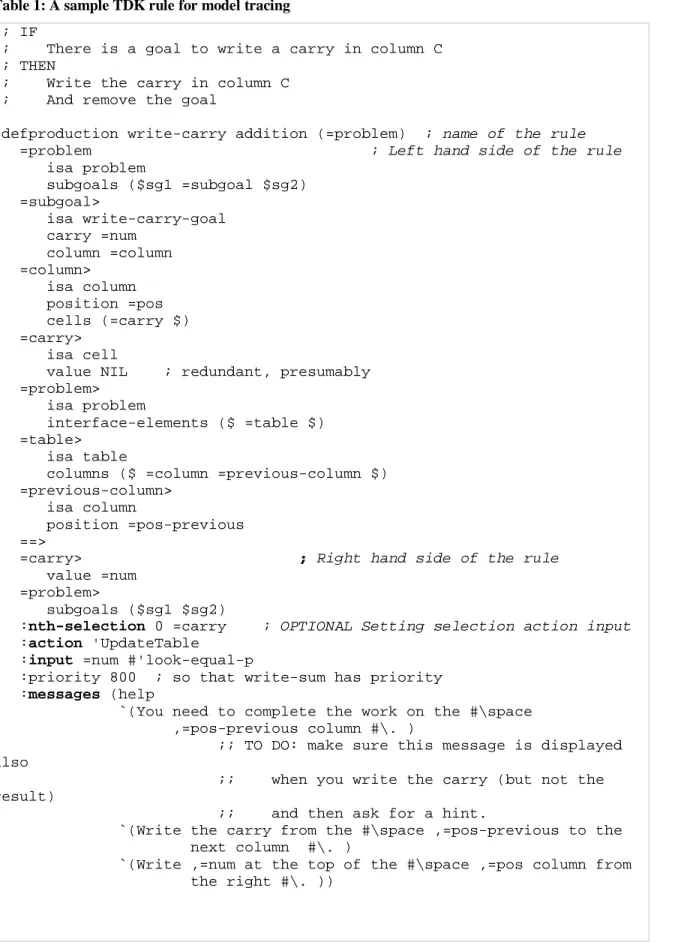
In Tertl, the author can specify on the right hand side of a production rule, the name
of the rule that the current production rule chains to using the chain keyword. Chaining is
used to model a student action that involves more than one cognitive step.
In order to identify a student action on the interface, the author has to set the
selection, action and input on the right hand side of a production rule.
• Selection – defines a WME corresponding to a widget in the user interface that has the student input,
• Action – defines the action performed by the student in the interface and
• Input – defines the values that the student entered. Table 1 shows a sample TDK rule for model tracing:
Table 1: A sample TDK rule for model tracing
;; IF
;; There is a goal to write a carry in column C ;; THEN
;; Write the carry in column C ;; And remove the goal
(defproduction write-carry addition (=problem) ; name of the rule =problem ; Left hand side of the rule isa problem subgoals ($sg1 =subgoal $sg2) =subgoal> isa write-carry-goal carry =num column =column =column> isa column position =pos cells (=carry $) =carry> isa cell
value NIL ; redundant, presumably =problem>
isa problem
interface-elements ($ =table $) =table>
isa table
columns ($ =column =previous-column $) =previous-column>
isa column
position =pos-previous ==>
=carry> ; Right hand side of the rule value =num
=problem>
subgoals ($sg1 $sg2)
:nth-selection 0 =carry ; OPTIONAL Setting selection action input :action 'UpdateTable
:input =num #'look-equal-p
:priority 800 ; so that write-sum has priority :messages (help
`(You need to complete the work on the #\space ,=pos-previous column #\. )
;; TO DO: make sure this message is displayed also
;; when you write the carry (but not the result)
;; and then ask for a hint.
`(Write the carry from the #\space ,=pos-previous to the next column #\. )
`(Write ,=num at the top of the #\space ,=pos column from the right #\. ))
2.4 The need for a different production system
TDK is a proprietary production system developed at Carnegie Mellon University.
There is not enough documentation on TDK. This makes it difficult to learn. Also TDK is
written in LISP and hence the authors have to learn LISP as well. Also the tutors
developed using TDK are hard to deploy on the web. Hence we have ported the CTAT to
support a more common production system called JESS (Java Expert System Shell)
(Ernest Friedman-Hill. 2003) developed at the Sandia National Laboratories, which is
based on the CLIPS (Giarratano, J. & Riley, G. 1998) rule based production system,
developed at the NASA. The tutors thus developed using JESS as the production system
can be easily deployed on the web.
2.5 Model tracing algorithm using JESS
There are two kinds of production rules, buggy rules and correct rules. Buggy rules
are production rules that model common student errors and correct rules model the
correct student actions in problem solving. In order to use the model tracing algorithm, a
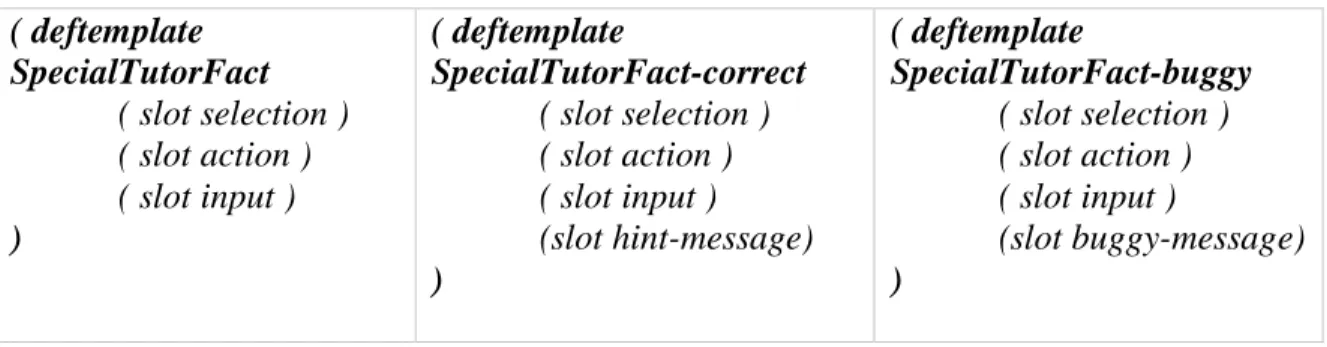
special working memory element (WME) called special-tutor-fact is created in the
working memory. It has three slots: selection, action and input as shown in Table 3. The
fact-correct and fact-buggy are inherited from special-tutor-fact and they add one more slot for the hint message and buggy message respectively as shown in Table 3. The rules that model the correct student action should reference the
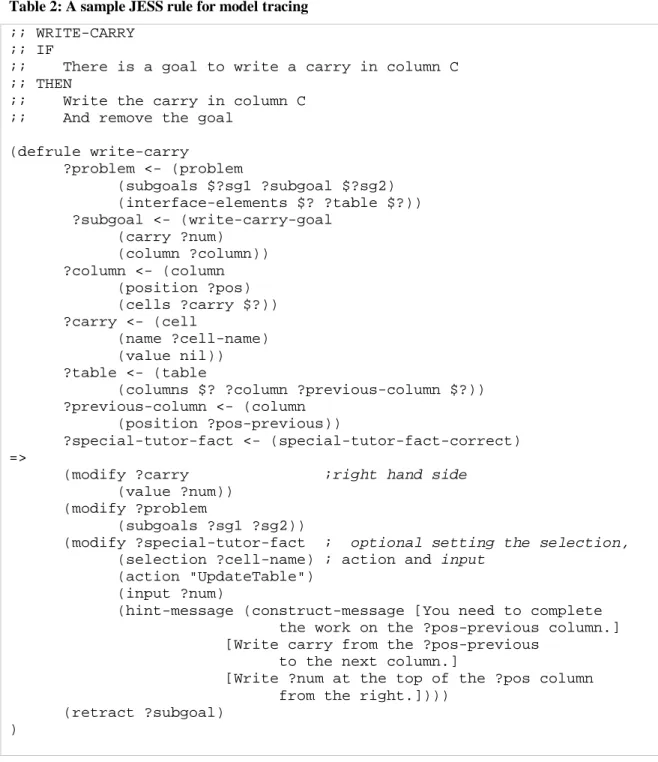
special-tutor-fact-correct on the LHS of the rule and rules that model incorrect student actions should reference the special-tutor-fact-buggy on the LHS of the rule. The JESS
fact on the RHS of a rule if that rule models a student action on the interface. Table 2
shows a sample JESS rule for model tracing tutors:
Table 2: A sample JESS rule for model tracing
;; WRITE-CARRY ;; IF
;; There is a goal to write a carry in column C ;; THEN
;; Write the carry in column C ;; And remove the goal
(defrule write-carry ?problem <- (problem (subgoals $?sg1 ?subgoal $?sg2) (interface-elements $? ?table $?)) ?subgoal <- (write-carry-goal (carry ?num) (column ?column)) ?column <- (column (position ?pos) (cells ?carry $?)) ?carry <- (cell (name ?cell-name) (value nil)) ?table <- (table
(columns $? ?column ?previous-column $?)) ?previous-column <- (column
(position ?pos-previous))
?special-tutor-fact <- (special-tutor-fact-correct) =>
(modify ?carry ;right hand side (value ?num))
(modify ?problem
(subgoals ?sg1 ?sg2))
(modify ?special-tutor-fact ; optional setting the selection, (selection ?cell-name) ; action and input
(action "UpdateTable") (input ?num)
(hint-message (construct-message [You need to complete the work on the ?pos-previous column.] [Write carry from the ?pos-previous
to the next column.]
[Write ?num at the top of the ?pos column from the right.])))
(retract ?subgoal) )
Table 3: special-tutor-fact ( deftemplate SpecialTutorFact ( slot selection ) ( slot action ) ( slot input ) ) ( deftemplate SpecialTutorFact-correct ( slot selection ) ( slot action ) ( slot input ) (slot hint-message) ) ( deftemplate SpecialTutorFact-buggy ( slot selection ) ( slot action ) ( slot input ) (slot buggy-message) )
Initially all the buggy rules are removed from the Rete (Forgy, C. L., 1982) engine
and the model tracing algorithm tries to trace the student input with only correct rules.
The model tracing algorithm starts with the initial working memory called as the “start
state” and fires one rule at a time from the list of activated rules and compares the
selection, action, input produced by the rules with the student’s selection, action and
input. If a match is found then the student’s input is said to be “traced” and the search is
terminated or else the working memory is restored back to the previous immediate state
and the next activated rule is fired and the search continues. If the student input cannot be
traced using only correct rules then buggy rules are added to the Rete engine and the
search is repeated again. If the student input is traced the algorithm returns the list of
rules i.e. the steps required to model the student behavior else the algorithm returns an
empty list indicating that the student’s action cannot be modeled by the current
production rules in the Rete engine.
2.5.1 Pseudo code for the model tracing algorithm
The algorithm uses an iterative deepening depth first search to find a sequence of
Table 4: Pseudo code for model tracing algotithm
Parameter: depthLimit – maximum depth to explore during the search Parameter: selection – A string representing the student’s selection Parameter: action – A string representing the student’s action Parameter: input – A string representing the student’s input
Returns: a list of rules that are required to model the student input. This function calls iterative deepening search.
Function modelTrace ( integer depthLimit, String selection, String action, String input ) returns list of rules
root.state <- current state of the rete engine
remove all the buggy rules from the rete engine and save them in buggyRulesList rules <- new List
traced <- iterativeDeepening ( root, depthLimit, selection, action, input, rules ) if traced equals true then
return the list of rules else
load buggy rules from buggyRulesList in the rete engine
traced <- iterativeDeepening ( root, depthLimit, selection, action, input, rules )
if traced equals true then return the list of rules else
return empty list
This function calls the depth limited search function until the student selection, action and input are traced or there are no more successors to explore.
Parameter: root – The root node in the search tree to explore
Parameter: depthLimit – maximum depth to explore during the search Parameter: selection – A string representing the student’s selection Parameter: action – A string representing the student’s action Parameter: input – A string representing the student’s input
Parameter: rules – At the end of the search, rules will contain a list of rule names that are required to model the student action.
Returns: a Boolean indicating whether the student’s selection, action and input traced
Function iterativeDeepening ( ActivationNode root, integer depthLimit, String selection, String action, String input, List rules ) returns boolean
initialize depth <- 1
temp <- save the current working memory elements in the rete engine do
remove all the elements from rules
depth <- depth + 1
while returnValue is greater than 0 and depth is less than or equal to depthLimit if returnValue equals -1 then
return false
else if returnValue equals 0 then return true
else
return false
This function performs the depth limited search until the student selection, action and input are traced or the maximum depth limit is reached.
Parameter: node – The current node in the search tree to explore
Parameter: depth – maximum depth to explore during this iteration search Parameter: selection – A string representing the student’s selection
Parameter: action – A string representing the student’s action Parameter: input – A string representing the student’s input
Parameter: rules – At the end of the search, rules will contain a list of rule names that are required to model the student action.
Returns: an integer indicating if the search needs to be performed with the next higher depth
Function depthLimitedSearch ( ActivationNode node, integer depth, String selection, String action, String input, List rules ) returns integer
currentDepth <- node.depth if currentDepth <= depth then
fire node.rule
add node.rule to rules
if isSAIFound ( selection, action, input ) then return 0
else
get the list of current rule activations from the rete engine if currentDepth < depth then
for each activated rule do
child.state <- current working memory elements in rete engine
child.rule <- rule
child.depth <- currentDepth + 1
returnValue <- depthLimited (child, depth, selection, action, input, rules )
if returnValue = 1 then
load the working memory elements from node.state return returnValue
else
retutn 1 else
return -1
Parameter: selection – a string representing student’s selection Parameter: action – a string representing student’s action Parameter: input – a string representing student’s input
Returns: a Boolean indicating if the current selection, action and input in the working memory matches with the student’s selection, action and input.
Function isSAIFound ( String selection, String action, String input) returns Boolean
% Comment: specialTutorFact is a special working memory element which is modified by % the RHS of the rules to set the selection, action and input
currentSelection <- specialTutorFact.selection from working memory in rete engine
currentAction <- specialTutorFact.action from working memory in rete engine currentInput <- specialTutorFact.input from working memory in rete engine If currentSelection = selection and currentAction = action and currentInput = input then Return true Else Return false Exit ActivationNode { Integer depth; ReteState state; ReteRule rule; }
In this thesis we have reused the behavior recorder tool from the TDK version of
the tools and integrated it with the JESS production system using the model tracing
algorithm. We have implemented the Debugging tool, the WME editor and the
production rule editor for the CTAT tools. We have also evaluated the runtime
performance of the model tracing algorithm in JESS and compared it with that of the
model tracing algorithm in TDK, results of which are described later in the evaluation
2.6 Debugging tool
In this thesis we do an empirical study of the kind of programming errors that are
made when building the ITSs. A majority of the time during programming is spent in the
debugging activity. A recent study conducted by NIST found that the US software
engineers spend about 70-80% of their time testing and debugging. A recent study by Ko,
and Myers, (2004) has shown “Interrogative Debugging” to reduce the debugging time
by a factor of 8. Interrogative debugging is a paradigm in which the programmer can ask
questions to reason about the observed unexpected runtime action and the absence of the
expected runtime action. Thus reducing the debugging time will reduce the overall time
required to develop an ITS.
In this thesis we have developed a tool called Cognitive Model Visualizer also called
Conflict tree, for debugging cognitive models written in JESS, which allows the author to ask similar questions about the program’s behavior. We have identified and categorized
the errors that authors made when using the tools and also tried to verify whether the
tools helped in debugging the errors that would have been very difficult to debug
otherwise. Detailed analysis reports are given in the evaluation section. Next paragraph
describes the cognitive model visualizer that we developed for debugging cognitive
Figure 2: Cognitive Model Visualizer
The cognitive model visualizer is intended to help the authors in locating errors in the
JESS production rules. The cognitive model visualizer provides a dynamic view of the
cognitive model at runtime. It displays the various paths (rule sequences) that model
tracing algorithm tried to generate the student input. The cognitive model visualizer in
Figure 2 is displaying two paths different paths of production rules that could have fired.
If the author was expecting a certain rule to fire at a certain state in the rule trace but the
rule didn’t fire then the author can go to that state and ask, why didn’t that rule fire? The
cognitive model visualizer displays instantiations for that rule using the correct state of
the working memory. By analyzing the rule instantiations the author can quickly locate
the error in the production rules.
For example: Here is a debugging episode of an author writing rules for multi column
addition tutor using CTAT. (Complete rule set for the multi-column addition tutor is
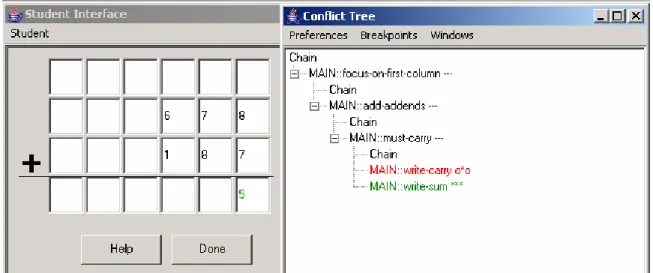
Figure 3: Student Interface displaying first two student actions
The author has written the rule for the next student action i.e. writing 6 in the
highlighted cell, which adjacent to the cell containing “5”. Next the author tests the rule
to see if it correctly models the student action. But the rule does not model the student
So at this point the conflict tree looks as shown in Figure 4:
Figure 4: Conflict tree after student input 6
By looking at the sequence of rules fired in the conflict tree, the author realizes that
the focus-on-next-column rule did not fire as expected. So the initial guess of the author
would be that the focus-on-next-column rule is erroneous. So the author initiates a
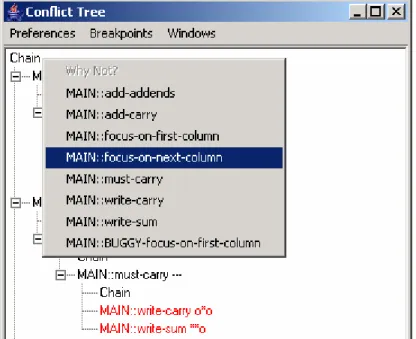
WHY-NOT for the focus-on-next-column rule, on the chain node where it was expected to fire
Figure 5: Initiating WHY-NOT on focus-on-next-column
By analyzing the output generated by why-not, it is clearly evident that a cell (named
table1_C6R4, this is the bottom rightmost cell in the interface) whose value should not be
“nil” has a value “nil”. This indicates that there is some error in the rule that is modifying
the value of cell named table1_C6R4 and not in the focus-on-next-column rule as per the
initial guess.
So now the author goes back to the first step in the problem where the student enters
5 in the bottom rightmost cell (table1_C6R4) in the interface. Conflict tree looks as
shown in Figure 7.
Figure 7: Conflict tree after the first student input "5"
So now the author looks at the working memory at this point and realizes that the
value slot of cell table1_C6R4 is “nil”. So looking at the instantiation of the write-sum
rule at this point as shown in Figure 8, the author realizes that the statement for
Figure 8: Rule instantiations for write-sum
Thus the conflict tree helped in locating this error in less time which otherwise would
Figure 9: Cognitive model visualizer displaying the visual cue’s
Figure 10: Detailed selection, action, input view
The cognitive model visualizer also displays visual cues next to the rule names as
shown in Figure 9 to indicate whether the selection, action and input do match. The
visual cue is in the form of three characters one each for selection, action and input. An *
indicates a match, o indicates no match and – indicates that the value is unspecified.
Hence a “***” next to a rule name in the cognitive model visualizer indicates that
selection, action and input matches whereas a “*oo” indicates that the selection matches
but the action and input do not match. Similarly “o*o” indicates that the selection does
not match, action matches and the input also does not match. To easily help locate this
kind of error, the author can right click on the rule name in the conflict tree and a table
containing the required and actual selection, action and input is displayed as shown by
input is required in order for the model to trace correctly and change the production rules
accordingly.
Figure 11: Interface for setting breakpoints
Figure 12: Interface for setting max depth for searching
The cognitive model visualizer also provides the facility to set break points on certain
rules. Figure 11 shows the interface for setting the breakpoints. If a break point is set on a
particular rule then the model tracing process stops after that rule fires. At this point the
author can inspect the working memory or view the instantiations for some other rule and
then resume the model tracing process. The break points are helpful to debug those errors
that cause a rule to chain itself and put model tracing algorithm in a seemingly infinite
loop or cause the “Out Of Memory” errors. To debug similar kind of errors the author can
3 Evaluation
The authoring tools are intended to make the development of ITSs faster and easier.
Hence an ideal evaluation of the tools would be a comparative study in which people are
randomly assigned to build tutors for different domains using different authoring tools
and then compare the time and effort required to build the tutors. This kind of usability
study would be premature and too costly. Hence our focus of evaluation was to
investigate the type of errors that authors make when building tutors and see if the tools
responded well in debugging those errors that are difficult to debug otherwise. We also
evaluated the runtime performance of model tracing algorithm in JESS and found it to be
roughly similar to that in TDK (Choksey, Heffernan, 2003).
3.1 Evaluation Study #1
Evaluating the runtime performance of model tracing algorithm in JESS:
We knew the run time performance of the model-tracing algorithm would depend
upon the average branching factor and depth of the goal node in the search tree.
Branching factor is the average number of rules that can be fired at any working memory
state in the search tree. The depth of a goal is the number of rules that need to be chained
together to generate the student’s input. We ran a series of experiments where we varied
the branching factor and the depth of a solution and measured the time that model tracing
took for TDK and JESS.
For each of the experiments we took an already existing rule set (for multi-column
rules (giving them different names), thereby causing the production system to branch on
each instance. In order to create a branching factor of 2 we duplicated each rule in the
rule set. Similarly to create an example with branching factor 4, we create 4 rules for
each rule in the set.
In order to vary the depth, we inserted a counter on the LHS of the productions so that
we could set a depth easily. Initially the counter is set to 0 and the first rule fires when the
counter value is 0 and it increases the counter by 1.The second rule fires when the
counter value is 1 and it sets the counter value to 2 and so on.
The following experiments were run on a Macintosh 867MHz PowerPC G4 machine
running OSX operating system. The JESS version of CTAT was run in the sun JRE v1.4.
Following Figure 13 is a graph comparing both implementations of the model-tracing
algorithm. The branching factor is fixed at 3 and the depth of the goal node is varied
linearly.
Comparison graph - branching factor 3
0 2 4 6 8 10 12 14 4 5 6 7 8 9
Depth of goal node
T im e ( s e c ) JESS TDK JESS TDK
3.1.1 Condition 1
Figure 14 shows the runtime evaluation of the model tracing algorithm in TDK:
TDK 0 10 20 30 40 50 60 4 5 6 7 8 9
Depth of Goal Node
T im e ( s e c ) BF-1 BF-2 BF-3 BF-4 BF-5 BF-6 BF-2 BF-1 BF-3 BF-4 BF-5 BF-6
Figure 14: Model tracing algorithm using TDK
The x-axis starts at depth 4, because the base rule sets required 4 productions to be
chained together. “BF” stands for branching factor. In figure 8 we see the highest point is
labeled with “BF-5” and represents when the experiment was run with a branching factor
of 5, and a depth of 6, it took 50.235 seconds (or 50235 milliseconds). If we follow the
line from that point down and to the left we see that when the depth was 5, it took about
12 seconds (12.784 seconds). The run time of the model-tracing algorithm using TDK
increases with increase in branching factor and depth of the goal node.
3.1.2 Condition 2
JESS Forward Chaining 0 20 40 60 80 100 120 140 4 5 6 7 8 9 10
Depth of Goal Node
T im e ( s e c ) BF - 1 BF - 2 BF - 3 BF - 4 BF - 5 BF - 6 BF-1 BF-2 BF-3 BF-4 BF-5 BF-6
Figure 15: Model tracing algorithm using JESS
The run time of the model-tracing algorithm, increases exponentially as the branching
factor and depth of the goal node increases. Hence this implementation is useful in cases
where the branching factor and chain length are not large.
The model-tracing algorithm using forward chaining in JESS did well enough for
most purposes, but if you wanted something very complicated you would get a faster
response from TDK.
Conclusions
Though the JESS implementation of the Rete pattern matching is slower, it is
probably fast enough for many tutoring purposes that have small branching factors and
3.2 Evaluation Study #2
Empirical study of the kind of programming errors made when implementing cognitive tutors.
3.2.1 Subjects
The CTAT tools were used by 12 computer science graduate and undergraduate
students in the Intelligent Tutoring Systems (cs525t) fall 2003 graduate level class
semester for 8 weeks.
3.2.2 Data collection
In order to collect data we instrumented the tools to log all actions of the author like
menu clicks when working with CTAT to build an ITS. All the actions are time stamped.
Each time the rules were evaluated the rules themselves and the result of evaluation was
logged.
3.2.3 Methodology
Unfortunately, we was able to collect very few log files from the subjects since with
every upgrade to the tools for bug fixes, the log files were replaced and also only few
students turned in their log files. We analyzed approximately 200 email messages that
were exchanged between me and the students as they were building their ITS, requesting
help on the problems that they were stuck on. There were few problems with the tools
itself, some of which were fixed during the course.
3.2.4 Results
Here are the most time consuming problems that students encountered while building
1. Problem description
Rules do not trace the student action because the selection, action, input is
specified incorrectly on the RHS of the rule.
How to locate the problem without using CTAT
Check the student action with the production system to see if the rule traces
correctly or not. It is hard to locate the error as no exceptions will be thrown if either,
selection, action or input is specified incorrectly. One way to locate the problem
would be to inspect the working memory after the rule has fired and check for
inconsistencies. Check the selection, action and input slots of the special-tutor-fact
WME to see if they contain the correct values.
How to locate the problem using CTAT
Check the student action with the production system to verify if the rule traces
correctly or not. The cognitive model visualizer displays the all the rule paths that
were tried to trace the student action. The small labels after the rule names indicate
whether the selection, action and input matched or not as shown in Figure 9. If any of
the selection, action or input is either ‘o’ or ‘–‘ then right click on the rule in the
cognitive model visualizer to get a detailed look at the required selection, action and
input vs. the actual selection, action and input produced by the rules as shown in Figure 10. This helps the author to quickly identify and locate the error (by looking at
the conflict tree) and also to quickly fix the error by looking at the detailed view.
2. Problem description
rule does not fire even though the parameters passed have the equal values. The
functions given above check whether the parameters passed to it are equal or not. The
exact descriptions of these functions as taken from the JESS manual are given in
Appendix B. A sample LHS of the rule with this problem is given in Table 5.
The hard part about this problem is to locate it. The reason for the rule not firing
is that not only the values of the parameters but also their types should be equal.
Students spent considerable time trying to locate the problem.
How to locate the problem without using CTAT
Try commenting conditions on the LHS of the rule one by one until the rule fires.
At this point the cause of the problem can be attributed to one condition but still the
cause is not known. Looking at the values of the working memory elements
everything looks ok and it seems that the rule should fire. There is no easy way to get
the types of the literals on the LHS of the rules.
(defrule write-borrow
(problem (interface-elements $? ?table $?) ) ?table <- (table (column $? ?column ?)) ?column <- (column (cells ?cell $?)) ?cell <- (cell (value ?borrow-num)) (test (= ?borrow-num 0))
=>
…RHS of the rule )
Table 5: Partial rule for problem 2
How to locate the problem using CTAT
Currently CTAT does not help in locating this problem. The output produced by
LHS of the rule failed to match successfully. --- Variable Value --- borrow-num 0 (= ?borrow-num 0) FALSE --- Literals do not match
Value Found: 0 Value Required: 0
Table 6: Partial output of WHY-NOT for problem 2
But here is a proposed feature to add to CTAT that would help in locating the
problem.
Display the type information of the variables and literals on the LHS of the rule
along with their values in the rule instantiations and mark/highlight those that do not
match. Hence analyzing the rule instantiations would help in locating and correcting
the problem quickly.
3. Problem description
The rule fires but throws a run time exception because non string values are
assigned to the selection and input slots of special-tutor-fact on the RHS of the rules.
The JESS error message is not very helpful and hence this error is hard to fix.
How to locate the problem without using CTAT
Comment actions on the RHS of the rule one by one until no exceptions are
thrown. Once the action causing the problem is found to be the one modifying the
selection, action and input slots of special-tutor-fact, check the type of the values
assigned to selection, action and input slots.
The CTAT tool displays a more detailed error message at the prompt indicating
that a non string value was assigned to the selection, action or input slot on the RHS
of the rule. But the detailed view of selection, action and input window does not help
in locating this error. Hence a good feature to add would be to display the type
information along with the values in the detailed view of selection, action and input.
4. Problem description
Working memory elements do not reflect the state of the interface. Some subjects
had difficulties understanding how the graphical user interface widgets and working
memory elements were related.
How to locate the problem without using CTAT
Inspect the working memory when the current state is the start state in the
behavior recorder and make sure that the working memory elements corresponding to
the graphical user interface widgets contain the same values. This can be done either
by using the working memory editor or through command line.
How to locate the problem using CTAT
Better documentation of CTAT explaining the relation of the interface widgets
and the working memory. Also better documentation is needed explaining the effects
of modifying the working memory.
5. Problem description
Many subjects had problem understanding the concept of reverse binding in JESS.
For example following is a part of the left hand side of a rule:
?right-column <- (column
(cells $? ?first-addend ?second-addend ?result))
In this case the students thought that binding was occurring in both statements for
variable ?first-addend. In this example reverse binding is used in the second
statement and the already bound variable ?first-addend is used to retrieve a cell fact.
How to locate the problem without using CTAT
Unknown
How to locate the problem using CTAT
Initiate a WHY-NOT on any rule that has reverse binding on the LHS. By looking
at the rule instantiation one might realize that the variable ?first-addend is bound in
the first statement and no binding occurs in the second statement. The variable
?first-addend has same value in both the statements and that less number of instantiations are produced for the rule. This might help in understanding the concept.
6. Problem description
Writing rules with overly general LHS. For example in the following rule:
(defrule focus-on-first-column (addition (problem ?problem)) ?problem <- (problem (subgoals ) (interface-elements $? ?table $?)) ?table <- (table (columns $? $? ?right-column)) ?right-column <- (column
(cells $? $? ?first-addend ?second-addend ?result $?))
The consecutive $? in the patterns do not add any value to the condition on the LHS
but increase the number of partial instantiations for that rule which makes the CTAT
Unknown
How to locate the problem using CTAT
The CTAT do not help in locating this problem. However a proposed feature to
help locate this problem would be to add a pattern search procedure in the production
rule editor that would detect such patterns at the evaluation times and report back to
the user.
7. Problem description
When a student action is traced the model tracing algorithm enters an infinite loop
due to certain rule chaining to itself. Extra conditions can be added on the LHS to
prevent self chaining of the rule.
How to locate the problem without using CTAT
Looking at the sequence in which the rules are explored by the model tracing
algorithm one can identify the rule that is self chaining and causing the model tracing
algorithm to enter an infinite loop. How ever to locate the exact cause of this on the
LHS of the rule comment the conditions on the LHS of the rule one by one until the
rule stops chaining to it.
How to locate the problem using CTAT
To locate this problem using CTAT break points can be used. Set the breakpoint
on the rule firing infinitely. Hence when the rule fires for the first time, the breakpoint
will be reached and the model tracing algorithm stops. At this point, inspect the
3.3 Evaluation Study #3
Empirical study of the kind of programming errors made while implementing cognitive tutors.
The CTAT were used at the 3rd Circle Summer School held at the Carnegie
Mellon University from June 17, 2003 to June 21, 2003 (Circle, 2003) and also at the 4th
Circle Summer School (Circle, 2004) held at the Carnegie Mellon University from June
28, 2004 to July 2, 2004.
3.3.1 Subjects
Participants at the 3rd Circle Summer School were divided in to 12 groups and at the
4th Circle Summer School were divided in to 9 groups. Participants of both Summer
Schools were researchers comprising of PhD students and Professors from different
universities within and outside of USA. Each group was allowed to choose the domain of
their interest.
3.3.2 Data collection
In order to collect data we instrumented the tools so that it logged all actions of the
authors as they were working with CTAT. All the actions were time stamped. Also the
working memory state and the production rules in the system at each evaluation were
recorded and time stamped.
3.3.3 Methodology
The log files for each group produced by CTAT were collected at the end of the
C. What are the most common errors made when implementing a cognitive model?
3.3.4 Results
The CTAT used during the 3rd Summer School had TDK as the underlying
production system and the CTAT used during the 4th Summer School had JESS as the
underlying production system. The subjects used the tools for approximately same
amount of time during both Summer Schools. Table 7 below gives the number of rules
written by each group during the two Summer Schools.
Table 7: Number of rules written by each group in the 3rd and 4th Circle Summer Schools
3rd Summer School Prod Rules 1 Radio Intercept Officer
Training 6 2 C programming 3 3 Medicine 2 4 Complex number 11 5 Angle Bisector 6
6 Letter sequence patterns 10 7 Transportation problems 3 8 Triangle Congruence Prover 14
9 Momentum 7
10 E-Circuits 3
11 Reading 3
12 Java Programming 0
Average 5.7
4th Summer School Prod Rules
1 Calculus 7 2 False Logic 11 3 Fraction 4 4 German 5 5 Java 35 6 Logo 19 7 Physics 13 8 Population Genetics 22 9 Sentence Completion 6 Average 13.6
We did an unpaired t-test for the number of rules written using the two versions of
the tools and found the difference statically significant (p=.025). Hence we conclude that
the JESS tools were far more productive. This might be due to the fact that JESS is better
documented.
Activity Time spent Percentage
1 Building interface 2:00:00 10.64%
2 Demonstrating problem 0:58:00 5.14%
3 Implementing cognitive model 15:49:39 84.22%
Table 8: Distribution of time spent while implementing an ITS
Table 8 shows that implementing a cognitive model is the most time consuming (84%)
activity of the three activities involved in implementing ITS.
Distribution of the time spent implementing a cognitive model
The graphs below (Figure 16 and Figure 17) give a detailed analysis of time spent
during activity 3 of Table 8.
Cumulative time spent writing a rule vs. Debugging a rule for group1 0:00:00 0:28:48 0:57:36 1:26:24 1:55:12 2:24:00 2:52:48 1 3 5 7 9 11 13 15 17 19 21 Rule # S u m o f a ll t h e t im e b e tw e e n f ir s t e v a lu a ti o n a n d l a s t e v a lu a ti o n Debugging rule Writing rule
Cumulative time spent writing a rule vs. Debugging a rule for group 2 0:00:00 0:07:12 0:14:24 0:21:36 0:28:48 0:36:00 0:43:12 0:50:24 0:57:36 1:04:48 1 3 5 7 9 11 13 15 17 Rule # S u m o f a ll t h e t im e b e tw e e n th e f ir s t e v a lu a ti o n a n d l a s t e v a lu a ti o n Debugging rule Writing rule
Figure 17: Cumulative time spent writing a rule vs. debugging a rule for group 2
The graphs above (Figure 16 and Figure 17) show the amount of time spent writing a
rule vs. the time spent debugging a rule. The time spent till the first evaluation of the rule
is considered as the time taken to write a rule and time since the first evaluation until a
new rule is added is considered as the debugging time for that rule. It is true that during
the debugging time for a rule the author might be making changes to other rules as well
so as to make the current rule working. According to the graphs above (Figure 16 and
Figure 17) almost 70% of the total time is spent in debugging, which confirms the results
of the recent study conducted by NIST.
Following is the graph of the time spent between evaluations vs. Code written for group 1
Time spent between evaluations vs. Code written for group 1 0:00:00 0:07:12 0:14:24 0:21:36 0:28:48 0:36:00 0:43:12 0:50:24 0:57:36 -400 -200 0 200 400 600 800 1000 1200 1400 1600
Code written (Change in # of characters w ritten between evaluation)
D e lt a i n t im e A B C D E
Writing new rules Hard to debug
Easy to
debug Copy & Paste new rules
Figure 18: Time Spent between evaluations vs. Code written for group 1
Table 9 below gives a brief summary of the activities at few evaluation points in the
graph. Evaluation Point Time # of characters added Activity description
A 00:51:05 1386 Two new rules were added to the rule set B 00:01:54 -295 Commenting out few conditions from the
LHS of a rule. The author was trying to modify the rule after copy & paste. C 00:10:54 1310 Copy and paste two new rules D 00:25:48 393 Writing the first rule of the rule set E 00:14:00 -236 Commenting out part of the rule so as to
isolate the error and also changing the types of the literals in the rule to STRING by enclosing the literals within quotes.
Table 9: Description of the activities at evaluation points
Subjects were found commenting the conditions on the LHS of a rule, one by one
the production rules is very effective and used by expert programmers in rule based
systems.
The graph in Figure 18 is divided in to four regions labeled as follows. The numbers
for defining the different regions were guessed and later on verified by the analysis of the
log files.
(a) Hard to debug – This region encompasses those points on the graph for which
authors have spent more time (> 10 minutes) between evaluations but have added
or deleted less number (< 100) of characters. As verified from the log files, these
points correspond indicate authors debugging difficult errors.
(b) Easy to debug – This region encompasses those points on the graph for which the
authors have spent less time (< 10 minutes) between evaluations and have added
or deleted less number (< 100) of characters.
(c) Writing new rules – This region encompasses those points on the graph for which
the authors have spent more time (> 10 minutes) and added more (> 100)
characters in the rules. As verified from the log files, new rules were added at
these points.
(d) Copy & Paste new rules – This region encompasses those points on the graph for
which the author spent less time (< 10 minutes) and added large number of
characters (> 100) to the production rules. As verified later. As verified from the
log files new rules were added at these points.
The focus of our analysis was the Hard to debug region. The log files were analyzed with
similar kind of analysis was done for one more group. Figure 19 is the graph for the
second group.
Time spent between evaluations vs. Code written for group 2 0:00:00 0:07:12 0:14:24 0:21:36 0:28:48 0:36:00 0:43:12 -500 -100 300 700 1100 1500 1900 2300
Code written (Change in the # of characters written between evaluations)
D e lt a i n T im e Hard to debug Easy to debug
Writing new rules
Copy & Paste new rules
Figure 19: Time spent between evaluations vs. Code written for group 2
Table 10 given below categorizes the more time consuming hard to debug or
Error category Error description Time spent in debugging this error Time spent in writing the rule # of char in the rule 0:20:54 0:13:07 555 00:7:55 0:07:22 673 Syntax of the
language and how jess does the automatic Error with data Type in JESS -
type conversion
2:28:28 0:13:16 681
Need to update the Working memory elements corresponding to the GUI widgets on the RHS of
the rule
0:06:43 0:08:44 407
Concept of model-tracing
Understanding how model tracing works. What should be the state of the working memory before the
rule fires and what should be on the RHS. Subject was thinking that the students input is already in the WM on the LHS of the rule
1:05:41 0:25:48 393
0:09:08 0:07:22 673
0:04:41 0:51:05 1386
Incorrect selection, input
0:03:07 0:13:41 822
0:03:04 0:13:41 822
Selection, action, input
errors
Non String Input
0:17:46 0:13:28 527