Testing Requirements for Mobile Applications
Dr. Rajnish Talwar, Principal(CGC-College Of Engg.), Landran(Mohali) Punjab IndiaDr. Bharat Bhushan, Assoc. Prof.&Head, Deptt. Of Comp. Sc.& Application, Guru Nanak Khalsa College, Yamuna Nagar (Hry.)
Rakesh Gupta, Research Scholar, P. T. U. Kapurthala
ABSTRACT
Wireless networks have contributed to the technological advance that popularized the use of mobile devices, and fostered the development of applications targeted to these devices. However, issues such as mobility and communication intermittency, as well as processing, storage and battery constraints demand changes in the traditional software testing process. This paper aims to present testing requirements that are specific to applications developed for mobile devices. We also show that these requirements can improve productivity and efficacy in the testing process of an application.
Keywords :
Software quality; software testing; mobile computing
I. INTRODUCTION
The technological advance of wireless networks popularized the use of mobile devices (e.g., PDAs - Personal Digital Assistants, cell phones, and smartphones), resulting in a demand for new applications and services called mobile applications in this work. These applications are developed to run on mobile devices, and to allow user mobility. However, many of them are complex and not always meet the users expectations [9].
In this context, software quality issues regarding development and testing of mobile applications showed up for software engineers as important challenges to overcome. Our focus in this paper is mobile applications testing. First, besides characteristics of the traditional software testing process, software engineers early realize that they must consider specific issues of the mobile environment and mobile devices constraints, such as different network interfaces, available bandwidth, memory, processing, storage capacity, and battery consumption. Additionally, software heterogeneity like operating systems and programming language must be considered.
This paper proposes then testing requirements to help software engineers to improve productivity and efficacy of the mobile applications testing process. These testing requirements have been elicited from the mobile
application related literature and through interviews with experts in this field. In this paper, users of mobile devices are referred to mobile users.
This paper is structured in six more sections. In Section 2, the fundamental concepts related to testing of mobile applications are presented. In Section 3, the research methodology adopted for the elicitation of testing requirements is described. Section 4 presents the elicited testing requirements. In Section 5, results obtained in the interviews are analyzed.In Section 6, the benefits of these testing requirements are evaluated using a mobile application. Finally, Section 7 concludes this paper with a summary of the main contributions and future works.
II. SOFTWARE TESTING FOR MOBILE
APPLICATIONS
The mobile environment brings challenges associated with the diversity of devices and platforms (e.g., Brew, Palm, Windows Mobile, Symbian and Java 2 Micro Edition), application mode (data and voice communication), data transfer mechanisms, and user mobility. Thus, according to Ballard [1], to develop and test mobile applications is necessary to consider three key factors: the mobile context, the mobile user and the mobile application.
The mobile context factor is associated with environment limitations, such as low battery, different network interfaces, and the size of device's screens and keyboards, resulting in constraints not found in traditional applications.
The mobile user factor considers the user mobility while interacting with the application. These aspects are equally important as follows. While user availability is high, the application must be prepared to deal with abrupt interruptions in its execution. For example, if a user is typing a message and the device is interrupted by an incoming call, she will not have the chance to save the message she was typing.
The mobile application factor is characterized by the device that the application is running on, a user (who may be in movement) using that application, different platforms, any available input and output interfaces (e.g., IrDA - Infrared
Data Association, Bluetooth and Wi-Fi), and, optionally, a server, a network or a wireless operator that enables these interfaces.
Therefore, to ensure quality, the testing process for mobile applications should consider the specific characteristics of the mobile user and the mobile context, focusing on usability and user experience of the mobile application. However, in practice, this task is not trivial and requires changes in the traditional testing process.
III. METHODOLOGY
In this research, the elicitation of testing requirements for mobile applications was initially done through an extensive literature overview, followed by an analysis of documents elaborated during real world projects development and interviews with experienced professionals in the field.
After that extensive literature overview, two questionnaires were developed. The first questionnaire was directed at developers and the second one directed at testers with experience in mobile applications development. This strategy had the following objectives: to compare data obtained from the literature overview with data obtained from developers and testers experience; to understand the dynamics of mobile application development; and to verify if developers and testers are considering the constraints of the mobile environment.
The questionnaires were available online and sent to forty professionals from fifteen different companies. Two criteria were used to select the questionnaire professionals: 1) have participated in the development of at least one mobile application project (e.g., enterprise, game, e-commerce, and web page) and 2) have at least three months of experience in the development of mobile applications. According to Fig. 1, the majority of professionals (60%) have experience in enterprise mobile applications. As depicted in Fig. 2, the professionals’ profile shows that 23% are testers, while 46% are developers. Depending on the company, developers also test the mobile applications.
Enterprise Game E-commerce Site Other 0% 20% 40% 60% 80%
Figure 1. Types of Mobile Applications
Researcher Other 5% Tester 18% 23% Developer
Analyst 8% 46%
Figure 2. Profile of professionals
IV. TESTING REQUIREMENTS
The testing requirements presented in this paper were obtained through the results of the methodology presented in section III and represent good practices adopted in the testing process of mobile applications. The documentation of these requirements can be used as a checklist of features that must be tested to improve the testing skills of the testing team.
The testing requirements are classified into two categories: 1) testing requirements for testing process and 2) usability testing requirements. The first category contains requirements related to the process of testing mobile applications in general. The second category contains requirements related to mobile applications with focus on usability.
The next sub-sections describe these two categories and present a summary of the interview results for each requirement, therefore, it also shows the current mobile application testing scenario.
A. Testing Requirements for Testing Process
Requirement 1: the development process model must focus on the testing process.
The development process must focus on the testing process aiming at testing the application whenever it becomes available. For this purpose, many manufacturers and developers suggest an incremental approach to the development of mobile applications [4]. The adoption of an incremental approach is crucial for mobile applications, mainly those with high complexity when is not always possible to fully specify the requirements in the early stages of the project. Thus, the incremental approach can handle the constraints and uncertainties inherent to the mobile environment throughout the development process. In practice, this research discovered that 70% of the professionals use the incremental process model for developing mobile applications. Some use the incremental model together with prototyping, which is more effective
for the requirements validation with the client. However, 85% of the professionals are not using a testing process model specifically designed to test mobile applications. Additionally, although issues like technology restrictions, hardware and software heterogeneity, and testing on an emulator and on the device itself are often considered, this research did not find testers using testing processes that contemplate all issues specific to mobile applications.
Requirement 2: mobile applications must be tested in bothemulators and mobile devices.
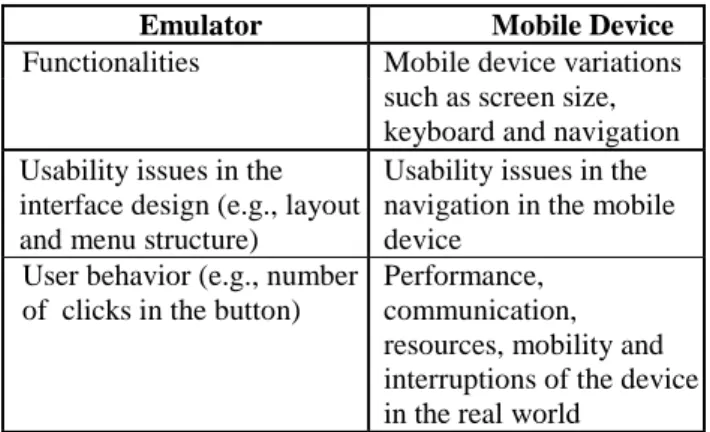
The behavior of the mobile applications must be tested on the emulator and on the device, since the application might perform differently according to the emulator used, and hardware and software versions running on the device. The emulator is useful to validate functionality and compatibility under controlled conditions [8]. However, the emulator fails to simulate issues specific to the mobile device characteristics, such as screen size, navigation differences, types of text/source, graphics (color rendering), mobility and disconnections. Then it is important that the tests are made in both environments, in an emulator specific to the target device and in the target mobile device. Table 1 presents the characteristics of mobile applications to be tested in the emulator and in the device.
TABLE I. CHARACTERISTICS TO BE TESTED IN THE EMULATOR AND IN
THE MOBILE DEVICE
Emulator Mobile Device
Functionalities Mobile device variations
such as screen size, keyboard and navigation Usability issues in the
interface design (e.g., layout and menu structure)
Usability issues in the navigation in the mobile device
User behavior (e.g., number of clicks in the button)
Performance, communication, resources, mobility and interruptions of the device in the real world
The research showed that 73% of the professionals use emulators, from which, 36% of the tests are made in both generic and specific emulators. Additionally, 24% perform the tests only in the generic emulator. Finally, 97% of professionals perform tests in both emulator and mobile device. These professionals said that the emulator tests help to verify the application functionality, and thus some defects can be corrected sooner, decreasing the time to
correct errors and their associated cost.
Requirement 3: the test report must inform the applicationname and version, the version of the emulator and/or the mobile device and the test environment.
The test report must inform the version of the emulator and the device, and the test environment plus the name and version of the application (what is a common practice in the testing process of desktop application), since the test cases results may vary depending on the context in which they were made.
In practice, only 43% of the professionals inform the version of the emulator and/or mobile device and only 72% of them document the test environment.
Requirement 4: for each error identified, the error report must inform its description, frequency of occurrence (systematic, random or just once), location in the application and a step by step guide to repeat it.
The testers must report the error in a way that the developers can understand and fix it. Therefore, providing the description, frequency, location and a step by step guide of the error help the developer to fix the problem quickly and effectively.
This research identified that only 22% of the professionals report all information. However, 100% of them provide a description and 67% provide a step by step guide as the error occurs. Additionally, the interviews helped to discover that other information, such as, error images of the application and the degree of importance of the error are also informed by testers.
Requirement 5: mobile applications must not harm applications already deployed on a mobile device.
Once an application is loaded, it must be able to pause and resume its execution when outside interruptions abruptly force the application to close [5]. These interruptions may be caused by services running on the device like alarm notification.
Here, 86% of the professionals reported that they perform this test. When applicable, they also test interruptions in the application with other types of resources available in the mobile device (e.g., Bluetooth).
Requirement 6: mobile applications must be tested according to the mobile context limitations to which they are directed at.
environment that are independent from the application being tested, such as memory, processing, screen, battery, storage capacity and mobility. Other factors, for example, bandwidth, depends on the application type being developed. The following items briefly discuss how tests are performed considering the aforementioned limitations.
• Memory: the amount of memory consumed is
displayed on the monitor memory of the emulator or in the mobile device when a user is using the application and inserting data (e.g., big size files and images). The experience shows that testing memory allocation in the emulator is not reliable, because it also uses the memory of the computer running the emulator. Thus, the device test is more realistic since allows to check the actual memory usage of the application.
• Processing: this test verifies processing peaks and application responsiveness. It measures how the application behaves under different processing load. For mobile games, the processing is measured by the number of frames per second. Although this test can be done in the emulator, it must also be performed in all target devices, since the same application can present different behaviors depending on the device characteristics.
• Screen: this test observes the display of the application on the emulator and/or on devices with different resolutions and sizes. As mobile devices have small screens and there are several models with different resolutions, it is necessary to select the devices according to the different screen characteristics to be tested. This test can also be done using prototypes in the early stages of development when design issues can be soon addressed.
• Battery: this test evaluates the battery levels while using the application. The battery test verifies how the battery level varies while the application uses all available resources on the mobile device (e.g., GPS and Bluetooth). It should also verify data consistency when the battery is suddenly removed while executing write operations.
• Storage capacity: test how the application behaves when the amount of memory left on the device varies. Data is inserted until the storage capacity of the device is fulfilled, and the tester checks if the application continues to function normally, and if the embedded applications (e.g., utilities and services) are also performing accordingly.
• Mobility: this test can be executed in a controlled environment, but it is preferable to test the
applications in the real world. Thus, communication interruptions can be simulated to evaluate how the application deals with unforeseen failures.
• Bandwidth: This test depends on the application type. Generally, the test is done by transferring data over the network (e.g., GPRS). In some cases, applications are tested in the laboratory using Wi-Fi to evaluate the actual transmission rate. However, experience shows that the performance of the application using the WLAN is usually poorer, mainly because it depends on the location of the mobile user.
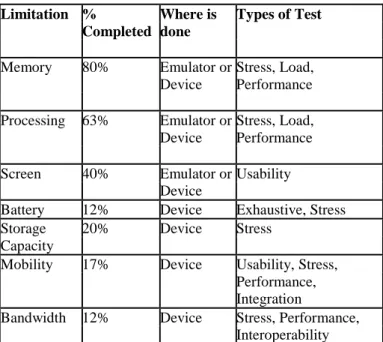
Table 2 presents a summary on how the restrictions described previously are tested in practice and the types of testing executed by developers / testers.
TABLE II. LIMITATIONS TESTED IN THE PRACTICE IN MOBILE APPLICATIONS
Limitation % Where is Types of Test Completed done Memory 80% Emulator or Device Stress, Load, Performance Processing 63% Emulator or Device Stress, Load, Performance
Screen 40% Emulator or Usability
Device
Battery 12% Device Exhaustive, Stress
Storage 20% Device Stress
Capacity
Mobility 17% Device Usability, Stress,
Performance, Integration
Bandwidth 12% Device Stress, Performance,
Interoperability
Requirement 7: the tester must know which features can be tested in the laboratory and which ones are supposed to be tested in the real mobile context (field test).
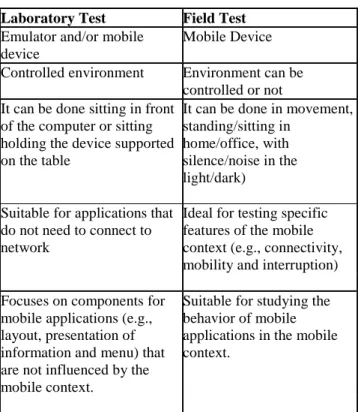
Testing in the laboratory generally observes features of the application and it can be done both in emulator and in the mobile device. However, testing the application on the device itself can be performed in a controlled environment (laboratory), as well as in the "real world". This test is more appropriate to evaluate the mobile user, because the context in which the user is inserted affects the use and the performance of the application [7]. Moreover, mobile applications must be tested with users doing real tasks, which help testers to identify common errors and to improve the usability of the application. Table 3 presents the
characteristics of both types of test.
TABLE III. CHARACTERISTICS OF THE TEST IN LABORATORY AND FIELD
Laboratory Test Field Test
Emulator and/or mobile device
Mobile Device Controlled environment Environment can be
controlled or not It can be done sitting in front
of the computer or sitting holding the device supported on the table
It can be done in movement, standing/sitting in
home/office, with silence/noise in the light/dark) Suitable for applications that
do not need to connect to network
Ideal for testing specific features of the mobile context (e.g., connectivity, mobility and interruption) Focuses on components for
mobile applications (e.g., layout, presentation of information and menu) that are not influenced by the mobile context.
Suitable for studying the behavior of mobile applications in the mobile context.
In the conducted research, all applications are tested in laboratories and 30% of the professionals perform tests on the field only when is necessary to test a feature that can only be seen in this environment (e.g., GPRS), and also, in some cases, to verify the application usability. However, 92% of applications are developed with focus on real users and 42% are tested with them. In practice, it happens because the developer and the tester are the same person, and usually there is not a sample of target users to help the testing process.
Requirement 8: the usability test must be included during the development cycle of the mobile application.
The user mobility and the environment influence usability tests of mobile applications. Thus, usability tests are mandatory to ensure that a mobile application is practical, effective and easy to use, especially considering the mobile user [6][10]. For example, the user may be standing, walking or sitting in a place, with low or high levels of light, while using the application. Additionally, the user may be performing several activities on her mobile device. Consequently, field studies are more appropriate for usability tests when the performance of the application has high dependence on the mobile context [10].
In this research, 56% of the professionals execute usability
tests in mobile applications. However, only 18% perform this test in the field. Thus, the environmental characteristics that affect the usability of an application are not always tested.
B. Usability Testing Requirements
Requirement 9: the mobile user must always know where she is in the application, which actions she has already done, what can be done from now on, and how to undo possible mistakes.
Each screen of a mobile application must contain information of where the user is, what she did, and what can be done to undo her mistakes.
The basic problem with usability of mobile applications is that users spend significant time browsing the content through a series of menus before to get what they want, so they often forget the structure of the menu, especially if the user is not familiar with the application. Important menus must not be hidden. However, the research showed that only 44% of professionals perform this test requirement.
Requirement 10: user actions must not be undone when external interruptions force the application to pause. When a user enters a textual information on a small screen through a limited keyboard, the application must not lose it during an interruption (e.g., incoming call). Thus, the application must save its current state correctly when the user is interrupted. In the conducted research, only 50% of professionals test if the application saves its current state during a break.
Requirement 11: the application must support the portrait and landscape screen formats.
When testing desktop applications, this testing requirement is not considered. This is because desktop monitors are rarely used to rotate 90 degrees [2]. However, in mobile applications, the tester must verify if the application support portrait and landscape screen formats, especially in games. Although this requirement is specific to the mobile context, only 32% of professionals test if the application supports both screen formats.
Requirement 12: the application must ask the user's permission before making connections.
Costs incurred by the application without the user's knowledge can lead to legal issues [3]. Similarly, when the application charges for their services, it must inform the cost associated to use this service. In the conducted research, 68% of professionals test this requirement.
Requirement 13: mobile applications must not use justified text, right aligned, broken, all capital letters, and the amount of text must be minimal, so that is not necessary to use the scroll bar. Furthermore, the application must have a good contrast on the background. One of the restrictions of the mobile device is to have small screen. To address this limitation, the information must be displayed in a way that maximizes the user view. Therefore, justified text must not be used on small screens, since it has large spaces which interrupt the movements of the eyes and prevent the reading.
Sometimes, experienced users do not notice some information or listed items because they are not visible. In this case, the most important information must be available without the scroll bar. However, when texts are too long and it is not possible to avoid the scroll bar, the user should not be forced to roll a long text line by line. Moreover, in a small screen, text must also have a good contrast on the background.
In the conducted research, 44% of the professionals test if the application does not use justified text, 80% of them test if it presents a good contrast, 82% of them test if it does not use scroll bar, and 50% of them test if the text is right aligned, cut, all in capital letters and if the amount of text is minimal.
Requirement 14: mobile applications must require confirmation from user to perform not reversible actions. The mobile user has the difficulty of entering data on a small screen and often makes typing mistakes. Thus, the application must request confirmation of the actions that are not reversible. In the conducted research, 82% of professionals test this requirement.
Requirement 15: the sound of mobile applications must improve the usefulness and usability of the mobile application.
Mobile applications must be tested with different sound configurations and the user must be able to control their sounds, adjusting the volume or turning the sound off completely. The testers should have it in their mind when testing applications with audible dimensions, especially mobile games.
According to the interviews, 38% of the professionals test if the users can control the sounds of the application and only 14% of them test the application with different configurations.
Requirement 16: softkeys, when used to control actions
ofthe application must follow the conventions established to the mobile device that hosts this application.
Softkeys must map most important and the most used actions in the application. Thus, they must be intuitive and used in the application as designed on the mobile device. In the literature, it is recommended to use left softkey for positive actions (e.g., menu, select and ok) and the right softkey for negative actions (e.g., back, cancel and exit). The research showed that 74% of the professionals test if the mobile applications use the softkeys following the conventions established to the mobile device. However, 50% use the right softkey for positive actions and 53% use the left softkey for negative actions.
V. ANALYSIS OF THE INTERVIEW
RESULTS
The previous section described the elicited testing requirements for mobile applications. However, beyond the results presented before, some important points were identified during this work. First, we identified that although several types of tests are performed during the development of mobile applications, there is no consensus yet, in both literature and practice, of which set of tests is ideal for mobile applications. What has been done in practice is twofold. Either to adopt a set of tests for any type of mobile application and they may vary according to the customer request, or to adopt a set of tests that vary depending on the mobile application.
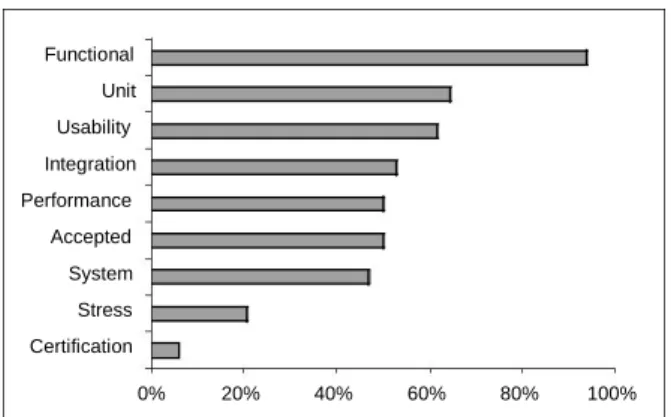
As illustrated in Figure 3, Functional Tests, Unit Tests and Usability Tests are performed more frequently, regardless of the type of mobile application. Nevertheless, 88% of the professionals with the developer profile do Performance Tests in mobile applications like games, and 55% of developers/testers do System Tests and Integration Tests on enterprise mobile applications.
Functional Unit Usability Integration Performance Accepted System Stress Certification 0% 20% 40% 60% 80% 100%
Figure 3. Types of tests performed in practice Another point noted is that, although there are several tools available (e.g., AutoSanity, Device Explorer and
TestQuest Pro) that automate some testing in the emulator and/or mobile device, only 10% of the professionals execute some kind of automated test, such as unit and performance test.
VI. VALIDATION
In order to validate the usefulness of the testing requirements presented in Section 4, they were used by two testers during the tests of a mobile application called Mobile Shopping. This application is client-server and allows the user to view the contents of shopping centers and to shop on a virtual shopping using a mobile device. Due to the space limitation, only the requirements 2, 3, 4, 6, 9, 13, 14 and 16 will be discussed.
The application was tested on a generic emulator and on a specific emulator for the target device, as well as on a mobile device in the laboratory. Considering Requirement 2, we found differences in the application interface. Using the generic emulator, the screen displayed is larger and shows a greater amount of information than the screen of the device. For example, the Mobile Shopping error messages are displayed on top of the screen, moving the content down. When tests are performed using the specific emulator or on the specific device, in general, you can not view the message due to the size of the screen. However, when the application is tested on a generic emulator, all content on the page including the error message is displayed without the need to use the scroll bar.
From the test of Requirement 2, it was possible to verify the need to test Requirement 13, because the vast amount of information on the screen led to the use of the scroll bar, damaging the display of the error message on the top of the screen. Therefore, the screen limitation in Requirement 6 was tested. Another point observed was the inappropriate presentation of the error message. It caused the user to become unaware of what occurred, demonstrating the need for using Requirement 9. In this context, it is also important to use Requirement 3, which suggests including the version of the emulator and/or device in the report.
When the Mobile Shopping was tested in real devices, it was identified that when one of the options is selected, the first word of the next screen is broken into several lines. However, this error only occurs one time when the application is started, and only on the device. Thus, there was the need for Requirement 4, which recommends informing the error frequency and the step by step guide to reproduce the error.
Another problem found was that the application does not require confirmation of the purchase data. When the "Buy" option is selected, the purchase is made without
confirmation of the input information (e.g., shipping address, form of payment, and amount of purchase). This problem shows the need of Requirement 14.
Regarding Requirement 16, the application softkeys were used according to the conventions of the mobile device. Furthermore, in the model of the tested device, positive actions and negative actions were used as described in the requirement.
The tests of the Mobile Shopping application presented in this section allowed the validation of the testing requirements benefits and the identification of common problems regarding the mobile environment, as well as problems that are not typical but are becoming more complex and challenging for the testing process in mobile applications. Therefore, the use of testing requirements helps the testers to find specific errors on mobile environment and improves the productivity and efficacy of the testing process.
VII. CONCLUSION AND FUTURE WORK
This paper proposed a set of testing requirements, elicited using the results of an extensive research on how the testing process for mobile applications is done in the literature and in practice. Although these requirements do not cover the entire testing process, they can be used as a start point to help the teams in the essential activities to test applications for mobile devices. This paper also presented some results from the analysis of interviews. However, some of these results cannot yet be defined as test requirements (e.g., what types of tests are ideal for mobile applications), because we were unable to demonstrate a consensus in the literature or in practice. Among the conclusions obtained from the interviews, it is important to emphasize that, firstly, most companies do not have a specific testing process for mobile applications. Hence, tests are not executed systematically, and are defined based on previous experience or intuition of developers and testers. Another important factor observed is the lack of testing requirements for mobile applications, which leaves untouched important aspects of the applications, and trivial errors are not identified.
As future work, the proposed testing requirements should be applied in different scenarios and they also should be grouped in a priority level. Furthermore, it is important to refine and document a greater amount of testing requirements for applications that were not presented in this paper, such as requirements for mobile games, sites and enterprise.
REFERENCES
[1] Ballard, B. (2007), Designing the Mobile User Experience. Little Springs Design, Inc., USA: Wiley, 2007.
[2] BugHuntress QA Lab (2007). Mobile Usability Testing Problem and Solutions. In: Proceedings of the Conference “Quality Assurance: Management & Technologies” (QAMT Ukraine’07), 2007.
[3] Kaikkonen, A; Kekäläinen, A Cankar, M; Kallio, T. e Kankainen, A. (2005). Usability testing of mobile applications: A comparison between laboratory and field testing. Journal of Usability Studies, vol.1, 2005, p.4-17. [4] LioNBRIDGE (2006). Testing Mobile Applications is Different from Testing Traditional Applications. Available at:
<http://www.lionbridge.com/lionbridge/en-US/kc/outsourced-testing.htm>. Access to: 17 jan. 2009. [5] Nokia (2007). Software Test Plan for a mobile
application. Available at: <http://wiki.forum.nokia.com/index.php/Software_Test_Pl
an_for_a_mo bile_application >. Access to: 16 jan. 2009. [6] Overlander, D. (2008) “Usability and the Design of Mobile Interfaces”. Available at: <http://www.pocketpcmag.com/cms/node/1346>. Access to: 17 jan. 2009.
[7] Roto, V.; Ketola, P. e Huotari, S. (2008) “User Experience Evaluation in Nokia”. Now Let's Do It in Practice - User Experience Evaluation Methods in Product Development workshop in Conference on Human Factors in Computing Systems archive (CHI'08), Florence, Italy, 2008.
[8] TestQuest (2004) “Automating Functional Testing of Mobile Business Application Software for a Competitive Advantage”, TESTQUEST, INC., Minneapolis, MN 55317, USA, 2004. Available at: < http://testquest.com/download.cfm?oid=4358&product=34 87 Access to: 22 jan. 2009.
[9] Zeidler, C.; Kittl, C. e Petrovic, O. (2007) “An Integrated Product Development Process for Mobile Software”. In: Proceedings of the IX International Conference on the Management of Mobile Business (ICBM), 2007, p. 23-23.
[10]Zhang, D. and Adipat, B. (2005) “Challenges, Methodologies, and Issues in the Usability Testing of Mobile Applications”. In: Proceedings of the International Journal of Human Computer Interaction (IJHCI), vol. 18, nº 3, 2005, p. 293-308.