ClearPass 6.4.0
www.arubanetworks.com
1344 Crossman Avenue
Sunnyvale, California 94089
Phone: 408.227.4500
Fax 408.227.4550
ClearPass 6.4.0 | Release Notes 0511692 | August 2014
Copyright
© 2014 Aruba Networks, Inc. Aruba Networks trademarks include the AirWave logo, Aruba Networks®, Aruba Wireless Networks®, the registered Aruba the Mobile Edge Company logo, Aruba Mobility Management System®, Mobile Edge Architecture®, People Move. Networks Must Follow®, RFProtect®, Green Island®. All rights reserved. All other trademarks are the property of their respective owners. Open Source Code
Certain Aruba products include Open Source software code developed by third parties, including software code subject to the GNU General Public License (GPL), GNU Lesser General Public License (LGPL), or other Open Source Licenses. The Open Source code used can be found at this site:
http://www.arubanetworks.com/open_source Legal Notice
The use of Aruba Networks, Inc. switching platforms and software, by all individuals or corporations, to terminate other vendors’ VPN client devices constitutes complete acceptance of liability by that individual or corporation for this action and indemnifies, in full, Aruba Networks, Inc. from any and all legal actions that might be taken against it with respect to infringement of copyright on behalf of those vendors.
Warranty
This hardware product is protected by an Aruba warranty. For more information, refer to the ArubaCare service and support terms and conditions.
ClearPass 6.4 | Release Notes | 1
Contents
About ClearPass 6.4.0 ... 5
Supported Browsers...5 System Requirements ...5 End of Support ...5Virtual Appliance Requirements ...6
Supported ESX/ESXi Versions...6
CP-VA-500...6
CP-VA-5K ...6
CP-VA-25K ...6
Evaluation Version ...6
ClearPass OnGuard Unified Agent Requirements ...7
Supported Antivirus Versions, OnGuard ...7
Supported Browser and Java Versions, OnGuard ...7
ClearPass Dissolvable Agent Requirements...8
ClearPass Onboard Requirements ...9
Use of Cookies ...9
Contacting Support ...10
Upgrade and Update Information ... 11
Upgrading to ClearPass 6.4 from 6.1, 6.2, or 6.3...11
Before You Upgrade ...11
After You Upgrade ...12
Restoring the Log DB Through the User Interface ...12
Restoring the Log DB Through the CLI ...13
Updating to a Patch Release from an Earlier Release...13
Before You Update ...14
After You Update ...14
Installation Instructions Through the User Interface ...14
Installation Instructions for an Offline Update...14
What’s New in This Release ... 15
Release Overview ...15
New Features and Enhancements in the 6.4.0 Release ...15
Policy Manager ...15
CLI...18
Native Dissolvable Agent ...18
Guest...18
Insight...20
Onboard ...20
OnGuard...21
Issues Resolved in the 6.4.0 Release ...21
Policy Manager ...21 CLI...25 Guest...25 Insight...28 Onboard ...29 OnGuard...30 QuickConnect ...31
2 | ClearPass 6.4 | Release Notes
New Known Issues in the 6.4.0 Release ...32
Policy Manager ...32
Guest...32
Native Dissolvable Agent ...32
Known Issues Identified in Previous Releases ... 35
Policy Manager ...35 Dissolvable Agent ...38 Guest ...39 Insight ...39 Onboard...39 OnGuard ...40 QuickConnect...43 WorkSpace ...43
ClearPass 6.4.0 | Release Notes About ClearPass 6.4.0 | 5
Chapter 1
About ClearPass 6.4.0
ClearPass 6.4.0 is a major release that introduces new features and provides fixes to previously outstanding issues. These release notes contain the following chapters:
Chapter 2, “Upgrade and Update Information” on page 11—Provides considerations and
instructions for version upgrades and patch updates.
Chapter 3, “What’s New in This Release” on page 15—Describes new features and issues
introduced in this 6.4.0 release as well as issues fixed in this 6.4.0 release.
Chapter 4, “Known Issues Identified in Previous Releases” on page 35—Lists currently existing
issues identified in previous releases.
Supported Browsers
For the best user experience, we recommend you update your browser to the latest version available. Supported browsers for ClearPass are:
Mozilla Firefox on Windows XP, Windows Vista, Windows 7, and Mac OS Google Chrome for Mac OS and Windows
Apple Safari 3.x and later on Mac OS Mobile Safari 5.x on iOS
Microsoft Internet Explorer 7.0 and later on Windows Vista, Windows 7, Windows 8, and Windows
8.1
System Requirements
ClearPass Guest and ClearPass Onboard are part of the ClearPass Policy Manager platform.
ClearPass comes pre-installed when you purchase an appliance. ClearPass can also be installed on a virtual appliance.
End of Support
N O T E
Microsoft Internet Explorer 6.0 is now considered a deprecated browser. You might encounter some visual and performance issues when using this browser version.
N O T E
Please note that Microsoft officially stopped supporting the Windows XP operating system as of April, 2014. Aruba Networks will not remove existing ClearPass features or software agents that are compatible with Windows XP, such as OnGuard. We will not, however, be providing any further bug fixes or feature
enhancements related to supporting the Windows XP operating system. Our TAC organization will not be able to service customer support requests related to Windows XP-based clients. Customers should consider Windows XP an unsupported operating system on ClearPass. (#21679)
6 | About ClearPass 6.4.0 ClearPass 6.4.0 | Release Notes
Virtual Appliance Requirements
The following specifications are recommended in order to properly operate Aruba ClearPass Policy Manager in 64-bit VMware ESX or ESXi server environments. To ensure successful deployment and maintain sufficient performance, verify that your hardware meets the following minimum
specifications.
Supported ESX/ESXi Versions
4.0 (Recommended minimum version of software for CP-VA-500 and CP-VA-5K. It does not
support greater than 8 virtual CPUs required for the CP-VA-25K.)
5.0 5.1 5.5
CP-VA-500
2 Virtual CPUs 500 GB disk space 4 GB RAM 2 Gigabit virtual switched ports
Functional IOP rating for a 40-60 read/write profile for 4K random read/write = 75
CP-VA-5K
8 Virtual CPUs 500 GB disk space 8 GB RAM
2 Gigabit virtual switched ports
Functional IOP rating for a 40-60 read/write profile for 4K random read/write = 105
CP-VA-25K
At least 12 Virtual CPUs (Aruba hardware appliances ship with 24 cores) 1024 GB disk space
At least 24 GB RAM (Aruba hardware appliances ship with 64 GB RAM) 2 Gigabit virtual switched ports
Functional IOP rating for a 40-60 read/write profile for 4K random read/write = 350
Evaluation Version
2 Virtual CPUs 80 GB disk space 4 GB RAM
2 Gigabit virtual switched ports N O T E
In order for a CP-VA-25K virtual appliance to properly support up to 25,000 unique authentications with full logging capability, customers should configure additional hardware to match the number of CPUs and RAM that ship in our hardware appliances. If you do not have the VA resources to support a full workload, please consider ordering the ClearPass Policy Manager hardware appliance.
ClearPass 6.4.0 | Release Notes About ClearPass 6.4.0 | 7
An evaluation version can be upgraded to a later evaluation version in a manner similar to a production upgrade.
ClearPass OnGuard Unified Agent Requirements
Be sure that your system meets the following requirements before installing the ClearPass OnGuard Unified Agent:
1 GB RAM recommended, 512 MB RAM minimum 200 MB Disk Space
Mac OS X: Version 10.6 or higher (64-bit only) Windows XP: Service Pack 3 or higher
Windows 2003: Service Pack 2 or higher
Windows 7, Windows 8.x Pro, Windows Vista, and Windows Server 2008 are all supported with no Service Pack requirements. OnGuard does not support Windows 8.x RT or Windows 8.x Phone.
Supported Antivirus Versions, OnGuard
In the lab, we use the following antivirus software for our validations. Due to the large number of products available, this list may change at any time:
Kaspersky: IS-11 and above Sophos: 9 and above Avast
COMODO McAfee
Microsoft Security Essentials
Microsoft Forefront Endpoint Protection-2008
AVG
Trend Micro
Windows Defender Firewall Microsoft Windows Firewall
Supported Browser and Java Versions, OnGuard
ClearPass OnGuard Dissolvable Agent Supports the following minimum browser and Java versions:
Firefox: 29 and 30, and Java 7u65 and above N O T E
VMware Player is not supported. Please contact customer support at [email protected] with any further questions or if you need additional assistance.
!
CAUTION
Installing the Unified Agent will remove an existing VIA installation. To continue using VPN functionality, log in to CPPM as the administrator, go to Administration > Agents and Software Updates > OnGuard Settings, and select Install and enable Aruba VPN component from the Installer Mode drop-down list.
N O T E
Some third-party anti-malware products are not supported by ClearPass OnGuard. For a complete list of supported third-party products, in CPPM go to Administration > Agents and Software Updates > OnGuard Settings, click the Help link, and then click the OnGuard Agent Support Charts link.
8 | About ClearPass 6.4.0 ClearPass 6.4.0 | Release Notes
Chrome: 34 and 35, and Java 7u65 and above
Internet Explorer (IE): 7 and above, and Java 7u65 and above Safari: 6 and 7, and Java 7u65 and above
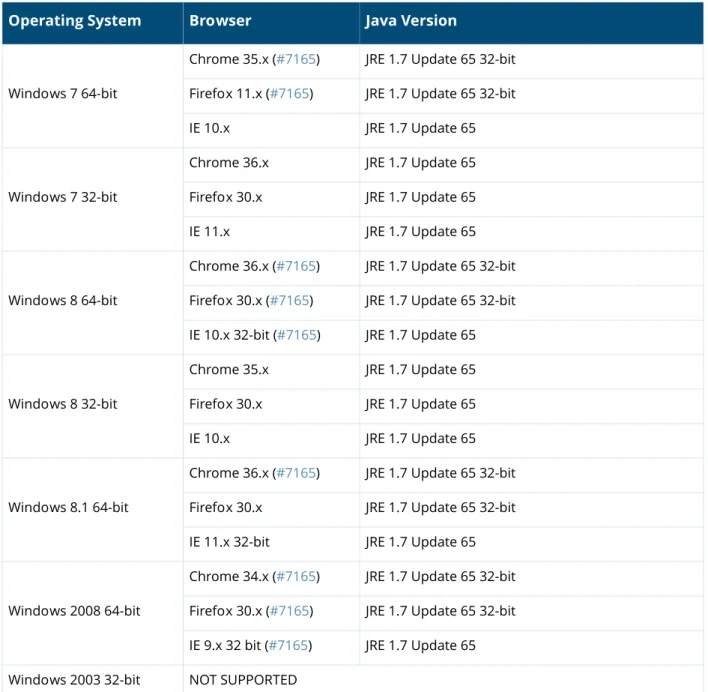
In current laboratory tests for ClearPass 6.4.0, the browser and Java versions shown in Table 1 were verified for the ClearPass OnGuard Dissolvable Agent. There are considerations to be aware of with some browser versions. For more information, click the ID number next to the browser’s name.
ClearPass Dissolvable Agent Requirements
The latest Java version is required in order to perform client health checks using the new Web login flow.
N O T E
ClearPass Policy Manager Online Help is updated with both Java and the Native Dissolvable Agent.
Table 1 Latest Supported Browser and Java Versions for This Release Operating System Browser Java Version
Windows 7 64-bit
Chrome 35.x (#7165) JRE 1.7 Update 65 32-bit Firefox 11.x (#7165) JRE 1.7 Update 65 32-bit IE 10.x JRE 1.7 Update 65
Windows 7 32-bit
Chrome 36.x JRE 1.7 Update 65 Firefox 30.x JRE 1.7 Update 65 IE 11.x JRE 1.7 Update 65
Windows 8 64-bit
Chrome 36.x (#7165) JRE 1.7 Update 65 32-bit Firefox 30.x (#7165) JRE 1.7 Update 65 32-bit IE 10.x 32-bit (#7165) JRE 1.7 Update 65 Windows 8 32-bit
Chrome 35.x JRE 1.7 Update 65 Firefox 30.x JRE 1.7 Update 65 IE 10.x JRE 1.7 Update 65
Windows 8.1 64-bit
Chrome 36.x (#7165) JRE 1.7 Update 65 32-bit Firefox 30.x JRE 1.7 Update 65 32-bit IE 11.x 32-bit JRE 1.7 Update 65
Windows 2008 64-bit
Chrome 34.x (#7165) JRE 1.7 Update 65 32-bit Firefox 30.x (#7165) JRE 1.7 Update 65 32-bit IE 9.x 32 bit (#7165) JRE 1.7 Update 65 Windows 2003 32-bit NOT SUPPORTED
ClearPass 6.4.0 | Release Notes About ClearPass 6.4.0 | 9
For more information on supported browsers and Java versions for Native Dissolvable Agent and Java, refer to the ClearPass Policy ManagerOnline Help.
ClearPass Onboard Requirements
Onboard does not support Windows 8.x RT or Windows 8.x Phone.
Use of Cookies
Cookies are small text files that are placed on a user’s computer by Web sites the user visits. They are widely used in order to make Web sites work, or work more efficiently, and to provide information to the owners of a site. Session cookies are temporary cookies that last only for the duration of one user session.
When a user registers or logs in via an Aruba captive portal, Aruba uses session cookies solely to remember between clicks who a guest or operator is. Aruba uses this information in a way that does not identify any user-specific information, and does not make any attempt to find out the identities of those using its ClearPass products. Aruba does not associate any data gathered by the cookie with any personally identifiable information (PII) from any source. Aruba uses session cookies only during the user’s active session and does not store any permanent cookies on a user’s computer. Session cookies are deleted when the user closes the browser.
Windows XP 32-bit NOT SUPPORTED
MAC 10.9 Firefox 30.x JRE 1.7 Update 65 Safari 7.x (#20191) JRE 1.7 Update 65 MAC 10.8 Firefox 30.x (#20191) JRE 1.7 Update 65 MAC 10.7.5 Firefox 30.x (#23340) JRE 1.7 Update 65 Safari 6.x (#20191) JRE 1.7 Update 65 Table 1 Latest Supported Browser and Java Versions for This Release
10 | About ClearPass 6.4.0 ClearPass 6.4.0 | Release Notes
Contacting Support
Table 2 Contact Information
Main Site arubanetworks.com
Support Site support.arubanetworks.com
Airheads Social Forums and
Knowledge Base community.arubanetworks.com North American Telephone 1-800-943-4526 (Toll Free)
1-408-754-1200
International Telephones http://www.arubanetworks.com/support-services/support-program/ contact-support
Software Licensing Site licensing.arubanetworks.com
End of Support information http://www.arubanetworks.com/support-services/end-of-life-products/ end-of-life-policy/
Wireless Security Incident
Response Team (WSIRT) http://www.arubanetworks.com/support-services/security-bulletins/ Support Email Addresses
Americas and APAC [email protected]
EMEA [email protected]
WSIRT Email
Please email details of any security problem found in an Aruba product.
ClearPass 6.4.0 | Release Notes Upgrade and Update Information | 11
Chapter 2
Upgrade and Update
Information
This chapter provides considerations and instructions for upgrading or updating your ClearPass application:
The term “upgrade” refers to moving from one major release version to another—for example,
from 6.3.x to 6.4.x. For information on upgrading from a version prior to 6.4, see “Upgrading to ClearPass 6.4 from 6.1, 6.2, or 6.3” on page 11.
The term “update” refers to applying a patch release within the same major version—for example,
from 6.3.4 to 6.3.5. For information on updating to a patch release, see “Updating to a Patch Release from an Earlier Release” on page 13.
Upgrading to ClearPass 6.4 from 6.1, 6.2, or 6.3
An upgrade is the process of moving from one major release version to another—for example, from 6.3.x to 6.4. This section describes accessing upgrade images, considerations to be aware of, and instructions for restoring the log database after the upgrade (optional).
You can upgrade to ClearPass 6.4.0 from ClearPass 6.1.x, 6.2.x, or 6.3.x. Before you proceed with the upgrade, we recommend that you apply the latest available patch updates to your current release. For information on the patch update procedure, see “Updating to a Patch Release from an Earlier Release” on page 13.
Upgrade images are available within ClearPass Policy Manager from the Software Updates Portal
at Administration > Agents and Software Updates > Software Updates.
For appliance upgrades from 5.2.0, upgrade to the latest 6.1, 6.2, or 6.3 before upgrading to 6.4.
The 6.1, 6.2, and 6.3 upgrade images are available for download on the Support site under
ClearPass > Policy Manager > Archives.
Direct upgrades from versions prior to ClearPass 6.1.x are not supported. Customers with
versions earlier than 6.1.0 must upgrade to the latest 6.1.x, 6.2.x, 6.2.x VM, or 6.3.x version first before upgrading to 6.4.
Before You Upgrade
Before you begin the upgrade process, please review the following important items:
Plan downtime accordingly. Upgrades can take longer (several hours) depending on the size of
your configuration database. A large number of audit records (hundreds of thousands) due to MDM integration can significantly increase upgrade times.
Review the VMware disk requirements. These are described in “System Requirements” on page 5
of the About ClearPass 6.4.0 chapter.
N O T E
MySQL is supported in CPPM 6.0.x and greater. Aruba does not ship drivers for MySQL by default. Customers who require MySQL can contact Aruba support to get the required patch. Users should be aware that this patch does not persist across upgrades, so customers using MySQL should contact support before they upgrade.
12 | Upgrade and Update Information ClearPass 6.4.0 | Release Notes
Any log settings that were modified prior to the upgrade are not retained, and are reset to the
default. The administrator should configure any custom log settings again after the upgrade.
Before initiating the Upgrade process in CPPM, we recommend you set the Auto Backup
Configuration Options to Off (if it was set to other values such as Config or Config|Session).
This reason for disabling this setting is to avoid interference between the Auto Backup process and the Migration process.
To change this setting:
Navigate to Administration > Cluster Wide Parameters > General > Auto Backup
Configuration Options = Off.
If you have a custom authentication source configured to use the session log database, additional
steps are required after upgrade. You have such an authentication source configured if you have a source of type Generic SQL DB in ClearPass Policy Manager > Configuration > Sources with server name localhost or 127.0.0.1 and with the database name tipsLogDb. In such cases, manually restoring the session log database is required after the upgrade completes (see “After You Upgrade” on page 12). Please contact Customer Support for configuration recommendations to move away from using the session log database as an authentication source.
VM only: If you have two disks already loaded with previous ClearPass versions—for example, 6.1
on SCSI 0:1 and 6.2 on SCSI 0:2—then drop the inactive disk before upgrading. You must then add a newer disk that is twice the size of the old disk. The ClearPass installation will partition this disk into two logical volumes.
After You Upgrade
To reduce downtime, the default upgrade behavior will now back up Log Database and Access Tracker records but will not restore them as part of the upgrade. If required, you can manually restore them after the upgrade through either the application or the CLI. The session log database contains:
Access Tracker and Accounting records Event Viewer
ClearPass Guest Application Log
Restoring the Log DB Through the User Interface
To restore the Log DB after upgrade through the UI, restore from the auto-generated
upgrade-backup.tar.gz file (available at Administration > Server Manager > Local Shared Folders).
The restoration process could take several hours, depending on the size of your session log
database. All services are accessible and will handle requests during the restoration, but there will be a performance impact while the restoration is in progress. We recommend that you perform this operation during a planned change window.
N O T E
Log Database and Access Tracker records are not restored as part of the upgrade. If required, you can manually restore them after the upgrade. For more information, please review “After You Upgrade” on page 12.
WARNING
Never remove SCSI 0:0
N O T E
ClearPass 6.4.0 | Release Notes Upgrade and Update Information | 13
The restoration process will continue in the background even if the UI is closed or the session times out. A “Restore complete” event is logged in the Event Viewer when the restoration is complete. This process needs to be repeated on each server in the cluster that should retain the session log database.
1. Go to Administration > Server Manager > Server Configuration and click Restore for the server.
2. In the Restore Policy Manager Database window, select the File is on server option, and select
the upgrade-backup.tar.gz file.
3. Also select the following options:
Restore CPPM session log data (if it exists on the backup)
Ignore version mismatch and attempt data migration
Do not back up the existing databases before this operation
4. Uncheck the Restore CPPM configuration data option. 5. Click Start.
Restoring the Log DB Through the CLI
To restore the Log Database after the upgrade process is complete, use the restore command. Go to
Administration > Server Manager > Local Shared Folders and download the
upgrade-backup.tar.gz file. Host the file at a scp or http location accessible from the ClearPass server and
execute the command restore <location/upgrade-backup.tar.gz> -l –i –b.
The restoration process could take several hours depending on the size of your session log database. All services are accessible and handling requests during the restoration, but there will be a
performance impact while the restoration is in progress. We recommend that you perform this operation during a planned change window.
The restoration process will abort if the CLI session is closed or times out. We recommend that you initiate the restoration from the User Interface, especially if you have a large number of Access Tracker and Accounting records.
This process needs to be repeated on each server in the cluster that should retain the session log database.
The restore command syntax is as follows: Usage:
restore user@hostname:/<backup-filename> [-l] [-i] [-b] [-c] [-r] [-n|-N] [-s] restore http://hostname/<backup-filename>[-l] [-i] [-b] [-c] [-e] [-n|-N] [-s] restore <backup-filename> [-l] [-i] [-b] [-c] [-r] [-n|-N] [-s]
-b -- do not backup current config before restore -c -- restore CPPM configuration data
-l -- restore CPPM session log data as well if it exists in the backup -r -- restore Insight data as well if it exists in the backup
-i -- ignore version mismatch and attempt data migration
-n -- retain local node config like certificates etc. after restore (default) -N -- do not retain local node config after restore
-s -- restore cluster server/node entries from backup. The node entries will be in disabled state on restore
Updating to a Patch Release from an Earlier Release
An update is the process of applying a minor patch release within the same major version—for example, from 6.3.4 to 6.3.5. Updates are available from the Software Updates page in ClearPass
14 | Upgrade and Update Information ClearPass 6.4.0 | Release Notes
Policy Manager. This section describes how to install a patch update either through the user interface or as an offline update.
During a patch update, the log database is migrated. No extra steps are needed to retain the session log history during a patch update.
Before You Update
When you install the patch on a cluster, update the Publisher first before applying the update on Subscriber nodes.
When the patch installation is complete, the Needs Restart status is displayed on the Software Updates page. Log out and log in again to restart the system.
After You Update
Installation Instructions Through the User Interface
If access is allowed to the Web service, ClearPass servers will show the latest patch update on the Software Updates portal:
1. In ClearPass Policy Manager, go to Administration > Agents and Software Updates > Software
Updates.
2. In the Firmware and Patch Updates area, find the latest patch update and click the Download
button in its row.
3. After the patch is downloaded, click Install.
4. When the installation is complete, if the status is shown as Needs Restart, restart ClearPass. The status for the patch is then shown as Installed.
Installation Instructions for an Offline Update
If ClearPass is not connected to the cloud and you need to do an offline update, you may download the signed patch from the Support site, upload it to the CPPM server, and then install it through the user interface:
1. Download the appropriate patch update from the support site (http:// support.arubanetworks.com)
1. Open ClearPass Policy Manager and go to Administration > Agents and Software Updates >
Software Updates.
2. At the bottom of the Firmware and Patch Updates area, click Import Updates and browse to the downloaded patch file.
3. Click Install. When the installation is complete, if the status is shown as Needs Restart, restart ClearPass. The status for the patch is then shown as Installed.
N O T E
If you are installing the patch through the Software Updates portal of the CPPM UI, the update progress indicator might stall. If this happens, refresh the browser window to show the updated progress.
ClearPass 6.4.0 | Release Notes What’s New in This Release | 15
Chapter 3
What’s New in This Release
This chapter provides a summary of the new features and changes in the ClearPass 6.4.0 release. This chapter contains the following sections:
“Release Overview” on page 15
“New Features and Enhancements in the 6.4.0 Release” on page 15 “Issues Resolved in the 6.4.0 Release” on page 21
“New Known Issues in the 6.4.0 Release” on page 32
Release Overview
ClearPass 6.4.0 is a major release that introduces new features and provides fixes for known issues. The 6.4.0 upgrade is available in Policy Manager under Administration > Agents and Software
Updates > Software Updates.
New Features and Enhancements in the 6.4.0 Release
Policy Manager
IPv6 support was added at the platform level. The following IPv6 options are supported: (#8199) Management and data port addresses:
DNS addresses NTP server addresses
Access Control List Configuration
Profile module now tracks IPv6 elements in the network Insight stores IPv6 data for endpoints
Support for IPv6 was added in ClearPass 6.4.0. The Administration > Server Manager > Server
Configuration > System tab includes options for specifying the IPv6 addresses for configuring
Management port, Data (external) port, and DNS addresses. For more information on the newly introduced CLI commands and updates, see the ClearPass Policy Manager 6.4.0 User Guide. (#12398)
Syslog Export Filters now support export of Insight Report attributes. These can be used to
export information such as: (#18245)
RADIUS Accounting RADIUS Authentications TACACS Authentications WebAuth Authentications Endpoints details Guest details
SMS and SMTP services are now integrated in the ClearPass platform for notifications, and SMS
16 | What’s New in This Release ClearPass 6.4.0 | Release Notes
Insight modules. The Administration > Server Manager > Messaging Setup page in ClearPass Policy Manager is enhanced to provide the interface for configuring the SMTP server for email and SMS notifications. The Configuration > SMS Services > Gateways page in ClearPass Guest is used by ClearPass Policy Manager, Guest, and Insight to send SMS notifications. This provides a single point of configuration that helps to ease the administration tasks and reduce configuration errors. (#25035, #23034, #23036, and #20662)
Support was added to link context server actions to context servers of type Generic Http. This
helps to show or filter appropriate actions for Generic Http servers in the Trigger Server Action
page and Server Action in the Access Tracker page. (#20663)
An Uninstall button for uninstalling skins or plugins through the ClearPass Policy Manager GUI
was added to the popup that shows installation logs. (#20828)
The Standby Publisher was enhanced to reach subscribers in a cluster through HTTPS - TCP port
443 protocol. In many customer deployments, the firewall does not allow the Internet Control Message Protocol (ICMP), and gateways are configured not to respond to ICMP communication. (#21295)
ClearPass Policy Manager server allows to define a virtual IP address without necessarily adding a
secondary server. (#21527)
ClearPass now supports encyrypted communication to MS SQL databases. (#21540)
Support was added to send the AD domain in the UID updates to Palo Alto firewall and Panorama
devices. To use this option, the user must be authenticated against the AD, and the Prefix
NETBIOS name in UID updates option must be selected in the Palo Alto firewall and Panorama
device configuration in ClearPass Policy Manager. (#21710)
The High Capacity Guest (HCG) mode was added to address the high volume licensing
requirements in the Public Facing Enterprises (PFE) environment, where a large volume of unique endpoints need wireless access. A Mode tab was added to the Administration > Server Manager
> Server Configuration > Cluster-Wide Parameters page, and lets you enable or disable the
High Capacity Guest mode. Because the intention of this mode is to handle a high volume of guest users in a PFE environment, only guest licenses can be added to the High Capacity Guest mode. After enabling the High Capacity Guest mode, you cannot add enterprise licenses. In High Capacity Guest mode, a maximum of 2x licenses are allowed. For example, if you use the CP-HW-5K platform that supports 5k licenses, a maximum of 10k licenses are allowed in High Capacity Guest mode. For more information, see the ClearPass Policy Manager 6.4.0 User Guide. (#21786)
The User-Name attribute in the Enforcement Profile is now always included in Radius
Access-Accept message. (#23407)
The PAP authentication method with external authentication sources (LDAP and Generic SQL DB)
now supports the following encryption schemes in ClearPass Policy Manager 6.4.0: (#21842)
Clear Crypt MD5 SHA1 SHA256 NT Hash LM Hash Aruba-SSO
The Service Template UI was enhanced to view, edit, and delete the pre-configured services
through service templates. This can be done by selecting the prefix in each template. Now you can select any authentication source from the list of all available authentication sources in ClearPass
ClearPass 6.4.0 | Release Notes What’s New in This Release | 17
Policy Manager and add new active directory using the ClearPass Policy Manager UI. (#23037, #23039, and #23040)
The EAP-PEAP-Public authentication method was introduced for authenticating and providing
secured wireless guest access to the endpoints. To provide secured wireless guest access, Wi-Fi Protected Access (WPA) is provided for a publicly-known username and password. This ensures that every device gets a unique wireless session key that is used to encrypt the traffic and provide secured wireless access, yet without intruding on the privacy of others even when the same username and password is shared by all devices. (#23300)
Support was added to SAP Afaria MDM integration with ClearPass Policy Manager to enable
collection of endpoint profile information from different types of devices. These servers provision mobile devices to configure connectivity settings, enforce security policies, restore lost data, and other administrative services. (#23310)
Syslog Export Filters now support Insight Report attributes. This eliminates the need for individual
nodes to send duplicate syslog data. (#23504)
The Network Address Translation (NAT) Pool Configuration page was added to the Aruba
Downloadable Role Enforcement profile in ClearPass Policy Manager. This is used to configure
the start and end of the source NAT range and associate them with session ACLs. (#23529)
A new Reinstall Patch link allows the ClearPass Policy Manager Administrator to reinstall a patch
in the event that the previous attempt to install fails. You can only install the last installed patch, which is indicated by a “!” symbol next to it in the Firmware & Patch Updates table on the
Administration > Agents and Software Updates > Software Updates page. (#23645)
A new Service parameter, Re-attempt AD login with different Username formats, lets you
control re-tries with different user name formats to the Active Directory in MS CHAP v2 authentication. (#23701)
Active Directory authentication source configuration supports a new option, Always Use
NETBIOS Name. If this option is enabled, when authenticating users, CPPM will always use the
NETBIOS name configured in the authentication source instead of the domain information received in RADIUS request username. (#23796)
The FIPS and High Capacity Guest mode information are exposed through SNMP MIB in
ClearPass Policy Manager 6.4.0. (#23841)
The language-selection flags on the Guest login page were removed. The language is
automatically detected based on the client's browser settings. To display the flags on the login page, go to Guest > Administration > Operator Logins > Login Configuration and enter the following in the Login Footer field: (#23847)
<pre>
{assign var=query_target value=$target|urlencode} {capture
name=auth_login}auth_login.php{if $query_target}?target={$query_target}{/if}{/ capture} {nwa_translations href=$smarty.capture.auth_login} </pre>
Optimized PAP authentication performance against Active Directory and LDAP authentication
sources by using a connection pool. (#24132)
(#24168) RADIUS authentication performance against a Kerberos authentication source is
improved.
Support was added for SQL authentication sources with five-digit port numbers. (#24345) Support was added for the Insight Replication feature to use the IP addresses of Insight-enabled
nodes for replication instead of using the DNS resolvable Hostname. (#24386)
A new OAuth2 API User Access service template was added to authenticate API clients by
18 | What’s New in This Release ClearPass 6.4.0 | Release Notes
CLI
To support the Reinstall Patch feature in the CLI, the system update command has a new -f
option, which reinstalls the last installed patch in the event that the previous attempt to install fails (system update -f). (#23643)
The configure mtu <mgmt|data> <mtu-value> command was added to set the Maximum
Transmission Unit (MTU) for the management and data port interfaces. (#23737)
Native Dissolvable Agent
ClearPass Guest’s Health Check portal now supports native dissolvable agents for Windows and
Mac OS. Native dissolvable agents are each native to a specific platform and do not require Java, so having these options available eliminates the need to have Java installed on client machines. OnGuard Dissolvable Agents communicate with the Guest portal to send information about endpoints such as status, health status, and remediation messages. Health checks can be configured with the following client agent options: (#20657)
Native agents only
Native agents with Java fallback Java Only
The Dissolvable Agent flow requires the latest Java version if the Weblogin mode is set to Java
Only.
This configuration option is available when the OnGuard Health Check is enabled in ClearPass Guest on the Configuration > Pages > Web Login or Configuration > Pages > Guest
Self-Registrations > Login Message form. For more information, see the ClearPass Policy Manager
6.4.0 User Guide and the ClearPass Guest 6.4.0 User Guide.
Guest
IPv6 support has been added at the platform level. (#8199)
Individual LDAP translation rules for the Policy Manager operator profiles are now consolidated
into a single rule, matching by name. If you are restoring an old configuration, your existing rules are retained. (#10067)
A new notification was added to inform users when their guest account is about to expire. The
notification is sent 24 hours prior to the account expiration. Configuration options for this feature are available in the Expiration Warning Options area of the form at Configuration > Guest
Manager. (#12623)
Support for users to log in with their social network credentials was added. Configuration options
for this feature and the list of social network providers are available on Configuration > Pages >
Web Logins form and the Configuration > Pages > Guest Self-Registrations > Login Message
form. (#12624)
A new action link, Show Details, was added to the Guest > Manage Accounts list view. The form
displays all the properties of the guest account, including endpoint details. A user must have the Show Details privilege in their operator profile in order to use this feature. (#13573, #23971)
A new option for SMS delivery of guest registration receipts was added, and is available on the
Configuration > Pages > Guest Self-Registrations form. (#19506)
In the XML-RPC API, fields that have a default value will now pick up the default value
automatically, and no longer need to have the value specified in the XML-RPC API call. (#20817)
A new vendor option, Single Sign-On —Authorize Only, was added to Configuration > Pages >
Web Logins. This option lets you configure the server as an IdP, but without displaying a login
form. If the AppAuth request to validate the SAML SP request is successful, the user is logged in through the usual SAML IdP flow. If the AppAuth request fails, a SAML Failure response is returned
ClearPass 6.4.0 | Release Notes What’s New in This Release | 19
to the service provider. This feature is useful for configuring Aruba Auto Sign-On (ASO) with third-party identity providers such as Ping Federate. (#22815)
To help you easily identify and translate page content, a new option, Text IDs, was added to the
Configuration > Translations > Translation Assistant form. When this option is selected, the
text ID numbers are displayed on all headings and field names in the ClearPass Guest user interface, and an Override all translations generated for this page link is displayed at the bottom of each page. (#22252)
The Advertising Services forms now include a tag feature for specifying labels in promotions and
materials. Similar to the tag feature in AirGroup forms, tags in the Labels field let you create new labels and provide autocomplete suggestions for selecting existing labels. (#22725)
Support was added for storing SAML enforcement profile attributes in the user’s session variable,
$smarty.session.userauth_user. (#22923)
Several areas of the ClearPass Guest user interface are reorganized or renamed to make
navigation easier and more logical: (#23111) Guest—
Edit Accounts is renamed Manage Multiple Accounts. List Accounts is renamed Manage Accounts.
List Devices is renamed Manage Devices.
Onboard—
WorkSpace and MDM features have been removed and the module is renamed Onboard.
Other navigation items (for example, push certificates, distribution certificates, asset database, WorkSpace configuration) have been removed to reflect this, and Onboard/MDM
Configuration within the Onboard module is now renamed Configuration.
Certificate Authorities is now a top-level category in the left navigation and the Initial Setup
category is removed.
The configuration units that used to be in the left navigation under Onboard/MDM
Configuration are reorganized. All iOS-specific configuration units are now accessed through
Onboard > Configuration > iOS Settings > Add New. Network settings configuration is
accessed separately at Onboard > Configuration > Network Settings. A new category,
Onboard > Configuration > Windows Applications provides access to App Sets
management. Configuration—
A new top-level Pages category was added to the left navigation. This includes Fields, Forms &
Views, Guest Self-Registrations, and Web Logins.
A new top-level Receipts category was added to the left navigation. This includes Digital Pass
Templates, Email Receipts, SMS Receipts, and print Templates.
SMS Services was moved into the Configuration module as a top-level category.
IP Phones was removed.
Administration—
A new top-level API Services category was added to the left navigation. This includes the new
API Clients feature as well as SOAP Web Services. The XML-RPC API features are also
included in the API Clients feature.
SMS Services was moved from the Administration module to the Configuration module.
(#22935) Sponsorship confirmation would default-enable guests when a role override or
expiration extension was configured. The enabled state on creation is now configurable.
Support was added for specifying the character set used by the Micros Fidelio FIAS transaction
20 | What’s New in This Release ClearPass 6.4.0 | Release Notes
Transaction Processors when you create or edit a transaction processor with Micros Fidelio as
the gateway. (#23808)
A new variable, {$simultaneous_use}, was added to use within Web login pages. The value of this
variable is taken from the Active Sessions field on the Configuration > Guest Manager form. (#24003)
Support for the OnGuard native dissolvable agent was added to the Guest portal. The
Configuration > Pages > Web Logins form includes related options in the Login Method and
Authentication fields. (#24062)
Two new options were added to the Configuration > Pages > Web Logins form as part of the
OnGuard dissolvable agent support. The Authentication: Auto option can be used when no authentication or prompting is necessary. This option is similar to the Anonymous User option, but the page is automatically submitted. A pre-existing account is required. This option should be selected if you are using OnGuard health checks. The Login Method: Policy Initiated option should be selected if a Policy Manager policy that includes a "bounce client" will be run as part of the page's actions. This option should be selected if you are using OnGuard health checks. (#24241)
A new API services feature was added at Administration > API Services. All API-related privileges
are included in API Services: new privileges are defined for it, and the XML-RPC API and SOAP API privileges are moved into it. (#24336, #10119)
API Services includes:
API Clients— For API management, the list view under this heading shows all API clients you
have defined, and includes a link to the Create API Client form.
SOAP Web Services—All forms that used to be under Administration > Web Services are
now here.
Customers who have been using the XML-RPC API or the SOAP API should review the operator profiles used for API access to ensure that the appropriate privileges are set up. Any existing operator profiles with the Administrator privilege set to Full Access should be updated to specifically include the appropriate new privilege in order for XML-RPC clients to work. In the Operator Profile Editor, set the API Services privilege to Custom, grant Allow API Access, and then specify the access levels for each API, SOAP, and XML-RPC privilege.
These API changes are backwards-compatible. The SOAP API and XMLRPC API are now considered legacy and will not be extended.
A new authentication provider, Ping SSO, was added and is available on the Configuration >
Pages > Web Logins form for social logins configuration. (#23972)
Insight
The Insight Posture Report template now shows just the last health status for an endpoint.
(#19665)
The Insight Report templates are categorized into different groups based on functionality. For
example, authentication related templates are grouped under the Authentication group. A new
Select Template Group field is added in the Add Reports - Configuration tab. (#20542)
Support was added for off-line download or upload of Insight reports to a remote location using
Session Control Protocol (SCP) or SSH File Transfer Protocol (SFTP) protocols. You can
configure the SFTP/SCP settings in the Administration tab in Insight. (#22423)
Onboard
Support was added for Chromebook. New configuration options are included in the General tab
of the Onboard > Deployment and Provisioning > Provisioning Settings form, and a new
ClearPass 6.4.0 | Release Notes What’s New in This Release | 21
Support was added for EST, the Enrollment over Secure Transport protocol (RFC 7030).
Configuration options are available in the SCEP & EST Server area of the form when you edit a CA in the Onboard > Certificate Authorities list. (#20924, #14017)
id-kp-eapOverLAN extended key usage is now added when creating trusted certificates. (#16460) Support was added for using the SHA-2 family of digest algorithms for client certificates issued by
the Onboard certificate authority. This configuration option is available in the Self-Signed
Certificate area of the form at Onboard > Certificate Authorities > Create a new certificate
authority. (#20696)
In the Onboard > Management and Control > View by Device list view, when you click the
Certificates link for a device the Manage Certificates form now shows the certificates currently
issued to the device in addition to the options for revoking or deleting certificates. (#21453)
A new status, Enrolled, was added to the Onboard > Management and Conrol > View by Device
list view. Status (All, Enrolled, Allowed, Denied) was also added as a filter for the list. A device is considered to be enrolled if it is using a license. (#21819)
Support was added for devices running the Ubuntu operating system. An Ubuntu tab is now
included in the Onboard > Deployment and Provisioning > Provisioning Settings form, and Ubuntu options are included in the Onboard > Configuration > Network Settings form. (#22007)
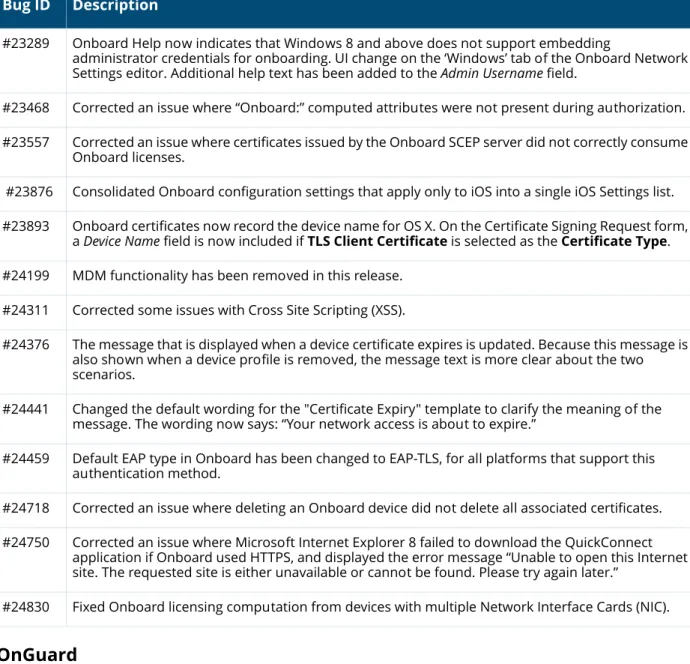
All Onboard configuration settings that apply only to iOS are now consolidated into a single iOS
Settings list at Onboard > Configuration > iOS Settings. The Add New link in the list view includes options for creating and configuring new iOS settings configuration units. (#23876)
The default EAP type in ClearPass Onboard is now EAP-TLS for all platforms that support this
method (iOS, Android, OS X, Windows, and Ubuntu). (#24459)
OnGuard
The ClearPass OnGuard Unified Agent for Mac OS X can now automatically upgrade when a newer
version of the OnGuard Unified Agent is available on the ClearPass Policy Manager server. To configure automatic upgrades, select the Download and Install option in the Agent action when
an update is available field on the OnGuard Settings page. This feature will not work with Mac
OS X OnGuard Agent versions prior to ClearPass 6.4.0. (#17900)
An Enable to hide Quit option parameter was added to the Agent Enforcement profile to hide
the Quit option in ClearPass OnGuard Unified Agent. This is supported on both Windows and Mac OS X. (#19320)
ClearPass OnGuard Unified Agent's connectivity tests for Windows now include the test to check
connectivity with ClearPass Agent Controller Service and Port 6658 on the ClearPass Policy Manager server. (#22943)
Issues Resolved in the 6.4.0 Release
The following issues have been fixed in the ClearPass 6.4.0 release.
Policy Manager
Table 3 Policy Manager Issues Fixed in 6.4.0 Bug ID Description
#10067 Individual Translation Rules for the Policy Manager profiles have been consolidated into a single rule matching by name. If you are restoring an old configuration, your existing rules will remain.
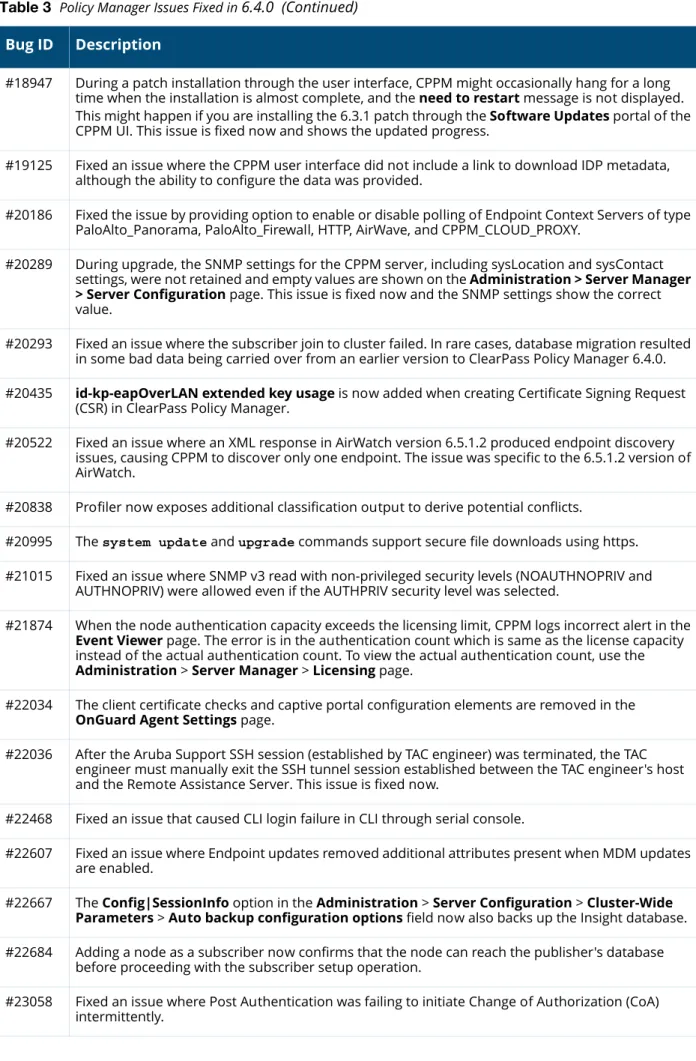
22 | What’s New in This Release ClearPass 6.4.0 | Release Notes #18947 During a patch installation through the user interface, CPPM might occasionally hang for a long
time when the installation is almost complete, and the need to restart message is not displayed. This might happen if you are installing the 6.3.1 patch through the Software Updates portal of the CPPM UI. This issue is fixed now and shows the updated progress.
#19125 Fixed an issue where the CPPM user interface did not include a link to download IDP metadata, although the ability to configure the data was provided.
#20186 Fixed the issue by providing option to enable or disable polling of Endpoint Context Servers of type PaloAlto_Panorama, PaloAlto_Firewall, HTTP, AirWave, and CPPM_CLOUD_PROXY.
#20289 During upgrade, the SNMP settings for the CPPM server, including sysLocation and sysContact settings, were not retained and empty values are shown on the Administration > Server Manager > Server Configuration page. This issue is fixed now and the SNMP settings show the correct value.
#20293 Fixed an issue where the subscriber join to cluster failed. In rare cases, database migration resulted in some bad data being carried over from an earlier version to ClearPass Policy Manager 6.4.0. #20435 id-kp-eapOverLAN extended key usage is now added when creating Certificate Signing Request
(CSR) in ClearPass Policy Manager.
#20522 Fixed an issue where an XML response in AirWatch version 6.5.1.2 produced endpoint discovery issues, causing CPPM to discover only one endpoint. The issue was specific to the 6.5.1.2 version of AirWatch.
#20838 Profiler now exposes additional classification output to derive potential conflicts.
#20995 The system update and upgrade commands support secure file downloads using https. #21015 Fixed an issue where SNMP v3 read with non-privileged security levels (NOAUTHNOPRIV and
AUTHNOPRIV) were allowed even if the AUTHPRIV security level was selected.
#21874 When the node authentication capacity exceeds the licensing limit, CPPM logs incorrect alert in the
Event Viewer page. The error is in the authentication count which is same as the license capacity instead of the actual authentication count. To view the actual authentication count, use the
Administration > Server Manager > Licensing page.
#22034 The client certificate checks and captive portal configuration elements are removed in the
OnGuard Agent Settings page.
#22036 After the Aruba Support SSH session (established by TAC engineer) was terminated, the TAC engineer must manually exit the SSH tunnel session established between the TAC engineer's host and the Remote Assistance Server. This issue is fixed now.
#22468 Fixed an issue that caused CLI login failure in CLI through serial console.
#22607 Fixed an issue where Endpoint updates removed additional attributes present when MDM updates are enabled.
#22667 The Config|SessionInfo option in the Administration > Server Configuration > Cluster-Wide Parameters > Auto backup configuration options field now also backs up the Insight database. #22684 Adding a node as a subscriber now confirms that the node can reach the publisher's database
before proceeding with the subscriber setup operation.
#23058 Fixed an issue where Post Authentication was failing to initiate Change of Authorization (CoA) intermittently.
Table 3 Policy Manager Issues Fixed in 6.4.0 (Continued) Bug ID Description
ClearPass 6.4.0 | Release Notes What’s New in This Release | 23 #23348 Fixed replication of cache issue, when shell special characters are used. For example, $ or !.
#23405 Fixed a scenario to persist the tag values with single quotes as a part of Post Authentications entity update operation.
#23418 If a CoA is sent for a device that was removed from the endpoint repository, the Access Tracker
page showed errors that are hard to understand. A clear error message to the effect of “Device not present in Endpoint Repository” should be shown instead. This issue is fixed in CPPM 6.4.
#23503 While restoring a backup from an older version to 6.4.0, existing custom report templates in the older version won’t be loaded. Customers who have custom templates in their older version of Policy Manager need to contact TAC, who can provide them with updated custom templates after moving to 6.4.0.
#23535 The Policy server crashed intermittently if it was configured to retrieve authorization attributes from an Oracle database.
#23593 The Device Registration Role was not updated in enforcement profiles after upgrading from 6.1 and 6.2 to 6.3.2.
#23662 ClearPass Policy Manager was not able to communicate with the AirWatch MDM server if ClearPass Policy Manager used a proxy server.
#23667
#24721 The virtual IP (VIP) subnet mask did not change for the data interface.
#23735 In Administration > External Servers > Syslog Export Filters, when RADIUS.Acct fields were combined with common attributes, duplicate syslog records were generated.
#23742 The promote publisher operation did not clean up the temporary database changes, which caused failures in subsequent promote publisher operations.
#23743 Fixed an issue where the IP address ending with .255 could not be aded for NAS devices. #23790 Corrected an issue with tag values so that now no SQL errors are seen after upgrading to Policy
Manager 6.4.
#23796 The Active Directory authentication source configuration supports a new Always Use NETBIOS Name option. If this option is enabled, ClearPass Policy Manager will always use the NETBIOS
name configured in the authentication source instead of the domain information received in RADIUS request username when authenticating users.
#23801 The ClearPass portal redirected to the welcome.action page instead of a specified self-registered portal.
#23831 Descriptions of RTP Status Check values were added to the online help.
#23889 Migration failed due to the same usernames but in different case (uppercase and lowercase) being present in the list of blacklisted users.
#23979 Apache Tomcat is upgraded to the latest version Tomcat 7.0.54.X.
#24001 Fixed an issue related to Insight authentication source fallback order as given below:
Whenever an Insight enabled node is dropped from cluster, the corresponding node entry in
Insight repository gets removed.
When an Insight enabled node in a cluster is down or out of sync for more than 30mins, the
Insight node is moved as last Insight node in the fall back list. Table 3 Policy Manager Issues Fixed in 6.4.0 (Continued)
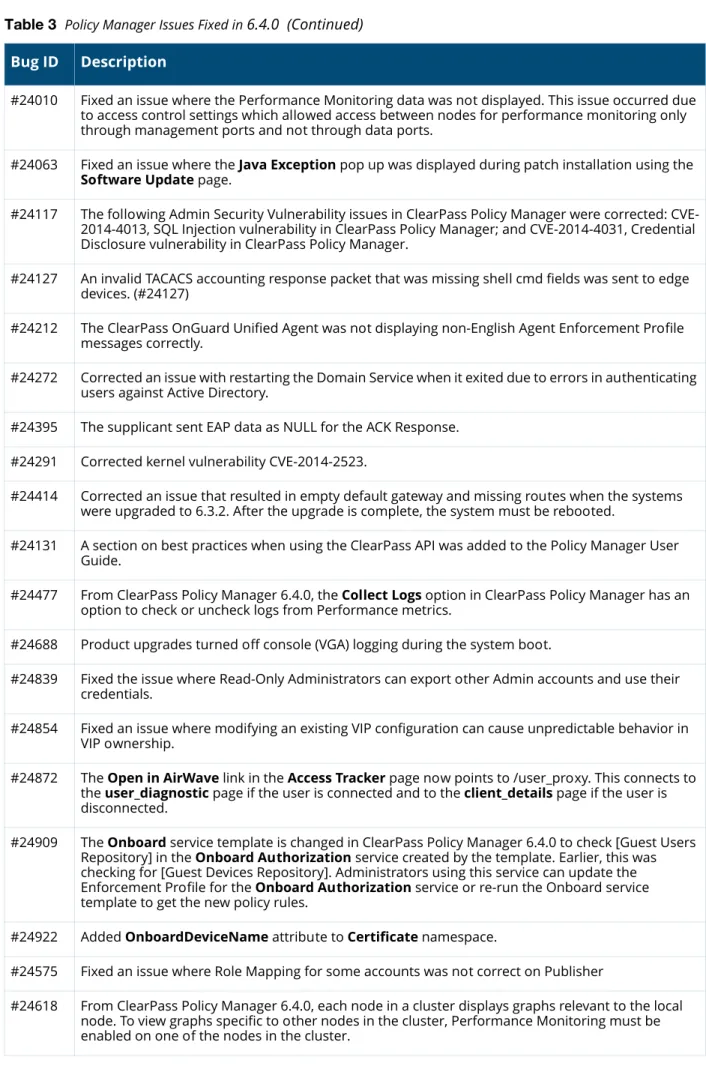
24 | What’s New in This Release ClearPass 6.4.0 | Release Notes #24010 Fixed an issue where the Performance Monitoring data was not displayed. This issue occurred due
to access control settings which allowed access between nodes for performance monitoring only through management ports and not through data ports.
#24063 Fixed an issue where the Java Exception pop up was displayed during patch installation using the
Software Update page.
#24117 The following Admin Security Vulnerability issues in ClearPass Policy Manager were corrected: CVE-2014-4013, SQL Injection vulnerability in ClearPass Policy Manager; and CVE-2014-4031, Credential Disclosure vulnerability in ClearPass Policy Manager.
#24127 An invalid TACACS accounting response packet that was missing shell cmd fields was sent to edge devices. (#24127)
#24212 The ClearPass OnGuard Unified Agent was not displaying non-English Agent Enforcement Profile messages correctly.
#24272 Corrected an issue with restarting the Domain Service when it exited due to errors in authenticating users against Active Directory.
#24395 The supplicant sent EAP data as NULL for the ACK Response. #24291 Corrected kernel vulnerability CVE-2014-2523.
#24414 Corrected an issue that resulted in empty default gateway and missing routes when the systems were upgraded to 6.3.2. After the upgrade is complete, the system must be rebooted.
#24131 A section on best practices when using the ClearPass API was added to the Policy Manager User Guide.
#24477 From ClearPass Policy Manager 6.4.0, the Collect Logs option in ClearPass Policy Manager has an option to check or uncheck logs from Performance metrics.
#24688 Product upgrades turned off console (VGA) logging during the system boot.
#24839 Fixed the issue where Read-Only Administrators can export other Admin accounts and use their credentials.
#24854 Fixed an issue where modifying an existing VIP configuration can cause unpredictable behavior in VIP ownership.
#24872 The Open in AirWave link in the Access Tracker page now points to /user_proxy. This connects to the user_diagnostic page if the user is connected and to the client_details page if the user is disconnected.
#24909 The Onboard service template is changed in ClearPass Policy Manager 6.4.0 to check [Guest Users Repository] in the Onboard Authorization service created by the template. Earlier, this was checking for [Guest Devices Repository]. Administrators using this service can update the Enforcement Profile for the Onboard Authorization service or re-run the Onboard service template to get the new policy rules.
#24922 Added OnboardDeviceName attribute to Certificate namespace.
#24575 Fixed an issue where Role Mapping for some accounts was not correct on Publisher
#24618 From ClearPass Policy Manager 6.4.0, each node in a cluster displays graphs relevant to the local node. To view graphs specific to other nodes in the cluster, Performance Monitoring must be enabled on one of the nodes in the cluster.
Table 3 Policy Manager Issues Fixed in 6.4.0 (Continued) Bug ID Description
ClearPass 6.4.0 | Release Notes What’s New in This Release | 25
CLI
Guest
#24782 Fixed an issue where an error message was displayed only on the System Monitor page instead of ClearPass Policy Manager Dashboard, when Performance Monitoring is disabled in a cluster. #24868 Fixed an issue where Cert migration failed during upgrade to 6.3.X if Private Key Type was not in the
PKCS8 format and private key password contains special characters.
#24977 New Service parameters are provided to enable Host header check which allows web access to valid CPPM entities (IP Address, HostNames, Virtual IPs) and add custom host names to this default whitelisted names.
#25085 Triggering an upgrade locks the configuration database now until the upgrade is complete and the node is booted into the new version.
#25136 Progress messages during a Restore operation now display size and restore time breakup for large database restore operations.
#25147 You can set the value of the Cluster-Wide parameter Auto Backup Configuration Options to Off,
Config, and Config|SessionInfo.
If you select the Config option: The configDb will be backed up automatically.
If you select the Config|SessionInfo option: ClearPass will perform backup of the configDb,
LogDb, and the Insight Db.
Table 4 CLI Issues Fixed in 6.4.0 Bug ID Description
#23763 Checks were added to return an error if the network nslookup command is executed with incorrect commands.
#24244 The command network reset mgmt was added for resetting CPPM’s management port’s IPv6 address.
Table 5 Guest Issues Fixed in 6.4.0 Bug ID Description
#13573 New action link is available on the List Guest Accounts page: Show Details. Requires the Show Details privilege within the Operator profile.
#19172 Support for Dutch translations has been added in ClearPass 6.4.
#19260 Added support for languages that display right-to-left, such as Arabic and Hebrew.
#19287 Corrected an issue where custom fields created with capital letters in their names were exported as blank to CSV and TSV format.
#19506 SMS delivery is now an option available for sponsor confirmation workflow. Table 3 Policy Manager Issues Fixed in 6.4.0 (Continued)
26 | What’s New in This Release ClearPass 6.4.0 | Release Notes #20126 Corrected an issue where not all disallowed characters were validated for manually entered
passwords. The validator for the custom password field is now set to IsValidPassword. #20209 Added Arabic translations.
#20245 Corrected an issue where a guest account set to not expire would be displayed in Insight reports as having an expiration time of 1970-01-01 00:00 UTC. A blank value for expiration time is now displayed in this case.
#20454 Corrected an issue where certain user account filter expressions specified in the operator profile could result in a database query error.
#20495 Corrected an issue where the {nwa_radius_query} function would return incorrect results for a valid MAC address.
#20530 Fixed an issue where contents of a zip file containing a directory did not show up in the Content Manager after extraction.
#20571 Added Twilio SMS Gateway support to ClearPass Guest.
#20727 Resolved an issue where 6.3.0 broke the ability to edit and create devices over XML-RPC. #20732 Fixed an issue where Auto-sending emails and SMS from a self-registration didn’t work in 6.3.0. #20817 XML-RPC calls will have all initial values defaulted and thus not require the sender to set these
values.
#20877 The amigopod.guest.list call would return both guests and devices. It now only returns guests. Use amigopod.mac.list to retrieve devices.
#20947 Added German translations.
#20560 The complete RADIUS server certificate trust chain is now installed in the provisioned profile by default.
#21362 Fixed database query error in migrating data from CPG 6.2 to 6.3.
#21442 Fixed an issue where the WebAuth requests were improperly being sent upon guest creation if the MAC field was set.
#21668 Corrected an issue where ampersand (&) characters in a password were not correctly escaped for server-initiated web login (Web-Auth) requests.
#21731 If using ClearPass Guest to export devices, ensure mac_auth is in the list of fields to export. #21844 The amigopod.guest.list and amigopod.mac.list XML-RPC calls now support a “sort”
parameter.
#22024 Upgraded PHP to version 5.4.26. Includes fixes for CVE-2013-6712, CVE-2014-1943, CVE-2014-2270. #22128 Corrected an issue where the correct trust list certificate settings were not used in all cases when
performing LDAP directory search. For example, for sponsor lookup use cases.
#22252 Added the Override all translations generated for this page link which enables the text IDs used for a given page to be identified and translated easily. To see this link, first enable the Translation Assistant.
Table 5 Guest Issues Fixed in 6.4.0 (Continued) Bug ID Description
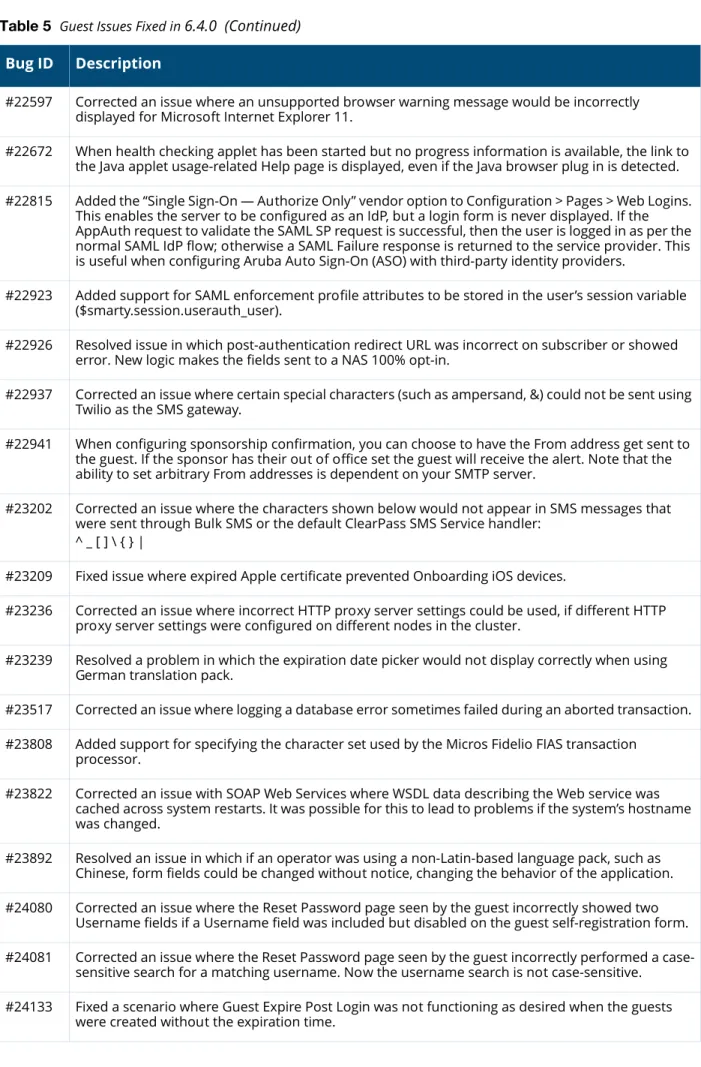
ClearPass 6.4.0 | Release Notes What’s New in This Release | 27 #22597 Corrected an issue where an unsupported browser warning message would be incorrectly
displayed for Microsoft Internet Explorer 11.
#22672 When health checking applet has been started but no progress information is available, the link to the Java applet usage-related Help page is displayed, even if the Java browser plug in is detected. #22815 Added the “Single Sign-On — Authorize Only” vendor option to Configuration > Pages > Web Logins.
This enables the server to be configured as an IdP, but a login form is never displayed. If the AppAuth request to validate the SAML SP request is successful, then the user is logged in as per the normal SAML IdP flow; otherwise a SAML Failure response is returned to the service provider. This is useful when configuring Aruba Auto Sign-On (ASO) with third-party identity providers.
#22923 Added support for SAML enforcement profile attributes to be stored in the user’s session variable ($smarty.session.userauth_user).
#22926 Resolved issue in which post-authentication redirect URL was incorrect on subscriber or showed error. New logic makes the fields sent to a NAS 100% opt-in.
#22937 Corrected an issue where certain special characters (such as ampersand, &) could not be sent using Twilio as the SMS gateway.
#22941 When configuring sponsorship confirmation, you can choose to have the From address get sent to the guest. If the sponsor has their out of office set the guest will receive the alert. Note that the ability to set arbitrary From addresses is dependent on your SMTP server.
#23202 Corrected an issue where the characters shown below would not appear in SMS messages that were sent through Bulk SMS or the default ClearPass SMS Service handler:
^ _ [ ] \ { } |
#23209 Fixed issue where expired Apple certificate prevented Onboarding iOS devices.
#23236 Corrected an issue where incorrect HTTP proxy server settings could be used, if different HTTP proxy server settings were configured on different nodes in the cluster.
#23239 Resolved a problem in which the expiration date picker would not display correctly when using German translation pack.
#23517 Corrected an issue where logging a database error sometimes failed during an aborted transaction. #23808 Added support for specifying the character set used by the Micros Fidelio FIAS transaction
processor.
#23822 Corrected an issue with SOAP Web Services where WSDL data describing the Web service was cached across system restarts. It was possible for this to lead to problems if the system’s hostname was changed.
#23892 Resolved an issue in which if an operator was using a non-Latin-based language pack, such as Chinese, form fields could be changed without notice, changing the behavior of the application. #24080 Corrected an issue where the Reset Password page seen by the guest incorrectly showed two
Username fields if a Username field was included but disabled on the guest self-registration form. #24081 Corrected an issue where the Reset Password page seen by the guest incorrectly performed a
case-sensitive search for a matching username. Now the username search is not case-case-sensitive. #24133 Fixed a scenario where Guest Expire Post Login was not functioning as desired when the guests
were created without the expiration time. Table 5 Guest Issues Fixed in 6.4.0 (Continued)
28 | What’s New in This Release ClearPass 6.4.0 | Release Notes
Insight
#24164 The PHP version was upgraded to 5.4.29. This includes fixes for CVE-2013-7345, CVE-2014-0185, CVE-2014-0237, and CVE-2014-0238.
#24263 Fixed an issue in which if a self-registration had pre-authentication disabled, and server-initiated logins enabled, it was possible for a typed password to become visible in the username field if the credentials failed the server-initiated Webauth check.
#24270 The default length of the guest’s password is now six digits instead of eight.
#24296 Corrected an issue where policies based on MAC caching sometimes failed unexpectedly if a device was authenticated to the network using multiple different usernames.
#24314
#24315 Corrected potential cross-site scripting (XSS) issues affecting the guest_custom_view (Forms & Views), guest_custom_form_field, and guest_custom_field (Fields), and hotspot_processors (Transaction Processors) pages.
#24311 Resolved reported XSS (Cross Site Scripting) issues.
#24438 The PHP version was upgraded to 5.4.30. This includes fixes for CVE-2014-3981, CVE-2014-0207, CVE-2014-3478, CVE-2014-3479, CVE-2014-3480, CVE-2014-3487, CVE-2014-4049, and
CVE-2014-3515.
#24677 Corrected an issue where SMTP messages sent by ClearPass Guest did not include the Date:
header, which is required by RFC 2822.
#24744 Removed all the logic to look for the SMS mail server in CPPM and set CPPM to look for the eMail mail server.
#24848 Corrected an issue where sending SMS messages on a subscriber could result in the error "Call to a member function GetSubscriptionKey() on a non-object."
#24988 Existing OnGuard deployments will continue to be Java only. We recommend you change this to 'Native agents only' within your login or self-registration setup.
Table 6 Insight Issues Fixed in 6.4.0 Bug ID Description
#20951 Insight Posture Report template is enhanced to support the following health classes:
HotFixes Running Services Running Processes Registry keys Disk Encryption Installed Applications Network Connections Virtual Machines USB Devices
#23503 When you restore the backup from previous versions to ClearPass Policy Manager 6.4.0, the existing custom report templates in previous versions will not be loaded. If you already have custom templates in previous versions, contact TAC team to get the updated custom templates after upgrading to ClearPass Policy Manager 6.4.0.
Table 5 Guest Issues Fixed in 6.4.0 (Continued) Bug ID Description