David Barrera
IBM Linux Technology Center
[email protected]Li Ge
IBM Linux Technology Center
[email protected]Stephanie Glass
IBM Linux Technology Center
[email protected]Paul Larson
IBM Linux Technology Center
[email protected]Abstract
Xen is an interesting and useful technology that has made virtualization features, normally found only in high-end systems, more widely available. Such technology, however, demands stability, since all virtual machines running on a single system are dependent on its functioning properly. This paper will focus on the methods employed to test Xen, and how it differs from normal LinuxR testing. Additionally, this pa-per discusses tests that are being used and cre-ated, and automation tools that are being devel-oped, to allow testers and developers working on Xen to easily run automated tests.
1
Testing Linux vs. Testing Linux
Under Xen
Xen, which provides a high performance resource-managed virtual machine monitor (VMM) [2], is one of several open-source projects devoted to offering virtualization soft-ware for the Linux environment. As virtualiza-tion is rapidly growing in popularity, Xen has recently gained a lot of momentum in the open-source community and is under active develop-ment. Therefore, the need to test Xen becomes
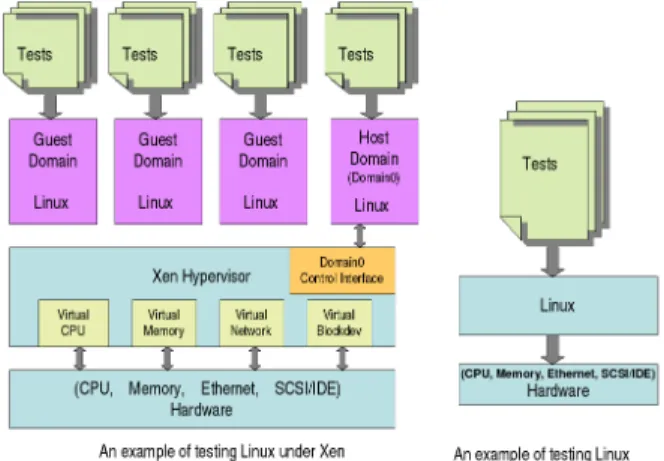
Figure 1: Testing Linux With and Without Xen
a critical task to ensure its stability and relia-bility. Most often, people run tests on Linux under Xen in order to exercise Xen code and to test its functionalities, as Xen is the hypervi-sor layer that is below the Linux and above the hardware.
1.1 Similarities
Testing Linux under Xen and testing Linux it-self are very much alike. Those traditional test-ing scenarios used to test Linux can also be ap-plied to testing Linux under Xen. The most
common testing done on Linux is testing dif-ferent kernels and kernel configurations to un-cover any regressions or new bugs. To help in-sure binary compatibility, different versions of glibc may also be used. Another big chunk of tests done is a wide range of device I/O tests including networking and storage tests. Also, hardware compatibility testing is very impor-tant to insure reliability across a broad range of hardware such as x86, x86-64, UP, SMP, and Blades.
The ABI for running Linux under Xen is no different than running under Linux on bare hardware, there is no change needed for user-space applications when running on Linux un-der Xen. In general, all user-space applications that can be used to test Linux can be used to test Linux on Xen. For example, memory in-tensive web serving application and real world large database applications are very good tools to create high stress workload for both Xen and the guest Linux OS.
1.2 Differences
Although testing Linux under Xen and testing Linux are very similar, there are still some fun-damental differences. First, Xen supports many virtual machines, each running a separate oper-ating system instance. Hence, on one physi-cal machine, testing Linux under Xen involves testing multiple versions of Linux, which can be different on multiple domains, including host domain and guest domain. The Linux dis-tribution, library versions, compiler versions, and even the version of the Linux kernel can be different on each domain. Furthermore, each domain can be running different tests without disturbing the tests running on other domains. The beneficial side of this is that you can use a single machine to enclose and test upgrades or software as if they were running in the existing
environment, but without disturbing the other domains [3].
Second, running tests on Linux under Xen guest domain actually accesses hardware re-sources through Xen virtual machine inter-faces, while running tests on Linux accesses physical hardware resources directly. Xen virtual machine interfaces have three aspects: memory management, CPU, and device I/O [2]. In order to achieve virtualization on these three aspects, Xen uses synchronous hypercalls and an asynchronous event mechanism for control transfer, and uses the I/O rings mechanism for data transfer between the domains and the un-derlying hypervisor. Therefore, even though the Xen hypervisor layer appears to be trans-parent to the application, it still creates an addi-tional layer where bugs may be found.
Third, Xen requires modifications to the oper-ating system to make calls into the hypervisor. Unlike other approaches to virtualization, Xen uses para-virtualization technology instead of full virtualization to avoid performance draw-backs [2]. For now, Xen is a patch to the Linux kernel. Testing Linux on Xen will be testing the modified Linux kernel with this Xen patch. As Xen matures though, it may one day be part of the normal Linux kernel, possibly as a sub-architecture. This would simplify the process of testing Xen and make it much easier for more people to become involved.
2
Testing Xen With Linux
One useful and simple approach to testing Xen is by running standard test suites under Linux running on top of Xen. Since Xen requires no user space tools, other than the domain man-agement tools, this is a very straightforward ap-proach. The approach to test Linux under Xen described here is patterned after the approach
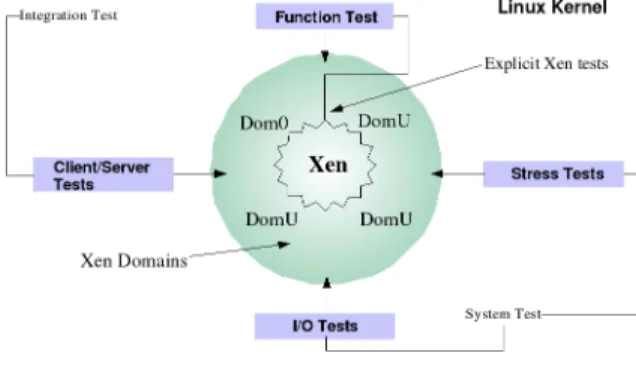
Figure 2: Xen Testing Model
taken to test the development Linux kernels. The traditional testing model used to test the Linux kernel involves function, system, and in-tegration testing. One clear advantage to this approach is that results can easily be checked against results of the same tests, running on an unmodified kernel of the same version, running on bare hardware.
The Linux Test Project (LTP) test suite is the primary tool we used in function testing. LTP is a comprehensive test suite made up of over two thousand individual test cases that test such things as system calls, memory management, inter-process communications, device drivers, I/O, file systems, and networking. The LTP is an established and widely used test suite in the open source community, and has become a de facto verification suite used by developers, testers, and Linux distributors who contribute enhancements and new tests back to the project.
The system testing approach involves running workloads that target specific sub-systems. For example, workloads that are memory intensive or drive heavy I/O are used to stress the system for a sustained period of time, say 96 hours. These tests are performed after function tests have successfully executed; thus, defects that manifest only under stressful conditions are
discovered. For example, in past system test ef-forts testing development Linux kernels, a com-bination of I/O heavy and file system stress test suites have been used such as IOZone, Bonnie, dbench, fs_inode, fs_maim, postmark, tiobench, fsstress, and fsx_linux. The tests are executed on a given file system, sustained over a period of time to expose defects. The com-bination of these tests have proven themselves particularly useful in exposing defects in many parts of the kernel.
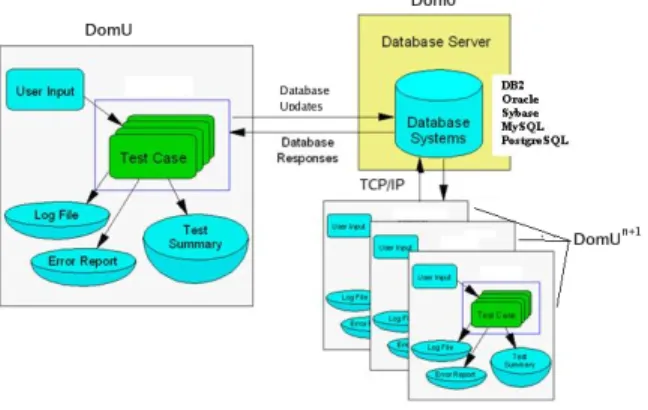
Integration testing is done after function and system testing have been successfully executed. This type of testing involves the running of multiple, varied workloads that exercise most or all subsystems. A database workload, for ex-ample, is used to insert, delete, and update mil-lions of database rows, stressing the I/O sub-system, memory management, and networking if running a networked application. Addition-ally, other workloads are run in parallel to fur-ther stress the system. The objective is to create a realistic scenario that will expose the oper-ating systems to interactions that would other-wise not be exercised under function or system test.
Figure 3, Sample Network Application, il-lustrates an integration test scenario where a database application, the Database Open source Test Suite (DOTS), is used to create a pseudo-networked application running both the clients and the server on virtual machines running on the same hardware under Xen. Obviously, this is an unlikely scenario in the real world, but it is useful in test to induce a workload in a test environment.
3
Testing Xen More Directly
While much of the functionality of Xen can be tested using Linux and standard tests, there
Figure 3: Sample Network Application
are many features that are very specific to Xen. Such features often require careful attention to insure they are adequately tested. A couple of examples include privileged hypercalls, and the balloon driver. A testing strategy for each is briefly outlined here to illustrate why simply running Linux as a guest OS under Xen and running standard tests does not suffice for test-ing Xen as a whole.
3.1 Testing Privileged Hypercalls
Domain 0 in Xen is considered to be a privi-leged domain. As the priviprivi-leged domain, there are certain operations that can only be per-formed from this domain. A few of these privi-leged operations include:
1. DOM0_CREATEDOMAIN– create a new do-main
2. DOM0_PAUSEDOMAIN– remove a domain from the scheduler run queue
3. DOM0_UNPAUSEDOMAIN– mark a paused domain as schedulable again
4. DOM0_DESTROYDOMAIN – deallocate all resources associated with a domain
5. DOM0_IOPL– set I/O privilege level 6. DOM0_SETTIME– set system time
7. DOM0_READCONSOLE– read console con-tent from the hypervisor buffer ring
These are just a few of the privileged operations available only to domain 0. A more complete list can be found in xen/include/public/ dom0_ops.h or in the Xen Interface Manual [4].
Many of these operations perform actions on domains such as creating, destroying, pausing, and unpausing them. These operations can easily be tested through the Xen management tools. The management tools that ship with Xen provide a set of user space commands that can be scripted in order to exercise these oper-ations.
Other operations, such asDOM0_SETTIME, can be exercised through the use of normal Linux utilities. In the case ofDOM0_SETTIME, some-thing like hwclock --systohc may be used to try to set the hardware clock to that of the current system time. The return value of that command on domain 0 is 0 (pass) while on an unprivileged domain it is 1 (fail). This sim-ple test not only verifies that it succeeds as ex-pected on domain 0, but also sufficiently shows that the operation fails as expected on an un-privileged domain.
For something like IOPL, there are tests in LTP that exercise the system call. These tests are expected to pass on domain 0, but fail on un-privileged domains. This is an example where a the results of a test may be unintuitive at first glance. The iopl test in LTP will prominently display a failure message in the resulting test output, but context must be considered as a “FAIL” result would be considered passing in unprivileged domains.
Still other operations such as DOM0_ READCONSOLE are probably best, and easiest to test in an implicit manner. The functionality of readconsole may be exercised by simply booting Xen and watching the output for obviously extraneous characters, or garbage coming across the console. Moreover, features of the console can be tested such as pressing Control-A 3 times in a row to switch back and forth from the domain 0 console to the Xen console.
3.2 Testing the Xen Balloon Driver
Another feature of Xen that warrants attention is the balloon driver. The balloon driver al-lows the amount of memory available to a do-main to dynamically grow or shrink. The cur-rent balloon information for a domain running Linux can be seen by looking at the contents of
/proc/xen/balloon. This is an example of the resulting output:
# cat /proc/xen/balloon
Current allocation: 131072 kB Requested target: 131072 kB Low-mem balloon: 0 kB High-mem balloon: 0 kB Xen hard limit: ??? kB
This feature is wide open to testing possibili-ties. Some of the possible test scenarios for the balloon driver include:
1. Read from/proc/xen/balloon.
2. Echo a number higher than current ram to balloon, cat balloon and see that requested target changed.
3. Echo a number lower than current ram to balloon, cat balloon and see that requested target and current allocation changed to that number.
4. Allocate nearly all available memory for the domain, then use /proc/xen/ balloon to reduce available memory to less than what is currently allocated.
5. Try to give/proc/xen/balloona value larger than the available RAM in the sys-tem.
6. Try to give/proc/xen/balloona value way too low, say 4k for instance.
7. Write something to /proc/xen/ balloon as a non-root user, expect
-EPERM.
8. Write 1 byte to /proc/xen/balloon, expect-EBADMSG.
9. Write >64 bytes to /proc/xen/ balloon, expect-EFBIG.
10. Rapidly write random values to /proc/ xen/balloon.
Many of the above tests may also be performed by using an alternative interface for controlling the balloon driver through the domain manage-ment tools that come with Xen. Scripts are be-ing written to automate these tests and report results.
4
Xentest
In the process of testing Xen, occasionally a patch will break the build, or a shallow bug will get introduced from one day to the next. These kinds of problems are common, especially in large projects with multiple contributers, but they are also relatively easy to look for in an automated fashion. So, a decision was made to develop an automated testing framework centered around Xen. This automated testing framework is called Xentest.
There are, of course, several test suites already available that may be employed in the testing of Xen. It should be made clear that Xentest is not a test suite, but rather an automation frame-work. The main purpose of Xentest is to pro-vide automated build services, start the execu-tion of tests, and gather results. That being said, the build and boot part of Xentest can be considered a build verification test (BVT) in its own right.
Our hope is that Xentest can be used by anyone with a spare machine to execute nightly tests of Xen. It was designed to be simple and unobtru-sive, while still providing the basic functional-ity required in an automated testing framework. Our goals were:
1. Use existing tools in Xen wherever possi-ble.
2. Simple and lightweight design, requires only a single physical machine to run.
3. Supports reusable control files.
4. Tests running under Xentest are easily ex-tended by just adding lines to the control file.
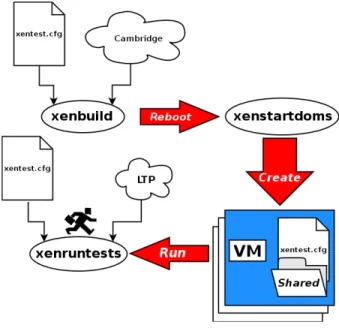
At the time this is being written, Xentest is composed of three main scripts named xen-build, xenstartdoms, and xenruntests. There is also a small init.d script, and a control file is used to describe information such as: where to pull Xen from, which virtual machines to launch, and which tests to run on which virtual machines. A shared directory must also be cre-ated and defined in the control file. The shared directory is used for communicating informa-tion down to the virtual machines, and for stor-ing results for each virtual machine. Usually, something like NFS is used for the shared di-rectory.
Figure 4: Xentest process
The xenbuild script takes a single argument, the name of control file to use for this test. That control file is first copied to /etc/xen/ xentest.conf. The xenbuild script is re-sponsible for downloading the appropriate ver-sion of Xen, building it, and rebooting the sys-tem. Before the system reboot occurs, a file is created in/etccalledxen_start_tests. Theinit.dscript checks for the existence of this file to signify that it should launch the re-maining scripts at boot time.
If the init.d script has detected the exis-tence of /etc/xen_start_tests, the next script to be executed after a successful reboot is xenstartdoms. The xenstartdoms script reads
/etc/xentest.confand callsxm create
to create any virtual machines defined in the control file. The xenstartdoms script also cre-ates subdirectories for each virtual machine in the shared directory for the purpose of stor-ing test results. For now though, /etc/ xentests.conf, which is a copy of the original control file passed to xenbuild, is copied into that directory.
The xenruntests script looks for a directory matching its hostname in the shared directory. In this directory it expects to find a copy of
xentests.conf that was copied there by xenstartdoms. All domains, including dom0, look for xentests.conf there in the xen-runtests scripts, so that no special handling is needed for domain 0. Xenruntests is the only script executed in all domains. After reading the control file in, xenruntests finds the section corresponding to the virtual machine it is run-ning on, and reads a list of tests that it needs to execute. A section corresponding to each test is then located in the control file telling it where to download the test from, how to build and install the test, how to run the test, and where to pick up logs from. After performing all these tasks for each test, xenruntests removes its own copy of the control file stored in the shared directory. This signifies that it is complete, and prevents the possibility of it from interfering with future runs.
5
Xentest control file format
The Xentest control file structure is simple and easy to read, but it is also highly configurable. It allows tests to be easily defined, and executed independent of one another on multiple guests. The ConfigParser class in python is used to im-plement Xentest control files, so the control file structure adheres to RFC 822 [1]. Let’s take a look at a basic control file.
[Preferences]
xen-tree=xen-unstable shared_dir=/xentest/shared
This section defines the tree you want down-loaded for testing, and the shared directory to use. Remember that these config files are reusable, so it’s easy to set up a control file
for any given machine to explicitly run tests on the stable, testing, and unstable Xen builds. The other variable here is the shared directory, which was discussed previously and is usu-ally mounted over something like NFS. The
/etc/fstab should be configured to auto-matically mount the shared directory for every domain configured for testing under Xentest.
[Locations] xen-2.0=http://www.where/to/ download/xen-stable.tgz xen-2.0-testing=http://www.where/ to/download/xen-testing.tgz xen-unstable=http://www.where/to/ download/xen-unstable.tgz
The locations in this section simply describe where to download each of the Xen nightly snapshot tarballs. More can be added if it ever becomes necessary. To work properly, the value for xen-tree above must simply match the variable name of one of these locations.
[LTP] source_url=http://where.to.download/ ltp/ltp-full-20050207.tgz build_command=make install_command=make install test_dir=ltp-full-20050207 log_dir=logs/ltp run_command=./runltp -q > \ ../logs/ltp/runltp.output
A bit more information is require to describe a specific test to Xentest. First, source_url
describes where to get the tarball for the test from. Currently gzip and bzip2 compressed tar files are supported.
Thetest_dirvariable tells Xentest the name of the directory that will be created when it ex-tracts the tarball. After changing to that direc-tory, Xentest needs to know how to build the test. The command used for building the test, if
any command is needed, is stored in build_ command. Likewise, if any commands are needed for installing the test before execution, Xentest can determine what to run by looking at the value ofinstall_command.
The value of log_dir is used to tell Xen-test where to pick up the Xen-test output from, and
run_command tells it how to run the test. This will be enough or more than enough to handle a wide variety of tests, but for espe-cially complex tests, you might consider writ-ing a custom script to perform complex setup tasks beyond the scope of what is configurable here. Then all that would need to be defined for the test issource_url, test_dir, and
run_command.
Since Xentest relies on the ConfigParser class in python to handle control files, variables may be used and substituted, but only within the same section, or if they are defined in the [DEFAULT] section. For instance, if tempo-rary directory was defined in this section as
tempdir, then variables like log_dir can be specified as:
log_dir=%(tempdir)s/logs/ltp
Since the temporary directory is more appro-priately defined under the domain section (de-scribed below), a variable substitution cannot be used here. It is for this reason that all di-rectories in the test section are relative to the path of the temporary directory on the domain being tested. Even though the variable substitu-tion provide by the python ConfigParser class is not available for use in this case, there may be other situations where a Xentest user can define variables in [DEFAULT], or in the same sec-tion that would be useful for substitusec-tion. This allows for a great range of configuration possi-bilities for different environments.
[XENVM0] tempdir=/tmp config=none name=bob13 test1=LTP [XENVM1] tempdir=/tmp config=/home/plars/xen/xen-sarge/ bob13-vm1.config name=bob13-vm1 test1=LTP [XENVM2] tempdir=/tmp config=/home/plars/xen/xen-sarge/ bob13-vm2.config name=bob13-vm2
These three sections describe the domains to be started and tested by Xentest. The only require-ment for these section names is that they start with the stringXENVM. That marker is all Xen-test needs in order to understand that it is deal-ing with a domain description, anythdeal-ing after that initial string is simply used to tell one from another.
The config variable sets the config file that will be used to start the domain, if any. If this variable is set, that file will be passed to
xm create -f in order to start the domain running. In the case of domain 0, or in the event that the domain will already be started by some other mechanism before Xentest is started, the field may be left blank.
Thetempdirvariable is used to designate the temporary directory that will be used on that domain, since you may want a different direc-tory for every one of them. Thenamevariable should match the hostname of the domain it is running on. Remember that this file is going to get copied into the shared directory for every domain to look at. In order to figure out where itstempdir is, each domain will find its sec-tion in the control file by simply looking for its own hostname in one of the XENVM sections.
Notice that Xentest does not try to understand whether a test passes or fails. Determination of test exit status is best left up to post-processing scripts that may also contain more advanced features specific to the context of an individual test. Such features may include:
1. Results comparisons to previous runs
2. Nicer output of test failures
3. Graphing capabilities
4. Test failure analysis and problem determi-nation
5. Results summaries for all tests
No post-processing scripts are currently pro-vided as part of Xentest, but as more tests are developed for testing Xen, they would be a use-ful enhancement.
Xenfc is an error or negative path test for the domain 0 hypercalls in Xen, and was originally written by Anthony Liguori. What that means is that xenfc attempts to make calls into the hy-pervisor, most of which are expected to fail, and checks to see that it received the expected er-ror back for the data that was passed to the hy-percall. Furthermore, xenfc does not systemat-ically test all of the error conditions, but rather generates most of its data randomly. It is prob-abilistically weighted towards generating valid hypercalls, but still with random data.
Xenfc generates a random interface version 1% of the time, the other 99% of the time it uses the correct interface version. 80% of the time, a valid hypercall is generated, 20% of the time, it is a random hypercall. The random nature of this test accomplishes three important goals:
1. Stress testing the error code path in Xen hypercalls
2. Consistency checking in error handling with different data
3. Bounds checking, as often the data is on the edge, far off from expected limits
Valid commands currently tested by xenfc are:
1. DOM0_CREATEDOMAIN
2. DOM0_PAUSEDOMAIN
3. DOM0_UNPAUSEDOMAIN
4. DOM0_DESTROYDOMAIN
These are only a few of the domain 0 hyper-calls currently available in Xen, and more tests are being added to cover these in xenfc. Even in its current state though, xenfc has turned up some interesting results, and uncovered bugs in Xen not yet seen in any other tests. Tests such as xenfc are highly effective at uncovering corner cases that are hard to reproduce by con-ventional means. Even though bugs like this are difficult to find in normal use, that does not make them any less serious. Even though xenfc relies heavily on randomization, the seed is re-ported at the beginning of every test run so that results can be reproduced.
Xenfc currently supports the following options:
1. s – specify a seed rather than generating one for reproducing previous results
2. l– specify a number of times to loop the test, new random data and calls are gener-ated in each loop
Here is some sample output of xenfc in its cur-rent form:
Seed: 1114727452 op .cmd = 9 .interface_version = 2863271940 .u.destroydomain .domain = 41244 Expecting -3
PASS: errno=-3 expected -3
In this example, xenfc is calling the DOM0_ DESTROYDOMAINhypercall. The interface ver-sion is valid, but the domain it’s being told to destroy is not, so -ESRCH is expected. Be-fore attempting to execute the hypercall, the
dom0_op_t structure is dumped along with the relevant fields for this particular call. This can help debug the problem in the event of a failure.
6
Legal Statement
Copyright c2005 IBM.
This work represents the views of the authors and does not necessarily represent the view of IBM. IBM and the IBM logo, are trademarks or registered trademarks of International Business Machines Cor-poration in the United States, other countries, or both.
Linux is a registered trademark of Linus Torvalds. Other company, product, and service names may be trademarks or service marks of others.
References in this publication to IBM products or services do not imply that IBM intends to make them available in all countries in which IBM oper-ates.
This document is provided “AS IS,” with no express or implied warranties. Use the information in this document at your own risk.
References
[1] The Python Library Reference, March 2005. http:
//www.python.org/doc/2.4.1/ lib/module-ConfigParser.html.
[2] Paul Barham, Boris Dragovic, Keir Fraser, Steven Hand, Tim Harris, Alex Ho, Rolf Neugebauer, Ian Pratt, and Andrew
Warfield. Xen and the art of virtualization. In 19th ACM Symposium on Operating
Systems Principles (SOSP 2003). ACM,
October 2003.
[3] Bryan Clark. A moment of xen: Virtualize linux to test your apps.
http://www-128.ibm.com/ developerworks/linux/ library/l-xen/, March 2005.
[4] The Xen Team. Xen Interface Manual
-Xen v2.0 for x86, 2004.
http://www.cl.cam.ac.uk/ Research/SRG/netos/xen/ readmes/interface.pdf.
Linux Symposium
Volume One
July 20nd–23th, 2005
Ottawa, Ontario
Andrew J. Hutton, Steamballoon, Inc.
C. Craig Ross, Linux Symposium
Stephanie Donovan, Linux Symposium
Review Committee
Gerrit Huizenga, IBM
Matthew Wilcox, HP
Dirk Hohndel, Intel
Val Henson, Sun Microsystems
Jamal Hadi Salimi, Znyx
Matt Domsch, Dell
Andrew Hutton, Steamballoon, Inc.
Proceedings Formatting Team
John W. Lockhart, Red Hat, Inc.
Authors retain copyright to all submitted papers, but have granted unlimited redistribution rights to all as a condition of submission.