Cloud Storage Services
Zhenhua Li1,2 , Christo Wilson3 , Zhefu Jiang4 , Yao Liu5 , Ben Y. Zhao6 , Cheng Jin7 , Zhi-Li Zhang7, and Yafei Dai1
1
Peking University 2
Tsinghua University 3
Northeastern University
4
Cornell University 5Binghamton University 6UCSB 7University of Minnesota
[email protected],[email protected],[email protected] [email protected],[email protected]
[email protected],[email protected],[email protected]
Abstract. As tools for personal storage, file synchronization and data sharing, cloud storage services such as Dropbox have quickly gained popularity. These services provide users with ubiquitous, reliable data storage that can be automati-cally synced across multiple devices, and also shared among a group of users. To minimize the network overhead, cloud storage services employ binary diff, da-ta compression, and other mechanisms when transferring updates among users. However, despite these optimizations, we observe that in the presence offrequent,
short updatesto user data, the network traffic generated by cloud storage services
often exhibits pathological inefficiencies. Through comprehensive measurements and detailed analysis, we demonstrate that many cloud storage applications gen-erate session maintenance traffic thatfar exceedsthe useful update traffic. We refer to this behavior as thetraffic overuse problem. To address this problem, we propose theupdate-batched delayed synchronization(UDS) mechanism. Acting as a middleware between the user’s file storage system and a cloud storage ap-plication, UDS batches updates from clients to significantly reduce the overhead caused by session maintenance traffic, while preserving the rapid file synchro-nization that users expect from cloud storage services. Furthermore, we extend UDS with a backwards compatible Linux kernel modification that further im-proves the performance of cloud storage applications by reducing the CPU usage. Keywords: Cloud storage service, Dropbox, Data synchronization, Traffic overuse.
1
Introduction
As tools for personal storage, file synchronization and data sharing, cloud storage ser-vices such as Dropbox, Google Drive, and SkyDrive have become extremely popular. These services provide users with ubiquitous, reliable data storage that can be synchro-nized (“sync’ed”) across multiple devices, and also shared among a group of users. Dropbox is arguably the most popular cloud storage service, reportedly hitting more than 100 million users who store or update one billion files per day [4].
Cloud storage services are characterized by two key components: a (front-end) client application that runs on user devices, and a (back-end) storage service that re-sides within the “cloud,” hosting users’ files in huge data centers. A user can “drop” files into or directly modify files in a special “sync folder” that is then automatically synchronized with cloud storage by the client application.
Cloud storage applications typically use two algorithms to minimize the amount of network traffic that they generate. First, the client application computes the binary diff of modified files and only sends the altered bits to the cloud. Second, all updates are compressed before they are sent to the cloud. As a simple example, if we append 100 MB of identical characters (e.g.“a”) to an existing file in the Dropbox sync folder (thus the binary diff size is 100 MB), the resulting network traffic is merely 40 KB. This amount of traffic is just slightly more than the traffic incurred by appending a single byte “a” (i.e.around 38 KB, including meta-data overhead).
The Traffic Overuse Problem. However, despite these performance optimizations,
we observe that the network traffic generated by cloud storage applications exhibits pathological inefficiencies in the presence offrequent, short updatesto user data. Each time a synced file is modified, the cloud storage application’supdate-triggered real-time synchronization(URS) mechanism is activated. URS computes and compresses the binary diff of the new data, and sends the update to the cloud along with somesession maintenance data. Unfortunately, when there are frequent, short updates to synced files, the amount of session maintenance trafficfar exceedsthe amount of useful update traffic sent by the client over time. We call this behavior thetraffic overuse problem. In essence, the traffic overuse problem originates from theupdate sensitivityof URS.
Our investigation into the traffic overuse problem reveals that this issue is perva-sive among users. By analyzing data released from a large-scale measurement of Drop-box [17], we discover that for around 8.5% of users,≥10% of their traffic is generated in response to frequent, short updates (refer to§4.1). In addition to Dropbox, we ex-amine seven other popular cloud storage applications across three different operating systems, and discover that their software also exhibits the traffic overuse problem.
As we show in§4, the traffic overuse problem is exacerbated by “power users” who leverage cloud storage in situations it was not designed for. Specifically, cloud storage applications were originally designed for simple use cases like storing music and shar-ing photos. However, cloud storage applications are now used in place of traditional source control systems (Dropbox markets their Teams service specifically for this pur-pose [6]). The problem is especially acute in situations where files are shared between multiple users, since frequent, short updates by one user force all users to download updates. Similarly, users now employ cloud storage for even more advanced use cases like setting up databases [1].
Deep Understanding of the Problem. To better understand the traffic overuse
prob-lem, we conduct extensive, carefully controlled experiments with the Dropbox appli-cation (§3). In our tests, we artificially generate streams of updates to synced files, while varying the size and frequency of updates. Although Dropbox is a closed-source application and its data packets are SSL encrypted, we are able to conduct black-box measurements of its network traffic by capturing packets with Wireshark [10].
By examining the time series of Dropbox’s packets, coupled with some analysis of the Dropbox binary, we quantitatively explore the reasons why the ratio of session maintenance traffic to update traffic is poor during frequent, short file updates. In partic-ular, we identify the operating system features that trigger Dropbox’s URS mechanism, and isolate the series of steps that the application goes through before it uploads data to the cloud. This knowledge enables us to identify the precise update-frequency intervals
Dropbox Sync Folder User
File Edits Batched Updates
Continuous Updates
Cloud Sync UDS
SavingBox Cloud
Fig. 1.High-level design of the UDS middleware.
and update sizes that lead to the generation of pathological session maintenance traffic. We reinforce these findings by examining traces from real Dropbox users in§4.
UDS: Addressing the Traffic Overuse Problem. Guided by our measurement
find-ings, we develop a solution to the traffic overuse problem calledupdate-batched delayed synchronization(UDS) (§5). As depicted in Fig. 1, UDS acts as a middleware between the user’s file storage system and a cloud storage client application (e.g.Dropbox). UD-S is independent of any specific cloud storage service and requires no modifications to proprietary software, which makes UDS simple to deploy. Specifically, UDS instanti-ates a “SavingBox” folder that replaces the sync folder used by the cloud storage appli-cation. UDS detects and batches frequent, short data updates to files in the SavingBox and delays the release of updated files to the cloud storage application. In effect, UDS forces the cloud storage application to batch file updates that would otherwise trigger pathological behavior. In practice, the additional delay caused by batching file updates is very small (around several seconds), meaning that users are unlikely to notice, and the integrity of cloud-replicated files will not be adversely affected.
To evaluate the performance of UDS, we implement a version for Linux. Our pro-totype uses theinotifykernel API [8] to track changes to files in the SavingBox folder, while usingrsync[9] to generate compressed diffs of modified files. Results from our prototype demonstrate that it reduces the overhead of session maintenance traffic to less than 30%, compared to 620% overhead in the worst case for Dropbox.
UDS+: Reducing CPU Overhead. Both URS and UDS have a drawback: in the case
of frequent data updates, they generate considerable CPU overhead from constantly re-indexingthe updated file (i.e.splitting the file into chunks, checksumming each chunk, and calculating diffs from previous versions of each chunk). This re-indexing occurs because theinotifykernel API reportswhatfile/directory has been modified on disk, but nothowit has been modified. Thus,rsync(or an equivalent algorithm) must be run over the entire modified file to determine how it has changed.
To address this problem, we modify the LinuxinotifyAPI to return thesizeand location of file updates. This information is readily available inside the kernel; our modified API simply exposes this information to applications in a backwards com-patible manner. We implement an improved version of our system, called UDS+, that leverages the new API (§6). Microbenchmark results demonstrate that UDS+ incurs significantly less CPU overhead than URS and UDS. Our kernel patch is available at
https://www.dropbox.com/s/oor7vo9z49urgrp/inotify-patch.html.
Although convincing the Linux kernel community to adopt new APIs is a difficult task, we believe that our extension toinotifyis a worthwhile addition to the operating system. Using thestracecommand, we tracked the system calls made by many com-mercial cloud storage applications (e.g.Dropbox, UbuntuOne, TeamDrive, SpiderOak,
etc.) and confirmed that they all use the inotify API. Thus, there is a large class of applications that would benefit from merging our modified API into the Linux kernel.
2
Related Work
As the popularity of cloud storage services has quickly grown, so too have the num-ber of research papers related to these services. Huet al.performed the first measure-ment study on cloud storage services, focusing on Dropbox, Mozy, CrashPlan, and Carbonite [21]. Their aim was to gauge the relative upload/download performance of d-ifferent services, and they find that Dropbox performs best while Mozy performs worst. Several studies have focused specifically on Dropbox. Dragoet al. study the de-tailed architecture of the Dropbox service and conduct measurements based on ISP-level traces of Dropbox network traffic [17]. The data from this paper is open-source, and we leverage it in§4 to conduct trace-driven simulations of Dropbox behavior. Dra-goet al.further compare the system capabilities of Dropbox, Google Drive, SkyDrive, Wuala, and Amazon Cloud Drive, and find that each service has its limitations and ad-vantages [16]. A study by Wanget al.reveals that the scalability of Dropbox is limited by their use of Amazon’s EC2 hosting service, and they propose novel mechanisms for overcoming these bottlenecks [31]. Dropbox cloud storage deduplication is studied in [20] [18], and some security/privacy issues of Dropbox are discussed in [25] [21].
Amazon’s cloud storage infrastructure has also been quantitatively analyzed. Bur-genet al. measure the performance of Amazon S3 from a client’s perspective [11]. They point out that the perceived performance at the client is primarily dependent on the transfer bandwidth between the client and Amazon S3, rather than the upload band-width of the cloud. Consequently, the designers of cloud storage services must pay special attention to the client-side, perceived quality of service.
Liet al.develop a tool called “CloudCmp” [23] to comprehensively compare the performances of four major cloud providers: Amazon AWS [22], Microsoft Azure [14], Google AppEngine and Rackspace CloudServers. They find that the performance of cloud storage can vary significantly across providers. Specifically, Amazon S3 is ob-served to be more suitable for handling large data objects rather than small data objects, which is consistent with our observation in this paper.
Based on two large-scale network-attached storage file system traces from a real-world enterprise datacenter, Chenet al.conduct a multi-dimensional analysis of data access patterns at the user, application, file, and directory levels [15]. Based on this analysis, they derive 12 design implications for how storage systems can be specialized for specific data access patterns. Wallaceet al.also present a comprehensive characteri-zation of backup workloads in a large production backup system [30]. Our work follows a similar methodology: study the data access patterns of cloud storage users and then leverage the knowledge to optimize these systems for improved performance.
Finally, there are more works related to Dropbox-like cloud storage services, such as the cloud-backed file systems [28] [29], delta compression [27], real-time compres-sion [19], dependable cloud storage design [24] [12], and economic issues like the market-oriented paradigm [13] and the Storage Exchange model [26].
3
Understanding Cloud Storage Services
In this section, we present a brief overview of the data synchronization mechanism of cloud storage services, and perform fine-grained measurements of network usage by
cloud storage applications. Although we focus on Dropbox as the most popular service, we demonstrate that our findings generalize to other services as well.
3.1 Data Synchronization Mechanism of Cloud Storage Services
Amazon S3 File Content Meta-Data Liveness Beacons Amaz Dropbox
Fig. 2.Dropbox data sync mechanism.
Fig. 2 depicts a high-level outline of Drop-box’s data sync mechanism. Each instance of the Dropbox client application sends three different types of traffic. First, each client maintains a connection to an index server. The index server authenticates each user, and stores meta-data about the user’s files, including: the list of the user’s files, their sizes and attributes, and pointers to where the files can be found on Amazon’s S3 storage service. Second, file data is
s-tored on Amazon’s S3 storage service. The Dropbox client compresses files before storing them in S3, and modifications to synced files are uploaded to S3 as compressed, binary diffs.Third, each client maintains a connection to abeacon server. Periodically, the Dropbox client sends a message to the user’s beacon server to report its online sta-tus, as well as receives notifications from the cloud (e.g.a shared file has been modified by another user and should be re-synced).
Relationship between the Disk and the Network. In addition to understanding the
network connections made by Dropbox, we also seek to understand what activity on the local file system triggers updates to the Dropbox cloud. To measure the fine-grained behavior of the Dropbox application, we leverage the Dropbox command-line interface (CLI) [2], which is a Python script that enables low-level monitoring of the Dropbox application. Using Dropbox CLI, we can programmatically query the status of the Drop-box application after adding files to or modifying files in the DropDrop-box Sync folder.
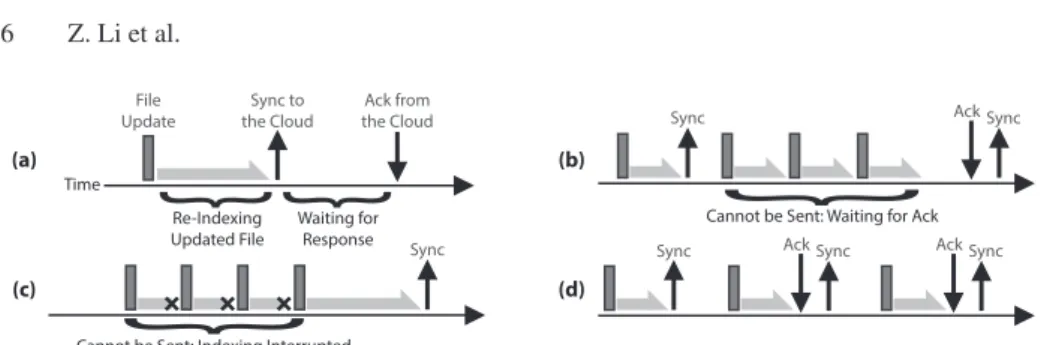
By repeatedly observing the behavior of the Dropbox application in response to file system changes, we are able to discern the inner workings of Dropbox’s update-triggered real-time synchronization(URS) system. Fig. 3(a) depicts the basic operation of URS. First, a change is made on disk within the Dropbox Sync folder,e.g. a new file is created or an existing file is modified. The Dropbox application uses OS-specific APIs to monitor for changes to files and directories of interest. After receiving a change notification, the Dropbox application indexes or re-indexes the affected file(s). Next, the compressed file or binary diff is sent to Amazon S3, and the file meta-data is sent to the Dropbox cloud. This process is labeled as “Sync to the Cloud” in Fig. 3(a). After these changes have been committed in the cloud, the Dropbox cloud responds to the client with an acknowledgment message. In§3.2, we investigate the actual length of time it takes to commit changes to the Dropbox cloud.
Although the process illustrated in Fig. 3(a) appears to be straightforward, there are some hidden conditions that complicate the process. Specifically, not every file update triggers a cloud synchronization: there are two situations where file updates are batched by the Dropbox application before they are sent to the cloud.
The first scenario is depicted in Fig. 3(b). In this situation, a file is modified numer-ous times after a cloud sync has begun, but before the acknowledgment is received. URS
Time File Update Sync to the Cloud Ack from the Cloud
{
Re-Indexing Updated File{
Waiting for Response (a){
Cannot be Sent: Waiting for Ack
(b)
Sync AckSync
{
Cannot be Sent: Indexing Interrupted
(c)
Sync
(d)
Sync AckSync AckSync
Fig. 3. Diagrams showing the low-level behavior of the Dropbox application following a file update. (a) shows the fundamental operations, while (b) and (c) show situations where file updates are batched together. (d) shows the worst-case scenario where no file updates are batched together.
only initiates one cloud sync at a time, thus file modifications made during the network wait interval get batched until the current sync is complete. After the acknowledgment is received, the batched file changes are immediately synced to the cloud.
The second scenario is shown in Fig. 3(c). In this situation, a file is modified several times in such rapid succession that URS does not have time to finish indexing the file. Dropbox cannot begin syncing changes to the cloud until after the file is completely indexed, thus these rapid edits prevent the client from sending any network traffic.
The two cases in Fig. 3(b) and 3(c) reveal that there are complicated interactions be-tween on-disk activity and the network traffic sent by Dropbox. On one hand, a carefully timed series of file edits can generate only a single network transfer if they occur fast enough to repeatedly interrupt file indexing. On the other hand, a poorly timed series of edits can initiate an enormous number of network transfers if the Dropbox software is not able to batch them. Fig. 3(d) depicts this worst-case situation: each file edit (regard-less of how trivially small) results in a cloud synchronization. In§4, we demonstrate that this worst-case scenario actually occurs under real-world usage conditions.
3.2 Controlled Measurements
Our investigation of the low-level behavior of the Dropbox application reveal complex interactions between file writes on disk and Dropbox’s network traffic to the cloud. In this section, we delve deeper into this relationship by performing carefully controlled microbenchmarks of cloud storage applications. In particular, our goal is to quantify the relationship between frequency and size of file updates with the amount of traffic generated by cloud storage applications. As before we focus on Dropbox, however we also demonstrate that our results generalize to other cloud storage systems as well.
All of our benchmarks are conducted on two test systems located in the United States in 2012. The first is a laptop with a dual-core Intel processor @2.26 GHz, 2 GB of RAM, and a 5400 RPM, 250 GB hard drive disk (HDD). The second is a desktop with a dual-core Intel processor @3.0 GHz, 4 GB of RAM, and a 7200 RPM, 1 TB HDD. We conduct tests on machines with different hard drive rotational speeds because this impacts the time it takes for cloud storage software to index files. Both machines run Ubuntu Linux 12.04, the Linux Dropbox application version 0.7.1 [3], and the Dropbox CLI extension [2]. Both machines are connected to a 4 Mbps Internet connection, which gives Dropbox ample resources for syncing files to the cloud.
File Creation. First, we examine the amount of network traffic generated by Dropbox
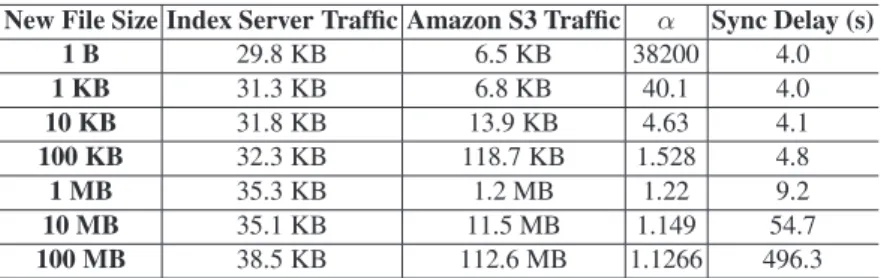
Table 1.Network traffic generated by adding new files to the Dropbox Sync folder. New File Size Index Server Traffic Amazon S3 Traffic α Sync Delay (s)
1 B 29.8 KB 6.5 KB 38200 4.0 1 KB 31.3 KB 6.8 KB 40.1 4.0 10 KB 31.8 KB 13.9 KB 4.63 4.1 100 KB 32.3 KB 118.7 KB 1.528 4.8 1 MB 35.3 KB 1.2 MB 1.22 9.2 10 MB 35.1 KB 11.5 MB 1.149 54.7 100 MB 38.5 KB 112.6 MB 1.1266 496.3
to the index server and to Amazon S3 when files of different sizes are placed in the Sync folder on the 5400 RPM machine. We use JPEG files for our tests (except the 1 byte test) because JPEGs are a compressed file format. This prevents the Dropbox application from being able to further compress data updates to the cloud.
Table 1 reveals several interesting facets about Dropbox traffic. First, regardless of the size of the created file, the size of the meta-data sent to the index server remains almost constant. Conversely, the amount of data sent to Amazon S3 closely tracks the size of the created file. This result makes sense, since the actual file data (plus some checksumming and HTTP overhead) are stored on S3.
Theαcolumn in Table 1 reports the ratio of total Dropbox traffic to the size of
new file.αclose to 1 is ideal, since that indicates that Dropbox has very little overhead
beyond the size of the user’s file. For small files, αis large because the fixed size of
the index server meta-data dwarfs the actual size of the file. For larger filesαis more
reasonable, since Dropbox’s overhead is amortized over the file size.
The last column of Table 1 reports the average time taken to complete the cloud syn-chronization. These tests reveal that, regardless of file size, all cloud synchronizations take at least 4 seconds on average. This minimum time interval is dictated by Dropbox’s cloud infrastructure, and is not a function of hard drive speed, Internet connection speed or RTT. For larger files, the sync delay grows commensurately larger. In these cases, the delay is dominated by the time it takes to upload the file to Amazon S3.
Short File Updates. The next set of experiments examine the behavior of Dropbox in
the presence of short updates to an existing file. Each test starts with an empty file in the Dropbox Sync folder, and then periodically we append one random byte to the file until its size reaches 1 KB. Appending random bytes ensures that it is difficult for Dropbox to compress the binary diff of the file.
Fig. 4 and 5 show the network traffic generated by Dropbox when 1 byte per second is appended on the 5400 RPM and 7200 RPM machines. Although each append is only 1 byte long, and the total file size never exceeds 1 KB, the total traffic sent by Dropbox reaches 1.2 MB on the 5400 RPM machine, and 2 MB on the 7200 RPM machine. The majority of Dropbox’s traffic is due to meta-data updates to the index server. As shown in Table 1, each index server update is roughly 30 KB in size, which dwarfs the size of our file and each individual update. The traffic sent to Amazon S3 is also significant, despite the small size of our file, while Beacon traffic is negligible. Overall, Fig. 4 and 5 clearly demonstrate that under certain conditions, the amount of traffic generated
0 200 400 600 800 1000 0 200 400 600 800 1000 Dropbox Traffic (KB) Time (s) Index Server Amazon S3 Beacons
Fig. 4.Dropbox traffic corresponding to rapid, 1 byte appends to a file (5400 RPM HDD).
0 400 800 1200 1600 2000 0 200 400 600 800 1000 Dropbox Traffic (KB) Time (s) Index Server Amazon S3 Beacons
Fig. 5.Dropbox traffic corresponding to rapid, 1 byte appends to a file (7200 RPM HDD).
0 5 10 15 20 0.2 0.3 0.4 0.5 1 5 10 Dropbox Traffic (MB)
Time Between File Appends (s) Amazon S3
Index Server Total
Fig. 6. Dropbox traffic as the time between 1 byte appends is varied (5400 RPM HDD). 0 5 10 15 20 25 30 0.2 0.3 0.4 0.5 1 5 10 Dropbox Traffic (MB)
Time Between File Appends (s) Amazon S3
Index Server Total
Fig. 7. Dropbox traffic as the time between 1 byte appends is varied (7200 RPM HDD). 0 20 40 60 80 100 0 200 400 600 800 1000 CDF Indexing Time (ms) 7200 RPM 5400 RPM
Fig. 8.Distribution of Dropbox file indexing time. Total file size is 1 KB.
by Dropbox can be several orders of magnitude larger than the amount of underlying user data. The faster, 7200 RPM hard drive actually makes the situation worse.
Timing of File Updates. As depicted in Fig. 3(b) and 3(c), the timing of file updates
can impact Dropbox’s network utilization. To examine the relationship between up-date timing and network traffic, we now conduct experiments where the time interval between 1 byte file appends in varied from 100 ms to 10 seconds.
Fig. 6 and 7 display the amount of network traffic generated by Dropbox during each experiment on the 5400 and 7200 RPM machines. The results show a clear trend: faster file updates result in less network traffic. This is due to the mechanisms highlighted in Fig. 3(b) and 3(c),i.e.Dropbox is able to batch updates that occur very quickly. This batching reduces the total number of meta-data updates that are sent to the index sever, and allows multiple appended bytes in the file to be aggregated into a single binary diff for Amazon S3. Unfortunately, Dropbox is able to perform less batching as the time interval between appends grows. This is particularly evident for the 5 and 10 second tests in Fig. 6 and 7. This case represents the extreme scenario shown in Fig. 3(d), where almost every 1 byte update triggers a full synchronization with the cloud.
Indexing Time of Files. The results in Fig. 6 and 7 reveal that the timing of file
up-dates impacts Dropbox’s network traffic. However, at this point we do not know which factor is responsible for lowering network usage: is it the network waiting interval as in Fig. 3(b), the interrupted file indexing as in Fig. 3(c), or some combination of the two? To answer this question, we perform microbenchmarks to examine how long it takes Dropbox to index files. As before, we begin with an empty file and periodically append one random byte until the file size reaches 1 KB. In these tests, we wait 5 seconds ibetween appends, since this time is long enough that the indexing operation is n-ever interrupted. We measure the time Dropbox spends indexing the modified file by monitoring the Dropbox process using Dropbox CLI.
0 10 20 30 40 <1 1-4 4-7 7-10 10-20 >20 Percent Sync Delay (s)
Fig. 9.Distribution of sync de-lays. Total file size is 1 KB.
5 5.2 5.4 5.6 5.8 6 6.2 50 60 70 80 90 100 Dropbox Traffic (MB) Appended Data (KBps)
Fig. 10.Network traffic as the speed of file appends is varied.
0 1 2 3 4 5 0 20 40 60 80 100 Indexing Time (s) Appended Data (MB) 5400 RPM 7200 RPM
Fig. 11.File indexing time as the total file size is varied.
Fig. 8 shows the indexing time distribution for Dropbox. The median indexing time for the 5400 and 7200 RPM drives are≈400 ms and≈200 ms, respectively. The longest indexing time we observed was 960 ms. These results indicates that file updates that oc-cur within≈200-400 ms of each other (depending on hard drive speed) should interrupt Dropbox’s indexing process, causing it to restart and batch the updates together.
Comparing the results from Fig. 6 and 7 to Fig. 8 reveals that indexing interrupts play a role in reducing Dropbox’s network traffic. The amount of traffic generated by Dropbox steadily rises as the time between file appends increases from 200 to 500 m-s. This corresponds to the likelihood of file appends interrupting the indexing process shown in Fig. 8. When the time between appends is 1 second, it is highly unlikely that sequential appends will interrupt the indexing process (the longest index we observed took 960 ms). Consequently, the amount of network traffic generated during the 1 sec-ond interval test is more than double the amount generated during the 500 ms test.
Although indexing interrupts are responsible for Dropbox’s network traffic patterns at short time scales, they cannot explain the sharp increase in network traffic that occurs when the time between appends rises from 1 to 5 seconds. Instead, in these situations the delimiting factor is the network synchronization delay depicted in Fig. 3(b). As shown in Fig. 9, one third of Dropbox synchronizations complete in 1-4 seconds, while another third complete in 4-7 seconds. Thus, increasing the time between file appends from 1 to 10 seconds causes the number of file updates that trigger network synchronization to rise (i.e.there is little batching of updates).
Long File Updates. So far, all of our results have focused on very short, 1 byte updates
to files. We now seek to measure the behavior of Dropbox when updates are longer. As before, we begin by looking at the amount of traffic generated by Dropbox when a file in the Sync folder is modified. In these tests, we append blocks of randomized data to an initially empty file every second until the total file size reaches 5 MB. We vary the size of the data blocks between 50 KB and 100 KB, in increments of 10KB.
Fig. 10 shows the results of the experiment for the 5400 RPM test machine. Unlike the results for the 1 byte append tests, the amount of network traffic generated by Drop-box in these experiments is comparable to the total file size (5 MB). As the number of kilobytes per second appended to the file increases, the ratio of network traffic to total file size falls. These results reiterate the point that the Dropbox application uses network resources more effectively when dealing with larger files.
Fig. 11 explores the relationship between the size of appended data and the file indexing time for Dropbox. There is a clear linear relationship between these two vari-ables: as the size of the appended data increases, so does the indexing time of the file. This makes intuitive sense, since it takes more time to load larger files from disk.
Fig. 11 indicates that interrupted indexing will be a more common occurrence with larger files, since they take longer to index, especially on devices with slower hard drives. Therefore, Dropbox will use network resources more efficiently when dealing with files on the order of megabytes in size. Similarly, the fixed overhead of updating the index server is easier to amortize over large files.
3.3 Other Cloud Storage Services and Operating Systems
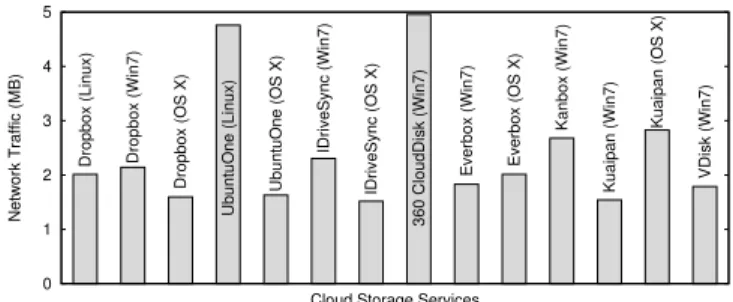
We now survey seven additional cloud storage services to see if they also exhibit the traffic overuse problem. For this experiment, we re-run our 1 byte per second append test on each cloud storage application. As before, the maximum size of the file is 1 KB. All of our measurements are conducted on the following two test machines: a desktop with a dual-core Intel processor @3.0 GHz, 4 GB of RAM, and a 7200 RPM, 1 TB hard drive, and a MacBook Pro laptop with a dual-core Intel processor @2.5 GHz, 4 GB of RAM, and a 7200 RPM, 512 GB hard drive. The desktop dual boots Ubuntu 12.04 and Windows 7 SP1, while the laptop runs OS X Lion 10.7. We test each cloud storage application on all OSes it supports. Because 360 CloudDisk, Everbox, Kanbox, Kuaipan, and VDisk are Chinese services, we executed these tests in China. Dropbox, UbuntuOne, and IDriveSync were tested in the US.
0 1 2 3 4 5 Network Traffic (MB)
Cloud Storage Services
Dropbox (Linux) Dropbox (Win7)
Dropbox (OS X) UbuntuOne (Linux) UbuntuOne (OS X) IDriveSync (Win7) IDriveSync (OS X) 360 CloudDisk (Win7)
Everbox (Win7) Everbox (OS X)
Kanbox (Win7)
Kuaipan (Win7)
Kuaipan (OS X)
VDisk (Win7)
Fig. 12.Total network traffic for various cloud storage applications running on three OSes after appending 1 byte to a file 1024 times.
Fig. 12 displays the results of our experiments, from which there are two important takeaways. First, we observe that the traffic overuse problem is pervasive across dif-ferent cloud storage applications. All of the tested applications generate megabytes of traffic when faced with frequent, short file updates, even though the actual size of the file in only 1KB. All applications perform equal to or worse than Dropbox. Secondly, we see that the traffic overuse problem exists whether the client is run on Windows, Linux, or OS X.
3.4 Summary
Below we briefly summarize our observations and insights got from the experimental results in this section.
– The Dropbox client only synchronizes data to the cloud after the local data has been indexed, and any prior synchronizations have been resolved. File updates that occur within 200-400 ms intervals are likely to be batched due to file indexing. Similarly, file updates that occur within a 4 second interval may be batched due to waiting for a previous cloud synchronization to finish.
– The traffic overuse problem occurs when there are numerous, small updates to files that occur at intervals on the order of several seconds. Under these conditions, cloud storage applications are unable to batch updates together, causing the amount of sync traffic to be several orders of magnitude larger than the actual size of the file. – Our tests reveal that the traffic overuse problem is pervasive across cloud storage
applications. The traffic overuse problem occurs on different OSes, and is actually made worse by faster hard drive speeds.
4
The Traffic Overuse Problem in Practice
The results in the previous section demonstrate that under controlled conditions, cloud storage applications generate large amounts of network traffic that far exceed the size of users’ actual data. In this section, we address a new question: are users actually affected by the traffic overuse problem? To answer this question, we measure the characteris-tics of Dropbox network traffic in real-world scenarios. First, we analyze data from a large-scale trace of Dropbox traffic to illustrate the pervasiveness of the traffic overuse problem in the real world. To confirm these findings, we use data from the trace to drive a simulation on our test machines. Second, we experiment with two practical Dropbox usage scenarios that may trigger the traffic overuse problem. The results of these tests reveal that the amount of network traffic generated by Dropbox is anywhere from 11 to 130 times the size of data on disk. This confirms that the traffic overuse problem can arise under real-world use cases.
4.1 Analysis of Real-World Dropbox Network Traces
To understand the pervasiveness of the traffic overuse problem, we analyze network-level traces from a recent, large-scale measurement study of Dropbox [5]. This trace is collected at the ISP level, and involves over 10,000 unique IP addresses and millions of data updates to/from Dropbox. To analyze the behavior of each Dropbox user, we as-sume all traffic generated from a given IP address corresponds to a single Dropbox user (unfortunately, we are unable to disambiguate multiple users behind a NAT). For each user, we calculate the percentage of Dropbox requests and traffic that can be attributed to frequent, short file updatesin a coarse-grained and conservative manner.
As mentioned in§3.4, the exact parameters for frequent, short updates that trigger the traffic overuse problem vary from system to system. Thus, we adopt the following conservativemetrics to locate a frequent, short update (Ui): 1) the inter-update time
between updatesUiandUi
−1is<1 second, and 2) the size of (compressed) data
asso-ciated withUiis<1 KB.
Figures 13 and 14 plot the percentage of requests and network traffic caused by fre-quent, short updates, respectively. In both figures, users are sorted in descending order by percentage of short, frequent requests/traffic. Fig. 13 reveals that for 11% of users,
0 20 40 60 80 100 0 2000 4000 6000 8000 10000 Percentage
Dropbox Users (Sorted) Short, Frequent Network Requests
Fig. 13.Each user’s percentage of frequent, short network re-quests, in descending order.
0 20 40 60 80 100 0 2000 4000 6000 8000 10000 Percentage
Dropbox Users (Sorted) Short, Frequent Network Traffic
Fig. 14.Each user’s percentage of frequent, short network traf-fic, in descending order.
0 10 20 30 40 50 0 0.5 1 1.5 2 2.5 3 3.5 4 MB Time (Hour) Dropbox Traffic Append Size
Fig. 15.Dropbox network traf-fic and log size corresponding to an active user’s trace.
0 25 50 75 100 0 100 200 300 400 500 Network Traffic (MB) Time (s) Amazon S3 Upload HTTP Download Index Server Upload
Fig. 16.Dropbox upload traffic as a 5MB file is downloaded in-to the Sync folder via HTTP.
0 5 10 15 20 25 30 50 100 150 200 250 300 350 400 Ratio
Average HTTP Download Rate (Kbps) Dropbox Traffic / File Size
HTTP Traffic / File Size
Fig. 17.Ratio of network traffic to real file size for the Dropbox upload and HTTP download.
100 200 300 400 500 600 100 200 300 400 2 4 6 8 10 Avg. Inter-Update Time (ms)
Avg. Update Length (KB)
Average HTTP Download Rate (Kbps) Time
Length
Fig. 18. Average inter-update time and data update length as HTTP download rate varies.
≥10% of their Dropbox requests are caused by frequent, short updates. Fig. 14 shows that for 8.5% of users,≥10% of their traffic is due to frequent, short updates. These results demonstrate that a significant portion of the network traffic from a particular population of Dropbox users is due to the traffic overuse problem.
Log Appending Experiment. To confirm that frequent, short updates are the cause of
the traffic patterns observed in Figures 13 and 14, we chose one trace from an active user and recreated her/his traffic on our test machine (i.e.the same Ubuntu laptop used in§3). Specifically, we play back the user’s trace by writing the events to an empty log in the Dropbox Sync folder. We use the event timestamps from the trace to ensure that updates are written to the log at precisely the same rate that they actually occurred. The user chosen for this experiment uses Dropbox for four hours, with an average inter-update time of 2.6 seconds. Fig. 15 shows the amount of network traffic generated by Dropbox as well as the true size of the log file over time. By the end of the test, Dropbox generates 21 times as much traffic as the size of data on disk. This result confirms that an active real-world Dropbox user can trigger the traffic overuse problem.
4.2 Examining Practical Dropbox Usage Scenarios
In the previous section, we showed that real-world users are impacted by the traffic overuse problem. However, the traces do not tell us what high-level user behavior gen-erates the observed frequent, short updates. In this section, we analyze two practical use cases for Dropbox that involve frequent, short updates.
HTTP File Download. One of the primary use cases for Dropbox is sharing files with
friends and colleagues. In some cases, it may be expedient for users to download files from the Web directly into the Dropbox Sync folder to share them with others. In this case, the browser writes chunks of the file to disk as pieces arrive via HTTP from the web. This manifests as repeated appends to the file at the disk-level. How does the Dropbox application react to this file writing pattern?
To answer this question, we usedwgetto download a compressed, 5 MB file into the Dropbox Sync folder. All network traffic was captured using Wireshark. As before, we use a compressed file for the test because this prevents Dropbox from being able to perform any additional compression while uploading data to the cloud.
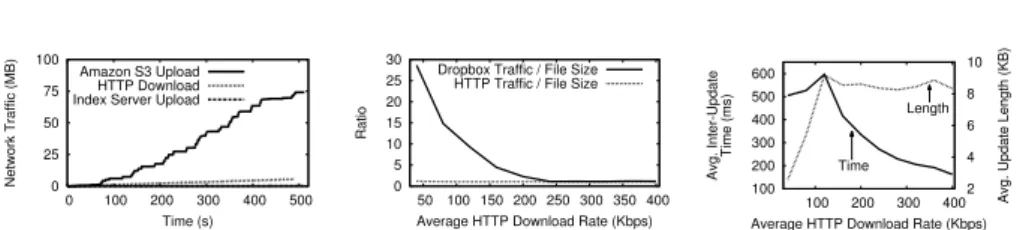
Fig. 16 plots the amount of traffic from the incoming HTTP download and the out-going Dropbox upload. For this test, we fixed the download rate ofwgetat 80 Kbps. The 75 MB of traffic generated by Dropbox is far greater than the 5.5 MB of traffic generated by the HTTP download (5 MB file plus HTTP header overhead). Fig. 16 and Fig. 4 demonstrate very similar results: in both cases, Dropbox transmits at least one order of magnitude more data to the cloud than the data in the actual file.
We now examine the behavior of the Dropbox software as the HTTP download rate is varied. Fig. 17 examines the ratio of network traffic to actual file size for Dropbox and HTTP as the HTTP download rate is varied. For the HTTP download, the ratio between the amount of incoming network traffic and the actual file size (5 MB) is constantly 1.1. The slight amount of overhead comes from the HTTP headers. For Dropbox, the ratio between outgoing traffic and file size varies between 30 and 1.1. The best case occurs when the HTTP download rate is high.
To explain why the network overhead for Dropbox is lowest when the HTTP down-load rate is high, we examine the interactions betweenwgetand the hard drive. Fig. 18 shows the time between hard drive writes bywget, as well as the size of writes, as the HTTP download rate is varied. The left hand axis and solid line correspond to the inter-update time, while the right hand axis and dashed line depict the size of writes. The network overhead for Dropbox is lowest when the HTTP download rate is≥200 Kbps. This corresponds to the scenario where file updates are written to disk every 300 ms, and the sizes of the updates are maximal (≈9 KB per update). Under these conditions, the Dropbox software is able to batch many updates together. Conversely, when the HTTP download rate is low, the inter-update time between hard disk writes is longer, and the size per write is smaller. Thus, Dropbox has fewer opportunities to batch updates, which triggers the traffic overuse problem.
In addition to our tests withwget, we have run identical experiments using Chrome and Firefox. The results for these browsers are similar to our results forwget: Dropbox generates large amounts of network traffic when HTTP download rates are low.
Collaborative Document Editing. In this experiment, we simulate the situation where
multiple users are collaboratively editing a document stored in the Dropbox Sync folder. Specifically, we place a 1 MB file full of random ASCII characters in the Dropbox Sync folder and share the file with a second Dropbox user. Each user edits the document by modifying or appendingl random bytes at location xeveryt seconds, wherel is a
random integer between 1 and 10, andtis a random float between 0 and 10. Each user
performs modifying and appending operations with the same probability (=0.5). If a user appends to the file,xis set to the end of the file.
We ran the collaborative document editing experiment for a single hour. During this period of time, we measured the amount of network traffic generated by Dropbox. By the end of the experiment, Dropbox had generated close to 130 MB of network traffic: two orders of magnitude more data than the size of the file (1 MB).
5
The UDS Middleware
In§3, we demonstrate that the design of cloud storage applications gives rise to situa-tions where they can send orders-of-magnitude more traffic than would be reasonably expected. We follow this up in§4 by showing that this pathological application behav-ior can actually be triggered in real-world situations.
To overcome the traffic overuse problem, we implement an application-level mecha-nism that dramatically reduces the network utilization of cloud storage applications. We call this mechanismupdate-batched delayed synchronization(UDS). The high-level op-eration of UDS is shown in Fig. 1. Intuitively, UDS is implemented as a replacement for the normal cloud sync folder (e.g.the Dropbox Sync folder). UDS proactively detects and batches frequent, short updates to files in its “SavingBox” folder. These batched
updates are then merged into the true cloud-sync folder, so they can be transferred to the cloud. Thus, UDS acts as a middleware that protects the cloud storage application from file update patterns that would otherwise trigger the traffic overuse problem.
In this section, we discuss the implementation details of UDS, and present bench-marks of the system. In keeping with the methodology in previous sections, we pair UDS with Dropbox when conducting experiments. Our benchmarks reveal that UDS effectively eliminates the traffic overuse problem, while only adding a few seconds of additional delay to Dropbox’s cloud synchronization.
5.1 UDS Implementation
At a high level the design of UDS is driven by two goals. First, the mechanism should fix the traffic overuse problem by forcing the cloud storage application to batch file updates. Second, the mechanism should be compatible with multiple cloud storage services. This second goal rules out directly modifying an existing application (e.g.the Dropbox application) or writing a custom client for a specific cloud storage service.
To satisfy these goals, we implement UDS as a middleware layer that sits between the user and an existing cloud storage application. From the user’s perspective, UDS acts just like any existing cloud storage service. UDS creates a “SavingBox” folder on the user’s hard drive, and monitors the files and folders placed in the SavingBox. When the user adds new files to the SavingBox, UDS automatically computes a compressed version of the data. Similarly, when a file in the SavingBox folder is modified, UDS calculates a compressed, binary diff of the file versus the original. If a time period t
elapses after the last file update, or the total size of file updates surpasses a threshold
c, then UDS pushes the updates over to the true cloud sync folder (e.g.the Dropbox Sync folder). At this point, the user’s cloud storage application (e.g.Dropbox) syncs the new/modified files to the cloud normally. In the event that files in the true cloud sync folder are modified (e.g.by a remote user acting on a shared file), UDS will copy the updated files to the SavingBox. Thus, the contents of the SavingBox are always consistent with content in the true cloud-synchronization folder.
As a proof of concept, we implement a version of UDS for Linux. We tested our implementation by pairing it with the Linux Dropbox client. However, we stress that it would be trivial to reconfigure UDS to work with other cloud storage software as well (e.g.Google Drive, SkyDrive, and UbuntuOne). Similarly, there is nothing fundamental about our implementation that prevents it from being ported to Windows, OS X, or Linux derivatives such as Android.
Implementation Details. Our UDS implementation uses the Linuxinotify APIs to
monitor changes to the SavingBox folder. Specifically, UDS callsinotify add watch()
to set up a callback that is invoked by the kernel whenever files or folders of interest are modified by the user. Once the callback is invoked, UDS writes information such as the type of event (e.g.file created, file modified,etc.) and the file path to an event log. If the target file is new, UDS computes the compressed size of the file usinggzip. However, if the target file has been modified then UDS uses the standardrsynctool to compute a binary diff between the updated file and the original version in the cloud-synchronization folder. UDS then computes the compressed size of the binary diff.
Periodically, UDS pushes new/modified files from the SavingBox to the true cloud sync folder. In the case of new files, UDS copies them entirely to the cloud sync folder.
Alternatively, in the case of modified files, the binary diff previously computed by UDS is applied to the copy of the file in the cloud sync folder.
Internally, UDS maintains two variables that determine how often new/modified files are pushed to the true cloud sync folder. Intuitively, these two variables control the frequency of batched updates to the cloud. The first variable is a timer: whenever a file is created/modified, the timer gets reset to zero. If the timer reaches a threshold valuet,
then all new/modified files in the SavingBox are pushed to the true cloud sync folder. The second variable is a byte counter that ensures frequent, small updates to files are batched together into chunks of at least some minimum size before they get pushed to the cloud. Specifically, UDS records the total size of all compressed data that has not been pushed to cloud storage. If this counter exceeds a thresholdc, then all new/modified
files in the SavingBox are pushed to the true cloud-synchronization folder. Note that all cloud storage software may not usegzipfor file compression: thus, UDS’s byte counter is an estimate of the amount of data the cloud storage software will send on the network. Although UDS’s estimate may not perfectly reflect the behavior of the cloud storage ap-plication, we show in the next section that this does not impact UDS’s performance.
As a fail-safe mechanism, UDS includes a second timer that pushes updates to the cloud on a coarse timeframe. This fail-safe is necessary because pathological file update patterns could otherwise block UDS’s synchronization mechanisms. For example, con-sider the case where bytes are appended to a file. Ifcis large, then it may take some time
before the threshold is breached. Similarly, if the appends occur at intervals< t, the first
timer will always be reset before the threshold is reached. In this practically unlikely but possible scenario, the fail-safe timer ensures that the append operations cannot per-petually block cloud synchronization. In our UDS implementation, the fail-safe timer automatically causes UDS to push updates to the cloud every 30 seconds.
5.2 Configuring and Benchmarking UDS
In this section we investigate two aspects of UDS. First, we establish values for the UD-S variablescandtthat offer a good tradeoff between reduced network traffic and low
synchronization delay. Second, we compare the performance of UDS to the stock Drop-box application by re-running our earlier benchmarks. In this section, all experiments are conducted on a laptop with a dual-core Intel processor 2.26GHz, 2 GB of RAM, and a 5400 RPM, 250 GB hard drive. Our results show that when properly configured, UDS eliminates the traffic overuse problem.
Choosing Threshold Values. Before we can benchmark the performance of UDS, the
values of the time thresholdt and byte counter thresholdcmust be established.
Intu-itively, these variables represent a tradeoff between network traffic and timeliness of updates to the cloud. On one hand, a short time interval and a small byte counter would cause UDS to push updates to the cloud very quickly. This reduces the delay between file modifications on disk and syncing those updates to the cloud, at the expense of in-creased traffic. Conversely, a long timer and large byte counter causes many file updates to be batched together, reducing traffic at the expense of increased sync delay.
What we want is to locate a good tradeoff between network traffic and delay. To locate this point, we conduct an experiment: we append random bytes to an empty file in the SavingBox folder until its size reaches 5 MB while recording how much net-work traffic is generated by UDS (by forwarding updates to Dropbox) and the resulting
0 2 4 6 8 10 12 0 200 400 600 800 1000 Network Traffic (MB)
Threshold of the UDS Byte Counter (KB) UDS Sync Traffic Real Data Size (5 MB)
Fig. 19.Network traffic corresponding to vari-ous thresholds of the UDS byte counterc.
0 2 4 6 8 10 0 200 400 600 800 1000 Sync Delay (s)
Threshold of the UDS Byte Counter (KB) Fig. 20.Sync delay corresponding to various thresholds of the UDS byte counterc.
sync delay. We run this experiment several times, varying the size of the byte counter thresholdcto observe its impact on network traffic and sync delay.
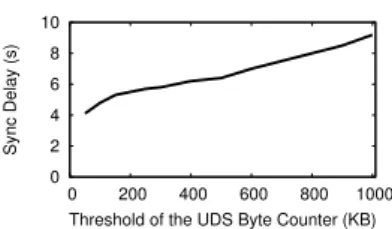
Fig. 19 and 20 show the results of this experiment. As expected, UDS generates a greater amount of network traffic but incurs shorter sync delay whenc is small
be-cause there is less batching of file updates. The interesting feature of Fig. 19 is that the amount of network traffic quickly declines and then levels off. The ideal tradeoff between network traffic and delay occurs whenc= 250 KB; any smaller and network
traffic quickly rises, any larger and there are diminishing returns in terms of enhanced network performance. On the other hand, Fig. 20 illustrates an approximately linear relationship between UDS’s batching threshold and the resulting sync delay, so there is no especially “good” thresholdcin terms of the sync delay. Therefore, we usec= 250
KB for the remainder of our experiments.
We configure the timer thresholdtto be 5 seconds. This value is chosen as a
qual-itative tradeoff between network performance and user perception. Longer times allow for more batching of updates, however long delays also negatively impact the perceived performance of cloud storage systems (i.e.the time between file updates and availability of that data in the cloud). We manually evaluated our UDS prototype, and determined that a 5 second delay does not negatively impact the end-user experience of cloud stor-age systems, but is long enough to mitigate the traffic overuse problem.
Although the values forcandtpresented here were calculated on a specific machine
configuration, we have conducted the same battery of tests on other, faster machines as well. Even when the speed of the hard drive is increased,c= 250 KB andt= 5 seconds
are adequate to prevent the traffic overuse problem.
UDS’s Performance vs. Dropbox. Having configured UDS’s threshold values, we can
now compare its performance to a stock instance of Dropbox. To this end, we re-run 1) thewgetexperiment and 2) the active user’s log file experiment from§4. Fig. 21 plots the total traffic generated by a stock instance of Dropbox, UDS (which batches updates before pushing them to Dropbox), and the amount of real data downloaded over time bywget. The results for Dropbox are identical to those presented in Fig. 16, and the traffic overuse problem is clearly visible. In contrast, the amount of traffic generated by UDS is only slightly more than the real data traffic. By the end of the HTTP download, UDS has generated 6.2 MB of traffic, compared to the true file size of 5 MB.
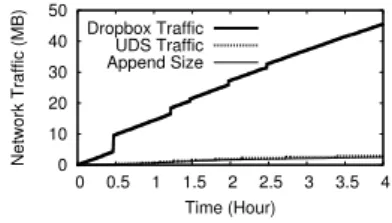
Fig. 22 plots the results of the log file append test. As in the previous experiment, the network traffic of UDS is only slightly more than the true size of the log file, and much less than that of Dropbox. These results clearly demonstrate that UDS’s batching mechanism is able to eliminate the traffic overuse problem.
0 10 20 30 40 50 60 70 0 100 200 300 400 500 Network Traffic (MB) Time (s) Dropbox Traffic UDS Traffic Real File Size
Fig. 21.Dropbox and UDS traffic as a 5 MB file is downloaded into the Sync folder.
0 10 20 30 40 50 0 0.5 1 1.5 2 2.5 3 3.5 4 Network Traffic (MB) Time (Hour) Dropbox Traffic UDS Traffic Append Size
Fig. 22.Dropbox and UDS traffic correspond-ing to an active user’s log file backup process.
6
UDS+: Reducing CPU Utilization
In the previous section, we demonstrate how our UDS middleware successfully reduces the network usage of cloud storage applications. In this section, we take our evaluation and our system design to the next level by analyzing its CPU usage. First, we analyze the CPU usage of Dropbox and find that it uses significant resources to index files (up to one full CPU core for megabyte sized files). In contrast, our UDS software significantly reduces the CPU overhead of cloud storage. Next, we extend the kernel level APIs of Linux in order to further improve the CPU performance of UDS. We call this modified system UDS+. We show that by extending Linux’s existing APIs, the CPU overhead of UDS (and by extension, all cloud storage software) can be further reduced.
6.1 CPU Usage of Dropbox and UDS
We begin by evaluating the CPU usage characteristics of the Dropbox cloud storage application by itself (i.e.without the use of UDS). As in§3, our test setup is a generic laptop with a dual-core Intel processor @2.26 GHz, 2 GB of RAM, and a 5400 RPM, 250 GB hard drive. On this platform, we conduct a benchmark where 2K random bytes are appended to an initially empty file in the Dropbox Sync folder every 200 ms for 1000 seconds. Thus, the final size of the file is 10 MB. During this process, we record the CPU utilization of the Dropbox process.
Fig. 23 shows the percentage of CPU resources being used by the Dropbox applica-tion over the course of the benchmark. The Dropbox applicaapplica-tion is single threaded, thus it only uses resources on one of the laptop’s two CPUs. There are two main findings visible in Fig. 23. First, the Dropbox application exhibits two large jumps in CPU uti-lization that occur around 400 seconds (4 MB file size) and 800 seconds (8 MB). These jumps occur because the Dropbox application segments files into 4 MB chunks [25]. Second, the average CPU utilization of Dropbox is 54% during the benchmark, which is quite high. There are even periods when Dropbox uses 100% of the CPU.
CPU usage of UDS. Next, we evaluate the CPU usage of our UDS middleware when
paired with Dropbox. We conduct the same benchmark as before, except in this case the target file is placed in UDS’s SavingBox folder. Fig. 24 shows the results of the benchmark (note that the scale of the y-axis has changed from Fig. 23). Immediately, it is clear that the combination of UDS and Dropbox uses much less CPU than Dropbox alone: on average, CPU utilization is just 12% during the UDS/Dropbox benchmark. Between 6% and 20% of CPU resources are used by UDS (specifically, byrsync), while the Dropbox application averages 2% CPU utilization. The large reduction in overall CPU utilization is due to UDS’s batching of file updates, which reduces the
0 20 40 60 80 100 0 200 400 600 800 1000 CPU Utilization (%) Time (s)
Fig. 23. Original CPU utiliza-tion of Dropbox. 0 5 10 15 20 0 200 400 600 800 1000 CPU Utilization (%) Time (s) UDS Dropbox
Fig. 24.CPU utilization of UD-S and Dropbox. 0 5 10 15 20 0 200 400 600 800 1000 CPU Utilization (%) Time (s) UDS+ Dropbox
Fig. 25.CPU utilization of UD-S+ and Dropbox.
frequency and amount of work done by the Dropbox application. The CPU usage of UDS does increase over time as the size of the target file grows.
6.2 Reducing the CPU Utilization of UDS
Although UDS significantly reduces the CPU overhead of using cloud storage software, we pose the question: can the system still be further improved? In particular, while developing UDS, we noticed a shortcoming in the LinuxinotifyAPI: the callback that reports file modification events includes parameters stating which file was changed, but notwherethe modification occurred within the file orhow muchdata was written. These two pieces of information are very important to all cloud storage applications, since they capture the byte range of the diff from the previous version of the file. Currently, cloud storage applications must calculate this information independently,e.g.usingrsync.
Our key insight is that these two pieces of meta-information are available inside the kernel; they just are not exposed by the existing LinuxinotifyAPI. Thus, having the kernel report where and how much a file is modified imposes no additional overhead on the kernel, but it would save cloud storage applications the trouble of calculating this information independently.
Table 2.Modified kernel functions.
fsnotify create event() fsnotify modify() fsnotify access() inotify add watch() copy event to user() vfs write()
nfsd vfs write()
compat do readv writev()
To implement this idea, we changed theinotify
API of the Linux kernel to report: 1) the byte off-set of file modifications, and 2) the number of bytes that were modified. Making these changes requires altering theinotifyandfsnotify[7] functions listed in Table 2 (fsnotifyis the subsystem thatinotifyis built on). Two integer variables are added to the
f-snotify eventandinotify eventstructures to store
the additional file meta-data. We also updated
ker-nel functions that rely directly on theinotifyandfsnotify APIs. In total, we changed around 160 lines of code in the kernel, spread over eight functions.
UDS+. Having updated the kernelinotifyAPI, we created an updated version of UDS,
called UDS+, that leverages the new API. The implementation of UDS+ is significantly simpler than that of UDS, since it no longer needs to usersyncto compute binary diffs. Instead, UDS+ simply leverages the “where” and “how much” information provided by the newinotifyAPIs. Based on this information, UDS+ can read the fresh data from the disk, compress it usinggzip, and update the byte counter.
To evaluate the performance improvement of UDS+, we re-run the earlier bench-mark scenario using UDS+ paired with Dropbox, and present the results in Fig. 25. UDS+ performs even better than UDS: the average CPU utilization during the UDS+ test is only 7%, compared to 12% for UDS. UDS+ exhibits more even and predictable
CPU utilization than UDS. Furthermore, the CPU usage of UDS+ increases much more slowly over time, since it no longer relies onrsync.
7
Conclusion
In this paper, we identify a pathological issue that causes cloud storage applications to upload large amount of traffic to the cloud: many times more data than the actual content of the user’s files. We call this issue the traffic overuse problem.
We measure the traffic overuse problem under synthetic and real-world conditions to understand the underlying causes that trigger this problem. Guided by this knowledge, we develop UDS: a middleware layer that sits between the user and the cloud storage application, to batch file updates in the background before handing them off to the true cloud storage software. UDS significantly reduces the traffic overhead of cloud storage applications, while only adding several seconds of delay to file transfers to the cloud. Importantly, UDS is compatible with any cloud storage application, and can easily be ported to different OSes.
Finally, by making proof-of-concept modifications to the Linux kernel that can be leveraged by cloud storage services to increase their performance, we implement an enhanced version of our middleware, called UDS+. UDS+ leverages these kernel en-hancements to further reduce the CPU usage of cloud storage applications.
Acknowledgements
This work is supported in part by the National Basic Research Program of China (973) Grant. 2011CB302305, the NSFC Grant. 61073015, 61190110 (China Major Program), and 61232004. Prof. Ben Y. Zhao is supported in part by the US NSF Grant. IIS-1321083 and CNS-1224100. Prof. Zhi-Li Zhang is supported in part by the US NSF Grant. CNS-1017647 and CNS-1117536, the DTRA Grant. HDTRA1-09-1-0050, and the DoD ARO MURI Award W911NF-12-1-0385.
We appreciate the instructive comments made by the reviewers, and the helpful advice offered by Prof. Baochun Li (University of Toronto), Prof. Yunhao Liu (Tsinghua University), Dr. Tianyin Xu (UCSD), and the 360 CloudDisk development team.
References
1. Dropbox-as-a-Database, the tutorial. http://blog.opalang.org/2012/11/dropbox-as-database-tutorial.html.
2. Dropbox CLI (Command Line Interface).http://www.dropboxwiki.com/Using Dropbox CLI. 3. Dropbox client (Ubuntu Linux version).
http://linux.dropbox.com/packages/ubuntu/nautilus-dropbox 0.7.1 i386.deb.
4. Dropbox is now the data fabric tying together devices for 100M registered users who save 1B files a day.http://techcrunch.com/2012/11/13/dropbox-100-million.
5. Dropbox traces.http://traces.simpleweb.org/wiki/Dropbox Traces. 6. DropboxTeams.http://dropbox.com/teams.
7. fsnotifygit hub. https://github.com/howeyc/fsnotify.
8. inotifyman page.http://linux.die.net/man/7/inotify.
9. rsyncweb site.http://www.samba.org/rsync.
10. Wireshark web site.http://www.wireshark.org.
11. BERGEN, A., COADY, Y.,ANDMCGEER, R. Client Bandwidth: The Forgotten Metric of Online Storage Providers. InProc. of PacRim(2011).
12. BESSANI, A., CORREIA, M., QUARESMA, B., ANDRE´, F.,AND SOUSA, P. DepSky: Dependable and Secure Storage in a Cloud-of-clouds. InProc. of EuroSys(2011).
13. BUYYA, R., YEO, C.,ANDVENUGOPAL, S. Market-oriented Cloud Computing: Vision, Hype, and Reality for Delivering IT Services as Computing Utilities. InProc. of HPCC (2008).
14. CALDER, B.,ET AL. Windows Azure Storage: A Highly Available Cloud Storage Service with Strong Consistency. InProc. of SOSP(2011).
15. CHEN, Y., SRINIVASAN, K., GOODSON, G.,ANDKATZ, R. Design Implications for En-terprise Storage Systems via Multi-dimensional Trace Analysis. InProc. of SOSP(2011). 16. DRAGO, I., BOCCHI, E., MELLIA, M., SLATMAN, H., ANDPRAS, A. Benchmarking
Personal Cloud Storage. InProc. of IMC(2013).
17. DRAGO, I., MELLIA, M., MUNAFO`, M., SPEROTTO, A., SADRE, R.,ANDPRAS, A. In-side Dropbox: Understanding Personal Cloud Storage Services. InProc. of IMC(2012). 18. HALEVI, S., HARNIK, D., PINKAS, B.,ANDSHULMAN-PELEG, A. Proofs of Pwnership
in Remote Storage Systems. InProc. of CCS(2011).
19. HARNIK, D., KAT, R., SOTNIKOV, D., TRAEGER, A.,ANDMARGALIT, O. To Zip or Not to Zip: Effective Resource Usage for Real-Time Compression. InProc. of FAST(2013). 20. HARNIK, D., PINKAS, B.,ANDSHULMAN-PELEG, A. Side Channels in Cloud Services:
Deduplication in Cloud Storage.IEEE Security & Privacy 8, 6 (2010), 40–47.
21. HU, W., YANG, T.,ANDMATTHEWS, J. The Good, the Bad and the Ugly of Consumer Cloud Storage.ACM SIGOPS Operating Systems Review 44, 3 (2010), 110–115.
22. JACKSON, K.,ET AL. Performance Analysis of High Performance Computing Applications on the Amazon Web Services Cloud. InProc. of CloudCom(2010).
23. LI, A., YANG, X., KANDULA, S.,ANDZHANG, M. CloudCmp: Comparing Public Cloud Providers. InProc. of IMC(2010).
24. MAHAJAN, P.,ET AL. Depot: Cloud Storage with Minimal Trust. ACM Transactions on Computer Systems (TOCS) 29, 4 (2011), 12.
25. MULAZZANI, M., SCHRITTWIESER, S.,ET AL. Dark Clouds on the Horizon: Using Cloud Storage as Attack Vector and Online Slack Space. InProc. of USENIX Security(2011). 26. PLACEK, M.,ANDBUYYA, R. Storage Exchange: A Global Trading Platform for Storage
Services. InProc. of EuroPar(2006).
27. SHILANE, P., HUANG, M., WALLACE, G.,ANDHSU, W. WAN Optimized Replication of Backup Datasets Using Stream-informed Delta Compression. InProc. of FAST(2012). 28. VRABLE, M., SAVAGE, S.,ANDVOELKER, G. Cumulus: Filesystem Backup to the Cloud.
ACM Transactions on Storage (TOS) 5, 4 (2009), 14.
29. VRABLE, M., SAVAGE, S.,ANDVOELKER, G. Bluesky: A Cloud-backed File System for the Enterprise. InProc. of FAST(2012).
30. WALLACE, G., DOUGLIS, F., QIAN, H., SHILANE, P., SMALDONE, S.,ET AL. Character-istics of Backup Workloads in Production Systems. InProc. of FAST(2012).
31. WANG, H., SHEA, R., WANG, F.,ANDLIU, J. On the Impact of Virtualization on Dropbox-like Cloud File Storage/Synchronization Services. InProc. of IWQoS(2012).