© Rinton Press
RAPID DEVELOPMENT OF KNOWLEDGE-BASED
CONVERSATIONAL RECOMMENDER APPLICATIONS WITH ADVISOR SUITEa
Dietmar Jannach and Gerold Kreutler
Institute of Applied Informatics University Klagenfurt, A-9020 Klagenfurt
dietmar.jannach @ifit.uni-klu.ac.at, [email protected]
Received (to be filled by the JWE editorial) Revised (to be filled by the JWE editorial)
Knowledge-based recommender systems are Web-based applications that exploit deep domain knowledge for generating buying proposals that match the individual needs and requirements of an online user. As in many domains the detailed customer requirements have to be elicited in an interactive dialog before the recommendation can be made, the development and in particular also the maintenance of the dynamic Web pages that form this personalized dialog are critical tasks, mostly because of the typically strong interdependencies between the recommendation and personalization knowledge.
In this paper, we present ADVISOR SUITE, an integrated, domain-independent environment for the development of highly-interactive, personalized recommender applications. The main pillars of the presented system are a) an integrated, model-driven approach for designing all the required recommendation-, personalization- and interaction knowledge, and b) a mechanism that allows for the automatic generation of Web applications, which is of particular importance in prototyping-based, evolutionary development approaches. On the basis of the experiences we have made with the system in several industrial projects, we finally summarize key criteria and best practices of how to efficiently develop high-quality recommender applications with ADVISOR SUITE.
Key words: Interactive Recommender Systems, Model-driven Web Application Development
Communicated by:(to be filled by the JMM editorial)
1 Motivation and Background
Recommender systems are Web-based software applications that have proven to be a valuable means to support the online customer in his decision-making process [1, 5, 39, 49, 59]. One of the most prominent examples is Amazon.com's online book store, a system that bases its recommendations both on an analysis of the users' past buying behavior and on the ratings of a large user community. Despite the broad success of collaborative and community-based approaches to product recommendation [1, 26, 39], there exist some well known limitations of these systems, most importantly with respect to their applicability to domains beyond "quality-and-taste" or their limited capability of explaining why a certain item is recommended. With the goal of broadening the application scope of recommender systems, in recent years therefore interactive and conversational
approaches to product recommendation gained in importance [10, 18, 29, 45, 50, 54, 56, 60]. The main characteristic of these systems is that they aim at eliciting the customer's needs and preferences interactively. This can be done, for instance, by directly questioning the user about the desired functionality and specific product features or by allowing the user to give feedback on the system's proposals (like in critique-based recommender systems [56]). Thus, when more knowledge about the customer's real needs is available, other forms of recommender applications become possible. By relating customer requirements to product characteristics, these systems can, for instance, reason about how useful certain products for a customer are based on utility functions or business rules; on the other hand, explicit knowledge about the needs can also help us to compute better, user-specific explanations as to why a certain product was recommended. Note, however, that in general such detailed knowledge about the current customer's needs cannot be easily learned from the past buying behavior or other users’ ratings alone.
This paper deals with a certain class of conversational and knowledge-based recommender systems, which are also referred to as salesadvisory systems in literature [18, 19, 32, 60]. In general, in conversational approaches a special requirement elicitation phase is needed, in which the user can incrementally enter or revise his personal preferences. However, finding out what the customer really needs can be a challenging task for different reasons. If we, for instance, think of a Web-based advisory application for digital cameras, we see that Web users can significantly differ with respect to the background they have in the domain. Whilst some expert users might prefer to specify technical requirements only, others might want to state their preferences on the functionality that should be provided by the camera, as they are not well-acquainted with the technical characteristics. For novice users, finally, it could be helpful if the system provides additional guidance during the dialog.
Many of these challenges of preference elicitation can be addressed by using multi-step,
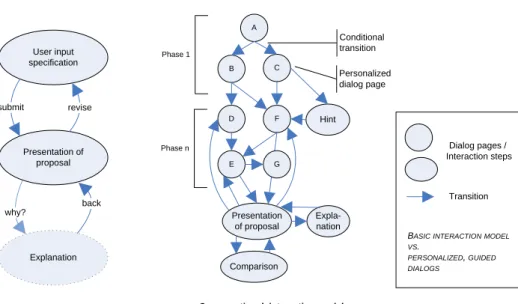
personalized elicitation dialogs [30, 33], which help us to overcome the limitations of simple interaction models as depicted in Figure 1. On the left hand side, a simple two- or three-phase interaction model is shown, in which the product proposals are immediately presented after all requirements have been entered in a previous step; explanations are only possible if the underlying algorithm for proposal generation is capable of providing such explanations. On the right hand side of Figure 1, a more complex interaction graph for a personalized advisory application in the sense of [16] and [33] is sketched. In these applications, several interaction sequences of questions and dialog pages are possible; the actual path is dynamically determined by the characteristics of the current users. In addition, the contents of the individual pages to be presented to the user can be personalized [30]. Finally, special pages for explanations or additional hints can be part of the recommender application.
The problem with these approaches, however, is that the implementation of such a complex behavior in a highly-interactive, personalized Web application is typically costly and time-consuming. On the one hand, personalization in general is a knowledge-intensive task [37] which means that the required personalization logic has to be acquired, made explicit, and stored in some underlying knowledge base.
User input specification Presentation of proposal submit revise Explanation why? back
Simple interaction model Conversational interaction model
A B C D E Presentation of proposal Expla-nation F Hint G Conditional transition Personalized dialog page Comparison Phase 1
Phase n Dialog pages /
Interaction steps
Transition
BASIC INTERACTION MODEL VS.
PERSONALIZED, GUIDED DIALOGS
Figure 1: Interaction Models.
In addition, in conversational and knowledge-based approaches to product recommendation, also the core recommendation logic (e.g., what questions can be asked, how do they relate to product characteristics) needs to be encoded in an underlying knowledge base. Furthermore, we also see that the two pieces of knowledge cannot be treated independently. Thus, an approach based on encoding only a part of the required knowledge in a declarative knowledge store and the other parts (like the interaction, presentation, or personalization knowledge) in procedural program logic is not to adequate, in particular when we think of knowledge acquisition, prototype and system development costs, or maintenance aspects.
In this paper, we describe a model-driven, rapid application development approach as well as an
integrated development environment (ADVISOR SUITE [19, 32, 33]) for the construction of
knowledge-based, conversational recommender applications for arbitrary domains. At the very core, the proposed approach is based on domain-specific, conceptual models that are used for designing the recommendation problem as well as additional interaction-, navigation-, and personalization knowledge. The integrated development environment ADVISOR SUITE presented in the paper features several user-oriented graphical editors for acquiring these models and also comprises a component capable of generating an executable, highly-dynamic Web application from these definitions. This particular feature of automated application assembly also serves as a basis for the proposed incremental, prototyping-based development process, with which we have successfully employed in numerous real-world applications of the system. Finally, as constant quality assurance is crucial in rapid application development processes based on evolutionary prototyping, the system also comprises different mechanisms and components for interactive testing, knowledge-base validation, and automated test-case generation.
The paper is organized as follows. In Section 2, we sketch how recommender applications built with ADVISOR SUITE are perceived by end users and give an architectural overview of the system's components. In Sections 3 and 4, the general structure and characteristics of these interactive
recommender applications are described and we show how the different pieces of knowledge can be modeled within our framework. Section 5 describes on a technical level how the presented system supports the process of generating functional Web application from the information contained in the different models and how the generated applications can be customized and extended. Afterwards, in Section 6, we discuss the best practices and experiences of managing development projects for knowledge-based, interactive recommenders. After giving an overview on related work in the area in Section 7, the paper ends with a summary of the contributions of this work.
2 System Overview
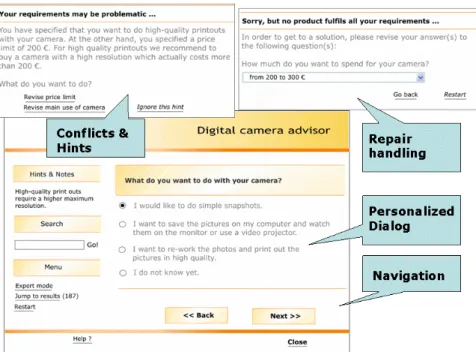
Figure 2 depicts the end user's view on a typical application built with ADVISOR SUITE. Typically, the user is guided through an interactive and personalized dialog, in which the system elicits the customer requirements by asking a series of questions. Throughout the dialog, the system constantly monitors the user's behavior and inputs and dynamically reacts, e.g., by determining the next questions to be asked and their presentation style, by reporting conflicts in the requirements, or by displaying other opportunistic hints and explanations depending on the current user’s profile. Figure 2 shows different screenshots from a generated recommender application. The larger window shows a question to the end user and a set of predefined answers, which have been designed with the help of the ADVISOR SUITE tools. The system's decision of selecting this question as the next one is determined by the set of previous user answers and the defined dialog model. The smaller window in Figure 2 labeled with "Conflicts and Hints" shows an opportunistic hint; the criteria for displaying this personalized add-on information have been again defined at design time. The "Repair handling" window illustrates some typical functionality of knowledge-based approaches, i.e., the capability of dealing with contradicting or unfulfillable customer requirements.
Due to the dynamicity of the contents to be displayed, only small portions of the Web pages of the recommender application can consist of static content and major parts of the page have to be dynamically constructed and filled with the appropriate content at run time. In fact, personalization of the dialogb in ADVISOR SUITE applications can be done on various levels [30]. On the content level we can for instance choose between different ways of how the questions are asked, on which level of detail results are explained to the user (e.g., depending on his expertise), or what additional text fragments should be displayed. With respect to navigation, we can decide on the degrees of freedom that the user should have when using the application, i.e., whether we need to guide the (novice) user through the dialog or whether we should let the (advanced) user decide by himself which questions to answer in which order. Finally, personalization could also be done on the
presentation level by, e.g., letting the user customize the appearance of the application for improved accessibility. In addition, flexibility on the presentation level is also required when an application should be deployed in the context of different Web shops with individual layout styles.
In ADVISOR SUITE, both the generation of product proposals and the personalization of the preference elicitation process are based on a fully knowledge-based and model-driven approach. Consequently, the framework comprises several components that support the user in modeling these different aspects of a conversational recommender application. Based on these models and
customizable page templates, the system is then capable of automatically generating an executable Web application. Thus, the whole development cycle from domain modeling, application development and code generation, over testing, debugging, and maintenance is covered by the framework.
Figure 2: Typical User Interface of a Conversational Recommender Application.
Figure 3 gives an overview on the architecture of the ADVISOR SUITE framework and shows the different roles of people in the development cycle: During design time, the domain expert – who is at least initially accompanied by a knowledge engineer – formalizes the required knowledge with the help of a set of graphical tools. The different pieces of knowledge include the product- and customer models, the recommendation rules and utility functions, as well as personalization rules and the dialog model. All these pieces of knowledge are stored in a central knowledge repository. The ADVISOR SUITE framework also comprises a set of "default" DHTML templates, which are used to render the personalized, conversational dialog. These DHTML templates are typically adapted by a
Web developer in order to conform to the layout of the hosting Web site or to accommodate application-specific extensions. In order to simplify this programming process, the Web developer is provided with a set of specific high-level programming constructs (see later) such that changes in the underlying knowledge base are automatically reflected in the user interfaces. From these adapted templates a GUI Generation Module is creating a working Web application. At run time, end users interact with this Web-based recommender application and the generic advisor and personalization engine steers the interaction and personalization process based on the definitions in the knowledge repository.
From a technical perspective, the whole system is based on standard Web technologies which
applications can be deployed on various platforms: Java was used both for the development of the editing tools as well as for the recommendation and personalization engine, the knowledge repository is built upon a relational database system, and Java Server Pagesc (JSP) serve as base technology for dynamically constructing the HTML pages. However, in particular with respect to Web development, the framework is open for the (additional) usage of other user interface development technologies like JavaScript, Ajax, Cascading Style Sheets, or XML/XSLT transformations.
In the following sections, we will describe the different components in more detail, give an overview of the proposed development process for recommender applications within our framework and will finally report on the experiences we gained from several industrial projects.
Figure 3: Overview of the ADVISOR SUITE Framework (compare [33]).
3 The Recommendation Model User Model / Questions
The first piece of knowledge we elaborate when developing a conversational recommender application are the customer characteristics that a sales agent would require in order to make a recommendation. In ADVISOR SUITE,we distinguish between two types of properties that make up the user model:
a) Standard characteristics which are acquired through direct questioning the user. For these questions, we can model the question to be displayed, an optional explanation, plus the
possible answers a user can give in case there exists such a predefined set of answers. In addition, at that stage we also define whether multiple answers should be possible or not and whether an input value is mandatory.
b) Derived or internal characteristics, for which a value is automatically derived from other characteristics. A typical example from the domain of financial services is the determination of the risk a customer would accept for his investments [18]. These properties cannot be directly elicited because a wrong self-assessment by the user would immediately lead to an inadequate proposal. The business rules for the derivation of these values can for instance be defined with the help of a basic scoring scheme or with if-then-style business rules. However, the actual values for such internal variables for an individual user can also be imported from external system like from a database that stores the past buying preferences of a customer. In general, a user model in our system thus basically consists of a set of variables, each of them associated with a defined data type. Our framework supports integer, float numbers, character strings as well as defined enumerations thereof as basic types. In addition, variables in our system can also be
set-valued, i.e., a variable can simultaneously take several values, which is particularly convenient when modeling questions for which multiple answers are allowed.
In typical modeling sessions in which a sales expert is directly involved in the knowledge engineering, we start with an initial set of customer characteristics and incrementally refine and extend this model within multiple iterations of modeling, automated generation of a prototype application, and testing. As such, the complexity for the domain expert remains manageable, as he is not required to know the full set of questions to be asked right from the beginning.
Product Model
Recommender applications built with ADVISOR SUITE are content-based, i.e., the proposals generated by the system are based on deep knowledge about the characteristics of the items in the product catalog. Product properties are used to specify the details about the items to be recommended and this set of variables represents the product model. Similar to customer properties, each of the product characteristics has a defined type or a domain definition restricting the set of allowed values. In practice, the acquisition of these characteristics is relatively easy for the domain expert, since in nearly all domains some sort of product specifications already exist.
Both the user model and the product model are designed with the help of graphical editors. Beside the definition of variable name and domain, the system supports the definition of further data for each variable like a multi-lingual question text for each variable in the user model, explanatory texts for predefined answers, display orders, grouping of variables, extra documentation, and so forth.
The ADVISOR SUITE toolset also comprises a tool for editing the actual product data in a domain, which can be used in the development and testing phase. In most applications, however, the real business data is periodically imported and updated via an XML-based interface from an external data source, like e.g., an electronic product catalog.
Recommendation Rules
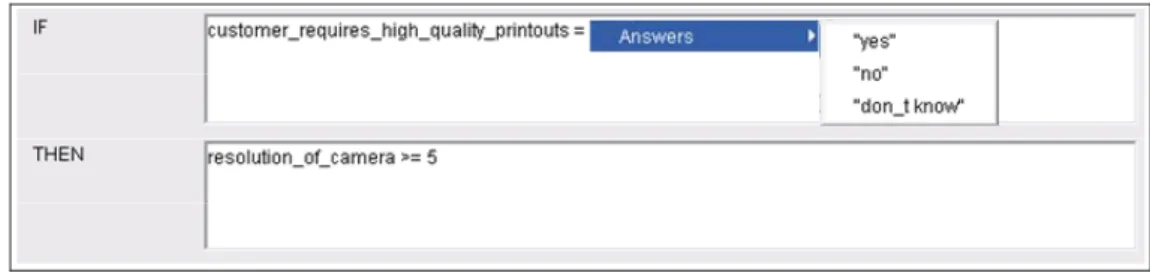
In ADVISOR SUITE, the set of suitable products for a certain customer is determined with the help of "if-then”-style filter rules that relate customer characteristics with technical product properties. Note that internally these recommendation rules are not evaluated by a classical rule-engine but are evaluated by a specific algorithm which constructs filter queries to the product catalog in the domain as described in [31]. For the user of the modeling environment, however, the complexity of query construction is hidden and he only needs to model business rules like "If the customer needs
high-quality printouts of his pictures, then the resolution of the camera must be higher than 5 Megapixels".
Figure 4: ADVISOR SUITE Expression Editor.
Figure 4 shows one of the editors of the ADVISOR SUITE system. In the condition part, the domain engineer can model an expression over the variables of the user model that describes under which circumstances, i.e., for which customer profile, the filtering rule in the conclusion shall be applied. The expression language implemented in the system supports complex nested expressions as well as common logical and arithmetic operators; the context-aware editor prevents the user from entering invalid expressions. Note that these ADVISOR SUITE expressions are used throughout in the modeling environment, i.e., the same types of expressions are also be used to model the conditions for displaying applying hints or applying personalization rules, as well as for modeling transition conditions in the dialog model (see below). Note that in that context, our approach is thus to some extent comparable to the Personalization Rules Modeling Language described in [22], which also bases personalization on relational expressions over user-specific pieces of information.
This chosen form of "if-then-style" modeling allows us to implement an end-user oriented recommendation approach, i.e., instead of directly asking the user about required technical product characteristics, questions about the desired functionality or the preferred use can be asked, which is of particular importance for end users that are not experts in the domain. Our experiences show that typical domain experts (which are typically non-IT people) are very soon able to learn how to specify business rules of that type without the help of a knowledge engineer, in particular when they are supported by a rule editor that constantly monitors the inputs, displays the currently available operators or predefined constants, and does not allow them to enter syntactically wrong statements. Furthermore, in our modeling environment the user can always test and fine-tune the different (combinations of) filter rules at design time in order to check whether the products proposed by the system correspond to his expectations.
At run time, when it comes to determine a product proposal for a specific recommendation session, the advisor engine (see Figure 3) evaluates these expressions given the variable values in the current customer's user model and constructs a conjunctive query to the catalog. The retrieval
algorithms in ADVISOR SUITE also help us to deal with situations, in which none of the products in the
catalog fulfills all the constraints specified by the customer. In these situations the system can be configured to retrieve a set of products that fulfill as many of the constraints as possible by using a preference-based relaxation and repair strategy. Technically, the implemented relaxation algorithm [31] is an optimized version of previous approaches to finding a "Maximum Succeeding Subquery" of a failing database query [43, 44] and is based on partial query evaluation and compact in-memory data structures.
Utility Model
After the recommendation process and the previous described filtering step, possibly many suitable products remain for the customer. In order to rank them according to the user’s requirements, a utility model can be defined in ADVISOR SUITE by the domain expert. Since we want to take the personal preferences of a customer into account, the expected utility value for each of the products can not be computed in advance but has to be determined dynamically based on a MAUT (Multi-Attribute-Utility-Theory) calculation [62]. In the MAUT-based approach, abstract interest dimensions are the central element (see Figure 5). In the domain of digital cameras, for instance, aspects of economy or
suitability for mobile use could be dimensions, in which the customer might be interested in. First, we therefore define user-independent utility functions that describe how the individual product characteristics contribute to these dimensions. A lower price, for instance, increases the utility value in the "economy" dimension; smaller cameras are better suited for the mobile use.
Economy Mobile use ....
Interest dimensions
Individual product characteristics
price size power
supply type ...
price range preferred
brand usage type ...
Current customer’s preferences utility values determine relative weights
rel. weight rel. weight
Figure 5: Expected Utilities based on Multi-Attribute Utility Theory (MAUT).
On the other hand, not for every user the importance of these dimensions is the same. When a user has no particular constraints with respect to the maximum price or to the camera brand, but has indicated that his main use of the camera will be to take holiday pictures, the relative weight (importance) of the dimension "mobile use" should be increased when calculating the expected, personalized utility value. For eliciting these personal interests, we again rely on interactive preference elicitation based on direct and indirect questioning. A single question can therefore at the same time be used for acquiring functional or technical requirements (when used in recommendation rules) and for determining the expected utility weights (when exploited for the MAUT-based calculation).
The final ranking of the products to be displayed (which also can be seen as a form of link-ordering in the sense of [8]) is thus determined by evaluating the personalized utility score [53, 62]
∑
==
ni
w
iv
ix
x
v
(
)
1(
)
.In this formula, n is the number of defined interest dimensions, vi(x) corresponds to the evaluation of a catalog item for the i-th interest dimension, and wi is the weight that represents the relative importance of a dimension on the overall evaluation. The relative weights wi for an individual
customer can be automatically derived from the interactively acquired user model with the help of
scoring rules (
∑
n==
i 1
w
i1
).An upper price limit of 200 Euro in a range of actual list prices up to 240 Euro specified by the customer, for instance, may be mapped by a scoring rule to a relative interest weight of 8 (within a range from 1 to 10) in the economy dimension. On the other hand, the customer-independent utility function for the "price"-property of a camera could be defined as a linear mapping of actual list prices to a normalized "1-to-10" scale. ADVISOR SUITE supports this MAUT-modeling process through a tabular graphical user interface.
4 Modeling a Personalized Dialog
Up to now, we have focused on modeling the core recommendation knowledge, i.e., how the set of suitable products and an appropriate ordering of these products for a given set of customer requirements can be determined. Thus, it would be possible to take the ADVISOR SUITE framework, define the user and product model, the required rules and implement a few Web pages: One that contains the needed input fields, checkboxes, or radio buttons for entering the preferences, one that is used to display the set of suitable products calculated by the system, and optionally an extra page on which the system's explanations are shown (compare Figure 1).
Such an approach, however, corresponds to a "one-style-fits-all" strategy with respect to the user interface, which has certain shortcomings. In fact, in particular in technical domains like in the area of consumer electronics, the end users can be quite heterogeneous in their technical background knowledge, their interests, or in the way they are able or willing to express their requirements [30]. While a technical expert in the domain of digital cameras might prefer to directly specify technical requirements and freely change the individual parameters, a novice user might need more explanations and additional information, more guidance, or a more functionality-oriented style of questioning. We therefore claim that the key to building successful conversational recommender applications can be found in the personalization of the dialog. If no personalization is done, end users can be easily frustrated, as, for instance, novice users might give up when they do not even understand the questions, while on the other hand experts who exactly know what they are looking for, might be annoyed with a system that asks too many non-technical questions.
As a long term vision, the ultimate goal of virtual sales advisory would of course be that some "virtual advisor" is capable of behaving like an experienced human advisor, who will continuously adapt the communication style based on the utterances and behavior of the customer during the sales conversation. At the same time he would develop a model of the customer's expertise and his
expectations and base the product proposal on this estimate. From the perspective of the user interaction style, a system that also understands natural language utterances appears to be promising at a first glance. In the ADVISOR SUITE system, however, we decided to follow a form-based, system-driven approach and did not rely on natural language interaction for different reasons. First, in a natural language system, we do not only have to develop knowledge bases for the recommendation domain but also have to build a large repository of phrases needed for casual conversation which one typically expects from such a system to be capable ofd. More importantly, we claim that in particular users with little background knowledge in the domain may have their problems in keeping the conversation running, as they might not even know which questions to ask or which terms to use. In addition, we argue that online users are well-acquainted with fill-out forms and navigation features in standard Web pages and will thus feel more comfortable and being in control when using the system. Finally, when using natural language systems, there is some risk that end users attribute more intelligence to the system than is warranted and disappointedly quit using the system that for instance does not understand certain utterances.
Still, many different aspects of the behavior of a human sales agent can also be implemented with the help of a standard Web interface and personalization can be done on different levels [30, 37].
Personalization on the Content Level: • Questions and Answers:
The preference elicitation process in ADVISOR SUITE is based on a conversational dialog in which the user is asked a series of questions. In ADVISOR SUITE applications, questions correspond to a subset of the variables of the user model. The possible answers to a question are determined by the data type of the variable. In typical applications, most of the questions correspond to variables with predefined, enumerated domains which are annotated with explanatory texts and so forth as described above. In general, the personalization opportunities in the context of questions and answers comprise, e.g., the selection of a language or a jargon
that the current user might be comfortable with, the set of currently available answer options, the selection of situation-dependent defaults, or the amount of optional detailed information [29]. Within the ADVISOR SUITE system, one can thus define personalized variants of text fragments that are used in the question and answers. The selection of the actual variant to be chosen for a certain customer is again determined by an ADVISOR SUITE expression.
• The Advisory Dialog:
The dialog model describes the possible flow of the conversation, i.e., which questions shall be asked to the user under which circumstances. In a typical example application, the system might at the beginning of the conversation ask the customer for a self-estimate of his expertise in the domain. Depending on the customer's answer, the system will e.g., provide extra information for beginners, ask non-technical questions for customers with an intermediate knowledge level, or directly step into technical details with an expert user.
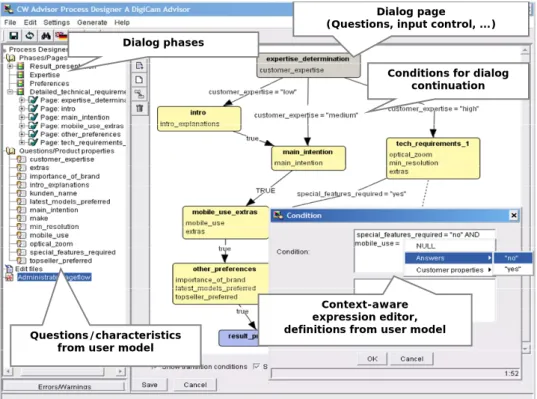
This dialog model in ADVISOR SUITE is defined by the domain expert based on a graphical,
flowgraph-like representation and with the help of a dedicated modelling environment (see Figure 6). Note that non-IT people have to use the modelling environment, which means that different aspects in the design of its user interface and the used conceptualizations have to be taken into account. Thus, our goal was to develop a graphical representation that has a close correspondence to the final Web application that the end user perceives. So, for instance, although the model could be as well described with the help of a state transition diagram, our experiences show that the domain experts who are non-programmers more easily comprehend concepts like "dialog pages and questions" instead of "states and variables". Internally, however, the model is subsequently transformed into a predicate-augmented finite-state automation, which is evaluated by the run-time component in order to determine the next dialog page.
Dialog page
(Questions, input control, ...)
Conditions for dialog continuation
Context-aware expression editor, definitions from user model Questions/characteristics
from user model
Dialog phases
Figure 6: Modeling the Dialog Flow with PROCESS DESIGNER.
As a result of this explicit form of modelling the dialog flow, in our approach the number of possible dialog paths in most applications remains rather small. If we would think of an alternative approach, in which we only model the preconditions of each page (i.e., do not rely on a procedural flow) and let some reasoning system like a rule engine dynamically decide on how to proceed, we would of course reach more flexibility. However, we claim that a typical domain expert will soon lose track of the problem, in particular as non-IT people rather think in procedural patterns. Furthermore, also the process of testing of a non-procedural dialog model will be harder due to the indeterminism that may be introduced with a declarative approach.
toolkit also comprises different consistency-ensuring techniques such as the one described in [20], with which we can automatically detect unreachable nodes or ambiguous transition conditions in the graph based on model-based diagnosis techniques.
With respect to tooling, we have decided to separate the modelling environment into two different views in order to reduce the complexity for the user. In the ADVISOR DESIGNER view, the core recommendation knowledge, like questions and answers, filter rules, or utility definitions are defined. In the PROCESS DESIGNER view, the focus lies on the dialog model only. However, both two tools operate upon the same knowledge base which means that for instance in the definition of the transition conditions in the dialog flow, the definitions of the user model can be directly accessed.
At the end of the modelling phase, corresponding DHTML pages are generated from these definitions (see next section). At run time, the personalization agent of the system keeps track of the state of the current conversation and guides the customer accordingly through the dialog by evaluating the transition conditions defined in the dialog model.
• Personalized Opportunistic Hints:
One way of making a Web-based conversion more vivid and livelier, is to present additional, situation-dependent information to the user during the dialog. One typical example is related to "conflicts" in the user's requirements, which can for instance be detected with the help of
control questions. These questions are a standard means to verify that a user's answers are plausible and consistent, and thus to increase the quality of the customer profile which is in our approach mainly based on self-assessment. In ADVISOR SUITE, the domain expert can therefore declaratively model those constellations, in which the user should be notified when his statements are conflicting or even contradictory. In our system, a conflict consists of a specification of the problematic situation and an explanatory text to be displayed to the user. The specification of the conflict situation can be either expressed with an ADVISOR SUITE expression over the customer characteristics (like "age_of_customer > 70yrs AND duration_of_investment > 10yrs") or with an explicit, tabular description of compatible and incompatible values. Another application area for hints (as opposed to conflicts) is the presentation of personalized, promotional information. This type of hints is usually used to achieve up-selling or cross-selling goals. In general, we claim that all types of opportunistic hints may help us to improve the customer's trust in the system's intelligence, since the user experiences that the system constantly monitors his behavior and immediately gives appropriate feedback.
• Parameterizable and Personalized Text Fragments:
Personalization on the content level in ADVISOR SUITE can also be done on the basis of personalized text fragments which can be used throughout the application. Basically, the domain expert can define different variants of text fragments which are e.g., to be used on explanation pages or in the result-presentation phase. Therefore, one could for instance model different variants of an explanatory text for the same fact. Depending on the current user's background, the explanation would then be either non-technical or technical or containing more or less detail, respectively. From a technical view, for each text variant ADVISOR SUITE enables the domain expert to model a condition on the current customer's characteristics which is subsequently
evaluated at run time to decide which variant to present to the user; the syntax and tooling for writing these conditions is the same as the used throughout in the application.
Figure 7 shows how general text variants can be modeled in our system. Depending on the current user characteristics – which is again defined though an ADVISOR SUITE expression – the same piece of information can be displayed in different forms. Note that the variation can be both on the content level, i.e., what information should be displayed, but also on the presentation level, i.e., how the information is displayed. As such, also different forms of general hypermedia adaptation techniques like described in [8] (stretch-text, link-hiding, or conditional fragments) can be implemented, as the usage of arbitrary HTML-code and empty texts in these fragments is also allowed.
A text variant definition in our system thus consists of pairs of ADVISOR SUITE expressions over the variables of the user model and a corresponding variant (Figure 7). At run time, the personalization agent evaluates these expressions and selects the appropriate, personalized variant for display.
Figure 7: Modeling Conditional Text Fragments.
Personalization on the Interaction and Presentation Level: • Degrees of Freedom in Navigation:
With respect to the navigation possibilities for the end user, ADVISOR SUITE allows us to define different alternatives and to take the background of the user into account. While it might be more appropriate for novice users to limit their navigation options to a minimum in order to focus their attention on the current questions, an expert user might be interested in a more flexible system in which he is able to move forward and back in the application, answer the questions in an arbitrary order, or view results immediately after having specified some technical characteristics.
Technically, the degree of freedom in navigation can be implemented in our system by using conditional text fragments as described above. Depending on the customer profile, for instance the HTML code for rendering a navigation button or link can be displayed or not. • Presentation:
Also the style of presentation can be varied in ADVISOR SUITE applications. Depending on the age or background of the user, we could for instance have a more youth-oriented or a businesslike style; on the other hand, we could for example choose a small, wizard-like appearance of the application or embed it in a larger information portal.
Again, such an adaptation can be steered by conditional text fragments, for instance by including one or the other style sheet definition depending on the customer's profile.
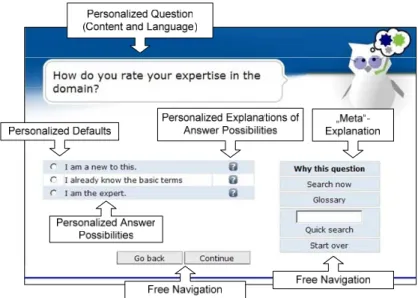
Figure 8 below summarizes our description of personalization possibilities in the conversational dialog. The screenshot from a typical run-time dialog page comprises the following features: a user-specific question, a personalized set of predefined answers with a defined default value and accompanying explanations, navigation buttons, whose visibility can be defined via conditional text fragments as well as further user-specific features like "meta-explanations" that appear on the page depending on the current user's profile.
Figure 8: Personalized Dialog Page [30].
5 Generating the Web Application from the Model
In the previous sections we have described how to model two different pieces of information, i.e., the core recommendation knowledge and the knowledge required for personalizing the preference elicitation process. In the following section, we will describe the mechanisms in ADVISOR
SUITE that allow us to develop easy-to-maintain page templates with the help of which we can automatically generate the dynamic Web pages for displaying the dialog.
There are two basic requirements that have to be addressed when developing the Web pages for the conversational recommender system:
• The pages have to be highly dynamic such that changes in the underlying recommendation
and personalization knowledge bases - like the introduction of an extra option for a question or a change in the personalization rules - do not require any adaptation in the presentation layer, i.e., the HTML pages.
• Although the content of the pages has to be dynamically constructed, it has to be possible that a Web developer can easily adapt and extend the pages if needed. This requirement is of particular importance, because sales assistance applications typically do not stand alone but are rather integrated into an existing Web shop or a portal. Changing the layout according to the corporate design, embedding it into the existing site's infrastructure and so forth are typical tasks that have to be accomplished in the development process.
The approach taken in the ADVISOR SUITE system is based on two pillars. First, we rely on a
typical Model-View-Controller [40] architecture and design pattern for separating the different layers of the application. In our case, the model contains the definitions of the knowledge base and the Personalization Agent of our system corresponds to a generic controller component that manages the dialog with the user and maps end-user actions to application responses. Finally, the view consists of the Web pages that are used for rendering the personalized content.
The second pillar we rely on in ADVISOR SUITE is the automatic assembly of dynamic Web pages (the view part) from page fragments according to the declarative descriptions in the knowledge repository. In our experience, this automatic generation of Web pages is of particular importance when developing Web applications like conversational recommender systems in which rapid prototyping and early user-involvement are typically central elements.
If we again look at a typical dialog page (Figure 9), we can see that a page in our system can be split up into several areas like headers, navigation areas, question and answer areas and so forth. The layout and content of each area is defined in a separate, small template that can be individually adapted. In the header area, for instance, one will typically define the style sheet, company logo, and include other required modules.
Custom footer area Menu area Animated avatar Answer display Question display
Cascading style sheets (Layout and positioning)
Navigation area
Figure 9: Assembling a Page from Fragments [33].
The surrounding areas of the page like navigation or menus typically remain rather stable during the whole dialog; the central part, i.e., the questions, possible answers, or hints of course are different for each page and depend on the user's inputs. However, we have already modeled in a previous step,
what the contents of each page should be (see Figure 6). Thus, we only have to define, how the content should be presented.
In ADVISOR SUITE, this layout information is contained in so-called "templates". In the example dialog page shown above in Figure 9, for instance, the different answer possibilities for one specific question on the page are rendered as vertically aligned radio boxes. Thus, we have to define a
corresponding template in our framework for rendering single selection inputs with radio buttons; the complete code contained in such a template is listed in Figure 10.
Figure 10: Template for Radio Buttons.
In these templates, we rely on the usage of Custom Tags [25] (printed in bold in Figure 10), which allow us to make all the technical details transparent for the Web developer, who can thus focus on, e.g., formatting the HTML table for aligning the radio buttons in the layout phase. The functionality of the Custom Tags used in the example is as follows. The <advise:question> declaration at the beginning sets the scope for the subsequent instructions, the placeholder $QUESTION_NAME$ will be automatically set by system when the page is assembled. With <advise:questiontext>, the question
text defined in the knowledge base will be printed on the page. Please note that the system will already take the proper personalized text variant in the correct language from the repository. With
<advise:answers>, a loop over the possible answers is constructed and within this loop, a radio
control and the defined answer option are displayed. Thus, the Web developer has not to be aware of the possible answer options of a question, what the personalization rules are, what default should be set and so forth, since everything is dynamically determined in the business logic layer (by the personalization agent). Therefore, changes in the knowledge base will not cause any maintenance efforts in the presentation layer.
The ADVISOR SUITE framework contains predefined templates for all of the components that are required for building a "standard" recommender application, i.e., the templates for different question styles, result presentation, explanation pages, conflict display and so forth (see also [30]) plus a default layout style sheet. This in turn means that one can immediately generate a first version of the application by only using the graphical modeling environment. However, the usage of these standard templates is not mandatory, i.e., the Web developer can always decide to develop his own Java Server Pages (being the standard technology in ADVISOR SUITE) from scratch and use the tag library or the
Application Programming Interface of ADVISOR SUITE for retrieving data from the knowledge
repository.
Overall, we claim that highly interactive, conversational recommender applications only remain maintainable if the development is based on a shared knowledge base that contains the different pieces of knowledge such that redundancies in the models can be avoided (see also [3]). In ADVISOR SUITE, the question (plus any further information like whether only one value or multiple values can be entered) is part of the recommendation knowledge. The specific moment in the dialog and the conditions when the question should be asked to the user is determined by evaluating the dialog model.
Finally, the presentation style has to be defined in a form in which all technical details of dynamically evaluating the knowledge base definitions are hidden from the Web developer.
In applications whose Web pages or source code is automatically constructed, we always face the problem of repeated generation when there have been manual changes in the generated artifacts. As in other approaches to automated code generation, also in the ADVISOR SUITE framework we partially avoid these problems by postulating that changes and additions may only be made in the templates and not in the generated pages. However, note that instead of having only one large, complex Web page for rendering the whole dialog, our system creates a separate JSP file for each page defined in the dialog model. The main advantage of this approach lies in the fact that if there is a need for a very specific, non-standard logic on one single page, these additions can be made on exactly this page, i.e., it is not necessary to implement these additions as a separate branch of execution in some generic template. These manually engineered pages can be then marked as such in the modeling environment, which means that in the next phase of application generation this extra logic in the page will not be overwritten.
Figure 11: Integration into Standard Web Development Environment.
With respect to the technologies used, finally, we experienced in several industrial projects that it is extremely important for companies that "standard" Web development languages and environments can be used. First, it is important that the recommender application can be easily integrated and deployed on the existing Web site. Second, when add-on programming is required, using a
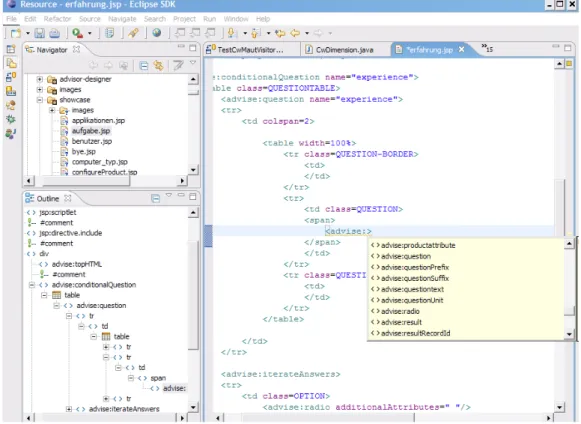
programming language like Java has the advantage that powerful Integrated Development Environments (IDE) for application development, debugging, versioning and so forth can be employed. Figure 11 shows how a wide-spread IDE like Eclipsee can be used for editing the page templates. Since Advisor Suite page templates are ordinary JSP files, all common features of modern editors like syntax highlighting, refactoring, or code-completion (also for Custom Tags) are available. In general, however, Web developers can use their favorite HTML-editors or Integrated Development Environments and do not need to learn new tools when they adapt ADVISOR SUITE pages or templates.
6 Development Process
Having described the technical aspects of our framework, we will subsequently summarize key learnings of how to efficiently develop high-quality recommender applications and describe main aspects of the ADVISOR SUITE "reference" process model that emerged from our experiences from different industrial projects. Up to now, more than thirty industrial recommender applications in different domains have been built with our system, among them a digital camera advisor on Austria's largest e-Commerce sitef which has been up to now used by more than 200.000 end users or a financial advisor tool which is used by more than 1000 sales agents of an Austrian insurance company [18]. Note that in this paper we will focus on general development process and principles and not on the specific results which were achieved in particular domains and which are for instance documented in [15, 17, 35], or [63].
As the presented ADVISOR SUITE system is a knowledge-based development system, quite
naturally, aspects of modeling, knowledge-engineering, prototyping, customizing and Web Engineering
are dominant in our problem domain and thus require an increased involvement of the different stakeholders. The main goals of the subsequently described approach are thus the reduction of development time/costs and an increase of quality by relying on "best practice" knowledge gained from previous projects.
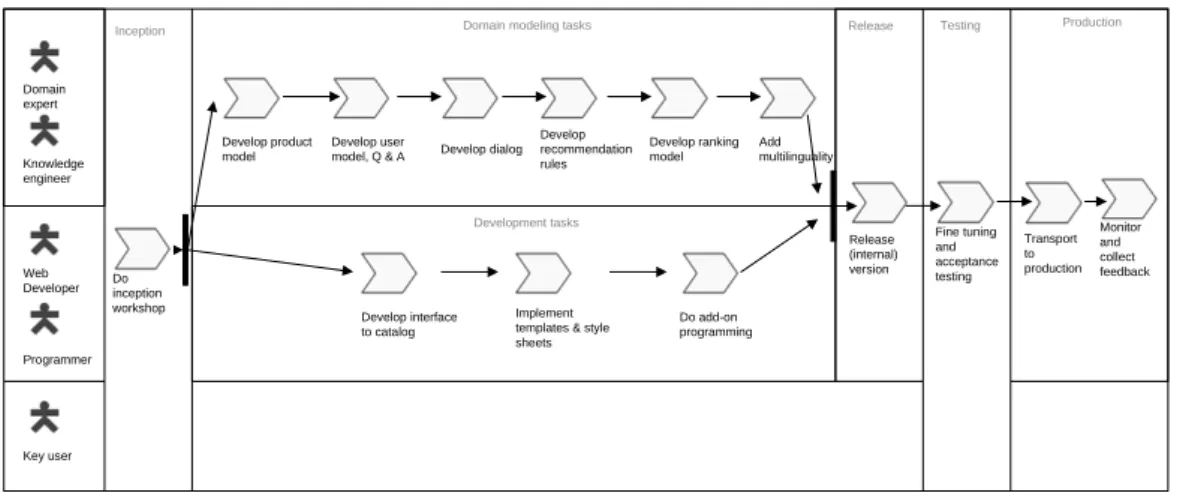
The main aspects of our proposed development process which is strongly based on evolutionary prototyping are depicted in Figure 12. We use a UML activity diagram notation to illustrate the basic structure of the process and use swimlanes [48] to organize the different responsibilities of the different process rolesg.
After a project has been accepted, an inception workshop shall take place, in which all different stakeholders shall participate for establishing a common understanding of the planned outcomes of the project. Typical stakeholders are, e.g., management, sales & marketing, specialist departments, tentative other project members, internal and outsourced IT staff, as well as potential end-users. In this early phase, we focus on the end-user’s view and aim at collaboratively sketching an initial customer and product model as well as a first idea of the advisory dialog. Depending on the situation, the initial model is either documented on the blackboard or it is recorded by directly entering it into our system extending a "standard application" which is part of the framework.
e http://www.eclipse.org
f Measured with respect to unique clients per day.
Domain expert Knowledge engineer Programmer Web Developer Develop product model Develop user
model, Q & A Develop dialog Develop recommendation rules Develop ranking model Add multilinguality Develop interface to catalog Implement templates & style sheets
Do add-on programming
Domain modeling tasks Release
Release (internal) version Fine tuning and acceptance testing Key user Transport to production Monitor and collect feedback Production Do inception workshop Testing Development tasks Inception
Figure 12: Overview on the Development Process.
Although typically major parts of the model developed in the initial workshop will be significantly revised during the actual development phase, building a throw-away prototype (initial sketch in an e-Prototyping approach as described in [4]) has different advantages. First, the envisioned project outcomes become more tangible for non-IT people, in particular as we can immediately generate and test functional Web applications during development. On the other hand, incorporating the different ideas coming up in the discussion (e.g., what questions to be asked) outright into a working application, typically helps us to increase the workshop participants’ motivation to actively contribute to the discussion, as they can see how their thoughts are immediately taken into account and reflected in the application.
After the initial workshop in which also roles and responsibilities for the next phases should be defined, the system construction process can be parallelized into two threads, "domain modeling" and "application development". Both of them start with a training phase in which domain experts learn how to formalize the different pieces of domain knowledge and how to use the software environment; technical engineers are briefed about low-level details of the system, in particular how to integrate the system within the company’s IT infrastructure, how to adapt and extend the user interface, or how to incorporate a special program logic by using pre-defined hooks or by sub-classing parts of the object-oriented framework.
The system construction process is typically executed in several iterations of parallelized modeling/programming activities and testing activities which are carried out by different people.
The domain modeling tasks to be carried out by the domain expert and knowledge engineer include the definition of the product model, the user model including the corresponding dialog questions, the dialog model, as well as recommendation and ranking rules. Finally, also the definition of multilingual versions of all text fragments is part of the modeling phase. With respect to the modeling phase, we have to note that – although this of course strongly depends on the background and expertise of the domain expert – the assistance of a knowledge engineer was nearly always required or helpful in our projects, at least during the first iterations. After these initial iterations however, in several projects the domain experts were capable of further developing and fine-tuning the
application by themselves and the help of a knowledge engineer was only required in exceptional cases. Thus, these experiences also suggest that the user-oriented conceptual models for expressing the required domain knowledge implemented in our system are also comprehensible for domain experts with a limited background in information technology or programming. An important experience we have made in that context is that many domain experts develop the recommendation model in a trial-and-error process, i.e., they for instance formulate some product filtering rule and then immediately want to test whether the rule leads to the expected results. Therefore, we implemented several features in our modeling environment for supporting this particular form of development. The domain engineer can for instance always re-generate the Web application and test the changes from the perspective of the end user. In addition, individual parts of the modeled knowledge can be tested individually for correctness or at least consistency. The effects of applying specific (combinations of) filtering rules can be immediately checked with the help of compact test screens that are included in the modeling environment; in the test environment of the framework [19] suitable test cases can be identified based on equivalence partitioning. Finally, new algorithms based on model-based diagnosis techniques for analyzing the dialog graph and for automatically detecting inconsistencies like non-reachable dialog paths have been proposed in [16] and implemented in the system.
The application development tasks carried out by programmers and Web developers typically comprise the implementation of a software module for importing existing product data from external data sources like an electronic catalog, the implementation and adaptation of templates and style sheets as described above, as well as any other add-on programming of functionality not covered by the standard framework.
The parallel threads of system construction are joined at the end of each iteration when a new (internal) version of the recommender application is to be released for a subsequent acceptance testing and fine-tuning activity. Depending on the situation, these release tests can be carried out in-house by domain experts or with the help of a pilot system which is evaluated by a selected group of potential end users. As in standard software development processes, the collected feedback and test results serve as a starting point for the next iteration.
Our reference process model stipulates that the incremental development of the application is to be done on a dedicated development and test system. In many cases, domain experts even like to run copies of the complete, light-weight modeling environment and the current application on their local
desktop PCs and do their own experiments and tests before doing changes in the development
installation. These local, private installations are typically helpful for those domain experts that have a limited background in IT and are initially afraid of doing something wrong or "damaging" the application. Thus, in the transport activity shown in Figure 12, changes in the development and test system are propagated to the production installation, which is supported in ADVISOR SUITE through an own "transport" layer. With the help of this software infrastructure, both the files of the application (generated Java Server Pages or templates) as well as the contents of the knowledge repository can be transferred over the Web to a remote system. The transport layer itself both supports "push" and "pull" operations. While pushing corresponds to the aforementioned deployment scenario, active pulling is required in scenarios in which the recommender application is used as a sales support tool and runs on the laptop of the sales agent. In that scenario, one can retrieve knowledge-base updates from a central server over the transport layer and roll-out costs can thus be minimized.
After a new version of the recommender application has been put into production, it is a common goal to constantly monitor the system and collect feedbackand statistics for further improvements. The ADVISOR SUITE framework supports these tasks as follows. On the one hand, the framework comprises a Web-based management console for monitoring the current system status which can for instance be used for displaying the number of current user sessions, overall usage statistics, all technical settings like open database connections, as well as listings of error messages. On the other hand, the framework automatically creates detailed logs of all recommendation sessions with end users and stores them in the system's database. These logs can be subsequently used for improving the recommender application in a next iteration of development. Based on the stored interaction logs, one can for instance try to analyze whether there are typical situations in which end users prematurely quit the
advisory dialog. At the moment, the ADVISOR SUITE framework comprises a basic module for
generating a set of standard interaction statistics from the full logs. In our current and future work, however, we aim at developing an advanced component that is for instance capable of automatically detecting problematic dialog situations and so forth and provide corresponding hints for the domain engineer.
7 Comparison and Related Work
Building Conversational Recommender Systems
Applications built with ADVISOR SUITE fall into the category of conversational recommender systems [6, 10, 50, 54, 60], but differ from other approaches by a user interface which allows us to elicit user preferences in a personalized dialog. Although high interactivity, personalization, and increased user involvement (compared, e.g., with classical collaborative filtering approaches like on Amazon.com) begin to play a more important role in recommender systems research, to the best of our knowledge, not much work on engineering aspects with respect to the Web-based user interface can be found in literature. Most of the previous work in the area of conversational systems focuses on specific aspects of the problem, like user query management, similarity measures [51], or multimedia user interfaces [29]; thus, in many cases, the user interfaces are either developed in an ad-hoc style, which can be found in many Web-based systems [36], or specifically engineered like the multimedia-enhanced product descriptions discussed in [51].
With respect to modeling and managing man-machine dialogs, a broad array of literature can be found in the area of Natural Language Processing (NLP). In [11], for instance, the Web-based sales assistance system NLSA is described that combines natural language processing with traditional AI rule-based technology and taxonomy mapping in order to assist the user in finding relevant information about products and services on an e-commerce site. Comparable to our work, NLSA relies on explicit domain knowledge for relating customer requirements to product characteristics and partially also on explicit requirements elicitation with the help of predefined questions. In addition, the NLSA system also uses a domain-ontology in the background and allows the user to enter free text which is then parsed for defined keywords for determining the interests of the end user and narrowing the range of possible problems. With respect to personalization features, however, in the NLSA system basically only the content (dialog and recommendations) can be personalized. The presented ADVISOR
SUITE system goes beyond that and – based on its general, rule-based personalization mechanism – also supports other typical types of personalization (e.g., with respect to links, structure, or the
presentation style), comprehensive tool support, and the automated generation of dynamic and maintainable Web pages. Still, we view the incorporation and exploitation of free-text search phrases, which – according to the study described in [11] – are well-appreciated by end users as a promising
additional feature in sales assistance systems and thus aim at integrating these capabilities into our system as a part of our future work.
Although the ultimate vision of virtual sales advisory could be seen in a system that interacts with the end user in natural language like an experienced sales agent would do, we are currently skeptical about using only natural language interfaces in Web-based recommender systems as already mentioned above. It is not only the massive amount of deep domain knowledge that is required in the background for carrying on the dialog, these systems also need sophisticated techniques for managing a mixed-initiative dialog (like proposed in [6, 7], or [60]). Finally, today’s Web users are well acquainted with the common form-based interaction and interrogation style, whereas on the other hand systems that provide more "natural" forms of interaction often suffer the problem that end users attribute to the system more intelligence than is warranted.
Model-driven Development and Web Engineering, Domain-oriented Software Development
Applying and extending the Model Driven Software Development (MDSD) approach [55] to Web-based applications and accommodating the particularities of these special types of systems are main approaches in the Web Engineering field, which in general is concerned with the investigation of principles, methods, and techniques for cost-effective development of high-quality, Web-based systems. With respect to MDSD, this relatively young field has brought up different specific development processes, extended modeling methods, design principles, as well as novel tools for transferring or applying best practices from general Software Engineering to the development of Web-based systems or applications. With regard to modeling and design, many approaches like OO-H [24], OO-HDM [57], WebML [12], UWE [38], SHDM [42], or also Netsilon [46] and HyperDE [47] aim at extending existing modeling approaches like UML- or E/R-diagrams with specific concepts needed in the design of Web applications, typical extensions being navigation models or interface-design and presentation models.
Correspondences between the overall goals of these approaches with our work can be seen in the following dimensions: The model-driven software development approach, the separation of the different layers of the application, support for adaptivity and personalization, as well as (semi-) automatic generation of dynamic Web pages.
Comparable to the above-mentioned modeling approaches to Web application development, the presented ADVISOR SUITE framework supports system design on the basis of different – in our case domain-specific – models as described in earlier sections, each one used for capturing a specific aspect of the overall knowledge and functionality of the target application. This separation of the models (like the product model, customer model, or dialog model) as well as the provision of user-oriented conceptualizations and corresponding, graphical tools helps us to significantly reduce the complexity for the domain expert and the knowledge engineer, which is one of the key prerequisites for the success of the system. Our work differs from the above-mentioned approaches insofar, as we do not aim at providing a comprehensive methodology for developing Web applications in general, but rather limit ourselves to conceptual modelling and development support for a specific family of applications,
i.e., Web-based sales assistance systems. We for instance deliberately decided not to use the widespread UML notation, because one of the main goals in the design of the ADVISOR SUITE system was to make it usable by the domain expert who in general may not have enough expertise in conceptual modelling techniques. Thus, it is important to provide user-oriented, domain-specific conceptualizationsh. As already argued in Section 4, we could have used for instance a UML state diagram to model the dialog (see Figure 6), but we decided to use a non-standard visualization and
terminology. In our experience this makes things easier for the domain expert as he has not to get acquainted to technically-oriented and rather generic domain-independent terms that have to be used in a general-purpose language like UML. Thus, our work to some extent also follows a Domain-oriented Software Development (see e.g., [27]) strategy, in which the main idea is to exploit domain-specific modelling concepts for improving the system development process both with respect the time needed for model acquisition as well as to the quality of the domain models.
From the viewpoint of general application design, the Model-View-Controller design pattern (see, e.g., [40]) is one of today’s successful best practices for building in particular Web-based applications, as this system architecture allows us to achieve high flexibility and to separate an application’s business logic from presentation aspects. The "standard application", which is automatically generated in ADVISOR SUITE, strictly observes the MVC design pattern. With respect to the model-part, however, we have to note that in contrast to general applications the structure of the domain model itself as well as algorithms that implement parts of the business logic are already pre-implemented in our system. Thus, the domain expert does not have to model the structure of recommendation problems themselves, but rather specific problem instances. The view-part of the application is realized in the form of the generated Java Server Pages that use the Custom Tags described above for transparently accessing the objects in the model. However, when a different view is required, when, e.g., the application should be displayed on a mobile device, the strict separation of layers allows us to easily exchange the standard view with an alternative implementation, e.g., based on XML output and XSLT transformations. The controller part is realized in the form of the "Personalization Agent" [33] that handles all the user interactions within a user session, evaluates the personalization rules based on the definitions in the knowledge base and appropriately forwards the user to the correct successor pages.
How to model adaptivity and personalization in context aware Web applications is another current issue in Web Engineering research [3, 12, 13, 14, 21, 58]. Baumeister et al., for instance, in [3] present an aspect-oriented extension of the UWE approach for modeling common types of adaptive navigation. Similarly, Schwabe et al. in [28, 52] and [58] argue that personalization issues should be addressed on the level of design and not on the implementation level. In the object-oriented OOHDM approach, they also describe some typical scenarios and patterns of personalization in Web applications that can be implemented on the basis of user profiles or preferences. In [23], Garrigós et al. discuss the personalization architecture of the OO-H method which is also based on the existence of a user model but additionally relies on adaptivity rules and a rules engine for supporting the dynamic composition of personalized pages from XML-based specifications. A proposal for designing context-aware, adaptive user interfaces on the conceptual level in WebML is discussed in [13], a non-graphical adaptation model for the Hera framework is proposed in [21] and [61].
![Figure 3: Overview of the ADVISOR SUITE Framework (compare [33]).](https://thumb-us.123doks.com/thumbv2/123dok_us/893892.2614888/6.892.167.721.426.762/figure-overview-advisor-suite-framework-compare.webp)

![Figure 9: Assembling a Page from Fragments [33].](https://thumb-us.123doks.com/thumbv2/123dok_us/893892.2614888/16.892.170.595.532.832/figure-assembling-page-fragments.webp)