548
18
Files and Streams
Supplementary Objectives
• Write code that uses objects of theFileclass to navigate the file system. • Distinguish between byte and character streams, and identify the roots of
their inheritance hierarchies.
• Select valid constructor arguments forFilterInputStreamand
FilterOutputStreamsubclasses from a list of classes in thejava.io package.
• Write appropriate code to read, write and update files usingFileInputStream,
FileOutputStreamandRandomAccessFileobjects.
• Write code that uses the classesDataOutputStreamandDataInputStreamfor writing and reading Java primitive values.
• Write code that uses objects of the classesInputStreamReaderand
OutputStreamWriterto translate between Unicode and either platform default
or other character encodings.
• Write code to set up (buffered) readers and writers for text files.
• Write code that uses the classesObjectOutputStreamandObjectInputStreamfor writing and reading objects.
18.1 Input and Output
Thejava.iopackage provides an extensive library of classes for dealing with input
and output. Java providesstreamsas a general mechanism for dealing with data I/O. Streams implementsequential accessof data. There are two kinds of streams:
byte streamsandcharacter streams. Aninput streamis an object that an application can use to read a sequence of data, and anoutput streamis an object that an applica-tion can use to write a sequence of data. Aninput streamacts as asourceof data, and anoutput streamacts as adestinationof data. The following entities can act as both input and output streams:
• an array of bytes or characters • a file
• apipe
• a network connection
Streams can be chained with filters to provide new functionality. In addition to dealing with bytes and characters, streams are provided for input and output of Java primitive values and objects. Thejava.iopackage also provides support for
random accessof files, and a general interface to interact with the file system of the host platform.
18.2
File
Class
TheFileclass provides a general machine-independent interface to the file system of the underlying platform. A File object represents the pathname of a file or directory in the host file system. An application can use the functionality provided by theFileclass for handling files and directories in the file system. TheFileclass is not meant for handling the contents of files. For that purpose, there are the
FileInputStream, FileOutputStream and RandomAccessFile classes, which are
dis-cussed later in this chapter.
The pathname for a file or directory is specified using the naming conventions of the host system. However, theFileclass defines platform-dependent constants that can be used to handle file and directory names in a platform-independent way:
public static final char separatorChar public static final String separator
Defines the character or string that separates the directory and the file com-ponents in a pathname. This separator is'/','\'or':'for Unix, Windows and Macintosh, respectively.
public static final char pathSeparatorChar public static final String pathSeparator
Defines the character or string that separates the file or directory names in a “path list”. This character is':'or';'for Unix and Windows, respectively.
Some examples of pathnames are:
/book/chapter1 on Unix
C:\book\chapter1 on Windows
HD:book:chapter1 on Macintosh
Some examples of path lists are:
/book:/manual:/draft on Unix
C:\book;D:\manual;A:\draft on Windows
Files and directories can be referenced using both absolute and relative pathnames, but the pathname must follow the conventions of the host platform. On Unix plat-forms, a pathname is absolute if its first character is the separator character. On Windows platforms, a path is absolute if the ASCII'\' is the first character, or follows the volume name (e.g.,C:), in a pathname. On the Macintosh, a pathname is absolute if it begins with a name followed by a colon. Java programs should not rely on system-specific pathname conventions. TheFileclass provides facilities to construct pathnames in a platform-independent way.
The Fileclass has various constructors for assigning a file or a directory to an object of theFileclass. Creating aFileobject does not mean creation of any file or directory based on the pathname specified. A File instance, called the abstract pathname,is a representation of the pathname of a file and directory. The pathname cannot be changed once theFileobject is created.
// "/book/chapter1" – absolute pathname of a file File chap1 = new File(File.separator + "book" +
File.separator + "chapter1"); // "draft/chapters" – relative pathname of a directory
File draftChapters = new File("draft" + File.separator + "chapters");
// "/book/chapter1" – absolute pathname of a file
File updatedChap1 = new File(File.separator + "book", "chapter1");
File(String pathname)
The pathname (of a file or a directory) can be an absolute pathname or a pathname relative to the current directory. An empty string as argument results in an abstract pathname for the current directory.
File(String directoryPathname, String filename)
This creates aFileobject whose pathname is as follows: directoryPathname+ separator +filename.
File(File directory, String filename)
If thedirectoryargument isnull, the resultingFileobject represents a file in the current directory. If the directory argument is not null, it creates a File
object that represents a file in the given directory. The pathname of the file is then the pathname of thedirectory Fileobject + separator +filename.
SECTION 18.2:FILECLASS 551
// "chapter13" – relative pathname of a file File parent = null;
File chap13 = new File(parent, "chapter13");
// "draft/chapters/chapter13" – relative pathname of a file
File draftChapters = new File("draft" + File.separator + "chapters"); File updatedChap13 = new File(draftChapters, "chapter13");
An object of theFileclass provides a handle to a file or directory in the file system, and can be used to create, rename, and delete the entry.
AFileobject can also be used to query the file system for information about a file or directory:
• whether the entry exists
• whether theFileobject represents a file or directory • whether the entry has read or write access
• get pathname information about the file or directory • list all entries under a directory in the file system
Many methods of theFileclass throw aSecurityExceptionin the case of a security violation, for example if read or write access is denied. Some also return a boolean value to indicate whether the operation was successful.
Querying the File System
TheFileclass provides a number of methods for obtaining the platform-dependent representation of a pathname and its components.
On Unix, the name part of"/book/chapters/one"is"one".
On Windows platforms, the name part of"c:\java\bin\javac"is"javac". On the Macintosh, the name part of"HD:java-tools:javac"is"javac".
String getName()
Returns the name of the file entry, excluding the specification of the directory in which it resides.
String getPath()
The method returns the (absolute or relative) pathname of the file represented by theFileobject.
String getAbsolutePath()
If the File object represents an absolute pathname then this pathname is returned, otherwise the returned pathname is constructed by concatenating the current directory pathname, the separator character and the pathname of theFileobject.
For example, if the File object represented the absolute pathname "c:\book\
chapter1" on Windows, then this pathname would be returned by these
methods. On the other hand, if theFileobject represented the relative pathname
"..\book\chapter1" and the current directory had the absolute pathname
"c:\documents", the pathname returned by thegetPath(),getAbsolutePath()and
getCanonicalPath() methods would be "..\book\chapter1", "c:\documents\..\
book\chapter1"and"c:\book\chapter1", respectively.
On Unix, the parent part of"/book/chapter1"is"/book", whose parent part is"/", which in turn has no parent.
On Windows platforms, the parent part of"c:\java-tools" is"c:\", which in turn has no parent.
On the Macintosh, the parent part of"HD:java-tools"is"HD:", which in turn has no parent.
The following three methods can be used to query the file system about the modi-fication time of a file or directory, determine the size (in bytes) of a file, and ascertain whether two pathnames are identical.
String getCanonicalPath() throws IOException
Also platform-dependent, the canonical path usually specifies a pathname in which all relative references have been completely resolved.
String getParent()
The parent part of the pathname of thisFileobject is returned if one exists, otherwise thenull value is returned. The parent part is generally the prefix obtained from the pathname after deleting the file or directory name com-ponent found after the last occurrence of the separator character. However, this is not true for all platforms.
boolean isAbsolute()
Whether a File object represents an absolute pathname can be determined using this method.
long lastModified()
The modification time returned is encoded as alongvalue, and should only be compared with other values returned by this method.
long length()
Returns the size (in bytes) of the file represented by theFileobject.
boolean equals(Object obj)
This method only compares the pathnames of theFileobjects, and returnstrue
SECTION 18.2:FILECLASS 553
File or Directory Existence
AFileobject is created using a pathname. Whether this pathname denotes an entry that actually exists in the file system can be checked using theexists()method:
Since aFileobject can represent a file or a directory, the following methods can be used to distinguish whether a givenFile object represents a file or a directory respectively:
Read and Write Access
To check whether the specified file has write and read access, the following methods can be used. They throw a SecurityException if general access is not allowed, i.e. the application is not even allowed to check whether it can read or write a file.
Listing Directory Entries
The entries in a specified directory can be obtained as a table of file names or abstract pathnames, using the followinglist()methods. The current directory and the parent directory are excluded from the list.
boolean exists() boolean isFile() boolean isDirectory() boolean canWrite() boolean canRead() String[] list()
String[] list(FilenameFilter filter)
File[] listFiles()
File[] listFiles(FilenameFilter filter)
File[] listFiles(FileFilter filter)
Thefilterargument can be used to specify afilterthat determines whether an
entry should be included in the list. These methods returnnullif the abstract pathname does not denote a directory, or if an I/O error occurs. A filter is an object of a class that implements either of these two interfaces:
interface FilenameFilter {
boolean accept(File currentDirectory, String entryName); }
interface FileFilter {
boolean accept(File pathname); }
Thelist()methods call theaccept() methods of the filter for each entry, to
Creating New Files and Directories
TheFileclass can be used to create files and directories. A file can be created whose pathname is specified in aFileobject using the following method:
A directory whose pathname is specified in aFileobject can be created using the following methods:
Renaming Files and Directories
A file or a directory can be renamed, using the following method which takes the new pathname from its argument:
Deleting Files and Directories
A file or a directory can be deleted using the following method. In the case of a directory, it must be empty before it can be deleted.
Example 18.1 Listing Files Under a Directory import java.io.*;
public class DirectoryLister {
public static void main(String args[]) { File entry;
if (args.length == 0) { // (1)
System.err.println("Please specify a directory name."); return;
}
entry = new File(args[0]); // (2) user specified listDirectory(entry);
}
boolean createNewFile() throws IOException
It creates a new, empty file named by the abstract pathname if, and only if, a file with this name does not already exist. The returned value istrueif the file was successfully created,falseif the file already exists. Any I/O error results in anIOException.
boolean mkdir() boolean mkdirs()
The mkdirs() method creates any intervening parent directories in the
pathname of the directory to be created.
boolean renameTo(File dest)
public static void listDirectory(File entry) { try {
if (!entry.exists()) { // (3)
System.out.println(entry.getName() + " not found."); return;
}
if (entry.isFile()) {
// Write the pathname of the file
System.out.println(entry.getCanonicalPath()); // (4) } else if (entry.isDirectory()) {
// Create list of entries for this directory
String[] fileName = entry.list(); // (5)
if (fileName == null) return;
for (int i = 0; i<fileName.length; i++) { // Create a File object for the entry
File item = new File(entry.getPath(), fileName[i]); // (6) // List it by a recursive call.
listDirectory(item); // (7)
} }
} catch(IOException e) { System.out.println("Error: " + e); } }
}
Running the program on a Windows platform: java DirectoryLister D:\docs\JC-Book\special produces the following output:
D:\docs\JC-Book\special\book19990308\JC-14-applets.fm D:\docs\JC-Book\special\book19990308\JC-16-swing.fm D:\docs\JC-Book\special\JC-11-awtlayout.fm
The classDirectoryListerin Example 18.1 lists all entries in a directory specified in the command line. If no directory is given, an error message is written. This is shown at (1) and (2). In the methodlistDirectory(), each entry is tested to see if it exists, as shown at (3). The entry could be an alias (symbolic linkin Unix orshortcut
in Windows terminology) and its destination might not exist. The method deter-mines whether the entry is a file, in which case the absolute pathname is listed, as shown at (4). In the case of a directory, an array of entry names is created, as shown at (5). For each entry in the directory, aFileobject is created, as shown at (6). The methodlistDirectory()is called recursively for each entry, as shown at (7).
18.3 Byte Streams: Input Streams and Output Streams
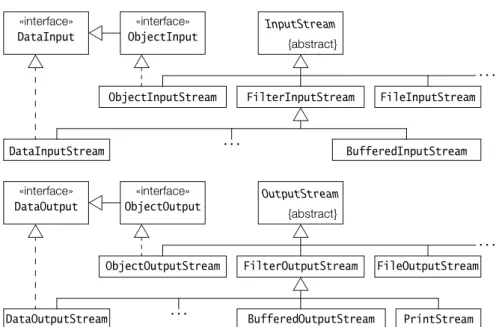
The abstract classesInputStreamand OutputStream are the root of the inheritance hierarchies for handling the reading and writing ofbytes(Figure 18.1). Their sub-classes, implementing different kinds of input and output streams, override the
following methods from theInputStreamandOutputStreamclasses to customize the reading and writing of bytes, respectively:
A stream should be closed when no longer needed, to free system resources:
Read and write operations on streams are synchronous (blocking) operations, i.e. a call to a read or write method does not return before a byte has been read or written.
Figure 18.1 Byte Stream Inheritance Hierarchies
int read() throws IOException
int read(byte[] b) throws IOException
int read(byte[] b, int off, int len) throws IOException void write(int b) throws IOException
void write(byte[] b) throws IOException
void write(byte[] b, int off, int len) throws IOException
Note that the firstread()method read a byte, but returns anintvalue. The byte read resides in the eight least significant bits of theint, while the remaining bits in theintare zeroed out. Theread()methods return the value –1 when the end of stream is reached. The firstwrite()method takes anintas argument, but truncates it down to the eight least significant bits before writing it out as a byte.
void close() throws IOException void flush() throws IOException
Closing an output stream automaticallyflushesthe stream, meaning that any data in its internal buffer is written out. An output stream can also be manually flushed by calling the second method.
BufferedInputStream DataInputStream ... FilterInputStream FileInputStream ObjectInputStream ... InputStream {abstract} DataInput «interface» ObjectInput «interface» BufferedOutputStream DataOutputStream ... FilterOutputStream FileOutputStream ObjectOutputStream ... OutputStream {abstract} DataOutput «interface» ObjectOutput «interface» PrintStream
Many methods in the classes contained in the java.io package throw an
IOException. A calling method must either catch the exception explicitly, or specify
it in athrowsclause.
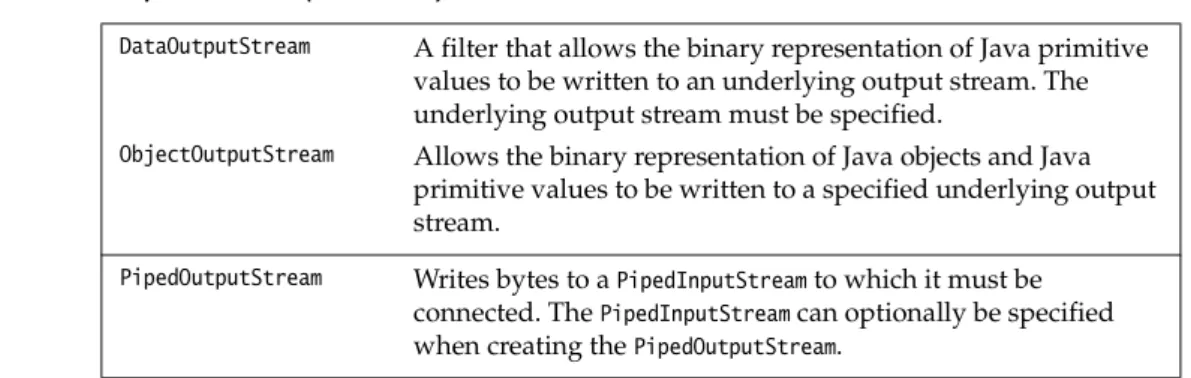
Table 18.1 and Table 18.2 give an overview of the byte streams.
Table 18.1 Input Streams
ByteArrayInputStream Data is read from a byte array that must be specified. FileInputStream Data is read as bytes from a file. The file acting as the input
stream can be specified by aFileobject, aFileDescriptoror a
Stringfile name.
FilterInputStream Superclass of all input stream filters. An input filter must be chained to an underlying input stream.
BufferedInputStream A filter that buffers the bytes read from an underlying input stream. The underlying input stream must be specified, and an optional buffer size can be included.
DataInputStream A filter that allows the binary representation of Java primitive
values to be read from an underlying input stream. The underlying input stream must be specified.
PushbackInputStream A filter that allows bytes to be "unread" from an underlying
input stream. The number of bytes to be unread can optionally be specified.
ObjectInputStream Allows binary representations of Java objects and Java
primitive values to be read from a specified input stream.
PipedInputStream Reads bytes from aPipedOutputStreamto which it must be connected. ThePipedOutputStreamcan optionally be specified when creating thePipedInputStream.
SequenceInputStream Allows bytes to be read sequentially from two or more input
streams consecutively. This should be regarded as concatenating the contents of several input streams into a single continuous input stream.
Table 18.2 Output Streams
ByteArrayOutputStream Data is written to a byte array. The size of the byte array
created can be specified.
FileOutputStream Data is written as bytes to a file. The file acting as the output stream can be specified by aFileobject, aFileDescriptoror a
Stringfile name.
FilterOutputStream Superclass of all output stream filters. An output filter must be
chained to an underlying output stream.
BufferedOutputStream A filter that buffers the bytes written to an underlying output
stream. The underlying output stream must be specified, and an optional buffer size can be given.
File Streams
The classes FileInputStream and FileOutputStream define byte input and output streams that are connected to files. Data can only be read or written as a sequence of bytes.
An input stream for reading bytes can be created using the following constructors:
An output stream for writing bytes can be created using the following con-structors:
TheFileInputStreamclass provides an implementation for theread()methods in its
superclass InputStream. Similarly, the FileOutputStream class provides an imple-mentation for thewrite()methods in its superclassOutputStream.
DataOutputStream A filter that allows the binary representation of Java primitive
values to be written to an underlying output stream. The underlying output stream must be specified.
ObjectOutputStream Allows the binary representation of Java objects and Java
primitive values to be written to a specified underlying output stream.
PipedOutputStream Writes bytes to aPipedInputStreamto which it must be connected. ThePipedInputStreamcan optionally be specified when creating thePipedOutputStream.
FileInputStream(String name) throws FileNotFoundException FileInputStream(File file) throws FileNotFoundException FileInputStream(FileDescriptor fdObj)
The file can be specified by its name, through aFileor aFileDescriptorobject. If the file does not exist, aFileNotFoundExceptionis thrown. If it exists, it is set to be read from the beginning. ASecurityExceptionis thrown if the file does not have read access.
FileOutputStream(String name) throws FileNotFoundException
FileOutputStream(String name, boolean append) throws FileNotFoundException FileOutputStream(File file) throws IOException
FileOutputStream(FileDescriptor fdObj)
The file can be specified by its name, through aFile object or using a File
Descriptorobject.
If the file does not exist, it is created. If it exists, its contents are reset, unless the appropriate constructor is used to indicate that output should be appended to the file. ASecurityExceptionis thrown if the file does not have write access or it cannot be created.
Example 18.2 demonstrates usage of writing and reading bytes to and from file streams. It copies the contents of one file to another file. The input and the output file names are specified on the command line. The streams are created as shown at (1) and (2). The input file is read a byte at a time and written straight to the output file, as shown in thetryblock at (3). The streams are explicitly closed, as shown at (4). Note that most of the code consists oftry-catchconstructs to handle the various exceptions. The example could be optimized by using buffering, and reading and writing several bytes at a time.
Example 18.2 Copy a File /* Copy a file.
Command syntax: java CopyFile <from-file> <to-file> */
import java.io.*; class CopyFile {
public static void main(String args[]) { FileInputStream fromFile;
FileOutputStream toFile; // Assign the files try {
fromFile = new FileInputStream(args[0]); // (1) toFile = new FileOutputStream(args[1]); // (2) } catch(FileNotFoundException e) {
System.err.println("File could not be copied: " + e); return;
} catch(IOException e) {
System.err.println("File could not be copied: " + e); return;
} catch(ArrayIndexOutOfBoundsException e) {
System.err.println("Usage: CopyFile <from-file> <to-file>"); return;
}
// Copy bytes
try { // (3)
int i = fromFile.read();
while (i != -1) { // check end of file toFile.write(i); i = fromFile.read(); } } catch(IOException e) { System.err.println("Error reading/writing."); }
// Close the files
try { // (4)
fromFile.close(); toFile.close();
} catch(IOException e) {
System.err.println("Error closing file."); }
} }
Filter Streams
Afilteris a high-level stream that provides additional functionality to an under-lying stream to which it is chained. The data from the underunder-lying stream is manip-ulated in some way by the filter. The FilterInputStream and FilterOutputStream
classes, together with their subclasses, define input and output filter streams. Sub-classes BufferedInputStream and BufferedOutputStream implement filters that respectively buffer input from, and output to, the underlying stream. Subclasses
DataInputStreamandDataOutputStream implement filters that allow Java primitive
values to be read and written respectively to and from an underlying stream.
I/O of Java Primitive Values
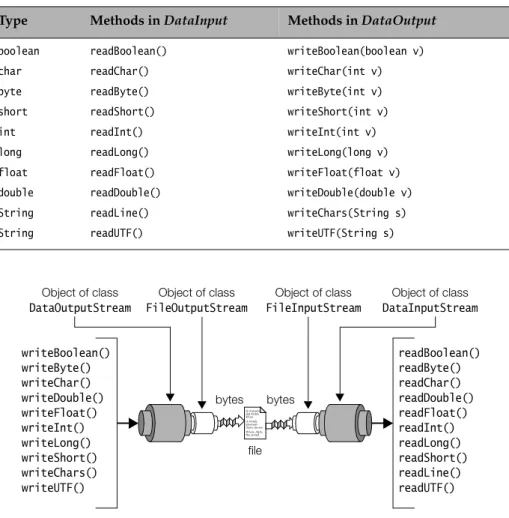
Thejava.iopackage contains two interfaces:DataInputandDataOutput, that streams
can implement to allow reading and writing of binary representations of Java primitive values (boolean,char,byte,short,int, long,float,double). Methods for writing binary representations of Java primitive values are namedwriteX(), where
Xis any Java primitive datatype. Methods for reading binary representations of Java primitive values are similarly namedreadX(). Table 18.3 gives an overview of
thereadX()andwriteX()methods found in these two interfaces. Note the methods
provided for reading and writing strings. Whereas the methods readChar()and
writeChar()handle a single character, the methods readLine() and writeChars()
handle a string of characters. The methodsreadUTF()andwriteUTF()also read and write a string of characters, but use the UTF-8 character encoding (see Table 18.7 on page 570).
The filter streamsDataOutputStreamandDataInputStreamimplementDataOutputand
DataInputinterfaces respectively, and can be used to write and read binary
repres-entations of Java primitive values to and from an underlying stream. Both the
writeX()andreadX()methods throw anIOExceptionin the event of an I/O error.
Bytes can also be skipped from a DataInput stream, using the skipBytes(int n)
method which skipsn bytes. The following constructors can be used to set up filters for reading and writing Java primitive values respectively from an under-lying stream:
For handling character streams, Java provides special streams called readers and
writerswhich are discussed in Section 18.4.
DataInputStream(InputStream in) DataOutputStream(OutputStream out)
To write the binary representation of Java primitive values to afile, the following procedure can be used, which is also depicted in Figure 18.2.
1. Create aFileOutputStream:
FileOutputStream outputFile = new FileOutputStream("primitives.data"); 2. Create aDataOutputStreamwhich is chained to theFileOutputStream:
DataOutputStream outputStream = new DataOutputStream(outputFile); 3. Write Java primitive values using relevantwriteX()methods:
outputStream.writeBoolean(true);
outputStream.writeChar('A'); // int written as Unicode char outputStream.writeByte(Byte.MAX_VALUE); // int written as 8-bits byte outputStream.writeShort(Short.MIN_VALUE); // int written as 16-bits short outputStream.writeInt(Integer.MAX_VALUE);
Table 18.3 DataInputandDataOutputInterfaces
Type Methods inDataInput Methods inDataOutput
boolean readBoolean() writeBoolean(boolean v)
char readChar() writeChar(int v)
byte readByte() writeByte(int v)
short readShort() writeShort(int v)
int readInt() writeInt(int v)
long readLong() writeLong(long v)
float readFloat() writeFloat(float v)
double readDouble() writeDouble(double v)
String readLine() writeChars(String s)
String readUTF() writeUTF(String s)
Figure 18.2 Stream Chaining Object of class DataOutputStream writeBoolean() writeByte() writeChar() writeDouble() writeFloat() writeInt() writeLong() writeShort() writeChars() writeUTF() In Xanadu did Kubla Khan A stately pleasure-dome decree: Where Alph, the sacred readBoolean() readByte() readChar() readDouble() readFloat() readInt() readLong() readShort() readLine() readUTF() Object of class FileOutputStream Object of class FileInputStream Object of class DataInputStream file bytes bytes
outputStream.writeLong(Long.MIN_VALUE); outputStream.writeFloat(Float.MAX_VALUE); outputStream.writeDouble(Math.PI);
Note that in the case ofchar,byteandshortdatatypes, theintargument to the
writeX()method is converted to the corresponding type, before it is written.
4. Close the filter stream, which also closes the underlying stream: outputStream.close();
To read the binary representation of Java primitive values from afilethe following procedure can be used, which is also depicted in Figure 18.2.
1. Create aFileInputStream:
FileInputStream inputFile = new FileInputStream("primitives.data"); 2. Create aDataInputStreamwhich is chained to theFileInputStream:
DataInputStream inputStream = new DataInputStream(inputFile);
3. Read Java primitive values in the same order they were written out, using relevantreadX()methods :
boolean v = inputStream.readBoolean(); char c = inputStream.readChar(); byte b = inputStream.readByte(); short s = inputStream.readShort(); int i = inputStream.readInt(); long l = inputStream.readLong(); float f = inputStream.readFloat(); double d = inputStream.readDouble();
4. Close the filter stream, which also closes the underlying stream: inputStream.close();
Example 18.3 uses both the procedures described above: first to write and then to read some Java primitive values to and from a file. The values are also written to the terminal.
Example 18.3 Reading and Writing Java Primitive Values import java.io.*;
public class JavaPrimitiveValues {
public static void main(String args[]) throws IOException { // Create a FileOutputStream.
FileOutputStream outputFile =
new FileOutputStream("primitives.data");
// Create a DataOutputStream which is chained to the FileOutputStream. DataOutputStream outputStream = new DataOutputStream(outputFile); // Write Java primitive values.
outputStream.writeBoolean(true);
outputStream.writeChar('A'); // int written as Unicode char outputStream.writeByte(Byte.MAX_VALUE); // int written as 8-bits byte
outputStream.writeShort(Short.MIN_VALUE); // int written as 16-bits short outputStream.writeInt(Integer.MAX_VALUE);
outputStream.writeLong(Long.MIN_VALUE); outputStream.writeFloat(Float.MAX_VALUE); outputStream.writeDouble(Math.PI);
// Close the output stream, which also closes the underlying stream. outputStream.close();
// Create a FileInputStream.
FileInputStream inputFile = new FileInputStream("primitives.data"); // Create a DataInputStream which is chained to the FileInputStream. DataInputStream inputStream = new DataInputStream(inputFile);
// Read Java primitive values in the same order they were written out. boolean v = inputStream.readBoolean(); char c = inputStream.readChar(); byte b = inputStream.readByte(); short s = inputStream.readShort(); int i = inputStream.readInt(); long l = inputStream.readLong(); float f = inputStream.readFloat(); double d = inputStream.readDouble();
// Close the input stream, which also closes the underlying stream. inputStream.close();
// Write the values read on the terminal System.out.println(v); System.out.println(c); System.out.println(b); System.out.println(s); System.out.println(i); System.out.println(l); System.out.println(f); System.out.println(d); } }
Output from the program: true A 127 -32768 2147483647 -9223372036854775808 3.4028235E38 3.141592653589793
Buffered Byte Streams
The filter classesBufferedInputStreamandBufferedOutputStreamimplementbuffering of bytesfor input and output streams, respectively. Data is read and written inblocks
of bytes, rather than a single byte at a time. Buffering can enhance performance significantly. These filter classes only provide methods for reading and writing bytes. A buffering filter must be chained to an underlying stream:
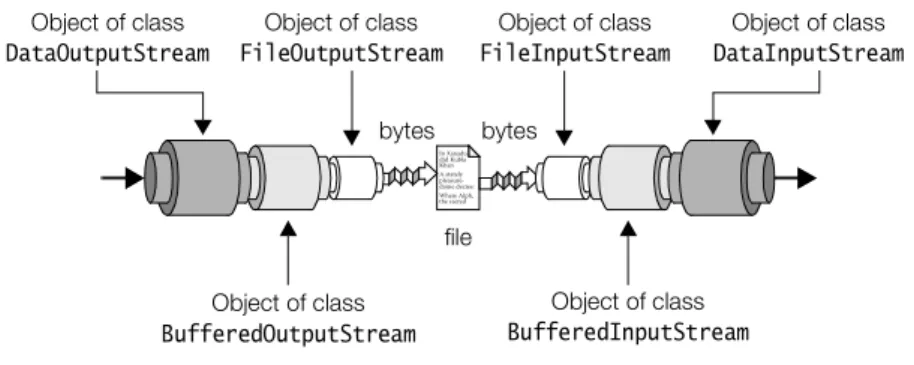
Other filters can be chained to byte buffering filters to provide buffering of data. For example, during the writing of binary representations of Java primitive values to a file, bytes can be buffered (see Figure 18.3):
FileOutputStream outputFile = new FileOutputStream("primitives.data"); BufferedOutputStream bufferedOutput = new BufferedOutputStream(outputFile); DataOutputStream outputStream = new DataOutputStream(bufferedOutput);
Values are now written using theDataOutputStream outputStream, with the buffering of bytes being provided by theBufferedOutputStream bufferedOutput.
Likewise, during the reading of binary representations of Java primitive values from a file, bytes can be buffered (see Figure 18.3):
FileInputStream inputFile = new FileInputStream("primitives.data"); BufferedInputStream bufferedInput = new BufferedInputStream(inputFile); DataInputStream inputStream = new DataInputStream(bufferedInput);
Values are now read using theDataInputStream inputStream, with the buffering of bytes being provided by theBufferedInputStream bufferedInput.
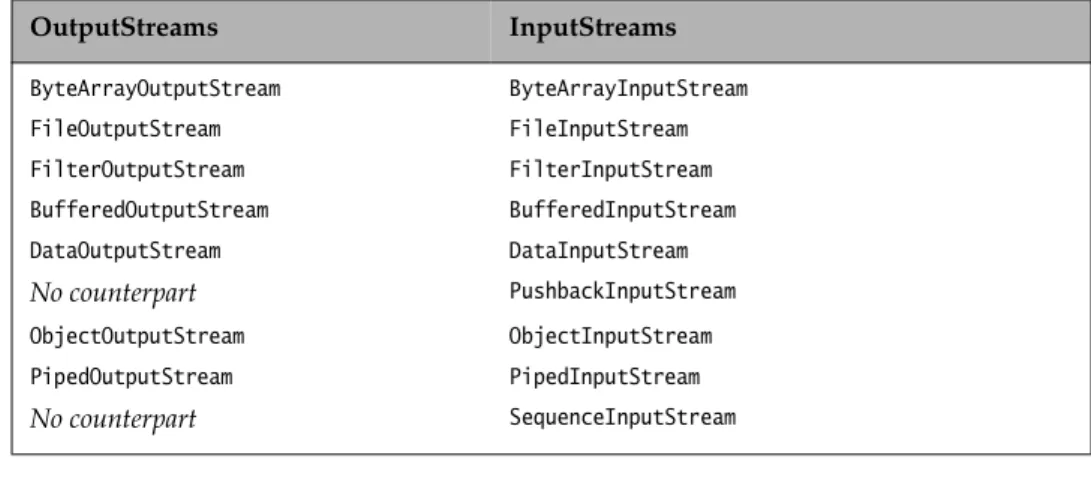
Comparison of Byte Output Streams and Input Streams
Usually an output stream has a corresponding input stream of the same type. The table below shows the correspondence between byte output and input streams. Note that not all classes have a corresponding counterpart.
BufferedInputStream(InputStream in) BufferedOutputStream(OutputStream out)
Figure 18.3 Buffering Byte Streams Object of class DataOutputStream In Xanadu did Kubla Khan A stately pleasure-dome decree: Where Alph, the sacred Object of class FileOutputStream Object of class FileInputStream Object of class DataInputStream file bytes bytes Object of class BufferedInputStream Object of class BufferedOutputStream
Review questions
18.1 Which of these can act both as an input stream and as an output stream, based on the classes provided by thejava.iopackage?
Select all valid answers. (a) A file
(b) A network connection (c) A pipe
(d) A string
(e) An array of chars
18.2 Which of these statements about the constant namedseparatorof theFileclass are true?
Select all valid answers. (a) The variable is of typechar. (b) The variable is of typeString.
(c) It can be assumed that the value of the variable always is the character'/'. (d) It can be assumed that the value of the variable always is one of'/','\'or':'. (e) The separator can consist of more than one character.
18.3 Which one of these methods in theFileclass will return the name of the entry, excluding the specification of the directory in which it resides?
Select the one right answer.
(a) getAbsolutePath()
(b) getName()
(c) getParent()
(d) getPath()
(e) None of the above.
Table 18.4 Comparing Output Streams and Input Streams
OutputStreams InputStreams ByteArrayOutputStream ByteArrayInputStream FileOutputStream FileInputStream FilterOutputStream FilterInputStream BufferedOutputStream BufferedInputStream DataOutputStream DataInputStream No counterpart PushbackInputStream ObjectOutputStream ObjectInputStream PipedOutputStream PipedInputStream No counterpart SequenceInputStream
18.4 What will the methodlength()in the classFilereturn? Select the one right answer.
(a) The number of characters in the file. (b) The number of kilobytes in the file. (c) The number of lines in the file. (d) The number of words in the file. (e) None of the above.
18.5 A file is readable but not writable on the file system of the host. What will be the result of calling the methodcanWrite()on aFileobject representing this file? Select the one right answer.
(a) ASecurityExceptionis thrown. (b) The boolean valuefalseis returned. (c) The boolean valuetrueis returned.
(d) The file is modified from being unwritable to being writable. (e) None of the above.
18.6 What is the type of the parameter given to the methodrenameTo()in the classFile? Select the one right answer.
(a) File
(b) FileDescriptor
(c) FileNameFilter
(d) String
(e) char[]
18.7 Ifwrite(0x01234567)is called on an instance ofOutputStream, what will be written to
the destination of the stream? Select the one right answer.
(a) The bytes0x01,0x23,0x34,0x45and0x67, in that order. (b) The bytes0x67,0x45,0x34,0x23and0x01, in that order. (c) The byte0x01.
(d) The byte0x67. (e) None of the above.
18.8 Given the following code, under which circumstances will the method return
false?
public static boolean test(InputStream is) throws IOException { int value = is.read();
return value == (value & 0xff); }
(a) A character of more than 8 bits was read from the stream. (b) An I/O error occurred.
(c) Never.
(d) The end of the input was reached in the input stream.
18.9 Which of these classes provides methods for writing binary representations of primitive Java types?
Select all valid answers.
(a) DataOutputStream
(b) FileOutputStream
(c) ObjectOutputStream
(d) PrintStream
(e) BufferedOutputStream
18.4 Character Streams: Readers and Writers
Acharacter encodingis a scheme for representing characters. Java programs repre-sent characters internally in the 16-bit Unicode character encoding, but the host platform might use another character encoding to represent characters externally. For example, the ASCII (American Standard Code for Information Interchange) character encoding is widely used to represent characters on many platforms. However, it is only one small subset of the Unicode standard.
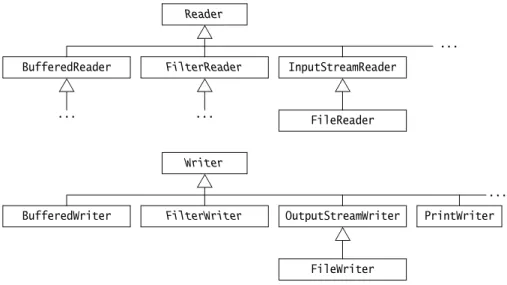
The abstract classesReaderandWriterare the roots of the inheritance hierarchies for streams that read and writeUnicode charactersusing a specific character encoding.
Figure 18.4 Character Stream Inheritance Hierarchies BufferedReader ... FilterReader InputStreamReader ... Reader ... FileReader
BufferedWriter FilterWriter OutputStreamWriter
...
Writer
FileWriter
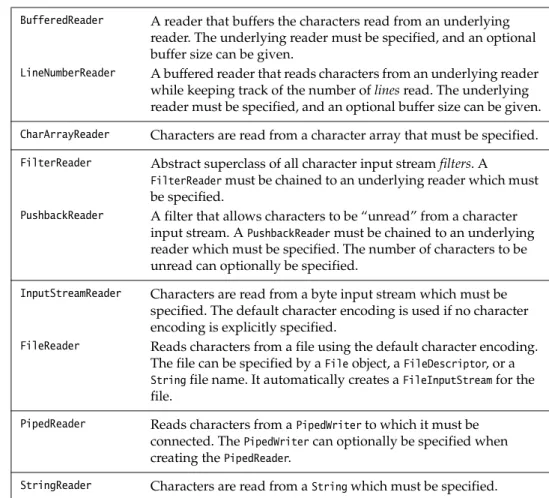
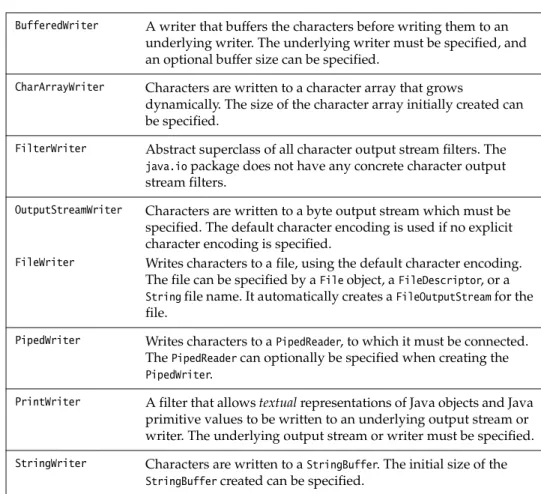
Areaderis an input character stream that reads a sequence of Unicode characters, and awriteris an output character stream that writes a sequence of Unicode char-acters. Character encodings are used by readers and writers to convert between external encoding and internal Unicode characters. Table 18.5 and Table 18.6 give an overview of the character streams found in thejava.iopackage.
Readers use the following methods for reading Unicode characters:
Table 18.5 Readers
BufferedReader A reader that buffers the characters read from an underlying
reader. The underlying reader must be specified, and an optional buffer size can be given.
LineNumberReader A buffered reader that reads characters from an underlying reader
while keeping track of the number oflinesread. The underlying reader must be specified, and an optional buffer size can be given.
CharArrayReader Characters are read from a character array that must be specified. FilterReader Abstract superclass of all character input streamfilters. A
FilterReadermust be chained to an underlying reader which must be specified.
PushbackReader A filter that allows characters to be “unread” from a character
input stream. APushbackReadermust be chained to an underlying reader which must be specified. The number of characters to be unread can optionally be specified.
InputStreamReader Characters are read from a byte input stream which must be specified. The default character encoding is used if no character encoding is explicitly specified.
FileReader Reads characters from a file using the default character encoding.
The file can be specified by aFileobject, aFileDescriptor, or a
Stringfile name. It automatically creates aFileInputStreamfor the file.
PipedReader Reads characters from aPipedWriterto which it must be connected. ThePipedWritercan optionally be specified when creating thePipedReader.
StringReader Characters are read from aStringwhich must be specified.
int read() throws IOException
int read(char cbuf[]) throws IOException
int read(char cbuf[], int off, int len) throws IOException
Note that the read()methods read an int in the range 0 to 65535 (0x0000– 0xFFFF), i.e. a Unicode character. The value –1 is returned if the end of file has been reached.
long skip(long n) throws IOException
Writers use the following methods for writing Unicode characters:
Table 18.6 Writers
BufferedWriter A writer that buffers the characters before writing them to an
underlying writer. The underlying writer must be specified, and an optional buffer size can be specified.
CharArrayWriter Characters are written to a character array that grows
dynamically. The size of the character array initially created can be specified.
FilterWriter Abstract superclass of all character output stream filters. The java.iopackage does not have any concrete character output stream filters.
OutputStreamWriter Characters are written to a byte output stream which must be
specified. The default character encoding is used if no explicit character encoding is specified.
FileWriter Writes characters to a file, using the default character encoding. The file can be specified by aFileobject, aFileDescriptor, or a
Stringfile name. It automatically creates aFileOutputStreamfor the file.
PipedWriter Writes characters to aPipedReader, to which it must be connected. ThePipedReadercan optionally be specified when creating the
PipedWriter.
PrintWriter A filter that allowstextualrepresentations of Java objects and Java
primitive values to be written to an underlying output stream or writer. The underlying output stream or writer must be specified.
StringWriter Characters are written to aStringBuffer. The initial size of the
StringBuffercreated can be specified.
void write(int c) throws IOException
Thewrite()method takes anintas argument, but only writes out the least
significant 16 bits.
void write(char[] cbuf) throws IOException void write(String str) throws IOException
void write(char[] cbuf, int off, int len) throws IOException void write(String str, int off, int len) throws IOException
These methods write the characters from an array of characters or a string.
void close() throws IOException void flush() throws IOException
Like byte streams, a character stream should be closed when no longer needed, to free system resources. Closing a character output stream automatically
Like byte streams, many methods of the character stream classes throw an
IOExceptionthat a calling method must either catch explicitly, or specify in athrows
clause.
Character Encodings
Every platform has adefaultcharacter encoding that can be used by readers and writers to convert between external encodings and internal Unicode characters. Readers and writers can also explicitly specify which encoding schemes to use for reading and writing. Some common encoding schemes are given in Table 18.7.
Not all Unicode characters can be represented in other encoding schemes. In that case, the'?'character is usually used to denote any such character in the resulting output, during translation from Unicode.
The raw 16-bit Unicode is not particularly space efficient for storing characters derived from the Latin alphabet, because the majority of the characters can be represented by one byte (same as ASCII), making the higher byte in the 16-bit Unicode superfluous. For this reason, Unicode characters are usually encoded externally, using the UTF8 encoding which has a multi-byte encoding format. It represents ASCII characters as one-byte characters but uses multiple bytes for others. The readers and writers can correctly and efficiently translate between UTF8 and Unicode.
The class OutputStreamWriter implements writers that can translate Unicode characters into bytes, using a character encoding which can be either the default encoding of the host platform or an encoding that is explicitly specified, and write the resulting bytes to a byte output stream:
Table 18.7 Encoding Schemes
Encoding Name Character Set Name
8859_1 ISO Latin-1 (subsumes ASCII)
8859_2 ISO Latin-2
8859_3 ISO Latin-3
8859_4 ISO Latin/Cyrillic
UTF8 Standard UTF-8 (UCS Transformation Format; UCS stands for
Universal Character Set) (subsumes ASCII)
OutputStreamWriter(OutputStream out)
This creates a writer that uses the default character encoding.
OutputStreamWriter(OutputStream out, String encodingName) throws UnsupportedEncodingException
The classInputStreamReaderimplements readers that can read bytes in the default character encoding or a particular character encoding from an input stream, and translate them to Unicode characters:
AnInputStreamReaderor anOutputStreamWritercan be queried about the encoding
scheme it uses:
TheOutputStreamWriterand theInputStreamReaderclasses provide methods for
writ-ing and readwrit-ing individual characters and arrays of characters to and from byte streams. TheOutputStreamWriterclass in addition provides a method for writing strings to byte output streams.
The rest of this section provides examples that illustrate readers and writers for handling text files, including textual representation of Java primitive values and objects,and usage of character encodings.
Print Writers
The capabilities of the OutputStreamWriter and the InputStreamReader classes are limited, as they primarily write and read characters.
In order to write textual representation of Java primitive values and objects, a
PrintWritershould be chained to either a writer or a byte output stream, using one
of the following constructors:
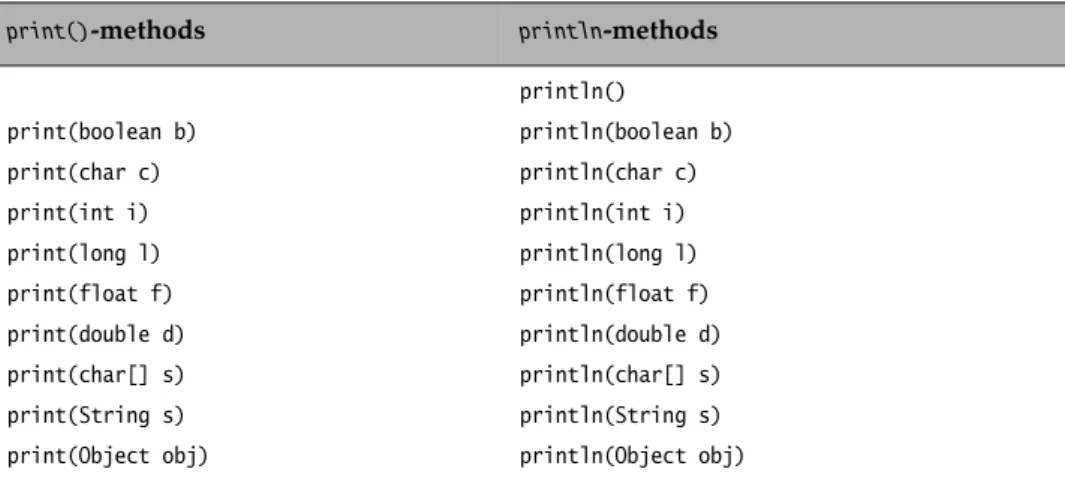
ThePrintWriterclass provides the following methods for writing textual
repres-entation of Java primitive values and objects:
InputStreamReader(InputStream in)
This creates a reader that reads bytes in the default character encoding.
InputStreamReader(InputStream in, String encodingName) throws UnsupportedEncodingException
This creates a reader that reads bytes in the specified character encoding.
String getEncoding()
PrintWriter(Writer out)
PrintWriter(Writer out, boolean autoFlush) PrintWriter(OutputStream out)
PrintWriter(OutputStream out, boolean autoFlush)
TheautoFlushargument specifies whether thePrintWritershould be flushed
when anyprintln()method of thePrintWriterclass is called.
When the underlying writer is specified, the character encoding supplied by the underlying writer is used. However, anOutputStreamhas no notion of any character encoding, so the necessary intermediateOutputStreamWriteris auto-matically created, which will convert characters into bytes, using the default character encoding.
The println() methods write the text representation of their argument to the underlying stream, and then append aline-separator. Theprintln()methods use the correct platform-dependent line-separator. For example, on Unix platforms the line-separator is'\n'(linefeed), while on Windows platforms it is"\r\n"(carriage return + linefeed) and on the Macintosh it is'\r'(carriage return).
The print()methods create a textual representation of an object by calling the
toString()method on the object. Theprint()methods do not throw anyIOException.
Instead, thecheckError()method of thePrintWriterclass must be called to check for errors.
Writing Text Files
When writing text to a file using the default character encoding, the following three procedures for setting up aPrintWriterare equivalent.
Setting up a PrintWriter based on an OutputStreamWriter which is chained to a
FileOutputStream(Figure 18.5a):
1. Create aFileOutputStream:
FileOutputStream outputFile = new FileOutputStream("info.txt"); 2. Create anOutputStreamWriterwhich is chained to theFileOutputStream:
OutputStreamWriter outputStream = new OutputStreamWriter(outputFile);
The OutputStreamWriter uses the default character encoding for writing the
characters to the file.
3. Create aPrintWriterwhich is chained to theOutputStreamWriter: PrintWriter printWriter1 = new PrintWriter(outputStream, true);
Table 18.8 Print Methods of thePrintWriterClass
print()-methods println-methods
println() print(boolean b) println(boolean b) print(char c) println(char c) print(int i) println(int i) print(long l) println(long l) print(float f) println(float f) print(double d) println(double d) print(char[] s) println(char[] s) print(String s) println(String s)
Setting up aPrintWriterbased on aFileOutputStream (Figure 18.5b): 1. Create aFileOutputStream:
FileOutputStream outputFile = new FileOutputStream("info.txt"); 2. Create aPrintWriterwhich is chained to theFileOutputStream:
PrintWriter printWriter2 = new PrintWriter(outputFile, true);
The intermediateOutputStreamWriterto convert the characters using the default encoding is automatically supplied.
Setting up aPrintWriterbased on aFileWriter(Figure 18.5c): 1. Create aFileWriterwhich is a subclass ofOutputStreamWriter:
FileWriter fileWriter = new FileWriter("info.txt");
This is equivalent to having anOutputStreamWriterchained to aFileOutputStream
for writing the characters to the file, as shown in Figure 18.5a. 2. Create aPrintWriterwhich is chained to theFileWriter:
PrintWriter printWriter3 = new PrintWriter(fileWriter, true);
Figure 18.5 Setting up a Print Writer
In Xanadu did Kubla Khan A stately pleasure-dome decree: Where Alph, the sacred Object of class OutputStreamWriter text file characters Object of class FileOutputStream Object of class PrintWriter In Xanadu did Kubla Khan A stately pleasure-dome decree: Where Alph, the sacred text file characters Object of class FileOutputStream Object of class PrintWriter In Xanadu did Kubla Khan A stately pleasure-dome decree: Where Alph, the sacred text file characters Object of class FileWriter Object of class PrintWriter (a) (b) (c)
If a specific character encoding is desired for the writer, then the first procedure (Figure 18.5a) must be used, the encoding being specified for the OutputStream
Writer:
FileOutputStream outputFile = new FileOutputStream("info.txt");
OutputStreamWriter outputStream = new OutputStreamWriter(outputFile, "8859_1"); PrintWriter printWriter4 = new PrintWriter(outputStream, true);
This writer will use the 8859_1 character encoding to write the characters to the file.
ABufferedWritercan be used to improve the efficiency of writing to the underlying
stream.
Reading Text Files
Java primitive values and objects cannot be read directly from their textual repres-entation. Characters must be read and converted to the relevant values explicitly. One common strategy is to writelines of textand tokenize the characters as they are read, a line at a time.
When reading characters from a file using the default character encoding, the following two procedures for setting up anInputStreamReaderare equivalent. Set up anInputStreamReaderwhich is chained to aFileInputStream(Figure 18.6a): 1. Create aFileInputStream:
FileInputStream inputFile = new FileInputStream("info.txt"); 2. Create anInputStreamReaderwhich is chained to theFileInputStream:
InputStreamReader reader = new InputStreamReader(inputFile);
The InputStreamReader uses the default character encoding for reading the
characters from the file.
Figure 18.6 Setting up Readers
In Xanadu did Kubla Khan A stately pleasure-dome decree: Where Alph, the sacred Object of class FileInputStream Object of class InputStreamReader text file characters In Xanadu did Kubla Khan A stately pleasure-dome decree: Where Alph, the sacred Object of class FileReader text file characters (a) (b)
Set up aFileReaderwhich is a subclass ofInputStreamReader(Figure 18.6b): 1. Create aFileReader:
FileReader fileReader = new FileReader("info.txt");
This is equivalent to having anInputStreamReaderchained to aFileInputStream
for reading the characters from the file, using the default character encoding. If a specific character encoding is desired for the reader, then the first procedure must be used (Figure 18.6a), the encoding being specified for theInputStreamReader:
FileInputStream inputFile = new FileInputStream("info.txt");
InputStreamReader reader = new InputStreamReader(inputFile, "8859_1");
This reader will use the 8859_1 character encoding to read the characters from the file.
Buffered Character Streams
To improve the efficiency of I/O operations, readers and writers can buffer their input and output. For this purpose, aBufferedWriteror a BufferedReader can be chained to the underlying writer or reader, respectively:
TheBufferedReaderclass provides the methodreadLine()to read a line of text from
the underlying reader:
TheBufferedWriterclass provides the methodnewLine()for writing the
platform-dependent line-separator.
Using Buffered Writers
The following code creates aPrintWriterwhose output is buffered, and the charac-ters are written using the 8859_1 character encoding (Figure 18.7a):
FileOutputStream outputFile = new FileOutputStream("info.txt");
OutputStreamWriter outputStream = new OutputStreamWriter(outputFile, "8859_1"); BufferedWriter bufferedWriter1 = new BufferedWriter(outputStream);
PrintWriter printWriter1 = new PrintWriter(bufferedWriter1, true); The following code creates aPrintWriterwhose output is buffered, and the charac-ters are written using the default character encoding (Figure 18.7b):
BufferedWriter(Writer out)
BufferedWriter(Writer out, int size) BufferedReader(Reader in)
BufferedReader(Reader in, int size)
The default buffer size is used, unless the buffer size is explicitly specified.
String readLine() throws IOException
The nullvalue is returned when the end of input is reached. The returned string must explicitly be converted to other values.
FileWriter fileWriter = new FileWriter("info.txt"); BufferedWriter bufferedWriter2 = new BufferedWriter(fileWriter); PrintWriter printWriter2 = new PrintWriter(bufferedWriter2, true);
Note that in both cases thePrintWriteris used to write the characters. TheBuffered
Writeris sandwiched between the PrintWriter and the underlyingOutputStream
Writer.
Using Buffered Readers
The following code creates aBufferedReaderthat can be used to read text lines from a file, using the 8859_1 character encoding (Figure 18.8a):
FileInputStream inputFile = new FileInputStream("info.txt");
InputStreamReader reader = new InputStreamReader(inputFile, "8859_1"); BufferedReader bufferedReader1 = new BufferedReader(reader);
The following code creates aBufferedReaderthat can be used to read text lines from a file, using the default character encoding (Figure 18.8b):
FileReader fileReader = new FileReader("lines.txt"); BufferedReader bufferedReader2 = new BufferedReader(fileReader);
Note that in both cases theBufferedReaderobject is used to read the text lines. In contrast to Example 18.3, which demonstrated the reading and writing of binary representations of primitive data values, Example 18.4 shows the reading and writ-ing of textual representations of primitive data values.
Figure 18.7 Buffered Writers
In Xanadu did Kubla Khan A stately pleasure-dome decree: Where Alph, the sacred Object of class OutputStreamWriter text file characters Object of class FileOutputStream Object of class PrintWriter (a) Object of class BufferedWriter In Xanadu did Kubla Khan A stately pleasure-dome decree: Where Alph, the sacred text file characters Object of class FileWriter Object of class PrintWriter (b) Object of class BufferedWriter
The CharEncodingDemo class in Example 18.4 writes textual representations of Java primitive values, using the 8859_1 character encoding (Figure 18.7a). The
PrintWriteris buffered. Its underlying writer uses the specified encoding, as shown
at (1). Values are written out with one value on each line, as shown at (2), and the writer is closed, as shown at (3). The example uses the same character encoding to read the values. ABufferedReaderis created (Figure 18.8a). Its underlying reader uses the specified encoding, as shown at (4). The values are read in the same order they were written out, one value per line. The line is explicitly converted to an appropriate value, as shown at (5). TheBufferedReaderis closed, as shown at (6), and the values are echoed on the terminal, as shown at (7). Note the exceptions that are specified in thethrowsclause of themain()method.
Example 18.4 Demonstrating Readers and Writers, and Character Encoding import java.io.*;
public class CharEncodingDemo {
public static void main(String args[])
throws IOException, NumberFormatException {
// character encoding. (1)
FileOutputStream outputFile = new FileOutputStream("info.txt");
OutputStreamWriter writer = new OutputStreamWriter(outputFile, "8859_1"); BufferedWriter bufferedWriter1 = new BufferedWriter(writer);
PrintWriter printWriter = new PrintWriter(bufferedWriter1, true); System.out.println("Writing using encoding: " + writer.getEncoding()); // Print Java primitive values, one on each line. (2) printWriter.println(true);
printWriter.println('A');
printWriter.println(Byte.MAX_VALUE);
Figure 18.8 Buffered Readers
In Xanadu did Kubla Khan A stately pleasure-dome decree: Where Alph, the sacred Object of class FileInputStream Object of class InputStreamReader text file characters (a) Object of class BufferedReader In Xanadu did Kubla Khan A stately pleasure-dome decree: Where Alph, the sacred Object of class FileReader text file characters (b) Object of class BufferedReader
printWriter.println(Short.MIN_VALUE); printWriter.println(Integer.MAX_VALUE); printWriter.println(Long.MIN_VALUE); printWriter.println(Float.MAX_VALUE); printWriter.println(Math.PI);
// Close the writer, which also closes the underlying stream (3) printWriter.close();
// Create a BufferedReader which uses 8859_1 character encoding (4) FileInputStream inputFile = new FileInputStream("info.txt");
InputStreamReader reader = new InputStreamReader(inputFile, "8859_1"); BufferedReader bufferedReader = new BufferedReader(reader);
System.out.println("Reading using encoding: " + reader.getEncoding()); // Read Java primitive values in the same order they (5) // were written out, one on each line
boolean v = bufferedReader.readLine().equals("true")? true : false; char c = bufferedReader.readLine().charAt(0);
byte b = (byte) Integer.parseInt(bufferedReader.readLine()); short s = (short) Integer.parseInt(bufferedReader.readLine()); int i = Integer.parseInt(bufferedReader.readLine());
long l = Long.parseLong(bufferedReader.readLine()); float f = Float.parseFloat(bufferedReader.readLine()); double d = Double.parseDouble(bufferedReader.readLine());
// Close the reader, which also closes the underlying stream (6) bufferedReader.close();
// Write the values read on the terminal (7)
System.out.println("Values:"); System.out.println(v); System.out.println(c); System.out.println(b); System.out.println(s); System.out.println(i); System.out.println(l); System.out.println(f); System.out.println(d); } }
Output from the program:
Writing using encoding: ISO8859_1 Reading using encoding: ISO8859_1 Values: true A 127 -32768 2147483647 -9223372036854775808 3.4028235E38 3.141592653589793
Terminal I/O
Thestandard outputstream (usually the screen) is represented by thePrintStream
objectSystem.out. Thestandard inputstream (usually the keyboard) is represented by theInputStreamobjectSystem.in. In other words, it is a byte input stream. The
standard errorstream (also usually the screen) is represented bySystem.errwhich is another object of thePrintStreamclass. ThePrintStreamclass is now mostly deprec-ated, but itsprint()methods, which act as correspondingprint()methods from
thePrintWriterclass, can still be used to write output toSystem.outandSystem.err.
In other words, bothSystem.outandSystem.erract likePrintWriter, but in addition they havewrite()methods for writing bytes.
In order to read and translate characters correctly and efficiently,System.inshould be chained to anInputStreamReaderthat in turn should be buffered:
InputStreamReader inStream = new InputStreamReader(System.in); BufferedReader stdInStream = new BufferedReader(inStream);
In this case, the default character encoding is used to translate the characters. In Example 18.5, aBufferedReaderis chained to anInputStreamReaderthat in turn is chained toSystem.in, as shown at (1). This allows the characters from the standard input stream to be buffered and read using the default character encoding. The
BufferedReaderin the example always reads a whole line at a time from the
ter-minal. If a line of text is requested, the whole line read is returned, as shown at (3). If anintis to be read, the line is parsed to anint, as shown at (5). If adoubleis to be read, the line is parsed to adouble, as shown at (7). Note the exception handling that is necessary to read a line of characters and ensure that it contains a valid numer-ical value.
The Java class libraries provide a class namedjava.text.NumberFormatthat can be used to format numeric values according to a specified locale. At (8), the example uses a NumberFormat object created to format values according to the locale
java.util.Locale.US.
Example 18.5 Demonstrating Terminal I/O import java.io.*; import java.text.*; import java.util.*; public final class Stdin {
// A BufferedReader chained to an InputStreamReader chained to an InputStream. private static BufferedReader reader = new BufferedReader( // (1)
new InputStreamReader(System.in) );
// Read one line of text from the terminal and return it as a string.
public static String readLine() { // (2)
while (true) try {
} catch(IOException ioe) { reportError(ioe); }
}
// Read one integer value from the terminal.
public static int readInteger() { // (4)
while (true) try {
return Integer.parseInt(reader.readLine()); // (5) } catch (IOException ioe) {
reportError(ioe);
} catch(NumberFormatException nfe) { reportError(nfe);
} }
// Read one double value from the terminal.
public static double readDouble() { // (6)
while (true) try {
return Double.parseDouble(reader.readLine()); // (7) } catch(IOException ioe) { reportError(ioe); } catch(NumberFormatException nfe) { reportError(nfe); } }
private static void reportError(Exception e) { System.err.println("Error in input: " + e); System.err.println("Please re-enter data."); }
public static void main(String args[]) { System.out.println("Input a string:"); String str = Stdin.readLine(); System.out.println("Input an integer:"); int i = Stdin.readInteger(); System.out.println("Input a double:"); double d = Stdin.readDouble();
NumberFormat formatter = NumberFormat.getInstance(Locale.US); // (8) System.out.println("Data read:"); System.out.println(str); System.out.println(formatter.format(i)); System.out.println(formatter.format(d)); } }
Output from the program: Input a string: Habari Input an integer: 0201596148 Input a double: 47.584152
Data read: Habari 201,596,148 47.584
Comparison of Character Writers and Readers
Usually a writer has a corresponding reader. Table 18.9 shows the correspondence between character output and character input streams. Note that not all classes have a corresponding counterpart.
Comparison of Byte Streams and Character Streams
It is instructive to see which byte streams correspond to which character streams. Table 18.10 shows the correspondence between byte and character streams. Note that not all classes have a corresponding counterpart.
Table 18.9 Correspondence between Writers and Readers
Writers Readers BufferedWriter BufferedReader No counterpart LineNumberReader CharArrayWriter CharArrayReader FilterWriter FilterReader No counterpart PushbackReader OutputStreamWriter InputStreamReader FileWriter FileReader PipedWriter PipedReader PrintWriter No counterpart StringWriter StringReader
Table 18.10 Correspondence between Byte Streams and Character Streams
Byte Streams Character Streams
OutputStream Writer InputStream Reader ByteArrayOutputStream CharArrayWriter ByteArrayInputStream CharArrayReader No counterpart OutputStreamWriter No counterpart InputStreamReader
Review questions
18.10 Which of these are valid parameter types for thewrite()methods of theWriter
class?
Select all valid answers. (a) TypeString
(b) Typechar
(c) Typechar[]
(d) Typeint
18.11 What is the default encoding for anOutputStreamWriter? Select the one right answer.
(a) 8859_1 (b) UTF8 (c) Unicode
(d) The default is system-dependent.
(e) The default is not system-dependent, but is none of the above.
FileOutputStream FileWriter FileInputStream FileReader FilterOutputStream FilterWriter FilterInputStream FilterReader BufferedOutputStream BufferedWriter BufferedInputStream BufferedReader PrintStream PrintWriter DataOutputStream No counterpart DataInputStream No counterpart ObjectOutputStream No counterpart ObjectInputStream No counterpart PipedOutputStream PipedWriter PipedInputStream PipedReader No counterpart StringWriter No counterpart StringReader No counterpart LineNumberReader PushbackInputStream PushbackReader SequenceInputStream No counterpart
Table 18.10 Correspondence between Byte Streams and Character Streams (continued)
18.12 Which of these integer types do not have their own print() method in the
PrintWriterclass?
Select all valid answers. (a) byte
(b) char
(c) int
(d) long
(e) All have their ownprint()method.
18.13 How can one access the standard error stream? Select all valid answers.
(a) It is accessed as a member of the classSystem.err.
(b) It is accessed as a static variable namedoutin the classSystem. (c) It is accessed as a static variable namederrin the classSystem. (d) It is accessed as a static variable namederrin the classRuntime. (e) It is returned by a method in the classSystem.
18.5 Random Access for Files
TheRandomAccessFileclass implementsdirect access for files, i.e. bytes can be read
from or written to any specified location in a file. TheRandomAccessFileclass inher-its directly from theObjectclass. It implements both theDataInputandDataOutput
interfaces, meaning that Java primitive values can be written and read from a random access file. However, note that objects of theRandomAccessFileclass cannot be chained with streams.
A random access file must be created and assigned to a file, before it can be used.
RandomAccessFile(String name, String mode) throws IOException RandomAccessFile(File file, String mode) throws IOException
The file is specified by a file name or by aFileobject. The mode argument must be equal to either"r"(for reading) or"rw"(for both reading and writing), other-wise an IllegalArgumentException is thrown. Note that opening the file for writing does not reset the contents of the file. The file should have the access specified in the constructor.
Figure 18.9 Random Access File Inheritance Hierarchy
java.lang.Object
Afile pointerindicates the next location in the file where bytes can be read from or written to. The current position of the file pointer can be obtained by using the
getFilePointer()method:
The number of bytes in the file can be obtained by using thelength()method:
The file pointer can be positioned using theseek()method:
When a random access file is no longer needed, it should be closed, to free the resources:
Example 18.6 illustrates usage of random access files. The program creates a file and writes the byte representation of the squares of numbers from 0 to 9. It then reads the squares of odd numbers back from the file, using direct access. The squares are represented asintvalues. The file is then extended with the squares of numbers from 10 to 19, and again the squares of odd numbers are read from the file. In the methodcreateFile(), the initial file is created using aRandomAccessFile
AnIOExceptionis thrown if an I/O error occurs, most notably when the mode
is"r"and the file does not exist. However, if the mode is"rw"and the file does
not exist, a new empty file is created. Regardless of the mode, if the file does exist, its file pointer is set to the beginning of the file.
ASecurityExceptionis thrown if the application does not have the necessary
access rights.
Figure 18.10 Positioning the File Pointer for Direct File Access
long getFilePointer() throws IOException
long length() throws IOException
void seek(long offset) throws IOException
Theoffsetargument specifies the position from the beginning of the file, the
first byte being at position 0. The position will be the target of the next read or write operation. See Figure 18.10.
void close() throws IOException
seek(0)
seek(length()-1) // last byte current = getFilePointer() seek(current - d)
seek(current + d) -d bytes
object with "rw" mode. The squares of odd numbers are read in the method
readFile()using aRandomAccessFileobject with"r"mode, which opens the file for
direct read access. The numbers are read after the current file pointer value is incre-mented with the size of anintvalue, thereby reading every other integer from the file, as shown at (1).
The file is extended in the methodextendFile(). The file is opened for direct read and write access. The file pointer is first positioned at the end of the file, before writing the new numbers as shown at (2).
The output from the program shows that only squares of odd numbers were read from the file.
Example 18.6 Random Access File import java.io.*;
public class RandomAccessDemo {
static String fileName = "new-numbers.data"; final static int INT_SIZE = 4;
public static void main(String args[]) { try {
RandomAccessDemo random = new RandomAccessDemo(); random.createFile();
random.readFile(); random.extendFile(); random.readFile(); } catch (IOException ex) {
System.err.println(ex); }
}
// Create a file with squares of numbers from 0 to 9. public void createFile() throws IOException {
File dataFile = new File(fileName);
RandomAccessFile outputFile = new RandomAccessFile(dataFile, "rw"); for (int i = 0; i < 10; i++)
outputFile.writeInt(i*i); outputFile.close();
}
// Read every other number from the file i.e. the squares of odd numbers public void readFile() throws IOException {
File dataFile = new File(fileName);
RandomAccessFile inputFile = new RandomAccessFile(dataFile, "r"); System.out.println("Squares of odd numbers from the file:"); long length = inputFile.length();
for (int i = INT_SIZE; i < length; i += 2 * INT_SIZE) {
inputFile.seek(i); // (1)
System.out.println(inputFile.readInt()); }
inputFile.close(); }