Addressing Performance and Security
in a Screen Reading Web Application that Enables Accessibility Anywhere
Jeffrey P. Bigham
Craig M. Prince
Department of Computer Science and Engineering
University of Washington
Seattle, WA, 98195 USA
{
jbigham, cmprince, ladner
}
@cs.washington.edu
Richard E. Ladner
Abstract
The web provides nearly ubiquitous access to informa-tion, but access for blind web users requires the use of ex-pensive, specialized software programs called screen read-ers unlikely to be installed on most computread-ers. WebAny-whereis a self-voicing, web-browsing web application that makes the web accessible for blind web users from most de-vices with web access. WebAnywhere requires no special permissions or additional software to be installed on the host machine, enabling it provide a self-voicing interface on almost any web-enabled device. WebAnywhere’s interface is written in Javascript, speech is retrieved from a remote server, and sounds are played using either Flash or exist-ing embedded sound players. This paper describes the per-formance and security implications of the system’s unique design and how it has been engineered to provide usable access anywhere. Specifically, we present prefetching and caching strategies developed to make the system responsive even on low-bandwidth connections and security consider-ations that replicate existing browser security policies.
1. Introduction
Blind computer users rely on software programs called screen readers to convert visual interfaces and information to aural speech. In addition to voicing content, screen read-ers also provide shortcut keys that make using a computer non-visually and without a mouse both more efficient and possible. Worldwide there are more than 38 million blind individuals (more than 1 million in the United States) whose access to the web depends on using a screen reader [29]. Popular screen readers are expensive, costing nearly a thou-sand dollars for each installation because of their complex-ity, relatively small market and high support costs.
Be-cause popular screen readers are expensive and beBe-cause most users do not require them for access, screen readers are not installed on most computers. Some free alternatives can be downloaded or carried on a USB drive, but involve running new software on the host computer (often not al-lowed on public terminals). This leaves blind users on-the-go unable to access the web from computer they happen to have access to and many blind users unable to afford a pricey screen reader unable to access the web at all.
WebAnywhere [7] is a self-voicing, web-browsing web application that can be used by blind individuals to access the web from almost any computer that has both an Inter-net connection and audio output. User studies with blind participants indicated that they (i) saw a need for such a system, (ii) were able to complete web-based tasks, such as checking a web-based email account or looking up a phone number, and (iii) wanted to use WebAnywhere in the future. When users open WebAnywhere’s homepage it speaks the contents of the page that is currently loaded (initially a welcome page). WebAnywhere voices both its interface and the content of the current web page. Users can navigate from this starting page to any other web page and the Web-Anywhere interface will speak those pages to the user as well. No separate software needs to be downloaded or run by the user; the system runs entirely as a web application with minimal permissions.
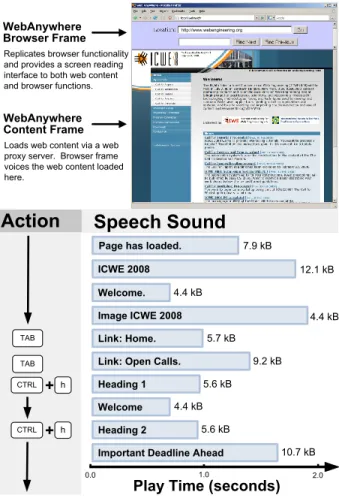
WebAnywhere includes much of the functionality cluded in existing screen readers for enabling users to in-teract with web pages. The system traverses the DOM of each loaded web page using a pre-order Depth First Search (DFS), which is approximately top-to-bottom, left-to-right in the visual page. As the system’s cursor reaches each el-ement of the DOM, it speaks the elel-ement’s textual repre-sentation to the user (Figure 1). For instance, upon reach-ing a link containreach-ing the text “Google,” it will speak “Link Google.” Users can follow the link by pressing enter. They
can also skip forward or backward in this content by sen-tence, word or character. Users can also skip through page content by headings, input elements, links, paragraphs and tables. In input fields, the system speaks the characters typed by the user and allows them to review what they have typed.
We used the following design goals while developing WebAnywhere in order to ensure that it would be accessible and usable on most computers:
1. WebAnywhere should replicate the functionality and security provided by traditional screen readers when used to browse the web.
2. In order to work on as many web-enabled devices and public computer terminals as possible, WebAnywhere should not require special software or permissions on the host machine in order to run.
3. WebAnywhere should be usable: users should not be substantially affected or aware of the engineering de-cisions made in order to satisfy the first two goals. This paper overviews the decisions that we made in or-der to create a usable system that satisfies these goals. We will first discuss the design of WebAnywhere and how it is able to provide a self-voicing interface to the web with-out requiring software to be installed or special permission on the host machine. The two key features of this are that (i) speech sounds are generated remotely and then played using generic audio players on from the browser, and (ii) the WebAnywhere interface is written entirely in client-side Javascript. We will then discuss the prefetching and caching strategies we have developed in order to reduce la-tency while retrieving speech remotely and next evaluate those strategies in realistic settings. Finally, we will dis-cuss how we have addressed security concerns raised by the unique design of WebAnywhere.
2. The WebAnywhere System
WebAnywhere is designed to function on most comput-ers that have Internet access and that can play sound. To this end, its design has carefully considered independence from a particular web browser or plugin. To facilitate its use on public systems with varying capabilities and on which users may not have permission to install new software, func-tionality that would require this has been moved to a re-mote server. The web application can play sound using several different sound players commonly available on web browsers.
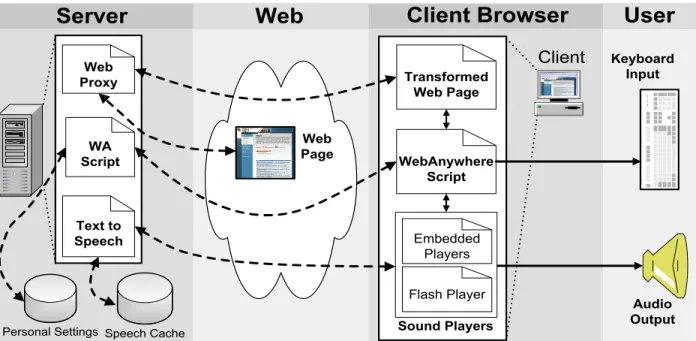
The system consists of the following three components (Figure 2): (i) client-side Javascript, which supports user in-teraction, decides which sounds to play and interfaces with
http://www.webengineering.org
Play Time (seconds)
WebAnywhere Browser Frame
Replicates browser functionality and provides a screen reading interface to both web content and browser functions.
WebAnywhere Content Frame
Loads web content via a web proxy server. Browser frame voices the web content loaded here.
Action
Speech Sound
CTRL + h
CTRL + h
TAB
Page has loaded. ICWE 2008 Welcome. Image ICWE 2008 TAB Link: Home.
Link: Open Calls. Heading 1 Welcome Heading 2
Important Deadline Ahead
0.0 1.0 2.0 7.9 kB 12.1 kB 4.4 kB 4.4 kB 4.4 kB 5.7 kB 9.2 kB 5.6 kB 5.6 kB 10.7 kB
Figure 1. Browsing the ICWE 2008 homepage with the WebAnywhere self-voicing, web-browsing web application. Users use the key-board to interact with WebAnywhere like they would with their own screen readers. Here, the user has pressed the TAB key to skip to the next focusable element, and CTRL+h to skip to the next heading element. Both web content and interfaces are voiced to enable blind web users access.
sound players to play them, (ii) server-side text-to-speech generation and caching, and (iii) a server-side transforma-tion proxy that makes web pages appear to come from a local server to overcome violations of the same-origin secu-rity policy enforced by most web browsers. WebAnywhere consists of less than 100 KB of data in four files, and that is all a user needs to download to begin using the system.
2.1. WebAnywhere Script
The client-side portion of WebAnywhere forms a self-voicing web browser that can be run inside an existing web
User
WA Script Web Proxy Personal Settings WebAnywhere Script Embedded Players Sound Players Flash Player Transformed Web PageClient
Text to Speech Speech Cache Web PageServer
Web
Client Browser
Audio Output Keyboard
Input
Figure 2. The WebAnywhere system consists of server-side components that convert text to speech and proxy web content; and client-side components that provide the user interface and coordinate what speech will be played and play the speech. Users interact with the system using the keyboard.
browser (Figure 1). The system is written in cross-browser Javascript that is downloaded from the server, allowing it to be run in most modern web browsers, including Fire-fox, Internet Explorer and Safari. The system captures all key events, allowing it to both provide a rich set of key-board commands like what users are accustomed to in their usual screen readers and to maintain control of the brow-ser window. WebAnywhere’s use of Javascript to capture a rich set of user interaction is similar to that of UsaProxy [4] and Google Analytics1, which are used to gather web usage statistics.
Web pages viewed in the system are loaded through a modified version of the web-based proxy PHProxy [3]. This enables the system to bypass the same-origin policy that prevents scripts from accessing content loaded from other domains. Without this step, the scripts retrieved from Web-Anywhere’s domain would not be able to traverse the Doc-ument Object Model (DOM) of pages that are retrieved, for instance, from google.com. Deliberately bypassing the same-origin policy can introduce security concerns, which we address in Section 6.
2.2. Producing and Playing Speech
Speech is produced on separate speech servers. Our cur-rent system uses the free Festival Text-to-Speech System
1http://analytics.google.com
[28] because it is distributed along with the Fedora Linux distribution on which the rest of the system runs. The sounds produced by the Festival Text to Speech (TTS) sys-tem are converted server-side to the MP3 format because this format can be played by most sound players already available in browsers and because it creates small files nec-essary for achieving our goal of low latency. For example, the sound “Welcome to WebAnywhere,” played when the system loads, is approximately 10k, while the single letter “t”, played when users type the letter, is 3k. See Figure 1 for more examples of how the speech sounds in WebAnywhere are generated and used.
Sounds are cached on the server so they don’t need to be generated again by the TTS service and on the client as part of the existing browser cache. For most efficient caching, WebAnywhere would generate a separate sound for each word, but this results in choppy-sounding speech. Another option would be to generate a single speech sound for an entire web page, but this would prevent the system from providing its rich interface. Sound players already installed in the browser do not support jumping to arbitrary places in a sound file as would be required when a user decides that they want to skip to the middle of the page. Instead, the system generates a separate sound for each phrase and the WebAnywhere script coordinates which sound to play based on user input.
The system primarily uses the SoundManager 2 Flash Object [26] for playing sound. This Flash object provides
a Javascript bridge between the WebAnywhere Javascript code and the Flash sound player. It provides an event-based API for sound playback that includes anonfinish
event that signals when a sound has finished playing. It is also able to begin playing sounds before they have finished downloading using streaming, which results in lower per-ceived latency. Adobe reports that version 8 or later of the Flash player, required for Sound Manager 2, is installed on 98.5% of computers [1].
To enable the system to operate on more systems, we have also developed our own Javascript API for playing speech using embedded players, such as Quicktime or the Windows Media Player. The existing API for controlling embedded players is limited and makes precise reaction to sounds that are being played difficult. While programmatic methods exist for playing and stopping audio files, they do not implement anonfinishevent that would provide a programmatic method for determining when a sound has finished playing. WebAnywhere relies on this information to tell it when it should start playing the next sound in the page when a user is reading through a page. We initially required users to manually advance sounds, but this proved cumbersome and caused the system to act differently based on which sound player was being used. It was also frus-trating for users to read a large section of a page as they have become accustomed to doing using their usual screen readers.
To enable WebAnywhere to simulate an onfinish
event for embedded sound players, the TTS service includes a header in its HTTP responses that specifies the length of each speech sound. Before programmatically embedding each sound file into the page, WebAnywhere first issues an xmlHttpRequest for the file and records the length of the returned sound. The mechanism used to retrieve sounds programmatically is the same as will be used for prefetch-ing sounds, which be discussed later. WebAnywhere then sets a timer for slightly longer than the length of the sound and finally inserts an embedded player for the sound into the navigation frame. Because the sound has already been retrieved via the programmatic request, it is located in the cache and the embedded player can start playing it almost immediately - there is a small delay for the embedded player to load and begin playing the sound. The timer is used as anonfinishevent signaling that the sound has stopped playing and the next sound in the queue of sounds to play should be played.
3. Related Work
Prior work has used transcoding proxy servers to mod-ify web content in order to produce content that is more easily viewed by users in specific groups, such as blind web users using screen readers [15, 14] or mobile phone
users viewing content on small screens [2, 8]. The AxsJAX project [12] enables ordinary web pages and web applica-tions to behave more like self-voicing applicaapplica-tions by pro-viding additional markup and shortcut keys through injected Javascript scripts. These systems all work with and require a screen reader to be installed, while, in contrast, WebAny-where modifies content in order to provide a self-voicing interface to the web directly from a web page.
Many existing products provide a screen-reading inter-face to web content (for a comprehensive survey, see [7]). Most require users to either carry expensive mobile devices with them or to download and install software on machines that they visit. These mobile devices cost more than $1,000 US when the cost for both the mobile device and the screen reader is combined, which many potential users cannot af-ford. Others may not want to be required to carry such ex-pensive devices. Importantly, many public terminals do not allow users to install new software and many existing screen readers will not run on the diversity of platforms powering web-enabled devices.
The remainder of this section first overviews available screen readers that run as processes on the client machine and then surveys self-voicing web pages that provide a speech-enabled interface to a limited portion of web con-tent.
3.1. Client Screen Readers
Traditional screen readers, such as JAWS [16] and Window-Eyes [30], run as independent processes on the client machine. These programs generate speech by query-ing separate processes on the machine responsible for TTS conversion. Because the TTS service is located on the same machine as the user, the speech is usually sent directly to the sound card of the client machine, meaning the screen reader does not need to be aware of the internals of the TTS service. Because generating speech is fast enough when only one user is requesting the service, the speech sounds generated are not generally cached. The Firefox extension Fire Vox [10] turns the Firefox browser into a self-voicing browser. Like WebAnywhere, it is implemented primarily in Javascript, but it also retrieves its speech from a local TTS server. Its Javascript operates in a privileged mode, and, therefore, can interact with the browser interface di-rectly.
The Serotek System Access Mobile (SAM) [27] reader designed is designed to run directly from a USB key on Windows computers without prior installation. It is avail-able for $500 US and still requires access to a USB port and permission to run arbitrary executables. The Serotek Sys-tem Access to Go (SA-to-Go) screen reader can be down-loaded from the web via a speech-enabled web page, but the program requires Windows, Internet Explorer, and
per-mission to run executables on the computer. This prod-uct has recently been made freely available by the AIR Foundation2, who also provide a self-voicing Flash inter-face for downloading and running the screen reader. Start-ing this system requires downloadStart-ing more than 10 MB of data, compared to WebAnywhere’s 100 kB. WebAnywhere, therefore, may be more appropriate for quickly checking email or looking up information, even on systems where SA-to-Go is able to run.
All of these existing screen readers are restricted in where they can be installed both because they require the user to have permission to install them and because each will only run on a specific platform - JAWS, Window-Eyes, and the Serotek tools require the Windows operating sys-tem and Firefox Vox requires the Firefox web browser to be installed. As a web application, WebAnywhere can run on most web-enabled devices, and remains agnostic to the specific operating system and browser that is used.
A small number of web pages voice their own content, but most have limited use as an accessible interface for screen reader users either because the scope of information that is provided is limited or because they lack an accessi-ble interface for navigation. Talklets enaaccessi-ble web developers to provide a spoken version of their web pages as a single file that users cannot control3. Scribd.com provides a un-voiced interface for converting documents to speech4, but the speech is available only as a single MP3 file that does not support interactive navigation. The National Associa-tion for the Blind, India, provides access to a porAssocia-tion of their web content via a self-voicing Flash Movie that pro-vides keyboard commands for navigation5, but the infor-mation contained in the separate Flash movie is not com-prehensive of the entire web site, which could be read by WebAnywhere. None of these techniques use caching or prefetching to improve the latency of sound retrieval. For most sounds, users must simply accept any latency, while a limited number of sounds are embedded into the Flash movie itself, making interaction fast once the movie has downloaded.
4. Reducing Latency
WebAnywhere uses remote text-to-speech conversion, and the latency of requesting, generating and retrieving speech could potentially disrupt the user experience. Be-cause the sound players used in WebAnywhere are able to play sounds soon after they begin downloading, latency is low on high-speed connections but can be noticeable on slower connections. Latency of retrieving speech is an
im-2www.accessibilityisaright.org 3www.talklets.com 4www.scribd.com 5www.nabindia.com WebAnywhere Browser Cache (MB) Server Cache (GB) Text-to-Speech Server Fast. Slower. Slow.
P
re
fe
tc
h
in
g
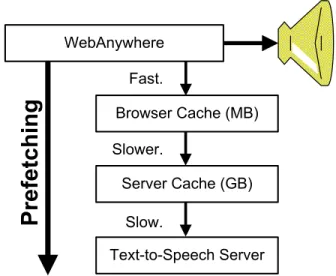
Figure 3. Retrieving sounds involves caching and prefetching on both the server and client.
portant factor in the system because it directly determines the user-perceived latency of the system. When a user hits a key, they know that the system has responded only when the sound that should be played in response to that key press is played by the system.
To reduce the perceived latency of retrieving speech, the system aggressively caches the speech that is generated by the TTS service on both the server and client. In order to increase the likelihood that the speech a user wants to be played is in the cache when they want to play it, the system can use several different prefetching strategies designed to prime these caches. Prefetching has been explored before as a way to reduce web latency [21] and has been shown to dramatically reduce the latency for general web browsing [18]. Traditional screen readers running as processes on the client machine do not require prefetching because generat-ing and playgenerat-ing sound has low latency. Web applications have long used prefetching as a mechanism for reducing the delay introduced by network latency. For instance, web applications that use dynamic images use Javascript scripts to preload images to make these changes appear more re-sponsive. The prefetching and caching strategies explored in WebAnywhere may also be useful for visually rich web applications.
4.1. Caching
The system uses caching on both the server and client browser in order to reduce the perceived latency of re-trieving speech. TTS conversion is a relatively processor-intensive task. To reduce how often speech must be gen-erated from scratch, WebAnywhere stores the speech that
is generated on a hard disk on the server. While hard disk seek times can be slow, their latency is low compared with the cost of generating the speech again.
The speech that is retrieved from the client is cached on the client machine by the browser. Most browsers maintain their own caches of files retrieved from the web, and an unprivileged web application such as WebAnywhere does not have permission to directly set either the the size of the cache or the cache replacement policy, and WebAnywhere does not attempt to do so. Flash uses the regular browser cache. Both the Internet Explorer and Firefox disk caches default to 50 Megabytes, which can hold a large number of the relatively small MP3 files used to represent speech.
The performance implications of these caching strategies are explored in Section 5.1.
4.2. Prefetching Speech
The goal of prefetching in WebAnywhere is to determine what text the user is likely to want to play as speech in the future and increase the likelihood that the speech sounds re-quested are in the web browser’s cache by the time that the user wants them to be played. The browser cache is stored in a combination of memory and hard disk, and retrieving sounds to play from it is a very low-latency operation rel-ative to retrieving sounds from the remote WebAnywhere server. The distribution of requested speech sounds is ex-pected to be Zipf-like [9], resulting in most popular sounds already likely to be in the cache, but a long tail of speech sounds that have not been generated before.
All prefetching strategies add strings to a priority queue, which a separate prefetching thread uses to prioritize which strings should be converted to speech. We explored sev-eral different strategies for deciding what strings should be given highest prefetching priority by the system. The func-tion of each strategy is to determine the priority that should be assigned to each string.
To prefetch speech sounds, the prefetching thread issues an xmlHttpRequest request for the speech sound (MP3) rep-resenting each string from its queue. This populates the browser’s local cache, so that when the sound is requested later, it is retrieved quickly from the cache. We next present several different prefetching strategies that we have imple-mented. Section 5.3 presents a comparison of these strate-gies.
4.2.1 DFS Prefetching
WebAnywhere and other screen readers traverse the DOM using a order Depth First Search (DFS). The basic pre-fetching mode of the WebAnywhere system performs a sep-arate DFS of the DOM that inserts the text that will be spo-ken for each node in the DOM into the priority queue with
a weight corresponding to its order in the DFS traversal of the DOM. This method retrieves speech sounds in the or-der in which users would reach them if they were to read through a page in the natural top-to-bottom, left-to-right or-der. If users either normally read in this order and if they do not read through the page more quickly than the prefetch-ing is able to be performed, then this strategy should work well. However, blind web users are known for leveraging the large number of shortcut keys made available by their screen readers to skip around in web content [11, 6], so it is worthwhile considering other strategies that may better address this usage.
4.2.2 DFS Prefetching + Position Update
The system could better adapt if it updated the nodes to be prefetched based on the node currently being read. This could prevent nodes that have already been skipped by the user from being prefetched and taking bandwidth that could otherwise be used to download sounds that are more likely to be played. The DFS+Update prefetching algorithm in-cludes support for changing its position in prefetching. For example, if the prefetcher is working on content near the top of the page when a user skips to the middle of the page us-ing the the find functionality, the prefetcher will be able to update its current position and continue prefetching at the new location. When the user skips ahead in the page, the priority of elements in the queue are updated to reflect the new position. These updates make prefetching more likely to improve performance.
4.2.3 DFS Prefetching + Prediction
WebAnywhere also prefetches sounds based on a personal-ized, predictive model of user behavior. The shortcut keys supported by the system are rich, but users frequently em-ploy only a few. Furthermore, users do not randomly skip through the page; meaning that, the likelihood that a user will issue each keyboard shortcut can be inferred from such factors as the keys that they previously pressed and the node that is currently being read. For instance, a user who has pressed TAB to move from one link to the next is more likely to press TAB again upon reaching another link than is a user who has been reading through the page sequentially. Similarly, some users may frequently skip forward by form element, while others may rarely do so.
To use such behavior patterns to improve the efficacy of prefetching, WebAnywhere records each user’s interactions with the system and uses this empirical data to construct a predictive model. The model is used to predict which ac-tions the user is most likely to take at each point, helping to direct the prefetcher to retrieve those sounds most likely to be played. An action is defined as a shortcut key pressed by the user. WebAnywhere records the history of actions
performed by the user and the history of the current node types associated with each. The system distinguishes three types: link, input element, and other. These actions were chosen because they roughly align with the most popular actions currently implemented in the system and could be expanded in the future.
The probability of the next actionactionibeing actionx assuming that the next action depends only on prior obser-vations of actions and visited nodes is as follows:
P(actioni =x|node0, ..., nodei, action0, ..., actioni−1) WebAnywhere uses the standard Markov assumption to estimate this probability by looking back only one time step [25]. Therefore, the probability that the user’s next action is
xgiven the type of the current node and the user’s previous action can be expressed as follows:
P(actioni=x|nodei, actioni−1)
All actions are initially assigned uniform probability. These probabilities are dynamically updated as the system is used and sounds in the priority queue are weighted using them. To be specific, for each possible condition (combi-nation of previous action and type of the current node)w, a countcw(x)is maintained. The count for each possible condition is initially set to1and is incremented by 1 when the event xoccurs in conditionw. An event xis defined as the user taking a specified action while in a particular condition. The probability of each new action can then be calculated as follows:
P(actioni=x|nodei, actioni−1=w) =
cw(x)/Pycw(y).
WebAnywhere reweights nodes in the priority queue used for prefetching according to these probabilities. Sec-tion 5.2 presents an evaluaSec-tion of the accuracy of predictive prefetching.
5. Evaluation
We evaluated the system along several dimensions, in-cluding both how caching improves the performance of the system and the load that it can withstand, and the accuracy and latency effects of the prefetch strategies discussed in Section 4.2.
5.1. Server Load
In order for us to release the system, we must be able to support a reasonable number of simultaneous users per ma-chine. In this section, we present our evaluation the perfor-mance of the WebAnywhere speech retrieval system under
0
No Cache Server Cache Server + Browser Cache
Number of Simultaneous Users
A ve ra g e L at en cy ( se c) 1 2 3 4 5 10 15 20 5 6
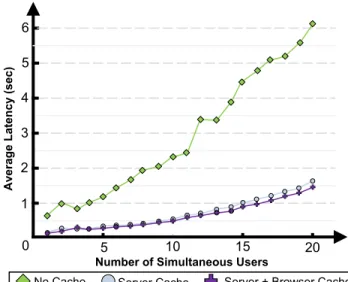
Figure 4. An evaluation of server load as the number of simultaneous users reading news.google.com is increased for 3 different caching combinations.
increasing load, while varying the caching and prefetching strategies used by the system.
We chose to evaluate the latency of sound retrieval be-cause it will contribute most to the perceived latency of the system. When users press a key, they expect the appropri-ate speech sound to be played immediappropri-ately. The TTS sys-tem and cache were running on a single machine with a 2.26 GHz Intel Pentium 4 Processor and 1 GB of memory. To implement this evaluation, we first recorded the first 250 requests that the system made for speech sounds when read-ing news.google.com from top to bottom. This represented a total of 446 seconds of speech with an average file size of 11.7 kB over the 250 retrieved files. A multi-threaded script was used to replay those requests for any number of users. The script first retrieves a speech sound and then waits for the length of the speech sound. It repeats this process until all of the recorded sounds have completed, reproducing the requests that WebAnywhere would make when reading the page. This script was run on a separate machine that issued requests over a high-speed connection to the WebAnywhere server.
We tested the following three caching conditions: (i) both server and browser caching enabled, (ii) only server caching enabled, and (iii) no caching enabled. Speech sounds were assumed to be in the server cache when it was used. Speech sounds were added to the browser cache as they were retrieved. Figure 4 presents the results of our evaluation, which demonstrates that TTS production is the major bottleneck in the system. Latency of retrieved speech quickly increases as the system attempts to serve
more than 10 users. With server-side caching, this is dra-matically improved. Client-side caching in the browser im-proves slightly more, although its effect is limited because in this example because relatively few speech sounds are repeated. Repeated sounds include “link,” which is said be-fore each link that is read, and “Associated Press,” which appears frequently because this is a news site. As we move toward releasing WebAnywhere to a larger audience, we will continue to evaluate its performance under real-world conditions.
A number of assumptions were made that may not be up-held in practice. For example, the system will not achieve the perfect server-side cache hit-rate assumed here, al-though both the server and browser caches will likely have had more opportunity to be primed when users read through multiple pages. Most users also do not read pages straight through. As we have observed users using the system, we have seen users most often skipping around through the page, often returning to nodes that they had visited be-fore, causing speech already retrieved by the browser to be played again. In this initial system we have also not opti-mized the TTS generation or the cache routines themselves but could likely achieve better results by doing so. Finally, latency here was calculated as the delay between when a speech sound was requested and when it was retrieved. In practice, the Flash sound player can stream sounds and be-gin playing them much earlier. Despite its limitations, this evaluation generally illustrates the performance of the cur-rent system and future development should be targeted.
5.2. Prefetching Accuracy
This section presents an analysis of the predictive power of the DFS+Prediction method described in Section 4.2.3. To conduct this study we collected traces of the interactions of 3 users of WebAnywhere in a study that we previously presented [7]. In that study, users completed the following four tasks using WebAnywhere: checking their email on gmail.com, looking up the next arrival of a bus, finding the phone number of a restaurant using google.com and com-pleting a web survey about WebAnywhere.
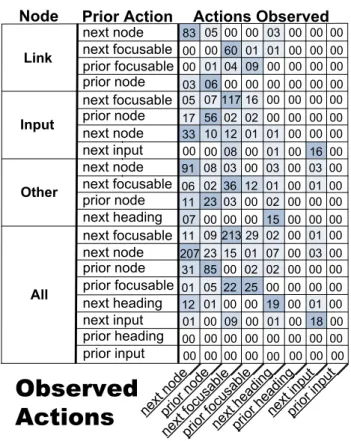
In total, we recorded 2632 individual key presses. 1110 of these were not command key presses and resulted in the name of a key being spoken, for instance “a” or “for-ward slash.” The system prefetches these keys automati-cally when it first loads. 1522 of these key presses were commands that caused the screen reader to read a new ele-ment in the page. For instance, the TAB key which would cause WebAnywhere to advance its internal cursor to the next focusable page element and read it to the user. Using this data, we computed the probability of each future action given the current node and the user’s previous action as de-scribed earlier. Figure 5 shows the counts that we recorded.
next node __ next input __ prior inpu t__ next focu sable __ prior focu sable __ prior nod e__ prior hea ding_ _ next head ing__ Link Other All
Observed
Actions
InputNode Prior Action
next node prior node next focusable prior focusable next focusable next node prior node next input next node next focusable prior node next node prior node next focusable prior focusable prior heading prior input next heading next input next heading 83 05 00 00 03 00 00 00 00 00 60 01 01 00 00 00 00 01 04 09 00 00 00 00 03 06 00 00 00 00 00 00 05 07 117 16 00 00 00 00 17 56 02 02 00 00 00 00 33 10 12 01 01 00 00 00 00 00 08 00 01 00 16 00 91 08 03 00 03 00 03 00 06 02 36 12 01 00 01 00 11 23 03 00 02 00 00 00 07 00 00 00 15 00 00 00 11 09 213 29 02 00 01 00 207 23 15 01 07 00 03 00 31 85 00 02 02 00 00 00 01 05 22 25 00 00 00 00 12 01 00 00 19 00 01 00 01 00 09 00 01 00 18 00 00 00 00 00 00 00 00 00 00 00 00 00 00 00 00 00 Actions Observed
Figure 5. Counts of recorded actions along with the contexts in which they were recorded (current node and prior action), or-dered by observed frequency.
From this data, it appears that users are more likely to is-sue a keyboard command again after issuing it once. Some commands are also more likely given certain types of nodes, for instance users are more likely to request the next input element when the cursor is currently located on an input el-ement.
We replayed the traces in order to build the models that would have been created when a user browsed using Web-Anywhere in order to measure the system’s accuracy in pre-dicting the user’s next action. Using the Markov model to predict the next action that the user is likely to choose is able to correctly predict the next action in 72.4% of cases. However, simply predicting that the user will choose to re-peat the action they just performed predicts the next action in 74.5% of cases. Markov prediction is still useful because it can quickly adapt to individual users whose behavior may not follow this particular pattern. Its predictions also enable prefetching of the second-most-likely action. The true ac-tion is in the two most likely candidates in 87.3% of cases.
Predictive prefetching is quite accurate. The next sec-tion explores how that accuracy manifests in the perceived latency of the system.
5.3. Observed Latency
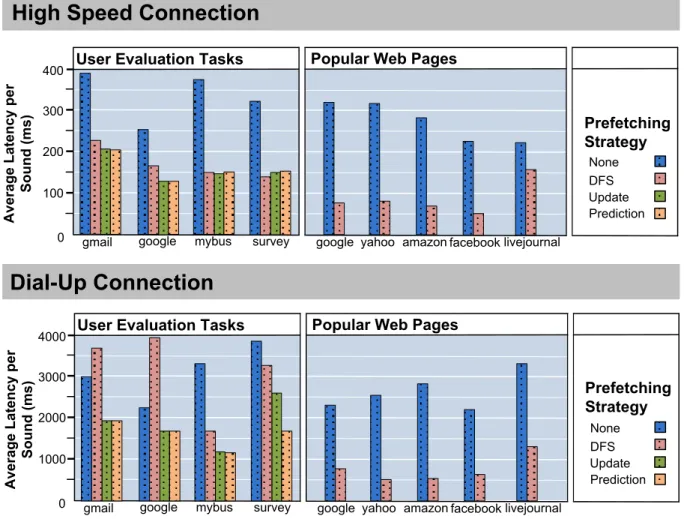
The main difference between WebAnywhere and other screen readers is that WebAnywhere generates speech re-motely and transfers it to the client for playback. Existing screen readers play sounds with almost no latency because the sounds are both generated and played on the client. To better understand the latency trade-offs inherent in Web-Anywhere and the implemented prefetching algorithms, we performed a series of experiments designed to test latency under various conditions. A summary of these results is presented in Figure 6.
For all experiments, we report the average latency per sound on both a dial-up and a high-speed connection, whose connection speeds were 44 kBps and 791 kBps, respec-tively. Although 63% of public libraries have high-speed connections in the United States [5], a dial-up connection may better represent speeds available in many communities. Timing was recorded and aggregated within the WebAny-where client script. The latency of a sound is the time be-tween when the sound is requested by the client-side script and when that sound begins playing. The average latency is the time that one should expect to wait before each sound is played. Because the system streams audio files, the en-tire sound does not need to be loaded when it starts playing. Experiments were conducted on a single computer and the browser cache was cleared between experiments.
We first compared the DFS prefetching strategy to using no prefetching on a straight-through read of the 5 web pages visited most often by blind users in a study of browsing be-havior [6]. We did not test the other prefetching methods because absent user interaction they operate identically to DFS prefetching. On these tests, the average latency for the high-speed connection was under 500 ms even without prefetching and under 100 ms with prefetching (Figure 6). Delays under 200 ms generally are not perceivable by users [19] and this may explain why most users did not cite la-tency as a concern with WebAnywhere during a user eval-uation of it [7]. The dial-up connection recorded latencies above 2 seconds per sound for all five web pages, making it almost unusable without prefetching. The latency with pre-fetching averages less than one second per sound, and the average length of all sounds was 2.4 seconds.
Screen reader users often skip around in content instead of reading it straight through. Using recordings of the ac-tions performed by participants during a user evaluation [7], we identified the common methods used to complete the tasks and replayed them manually to see the effect of dif-ferent prefetching strategies on these tasks. Recording and then replaying actions in order to test web performance un-der varying strategies has been done before [17]. The pre-fetching strategies tested were DFS-DOM traversal, DFS with dynamic updating and Markov model prediction.
Observed latency was again quite low for runs using the high-speed connection. When using the dial-up connec-tion, however, the results differed dramatically. On both the GMail and Google tasks, DFS prefetching increased the latency of retrieving sounds. This happened because our participants used skipping extensively on these sites and quickly moved beyond the point in the DOM where the prefetcher was retrieving sounds. When this happened, the prefetcher used bandwidth to retrieve speech that the user was not going to play later, slowing the retrieval of speech that would be played. Only the survey task showed a sig-nificant benefit for the predictive model of user behavior. On this task, participants exhibited a regular pattern of tab-bing from selection box to selection box, making their ac-tions easy to correctly determine. Importantly, the predic-tion method did not perform worse than the Update method, and both far outperformed both DFS and no prefetching.
6. Security
WebAnywhere enables users to browse arbitrary web content, and that content must be considered untrusted. Be-cause WebAnywhere is a web application running inside the browser with no special permissions, it lacks many of the usual mechanisms that web browsers use to enforce se-curity. In this section, we describe the security concerns resulting from our engineering decisions in building Web-Anywhere and the steps we have taken to address them.
6.1. Enforcing the Same-Origin Policy
The primary security policy that web browsers enforce is called thesame-originpolicy, which prevents scripts loaded from one web domain from accessing scripts or documents loaded from another domain [24]. This policy restricts scripts from google.com from accessing content on, for in-stance, yahoo.com. To enable WebAnywhere to access and voice the contents of the pages its users want to visit, the system retrieves all web content through a web proxy in or-der to bypass the same-origin restriction. This makes all content appear to originate from the WebAnywhere domain (for these examples, assume wadomain.org) and affords the WebAnywhere script access to that content.
Although violating the same-origin policy enables Web-Anywhere to operate, it also gives malicious web sites an opportunity to violate the security guarantees that users ex-pect, potentially accessing information to which they should not have access. We advise users not to access important personal information while using WebAnywhere, but want users to have access to private information contained in such resources as online email accounts or calendars.
WebAnywhere cannot directly enforce the same-origin policy, and so it instead ensures that all content retrieved
google mybus survey A ve ra g e L at en cy p er S o u n d ( m s) 0
User Evaluation Tasks Popular Web Pages
amazon
None DFS Update Prediction google yahoo facebook livejournal
4000
1000 2000 3000
gmail
google mybus survey
A ve ra g e L at en cy p er S o u n d ( m s) 0
User Evaluation Tasks Popular Web Pages
amazon
None DFS Update Prediction google yahoo facebook livejournal
400 100 200 300 Prefetching Strategy gmail
High Speed Connection
Dial-Up Connection
Prefetching Strategy
Figure 6. Average latency per sound using different prefetching strategies. The first set contains tasks performed by participants in our user evaluation, including results for prefetching strategies that are based on user behavior. The second set contains five popular sites, read straight through from top to bottom, with and without DFS prefetching. (Note the different scales.)
that should be isolated based on the same-origin policy orig-inates from a different domain. This is done by prepending the original domain of a resource onto its existing domain. For instance, content from yahoo.com is made to originate from yahoo.com.wadomain.org. WebAnywhere rewrites all URLs in this way, causing the browser to correctly enforce the same-origin policy for the content viewed.
All requests to open new pages and URL references within retrieved pages are rewritten to point to the proper domain. The web proxy server enforces that a request for web content located on domaindmust originate from the
d.wadomain.org domain. WebAnywhere is able to respond to requests for any domain, regardless of the subdomain supplied, through the use of a wildcard DNS record [20] for *.wadomain.org that directs all such requests to Web-Anywhere. The WebAnywhere script and the Flash sound player must also originate from the thed.wadomain.org do-main, and so they are reloaded. This 100 KB download need only occur when users browse to a new domain.
Browser cookies also have access restrictions de-signed to prevent unauthorized scripts from accessing them [22]. The PHProxy web proxy used by WebAny-where keeps track of the cookies assigned by each main and only sends cookies set by a domain to that do-main. This is not entirely sufficient. Access to cook-ies is controlled both by the domain and path listed when a cookie is set as determined by the web page that sets each. Future versions of WebAnywhere will modify the domain and the path requested by the cookie to match its location in WebAnywhere. For exam-ple, the URL www.domain.com/articles/index.php will ap-pear to come from www.domain.com.wadomain.org/web-proxy/articles/index.php using the URL rewriting supported by the Apache web server. The domain and path of the Set-Cookie request could be adjusted accordingly.
Others have attempted to detect malicious Javascript in the browser client [13], but this relies on potentially mali-cious Javascript code being isolated from code within the
browser. The WebAnywhere Javascript runs in the same se-curity context as the potentially malicious code. Browser-Shield describes a method for rewriting static web pages in order to enforce run-time checks for security vulnerabili-ties with Javascript scripts [23]. It is targeted at protecting against generalized threats and is, therefore, a fairly heavy-weight option. The same-origin policy is our main concern because it is the security policy that we removed by intro-ducing the web proxy. We believe the approach here could be used more generally by web proxies in order to make them less vulnerable to violations of the same-origin policy.
6.2. Remaining Concerns
Fixing the same-origin policy vulnerability created by WebAnywhere was of primary importance to us, but other concerns remain. The first is that in order to work for secure web sites, WebAnywhere must intercept and decode secure connections made by users of the system before forwarding them on. When a secure request is made, the web proxy es-tablishes a separate secure connection with both the client and the server. The data is unencrypted on the WebAny-where server. All accesses to WebAnyWebAny-where are made over its SSL-enabled web server, but users still must trust that the WebAnywhere server is secure and, therefore, may want to avoid connecting to secure sites using the system.
The second concern that remains unresolved is the op-portunity for sites to use phishing to misrepresent their iden-tity, potentially tricking users into giving up personal in-formation. Although phishing is a problem general to web browsing, the unique design of WebAnywhere makes phish-ing potentially more difficult to detect. A web page could override the WebAnywhere script used to play speech and prevent users from discovering the real origin of the web page. For instance, as the system currently exists, a mali-cious site could override the commands in WebAnywhere used to speak the current URL, preventing a user from dis-covering the real web address they are visiting. Future ver-sions of WebAnywhere will include protections like those in BrowserShield [23] to enforce runtime checks to ensure the WebAnywhere functions have not been altered.
Finally, because content that has been read previously is cached on the server, malicious users could determine what other users have had read to them, possibly expos-ing private information. While this problem is shared by all proxy-based systems, WebAnywhere enables it at a finer granularity than most other systems, which is potentially more revealing. For instance, if a user visits a page that con-tains their credit card number, it is likely that the system will choose to generate a separate speech sound for their num-ber. A malicious user could repeatedly query the system for credit card numbers and isolate those that are retrieved most quickly. We have partially addressed this problem by not caching sounds that originate from secure web addresses.
7. Future Work
We plan to release WebAnywhere to everyone so that blind web users and web developers can use it to both ac-cess the web from anywhere they happen to be and to cre-ate more accessible content. As users begin using the sys-tem, we will be given the opportunity to further analyze the effects of our caching, prefetching, and security improve-ments at larger scales. To support these additional users, we will modify our application to run on multiple machines. The design of WebAnywhere is quite parallel and naturally divides into separate components that could be hosted on separate servers. Because our experiments with server load demonstrated that the TTS service is currently the limiting factor of the system we will seek to concentrate our efforts on optimizing this component.
Participants in our initial user study of the system re-quested several features that are offered by other screen readers but which are currently unavailable in WebAny-where. Many of these requests involved new keyboard shortcuts and functionality, but several involved produc-ing different, individualized speech sounds. Implementproduc-ing these features in a straightforward way has the potential to reduce the efficacy of the prefetching and caching strategies employed by the system. For instance, users requested that the system use a voice that is more preferred by them; pop-ular screen readers offer tens of voices form which users can choose. Others asked for the ability to set the speech rate to a custom level. Because using a screen reader can be inefficient, many users speed up the rate of the speech that is read by two times or more. Many users, however, do not prefer this because speech can be difficult to understand at high speeds. Both of these improvements will cause the speech played by the system to less frequently be located in its cache, and, therefore, the value of these features will need to be balanced by their performance implications. We also plan to explore the option of switching to client-side TTS when users both have the permission to use it and it is available. Several operating systems have native support for TTS that WebAnywhere could leverage when permitted.
8. Conclusion
In this paper, we have presented the unique architecture of the WebAnywhere self-voicing, web-browsing web ap-plication. The WebAnywhere web-based, self-voicing web browser enables blind individuals otherwise unable to af-ford a screen reader and blind individuals on-the-go to ac-cess the web from any computer that happens to be avail-able. The system is designed to be available, usable and secure on most computers with both a web browser and the ability to play sound. Fulfilling those requirements necessi-tated moving text-to-speech functionality to a remote server, which resulted in latency of sound retrieval that hurt the user
experience. We introduced and tested caching and prefetch-ing methods designed to improve latency and showed that they can make the system usable even on low-bandwidth connections. To enable the system to read arbitrary web content, we utilized a web proxy that introduced new secu-rity concerns. We described improvements to secusecu-rity that will help ensure that security policies enforced by existing browsers will be supported by WebAnywhere as well. Our experiences will be useful to anyone implementing either a self-voicing or highly-interactive web application.
8.0.1 Acknowledgements
This work has been supported by National Science Founda-tion Grant IIS-0415273 and a Boeing Professorship. We thank Charlie Reis, Sangyun Hahn, and T.V. Raman for their comments and support.
References
[1] Adobe Shockwave and Flash Players: Adoption statistics. Adobe, June 2007. http://www.adobe.com/products/player census/.
[2] C. Anderson, P. Domingos, and D. S. Weld. Web site person-alizers for mobile devices. InIJCAI Workshop on Intelligent Techniques for Web Personalization (ITWP), 2001. [3] A. Arif. Phproxy, 2007. http://whitefyre.com/poxy/. [4] R. Atterer, M. Wnuk, and A. Schmidt. Knowing the user’s
every move - user activity tracking for website usability evaluation and implicit interaction. InProc. of the 15th Intl. Conf. on World Wide Web (WWW ’06), pages 203–212, New York, NY, 2006.
[5] J. C. Bertot, C. R. McClure, P. T. Jaeger, and J. Ryan. Public libraries and the internet 2006: Study results and findings. Technical report, Information Use Management and Policy Institute, Florida State University, September 2006. [6] J. Bigham, A. C. Cavender, J. T. Brudvik, J. O. Wobbrock,
and R. Ladner. WebinSitu: A comparative analysis of blind and sighted browsing behavior. InProc. of the 9th Intl. Conf. on Computers and Accessibility (ASSETS ’07).
[7] J. P. Bigham, C. M. Prince, and R. E. Ladner. Webanywhere: A Screen Reader On-the-Go. InProc. of the Intl. Cross-Disciplinary Conf. on Web Accessibility (W4A), 2008. [8] N. Bila, T. Ronda, I. Mohomed, K. N. Truong, and
E. de Lara. Pagetailor: Reusable end-user customization for the mobile web. InProc. of the 5th Intl. Conf. on Mobile Systems, Applications and Services (MOBISYS ’07), pages 16–29, New York, NY, USA, 2007. ACM.
[9] L. Breslau, P. Cao, L. Fan, G. Phillips, and S. Shenker. Web caching and zipf-like distributions: Evidence and implica-tions. InINFOCOM (1), pages 126–134, 1999.
[10] C. Chen. Fire vox: A screen reader firefox extension, 2006. http://firevox.clcworld.net/.
[11] K. P. Coyne and J. Nielsen. Beyond alt text: Making the web easy to use for users with disabilities, 2001.
[12] Google-AxsJAX. http://code.google.com/p/google-axsjax/.
[13] O. Hallaraker and G. Vigna. Detecting malicious javascript code in mozilla. InProc. of the 10th IEEE Intl. Conf. on Engineering of Complex Computer Systems (ICECCS’05), pages 85–94, Washington, DC, USA, 2005. IEEE Computer Society.
[14] S. Harper, C. Goble, R. Stevens, and Y. Yesilada. Middle-ware to expand context and preview in hypertext. InProc. of the 6th Intl. Conf. on Computers and accessibility (ASSETS ’04), pages 63–70, New York, NY, USA, 2004.
[15] A. W. Huang and N. Sundaresan. A semantic transcoding system to adapt web services for users with disabilities. In
Proc. of the 4th Intl. Conf. on Assistive Technologies (AS-SETS ’00), pages 156–163, New York, NY, USA, 2000. [16] JAWS 8.0. Freedom Scientific, 2006.
http://www.freedomscientific.com.
[17] M. Koletsou and G. Voelker. The medusa proxy: A tool for exploring user-perceived web performance. InProc. of the 6th annual Web Caching Workshop, June 2001.
[18] T. M. Kroeger, D. D. E. Long, and J. C. Mogul. Exploring the bounds of web latency reduction from caching and pre-fetching. InUSENIX Symposium on Internet Technologies and Systems, 1997.
[19] I. S. MacKenzie and C. Ware. Lag as a determinant of hu-man perforhu-mance in interactive systems. In Proc. of the INTERACT and Conf. on Human factors in computing sys-tems (CHI ’93), pages 488–493, New York, NY, USA, 1993. ACM Press.
[20] P. Mockapetris. RFC 1034 Domain Names - Concepts and Facilities. Network Working Group, November, 1987. [21] V. N. Padmanabhan and J. C. Mogul. Using predictive
pre-fetching to improve world wide web latency. SIGCOMM Comput. Commun. Rev., 26(3):22–36, 1996. ISSN 0146-4833.
[22] J. S. Park and R. Sandhu. Secure cookies on the web.IEEE Internet Computing, 4(4):36–44, July 2000.
[23] C. Reis, J. Dunagan, H. J. Wang, O. Dubrosky, and S. Es-meir. Browsershield: Vulnerability-driven filtering of dy-namic html. InProc. of the 8th Symposium on Operating Systems Design and Implementation (OSDI ’06), 2006. [24] J. Ruderman. The same origin policy, 2008.
http://www.mozilla.org/projects/security/components/same-origin.html.
[25] S. Russell and P. Norvig. Artificial Intelligence: A Modern Approach. Prentice-Hall, Englewood Cliffs, NJ, 2nd edition edition, 2003.
[26] S. Schiller. Sound manager 2, 2007. http://www.schillmania.com/projects/soundmanager2/. [27] Serotek system access mobile. Serotek, 2007.
http://www.serotek.com/.
[28] P. A. Taylor, A. W. Black, and R. J. Caley. The architecture of the the festival speech synthesis system. InProc. of the 3rd Intl. Workshop on Speech Synthesis, Sydney, Australia, November 1998.
[29] B. Thylefors, A. Negrel, R. Pararajasegaram, and K. Dadzie. Global data on blindness. Bull. World Health Organ., 73(1):115–121, 1995.
[30] Window-Eyes. GW Micro. http://www.gwmicro.com/Window-Eyes/.