Refactoring meets Spreadsheet Formulas
Sandro Badame, Danny Dig University of Illinois {badame1,dig}@illinois.edu
Abstract—The number of end-users who write spreadsheet programs is at least an order of magnitude larger than the number of trained programmers who write professional software. We studied a corpus of 3691 spreadsheets and we found that their formulas are riddled with the same smells that plague professional software: hardcoded constants, duplicated expres-sions, unnecessary complexity, and unsanitized input. These make spreadsheets difficult to read and expensive to maintain. Like refactoring of object-oriented code, refactoring of spreadsheet formulas can be transformative.
In this paper we present seven refactorings for spreadsheet formulas implemented inREFBOOK, a plugin for Microsoft Excel. To evaluate the usefulness ofREFBOOK, we employed three kinds of empirical methods. First, we performed a Retrospective Case Study on the EUSES Spreadsheet Corpus with 3691 spreadsheets to determine how often we could apply the refactorings supported byREFBOOK. Second, we conducted a User Survey with 28 Excel users to find out whether they preferred the refactored formulas. Third, we conducted a Controlled Experiment with the same 28 participants to measure their productivity when doing manual refactorings. The results show: (i) the refactorings are widely applicable, (ii) users prefer the refactored formulas, and (iii) REFBOOKis faster and safer than manual refactoring. On average REFBOOK is able to apply the refactorings in less than half the time that users performed the refactorings manually. 92.54% of users introduced errors or new smells into the spreadsheet or where unable to complete the task.
Keywords-refactoring, end-user, spreadsheets, Microsoft Excel, code smells
I. INTRODUCTION
The number of end-users who write spreadsheet programs is at least an order of magnitude larger than the number of trained programmers who write professional software [1], [6], [30]. Therefore the majority of programming is actually performed by users who do not consider themselves programmers. These spreadsheet users are referred to as end-users [7]. While these end-users are responsible for the maintenance and correctness of their spreadsheets, they have not been trained to develop software and often are not trained in the best practices for spreadsheet maintenance.
We have analyzed 3691 spreadsheets from the EUSES Spreadsheet Corpus [15] to determine the internal quality of the spreadsheets. We found that many formulas have
smells, similar to those commonly found in professionally developed software. Some smells degrade the performance, others decrease readability, and others make it harder to change the table in the future. For example: 61% of formulas contain numerical constants that can be extracted. By consolidating all of the constant references in a formula to a single place, the formula’s readability and maintainability is increased.
13.66% of text columns are good candidates for conversion to a dropdown menu which reduces the possibility of typos occurring in a column and convey to a maintainer the acceptable values for a text column. 61% of formulas can be given descriptive names instead of using anonymous cell references, thus making it easier to understand the purpose of a formula. Although smelly formulas may correctly perform their tasks, they are difficult to maintain and can mask errors. Such errors have cost millions of dollars [7]. Researchers [2], [4], [9], [12], [17], [18], [20], [23], [26], [27], [29] have made continuous strides into finding and displaying errors and smells in spreadsheets. However, there is no work on the removal of smells from spreadsheet formulas.
In professional programing the removal of smells while preserving program behavior is called refactoring [16]. Refac-toring is an important part of professional software develop-ment. Refactoring has revolutionized how programmers design software: it has enabled programmers to continuously explore the design space of large codebases, while preserving the existing behavior. Researchers found that refactorings decrease the number of software defects [28]. Modern IDEs such as Eclipse [10], NetBeans [22], IntelliJ IDEA [19], or Visual Studio [32] incorporate refactoring in their top-level menu and often compete on the basis of refactoring support.
While professional programmers have the support of refac-toring tools, end-users – who are not even trained to maintain software – do not have any refactoring support. We propose to remove spreadsheet smells through the use of automated refactoring, analogous to the refactoring process used for object-oriented code.
There is a large number of refactorings for spreadsheet formulas that we could have implemented. However, we want to automate those that are frequently performed but cause frustration, and those that are infrequent but are difficult. We asked these questions to different end users.
We contacted the 750 members of the European Spreadsheet Risks Interest Group [13] that subscribe to the mailing list of professional spreadsheet users, and we exchanged several emails with their Chair, Patrick O’Beirne, the author of an influential paper [23] about best practices for spreadsheets. We also posted on two large forums that have been used by hundreds of thousands of users: the OpenOffice Calc forum1 that has more than 200 active users online at any time, and the Excel forum2 that has on average 4,000 active members
1http://www.oooforum.org/ 2http://www.excelforum.com/
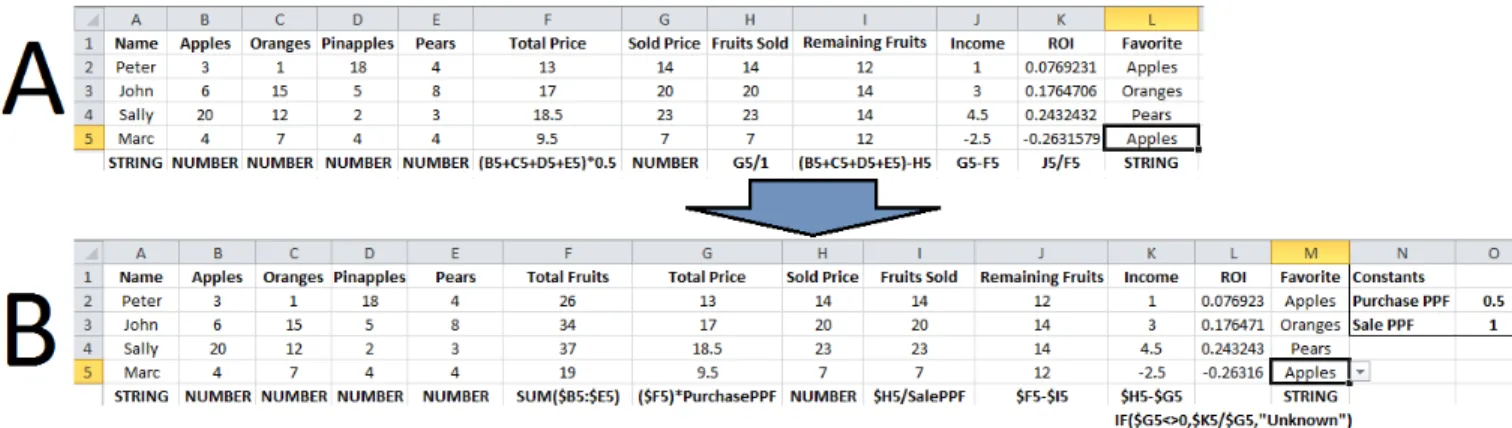
Fig. 1. Table before refactoring (A), and after refactoring (B). Underneath the table we show the formulas in row 5. The other formulas differ only in their row index.
online at any time. We also asked on the staff mailing list at the CS department at UIUC.
Based on their input, we have implemented REFBOOK: a plugin for Microsoft Excel that implements seven refactorings that safely remove spreadsheet smells.
REFBOOKimplements the following refactorings:EXTRACTROW ORCOLUMN,MAKECELLCONSTANT,GUARDCALL,REPLACEAWKWARD
FORMULAS, STRING TODROPDOWN, INTRODUCE CELLNAME, and
EXTRACTLITERAL. Each refactoring is specialized to remove a particular smell from a spreadsheet. These refactorings increase programmer productivity by performing the refactorings quickly and correctly. EXTRACTROW ORCOLUMN breaks formulas into smaller components and can reduce the amount of code duplication that exists in spreadsheets. MAKECELLCONSTANT makes formulas less error prone and more readable by rewriting the formula to contain $’s that signify that a particular cell or column is constant throughout a set of formulas. GUARDCALL rewrites a cell formula to have user defined behavior when an error condition occur. REPLACEAWKWARDFORMULAS re-writes formulas using Excel’s built-in functions (e.g., SUM) so that spreadsheets become more uniform and easier to understand.
STRINGTODROPDOWNlimits the number of allowed values for a cell to reduce the chance of a typo. INTRODUCECELLNAME removes anonymous cells and replaces them with named cells.
EXTRACTLITERALremoves “magic numbers” from formulas. To evaluate the usefulness of REFBOOK, we employed three kinds of empirical evaluation methods. First, we performed a Retrospective Case Study on the EUSES Spreadsheet Corpus with 3691 spreadsheets. Our goal is to determine how often we could apply the refactorings supported by REFBOOK. Second, we conducted a User Survey with 28 Excel users to find out whether they preferred the refactored formulas. Third, we conducted a Controlled Experiment with the same 28 participants to measure their productivity when doing manual refactorings.
This paper makes the following contributions:
1) To the best of our knowledge, we are the first to present the concept of refactoring into the domain of spreadsheet formulas.
2) We present the first refactoring tool for spreadsheet
formulas, REFBOOK, implemented as a plugin for Excel.
REFBOOK currently supports seven refactorings. A demo can be seen at:
http://www.youtube.com/watch?v=wGIu6Muvd8I 3) Our three-way evaluation reveals:
(i) The refactorings can be applied to many of the formulas contained in spreadsheets. Thus REFBOOK is
applicable. (ii) On average REFBOOK is able to apply the refactorings in less than half the time that users performed the refactorings manually. Thus REFBOOK
improves programmer productivity. (iii) 92.54% of users asked to perform the same refactorings introduced errors into the spreadsheet or where unable to complete the task. REFBOOKmakes it easier to apply the refactorings correctly, thus it issafer. (iv) For four out of the seven refactorings users preferred the refactored output. Thus the refactoringsimprove spreadsheet quality.
II. MOTIVATINGEXAMPLE
To illustrate the kinds of refactorings applicable to spread-sheets, we will use the table shown in Figure 1(A). This table tabulates data from an orchard warehouse where four salespersons purchased fruits and resold them for a profit. Each row tabulates the data for one salesperson. Underneath the table we show the kind of each column and the formulas they compute. Notice that we only show the formulas as they would appear in row 5 (thus referring to cells from row 5), but the formulas for the other rows refer to their respective cells. The table contains twelve columns: six columns contain literals, and six columns contain formulas that compute on the other columns. Now we briefly explain each column.
• Column Ais a text column containing the names of the participants.
• Columns B-Eare numerical columns that hold the number of each type of fruit that each salesperson had purchased.
• Column F Total Price is a formula column that computes the total price that each salesperson paid for their fruits. This column performs two calculations: sum the total number of fruits purchased by each person, then multiply it by $0.50, the purchase price per fruit.
• Column GSold Price is a numerical column that holds the amount of money that each salesperson collected from selling their fruits.
• Column H Fruits Sold is a formula column that computes the number of fruits sold: it divides the Sold Price by $1, the resale price per fruit.
• Column I is a formula column that computes the
remain-ing fruits that each salesperson still has. This column performs two calculations: sum the total number of fruits purchased by that person, then subtract the number of fruits sold by that person.
• Column Jis a formula column that computesIncome as the difference betweenSold Price andTotal Price.
• Column Kis a formula column that computes the return on investment, ROI, as the division between Income and Total Price.
• Column L is a text column containing the favorite fruit as reported by the salesperson. This column should only contain the names of real fruits, not arbitrary text. There are several things that point to “smells” in this table. Some smells degrade the performance, others decrease readability, and others make it harder to change the table in the future.
Take for example the expression B5+C5+D5+E5 which computes the total number of sold fruits. First, this can become more readable if it was replaced with the built-inSUM function (i.e.,SUM(B5:E5)). Second, this expression is calculated twice, once in the Total Price column and then again in the Remaining Fruits column. Given that Excel does not cache expression results, but instead does cache cell results, this wastes CPU cycles. Third, since this expression is duplicated between theTotal Price column and theRemaining Fruits column, a future change request like introducing a new kind of fruit and its afferent column, requires changing the expression in the two columns. Like in the case of professional programming, duplication increases the maintenance effort.
Also notice that the table contains two constants,0.5 and 1. First, constants make the formulas unreadable: another co-worker who inspects the table will have to guess what is the meaning of these constants (i.e., purchase price and resale price). Second, constants make it tedious to perform maintenance tasks: if we wanted to change the purchase and resale price, we will have to manually find and update 8 cells. Performing a find-and-replace for 1 will erroneously update the cellC2, which just happens to have value1.
Also notice that the Favorite column can contain any arbitrary text, even the ones that do not represent fruit names, for example by a typo that just misplaced one character (e.g., “Appls”). This affects the readability of the column for humans. This is even worse for other automated tools: macros or other programs that read such erroneous values won’t work.
Also notice that all formulas that refer to static cells use the “fixed column” format. For example, the formula in H5 refers to the static cell G5. Adding the $ can make cell references more resistant to errors when the spreadsheet is modified for maintenance, e.g., when the formula is dragged down a column.
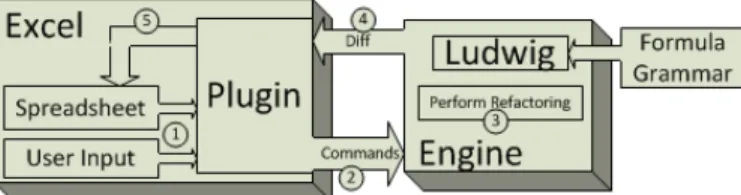
Fig. 2. Typical sequence of events to perform a refactoring.
Dragging a formula in Excel copies the formula into the adjacent cell and changes the cell references in the formula to reference the new row or column that the cell was dragged into. For example, dragging A1 down one row will insert the formulaA2 into the new row. While the ability to drag a formula is very useful in practice, it leads to smelly and possibly erroneous spreadsheets when not used carefully. Bugs can occur when dragging a formula that contains a reference to a cell that is constant throughout the entire table. Dragging this formula will also increment the reference to the constant cell. This means that the dragged formulas will refer to a different cell than the one intended by the user.
The $ signs also serve as a form of documentation about the formula: the $ signs highlight which cell references are constant throughout the entire column of formulas.
Figure 1(B) shows the same table after we applied several refactorings. We added Total Fruits column to hold the intermediate calculation of total number of purchased fruits. We modified theTotal Price andRemaining Fruits formulas to reference the newly introduced Total Fruits column.
We moved the 0.5 and 1 constants fromTotal Price and Fruits Sold columns into their own cell and named them PurchasePPF andSoldPPF respectively.
We changed theROI column to sanitize its input against a division by 0. If the number of sold fruits was 0 then the ROI would display a “divide by zero” error. With the guarded formula, the ”Unknown” text is displayed. The advantage is that it notifies the reader that the formula was written with the error case in mind, and that the error case is handled.
We changed theFavorite column to use a dropdown menu for valid values instead of arbitrary text. Using a dropdown also makes the user aware that there are a fixed number of values that are allowed in the column.
Across all of the formula cells, we updated the cell references to use the $ on their column identifier.
REFBOOKsupports all the refactorings performed on the table from Fig. 1(B).
III. HIGHLEVELOVERVIEW OFREFBOOK A. Typical use of REFBOOK
Users interact withREFBOOKfrom within Excel. We describe a typical use ofREFBOOK using our motivating example from Figure 1: replace the formulas in the Total Price column with formulas that contain constant cell references. To perform this refactoring the user selects cellsF2-F5 from the Total Price column, right-clicks on the selection to bring up the context menu (which shows REFBOOKon the top), then selects
the MAKECELLCONSTANT option in the menu. REFBOOK then replaces the highlighted formulas with formulas that contain the $ sign.
B. Life-cycle of a Refactoring
REFBOOK’s architecture consists of three major components: Excel plugin, Ludwig [25], and the refactoring engine. The Excel plugin is the front-end. Users only interact with the Excel plugin component of REFBOOK. The Excel plugin creates a separate process for the back-end, Ludwig and the refactoring engine. The back-end calculates the corresponding changes for each refactoring, and sends them to the Excel plugin that applies them on the spreadsheet.
Ludwig [25] is an off-the-shelf component that given a grammar for a language (e.g., the grammar for Excel formulas – see Fig 3) generates a Java library for parsing that grammar. The Abstract Syntax Tree (AST) generated by Ludwig supports manipulation of the AST while preserving the formatting for the remainder of the formula. This crucial feature simplifies the implementation of actual refactorings while making it very practical for users who care about the formatting.
The refactoring engine is a Java application that takes as input the name of the refactoring to perform, the table that is the target of the refactoring, and the user input. It performs the AST transformations, e.g., adding, removing, updating cells. Then it outputs commands for the Excel plugin to perform on the Excel spreadsheet. The output of the refactoring engine is an ordered list comprised of commands of this kind:
• INSERTCOLUMN columnIndex
• INSERTROW rowIndex
• SETCELL columnIndex, rowIndex, content
• NAMECELL columnIndex, rowIndex, name
The major advantage of this 3-tier architecture is that
REFBOOK is extensible to other spreadsheet tools, beyond Microsoft Excel. If we were to implement refactoring support for OpenOffice Calc [8] then we would have to reimplement only the Excel plugin portion of REFBOOK.
IV. SPREADSHEETGRAMMAR A. Anatomy of a Spreadsheet
The terminology we will use is derived from Excel’s terminology. AWorkbook is a single file that contains multiple Sheets. TheWorkbook’s name is its filename. A sheet can only belong to oneWorkbook. ASheet is a named two dimensional array of Cells.
Cellsare indexed in aSheet either by row and column, or by a user-defined name. A Cell’s column is represented as series of letters that range between A and ZZ. A Cell’s row is represented as an integer greater than 0. Cellscan be named or anonymous. The condition for a valid user-defined name is that the given name cannot be interpreted as a valid index (e.g.A1 is not a valid cell name) or as an Excel builtin. We will refer to a cell that has not been given a user-defined name as an anonymous cell.
Cellscan contain a value that is one of three types: Number, Text, or Formula. Other types such as Dates and Currency are
( s k i p ) : : = [ \t\r\n ] + # D e f i n e w h i t e s p a c e <F o r m u l a> : : = <E x p r e s s i o n> | ”{” <E x p r e s s i o n> ”}” <E x p r e s s i o n> : : = O p e r a t o r∗ <E x p r e s s i o n P r i m i t i v e> < A n o t h e r E x p r e s s i o n>? <E x p r e s s i o n P r i m i t i v e> : : = <P r i m i t i v e> | <F u n c t i o n> | <C e l l R e f e r e n c e> | <R a n g e R e f e r e n c e> | <E r r o r> | ” ( ” <E x p r e s s i o n> ” ) ” <A n o t h e r E x p r e s s i o n> : : = O p e r a t o r <E x p r e s s i o n> # P r i m i t i v e D a t a t y p e s <P r i m i t i v e> : : = t o k e n : Number | t o k e n : B o o l e a n | t o k e n : S t r i n g Number : : = [0−9]+ ( ” . ” [ 0−9 ] + ) ? ”%”? B o o l e a n : : = ” t r u e ” | ” f a l s e ” | ”TRUE” | ”FALSE” S t r i n g : : = ”\” ” ( [ ˆ\” ]|”\”\” ” )∗ ”\” ” O p e r a t o r : : = ”<” | ”>” | ”>=” | ”<=” | ”>=” | ”<=” | ”<>” | ”=” | ”+” | ”−” | ” / ” | ”∗” | ” ˆ ” | ”&” <E r r o r> : : = ”#REF ! ” # R e f e r e n c i n g c e l l s <C e l l R e f e r e n c e> : : = <R e f e r e n c e P r e f i x> <C e l l> <R e f e r e n c e P r e f i x> : : = <E r r o r>? workbook : Workbook ? s h e e t : S h e e t ? <R a n g e R e f e r e n c e> : : = s t a r t :<C e l l R e f e r e n c e> ” : ” end :< C e l l R e f e r e n c e> Workbook : : = ” ’ ” ? ” [ ” ˜ ” ] ” ” ’ ” ? S h e e t : : = ” ’ ” [ ˆ ’ ! ]∗ ” ’ ” ” ! ” | [ A−Za−z ] [ . A−Za−z0−9]+ ” ! ” <C e l l> : : = i s C o l u m n F i x e d ( b o o l ) : D o l l a r ? Column i s R o w F i x e d ( b o o l ) : D o l l a r ? row : Number ? D o l l a r : : = ” $ ” Column : : = [0−9A−Za−z # ! ]∗ [ A−Za−z # ! ] # F u n c t i o n s <F u n c t i o n> : : = F u n c t i o n S t a r t a r g s :<E x p r e s s i o n>∗ ( s e p a r a t e d−by ) Comma ” ) ” F u n c t i o n S t a r t : : = [ A−Za−z ] [ A−Za−z0−9 ]∗ [ \t ]∗ ” ( ” R p a r e n : : = ” ) ” Comma : : = ” , ”
Fig. 3. Grammar that we feed to Ludwig to parse Excel formulas
represented internally by bothREFBOOKand Excel as numerical Cells . Cells that are Numerical or Textual have values defined by the user. Formula Cellscontain a formula that is executed by Excel, which produces a Number or Text.
Most formulas refer to other cells. Figure 3 defines the grammar for formulas. Excel does not publicly release a grammar for their formula language. Therefore we developed our own grammar that is a subset of the official Excel formula language. The grammar was based heavily on a grammar developed by Daniel Ballinger [5].
We pass our grammar from Figure 3 to Ludwig to generate an Excel formula parser. The grammar assumes that all formulas are syntax error-free.
The grammar does not have a special node for named cells. This is done to simplify the grammar. A named cell is a Cell with the name stored in theColumn.
For the sake of simplicity of the grammar, the grammar does not differentiate between binary and unary operators.
V. REFACTORINGS
Now we describe each of the seven refactorings supported byREFBOOK. For each refactoring we first present an example of the transformation, then we describe in plain text what the refactoring does, then we provide pseudo-code for the algorithm. Here we show the input, the preconditions, and the
transformation. We use the same style of behavior-presentation introduced by Opdyke [24], namely we guarantee that the refactored spreadsheet computes the same values as the original spreadsheet when the precondition predicate is true.
There are many formulas in a spreadsheet that are dragged down a column or across a row. However, the user only created one single formula, the rest only differ by the cell references. Many of our refactorings check whether the user selected cells that belong to consistent formulas (defined below).
Definition 1. Consistent formulas are formulas that have the same AST shapes.
Definition 2. Distinct formulas are formulas that have different AST shapes.
Two formulas have the same shape if their ASTs are isomorphic, i.e., the ASTs contain the same number of AST nodes, the corresponding nodes have the same type, and the nodes form the same structure.
A. EXTRACTROW ORCOLUMN
Example: In the motivating example in Fig. 1, we apply the refactoring to the Total Price column. It extracts the expression:(B5+C5+D5+E5) fromTotal Price andRemaining Fruits into a new column,F5. This new column will contain B5+C5+D5+E5. The Total Price column will then contain: F5*.5 and theRemaining Fruits column will contain:F5-H5
In professional programming the analogous refactoring is ”Extract Temporary Variable”.
Description: The user selects a row or column to extract from and a subexpression from the row or column to be extracted into a new row or column. REFBOOK moves the selected row or column one position down or to the right. Then it updates the cell references in the table to refer to the new cell positions after the movement. It places the extracted subexpression into every cell of the newly created row or column. Then, it finds all instances of the subexpression in the table and replaces them with a reference to the corresponding cell in the new column or row.
Our prototype implementation does not check whether the user selects a subexpression that transcends the boundary of operator precedence. For example, a user could select 2+3 from the6*2+3 formula. An industrial-strength implementation should raise a warning that the new formula will compute value 30 instead of 15. We leave this for future work.
B. MAKECELLCONSTANT
Example: In the motivating example in Fig 1, we apply the refactoring to all of the formula columns: Total Price , Fruits Sold , and Remaining Fruits . REFBOOK converts the column formulas from (B5+C5+D5+E5)*0.5), G5/1 and (B5+C5+D5+E5)-H5) to ($B5+$C5+$D5+$E5)*0.5) , $G5/1 , and($B5+$C5+$D5+$E5)-$H5) respectively.
Description: The user selects formula cells. REFBOOK first determines whether any of the cell references can be made constant. It uses the shape of the first formula as the model for all the other formulas in the selection. Then
Procedure 1Extract an expression into a column Input:sheet, expr, colIndex
Preconditions: f1, f2∈sheet[colIndex], f1isConsistent(f2) functionEXTRACTCOLUMN
for allcell∈sheetdo
original=expr.updateRowsT o(cell.row) new= ” = ” +colIndex+cell.Row cell.F ormula.replaceAll(original, new) end for
newColumn=sheet.insertColumn(colIndex) for allcell∈newColumndo
cell.F ormula=expr.updateRowsT o(cell.row) end for
end function
it compares corresponding cell references between pairs of selected formulas and it determines which cell references do not change. These are the cell references that it prefixes with the$ sign.
Procedure 2Make all possible cell references fixed. Input:sheet, colIndex
Preconditions: f1, f2∈sheet[colIndex], f1isConsistent(f2)
∃cellRef∈sheet[colIndex][1].F ormula) functionMAKECELLCONSTANT
column=sheet[colIndex] f irst=column[1].F ormula constColRef s=f irst.cellRef s.cols discardedColRef s={}
constRowRef s=f irst.cellRef s.rows discardedRowRef s={}
for allcell∈columndo
ifcell.F ormula.isDistinctF rom(f irst)then
continue
end if
cellColRef s=cell.F ormula.cellRef s cellRowRef s=cell.F ormula.cellRef s fori= 1→ |cellRef s|do
ifi /∈discardedColRef sthen
ifcellColRef s6=constColRef s[i]then discardedColRef s.add(i)
end if end if
ifi /∈discardedRowRef sthen
ifcellRowRef s6=constRowRef s[i]then discardedRowRef s.add(i)
end if end if end for end for
for allcell∈columndo
cellRef s=cell.F ormula.cellRef s fori= 1→ |cellRef s|do ifi /∈discardedColRef sthen cellRef s.f ixColumn end if ifi /∈discardedRowRef sthen cellRef s.f ixRow end if end for end for end function C. GUARDCALL
Example: In the motivating example we apply the refac-toring to the ROI column. The user supplied the error
expression "Unknown" . GUARD CALL converted J5/F5 to IF(G5<>9,K5/G5,"Unknown").
Description: The user selects a formula cell and also provides an expression to be supplied as the error message.
REFBOOKsearches for a division operator, and replaces it with a conditional IF, where the condition checks whether the denominator is different than zero, the then branch performs the division, and the else branch displays the error message.
Procedure 3 GUARDCALL
Input: formula, errMsg
Preconditions: ∃“/”∈f ormula
errMsg.isValidFormula
functionGUARDCALL
binaryOps=f ormula.collectAll(AnotherExpression) for alln∈binaryOps|n.Operator= “/”do
guard= “IF(” +n.Expression+ “<>0,” +n.P arent+ “,” +errM sg+ “)”
n.parent.ExpressionP rimitive=guard end for
end function
D. REPLACEAWKWARDFORMULAS
Example: In the motivating example, we apply the refactoring to the Total Price andRemaining Fruits fruits column converting them from (B5+C5+D5+E5)*0.5) and (B5+C5+D5+E5)-H5) to SUM(B5:E5)*0.5 and SUM(B5:E5)-H5 respectively.
Description: The user selects a formula and REFBOOKfirst searches for expressions containing the + or * operator, and at least four operands of consecutive cells. REFBOOK replaces such long chains with a single SUM(<<range>>) or PRODUCT(<<range>>) function.
Procedure 4 Replace Awkward Input: formula
Preconditions: ∃“ + ”or“∗”∈f ormula
∃{cellRef} ∈f ormula|{cellRef}.cardinality >3 functionREPLACEAWKWARD
original=f ormula
ref actored=attempt(f ormula) whileoriginal6=ref actoreddo
original=ref actored
ref actored=attempt(original) end while
end function
functionATTEMPT(expr)
awkwardAST =getAwkwardAST N ode(expr) ifawkwardAST6=N ON Ethen
expr.replace(awkwardAST, f ixedAST) end ifreturnexpr
end function
REPLACEAWKWARDFORMULAScan be applied to any formula expression.
E. STRINGTODROPDOWN
Example: In our motivating example, we apply this refactoring to theFavorite column. The set of valid entries consists of: Apples, Oranges, and Pears.
Description: The user selects a textual column.REFBOOK searches for all the unique text entries in the column.REFBOOK attaches dropdown menus to each cell in the column. It fills in each dropdown selection the value that was previously in the cell.
Procedure 5STRINGTODROPDOWN
Input:column
Preconditions: f orEachcell∈column, cell.isT extual functionSTRING TODROPDOWN
choices={x∈column|x /∈choices}
for allcell∈columndo
cell.DropdownOptions=choices end for
end function
STRINGTODROPDOWN assumes that the user-selected column of textual entries does not contain any errors. Specifically if typos exist, they also populate the values in the dropdown menu.
F. INTRODUCECELLNAME
Example: In our second table from the motivating example, we appled this refactoring to the cell O2, and we named it PurchasePPF. The formula inG5,F5*PurchasePPF, uses the new name.
Excel’s “Search and Replace” is not a sound method to use to replace all anonymous cell references in formulas with the named reference. For example, if the text A1 was in a text literal then it would be replaced. IfA1 was referenced as$A$1 “Search and Replace” misses this reference. Without REFBOOK the end-user programmer would be forced to inspect each cell in the table for correctness.REFBOOK safely and correctly finds all references to the cell.
Description: The user selects a cell, and provides a name.
REFBOOK checks whether the new name is not in use, and defines the name. REFBOOK searches in the entire table for references to the anonymous selected cell, and updates them to the named cell.
Procedure 6INTRODUCECELLNAME
Input:anonCell, name, sheet
Preconditions: name.isV alid functionINTRODUCENAME
anonLoc=cellLocation(anonCell) sheet.def ineN ame(anonCell, name) for allcell∈sheetdo
for allcellRef∈cell.F ormula
|cellLocation(cellRef) =anonLocdo
cell.F ormula.replace(cellRef, name) end for
end for end function
functionCELLLOCATION(cell)
return(cell.W orkbook, cell.Sheet, cell.Column, cell.Row) end function
G. EXTRACTLITERAL
Example: In the motivating example, we applied the refactoring to the Total Price and Fruits Sold columns.
Each of these columns have a “magic number” (0.5 and 1 respectively).
Description: User selects a formula. She also selects the actual literal value to be extracted and provides a name for the cell. REFBOOK first checks whether the new name is not in use. ThenREFBOOK finds an empty cell where it moves the literal, names the cell, then replaces all references to the literal in the table with a reference to the named cell.
Procedure 7 EXTRACTLITERAL
Input: literal, cellName, sheet
Preconditions: cellN ame.isV alid functionEXTRACTLITERAL
sheet.def ineN ame(sheet.getU nU sedCell(), cellN ame) sheet[cellN ame] =literal
for allcell∈sheetdo
for allliteral∈cell.F ormula.collectAll(Number)do ifliteral.P arent6=Cellthen
cell.F ormula.replace(literal, cellN ame) end if
end for end for end function
VI. EVALUATION
We evaluate the usefulness of the proposed refactorings by answering four research questions:
• Q1: CanREFBOOKmake the refactoring process safer?
• Q2: Do the refactorings improve programmer produc-tivity?
• Q3: Do the refactorings improve the spreadsheets quality?
• Q4: Are the refactorings applicable?
All these questions address the higher level question “Is
REFBOOK useful?” from different angles. Safety ensures that the runtime behavior is not modified and the transformation does not introduce more smells. Productivity measures whether automation saves human time. Quality measures whether the users find the refactored formulas more readable. Applicability measures how many formulas in real-world spreadsheets can be directly transformed.
A. Methodology
To answer these questions, we employed three different empirical techniques.
To measure refactoring safety and user productivity when performing manual refactorings, we conducted a Controlled Experiment with 28 Excel users. To assess whether users preferred the refactored formulas, we conducted an online User Survey with the same 28 participants. In order to ensure discretion, each participant responded to the survey and performed the change tasks in their own environment. To determine how often we could apply the refactorings supported by REFBOOK, we performed a Retrospective Case Study on the EUSES Spreadsheet Corpus [15] with 3691 spreadsheets.
1) Controlled Experiment: To recruit participants, we ad-vertised to students in the University of Illinois CS105 course. This course is attended by students enrolled in the Business department. In this course students learn how to use Excel for business-related purpose. The participation in the survey was voluntary, and it did not have any relationship with the course evaluation. The successful completion of the survey was rewarded with a $5 Amazon giftcard.
Out of the 500 enrolled students, 28 responded to our call. We asked three questions about their experience with Excel. Figure 4 shows the demographics of our participants. Notice that two-thirds of the participants claimed to have more than two years experience with Excel. All our participants responded within 24 hours from our post.
Each participant used an Excel document. The tables contained data about the orchard warehouse, similar with the example shown in our motivating example from Fig. 1. The document contained 7 tasks. Each task has a smelly table, a set of instructions on what to change in the table, a “Start” button, and a “Task Complete” button. Before the “Start” button is pressed, the spreadsheet is read-only. During this time the participant is free to inspect and become familiar with the table, the task that she will perform, and a short, optional tutorial that we designed to present the Excel features she might use. Once the participant has familiarized with the task and the table, she can press the “Start” button. When a participant presses the “Start” button, the table becomes editable, and the participant can perform the changes. A timer records the time taken to perform the changes. When a participant completes the task, she presses the “Task Complete” button which stops the timer and moves her onto the next task.
After we received their online submissions, we processed each document to record the time it took participants, and whether they performed the tasks correctly. We also applied ourselves REFBOOK to complete the same tasks, and then we compared our results with the participants’ results.
2) User Survey: To find out whether end-users prefer smelly or refactored formulas, we designed and deployed a survey to the same 28 participants. Each participant performed the User Survey by using an Excel document, consisting of 7 sections. Each section focuses on a single particular smell. Each section has two tables: one table that contains the smell and one table were the smell has been removed through applying one of our refactorings.
For each section, we asked two questions about the tables. The first question was a “filter”: we asked a technical question that revealed whether the participant studied the two tables and understood the differences between them. The second question asked which table they would prefer to work with. To eliminate the confounding effect, we randomized the order of appearance between smelly and non-smelly tables.
3) Retrospective Case Study: To determine the applicability of our refactorings we analyzed the EUSES Spreadsheet Corpus’s 3691 spreadsheets to find out how many formulas have smells that can be fixed by our refactorings. We chose the EUSES Spreadsheet Corpus because it is regarded as the
Fig. 4. Demographics of our 28 participants.
most mature, representative corpus of spreadsheets. At least 13 published papers [15] have used it to draw conclusions about spreadsheet programming. This corpus contains 206355 tables and 495578 distinct formulas, thus we think it is representative. First, we had written a tool to find the tables in all the spreadsheets. In real-world spreadsheets, tables are (i) often surrounded by documentation, (ii) do not begin at the top and left-most cell, and (iii) multiple tables are scattered throughout the spreadsheet. Our tool parses the corpus spreadsheets using the Apache POI [3] Java library. Due to limitations in the Apache POI [3] library, our tool could not parse 234 spreadsheets of the 3925, so we retained 3691. Apache POI [3] can not find tables within a workbook’s sheet, so we implemented a search algorithm. To find the individual tables that exist within a sheet, we used the algorithm described in [17].
Then we implemented a collector tool, customized for each refactoring kind. The collector calculates how many cells in each table manifest a particular smell that can be fixed by a particular kind of refactoring.
B. Results
Safety: The second column in Table I shows how many of our participants submitted a solution that contained at least one fault. A fault is a semantical error (i.e., the changed formula computes the wrong value) or a smell (i.e., the original smell was not corrected).
The overall majority of the 28 participants submitted solu-tions with at least one fault. For one refactoring, EXTRACTROW ORCOLUMN, all submitted solutions had faults. Many participants copied the subformula into a new column, but did not remove the duplication between the newly introduced column and the old column. That is, the new column is never referenced from the old column. For the example in Fig. 1, from column F containing the formula (B5+C5+D5+E5)*0.5 they copied the expression (B5+C5+D5+E5) into a new columnG, but did not replace the original formula withG5*0.5.
For EXTRACTLITERAL, the literal appeared in multiple for-mulas, e.g., G5*0.5 and (B5+C5+D5+E5)*0.5 . Many users extracted the literal from one of the formula columns, but not both. Thus the “magic number” smell still remains in the table.
In contrast, REFBOOK performs all refactorings correctly.
Productivity: The third and fourth columns in Table I show the average time that it took our 28 participants to perform the
Refactoring % Faulty Manual Std. REFBOOK
Kind Submissions Time[sec] Dev. Time[sec] ExtractColumn 100% 36 18 16 MakeCellConstant 30% 37 17 09 StringToDropdown 82% 217 169 09 ReplaceAwkward 47% 68 42 22 GuardCall 82% 67 28 31 IntroduceName 82% 79 50 30 ExtractLiteral 91% 42 23 18 TABLE I
SAFETY ANDPRODUCTIVITY OF MANUAL VS. AUTOMATEDREFACTORINGS.
manual refactorings. The fifth column shows the time we took to perform the same refactorings withREFBOOK.
Notice that the time that our Excel macro records for the participants includes both the selection of cells and the actual change. To make the comparison fair, in the REFBOOK’s time we also report the time to select cells and to apply REFBOOK (thoughREFBOOKapplies the refactoring in less than 3 seconds).
The table shows that performing the refactoring withREFBOOK is faster than performing it manually, the improvements ranging from 2.2x to 24x. Notice that this is a conservative lower bound; we expect the productivity difference to be even more dramatic in practice. First, real-world tables contain more rows than the 15 rows in our controlled experiment. Second, the faults committed by the participants were typically errors of omission: many participants had applied the refactoring incompletely. Had they applied the complete refactoring, this would have taken them even more time.
Quality: Table II shows for each refactoring kind, how many of the 28 participants preferred the smelly or the refactored formulas.
For 4 out of the 7 refactorings, the majority of participants preferred the refactored formulas. For one refactoring, STRING
TODROPDOWN, the majority did not have any preference. For 2 refactorings, the majority preferred the smelly formulas. For example, for theINTRODUCECELLNAME, the participants preferred the table that contained the anonymous cells. Since 82.61% of the participants were able to correctly answer the filter question about the table, we are confident that they understood the table. This corroborates another study [31] where end-users working with Yahoo pipes preferred seeing all the pipes at once instead of abstracting functionality to another pipe.
Refactoring Prefer Prefer No No Pass Kind Smelly Refactor Pref. Resp. Filter ExtractColumn 17.39% 47.83% 21.74% 13.04% 73.91% MakeCellConstant 21.74% 52.17% 13.04% 13.04% 60.87% StringToDropdown 8.70% 21.74% 56.52% 13.04% 34.78% ReplaceAwkward 4.35% 52.17% 26.09% 17.39% 78.26% GuardCall 47.83% 13.04% 26.09% 13.04% 78.26% IntroduceName 52.17% 4.35% 26.09% 17.39% 82.61% ExtractLiteral 17.39% 60.87% 8.70% 13.04% 69.57% TABLE II
PREFERENCES OF USERS TOWARD FORMULAS.
readability and maintainability for end users, we assume that that their opinion reflects the quality of the formulas. Others [31] have used the same technique when judging the quality of end-user code.
Applicability: Based on the data we collected from the EUSES Spreadsheet Corpus, we present the applicability of individual refactorings.
There are many formulas in a spreadsheet that are dragged down a column or across a row. However, the user only created one single formula, the rest only differ by the cell references. If we took these dragged cells into account, our results will be skewed by the amount of dragged cells that exist in each table. To prevent this, we define and compute metrics only over distinct formulas(defined in Section V).
EXTRACTROW ORCOLUMN. First, we measured the formula complexity. We define a formula’s complexity as the sum of the number of binary operators and function calls that a formula contains. For example:
IF(G5 <> 0, K5/G5, "Unknown"))
has a complexity of 3 (one function call, i.e., IF, plus two binary operators, i.e., not equals and division). A formula that contains only a single reference to another cell, number, or text, has a complexity of 0.
We found that 10.1% of distinct formulas have a complexity of 0, 57.71% have a complexity of 1, 18.49% have a complexity of 2, 11.97% have a complexity of 3, 1.73% have a complexity greater than 3. Formulas that have complexity larger than 1, that is, 32.19% of all distinct formulas, are candidates for the
EXTRACTROW ORCOLUMN, which reduces the complexity of a formula by breaking it into smaller sub-formulas.
We also compute the amount of duplication that exists between distinct formulas in a table. We calculate the amount of duplication by counting the number of times an AST node is repeated in a table. 72.89% of the formulas contain no duplication. The remaining 27.11% of formulas contain some amount of duplication, thus are candidates for EXTRACTROW OR
COLUMN.
MAKECELLCONSTANT We apply the MAKECELLCONSTANT refactoring on every distinct formula and recorded the number of cell references that were successfully made constant. We found that 23.28% of the formulas did not change when we applied the MAKE CELL CONSTANT refactoring, 9.03% of the formulas had a single $ prefix added to a cell reference, 19.35% of the formulas had two places where$ was added to
cell references (e.g.,$A$5), 3.24% of the formulas had three $ added to cell references, 32.64% of the formulas had four$ added to cell references (e.g., $A$5 + $B$5). The reason for the higher percentages for two and four $ is because often when one cell is made constant both the row and column are made constant.
GUARD CALL We found that IFERROR , ISBLANK , and ISNUMBER are all among the top 10% most widely-used Excel functions. This shows that explicit error handling code is a popular technique.
REPLACEAWKWARDFORMULAS We found that 15.73% of all distinct formulas use theSUM function. This shows that end-users understand it and like to use it.
STRINGTODROPDOWNWe computed the number of duplicated entries that exist in a column of text values. We found that 86.34% of the text columns had no duplication of text values, 6.99% of the text columns repeated up to 50% of the text entries, and 6.67% of the text columns repeated between 51% and 99% of their text entries. This shows that for 13.66% of text columns the STRINGTODROPDOWN refactoring can reduce a drastic amount of duplicated entries.
INTRODUCECELLNAME Among formula columns, we found that 61% of the columns refer to at least one common anonymous cell that is a good candidate for being named. For example, columnC contains formulas of the type: A1+B0 ,A2+B0,A3+B0; cell B0 is a good candidate for INTRODUCE
CELLNAME. We also found that in such columns, on average 2.21 cells could be named.
EXTRACTLITERALAmong formula columns, we found that 61% of them referred to the same numerical constants. For example, column D contains formulas of the type: C1+12 , C2+12,C3+12; constant 12 can be extracted into a separate cell. Of the columns whereEXTRACTLITERALcan be applied, on average 2.09 numerical constants can be extracted. We also found that 0.06% of formula columns referred to the same string literal. From these columns, on average 1.84 string literals can be extracted.
VII. RELATEDWORK
Erwig [12] proposes to apply techniques and tools from professional programming to end-users. Erwig specifically advocates for better error reporting, debuggers and static type checking [11]. He does not mention applying the refactoring techniques from professional programming.
Guidelines for creating clean, consistent and non-smelly spreadsheets have been proposed by others [23], [27].
PUP [20] and ASAP Utilities [2] are tools that add many features to Excel including some basic formula manipulation. The “Error Condition Wizard” in PUP and “Custom Error Message” in ASAP Utilities is similar in spirit to ourGUARD
CALL refactoring. The major difference is that these tools do not let users type in arbitrary expressions to be executed in the erroneous else branch, but they limit the type to Strings, unlike
REFBOOK that allows any arbitrary expression. Also, ourGUARD
to an already existing error. This gives users more flexibility to define the action that should be taken for bad input.
ASAP Utilities includes a “Change formula reference style” operation and Excel has a feature that adds $ sign to cell references that is similar in spirit to our MAKECELLCONSTANT. However, they cycle through the selected cells and blindly add $ to every single cell reference. Our MAKECELLCONSTANT is different from the above alternatives because it intelligently determines which cells should be made constant based on their usage in similar formulas from the user selection.
”What You See is What You Test” (WYSIWYT) [29] is a testing tool that helps end users find bugs in their spreadsheets. WYSIWYT estimates a cell’s correctness based on user input. WYSIWYT does not offer any automation to correct cells that are found to be incorrect.
Cunha et al. [9] detect data in spreadsheets that are outliers from the typical entries. These outliers are referred to as being “smelly”. Their work does not apply to finding spreadsheet formula smells. REFBOOK removes smells from formula cells not from data cells.
Hermans et al. [14], [18] implemented a tool to generate diagrams that visualize the dataflow between spreadsheet formulas. The tool is designed to make spreadsheet smells apparent through visualizations but does not support removing the smells. Also their work focuses on inter-table smells, whereas we focus on intra-table smells and their correction.
Harris et al. [17] implemented a tool that infers spreadsheet transformations by parsing a small example of the transfor-mation and then extrapolating that example to an entire table. Their work focuses on transforming the layout of data cells and does not take cell formulas into account. REFBOOK has a predefined set of refactorings while their tool infers a new transformation for every example.
The inspiration for our project comes from research on refactoring for end-user programming in the context of Yahoo Pipes [31]. While both Yahoo Pipes refactoring and REFBOOK target end-users, the environments of these users are different. Spreadsheets have different smells and require a different set of tools to remove these smells.
Jazayeri et al. [21] found that the end-user programming population are missing the tools that professional programmers have. Their research focuses on developing end-user tools for web development while we focus on spreadsheets.
VIII. CONCLUSIONS
End users working with spreadsheets make the same poor choices that professional developers make and have to pay the same “technical debt” that professional programmers pay during maintenance.
We designed, implemented, and evaluated REFBOOK, the first refactoring tool for spreadsheet formulas. It currently supports 7 refactorings that eliminate smells in spreadsheets.
Our three-pronged evaluation (case study of the EUSES Spreadsheet Corpus, user survey and controlled experiment with 28 participants) concludes that the refactorings supported by REFBOOK are widely applicable, increase programmer
productivity, increase safety of transformations, and increase the quality of spreadsheets. More research is needed to find why end users do not feel comfortable with abstraction and how to create tools that they can embrace.
Acknowledgements: The authors thank Cosmin Radoi and Semih Okur for providing comments on an earlier draft of this paper, Jeff Overbey for providing assistance with Ludwig, Patrick O’Beirne for his advice on selecting refactorings to automate, the 28 participants in our study, and Microsoft for partially funding this research through a SEIF award.
REFERENCES
[1] The state of the art in end-user software engineering.
[2] Asap utilities - the essential add-in for excel users. http://www.asap-utilities.com/index.php, December 2011.
[3] Apache POI. http://poi.apache.org/.
[4] Fairway Associates. FormulaDataSleuth ExcelSpreadsheet Checking Software — Excel Experts — Fairway Associates. http://www.fairwayassociates.co.uk/formuladatasleuth.
[5] Daniel Ballinger. Fishbrains. http://homepages.ecs.vuw.ac.nz/ elvis/d-b/Excel.shtml, December 2011.
[6] C. Brown A. Chulani S. Clark B. Horowitz E. Madachy R. Reifer J. Boehm, B. Abts and Steece. Software Cost Estimation with COCOMO II. Prentice Hall PTR.
[7] Margaret Burnett, Curtis Cook, and Gregg Rothermel. End-user software engineering. Commun. ACM, 2004.
[8] OpenOffice Calc. http://www.openoffice.org/product/calc.html. [9] J´acome Cunha, Jo˜ao Paulo Fernandes, Jorge Mendes, and Jo˜ao Saraiva
Hugo Pacheco. Towards a Catalog of Spreadsheet Smells. ICCSA, 2012. [10] Eclipse IDE. http://www.eclipse.org/.
[11] M. Erwig and M. M. Burnett. Adding apples and oranges. 2002. [12] Martin Erwig. Software engineering for spreadsheets. 2009.
[13] EuSpRiG: European Spreadsheet Risk Interest Group. http://www.eusprig.org/dt.
[14] M. Pinzger F. Hermans and A. van Deursen. Detecting and visualizing inter-worksheet smells in spreadsheets. to appear in ICSE, 2012. [15] Marc Fisher and Gregg Rothermel. The euses spreadsheet corpus: a shared
resource for supporting experimentation with spreadsheet dependability mechanisms. 2005.
[16] Martin Fowler. Refactoring: Improving the Design of Existing Code. Addison-Wesley Longman Publishing Co., Inc., 1999.
[17] William R. Harris and Sumit Gulwani. Spreadsheet table transformations from examples. PLDI, 2011.
[18] Felienne Hermans, Martin Pinzger, and Arie van Deursen. Supporting professional spreadsheet users by generating leveled dataflow diagrams. ICSE, 2011.
[19] IntelliJ IDEA. http://www.jetbrains.com/idea/. [20] Inc. J-Walk & Associates. Pup v7 utilities, June 2011.
[21] Mehdi Jazayeri and Navid Ahmadi. End-user programming of web-native interactive applications. CompSysTech, 2011.
[22] NetBeans IDE. http://www.netbeans.org/.
[23] Patrick O’Beirne. Spreadsheet refactoring.CoRR, 2010.
[24] Bill Opdyke. Refactoring Object-Oriented Frameworks. PhD thesis, University of Illinois at Urbana-Champaign, 1992.
[25] Jeffrey L. Overbey and Ralph E. Johnson. Generating rewritable abstract syntax trees. InSLE. 2009.
[26] Raymond R. Panko. What we know about spreadsheet errors. J. End User Comput., 1998.
[27] John F. Raffensperger. New guidelines for spreadsheets. CoRR, 2008. [28] Jacek Ratzinger, Thomas Sigmund, and Harald C. Gall. On the relation
of refactorings and software defect prediction. 2008.
[29] Karen J. Rothermel, Curtis R. Cook, Margaret M. Burnett, Justin Schonfeld, T. R. G. Green, and Gregg Rothermel. Wysiwyt testing in the spreadsheet paradigm: an empirical evaluation. InICSE, 2000. [30] Christopher Scaffidi, Mary Shaw, and Brad Myers. Estimating the
numbers of end users and end user programmers. InVLHCC, 2005. [31] Kathryn T. Stolee and Sebastian Elbaum. Refactoring pipe-like mashups
for end-user programmers. InICSE, 2011.