APP 6.0
2 APP Network Installation Information in this document is subject to change without notice. No part of this document may be reproduced or transmitted in any form or by any means, electronic or mechanical, for any purpose without the express written permission of ALR.
© 1995 - 2013 Aerospace Project Development Group, ALR All rights reserved
Microsoft is a registered trademark, Windows is a trademark of Microsoft Corporation in the USA and other countries. Other brands and products are trademarked or have registered the trademarks of their respective holders.
The ALR License Agreement included with the product, specifies the permitted and prohibited uses of the product. Any unauthorized reproduction or use of the product or breach of terms and conditions of the License Agreement is forbidden. The ALR License Agreement sets forth the only warranties applicable to the product and the documentation. All warranty disclaimers and exclusions set forth therein apply to the information contained in this document.
ALR
Aerospace Project Development Group Gotthardstr. 52
CH-8002 Zürich Switzerland
www.alr-aerospace.ch
DARcorporation
Design, Analysis and Research Corporation 1440 Wakarusa Drive, Suite 500
Lawrence, Kansas 66049, USA www.darcorp.com RUAG Aerospace Center Aerodynamics CH-6032 Emmen Switzerland www.ruag.com Printed in 2013
1
Introduction
ALR uses the WIBU-Systems WIBU-KEY Copy Protection concept for the APP network licensing. The WIBU-KEY concept consists of a WIBU-BOX (Universal Serial Bus key) and the WIBU software.
A WIBU-BOX doesn’t need to be attached to the local computer where APP is started. The protection in a network is handled centrally by a WIBU-BOX on a computer called the License Server (or WIBU-KEY server). All computers running APP must be able to access the license server. APP uses the license server WKLAN (WKSVW32.EXE). On Windows, this server can be started as a system service or as an application.
The License Server is a computer with the Wibukey software installed and is additionally running the WIBU-KEY server process WKLAN. WKLAN is protocol based (currently TCP/IP), so it requires TCP/IP support of the network and a proper installation of TCP/IP on the server and all client machines. The client machine is a computer on which APP runs.
The number of licenses can be increased or decreased in a simple fashion by contacting DARcorporation. No new hardware is needed; a file can be exchanged via Internet, e-mail or disk to change the WIBU-BOX contents.
We recommend reading through the complete document first and then following the installation steps of Section 2.
4 APP Network Installation
2
Install Procedure
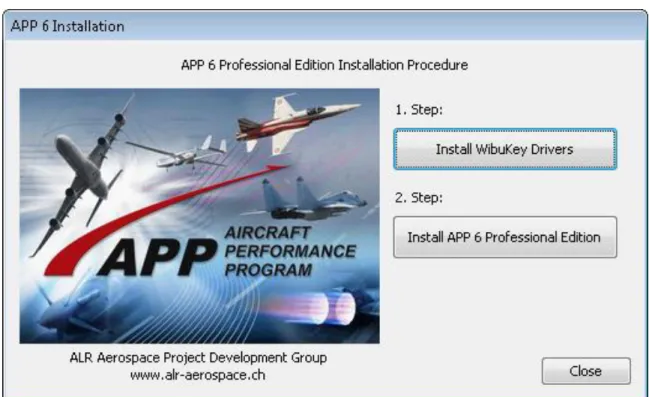
STEP 1 Install the software from the CD (do not insert the WIBU-BOX yet). Install Acrobat Reader to read the manuals.
Figure 2.1 APP Installation Window
STEP 2 Install the WibuKey Drivers
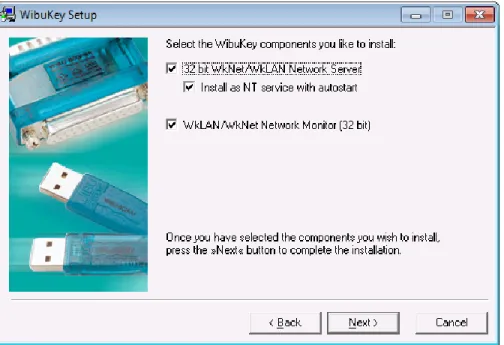
Figure 2.2 WibuKey Setup Window
STEP 4 Insert the WIBU-BOX in the computer that will be the License Server computer. Windows will automatically detect the USB device as a “Plug and Play” device. If the WIBU Key software has been installed, the device will be automatically installed.
STEP 5 Install the APP software and the WibuKey Drivers on each computer in the network. On computers other than the network server, the Network server and Network Monitor options from Figure 2.2 do not need to be checked.
STEP 6 Start the Network Server only on the license server (not on any other computers) by selecting:
Start > Programs > WibuKey > Network Server
On Windows, the server software can be installed as a service instead of running as a user program. It will start up automatically after rebooting the computer. If you run the server as an application you can set it into the taskbar by right clicking on the icon after you started the server.
6 APP Network Installation
3
WibuKey Software
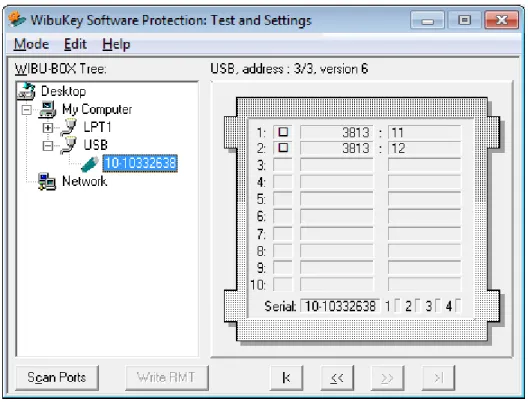
When the WibuKey software is installed on the server or client computer, a program icon is added to the Control Panel. This icon executes the WibuKey Control Panel Applet “WibuKey Software Protection: Test and Settings”.
The program shows the contents of the WibuKey (see Figure 3.1) and several options to control the WibuKey software.
Figure 3.1 WibuKey Control Panel Applet
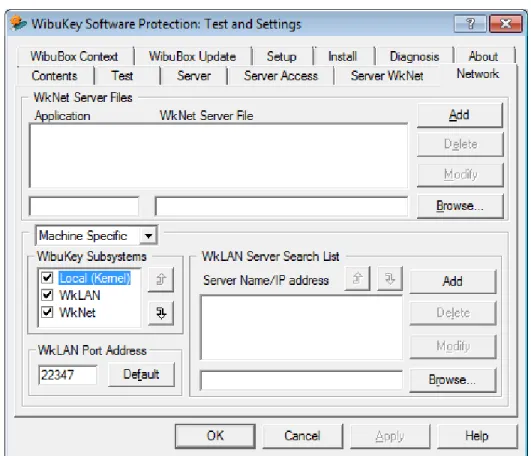
Normally, no special configuration changes are needed on the client side to access WKLAN. A client computer browses the local network for a suitable WKLAN server. For APP the Network page is important. On the network page (see Figure 3.2) the default TCP/IP port 22347 can be changed, if this number conflicts with port numbers of other TCP/IP applications. Changing the port number must be done by the WIBU-KEY Control Panel Applet at the server side and on all clients where a WKLAN server access is desired.
255.255.255.255 (LAN broadcast). The network can be searched for WKLAN accessible WIBU-KEY Servers by the browse button.
Figure 3.2 WibuKey Control Applet Network Page
After the WibuKey Network Server has been started, a status page can be displayed showing network activity (see Figure 3.3). The timeout is set to 1440 minutes. If APP has been started and no communication between APP and the server has been received in 24 hours, the license will be freed. The timeout can be set on the Server page of the WIBU-KEY Control Applet.
8 APP Network Installation Figure 3.3 WKLAN Server Status
As part of the WibuKey software installation, a program (see Figure 3.4) is included to monitor APP activities with the WibuKey.
This program can be started with:
Start > Programs > WibuKey > Server Monitor
The Help system of the Server Monitor explains the use of all features.
The status window of Figure 3.4 can also be displayed through the Server Monitor by selecting: View > Server View > Select Server > Status Msg.
4
Troubleshooting
The WibuKey software has an extensive help system built-in. Select the help from: Start > Programs > WibuKey > WibuKey Help
The help has an FAQ with common questions and problems. Other common problems are:
Problem: Unable to Locate DLL, the dynamic library WKWIN32.DLL could not be found
Solution: Install the WibuKey software
Problem: WibuKey network system not available
Solution: Check if the WIBU-BOX is attached to the License Server
Check if the Network Server software is running
Problem: APP keeps looking for a WIBU-BOX but cannot find it.
Solution: Check if the server name/IP address is correct in the WibuKey Control Applet
Network page. Change the Server Name into the actual IP address of the License server in the WibuKey Control Applet Network page. Reset the server and client computer
10 APP Network Installation
5
Reporting Software Errors
We at DARcorporation want to know about potential errors in the software so that we may correct them as soon as possible. If you feel that you have encountered an error in the software user interface, license manager, module calculations or module calculation methods, software errors can be reported to the software support department at:
Phone: (785) 832-0434 E-mail: [email protected] Internet: www.darcorp.com