Multivariate Testing of Native Mobile Applications
Clemens Holzmann
University of Applied Sciences Upper Austria Department of Mobile Computing Softwarepark 11, 4232 Hagenberg, Austria
[email protected]
Patrick Hutflesz
University of Applied Sciences Upper Austria Department of Mobile Computing Softwarepark 11, 4232 Hagenberg, Austria
[email protected]
ABSTRACT
A/B testing has a long history in web development and is used on a daily basis by many companies. Although it is a common test method for web pages, it is hardly used for native mobile applications. The reason seems to be that it is much more difficult to change the user interface of a mobile application, which has been downloaded from an app store, than that of a web page which is fetched from a server by
request. In this paper, we present an approach for A/B
testing of native mobile applications. Furthermore, it allows for the more flexible multivariate testing, which is based on the same mechanisms as A/B testing, but compares a much higher number of variants by combining variations for dif-ferent sections of the user interface. Our proposed approach works without redeployment of the mobile application in the app store and thus allows for a seamless integration into the developer’s workflow with low effort for creating and deploy-ing new variants. We implemented a prototype solution for the Android platform and compared it against other A/B testing products. It shows that our solution requires less effort and is more convenient to use than related products. Moreover, it is the only one which allows for multivariate testing of native mobile applications.
Categories and Subject Descriptors
H.5.2 [Information Interfaces and Presentation]: User
Interfaces – Evaluation/methodology
General Terms
Human Factors; Design; Measurement
Keywords
A/B Testing; Multivariate Testing; Mobile User Interface; Android; Conversion Funnel; Remote User Interface Ex-change.
Permission to make digital or hard copies of all or part of this work for personal or classroom use is granted without fee provided that copies are not made or distributed for profit or commercial advantage and that copies bear this notice and the full citation on the first page. Copyrights for components of this work owned by others than ACM must be honored. Abstracting with credit is permitted. To copy otherwise, or republish, to post on servers or to redistribute to lists, requires prior specific permission and/or a fee. Request permissions from [email protected].
MoMM’14, 3-10 December, 2014, Kaohsiung, Taiwan. Copyright 2014 ACM 978-1-4503-3008-4/14/12...$15.00. http://dx.doi.org/10.1145/2684103.2684119
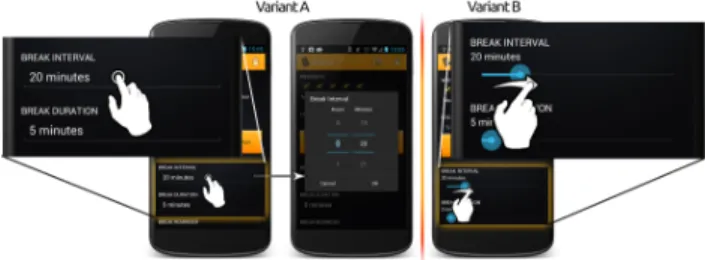
Figure 1: Example of an A/B test in a simple alarm application. Variant A on the left lets the user choose the interval of the alarm by using a num-ber picker, while variant B on the right uses sliders for the selection. The presented multivariate testing solution uses the same mechanisms as A/B testing, but it automatically creates variants by combining variations of different sections of the mobile UI.
1.
INTRODUCTION
Testing is a necessary and helpful step in the develop-ment cycle of any product. It helps to make sure that the clients who ordered the product are satisfied and that their requirements on the product are met. Software tests have been categorized into different levels and types such as unit testing, integration testing, system testing and acceptance testing [14].
The highest level of testing in this classification (accep-tance testing) evaluates whether the product meets the
ex-pectations and requirements of the clients. According to
this classification, A/B testing can be seen as the next step in the chain. A/B testing makes sure that the developers and the customers assessed the usability of the required ap-plication right for the target audience. This is achieved by making iterative improvements of the user interface over a longer period of time.
There are of course other methods to achieve this, such as the various user interface evaluation methods as compared by Jeffries et al. [7]. However, most of them require teams of users or developers with extensive knowledge about the evaluations that are conducted. Bouvier et al. [3] studied how novices with minimal coursework in computer science and user interface design compare interfaces. Even though no expert users were required, it was a very time-consuming task and users had to be recruited for the tests.
In A/B testing, two variations of the same product are compared to each other at the same time to see which variant performs better. Users are randomly split into two groups,
50% 50% Version A Version B 100 clicks 25 clicks
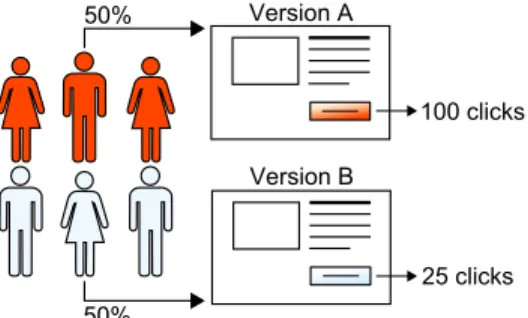
Figure 2: The course of events in an experiment. Users are split into groups and certain actions that are taken by the users are measured.
where each group is presented a different version of the user interface. This is shown in Figure 1 with the example of a simple alarm application for Android. The two variations are commonly called “control” and “treatment” groups; while the control group receives the normal product, the treatment group gets to work with a slightly different version. Finally, measurements are collected for each variation in order to find out which one is more successful than another. The performance of different variants can be evaluated e.g. by looking at conversions, which can be a simple task like click-ing a button. The variant that convinces the majority of users to take certain actions performs best.
Figure 2 illustrates the principle of A/B testing. The vis-itors of a web page, or of a view in a mobile application, are divided into two (or more) groups by the server. Half of the users get to see version A, while the other half is presented version B. In this example, only 25 clicks are registered on the button in version B, but 100 clicks are documented for version A. This means that version A is the winner of the ex-periment, should become the new control group and should be used as a basis for further optimization.
Without A/B testing, it would be very difficult to analyse the impact a certain change had on a product. It cannot be determined if a change in sales of an online shop really results from recent design changes or from environmental factors which include time, the season or even the weather. A/B testing effectively cancels out the variable environment in an experiment, since both the control and the treatment group are tested at the same time [4].
A/B tests are a subset of a bigger set of tests called mul-tivariate tests, where parts of different variations are mixed together to form combination. Figure 3 shows an example of such a multivariate test with three variable sections and two variations for each section. When optimizing several different parts of a product, it is important to conduct the experiments one after the other. However, each A/B test needs to run for a certain amount of time, which can be re-duced with multivariate testing allowing to conduct several different experiments in parallel.
1.1
Challenges and Contribution
A/B testing is widely used in web development nowadays. Conducting user interface experiments like these is a very important part of improving the user’s comfort level when using a product. Ultimately, A/B testing greatly impacts the return on investment [4], and there are many commer-cial software products available for this purpose. Only little
Figure 3: Example of a multivariate test, in which three sections (image, button colour, text place-ment) are tested, each one with two variations.
change of the website code is necessary to enable A/B test-ing, and most frameworks allow the designers to change the website using a visual editor in the framework’s online por-tal even without touching the source code of the website. However, for native mobile applications, this is not as easy. A major difference between A/B testing on the web and on mobile devices is the way native mobile applications are built and distributed. Native applications for mobile de-vices are self-contained, stand-alone products. Once down-loaded and installed, the user interface and the code cannot be changed from a remote location, unlike websites which can be changed every time the user visits them.
Even though there are frameworks that allow changing pa-rameters for experiments online using the browser, available frameworks for mobile devices still require the developers to add framework-specific code for the various experiments to the application. Every experiment needs to be hard-coded into the application code and requires a re-publishing of the application in the app store in order to be changed. This stands in stark contrast to the quick iterations that are possi-ble when conducting experiments on the web. Being apossi-ble to quickly and remotely update the application in rapid succes-sion is vitally important for successful A/B or multivariate testing [4].
A reason for companies neglecting A/B testing and user interface experiments in general is the initial entry cost to get started with A/B testing [1, 13]. Because of this, it is very important to provide the developer with tools that have a low entry barrier and make it easy to start A/B testing. A further relevant issue arises with the implementation of multivariate tests. Because of the necessary combinations of variations in a multivariate test, this type of test is much more challenging to implement than a traditional A/B test. In this paper, we present a concept for a multivariate test-ing tool that provides a low entry barrier to A/B and mul-tivariate tests for mobile application developers. We tried to accomplish this by removing the need for re-publishing on the application store after changing an experiment. The developers should be able to continue working with their favourite editor to create program code and user interfaces. In addition, we present an implementation of the described concept which can be used for native Android applications. To the best of our knowledge, it is the only one which allows for multivariate testing of native Android applications.
1.2
Outline
This section introduced the topic of A/B and multivari-ate testing, emphasized the lack of solutions for native mo-bile applications and identified problems that arise with na-tive applications (e.g. on Android). In the following section,
state-of-the-art products and research projects will be pre-sented and compared to each other. Afterwards, a new con-cept for A/B and multivariate testing of native mobile appli-cations in general will be presented, and an implementation specific for the Android operating system will be described and compared to related tools.
2.
RELATED WORK
This section presents related work in both the research and the commercial area. The research projects we present here can be very well suited to enhance the productivity of native mobile A/B testing. Furthermore, some commercial products are going to be compared which allow developers to A/B test native mobile applications on various platforms.
2.1
Research Projects
An alternative to A/B testing of native applications on mobile platforms is to use web views and continue A/B test-ing exactly like on the web. In this case, A/B testtest-ing prod-ucts for the web could be used. However, Luo et al. [11] show that there are security problems when using Android’s WebView implementation. In addition to that, the usabil-ity and performance is not optimized in contrast to native applications. Therefore, building native applications is of-ten the better alternative. Nevertheless, there are security issues when A/B testing native mobile applications, espe-cially concerning the functionality to dynamically load code
at run-time. As Poeplau et al. [12] show, dynamic code
loading on Android is possible and potentially dangerous. Apart from security issues, A/B testing also introduces stability issues. A/B tests, and especially multivariate tests, can produce a large number of variations in each experi-ment. Bugs that occur in one variation of the experiment, but not in another, can have an impact on the results of the experiment. Amalfitano et al. [1] presented a way to do automated user interface testing for mobile Android appli-cations. A model of the user interface is created, which is then used to automatically create test scenarios. This way, all A/B variations can be tested before publishing them.
Another approach for automated UI testing on Android was pursued by Hu and Neamtiu [6]. The Monkey event gen-erator provided with the Android SDK was used in conjunc-tion with the JUnit testing framework to generate random test sequences and run the tests automatically.
In contrast to the model-based approach by Amalfitano et al. and the random sequences used by Hu and Neamtiu, the approach by Jensen et al. [8] uses a two-phase technique for automatically finding event sequences that reach a given target line in the code. This way, new parts of an application can be tested more intensively, while no event sequences are created for older code.
The approach presented by Baride and Dutta [2] allows for efficient testing of an application on real devices. The application is uploaded to a cloud consisting of emulators and real test devices, where it is then tested using addi-tionally supplied test scripts. The testing process happens automatically and concurrently on several different devices and emulators. This allows the designers of an A/B test to efficiently run a large number of software tests on several different devices at the same time. The solution presented by Kaasila et al. [9] is similar to the approach by Baride and Dutta, the difference being that test scripts can be recorded by the developers while the application is in use on a device.
Using a cloud-based approach in conjunction with auto-matic GUI crawling would enable automated dynamic model-based testing on emulators and test devices. It would be even more efficient than manually testing the application on different devices or creating test scripts for use with the cloud-based approach.
As this subsection shows, there has been a considerable amount of research concerning the automation if of user in-terface testing. However, A/B or multivariate experiments for native mobile applications have hardly been covered so far.
2.2
Commercial Products
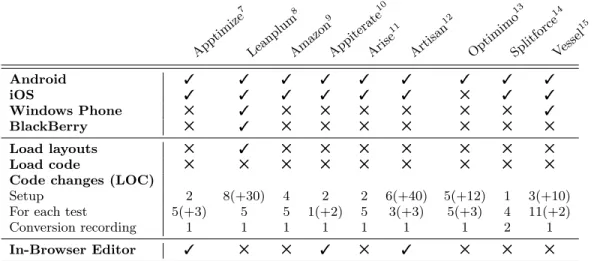
Table 1 gives an overview of available A/B testing prod-ucts. The focus of this overview is solely on the functional-ity of the A/B testing capabilities and how the framework can be integrated into mobile applications; none of the in-spected products supports multivariate testing. The focus when comparing different frameworks was on Android, since the implementation of our concept has been developed for the Android platform.
All compared products offer a web-based interface to set
up and configure A/B tests. Most products support the
mobile platforms Android and iOS. Only a minority of two products that were compared – namely Leanplum and Ves-sel – additionally support Windows Phone. Moreover, only Leanplum supports the mobile platform BlackBerry. On the other hand, Optimimo only supports Android.
Some of the products feature their own browser-based user interface editor. These editors allow designers to make sim-ple changes to the user interface elements, like changing their colour or text. Leanplum is the only framework that features the ability to load files and layouts in addition to changing simple values for each variation. However, bigger changes to user interfaces are not possible with most frameworks with-out republishing the application in the store, since none of the products allows to load code dynamically at run time.
The changes needed to start A/B testing with the different products are quite extensive. Leanplum for instance requires more than 30 lines of code in each Android Activity in or-der to be able to create usage statistics and session times. Moreover, some frameworks require the developers to write
additional code for each A/B test. This additional code
does not consist of the business code for the actual variants, but rather contains a lot of branches in the code to make sure that the correct variant is displayed on a certain mo-bile device. Goal or conversion tracking, on the other hand, can easily be implemented with almost all frameworks; it requires only one line of code per achieved goal.
In general, it can be observed that mobile A/B testing is more widespread in the commercial sector than in research. We developed a concept that includes a feature the commer-cial products for mobile platforms are neglecting completely, which is multivariate testing.
3.
CONCEPT
Conducting an A/B test requires that multiple steps are
performed. The mobile application under test has to be
prepared and several different interface variants have to be created. Currently, the only way to distribute multiple in-terfaces is by adding them during the build process, or by using web views with all their drawbacks. Furthermore, the results of different test groups have to be analysed.
App timi ze 7 Lean plum 8 Ama zon 9 App itera te 10 Aris e11 Arti san 12 Optimi mo 13 Split forc e14 Vess el15 Android 3 3 3 3 3 3 3 3 3 iOS 3 3 3 3 3 3 5 3 3 Windows Phone 5 3 5 5 5 5 5 5 3 BlackBerry 5 3 5 5 5 5 5 5 5 Load layouts 5 3 5 5 5 5 5 5 5 Load code 5 5 5 5 5 5 5 5 5
Code changes (LOC)
Setup 2 8(+30) 4 2 2 6(+40) 5(+12) 1 3(+10)
For each test 5(+3) 5 5 1(+2) 5 3(+3) 5(+3) 4 11(+2)
Conversion recording 1 1 1 1 1 1 1 2 1
In-Browser Editor 3 5 5 3 5 3 5 5 5
Table 1: Comparison of several popular mobile A/B testing frameworks for Android. Numbers of code changes in parentheses are lines of code for each Activity (for setup) or for each additional variation (for tests).
Figure 4: Depiction of the workflow for the devel-oper when creating A/B testable content for the framework.
The first part of this step, creating the layouts, does not differ a lot from the usual workflow of creating an Android UI. However, there are several problems with loading user interfaces from external locations. First, they have to be prepared in some way and the Android operating system does not allow to load interfaces from an external location. Second, Android assigns an identifier to every interface el-ement, which must be available during the build process of the application. Finally, it must be possible to provide ad-ditional functionality for specific interfaces, as the added UI elements would not react to the user’s input otherwise.
3.1
Remote UI Inflation
Figure 4 shows an overview of the workflow to create, up-load and finally inflate a layout that is remotely available from a server. First of all, it is necessary for an application to be able to load simple user interfaces from an external provider and display them. The second step consists of com-piling the layout files and source code. The binary layout and code files are then made available on the server. The final step consists of inflating the downloaded layouts on the device and loading the corresponding code.
Creating an A/B test layout.
The first step required to conduct an A/B test is to create different interface variants for the test groups. As already
mentioned, including A/B tests in an application does not change the workflow of creating the user interfaces. The developer then registers the new user interface with the
sys-tem by adding a line in a configuration file. Hence, the
framework is aware that the layout contains a UI for an experiment.
Processing the layout.
This step contains the compilation process where sepa-rate A/B content packages are created for each A/B group. These packages contain the layouts of the respective A/B groups, the configuration file, and if necessary additional code to drive the new user interface. Then the A/B pack-ages are uploaded to a server. Finally, the packpack-ages are made available to devices for download.
Distributing the layout.
The distribution of the layouts is of course limited to clients which have an internet connection. New layouts, if available, can be downloaded during the start of the appli-cation. However, applications should also work without an internet connection, and a synchronous download during the start could hamper the user experience. Another possibility – and our chosen approach – is to continue with the ap-plication execution and start an asynchronous download in the background. The downloaded resources are stored in a temporary location and are ready to be loaded quickly when they are needed.
Inflating the layout.
The new layouts are used during the following start of the
7 http://apptimize.com 8https://www.leanplum.com 9 https://developer.amazon.com/sdk/ab-testing.html 10http://appiterate.com 11 http://arise.io 12http://useartisan.com 13 http://www.optimimo.com 14https://splitforce.com 15 https://www.vessel.io
30.07.2014 1 Application Level Call setContentView(...) System Level Load binary layout from
APK Inflate layout Customize layout
Aspect Level Intercept call
Look for test variants for loaded layout
Inflate layout using Reflection
Normal execution flow Intercepted execution flow
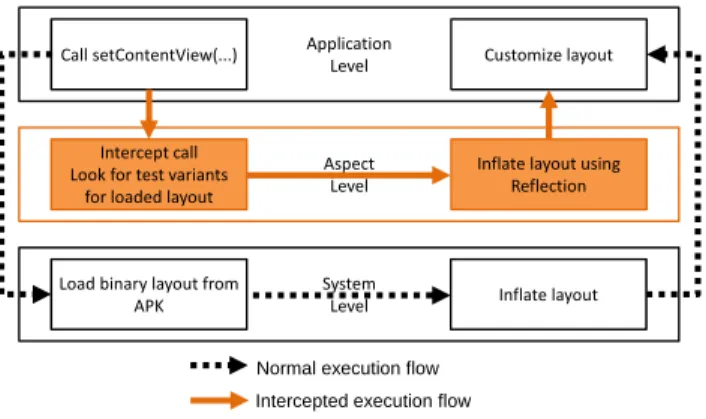
Figure 5: Intercepting a system call for loading a specific layout, in order to load a different UI instead and enable A/B testing therewith.
application. Otherwise, the users could be confused by in-terfaces changing from one moment to the next while they navigate through the application, or input which they al-ready made disappearing.
As described in the introduction, a major challenge is to allow rapid iterations of A/B tests just like it is possible on the web. To be able to do this, it is necessary to over-come the security restriction of being able to load only UI and code resources from the application package. This pack-age cannot be modified once deployed, and thus it is neces-sary to load resources from a remote location. By utilising aspect-oriented programming (AOP) features, it is possible to intercept the method call that loads the original UI (at the application level) and direct the invocation to the aspect level instead of the system level (see Figure 5). This allows the framework to load a different user interface instead.
Now that it is possible to remotely change user interfaces, the problem that follows is that usually additional code has to be provided in order to add functionality for the new interface. Without that, the new interface would appear on the screen correctly, but the new elements would not have any functionality behind them. It is necessary to allow the developer to add functionality dynamically at runtime.
3.2
Changing UI Controls
The proposed concept makes heavy use of AOP features. Even though loading code during run-time is a security risk as Poeplau et al. [12] show, it is necessary in order to allow developers to work seamlessly and effectively when doing A/B tests. We combine run-time code loading with AOP. By doing that, we try to minimize the necessary work that has to be done by the programmers in order to conduct A/B tests on mobile devices without changing existing code of the main application.
To allow this, a different class is loaded in place of the original one. This new class is retrieved alongside with the layouts from the server. It gets control over which layout is loaded. Thus, the newly loaded code can control the in-flated UI. The framework makes use of configuration files that contain information about the A/B tests and the dif-ferent variables and variations used in these tests. One of these files contains the mappings of classes in the main ap-plication together with the dynamically loaded classes that replace them in the different variations. Our approach is to
use AOP again to create a separate layer between the appli-cation and system layer. In this case, the aspect layer inter-cepts all method calls that belong to the life cycle of view pages. Whenever a view is instantiated (e.g. an Activity ob-ject on Android), the aspect layer intercepts the respective method calls. In this process, the A/B view configuration file mentioned previously is read. The file is checked for a corresponding entry of the class that was loaded. If an entry was found, the mapped class is loaded instead of the original class. Otherwise, the normal application flow is continued and the original class is loaded.
The loaded A/B variations are structured using the model-view-presenter architecture pattern. The A/B variation clas-ses are the presenters. Every presenter has access to its own passive view, which is loaded by the presenter itself. All of the business logic for managing input or different states in the view resides in the corresponding presenter. There-fore, it is possible to create completely different variations. If necessary, a combination of a presenter together with its user interface can be a stand-alone module without any ref-erences or dependencies on the rest of the application. Thus, new modules consisting of one or more views can be built independently from the main application.
3.3
Multivariate Tests
The support for independent modules is important for a variety of reasons. As already mentioned, in multivariate testing several different variations are mixed together. If these variations can be tested independently from each other and do not have a lot of dependencies on other variations or on the main application, the application as a whole is easier to test.
Multivariate testing benefits greatly from the modularity. On Android for instance, the developer can use so-called Fragments to modularise the application. Each Fragment can be an independent module that has its own user interface and business logic. Just like normal views, these modules also have their own life cycle. Each separate module can be exchanged with an A/B variation, just like a view can be replaced with another version. Since it is possible to build a normal view out of different modules, each of which can have several versions for A/B testing, multivariate testing is possible. In this case, the framework may not simply load the same variation for each available variable. It must store the mapping of variables and the assigned A/B groups and load each module accordingly.
Now that the basic functionality that enables A/B and multivariate testing has been explained, the next important aspect is being able to analyse the conducted tests and eval-uate the results. This is done using so-called conversions.
3.4
Recording Conversions
Recording results for A/B tests is a very important func-tionality of an A/B testing framework, apart from being able to load code and user interfaces to enable A/B testing of course.
In this paper, the term conversion has another mean-ing in addition to describmean-ing the status change of a visi-tor to a paying customer [5]. A conversion also describes every application-specific task that a user can accomplish and which the developer is interested in. Simple actions like clicks on a button, taps or other gestures can be detected by the testing framework automatically using AOP.
Con-Main M enu Sign-Up Featur es Sign-Up For m Form submitted 100% 98% 95% 15%
Figure 6: Example for a conversion funnel. This diagram indicates that the sign-up form should be improved (e.g. via A/B testing).
versions however, which can be more complex, application-dependent actions, cannot be detected automatically since they differ from one application to the next. The developer has to define interesting conversions in order to know how many visitors use a particular feature.
Several conversions can be chained together to create so-called conversion funnels (see Figure 6). In this example, the funnel indicates that 98% of the users look at the sign-up features and 95% actually continue to fill out the form. However, only 15% filled out the form and submitted it. With this information, the developer knows where users have problems and stop progressing further down a conversion funnel. A reason for this could be usability problems of the user interface. This can be evaluated by creating A/B tests for the page or module in question and figuring out if the problem remains.
As already mentioned, one of the aspects that are impor-tant for our concept is to allow for a seamless integration of the testing framework into the developer’s workflow. Some products require the developer to write code manually in the main application to create conversion funnels or to track cer-tain interesting events. This step cannot be automated using these products. In contrast, our approach uses Java annota-tions on methods instead of code within the application. An idea for future work is to create a plug-in for the developer’s IDE which automatically injects annotations into the appli-cation without requiring the developer to write additional code. The methods acting as triggers could be selected via menus in the plug-in. The injection of the conversion trig-gers is made before the project is compiled.
3.5
Discussion
This section showed the concept of the prooposed A/B and multivariate testing framework. Furthermore, the pro-cesses for developers in the workflow of the concept were
presented. In addition, this section described what
hap-pens with the A/B content on the user’s device and how the framework makes use of AOP in order to be able to load remote A/B content instead of the original application con-tent. A very important aspect of the presented concept is the ability to conduct multivariate tests in addition to normal A/B tests. It is crucial to be able to record usage data for several different variations in an A/B or multivariate test.
4.
IMPLEMENTATION DETAILS
The concept presented so far was described on a fairly high level. In the following, details about the implementation for the Android platform will be described. It builds upon
the logging framework presented in [10], which can be used for the remote logging and analysis of user interactions in Android applications.
4.1
Software Architecture
The A/B testing framework initializes its components at the time when the first Activity of an application is created. The initialization phase includes for example finding the ex-ternal A/B variant functionality and dynamic resources (if available) and loading them.
In addition, the life-cycle monitor notifies the testing fra-mework whenever an Activity is displayed. This is impor-tant since it enables the testing framework to intercept the normal program flow at this point and instantiate an alter-native version of the loaded Activity instead. Furthermore, the server is contacted to check and download updated A/B test data if possible.
Another very important part of the testing framework is conversion recording, which is implemented using AOP fea-tures. It is possible to intercept method calls based on the method’s annotations. The execution of methods with these annotations indicates that a certain conversion has taken place. A data packet is then sent to the A/B server con-taining detailed information about the conversion that was triggered. The use of AOP requires changes in the project’s build process.
4.2
Project Compilation
In order to make our native A/B testing approach avail-able on Android, it is necessary to make changes to the standard build process which Android uses. A very impor-tant aspect is that UI elements are parsed out of the layout files during the build process. The names of these elements are then automatically defined in a static resource identifier look-up table. This allows the developers to access them from within the application code. Layouts for A/B varia-tions however would contain UI elements that are not pack-aged into the main application file. Thus, they would not be accessible from application code. Since this static identifier file is unmodifiable after compilation, the view identifiers have to be available during compile time. Otherwise, only very simple changes in the UI would be possible (e.g. moving a button, changing the colour of an element).
In our approach, an ID generator creates a predefined number of UI identifiers before the application is compiled. Developers can use this to estimate the number of UI ele-ments that will be needed in the future. View identifiers are going to be allocated for the elements during the build process. Furthermore, all existing identifiers in A/B layouts created by the developers are replaced with the generated ones. Of course, this requires that a mapping of the gener-ated identifiers back to the friendly names is also cregener-ated. This map is contained in the A/B data packages and can be changed without re-deployment of the application. After the usual build process of the Android application, the code specific to A/B variations is compiled and put into archives (see Figure 7).
In addition to the code in the DEX file, the pre-compiled layouts are packed into the archive, along with the dynamic resource identifier map and a view configuration file. This file contains the mappings of A/B views to the Activity or Fragment they are supposed to replace. These A/B packages can be uploaded to the server. However, the transmission to
This is done because the following step in the build process (dex) expects libraries to be in a different format than the main project.
Furthermore, this step also compiles, weaves and dexes the A/B specific code which was removed earlier in the process:
(4) The last custom step (post-build) reverts all the changes done to the repository over the course of the build process. In addition, the compiled layouts are extracted from the application package, and are packed together with the abclasses.dex file into a ZIP archive:
APK Layout Fetcher
Compiled layouts
abclasses.dex ABPacker abdata.zip dynamicresources.dex
View configuration file src
A/B javac iajc dex abclasses.dex
Figure 7: Process of creating one package for each A/B variation.
and from the server as well as the storage on it is beyond the scope of this paper. The next sections are going to explain how the data is used after it has been downloaded from the server to the mobile device.
4.3
Remote UI Inflation
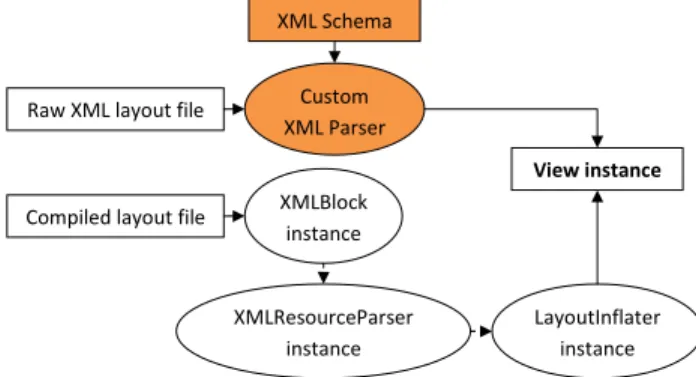
Internal Android APIs which are accessed via Java Reflec-tion can be used to parse the downloaded binary layout file. The human-readable Android layout files are pre-compiled during the build process. These binary files cannot be parsed
by normal XML file parsers any more. Another
alterna-tive to using the internal class would be to write a custom parser and use the uncompiled XML files instead. This way, it would not be necessary to make use of Android’s inter-nal classes. However, these classes could change drastically from one version to the next and thus break the compatibil-ity with the framework.
Figure 8 depicts the difference in the two approaches and illustrates that a custom XML parser would have to be writ-ten to parse the Android layout files. Android XML files feature a whole slew of tags and properties whose names, values and availability change from one version to the next, as demanded by the changes in Android’s UI. As such, using the internal class is the lesser of two evils, in case the XML files are changed dramatically.
As a result, an instance of XMLResourceParser is pro-vided, which contains the compressed layout stream. By using the LayoutInflater, which is part of the Android App Framework, we are able to create a native View object from the stream, which can finally be displayed. An A/B vari-ation of a view is only shown if a mapping exists from the original class that should be instantiated to an A/B varia-tion that should be loaded instead.
4.4
Remote Functionality Changes
The previous section showed that it is possible to inflate an Android layout during runtime and show the resulting view on the screen instead of another view. However, this func-tionality alone is not really useful for advanced A/B testing. As long as no UI elements are added or removed in these two views, the application continues to function correctly. However, this reduces the opportunities of A/B testing to changing button colours and text fonts, which is not satis-factory at all. The real advantage of A/B testing comes into play when two or more variants of a user interface which look and feel differently can be compared to each other.
Be-Raw XML layout file
Compiled layout file
Custom XML Parser XML Schema View instance XMLBlock instance XMLResourceParser instance LayoutInflater instance Raw XML layout file
Compiled layout file
Custom XML Parser XML Schema View instance XMLBlock instance XMLResourceParser instance LayoutInflater instance
Figure 8: Two options to inflate an XML layout file on Android.
cause of this, it is necessary to provide code that drives and controls every A/B variation.
The framework defines aspects that execute around the lifecycle methods of Android Activity instances. Therefore it gets notified whenever a new Activity is instantiated. It then searches the view configuration file for a matching com-bination of instantiated Activity and assigned A/B group. If such a combination and the corresponding mapped A/B class is found, the framework tries to instantiate the class. The instantiated view presenter now has control over which layout should be loaded. To do this, it uses the remote UI inflation described previously. In return, it receives a View instance of the A/B view that should be displayed.
The process of instantiating a Fragment is essentially the same, even though there is a difference. The set-up process executed by Android is different for Fragments and Activ-ities. Activities have the possibility to load custom A/B layouts and set the appropriate click handlers right after they have been instantiated, because they immediately have access to the application context. The context is necessary to be able to retrieve string or image resources from the project’s assets folder, open input or output streams to a file, and much more1. However, Fragments only have access
to the context after it was attached to its parent Activity, which happens at some point after the instantiation. Only after that a file can be read, for instance.
This section illustrated how the framework enables A/B testing. It allows to load classes from external DEX files. Together with the functionality to inflate external layout files as shown in the previous section, this lets the framework load different variations of views along with the necessary code to drive the view. The next section is going to describe how the framework allows to track conversions of users in order to be able to evaluate the outcome of an A/B test.
4.5
Recording Conversions
The A/B framework also provides a way to compare how well two or more different A/B variants (or MV-variants) work compared to each other. In order to do this, the frame-work offers two custom Java annotations that can be at-tached to the project’s classes and methods. Through AOP the framework is automatically notified whenever an anno-tated class is created or a method is executed.
To let a user start a new conversion, the
@PrepareCon-1
Apptimize Leanplum Proposed system
Supports Multivariate Tests 3
Supports Loading Layouts 3 3
Supports Loading Code 3
Changes for Setup (LOC) 2 8(+30) 0
Changes for each Test (LOC) 5(+3) 5 0
Changes for Conversions (LOC) 1 1 1 (0)
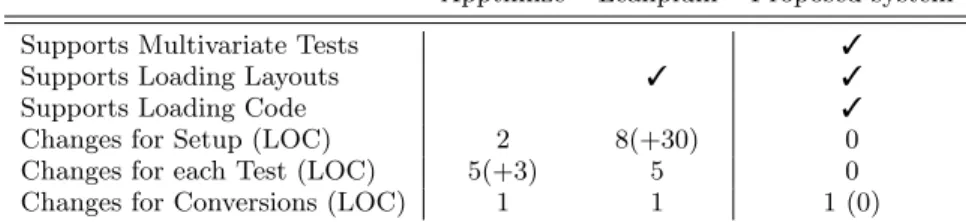
Table 2: Feature comparison of two commercial products with the presented concept.
version annotation can be used on the Activity or Frag-ment that is involved with starting the conversion. Adding this annotation informs the framework that a conversion has been started as soon as any method invocation is done on an instance of this class. The framework will use the first invocation of any method and interpret it as the start of a new conversion.
To progress an already started conversion further, the @ExecuteConversion annotation is used. This annotation can be used on methods, and it will indicate to the frame-work that the user did something that progresses the conver-sion. A conversion can be made up of several steps, which are indicated with a step parameter in the @ExecuteCon-version annotation. Several con@ExecuteCon-version steps can be put to-gether to form a conversion funnel.
As previously described, the developers can use the usual editor when creating A/B content for the A/B testing frame-work. In this case, the editor currently supported for the An-droid mobile platform is Eclipse. Furthermore, it is possible to implement a plug-in for the Eclipse IDE, which allows the developers to easily and automatically create conversion funnels in their application. This is achieved by utilising the compile-time weaving functionality of aspect-oriented pro-gramming. No custom code changes are required only to be able to use conversion recording with the A/B testing framework.
5.
EVALUATION
As part of the evaluation and comparison of related prod-ucts with our approach, the differences in the workflows are going to be illustrated in the following subsections. Fur-thermore, a simple test application has been written with our testing framework and two commercial products, App-timize2 and Leanplum3. The differences in structure,
pro-gramming style and effort required to test the application with each of the three frameworks will be analysed.
5.1
Feature Comparison
Table 2 shows a comparison of the different products based on the features they have. The presented solution is the only one which allows application developers to conduct
mul-tivariate tests. Neither Apptimize nor Leanplum provide
this functionality, although multivariate testing is frequently used in the web environment for the rapid improvement of a web page.
The loading of user interface layouts during runtime on Android is supported by our approach and Leanplum. How-ever, Leanplum is missing a very important part to comple-ment the feature of loading e.g. user interface resources on
2http://apptimize.com 3
https://www.leanplum.com
the fly. Only our approach actually supports loading addi-tional code that is not already contained in the application package. Even though Leanplum would allow to exchange user interfaces with different UI elements several times a day, this is not feasible since the application with the new code needs to be deployed in the store before the alternative UI works.
Because of the integration of the testing system into the existing logging framework [10], there are no necessary code changes in order to initialize and configure the testing sys-tem. In other products, the developers have to take care of that from within the application. This does not pose a big issue in case of Apptimize for instance. It takes merely two lines of code to initialize the framework. Leanplum however takes a different approach. In order to keep track of the session lifecycle of Android Activities, it requires 30 addi-tional lines of code for each Activity, unless the developer can change the class structure of the application. Our test-ing system on the other hand uses aspect-oriented program-ming to make sure that the lifecycle of Android Activities is recognized without further measures from the developers.
The next difference lies in the required code for testing. Both Leanplum and Apptimize let the application developer take care of which test variant should be displayed at which point in time. This means that the framework only assigns different devices to different test groups. The developer then writes code to make sure that a certain test variation is used when the device is assigned to one group, and a different ver-sion is used when it is assigned to a another group. Every start of a new test and every end of old tests requires the whole application to be republished , even if the original version always turns out to be the best performing variant and the application itself is never changed. When using our testing framework, configuration files are used instead of ap-plication code. These files indicate to the framework that an alternative version should be loaded instead of the original. These configuration files are deployed on the testing server and can be changed independently from the main applica-tion in the store. Moreover, the process of instantiating the test variations is done automatically by the framework. The main application stays free of any code regarding A/B or multivariate tests.
Last but not least, another matter is how conversion record-ing can be realized. All three of the compared frameworks require a single line of code to indicate to the system that a conversion or another interesting event has occurred. How-ever, this is because the implementation is missing the plug-in for the developer’s IDE. Usplug-ing such a plug-plug-in plug-in future version of out testing framework would reduce the number of lines written by the app developer for conversion record-ing to zero. The followrecord-ing section is gorecord-ing to highlight the differences in the workflows of the frameworks.
Setup project on server
Create additional
A/B content Compile app
Deploy in store
Upload A/B packages to
server
Create new A/B content
Compile app
Setup project on server
Create A/B content
in main app Compile app
Deploy in store
Setup project on server
Create additional
A/B content Compile app
Deploy in store
Upload A/B packages to
server
Create new A/B content
Compile app
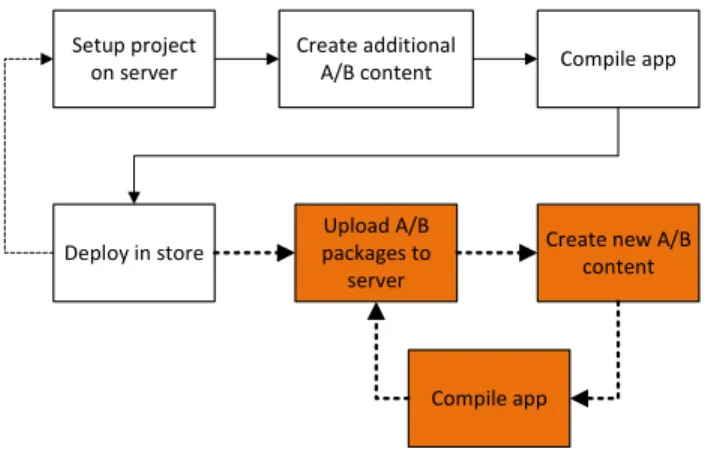
Figure 9: Deployment and update workflows of state-of-the-art products (white background) and the proposed approach (coloured background).
5.2
Comparison of Workflows
In addition to the different features of testing frameworks, it is important to know if and how the frameworks influence the usual workflow of an application developer or designer. Since testing systems integrate very tightly with the main application, it is possible that the use of such a testing sys-tem changes the way an application has to be compiled, de-ployed and updated in the app store. This section is going to illustrate the workflows when deploying an application in the store and subsequently updating it for the commercial products and our approach. This scenario occurs whenever a new A/B test should be published or when an old finished A/B test should be removed.
5.2.1
Workflow of State-of-the-Art Products
The approach taken by products like Apptimize and Lean-plum is to let the application developer handle all the differ-ent necessary tasks from setup to instantiating the differdiffer-ent variations. These products require minimal changes to the build process itself. They don’t make use of any automating techniques like aspect-oriented programming.
The downside is the amount of influence this simple ap-proach has on the normal workflow of a developer. Figure 9 depicts the process of creating content for a new A/B test and publishing it. First of all, the project and A/B test has to be set up on the testing server. Different test variations are displayed accordingly, and all of the code necessary for this is contained in the application package. The next step is to compile the application as usual, since no modifications are necessary to the build process itself. Lastly, the appli-cation is deployed in the app store. After some time, the store is updated and the application is ready for users to download it.
Whenever the tests in the application require an update, the whole process needs to start over from the beginning. In Figure 9, the thin dashed line leads back to the first step. The whole process including the republishing in the app store has to be done again. This stands in stark contrast to the deployment process in the web environment where the updated version of a web page is available for users to expe-rience mere moments after it has been published on the test server. Because of this, the concept presented in this paper takes a different approach, which is going to be presented in
the following subsection.
5.2.2
Workflow of the Proposed Approach
In contrast to the approach taken by the commercially available products, we make use of aspect-oriented program-ming features to take workload off of the application devel-oper and allow the framework to automate certain processes. As already described, this requires a modified build process. However, the process of updating tests in an application that is already deployed and in use is simpler. As depicted in Figure 9, the first steps look the same as for state-of-the-art products. However, there is a small detail that makes a big difference. Using our approach, the test content is compiled into separate packages.
After the application is deployed in the store, these pack-ages can be uploaded to the test server, from where they are retrieved by the users’ mobile devices. Using our ap-proach, the bold dashed line leads to the step where these packages are uploaded to the server. The steps that are nec-essary to update only the A/B or multivariate tests after the deployment have a coloured background. There is no need to redeploy the application for adding or removing a test, as long as the main application is not modified. Therefore, our approach allows developers to work the same way with mobile native applications as a web developer would.
6.
CONCLUSION
In this paper, a concept for mobile native A/B and mul-tivariate testing has been presented. The approach makes use of aspect-oriented programming to relieve an applica-tion programmer of the burden of writing boiler-plate code specific to UI experiments. The Android implementation of the testing framework features a low entry barrier, as it does not require changes in the main application code. At the moment, only the annotations for conversion recording have to be written by the app developers. In future work, we intend to provide an implementation for a plug-in that takes care of automatically injecting the necessary annota-tions into the code. The developers can continue to work with their favourite editor and don’t have to use proprietary web editors to make changes to a user interface.
The presented concept allows developers to easily conduct multivariate tests for mobile native applications, too. This is a huge advantage over existing frameworks. None of the related frameworks we analysed feature multivariate testing, and to the best of our knowledge, there is no existing solution for multivariate testing of native Android applications.
In the presented work, only an implementation for An-droid devices has been realized. In future work, we plan to implement the concept for other mobile platforms like iOS and show that the proposed approach is not only possible
on Android. In addition, we plan to investigate ways to
restrict the usage of several different variations in a multi-variate test. At the moment, the server creates combina-tions from all available variacombina-tions when multivariate testing is used. This means that it is not possible to test two ver-sions of an application that look completely different and each haveing their own variations. It would be necessary to configure the server in a way so that not all variations from these two designs are combined with each other. Right now, such a test would have to be split into two separate experiments, the first one testing the overall design of the UI, while the second experiment tests different versions of
the winning design using multivariate testing. Being able to restrict combinations of the two designs would allow to conduct these two experiments in just one test.
7.
ACKNOWLEDGMENTS
The research presented is conducted within the Austrian project “AUToMAte – Automatic Usability Testing of Mo-bile Applications” funded by the Austrian Research Promo-tion Agency (FFG) under contract number 839094.
8.
REFERENCES
[1] D. Amalfitano, A. Fasolino, and P. Tramontana. A GUI crawling-based technique for Android mobile application testing. InSoftware Testing, Verification and Validation Workshops (ICSTW), 2011 IEEE Fourth International Conference on, pages 252–261, 2011.
[2] S. Baride and K. Dutta. A cloud based software
testing paradigm for mobile applications.SIGSOFT
Softw. Eng. Notes, 36(3):1–4, May 2011. [3] D. Bouvier, T.-Y. Chen, G. Lewandowski,
R. McCartney, K. Sanders, and T. VanDeGrift. User interface evaluation by novices. InProceedings of the 17th ACM Annual Conference on Innovation and Technology in Computer Science Education, ITiCSE ’12, pages 327–332, New York, NY, USA, 2012. ACM. [4] B. Eisenberg, J. Quarto-vonTivadar, L. Davis, and
B. Crosby.Always Be Testing: The Complete Guide to
Google Website Optimizer. Wiley, 2009.
[5] O. Gardner and C. D. Rio.The Ultimate Guide to
A/B Split Testing. Unbounce, 2012.
[6] C. Hu and I. Neamtiu. Automating GUI testing for Android applications. InProceedings of the 6th International Workshop on Automation of Software Test, AST ’11, pages 77–83, New York, NY, USA, 2011. ACM.
[7] R. Jeffries, J. R. Miller, C. Wharton, and K. Uyeda. User interface evaluation in the real world: A comparison of four techniques. InProceedings of the SIGCHI Conference on Human Factors in Computing Systems, CHI ’91, pages 119–124, New York, NY, USA, 1991. ACM.
[8] C. S. Jensen, M. R. Prasad, and A. Møller. Automated testing with targeted event sequence generation. InProceedings of the 2013 International Symposium on Software Testing and Analysis, ISSTA 2013, pages 67–77, New York, NY, USA, 2013. ACM. [9] J. Kaasila, D. Ferreira, V. Kostakos, and T. Ojala.
Testdroid: Automated remote UI testing on Android. InProceedings of the 11th International Conference on Mobile and Ubiquitous Multimedia, MUM ’12, pages 28:1–28:4, New York, NY, USA, 2012. ACM. [10] F. Lettner and C. Holzmann. Automated and
unsupervised user interaction logging as basis for usability evaluation of mobile applications. In Proceedings of the 10th International Conference on Advances in Mobile Computing & Multimedia, MoMM ’12, pages 118–127, New York, NY, USA, 2012. ACM. [11] T. Luo, H. Hao, W. Du, Y. Wang, and H. Yin.
Attacks on WebView in the Android system. In Proceedings of the 27th Annual Computer Security Applications Conference, ACSAC ’11, pages 343–352, New York, NY, USA, 2011. ACM.
[12] S. Poeplau, Y. Fratantonio, A. Bianchi, C. Kruegel, and G. Vigna. Execute this! Analyzing unsafe and malicious dynamic code loading in Android
applications.Network and Distributed System Security (NDSS) Symposium, 2014.
[13] J. Quarto-vonTivadar. A/B testing: Too little, too soon. FutureNowInc.com, 2006.
[14] A. Spillner and T. Linz.Basiswissen Softwaretest: Aus und Weiterbildung zum Certified Tester -Foundation Level nach ISTQB-Standard. dpunkt-Verlag, 2010.