June 2019
Car Hacking: Accessing and Exploiting the CAN
Bus Protocol
Bryson R. Payne
University of North Georgia, [email protected]
Follow this and additional works at:https://digitalcommons.kennesaw.edu/jcerp
Part of theAutomotive Engineering Commons,Information Security Commons,Management Information Systems Commons, and theTechnology and Innovation Commons
This Article is brought to you for free and open access by DigitalCommons@Kennesaw State University. It has been accepted for inclusion in Journal of
Recommended Citation
Payne, Bryson R. (2019) "Car Hacking: Accessing and Exploiting the CAN Bus Protocol,"Journal of Cybersecurity Education, Research and Practice: Vol. 2019 : No. 1 , Article 5.
worth exploring both in the classroom and in the real world. Highly publicized hacks against production cars, and a relatively small number of crashes involving autonomous vehicles, have brought the issue of securing smart cars to the forefront as a matter of public and individual safety, and the cybersecurity of these “data centers on wheels” is of greater concern than ever.
However, up to this point there has been a steep learning curve involved in applying cybersecurity research to car hacking. The purpose of this paper is to present a clear, step-by-step process for creating a car-hacking research workstation and to give faculty, students, and researchers the ability to implement car hacking in their own courses and lab environments. This article describes the integration of a module on car hacking into a semester-long ethical hacking cybersecurity course, including full installation and setup of all the open-source tools necessary to implement the hands-on labs in similar courses. This work demonstrates how to test an automobile for vulnerabilities involving replay attacks, and how to reverse-engineer CAN bus messages, using a combination of open-source tools and a commodity CAN-to-USB cable or wireless connector for under $100 (USD). Also provided are an introduction to the CAN (controller area network) bus in modern automobiles and a brief history of car hacking.
Keywords
car hacking, cybersecurity, CAN bus, controller area network, automotive security
Cover Page Footnote
This research was supported in part by National Security Agency and National Science Foundation GenCyber grant project #H98230-17-1-0167, and Spanish Ministry of Economy and Business grant
INTRODUCTION
Car hacking has been portrayed in popular media as a present danger, even though relatively few successful proofs of concept have been demonstrated against production vehicles during normal use on the highway (Miller & Valasek, 2018). Similarly, autonomous or self-driving cars have logged over a million miles with fewer accidents than the average human driver (Dixit, Chand & Nair, 2016), but the few crashes involving autonomous vehicles have been highly publicized, even when those accidents were caused by human intervention (Banerjee et al., 2018). With the rapid adoption of internet-connected and driver-assist technologies, and the spread of semi-autonomous to self-driving cars on roads world-wide, cybersecurity for smart cars is a timely concern and one worth exploring both in the classroom and in the real world (Ring, 2015).
Automobile networks are increasingly complex, running on tens of millions of lines of code (Saracco, 2016), yet they employ decades-old protocols with little to no security (Bosch, 1991). Furthermore, the tools needed to access these networks are widely available for free or for very little cost. Unfortunately, the learning curve necessary to implement these tools has, up to this point, been rather steep, making it difficult for students or even experienced cybersecurity researchers to apply their skills to automotive networks. The purpose of this paper is to present a clear, step-by-step process for creating a car-hacking research workstation. Using open-source software and a $70 cable, we can demonstrate a common vulnerability across newer IoT devices, the replay attack, as an easy-to-understand first attack on automobile networked systems.
This paper details the implementation of a hands-on car-hacking module developed by the author into an ethical-hacking computer security course, including the setup of open-source car-hacking tools, a demonstration of a replay attack on a simulated controller area network (CAN), and the low-cost tools necessary to test for similar vulnerabilities in modern automobiles. All the software can be installed on a laptop or Raspberry Pi, or on a Linux virtual machine, like the ones typically used in an ethical hacking course featuring Kali Linux and Metasploit tools. And the only physical equipment needed to connect the software to a modern car, a USB to OBD-II cable or wireless connector, can be acquired easily online for under $100USD.
BACKGROUND
Automobiles have become increasingly more technologically sophisticated, but the underlying communication system, the controller area network, or CAN bus, has remained either largely unchanged or backwards compatible with the 1991 standard (Bosch, 1991). Including firmware, operating systems, and application software, a “typical” new car may include 100 million lines of code (Newcomb, 2012). The 2016 Ford F150 pickup truck was unveiled not at a car show, but at the Consumer Electronics Show, touting 150 million lines of code (Saracco, 2016), and that was years ago.
In addition to autonomous software and hardware advances like self-driving and driver-assist technologies, newer automobiles may include Bluetooth and standard Wi-Fi networking capabilities, and many even include a persistent wireless connection over 4G LTE. Some automobiles, including new Teslas, can even update their own software and firmware over 4G LTE (Alvarez, 2018). These network connections significantly expand the threat surface, bringing new vectors of attack to ever more complex automotive systems.
Koscher et al. (2010) noted that an attacker who is able to access almost any of the dozens of ECUs (electronic control units), the microprocessor chips responsible for sensing and control, in modern automobiles could “completely circumvent a broad array of safety-critical systems” (Koscher et al, 2010, p. 447).
At the same time the attack surfaces of network connectivity and system complexity have grown exponentially, the resources needed to attack an automobile have shrunk almost to zero. Using only free, open-source software and either a Raspberry Pi, an Android phone, or a free Kali Linux virtual machine running on an existing laptop, hackers can test for vulnerabilities and potentially attack a car via Bluetooth and Wi-Fi. For under $20, a wired or wireless OBD-II connector can be attached to the on-board diagnostic port (OBD-II) of a target vehicle for direct access to the internal workings of the automobile across any of those devices.
Car hacking itself is surprisingly similar to hacking other networked devices. We can use a network sniffer to view packets as they move across the controller area network, or CAN bus, in an automobile. Let us first cover a brief introduction to the modern CAN bus, then provide some history on significant moments in car hacking, followed by an introduction to the open-source car hacking tools we’ll be using from OpenGarages.org.
Introduction to the CAN Bus
The CAN (controller area network) bus in an automobile is the network that enables communication between the vehicle’s sensors and its various electronic control units (ECUs). Modern production cars can have as many as 70 or more ECUs (CSS Electronics, 2018), controlling the engine, airbags, anti-lock braking system, tail lights, entertainment system, and more. CAN itself is a message-based protocol standardized as CAN specification 2.0 in 1991 by multinational electronics and engineering company Bosch (Cook & Freudenberg, 2008).
The CAN bus in an automobile could be thought of as a noisy, crowded, slower version of a traditional Ethernet LAN (local area network), except that the traffic is mostly UDP (user datagram protocol), a connectionless transport protocol, rather than the TCP (transmission control protocol) traffic that dominates most web and client-server networks.
It is worth noting that not all automobile control systems run over the CAN bus. In addition to multiple bus architectures for sensory and control automation, including LIN (local interconnect network), FlexRay, and MOST (media oriented system transport), there are several other networks present in modern automobiles (Wolf, Weimerskirch & Paar, 2004). These network connections can include Bluetooth, GSM/LTE cellular network connections, GPS navigation, satellite radio as well as vendor-specific systems like OnStar. Proposals have also been made for more secure network messaging systems to protect critical functions. In one promising example, Schmandt, Sherman and Banerjee (2017) proposed a modified message authentication protocol to address security gaps in networks like the CAN bus, but automotive manufacturers have been slow to adopt these technologies.
There are some advantages to using UDP for CAN bus automotive communications (Vector, 2016). For one, there are fewer communication delays and therefore less variation in communication timing because UDP does not require feedback from the receiver like TCP does. Another advantage is the ability to broadcast to all controllers and sensors in the controller area network, so that a change in an actuator, like the turn signal lever, can be reflected on the dashboard and carried out on the lighting circuit without requiring multiple direct wiring circuits. The CAN bus architecture allows all of these devices to communicate over as little as one pair of shared wires running to each sensor, actuator, or ECU.
CAN bus protocol messages are small (eight bytes or less at a time), with no explicit addresses in the messages, just a priority value (messages from the engine or brakes get higher priority than the air conditioning or audio player). Although there is some integrity protection, in the form of a checksum, and availability protection in the form of error handling and retransmission of lost messages, the CAN bus protocol was not built with modern security controls in mind.
Brief History of Car Hacking
In 2011, the first widely accepted remote compromise, or hack, of a production vehicle was accomplished by a team of researchers at the University of California, San Diego (Checkoway et al., 2011), against a 2011 Chevy Malibu. The researchers were able to cause the car’s brakes to lock up while driving using two different remote attack vectors.
In 2015, researchers Charlie Miller and Chris Valasek remotely controlled the steering, braking, acceleration, and other controls of a 2015 Jeep Cherokee (Miller & Valasek, 2018). They noted that automotive control messages should be protected with modern encryption mechanisms, like TLS, to ensure authenticity and integrity. The researchers reported being shocked to learn that the manufacturers stated they would first have to find a way to implement TCP in automotive networks before they could handle SSL or TLS encryption, both of which require establishment of a TCP session.
Additional high-profile hacks were demonstrated against electric vehicles, including a 2016 Tesla Model S and a 2018 BMW i3 by Tencent’s Keen Security Lab. And, while most of these cyber-physical attack vectors were rapidly addressed by the manufacturers, fundamental security concerns remain, especially when physical access to the vehicle is possible. Many researchers include internet-connected automobiles among the growing Internet of Things (IoT), and note significant cybersecurity concerns as once-isolated devices and machines are interconnected across both wired and wireless IP networks (Payne & Abegaz, 2018).
An Open Source Toolkit for Car Hacking
The software we use in our car hacking module is both free and open-source, available from OpenGarages.org, consisting primarily of the Instrument Cluster Simulator, or ICSim package (OpenGarages.org, 2017). ICSim was created by car hacking researcher Craig Smith, author of The Car Hacker’s Handbook (Smith, 2016). Smith’s handbook was the foundation for our original research into car hacking. ICSim includes both a dashboard simulator with a speedometer, door lock indicators, and turn signal indicators, and a control panel that allows the user to interact with the simulated automobile network, applying acceleration and controlling the door locks and turn signals. ICSim relies on other free Linux tools, including the CAN Utilities, or can-utils, that are available under the package installer repositories for most Linux distributions.
In the following section, we will detail the step-by-step installation and configuration of the ICSim software and related tools for use in a classroom, computer lab, or automotive research workstation, as well as running in a virtual machine on a commodity Windows, Mac or Linux laptop.
IMPLEMENTATION
At the onset of this lesson or module in a classroom environment, it is an opportune time to discuss ethical considerations in car hacking, and in the greater Internet of Things (IoT) as a whole. As we become more reliant on connected technologies in our daily lives, the role that security plays becomes even more important. As self-driving cars and driver-assist technologies continue to expand and improve, discussing ethical and security concerns, especially with respect to human safety, provides an additional opportunity for discussion in a cybersecurity course. Should car owners be able to test the security of their own vehicles? What are ethical limits for security researchers? Do car manufacturers have greater responsibility than other IoT device manufacturers in assuring the security of systems and networks in their products? Such questions can help frame the importance and relevance of car hacking in the context of a cyber course.
Faculty and students familiar with Linux, especially Kali Linux for ethical hacking and penetration testing, will find both the setup and the use of the tools themselves relatively intuitive. Those with less experience, especially with less command-line Linux expertise, can still install and run the tools in a virtual machine similar to the ones used in most hands-on courses in ethical hacking.
In our ethical hacking course, we were already using virtual machines for Kali Linux, so we implemented the OpenGarages.org car hacking tools on Kali, a Debian-based Linux distribution favored by many ethical hackers, red teams, and offensive security practitioners. Our implementation used Kali Linux running in a virtual machine under Oracle’s freely available VirtualBox platform.
VirtualBox runs on Windows, Linux, and Mac computers and can host dozens of different operating systems in individual virtual machines, and even though its technology was acquired by Oracle, Inc., VirtualBox remains free and open-source under the GNU General Public License version 2.
Installation
This installation will assume the user has either a workstation running Kali Linux or a virtual machine running Kali Linux in a platform like VMware or VirtualBox. For the car hacking modules, we will use open-source tools from OpenGarages.org developed by Craig Smith.
Installing Dependencies
The first step in setting up the OpenGarages.org car hacking software is installing prerequisite software known as dependencies. First, update Kali Linux by typing the update command into a new Terminal (command-line) window:
sudo apt-get update
Then, install the LibSDL (SDL stands for Simple DirectMedia Layer, a cross-platform development library for computer graphics and audio) development libraries. LibSDL is used by the Instrument Cluster Simulator software from OpenGarages to draw and animate the virtual dashboard (or instrument cluster), as well as to access various game controllers, like the PlayStation PS3 controller natively supported by the software to drive the virtual car in the ICsim control application.
Install both the libsdl2-dev and libsdl2-image-dev libraries with the command:
sudo apt-get install libsdl2-dev libsdl2-image-dev
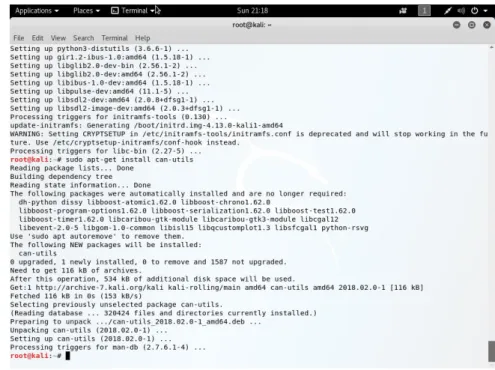
After the LibSDL libraries are installed, add the CAN utilities. CAN is short for controller area network, the primary network in modern automobiles. The CAN utilities are included in some Linux distributions, but not in Kali as of this writing. The CAN utilities can be installed using the command:
sudo apt-get install can-utils
Once the LibSDL and CAN utilities software dependencies are in place, as shown in Figure 1, we can proceed to download and install the ICSim car hacking tools.
Figure 1: After installing LibSDL and CAN Utilities software dependencies, we can download and install the ICSim software from OpenGarages.org.
Downloading and Installing ICSim
We will utilize git to download the OpenGarages.org software ICSim, short for Instrument Cluster Simulator. Git is the most widely used version control system, and is free and open-source (created by Linus Torvalds, the creator of Linux himself). It’s also included in Kali, as well as in most Linux distributions.
Git will clone, or copy the ICSim project files, directly to your local computer. Set the directory to your home directory with the command:
cd ~
That’s cd (short for change directory) followed by a tilde (~) symbol, to signify the user’s home directory. On Kali Linux, this is usually the directory /root/, corresponding to the root user.
Download and expand the ICSim project files using git with the command:
git clone https://github.com/zombieCraig/ICSim.git
Git will download the project files for ICSim into a folder labeled ICSim in your home directory. Change into the ICSim folder and list the contents:
cd ICSim/ ls
You should see several files, including two executable files labeled controls and
icsim, inside the ICSim folder, as shown in Figure 2.
Figure 2: After cloning ICSim.git, you’ll be able to cd into the ICSim folder to reveal the Instrument Cluster Simulator files.
Preparing the Virtual CAN Network
View the contents of the shell script setup_vcan.sh by typing the more command:
more setup_vcan.sh
You should see the following four lines of shell commands: sudo modprobe can
sudo modprobe vcan
sudo ip link add dev vcan0 type vcan sudo ip link set up vcan0
The modprobe command is used to load kernel modules, like the CAN and vCAN network modules from the CAN utilities library, and the first two lines of the script will load these two modules to be able to communicate using CAN protocols on a virtual controller area network (vCAN) for our car-hacking simulator. The final two lines will create a new network device called vcan0 of type vCAN and turn the link on.
Either type and run those four lines above, or run the shell script by typing:
You can verify that the vcan0 network link is active by typing ifconfig. In addition to your regular network interfaces, you should now see vcan0 listed. With the vcan0 network link active, we can run the Instrument Cluster Simulator and the Control Panel to simulate a live controller area network and instrument cluster in a modern automobile.
Running the ICSim Software
The standard setup for running ICSim includes at least two components, the icsim Instrument Cluster Simulator program file, which simulates an automobile’s dashboard instrument panel, and the controls executable, which gives the user control of the virtual automobile, including acceleration, steering, door locks, and turn signals. For a first experience for beginning car hackers, it’s also instructive to open a third terminal window running a network sniffer to view packets on this new virtual CAN network.
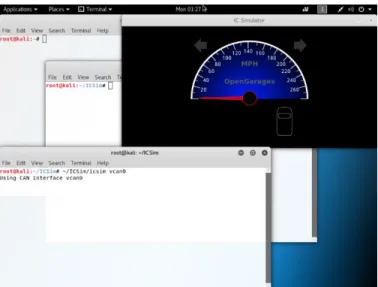
Open three terminal windows. In the first window, open the Instrument Cluster Simulator application, icsim, on the vcan0 virtual CAN network interface we created:
~/ICSim/icsim vcan0
That’s vcan0, with a zero, denoting the virtual CAN network we created by running setup_vcan.sh above. The dashboard instrument panel simulator will appear as shown in Figure 3.
Figure 3: The icsim instrument cluster simulator represents the dashboard of a virtual automobile, with indicators for speed, turn signals, and door locks.
Nothing on the dashboard will light up, and the speedometer will remain fixed, because there’s no traffic on the vcan0 network yet. We’ll address that by starting the ICSim’s controls. In a second terminal window, open the controls app:
~/ICSim/controls vcan0
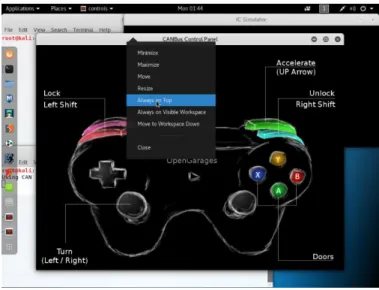
The CANBus Control Panel application will appear on the screen, with a GUI mimicking the PlayStation 3’s PS3 controller (which, by the way, is supported by the controls app). The keyboard controls are labeled on the controller GUI: acceleration is controlled with the Up arrow key, turn signals with the Left and Right arrow keys, and so on.
Right-click (or control-click) on the title bar at the top of the window, and select
Always on Top to keep the control panel app visible, as shown in Figure 4.
Figure 4: The CANBus Control Panel is launched by running the ICSim/controls application on virtual CAN network vcan0. Keep it visible by selecting Always on
Top, then resize it to view both the dashboard and the controller.
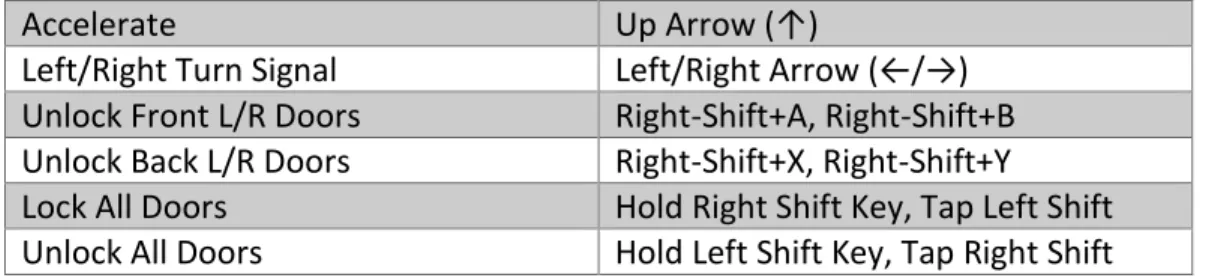
Resize the controller window so that it fits on the screen with the dashboard simulator. You’ll notice that the speedometer is now “idling”, or jittering slightly while sitting at 0 MPH. This is because the controller app is sending mild noise signals over the virtual CAN bus network vcan0 to simulate a real car’s CAN bus. The keyboard controls shown in Table 1 will only function when the CANBus Control Panel app is currently selected. If the dashboard doesn’t seem to be responding, first click your mouse in the CANBus Control Panel window, then use
Accelerate Up Arrow (↑)
Left/Right Turn Signal Left/Right Arrow (←/→)
Unlock Front L/R Doors Right-Shift+A, Right-Shift+B
Unlock Back L/R Doors Right-Shift+X, Right-Shift+Y
Lock All Doors Hold Right Shift Key, Tap Left Shift
Unlock All Doors Hold Left Shift Key, Tap Right Shift
Table 1: Keyboard controls for the CANBus Control Panel app, and their associated function viewable in the IC Simulator dashboard app.
Click the CANBus Control Panel window and press a few of the keys and key combinations given in Table 1 to see the virtual car take off, signal for left and right turns, lock and unlock doors, and so on.
Finally, let’s view the network packets that our control panel app is sending across the vcan0 network to the dashboard simulator by running cansniffer, the CAN network sniffer included in the CAN Utilities software we installed earlier. From a third terminal window, run:
cansniffer -c vcan0
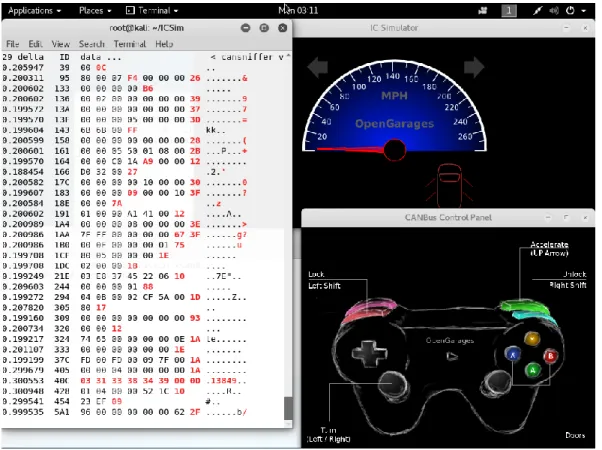
The cansniffer executable is not provided in the ICSim package; rather, it is contained in the can-utils software dependency we installed prior to downloading the ICSim software. As you can see in Figure 5, the network traffic looks similar to a raw tcpdump or captured packet data in Wireshark.
Figure 5: Cansniffer running alongside the IC Simulator and CANBus Control Panel, providing a network-level view of packets on the virtual CAN bus
The cansniffer -c flag tells the sniffer to colorize bytes that are changing, which can help us identify bytes that vary as we interact with the CAN bus via the control panel app.
With these three windows open, the icsim dashboard, the controls control panel, and the cansniffer network sniffer, we can see one perspective of how sensors, actuators, and ECUs interact over a simple CAN bus. Try accelerating all the way to 90 MPH, the maximum speed configured for the controller, then lock and unlock all the doors, and press the left and right turn signals while accelerating. The dashboard will reflect your keystrokes regardless of whether such combinations would be safe to attempt in a real vehicle.
In the next section, we’ll see how to use this combination of tools to perform a common cybersecurity test by demonstrating the ability to capture packets and replay them on the CAN network to trigger sensors and controls without interaction on the part of the driver.
DEMONSTRATING A REPLAY ATTACK
While deciphering the packets from the virtual CAN network is beyond the scope of this current work, we can demonstrate the effective use of these packets by attempting a replay attack. In a replay attack, a hacker captures packets from interesting network traffic and attempts to re-inject them into the network later to repeat the functionality, or to learn more about the packets by observing errors or other abnormal behavior in the affected devices.
Unfortunately, many newer (and some older) IoT devices suffer from replay attack vulnerabilities, like Bluetooth smart locks (Benchoff, 2016), and even industrial control systems (Kovacs, 2017). A replay attack can be one of the first steps a security tester or an attacker might use in attempting to reverse-engineer a device’s functionality in a new or unknown network, like our virtual CAN network. Fortunately, just like the cansniffer software allowed us to view packets on the virtual CAN network interface, there are additional tools in the can-utils library that enable us to capture and replay those packets. In this example lab module, we’ll demonstrate the replay attack in two steps: capturing packets with known commands from the virtual CAN network traffic, and replaying those packets on the virtual CAN bus.
Capturing the CAN Bus Packets
If you still have the icsim, controls, and cansniffer windows active from the previous section, press Ctrl-C (control-C) in the cansniffer window to stop the network sniffer.
If you’ve closed the car-hacking windows, or if you’ve restarted your Kali VM, you can run the following commands to recreate the vcan0 network and open the
icsim dashboard and controls control panel on vcan0:
cd ~/ICSim
sh setup_vcan.sh ./icsim vcan0 & ./controls vcan0 &
Note that by adding the ampersand (&) to the end of the last two commands, you can run both the IC Simulator and CANBus Control Panel from the same terminal window. The ampersand places each command in the “background”, allowing the user to continue working in the command line shell while a process executes.
In a separate terminal window, run the candump tool to log all the traffic on
candump -l vcan0
Note the -l is dash-lowercase-L (not dash-one). The candump -l flag stands for log, or capture the CAN traffic and save it to a file. We still use the vcan0 network interface, because that’s the interface where our dashboard and controller are simulating CAN traffic.
Immediately after starting candump, click back on the CANBus Control Panel window and begin pressing keys to accelerate, activate the turn signals, and lock and unlock doors. After a few seconds of “driving”, click back on the candump
terminal window and press Ctrl-C (control-C) to stop the packet capture.
List the contents of the current directory with the ls command, and you’ll see a new file in the format candump-YYYY-MM-DD_time.log, such as:
candump-2019-02-23_083845.log
This log file contains all the packets we just captured. Now it’s time to close the controller window and try the replay attack against our virtual CAN bus.
Replaying the CAN Bus Packets
Close the CANBus Control Panel window. You’ll notice the needle on the virtual speedometer stops “idling”, because the controller was adding the noise and jitter. Right now, the CAN bus is completely quiet. But, we can re-inject the packets we captured above and observe whether the packets will have the same effect on the dashboard as the real controller did. This is a simple, safe replay hack, but we’ll learn how to extend it to try this out on a real automobile.
In the terminal window you were using to run the candump tool, type the following command:
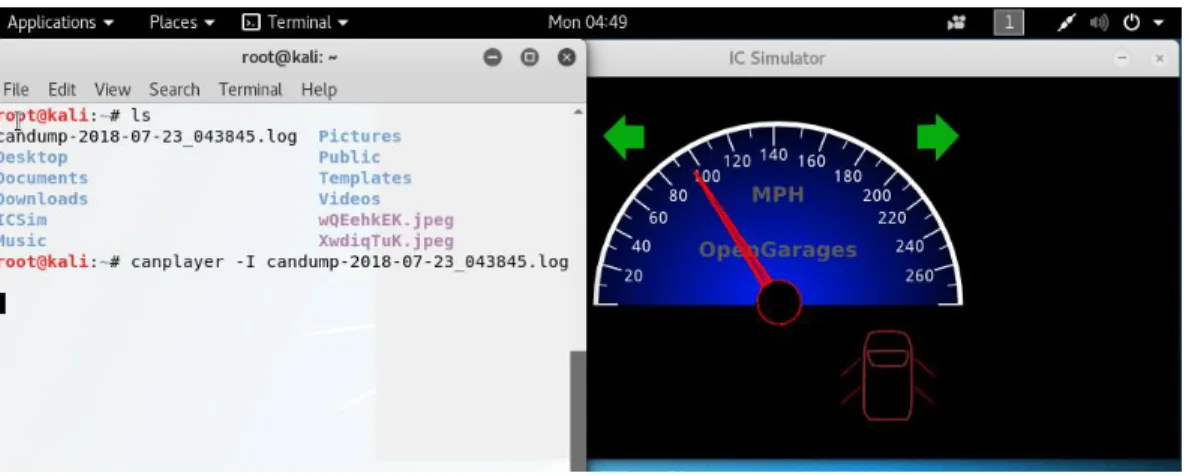
canplayer -I candump-2019-02-23_083845.log
The -I flag tells canplayer to use the supplied log file as input. Note that you can start typing the log filename and just press the tab key (type c-a-n and press the Tab key to auto-complete the log file name) instead of typing the long sequence of digits. Also notice that you don’t have to specify which interface to use, vcan0, like you did with all the previous CAN utilities. This is because canplayer will replay the packets on the same interface they were captured on.
After pressing the enter key, you should see the speedometer and other dashboard components do the same thing they did when you captured the packets, as shown in Figure 6. Notice we were able to get both the left and right turn signals on at the same time, and unlock all the doors, while the car was going at over 90 miles per hour!
Figure 6: We can replay the packets we captured earlier using canplayer, and control the virtual dashboard without using the CANBus Control Panel.
You’re able to see the same indicators, even though the car is turned “off”— there are no controls active, but you’re changing the dashboard as if the car is actively running.
In fact, if you run canplayer with the CANBus Control Panel still active, the speedometer will jump between its “real” value, determined by the controller app, and the value the canplayer app is replaying onto the virtual CAN bus.
REVERSE ENGINEERING CANBUS MESSAGES
For advanced students, the next step in car hacking is to reverse engineer a specific packet or CAN bus message to perform a particular task, like turning on the breaks or the turn signals, pressing the accelerator, and so on. In this section, we will demonstrate how to use candump, canplayer, and cansend to reverse engineer the CAN ID and message values of a targeted system, such as the door locks, accelerator, turn signal, or similar. Once the CAN ID of a particular system is known, and the various message values for that ID are enumerated, the hacker can control each feature individually with single commands set to the CAN bus.
Reverse Engineering the Turn Signals
A relatively accessible first CAN system to exploit is the turn signal. We usually use this as a first example both because the results of a successful exploit are readily visible (the turn signal lights up), and because it is a good example of an innocuous sensor that can be used in a harmful way. Usually a turn signal is beneficial, allowing the driver of one car to let others know she is slowing to turn left or right. However, if both turn signals are lit at the same time, the effect is very similar to brake lights. On a busy, crowded, fast-moving interstate, a flash of brake lights can cause drivers to slam on their brakes, potentially causing multiple accidents.
To achieve control of a car’s turn signals through reverse engineering, we will need to capture a baseline set of CAN packets with the signals turned off. Then, we will capture a set of CAN packets with the right turn signal active. Using a type of binary search, we will divide each packet capture in half, and replay each half until one packet lights up the right turn signal. We then recursively divide each “good” packet in half until we isolate the single CAN message that is responsible for lighting the turn signal. Once we have the CAN ID of that packet, we can modify the data values in the message to discover both the left and right turn signal values, turning off the signal, and turning on both signals at the same time.
Capturing a Baseline CAN Dump with No Turn Signals
With the IC Simulator, CANBus Control Panel, and a Terminal window open as in the previous section, start candump in the Terminal:
candump -l vcan0
Do not interact with the controller, just capture about a second’s worth of packets with no turn signals running. (Note: If you’re trying to reverse engineer a CAN control that toggles, like door locks, you may need to capture a baseline in which you re-lock the doors, or perform an opposite action to whatever action you’re trying to replay.) Stop the packet capture by pressing Ctrl-C. Rename the resulting
candump log file something memorable like baseline.
mv candump-2019-03-02_102411.log baseline
With the baseline, or lights out, file captured, it’s time to capture the right turn signal, and reverse engineer the CAN ID responsible for showing the turn signals.
Next, capture a candump of the right turn signal for a second or two. To do this, start candump in the Terminal window, switch immediately to the CANBus Control Panel and press the right arrow on your keyboard. After about a second, switch back to the Terminal window and stop the candump by pressing Ctrl-C.
The process we’ll use to reverse engineer the individual CAN ID of the turn signal is to split the candump file in half recursively until we have a single CAN packet or message that will light the right turn signal.
First, determine the number of lines (the candump format is plain text, one line per CAN message) in the most recent capture:
wc -l candump-2019-03-07_102721.log
9761 candump-2019-03-07_102721.log
The Linux word count command wc -l (dash l as in lines) will count the number of lines in a file. Above, the command reports that there are 9,761 lines in the couple of seconds of candump logs we captured.
Replay the log file to make sure it does, indeed, show the right turn signal:
canplayer -I candump-2019-03-07_102721.log
If the turn signal does not light up, go back and capture the turn signal again. Once the signal lights up, close the CANBus Control Panel so that it will not interfere in the reverse engineering steps to follow.
Recursively apply the following steps:
1. Split the previous log file into two approximately equal halves:
split -l 5000 candump-2019-03-07_102721.log x1
The Linux split -l (again, dash l as in lines) command will split the file into multiple files containing the specified number of lines (we began with almost 10,000 lines, so we used 5,000 as the first split value). The x1 (x one) at the end of the command specifies the prefix for the resulting files; the two files produced above will be named x1aa and x1ab. 2. Play each half until the turn signal lights up on the dashboard:
canplayer -I x1aa canplayer -I x1ab
If the first command lights the right turn signal, there is no need to run the second command. If not, run the second command. Because the original complete file turned on the signal, at least one of these two halves should also turn on the signal. If both work, we’ll arbitrarily pick the first file each time for further analysis.
Note: The turn signal is a simple on/off value, so it is easy to spot. If the CAN system you’re trying to reverse engineer is more subtle or continuous, like acceleration, braking, or turning up the stereo volume or A/C temperature, you may want to wrap the canplayer command in a
for loop to be able to spot shorter or incremental effects:
for i in {1..10}; do canplayer -I x1aa ; done 3. Reset the dashboard by playing the baseline to clear the turn signal:
canplayer -I baseline
The turn signal should return to the off state. This is necessary because our dashboard will continue to show the turn signal as on, or lit up, until an off state is received.
4. Go back to Step 1, splitting the number of lines in the “good” packet capture (either x1aa or x1ab above, whichever lights the signal) roughly in half (2500, 1250, 640, 320, 160, 80, 40, 20, 10, 5, 3, 2, 1), and incrementing the prefix (x2, x3, and so on) each time:
split -l 2500 x1aa x2
The two new resulting files will be named x2aa and x2ab. Repeat steps 2-4 until your “good” file consists of one line that turns on the right turn signal.
Students familiar with the power of the binary search will recognize that this process will take surprisingly few iterations. Even an initial packet capture of 1,000,000 lines (approximately 220) will require only 20 iterations to identify the single CAN message responsible for turning on the signal. Here are the last few rounds of one example:
split -l 4 x11ab x12 canplayer -I x12aa canplayer -I baseline
canplayer -I x13ab canplayer -I baseline split -l 1 x13ab x14 canplayer -I x14aa canplayer -I x14ab
The x14ab file in this example is a single line long, and it turns on the right signal. Let’s look at the contents:
more x14ab
(1551972443.099502) vcan0 188#02000000
The timing of the packet is at the start of the line, the CAN network vcan0 is next, then the CAN ID of the turn signal, 188, followed by the hash symbol # and the data responsible for turning on the right turn signal: 02000000.
We have successfully reverse engineered the CAN ID of the turn signal! We can verify this by resetting the dashboard with the baseline, then running the cansend
command with the correct CAN ID and data, as follows:
canplayer -I baseline
cansend vcan0 188#02000000
The turn signal is on! Now that we have the CAN ID of the turn signals, it’s time to perform the last step, and take full control of the turn signal system.
Enumerating CAN Data Values and Gaining Full Control of a CAN System
Once we have the CAN ID of the turn signals, it’s time to modify the data values in the message to discover both the left and right turn signal values, turn off the signal, and turn on both signals at the same time.
First, we know that we can light up the right turn signal with the CAN message 188#02000000. Visually inspecting the data value, 02000000, a logical next value to try might be 01000000. With the IC Simulator still running, type:
cansend vcan0 188#01000000
The left turn signal lights up! Next, let’s try all zero values for the data :
Both turn signals go dark with the zero data values. This means that if we can inject 188#00000000 signals repeatedly on the CAN bus (e.g. with a for loop, as noted in the previous section), we can effectively suppress or silence the turn signal. This is not likely to be catastrophic alone, but it could induce stress on a driver as well as other vehicles behind him or her.
Last, but not least, let’s go for the pièce de résistance: Can we turn on both the left and right turn signals at the same time? A little familiarity with binary arithmetic helps here:
cansend vcan0 188#03000000
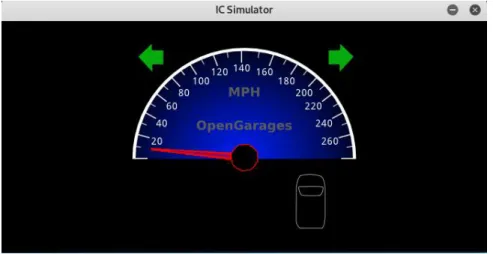
The data value 03000000 on CAN ID 188 lights both the left and turn signals at the same time! We have achieved the effect of emergency lights or a simulated pair of brake lights, potentially enough to disrupt a driver or several drivers in traffic.
Figure 7: We have successfully reverse engineered the CAN ID and data values needed to hack the turn signals, gaining full control of both turn signals in the IC Simulator.
In just a few steps, we have gained complete control of the turn signals in a simulated vehicle. This would be an opportune time to discuss ethical concerns with students: when could this hack be applied ethically? What are some of the potential side effects of this attack if used unethically? What greater impact could an attack like this have if it could be aimed at multiple vehicles simultaneously?
One area of ethical application of these tools is in vulnerability testing (Jafarnejad et al., 2015). In much the same way we can use ethical hacking techniques to find vulnerabilities and harden computers, ethical car hacking can
While the examples above are simulated safely in a lab environment, the tools needed to connect a researcher’s Kali laptop to a physical automobile are inexpensive and widely available.
Connecting to a Real Automobile
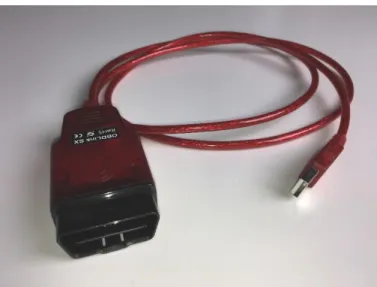
On a lab computer, car hacking is a theoretical exercise, but by adding a $20 ODB-II to USB cable you can purchase online, like the one shown in Figure 8, you can plug into your car’s on-board-diagnostic port (or OBD-II port, usually found under the steering wheel near the driver’s side floorboard) and see the results of CAN messages on your Windows, Linux, or Mac computer.
Figure 8: You can purchase a USB to OBD-II adapter cable to connect your computer to almost any post-1996 automobile’s on-board-diagnostic (OBD) port, for just around $20-30USD online.
The OBDLink SX is an inexpensive and widely available piece of hardware for home mechanics and car hackers alike. In this section, we’ll detail how to connect such an OBD to USB cable to the Kali VM used in previous sections.
To connect to the OBDLink cable shown for the first time, it’s helpful to install the ScanTool software from ScanTool.net (Hobbs, 2015), available as an apt-get package:
sudo apt-get install scantool
Then, run the scantool application by typing the command:
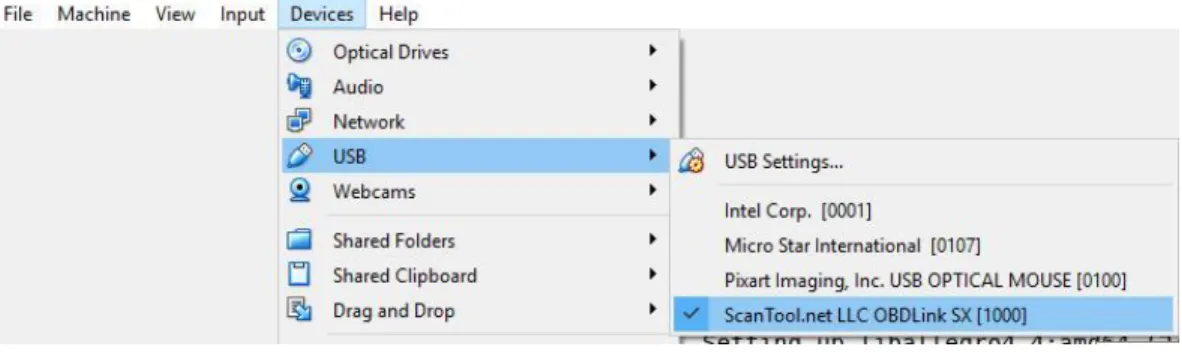
You can plug the OBD-II cable into your laptop or computer using the USB adapter end, plug the OBD-II connector into your car’s OBD port under the steering wheel on the driver’s side near the floorboard, and turn on the automobile’s ignition. If you’re using a virtual machine, you’ll need to connect the USB device to your VM in VirtualBox by selecting Devices > USB > ScanTool OBDLink (or similar), as shown in Figure 9.
Figure 9: You can connect a physical OBD-II to USB cable to your virtual machine in VirtualBox by going to the virtual machine’s menu and selecting
Devices > USB > ScanTool OBDLink (or the name of your OBD-to-USB cable). The ScanTool software will connect to automobile’s CAN network to perform tasks like reading diagnostic codes (and resetting them, like your mechanic does when he changes your oil, etc.), reading sensor data (with room for over eight pages of sensors to accommodate most modern vehicles), and more. The Linux version of the ScanTool GUI is shown in Figure 10.
Figure 10: The free ScanTool software that works with several types of OBD-II to USB cables has an easy-to-use GUI interface, as well as all the drivers you need to be able to read data from the CAN bus of most modern vehicles.
With a slightly more capable CAN-to-USB converter, like CANable, CANtact, or Korlan USB2CAN, all available for under $75USD, you should be able to read raw CAN packets and attempt some of the same replay attacks mentioned above (capturing the left turn signal for a few seconds, turning off the turn signal, then reinjecting the packets using canplayer to see if the dashboard indicator blinks—or if the actual turn signal lights on the outside of the car flash). Remember, though, that the effects of packet injection can cause unpredictable behavior, and should only be attempted in a safe environment on a vehicle you can afford to take to a real mechanic.
CONCLUSION AND FUTURE WORK
This paper has provided detailed instructions for setting up free, open-source car-hacking software for instructional or research use. We also described how to add an inexpensive (under $100USD) physical cable or wireless connector capable of connecting to modern production vehicles through the OBD-II on-board-diagnostic port.
We have implemented this module in two ethical hacking courses, one at the undergraduate level and one at the graduate level, and have found significant student interest in the material. We have also included a complete tutorial in an online ethical hacking course with over 5,000 students enrolled (Payne, 2018). In addition to working successfully with college students in implementing replay attacks as described in this work, we added the car-hacking module to two high-school cyber summer camps under the NSA GenCyber grant program. The students were able to effectively and accurately reproduce the replay attacks, facilitating both their understanding of the car-hacking material itself and their ability to work with network sniffers like Wireshark and tcpdump.
In all cases, students were able to master the material quickly and displayed great interest and motivation. In fact, the “hacking the car-hacking software” extension to the module came from one of the high-school summer cyber camps, and one of the students demonstrated how to edit the source code and create the “wrap-around” speedometer effect to his peers in class.
From the foundation provided by the open-source ICSim package from OpenGarages.org and the free ScanTool software from ScanTool.net, students and researchers alike can apply these tools to test various car-hacking scenarios, and they can even modify the underlying source code to customize the tools to their needs.
In the near term, we plan to expand the car hacking module to include more hands-on testing with faculty (and student) automobiles of various makes and models, as well as encourage the students to make further modifications to the software to customize it to suit additional test cases. In the long term, we hope to acquire an electric vehicle with LTE cellular connectivity (like the Nissan Leaf, Chevy Bolt, or Tesla Model 3) to extend this research to include wireless and remote vulnerability testing with no direct connection to the OBD-II port necessary. We also hope to survey students formally to gather relevant data for determining whether car hacking had a significant impact on student outcomes in ethical hacking and related courses as future research.
REFERENCES
Alvarez, S. (2018). Tesla to offer ‘premium connectivity’ internet package starting July 1. Teslarati.com. June 23, 2018. https://www.teslarati.com/tesla-premium-connectivity-internet-package-july-1/
Banerjee, S. S., Jha, S., Cyriac, J., Kalbarczyk, Z. T., & Iyer, R. K. (2018, June). Hands Off the Wheel in Autonomous Vehicles?: A Systems Perspective on over a Million Miles of Field Data. In 2018 48th Annual IEEE/IFIP International Conference on Dependable Systems and Networks (DSN)(pp. 586-597). IEEE.
Benchoff, B. (2016). The terrible security of Bluetooth locks. Hackaday. August 8, 2016. https://hackaday.com/2016/08/08/the-terrible-security-of-bluetooth-locks/
Bosch GmbH. (1991). CAN specification version 2.0. Retrieved June 3, 2018 from http://esd.cs.ucr.edu/webres/can20.pdf
Checkoway, S., McCoy, D., Kantor, B., Anderson, D., Shacham, H., Savage, S., ... & Kohno, T. (2011, August). Comprehensive experimental analyses of automotive attack surfaces. USENIX Security Symposium (pp. 77-92). http://www.autosec.org/pubs/cars-usenixsec2011.pdf Cook, J.A. & Freudenberg, J.S. (2008). Controller Area Network (CAN). Retrieved September 5,
2018 from https://www.eecs.umich.edu/courses/eecs461/doc/CAN_notes.pdf
CSS Electronics (2018). CAN Bus Explained – A Simple Intro. Retrieved July 10, 2018 from https://www.csselectronics.com/screen/page/simple-intro-to-can-bus/language/en
Dixit, V. V., Chand, S., & Nair, D. J. (2016). Autonomous vehicles: disengagements, accidents and reaction times. PLoS one, 11(12), e0168054.
Hobbs, S. (2015). Scantool – OBD-II Car Diagnostic Software for Linux. Retrieved July 25, 2018 from https://samhobbs.co.uk/2015/04/scantool-obdii-car-diagnostic-software-linux
Jafarnejad, S., Codeca, L., Bronzi, W., Frank, R., & Engel, T. (2015, December). A car hacking experiment: When connectivity meets vulnerability. In 2015 IEEE Globecom Workshops (GC Wkshps) (pp. 1-6). IEEE.
Kovacs, E. (2017). PLCs from several vendors vulnerable to replay attacks. SecurityWeek, April 6, 2016. https://www.securityweek.com/plcs-several-vendors-vulnerable-replay-attacks
Miller, C. & Valasek, C. (2018). Securing Self-Driving Cars. Presentation at Black Hat USA 2018. Retrieved August 9, 2018 from http://illmatics.com/securing_self_driving_cars.pdf
Newcomb, D. (2012). The next big OS war is in your dashboard. Wired. December 2012. https://www.wired.com/2012/12/automotive-os-war/
OpenGarages.org. (2017). ICSim: Instrument Cluster Simulator for SocketCAN. Retrieved May 15, 2018 from https://github.com/zombieCraig/ICSim
Payne, B. R., & Abegaz, T. T. (2018). Securing the Internet of Things: Best Practices for Deploying IoT Devices. Computer and Network Security Essentials, 493-506.
Payne, B. (2018). Real-World Ethical Hacking: Hands-on Cybersecurity. Udemy.com. https://www.udemy.com/real-world-ethical-hacking/
Ring, T. (2015). Connected cars – the next target for hackers. Network Security, 2015(11), 11-16. Saracco, R. (2016). Guess what requires 150 million lines of code… EIT Digital. January 13, 2016.
https://www.eitdigital.eu/news-events/blog/article/guess-what-requires-150-million-lines-of-code/
Schmandt, J., Sherman, A. T., & Banerjee, N. (2017). Mini-MAC: Raising the bar for vehicular security with a lightweight message authentication protocol. Vehicular Communications, 9, 188-196.
Smith, C. (2016). The Car Hacker’s Handbook. San Francisco:No Starch Press.
Vector (2016). Automotive Ethernet. Retrieved July 18, 2018 from https://elearning.vector.com/index.php?&seite=vl_automotive_ethernet_introduction_ko Wolf, M., Weimerskirch, A., & Paar, C. (2004, November). Security in automotive bus systems.