The Future of Teaching Programming is on Mobile Devices
Nikolai Tillmann, Michal Moskal,
Jonathan de Halleux, Manuel Fahndrich,
Judith Bishop, Arjmand Samuel
Microsoft Research One Microsoft Way Redmond WA, USA
{nikolait,micmo,jhalleux,maf,
jbishop,arjmands}@microsoft.com
Tao Xie
Department of Computer Science North Carolina State University
Raleigh NC, USA
[email protected]
ABSTRACT
From paper to computers, the way that we have been writing down thoughts and performing symbolic computations has been constantly evolving. Teaching methods closely follow this trend, leveraging existing technology to make teaching more effective and preparing students for their later careers with the available technology. Right now, in 2012, we are in the middle of another technology shift: instead of using PCs and laptops, mobile devices are becoming more prevalent for most everyday computing tasks. In fact, never before in human history were incredibly powerful and versatile com-puting devices such as smartphones available and adopted so broadly. We propose that computer programming, and thus the teaching of programming, can and should be done directly on the mobile devices themselves, without the need for a separate PC or laptop to write code. Programming on smartphones that we carry around with us at all times means instant gratification for students, as they can show their games and applications to their friends, and it means that students can do their homework or additional practic-ing at all times. We describe TouchDevelop, a novel mobile programming environment, and call out challenges that need to be overcome and opportunities that it creates.
Categories and Subject Descriptors
D.2.3 [Software Engineering]: Program editors; D.2.3 [Software Engineering]: Structured programming; D.2.6 [Programming Environments/Construction Tools]: Integrated environments; D.2.11 [Software Architectures]: Languages
General Terms
Human Factors, Design, Languages
Permission to make digital or hard copies of all or part of this work for personal or classroom use is granted without fee provided that copies are not made or distributed for profit or commercial advantage and that copies bear this notice and the full citation on the first page. To copy otherwise, to republish, to post on servers or to redistribute to lists, requires prior specific permission and/or a fee.
ITiCSE’12,July 3–5, 2012, Haifa, Israel.
Copyright 2012 ACM 978-1-4503-1246-2/12/07 ...$10.00.
Keywords
Evolution, Mobile Devices, Touchscreen, Cloud, Type infer-ence
1.
INTRODUCTION
From scratching in sand, chiseling in stone, writing on pa-per, using an abacus, mechanical computers, electric com-puters, mainframes, minicomcom-puters, to eventually micro-computers/PC, the way that we have been writing down thoughts and performing symbolic computations has been constantly evolving. The instruments that are available for teaching follow the prevalent technologies. Ideally, the way that a subject is taught should be closely related to how the students will apply the acquired knowledge later in their professional careers.
Right now, in 2012, we are in the middle of another tech-nology shift: more touchscreen-based mobile devices like smartphones and tablets will be sold than PCs, laptops, and netbooks combined. In fact, in many cases, incredibly pow-erful and easy-to-use smartphones are going to be the first and, in less developed countries, possibly the only comput-ing devices that virtually all people will own. Many tasks that used to require a large computer are now feasible on smaller devices. Even the tiniest smartphones are always connected to the cloud and have great email reading and internet surfing capabilities. Improvements in touchscreen technology and word prediction techniques made it possible to perform basic typing tasks with ease. Mobile devices are now often used to play games of a sophistication that would have required the most advanced PC a decade ago.
While traditional servers, PCs and embedded systems will stay around and much critical software still needs to be writ-ten for them, a significant portion of all developed programs will target mobile devices.
What has not yet happened is the shift to use the new mobile devices themselves to write applications for those de-vices. This shift might not seem desirable for affluent pro-fessional developers who spend the majority of their time writing code and who can afford a traditional PC develop-ment environdevelop-ment set up in order to be more productive with a big screen, full physical keyboard, and mouse. But note that in general non-essential input devices tend to die; witness for example the PDA stylus and tablet PC pen, and the declining popularity of slide-out keyboards for phones. If it is possible and effective to use only a mobile device with a touchscreen to program certain applications, then other
more complicated approaches are likely to be eventually re-placed by the single-device approach, making obsolete the PC development environment tethered to a mobile device for testing mobile applications.
Teaching of programming should follow this trend. Students are soon more likely to personally own a smart-phone than a traditional PC or laptop. Students will not only own such devices, they will carry them with them at all times. They will use them not only for communication, fun, and utility, but also to store and access their most per-sonal digital data such as pictures, videos, and music.
This connection opens new opportunities for teaching pro-gramming. Instead of analyzing and manipulating abstract or teacher-provided data, students should write and execute programs on their own mobile devices, working with their own readily available content, making learning programming the engaging experience that it should be.
2.
DISRUPTION
While some technology shifts happen gradually, they are often accompanied by fundamental changes. We believe that the way we input programs and the way we handle program state will change with the transition to mobile devices, and there will be consequences for the programming languages as well. It is important that teachers prepare students for these imminent changes, which are syntactical and conceptual in nature.
There are many precedents for the coupling of input de-vices and programming languages. Consider for example FORTRAN 77, to name one representative of the punch card era. Each punch card had 72-column lines; in FORTRAN 77, the first 5 columns were reserved for line numbers, the 6th could indicate a continuation line, and the first column could indicate a comment. All of these conventions became cumbersome once programs were not entered directly on physical punch cards anymore, but instead via a keyboard and editors with line buffers. We predict that moving away from a keyboard, a device that allows very precise entry of around 100 different characters to a touchscreen typical for mobile devices will again influence how the program syntax is structured and entered. While forward-looking predic-tive text input works reasonably well on virtual touchscreen keyboard, actions that require fine navigation, e.g., to make structural corrections, are awkward on a touchscreen where the size of a finger limits precision.
The capabilities of how a computer may handle mem-oryalso influences programming languages. Consider again FORTRAN 77. It did not allow dynamic memory alloca-tion and had no way to represent memory references and had no safe external storage facilities, but only the unsafe COMMON blocks. Modern programming languages have greatly improved this situation, providing garbage collected object references, and routines for structured I/O. However, the modern languages were designed to handle local mem-ory and storage, and they did not yet make the transition to cloud-connected devices where the user often perceives state as not being tied to a particular device, but instead to be rooted in the cloud, being made available as needed to fill in for the current task at hand. Besides the general hype to move storage to the cloud, mobile devices are especially affected by this trend as they have short replacement cycles, and they are easily lost or broken. Instead of burdening the programmer with the implementation of abstractions to
string::= ”Hello world!\n”|...
number ::= 0|1|3.1415|...
local ::= x|y|z|foo bar|...
action ::= frobnicate|go draw line|...
global::= phone|math|maps|ok button|chat roster|...
property::= vibrate|sin|add pushpin|disable|add|...
exprs::=expr|exprs,expr parameters::=|(exprs )
op::= +| − |/| ∗ |<=|>=|>|<|=|!=|and|or| ||
expr ::=local|string|number |true|false
| −expr|notexpr|expr op expr
|action parameters|expr −> propertyparameters block ::=stmt|block stmt
locals::=local |local,locals
stmt ::=expr|locals:=expr |do nothing
|ifexprthenblockelseblock
|whileexprdoblock |foreachlocal inexpr doblock
|for 0<=local <exprdoblock
type ::= Number|String|Song|Nothing|Phone|...
formals ::=local :type |local:type ,formals formals-opt ::=|formals
returns-opt ::=|returnsformals
action-def ::= actionaction(formals-opt )returns-opt block
Figure 1: Abstract syntax of TouchDevelop
move around and merge local and cloud data, or learning how to use add-on libraries that perform such tasks, cloud-based state and storage should be an integral aspect of a new programming language for mobile devices.
3.
MOBILE DEVELOPMENT
ENVIRONMENT
TouchDevelop [11] is a novel programming environment, language and code editor for mobile devices that addresses some of the main consequences of the expected technology shift. TouchDevelop makes it possible to write applications directly on mobile devices, without the need for a separate PC. At its core is a typed, structured programming language that is built around the idea of using only a touchscreen as the input device to author code.
In fact, the abstract syntax, typing rules, and basic se-mantics of the language are fairly similar to correspond-ing fragments of mainstream programmcorrespond-ing languages like Java or C#. This similarity lets the user transfer expertise between the TouchDevelop language and a traditional pro-gramming environment, in both directions. The language mixes imperative, object-oriented, and functional aspects. The imperative parts are most visible: assignment state-ments can update local variables and state of global objects. The language has a notion of objects in order to facilitate code autocompletion by the editor — properties of objects are an easily accessible and intuitive concept. Functional features come in form of a query language.
A program consist of a set of actions; each action con-tains statements. Figure 1 gives an overview of the abstract syntax of statements and expressions that can appear in ac-tions. The language provides built-in primitives that make it easy to access the rich sensor data available on a mobile device.
Instead of a traditional text editor, TouchDevelop employs a semi-structured code editor. The motivation for structured editing is not to entirely eliminate the possibility of syntax errors, but instead to ensure that every navigation task
be-tween different syntax elements can be easily achieved by tapping on a finger-sized user interface element on the screen instead of relying on a full physical or on-screen keyboard that enables editing of code at the level of individual charac-ters from which words and in turn sentences are formed. To determine which user interface elements are shown on the limited screen space, the editor leverages inferred types and it mines previously written programs to provide highly pre-dictive auto-completion suggestions to the user. In effect, the user only has to choose from lists of statement kinds and expression tokens instead of entering statements and expressions character by character.
In addition to the basic programming functionality (lan-guage, interpreter, editor), TouchDevelop provides a social experience, allowing users to publish and download pro-grams, discuss them by writing comments, publish screen-shots, and users can give hearts to a program or comment when they like it. A central program repository in the cloud manages all programs and analyzes them for privacy con-cerns and code duplication.
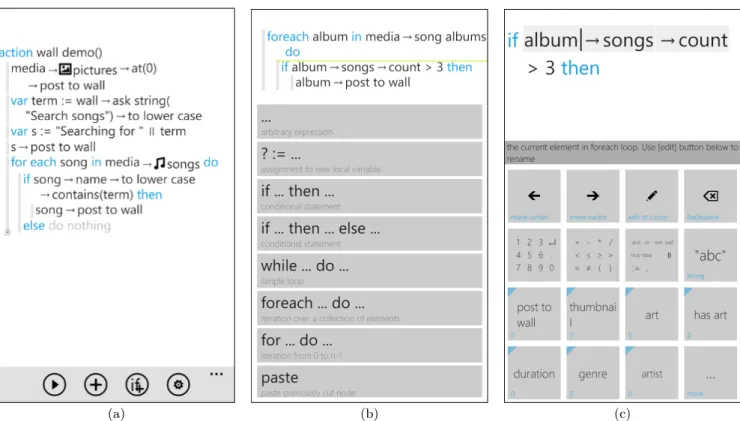
Figure 2 shows the different views of the code editor in TouchDevelop, including a listing of a complete program. Each screenshot captures the entire screen of a smartphone. Note that all surface areas which act as buttons are large enough to be tapped on quite precisely by a big finger. The left screenshot (a) shows a list of statements. The user can select a statement by tapping somewhere in a statement line. The middle screenshot (b) shows how the user adds addi-tional statements by choosing from a list of possible state-ment kinds. It is not possible to make syntactical mistakes at the statement level. Once the statement kind is chosen, the view transitions to the expression editor to edit the expres-sion associated with the statement. The right screenshot (c) shows the expression editor, which is implemented similar to a rich calculator. Individual built-in syntactic primitives such as numbers and operators can be accessed via nested keypads, opened by first tapping on the corresponding sum-mary button. Other semantic procedure and function calls can be inserted by eight quick buttons, which are populated based on the type of the current scope, and historical usage information.
TouchDevelop is available as an free application on the Windows Phone Marketplace.
4.
EXPERIENCE
After six months, more than 3000 games and applica-tions have been written and published by users of TouchDe-velop, using the touchscreen as the only input device. The TouchDevelop website1 shows all games and applications.
Many games written by users leverage the accelerometer of the phone as a controller, measuring how the phone is tilted, including a fully-featured Tetris-like game, a Breakout-like game, warehouse games where boxes need to be moved to particular locations, and many more. Other applications are useful tools and utilities, including a program that queries the calendar on the phone and automatically connects to any currently scheduled online meeting, a program that queries the current state of parking meters in a city via a web service and projects the information on a map, a Siri-like application that connects the microphone, a speech recognition engine, and a search engine via web service calls, and many more. 1
http://touchdevelop.com/
In the following, we report on our ongoing experience working with students at various levels2.
4.1
9 Weeks with High School Students
The first indication of the feasibility of the approach was an experience with two high school students who spent 9 weeks over the course of a summer developing games and ap-plications with an early version of TouchDevelop. The stu-dents had some previous experience with programming on PCs for PCs using Java, Python, and/or Scheme, but they had never written applications for mobile devices before. We provided them with smartphones that had TouchDevelop pre-installed, and we encouraged them to be investigative and learn by themselves how to create games and applica-tions with the environment. The only instructional material we provided to the students was a set of sample games and applications, and a few videos that walk through the process of creating a new application, tap by tap on the touchscreen. We would help them later when they had particular ques-tions about the language, built-in funcques-tions, the editor, or other aspects of the environment.
The students started as learners of the language and en-vironment, and quickly became relatively experienced pro-grammers who could write quite sophisticated games and applications by themselves. One student wrote 19 different games and applications during this time. Some of the stu-dents’ games rival existing apps in software marketplaces for smartphones.
4.2
90 Minutes with 30 High School Students
in a Computer Science Class
We were invited to a high school to work with 30 students in grades 11-12 in a computer science class for 90 minutes. The students had recently started the class and were already introduced to some programming concepts but they had no experience in developing mobile applications. We provided 12 phones for students to work in groups of three. After a brief introduction to TouchDevelop, the students had 45 minutes to explore the language and write their own mobile applications. All groups were able to write applications on their own, including a program that changes the color of the screen based on the direction in 3D space that the phone is facing, a peek-a-boo game that utilized the direction the phone was facing to display a covered face or an open face with the audio track to accompany it, and a role playing game where the user has to answer questions to progress. The regular computer science teacher made the following remarks: “Even though most of the students haven’t learned about some to the [techniques] before, like using a loop or a collection of objects, the concepts made sense in the context of a phone app. [It] was a fun way to learn about program-ming topics and obtain instant feedback on whether you did it correctly or not.”
4.3
2 Hours with 90 Eighth Grade Students
We were invited to a middle school to work with the entire eighth grade of that school — 90 students in two sessions for 2 hours with 45 students. The students did not volunteer to be part of the sessions. We provided enough phones so that students could work together in groups of two. After a brief introduction to TouchDevelop, the students had 60 2
(a) (b) (c)
Figure 2: Three screenshots illustrating the TouchDevelop programming environment on mobile devices.
minutes to explore the language and write their own mobile applications.
71 students filled out questionnaires before and after the class.
Before the class,
• 12% of the students stated that they already had pro-gramming knowledge, 43% some and 43% no program-ming knowledge at all
• 61% of the students did not own a smartphone After the class,
• 7% of the students stated that they thought the de-velopment of a mobile application with TouchDevelop was easy, 48% thought it was somewhat difficult, and 45% said it was difficult. However,
• 86% of the students wanted to create more applications using TouchDevelop.
• 92% of the girls wanted to continue writing applica-tions whereas only 38% of them had an idea of what applications they could create prior to the class. Almost all groups were able to create a unique applica-tion3, incorporating the phone input sensors (accelerometer, camera, touchscreen, microphone) outputs (vibrator, screen, audio) and/or media libraries (songs, pictures).
3
http://research.microsoft.com/apps/video/?id=157112
5.
OPPORTUNITIES AND CHALLENGES
FOR TEACHING AND LEARNING
We next discuss opportunities and challenges of teaching and learning in the context of TouchDevelop, and writing programs on mobile devices in general. The discussion is based on feedback from users and students.5.1
Platform and Environment Support
Today’s classrooms are not well equipped for the transi-tion yet. The widespread expectatransi-tion is that exercises are performed on traditional PCs and laptops. Such an expecta-tion is reflected in the equipment made available for the stu-dents for the duration of a course. While some stustu-dents may already own personal mobile devices, it is likely that with increasing adoption of various smartphone platforms we will find a heterogeneous set of incompatible phone platforms supporting vastly different programming environments that are rapidly evolving.
Mobile programming environments will have to be stan-dardized or made available across platforms, or all students of a class must adopt a particular phone platform, or schools must make available a homogeneous set of mobile devices for teaching purposes, similar to how many schools already make available PCs or laptops.
In a classroom setting, a teacher would have to be able to project a programming session on a mobile device on a big-ger screen. Some mobile devices have video-out capabilities, similar to laptops, or a teacher would need a WolfVision-like desktop visualizer4to capture and project the phone’s screen on a larger display for students to see. Another alternative for the teacher would be to use an emulator or simulator of 4
the mobile device that runs on the teacher’s laptop or PC. Finally, the programming environment itself could support a mechanism to stream its current image.
5.2
Teaching and Learning Materials
Teachers are not yet well prepared for the transition. Ex-isting course material is tailored around programming lan-guages that were not designed for mobile devices. Much of the existing material should be easy to adapt, as the fun-damental algorithmic aspects of programming still apply. The necessary changes are foremost adaptations to language syntax and editors, with new aspects of programming with cloud state added later on.
Over time, examples and exercises could be adapted to be better suited for the nature of personal mobile devices, e.g., by letting algorithms iterate over the songs available on the actual phone instead of enumerating over fictitious payroll data.
We are in the process of creating course material for an introductory course on programming with TouchDevelop. A book5 and slide decks6 are already available.
5.3
Software Development Processes
and Practices
There are many established development processes and practices for software development with traditional program-ming languages on PCs and laptops. Not all of them carry over seamlessly to an emerging mobile programming envi-ronment. Next we discuss some constraints imposed by the new programming environments and their impact on the de-velopment processes and practices.
Some processes (e.g., test-driven development) that re-quire specific practices (e.g., testing) and supporting tools (e.g., formal unit testing frameworks and test runners) may not work well in the new programming environments at first, as the environment will not have the fully developed ecosys-tems that we have become accustomed to from established programming environments. This situation is likely tempo-rary as the ecosystem is developing.
Some software development and teaching practices such as pair programming and remote assistance could be infea-sible without specific platform support, e.g., live sharing of screens across phones. Even when the platform support is provided, the exact same code-editing screen without edit-ing context may not be desirable for the observedit-ing program-mer, and the platform support may need to show a different screen with more editing context for the observer.
6.
DISCUSSION AND RELATED WORK
The idea of using mobile devices instead of PCs in edu-cation is not new [9]; what is new in TouchDevelop is that the mobile device is not just used as a browser-like device to access existing information and programs, but that it is used as a program creation environment itself.
Learning programming is difficult [4], as it amounts to acquiring a skill, and not just a body of knowledge. Work-ing with mobile devices such as personal smartphones may make learning programming more interesting to students. The traditional mobile application development model cen-tered around developing on a PC adds many complexities for 5http://touchdevelop.com/book
6
http://touchdevelop.com/slides
teaching [3]. Nevertheless, teaching an introductory course on programming by writing code for mobile devices has been tried [8, 6, 7]; one finding was that developing mobile ap-plications (by using a PC) was more difficult than develop-ing desktop applications (on a PC), since the mobile pro-gramming models are typically a restricted subset of the PC model, to the extent that programming for mobile devices on PCs can be seen as a form of programming embedded systems. In contrast, TouchDevelop does not require a PC at all, offering a homogeneous development experience.
At many universities, advanced programming courses for mobile devices are becoming available. Workshops are held to make teachers familiar with mobile programming environ-ments. An example is the Audacious Android Application Programming Workshop7.
It has been observed that developing games for mobile devices can be a valuable tool in the CS curriculum [5], as the students can directly relate to mobile games, and because such games offer instant gratification — students can play them on the mobile devices that they carry with them at all times, and they can show them to their friends. However, it was also observed that it is difficult to develop mobile applications in the traditional development setting, and thus it is a topic that is usually delayed to advanced CS classes. Attempts have been made to greatly simplify the pro-gramming model for mobile applications. For example, App Inventor [14] is a system that enables the visual develop-ment of Android apps by connecting blocks to define the program’s behavior. This system is promising for use in in-troductory programming courses [13, 12]. However, even if simplifying application development, the development sys-tem is still designed around the idea of developing programs on a fully featured PC with a big screen and precise mouse. Our experience with high school students shows that a pro-gramming environment that runs directly on mobile devices has the potential to dramatically reduce the technical learn-ing overhead; high school students whom we worked with were able to create and refine their first programs within an hour, immediately leveraging the sensors and data available on the phone, instead of having to learn concepts such as cross-compilation and application deployment first.
It has been observed that the rich sensory data available on mobile devices stimulates the use of mobile devices as learning tools [1]. However, the PC itself does not offer many of the sensors such as location and accelerometer that are often used in mobile games and applications, making it awkward to develop and test initial versions of mobile ap-plications in a PC-based emulator; in contrast, development directly on mobile devices makes the use of such sensors easier since immediate feedback is provided.
By carrying their own mobile devices with them at all times, students will effectively carry around the entire com-puter programming learning and practicing environment, as-suming that the programming environment runs on the de-vice itself. The effect is an unprecedented form of mobile-device supported lifelong learning and practicing [10]. If eventually every student will own a mobile device, then this environment enables a new phase of technology-enhanced learning of programming, termed “seamless learning” [2]. This mode of learning allows students not only to learn something whenever they are curious, but also to seamlessly 7
switch from one activity to another supported by their mo-bile devices.
One might argue that the smaller form factor and lim-ited input capabilities of mobile devices make them inher-ently restrictive, and unsuitable for certain tasks, possibly including programming. What seems clear is that estab-lished patterns will have to change to make programming on such devices feasible. There are several programming en-vironments already on software marketplaces for mobile de-vices; most are difficult to use, as they simply port existing text-editor based programming languages, but some radi-cally adapt to the new touchscreen-based mobile paradigm, such as TouchDevelop.
Besides the small screen, the limited battery life and pro-cessors that are not as fast as those found in desktop PCs may limit the applications that run on mobile devices. How-ever, with the omnipresent cloud, it is feasible to defer rich functionalities to remote services. Over time, more and more such services are becoming available, see for example Project Hawaii8which offers services for OCR, Speech to Text, and message relay. TouchDevelop makes it easy to perform such service calls, thus greatly extending the environment from the immediate sensors on the device to anything accessible via the cloud. The cloud also enables a new paradigm for data storage: the concept of distributed state will be di-rectly incorporated into the semantics of the TouchDevelop programming language; the runtime system will take care of synchronizing and merging data between different mo-bile clients and the cloud, providing an abstraction at the language-level to the programmer.
The current trend to mobile devices and touchscreens may simply be a transient phenomenon, and we might soon see yet another technology emerge that will make small touch-screen considerations again obsolete. But such a develop-ment is not certain either.
7.
CONCLUSION
In the foreseeable future, incredibly powerful and easy-to-use smartphones will be the first (and possibly only) com-puting devices that virtually all people will own, and carry with them at all times. We predict that those devices will be used as application creation environments, and propose that the teaching of programming should start from this new reality. We presented our experience with middle and high school students that indicates that programming directly on mobile devices is indeed quite accessible to students who are beginning to learn programming. By learning program-ming on their own personal devices, with access to personal content such as pictures, videos, songs, and sensors such as location and accelerometer, this new way of teaching pro-gramming will create a uniquely engaging and fun learning experience for students.
8.
REFERENCES
[1] J. Barbosa, R. Hahn, D. N. F. Barbosa, and C. F. R. Geyer. Mobile and ubiquitous computing in an innovative undergraduate course. InProceedings of the 38th SIGCSE technical symposium on Computer science education, SIGCSE ’07, pages 379–383, New York, NY, USA, 2007. ACM.
8
http://research.microsoft.com/hawaii/
[2] T.-W. Chan, J. Roschelle, S. Hsi, Kinshuk,
M. Sharples, T. Brown, C. Patton, J. C. Cherniavsky, R. D. Pea, C. Norris, E. Soloway, N. Balacheff, M. Scardamalia, P. Dillenbourg, C.-K. Looi, M. Milrad, and H. U. Hoppe. One-to-one
technology-enhanced learning: an opportunity for global research collaboration.Research and Practice in Technology Enhanced Learning, 1(1):3–29, 2006. [3] M. H. Goadrich and M. P. Rogers. Smart smartphone
development: ios versus android. InProceedings of the 42nd ACM technical symposium on Computer science education, SIGCSE ’11, pages 607–612, New York, NY, USA, 2011. ACM.
[4] T. Jenkins. On the difficulty of learning to program.
Language, 4:53–58, 2002.
[5] S. Kurkovsky. Engaging students through mobile game development. InProceedings of the 40th ACM technical symposium on Computer science education, SIGCSE ’09, pages 44–48, New York, NY, USA, 2009. ACM. [6] Q. Mahmoud and P. Popowicz. A mobile application
development approach to teaching introductory programming. InFrontiers in Education Conference (FIE), 2010 IEEE, pages T4F–1 –T4F–6, oct. 2010. [7] Q. H. Mahmoud. Best practices in teaching mobile
application development. InProceedings of the 16th annual joint conference on Innovation and technology in computer science education, ITiCSE ’11, pages 333–333, New York, NY, USA, 2011. ACM. [8] Q. H. Mahmoud and A. Dyer. Mobile devices in an
introductory programming course.Computer, 41:108–107, June 2008.
[9] M. Pasamontes, J. Guzman, F. Rodriguez,
M. Berenguel, and S. Dormido. Easy mobile device programming for educational purposes. InDecision and Control, 2005 and 2005 European Control
Conference. CDC-ECC ’05. 44th IEEE Conference on, pages 3420 – 3425, dec. 2005.
[10] M. Sharples. The design of personal mobile technologies for lifelong learning.Comput. Educ., 34:177–193, April 2000.
[11] N. Tillmann, M. Moskal, J. de Halleux, and M. Fahndrich. Touchdevelop: programming cloud-connected mobile devices via touchscreen. In
Proceedings of the 10th SIGPLAN symposium on New ideas, new paradigms, and reflections on programming and software, ONWARD ’11, pages 49–60, New York, NY, USA, 2011. ACM.
[12] S. Uludag, M. Karakus, and S. W. Turner.
Implementing it0/cs0 with scratch, app inventor for android, and lego mindstorms. InProceedings of the 2011 conference on Information technology education, SIGITE ’11, pages 183–190, New York, NY, USA, 2011. ACM.
[13] D. Wolber. App inventor and real-world motivation. InProceedings of the 42nd ACM technical symposium on Computer science education, SIGCSE ’11, pages 601–606, New York, NY, USA, 2011. ACM. [14] D. Wolber, H. Abelson, E. Spertus, and L. Looney.
App Inventor - Create Your Own Android Apps.