LaTisha D. Lankford. Guide for Cataloging Legal Websites: using MARC and Dublin Core. A Master’s Paper for the M.S. in L.S. degree. April, 2007. 38 pages. Advisor: Jerry D. Saye
For many catalogers, web sites that are pertinent to their users’ needs are particularly challenging to catalog. While AACR2 has addressed the standards for cataloging electronic resources, including web sites, the structures and constantly changing information within web sites makes cataloging them problematic. This guide provides new catalogers who are not familiar with cataloging web sites with strategies for effective copy cataloging using the OCLC Connexion cataloging tool. Some of the topics explored are the development of the Internet, reasons for cataloging web sites, problems with cataloging web sites, and maintaining web addressing, using AACR2 rules or Dublin Core metadata schemes and the fields and code typically used in catalog records for web sites.
Headings:
Cataloging – Web sites Copy cataloging Internet – Cataloging
Internet resources – Cataloging Web sites
Guide for Cataloging Legal Websites: using MARC and Dublin Core
By
LaTisha D. Lankford
A Master’s paper submitted to the faculty of the School of Information and Library Science of the University of North Carolina at Chapel Hill
in partial fulfillment of the requirements for the degree of Master of Science in
Library Science
Chapel Hill, North Carolina April 2007
Approved by
1
Table of Contents
Introduction………2
Literature Review………...2
A Historical Look at Cataloging and Classification……...………2
A Historical Look at Law Education in the United States……….5
The Birth of the Internet and Information Explosion……….6
Cataloging Web Sites? Why and How?...………....7
Starting the Process………9
Problems with providing access to Internet resources………..11
Maintaining Web addresses………..12
AACR2 vs. Dublin Core?...14
Codes and Fields for Cataloging Legal Web sites………18
Cataloging Exercise………..22
Conclusion………24
Works Cited………..25
Appendixes………...27
A: Glossary………...27
B: List of Credible Legal Websites………..29
C: MARC Cataloging Worksheet for Web sites………..31
D: Dublin Core Cataloging Worksheet………32
E: Cataloging Exercise Answers……….34
F: OCLC Connexion Record for a website using AACR2 format……..35
Introduction
This guide is intended to be used as a manual by new and experienced catalogers who want to provide patrons with access to websites through their library’s online public access catalog (OPAC). The idea of cataloging the web is challenging if not practically impossible. Websites are constantly changing and being updated. It would take
tremendous time and effort to maintain accurate and up to date access to websites for library patrons. Cataloging services provided by OCLC are now more advanced and provides catalogers with the capability to create records with ease. OCLC’s cataloging tool Connexion has completely changed how time consuming creating bibliographic records can be. Records can now be created with the click of a few buttons. Because tools have become simplified, it does not suggest that library students should not have formal training in organizing materials.
Literature Review
A Historical Look at Cataloging and Classification
The origin of cataloging dates back thousands of years. With such a long history, it is remarkable how the need for revisions, clarifications and additions are required for a
and accurate record of their holding since 2000 B.C.” (Strout as cited by Blake, 2002). Unlike to today, catalogs were created by sole individuals and they varied in quality. The need for sophisticated catalogs was unnecessary since most collections were small and the demand for resources in them was modest. Both of these factors changed and the necessity to retrieve resources quickly increased causing serious challenges.
the title page is the primary source of data, and (3) the title is to be transcribed exactly as it appears in the work” (Blake, 2002).
In America, efforts were being made at Brown University to create a new library catalog. In 1841 Charles Coffin Jewett was appointed librarian and Professor of Modern Language at Brown University. “The library there had a collection of 10,000 volumes and was considered one of the better collections in the country” (Harris as cited by Blake, 2002). Two catalogs for the library had previously been published. One in 1793 that consisted of 2,173 volumes and the second in 1826 consisting of 5,818 volumes. Jewett completed the new catalog in 1843 and received for this achievement. “This catalog represented an important advance for American cataloging achievement” (Blake, 2002). Jewett traveled to Europe and met with Anthony Panizzi forming a close friendship and forging the first steps towards a cataloging alliance. It wasn’t until 1876 that more efforts towards an alliance were made again. During a conference in Philadelphia, 103 librarians met and started the American Library Association (ALA). Throughout this conference the major discussion was on reviving Jewett’s concept of cooperative cataloging. In 1901 ALA reached an agreement with the Library of Congress to create printed cataloging cards and make them available to American Libraries.
A Historical Look at Law and Law Librarianship in the United States
The development of law is closely related to the expansion of civilization. It is a natural outcome of people living together and dealing with each other that a set of rules would be established to resolve disputes. Law evolved before history was recorded and rules were established to settle disputes before written law or courts existed dating back to the times of ancient Egyptians. As societies evolved laws became more detailed and a sophisticated formal legal system was established. In 1779 the nation’s first law school was created at the College of William and Mary, by then-governor of Virginia, Thomas Jefferson, during his reorganization of the institution. Not long after, Harvard’s Law School was established in 1817 and the University of Virginia’s School of Law was established in 1826. Within one hundred years, twenty-six law schools were established in America.
In August of 1878,100 lawyers from 21 states founded the American Bar Association (ABA) was in Saratoga Springs, New York,. The legal profession barely existed at that time. During this time lawyers were generally practitioners who trained under an apprenticeship. Before the inception of the ABA, there was no national code of ethics and no national organization to serve as a forum for discussion of the progressively complicated matters involved in legal practice.
works, collections and the bibliographic control architecture that gives access to the collections” (Gorman, 1999). “New York Senator William Marcy, a sometime
Associate Judge of the Supreme Court of New York, introduced a bill to “Increase and Improve the Law Department of the Library of Congress.” This time, the Bill passed both Houses of Congress and was signed by President Andrew Jackson on July 14, 1832. The Statute remains in force, now listed as 2 U.S.C. 132, 134, 135, 137. The Act directed the Librarian to prepare an “apartment” for the purpose of a law library and to remove the law books from the library into the apartment. The Justices of the Supreme Court were authorized to make rules and regulations for the use of the Law Library during the sitting of the court. The Law Library, however, remained a part of the Library of Congress which was responsible for its incidental expenses” (Library of Congress, 2007). “ Great law libraries grew in the middle of the twentieth century. Elite law schools like Harvard, Yale, Columbia, and Michigan built huge collections of materials” (Balleste, Lamas, and Butler, 2007). Today the ABA requires all accredited American law school to have a law library. The American Association for Law Libraries was founded in 1906 by J. Small who was working as the curator of the Iowa State Law Library. Today the organization boasts of having a membership count of more than 5,000.
The Birth of the Internet and Information Explosion
increasing use of online tools to accomplish electronic commerce, information acquisition, and community operations” (Internet Society, 2006). The first account of using networked communication was written by J.C.R. Licklider in 1962 when he envisioned a set of computer that globally connected through a network. This idea grew into what we now as the Internet.
Cataloging Web Sites? Why and How?
Today information seekers turn to the World Wide Web before entering the doors of a library. While this may seem discouraging for many information professionals, it is not practical to ignore the popularity of information resources being accessed online. As an alternative it is important to become involved in creating and managing records for access. One of the main challenges for librarians with respect to web sites is the constant updating of information and access to them. It is not unheard of to visit a web site one day and on the next day the web address and information on it has changed. So why should libraries even bother with cataloging web sites? One of the stigmas associated with libraries is that they are dinosaurs. While many students and citizens consider libraries to be constructive dwellings, the need for them is being questioned more and more today.
Internet is a massive information resource and it is impossible for librarians to catalog the entire web. It is however possible and behooving for libraries to provide access to
resources in all format to their users. With that being said the nature of libraries has changes rapidly with the advances of technology. Online catalogs have become more than simple searching aids for books. More and more people are using web sites for research. “Although librarians probably could never catalog the whole Internet, there are valid reasons to add web sites to online catalogs” (Barnes, 2002). Library OPACs
added to records for electronic resources through subject analysis, classification, authority control, and uniform headings. He suggests that if an Internet resource, if it were published in a more traditional format such as paper, falls within a library’s criteria for selection, it should be chosen for cataloging and inclusion in the OPAC” (1998).
While there are numerous benefits to adding records for Internet resources to a library’s catalog, there are also some disadvantages. Arlene Taylor identified five major obstacles in cataloging Internet resources. First, she cites the lack of a clear definition of what constitutes an information package for an electronic resource, particularly the difficulty in defining what constitutes a monograph or serial under the new environment. “Problems also exist in identifying an Internet resource’s chief source of information; determining whether a resource should be treated as a new edition; deciding whether a resource should be considered published; and finally, experiencing the limitations in apply the “Rule of 3” wherein it is required that states of responsibility which cite four or more names shall be limited to transcribing on the first identified individual or body in the statement of responsibility” (Taylor, 1999).
Starting the process
complete with location and access information, for Internet-accessible materials” (Neumeister, 1997). Hinton states, “with the overwhelming amount of quality materials available, determining where to begin one’s efforts in cataloging these materials can be a daunting task” (2002). In an academic library, the selection criteria for cataloging web sites should be based on supporting curriculum of degree programs offered at their respective institutions or the school in which they serve, for example law. The selection criteria for web sites should be the same as the selection criteria for traditional materials. Librarians must maintain the same critical assessment skills for deciding what materials will be physically housed in the library those same skills are essential when selecting web sites that will be cataloged and accessed by users. Those familiar with the cataloging process of librarians will agree that it is a tedious and sometimes complicated endeavor.
Cataloging web sites is not a new idea, but for any library planning to embark on this effort they should make all attempts to make the process easier. “A notable effort of the department at Vanderbilt was the development and creation of a web form sent via e-mail to the designated cataloger from the bibliographer selecting the site” (Hinton, 2002). “In addition to such essential information as title and URL, the form also asks for
information about access (whether it is restricted to Vanderbilt users or not); what library should be citied for ownership in addition to the default library, INTERNET; and if there is a related print resource in the library’s OPAC” (Hinton, 2002). Producing this form electronically is a sure way to hasten the selection process and provides structure and consistency to this task. “As cataloging of Internet resources continues to evolve,
of stability, variable quality), catalogers have decided that they are worth cataloging, in particular those meeting library selection criteria” (Lam, 2000).
Problems with providing access to Internet resources
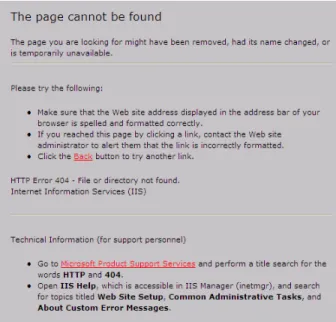
Difficulty providing access to Internet resources are well known to libraries who are considering adding them to their catalog. “One of the greatest difficulties with introducing Internet resources into a library collection is determining if a library [can] provide through its OPAC access to Internet resources that equals or exceeds the access it provides to the other information resources in its collection” (Dillon and Jul as cited by Ward and VanderPol, 2000). Web sites are known for being inherently unstable. It is one of the major reasons librarians are opposed to adding records for web site to the catalog. According to Ward and VanderPol, “a site may be analyzed, selected, and cataloged, only to later have its content, scope, or authorship changed slightly or drastically. Careful subject analysis of an individual site can thus be rendered either insufficient or else entirely inappropriate” (2000). Web surfers are all too familiar with the common error message, “404 Not Found” (Figure 1) signifying that a web site’s been removed from the Internet or has a new URL. “When the possibilities of theses problems are multiplied by the number of Internet resources a library seeks to provide access to, it quickly becomes apparent how unstable access to appropriate sites can become (Ward and VanderPol, 2000).
from 1.88 to 3.32 trillions” (Dillon et. Al. as cited by Lam, 2000). The rate has not slowed down and shows no signs of slowing.
Fig. 1: HTTP error message indicating that the browser was unable to communicate with the server to find the desired web site.
Maintaining Web addresses
Web sites are notorious for being unreliable sources and cataloging them has proven to be difficult. Jeffrey Beall indicated, “as with all web pages, link sites created by individuals and by organizations are subject to a certain degree of volatility” (1997). The Web is an ideal outlet for a plethora of information resources that allow updating and changes to be made with ease. “According to Beall, “sites can undergo total,
them and it is in their best interest to retain a positive Web presence the better the organization is perceived by Web users. There are three types of volatility in web link pages Beall writes, “external volatility, which refers to the presence of the whole site on the Web; internal volatility, which refers to how the site measures up in terms of its serving as a comprehensive and up to date set of links to resources on a given topic” (1997). The overall creation and use of Internet resources is a tremendous benefit for persons providing information and those who are seeking it. It is a must that the data being offered is current and that links within those web sites are active.
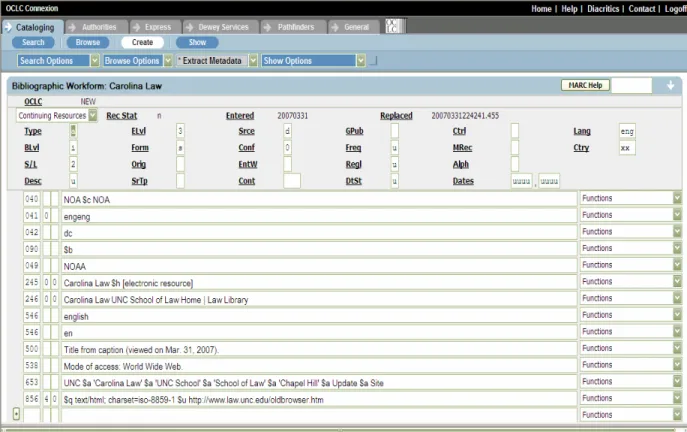
Hinton states, “decisions as to who is responsible for correcting the links and in what time frame have yet to be made [at various institutions]” (2002). Not having a librarian reviewing catalog records for web sites is a problem that is particularly destructive to the stability of the library’s OPAC. Links that are no long active or lead to the wrong web site will only leave information seekers with a negative impression of the library’s ability to provide reliable and authoritative resources. Neumeister mirrors this sentiment with stating that, “URLs are an additional problem when they do not work because Internet resources move, change names, or change methods of access” (1997). During this period, OCLC was able to e-mail the results of their periodic automated checking of URLs in 856 fields (Figure 2) to project participants who have contributed bibliographic records for Internet resources.
Fig. 2: Catalog record for UNC Law School homepage
“This raises the issue of changing the catalog record to reflect the changed title and including a 257 field to denote what the earlier title had been” (Hinton, 2002). The challenge then for the next generation of catalogers would seem to be to invent and apply innovative uses for the catalog, to further expand the interconnectivity between the catalog and web pages as was suggested by Zora Breeding and to educate information seekers about the changing, but certainly not extinct role of the catalog in the digitized world” (Hinton, 2002).
AACR2 or Dublin Core?
The notion that one method of cataloging is better than the other should be
intricate part of libraries for many years. While material formats have changed, the need for standards and consistency among records is still vital to libraries providing quality information to its users. “Libraries catalog Internet sites in order to integrate them with other long existing materials” (Callery and Proulx, 1997). While this many seem like an obvious progression in what is now seen as an Information driven world, concerns and excitement about cataloging web sites are still strong. Along with these varying emotions the creating and use of trendy new words and language has taken hold.
Metadata is the buzzword of the moment. Wendler defines metadata as
“information needed to identify, locate, manage, and access materials the library wishes to make available to its users” (1999). The most popular example of metadata elements set is Dublin Core (DC). “The Dublin Core is an international standard for describing and cataloging all kinds of information resources: books, articles, videos, and World Wide Web (web) resources” (Coleman, 2005). Currently there are sixteen DC elements (See figure 3). Originally there were only fifteen metadata elements. Coleman writes, “last year [2004] DC was extended with a sixteenth element, Audience. When only the
original fifteen DC elements are used in metadata creation, the level of DC used is called Simple; this can be considered equivalent to minimal level cataloging. When the
sixteenth element, refinements to the original fifteen, such as qualifiers and encoding schemes (for example, the vocabulary term and name of the vocabulary form which it is derived), are used, the level of DC use is called Qualified; think of this as full level cataloging (2005). The sixteen Dublin Core elements are:
Dublin Core Element Set
Dublin Core Element Set (continued)
Description Language Publisher Relation Contributor Coverage
Date Rights Type Audience Figure 3: Dublin Core Element Set
Some of the general guidelines about metadata creation that can be drawn from the rich history of libraries in descriptive and subject cataloging are presented. “Library
cataloging has always been considered costly and prone to budget cuts and criticisms. Even as early as the late 1800s American libraries were concerned about the unit cost of cataloging, i.e., how much did it cost to catalog a book” (Coleman, 2005). Ron Chepesiuk adds, “MARC cataloging poses problems because it is labor intensive, in-depth
cataloging that cost a lot of money to produce” (1999). This is important to understand because library budgets are constantly shrinking and the price of library materials are continuously rising. This makes providing access to Internet resources vital, if librarians have to cut print subscriptions and purchase fewer books due to dwindling budgets. Stuart Weibel advised “ MARC and other formal standards are time-consuming to create and maintain and should only be created for the most important records” (Chepesiuk, 1999).
building around using Dublin Core as the method for describing Internet resources. Dublin Core has become the prominent candidate for describing electronic resources. Its simplicity is an appealing because it allows anyone to organize materials with ease. “The lack of rules and rule interpretations also makes the use of DC simpler and easier for local applications” (Banski, 2002). Libraries can customize metadata sets to fit their institution’s need. As Hillman pointed out, “it’s not a metadata element set that is going to replace MARC. It’s going to evolve and co-exist alongside it” (Chepesiuk, 1999). Norm Medeiros shares Hillman’s view by stating, “clearly MARC and Dublin Core combined are greater than the sum of their parts. Through a complementary relationship, these two descriptive standards can provide much needed access to the best the Net has to offer” (1999).
Some argue that although complex and tedious, AACR2 rules are the best method to use because of its long proven history of working well for resource description and vocabulary control. “Metadata like Dublin Core lacks the level of predictability that would allow for a broad systematic re-use of the records” (Coyle, 2005). With Internet resources having the reputation for being unreliable, the scheme being used to organize these resources need to predictable and dependable. Ann Huthwaite points out the
AACR2 is designed to describe all types of resources, not just web materials. It allows Internet resources to be integrated in a hybrid environment. The third advantage is that AACR2 is a precise standard. The fourth advantage is that AACR2 is considered to be a more controlled metadata standard. According to Huthwaite, “another important factor is that AACR2 provides for authority control” (2003). This is a benefit for library users who are not familiar with various names and places that may relate. “Finally, AACR2
provides a principled approach for resource discovery” (Huthwaite, 2003).
Codes and Fields Used for Cataloging Web sites
(Information gathered from AACR2 rev.)
(R) = Repeatable and (NR) = Non-repeatable
Fixed Fields
This is a “quick” reference for MARC fields and subfields to use when cataloging electronic resources:
Enc Lvl (Encoding Level) 008
• use 7 for minimal level records
• use blank for full level records
File Type must be coded in the 006 (Fixed Field – Additional Material Characteristics).
File Typ (File Type) 006
• a Numeric data
• b Computer program
• c Representational – Pictorial or graphic information that can be manipulated in conjunction with other types of files to produce graphic patterns that can be used to interpret and give meaning to the information.
• d Document
• e Bibliographic data
• f Font
• g Game
• h Sound
• Interactive multimedia (R)
• j Online system or service
• u Unknown
• z Other
006 (Fixed Field – Additional Material Characteristics)
The 006 is an additional fixed field used to code information pertaining to aspect(s) of the resource not contained in the 008 for the format used to catalogue it. In this case, the 006 is used to code information pertaining to the computer file part of the electronic resource and can ONLY be added at the point of creating a new title.
007 (Fixed Field – Physical Description – Computer File)
This data element gets coded in with the variable fields. There are thirteen positions. The first one is ALWAYS ‘c’ for computer file. For internet resources, the next position is the only one necessary and it is almost always ‘r’ for remote. Consult the appropriate volume of the MARC21 Bibliographic Format for complete information.
500 Source of Title Note (R)
This is a required note for minimal level and full level electronic/Internet resources records. It is used to specify where the form of the title used as the title proper was obtained.
Examples:
500: |a Title from title screen 500: |a Title supplied by cataloger
530 Additional Physical Forms Available (R)
Since this note ends with a URL, please DO NOT end it with any punctuation as the punctuation could be incorrectly interpreted as being part of the URL. Examples:
Added copy to print version
530: |a Also available on the Internet. MODE OF ACCESS via web browser by entering the following URL: http://nclrev.unc.edu/cocoon/nclrev/current-issue.xsp
No longer issued in print
530: |a Final print issue autumn 1996. CURRENT issues ONLY available on the Internet. MODE OF ACCESS via web browser by entering the following URL:
http://nclrev.unc.edu/cocoon/nclrev/current-issue.xsp
538 Mode of Access (R)
This note is required for electronic resources.
538: |a Available on the Internet. MODE OF ACCESS via web browser by entering the following URL: http://nclrev.unc.edu/cocoon/nclrev/current-issue.xsp
Since this note ends with a URL, please DO NOT end it with any punctuation as the punctuation could be incorrectly interpreted as being part of the URL.
538 System Requirements (R)
For files available by remote access, this note is used to specify any special program required for use with the file. It begins with the words: System requirements. This note is not required (See figure 4).
Example:
538: |a System requirements: World Wide Web
Figure 4: Marc record for U.S. Department of Justice web site with note pointing out the 538 field. 538 Field provides access information
856 Electronic Access and Location (R)
856 Field identifies the web address
Figure 5: Marc record for U.S. Department of Justice web site with note pointing out the 856 field. Indicator 1: Access Method
The most common values follow, 4 HTTP will be the one used most often.
0- Email: indicates that access to the electronic resource is through electronic mail 1- FTP: indicates that access to the electronic resource is through File Transfer Protocol 2- Remote login (Telnet): indicates that access to the electronic resource is through remote login
3- Dial-up: indicates that access to the electronic resource is through a conventional telephone line
4- HTTP: indicates that access to the electronic resource is via a web browser through HyperText Transfer Protocol
7- Method specified in subfield $2
Indicator 2: Leave Blank
Subfield Codes
|u URL. Uniform Resource Locator: contains the data which makes the electronic link work. It is the information in the |u which makes the link to the electronic/Internet resource so it is important to take extra care to ensure that this information is correct.
These will be the subfield codes used most often.
Examples:
856: 4 |u http://www.law.unc.edu/ 856: 4 |u http://library.law.unc.edu/
Cataloging Exercise
Today cataloging tools have advanced tremendously. They allow the once time consuming and tedious process of catalogingmaterials to start and be completed within a matter of minutes. Cataloging librarians who are a part of OCLC member institutions can have access to up-to-date records for all types of resources: monographs, serials,
electronic books, audiovisual recording and websites. This service is not only a cost effective way to obtain reliable MARC records, it also increases the visibility of a library’s collection by adding an a holding symbol to each record that is used. The ease of new tools in no way means that librarians should not have an in-depth understanding and superior knowledge of the fields that make up a MARC record and their purpose. Below is a cataloging exercise that is intended to help build ones knowledge about the fields that are used to catalog websites.
Please take a look at the cataloging exercise and answer the questions below.
1. What note field is repeatable and provides mode of access information in a MARC record?
□ 245 □538 □856
2. The 856 field is required for the electronic resource and location information. What is the first indicator used to show that access to the electronic resource is via a web browser through HyperText Transfer Protocol? What is the second
3. What chapter in AACR2 is devoted to providing information about electronic resources standard?
□Chapter 3 □Chapter 6 □Chapter 9
4. What fixed field is used for physical description information? □006
□007 □090
5. What subfield code is used for the URL data? □a
□b □u
Now practice create catalog records for web sites and take a look at the fields and subfields that are used when these records are generated. This is a good way to become familiar with codes that are used in cataloging records and it allows you to practice adding information into a record that may someday be added to your library’s OPAC. Follow the steps below.
Step 1: Login to OCLC Connexion Browser at connexion.oclc.org (If your
institution does not have access to this tool, find out how you can gain access even if for a trial period).
Step 2: On Cataloging select the Create tab.
Step 3: On “Use the . . .” select Computer files.
Step 4: Where it says Single Record select instead Extract Metadata
Step 5: On the Extract Data from URL enter a URL (see appendix B) then click Create.
Step 6: Examine the MARC data created by the extraction software to see how much you agree and disagree with it.
Step 8: You can alter the amount of cataloging data displayed or website displayed by moving the dividing line up or down. This will allow you to see the information in the record better.
Step 9: Now in the upper right area change MARC Template to DC Template.
Step 10: Compare the DC standards to the AACR2 2002 rev. Chapter 9 standards?
Step 11: To do another website repeat the process beginning with Step 2.
Conclusion
Works Cited
American Heritage Dictionary of the English Language, Fourth Edition. (n.d.). Retrieved March 16, 2007, from Dictionary.com Web site:
http://dictionary.reference.com/browse/internet
American Library Association (2004). Anglo-American cataloguing rules, 2nd edition, 2002 revision. Chicago: American Library Association.
Banski, E. (2002). Implementation of Dublin Core at the University of Alberta libraries. OCLC Systems & Services, 18(3), 130-138.
Balleste, R., Lamas, S. and Butler, L. ( 2007). Law librarianship in the twenty-first century. Lanham, MD, Scarecrow Press.
Barnes, K. (2002). Cataloging the Web at UNL Libraries. Nebraska Library Association Quarterly, 33(4), 22-27.
Beall, J. (1997). Cataloging World Wide Web sites consisting mainly of links. Journal of Internet Cataloging, 1(1), 83-91.
Blake, V. (2002). Forging the Anglo-American cataloging alliance: descriptive cataloging, 1830-1908, Haworth Press, 35(1/2), 3-22.
Callery, A. and Tracy-Proulx, D. (1997). Yahoo! Cataloging the web. Journal of Internet Cataloging, 1(1), 57-64.
Chepesiuk, R. (1999). Organizing the Internet: the “core” of the challenge. American Libraries, January, 60-63.
Coleman, A. (2005). From cataloging to metadata: Dublin Core records for the library catalog. Haworth Press, 40(3), 153-181.
Coyle, K. (2005). Understanding metadata and its purpose. The Journal of Academic Librarianship, 31(2), 160-163.
Elrod, J. (2000). Classification of Internet resources: an AUTOCAT discussion. Cataloging & Classification Quarterly, 29(4), 19-38.
Gorman, M. (2004). Authority control in the context of bibliographic control in the electronic environment. Haworth Press, 38(3/4), 11-22.
Hinton, M. (2002). On cataloging Internet resources: voices from the field. Journal of Internet Cataloging, 5(1), 53- 67.
Huthwaite, A. (2003). AACR2 and other metadata standards: the way forward. Haworth Press, 36(3), 87-100.
Internet Society. (2006). Histories of the Internet. Retrieved on March 22, 2007 from http://www.isoc.org/internet/history/brief.shtml#Future
Johns, C. (1997). Cataloging Internet resources: an administrative view. Journal of Internet Cataloging, 1(1), 17-23.
Jul, E. (1998). Now that we know the answer, what are the questions? Journal of Internet Cataloging, 1(3), 9-14.
Lam, V. (2000). Cataloging Internet resources: why, what, how. Cataloging & Classification Quarterly, 29(3), 49-61.
Library of Congress. (2007). Law Library of Congress. Retrieved on March 21, 2007 from http://www.loc.gov/law/public/law.html
Lundgren, J. and Simpson, B. (1999). Looking through user’s eyes: what do graduate students need to know about Internet resources via the library catalog. Journal of Internet Cataloging, 1(4), 31-44.
Medeiros, N. (1999). Making room for MARC in a Dublin Core world. Online, 23(6), 57-60.
Neumeister, S. (1997). Cataloging Internet resources: a practitioner’s viewpoint. Journal of Internet Cataloging, 1(1), 25-45.
Schottlaender, B. (2003). Why metadata? Why me? Why now? Haworth Press, 36(3), 19-29.
Simpson, P. (1997). NASIG Workshops: Finding the missing link: how cataloging bridges the gap between libraries and the Internet. The Serials Librarian, 31(1/2), 245-249.
Taylor, A. (1999). Where does AACR2 fall short for Internet resources? Journal of Internet Cataloging, 2(2), 43-50.
Ward, D. and VanderPol, D. (2000). Librarian, catalog thy work! Getting started integrating Internet resources into OPACs. Journal of Internet Cataloging, 3(4), 51-64.
APPENDIX A: Glossary
AACR2: stands for the Anglo-American Cataloguing Rules, Second Edition. It is published jointly by the American Library Association, the Canadian Library
Association, and the Chartered Institute of Library and Information Professionals (in the UK). AACR2 is designed for use in the construction of catalogues and other lists in general libraries of all sizes. The rules cover the description of, and the provision of access points for, all library materials commonly collected at the present time.
AALL: American Association of Law Libraries
ABA: American Bar Association
ALA: American Library Association
Bibliographic Control: the identification, description, analysis, and classification of books and other materials of communication so that they may be effectively organized, stored, retrieved, and used when needed.
Catalog: A list or itemized display, as of titles, course offerings, or articles for exhibition or sale, usually including descriptive information or illustrations.
Cataloger: a person who catalogs.
Cataloging: To classify (a book or publication, for example) according to a categorical system.
Classification: any of various systems for arranging books and other materials, esp. according to subject or format.
Dublin Core: a metadata element set that is a standard for cross-domain information resource description. In other words, it provides a simple and standardized set of conventions for describing things online in ways that make them easier to find. Dublin Core is widely used to describe digital materials such as video, sound, image, text, and composite media like web pages.
Hyperlink: a link from a hypertext file to another location or file; typically activated by clicking on a highlighted word or icon at a particular location on the screen.
Hypertext: A computer-based text retrieval system that enables a user to access particular locations or files in web pages or other electronic documents by clicking on links within specific web pages or documents.
APPENDIX A: Glossary (continued)
Law: the principles and regulations established in a community by some authority and applicable to its people, whether in the form of legislation or of custom and policies recognized and enforced by judicial decision.
MARC: Machine Readable Cataloging record
Metadata: data about data; “a library catalog is metadata because it describes publications”
Online Computer Library Center (OCLC):
Online Public Access Catalog (OPAC): A computerized system to catalogue and organize materials in a library (the kind that contains books). OPACs have replaced card-based catalogues in many libraries. An OPAC is available to library users (public access).
Uniform Resource Locator(URL): is the global address of documents and other resources on the World Wide Web.
APPENDIX B: List of Credible Legal Websites
Federal Web Addresses
Supreme Court of the United
States Supreme Court of the United States http://www.supremecourtus.gov/
United States Department of
Justice United States Department of Justice http://www.usdoj.gov/
Copyright Law in the United
States Copyright Law in the United States http://www.copyright.gov/title17/
Law Library of Congress Law Library of Congress http://www.loc.gov/law/guide/index.html
USA Gov USA Gov. http://www.usa.gov/Topics/Reference_Shelf.shtml
United States Senate http://www.senate.gov/general/contact_information/senators_cfm.cfm
United States House of
Representatives http://www.house.gov/house/MemberWWW.shtml
State (North Carolina) Web Addresses
North Carolina Department of Justice
http://www.ncdoj.com/
The North Carolina Court System
http://www.nccourts.org/Courts/Appellate/Supreme/Default.asp
North Carolina Board of Law Examiners
http://www.ncble.org/
North Carolina State Bar http://www.ncbar.com/
North Carolina General Assembly
http://www.ncga.state.nc.us/gascripts/Statutes/Statutes.asp
North Carolina Office of the Governor
http://www.governor.state.nc.us/
International Web Addresses
Comparative and Foreign Law Guides
http://www.llrx.com/comparative_and_foreign_law.html
International Court of Justice http://www.icj-cij.org/icjwww/icj002.htm
Benelux Court of Justice http://www.benelux.be/
African Court on Human and People’s Rights
http://www.achpr.org/english/_info/news_en.html
International Criminal Court http://www.icc-cpi.int/home.html&l=en
International Centre for Settlement of Investment
Disputes
APPENDIX B: List of Credible Legal Websites (continued)
General Legal Resources Web Addresses
American Civil Liberties Union American Civil Liberties Union http://www.aclu.org/
American Bar Association American Bar Association http://www.abanet.org/
The Association of American Law Schools
The Association of American Law Schools http://www.aals.org/about_memberschools.php
UNC School of Law UNC School of Law http://www.law.unc.edu/
Law.com Law.com http://www.law.com/
Find Law Find Law http://www.findlaw.com/casecode/supreme.html
APPENDIX C: MARC Cataloging Worksheet for Web sites
Personal Author Main Entry (Not Repeatable): 100________________________________
Corporate Author Main Entry (Not Repeatable): 110______________________________
Title and Responsibility(Not Repeatable): 245____________________________________
Varying Form of Title (Repeatable): 246_______________________________________
General Note (Repeatable): 500________________________________________
Systems Detail Note (Repeatable): 538_________________________________________
Index Term (Repeatable):653__________________________________________
APPENDIX D: Dublin Core Cataloging Worksheet
Name of Metadata Creator: __________________________________________________ Date of Metadata Creation: __________________________________________________ Title:___________________________________________________________________ Identifier (URL): _________________________________________________________
Description: [Use Abstract to provide your own brief summary of the resource; use quotation marks if summary is taken directly from resource. Use Table Of Contents to include the sections/components.]
Abstract:
Table of Contents:
Subject: [Use Library of Congress Subject Headings or just enter Keywords.] 1.____________________________ 2.____________________________ 3.____________________________ 4.____________________________
Keyword: [Use keywords to express additional ideas and concepts to describe the resource not already expressed in the Title, Description, Coverage, or Subject Fields. Use keywords from the resource itself and not from a controlled vocabulary.]
1.__________________________ 2.____________________________ 3.__________________________ 4.____________________________
Coverage: [Use geographical terms to indicate spatial coverage and time periods or years to indicate temporal.]
Temporal: Spatial:
Date: [Enter date in YYYY-MM-DD format. Enter the last date found or estimated for one or more of the following as is possible. Leave month and day blank if it is not found on resource, and leave date blank if it is
not possible to easily determine from resource.]
Created: Issued:
Valid: Modified:
Available: Accepted:
Submitted:
Creator [First Author]: ________________________ Creator [Second Author]: _____________________ Creator [Third Author]: _______________________
Contributor: [Enter additional contributors, if any, as follows:]
Publisher: [Enter the publisher name.] __________________________________
Rights: [Search the resource for an explicit copyright statement and/or information about cost or license and select from list below. Add notes and URL as necessary.]
Accessible freely License restrictions apply Copyrighted Restrictions apply Copyright unknown Subscription needed Copyright and cost restrictions unknown Public domain
Cost unknown
Type: [Select ONLY ONE categorical Type (form or genre) of the resource.]
Collection Service
Dataset Software
Event Sound
Image Text
Interactive Resource
Format: [Use this to indicate the media-type, the physical manifestation of the resource and select as many as are applicable.]
Application/ms-word Image/png Application/ms-excel Multipart/mixed Application/ms-publisher Text/html Application/pdf Text/xml
Audio/mpeg Text/rtf
Ebook Video/mpeg
Image/gif Video/quicktime
Image/jpg Other
Language: [Select one or more from list; add other languages as needed.]
English German
French Spanish
Relation: [Select from list and add Title and Identifier (URL), when available.] Is Version Of Has Part
Has Version Is Referenced By Is Replaced By References Replaces Is Format Of Is Required By Has Format
Requires Conforms To
Is Part Of
Source: [Enter Title and URL or description.]
1. 538
2. The first indicator is 4. The second indicator is left blank 3. Chapter 9