Laura C. O’Neill. A Usability Study of E-book Platforms. A Master’s Paper for the M.S. in L.S degree. April, 2009.76pages.Advisor: Deborah Barreau.
While e-books offer great potential for academic libraries, research has shown that usability issues can prevent readers from reading books or from using certain e-book functions. This study presents the results of usability testing on the platforms of three of the largest aggregators of academic e-books: ebrary, MyiLibrary, and Ebook Library. In addition to learning about the usability of these specific platforms, this research provides greater insight into the usability issues that students encounter while reading e-books and a deeper understanding of how e-books can meet the academic needs of students. Five undergraduate and five graduate students participated in testing,
completing a series of tasks in each platform. Testing revealed several usability issues. Students want flexible navigational options, including the ability to scroll. Additionally, students enjoy certain e-book features, such as annotation and highlighting tools, but they were not sure that they would use these tools.
Headings:
Electronic books/Evaluation
Electronic books
A USABILITY STUDY OF E-BOOK PLATFORMS
by
Laura C. O’Neill
A Master’s paper submitted to the faculty of the School of Information and Library Science of the University of North Carolina at Chapel Hill
in partial fulfillment of the requirements for the degree of Master of Science in
LibraryScience.
Chapel Hill, North Carolina
April 2009
Approved by
_______________________________________
Table of Contents
List of Figures ... 2
Acknowledgements ... 3
Introduction ... 4
Literature Review... 6
Methodology ... 17
Results ... 23
Discussion ... 55
Conclusion ... 60
Works Cited ... 62
Appendix A ...65
Appendix B ...66
List of Figures
Figure 1: A page from a book displayed in ebrary’s QuickView ...26
Figure 2: A page from an e-book displayed in ebrary Reader ...26
Figure 3: A book from MyiLibrary, displayed in PDF format ...30
Figure 4: A book from MyiLibrary, displayed in HTML format ...30
Figure 5: A list of search results in EBL...32
Figure 6: A “Full Record” page in EBL ...32
Figure 7: Moving from page to the next in EBL ...33
Figure 8: Annotating in ebrary ...36
Figure 9: Highlighting in ebrary ...36
Figure 10: MyiLibrary’s Notes tab ...38
Figure 11: The notes window in MyiLibrary ...38
Figure 12: EBL’s Notes tab ...40
Figure 13: Annotating in EBL ...40
Figure 14: Ebrary's InfoTools menu ...42
Figure 15: An online resource, linked to from ebrary’s InfoTools ...43
Figure 16: MyiLibrary's page of Available Resources ...44
Figure 17: Ebrary’s Print Window ...46
Figure 18: Ebrary’s message about printing restrictions ...46
Figure 19: MyiLibrary’s Adobe Toolbar printer option ...48
Figure 20: Printing multiple pages from MyiLibrary ...49
Acknowledgements
I would like to thank Lisa Norberg and Leah Dunn for their assistance with this
research study. Lisa answered my many questions and provided valuable advice. Leah
arranged trials from MyiLibrary and Ebook Library. Without their help, this study would
not have been possible.
I am also grateful to Professor Deborah Barreau for her excellent advising and
support with this research and throughout my time at UNC’s School of Information and
Introduction
As academic libraries have expanded their offerings of electronic resources in
recent years, students have increasingly turned toward these resources. While electronic
books have not reached the same level of popularity as other online resources such as
e-journals (Anuradha & Usha, 2006; Levine-Clark, 2006; Safley, 2006), there is evidence
that students are using books to meet their academic needs and that they even prefer
e-books over their print equivalents in some situations (Christianson & Aucoin, 2005; Croft
& Bedi, 2005; Littman & Connaway, 2004; Safley, 2006). As academic libraries seek to
meet the ever-evolving needs of their users, e-books offer conveniences that today's
students have grown to expect from their previous experiences finding information
online—conveniences such as full-text searching and accessibility from any place at
anytime.
While Amazon.com’s Kindle reading device has received a great deal of
attention, the term e-book encompasses more than just books that are read from a
personal device. Academic libraries currently purchase e-books through individual
publishers and aggregators of e-books. Offering books from many different publishers
under a single contract, each aggregator has a different platform, providing books through
its own interface. Students can access their library’s e-books online and, as of 2009, they
As academic libraries increase their e-book collections, librarians must consider a
variety of issues including prices, licensing options, and the quality of content.
Additionally, they must consider which e-book platforms will be easiest to use. Many
platforms now offer additional functionality. These added value features take advantage
of the electronic environment, allowing readers to annotate text and connect to outside
resources. With the addition of such features, librarians must also assess which platforms
offer the most valuable functionality for student research and work.
While e-books offer a great deal of potential for academic libraries, surveys of
academic library users have found that usability issues can discourage readers from
reading e-books (Anuradha & Usha, 2006; Chu, 2003; Croft & Bedi, 2005) or from using
certain book functions (McFall, 2005). This study will examine the usability of the
e-book platforms of three of the largest academic aggregators: ebrary, MyiLibrary, and
Ebook Library (EBL). Each of these platforms offers titles covering the full range of
academic disciplines. The University of North Carolina at Chapel Hill (UNC-CH)
currently subscribes to ebrary and the University Library set up trials with both
MyiLibrary and EBL for the duration of this study.
The goal of this research is to identify usability issues that students encounter
using these platforms, as well what types of added value features students find to be most
valuable. While this research is limited to three platforms, the study aims to serve as
more than a review of these particular products. Beyond learning about these specific
platforms, the purpose of this study is to gain greater insight into the usability issues that
students encounter while reading e-books and to develop a deeper understanding of how
Literature Review
In examining the usability of e-books and their future in academic libraries, it is
worthwhile to first consider if students will want to use this type of resource. A number
of studies have noted that many people prefer reading from the printed page, with readers
explaining that they find it difficult to read from the computer screen (see, for example,
Abdullah & Gibb, 2008; Chu, 2003; Langston, 2003; Levine-Clark, 2006). Despite this
preference for reading from the printed page, several studies indicate that the
convenience and accessibility of e-books may outweigh students’ dislike for reading from
a computer screen. The United Kingdom National E-Books Observatory study offers
perhaps the most convincing statistics on e-book use at the university level. With over
20,000 responses from teachers and students to their online survey, the study found that
over 60 percent of students were using e-books for their academic work. Nearly half of
all students had used one or two e-books in the previous month and another 39 percent
had used three or more e-books in that time period (Nicholas et al., 2008). In a study at
Royal Roads University in British Columbia, when students were referred to both the
electronic and print versions of the books for their classes, students opted for the
electronic version over the print version at a rate of three to one (Croft & Bedi, 2005).
By comparing the use of e-books and print books, a number of studies further
demonstrate the growing use of e-books at universities. However, the researchers note
figures for print books do not include in-house use; any books that a person reads in the
library would be excluded. While a print book usage would be recorded only when a
book is checked out, an electronic book usage occurs each time a person accesses the
book. These statistics do not indicate if a single individual used the same e-book ten
times or if ten different users individually accessed the book. While such limitations
make it difficult to draw conclusions about how resources are used, these studies provide
strong evidence that students are turning to e-books for their academic work.
Librarians at the University of Texas found that while print circulation declined in 2005,
e-book usage increased substantially (Safley, 2006). Bailey (2006) had similar results in
a study comparing electronic and print book usage at Auburn University between 2000
and 2004. Bailey found that print usage declined by almost a third while the use of
electronic books increased between three and five fold. Both Bailey and Safley note that
since each school’s e-book collection was still relatively new during these years, usage
would not be likely to continue to rise so dramatically in the future years. However,
these numbers clearly demonstrate that students have accepted e-books and that they are
turning to these resources for their academic work.
Studies at other universities confirm this growing acceptance and use of e-books.
At Duke University, researchers studied the circulation of 7,880 print and e-book
equivalents in 2001 and 2002. Despite the fact that e-books were relatively new, e-books
received 11% more use than their print equivalents. (Littman & Connaway, 2004). At
Louisiana State University, Christianson and Aucoin looked at usage statistics for 2,852
titles that were available in both print and electronic format. They compared usage of
results are less decisive; while 29.27 percent of print books were used over the course of
the year, only 19.6 percent of the e-books were. However, of the e-books that were used,
these electronic versions were accessed more often than their print equivalents circulated
from the library.
In addition to these studies looking at general usage statistics, Grudzien and
Casey (2008) investigated the use of e-books by distance education students at Central
Michigan University. Since they are often located at some distance from the school’s
library, this segment of the student population may derive great benefit from the ability to
access books online. Central Michigan University’s distance education students were
surveyed in 2007 and over 40 percent of respondents said that greater access to e-books
would be the one change that would most improve their educational experience. From
2004 to 2007, the university saw increasing e-book use among both on-campus students
and distance education students, but the percentage of e-book use among distance
education students was much higher. Additionally, as the University began to provide
access to more e-books, distance education students also began to borrow fewer print
materials. E-books clearly meet a need for this student population.
While usage statistics indicate that students are turning toward electronic books
for their academic needs, these studies fail to capture the human dimension involved in
the reading process. The UK National E-Books Observatory study looks more deeply
into this dimension of e-book use, asking survey respondents about their e-book reading
behavior. Nicholas et al. (2008) found that individuals read short sections from e-books,
rather than the complete text. When asked to think back to the last time they had read an
read one or more full chapters, but over half had “dipped in and out of several chapters”
(p. 323). Another question asked respondents how long they typically read an e-book
from the computer screen in one session. Almost 60 percent estimated that they read for
less than twenty minutes in a session (Nicholas et al., 2008). Levine-Clark had similar
findings in a survey of students, faculty and staff at the University of Denver. A little
over half of respondents (a total of 1,061 individuals) had used e-books. When asked
how they typically used e-books, only 7.1 percent read the entire book. Over half (56.5
percent) typically read a section within a book and 36.4 percent spent even less time
using e-books, reading a single entry or just a few pages (Levine-Clark, 2006). Rather
than deplore this lack of in-depth reading, Nicholas et al. (2008) point out that few people
probably read a book from cover to cover in the past either. They suggest that e-books
can potentially better serve people's research needs by allowing individuals to search for
the precise information that they need.
The UK National E-Books Observatory study also included two open-ended
questions in its survey, providing respondents with the opportunity to freely express their
thoughts concerning e-books (Jamali, Nichols, & Rowlands, 2009). The first question
asked respondents to explain what they viewed as the greatest advantages of e- books
over print books. Although the free-response set-up led to thousands of unique answers,
several themes emerged from the responses. The most commonly mentioned advantage
was accessibility, with users explaining that they enjoy the convenience of being able to
access e-books from anywhere at any time. The second most mentioned advantage
involved searchability. Despite these advantages, respondents cited a range of problems
out that the most often cited advantages of e-books (accessibility and searchability)
suggest that users may be turning to e-books for practical reasons. For example, they
may use an e-book to save the time of going to the library. The usage statistics cited
earlier may be a reflection of how e-books are filling these practical needs, rather than a
reflection of how satisfying and easy e-books are to use.
Additional research has focused on the added value features of e-books by
examining if students find these features useful and easy to use. In a survey that focused
on use of electronic textbooks, McFall (2005) found that college students had mixed
reactions to the e-textbook with such features. The students in several computer science
courses each used an electronic textbook on a tablet PC. McFall had hypothesized that a
textbook with functions for highlighting and note-taking would promote active reading
and enhance student learning. Although McFall does not provide specific data on his
results, he reports on general trends. Students rated the highlighting tool as somewhat
useful, but they had a difficult time using certain e-textbook features. Perhaps as a result
of such difficulties, students did not use many of the e-textbook’s features. McFall
suggests that students’ deeply ingrained study habits may explain why they did not use
these features. Regarding student use of e-book annotation tools, Hernon et al. (2007)
had similar findings in their research. Of the fifteen students in their study, only two
annotated e-book content. Other participants preferred to handwrite notes on pages that
they had printed out from an e-book; some students indicated that they might use these
tools, but they would have to grow accustomed to them first. While e-book vendors often
highlighting and annotation. They may want to continue with the study and work habits
they have developed over the course of their academic careers.
McFall found that students had a more positive reaction to the functionality of an
e-textbook that he tested several years later (McFall, Dershem, & Davis, 2006).
According to the researchers, the technology involved in the e-textbook had improved
significantly over the previous study. A great deal of their research involved looking at
how the textbook improved student learning, but they also focused on student perceptions
of this book. As they point out, “Student reactions to the e-textbook are an important part
of its evaluation; a tool students don’t want to use is useless even if it is one of the most
effecting learning instruments available” (p. 340). Twelve of the fourteen students rated
the textbook as “useful” or “very useful.” When asked if the electronic nature of the
textbook had helped them learn less or more than other textbooks, nine students said it
helped them learn “a little more.” However, two students responded that they had
learned “much less” using this textbook. Usability stands out as an issue here, as these
two students both commented on the amount of time required to perform tasks with the
e-textbook. When students were asked which features were the most useful, usability
issues come up once again. Students named the ability to search, annotate, and
bookmark, but some students did not use the annotation tool because it was difficult to
use. The researchers found that highlighting and searching were the features that students
used most often. However, there was a great range in how much individual students used
these features. With highlighting, for example, one student had highlighted 367 times
students’ individual reading styles; some students may not have thought that this tool was
useful. Another possibility is that they may have encountered difficulty using this tool.
As these studies suggest, students may not always find e-books’ added value
features useful or user-friendly. Academic librarians should consider such issues when
assessing e-book platforms. Additionally, they may need to consider if users must log
into a platform in order to use these features. On most e-book platforms, users must set
up their own accounts in order to perform tasks such as highlighting and annotating.
From their research at Royal Roads University in British Columbia, Croft and Bedi
(2004) found that only 35 percent of e-book users had set up accounts. Some mentioned
difficulties trying to set up accounts. On a similar note, Morris and Balatsoukas (2006)
also found that a log in requirement caused problems for students. In their usability study
at Loughborough University in the United Kingdom, sixteen study participants performed
the same tasks in two different e-book platforms. One platform required that users log in
before performing certain tasks. Participants made significantly more errors when
completing a task that involved logging into this platform as they typed incorrect
passwords or tried to sign in without first creating an account. While students may be interested in these e-book tools, they may become frustrated when faced with a computer
screen asking them to sign in or to set up an account.
In considering added value features, some disagreement exists over how much
e-books should resemble the print book. In 1998, usability expert Jakob Nielsen argued
that e-books should depart from the model of the print book and its linear lay-out.
“Electronic text should be based on interaction, hypertext linking, navigation, search, and
allow for much more powerful user experiences than a linear flow of text” (Nielsen,
1998). In their research on the design of electronic textbooks, Wilson, Landoni, and Gibb
(2002) found that readers enjoyed interactive and multimedia features. However, Wilson
et al. also found that features of the print book increased usability for readers. These
features, such as a table of contents and index, gave readers a sense of the e-book’s
structure. As for added value features, such as the ability to search, bookmark and
annotate, participants appreciated these tools. However, they commented that these
features were difficult to use and took a considerable amount of time (Wilson et al.,
2002). Wilson, Shortreed, and Landoni (2004) had similar results in a study focusing
specifically on encyclopedias. They tested the usability of three different
e-encyclopedias which varied in their level of added value content and interactive features.
Participants liked these additions. Additionally, the added value content and interactivity
helped individuals remember the information they had read. However, participants
encountered more difficulties trying to find information from encyclopedias that had
more of these features. These two studies suggest that users like the idea of added value
features which allow functionality beyond the possibilities of the print book. However,
this functionality can contribute to usability problems.
Like the two studies cited above (Wilson et al., 2002; Wilson, et al., 2004), this
research will rely on usability testing to evaluate e-book platforms. The usability
literature confirms the importance of usability in a range of information technology
products and computer programs. One study has found that even experienced computer
users waste approximately forty-five percent of their time on computers because of
Robinson, Shneiderman, 2004). When using a new product or system, such frustrating
experiences have the potential to leave an individual with a negative opinion. As a result,
he or she may decide not to use the product or system again in the future. In a study of
e-learning services, Chiu, Hsu, Sun, Lin, and Sun (2005) found that usability played a
crucial role in students’ decision to continue using an e-learning service. Considering
this study, one recognizes the importance of usability in the success of e-books as well.
If an e-book is not easy and satisfying to use, a student may not choose to read from one
in the future.
In addition to demonstrating the value of usability testing, the relevant literature
provides guidance for this research. The literature confirms the importance of
considering several different aspects of usability. Frokjaer, Hertzum, and Hornbaek
(2000) argue that effectiveness, efficiency, and satisfaction should all be considered
independent components of usability. They found that there was only a weak correlation
between efficiency, effectiveness, and satisfaction. By examining only one or two of
these aspects of usability, researchers are in danger of overlooking other important
usability issues. In the research of Frokjaer et al., participants solved information
retrieval tasks using different retrieval modes. Efficiency, effectiveness, and satisfaction
were then considered for each retrieval mode in order to determine its overall usability.
To determine efficiency, the researchers measured the time required to complete each
task using the different modes. Effectiveness was measured by the quality of each
solution that participants produced for each task. Defining satisfaction as “the users'
researchers measured satisfaction by user’s preference for one retrieval mode over
another.
The importance of assessing these usability components is reflected in literature
regarding the usability of e-books and digital library resources as well. Morris and
Balatsoukas (2006) considered efficiency, effectiveness, and satisfaction in their usability
testing comparing two different e-book platforms. In a study of the usability of a virtual
map, Garoufallou, Siatri, and Balatsoukas (2008) asked participants to perform tasks that
reflected the types of procedures for which people would typically use the map. By
focusing on study participants’ efficiency, effectiveness, and satisfaction, the researchers
recommended ways that the map could be made more usable. Toms, Dufour, and
Hesemeier (2004) emphasize that, when evaluating digital libraries, it is especially
important to consider satisfaction. Users want an efficient and effective way to find
information, but they also want to have an enjoyable experience when interacting with a
digital library.
While many researchers measure efficiency, effectiveness and satisfaction, other
researchers use different terminology to define and explore usability. In Handbook of
Usability Testing (1994), Rubin discusses usefulness, effectiveness, learnability, and
likability as four factors of usability (p. 18-19). In a study of students’ decisions to
continue using e-learning systems, Chiu et al. (2005) consider usability separately from
the user’s perceived quality of an e-learning service and from the user’s perceived value
of the service. These researchers found that, together with usability, the user’s perception
of quality and value each contribute to the user’s decision to continue using a service.
considerations stay the same. In examining the usability of a product, the focus remains
on the user’s experience and how easy and satisfying the user finds the product.
In considering a product’s usability, Dillon (2001) cautions that researchers must
look beyond simply quantifying these usability components. While researchers often use
error rate as an indicator of effectiveness, it is difficult to quantify the effectiveness of
many tasks that are supported by technology. For example, how does one measure the
effectiveness of reading when using a particular e-book platform? One cannot assess the
reading process through an easily quantified error rate. The measurement of efficiency
can be equally problematic. Efficiency is often measured by the time taken to complete a
task or by the number of steps taken to finish a task. Dillon points out that users may not
always be concerned with these measures of time and steps; the user experience is more
complex. The experience actually may be enhanced by a product that takes longer to use.
The addition of interactive elements to a product may require more of the user’s time, but
these features may also make the process more interesting or appealing. Even in
measuring satisfaction, Dillon cautions that researchers should be careful to look beyond
simple user ratings of like and dislike.
The usability literature provides both context and guidance for this research study.
A number of studies have shown that students have accepted e-books and now use them
for their academic work, demonstrating the importance of evaluating these resources in
academic libraries. However, the literature also indicates a need for improvement in
e-book platforms. This research aims to find what features make e-e-books easier and more
Methodology
Participants
Five undergraduate and five graduate students from the University of North
Carolina at Chapel Hill participated in this study. The study was advertised on fliers at
UNC-CH’s Davis Library and the Undergraduate Library. Interested students emailed
the researcher to arrange a time for an appointment to participate in the study. When this
recruitment method did not result in enough graduate student participants, the researcher
successfully recruited three additional graduate students via email.
With a pool of ten participants, the sample size is small. However, small sample
sizes are well-established in the usability literature. While Nielsen confirms that larger
sample sizes have greater statistical significance, he writes that with just five participants,
a usability test can uncover 80 percent of a product’s usability problems. Additionally,
these uncovered problems will be the most major (Nielsen, 2000). A sample of this size
will uncover trends and patterns in the types of usability issues that students face using
e-books.
E-book Platforms
For the testing sessions, each platform was open in a different tab in a browser
window. While the three platforms each provide e-books covering a range of academic
• Ebrary has two different viewing options: QuickView and ebrary Reader (Figure
1 and 2). With QuickView, a user can immediately view an e-book in his browser
window. Ebrary Reader offers greater functionality, but the software needs to be
installed on the user’s computer. For the purposes of this study, ebrary Reader
was installed on the computer used for the testing sessions. The participants in
this study used QuickView to read several pages in their chosen books before
being asked to open their books in ebrary Reader.
• MyiLibrary displays books in either PDF or HTML format, depending on the file
provided by the book’s publisher (Figures 3 and 4).
• For reading online, EBL books can be viewed as either a PDF or an image. In
this study, participants viewed pages as images because this is the default option
(Figure 5). With EBL, a user also has the option to download an e-book to his
computer. EBL advises its users to read e-books online if they are working on a
computer that they do not have permanent access to, such as a library computer.
For this reason, study participants were asked to read EBL books online rather
than downloading them as students would be able read the online format from any
machine, not just their personal computers.
Study Procedure
At the beginning of each testing session, the researcher asked each participant to
read and sign a consent form. After deciding if they wanted to continue with the study,
participants answered several demographic questions as well several questions about their
The researcher explained to the participants that they would be asked to perform a
series of tasks with each of the three e-book platforms (Appendix B). Using the literature
on e-book usage as a guide, these tasks had been selected because they are typical of the
actions that individuals make while using e-books. Additionally, the literature indicates
the users often encounter difficulty accomplishing these actions. The tasks were as
follows:
1. Search each e-book collection for a term. From the list of search results,
choose an e-book and read several pages.
2. Use the e-book platform to take a note.
3. Use the platform’s options for accessing online resources.
4. Print several pages from the e-book.
To reduce the impact of a learning effect as participants completed the tasks in each
platform, the researcher varied the order in which participants used the platforms. Three
participants began with ebrary and then moved on to MyiLibrary and then EBL, while
three other participants started with EBL and then worked with MyiLibrary and then
ebrary. Four participants went from MyiLibrary to EBL to ebrary.
As participants completed the tasks, the researcher sat next to them to observe and
to guide the usability test. Morae usability software was used to record participants’
on-screen actions and verbal responses during each of the usability testing sessions. As the
participants moved through the tasks, the principal investigator asked them to explain
what they liked and did not like about each platform and to compare the usability of the
Since students often read selectively from e-books, looking for specific
information (Abdullah & Gibb, 2008; Levine-Clark, 2005), the first task asked each
participant to choose a term from a list of three suggested search terms. These suggested
terms were based on different general areas of academic study, with one term for the
social science students, another for science students, and another for humanities students.
This task takes advantage of the full-text searching functionality that is considered one of
the biggest advantages of e-books. After retrieving a list of search results, participants
were asked to choose a book and to read several pages. These same steps were then
repeated in each of the platforms.
In both Task 2 and Task 3, participants were asked to use some of the platforms’
added value features. While research indicates that users are impressed with such
functionality, studies also indicate that users have trouble using these features. In Task 2,
participants were asked to use each platform’s tools for annotation. Additionally, they
were asked to use ebrary’s highlighting tool. MyiLibrary and EBL do not have a
highlighting tool with which ebrary could be compared, but ebrary’s highlighting tool
was included in order to examine whether students had a preference for taking notes or
for highlighting in the electronic environment.
Task 3 asked participants to use ebrary’s and MyiLibrary’s options for accessing
online resources. (EBL does not have a tool for linking to outside resources.) Ebrary
advertises its InfoTools as one of its key features. By selecting a menu item or selecting
a word from the page of book, readers can use InfoTools to link to additional resources,
such as an online dictionary, encyclopedia, or database. In MyiLibrary, readers can link
resources. Participants were asked if they would access online resources using these
e-book features or if they would find it easier to use an online search engine if they needed
additional information while reading an e-book. Considering Nielsen’s argument (1998)
that e-books should depart from the linear print book structure in order to provide
interactivity and to connect to outside resources, this task served to examine whether
students saw value in such connectivity that allowed them to link to outside resources
when they wanted further information on a topic.
The last task asked participants to print a page range from an e-book. Several
studies have noted that printing problems are a common complaint about e-books (Jamali
et al., 2009; Levine-Clark, 2006). Additionally, the library staff at the UNC-CH has
observed that students frequently want to print sections from e-books, but they often have
trouble doing so. Publishers’ printing restrictions are likely the source of students’
confusion, but this task served to determine if students found it easier to print in one
platform than the others.
After completing all four tasks, the participants filled out a follow-up
questionnaire (Appendix C). Each testing session was completed in fewer than forty-five
minutes and participants received eight dollars compensation for taking part. The
participants’ verbal responses were transcribed and analyzed using nVivo software. After
an initial reading of responses, the researcher created codes to identify key concepts. The
data was then coded to identify patterns and trends in the participants’ responses.
A qualitative approach was selected for this study in order to gain a full sense of
the user experience. Other research studies measure a system or a product’s usability
errors committed while completing a task. Building on the ideas of Dillon (2001), this
research endeavors to look beyond these quantifiable measures. Through individual
testing sessions with each participant, the researcher gains an understanding of the
rationale behind participants’ actions and responses, as well as an understanding of which
features did (or did not) enhance the participants’ experiences.
A Note About How E-book Platforms Were Viewed in this Study
The computer used in this testing was a Lenovo Thinkpad T500. With a 15.4 inch
widescreen display and 1680x1050 resolution, e-books may appear slightly differently on
Results
Questionnaire on Demographics and E-book Experience
Half of the study participants were graduate students, while the other half were
undergraduate students. Of the undergraduates, there were three juniors, one sophomore
and one first-year student. The participants ranged in age from 18 to 27 years old. A
variety of academic disciplines was represented and several students listed more than one
area of study. The participants’ majors or courses of study are listed below.
• Anthropology
• Economics
• Environmental Studies
• Environmental Science
• Germanic Language and Literature
• History
• Library Science
• Linguistics
• Management and Society
• Mathematics
• Public Health
• Russian Language and Culture
Eight of the students had used e-books before. Five of these students had
experience using an e-textbook. When asked how they had found e-books, three said
they had found books using the UNC-CH library catalog. Three others had found
library catalog and Google. One participant with e-book experience had never actually
searched for an e-book herself; she had used an e-textbook assigned for a class.
Usability Test
Task 1: Finding and reading e-books
Ebrary
Participants did not encounter difficulty finding e-books in ebrary, but three
participants responded negatively to the QuickView lay-out. The image of the book’s
page is displayed on the left hand side of the computer screen (Figure 1). “That looks
very weird,” one participant commented. Two others asked if they could change the
display so that the book’s pages weren’t limited to less than half of the screen. One
asked, “Is there any way to move it over so that the page is not scrunched up on the left?”
One of these participants went so far as to describe QuickView as “awful.”
When they were shown how to open the books in ebrary Reader (ebrary’s other
viewing option), participants liked this display more than the QuickView display (Figure
2). For the individual who described QuickView as awful, ebrary Reader was “much,
much better.” Once they had opened a particular title, two participants commented that
they liked using ebrary’s hyperlinked Table of Contents to immediately move to a chosen
chapter within the book. While participants did not encounter any usability issues
reading from ebrary, three participants said that they wished they were able to scroll from
one page to the next. Instead, they had to use either the arrows on ebrary’s toolbar or the
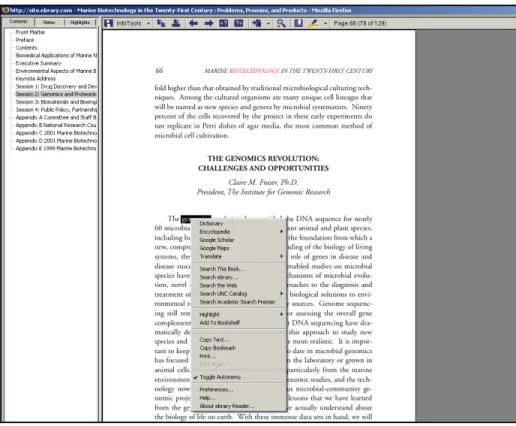
move back and forth between pages, it would become “annoying” to have to select a
Figure 1: A page from a book displayed in ebrary’s QuickView. Several participants did not like the page
lay‐out, with the e‐book’s current page limited to less than half of the left hand side of the screen. To get
to ebrary Reader, the user selects the blue rectangular box in the upper right part of the screen.
Figure 2: A page from an e‐book displayed in ebrary Reader. Using ebrary Reader (ebrary’s other viewing
option), participants liked that they could select a title from the Table of Contents and immediately access
that chapter. However, they felt that it was inconvenient to move from one page to the next using the
MyiLibrary
Participants did not encounter usability issues searching for and finding books in
MyiLibrary. As explained earlier, MyiLibrary books are displayed in either PDF or
HTML format, depending on the file provided by the book’s publisher. Nine of the
participants opened books displayed as PDF documents; the other student happened to
choose a book displayed in HTML format. From the start, those students reading PDF’s
were confused by the fact that MyiLibrary had two toolbars (Figure 3). The main toolbar
was for the e-book platform itself; below that was a PDF toolbar, resembling the type of
toolbar students are accustomed to seeing in Adobe PDF documents. Since they were
familiar with this Adobe PDF toolbar, participants tried to move from one page to
another by using this toolbar’s arrows. However, they found that those arrows were
inactive. Upon closer examination, they found that this toolbar referred only to the
current page of the book. For the page number, the toolbar read “1/1” as if the book was
only one page. Instead of using the PDF toolbar to turn the page, participants found that
they had to go to the MyiLibrary toolbar and select “Next.” Participants commented that
they are accustomed to the PDF toolbar and they expected it to allow them to perform the
same functions that one would expect when reading a PDF. Participants did not like this
set-up. After seeing how these toolbars worked, one individual responded, “Oh, that’s
weird…. I don’t like that much.”
Several participants felt that MyiLibrary should improve their toolbars to be more
user-friendly. One participant suggested that MyiLibrary “could better organize this
window so that they didn’t have two separate toolbars.” Once they learned that they
commented that the toolbar’s “Next” option was too small. They would have found it
more easily if this option had been larger. The same two individuals also felt that an
arrow symbol would be more intuitive than looking for the word “Next” in the
MyiLibrary toolbar. MyiLibrary’s navigability could be further improved by allowing
readers to scroll; as in ebrary, several participants commented on the fact they could not
scroll from one page to the next.
Even without the PDF toolbar causing confusion, the participant who read from a
book in HTML format made similar comments about navigability within MyiLibrary
(Figure 4). In the HTML format, there is an arrow at the end of each page from the
e-book. In order to turn pages, readers can use this arrow or the “Next” option on the
MyiLibrary toolbar. The participant reading in HTML format commented that it would
be more convenient to be able to scroll, rather than having to select the arrow icon or
“Next” option.
Three participants also responded negatively to the size of the pages in
MyiLibrary. When they opened an e-book in the PDF format, the pages were displayed
at a magnification varying between 153 and 207 percent. Finding this size awkward to
read, three participants tried reducing the magnification while they read. However, they
found that when they turned to the next page, the magnification had returned back to the
higher percentage again. After reading through several pages, one participant
student expressed her annoyance with this magnification issue, “Every time I go to the
next page, it jumps back up to 207 percent. It’s driving me nuts.”1
1
Figure 3: A book from MyiLibrary, displayed in PDF format. MyiLibrary’s two toolbars caused confusion
for participants. Additionally, participants found the magnification too large.
Figure 4: A book from MyiLibrary, displayed in HTML format. The participants who read a book in this
format commented that it would be more convenient to scroll, rather than using the arrow at the end of
EBL
When using EBL, participants had trouble getting to the full-text of an e-book
from their search results. Nine participants began by selecting the hyperlinked book title
from their search results (Figure 5). Rather than bringing them into the text of the book,
this brought them to a page for the book’s “Full Record” (Figure 6). While this page
contains potentially useful information, these nine participants struggled to access the full
text of the book. The informational page contained a table of contents; seven participants
tried clicking on items within the table of contents, expecting these items to be
hyperlinked to the text. In order to access the full-text, they had to select “EBL
ReadOnline” button from the menu on the left, but they did not see this option. After the
researcher pointed out this button, one participant said that this button should be bigger.
Another said that he had not realized the purpose of the button, explaining that it “almost
looks like the name of it…EBL ReadOnline.”
After this initial problem getting to the full-text of books, participants were
generally pleased with EBL. They especially appreciated the ability to scroll through
pages, using the mouse or the scroll bar (Figure 7). Seven participants commented that
they found it more convenient to scroll from one page to the next, rather than having to
continuously go to the toolbar to select an arrow icon or the word “next.” One participant
explained his preference for scrolling, “if you were looking to skim through a text, the
Figure 5: A list of search results in EBL. Nine participants selected the hyperlinked book title from their
search results and found that this brought them to the book’s “Full Record” page, rather than to the text of
the book.
Figure 6: A “Full Record” page in EBL. On the “Full Record” page, participants struggled to get into the
text of the book. Seven participants tried clicking on items in the Table of Contents, expecting the chapter
titles to be hyperlinked to the text of those chapters. Several participants commented that the “EBL
Figure 7: Moving from page to the next in EBL. Participants commented that they liked the convenience
Task 2: Annotating and highlighting
Ebrary
Participants did not have difficulty annotating or highlighting in ebrary. Two
participants felt that it was easier to annotate with ebrary than with the other platforms
because they could immediately begin typing notes in the bottom part of the “Notes” tab
(Figure 8). A running tally for all of a book’s notes appears in the top part of the tab. By
contrast, MyiLibary and EBL each involve an extra step in the note-taking process. In
these platforms, readers must select a menu option before a window appears where they
can then type notes. Like the tool for annotation, ebrary’s highlighting tool elicited
positive responses from participants, who described it in terms such as “awesome,”
“fun,” “intuitive,” “nifty,” and “helpful” (Figure 9).
When participants were asked if they thought they would use the annotation or
highlighting tool in their schoolwork, their comments reflected the varying studying
habits of students. Four participants noted that they would be more likely to highlight
than annotate an e-book. One explained that highlighting was less disruptive to the
reading process. A graduate student explained that she would prefer to take notes by
hand, but she felt that the highlighting would be valuable if she needed to return to a text
in several years when she begins her thesis. For two other students, a highlighting tool
did not seem to fit well with their work habits. One explained that he could see how a
highlighting tool would be valuable for other students, but he would be unlikely to use it
himself as he rarely highlights any type of book. “I think it could be useful, but not for
highlighting. This particular participant described the highlighting as “great,” but she
went on to explain, “Highlighting is just sort of mindless for me; it doesn’t really stay in
my brain. So I probably wouldn’t use it, but that is just because of my way of learning;
that’s all.” No matter how user-friendly a feature is, some students may decide not to use
it.
Two participants also expressed a desire for a greater connection between
ebrary’s annotation and highlighting tools. After trying the highlighting function, one
participant commented, “That’s nice. I just wish that I could make some sort of
comment… I never remember why I highlight something… [I’d want] a note to go with
it.” The highlights and notes are listed in separate tabs on the left hand side of the ebrary
screen. These participants felt that if they could see a particular note along with the
highlighted text, they would have a better reminder of the significance of this portion of
Figure 8: Annotating in ebrary. In the notes tab is on the left side of the screen, readers can take notes in
the bottom part of the tab and a running tally of all notes appears above.
Figure 9: Highlighting in ebrary. This tool elicited positive responses from participants, but several
MyiLibrary
Across the board, participants responded negatively to MyiLibrary’s system for
note-taking. To annotate a particular page in MyiLibrary, the reader goes to the "Notes"
tab and selects "Create/Edit Notes." The reader is then taken away from the text of the
book to a new window for typing notes (Figures 10 and 11). Participants felt that it
would be more convenient to be able to refer back to the text of the book while taking
notes. One individual explained that this step interrupted the reading process.
Participants did not find it easy to move back to the text once they were in MyiLibrary’s
window for note-taking. To move back to the book from the notes window, the reader
must select a link that says, “close window.” This link is not very large, however, and
four participants did not see it.
Two participants also pointed out that it would be beneficial if MyiLibrary left an
indication of which pages had been annotated. If they were to return to the book and
re-read a section later on, they would not have any reminder showing them that they had
previously annotated a particular page. As one explained, “If I’m reading along in this
book, there is no indication that I have noted something on page 30. I’d have to go to my
notes to remember that I’d noted something on this page. It’d be nice to have a flag or
Figure 10: MyiLibrary’s Notes tab. To take notes for a particular page in MyiLibrary, the reader goes to
the "Notes" tab and selects "Create/Edit Notes." The reader is then taken away from the text of the book
to notes window.
Figure 11: The notes window in MyiLibrary. Participants commented that they would like to be able to
EBL
As with ebrary, participants did not find it difficult to make notes in the EBL
platform (Figures 12 and 13), but several comments reflected a desire for more control
over how they could take notes. One subject explained, “I would probably use my own
notes [taken by-hand on paper], because I feel like I could be more specific.” Another
participant pointed out that since the notes appear in a column to the left of the text, there
is not a way to specify the part of the page that the note refers to. She explained, “I think
I would like it if there was something on the page to show me, ‘Hey, you marked
something.’ There’s no way to say like…the first two sentences on this page are what I
am really interested in.” Additionally, two students commented that they would like EBL
to have a highlighting tool like ebrary’s and, as mentioned earlier, two participants had
commented on the fact that ebrary had fewer steps in the annotation process. Before
taking notes in EBL, the reader must first go to the “Notes” tab and select "Create Note
Figure 12: EBL’s Notes tab. To take notes, the reader goes to the "Notes" tab and selects "Create Note on
Current Page."
Figure 13: Annotating in EBL. After selecting “Create Note on Current Page,” readers can then type notes
Task 3: Using an e-book platform to link to other online resources
Ebrary
Participants had mixed reactions to ebrary’s InfoTools (Figures 14 and 15). One
participant described this functionality as “very helpful.” Since she is not a native
English speaker, she often looks for the definitions of words online. For her, using
InfoTools to link to an online dictionary would be faster than having to go to one herself.
Another participant thought that this feature would be particularly useful when reading
books with many technical terms; with InfoTools, a student could quickly look up
unfamiliar terms he came across. While half of the students saw InfoTools’ direct linking
to online resources as a way to save some time, others did not think that this functionality
offered a significant advantage over going to a search engine or online resource in a
different browser window. One participant, for example, described InfoTools as “very
neat.” However, he went on to say that he did not think the tool was especially important
since other options exist for finding information. Two students explained that they would
not use InfoTools often because they have their own favored online resources for looking
up information. “I’m such a creature of habit,” one remarked.
Three graduate students also questioned the quality of some of the tools that
InfoTools linked to. InfoTools’ translating option links to Babel Fish, Yahoo!’s website
for translating words in different languages. “I would definitely not do Babel Fish,” one
participant remarked. Another participant saw a need for a better translator tool, “It’s
anything. If they actually had a proprietary translator tool, it would be really cool to have
free access to that.”
Figure 14: Ebrary's InfoTools menu. Readers can access this menu by choosing InfoTools from the toolbar
Figure 15: An online resource, linked to from ebrary’s InfoTools. When a reader chooses an option from
InfoTools, that resource will open in a second tab. In this example, the reader used InfoTools to look up
the word "genomics" in an online dictionary.
MyiLibrary
Reaction to MyiLibrary’s Available Resources was mixed (Figure 16). Three
participants saw these resources as potentially useful. One student explained, “They are
kind of neat…it lists a bunch of resources all in one place which could be good for
finding things I wouldn’t ordinarily expect to find.” However, others did not think these
resources looked particularly useful. Looking over the list of resources, one student
remarked, “There are few things on here that I’m just like…post codes? Really? Why is
that on there?”
As with note-taking, MyiLibrary takes the reader away from the text of the book
set-up; one individual pointed out how problematic it could be to use resources from
MyiLibrary’s list, “You’ve gone away from your book now and if you ended up looking
at a bunch of different resources, you’d have to navigate back through a lot of pages to
get back.” Rather than using MyiLibrary’s list, several participants commented that they
could easily look up information in a different browser window. “Generally, I have
references that I know about so I don’t think this adds anything,” one individual
explained. “I think I would open a new tab and I have the Google search bar in my
browser, so I would just search there.” Six participants said that they preferred ebrary’s
mechanism for directly linking from a word in a book out to another online resource.
Figure 16: MyiLibrary's page of Available Resources. Participants did not like being taken away from the
Task 4: Printing
ebrary
None of the participants had difficulty figuring out how to print with ebrary, but
several participants felt that ebrary should convey its printing limitations more clearly
(Figures 17 and 18). Ebrary does not allow users to print more than ten pages at a time,
but this limit is not conveyed to the user until after he or she has submitted a page range
to print. One participant pointed out how this set-up could potentially cause problems for
users, “They don’t tell you how many pages you can print so I do think that that could be
bad if the all of a sudden they just say stop and it was a page that you really needed. That
could be bad.” When one participant tried to print from pages 21 to 68 of a book, she
received a message explaining that the “requested range has been changed to 21-30.”
This participant cited from personal experience how frustrating it can be to receive a
message like this. Another participant wished that ebrary had options other than selecting
a page range to print. “I’d probably want to print a whole chapter and it doesn’t give me
that option.” If a student wants to print a chapter from ebrary, he or she would have to
Figure 17: Ebrary’s Print Window. To print in ebrary, the reader selects the printer icon from the toolbar
and then enters the desired page range in a print window that appears.
Figure 18: Ebrary’s message about printing restrictions. Ebrary does not allow users to print more than
ten pages at a time, but this limit is not conveyed to the user until after he or she has submitted a page
MyiLibrary
Several participants did have difficulty determining how to print a range of pages
from this platform. As was discussed earlier, MyiLibrary’s two toolbars caused
confusion for participants when they tried turning pages in books that were displayed in
PDF format. The presence of two toolbars was a source of confusion when participants
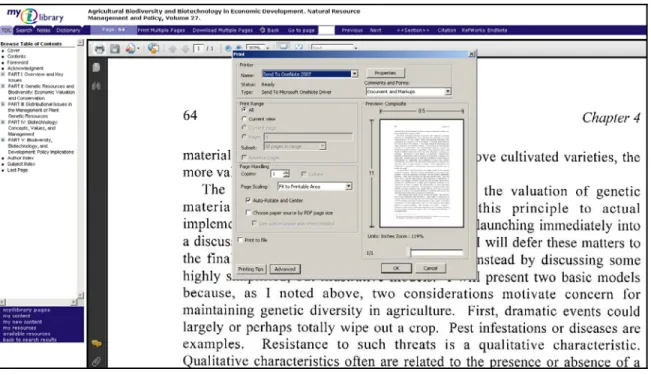
tried to print as well. Of the nine participants who viewed books in PDF format, five
went to the printer icon on the Adobe toolbar. They found that this print option only
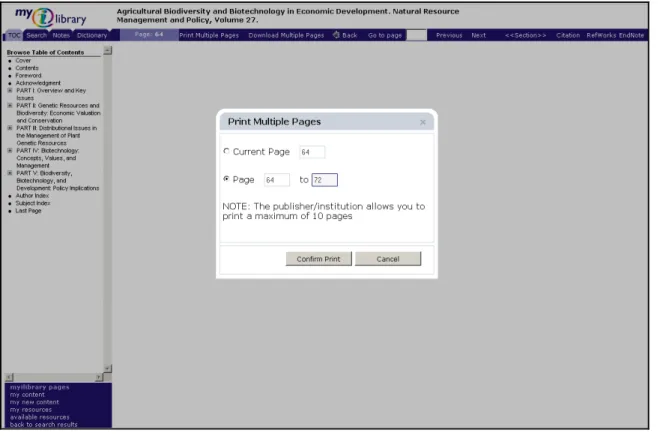
allowed them to print their current page (Figure 19). In order to print a range of pages,
they had to select “Print Multiple Pages” from the MyiLibrary toolbar (Figure 20). One
participant felt that printing would be easier if the “Print Multiple Pages” option was the
standard printer icon, since people automatically go to this icon when they need to print.
This participant also pointed out that the menu option “Print Multiple Pages” was small,
making it easy to overlook.
On a more positive note, participants appreciated that MyiLibrary was more
upfront than ebrary about how much a user may print. When users try to print with
MyiLibrary, the printing pop-up menu contains a sentence explaining that they cannot
print more than 10 pages (Figure 21). Two participants pointed out that this information
Figure 19: MyiLibrary’s Adobe Toolbar printer option. When participants went to the printer icon on the
Figure 20: Printing multiple pages from MyiLibrary. To print a page range, participants found that they
had to select “Print Multiple Pages” from the MyiLibrary toolbar.
EBL
As they figured out how to print in EBL, three participants commented on ways
that EBL could make the process easier. One felt that the print option should be larger.
Two others thought that EBL should use the standard print icon rather than the word
“print.” “I think I am more used to the little image of a printer, so it took me a second
longer to see [how to print].” Like MyiLibrary, EBL presents the reader with more
information about how many pages he or she is permitted to print from a book. When an
individual tries to print in the EBL platform, he is brought to a screen that provides three
options: print the current page, print a page range, or select chapters to print from the
these options. They appreciated that they could select specific chapters to print, rather
than having to figure out which page numbers they needed.
EBL’s printing screen also provides the user with a summary that explains how
many pages he has printed so far and how many pages he can print in all. However, this
summary is small and the study participants did not initially notice it. When the
researcher pointed out this summary information, six participants commented that this
information would be useful. Although she had not initially noticed the printing
information, one participant commented, “Now that I know it’s very easy to see. It’s also
good for students who are counting pages that they are printing….so I think it’s a really
important feature.” She went on to describe this feature as “fantastic. That’s very
user-friendly.” Another participant commented on this print summary, “I think that’s nice,
because it helps you plan.” She added, “I like that they are upfront about how much I can
print.” Considering that participants appreciated this printing summary, this information
Figure 21: EBL's page of printing options. Participants appreciated that they could print their current
page, selected pages, or chapters. They also appreciated the summary detailing how many pages they
had printed and how many more pages they were permitted print. However, study participants did not
Follow-up Questionnaire
At the end of the testing session, each participant was asked to fill out the
follow-up test questionnaire by hand. The first question was meant to gain an overall assessment
of which platform was easiest for participants to use. While responses varied here,
MyiLibrary was the clear third-place choice. In distinguishing between ebrary and EBL,
it is more difficult to determine an overall pick for the easiest platform. Five participants
selected EBL. Three other participants selected ebrary and two students felt that ebrary
and EBL were equally easy to use. The most common reasons for choosing EBL
included the ability to navigate by scrolling and the straightforward printing options.
The second question asked participants if they would be less likely to use certain
e-book functions if they had needed to log in with a username and password. Because of
time constraints, the researcher had logged participants into each platform before the start
of each testing session. However, the researcher wanted to determine if a log in would
have discouraged students from using these tools. Despite the fact that participants had
been unsure if they would actually use these tools in their academic work, they did not
see a log in as a deterrent. Nine participants said that a login would not make them less
likely to annotate or highlight. The other participant said that he probably would not use
these tools anyway, regardless of the log in.
The next question asked, “If you wanted to search for an e-book, what type of
search would you prefer?” Participants could then choose a catalog search that finds both
providing their own response. Seven participants selected a catalog search that finds both
print and electronic books. These results suggest that the majority of participants do not
approach their research with a particular format in mind; they want to view the available
resources and then make their decisions about which resources to read.
When asked what would make them more likely and less likely to use e-books in
the future, participants commented on a number of usability issues. Among the factors
that would increase their e-book use were “straightforward navigation,” “simple sites
with easy printing, and note-taking,” and “easier, more intuitive platforms.”
Corresponding with these responses, participants listed the following factors that would
make them less likely to use e-book in the future: “if they are a pain to use,” “confusing,
distracting lay-out,” “complications,” “hard to navigate,” and “complicated platforms.”
Two participants also wrote about the need to be able to access e-books easily from any
computer. In addition to usability issues, two participants addressed e-book content; they
would be more likely to use e-books if the content was relevant to their academic work.
One participant brought up practical considerations, explaining that he would be more
likely to use an e-book if there were no print version available; he would be less likely to
read e-books if he had to pay for them.
The last part of this questionnaire was meant to look into the potential for using
handheld devices for reading e-books. The first question here asked, “Do you use a
handheld device for your academic work?” Examples of handheld devices were listed,
including cell phones and personal digital assistants (PDA). The next question asked, “If
one participant answered “no” to the first question, indicating that there is not currently
widespread use of these devices for academic work. Even the participant who answered
“yes” did not frequently use her personal digital assistant (PDA) for schoolwork. She
explained, “Sometimes I use my PDA phone to look up something if I am not near a
computer.” Since so many participants did not currently use devices in this way, most of
the respondents did not reply to the second question. Thus, it is difficult to come to any
conclusions about how much interest students have in accessing e-books through these
devices. One participant still answered yes to this question, even though she did not
currently do school work on a handheld device. From the participant who sometimes
used her PDA to look up information, there was more emphasis to her response, as she
Discussion
While participants’ comments reflected individual preferences about each of the
platforms, a number of trends emerge, providing insight into the usability issues that
students encounter while reading e-books. Navigability stood out as an important issue
for all of the study participants. Students clearly value the ability to scroll through a text,
rather than having to select a next option from a toolbar. For quickly finding relevant
information and for determining the relevance of a book, it is imperative that e-books
make navigation as effortless as possible.
Just as individuals expected to be able to scroll while reading in the electronic
environment, they also expected to be able to access the text of a book as easily as
possible. After selecting a title from their search results, participants experienced
difficulty getting to the full-text of an e-book using EBL. In providing her impressions of
EBL, one participant explained, “Once I get into the book, I am happy, but it took me a
little while to find where I need to go for the book.” This process could be simplified by
placing the “ReadOnline” button in a more prominent place on the page of search results.
Participants found that selecting the hyperlinked title of an e-book in their search results
brought them to the “Full Record” page of the book. From here, they expected to be able
to access the full-text of the book by clicking on words in the Table of Contents. EBL