Shaun M. Trujillo.Living Legacies: Recovering Data from 5¼” Floppy Disk Storage Media for the Commodore 64. A Master‟s Paper for the M.S. in I.S. degree. November, 2011.97pages.Advisor: Christopher Lee
In an attempt to investigate the challenges of recovering and preserving digital objects from legacy systems this case study focuses on working with a particular storage medium and computing hardware. This study illustrates the physical and representational
challenges that result from recovering data created with a Commodore 64 computer and stored on 5¼” floppy disks. A system for classifying types of digital objects found in the sample of recovered data was developed. This study contributes to the discourse of collecting institutions engaged in digital preservation and provides examples of ad hoc solutions for working through the challenges of recovering meaningful information from legacy systems. The issues that come to light in this study can be extended beyond the context of the Commodore 64 to include other types of digital resources and computing artifacts that will potentially cross the archival threshold in the near future.
Headings:
Data recovery (Computer science)
Digital curation
Personal archives
Emulators (Computer programs)
LIVING LEGACIES:
RECOVERING DATA FROM 5¼” FLOPPY DISK STORAGE MEDIA FOR THE COMMODORE 64
by
Shaun M. Trujillo
A Master‟s paper submitted to the faculty of the School of Information and Library Science of the University of North Carolina at Chapel Hill
in partial fulfillment of the requirements for the degree of Master of Science in
InformationScience.
Chapel Hill, North Carolina
November 2011
Approved by
CONTENTS
1. INTRODUCTION ... 2
2. LITERATURE REVIEW ... 6
2.1 E-Manuscripts / Digital Curation ... 6
2.2 Data Recovery and Levels of Representation ... 8
2.3 Characterization, Affordances, Genre Classification and Triage ... 12
2.4 Emulation as Digital Preservation ... 15
3. PROFILE OF THE COMMODORE 64 ... 17
3.1 System Features and Affordances ... 18
3.1.1 Connectors, Ports and Peripherals ... 18
3.1.2 Commodore Keyboard and Graphics ... 20
3.1.3 BASIC Programming Language and the CBM Disk Operating System ... 23
3.1.4 VIC-1541 Disk Drive and 5¼” Floppy Disks ... 24
3.2 Characterization of Files ... 32
3.3 Cultural Context & Resources ... 33
4. METHOD ... 35
4.1 Recovery Process ... 36
4.1.1 Acquiring hardware and software ... 38
4.1.2 Testing hardware ... 40
4.1.3 OpenCBM build and ZoomFloppy ... 41
4.1.4 Creating disk images with OpenCBM ... 43
4.2 Results ... 47
4.2.1 Breakdown of Accessions ... 47
4.2.2 Analyzing the Content of Disk Images ... 50
4.2.3 Constraints to Accessing User Created Content ... 58
4.2.4 Maintenance ... 61
4.3 Triage System ... 62
4.3.1 Designing the Classification System ... 62
4.3.2 Administering the Intercoder Agreement Test and Results ... 65
5. DISCUSSION ... 67
ENDNOTES ... 72
REFERENCES ... 75
APPENDIX A – Disk Image Results From Four Accessions of 5¼” Floppy Disks .. 80
APPENDIX B – Online Communities and Resources for C64 Enthusiasts ... 93
1. INTRODUCTION
Before ever opening a file saved to a hard drive or USB thumb stick I accessed
data stored on 5¼” floppy disks. My first computer was a Platinum Apple IIe, a “gift for
the family” that was purchased by my parents in 1989. A year prior to the arrival of the
IIe my best friend was given a Commodore 64 for his birthday, at which point it became
my mission to use all of my leveraging power towards acquiring a home computer. My
computing routine at the time amounted to loading and playing classic video games like
Dig Dug and Burger Time, and, depending on the minor holiday in question, occasionally
printing ugly monochromatic cards with 8-bit pictures of shamrocks or Abe Lincoln‟s
profile on them. I am indulging in anecdotal reverie to loosely illustrate a point about the
early consumer market for computers. Researching this project I have come to appreciate,
mostly through the lens of devoted retro-computing fansites and computing publications
of the age, that the possibilities offered by these early commercial microcomputers were
far richer than I had ever realized. The machines I had miscast as glorified gaming
consoles were in fact robust computing systems with scores of specialized devices and
software that could equip users to tailor complex and customizable information
interactions. Much like the devices of today, the first generation of personal computers
were intended for more than playing games; they allowed for the creation and
manipulation of unique data and complex digital objects, and, by modem or by mail, they
empowered a hybrid network of communication and discourse for the enthusiasts of the
of the 1980s is rooted primarily in nostalgia, but I believe that contemporary users are
still interested in pushing the capabilities of these older systems in part because they were
so versatile in their own right and many users had not previously been able to experience
the full scope of their capabilities. With this work I hope to qualify some of the enduring
value of these systems for the broader cultural heritage community.1
The catalyst for this study was a book authored by Matthew G. Kirschenbaum
titled Mechanisms: New Media and the Forensic Imagination. In his meditation on the
techniques of digital inscription, Kirschenbaum frames digital media as a writing
technology and effectively places objects encountered by digital curators within the
continuum of literary analysis and forensics. The thrust of Kirschenbaum‟s analysis relies
on the premise that information is in reality bound to a physical entity, and that although
digital information is medium-independent it can never be wholly intangible.
Philosophically speaking, Kirschenbaum‟s forensic imagination contrasts the Platonists‟
position in which the real is situated outside of and beyond phenomenal reality in the
realm of supersensible ideas. Rather, in the digital domain, Kirschenbaum locates the real
beneath everyday human reality in the realm of subsensible mechanics. In both positions
the source of reality is not immediately accessible to individuals who are separated from
it by varying degrees of abstraction.
Computer systems are designed to hide what is most essential to their functioning,
allowing human users only a requisite margin of interaction and manipulation of the
underlying processes that determine a machine‟s output. As computer technology has
grown in complexity over the last century, the abstractions between the human
information via a particular configuration of hardware and software binds it to a set of
affordances that act as both ingress and terminus of human interpretation. Archivists
working with born digital acquisitions will be charged with characterizing the advantages
and limitations of various formats and media types and will be responsible for peeling
back the layers of representation that digital objects possess. Digital archaeology is a
term used to designate the work of curators employing post hoc strategies to recover
information from legacy systems and formats (Arms, 2000; Ross & Gow, 1999). Ross
and Gow (1999) define digital archaeology as an approach “to accessing digital materials
where the media has become damaged (through disaster or age) or where hardware or
software is either no longer available or unknown” (p.iii). Comparing aspects of digital
curation with archaeology is by no means arbitrary; data can be stratified within obsolete
formats, corrupt files are essentially sealed off in a state of disintegration, orphan files
remain unrenderable except by means of forgotten ancestral operating systems, and
deleted information long believed to be lost can be fossilized on a magnetic disk (Farmer
& Venema, 2005).I discovered one remark in an online message board that I believe
succinctly sums up all the intricacies, frustrations and tribulations of data recovery and
digital forensics: “It's like trying to reanimate a frozen Siberian mammoth.”2 Searching for traces of the creator along with the original function and
provenance of records are all tasks familiar to archivists. By reexamining digital
information, we can divest from it the reputation of a mutable and chaotic distribution of
electrons and can place it within the category of sound physical artifacts. This does not
mean that digital objects will conveniently fit into all models of archival preservation and
heretofore were paper based, and could be handled and interpreted directly with very few
boundaries other than semantic, linguistic, and dialectical unknowns, loss of integrity of
information due to physical disrepair and decay, and possibly poor handwriting. The
challenges that archivists face today and tomorrow will be more numerous than ever
before, will require skills borrowed and adapted from other disciplines and will foster
new alliances across institutions.
In an attempt to investigate the challenges of recovering and preserving digital
objects from legacy systems I have conducted a case study that focuses on working with
a particular storage medium and computing hardware. In this study I have worked to
illustrate the physical and representational challenges that result from capturing data
created with a Commodore 64 (C64) computer and stored on 5¼” floppy disks for nearly
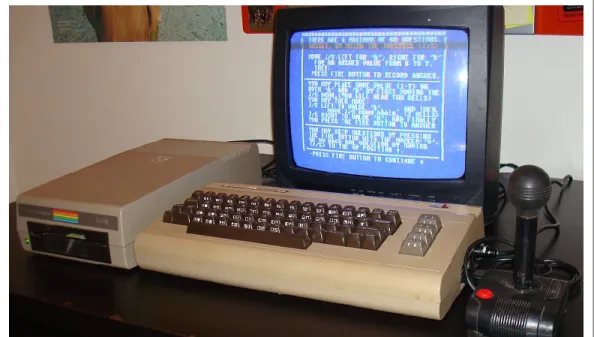
two decades. Figure 1 shows the C64 hardware used during the course of this project.
The issues that come to light in this study can be extended beyond the context of
the C64 to include other types of digital resources and computing artifacts that will
potentially cross the archival threshold in the near future. After collecting the data from
the case study, I developed a system for classifying the types of digital objects that I
found in the body of data. The purpose of this case study, and the triage system more
generally, is to contribute to the discourse of collecting institutions engaged in digital
preservation and to provide an example of developing ad hoc solutions for working
through the challenges of recovering meaningful information from unfamiliar legacy
systems.
2. LITERATURE REVIEW
2.1 E-Manuscripts / Digital Curation
Increasingly, collecting institutions are encountering acquisitions which include
born-digital materials. In much of the professional literature, the future of archival
collecting is figuratively overshadowed by an ominous cloud of digital media that
threatens to produce a deluge of volatile information. This data is at risk of being lost if
certain issues are not immediately addressed by the professional community. In recent
years any number of collecting institutions have needed to come to terms with the reality
of digital acquisitions, including museums and cultural heritage organizations such as
historical societies, public libraries, college and university archives, government archives,
corporate and institutional archives, digital libraries, and other small records
environments. If we add to that list the curation of personal digital objects by individuals
in the wider social sphere, material that Jeremy Leighton John – the curator of
Rowlands, Williams, & Dean, 2010), then we begin to see the wide ranging influence that
born-digital media will hold for the future of archives and cultural memory in general.
Personal digital archives (PDA) and electronic records created by individuals for
personal use have only recently found a place in the larger professional dialogue of
electronic records management. As far back as 1994, Adrian Cunningham, of the
National Archives of Australia, had written an article examining the difficulties of
preserving personal digital information. Almost six years later Cunningham wrote a
follow-up article that addressed the near total lack of response that his article had
received, due in part to an ongoing trend in the discourse on electronic records, “which
was, and sadly still is, completely dominated by the corporate/organizational records
perspective. This lopsided discourse is something I have over the years criticized as
„corporate myopia‟, a phrase denoting the failure to recognize that private individuals
also create records” (Cunningham, 1999, ¶3). Notably there has also been little urgency
on the part of the manuscript and special collections community regarding digital assets
that appear in the collections of current donors, or the variety that are bound to appear in
future accessions. Since the early 1990s advances in Internet and computing technologies
have led to the increased digital output of individuals from all walks of life. This
widening stream of personal digital information has become preponderous enough to
command the attention of collecting institutions.
So what are some of the options for collecting institutions already haunted by
expanding backlogs and diminishing resources to allocate towards processing analog
collections? Can archives afford to appraise the digital records of individuals in order to
and ask questions later in accordance with the notion of benign neglect? Storage media
are cheaper every year and thereby increasingly available; it might actually be feasible
for archives to store many types of digital objects that were created in recent memory for
an interim period during which they are fundraising and creating preservation policies.
However, when considering the astronomical increase in the creation of data and speed of
its proliferation (and duplication), archivists will inevitably be forced to take in more
“bytes than they can chew” if they do not proactively determine a system for appraising
and retaining digital objects (Cook, 1991-92; Cook, 2004). Eric Schmidt, a CEO of
Google, estimates that the current rate of information being generated every two days
roughly equals the sum of all information from the beginning of civilization to the year
2003.3 By Schmidt‟s estimation, user-generated content is largely responsible for that
staggering statistic, as more and more people are using personal computers and mobile
devices to create and organize their electronic lives (Strodl, Motlike, Stadler, & Rauber,
2008).
2.2 Data Recovery and Levels of Representation
Among the concerns that are central to the preservation and curation of
born-digital materials is the problem of providing users with access to data created with
outdated computing platforms and stored in legacy formats. Transferring this data from
its obsolescent storage media into current contexts in which it may be accessed and used
is the basic premise of data recovery (Ross & Gow, 1999). Data recovery, or digital
capture (John, 2008), utilizes tools and strategies that rely on the physical realities of
digital data in order to preserve the integrity and authenticity of digital information on a
computing and the accelerating growth of information relies, to some degree, on
equivocations about the imperceptible nature of information; that is, it confounds the
difference between information‟s invisibility to the human eye and inaccessibility to
human touch with actual intangibility. In an amusing article on techniques for destroying
paper-based information, Burnett and Randolph explain that “information is... medium
independent... (but) definitely not „immaterial‟” (p.71).
Data recovery – the process that results in the accurate reproduction and access of
digital objects from data stored on fragile and at-risk media – relies on interacting with
and evaluating a series of physical conditions that determine numerous means for
interpreting a digital object. In 2002, Kenneth Thibodeau defined digital objects as
“information object[s], of any type of information or any format, that [are] expressed in
digital form” (p.6). According to Thibodeau, digital objects have characteristics derived
from three levels of representation which are described below:
All digital objects are entities with multiple inheritance; that is, the properties of any digital object are inherited from three classes. Every digital object is a
physical object, a logical object, and a conceptual object, and its properties at each of those levels can be significantly different. (p.6)
Accordingly, each layer of a digital object‟s representation presents specific challenges to
recovery and preservation practices.
At the most fundamental level, digital information can be interpreted as a form of
physical writing, i.e., binary inscription on the surface of a disk in the form of magnetic
flux reversals (Kirschenbaum, 2008; Thibodeau, 2002; Woods, Lee, & Garfinkel, 2011).
Guttenbrunner, Becker and Rauber (2010) cite the UNESCO guidelines for the
from its physical layer are threatened by decay to the storage medium, i.e., bitrot, as well
as by the absence of the necessary hardware to access the medium (p.66).
Kirschenbaum (2008) describes the next class “above” the physical representation
of bits as a formal level of executing rationalized code, i.e., “data as it is recognized and
interpreted by particular processes and applications software” (p.3). A machine that is
processing code is actively reading and writing data in order to perform some action,
which could involve the erasure, copying, addressing or modification of a file or other
form of data. Here again digital objects are essentially grounded in inscription practices.
Notably this second level of representation accounts for the arrangement and allocation of
the units of storage, such as blocks, clusters and sectors, which are characteristic to
digital storage media (Kirschenbaum, 2008). This arrangement of digital bytes is largely
a function of a computer‟s operating system and generally takes place outside of the
direct control of the user.
Finally, there is the high-level conceptual representation of digital information,
which usually takes shape as the user-facing end product of an operating system‟s
interpretation of digital bits. This level of representation is synonymous with the user
interface and is the means of accessing an information object. Some examples of the
conceptual layer of an information object are games running on specific platforms, an
MP3 played with a particular application, or an uncompressed image being accessed by
means of a graphical editor.
The Reference Model for an Open Archival Information System (OAIS) provides
a parallel schema for interpreting the levels of representation mentioned above and for
OAIS model, a data object can be composed of either a physical object or a digital object.
The data object is interpreted by means of associated representation information. The
representation information can then be variously reinterpreted or translated using a
secondary set of representation information or metadata, or it can designate its final
output, the information object, which is the basic denomination of human-information
interactions. In addition to the three classes of representation mentioned above
Guttenbrunner et al., again citing the UNESCO guidelines, acknowledge a fourth layer of
a digital object. This layer is described as the essential elements of a digital object and
consists of “the context in which a digital object has been created. This information
describing a digital object is usually referred to as metadata” (p.66). The OAIS model
distinguishes similar contextual information for a digital object‟s content and labels it
Preservation Description Information. PDI includes unique reference identifiers for the
content of digital objects along with information for documenting the provenance,
context and fixity of such content (OCLC/RLG, 2002).
The conceptual level of a digital object is necessarily integrated with and
dependent on its means of access, and therefore accessing a digital object in a new
context, whether by converting the data or rendering the original data via emulation, will
likely result in changes to the object‟s characteristics and will necessitate reinterpretation
of its essential qualities. Nonetheless, since determining what qualifies a digital object as
genuine and accurate is a judgment call that usually relies on the topmost level of
interpretation (i.e., on the level of the information object), multiple possible encodings, or
formats, of the same object are possible and can equally preserve the essential
curation is identifying what the essential characteristics of a digital object actually are
and then securing those characteristics over time. In the end preserving the essential
aspects of a digital object may not be feasible for several reasons including high costs
associated with analyzing recovered data and developing systems for emulating legacy
files, loss of ambient data (Kirschenbaum, 2010) and metadata during migration of files,
or simply an inability to capture all of the relevant inheritances that comprise the object.
Approaching new and unfamiliar sources of digital information will require that
archivists develop methods for drawing out important characteristics of information
objects and determining what qualities can be sacrificed and what qualities should remain
in order to maintain the fidelity of the preserved object to its original source (Holdsworth
& Sergeant, 2000; Heslop, Davis, & Wilson, 2002).
2.3 Characterization, Affordances, Genre Classification and Triage
Abrams et al., cite Adrian Brown in describing characterization as “information
that describes a digital object‟s format-specific character or significant nature” (p.16).
Characterization can refer to the specifications of the medium on which a digital object is
stored, the encoding standard of the file types of which it is composed, and the qualities
of its use within a specific computing context. Understanding the characteristics of a
digital object can provide grounds for interpreting the object in different contexts and
help in prioritizing the aspects of the object that should remain across various
translations.
Characterization of a digital object is closely linked to the affordances of the
particular computing environment by which it is accessed. Affordances are the
highlight the nature of human practices surrounding it (Gibson, 1979; Sellen & Harper,
2001; Kirschenbaum, 2008). Tools and artifacts are designed by humans with specific
uses in mind, and these uses are integrated into the affordances an object provides. The
affordances of an object are footholds for both deeper inference concerning its meaning
and use and, in the case of digital objects, for the possibility of automating the creation of
characterization information (Kim & Ross, 2007).
Characterization information, similar in many ways to Thibodeau‟s representation
information, is considered highly important to digital repository frameworks for ingesting
digital objects (Abrams, 2009; Esteva, Xu, Jain, Lee, & Martin, 2011). In order to
preserve the coherence of a digital object over time and across contexts, characterization
information must be preserved alongside the object. This means that information
important to the integrity of the object, such as header and file type information,
checksums, and other authority metadata, must be extracted from various representational
levels of the object and stored peripherally in the archives. There are numerous
proprietary and open source tools4 that can be used to gather and extract preservation
metadata from digital objects. Special forensic software such as AccessData‟s Forensic
Toolkit5 and Guidance Software‟s EnCase Forensic6 software can be used to create
bitstream copies of storage media, aid in analyzing disk images by arranging the
bitstream into its original sectors, provide a hexadecimal view of the bytes in a file, and
allow for searching across the bitstream for signature file structures and data
characteristics.
Simultaneously, larger assertions about the use and characteristics of a digital
can then be used to organize the object into predefined genre classifications. Developing
a system for assigning genres to digital accessions is a high-level approach to
understanding the contents of digital collections and efficiently applying an archives‟
resources towards their further description, processing and preservation. In 2008, the
Digital Curation Center published a briefing paper by Abbott and Kim that defined genre
classification as “the process of grouping objects together based on defined similarities
such as subject, format, style, or purpose” (¶1). Elsewhere, Kim and Ross have conducted
several studies that look at automatic genre classification as a means of enhancing the
management and preservation of digital objects. In a 2007 study they defined (automatic)
genre classification as:
The automatic grouping of documents into distinctive document structures, to be followed by focused metadata extraction from single structural types, as a means of creating a tool capable of extracting metadata across many domains at different semantic levels... Identifying the genre first provides a mechanism to limit the scope of document forms from which to extract other metadata. (p.50)
The fundamental purpose of genre classification is to inform a system of triage
that can reduce the space of interactions and analysis of data objects. Additionally, by
applying genres to known object types and sets of characteristics, effectively separating
those objects from the larger aggregation of data, the unknown quantities within an
accession are distinguished and brought to light. In describing the benefits of
characterizing digital objects, Esteva et al. explain, “learning what is not known about a
collection is an important part of its assessment” (p.46). Additionally they describe the
purpose of an assessment system as allowing curators to “go from overviews to detailed
examinations, combine variables of interest, identify risk priorities, detect patterns and
make preservation recommendations” (p.46). Finally, a triage system can efficiently
to the collecting institution at large and can conserve energy that would be exhausted on
uncovering the meaning of such objects through complex analysis, effectively reinforcing
local collection policies (Kim & Ross, 2007).
2.4 Emulation as Digital Preservation
Emulation is seen as one of several partial solutions to the various problems
confronting digital curators. In most cases emulation is discussed in contrast with
migration as a strategy for preserving the integrity of born-digital files across time.
Migration is a technique in which data in obsolete formats is saved in new formats that
are compatible with modern operating systems and software. Migration is a cheaper
solution to preserving digital files in the short term, but due to the constant evolution of
software and computing technology it involves regular reiterations of the process in order
to maintain the data‟s accessibility (Rothenberg, 1999; Granger 2000). A second
short-coming of the migration strategy resides in its tendency to alter the “look-and-feel” of old
files, often losing aspects of original born-digital documents such as fonts, formatting,
associated images and graphical data, and other ambient data (John et al., 2010).
Alternatively, emulation preserves the bitstream of the original media and accesses the
legacy data using virtual machine software installed on modern computers. Although
emulation tools tend to be more expensive to develop than the initial cost of migrating
files to modern formats, emulation has the potential to maintain a higher fidelity to the
“look-and-feel” of the original computing environment, along with preserving the
integrity of the data in the archival science sense of provenance, authenticity and
Attempts have been made to empirically test user perception of the benefits of
emulation over migration. In 2001, Hedstrom and Lampe reported on a study that asked
users to describe their interactions with a retro-computer game as played on an emulator
as well as a migrated file on a modern PC, but only after first playing the game on the
original computing system. Based on the users‟ responses there was no major qualitative
difference in their satisfaction with the emulated or migrated version of the game,
however users resoundingly preferred either version to playing the game in its original
context on the actual BBC Micro hardware and peripherals.
Concepts of user satisfaction are commonly linked to studies concerned with
preserving outdated digital objects. In 2006, Hedstrom, Lee, Olson and Lampe focused
on the acceptance of “look-and- feel” as an indicator of overall user satisfaction when
interacting with emulated files, and looked at office documents as well as instances of
retro-gaming for sources of insight. An emphasis on user comfort has been incorporated
into recent emulation projects and case studies. Technology research initiatives such as
the PLANETS project7 and the CAMiLEON project8 have advanced the concept of
remote emulation, which sidesteps the necessity of installing operating systems and
applications that are necessary to run legacy executables on local machines, and instead
allows users to access files remotely. In addition, it is useful to note that easy access to
emulated files will not necessarily account for quality user experiences. Von Suchodoletz
and van der Hoeven, 2009, and Woods and Brown, 2010, both point out the necessity of
contextualized knowledge of the original operating system and software in order to meet
performance expectations of installation and execution of legacy files. Simply put, users
legacy files beyond the initial setup of a virtual machine and emulator (Woods & Brown,
2010).
3. PROFILE OF THE COMMODORE 649
Commodore International Limited, the parent company of Commodore Business
Machines (CBM), released several 8-bit microcomputers preceding the C64 including the
Commodore PET and the VIC-20. The C64 was released in 1982 and rapidly took over
the personal computing market. The main feature that the C64 offered that no other
microcomputer in its price range included at the time was 64Kb of random-access
memory (RAM). The C64 allowed access to its built-in 64Kb of RAM, 20 Kb of
read-only memory (ROM) and numerous input/output (I/O) ports, along with RAM or ROM
cartridge extensions, all within a 16 bit address space, by means of its Programmable
Logic Array (PLA) chip that allowed for bank switching (Evans, 2010a).10In essence bank switching is a technical method for expanding the available memory in a system
beyond what is directly addressable by the processor by temporarily repurposing, or
switching, the role of memory elements in the system such as ROM or RAM.11 This all
goes to illustrate that for its time the C64 was an incredibly versatile machine with
powerful processing capabilities available to consumers at a relatively inexpensive retail
price of $595 (Mullish & Kruger, 1984). Researching the C64, I came across numerous
reminders that it is, in fact, ranked by Guinness Book of World Records as the best
selling computer model of all time, due in part to its long stint on the market, from
1982-1994, during which time CBM sold between 17 and 30 million units (Edwards, 2008).
This claim to market dominance gives further proof of the value of this study in the
information generated during the seminal years of personal computing was created with
C64 systems and is now at high risk of permanent loss.
3.1 System Features and Affordances
In this section I have included a brief overview of some of the system
specifications for the Commodore 64 and introduced some of the primary modes of data
creation, transmission and retrieval available to users of the original C64 machines. This
is by no means an exhaustive list of hardware devices or interface and programming
options for operating the C64, with some of the glaring omissions including the C64‟s
groundbreaking 6581 Sound Interface Device (SID) sound chip and the use of “sprites”
for programming graphical animation. Essentially, the list below reflects the ground level
interactions and operations one would first expect to encounter when approaching the
C64 system from a generalized non-computer science background.
3.1.1 Connectors, Ports and Peripherals12
The cartridge expansion slot for ROM-based software and, later in the C64‟s 12
year run, for various system expansions, aftermarket add-ons and utilities.
The C2N cassette interface, designed to connect the C64 to Commodore 1531
Datassette tape drive. This drive was also compatible with the Commodore PET
and VIC-20 models (Evans, 2010a). Unfortunately, I was unable to incorporate
the 1531 into my study and the mysteries of storing data on tape will persist until
a later date.13
An RCA port for video and audio that transmits a modulated radio frequency (RF)
signal.14 Establishing the video signal from a C64 to a television or monitor can be
project, I assumed that an ordinary RCA cable would work, and plugging the C64
directly into an NEC monitor‟s video/audio input returned no result, leading me to
believe that there was something wrong with the monitor or the computer, rather
than the connection. In reality the modulated RF signal requires that the RCA cable
be attached to a switchbox that converts the signal to TV antenna. I describe this
issue further in the Method section of this study.
An 8 Pin A/V port that requires a special composite cable, i.e., the Commodore
video cable. This option allows for high quality 16-color video and sound and was
ideally designed to connect the C64 to a Commodore 1701 monitor (Evans, 2010a).
The Serial port (aka IEC bus) for communication between the C64 and external
devices such as disk drives and printers. The IEC bus was designed to be a
proprietary serial-bit version of the industry-standard IEEE 488 bus which was
featured on the PET and the VIC-20, and was significantly slower in transmitting
data.15 The slowness of the serial I/O speed was long considered one of the C64‟s
glaring weak spots and was later addressed by the programming community with
the introduction of fast loader software that replaced the built-in ROM of the VIC
drives as well as expansion cartridges and complimentary fast loader routines
included with specific software (Evans, 2010b).16 The serial connection was
designed to meet the TALK/LISTEN protocol of the CBM DOS file system which
Jim Butterfield describes in a July 1983 article in Compute! magazine:
or receive from it. Finally, you shut it off. All devices are connected, but only the one you have selected will listen or talk (as cited in Derogee, 2008, p. 4).
The IEC bus was capable of connecting multiple peripherals through
daisy-chaining, with the maximum number of concatenated devices reaching five disk
drives and one printer.17
The 8-bit User port allows for “free style interfacing” (Evans, 2010a), and was
designed by CBM to be used with communication devices such as the
VICMODEM and the RS 232 cartridge.18
Two 9-pin Game ports (aka Control ports) that are compatible with Atari
joysticks.
3.1.2 Commodore Keyboard and Graphics
According to the Commodore 64 User’s Guide, the C64 16-color display
combines 40 columns by 25 rows to hold up to 1000 characters or memory locations in
320x200 pixel resolution.19 Each location consists of a byte and thereby can contain a
number from 0 to 255 for a total of 256 values that correspond to a graphic character in
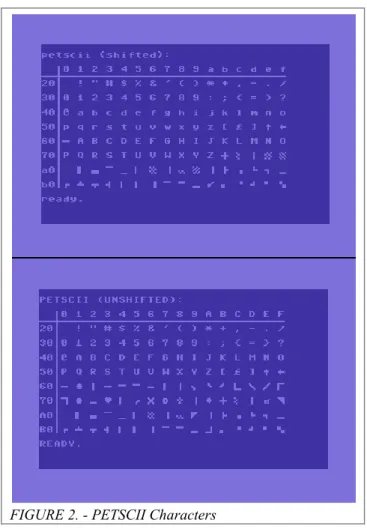
the PET Standard Code of Information Interchange (PETSCII). Figure 2 shows the range
of available PETSCII characters on the C64 and was taken from the Wikimedia
FIGURE 2. - PETSCII Characters
The Commodore 64 uses the PETSCII character encoding set for both textual and
graphical purposes, with PETSCII representing CBM‟s attempt at customizing the 1963
version of ASCII in order to work around graphics limitations of the Commodore PET
(Østerby, 2009). Nearly all other information systems that use the ASCII character set are
based on the 1967 version.21 Like the built-in BASIC Ver. 2.0 programming language,
PETSCII for the C64 is a relicfrom a previous CBM micro-computer, and though
PETSCII does allow for creative use of characters for generating graphics as well as
screen control codes for reversing characters and changing display colors, converting text
encoded in PETSCII to standard ASCII can be problematic and can interfere with some
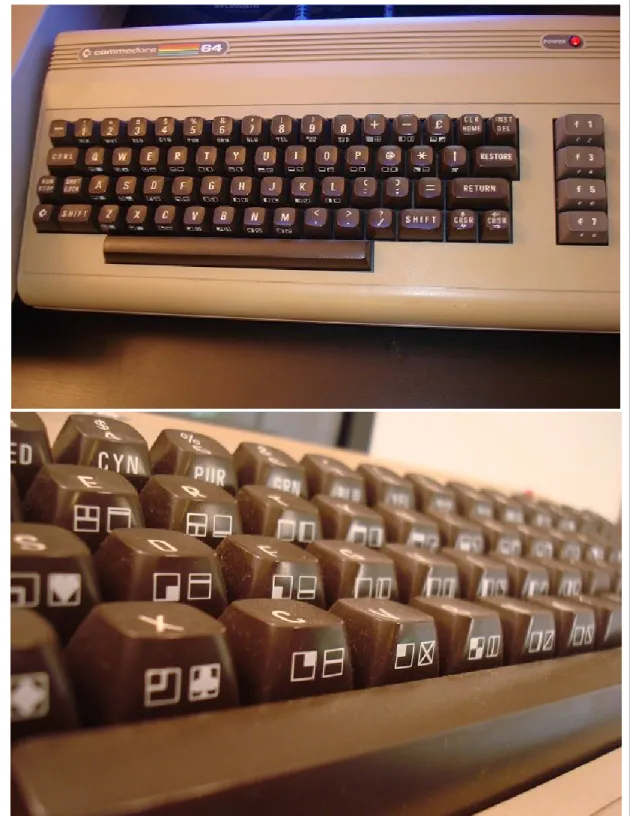
layout overlaid with shift accessible PETSCII characters and bonus programmable
function keys. Figure 3 shows the C64 keyboard and a detail depicting the PETSCII
characters displayed on the keys.
3.1.3 BASIC Programming Language and the CBM Disk Operating System
As defined by Silberschatz, Peterson and Galvin (1991), an operating system is “a
program that acts as an intermediary between a user of a computer and the computer
hardware” (p.3). The C64 has two main components to its native operating system - the
BASIC programming language and the Commodore Disk Operating System (CBM DOS)
which is stored in ROM on the various Commodore disk drives. When one turns on the
C64 a simple blue terminal takes shape on the monitor. This is the full-screen command
line interface where users implement the Commodore BASIC programming language
(aka PET BASIC) in order to write programs and routines, to operate peripherals and
most importantly to load software. The built-in BASIC Ver. 2.0 language is the same as
what CBM implemented with the VIC-20, and is based on Microsoft‟s BASIC language.
In 1986, Commodore released the Graphical Environment Operating System (GEOS), a
graphical user interface that was also used by the early Apple II family of computers.22
Although worthy of note, the GEOS remains outside of the scope of this project as both
the method of testing, extracting, and emulating data was performed with BASIC and
CBM DOS commands. Some of the essential disk commands for BASIC, used for
writing to and reading from disk devices which were signified with an address number
from 8 to 11, are listed below. In the examples below all of the commands are being
executed on a floppy drive located at address number 8:
Format a new disk: OPEN 1,8,15,“N0: DISKNAME, ID”:CLOSE 1
Load a file: LOAD “FILENAME”,8
Load and run file: LOAD “FILENAME”,8,1
Save a file: SAVE “FILENAME”, 8
Save and replace: SAVE “@0:FILENAME”, 8
Verify disk file: VERIFY “FILENAME”, 8
Directory listing: LOAD “$”,8 (followed by) LIST
CBM DOS is the software that the C64 uses to communicate with and control its
various disk drive devices, or, in similar terms CBM DOS abstracts user commands and
manages secondary storage media and the data stored on them (Silberschatz, Peterson, &
Galvin, 1991).23 Among the primary tasks of the DOS is the management of free-space
on storage media as well as the systematic allocation and retrieval of data to and from
memory. The operating system is also responsible for creating and deleting files and
directories, and supporting “primatives for manipulating files and directories”
(Silberschatz et al., 1991, p.44). The specifics of CBM DOS‟s file mapping and space
management as it relates to this project will be described in the following section.
3.1.4 VIC-1541 Disk Drive and 5¼” Floppy Disks
The VIC-1541 (aka CBM 1541) is one of several floppy disk drives that were
compatible with the C64 and was probably the most popular of the drive options during
its heyday. The 1541 is the heart of the data recovery process explored in this study and,
in broader terms, the development of firmware and communication protocols between the
varying Commodore disk drives and modern day platforms is central to ongoing
preservation efforts in the Commodore enthusiast community. The Commodore arrived
on the scene shortly before IBM popularized internal hard drive technology with the IBM
data took place in an external drive mechanism that existed outside of the main chassis
that housed the central processing unit (CPU). Today, someone encountering the C64 for
the first time may think that he or she is looking at a keyboard and may wonder where the
rest of the computer is hiding. For users who are used to laptops and towers, the
separation of disk drive and computer makes less sense than the separation of keyboard
and computer. The fact that the CBM disk drives remain easily accessible to human
manipulation and are not relegated to the internal space of the computer or hermetically
sealed within a drive case is one of the main differences in terms of the affordances that
affect a user‟s behavior in creating and interacting with data. In other words, the role of
the user as a physical intermediary in the circuit of data manipulation and the specifics of
how the external drives handle data - in terms of the discrete units of storage dictated by
optimal performance and space and the means of addressing, accessing and transmitting
data from such storage media to the user - affects the way in which data was produced
and used.
The VIC-1541 was considered a “smart device” in that not only did it receive
commands from the C64, but the drive also had its own integrated CPU chip, 2 kB of
RAM, and CBM DOS v2.6 hardcoded in 16kB of ROM.25 The 1541 included two serial
ports, one for connecting to the C64 and one for daisy-chaining with another external
device. A drive could be assigned a specific number from 8 to 11 with the DIP switch on
its back to differentiate it from other connected drives. Most importantly, the single-sided
1541 drive was designed to accept 5¼” floppy disks, the most ubiquitous storage medium
of the early 1980s before they were superseded by 3½” floppies. Even though the 1541
(SD) single-sided floppy disks, many commercial and private-use floppies were
double-sided. Most floppy manufacturer‟s warned against writing data to both sides of a
single-sided disk claiming that data loss was accelerated by friction from the internal magnetic
disk rotating in the opposite direction than intended.26 However, most users ignored this
warning altogether and figured out a simple way of converting single-sided disks into
fully functional double-sided disks. While revisiting the 5¼” floppy format,
Kirschenbaum (2008) notices the mark of this (almost literal) hack on one of his own
disks and infers about the information behavior that resulted from the affordances of the
floppy medium:
A portion of the disk envelope alongside the label has been crudely cut away… By mimicking the professionally cut write tab in a symmetrical location I double-sided the disk, signaling to the drive mechanism that the reverse side was also available for data inscription (to access the reverse side you would place the disk in the drive upside down). This was a common trick, and one I was quick to appreciate once I learned that disks had a finite capacity, and... that more disks were what enabled me to expand my software collection (primarily games)… In this instance I can surmise that I double-sided this disk at some point well after its initial purchase in order to store the Koala picture files I was then generating with that piece of software (itself stored on a separate disk), hastily inking in an
addition to the label which would allow me to locate them. (p.33)
Here Kirschenbaum has illustrated how the physical characteristics and limitations of a
particular medium inform the ways in which people manipulate it and, in turn, these
manipulations have an effect on information practices that are identified with the
medium. It is important to note that a single program and its supporting files could be
stored on either side of a double-sided floppy, as well as on various sides of multiple
floppies. Therefore, the means to access a complete digital object may require that the
user maintain several floppy disks.
To better understand the process of reading, writing and storing a file generated
specifications of 5¼” floppy disks follows. CBM DOS tells the 1541 disk drive‟s
controller to inscribe bits of information to the floppy‟s magnetic disk in a particular way,
known as the group code recording method,27 effectively organizing bytes according to
specific physical conditions, i.e., the spacing of magnetic flux reversals. These bytes are
then further bundled together, by means of a file system, into logical address spaces that
the DOS can recognize and “remember” when the drive is called upon to retrieve or
(over)write data. Every proprietary operating system organizes these bundles slightly
differently as they require partitioning a specific physical storage medium, e.g., floppy
disks, to garner specific results such as speed of retrieval or storing the most amount of
data in a limited amount of space. The most basic unit of bundled bytes on a floppy disk
is called a block, and every file is made up of one or more blocks. Blocks are comprised
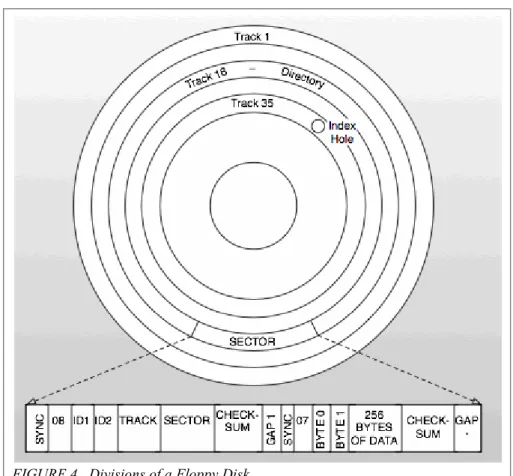
of 256 bytes, with four blocks equaling 1kB of data. The magnetic disk is divided into
discrete concentric sections called tracks which are further subdivided into sectors once a
disk is formatted.The specific track number combined with the specific sector number
gives the address of a block of data. Figure 4 illustrates the divisions of tracks and sectors
on a floppy disk and shows the breakdown of header information and data on a single
FIGURE 4. Divisions of a Floppy Disk
Note: Figure is based on a diagram in the VIC-1541 User’s Manual, p.54
Commodore‟s particular schema for Group Code Recording allowed for 174,848
bytes (roughly 170kB) of space on one side of a single-density floppy disk, which was
broken into a total of 664 available blocks distributed along 35 tracks divided into 683
sectors.28 Double density floppies held roughly 80 tracks but the VIC drives‟ read/write
heads were too wide to register all of the tracks, so instead they wrote data to every other
track, maintaining a total of 35 tracks. Manufacturers of proprietary software took
advantage of this physical limitation to create a kind of primitive copy protection for their
software, dubbed „fat tracking‟, by assigning data to nonstandard tracks and using
programmed commands, sometimes included in dongle keys, to force the head to read the
Peter Schepers (2005) describes the way in which the different sized tracks
(smaller on the inside and larger on the outside) were assigned different numbers of
sectors, “Commodore, in their infinite wisdom, varied the number of sectors per track and
data densities across the disk to optimize available storage” (¶2). Figure 5 is based on a
chart by Schepers that explains the distribution of sectors across tracks:
Storage Distribution Across Tracks
Tracks Sectors Per
Track # Sectors Storage in
Bytes
1-17 21 357 7820
18-24 19 133 7170
25-30 18 108 6300
31-40* 17 85 6020
*Tracks 36-40 only on 40 track images 683 (for a 35 track image)
FIGURE 5. Storage Distribution Across Tracks
The disk drive is a random access device, and therefore the CBM DOS does not
assign blocks of a file to successive sectors, but rather assigns data based on an algorithm
for conserving space and enhancing the speed of retrieval that depends on the physical
mechanics of the spinning drive. This method of file assignment is termed „interleaving‟
and when CBM DOS looks for available blocks to store a file‟s data it skips to every
third sector on a track, e.g., t1/s1, t1/s4, t1/s7, etc.30 Interestingly, CBM DOS tries to
write as much of a file on a single track as possible for the sake of efficiency. If a
particular disk has files with blocks scattered across various tracks it can be inferred that
at some point files were erased and overwritten, probably when the user ran out of room
on the disk. File blocks that are scattered across multiple tracks represent a simplified
form of disk fragmentation,31 and also provide a forensic investigator or archival
space of an orphan data block. CBM DOS is able to keep track of each block of data and
its relation to other blocks in a „file chain‟ as well as locate blocks for writing new data
by creating a Block Availability Map (BAM) on every disk. Each floppy disk formatted
by CBM DOS has a special track reserved for the BAM, which is always located on the
18th track situated directly in the “middle of the diskette, halfway between the center hub
(track 35) and the outer rim (track 1)” (VIC-1541 Manual, p.11). Again, the location of
the BAM within the center track increases the efficiency of recalling files, since the disk
drive read arm will only have to move a maximum of half the entire disk‟s width in order
to retrieve the first block in a file starting from the BAM. More specifically, the BAM is
located within sector 0 of track 18 along with the disk name and ID number. Sectors 1-18
of track 18 contain the contents of the disk directory, which includes the names of all the
files written to the disk. The BAM and file directory take up a total of 19 sectors. Each of
the directory‟s 18 sectors is capable of holding 256 bytes of data divided among eight 32
byte entries, so that 8 entries by 18 sectors results in a total of 144 separate entries per
disk directory. In bytes 0 and 1 of t18/s0 the BAM contains a pointer to the first track and
sector of the directory, namely track 18/sector 1. Bytes 4-143 of the BAM keep a record
of all the blocks still available for tracks 1-35.32 Byte 0 of a directory entry contains one
of five specific files types that correspond with the particular file; these file types are
briefly described in the following section. Bytes 1,2 of a directory entry are pointers that
tell the file system where to find the specific track and sector of the file‟s first data block.
Finally bytes 3-18 contain the name given to a file by the user at the time it was saved to
disk. Using the BASIC command LIST after loading a disk will bring up the disk
a 1 to indicating the drive number, with 1 only appearing if the disk was loaded from a
dual drive unit. The drive number is followed by the disk name, ID number and a number
code for the version of DOS used to create the disk. Most 5¼” disks formatted on a C64
have the number 2A in the file directory to indicate that they were created with DOS
version 2.6. The following directory entry lines give the file size in blocks, followed by
the name of the file and the three letter file type code. The final line in the directory gives
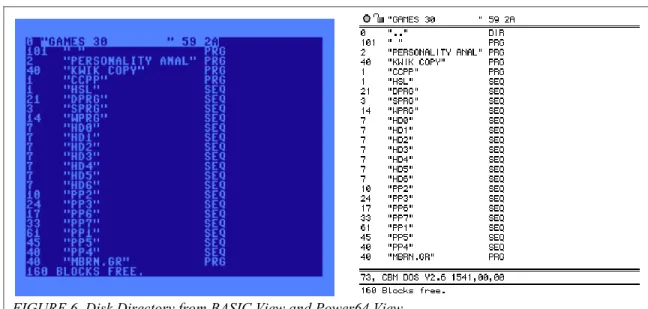
the amount of free space in blocks remaining on the disk. Figure 6 shows the directory
for a disk entitled “Games 30,” as displayed when the disk is accessed via the C64‟s
BASIC interface and when an electronic version of the disk, i.e. a disk image, is accessed
directly with the Power64 emulator:
FIGURE 6. Disk Directory from BASIC View and Power64 View
An important omission from the metadata contained in a directory entry and the
directory header (bytes 0, 1 and 2) is the time of file creation. This information would be
valuable to an archivist attempting to preserve the authenticity and context of a digital
object, but because Commodore chose not to include it (due most likely to concerns of
characteristic of the data. Additionally, the relatively small size of SD 5¼” floppies (176
kB) presents further limitations in gathering valuable information associated with files
into one place. In most cases commercial programs came with a hardcopy manual for
users to understand the various functions and options available for running the program.
In many cases these manuals may not be presented with an accession of disks, so that the
responsibility of tracking down the supplementary information necessary to fully access
files on a disk rests with the archivist. In cases when file names in a directory bear no
relation to the software used to create and access them, and when the disk name is obtuse,
it may be an intensive process just to identify the original software. In section 3.3 I
discuss some of the registries, databases, forums and other resources that can aid in
tracking down supporting programs and manuals.
3.2 Characterization of Files
According to the VIC-1541 manual (1981), “to the disk drive all files are created
equal” (p.19). All C64 files are written the same way using the BASIC programming
language. The difference in file types is more or less a formality to signal to the operating
system how to handle the contents of a file. The primary difference among the file types
listed below is that the PRG files, which usually represent top level applications and
application subroutines, may be bootable whereas the others are always handled like flat
files and read by the OS during the course of other routines.33 PRG files also make up the
vast majority of files found on a floppy disk as demonstrated in Figure 13 in the results
section.
PRG Files - Program files. They can be either bootable top-level programs or
SEQ Files - Sequential files. Linear files that are read from beginning to end.
REL Files - Relative files. “Internal files” (not readily viewable from BASIC
command line).
USR Files - User files. Customizable file types intended for DOS expansion.
DEL Files - Undocumented file type for internal use commonly used to customize
the look of a disk directory.
SCR Files - Scratch files (not readily viewable from BASIC command line).
Interesting from a forensic perspective since SCR files are basically labeled slack
spaces, i.e. blocks of space that are available to be overwritten but that have
lingering data allocated within them from a previous deleted file.
* Files - File types preceded by an asterisk denote files that were not properly
closed upon their creation. These files are known as poison files and are common
causes of data corruption since they crosslink blocks in the BAM and cause file
collisions.
3.3 Cultural Context & Resources
Among the identified sources of tools potentially available to digital curators
outlined in the Digital Lives report, the ancestral computer community is by far the least
discussed (John et al., 2010). Perhaps this is due in part to the fact that, barring a few
instances of computer history museums and retro-computing exhibitions, not much
overlap has occurred between the cultural heritage community and the ancestral
computing community thus far. Another reason might be that many communities of
enthusiasts that shared knowledge of ancestral systems at one time have become inactive
which would be difficult to collate without considerable research. In many cases online
communities can be understood as temporary information grounds (Fisher, Durrance, &
Hinton, 2004),and suffer from the same issues of dispersal of content and obsolescence
of context that plague PDA curation in general.
Archivist will want to consider how to preserve the contributions of groups like
computer enthusiasts, who have tackled relevant problems in the past that are only now
confronting archives. Another potential role for digital curators and archivists may be that
of network anthropologists, i.e. researchers who trace the communication and exchanges
of technology-focused communities across time and work to preserve and interpret their
output for present and future uses. It should be a goal of archivists to engage members of
these specialist communities to weigh in on considerations for digital capture, appraisal
and access.
The number of storage media types that have proliferated from the onset of the
personal computing revolution into the last decade is staggering. A short list of fading
and forgotten media that can be potentially encountered in PDAs includes but is not
limited to: Audio MiniDisc; Jaz cartridges; VHS tapes; Advanced Intelligence Tapes;
Iomega‟s Click! drive; ID-1 Digital Tape; SyJet cartridges; compact cassettes;
SmartMediaCards; 3.5” diskettes; BetaMax tapes; CompactFlashCards; and of course
5¼” floppy disks. 34In an ideal world capturing the authentic data contained on these
media is a matter of setting up the right workflows and policies within standardized
forensics applications and storage technologies; even so, being able to access the media
will present considerable challenges to anyone without knowledge of the original systems
without insight into the operations of their original use environments. As mentioned
previously, individuals “forget how to drive,”old systems and an operating system
merely a decade old can appear alien to users accustomed to modern day interfaces
(Woods & Brown, 2010).
The C64 has a devoted following in Germany, Britain and the United States and
stands apart from most other retro systems in terms of the level of community
engagement and enthusiast networking that still goes on today. There are a huge number
of online resources for finding information about Commodore systems, tracking down
games, downloading utilities, sharing new custom programs and files, and pursuing other
related interests. It‟s important to note that new applications and devices are still being
developed for the C64 by its hardcore devotees. In addition new products are being
introduced that reimagine and derive aspects of the C64 in modern computing contexts or
entirely separate cultural domains.35 For more information about resources available to
Commodore neophytes and elites alike see Appendix B for a list of useful sites.
4. METHOD
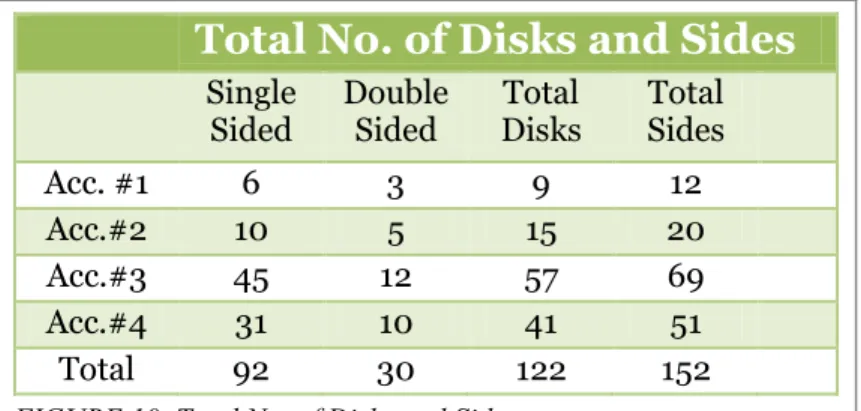
This section recounts the process used for recovering data from 122 floppy disks
that were attained from four separate sources. I present the results of the recovery process
which yielded electronic versions of the original floppy disks in the form of D64 disk
image files. Finally, I introduce a triage system for classifying the contents of D64 disk
images to inform digital preservation practices, and will test this classification schema
using a Kappa statistic for measuring intercoder agreement between two research
4.1 Recovery Process
In recent years many advances have been made in the development of hardware
and software aimed at solving the problems of access, transmission and recovery of data
at high risk of loss. These efforts fall under the larger banner of digital preservation, and,
while a large portion of those engaged in recovery practices fall into the camp of
computer enthusiasts and hobbyists, new technological offerings in the world of data
recovery and preservation are increasingly being tailored to the contexts of archives and
cultural heritage communities (Elford, Pozo, Mihajlovic, Pearson, Clifton, & Web,
2008).36 The purpose of this project has always been to approach a collection of digital
artifacts from the perspective of a small collecting institution, a situation that would
require ad hoc solutions to access and preservation challenges and that would not rely so
much on building an exhaustive infrastructure for ingest, preservation and long-term
access. Nonetheless the implications of my study could be applied to any archives, small
or otherwise, that do not have an explicit system in place for recovering data that falls
into the domain of digital archaeology. For instance, in 2009 John Blythe examined the
workflow for processing digital media at the University of North Carolina‟s Southern
Historical Collection and found that certain media storage types fell outside of the SHC
staff‟s ability to access them. Blythe describes how issues surrounding access to 5¼” disk
contributed to the uncertain state of SHC policies for accessioning and processing future
collections of floppy disks and similar media types:
capture from such a disk type. Nevertheless, the experiment revived earlier discussions within the SHC about whether the archive should limit the types of digital media that it collects. (p.34-35)
Out of necessity I could not approach these challenges from the prospective of a
seasoned specialist, computer scientist or technology enthusiast. Instead I needed to start
at the bottom and to search out a case scenario and set of solutions that would be feasible
for a digital preservation novice, and to draw out the aspects of that scenario that spoke
strongly to larger concerns of archival theory and practices.
Fine tuning the scope of the case study informed the requirements for a technical
method of transmitting and capturing legacy data on a modern computing platform. Many
of the options for data capture designed for C64 floppies, some of which are listed in
Appendix B, use software that was developed for Microsoft Windows and that requires
some hardware customization of the 1541 drive. I decided to use the ZoomFloppy device
because it required no specialized installation of an I/O port, as its firmware takes
advantage of the native serial connection on the C64, and because it was a newer
mechanism that had benefitted from the knowledge developed while testing earlier
iterations of similar intermediary devices. Lastly, the C64 emulation software I found to
be the most user-friendly, at least in terms of installation and basic navigation, was the
Mac-based Power64 emulator. Therefore, I tried to consolidate as much of the data
recovery process and subsequent data analysis as possible to the Mac interface. Later, I
will discuss how making use of some of the specialized software created by Commodore
enthusiasts required that I also use Windows as a means to manipulate D64 disk images
4.1.1 Acquiring hardware and software
I began with the goal of working in some capacity with the Commodore 64 and
data on 5¼” floppies. The initial stage of preparation involved gathering the actual legacy
hardware and software from a variety of sources. I had already obtained two C64‟s, a
VIC-1541 drive, joystick controllers and a small set of floppies at a yardsale the year
prior to entering the Master‟s Program at UNC. The gear had been sequestered in my
closet ever since and had never been tested to see if it would awaken from its slumber. In
a way this is the dilemma of any one, either hobbyist or professional, who sets out to do
something they have either never attempted before or have not tried in some time. In the
setting of the archives or museum one may have hardware available that could potentially
access software and various data stored on legacy formats, but the question remains of
whether that equipment will even function today, and more importantly, whether one is
capable of getting it to work or remembering how to operate it.37
Parallel to the uncertainty surrounding the state of available legacy hardware, the
prospect of acquiring sets of random 5¼” floppy disks provides dual concerns in terms of
the media‟s integrity and provenance. Testing floppies (and other media generally)
requires knowing how the disks were originally formatted, i.e., knowing what machine(s)
and system(s) the disks initially ran on and with which they are compatible. Even if the
disks have survived over the years with a significant amount of data intact, there is still
no guarantee that one will be able read the data, unless one makes special arrangements
to acquire multiple drive devices that can read versatile formats or a single drive that is
format agnostic. Looking at a lot of nameless floppy disks for auction on eBay I was left
whether they were actually written on a CBM machine, or "a CP/M machine, like a
Kaypro. Or (they) could be from a Microbee, which almost every public school had in the
80s" (Lavo, 2010). It is also possible for the disks to be completely blank or in such bad
disrepair that they are completely unreadable. Østerby (2009) cites numerous sources that
estimate the outside lifespan for floppy disk media is roughly 15 years, which means that
disks created in the twilight years of the Commodore market have already surpassed their
drop-dead date (Levy, 1998; Rothenberg, 1999).
Fearing that, after jumping headlong into a data recovery project, I had already
misstepped by putting off proper testing of the hardware at hand, I preemptively bought
another C64, 1541 drive, and bonus NEC character display monitor from someone I had
contacted on the Raleigh/Durham/Chapel Hill chapter of Craigslist. I was warned when I
bought the gear that “everything turns on, but the monitor doesn‟t seem to work; maybe
it‟s a broken video chip in the C64?” The full extent of testing that this system had
received before I acquired it was a basic power check, which is often the case for
hardware bought remotely via eBay. I bought all three pieces for $30. As extra incentive I
asked if there were any floppies left over the owner would be willing to part with and
received a set of 41disks, the contents of which the owner explained, “got him through
high school,” presumably in the mid 1980s. In the end buying this backup system proved
to be completely unnecessary, but on the upside the disks that came with the setup turned
out to be, from an archival perspective, the most interesting collection of files that came
into my possession.
At the start of this project my entire inventory of equipment amounted to three
Neutronics Drive);38 one NEC Character Display Monitor; one ZoomFloppy device; and
122 random floppy disks from four separate „accessions.‟
4.1.2 Testing hardware
Before connecting the 1541 to my MacBook via the ZoomFloppy, I needed to test
whether the drives even worked. If I had installed the supporting software for interfacing
with the 1541 first and the drives were inoperable then there would be no way to tell
whether the problem was due to the bad drive or a bad installation. I needed to logically
discern the best order of operations for testing and connecting all of the components of
the „recovery station.‟ It turned out that there were dependencies between the linked
hardware and that each device relied on another device being functional in order to be
tested. The chain involved first testing the monitor, then testing the C64 computer, and
finally testing the most important component, the 1541 drive.
Testing the NEC monitor presented an issue. As the seller predicted, no picture
came up on the display once everything was turned on. Anticipating that something could
be wrong with the C64 from the Raleigh setup I decide to test the original „yardsale‟ C64
with the Raleigh (Alps) 1541 drive. The Raleigh unit came with an adapter that converts
the Commodore A/V 15 DIN output to an early form of S-Video by separating out the
chroma signal from the luminosity signal. The reason that the monitor was not picking up
any signal was because the adaptor arrangement was not complete. After searching the
forums I discovered that another connector, commonly found at Radio Shack, was needed
to recombine the video signal into a single composite output that could then be connected
to most monitors.39 I did not have the composite connector on hand, so I decided to go a