Aubrey A. Klein. Digital Curation for Audiovisual Materials: Two Case Studies of Non-Academic Repositories. A Master’s Paper for the M.S. in L.S degree. May, 2018. 49 pages. Advisor: Helen Tibbo
Few studies have examined the digital curation practices of audiovisual materials from the perspective of the digital object lifecycle. With a plethora of existing video content and more being produced at a steady rate, it is important that repositories have a plan for the long-term digital preservation of their video assets. Of particular interest is
audiovisual preservation outside of academic repositories. In this case study, the digital curation strategies of two non-academic repositories handling digital video assets were analyzed in relation to the digital object lifecycle. Findings from these cases provide insight into real-world practice and suggest that digital preservation planning in these environments requires more attention.
Headings:
DIGITAL CURATION FOR AUDIOVISUAL MATERIALS: TWO CASE STUDIES OF NON-ACADEMIC REPOSITORIES
by
Aubrey A. Klein
A Master’s paper submitted to the faculty of the School of Information and Library Science of the University of North Carolina at Chapel Hill
in partial fulfillment of the requirements for the degree of Master of Science in
Library Science.
Chapel Hill, North Carolina May 2018
Approved by
Introduction
In today’s world, digital video is an educational tool, entertainment format and
vehicle for distributing important news and information about current events. In 2015 alone, there were 422 scripted TV series on television in the U.S., 705 full-length motion pictures released in the U.S. and Canada, and over 400 hours of video uploaded to YouTube every minute (Statista, 2018). Much of the world’s contemporary culture and heritage has been captured on video. Across the country there are tape libraries holding shelves of programming that document life, provide entertainment and educate the public on current events. There are billions of hours of video content in existence, but without proper care and maintenance we could be left with nothing to show for it. Digital curation and digital preservation are the solution to saving the world’s digital video content from
being lost forever.
environments requires more attention. I will be analyzing two video repositories’ workflows from a digital curation perspective. I aim to answer these questions:
1. How well do the demonstrated life cycles of video assets at non-academic repositories compare to the Digital Curation Lifecycle Model (DCLM)? 2. What unique challenges do audiovisual assets pose to data curation and maintenance practices?
3. How are smaller institutions with limited resources planning and executing digital preservation activities for their assets?
Digital Curation and Preservation
While our society is skilled at creating large volumes of digital materials, most content creators have no plans for preserving content after its initial use. The fields of digital curation and digital preservation aim to provide the tools and knowledge needed to ensure that our digital heritage remains viable and accessible decades from now. One of the ways in which digital preservation is more complicated than traditional preservation is the machine-dependency of digital materials. The Digital Preservation Coalition (DPC) Handbook explains that digital preservation is an always emerging challenge because: “Information can only be accessed and functions can only be executed through a
(Pennock, 2007). This lifecycle was conceptualized and formalized and as the Digital Curation Lifecycle Model (DCLC) in 2008 by Sarah Higgins of the Digital Curation Centre.
The Lifecycle Model for Digital Objects
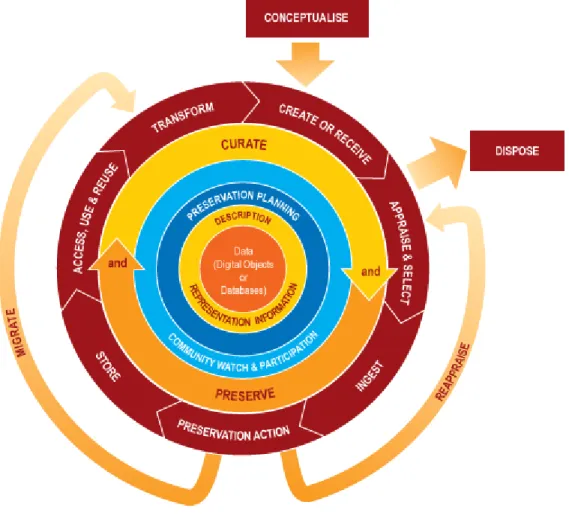
The DCLC visualizes the preservation of data in the long view, taking into account all stages of a digital document’s lifecycle, not just when it’s in use, as well as incorporating layers of actions and stakeholders. This effectively offers a graphical high-level overview of the lifecycle stages required for successful curation (Higgins, 2008). The following details are also drawn from Higgins.
Overall, the DCLM has three main action areas: full lifecycle actions, sequential actions and occasional actions. The model is centered around the data that is to be curated, represented by the central circle. All actions are built around and depend on the digital objects. Forming concentric rings around the digital objects are the full lifecycle actions. They are represented as rings because they can (and do) take place at any time during the lifecycle of the digital object.
These actions are:
• Description and Representation Information—Assigning metadata to ensure
adequate description and collecting representation information to ensure proper rendering of digital material
• Preservation Planning—Making plans to manage and administrate actions
throughout the lifecycle
• Community Watch and Participation—Awareness of and participation in digital
curation community activities
• Curate and Preserve—Undertaking management and administration actions to
promote curation and preservation throughout the curation lifecycle
The outer ring of the model represents the sequential actions that are performed on a digital object. They present a roadmap for important curation steps. A digital object enters the sequential actions cycle with its conceptualization, and is followed by these actions:
• Create or Receive—Creation or receipt of data including administrative,
• Appraise and Select—Evaluation and selection of data for long-term curation and
preservation.
• Ingest—Transfer of data to an archive, repository, data center or other custodian. • Preservation Action—Undertake actions to ensure long-term preservation and
retention of the authoritative nature of data
• Store—Store the data in a secure manner adhering to relevant standards.
• Access, Use and Reuse—Ensure that data is accessible to both designated users
and reusers, on a day-to-day basis.
• Transform—Create new data from the original.
The arrows surrounding the central circle represent occasional actions that should be done as needed. These are:
• Dispose—Disposal of data, which has not been selected for long-term curation
and preservation.
• Reappraise—Return data which fails validation procedures for further appraisal
and re-selection.
• Migrate—Migrate data to a different format. This may be done to accord with the
storage environment or to ensure the data's immunity from hardware or software obsolescence.
This model this provides a useful framework for understanding digital object management from a document lifecycle perspective.
Digital video is considered a complex digital object, made by combining other digital objects like sound and images (Higgins, 2008). These complex digital objects are made up of many layers of information that must be preserved together in order to maintain the integrity of the original object. Adding to the complexity of digital video preservation is the variety of source formats of audiovisual materials. Though most audiovisual assets produced today are born-digital, the bulk of audiovisual material is at present analogue and requires digitization for preservation and for access (Wright, 2004). Archivists and those concerned with digital preservation have to contend with a vast amount of digitized and born-digital assets on a scale that is simply not seen in other environments.
In the early 1990s, the Library of Congress recognized that American television and video heritage was at risk and commissioned a special report which was published in 1997. Some of the findings were that network news divisions have the greatest
preservation difficulty due to the sheer amount of content they produce and that while public television has recorded rich cultural history, financial uncertainty has left preservation a low priority. The report also notes that the works of video artists and of independent video producers also face a precarious existence because few productions have found their way into traditional archives. The report culminated in a national plan of action focusing on preservation, access, funding, and public awareness.
forums for developing new standards. The Association of Moving Image Archivists (AMIA) has written numerous guides and publications on the preservation of all types of audiovisual materials including film, tape and discs. Many of these guidelines form the backbone of technical practice in audiovisual preservation.
However, file formats and standards are only one part of the story. It is also important for the preservation community to understand how these standards and practices are applied in real collections and the outcomes of their implementation. Several studies have looked at video preservation projects of discrete collections,
primarily of academic repositories and public broadcasters, many of whom have become leaders in developing video preservation workflows. Carter (2005) follows the
digitization of the Kentucky Educational Television (KET) archives. At the time of this project, there were few standards, studies, or best practices relevant to digitizing local television, so the KET project was undertaken as a pilot project with the goal of learning about and contributing to digitization practices. The main components of this project were taking inventory, choosing format standards, creating standards to maintain the physical tape library, enhancement with metadata, and making DVD backups of materials. The project revealed more questions than answers, specifically the
unpreparedness of television stations to take on large-scale digitization projects and a mismatch in expectations, culture and understanding of the current states of archives between broadcasters and archivists.
a partnership between WNET-TV in New York, WGBH-TV in Boston, PBS and New York University that sought “to build a model preservation repository for digital video files and to examine the broader issues related to operating such a repository” (p.393).
The main activities of this project addressed many aspects of the digital object lifecycle, including determining metadata needs, addressing the problem of a standardized video file wrapper, content selection and appraisal, and program rights management. The project successfully influenced public television to take preservation seriously, but recognized that building commitment to preservation programs remained a challenge. Lewis and Hubbs (2016) document a video preservation project at American University Library including the planning process, taking a detailed inventory of tapes to understand which tapes needed to be prioritized, and then setting up a timeline for completion. Other steps include identification of high-risk materials, hardware/software specifications, metadata procedures and file storage. Their report covers most of the sequential actions of the DCLM, with an emphasis on appraisal and selection, ingestion and preservation actions.
There are fewer large-scale studies that examine the preservation efforts and challenges faced by non-academic video repositories. One of these major studies is the “Digital Dilemma” (2007) conducted by the Academy of Motion Picture Arts and
Sciences, which brought the industry up to speed concerning the threat to long term access to digital films. They found that, coupled with the explosion of digital data being created, “the marked acceleration in the use of digital systems was not being
organizations, where does this leave smaller video production outlets with a need to preserve their assets for the long term? These repositories will have fewer financial and staff resources but the need to preserve digital media still exists.
A follow-up report from the Academy, the “Digital Dilemma 2” (2012)
investigated the longevity of digital motion picture materials and other valuable digital data from the perspective of independent filmmakers, documentarians and non-profit audiovisual archives. The survey found that “At nonprofit audiovisual archives, the
decision to start digitizing analog materials, as well as the digitizing itself, quite often precedes the establishment of a digital preservation program” (p. 5). Of the 21 archives
surveyed, only three have implemented some level of digital preservation or curation policies. Twelve respondents reported they are working on creating policies, but face impediments related to funding, technical infrastructure and trained staff (p. 55). In addition to a dearth of financial resources, these smaller repositories also lack active collaborative forums focused on addressing these issues (p. 5).
In a 2011 report from the Smithsonian Institution, Shahmohammadi notes that “The lack of professionally established standards, protocols and proven methods has
resulted in a failure to achieve consensus in the archival community about how to preserve digital video” (p.3). To rectify this problem, she recommends the following
guidelines: establishing an internal risk management document, avoiding unnecessary transcoding and migration, using uncompressed file formats and lossless compression when possible, and developing good preservation metadata. McDonough and Jimenez (2007) also talk generally about the challenges of video preservation and the serious lack of adequate metadata to make managing digital video collections possible, particularly a lack of preservation metadata. The authors also observed a mismatch in formats
considered economically prudent in in commercial broadcasting versus formats that are actually good for preservation.
A related and disturbing phenomenon is that digital asset management literature almost wholly ignores long-term preservation. For example, Wills (2015) documents the multi-year effort of the McDonalds creative services team to launch a
companywide digital asset management system to manage their video production services and b-roll library. Browning (2016), the founder of the C-SPAN Archives, details C-SPAN’s transition from analogue to digital, new video workflows for storing audiovisual material in digital form, and the specific goals this massive project tried to achieve. While he makes some mention of digital preservation, it is usually in tandem with access (as in “preservation and access”) and is light on details as to how digital
educational and professional development organization) and Facredyn, founder of Orange Logic (a DAM solutions provider) documented the project of choosing a DAM system including providing a business case to management and donors, preparation of assets and rollout of the resulting system (2017). These studies document workflows, system architectures, timelines and goal achievement, rather than considering the lifecycle of digital assets. Even though the goal of digital asset management programs and systems is to organize and gain control over digital assets, those responsible for managing them have little to no knowledge of or systems in place to curate them beyond a few years’ time.
Returning to Higgins’ lifecycle model, part of its utility is the ability to map
specific functions against it, and thus to help build a framework of standards and technologies to implement. Based on the existing literature, certain themes emerge that can be connected back to specific actions in the DCLM. What follows is a list of lifecycle actions most often connected to challenges, along with a brief summary of the associated challenge.
• Create or Receive: Lack of adequate metadata, especially that which will provide
important contextual information for reading digital file formats in the future. • Preservation Action: There is still room for developments in technology and
processes that will ensure long-term accessibility and viability of digital video. • Community Watch and Participation: Miscommunications and lack of consensus
Methodology and Study Rationale
This study aims to investigate current digital video curation practices of small/medium sized digital video content production outlets. It is important to
understand what is currently being done in order to improve it or work within current practices—both by information professionals and non-professionals. I have chosen a case study approach for this research because first, digital video repositories are unique depending on the site, so a case study is appropriate for looking at the specifics of each situation. Second, as Wildemuth and Choemprayong (2009) point out: “A case study approach can also be used in descriptive research to depict comprehensively the
phenomenon of interest” (p. 52). Given that few studies examine the digital curation of
audiovisual materials from the perspective of the digital object lifecycle, I plan to answer the following research questions from the perspective of the document lifecycle:
1. How well do the demonstrated lifecycles of video assets at non-academic repositories compare to the DCLM?
2. What unique challenges do audiovisual assets pose to data curation and maintenance practices?
3. How are smaller institutions with limited resources planning and executing digital preservation activities for their assets?
handled (digital video assets) as well as convenience. In the interest of full disclosure, I previously completed an internship at the public television station, and had network connections with the independent contractor and collector.
Data was collected through semi-structured interviews with three key informants who were responsible for managing and maintaining digital assets, as well as direct observation of the work environment, and examination and analysis of the actions and procedures that contribute to the management of digital assets (see Appendix 1 for the interview protocol). After the initial interviews and site visits were completed, the content of the interviews was transcribed and analyzed for actions based on the digital object lifecycle. Email follow-ups were sent to the respondents to clarify some details and figures. The results from the various data collection methods were combined and synthesized to account for each of the steps in the digital object lifecycle model.
Research Findings
For each case, I will begin with an overview of the setting. Then I will walk through the digital object lifecycle based on the DCLM starting with sequential actions, followed by full lifecycle actions and ending with occasional actions. Subheadings within these sections lead the reader through each step in the lifecycle. I will also present some of the unique challenges faced at each site related to the management and storage of digital audiovisual assets.
Public Television Station
Overview. Site number one is a public television network that operates multiple
privacy reasons, the site will hereafter be referred to as “Public Television Station”
(PTS). In addition to the shows that make up PTS’s current programming, the station maintains a tape archive of past programming that is slowly being digitized. PTS uses a digital asset management system called Dalet, which acts as the main technical
workspace and gateway of all digital assets. Respondent 1 is the archival services
manager at the station, responsible for planning and executing the digitization of the tape library. Respondent 2 is the broadcast and IT engineer responsible for managing the IT infrastructure and digital storage solutions at the station
Sequential actions. Conceptualize. The lifecycle of an asset begins with its
conceptualization. At PTS, there are broadly two types of content that require conceptualization and planning: current productions and legacy content. Current productions are those that are currently being produced, shot and aired. Legacy content are shows that were shot, packaged and aired before PTS switched to digital production, so they are being digitized from tape. While it is important to know where the process begins, the particulars of how television shows are developed, recorded and aired is outside the scope of this paper.
Create or Receive. After shooting, editing and post production, the result is a
server. At this point, the following technical metadata is automatically captured as an XML file from programming software at the time of creation:
• Date of creation
• Duration
• Device
• User who initiated the creation
• Format
The other main type of content consists of older programming, which is received by PTS when it is digitized (physical tapes are kept on the premises in a tape library, but they enter the digital object lifecycle when they are received as digitized assets). This process will be described in greater detail during the ingestion step. According to Respondent 1, digitized assets are “old programming, mainly packaged programming in the form that it aired originally, a fully edited finished program” but can also be raw, unedited footage
that never made it to air in the form of a finished product.
Appraise and Select. For current programming, all shows are recorded digitally
PTS is to have the entire tape library digitized and archived, so every tape that currently resides in the library has already been determined to have value.
Even though all the tapes in the video library have been selected for preservation, since the digitization process is time-consuming, decisions must be made about which content gets first priority. There are two main criteria for the shows that get digitized from tape. One, that they are shows originally produced by PTS (rather than produced by other stations or entities). And two, content is prioritized for digitization based on
historic/cultural value and by individual requests. Historic/cultural value is determined on the level of series (as in series run), meaning that an entire series or season of a show will be chosen for digitization and will be worked on until completed.
The exception to this general procedure are individual requests for specific known episodes as Respondent 1 explains: “I get footage requests sometimes from other state agencies, primarily, or I may get a viewer request from a producer who worked for us once upon a time and wants a copy [of a show] …we’ll convert it to an MP4 file…pretty much anybody [should be able] to play that on their computer or put in on a thumb drive” as a universal, high quality format.” Individual episodes or segments may also be
digitized for the purposes of re-airing legacy content for certain historical or important events that happen periodically but not on a strict schedule.
Ingest. Ingestion to the archival repository takes place primarily through
automated APIs that are triggered when files are placed in a certain folder. Physical tapes first have to be transferred from tape to digital and ingested into the digital asset
that inputs the digital transfer into a recording system. This recording system is connected to the Dalet DAM, and the resulting MPEG-2 is then transferred into the digital asset management system.
From here, both current programming and legacy content follow a similar path. After a show is digitally recorded into Dalet or ingested into the DAM after digitization, it must be transferred into a special folder that triggers a set of automated actions that send the digital file to several different places through automated APIs setup by IT administrators. When a product is completed it goes to several places: 1) The file is transcoded and transferred through FTP to Joint Master Control in Syracuse 2) The file is transcoded and uploaded to Amazon cloud storage via an API through Dalet 3) Finally, the file is sent to the DVA Archive (digital storage space) through another API which deletes the high-res video on local storage then puts it on LTO-7 tape for long-term storage.
Preservation Action. The metadata created for shows at PTS is a combination of
PBS standards and the individual station needs and design. PTS does not record preservation metadata pertaining to a standard like PREMIS. If the asset came from a tape, they do retain the tape number that refers to its physical origin and place in the tape library.
Store. For PTS, digital storage is composed of different storage types that ensures
combination of local and external storage that combines server storage and LTO-Tape storage. Storage is organized into tape groups that organize related assets together and thus determine the flow of assets through the various systems. These tape groups are: default, local, show footage (which consists of packages and B-roll), and two groups called EXTERNAL 1 and EXTERNAL 2. The database backs up files onto two local servers every 15 minutes. Once a day, files are backed up to a database on a server outside the building. Offsite storage is also partially handled by the information
management services company Iron Mountain, which picks up the digital assets stored on LTO tape and stores them off site in a different physical location. This ensures that video files can be recovered in the event that the LTO tapes stored onsite at the station were destroyed. Respondent 2 explains that “The rule-of-thumb is every 5-10 years, you upgrade your system, and by doing that you keep pulling the old stuff onto the new.” By “pulling the old stuff onto the new” the Respondent refers to media migration, which will be addressed in the “Occasional Actions” section.
Access, Use and Reuse. High-resolution, finished products are the priority for
long-term storage. However, these files can be accessed and reused for other purposes. Respondent 2 explains: “We’re not storing video for web playback. Though we do use it for that, the source video files have to be broadcast quality format.” Working or
archival shows is so that segments from shows that are currently only stored on tape can be re-aired for special programs or as they relate to current events. As an example of a digital asset getting reused after its original air date, once digitized, these shows or segments of them can be repackaged and reprogrammed on air.
Transform. Full episodes may be re-aired, or sections of episodes that are re-cut
and edited into a new product may be produced. Another way that digital assets are transformed is through transcoding. A broadcast quality file (MPEG-2 format) is always kept and then can be transcoded for use and distribution on different platforms depending on the specifications of that form. Some examples of transformation through transcoding include:
• MP4 proxies that can be stored and viewed locally are generated from
high-quality files.
• A subset of shows/episodes are transcoded to a web-friendly format so they can
be uploaded to YouTube or other social media platforms
• Any requests made by viewers or producers are rendered into an MP4 and
delivered on a flash drive.
Migration is another form of transformation and is its own action in the DCLC. Full Lifecycle Actions. Description and Representation Information.
programming, all metadata must be manually entered. This includes technical metadata such as runtime, an identifier called a NOLA code, and a description element for information about the content of the individual episode. Once archived, searches for content are primarily done by subject keyword searching, so rich descriptions are an important part of the metadata package. The purpose of the show description is
findability for searches that are performed by staff or by outside users who can access the archive records through the PTS website. This description consists of proper nouns such as names, places, events and other topics of the content. This metadata is generated manually by watching the show from beginning to end and noting topics and names as they are discussed or mentioned. Most recently, this work is done by interns, usually college-level students.
As an example of a metadata element common to all shows is the NOLA code, a PBS standard that originated in the early 1990s. The NOLA code is an alphanumeric identifier that consists of an alphabetical representation of the show and then the episode number. The whole PBS archive is based on the NOLA code so it is required by PBS standards. The overall purpose of metadata is to record accurate information (show title, people appearing on the program) about a show so it can be properly organized and retrieved. The longform description is the primary vehicle through which users find shows by subject or content.
Preservation Planning. At PTS, two staff members, including Respondent 2,
work together to plan for preservation by designing the system architecture and policies. Respondent 2 says that: “We generally build from our own experience. At times we have
REDACTED] throws out a problem, we think of a workflow that would solve the problem. After that I will technically design and build the solution.” Preservation activities are a combination of manual and automated features. For example, a watch folder can be set up so that any files transferred to that file can be automatically transferred through FTP to Joint Master Control.
Community Watch and Participation. For the respondents at PTS,
communication and participation in wider conversations are done on a sporadic basis. Respondent 1 communicated with staff at several other public television stations in different regions seeking information about a specific project he wanted to know more about: “When we were exploring the idea of monetizing [the archive] I talked to WGBH, I talked to WNET…just to get an idea how they were approaching it.” PTS as a station
also participated in a grant-funded project with the Corporation for Public Broadcasting. Individually, Respondent 1 said he subscribes to newsletters and updates from the Corporation for Public Broadcasting.
Curate and Preserve. As far as administrative actions are concerned, Respondent
2 said that during the initial launch of the digital archiving system, he and the other employee primarily responsible for the system were meeting every day to design workflows, test them and then adjust them to fit the needs of the station and its
employees. Now, several years after the initial implementation, he says that they typically only meet to discuss preservation-related actions when there are problems or when the systems they use release major new features. Both events happen only sporadically.
Occasional Actions. Dispose. In the current setup, high-quality video assets are
archive system, the high-res copy can be purged from local storage. Disposal mostly applies to working files and files that are temporarily stored for playback. Once a show is finished and archived, there is no need to keep the high-quality version on a local server, or to store duplicates or unfinished programs. For these types of files, there are automated purge actions set up in Dalet to clear file space from local servers. Disposal is setup through triggers and scheduled actions, because according to Respondent 2, “the users are busy enough…we can’t trust them to remember to purge things out.” Scheduling and
automated file deletion also prevents accidental deletion of files.
Reappraise. Reappraisal of digital assets is mostly automated. When assets enter
Unique Challenges. For all content types, PTS’s major challenge is the massive
size of video assets. Though compression technology is getting better, “you just can’t get around it, video files are larger than almost any file” (Respondent 2). Because of the size
and volume of assets that the station is working with daily, there must be rules built into the system that automatically purge old content and high-quality masters (once safely archived) from local servers to keep space open and available for working products. And unlike some other types of electronic records or digital files, video assets cannot be recreated easily. Respondent 2 makes a useful comparison:
It’s gone if it gets destroyed or manipulated…If you have something like an accounting spreadsheet…if you have the people still [there] what you do is you recreate the work and you get it done. With something like this we’re talking about stuff that was shot in the 1950s…when it’s gone, it’s gone. You can’t recreate it. You can’t put the numbers back in and have the information again.
From the physical side, Respondent 1 notes that his biggest challenge is that the older the physical tape is, the more likely there is degradation from age. This influences the digital object lifecycle when those physical tapes are transformed into digital assets, and poses a limitation on quality control during digitization because tapes must be ingested in real time: “Unless you’re sitting there watching the thing front to back while you’re ingesting it, you don’t know for certain whether you’ve gotten decent ingest”
(Respondent 1). Mistakes can be caught when someone watches it back while creating metadata (done by interns). But if there are no interns currently working, he and other staff members do not have time to methodically go through episodes to identify errors.
Independent Collector and Contractor
Overview. The second case is of the work of Respondent 3, an independent film
the internet, sells them as stock footage, and digitizes films such as home movies for clients. It is primarily a one-man operation but is aided by the work of temporary interns, usually college or graduate students.
Sequential Actions. Conceptualize. The assets handled at this site are digitized
from 8mm, 16mm, and 35mm film. The analog films are acquired by the contractor through websites like eBay or rescued from institutions that otherwise destined them for the trash. Films are digitized using transfer machines that capture each frame and render it as a digital file (the mechanics of this process are certainly complicated and interesting, but are outside the scope of this paper). This process results in a QuickTime file, which can be further edited in post-production. This work usually involves editing the beginning and end of the film, and in some cases multiple files are stitched together to form a
complete film. When this work is completed, an MPEG-4 copy of the asset is made which can be accessed and played back quickly, and from which descriptive can be created.
Create or Receive. While this step is typically one in which some metadata is
created at the time of capture, this contractor does not record that information as part of the process. Another part of this step is adhering to documented collecting policies but since this site is not a typical institutional repository that is part of a larger organization, collection happens on an ad-hoc basis and is not codified in any written policies.
Appraise and Select. The contractor does not have a systematic appraisal process.
we get a title, we try to find out who did it, we get a size of the reel and then it goes on a shelf.” At the time of collection, he does check for duplication among the physical reels,
based on if titles are available, but there is no appraisal by other means like subject. There is no real appraisal for the assets once they are digitized. Respondent 3’s stated goal is to rescue everything he can and store it in a controlled environment, in the hopes that the film remains intact. There is no appraisal process for digital video assets because he primarily digitizes on demand for clients, so digitization for preservation is client-led as opposed to driven by factors like level of degradation. Appraisal for quality happens only when the film is pulled from the library and enters the digitization process, but he adds as a caveat, “Things have to be pretty far gone for me to toss them.”
Ingest. After a film is digitized, information about copyright needs to be obtained.
Checking if the film is still under copyright is essential to knowing whether a film has entered the public domain, and thus whether a digital version can be distributed online or sold. Even before digitization, “we’ve gone through and we’ve done some due diligence on titles to see if they exist, to see if the copyright is still valid” (Respondent 3). The “general rule of thumb” is anything published before 1964 potentially has an unrenewed
copyright. For films published after 1964, they can look to see if there is a copyright notice on the material. While transferring the film, they can check if there is a copyright notice within the film, such as in the intro material. If no notice is present, it is “published without notice” and the copyright term will differ depending on the date of publication.
Preservation Action. After post-production and metadata, the video is transcoded
into a high-quality QuickTime ProRes file. This is the master file that will eventually be stored on a hard drive and/or delivered to a client. After assets are transferred to digital, the highest quality masters are transferred to a hard drive as well as delivered to the client. Hard drives are stored on a floor-to-ceiling shelf in the workspace. Spreadsheet software is used to maintain a record of what is on each hard-drive. The contractor is also slowly implementing a backup solution other than hard drives. He currently offers LTO Tape as an option for delivery to clients. However, there is a cost barrier to a more extensive backup solution, and Respondent 3 is currently struggling with the decision to implement a more permanent backup solution. He explains:
There’s a buy in of about $5000, and $5000 would buy a lot of hard drives and won’t require proprietary anything to read those hard drives. Whereas LTO is-you have to have a deck, you have to have software that will read and write to that deck, you have to have a certain connection…so very quickly then that becomes [prohibitive].
Store. The current storage system has some redundancy built into it, as
Respondent 3 explains: “We have hard drives and are making backups of those drives to
be housed elsewhere. We also are uploading the clips to three different stock footage sites for monetizing stock footage sales. Finally, we have Amazon S3 servers that we've been uploading the clips to.” Checksums are made of digital files and can be compared to
determine if there has been data loss or corruption. In the event of data loss, the Respondent says that “We would go to our backup hard drive or look online,” and “At
Access, Use and Reuse. Since this repository is an independent one, the
Respondent himself along with any interns working at the time are the designated users of content. Portions of the assets are made publicly available if being sold as stock footage. Other footage is made available on YouTube and through the Internet Archive, which collectively give access to close to 3000 films from the collection. These platforms serve as portals for users looking for material: “We put everything online at
YouTube/Internet Archive and as clips. YouTube and Internet Archive give access and researchers often find what they want from the entire films” (Respondent 3). Transform. Assets can be transformed in two main ways: through clip-making or migration. Short preview-style clips are derived from full length films and are then uploaded to stock footage sites for purchase. The collection of hard drives is also periodically migrated to larger drives.
Full Lifecycle Actions. Description and Representation Information. For this
collection, descriptive metadata is primarily geared toward findability on stock footage websites for purchase by potential consumers. Before even watching the film, some metadata can be found by searching databases online:
A lot of times I’m filling in metadata not watching the films but just kind of looking for, if it’s a unique enough title, I can pretty much figure out what it is by looking at WorldCat…WorldCat is amazing—it’s wrong a percentage of the time—but it gets me in the ballpark and it helps me if I start fleshing out some of the details. (Respondent 3)
that “come through” from longer works and adds value to all the footage. Other technical
metadata are not recorded, but Respondent 3 says they can access it quickly if needed using CatDV or MediaConch—two programs that are utilized in the digitization workflow and contain more technical information.
Preservation Planning. Preservation planning and subsequent actions are not
documented at this repository. Because of the individual nature of the operation, the respondent generally relies on his experience and established routines to keep the collection preserved. He has not developed any explicit policies for his own collection but says he has done so for clients. His process can be summed up by the admission that, “We are kinda winging it here” (Respondent 3).
Community Watch and Participation. Respondent 3 contributes a considerable
amount of knowledge to the field of film preservation—based on his many years of experience handling and digitizing film, including consulting work—and sharing his practices is the main form of participation. Specific actions and events include attending Association of Moving Image Archivists (AMIA) conferences, presenting workshops, contributing to Q&A discussions, and subscribing to AMIA listservs. As to learning from others, he relies more on his own experience than stated best practices that he encounters in forums and listservs, saying “In practice that sounds great, but honestly you haven’t done it, you’re just spouting out best practices…you haven’t done the actual work to see how impossible what you just suggested is.” Curate and Preserve. Management and
Occasional Actions. Dispose. Like preservation planning, disposal happens on a
sporadic basis and is not codified in specific policies or schedules. For clients, the
contractor retains digital assets for about a month. Disposal of digital files is triggered by irregular occurrences. For example, he will retain assets until storage space on the master hard drive runs out and this will trigger an action to clear older assets from the hard drive. For assets digitized for clients, he recommends that they create multiple copies, but after his work on the assets is done he no longer takes responsibility for preserving the digital files. Other than this, Respondent 3 supposes that “At some point we’ll do some culling.”
Another solution for lack of storage space is just to purchase new hard-drives. For physical assets, he mentions that “Things have to be pretty far gone for me to toss them”
(Respondent 3). Digital assets are occasionally migrated, again based on triggers. Reappraise. Data validation procedures are limited to recording checksums of
digital files, but there is no system or schedule for checking assets. Migrate. This process is one that the contractor is still figuring out, and does not currently happen on any sort of schedule. Rather, there may be periodic or rare events that trigger a refresh, for example if a bigger drive is made for a client, the contractor will take the opportunity to refresh other hard-drives as well.
Unique Challenges. As might be expected, a dearth of financial resources means
criterion for which films are valuable or important, resulting in a somewhat arbitrary decision-making process of which films which will be digitized next. Respondent 2 says: “That’s what I’ve learned. I know how to collect the films. I know how to digitize the films. But the hard part has always been how do I give relevancy to it.” Since at least
clips of all the digital assets end up online, metadata must be partially designed to help clips surface online and be seen, to stand out as one among millions of video clips that exist online. There is an additional layer of difficulty here in that digitizing the film alone does not provide access to it, especially in an ad-hoc operation such outside any sort of larger institution.
Discussion and Implications
The lifecycle of video assets at the PTS meets the actions and recommendations made by the DCLM, meaning that the workflows for digital video engaged in every step of the lifecycle in a substantial way. As a member of a larger organization (PBS)
committed to preservation, and with their focus on redundancy, PTS is especially attentive to data backup and storage. Also, given the proliferation of video file formats and mismatch between broadcasting and preservation formats (McDonough & Jimenez, 2007), the MXF wrapped MPEG-2 used by PTS is recommended as a preservation format by the Library of Congress and is used at the LOC National Audio-Visual Conservation Center (Library of Congress, 2017).
from degradation or obsolescence. This requires knowing the year that the tapes were made as well as the tape format. In their current system, PTS does not have a detailed inventory list or record of when tapes were made, so they cannot perform a
comprehensive risk assessment like those detailed in other projects. This is especially prescient because of the discrepancy in number of tapes to be digitized and resources required to do so that most certainly means the tape library at PTS will take decades to digitize at the current rate. If digitization continues at the current rate many of the materials held now could be degraded by the time PTS gets around to digitizing them. One could go into the tape library and see what the tape formats are but that is time-consuming and would have to be repeated each time someone sought that information. This speaks to the problem of lack of contextual metadata for video preservation projects, and appears to be a problem at PTS as well. Given that their goal is to have everything digitized, a better prioritization process could potentially save more materials.
The lifecycle of video assets at Site 2 (Independent Collector and Contractor) only partially met the DCLM. Some recommendations for video preservation are followed at this site. The QuickTime ProRes file format is acceptable as a preservation format and additionally has wide adoption professional moving image production (Library of
Congress, 2017). Per Wright (2004) the contractor does make compressed versions of all videos for Web access, which is not the primary preservation format but does result in another copy of the asset. Other steps in the lifecycle were not attended to at all,
Of major concern is a lack of documentation and scheduled preservation actions. As the sole person working with the collection full time, Respondent 3 knows his process and rarely has to communicate it with anyone else. But without the processes being documented or codified in any substantial way, even the lite preservation actions could not be continued when he inevitably stops working on the collection. Lack of
systemization of any kind introduces the possibility for error and lapses in necessary preservation actions. Though Respondent 3 remarked that many best practices were “impossible” for him, they wouldn’t be for larger facilities. A lack of resources may make it difficult to adhere to standards, but it doesn’t make the best practices wrong or
impractical. Considering the trend of the developing “lite” best practices, this case provides some insight into how open question of how “lite” these practices can go and
still be meaningful and effective. As it stands now, the operation is not trustworthy based on its comparison to the DCLM.
Lack of contextual metadata for digital assets is a common problem that requires improvement at both sites (Shahmohammadi, 2011; McDonough & Jimenez, 2007). Though respondents at PTS were confident that assets would be retrievable many years from now, that doesn’t necessarily mean they can be read, especially decades from now when the machines used for tape playback are obsolete and certain file formats may be obsolete. Proper contextual metadata and representation information will ensure that even if new file format standards come along, the high-quality digital masters that were created will still be readable and accessible in a century’s time. For the independent contractor,
a project, it is not the end of the life of that digital asset, and neither the contractor nor the clients have insured that the assets are well-described enough to be viewable in decades-time.
Another major problem common to many digital preservation projects (Carter, 2005; Shahmohammadi, 2011; McDonough & Jimenez, 2007) is a lack of consensus among archivists as well as between archivists and broadcasters. This finding was also true of the cases in this study. Though PTS benefitted from institutional support and systems, none of the people working on digital preservation are trained archivists or librarians. The contractor is also not a trained archivist or librarian. While these people have hands-on experience and a knowledge base from working with video material in different capacities, there is still a gap between what archivists recommend for digital curation and what these non-archivists working with the material feel is best and know how to do. There are a lot of materials being curated in repositories that have no direct link with digital preservation experts. These two groups need to bridge the cultural gaps between one another so that digital preservation is integrated into video production workflows, rather than trying to save things before it’s too late. This is especially
important since there the work of independent artists and producers rarely make their way into traditional archives. Collaboration is also essential to the continual establishment of standards, protocols and proven methods for video preservation, which by definition require the effort and expertise of many.
surveyed rated “Importance of content” highest in their reasons for digitizing for access, followed by “user request.” Regarding motivations for digitizing for preservation, “Importance of content” also ranked the highest, followed by reasons related to
obsolescence. These are the same reasons cited by Respondent 1 at the television station. Respondent 3—the independent contractor—also digitized for user requests, as well as to preserve material from analog formats.
However, there is one major contradiction to these results, reflected in the philosophy of the independent contractor. He says, “I’m all about going from one thing that nobody has access to and trying to give access to it,” which reflects the goal of
digitizing for access. However, he complicates the notion of “importance.” He illustrates this with the example a silent film he digitized showing John Deere tractors driving up and down fields. He did not think that this film would be popular, but says over time users added metadata to it, shared it, and it has since garnered many views online and sold extremely well on stock footage sites. He explains: “I gave access to it...Someone found it and they elevated it...now it suddenly has value.” He even goes so far as to point out that it didn’t really matter whether the metadata was correct or not because it got more eyes on the film. He views the determining of a film’s value as not solely up to him,
rather he releases the film and makes it so the wider public can decide how valuable it is to them:
Honestly you don’t know what’s going to sell. My current strategy is find out whatever is in public domain...digitize it, put it in as many places as I can, for sale or for people to watch and then just see what happens. And what has happened is money has been coming in, but also attention has been coming in for the
The respondent’s understanding of appraisal is very different from an archivist’s
definition of appraisal, and is truly mostly arbitrary. According to the Society of
American Archivist Glossary, “Appraisal is the process of determining whether records
and other materials have permanent (archival) value. Appraisal may be done at the
collection, creator, series, file, or item level. Appraisal can take place prior to donation and prior to physical transfer, at or after accessioning (“Appraisal,” 2017).” This
definition of appraisal presupposes that one will not be able to keep everything, but the repositories studied were essentially doing just that, albeit primarily materials they were
producing.
While there was appraisal for quality—both repositories stored only the highest
quality digital assets—there was little appraisal beyond that, for example by subject
matter. I think this can be partially attributed to the nature of the collections, which are
less attached to institutional collecting goals or collection policies, but rather originate
with the production process. PTS is not actively building a collection from outside
sources, they are archiving the materials of their own production, of which there is an
active pipeline. For the contractor, collecting is not done in order to fulfill institutional
actions. While it may be true that “permanent archival value” is subjective, these two
groups need to develop better appraisal criteria that prioritize preservation of at-risk materials and provide access to valuable content for users.
In the digital object lifecycle, preservation planning is an important step in defining and codifying plans for management and administration of all curation lifecycle actions. Though both sites had redundancy plans (though they differed in robustness based on resource availability) neither had specific policies or plans for when they eventually run out of storage space beyond “buy more space.” While the physical space
requirements of digital assets allow many files to be stored in a compact physical space, and one more hard drive can easily be bought when disk space runs out, this seems to have made it easier to ere on the side of keeping assets and dispose of little to no content. However, there still exists the problem of cost. Though one may be able to buy another hard drive, they must be maintained and a digital asset archive will presumably reach a point when storage and necessary migration to avoid obsolescence becomes prohibitively expensive. What then? It appears that this is still a pressing issue in the digital
preservation field and is not being reckoned with at these two sites. This is a significant barrier for archives and collections that would like to engage in digital preservation activities.
According to “Digital Dilemma 2,” an absence of comprehensive digital preservation policy is not uncommon. The majority of cases in that study did not have policies in place, though they were actively working on them. Impediments cited
included lack of funding, lack of technical infrastructure, lack of trained staff and lack of
impediments listed above, reflects another finding of the report, that archives that are part of a larger institution, generally have more internal financial support than smaller, stand-alone archives (Academy, 2012). This is reflected in PTS’s ability to take advantage of PBS’s digital infrastructure, by sending their digital assets to Joint Master Control. By contrast, the independent contractor’s storage consists mainly of a collection of hard
drives, which is easier and more manageable for a one-person operation. The two cases displayed a range of automation within the digital asset management process, and many activities within the lifecycle are a combination of automation and manual work. For example, in both cases, descriptive metadata was created by humans and inputted manually using internal metadata schemas. This is reflective of other audiovisual archives (Academy, 2012). On the other hand, disposal of old or unneeded content at PTS is largely carried out through an automated scheduling system. There may be many different reasons for this, but at PTS two major factors could be identified. The amount of automation is partially determined by available technology. PTS’s DAM system allows for many automations to be set up and controlled through this
central system, while the setup of the Independent Contractor is less centrally controlled and therefore less automated. At PTS, Respondent 2 noted that the technology allowed him to automate things a lot more, but there is a balance that must be struck with the primary users of the system, and their level of comfortability with automated procedures. A more in-depth analysis of this phenomenon could determine where tradeoffs exist for time, data accuracy, and digital preservation goals among steps in the lifecycle.
in every step of the life-cycle but not always in order or in the same order. Something that is not reflected in the model is that the reality of digital curation and digital preservation as a practice involves other processes and artifacts outside of the self-contained digital object lifecycle. The detailed knowledge one can gain from breaking the lifecycle of a digital asset down into its component parts implies that case studies like these may be used to see where an institution’s digital curation strategy is succeeding and where there
is need for improvement. Researchers and practitioners may consider using a similar approach in the future.
Conclusion
The purpose of this study was to gain insight into the digital curation practices of non-academic repositories handling digital A/V materials. More specifically, this study was framed by three main questions:
1. How well do the demonstrated life cycles of video assets at non-academic repositories compare to the DCLM?
2. What unique challenges do audiovisual assets pose to data curation and maintenance practices?
3. How are smaller institutions with limited resources planning and executing digital preservation activities for their assets?
Two case-study explorations of a public television station and an independent
and how the actions captured in the model translate into real-world actions and
procedures. While PTS’s video assets generally fit the actions of the DCLM, additional appraisal criteria and comprehensive inventory could help prioritize the digitization of videotapes most at-risk from age-related degradation. The independent contractor’s video assets skipped some important steps in the lifecycle, namely enhancing assets with metadata beyond descriptive information and documenting preservation and administrative actions.
Both sites lacked robust appraisal criteria, making it difficult to determine what materials should be targeted for digital preservation. Neither site recorded preservation related metadata or representation information that would ensure file formats can be read by machines in the not-so-distant future. While many challenges faced by non-academic A/V repositories are like those faced by other archives (lack of funding, finite time), others are specific to A/V repositories. The large size of video formats as well as
irreplaceable content makes storage space and redundancy two of the biggest challenges of storing A/V materials. Additionally, quality control, if not automated, poses a large challenge, since quality cannot be determined at a glance and often can only be done in real-time playback.
repository has no direct contact with an archival expert, other forums for learning best practices and standards from professionals should be formed. The respondents in these cases reported limited sharing activities, and even viewed “best practice”
References
Academy of Motion Picture Arts and Sciences (2007). The Digital Dilemma. Los Angeles, CA: Academy of Motion Picture Arts and Sciences. Academy of Motion Picture Arts and Sciences (2012). The Digital Dilemma 2.
Los Angeles, CA: Academy of Motion Picture Arts and Sciences.
Box Office Mojo. (n.d.). Number of movies released in the United States and Canada from 2001 to 2017. In Statista - The Statistics Portal. Retrieved April 27, 2018, from https://www-statista-com.libproxy.lib.unc.edu/statistics/187122/movie-releases-in-north-america-since-2001/.
Browning, R.X. (2014) ‘The C-SPAN Video Archives: a case study,’
Journal of the Society of American Archivists, Vol. 77, No. 2, pp. 425–443. Carter, L. R. (2005). Digitizing the KET Archives: A Brief Case Study. VRA Bulletin, 31,
(3), 50-55.
Digital Preservation Coalition. (2015). Digital Preservation Handbook, 2nd Edition. Retrieved from: http://handbook.dpconline.org/
Television and Video Preservation. Retrieved from
https://www.loc.gov/programs/static/national-film-preservation-board/documents/tvstudy.pdf
Library of Congress. (2017). Sustainability of Digital Formats: Planning for Library of Congress Collections. Retrieved from
https://www.loc.gov/preservation/digital/formats/fdd/fdd000013.shtml
Lyons, B. (2010). Digital Asset Management and Audiovisual Preservation: Will We Be Glad We Did This in Ten Years? Midwest Archives Conference Newsletter. McDonough, J., & Jimenez, M. (2007). Video preservation and digital reformatting: Pain
and possibility. Journal of Archival Organization, 4(1-2), 167-191.
Pennock, M. (2007). Digital Curation: A life-cycle approach to managing and preserving usable digital information. Library & Archives, January.
Radding, E., & Facredyn, K. (2017). Creating a trove of digital assets at Facing History and Ourselves. Journal of Digital Media Management, 5(4), 336-351. Shahmohammadi, A. (2011). Born-Digital Video Preservation: A Final Report.
Washington, DC: Smithsonian Institution Archives.
Singh, R. (2009). Digital preservation of mass media artifacts: Technologies and challenges. Journal of Digital Asset Management, 5(4), 185–195.
doi:10.1057/dam.2009.12
Variety. (n.d.). Number of original scripted TV series in the United States from 2009 to 2017. In Statista - The Statistics Portal. Retrieved May 3, 2018, from
Wills, A. (2014). Case study: Transitioning to a digital video workflow. Journal of Digital Media Management, 3(3), 202-206.
Wright, R. (2004). Digital preservation of audio, video and film. Vine, 34(2), 71-76. YouTube, & Tubefilter. (n.d.). Hours of video uploaded to YouTube every minute as of
Interview Guide
SECTION 1. Opening questions and general inquiry
• Walk me through a typical day of work for you. • What types of digital assets do you handle daily?
Based on the answers to the following questions, may choose to focus on top 3 goals/uses.
• What is the primary use of the digital objects you handle? • What is the ultimate goal of preserving these materials?
• Who is responsible for dictating the path of the digital objects?
SECTION 2. Questions relating to the DCC Curation Lifecycle Model
SEQUENTIAL ACTIONS
Conceptualise
Conceive and plan the creation of data, including capture method and storage options.
For primary type of content handled:
• Who is responsible for the creation of data? • What medium is it captured on?
• How is that medium stored for immediate use? Where does it go after its immediate use and purpose are fulfilled?
Create or Receive
Create data including administrative, descriptive, structural and technical metadata. Preservation metadata may also be added at the time of creation.
Receive data, in accordance with documented collecting policies, from data creators, other archives, repositories or data centres, and if required assign appropriate metadata.
• When you're creating metadata, what purpose do you have in mind? • Who might use that metadata?
Appraise and Select
Evaluate data and select for long-term curation and preservation. Adhere to documented guidance, policies or legal requirements.
• How do you decide what to keep?
• What is the next step for materials you plan to keep in the long term?
Transfer data to an archive, repository, data centre or other custodian. Adhere to documented guidance, policies or legal requirements.
• Once you decide that you want to preserve an asset, where does it go?
• What policies do you have that pertain to data storage?
Preservation Action
Undertake actions to ensure long-term preservation and retention of the authoritative nature of data. Preservation actions should ensure that data remains authentic, reliable and usable while maintaining its integrity. Actions include data cleaning, validation, assigning preservation metadata, assigning representation information and ensuring acceptable data structures or file formats.
• How do you insure the long-term integrity of the video assets?
• What specific actions do you take to ensure the long-term integrity of the video assets?
• How confident are you about what the state of your collection will be in 5, 10, 50 years?
Store
Store the data in a secure manner adhering to relevant standards.
• Where is the data stored?
• On site? Offsite? Cloud storage?
• Do you use a combination of storage solutions?
• How does the nature of video content affect the storage solution used?
Access, Use and Reuse
Ensure that data is accessible to both designated users and reusers, on a day-to-day basis. This may be in the form of publicly available published information. Robust access controls and authentication procedures may be applicable.
• Who can access the assets after they have been stored?
• Are the assets publicly available?
Transform
Create new data from the original, for example: by migration into a different format, or
by creating a subset, by selection or query, to create newly derived results, perhaps for publication.
• Is the data ever migrated or transformed?
FULL LIFECYCLE ACTIONS
Description and Representation Information
Assign administrative, descriptive, technical, structural and preservation metadata, using appropriate standards, to ensure adequate description and control over the long-term. Collect and assign
• What sorts of metadata do you use for your collection?
Preservation Planning
Plan for preservation throughout the curation lifecycle of digital material. This would include plans for management and administration of all curation lifecycle actions.
• Who is responsible for planning the archival process?
• Who are the stakeholders in preservation planning?
Community Watch and Participation
Maintain a watch on appropriate community activities, and participate in the development of shared standards, tools and suitable software.
• Can you give any examples of ways you share your practices with the wider community?
• How do you learn about new tools and techniques for archiving?
Curate and Preserve
Be aware of, and undertake management and administrative actions planned to promote curation and preservation throughout the curation lifecycle.
OCCASIONAL ACTIONS
Dispose
Dispose of data, which has not been selected for long-term curation and preservation in accordance with documented policies, guidance or legal requirements.
Typically data may be transferred to another archive, repository, data centre or other custodian. In some instances, data is destroyed. The data's nature may, for legal reasons, necessitate secure destruction.
• Is data ever destroyed?
• If so, how is this decided and how is it disposed of?
Reappraise
Return data which fails validation procedures for further appraisal and re-selection. Migrate
Migrate data to a different format. This may be done to accord with the storage environment or to ensure the data's immunity from hardware or software obsolescence.
SECTION 3: Follow-up questions (to be determined based on content gathered from the previous sections)
Questions will be limited to materials and organizational procedures and will not be about people or individuals.
Sample follow-up questions:
• Could you tell me more about the process of appraisal for your digitized video material?
• You mentioned that you use cloud storage for your materials. Could you elaborate on that?