fe
a
tur
e
An
Introduction
to Model
Checking
Model checking has proven to be a successful technology to verify
requirements and design for a variety of systems, particularly in
hardware systems and real-time embedded and safety-critical systems.
Here’s how it works.
efore you even start writing code on a project, you face the chronic problem of software development: flawed design requirements. Flawed requirements breed bugs that you have to get rid of later, often at much cost to the project and the bottom line, so it makes sense to find the flaws upfront. In the last decade or so, the computer science research community has made tremendous progress in developing tools and tech-niques for verifying requirements and design. The most successful approach that’s emerged is called model checking. When combined with strict use of a formal modeling language, you can automate your verifica-tion process fairly well. In this article, I’ll introduce you to model checking and show you how it works.
Colossal task
It’s common to write design requirements heavily in English, interlaced with suitable tables, diagrams, screen shots, and UML descriptions, such as use cases and diagrams (for instance, sequence, class, and state transition diagrams).
B
When we check design require-ments, we’re basically seeking the answers to a series of questions. Here are the general questions you’ll ask when checking your requirements:
•
Do they accurately reflect the users’ requirements? Does everything you’ve stated match what the users want and have you included every-thing the users have requested?•
Are the requirements clearly writtenand unambiguous? Understandable?
•
Are they flexible and realizable for the engineers? For instance, are the requirements suitably modular and well structured to aid in design and development?•
Can the requirements be used to eas-ily define acceptance test cases to check the conformance of the imple-mentation against the requirements?•
Are the requirements written in an abstract and high-level manner, away from design, implementation, tech-nology platforms and so on, so as to give enough freedom to the designer and developers to implement them efficiently?Finding the answers to these ques-tions is a tall order and there’s no easy
way to do it, but if your requirements can jump successfully through these hoops, you’ve got a good foundation for a sound system.
Despite some help from modeling tools such as UML, the problem of ensuring the quality of requirements remains. The process is heavily manu-al and time consuming, involving reviews and sometimes partial proto-typing. Using multiple notations (such as those in UML) introduces addition-al problems:
•
which notation to use for what requirements•
how to ensure that the descriptions in different notations are consistent with each otherThe cost of errors in requirements are often high, requiring at least rework and maintenance. If you implement the incorrect require-ments as they are, it may lead to incor-rect system behavior in the field and high costs, such as loss of life and property, particularly in real-time, embedded safety-critical systems. Similar problems exist in ensuring the quality of system design.
One way to improve the quality of
your requirements and design is to use automated tools to check the quality of various aspects of the requirements and design. But what tools? Building tools to check requirements or design written in English is clearly extremely difficult. It’s necessary to enforce a clear, rigorous, and unambiguous for-mal language for stating the require-ments. If the language for writing requirements and design has well-defined semantics, it may be feasible to develop tools to analyze the state-ments written in that language. This basic idea using a rigorous language for writing requirements or design is now acknowledged as a foundation for system verification.
Model checking
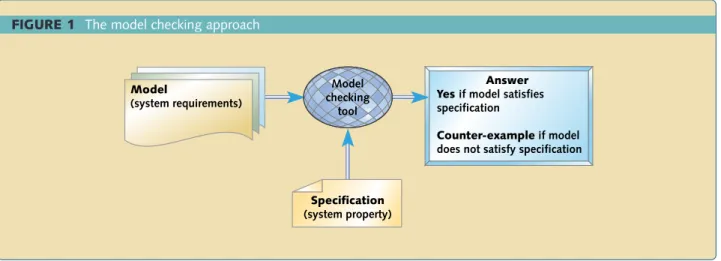
Model checking is the most successful approach that’s emerged for verifying requirements. The essential idea behind model checking is shown in Figure 1. A model-checking tool accepts system requirements or design (called models) and a property (called specifi-cation) that the final system is expect-ed to satisfy. The tool then outputs yes if the given model satisfies given spec-ifications and generates a counterex-ample otherwise. The counterexcounterex-ample
INSERT NAME ONLY
FIGURE 1 The model checking approach
Answer Yes if model satisfies specification
Counter-example if model does not satisfy specification
Model
(system requirements)
Specification
(system property) Model checking
details why the model doesn’t satisfy the specification. By studying the counterexample, you can pinpoint the source of the error in the model, cor-rect the model, and try again. The idea is that by ensuring that the model satisfies enough system properties, we increase our confidence in the cor-rectness of the model. The system requirements are called models because they represent requirements or design.
So what formal language works for defining models? There’s no single answer, since requirements (or design) for systems in different appli-cation domains vary greatly. For instance, requirements of a banking system and an aerospace system differ in size, structure, complexity, nature of system data, and operations per-formed. In contrast, most real-time embedded or safety-critical systems are control-oriented rather than data-ori-ented—meaning that dynamic behav-ior is much more important than busi-ness logic (the structure of and opera-tions on the internal data maintained by the system). Such control-oriented systems occur in a wide variety of
tive, biomedical instrumentation, industrial automation and process control, railways, nuclear power plants, and so forth. Even communica-tion and security protocols in digital hardware systems can be thought of as control oriented.
For control-oriented systems, finite state machines (FSM) are widely accept-ed as a good, clean, and abstract nota-tion for defining requirements and design. But of course, a “pure” FSM is not adequate for modeling complex real-life industrial systems. We also need to:
•
be able to modularize the require-ments to view them at different levels of detail•
have a way to combine requirements (or design) of components•
be able to state variables and facilities to update them in order to use them in guards on transitions.In short, we need extended finite state machines (EFSM). Most model check-ing tools have their own rigorous for-mal language for defining models, but most of them are some variant of the
A simple system model
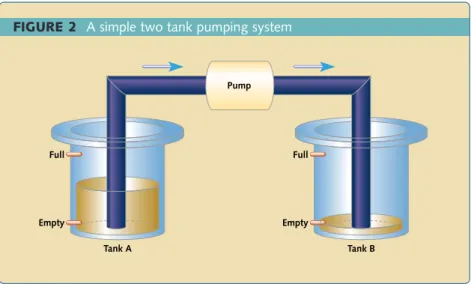
Let’s look at how you can use model checking to verify properties of a sim-ple embedded system. We’ll use the symbolic model verifier (SMV) model-checking tool from Carnegie-Mellon University for this purpose. Of course, you can also write this model in most other model-checking tools. See the sidebar near the end of this article for a list of model-checking tools and where to find them.Consider a simple pumping con-trol system that transfers water from a source tank A into another sink tank B using a pump P, as shown in Figure 2. Each tank has two level-meters: one to detect whether its level is empty and the other to detect whether its level is full. The tank level is ok if it’s neither empty nor full; in other words, if it’s above the empty mark but below the full mark.
Initially, both tanks are empty. The pump is to be switched on as soon as the water level in tank A reaches ok (from empty), provided that tank B is not full. The pump remains on as long as tank A is not empty and as long as tank B is not full. The pump is to be switched off as soon as either tank A becomes empty or tank B becomes full. The system should not attempt to switch the pump off (on) if it’s already off (on). While this example may appear trivial, it easily extends to a controller for a complex network of pumps and pipes to control multiple source and sink tanks, such as those in water treatment facilities or chemical production plants.
The model of this system in SMV is as follows and is shown in Listing 1. The first VARsection declares that the system has three state variables. Variables
level_aand level_brecord the cur-rent level of the upper and lower tank respectively; at each “instant” these vari-ables take a value, which can be either
empty, ok, or full. Variable pump
records whether the pump is onor off. A system state is defined by a tuple of values for each of these three
vari-model checking
FIGURE 2 A simple two tank pumping system
Full
Empty
Full
Empty Pump
Tank A Tank B
level_b=ok, pump=off)and (level_a= empty, level_b=full, pump=on)are pos-sible system states. The INITsection, near the end, defines initial values for the variables (here, initially the pump is assumed to be off but the other two variables can have any value).
The ASSIGNsection defines how the system changes from one state to another. Each nextstatement defines how the value of a particular variable changes. All these assignment state-ments are assumed to work in parallel; the nextstate is defined as the net result of executing all the assignment statements in this section. The lower
tank can go from empty to the empty or ok state; from ok to either empty or full or remain ok if the pump is on; from ok to either ok or full if the pump is off; from full can’t change state if the pump is off; from full to ok or full if the pump is on. Similar changes are defined for the upper tank.
Internally, most model-checking tools flatten (or unfold) an input model into a transition system called Kripke structure. Unfolding involves removing hierarchies in the EFSM, removing parallel compositions, and removing guards and actions on
LISTING 1 An SMV model description and requirements list
MODULE main VAR
level_a : {empty, ok, full}; -- lower tank level_b : {empty, ok, full}; -- upper tank pump : {on, off};
ASSIGN
next(level_a) := case
level_a = empty : {empty, ok};
level_a = ok & pump = off : {ok, full}; level_a = ok & pump = on : {ok, empty, full}; level_a = full & pump = off : full;
level_a = full & pump = on : {ok, full}; 1 : {ok, empty, full};
esac;
next(level_b) := case
level_b = empty & pump = off : empty; level_b = empty & pump = on : {empty, ok}; level_b = ok & pump = off : {ok, empty}; level_b = ok & pump = on : {ok, empty, full}; level_b = full & pump = off : {ok, full}; level_b = full & pump = on : {ok, full}; 1 : {ok, empty, full};
esac;
next(pump) := case
pump = off & (level_a = ok | level_a = full) & (level_b = empty | level_b = ok) : on;
pump = on & (level_a = empty | level_b = full) : off; 1 : pump; -- keep pump status as it is
esac; INIT
(pump = off) SPEC
-- pump if always off if ground tank is empty or up tank is full -- AG AF (pump = off -> (level_a = empty | level_b = full))
transitions. Each state in the Kripke structure is essentially a tuple con-taining one value for each state vari-able. A transition in Kripke
struc-ture denotes change in the value of one or more state variables. A given property is actually checked against the Kripke structure obtained by
unfolding the given model. However, for the purposes of under-standing what a property statement means, a Kripke structure is further unfolded into an infinite tree where each path in the tree indicates a pos-sible execution or behavior of the system.
model checking
Each state in the Kripke structure is essentially a tuple containing
one value for each state variable.
TABLE 1 Some temporal connectives in CTL
EXφ true in current state if formula φis true in at least one of the next states
EFφ true in current state if there exists some state in some path beginning in current state which satisfies the formula φ EGφ true in current state if there exists some state in every path beginning in current state which satisfies the formula φ AXφ true in current state if formula φis true in every one of the next states
AFφ true in current state if there exists some state in every path beginning in current state which satisfies the formula φ AGφ true in current state if every state in every path beginning in current state satisfies the formula φ
FIGURE 3 Initial part of the execution tree for the pump controller system
<empty, empty, off>
<empty, empty, off>
<empty, empty, off>
<ok, empty, on>
<empty, empty, off>
<empty, ok, off>
<empty, empty, on>
<ok, ok, on>
<full, ok, on>
••• ••• ••• ••• ••• ••• •••
<ok, empty, on>
FIGURE 4 Intuition for CTL formulae which are satisfied at state s0
••• ••• ••• •••
S0
g
(a) EF g
••• ••• ••• •••
S0
g g
g g
g
g g
g
(b) AF g
••• ••• ••• •••
S0
g
(c) EG g
••• ••• ••• •••
S0
g
g g g
Paths and specs
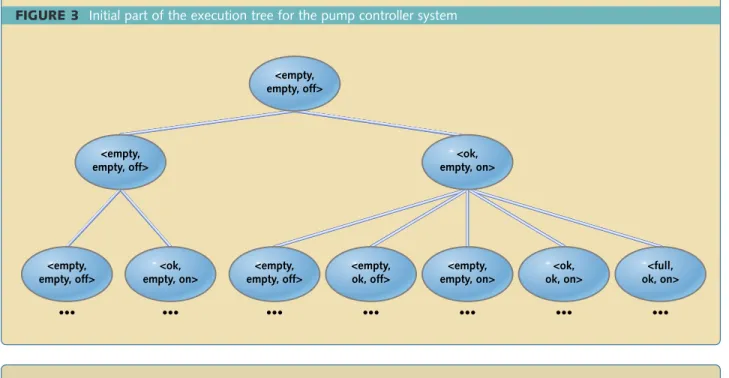
Initially, the system could be in any of the nine states where there are no restrictions on the water level in A or B but the pump is assumed to be off. Let’s denote a state by an ordered tuple <A,B,P> where A and B denote the current water level in tank A and B, and P denotes the current pump status. To illustrate, let’s assume the initial state to be <empty,empty,off>. Then as per the system model, the next state from this state could be any of the <empty,empty,off>, <ok,empty, on>. From <ok,empty,on> the next state could be either of <ok,empty, on>, <ok,ok,on>, <full,empty,on>, <full,ok,on>, <empty,empty,off>, or <empty,ok,off>. For each of these states, we could calculate the next pos-sible states.
The states can be arranged in the form of an infinite execution (or compu-tation) tree, where the root is labeled with our chosen initial state and the children of any state denote the next possible states as shown in Figure 3. A system execution is a path in this execu-tion tree. In general, the system has infinitely many such execution paths. The aim of model checking is to exam-ine whether or not the execution tree satisfies a user-given property specifi-cation.
The question now is how do we specify properties of paths (and states in the paths) of an execution tree? Computation tree logic (CTL)—technical-ly a branching time temporal logic—is a simple and intuitive notation suit-able for this purpose. CTL is an exten-sion of the usual Boolean proposition-al logic (which includes the logicproposition-al connectives such as and, or, not, implies) where additional temporal connectives are available.
Table 1 and Figure 4 illustrate the intuitive meaning of some of the basic temporal connectives in CTL.
Basically, E (for some path) and A (for all paths) are path quantifiers for paths beginning from a state. F (for some state) and G (for all states) are state quantifiers for states in a path.
Given a property and a (possibly infinite) computation tree T corre-sponding to the system model, a model-checking algorithm essentially examines T to check if T satisfies the property. For example, consider a property AF g where g is a proposi-tional formula not involving any CTL connectives. Figure 4b shows an exam-ple of a computation tree T. The prop-erty AF g is true for this T if it’s true at the root state s0—in other words, if there’s some state in every path in T starting at s0such that the formula g is true in that state. If g is true at s0then we’re done, since s0 occurs in every path starting at s0. But suppose g is not true in s0. Then since every path from s0goes either to the left child or to the right child of s0, the property is true at s0 if it’s (recursively checked to be) true at both children of s0in T.
Figure 4b shows that g is true at the root of the left subtree (indicated by the filled circle). Hence all paths from s0to left child and further down in the left subtree satisfy the property. Now suppose g is not true at the right child of s0; hence the property is recursively checked for all its children. Figure 4b shows that g is true at all children of the right child of s0(indicated by filled circles) and hence the property is true for the right subtree of s0. Thus the property is true for all subtrees of s0 and hence it’s also true at s0.
where the property is guaranteed to be true.1, 2Some good model checkers have been used to verify properties of state spaces of size as large as 1,040 states.
In SMV, a property to be verified is given by the user in the SPECsection. The logical connectives not, or, and, implies (if-then) are represented by !,
|, &, and ->respectively. The CTL tem-poral connectives are AF, AG, EF, EG, and so on. The property AF (pump = on) states that for every path begin-ning at the initial state, there’s a state in that path at which the pump is on. This property is clearly false in the ini-tial state since there’s a path from the initial state in which the pump always remains off (for example, if tank A for-ever remains empty). If this property is
specified in the SPECsection, SMV gen-erates the following counterexample for the property. The loop indicates an infinite sequence of states (in other words, a path) beginning at the initial state such that tank B is full in every state of the path and hence pump is off.
-- specification AF pump = on is false
-- as demonstrated by the following execution sequence -- loop starts here
state 1.1: level_a = full level_b = full pump = off
state 1.2:
The dual property AF (pump = off) states that for every path beginning at the initial state, there’s a state in that path at which the pump is off. This property is trivially true at the initial state, since in the initial state itself (which is included in all paths) pump = offis true.
You can specify interesting and complex properties by combining temporal and logical connectives. The property AG ((pump = off) -> AF (pump = on)) states that it’s always the case that if pump is off then it eventu-ally becomes on. This property is clear-ly false in the initial state. The proper-ty AG AF (pump = off -> (level_a = empty | level_b = full)) states that pump is always off if ground tank is empty or the upper tank is full. The property AG (EF (level_b = ok | level_b = full)) states that it’s always possible to reach a state when the upper tank is ok or full.
model checking
Model checking tools
PUBLIC DOMAINThe following are some (but not all) prominent public domain model-checking tools, many of which are freely available for noncom-mercial use and can be used comnoncom-mercially by paying a license fee (check the web sites for detailed conditions).
MODELING CHECKING TOOL MODELING SPECIFICATION
SMV
www.cs.cmu.edu/~modelcheck/smv.html Network of automata that CTL
www-cad.eecs.berkeley.edu/~kenmcmil/smv communicate using shared variables SPIN
http://netlib.bell-labs.com/netlib/spin/whatispin.html PROMELA communicating automata PLTL KRONOS
www-verimag.imag.fr/TEMPORISE/kronos Timed automata Timed CTL
UPPAAL Timed automata CTL
www.docs.uu.se/docs/rtmv/uppaal
HYTECH
www-cad.eecs.berkeley.edu/~tah/HyTech Linear hybrid automata Control instruction set Design/CPN
www.daimi.au.dk/designCPN Coloured Petri Nets CTL
COMMERCIAL
Some (again, certainly not all) commercial model checking tools are:
Motorola VeriState-SM www.motorola.com/eda/products/veristate/veristate-bro.pdf
I-Logix Statemate MAGNUM www.ilogix.com/products/magnum/add_ons_modelcheckercertifier.cfm
Model checking in practice
Model checking has proven to be a tremendously successful technology to verify requirements and design for a variety of systems, particularly in hard-ware systems and real-time embedded and safety-critical systems. For exam-ple, the SPIN model-checker was used to verify the multi-threaded plan exe-cution module in NASA’s DEEP SPACE 1 mission and discovered five previously unknown concurrency errors.3However, there are some major issues to deal with when using model checking in practice. For example:
•
Every model-checking tool comes with its own modeling language that provides no way to automati-cally translate informal require-ment descriptions into this lan-guage. This translation is necessari-ly manual and hence it’s difficult to check whether the model correctly represents your system. In fact, there may be parts of your require-ments that may be difficult or even impossible to model in the given modeling notation.•
Similar problems exist for the tool-specific property tool-specification nota-tion, which is often a variant of CTL, CTL*, or propositional linear tempo-ral logic (PLTL). Some properties to be verified may be difficult or even impossible to express in the notation.•
The number of states in your model may be extremely large. Although model-checking algorithms include ingenious ways to reduce this state space, the model checker may still take too long to verify a given proper-ty or “give up” during this task. In such cases the user has to put in more work, such as verifying parts of the model separately or reducing the state space by reducing domains of variables.Nevertheless, model checking is likely to prove an invaluable way to ver-ify system requirements or design. It often leads to early detection of the shortcomings in the requirements or design, thereby leading to large savings in later rework. esp
Girish Keshav Palshikar is a scientist at the Tata Research Development and Design Centre (TRDDC) in Pune, India. His research interests are in theoretical computer science and artificial intelli-gence, and he has published several arti-cles in international journals and at conferences. You can reach him at [email protected].
ACKNOWLEDGEMENTS.
I would like to thank Prof. Mathai Joseph, Executive Director, Tata Research Development and Design Centre (TRDDC) for his unmitigated support. I sincerely appreciate the deep encour-agement given by Dr. Manasee Palshikar.
--Girish Palshikar
References
1. Clarke, Edmund M., Orna Grumberg, and Doron A. Peled. Model Checking, Cambridge, MA: MIT Press, 1999. 2. Berard, Beatrice, Michel Bidoit, Alain
Finkel, Francois Laroussinie, Antoine Petit, Laure Petrucci, Philippe Schnoebelen, and Pierre Mckenzie.
Systems and Software Verification: Model-Checking Techniques and Tools, Berlin-Heidelberg: Springer Verlag, 2001.
3. Havelund, Klaus, Mike Lowry, and John Penix. “Formal Analysis of a Space-Craft Controller using SPIN,”
IEEE Transactions on Software Engineering, vol. 27, no. 8, Aug. 2001, pp. 749-765.
Further reading
Harel, David, and Michal Politi.
Modeling Reactive Systems with Statecharts—The Statemate