A white paper issued by: Siemens. © Siemens AG 2012. All rights reserved.
Summary
Controlled planning processes are a fundamental factor in efficient
plant engineering. During these processes, it must be possible to
define and check rules for certain plant components or planning
activities. The Knowledge Base in the COMOS FEED software
solu-tion provides useful rules for creating process flow diagrams and also
allows the simple definition of company-specific conditions. The
checking can be triggered easily by the responsible design engineer
in COMOS. Deviations are then displayed in different warning levels
that can be recognized at a glance and highlighted in color on the
individual process flow diagrams.
White Paper
Simple creation and checking of rules for process
flow diagrams
Contents
Simple creation and checking of rules for process flow diagrams...3
Avoiding errors in good time...3
Simple creation and checking of rules ...3
Different warning levels ...3
Conclusion: A controlled planning process increases the efficiency of plant engineering ...6
A white paper issued by: Siemens. © Siemens AG 2012. All rights reserved.
Avoiding errors in good time
Up to 80 percent of the total costs of an industrial plant project are already defined at a very early stage in the planning. The decisions in this concept phase, known as the front-end-engineering- and design-phase (FEED design-phase), have a decisive influence on the subsequent detailed planning and are crucial for the performance, cost efficiency and practical suitability of a plant or a component. Efficient plant engineering is therefore only possible when the planning process is controlled from the very beginning. This means, for example, that errors occurring in the design of the process flow diagram in the FEED phase are detected early to avoid subsequent costs for correc-tions or even damage to plants or injury to persons. A tool is required with which rules for process planning can be defined simply and checked regularly.
Simple creation and checking of rules
With the Knowledge Base in COMOS FEED, the design engineer can choose from a selection of rules for creating a process flow diagram. This allows, for example, the design temperature for pipe parts to be decided in advance. It is possible to define which of the three warning levels possible in COMOS appears if there is a deviation from the technical limits. When planning the process, the design engineer then has the opportunity to check whether the operating temperatures specified for the individual pipe parts correspond to the design temperatures and the extent
to which they are critical. This check can be started in COMOS simply by double-clicking and can be used either for the entire process or for subsections of it. Apart from the standard rules available in COMOS, other company-specific rules can also be created with the Knowledge Base. This, for example, gives admin-istrators the opportunity of creating rules that can be used to check whether all the plant components in the Navigator are positioned accordingly in the process flow diagram. The design engineer then receives a warning if components have been left out.
Different warning levels
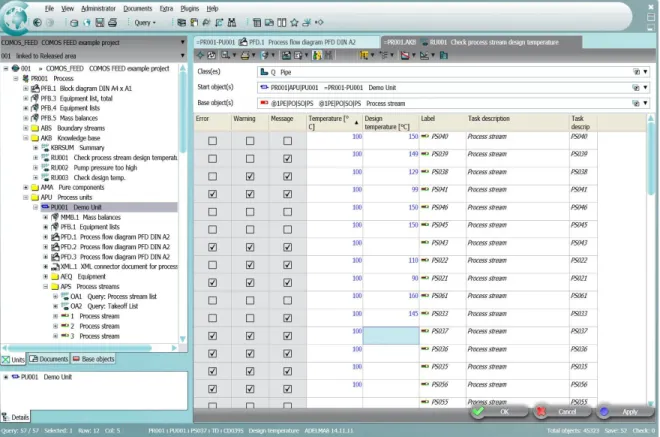
The data check in COMOS is based on object query technology. Technical values of the individual plant objects located on the process flow diagram are queried and compared with the limits defined by the administrator. The result is shown in an evaluation table. Here, a check mark makes it easy to recognize the degree to which the rule has been violated (see also Figure 1). As a standard, COMOS offers three default warning levels: error, warning and message. This, for example, makes directly visible the degree to which the planned operating temperatures for the pipe parts deviate from the design temperatures. The design engineer can see at a glance which parts of the process design need to be adapted. To make this easier, the engineer can navigate directly from the evaluation table to the properties of the individ-ual objects.
Figure 1: Object query evaluation with three default warning levels.
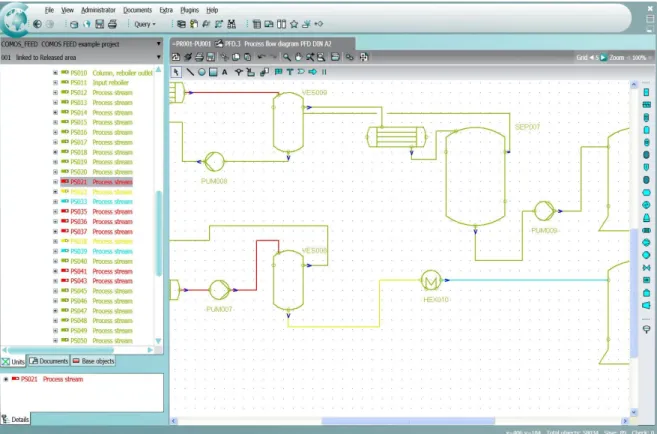
After checking the rules, the individual plant objects are highlighted in color in the COMOS Navigator and in the process flow diagram according to their status. Objects that do not deviate from any rule are shown in green, errors in red. Warnings appear yellow and messages are light blue (see also Figure 2). Where
necessary, the administrator can adapt the individual colors quickly and simply. Any corrections necessary in the design of the process can therefore be recog-nized immediately on the PFD, and the design engi-neer can react flexibly and quickly to any possible errors.
A white paper issued by: Siemens. © Siemens AG 2012. All rights reserved.
With the Knowledge Base in COMOS, the planning process is controlled from beginning to end. Errors in the process design are recognized easily and in good time. On the one hand, this reduces the time required by the design engineer, who is no longer faced with the laborious task of manually checking the process flow diagram for errors. On the other hand, the use of the Knowledge Base during the early planning phase reduces the risk of error and guarantees high quality of the plant data. Time-consuming corrections in the later engineering phases can be omitted, considerably reducing the time and costs involved in the engineering.
Conclusion: A controlled planning process increases
the efficiency of plant engineering
A white paper issued by: Siemens. © Siemens AG 2012. All rights reserved.
www.siemens.com/comos
All rights reserved. All trademarks used are owned by Siemens or their respective owners.
© Siemens AG 2012