Alcatel-Lucent Application Partner Program
Inter-Working Report
Partner: QuesCom
Application type: GSM & T.38 Fax Gateway
Application name: QuesCom Gateway
The product and version listed have been tested with the Alcatel-Lucent Communication Server and the version specified hereinafter. The tests concern only the inter-working between the Application Partner product and the Alcatel-Lucent Communication platforms. The inter-working report is valid until the Application Partner issues a new version of such product (incorporating new features or functionality), or until Alcatel-Lucent issues a new version of such Alcatel-Lucent product (incorporating new features or functionality), whichever first occurs.
ALCATEL-LUCENT MAKES NO REPRESENTATIONS, WARRANTIES OR CONDITIONS WITH RESPECT TO THE APPLICATION PARTNER PRODUCT. WITHOUT LIMITING THE GENERALITY OF THE FOREGOING, ALCATEL-LUCENT HEREBY EXPRESSLY DISCLAIMS ANY AND ALL REPRESENTATIONS, WARRANTIES OR CONDITIONS OF ANY NATURE WHATSOEVER AS TO THE APPLICATION PARTNER PRODUCT INCLUDING WITHOUT LIMITATION THE IMPLIED WARRANTIES OF MERCHANTABILITY, NON INFRINGEMENT OR FITNESS FOR A PARTICULAR PURPOSE AND ALCATEL-LUCENT FURTHER SHALL HAVE NO LIABILITY TO APPLICATION PARTNER OR ANY OTHER PARTY ARISING FROM OR RELATED IN ANY MANNER TO THIS CERTIFICATE.
Tests identification
Date of the tests
18 and 19 March 2008
Alcatel-Lucent’s representative
Pierre VILLET
Yves Dupont
Partner’s representative
Scott STEPHEN
Alcatel-Lucent Communication
Platform (OmniPCX
4400/Enterprise, OmniTouch,
OmniPCX Office, ...)
OmniPCX Enterprise
Alcatel-Lucent compatibility release R8.0 (G1.302.8)
Partner’s application version
IAD0.500B042P000
Environment (if it has a sense)
Author(s): Scott STEPHENReviewer(s): Pierre VILLET, Yves DUPONT Historic
Edition 1: creation of the document - 03-20-2008
Edition 2: update of the document - 04-14-2008 (integrate comments by Pierre and Yves)
Test results
Passed Refused Postponed
Passed with restrictions
Refer to the section 4 for a summary of the test results.
Company Contact Information
(Information provided by the partner)Contact name: Scott STEPHEN
Title: Product Engineer
Address 1: Les Espaces de Sophia – Bât. C
Address 2: 80 route des Lucioles – BP 327
City: Sophia Antipolis
Zip: 06906
Country: FRANCE
Country code: 33
Phone: +33.4.97.23.48.54
Fax: +33.4.97.23.48.49
Web address: http:// www.quescom.com
TABLE OF CONTENTS
1 INTRODUCTION... 6 2 APPLICATION INFORMATION... 7 3 TESTS ENVIRONMENT... 8 3.1 GENERAL... 8 3.2 NUMBER INVENTORY... 8 3.3 HARDWARE... 9 3.4 CONFIGURATION... 9 3.4.1 QuesCom Gateway ... 9 3.4.2 OXE... 94 SUMMARY OF TEST RESULTS... 10
4.1 SUMMARY OF MAIN FUNCTIONS SUPPORTED... 10
4.2 SUMMARY OF PROBLEMS... 10 4.3 SUMMARY OF LIMITATIONS... 10 5 TEST SCENARIOS... 11 5.1 TEST PROCEDURE... 11 5.2 RESULT TEMPLATE... 11 6 TESTING... 12 6.1 SIP ... 12 6.1.1 Outgoing Call ... 12 6.1.2 Incoming Call ... 13 6.1.3 Surveillance / recovery ... 14 6.1.4 Call Transfer... 16 6.1.5 Call Diversion... 17 6.1.6 Call on Hold... 17
6.1.7 Call Park and Pick Up... 18
6.1.8 Conference... 18
6.1.9 DTMF ... 19
6.1.10 Overflow when no GSM channel available on the gateway ... 19
6.1.11 T.38 Fax... 20 6.2 H.323 ... 21 6.2.1 Outgoing Call ... 21 6.2.2 Incoming Call ... 22 6.2.3 Surveillance / recovery ... 23 6.2.4 T.38 Fax... 25
7 APPENDIX A : APPLICATION DESCRIPTION... 26
7.1 SERVICES... 26
7.2 SIP ... 26
7.3 H.323 ... 27
7.4 USER... 28
7.5 QWADMIN... 29
8 APPENDIX B: ALCATEL-LUCENT COMMUNICATION PLATFORM: CONFIGURATION REQUIREMENTS ... 30
10 APPENDIX D: AAPP PROGRAM, DOCUMENTATION AND TECHNICAL ASSISTANCE39 11 APPENDIX E: ALCATEL-LUCENT ESCALATION PROCESS IN CASE OF PROBLEM WITH A CERTIFIED EXTERNAL APPLICATION (REFERENCED IN THE AAPP) ... 43
1 Introduction
The goal of these tests is to qualify an external application as an Alcatel-Lucent Application Partner Program solution for the Alcatel-Lucent Communication Platform.
The scope of the tests is the interoperability of the application with the Alcatel-Lucent Communication Platform. It covers a basic or complex inter-working to ensure that services requested by the application and provided by the Communication Platform (and/or conversely) are properly completed.
These tests do not verify the functional achievement of the application as well as they do not cover load capacity checks, race conditions and generally speaking any real customer's site conditions. The QuesCom Gateway will be tested for GSM call routing and T.38 fax transmission. The tests will be carried out over SIP and H.323 trunks.
2 Application information
Application type: GSM & T.38 Fax Gateway
Application commercial name: QuesCom Gateway
Application version: IAD0.50B042P000
Interface type: SIP and H.323
Interface version (if relevant):
Brief application description:
The QuesCom Gateway is an IP, GSM and T.38 Fax gateway, employed to expand the functionalities of traditional as well as IP telephone systems.
3 Tests environment
3.1 General
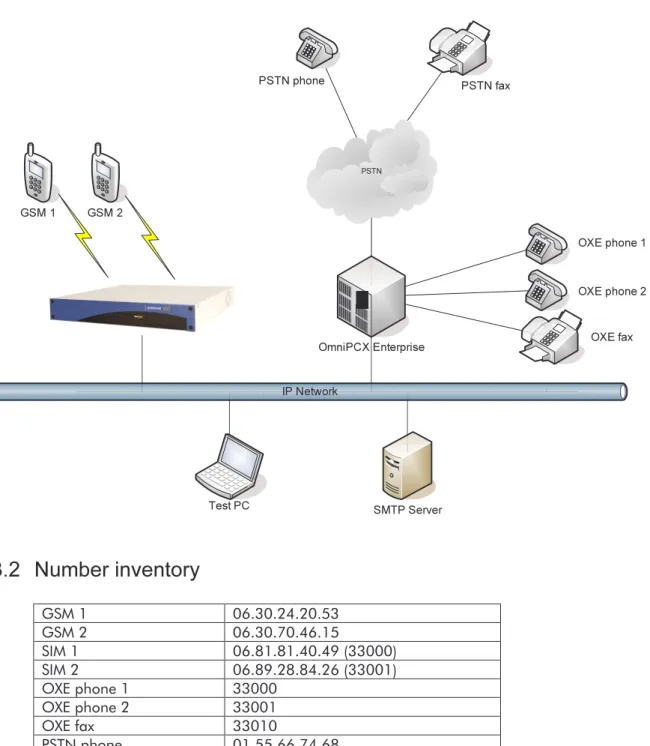
Figure 1 Tests environment
PSTN
IP Network GSM 1
OXE phone 1
OmniPCX Enterprise OXE fax
PSTN phone PSTN fax Test PC SMTP Server OXE phone 2 GSM 2
3.2 Number inventory
GSM 1 06.30.24.20.53 GSM 2 06.30.70.46.15 SIM 1 06.81.81.40.49 (33000) SIM 2 06.89.28.84.26 (33001) OXE phone 1 33000 OXE phone 2 33001 OXE fax 33010 PSTN phone 01.55.66.74.683.3 Hardware
Alcatel Communication Platform:
- Omni PCX Enterprise R8 - 2 OXE phones - 1 OXE fax - 1 PSTN connection - 1 PSTN phone - 1 PSTN fax QuesCom: - QuesCom Gateway
- 2 SIM cards for the gateway
- 2 GSM phones with SIM cards
- SMTP Server: running on test PC
- Test PC for sending/receiving faxes
3.4 Configuration
3.4.1 QuesCom Gateway
See Appendix A for configuration information.
3.4.2 OXE
4 Summary of test results
4.1 Summary of main functions supported
The main functions supported by the QuesCom Gateway are outbound and inbound GSM call routing and outbound and inbound T.38 faxes. These functions are supported with both the SIP and H.323 VoIP protocols.
4.2 Summary of problems
With the SIP protocol, when the link between OXE and the QuesCom Gateway is interrupted, the voice is effectively disrupted, however both the GSM connected to the gateway and the telephone connected to OXE remain in a call, no release is sent. Neither side detects the link down. However, any new calls are correctly routed out the overflow trunk, in this test case a T0.
Again with the SIP protocol, when the QuesCom Gateway is saturated, and another call is placed to a GSM, the user gets a "Busy" tone instead of the call being routed out the overflow trunk. The QuesCom Gateway correctly sends a "503 Service Unavailable" message, however the OXE translated this into a "Busy" message. This happens due to a change in the translation table since version R8.0 G1.302.6, previous versions will overflow correctly. This will be corrected in an upcoming version of OXE.
4.3 Summary of limitations
Until a new version of OXE is released, to address the overflow problem when using the SIP protocol, the user may receive a "Busy" tone is the QuesCom Gateway is saturated, and will have to manually dial another prefix to go out another trunk.
5 Test Scenarios
5.1 Test procedure
Step Action N/A Result Origin of the problem Comment
Step: a test may comprise multiple steps depending on its complexity. Each step has to be completed successfully in order to conform to the test. Step 0 when present represents the initial state for all the following steps.
Action: describes which action to realize in order to set-up the conditions of the test.
N/A: the step within this test is not applicable to this application. This has to be filled in only if the test is checked as mandatory in the applicability box. In that case, the column comment must indicate the reason of the non-applicability (e.g.: service not supported).
Result: describes the result of the test from an external point of view. If it is positive, it describes which application's trigger was checked. If it is negative, it describes as precisely as possible the problem.
Origin of the problem: this column has to be filled in when a problem occurs during the test. It must contain a high level evaluation of the localization of the responsibility: Alcatel-Lucent or the Partner.
it is not intended during this test session to debug and fix problems
.
5.2 Result template
The results table must be formatted as indicated in the example below:
Step Action N/A Result Origin of the
problem Comment 1 . action 1 OK 2 . action 2 OK The application waits for PBX timer or phone set hangs up 3 . action 3 OK 4 . action 4 X Relevant only if the CTI interface is a direct CSTA link 5 . action 5
NOK No indication, no error
message
6 Testing
6.1 SIP
6.1.1 Outgoing Call
6.1.1.1 Make CallVerify that the QuesCom Gateway routes calls from an OXE phone to a GSM phone.
Step Action N/A Result Origin of the
problem Comment
1 From OXE phone 1 call GSM 1. The call should be routed
via the QuesCom Gateway. OK 2 Check the Call establishment
and voice quality using
G711 codec OK
3 Check the Call establishment and voice quality using
G729 codec OK
4 Check the Call establishment and voice quality using
G723 codec OK
5 Check the release of the call
from the OXE phone OK
6 Check the release of the call
from the GSM phone OK
6.1.1.2 Release Call
Verify the call release behavior and cause when the QuesCom Gateway routes calls from an OXE phone to a GSM phone.
Step Action N/A Result Origin of the
problem Comment
1 From OXE phone 1 call GSM 1. The call should be routed
via the QuesCom Gateway. OK 2 Check when the GSM is busy X
3 Check when the GSM does
not answer OK GSM voicebox responds
4 Check when the dialed
6.1.2 Incoming Call
6.1.2.1 Make CallVerify that the QuesCom Gateway routes calls from a GSM phone to an OXE phone.
Step Action N/A Result Origin of the
problem Comment
1 FROM GSM 1 call SIM 1. The call should be routed to
OXE phone 1. OK
2 Check the Call establishment and voice quality using
G711 codec. OK
3 Check the Call establishment and voice quality using
G729 codec. OK
4 Check the Call establishment and voice quality using
G723 codec. OK
5 Check the release of the call
from OXE phone 1. OK
6 Check the release of the call
from GSM 1. OK
6.1.2.2 Release Call
Verify the call release behavior and cause when the QuesCom Gateway routes calls from a GSM phone to an OXE phone.
Step Action N/A Result Origin of the
problem Comment
1 FROM GSM 1 call SIM 1. The call should be routed to
OXE phone 1. OK
2 Check when OXE phone 1 is busy
OK
Released OK by OXE, but test SIM had a voicebox, so the voicebox answered, normally this would not happen. 3 Check when OXE phone 1
does not answer
OK
OXE phone rings, test SIM had a voicebox, so the voicebox answered, normally this would not happen. 4 Check when the dialed
6.1.3 Surveillance / recovery
Check how the application will react in case of a reboot or link failure. 6.1.3.1 Reboot
6.1.3.1.1 PBX
Step Action N/A Result Origin of the
problem Comment
1 Restart the PBX OK
2 Check the PBX restarts
properly OK
3 Check the connection between PBX and QuesCom Gateway has been re-established
OK 4 Try to make an outgoing
GSM call OK
5 Try to make an incoming
GSM call OK
6.1.3.1.2 QuesCom Gateway
Step Action N/A Result Origin of the
problem Comment
1 Restart the QuesCom
Gateway OK
2 Check the QuesCom
Gateway restarts properly OK 3 Check the connection
between PBX and QuesCom Gateway has been re-established
OK 4 Try to make an outgoing
GSM call OK
5 Try to make an incoming
6.1.3.2 Link Failure
6.1.3.2.1 No call is on-going
Step Action N/A Result Origin of the
problem Comment
1 Disconnect the link between PBX and QuesCom Gateway
when no call is on going OK 2 Try to make an outgoing
GSM call OK Call correctly went out overflow trunk, in this case a T0.
3 Reconnect the link between
PBX and QuesCom Gateway OK 4 Check the connection
between PBX and QuesCom Gateway has been re-established
OK 5 Try to make an outgoing
GSM call OK
6 Try to make an incoming
GSM call OK
6.1.3.2.2 A call is on-going
Step Action N/A Result Origin of the
problem Comment
1 Disconnect the link between PBX and QuesCom Gateway
when a call is on going OK 2 Check on going call has
been released KO The QuesCom Gateway does not support message OPTIONS that should act as KEEP ALIVES. No more voice on current call, but the phones remain connected to their respective equipement, no release. A second call correctly goes out overflow trunk.
6.1.4 Call Transfer
6.1.4.1 To an OXE phoneVerify the transfer of a GSM call between OXE phones.
Step Action N/A Result Origin of the
problem Comment
1 From OXE phone 1 call GSM
1 and establish the call. OK 2 From OXE phone 1 call OXE
phone 2 and establish the
call. OK
3 From OXE phone 1 transfer
GSM 1 to OXE phone 2. OK
4 Try the transfer without waiting for the establishment of the call to OXE phone 2. (Blind Transfer).
OK
6.1.4.2 To a GSM phone
Verify the transfer of a GSM call from an OXE phone to another GSM.
Step Action N/A Result Origin of the
problem Comment
1 From OXE phone 1 call GSM
1 and establish the call. OK 2 From OXE phone 1 call GSM
2 and establish the call. OK 3 From OXE phone 1 transfer
GSM 1 to GSM 2. OK
4 Try the transfer without waiting for the establishment of the call to GSM 2. (Blind Transfer).
6.1.4.3 To a PSTN phone
Verify the transfer of a GSM call to the PSTN.
Step Action N/A Result Origin of the
problem Comment
1 From OXE phone 1 call GSM
1 and establish the call. OK 2 From OXE phone 1 call the
PSTN phone and establish
the call. OK
3 From OXE phone 1 transfer
GSM 1 to the PSTN phone. OK 4 Try the transfer without
waiting for the establishment of the call to the PSTN phone. (Blind Transfer).
OK
6.1.5 Call Diversion
6.1.5.1 To a GSM phone Verify call diversion to a GSM.Step Action N/A Result Origin of the
problem Comment
1 Set call diversion on OXE
phone 1 to GSM 1. OK
2 From OXE phone 2 call OXE phone 1. The call should be
routed to GSM 1. OK
3 Check for an unconditional
diversion. OK
4 Check for an “on busy”
diversion. OK This was also tested on an IPTouch
5 Check for a “no answer”
diversion. OK This was also tested on an IPTouch
6.1.6 Call on Hold
Verify the call hold feature and the re-establishment of a GSM phone call.
Step Action N/A Result Origin of the
problem Comment
1 From OXE phone 1 call GSM
1. OK
2 From OXE phone 1, place
GSM 1 on hold. OK
6.1.7 Call Park and Pick Up
Verify the parking and pickup of a GSM phone call.
Step Action N/A Result Origin of the
problem Comment
1 From OXE phone 1 call GSM
1. OK
2 From OXE phone 1 park
GSM 1. OK
3 From OXE phone 2 pickup
GSM 1. OK
6.1.8 Conference
6.1.8.1 With 2 OXE phones
Verify the conference call with a GSM phone and two analog OXE phones.
Step Action N/A Result Origin of the
problem Comment
1 From OXE phone 1 call GSM
1 and establish the call. OK 2 From OXE phone 1 call OXE
phone 2 and establish a
conference. OK
3 Guest leaves the conference. OK 4 Conference initiator leaves
the conference. OK GSM and guest remain connected
6.1.8.2 With 2 GSM phones
Verify the conference call with a GSM phone and two analog OXE phones.
Step Action N/A Result Origin of the
problem Comment
1 From OXE phone 1 call GSM
1 and establish the call. OK 2 From OXE phone 1 call GSM
2 and establish a
conference. OK
3 Guest leaves the conference. OK 4 Conference initiator leaves
6.1.8.3 With a GSM phone and a PSTN phone
Verify the conference call with a GSM phone and two analog OXE phones.
Step Action N/A Result Origin of the
problem Comment
1 From OXE phone 1 call GSM
1 and establish the call. OK 2 From OXE phone 1 call the
PSTN phone and establish a
conference. OK
3 Guest leaves the conference. OK 4 Conference initiator leaves
the conference. OK GSM and PSTN phone remain connected
6.1.9 DTMF
Verify DTMF sending from an OXE phone to a GSM phone.
Step Action N/A Result Origin of the
problem Comment
1 From OXE phone 1 call GSM
1 and establish the call. OK 2 From OXE phone 1 send
DTMF string and check the reception on GSM 1 (DTMF audible).
OK
6.1.10 Overflow when no GSM channel available on the gateway
Verify that when no SIM card is available on the QuesCom Gateway, the call is routed to another trunk on the OXE.
Step Action N/A Result Origin of the
problem Comment
1 Make a call from an OXE phone to a GSM. The call is to be routed over the
QuesCom Gateway. The SIM card of the QuesCom Gateway is busy.
OK 2 GSM calls were placed to occupy both SIM cards.
2 Make a call from another OXE phone to a GSM. Check that the call is routed back to the OXE and then to a backup trunk. KO QuesCom correctly sends à "503 Service Unavailable" message, but the OXE translates it into a "User Busy", so the caller gets a "Busy" tone instead of going out the
Alcatel-Lucent Anomaly Report 1-85659701/crms00116 202.
6.1.11 T.38 Fax
6.1.11.1 QuesCom Gateway to OXE fax
Verify that a fax can be sent from the QuesCom Gateway over T.38 to an OXE fax.
Step Action N/A Result Origin of the
problem Comment
1 Send a fax with VPD to an
OXE fax OK
6.1.11.2 QuesCom Gateway to PSTN fax
Verify that a fax can be sent from the QuesCom Gateway over T.38 to a PSTN fax.
Step Action N/A Result Origin of the
problem Comment
1 Send a fax with VPD to a
PSTN fax OK
6.1.11.3 OXE fax to QuesCom Gateway
Verify that a fax can be sent from an OXE fax over T.38 to the QuesCom Gateway.
Step Action N/A Result Origin of the
problem Comment
1 Send a fax from an OXE fax
to QuesCom Gateway. OK
6.1.11.4 PSTN fax to QuesCom Gateway
Verify that a fax can be sent from a PSTN fax over T.38 to the QuesCom Gateway.
Step Action N/A Result Origin of the
problem Comment
1 Send a fax from a PSTN fax
6.2 H.323
6.2.1 Outgoing Call
6.2.1.1 Make CallVerify that the QuesCom Gateway passes calls from the OXE analog phone to the GSM phone.
Step Action N/A Result Origin of the
problem Comment
1 Dial a mobile phone number from an analog phone of the OXE. The call is to be routed over the QuesCom Gateway.
OK 2 Check the Call establishment
and voice quality using
G711 codec OK
3 Check the Call establishment and voice quality using
G729 codec OK
4 Check the Call establishment and voice quality using
G723 codec OK
5 Check the release of the call
from the OXE phone OK
6 Check the release of the call
from the GSM phone OK
6.2.1.2 Release Call
Verify the call release behavior and cause when the QuesCom Gateway passes calls from the OXE analog phone to the GSM phone.
Step Action N/A Result Origin of the
problem Comment
1 Dial a mobile phone number from an analog phone of the OXE. The call is to be routed over the QuesCom Gateway.
OK 2 Check when the GSM is busy X
3 Check when the GSM does
not answer OK GSM voicebox answers
4 Check when the dialed
6.2.2 Incoming Call
6.2.2.1 Make CallVerify that the QuesCom Gateway passes calls from the GSM network to the OXE analog phone.
Step Action N/A Result Origin of the
problem Comment
1 Dial the mobile phone number of the SIM card inserted in the QuesCom Gateway. The call is to be routed through the gateway to the default OXE phone.
OK 2 Check the Call establishment
and voice quality using
G711 codec OK
3 Check the Call establishment and voice quality using
G729 codec OK
4 Check the Call establishment and voice quality using
G723 codec OK
5 Check the release of the call
from the OXE phone OK
6 Check the release of the call
from the GSM phone OK
6.2.2.2 Release Call
Verify the call release behavior and cause when the QuesCom Gateway passes calls from the GSM phone to the OXE analog phone.
Step Action N/A Result Origin of the
problem Comment
1 Dial the mobile phone number of the SIM card inserted in the QuesCom Gateway. The call is to be routed through the gateway to the default OXE phone.
OK 2 Check when the analog
phone is busy OK
3 Check when the analog
phone does not answer OK
4 Check when the dialed
6.2.3 Surveillance / recovery
Check how the application will react in case of a reboot or link failure. 6.2.3.1 Reboot
6.2.3.1.1 PBX
Step Action N/A Result Origin of the
problem Comment
1 Restart the PBX OK
2 Check the PBX restarts properly OK 3 Check the connection
between PBX and QuesCom Gateway has been re-established
OK 4 Try to make an outgoing
GSM call OK
5 Try to make an incoming
GSM call OK
6.2.3.1.2 QuesCom Gateway
Step Action N/A Result Origin of the
problem Comment
1 Restart the QuesCom
Gateway OK
2 Check the QuesCom
Gateway restarts properly OK 3 Check the connection
between PBX and QuesCom Gateway has been re-established
OK 4 Try to make an outgoing
GSM call OK
5 Try to make an incoming
6.2.3.2 Link Failure
6.2.3.2.1 No call is on-going
Step Action N/A Result Origin of the
problem Comment
1 Disconnect the link between PBX and QuesCom Gateway
when no call is on going OK 2 Try to make an outgoing
GSM call OK Out T0
3 Reconnect the link between
PBX and QuesCom Gateway OK 4 Check the connection
between PBX and QuesCom Gateway has been re-established
OK 5 Try to make an outgoing
GSM call OK
6 Try to make an incoming
GSM call OK It could take up to five minutes to reactivate the trunk. This timer can be modified.
6.2.3.2.2 A call is on-going
Step Action N/A Result Origin of the
problem Comment
1 Disconnect the link between PBX and QuesCom Gateway
when a call is on going OK 2 Check on going call has
been released OK GSM released immediately.
OXE phone released after 30 seconds.
6.2.4 T.38 Fax
6.2.4.1 QuesCom Gateway to OXE fax
Verify that a fax can be sent from the QuesCom Gateway over T.38 to an OXE fax.
Step Action N/A Result Origin of the
problem Comment
1 Send a fax with VPD to an
OXE fax OK
6.2.4.2 QuesCom Gateway to PSTN fax
Verify that a fax can be sent from the QuesCom Gateway over T.38 to a PSTN fax.
Step Action N/A Result Origin of the
problem Comment
1 Send a fax with VPD to a
PSTN fax OK
6.2.4.3 OXE fax to QuesCom Gateway
Verify that a fax can be sent from an OXE fax over T.38 to the QuesCom Gateway.
Step Action N/A Result Origin of the
problem Comment
1 Send a fax from an OXE fax
to QuesCom Gateway. OK
6.2.4.4 PSTN fax to QuesCom Gateway
Verify that a fax can be sent from a PSTN fax over T.38 to the QuesCom Gateway.
Step Action N/A Result Origin of the
problem Comment
1 Send a fax from a PSTN fax
7 Appendix A : Application description
The QuesCom Gateway has been tested with two different configurations:1) exhaustive testing with a SIP trunk, and 2) basic testing with a H.323 trunk.
The standard command line configuration was done to provide the Gateway with proper IP addressing and system name. The Gateway was setup without the VoiceBox service and with Conferencing activated.
7.1 Services
The services remain identical for both VoIP protocols (SIP & H.323) tested.
7.4 User
7.5 QWAdmin
8 Appendix B: Alcatel-Lucent Communication
Platform: configuration requirements
OXE must be configured to allow the QuesCom Gateway to send and receive calls with the OXE connected phones and fax, as well as with the phone and fax on the PSTN. This must be available with the SIP and H.323 configuration.
8.1 General Configuration :
UA sets : 33000 (set 4035 1-1-32) 33001 (set 4035 1-1-33) IPphone : 33006 (set 4038) Analog set (for FAX)33010 (analog set 1-1-64) External public T0 line : 0146130445 External public FAX : 0155667593 Call server : G1.302.8 @IP = 10.15.62.1 GD : @IP = 10.15.62.10 QUESCOM @IP = 10.15.50.1 33100 : FAX server
8.2 Management for H323 tests :
Trunk groups H323 number 4. Prefix 29 to seize the trunk groups 4.
Abbreviated Numbers 30 and 331 to perform the H323 call. ARS number 0 with H323 and T0 routes.
Translator/Prefix
Number : 0
Prefix Meaning + Professional trunk seize Prefix Information : 4 Private Route type + False
Translator/Prefix
Number : 29
Prefix Meaning + ARS Prof.Trg Grp Seizure Discriminator Nr. : 0
Entity/Discriminator Selector/ Entity Number : 1 Discriminator 00 :0 Discriminator 01 : 1
Translator/External Numbering Plan/Numbering Discriminator/Discriminator Rule Discriminator Nr. : 1
Call Number : 06 Area Number : 1
ARS Route List Number : 0 Schedule Number : -1 Number of Digits : 10
Automatic Route Selection/ARS Route list/ARS Route ARS Route list : 0 Route : 1
Name : H323
Trunk Group Source + Route Trunk Group : -1
Nb.Digits To Be Removed : 2 Digits To Add : 30
Numbering Command Tabl.Id : 0 VPN Cost Limit : 0
Protocol Type + Dependant on Bundle Type NPD identifier : 255
Route Type + Public ATM Address Id : -1 Preempter + False
Quality + Speech +Fax
Trunk Group : 3
Nb.Digits To Be Removed : 0 Digits To Add : ---
Numbering Command Tabl.Id : 0 VPN Cost Limit : 0
Protocol Type + Dependant on Bundle Type NPD identifier : 255
Route Type + Public ATM Address Id : -1 Preempter + False
Quality + Speech + Fax
Automatic Route Selection/ARS Route list/Time Based Route List ARS Route list : 0
Time Based Route List Id : 1 Time Based Route
[ Add ] [ Remove ] [ Next ] [Previous] Time Based Route
Route Number : 1 Waiting Cost Limit : -1 Stopping Cost Limit : -1
Route Number : 2 Waiting Cost Limit : -1 Stopping Cost Limit : -1
Abbreviated Numbering/Direct Abbrev.Numbers/Direct Abbrev.No Pref. Direct Abbr.No Prefix : 30
Call Number : 2906 Directory name : --- Directory First Name : --- UTF-8 Directory Name : --- UTF-8 Directory First Name : --- Barring + False
Overfl.Dir.Abbrev.No Pref. : --- Auto.Attendant Calling Right : 0 Call Type + IP
Timed Forward.Dir.Abbrev.No. : --- Range Number : 255
Can Be Called By Name + NO Displayed Name : num abr
External DISA Dir.No. : --- IP Address : 10.15.50.1
Abbreviated Numbering/Direct Abbrev.Numbers/Direct Abbrev.No Pref. Direct Abbr.No Prefix : 331
Barring + False
Overfl.Dir.Abbrev.No Pref. : --- Auto.Attendant Calling Right : 0 Call Type + IP
Timed Forward.Dir.Abbrev.No. : --- Range Number : 255
Can Be Called By Name + YEX Displayed Name : FAX
External DISA Dir.No. : ---
Phone book Name (Call by name) : FAX
Phone book First Name : --- IP Address : 10.15.50.1
Trunk Groups
Trunk Group Id : 4 Trunk Group Type + T2 Trunk Group Name : F H323
UTF-8 Trunk Group Name : --- Number Compatible With : 0 Remote Network : 15
Q931 signal variant + ISDN all countries ...all parameters by default
T2 Specificity + IP
...all parameters by default Trunk Groups/Trunk Group
...all parameters by default Nb of digits unused (ISDN) : 0
Trunk Groups/Trunk Group/T2/T1/T0 Access Trunk Group Id : 4 Physical Address : 1-0-0 Access Type + T2
Access Cluster Id : -1
Time Slots T2 : 01111111111111110111111111111111
8.3 Management for SIP tests.
"28" is the prefix to seize the SIP trunk groups number "2". ARS table number "5" is used.
External gateway number "1" is used. Translator/Prefix
Number : 28
Prefix Meaning + ARS Prof.Trg Grp Seizure Discriminator Nr. : 1
Discriminator 00 : 0 Discriminator 01 :1
Translator/External Numbering Plan/Numbering Discriminator/Discriminator Rule Discriminator Nr. : 1
Call Number : 06 Area Number : 1
ARS Route List Number : 5 Schedule Number : -1 Number of Digits : 10
Call Number : 33 Area Number : 1
ARS Route List Number : 5 Schedule Number : -1 Number of Digits : 5
Automatic Route Selection/ARS Route list/ARS Route ARS Route list : 5 Route : 1
Name : SIP ARS
Trunk Group Source + Route Trunk Group : 2
Nb.Digits To Be Removed : 0 Digits To Add : ---
Numbering Command Tabl.Id : 1 VPN Cost Limit : 0
Protocol Type + Dependant on Bundle Type NPD identifier : 33
Route Type + Public ATM Address Id : -1 Preempter + False
Quality + Speech +Fax
Route : 2 Name : T0
Trunk Group Source + Route Trunk Group : 3
Nb.Digits To Be Removed : 0 Digits To Add : ---
Numbering Command Tabl.Id : 0 VPN Cost Limit : 0
Protocol Type + Dependant on Bundle Type NPD identifier : 255
Route Type + Public ATM Address Id : -1 Preempter + False
Time Based Route
[ Add ] [ Remove ] [ Next ] [Previous] Time Based Route
Route Number : 1 Waiting Cost Limit : -1 Stopping Cost Limit : -1
Route Number : 2 Waiting Cost Limit : -1 Stopping Cost Limit : -1
Automatic Route Selection/ARS Route list/Numbering Command Table Table Id : 1
Carrier Reference : 0 Command : W04I Associated SIP gateway : 1
SIP/External Gateway
Instance : 1
Remote domain : 10.15.50.1 Port number : 5060 Transport type + UDP RFC3262 forced use + False Authentication domain : --- Registration Id : SIP_Res2 + False Registration timer : 0 Outbound Proxy : --- Supervision timer : 0 Trunk group number : 2 Pool Number : -1 Outgoing realm : --- Outgoing username : --- Outgoing Password : ***** Confirm : ***** Incoming username : --- Incoming Password : ******* Confirm : *******
RFC 3325 supported by the distant + True SDP IN 180 + True
Minimal authentication method + None INFO method for remote extension + False Send only trunk group algo + False
Dynamic Payload type for dtmf : 97 SIP/SIP Gateway
Subnetwork number : 1 Trunk Group : 1
IP Address : 10.15.62.1 Machin name : node000062 Proxy Port Number : 5060
Session Timer : 1800
DNS local domain name : --- First DNS IP Address : --- Second DNS IP Address : --- SDP IN 180 + True
Cac SIP-SIP + False
INFO method for remote extension + False Dynamic Payload type for dtmf : 97
Trunk Groups
Trunk Group Id : 2 Trunk Group Type + T2 Trunk Group Name : SIP PUBLIC
UTF-8 Trunk Group Name : --- Number Compatible With : 0 Remote Network : 15
Q931 signal variant + ISDN all countries ...all parameters by default
T2 Specificity + SIP
...all parameters by default Trunk Groups/Trunk Group
...all parameters by default Other system parameters :
(3)xa015062> compvisu sys Wed Feb 20 15:41:44 CET 2008
+===========================================+ | C O M P V I S U | +===========================================+ | Inter-node protocol H323... yes
| RTP Direct... yes | RTP Direct for H323 terminals.. no | Fast Start... yes
| VAD (Voice Activity Detection): | - G723/G729... no | - G711... no | ECE (Echo Canceller)... yes | - LIO/LIOE... 16 ms | - INTIP/GA/GD... 128 ms | PFE (Post Filter)... yes | Volume ... 8 | Volume for IP Phone ... 0dB | Volume for other device. ... 0dB | VRE ... no
| ticket Stat IP... no | IP version... IPv4 | Transit compatibility... no | Voip Framing G711 ... 20 ms | Voip Framing G723 ... 30 ms | Voip Framing G729 ... 20 ms | No RBT For Direct RTP H323... no +===========================================+
9 Appendix C: Partner escalation process
QuesCom Support0.820.20.38.46
http://support.quescom.com [email protected]
10 Appendix D: AAPP program, documentation
and technical assistance
Alcatel-Lucent Application Partner Program (AAPP)
Complete e-business solutions at your disposal
The Alcatel-Lucent Application Partner Program is designed to support companies that develop communication applications for the enterprise market, based on Alcatel-Lucent's Omni product family.
The program provides tools and support for developing, verifying and promoting compliant third-party applications that complement Alcatel-Lucent's Omni-based products. Alcatel-Lucent facilitates market access for compliant applications.
The Alcatel-Lucent Application Partner Program (AAPP) has two main objectives:
• Provide easy interfacing for Alcatel-Lucent communication products:
Alcatel-Lucent's communication products for the enterprise market include infrastructure elements, platforms and software suites. To ensure easy integration, the AAPP provides a full array of standards-based application programming interfaces and fully-documented proprietary interfaces. Together, these enable third-party applications to benefit fully from the potential of Alcatel-Lucent products.
• Test and verify a comprehensive range of third-party applications:
to ensure proper inter-working, Alcatel-Lucent tests and verifies selected third-party applications that complement its portfolio. Successful candidates, which are labelled Alcatel-Lucent Compliant Application, come from every area of voice and data communications.
The Alcatel-Lucent Application Partner Program covers a wide array of third-party applications/products designed for voice-centric and data-centric networks in the enterprise market, including terminals, communication applications, mobility, management, security, …
Web site
If registered Alcatel-Lucent Application Partner, you can access the AAPP website at this URL: http://www.applicationpartner.alcatel-lucent.com
Alcatel-Lucent.com
Alcatel-Lucent documentation
Alcatel-Lucent Application Partner Program (AAPP)
If registered Alcatel-Lucent Application Partner, you can access the current AAPP documentation at this URL:
http://www.applicationpartner.alcatel-lucent.com and then click the Partner Center link.
Alcatel-Lucent Business Partner Program (ABPP)
The Alcatel-Lucent Business Partner Program is designed to empower and maximize the business of the Partners. In addition, it enables them to help their customers successfully maximize their telecom investment through optimum deployment and proper configuration of Alcatel-Lucent's solutions. Alcatel-Lucent Partners also receive the added benefit of rapid, highly qualified service and support as well as world class training. Alcatel-Lucent will work closely with Business Partners to provide top quality design, delivery, and support of the very best solutions for your customers. The Business Partner Program is designed around a flexible and scalable framework so each Partner can identify the exact support they need. So, depending on your specific requirements you can quickly become a 'Certified', 'Expert' or 'Premium' Business Partner with one of the world leaders in the communications industry.
If registered Alcatel-Lucent Business Partners, you can access to an exciting on-line resource centre with a wealth of information on all product lines at this URL:
Technical assistance
In order to guide you in your purchasing decisions and provide you with assistance for updating our Communication Server and Networking Infrastructure products and for commercial development, Alcatel-Lucent has created the SUPPORT CENTER. The SUPPORT CENTER is responsible for the management and routing of all your requests. It includes e-Support and a Contact Centre reserved for registered Alcatel-Lucent Application Partner and Alcatel-Lucent Business Partners. The Contact Centre is open 24 hours a day; 7 days a week and is available in 5 languages. This Call Centre has a team of 15 people and handles 10; 000 requests per month.
• e-Support from the Alcatel-Lucent Application Partner Web site (if registered Alcatel-Lucent Application Partner): http://www.applicationpartner.alcatel-lucent.com click the Partner Center link and then Support
• e-Support from the Alcatel-Lucent Business Partners Web site (if registered Alcatel-Lucent Business Partners): http://www.businesspartner.Alcatel-Lucent.com click the e-Support link and then e-Service Request
• e-mail: [email protected]
• Fax number: +33 (0) 3 90 67 73 45
• Telephone numbers:
Alcatel-Lucent Business Partner Contact Center:
France : 0 811 900 110 French agent
Austria : 0 810 810 012 German agent
Denmark : 70 11 21 09 English agent
Germany : 0 1 803 000 680 German agent
Ireland : 1 890 925 039 English agent
Italy : 848 800 389 Italian agent
UK : 0 845 601 4101 English agent
Spain : 901 120 085 Spanish agent
Switzerland : 0 844 850 588 German agent
For other countries:
English answer : + 33 (0)3 88 55 69 04
Alcatel-Lucent training
Technological innovative cycles are quickening and your customers are more and more demanding regarding the quality of services. In order to meet these requirements, you have to invest in skills: a key success factor for services.
If registered Alcatel-Lucent Business Partners, you can access to the training part at this URL: http://www.businesspartner.Alcatel-Lucent.com and then click the Training link.
Our vision of learning services is described in the Services Portfolio section. The Certification section gives you some statistics and details on how training curricula are designed to match certification levels.
All updated training curricula and assessment tools are available in the Curricula & Catalogues section.
The Schedule section is regularly updated to show forthcoming training sessions over the world. The How to Enrol section provides you with the registration procedure and the Alcatel-Lucent University Customer Service list of contacts world wide.
Last but not least, find statistics and reports of what you think about our training services in the Customer Satisfaction section.
11 Appendix E: Alcatel-Lucent escalation process
in case of problem with a certified external
application (referenced in the AAPP)
Introduction
The purpose of this document is to define the split of responsibilities and the escalation process to be applied by the Business Partners when facing a problem with a solution involving an
Alcatel-Lucent platform and an external application with a valid Alcatel-Lucent Inter-working report.
As for other Alcatel-Lucent equipment, the Alcatel-Lucent business partner is the only one facing the end-customer for support or maintenance. The Business partner will open cases (service request) either on Alcatel-Lucent side or on Application Partner side depending on the nature of the issue. Expert from both companies will collaborate to provide the best and quickest correction.
Partner’s answers
Customer Business Partner
Application Partner Support
Technical Issues
Alcatel Technical Support
SR SR = Service Request SR Answer Answer Experts Exchanges
In cases of the problem has not been sent to the right organization: “Please open a SR into our partner database by mentioning our SR number”
Partner’s answers
Customer Business Partner
Application Partner Support Application Partner Support
Technical Issues
Alcatel Technical Support Alcatel Technical Support
SR SR = Service Request SR Answer Answer Experts Exchanges
In cases of the problem has not been sent to the right organization: “Please open a SR into our partner database by mentioning our SR number”
General Rules
The following general rules are applied:
• Only certified AAPP applications are officially supported by Alcatel-Lucent
• The certification is based on tests suite passed by Alcatel-Lucent and the
Application Partner and the result is consigned into an Inter-Working Report (IWR) validated by the two parties.
• The IWR is available on the AAPP Web site.
• Only the major releases of both parties are certified. Certification tests are usually not performed for intermediate versions. Only the existence of the IWR in the AAPP Web site for the right Alcatel-Lucent release is the guarantee that the application has been certified with this Alcatel-Lucent release.
• If the IWR for the Alcatel-Lucent release is not available, Alcatel-Lucent doesn’t engage any responsibility. In that case, please contact the central Pre-Sales team.
• The existence of the IWR engages Alcatel-Lucent and the Application Partner. Both parties are engaged, not exclusively Alcatel-Lucent (see the section escalation process).
Warning:
The possibility to configure the Alcatel-Lucent PBX with ACTIS quotation tool in order to interwork with an external application, is not a guarantee of the availability of the solution. Please check the availability of the Inter-Working Report on AAPP web site.
The escalation process
As stated above, the Alcatel-Lucent support will be limited to applications with a valid inter-working report. Known problems or remarks mentioned in the IWR will not be taken into account.
In case of problem, the two parties, Alcatel-Lucent and the Application Partner, are engaged: Case 1: the responsibility can be established 100% on Alcatel-Lucent side
In that case, the problem must be escalated by the Business Partner to the Alcatel-Lucent Hot-line via the standard process: open a ticket (Service Request –SR)
Case 2 : the responsibility can be established 100% on Application Partner side In that case, the problem must be escalated directly to the partner by opening a ticket trough the Partner Hotline. In general, the process to be applied for the partner side is described in the IWR.
Case 3 : the responsibility can not be established In that case the following process applies:
1) The Application Partner shall be contacted first by the Business Partner or the party responsible for that Application for an analysis of the problem.
Alcatel-Lucent has to be involved solely if the application partner demonstrate, with traces, after reproduction of the problem, that the defect which has generated the end-user’s demand of support is coming from the equipment provided by Alcatel-Lucent or if he needs support of Alcatel-Lucent.
2) The Business partner will escalate the problem to the Alcatel-Lucent Hot-line if the Application Partner has demonstrated a problem on Alcatel-Lucent side or if the Application Partner (not the Business Partner) needs the involvement of Alcatel-Lucent.
In that case, the Business Partner must provide the reference of the Case Number on Application Partner side. The Application Partner must provide to Alcatel-Lucent the results of its investigations, traces, etc, related to this Case Number.
Alcatel-Lucent reserves the right to close the case opened on his side if the investigations made on Application Partner side are insufficient or do no exist.
Note:
Involvement of the Business Partner is mandatory because the access to the Alcatel-Lucent Platform (remote access, login/password) is under the Business Partner responsibility.