Intel
®
RAID Controller SASMF8I Hardware
User’s Guide
ii Intel® RAID Controller SASMF8I Hardware User’s Guide DISCLAIMER
INFORMATION IN THIS DOCUMENT IS PROVIDED IN CONNECTION WITH INTEL(R) PROD-UCTS. NO LICENSE, EXPRESS OR IMPLIED, BY ESTOPPEL OR OTHERWISE, TO ANY INTELLECTUAL PROPERTY RIGHTS IS GRANTED BY THIS DOCUMENT. EXCEPT AS PRO-VIDED IN INTEL'S TERMS AND CONDITIONS OF SALE FOR SUCH PRODUCTS, INTEL ASSUMES NO LIABILITY WHATSOEVER, AND INTEL DISCLAIMS ANY EXPRESS OR IMPLIED WARRANTY, RELATING TO SALE AND/OR USE OF INTEL PRODUCTS INCLUDING LIABILITY OR WARRANTIES RELATING TO FITNESS FOR A PARTICULAR PURPOSE, MERCHANTABIL-ITY, OR INFRINGEMENT OF ANY PATENT, COPYRIGHT OR OTHER INTELLECTUAL PROP-ERTY RIGHT. Intel products are not intended for use in medical, life saving, life sustaining applications.
Intel may make changes to specifications and product descriptions at any time, without notice. Intel is a trademark or registered trademark of Intel Corporation or its subsidiaries in the United States and other countries.
*Other names and brands may be claimed as the property of others.
Copyright © 2008 by Intel Corporation. Portions Copyright 2005-2007 by LSI Logic Corporation. All rights reserved.
Intel® RAID Controller SASMF8I Hardware User’s Guide iii
Preface
This is the primary reference and user’s guide for the Intel® RAID Controller SASMF8I, which can be used for SAS and SATA II disk drives. It contains installation instructions and specifications.
For details on how to configure the storage adapters, and for an overview of the software drivers, see the Intel® IT/IR RAID Software User’s Guide on the Resource CD.
Audience
This document assumes that you have some familiarity with storage disk controllers, RAID technology, and related support devices. The people who benefit from this book are:
• Engineers who are designing an Intel® RAID Controller SASMF8I for a system. • Anyone installing an Intel® RAID Controller SASMF8I in a software RAID system.
Organization
This document includes the following chapters and appendixes:
• Chapter 1 provides a general overview of the Intel® RAID Controller SASMF8I. • Chapter 2 describes the procedures for installing the Intel® RAID Controller
SASMF8I.
• Chapter 3 provides the characteristics and technical specifications for the Intel® RAID Controller SASMF8I.
• Appendix A lists and explains the terms and abbreviations used in this manual.
Related Publication
The Intel® IT/IR RAID Software User’s Guide on the Resource CD that is included with the RAID controller.
Intel® RAID Controller SASMF8I Hardware User’s Guide v
Table of Contents
Preface ... iii
Audience ... iii
Organization ... iii
Related Publication ... iii
Chapter 1: Overview ... 1
Summary of SAS RAID Controller Features ...1
Usability ...2
Redundancy and Error Handling ...2
SAS and SATA Features ...3
Operating System Support ...4
Benefits of Serial-Attached SCSI (SAS) ...4
Chapter 2: Intel
®RAID Controller SASMF8I Hardware Installation ... 5
Requirements ...5
Installing the RAID Controller ...6
Connecting the Cables ...9
Configuring the Storage Adapter ...9
Replacing a Controller ...10
Chapter 3: Intel
®RAID Controller SASMF8I Characteristics ... 11
Technical Specifications ...12
Array Performance Features ...13
Fault Tolerance ...13
Electrical Characteristics ...14
Thermal and Atmospheric Characteristics ...14
Safety Characteristics ...14
Intel® RAID Controller SASMF8I Hardware User’s Guide vii
List of Figures
Figure 1. Inserting the Intel® RAID Controller SASMF8I into a
PCI Express* Slot... 6
Figure 2. Attaching cables to the Intel® RAID Controller SASMF8I ... 7
Figure 3. SAS and SATA Plugs and SAS Backplane Connector ... 9
Intel® RAID Controller SASMF8I Hardware User’s Guide ix
List of Tables
Table 1. Jumper Descriptions ...11
Table 2. Specifications ...12
Table 3. Array Performance Features ...13
Table 4. Fault Tolerance Features ...13
Intel® RAID Controller SASMF8I Hardware User’s Guide 1
1
Overview
This chapter provides a general overview of the Intel® RAID Controller SASMF8I. It consists of the following sections:
•
Summary of SAS RAID Controller Features•
Benefits of Serial-Attached SCSI (SAS)The Intel® RAID Controller SASMF8I is a high-performance PCI Express* SAS RAID controller. It provides reliability, high performance, and fault-tolerant disk subsystem management. This is an ideal RAID solution for the internal storage needs of mid to low-end servers and workstations for use by workgroups and departmental-sized organizations or individuals. The Intel® RAID Controller SASMF8I offers a cost-effective way to implement RAID in a server for internal storage.
The SAS controller allows you to use SATA II and SAS hard disk drives in the same system, so you can take advantage of the benefits of each type of drive. The controller supports up to eight devices including expander devices. See the ANSI SAS Standard Specification, Version 1.0 for more information about the use of expanders.
As the second generation PCI Express* storage adapter, the Intel® RAID Controller SASMF8I addresses the growing demand for increased data throughput and scalability requirements across mid to low-end servers and workstations. Simplified cabling between drives is an additional benefit.
Summary of SAS RAID Controller Features
Note: In this document, the term low-profile refers to the height, not the length, of a PCI add-in
card.
The Intel® RAID Controller SASMF8I is a low-profile SAS RAID adapter with:
•
An LSI 1068E SAS (including SATA) controller.•
Eight independent internal ports provided via two SFF8087 connectors.•
Support for both enterprise-class SAS devices and enterprise-class SATA II drives.•
Support for up to 8 SAS or SATA II drives and 40 logical drives.•
PCI Express* connector that fits into a x4 PCI Express slot capable of 2.5 Gbps per lane over PCI Express* x1, or x4.•
3.0 Gbps point-to-point transfer rate.2 Intel® RAID Controller SASMF8I Hardware User’s Guide
The SAS controller supports the ANSI Serial-attached SCSI (SAS) Standard, Version 1.0. In addition, the controller supports the Serial ATA (SATA) protocol defined by the Serial ATA Specification, Version 1.0a. The SAS controller is a versatile controller that supports both the SAS and SATA interfaces and provides the backbone of both server and high-end workstation environments.
Protocols supported include:
•
Serial SCSI Protocol (SSP): Communication with other SAS devices.•
SATA II Protocol: Communication with other SATA II devices.•
Serial Management Protocol (SMP): Topology management information sharing with expanders.•
Serial Tunneling Protocol (STP) support for SATA II through expander interfaces.Usability
•
Smaller, thinner cabling with serial point-to-point 3.0 Gbps data transfer rates.•
Allows mixed connections to SAS or SATA II targets.•
Support for non-disk devices and mixed capacity drives.•
Support for software RAID levels 0, 1, 5, and 10.•
Global hot spare with auto rebuild if an array drive fails.•
Fixed RAID stripe size of 64 KB.•
Advanced array configuration and management utilities that provide: — Drive migration.— Drive roaming.
•
An upgradeable Flash ROM interface.•
Allows for staggered spin-up, hot plug, and lower power consumption.•
User specified rebuild rate (% of system resources to use from 0-100%).Warning: Exceeding 50% rate may cause operating system errors caused by waiting
for controller access.
•
Background operating mode can be set for rebuilds, consistency checks,and initialization (auto restarting consistency check on redundant volumes).Redundancy and Error Handling
•
Enclosure management support, including LEDs.•
Activity and fault indicators per drive, port selector (dual-port drives).•
Drive coercion (auto resizing to match existing disks).•
Auto-detection of failed drives with transparent rebuild. Disk activity (I/O to the drive) must be present for a missing drive to be marked as failed.Intel® RAID Controller SASMF8I Hardware User’s Guide 3
•
Auto-resume of initialization or rebuild on reboot (the auto rebuild feature must be enabled before virtual disk creation).•
Smart initialization automatically checks consistency of virtual disks if there are five or more disks in a RAID 5 array, which optimizes performance by enabling read-modify-write mode. RAID 5 arrays of only three or overdrives use peer read mode.•
Smart Technology predicts failures of drives and electronic components.•
Commands are retried at least four times.•
Firmware provides best effort to recognize an error and recover from it if possible.•
Failures are logged from controller and drive firmware, SMART monitor, and SAF-TE controller.•
Failures are logged in Intel® RAID Web Console 2 or CIM, and can be viewed from LEDs.•
Multiple cache options provide choice of speed and redundancy:— Disk Write Cache: The data written / (done) signal is returned when data is written to the drive or only to the drive’s cache.
✧ On (default): Write back mode enabled. Faster, because it does not wait for the disk, but data will be lost if power is lost.
✧ Off: Write-through mode enabled. Slower, but ensures data is on the disk. — Read Ahead: Predicts the next read will be sequential and buffers this data into
the drive’s cache.
✧ On: Read Ahead mode enabled. Faster in data sequential read mode but slower in data random read mode.
✧ Off: Non-Read Ahead mode enabled. Always reads from the drive after determining the exact location of each read.
•
Redundancy through:— Configuration stored in non-volatile RAM and on the drives (COD). — Hot-swap support.
SAS and SATA Features
•
Provides eight independent PHYs, each supporting 3.0 Gbps and 1.5 Gbps SAS and SATA data transfers.•
Scalable interface that supports up to eight direct-attached SAS/SATA devices or eight logical devices.•
Transfers data using SCSI information units.•
Supports SSP to enable communication with other SAS devices.•
Supports SMP to communicate topology management information.•
Supports single PHY or wide ports consisting of two, three, or four PHYs within a single quad port.4 Intel® RAID Controller SASMF8I Hardware User’s Guide
•
Allows addressing of multiple SATA targets through an expander if using SATA2.0-compliant hard disk drives.
•
Allows multiple initiators to address a single target (in a fail-over configuration) through an expander.Operating System Support
The Intel® RAID Controller SASMF8I supports major operating systems, including:
•
Microsoft Windows Server 2008*, Microsoft Windows Server 2003*, and Microsoft Windows XP*•
Red Hat* Enterprise Linux 4.0 and 5.0•
SuSe* Linux Enterprise Server 9 and 10Note: The operating systems supported by this controller may not be supported by your server
board. See the tested operating system list for your server board at
http://support.intel.com/support/motherboards/server/. See also the Tested Hardware and Operating System List for the Intel® RAID Controller SASMF8I to make sure the RAID controller supports your operating system.
Benefits of Serial-Attached SCSI (SAS)
SAS is a serial, point-to-point, enterprise-level device interface that leverages the proven SCSI protocol set. SAS is a convergence of the advantages of SATA, SCSI, and FC, and is the future mainstay of the enterprise and high-end workstation storage markets. SAS offers a higher bandwidth per pin than parallel SCSI, and improves signal and data integrity.
The SAS interface uses the proven SCSI command set to ensure reliable data transfers, while providing the connectivity and flexibility of point-to-point serial data transfers. The serial transmission of SCSI commands eliminates clock skew challenges. The SAS interface provides improved performance, simplified cabling, smaller connectors, lower pin count, and lower power requirements when compared to parallel SCSI.
SAS controllers leverage a common electrical and physical connection interface that is compatible with Serial ATA technology. The SAS and SATA protocols use a thin, 7-wire connector instead of the 68-wire SCSI cable or 40-wire ATA cable. The SAS/SATA connector and cable are easier to manipulate, allow connections to smaller devices, and do not inhibit airflow. The point-to-point SATA architecture eliminates inherent difficulties created by the legacy ATA master-slave architecture, while maintaining compatibility with existing ATA firmware.
Intel® RAID Controller SASMF8I Hardware User’s Guide 5
2
Intel
®
RAID Controller SASMF8I
Hardware Installation
This chapter describes the procedures used to install the Intel® RAID Controller SASMF8I with internal connectors.
Requirements
The following items are required to install a Intel® RAID Controller SASMF8I:
•
An Intel® RAID Controller SASMF8I.•
A host system with an available x4 bi-directional PCI Express* slot.•
The Resource CD, which contains drivers and documentation.•
The cables provided with the RAID controller.•
SAS or SATA II hard disk drives.6 Intel® RAID Controller SASMF8I Hardware User’s Guide
Installing the RAID Controller
To install the RAID Controller, follow these steps:
1. Power off the computer, all drives, enclosures, and system components. Remove the power cord from the computer.
2. Remove the chassis cover and access the PCI Express add-in card slots. For instructions, see your server chassis documentation.
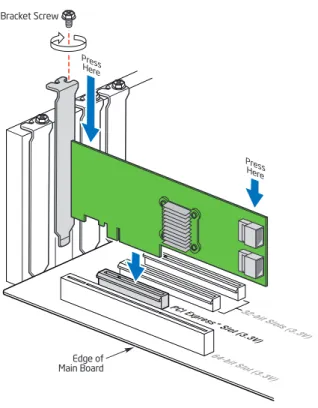
3. Align the controller’s connector with a x4 PCI Express* slot on the server board. 4. Press down gently but firmly to ensure that the card is properly seated in the slot, as
shown in Figure 1. Secure the bracket to the computer chassis.
Figure 1. Inserting the Intel® RAID Controller SASMF8I into a
PCI Express* Slot
AF002653 Edge of Main Board Bracket Screw Press Her e Press Her e 64-bit Slot (3.3V)
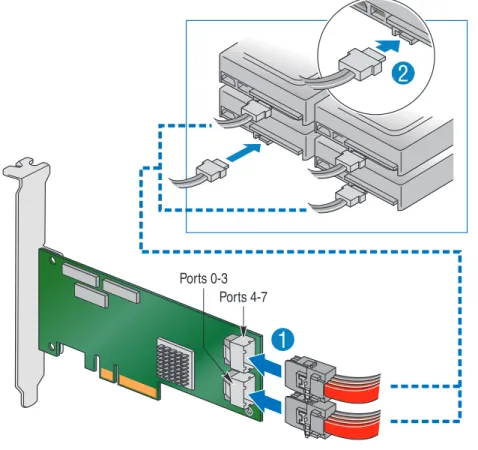
Intel® RAID Controller SASMF8I Hardware User’s Guide 7 5. Connect the SAS/SATA cables from the backplane (or hard drives) to the RAID
Controller. Make sure the cables are properly connected to the controller.
Figure 2. Attaching cables to the Intel® RAID Controller SASMF8I
Note: System throughput problems can occur if the SAS cables that come with the RAID
controller are not used. To minimize the potential for problems:
— Use cables no longer than ten meters for SAS and one meter for SATA. It is better to use the shortest possible cables. The cable length should be reduced by about one foot (.33 meters) if using a backplane.
— You may connect one device per SATA/SAS cable either as a device or as an expander.
— Route SAS cables carefully.
— Use only “straight” SAS cables, not “cross-over” SAS cables.
6. Replace components you needed to remove to access the PCI Express add-in card slot. For instructions, see your server chassis documentation.
7. Reinstall the chassis cover and reconnect the power cord(s). For instructions, see your server chassis documentation.
8. Reconnect any peripheral items you needed to disconnect.
9. Turn the power on to the server and hard drives. As the server powers up, listen to be sure that the SAS and SATA devices are powered up before or at the same time as the computer boots.
Ports 0-3 Ports 4-7
1
8 Intel® RAID Controller SASMF8I Hardware User’s Guide
10. Watch the boot process until you see a BIOS message to inform you of the key combination to press to enter the Intel® Embedded Server RAID Technology II Configuration Utility. A message similar to the following appears:
Press <CTRL> + <E> to run the Intel® Embedded Server RAID Technology II Configuration Utility.
This message times out after several seconds. If you miss it, you will pass the option to get into the Intel® Embedded Server RAID Technology II Configuration Utility. The firmware takes several seconds to initialize and then displays the Intel® RAID Controller SASMF8I number and firmware version. The numbering of the controllers follows the PCI slot scanning order used by the server board.
Intel® RAID Controller SASMF8I Hardware User’s Guide 9
Connecting the Cables
This section describes the cables used on the SAS controller and provides instructions for connecting SAS and SATA hard disk drives to the SAS RAID controller.
Note: Use only “straight” SAS cables, not “cross-over” SAS cables.
The cable supplied with the Intel® RAID Controller SASMF8I is for SATA drives or a SAS backplane connection.
A SATA connector consists of a signal connector and a power connector. The SAS connector adds a bridge (primary physical link) between the signal connector and the power connector. This means SAS backplane connectors can accept either drive type, but SATA backplane connectors can ONLY accept SATA drives. Figure 3 shows these connectors.
Figure 3. SAS and SATA Plugs and SAS Backplane Connector
Configuring the Storage Adapter
After installing the Intel® RAID Controller SASMF8I, you must configure the storage adapter and install the operating system driver. The Intel®IT/IR RAID Intel® IT/IR RAID Software User’s Guide instructs you on the configuration options and how to set them on your Intel® RAID Controller SASMF8I, and provides detailed installation instructions for operating system drivers.
10 Intel® RAID Controller SASMF8I Hardware User’s Guide
Replacing a Controller
To replace a failed controller, follow these steps:
1. Power off the computer, all drives, enclosures, and system components. Remove the power cord.
2. Remove the chassis cover and access the PCI Express* add-in card slots. For instructions, see your server documentation.
3. Disconnect the cable(s) from the RAID controller. 4. Remove the failed controller from the system.
5. Insert the replacement controller into the system. For instructions, see “Installing the RAID Controller”.
Intel® RAID Controller SASMF8I Hardware User’s Guide 11
3
Intel
®
RAID Controller SASMF8I
Characteristics
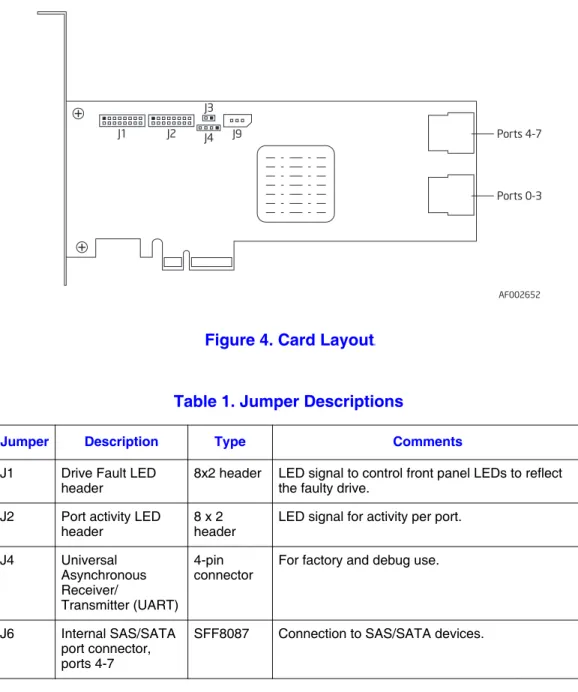
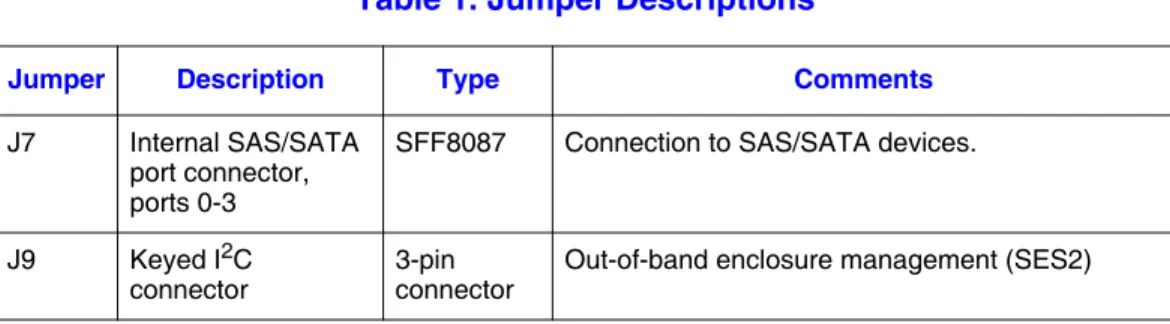
This chapter describes the characteristics of the Intel® RAID Controller SASMF8I. Figure 4 displays the connectors and headers on the controller and Table 1 describes them.
Figure 4. Card Layouts
Table 1. Jumper Descriptions
Jumper Description Type Comments
J1 Drive Fault LED
header 8x2 header LED signal to control front panel LEDs to reflect the faulty drive. J2 Port activity LED
header 8 x 2 header LED signal for activity per port. J4 Universal
Asynchronous Receiver/
Transmitter (UART) 4-pin
connector For factory and debug use.
J6 Internal SAS/SATA port connector, ports 4-7
SFF8087 Connection to SAS/SATA devices.
AF002652 Ports 4-7 Ports 0-3 J1 J2 J3 J4 J9
12 Intel® RAID Controller SASMF8I Hardware User’s Guide
Technical Specifications
The design and implementation of the Intel® RAID Controller SASMF8I minimizes electromagnetic emissions, susceptibility to radio frequency energy, and the effects of electrostatic discharge. See the appendices for regulatory marks and certifications. Table 2 lists the specifications for the Intel®RAID Controller SASMF8I.
J7 Internal SAS/SATA port connector, ports 0-3
SFF8087 Connection to SAS/SATA devices.
J9 Keyed I2C
connector 3-pin connector Out-of-band enclosure management (SES2)
Table 1. Jumper Descriptions
Jumper Description Type Comments
Table 2. Specifications
Specification Intel® RAID Controller SASMF8I
Operating Voltage +3.3 V, +12 V
Card Size Low-profile MD2 PCI Express* adapter card size (6.600 inches by 2.713 inches)
Array Interface
to Host PCI Express* Rev 1.0A, x4 lane width 2.5 Gbps SAS Bus Speed 3 GBps per port, point-to-point
SAS Controller One LSI SAS 1068 controller
SAS / SATA Ports 2x4 internal ports. Supports 8 SAS/SATA devices using expanders, and 40 virtual disks.
Firmware 2 MB in reflashable flash ROM
Compatible Devices
•
Mixed capacity, mixed SATA II and SAS in different enclosures•
Non-disk devices, including expanders. Cabling•
Small, thin cables that do not restrict airflow•
Shared connectors for multiple drive types. RedundantConfiguration
Config on disk (COD) stores RAID configuration. Enclosure
Management I
Intel® RAID Controller SASMF8I Hardware User’s Guide 13
Array Performance Features
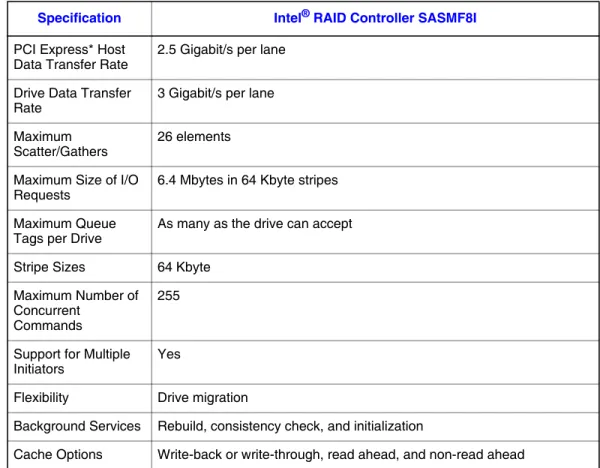
Table 3 lists the Intel® RAID Controller SASMF8I array performance features.
Fault Tolerance
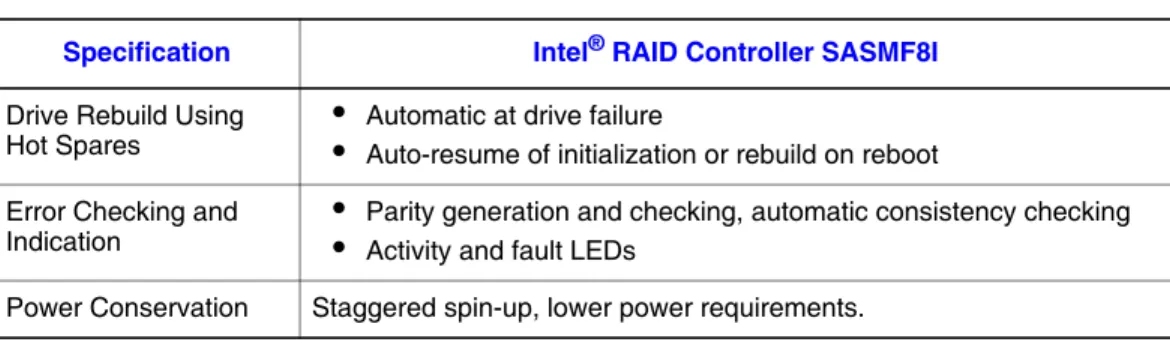
Table 4 lists the Intel® RAID Controller SASMF8I fault tolerance features. Table 3. Array Performance Features
Specification Intel® RAID Controller SASMF8I
PCI Express* Host
Data Transfer Rate 2.5 Gigabit/s per lane Drive Data Transfer
Rate 3 Gigabit/s per lane
Maximum
Scatter/Gathers 26 elements Maximum Size of I/O
Requests 6.4 Mbytes in 64 Kbyte stripes Maximum Queue
Tags per Drive As many as the drive can accept Stripe Sizes 64 Kbyte
Maximum Number of Concurrent
Commands
255
Support for Multiple
Initiators Yes
Flexibility Drive migration
Background Services Rebuild, consistency check, and initialization
Cache Options Write-back or write-through, read ahead, and non-read ahead
Table 4. Fault Tolerance Features
Specification Intel® RAID Controller SASMF8I
Self Monitoring Analysis and Reporting Technology (SMART) support
Detects up to 70% of all predictable disk drive failures and monitors the internal performance of all motors, heads, and drive electronics.
Drive Replacement
•
Auto detection of hard drive failure•
Hot-plug, hot-swap14 Intel® RAID Controller SASMF8I Hardware User’s Guide
Electrical Characteristics
This section provides the power requirements for the Intel® RAID Controller SASMF8I. Table 5 lists the maximum power requirements.
Thermal and Atmospheric Characteristics
The thermal and atmospheric characteristics are:
•
Relative humidity range: 5% to 90% non-condensing•
Maximum dew point temperature: 32°C•
Airflow must be at least 200 linear feet per minute (SFPM) to avoid operating above the maximum ambient temperature.The storage and transit environment conditions are:
•
Temperature range from -30°C to 80°C (dry bulb).•
Relative humidity range: 5% to 90% non-condensingSafety Characteristics
The Intel® RAID Controller SASMF8I meets or exceeds the requirements of UL flammability rating 94 V0. Each bare board is also marked with the supplier name or trademark, type, and UL flammability rating. For the boards installed in a PCI Express* bus slot, all voltages are lower than the SELV 42.4 V limit.
Drive Rebuild Using
Hot Spares
•
•
Automatic at drive failureAuto-resume of initialization or rebuild on reboot Error Checking andIndication
•
•
Parity generation and checking, automatic consistency checkingActivity and fault LEDs Power Conservation Staggered spin-up, lower power requirements.Table 4. Fault Tolerance Features
Specification Intel® RAID Controller SASMF8I
Table 5. Electrical Characteristics PCI / PCI Express*
/ Express +12 V PCI / +5.0 V PCI / PCI Express / Express +3.3 V PCI PRSNT1# / 2# Power Operating Range Temperature N/A N/A 1 A 3.2 W 0° C to 45° C
Intel® RAID Controller SASMF8I Hardware User’s Guide 15 The design and implementation minimizes electromagnetic emissions, susceptibility to radio frequency energy, and the effects of electrostatic discharge. The adapter carries the CE mark, C-tick mark, FCC self-certification logo, Canadian compliance statement, Korean MIC, Taiwan BSMI, and Japan VCCI. The adapter meets the requirements of CISPR Class B. This adapter matches the description in CCSA C22.2, No. 60950-1, UL60950-1 First Edition listed accessory, UL filenumber E257743.
16 Intel® RAID Controller SASMF8I Hardware Guide
A
Glossary of Terms and Abbreviations
BIOS Basic Input/Output System. Software that provides basic read/write capability. Usually kept as firmware (ROM based). The system BIOS on a server board is used to boot and control the system. The BIOS on your host adapter acts as an extension of the system BIOS.
Configuration The way a computer is setup; the combined hardware components (computer,
monitor, keyboard, and peripheral devices) that make up a computer system, and the software settings that allow the hardware components to communicate with each other.
Device Driver A program that allows a microprocessor (through the operating system) to direct the
operation of a peripheral device.
Domain Validation
A software procedure in which a host queries a device to determine its ability to communicate at the negotiated data rate.
EEPROM Electronically Erasable Programmable Read-Only Memory. A memory chip
typically used to store configuration information. It provides stable storage for long periods without electricity and can be reprogrammed. See NVRAM.
External SAS Device
A SAS device installed outside the computer cabinet. These devices are connected together using specific types of shielded cables.
Host The computer system in which a storage adapter is installed. It uses the storage adapter to transfer information to and from devices attached to the SCSI bus.
Host Adapter Board (HAB)
A circuit board or integrated circuit that provides a device connection to the computer system.
Internal SAS Device
A SAS device installed inside the computer cabinet. These devices are connected together using an unshielded ribbon cable.
Main Memory The part of a computer’s memory which is directly accessible by the CPU (usually
synonymous with RAM).
NVRAM Non-volatile Random Access Memory. An EEPROM (Electronically Erasable
Read-Only Memory chip) used to store configuration information. See EEPROM.
Peripheral Devices
A piece of hardware (such as a video monitor, disk drive, printer, or CD-ROM) used with a computer and under the computer’s control. SCSI peripherals are controlled through a SAS Intel® RAID Controller SASMF8I.
Intel® RAID Controller SASMF8I Hardware Guide 17
SAS Serial-attached SCSI. A serial, point-to-point, enterprise-level device interface that leverages the proven SCSI protocol set. The SAS interface provides improved performance, simplified cabling, smaller connections, lower pin count, and lower power requirements when compared to parallel SCSI. SAS controllers leverage a common electrical and physical connection interface that is compatible with Serial ATA. The SAS controllers support the ANSI Serial Attached SCSI standard, version 1.0. In addition, the controller supports the Serial ATA (SATA) protocol defined by the Serial ATA specification, version 1.0a. Each port on the SAS RAID controller supports SAS and SATA devices.
SAS Device Any device that conforms to the SAS standard and is attached to the SAS bus by a