V Mamoru Yokoyama V Hiroshi Yazawa
(Manuscript received January 17, 2007)
Vendors have recently been offering more products and solutions for IT system “automation” management. Fujitsu’s “Systemwalker Resource Coordinator” is a product that provides an infrastructure for automation to reduce the administrative costs of a complex, large-scale IT system. Although the term “automation” is often used to discuss system management, how this technology can be applied to actual systems and what benefits it will provide are not fully understood. Automation entails certain aspects such as monitoring, correcting, and acting. Systemwalker Resource Coordinator provides provisioning technology for self-acting. This paper outlines the provisioning technology of Systemwalker Resource Coordinator and cites several case studies in describing how Systemwalker Resource Coordinator resolves many common issues facing system administrators.
1. Introduction
Today many enterprises are struggling to adapt to rapidly changing business models and the dynamic demands of business and customers. To remain competitive, IT departments must do more, do it faster, and do it with less. A common reaction to this issue is to simply add more IT staff. However, human resources account for a major portion of IT costs and additional human resources increase both risk and cost in administrative operations. Therefore, enterprises must find ways to operate more efficiently by automating labor-intensive IT tasks and opera-tions. Automation shifts the focus from the manual performance of repetitive and complex tasks to the optimization of IT processes. Automation provides processes and machines with self-managing mechanisms such as for monitoring, correcting, and acting.
Many IT vendors are now releasing products
and solutions1) for “automation.” However, the application of this technology to actual systems and the benefits to be provided are not fully understood. For instance, automation may be considered only applicable to large enter-prise data center systems, and not to small and medium-size systems, or the application of automation solutions to customer sites may be considered premature since automation entails a complete change in system administration processes.
Fujitsu has released a product called “Systemwalker Resource Coordinator” (hereafter “Resource Coordinator”) that provides provi-sioning technology for self-acting. This paper describes the key technologies of Resource Coordinator used to apply automation solutions to systems and cites case studies in describing how Resource Coordinator solves system manage-ment issues.
2. Main Features of Resource
Coordinator
This section describes the key technologies2) of Resource Coordinator that are used to realize a self-acting infrastructure for automation.
2.1 Virtualization and visualization of
system configuration
The first step in automation is to correctly monitor the system status. System virtualization is one of the ways to easily recognize and manage the system configuration. The system admin-istrator registers physical information about the servers, storage, and network resources of the IT system, and then Resource Coordinator recognizes the physical connectivity between these physical resources. The system admin-istrator also introduces the logical names of business applications and defines the required logical resources and logical connectivity of those business applications. Resource Coordinator is an infrastructure for managing the assignment of physical resources, the relationships between logical resources, and the relationships between physical and logical resources and therefore allows the system configuration to be flexibly changed.
Resource Coordinator also enables the physical configuration of virtualized resources and the relationships between and status of resources to be visualized at a glance. It also detects fault locations using the error informa-tion about related resources and knowledge regarding logical connectivity, which previously required human effort and experience. Moreover, a graphical presentation shows the fault location and area of impact.
2.2 System image management and
deployment
Resource Coordinator centrally manages business applications as part of a system image (called the master image) that includes the operating system run on the management
servers. When a server is assigned to run a business application, Resource Coordinator automatically deploys the required master image to that server. This feature not only simplifies and speeds up operation, it also distinguishes newly installed or additional servers that have been added to a system. Resource Coordinator can retain multiple generations of system images for each business application, with each image provided with notation to describe its contents. This description can be referenced in selecting an adequate image for restoration or deployment.
When the system administrator needs to apply patches to multiple servers, the image on one server with the patch can be simultaneously deployed to multiple servers, which dramatically reduces the time needed to apply patches and test multiple servers.
2.3 Server boot from RAID system
The boot image is conventionally bound closely to a dedicated server. Consequently, replacing a server due to server failure and adding a server entails installing the operat-ing system and software on the new system. Resource Coordinator, however, manages the boot configuration (called “SAN boot”) that retains system images on the RAID system disk in the Storage Area Network (SAN). This configuration enables the physical separation of server devices and system images, and Resource Coordinator centrally manages the relations between servers and system images (Figure 1) so that the assign-ment of relations is flexible. For example, “system image#2,” which was used by “server#B,” is used to boot “server#C” when “server#B” became corrupted. Other example would be booting “server#D” from “system image#3” during the day and booting it from “system image#4” at night.
Since Resource Coordinator automatically configures the setting of RAID system disks and fibre-channel switches for SAN boot, the system administrator can easily prepare the required
system through simple operations. Accessing disks in the RAID system usually requires isola-tion for security reasons; therefore, Resource Coordinator manages connectivity from a specific server to a specific disk in consideration of security, and automatically applies necessary changes in connectivity to fibre-channel switches and the RAID system when changing servers and/or applications.
2.4 Optimization of resource allocation
(provisioning)
A spare pool of server and storage resources can be created. Server and storage resources in the spare pool can be dynamically assigned and unassigned to meet the system change require-ments such as workload.
1) Server provisioning
In line with changes in business application workload or in case of an abnormality, servers in a server pool are dynamically assigned or servers assigned to a business application are dynamically unassigned when these servers are no longer necessary. Along with the changes of assignment, Resource Coordinator automatically changes storage, network, and software settings.
2) Storage provisioning
In line with the required quantity of data, disk volumes in a storage pool are dynamically assigned or unassigned. Along with the changes of assignment, Resource Coordinator automati-cally changes RAID system, fibre-channel switch, and software settings.
2.5 Changing the role of the system
(repurposing)
The role of the system can be easily changed to suit the user’s specific needs by separating server devices and system boot disks through SAN boot.
By specifying the required business applications to servers, Resource Coordinator automatically changes the connectivity of servers and disks, and starts those business applications when the servers are rebooted.
3. Case studies
This section cites specific case studies in describing how Resource Coordinator uses the features described in Section 2 to resolve issues facing system administrators.
3.1 Management of an increasingly
complex system configuration
Adding servers and storage to introduce additional business applications to an exist-ing system makes it difficult to correctly follow changes in the system configuration. The system administrator needs to understand such physi-cal and logiphysi-cal configurations as the disk layout in the RAID system, the access paths from servers to storage, the file system configura-tion and databases, and the interrelaconfigura-tionship between these configurations, which may exceed the capacity of manual operation upon further expansion. The initial system configuration chart may not solve this issue because it is usually not updated to the latest configuration.
By applying Resource Coordinator, the current system configuration is visualized 3YSTEM
3YSTEM 3YSTEM 3YSTEM
3YSTEMIMAGES 2!)$SYSTEM 3ERVER
! 3ERVER" 3ERVER# 3ERVER$ 3ERVERS
.IGHTTIME $AYTIME
3YSTEMWALKER2ESOURCE#OORDINATOR 3YSTEMWALKER2ESOURCE#OORDINATOR
Figure 1
graphically so that the administrator can under-stand it at a glance. It shows not only physical connectivity, but also the logical relations between SAN, access paths on the server side, volumes, the file system, and databases (Figure 2). Moreover, Resource Coordinator applies changes in settings for adding disks and RAID devices through a simple operation, and thus dramatically reduces the burden on the system administrator.
Resource Coordinator also enables the system administrator to quickly and easily identify the fault location of a device and the area of impact through graphical presentation.
3.2 System image backup management
System administrators typically make a backup of the system after its construction and store it on external media like magnetic tape in case of an unexpected system failure. As more servers and system generations are managed, however, more administrative cost is required. If system recovery is required due to system
failure, the administrator must also determine the appropriate backup media and perform recov-ery operation. These administrative tasks entail a lot of human resources and time.
Resource Coordinator centrally manages the backup of system images, and thereby reduces the costs of human resources needed for backup operation, backup data management, and recov-ery operation (Figure 3).
Resource Coordinator automatically manages the generation of backups. As a supplemental function for backup generation management, a text comment can be described for each backup. For instance, three backup generations for the system image for “Server#A” are created and text comments for each generation are described as “Server#A with no patch,” “Server#A with patch A,” and “Server#A with patches A and B.” These comments help the system administrator deter-mine which appropriate backup generation to restore when the system configuration must be restored to the previous one.
SAN
RAID system Servers
Figure 2
3.3 Recovery from server failure
The safe and quick recovery of online service from system failure is now a mandatory requirement for system management. Resource Coordinator can be applied to a system that does not require quick failover like a cluster system, but service must be recovered automatically in a short time, such as within one hour.
Once Resource Coordinator detects failure in the server hardware, it recovers the server failure by using a spare server and copying the image of the system in which the server failed from the master image to the local disk on the spare server, and then reboots the spare server instead of the failed server (Figure 4). Resource Coordinator also automatically configures network settings like IP address.
In the SAN environment, server recovery can be completed even more quickly. Once Resource Coordinator detects failure in the server hardware, it recovers the server failure by using a spare server and changing access permis-sion from the failed server to the spare server in the Fibre Channel (FC) switch and RAID device configuration, and then reboots the spare server (Figure 5). Since SAN boot requires no copying of system image data, server recovery can be achieved more quickly than in a local disk boot environment. The SAN access path is usually
configured to permit access only from a specific server to the specific Logical Unit Number (LUN) device for security reasons. Resource Coordinator considers SAN access path security and automat-ically changes the SAN access path settings of the FC switch and RAID device to enable spare server operation.
This methodology makes it possible to share spare servers among different server OS platforms like Windows and Linux.
3.4 Consolidation of dispersed servers
Similar systems are often dispersed for each respective division. This provides the opportu-nity to consolidate servers. However, collecting systems in one place is often inadequate, and may result in concentrating the administrator’s workload instead of reducing it.Resource Coordinator can reduce adminis-trative costs by not simply collecting dispersed servers but consolidating the servers adequately.
Using Resource Coordinator to prepare system images for multiple servers in a consoli-dated server farm will dramatically reduce the time required, instead of having to manually install individual items of software. If software updates like a security patch must be installed for many servers simultaneously, Resource Coordinator can reduce the installation time by deploying updated system images to multiple servers at once.
3.5 Effective server usage for multiple
purposes
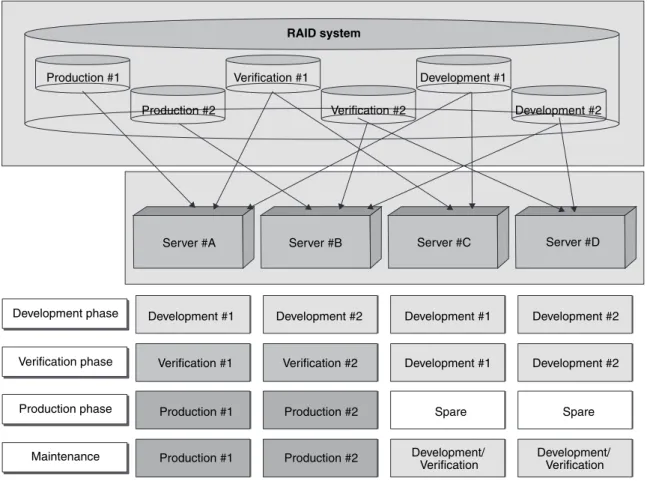
A system involved in the development of applications often prepares servers individually for each application being developed, as well as for testing and service purposes. Servers used for development and testing are fully operated in the development phase. However, once appli-cation development phase has finished and the service phase begins, these servers are only used in the maintenance and application enhancement phases.
3YSTEM! 3YSTEM" 3YSTEM! 3YSTEM"
3YSTEM! 3YSTEM" 3YSTEM! 3YSTEM" "ACKUP
3TORINGSYSTEM IMAGES
2ESTORE
$EPLOYINGSYSTEM IMAGES
-ASTERIMAGE
3ERVER
! 3ERVER"
Figure 3
Figure 4
Automatic recovery from server failure (local boot environment).
Figure 5
Automatic recovery from server failure (SAN boot environment). Master image
Copy system image
System #1 System #2
System #1 System #2 System #2
Allocate spare
Server #A Server #B Spare server Server pool
Fibre Channel switch Allocate spare
System #1 System #2
RAID system
Likewise, the frequency of using develop-ment servers varies and some customer sites face the challenge of efficiently using develop-ment servers. All procedures ultimately depend, however, on manual operations. Therefore, changing the purpose of a server requires many manual operations, such as restoring backup images, changing IP addresses, changing the SAN configuration, and installing necessary software packages, resulting in the system administrator possibly spending a lot of time and performing administrative work before verifying or testing the system. Moreover, these manual operations might disrupt the system configuration and adversely affect the production environment due to human error.
To effectively use development servers in a simple and easy manner, Resource Coordinator
provides two functions: server repurposing and system image management/deployment. These functions enable optimized server alloca-tion dependent on individual system lifecycles such as development, verification, production, and maintenance (Figure 6). For instance, all servers are allocated as development servers in the development phase and servers are migrated stepwise from development to verification in the verification phase. Once the production phase begins, development and verification servers are reserved in the server pool in case of emergency. When development servers are required for enhancing software or verification servers are needed to verify software patches, servers in the server pool are temporally allocated to the devel-opment or verification system.
In the server management described above,
Figure 6
Case of practical use for effective server usage for multiple purposes. Server #A
Development #1 Development #1
Development #1
Development #1 Development #2
Development #2 Development #2
Development #2 Development phase
Verification phase
Development/
Verification Development/ Verification
Production phase Production #1
Production #1
Production #1 Production #2
Production #2 Production #2
Verification #1
Verification #1
Verification #2 Verification #2
Maintenance
Server #B Server #C
Spare Spare
Server #D RAID system
the system administrator simply performs a single operation to “add” or “remove” servers like “server#A” and “server#B” to and from server groups like “Development#1” and “Verification#1” that correspond to each purpose. Since Resource Coordinator automatically configures the addition and removal of servers, including system deployment, the SAN switch configura-tion, and IP address setting, there is no risk of the system being stopped for a long time due to improper operation caused by human error, and thus the system administrator obtains the safe and efficient use of servers.
The allocation of user data in SAN storage also ensures that the latest data is always stored in SAN storage. Moreover, when a server is previously used as a development server and repurposed as a verification server, it can be reassigned as a development server, since allocat-ing user data on SAN enables a quick start in using the last development data from the SAN.
4. Future plans
Resource Coordinator currently provides resource management and provisioning functions to manage such physical resources as servers, storage, networks, and software. There are now plans for Resource Coordinator to support virtualized servers like VMware and Xen, and also support virtual I/O environments using virtualized Media Access Control (MAC) and World Wide Port Name (WWPN).
In the near future, Resource Coordinator will provide solutions not only for physical servers and I/O environments, but also for virtual servers and I/O environments to realize unified infrastructure management intended to help system administrators streamline system management processes and optimize IT systems.
5. Conclusion
Resource Coordinator realizes automation to resolve many immediate problems faced by system administrators. System adminis-trators can streamline system management processes and reduce costs by applying Resource Coordinator to various solutions in such system management scenarios as system configuration management, system image backup management, recovery from server failure, the consolidation of servers, and effective use of servers for multiple purposes.
Our ultimate goal is to realize autonomic computing,3) an important aspect of which is automation. Autonomic computing poses the highest challenge in creating self-managing systems and optimizes the use of resources. Through such optimization, autonomic computing enables IT to adapt more quickly and efficiently to changing business needs. For this reason, Resource Coordinator will continue providing automation technologies and solutions for the optimization of resources through autonomic computing.
References
1) R. Fichera et al.: Organic IT in Japan. Forrester Research, November 21, 2005.
http://www.forrester.com/Research/Document/ Excerpt/0,7211,38224,00.html
2) T.Hirao et al.: Resource Management. FUJITSU Sci. Tech.J., 40, 1, p.123-132 (2004).
3) J. O. Kephart et al.: The Vision of Autonomic Computing. IEEE Computer, 36, 1, p.41-50 (2003).
Mamoru Yokoyama, Fujitsu Siemens Computers, GmbH.
Mr. Yokoyama received the B.S. and M.S. degrees in Computer Science from Tokyo Institute of Technology, Tokyo, Japan in 1988 and 1990, respectively. He joined Fujitsu Limited in 1990, where he was engaged in software development until 2005. Since 2005, he has been working at Fujitsu Siemens Computers, GmbH, in Munich, Germany.
Hiroshi Yazawa, Fujitsu Ltd.
Mr. Yazawa received the B.S. degree in Electrical and Computer Engineering from Yokohama National University, Yokohama, Japan in 1992. He joined Fujitsu Ltd., Yokohama, Japan in 1992, where he was engaged in research and development of applications for UNIX workstations. He is currently engaged in research and development of Systemwalker Resource Coordinator.