Copyright UPnP Forum © 2011. All rights reserved
For UPnP Version 1.0
Status: Standardized DCP (SDCP), Version 1.0
Date: February 24, 2011
Service Template Version: 2.00
This Standardized DCP has been adopted as a Standardized DCP by the Steering
Committee of the UPnP Forum, pursuant to Section 2.1(c)(ii) of the UPnP Forum
Membership Agreement. UPnP Forum Members have rights and licenses defined by
Section 3 of the UPnP Forum Membership Agreement to use and reproduce the
Standardized DCP in UPnP Compliant Devices. All such use is subject to all of the
provisions of the UPnP Forum Membership Agreement.
THE UPNP FORUM TAKES NO POSITION AS TO WHETHER ANY
INTELLECTUAL PROPERTY RIGHTS EXIST IN THE STANDARDIZED DCPS.
THE STANDARDIZED DCPS ARE PROVIDED "AS IS" AND "WITH ALL
FAULTS". THE UPNP™ FORUM MAKES NO WARRANTIES, EXPRESS,
IMPLIED, STATUTORY, OR OTHERWISE WITH RESPECT TO THE
STANDARDIZED DCPS, INCLUDING BUT NOT LIMITED TO ALL IMPLIED
WARRANTIES OF MERCHANTABILITY, NON-INFRINGEMENT AND FITNESS
FOR A PARTICULAR PURPOSE, OF REASONABLE CARE OR WORKMANLIKE
EFFORT, OR RESULTS OR OF LACK OF NEGLIGENCE.
© 2011 UPnPForum. All rights reserved.
* Note: The UPnP Forum in no way guarantees the accuracy or completeness of this author list and in no way implies any rights for or support from those members listed. This list is not the specifications’ contributor list that is kept on the UPnP Forum’s website.
Authors * Company
Vic Lortz (Security TF Chair) Intel Corporation Mika Saaranen (Gateway WC chair) Nokia Corporation
Contents
Contents ... 2
List of Tables ... 4
List of Figures ... 5
1 Overview and Scope ... 6
1.1 Introduction ... 6
1.1.1 Motivation for Updating the UPnP Security Framework ... 6
1.1.2 This service provides control points with the following functionality: ... 6
1.1.3 This service does not provide the following functionality: ... 7
1.2 Access Control Model ... 7
1.3 Notation ... 7 1.3.1 Data Types ... 8 1.4 Vendor-defined Extensions ... 8 1.5 References ... 9 1.5.1 Normative References ... 9 1.5.2 Informative References ... 10
2 Service Modeling Definitions (Normative) ... 11
2.1 Service Type ... 11
2.2 Terms and Abbreviations ... 11
2.2.1 Abbreviations ... 11
2.2.2 Terms ... 12
2.3 DeviceProtection Service Architecture ... 12
2.3.1 Device Discovery and Control Layer Security ... 13
2.3.2 Scope of DeviceProtection Access Control Policy ... 14
2.3.3 Case Sensitivity of Names ... 14
2.3.4 TLS Renegotiation Attack Protection ... 14
2.4 State Variables ... 14
2.4.1 State Variable Overview ... 14
2.4.2 SetupReady ... 14
2.4.3 SupportedProtocols ... 15
2.4.4 A_ARG_TYPE_ACL ... 16
2.4.5 A_ARG_TYPE_IdentityList ... 19
2.4.6 A_ARG_TYPE_Identity ... 20
2.5 Eventing and Moderation ... 22
2.6 Actions ... 22 2.6.1 SendSetupMessage() ... 23 2.6.2 GetSupportedProtocols() ... 24 2.6.3 GetAssignedRoles() ... 25 2.6.4 GetRolesForAction() ... 26 2.6.5 GetUserLoginChallenge() ... 27 2.6.6 UserLogin() ... 29 2.6.7 UserLogout() ... 31 2.6.8 GetACLData() ... 32 2.6.9 AddIdentityList() ... 34
2.6.10 RemoveIdentity() ... 36
2.6.11 SetUserLoginPassword() ... 37
2.6.12 AddRolesForIdentity() ... 38
2.6.13 RemoveRolesForIdentity() ... 40
2.6.14 Relationships Between Actions ... 41
2.6.15 Error Code Summary ... 42
2.7 Service Behavioral Model ... 42
3 Theory of Operation (Informative) ... 46
3.1 Determining Roles Required for Actions ... 46
3.2 Obtaining a Certificate ... 46
3.3 Obtaining Required Role(s) ... 47
3.3.1 Scenario 1: Control Point Initial Introduction for Role(s) ... 48
3.3.2 Scenario 2: Push-Putton Control Point Introduction ... 48
3.3.3 Scenario 3: Headless Control Point PIN Introduction ... 49
3.4 Indirect Control Point Introduction ... 50
3.5 Gaining Administrative Privileges ... 51
3.6 Changing User Login Passwords ... 52
3.7 Managing Roles of Identities ... 53
4 XML Service Description ... 55
Appendix A. Wi-Fi Protected Setup Introduction Protocol (Normative) ... 62
Appendix B. Security Considerations (Informative) ... 65
4.1 Discovery and Description ... 65
4.2 Control ... 66
4.3 Eventing ... 67
List of Tables
Table 2-1: Abbreviations ... 11
Table 2-2: DeviceProtection SSDP extension header ... 13
Table 2-3: State Variables ... 14
Table 2-4: Eventing and Moderation ... 22
Table 2-5: Actions ... 22
Table 2-6: Arguments for SendSetupMessage() ... 23
Table 2-7: Error Codes for SendSetupMessage() ... 24
Table 2-8: Arguments for GetSupportedProtocols() ... 24
Table 2-9: Error Codes for GetSupportedProtocols() ... 25
Table 2-10: Arguments for GetAssignedRoles() ... 25
Table 2-11: Error Codes for GetAssignedRoles() ... 26
Table 2-12: Arguments for GetRolesForAction() ... 26
Table 2-13: Error Codes for GetRolesForAction() ... 27
Table 2-14: Arguments for GetUserLoginChallenge() ... 27
Table 2-15: Error Codes for GetUserLoginChallenge() ... 29
Table 2-16: Arguments for UserLogin() ... 29
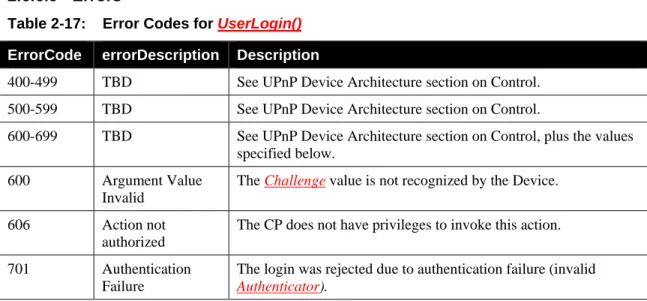
Table 2-17: Error Codes for UserLogin() ... 31
Table 2-18: Error Codes for UserLogout() ... 31
Table 2-19: Arguments for GetACLData() ... 32
Table 2-20: Error Codes for GetACLData() ... 34
Table 2-21: Arguments for AddIdentityList() ... 34
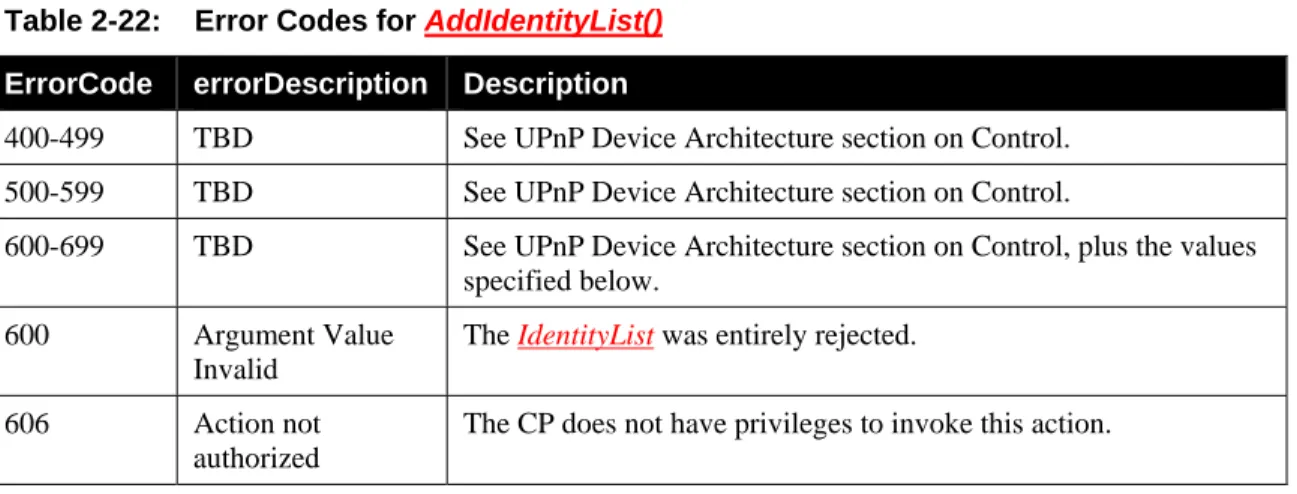
Table 2-22: Error Codes for AddIdentityList() ... 36
Table 2-23: Arguments for RemoveIdentity() ... 36
Table 2-24: Error Codes for RemoveIdentity() ... 37
Table 2-25: Arguments for SetUserLoginPassword() ... 37
Table 2-26: Error Codes for SetUserLoginPassword() ... 38
Table 2-27: Arguments for AddRolesForIdentity() ... 39
Table 2-28: Error Codes for AddRolesForIdentity() ... 40
Table 2-29: Arguments for RemoveRolesForIdentity() ... 40
Table 2-30: Error Codes for RemoveRolesForIdentity() ... 41
Table 2-31: Error Code Summary ... 42
List of Figures
Figure 3-1: Default WPS-based Introduction. ... 48
Figure 3-2: Push-Button Control Point Introduction. ... 49
Figure 3-3: Headless Control Point Introduction. ... 50
Figure 3-4: Identity Data Synchronization. ... 51
Figure 3-5: Gaining Administrative Privileges. ... 52
Figure 3-6: Editing a Login Password. ... 53
1 Overview
and
Scope
This service definition is compliant with the UPnP Device Architecture version 1.0. It defines a service type referred to herein as DeviceProtection.
1.1 Introduction
The DeviceProtection:1 service is intended to provide roughly equivalent functionality to UPnP Security 1.0. The goal in introducing this new service is to address a variety of issues that have inhibited
deployment of the earlier design in the industry. A brief overview of the motivation and requirements of this specification are given below.
1.1.1
Motivation for Updating the UPnP Security Framework
The UPnP Security DCP version 1.0 was published by the UPnP Forum in November, 2003. Since that time, product support and deployment of this standard has been extremely limited. A variety of factors have contributed to the lack of support:
• The user experience of the setup process was considered by some as too complex and cumbersome.
• Some of the advanced UPnP Security features depended upon security standards such as SPKI that were not widely supported in the industry.
• The UPnP Security 1.0 model is based on a “3 box” approach, requiring presence of a Security Console with a rich user interface. This dependency is a significant deployment obstacle. • Lack of consensus within the UPnP Forum regarding deployment of UPnP Security increased the
risks and reduced the benefits of implementation in products.
In addition to these issues, the following developments have occurred since the 1.0 release that have been taken into account in the new design.
• Wi-Fi networks have become prevalent in homes, and a new standard for setting them up securely has been established. This new standard, called Wi-Fi Protected Setup [WPS], is based on a simpler user experience than UPnP Security 1.0. The rapid adoption of WPS indicates that manufacturers believe the user experience of WPS is acceptable to the broad market.
• The DLNA has identified several new scenarios requiring security that have increased the urgency of developing a deployable framework for security in UPnP.
• New threats have emerged against home devices based on active attacks launched by malicious websites through browser extensions on home PCs.
• UPnP services for remote access to UPnP networks is being standardized based on VPN technology. This development provides an alternative approach to supporting secure remote access to UPnP devices.
1.1.2
This service provides control points with the following functionality:
• Device and Service Description – Security-aware Control Points can securely retrieve Device andservice descriptions based on an SSDP extension header.
• Initial Introduction – Security-aware Control Points can securely introduce themselves to Devices and thereby establish basic access privileges for their Control Point Identity.
• Device and Control Point Authentication – Device authentication to the Control Point is
accomplished via an X.509 server peer certificate exchanged in a TLS handshake. Control Point authentication to a device is accomplished via an X.509 client peer certificate exchanged in a TLS handshake. The certificate chains exchanged in the handshake are NOT required to be signed by a commercial Certificate Authority with well-known keys. Instead, it is expected that
Devices and Control Points will generate their own CA certificates. The DeviceProtection security model derives its trust basis from local peer-to-peer introduction procedures rather than pre-configured roots of trust. A Device implementation may support a more complex model that takes into account the certificate issuer in access control decisions. However, DeviceProtection does not provide any mechanisms for expressing or establishing access control policies based on trusted CAs. Therefore, access control policies based on trusted CA roots and longer certificate chains (which would require a separate TLS handshake) are outside the scope of
DeviceProtection.
• User Authentication – A user can establish their username/password identity over a previously-established TLS connection authenticated using Device and Control Point certificates. • Privacy and integrity protection for SOAP services and Presentation Pages – Privacy and
integrity protection is provided at the HTTPS transport level using standard TLS.
• Examination and manipulation of access control policy – an authenticated and authorized Control Point can read and configure a Device’s access control policy for Control Point and/or User Identities.
• Enumeration of Roles supported by Devices – Roles are names associated with a set of access rights. When a Role or set of Roles is assigned to a Control Point Identity or User Identity, that identity is granted access rights associated with the Role(s).
1.1.3
This service does not provide the following functionality:
Explicit non-goals of the DeviceProtection service include:• Platform security for UPnP devices – DeviceProtection does not address problems relating to internal compromise of the integrity of trusted devices.
• Digital rights management – DeviceProtection does not address enforcement of copy protection restrictions on digital media or other digital content.
• Code base trust – similar to platform security. DeviceProtection does not address problems associated with downloading, hosting, or verifying the integrity of code that generates UPnP messages.
• Application-specific security needs – DeviceProtection provides a set of mechanisms, but each device or application is responsible for deciding how to apply these mechanisms to solve domain-specific problems. For example, other UPnP DCPs may define their own domain-specific requirements for using DeviceProtection.
• Policing/verification of security policy enforcement.
1.2 Access Control Model
The DeviceProtection access control model is based on an access control list (ACL) that assigns Device-specific and service-Device-specific Roles to Control Point and User Identities. Each Device maintains its own ACL, and there is no explicit support for automatically sharing or synchronizing ACLs across multiple Devices. Roles correspond to permissions to perform specific SOAP actions. The required Roles to perform an action MAY depend upon the values of arguments passed to the action. UPnP service specifications SHOULD include documentation of RECOMMENDED Roles to perform actions, but Devices MAY ignore those recommendations. Therefore, DeviceProtection also provides the ability to query a Device to discover the Roles required to perform specific actions. DeviceProtection uses its own services to prevent unauthorized modifications of the ACL.
1.3 Notation
The key words “MUST,” “MUST NOT,” “REQUIRED,” “SHALL,” “SHALL NOT,” “SHOULD,” “SHOULD NOT,” “RECOMMENDED,” “MAY,” and “OPTIONAL” in this specification are to be interpreted as described in [RFC 2119].
In addition, the following keywords are used in this specification:
PROHIBITED – The definition or behavior is an absolute prohibition of this specification. Opposite of REQUIRED.
CONDITIONALLY REQUIRED – The definition or behavior depends on a condition. If the specified condition is met, then the definition or behavior is REQUIRED, otherwise it is PROHIBITED.
CONDITIONALLY OPTIONAL – The definition or behavior depends on a condition. If the specified condition is met, then the definition or behavior is OPTIONAL, otherwise it is PROHIBITED.
These keywords are thus capitalized when used to unambiguously specify requirements over protocol and application features and behavior that affect the interoperability and security of implementations. When these words are not capitalized, they are meant in their natural-language sense.
• Strings that are to be taken literally are enclosed in “double quotes”. • Words that are emphasized are printed in italic.
• Keywords that are defined by the UPnP Working Committee are printed using the forum character style.
• Keywords that are defined by the UPnP Device Architecture are printed using the arch character style.
• A double colon delimiter, “::”, signifies a hierarchical parent-child (parent::child) relationship between the two objects separated by the double colon. This delimiter is used in multiple contexts, for example: Service::Action(), Action()::Argument, parentProperty::childProperty.
1.3.1
Data Types
This specification uses data type definitions from two different sources. The UPnP Device Architecture defined data types are used to define state variable and action argument data types [DEVICE]. The XML Schema namespace is used to define property data types [XML SCHEMA-2].
For UPnP Device Architecture defined Boolean data types, it is strongly RECOMMENDED to use the value “0” for false, and the value “1” for true. The values “true”, “yes”, “false”, or “no” MAY also be used but are NOT RECOMMENDED. The values “yes” and “no” are deprecated and MUST NOT be sent out by devices but MUST be accepted on input.
For XML Schema defined Boolean data types, it is strongly RECOMMENDED to use the value “0” for false, and the value “1” for true. The values “true”, “yes”, “false”, or “no” MAY also be used but are NOT RECOMMENDED. The values “yes” and “no” are deprecated and MUST NOT be sent out by devices but MUST be accepted on input.
1.4 Vendor-defined
Extensions
Whenever vendors create additional vendor-defined state variables, actions or properties, their assigned names and XML representation MUST follow the naming conventions and XML rules as specified in [DEVICE], Section 2.5, “Description: Non-standard vendor extensions”.
1.5 References
1.5.1
Normative References
This section lists the normative references used in this specification and includes the tag inside square brackets that is used for each such reference:
[DEVICE] – UPnP Device Architecture, version 1.0, UPnP Forum, October 15, 2008.
Latest version available at: http://www.upnp.org/specs/arch/UPnP-arch-DeviceArchitecture-v1.0.pdf. [PKCS#5] – PKCS #5 v2.0: Password-Based Cryptography Standard, March 25, 1999.
Available at: ftp://ftp.rsasecurity.com/pub/pkcs/pkcs-5v2/pkcs5v2-0.pdf.
[ISO 8601] – Data elements and interchange formats – Information interchange -- Representation of dates and times, International Standards Organization, December 21, 2000.
Available at: ISO 8601:2000.
[RFC 2119] – IETF RFC 2119, Key words for use in RFCs to Indicate Requirement Levels, S. Bradner, March 1997.Available at: http://tools.ietf.org/html/rfc2119.
[RFC 3339] – IETF RFC 3339, Date and Time on the Internet: Timestamps, G. Klyne, Clearswift Corporation, C. Newman, Sun Microsystems, July 2002.
Available at: http://tools.ietf.org/html/rfc3339.
[SHA-256] – FIPS Secure Hash Standard, August 1, 2002.
Available at: http://csrc.nist.gov/publications/fips/fips180-2/fips180-2.pdf.
[RFC 4279] – IETF RFC 4279, Pre-Shared Key Ciphersuites for Transport Layer Security (TLS), P. Eronen, H. Tschofenig, December 2005.
Available at: http://tools.ietf.org/html/rfc4279.
[RFC 5280] – IETF RFC 5280, Internet X.509 Public Key Infrastructure Certificate and Certificate Revocation List (CRL) Profile, D. Cooper, S. Santesson, S. Farrell, S. Boeyen, R. Housley, W. Polk, May 2008.
Available at: http://tools.ietf.org/html/rfc5280.
[RFC 4122] – IETF RFC 4122, A Universally Unique Identifier (UUID) URN Namespace, P. Leach, M. Mealling, R. Salz, July 2005.
Available at: http://tools.ietf.org/html/rfc4122.
[RFC 2246] – IETF RFC 2246, The TLS Protocol Version 1.0, T. Dierks, C. Allen, January 1999. Available at: http://tools.ietf.org/html/rfc2246.
[RFC 5746] – IETF RFC 5746, Transport Layer Security (TLS) Renegotiation Indication Extension, E. Rescorla, M. Ray, S. Dispensa, N. Oskov, February 2010.
Available at: http://tools.ietf.org/html/rfc5746.
[RFC 3629] – IETF RFC 3629, UTF-8, a transformation of ISO 10646, F. Yergeau, November 2003. Available at: http://tools.ietf.org/html/rfc3629.
[WPS] – Wi-Fi Protected Setup Version 1.0h, December, 2006. Available at: http://www.wi-fi.org/wifi-protected-setup.
[XML] – Extensible Markup Language (XML) 1.0 (Third Edition), François Yergeau, Tim Bray, Jean Paoli, C. M. Sperberg-McQueen, Eve Maler, eds., W3C Recommendation, February 4, 2004.
Available at: http://www.w3.org/TR/2004/REC-xml-20040204.
[XML SCHEMA-2] – XML Schema Part 2: Data Types, Second Edition, Paul V. Biron, Ashok Malhotra, W3C Recommendation, 28 October 2004.
1.5.2
Informative References
This section lists the informative references that are provided as information in helping understand this specification:
[DEVICE SECURITY] – DeviceSecurity:1, UPnP Forum, November 17, 2003. Available at: http://www.upnp.org/specs/sec/UPnP-sec-DeviceSecurity-v1-Service.pdf
[SECURITY CONSOLE] – SecurityConsole:1, UPnP Forum, November 17, 2003. Available at: http://www.upnp.org/specs/sec/UPnP-sec-SecurityConsole-v1-Service.pdf
2 Service Modeling Definitions (Normative)
2.1 Service
Type
The following service type identifies a service that is compliant with this specification:
urn:schemas-upnp-org:service:DeviceProtection:1DeviceProtection:1
DeviceProtection service is used herein to refer to this service type.
2.2 Terms and Abbreviations
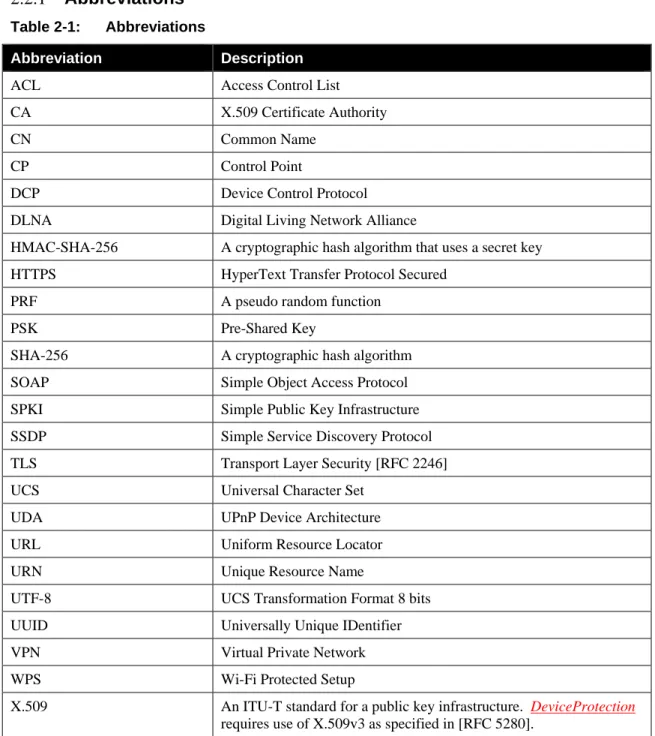
2.2.1
Abbreviations
Table 2-1: AbbreviationsAbbreviation Description
ACL Access Control List
CA X.509 Certificate Authority
CN Common Name
CP Control Point
DCP Device Control Protocol
DLNA Digital Living Network Alliance
HMAC-SHA-256 A cryptographic hash algorithm that uses a secret key
HTTPS HyperText Transfer Protocol Secured
PRF A pseudo random function
PSK Pre-Shared Key
SHA-256 A cryptographic hash algorithm
SOAP Simple Object Access Protocol
SPKI Simple Public Key Infrastructure
SSDP Simple Service Discovery Protocol
TLS Transport Layer Security [RFC 2246]
UCS Universal Character Set
UDA UPnP Device Architecture
URL Uniform Resource Locator
URN Unique Resource Name
UTF-8 UCS Transformation Format 8 bits
UUID Universally Unique IDentifier
VPN Virtual Private Network
WPS Wi-Fi Protected Setup
X.509 An ITU-T standard for a public key infrastructure. DeviceProtection requires use of X.509v3 as specified in [RFC 5280].
Abbreviation Description
XML eXtensible Markup Langage
2.2.2
Terms
2.2.2.1 Device Identity (certificate Identity)
A Device Identity is the identity of a UPnP Device that implements the DeviceProtection service. A Device Identity is a UUID value derived from a hash of the Device’s X.509 server peer certificate (not the CA certificate), in accordance with the algorithm given in Section 4.3 of [RFC 4122]. See Section 2.6.8.2 of this specification for detailed information regarding deriving Device Identity UUIDs. The same UUID value MAY be used for both the Device Identity and the normal UPnP Device UUID, but this is NOT required.
2.2.2.2 Control Point Identity (certificate Identity)
A Control Point Identity (also referred to as its certificate Identity) is a UUID value derived from a hash of the Control Point’s X.509 client peer certificate (not the CA certificate), in accordance with the algorithm given in Section 4.3 of [RFC 4122]. See Section 2.6.8.2 of this specification for additional information.
2.2.2.3 Certificate Exchange
During the TLS handshake, both Control Point and Device authenticate by exchanging X.509 certificates. Both the Device and Control Point (TLS server and client) MUST provide certificates. A complete certificate chain with length 2 MUST be provided. This means the chain MUST include a self-signed root certificate and either a server or client certificate (for the Device and Control Point, respectively). The certificates MUST be X.509 v3 certificates with an RSA key of either 1024 bits or 2048 bits.
2.2.2.4 User Identity
The identity of a human user operating a Control Point. User identities consist of Username/Password pairs.
2.2.2.5 Role
A name used to identify a set of access rights. When a Role is assigned to a Control Point Identity or User Identity, that identity is granted access rights associated with the Role. Vendor-specific Name
A Vendor-specific Name is a name of a DeviceProtection entity such as a Role that is prefixed with a Vendor Domain Name followed by a colon (such as “example.com:”). The Domain Name component protects against name collisions and resulting ambiguity of interpretation.
2.2.2.6 Introduction Protocol
An Introduction Protocol is a protocol designed to support an initial exchange of cryptographic data that can be used subsequently for secure communications.
2.2.2.7 Identity List
An Identity List is a data structure containing a list of references to Control Point and User Identities.
2.3
DeviceProtection
Service Architecture
This service is designed to be embedded in any device type that exposes sensitive information or UPnP control operations that need to be protected from unauthorized access. Other DCPs and standardization forums (for example, the DLNA) should develop Security Considerations for DCPs to document security risks and specify requirements associated with their services, including use of DeviceProtection. This documentation should also specify the access control levels (Roles) required to use their functionality. The generic DeviceProtection service defines three Roles for its own use (Public, Basic, and Admin). Other
DCPs and device vendors are free to re-use the Roles defined by DeviceProtection and/or define additional Roles as needed. Any Control Point is implicitly considered to have role Public in addition to any other Roles that are explicitly assigned to it.
DeviceProtection is designed to allow a device to expose some parts of its services to legacy and
unauthenticated Control Points and restrict other parts to only authenticated and authorized Control Points. A Device can also simultaneously support both types of Control Points. UPnP actions that require
authenticated access MUST be accessible ONLY via HTTPS URLs. Publicly-available actions MUST be accessible over both HTTPS and legacy HTTP URLs. For DeviceProtection:1, TLS version 1.0 [RFC 2246] MUST be supported. A Control Point and Device are also permitted to negotiate and use a more recent version of TLS, if both sides support it.
2.3.1
Device Discovery and Control Layer Security
DeviceProtection does not provide any security for the SSDP protocol itself. An active attacker on the network can make his rogue device discoverable and can try to prevent discovery of legitimate devices. However, the DeviceProtection architecture can protect the device and service discovery and control actions performed subsequent to SSDP.
To add security while preserving compatibility with legacy Control Points, root Devices and embedded Devices that directly contain the DeviceProtection service MUST include the SSDP extension header SECURELOCATION.UPNP.ORG in addition to the normal SSDP LOCATION URL. Both of these URLs MUST point to the same device description document but with different port numbers. Relative URLs MUST be used in the device description document, and this document MUST NOT include a URLBase
element.
If a root Device does NOT contain DeviceProtection, but an embedded Device within it does contain DeviceProtection, then the root Device is NOT required to include SECURELOCATION.UPNP.ORG. However, if any containing Device includes the DeviceProtection service, then all embedded Devices within it are also required to include SECURELOCATION.UPNP.ORG, even if those embedded Devices themselves do not include the DeviceProtection service. The DeviceProtection service and associated ACL of the closest containing Device determines access control for the services of an embedded Device, as described in Section 2.3.2.
The SECURELOCATION.UPNP.ORG header MUST provide a base URL with “https:” for the scheme component and indicate the correct “port” subcomponent in the “authority” component for a TLS connection. Because the scheme and authority components are not included in relative URLs, these components are obtained from the base URL provided by either LOCATION or
SECURELOCATION.UPNP.ORG. Thus, the same device description document can be used for both unsecure and secure control points.
Security-aware Control Points SHOULD use the URL from the header SECURELOCATION.UPNP.ORG to retrieve the device description document and service description documents over TLS. Control Points MUST use the base URL from SECURELOCATION.UPNP.ORG combined with a relative ControlURL to invoke protected actions.
When a protected action is invoked, a Device MAY return different argument values from actions depending upon the Role(s) currently assigned to the CP. For example, a Device MAY return different or more complete data to a CP with administrative rights than a normal CP even though they both successfully invoke the same action. The DeviceProtection service itself does not specify Role-dependent return values, but other DCPs are permitted to do so.
Table 2-2: DeviceProtection SSDP extension header
Header Value Description
SECURELOCATION.UPNP.ORG Single URL Same syntax and semantics as LOCATION header except the URL MUST have an https: prefix
2.3.2
Scope of DeviceProtection Access Control Policy
Each instance of the DeviceProtection service maintains a corresponding access control policy expressed in an Access Control List (ACL) that applies to the DeviceProtection service and other services within the same root Device or embedded Device. The ACL for an access-controlled service MUST be kept in the closest DeviceProtection service in the Device hierarchy. For example, if an embedded Device contains a DeviceProtection service, all other services in that embedded Device are governed by the ACL of that service. If an embedded Device does not contain a DeviceProtection service, then the ACL for services in that embedded Device MUST be placed in the closest containing Device or root Device.
2.3.3
Case Sensitivity of Names
Comparisons of the names of Protocols (such as WPS), User Identities, Passwords, and Roles are case-sensitive.
2.3.4
TLS Renegotiation Attack Protection
TLS Version 1.0 is known to be vulnerable to a man-in-the-middle attack that uses TLS session
renegotiation to inject attack code. A technical description of the attack and mitigation approaches may be found at http://www.kb.cert.org/vuls/id/120541 and [RFC 5746]. For DeviceProtection, the Device MUST reject all requests for TLS renegotiation and SHOULD respond to such requests with a “no_renegotiation” alert. Enforcing this policy will protect against the attack. In the future, it is expected that mitigation strategies such as that described in [RFC 5746] will allow renegotiation to be safely supported again in the TLS standard and likewise with DeviceProtection.
2.4 State
Variables
Note: For first-time reader, it may be more insightful to read the theory of operations in Section 3 first and then the action definitions before reading the state variable definitions.
2.4.1
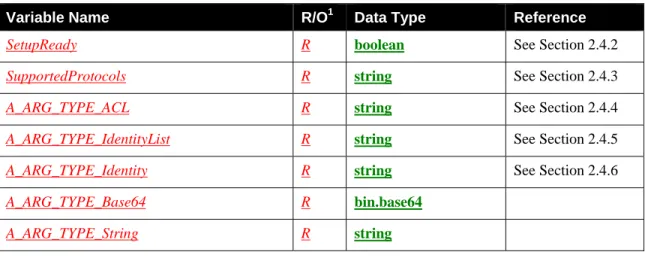
State Variable Overview
Table 2-3: State VariablesVariable Name R/O1 Data Type Reference
SetupReady R boolean See Section 2.4.2
SupportedProtocols R string See Section 2.4.3
A_ARG_TYPE_ACL R string See Section 2.4.4
A_ARG_TYPE_IdentityList R string See Section 2.4.5
A_ARG_TYPE_Identity R string See Section 2.4.6
A_ARG_TYPE_Base64 R bin.base64
A_ARG_TYPE_String R string
1
R = REQUIRED, O = OPTIONAL, CR = CONDITIONALLY REQUIRED, CO = CONDITIONALLY OPTIONAL, X = Non-standard, add -D when deprecated (e.g., R-D, O-D).
2.4.2
SetupReady
This evented state variable is used to signal the Control Point when the Device is ready to proceed with a setup operation.
2.4.2.1 Description
If SetupReady is 0 (false), this indicates that the device is busy or requires some user input before being ready to proceed with a setup operation. Specific details regarding what the user should do at this point are not indicated by SetupReady. Instead, the Control Point can obtain protocol-specific status information by invoking SendSetupMessage(). When conditions have changed such that the Device is ready to proceed with a setup operation, it signals this to the Control Point by changing SetupReady to 1 (true). Note that even if SetupReady is 1 (true), this is no guarantee that the setup operation will succeed. The CP should simply use changes in the state of SetupReady as input to help it decide when to invoke
SendSetupMessage().
If a Device determines that it is not ready to run a setup protocol that is being attempted by a CP, then it MUST signal this situation by setting SetupReady to 0 (false). If multiple concurrent setup operations are underway, then the value of SetupReady reflects the most recent status change corresponding to any of those operations. This introduces a degree of ambiguity in the interpretation of SetupReady, and this ambiguity is an intentional choice to simplify the design. The likelihood of such conflicts is expected to be very low, and a CP MUST in any case be designed to operate correctly if SetupReady does not provide a reliable indication of when to attempt a setup operation. The CP SHOULD only treat SetupReady as a hint that can help it avoid polling or otherwise burdening the Device with excessive calls to
SendSetupMessage().
For example, if a CP attempts to perform a WPS introduction with a Device and receives a WPS DeviceBusy error (NACK) via SendSetupMessage(), the CP SHOULD reflect this status in its user interface and wait until SetupReady becomes true before trying again to run WPS. Please refer to Figure 3-3 for an example.
Note also that a CP MAY choose to ignore the value of SetupReady and use some other method (such as a timer or user input) to decide when to invoke a setup operation.
2.4.3
SupportedProtocols
2.4.3.1 DescriptionThis state variable is an XML document containing a list of protocols supported by the Device. Each protocol advertised in this way consists of one or more protocol type element <Introduction> and one or more elements <Login>, each with an embedded <Name> element. An <Introduction> element with the <Name> element of “WPS” MUST always be included. A <Login> element with the <Name> element of “PKCS5” MUST always be included. Additional <Introduction> and <Login> elements MAY be included. The ordering of the sub-elements is arbitrary, and CPs MUST NOT depend upon the ordering. Note that protocol names are case-sensitive.
Additional elements MAY also be included within <SupportedProtocols>. The ordering of the sub-elements is arbitrary, and CPs MUST NOT depend upon the ordering.
The following example shows a generalized “template” for the format of the SupportedProtocols XML Document. The example shows fields that need to be filled out by individual implementations in the vendor character style.
<?xml version="1.0" encoding="UTF-8"?> <SupportedProtocols xmlns="urn:schemas-upnp-org:gw:DeviceProtection" xmlns:xsi="http://www.w3.org/2001/XMLSchema-instance" xsi:schemaLocation="urn:schemas-upnp-org:gw:DeviceProtection http://www.upnp.org/schemas/gw/DeviceProtection-v1.xsd"> <Introduction><Name>WPS</Name></Introduction> <Introduction><Name>Vendor-specific protocol</Name></Introduction> <Login><Name>PKCS5</Name></Login> <Login><Name>Vendor-specific protocol</Name></Login> </SupportedProtocols>
<?xml>
OPTIONAL. Case sensitive.
<SupportedProtocols>
REQUIRED. MUST include a namespace declaration for the DeviceProtection service Common Datastructures Schema (“urn:schemas-upnp-org:gw:DeviceProtection”). MUST include the following elements:
<Introduction>
REQUIRED. MUST appear at least once. MUST include exactly one instance of the following element:
<Name>
REQUIRED. The format of this element is a case-sensitive name of the Introduction protocol. The name of the default Introduction protocol defined by the Forum is WPS. Protocol names other than names defined by the Forum MUST be Vendor-specific Names.
<Login>
REQUIRED. MUST appear at least once. MUST include exactly one instance of the following element:
<Name>
REQUIRED. The format of this element is a case-sensitive name of the User Login protocol. The default Login protocol name for DeviceProtection is PKCS5. Login protocol names other than names defined by the Forum MUST be Vendor-specific Names as defined in Section 0.
Note that since the value of SupportedProtocols is XML, it needs to be properly escaped (using the normal XML rules: [XML] Section 2.4 Character Data and Markup) before embedding in a SOAP response message. Example: <?xml version="1.0" encoding="UTF-8"?> <SupportedProtocols xmlns="urn:schemas-upnp-org:gw:DeviceProtection" xmlns:xsi="http://www.w3.org/2001/XMLSchema-instance" xsi:schemaLocation="urn:schemas-upnp-org:gw:DeviceProtection http://www.upnp.org/schemas/gw/DeviceProtection-v1.xsd"> <Introduction><Name>WPS</Name></Introduction> <Introduction><Name>Some.org:SomeProtocol</Name></Introduction> <Login><Name>PKCS5</Name></Login> </SupportedProtocols>
2.4.4
A_ARG_TYPE_ACL
2.4.4.1 DescriptionThis virtual state variable is introduced to provide type information for the ACL argument in the GetACLData() action. This data structure encodes the access control policy of a particular Device. Additional vendor-defined elements MAY also be included within <ACL>.
The following example shows a generalized “template” for the format of the ACL XML Document. The example shows fields that need to be filled out by individual implementations in the vendor character style.
<?xml version="1.0" encoding="UTF-8"?> <ACL xmlns="urn:schemas-upnp-org:gw:DeviceProtection" xmlns:xsi="http://www.w3.org/2001/XMLSchema-instance" xsi:schemaLocation="urn:schemas-upnp-org:gw:DeviceProtection http://www.upnp.org/schemas/gw/DeviceProtection-v1.xsd"> <Identities> <User> <Name>Name of a user</Name>
<RoleList>List of Roles for this user</RoleList> </User>
<User>
<Name>Name of a user</Name>
<RoleList>List of Roles for this user</RoleList> </User>
<CP introduced="1">
<Name>Name in this CP’s certificate</Name> <Alias>Alias for this CP</Alias>
<ID>UUID derived from a hash of this CP’s certificate</ID> <RoleList>List of Roles for this CP</RoleList>
</CP> <CP>
<Name>Name in this CP’s certificate</Name>
<ID>UUID derived from a hash of this CP’s certificate</ID> <RoleList>List of Roles for this CP</RoleList>
</CP>
</Identities> <Roles>
<Role>
<Name>Name of Role supported by this implementation</Name> </Role>
<Role>
<Name>Name of Role supported by this implementation</Name> </Role>
<Role>
<Name>Name of Role supported by this implementation</Name> </Role>
</Roles> </ACL>
<?xml>
OPTIONAL. Case sensitive.
<ACL>
REQUIRED. MUST include a namespace declaration for the DeviceProtection service Common Datastructures Schema (“urn:schemas-upnp-org:gw:DeviceProtection”). MUST include exactly one instance of each of the following elements:
<Identities>
REQUIRED. MUST appear exactly once. MUST include zero or more instances of the following elements, in arbitrary order:
<User>
OPTIONAL. Includes the following sub-elements:
<Name>
REQUIRED. This element contains the name of the User. Spaces are permitted in User names. For comparison purposes, multiple adjacent white space characters are compressed into a single space character.
<RoleList>
REQUIRED. The format of this element is a space-separated list of Role names. Each Name in this list MUST also be present in exactly one <Name> sub-element of a <Role> in the <Roles> element. Spaces are NOT permitted in Role names. <CP>
OPTIONAL. Includes the following attributes and sub-elements:
introduced
OPTIONAL. Attribute of type xsd:boolean, Indicates whether or not the CP was introduced directly with the Device. A value of “1” (one) indicates that the CP has been directly introduced. A value of “0” (zero) indicates that Device did not learn about the CP’s Identity through direct pairwise introduction. If omitted, defaults to “0”.
<Name>
REQUIRED. The format of this element is a string matching that of the CP’s certificate.
<Alias>
OPTIONAL. The format of this element is a supplemental name of the CP that users can set without requiring changes to the CP’s certificate.
<ID>
REQUIRED. Contains a string representation of a UUID derived from a hash of the CP’s certificate. The <ID> MUST NOT include a “uuid:” prefix.
<RoleList>
REQUIRED. The format of this element is a space-separated list of Role names. Each Name in this list MUST also be present in the <Name> sub-element of exactly one <Role> in the <Roles> element list.
<Roles>
REQUIRED. MUST appear exactly once. MUST include one or more of the following elements:
<Role>
REQUIRED. This element MUST contain exactly one <Name> sub-element.
<Name>
REQUIRED. This element contains the name of a Role supported by the Device. Role names MUST NOT contain spaces. Role names not defined by the Forum MUST be prefixed, vendor-specific Names as defined in Section 0. Forum-defined Role names MUST be defined in service specifications and/or DCP-specific security considerations documents published by Working Committees.Role names defined by UPnP Working Committes MUST be prefixed with the WC moniker followed by a colon (for example, “av:”). Role names defined by the DeviceProtection service do not include a prefix. Each Role name MUST have length no longer than 64 characters, including the prefix (if any).
Note that since the value of A_ARG_TYPE_ACL is XML, it needs to be properly escaped (using the normal XML rules: [XML] Section 2.4 Character Data and Markup) before embedding in a SOAP message.
Example: <?xml version="1.0" encoding="UTF-8"?> <ACL xmlns="urn:schemas-upnp-org:gw:DeviceProtection" xmlns:xsi="http://www.w3.org/2001/XMLSchema-instance" xsi:schemaLocation="urn:schemas-upnp-org:gw:DeviceProtection http://www.upnp.org/schemas/gw/DeviceProtection-v1.xsd"> <Identities> <User> <Name>Administrator</Name> <RoleList>Admin</RoleList> </User> <User> <Name>Mika</Name> <RoleList>Basic</RoleList> </User> <CP introduced="1">
<Name>ACME Widget Model XYZ</Name> <Alias>Mark’s Game Console</Alias>
<ID>ad93e8f5-634b-4123-80ca-225886a5c0e8</ID> <RoleList>Admin Basic</RoleList>
</CP> <CP>
<ID>3543d8e6-3b8b-4456-81cb-f12886b5b044</ID> <RoleList>Public</RoleList> </CP> </Identities> <Roles> <Role><Name>Admin</Name></Role> <Role><Name>Basic</Name></Role> <Role><Name>Public</Name></Role> </Roles> </ACL>
2.4.5
A_ARG_TYPE_IdentityList
2.4.5.1 DescriptionThis virtual state variable is introduced to provide type information for various action arguments that contain lists of DeviceProtection Identities.
The following example shows a generalized “template” for the format of the Identities XML Document. The example shows fields that need to be filled out by individual implementations in the vendor character style. <?xml version="1.0" encoding="UTF-8"?> <Identities xmlns="urn:schemas-upnp-org:gw:DeviceProtection" xmlns:xsi="http://www.w3.org/2001/XMLSchema-instance" xsi:schemaLocation="urn:schemas-upnp-org:gw:DeviceProtection http://www.upnp.org/schemas/gw/DeviceProtection-v1.xsd"> <User> <Name>Name of a user</Name> </User> <CP introduced="1">
<Name>Name in this CP’s certificate</Name> <Alias>Alias for this CP</Alias>
<ID>UUID derived from a hash of this CP’s certificate</ID> </CP>
<CP>
<Name>Name in this CP’s certificate</Name>
<ID>UUID derived from a hash of this CP’s certificate</ID> </CP>
</Identities> <?xml>
OPTIONAL. Case sensitive.
<Identities>
REQUIRED. MUST include a namespace declaration for the DeviceProtection service Common Datastructures Schema (“urn:schemas-upnp-org:gw:DeviceProtection”). MUST include zero or more instances of the following elements, in arbitrary order:
<User>
OPTIONAL. MUST include exactly one instance of the following elements:
<Name>
REQUIRED. This element contains the name of the User. Spaces are permitted in User names. For comparison purposes, multiple adjacent white space characters are compressed into a single space character.
<CP>
introduced
OPTIONAL. xsd:boolean, Indicates whether or not the CP was introduced directly with the Device. A value of “1” (one) indicates that the CP has been directly introduced. A value of “0” (zero) indicates that Device did not learn about the CP’s Identity through direct pairwise introduction. If omitted, defaults to “0”.
<Name>
REQUIRED. The format of this element is a string matching that of the CP’s certificate.
<Alias>
OPTIONAL. The format of this element is a supplemental name of the CP that users can set without requiring changes to the CP’s certificate.
<ID>
REQUIRED. Contains a string representation of a UUID corresponding to a hash of the CP’s certificate. No “uuid:” prefix is used in the content of the <ID> element.
Note that since the value of A_ARG_TYPE_IdentityList is XML, it needs to be properly escaped (using the normal XML rules: [XML] Section 2.4 Character Data and Markup) before embedding in a SOAP response message.
Example:
<?xml version="1.0" encoding="UTF-8"?>
<Identities xmlns="urn:schemas-upnp-org:gw:DeviceProtection" xmlns:xsi="http://www.w3.org/2001/XMLSchema-instance" xsi:schemaLocation="urn:schemas-upnp-org:gw:DeviceProtection http://www.upnp.org/schemas/gw/DeviceProtection-v1.xsd"> <User> <Name>Administrator</Name> </User> <User> <Name>Mika</Name> </User> <CP introduced="1">
<Name>ACME Widget Model XYZ</Name> <Alias>Mark’s Game Console</Alias>
<ID>ad93e8f5-634b-4123-80ca-225886a5c0e8</ID> </CP> <CP> <Name>Some CP</Name> <ID>3543d8e6-3b8b-4456-81cb-f12886b5b044</ID> </CP> </Identities>
2.4.6
A_ARG_TYPE_Identity
2.4.6.1 DescriptionThis virtual state variable is introduced to provide type information for various action arguments that contain a reference to a DeviceProtection Identity.
The following example shows a generalized “template” for the format of the Identity XML Document. The example shows fields that need to be filled out by individual implementations in the vendor character style. <?xml version="1.0" encoding="UTF-8"?>
<Identity xmlns="urn:schemas-upnp-org:gw:DeviceProtection" xmlns:xsi="http://www.w3.org/2001/XMLSchema-instance"
xsi:schemaLocation="urn:schemas-upnp-org:gw:DeviceProtection http://www.upnp.org/schemas/gw/DeviceProtection-v1.xsd">
<User> <Name>Name of a user</Name> </User> </Identity> or <?xml version="1.0" encoding="UTF-8"?> <Identity xmlns="urn:schemas-upnp-org:gw:DeviceProtection" xmlns:xsi="http://www.w3.org/2001/XMLSchema-instance" xsi:schemaLocation="urn:schemas-upnp-org:gw:DeviceProtection http://www.upnp.org/schemas/gw/DeviceProtection-v1.xsd"> <CP>
<ID>UUID of the CP’s certificate</ID> </CP>
</Identity>
<?xml>
OPTIONAL. Case sensitive.
<Identity>
REQUIRED. MUST include a namespace declaration for the DeviceProtection service Common Datastructures Schema (“urn:schemas-upnp-org:gw:DeviceProtection”). MUST include exactly one instance of only one of the following elements:
<User>
OPTIONAL. MUST include the following element:
<Name>
REQUIRED. This element contains the name of the User. Spaces are permitted in User names. For comparison purposes, multiple adjacent white space characters are compressed into a single space character.
<CP>
OPTIONAL. MUST include the following element:
<ID>
REQUIRED. Contains a string representation of a UUID corresponding to a hash of the CP’s certificate.
Note that since the value of A_ARG_TYPE_Identity is XML, it needs to be properly escaped (using the normal XML rules: [XML] Section 2.4 Character Data and Markup) before embedding in a SOAP response message. Example: <?xml version="1.0" encoding="UTF-8"?> <Identity xmlns="urn:schemas-upnp-org:gw:DeviceProtection" xmlns:xsi="http://www.w3.org/2001/XMLSchema-instance" xsi:schemaLocation="urn:schemas-upnp-org:gw:DeviceProtection http://www.upnp.org/schemas/gw/DeviceProtection-v1.xsd"> <User> <Name>Administrator</Name> </User> </Identity>
2.5 Eventing
and
Moderation
Table 2-4: Eventing and ModerationVariable Name Evented Moderated Criteria
SetupReady YES NO SupportedProtocols NO NO
2.6 Actions
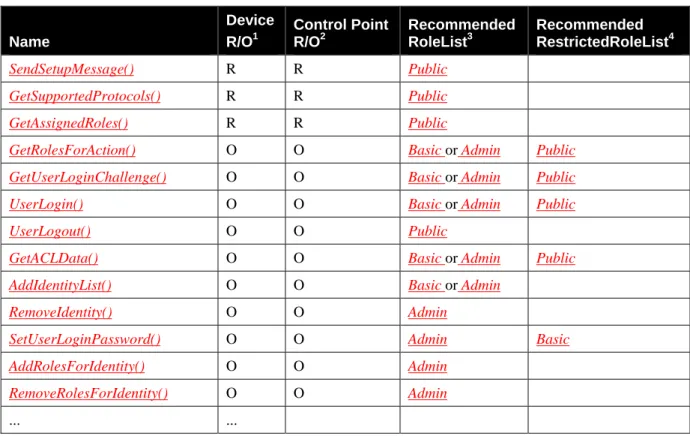
Table 2-5Table 2-5 lists the SOAP actions of DeviceProtection. Some of these actions are restricted to authenticated Control Points having the Basic and/or Admin Role. The RECOMMENDED Role required for each action is indicated in the table. Device manufacturers are permitted to establish different required Roles for actions, if they choose. Control Points can query the Roles required for specific actions in DeviceProtection or in other UPnP services by calling GetRolesForAction().
Table 2-5: Actions Name Device R/O1 Control Point R/O2 Recommended RoleList3 Recommended RestrictedRoleList4 SendSetupMessage() R R Public GetSupportedProtocols() R R Public GetAssignedRoles() R R Public
GetRolesForAction() O O Basic or Admin Public
GetUserLoginChallenge() O O Basic or Admin Public
UserLogin() O O Basic or Admin Public
UserLogout() O O Public
GetACLData() O O Basic or Admin Public
AddIdentityList() O O Basic or Admin
RemoveIdentity() O O Admin
SetUserLoginPassword() O O Admin Basic
AddRolesForIdentity() O O Admin
RemoveRolesForIdentity() O O Admin
... ...
1
For a device this column indicates whether the action MUST be implemented or not, where R = REQUIRED, O = OPTIONAL, CR = CONDITIONALLY REQUIRED, CO = CONDITIONALLY OPTIONAL, X = Non-standard, add -D when deprecated (e.g., R-D, O-D).
2
For a control pont this column indicates whether a control point MUST be capable of invoking this action, where R = REQUIRED, O = OPTIONAL, CR = CONDITIONALLY REQUIRED, CO =
CONDITIONALLY OPTIONAL, X = Non-standard, add -D when deprecated (e.g., R-D, O-D). 3
The RoleList contains Roles that are authorized to invoke the corresponding action in all contexts. 4
The RestrictedRoleList contains Roles that are authorized to invoke the corresponding action only in certain contexts. For example, SetUserLoginPassword() can be invoked with the Role Basic only if the Control Point’s currently logged-in user matches the Name argument.
2.6.1
SendSetupMessage()
This action is a generic and extensible transport for pairwise introduction protocols. By providing this generic transport, new introduction protocols can be added in the future without requiring modification of the DeviceProtection SOAP interface.
2.6.1.1 Arguments
Table 2-6: Arguments for SendSetupMessage()
Argument Direction relatedStateVariable
ProtocolType IN A_ARG_TYPE_String InMessage IN A_ARG_TYPE_Base64 OutMessage OUT A_ARG_TYPE_Base64
2.6.1.2 ProtocolType
This argument is a string that identifies the protocol type for messages exchanged in InMessage and OutMessage. The ProtocolType value MUST match the value of a single <Name> contained in the SupportedProtocols state variable. When the default WPS-based introduction protocol of DeviceProtection is used, ProtocolType is set to the UTF-8 encoded string “WPS”. For information regarding how to use SendSetupMessage() with the WPS protocol, refer to Appendix A and Sections 3.3.1 and 3.3.2.
2.6.1.3 InMessage
This argument contains a Base64-encoded binary message of type indicated in ProtocolType sent from the Control Point to the Device.
2.6.1.4 OutMessage
This argument contains a Base64-encoded binary message of type indicated in ProtocolType sent from the Device to the Control Point.
2.6.1.5 Service Requirements
Service requirements depend upon the specific setup protocol. Requirements related to the WPS protocol are documented in Appendix A.
2.6.1.6 Control Point Requirements When Calling The Action
The RECOMMENDED Role to invoke this action is Public. Other Control Point requirements depend upon the specific setup protocol. If the WPS protocol is used, the Control Point MUST support both the PIN method and the PushButton method, as documented in Appendix A.
2.6.1.7 Dependency on Device State
Dependencies on device state depend upon the specific setup protocol. Some implementations MAY impose a limit of only a single instance of a given setup protocol at a given time. For this reason, a Device MAY respond with a Busy error if it is unable to accommodate a request for a new setup exchange. 2.6.1.8 Effect on Device State
Ordinarily, an introduction protocol such as WPS will involve a sequence of message exchanges spanning several invocations of SendSetupMessage() . A Device MAY support multiple concurrent setup operations with different CPs, but this is not required. If a Device supports only a single setup operation at a time, it MUST update its SetupReady state variable to indicate when that operation is complete, and it is available for setup with another CP. If the introduction protocol completes successfully, the Device MUST assign a Role to the CP’s Identity and add that Identity to the Device’s ACL structure.
2.6.1.9 Errors
Table 2-7: Error Codes for SendSetupMessage()
ErrorCode errorDescription Description
400-499 TBD See UPnP Device Architecture section on Control. 500-599 TBD See UPnP Device Architecture section on Control.
600 Argument Value
Invalid
The ProtocolType value is not supported by the Device.
704 Processing Error An error was encountered in processing InMessage. More detailed error information MAY be provided inside OutMessage, if the setup protocol defines detailed error messages.
708 Busy The Device is busy and unable to process the request. A SetupReady(1) event will be signaled when it is no longer busy.
2.6.2
GetSupportedProtocols()
This action is used to retrieve a list of setup protocols supported by the Device. 2.6.2.1 Arguments
Table 2-8: Arguments for GetSupportedProtocols()
Argument Direction relatedStateVariable
ProtocolList OUT SupportedProtocols
2.6.2.2 ProtocolList
ProtocolList is an XML document conformant to the same schema as the SupportedProtocols state variable. For more information on this argument, please refer to Section 2.4.3.
The minimum required value for ProtocolList is: <?xml version="1.0" encoding="UTF-8"?> <SupportedProtocols xmlns="urn:schemas-upnp-org:gw:DeviceProtection" xmlns:xsi="http://www.w3.org/2001/XMLSchema-instance" xsi:schemaLocation="urn:schemas-upnp-org:gw:DeviceProtection http://www.upnp.org/schemas/gw/DeviceProtection-v1.xsd"> <Introduction><Name>WPS</Name></Introduction> <Login><Name>PKCS5</Name></Login> </SupportedProtocols> 2.6.2.3 Service Requirements
Devices implementing the DeviceProtection:1 service MUST include at least the mandatory default values. Devices MAY also include additional vendor-specific protocols, with Vendor-specific Names.
2.6.2.4 Control Point Requirements When Calling The Action The RECOMMENDED Role to invoke this action is Public.
2.6.2.5 Dependency on Device State None.
2.6.2.6 Effect on Device State None.
2.6.2.7 Errors
Table 2-9: Error Codes for GetSupportedProtocols()
ErrorCode errorDescription Description
400-499 TBD See UPnP Device Architecture section on Control. 500-599 TBD See UPnP Device Architecture section on Control. 600-699 TBD See UPnP Device Architecture section on Control.
2.6.3
GetAssignedRoles()
This action is used to retrieve the list of Roles that the Device has currently assigned to the Control Point. The list includes the union of Roles assigned to the Control Point Identity plus any Roles assigned to the currently logged-in user (if any).
2.6.3.1 Arguments
Table 2-10: Arguments for GetAssignedRoles()
Argument Direction relatedStateVariable
RoleList OUT A_ARG_TYPE_String
2.6.3.2 RoleList
This argument contains a space-separated list of Roles currently assigned to the Control Point. For example, “Admin” or “Admin Basic”.
Role names other than those names defined in a standard Forum DCP MUST be Vendor-specific Names encoded in UTF-8 [RFC 3629] as defined in Section 0. For example: “Some.org:SomeRole”.
If GetAssignedRoles() is called outside of an TLS connection, or if it is called by a Control Point whose Certificate is unknown by the Device, then RoleList MUST include the value “Public” and MUST NOT include the Roles “Basic” or “Admin”.
2.6.3.3 Service Requirements
None.
2.6.3.4 Control Point Requirements When Calling The Action The RECOMMENDED Role to invoke this action is Public.
2.6.3.5 Dependency on Device State None.
2.6.3.6 Effect on Device State None.
2.6.3.7 Errors
Table 2-11: Error Codes for GetAssignedRoles()
ErrorCode errorDescription Description
400-499 TBD See UPnP Device Architecture section on Control. 500-599 TBD See UPnP Device Architecture section on Control. 600-699 TBD See UPnP Device Architecture section on Control.
2.6.4
GetRolesForAction()
This action is used to query which Roles a Device requires a Control Point to have in order to perform a specified action. In some cases, the required Roles MAY depend upon the argument values that will be passed to the action . Threfore, GetRolesForAction() returns two lists of Roles. The first list, RoleList, contains Roles that are granted access regardless of argument values. The second list, RestrictedRoleList, returns Roles that are granted conditional access, depending upon the arguments. The specific argument dependencies are not given in the RestrictedRoleList. These dependencies will typically be documented by the DCP of ServiceId.
2.6.4.1 Arguments
Table 2-12: Arguments for GetRolesForAction()
Argument Direction relatedStateVariable
DeviceUDN IN A_ARG_TYPE_String ServiceId IN A_ARG_TYPE_String ActionName IN A_ARG_TYPE_String RoleList OUT A_ARG_TYPE_String
RestrictedRoleList OUT A_ARG_TYPE_String
2.6.4.2 DeviceUDN
This argument contains the UDN of the UPnP Device containing the service that provides the scope of interpretation of ActionName. The DeviceUDN string is case-sensitive.
2.6.4.3 ServiceId
This argument contains the serviceId of the UPnP service providing the scope of interpretation of ActionName. The ServiceId is case-sensitive.
2.6.4.4 ActionName
This argument contains the name of the SOAP action being queried. This name is case-sensitive.
2.6.4.5 RoleList
This argument returns a space-separated list of Roles associated with ActionName. For example, “Admin” or “Admin Basic”. The Role names in RoleList have OR semantics. This means that a Control Point only needs to be authorized with one of the Roles in RoleList to use the action. The Roles in RoleList are granted access for all argument values.
2.6.4.6 RestrictedRoleList
RestrictedRoleList is similar to RoleList except that it contains Roles that allow the action to be invoked only with certain argument values (or other conditions, as documented in the action specification). The
specific restrictions are dependent upon the security requirements and semanticas of the action, and this information SHOULD be provided as part of the DCP-specific security documentation for that action.
2.6.4.7 Service Requirements
GetRolesForAction() MUST be invoked over a TLS connection that has been authenticated by both the CP and Device’s X.509 certificates.
The CP certificate Identity MUST be present in the Device’s ACL.
2.6.4.8 Control Point Requirements When Calling The Action
The RECOMMENDED Roles to invoke this action are Basic or Admin, but a Control Point with Role Public is conditionally permitted to invoke this action if its certificate Identity is present in the Device’s ACL.
2.6.4.9 Dependency on Device State None.
2.6.4.10 Effect on Device State None.
2.6.4.11 Errors
Table 2-13: Error Codes for GetRolesForAction()
ErrorCode errorDescription Description
400-499 TBD See UPnP Device Architecture section on Control. 500-599 TBD See UPnP Device Architecture section on Control.
600-699 TBD See UPnP Device Architecture section on Control, plus the values specified below.
600 Argument Value
Invalid
DeviceUDN, ServiceId and/or ActionName are not recognized.
606 Action not
authorized
The CP does not have privileges to invoke this action.
2.6.5
GetUserLoginChallenge()
This action is used to obtain data from the Device that will be needed for a successful challenge-based UserLogin().
2.6.5.1 Arguments
Table 2-14: Arguments for GetUserLoginChallenge()
Argument Direction relatedStateVariable
ProtocolType IN A_ARG_TYPE_String Name IN A_ARG_TYPE_String Salt OUT A_ARG_TYPE_Base64 Challenge OUT A_ARG_TYPE_Base64
2.6.5.2 ProtocolType
This argument is a string that identifies the protocol type for GetUserLoginChallenge. The ProtocolType value MUST match the value of a single <Name> in a <Login> element of the SupportedProtocols state variable. When the default UserLogin method of DeviceProtection is used, ProtocolType MUST be set to the UTF-8 encoded string “PKCS5”.
2.6.5.3 Name
This argument contains a UTF-8 [RFC 3629] encoded user name to be authenticated. Name comparisons are case-sensitive.
2.6.5.4 Salt
This argument returns a Base64-encoded binary value that is used to compute the Authenticator in a subsequent UserLogin() call. A Salt value is typically combined with password data to reduce the risk of compromise of a Device’s password file.
2.6.5.5 Challenge
This argument returns a Base64-encoded binary value to use in a subsequent call to UserLogin().
2.6.5.6 Service Requirements
GetUserLoginChallenge() MUST be invoked over a TLS connection that has been authenticated by both the CP and Device’s X.509 certificates.
The CP certificate Identity MUST be present in the Device’s ACL.
If the Roles assigned to Identity Name include Admin, then the RECOMMENDED Role to invoke GetUserLoginChallenge() is Basic or Admin.
The Salt and Challenge are derived as follows:
Salt = 16-octet random value used to hash Password into the STORED authentication value for each Name in the database. Using a random Salt ensures that the STORED values associated with the same User will be different on different Devices. This prevents a Device from using its own STORED value to
authenticate as that User on another Device.
• STORED = first 128 bits of the key T1, with T1 computed according to [PKCS#5] algorithm PBKDF2, with PRF=HMAC-SHA-256. A separate value of STORED is kept in the Device’s password file for each specific Name.
• T1 is defined as the exclusive-or sum of the first c iterates of PRF applied to the concatenation of the Password, Name, Salt, and four-octet block index (0x00000001) in big-endian format. For
DeviceProtection, the value for c is 5,000. All characters in Name Password and Name MUST be encoded in UTF-8 format [RFC 3629] prior to invoking the PRF operation.
T1 = U1 \xor U2 \xor … \xor Uc where
U1 = PRF(Password, Name || Salt || 0x0 || 0x0 || 0x0 || 0x1) U2 = PRF(Password, U1),
…
Uc = PRF(Password, Uc-1).
2.6.5.7 Control Point Requirements When Calling The Action
The CP certificate Identity MUST be present in the Device’s ACL to invoke this action. The
RECOMMENDED Role to invoke this action is Basic or Admin, but Public is also conditionally permitted if the Roles associated with Name do not include Admin. For example, if the CP Identity is in the ACL but has only Public Role, the CP is not permitted to log in as Administrator.
2.6.5.8 Dependency on Device State None.
2.6.5.9 Effect on Device State
The Device is only required to store the most recent value returned by GetUserLoginChallenge() for each active TLS session.
2.6.5.10 Errors
Table 2-15: Error Codes for GetUserLoginChallenge()
ErrorCode errorDescription Description
400-499 TBD See UPnP Device Architecture section on Control. 500-599 TBD See UPnP Device Architecture section on Control.
600-699 TBD See UPnP Device Architecture section on Control, plus the values specified below.
600 Argument Value
Invalid
The Name is not recognized by the Device.
606 Action not
authorized
The CP does not have privileges to invoke this action.
2.6.6
UserLogin()
This action is used to authenticate the Control Point as a particular User. UserLogin() MUST be invoked over TLS, and the Control Point’s certificate Identity MUST already be present in the Device’s ACL. The duration of this authentication is limited to the lifetime of the TLS session or until UserLogout() is called. A Device is also permitted to automatically log out a User Identity after an implementation-dependent timeout.
If TLS Session Resumption is used, the Device MAY restore the CP’s logged-in User Identity of the prior session. Note that the Role(s) of that User in the ACL may have been changed since the prior session. The most recent Role list in the ACL for a User Identity MUST be used rather than Roles that were assigned to the User Identity in the prior session.
2.6.6.1 Arguments
Table 2-16: Arguments for UserLogin()
Argument Direction relatedStateVariable
ProtocolType IN A_ARG_TYPE_String Challenge IN A_ARG_TYPE_Base64 Authenticator IN A_ARG_TYPE_Base64