CHAPTER 27
Calling Java from PL/SQL
The Java language, originally designed and promoted by Sun Microsystems and now widely promoted by nearly everyone other than Microsoft, offers an extremely diverse set of programming features, many of which are not available natively in PL/SQL. This chapter introduces the topic of creating and using Java Stored Procedures in Oracle, and shows how you can create and use JSP functionality from PL/SQL.
Oracle and Java
Starting with Oracle8i Database, the Oracle Database Server has included a Java Virtual Machine that allows Java programs to run efficiently in the server memory space. Many of the core Java class libraries are bundled with Oracle as well, resulting not only in a formidable weapon in the programmer’s arsenal, but also a formidable topic for a PL/SQL book! That’s why the objectives for this chapter are limited to the following:
• Providing the information you need to load Java classes into the Oracle database, manage those new database objects, and publish them for use inside PL/SQL. • Offering a basic tutorial on building Java classes that will provide enough guidance
to let you construct simple classes to access underlying Java functionality. In preview, here is the usual way you will create and expose Java stored procedures:
1. Write the Java source code. You can use any convenient text editor or IDE such as Oracle’s JDeveloper.
2. Compile your Java into classes and, optionally, bundle them into .jar files. Again, you can use an IDE or Sun’s command-line javac compiler. (Strictly speaking, this step is optional because you can load the source into Oracle and use the built-in Java compiler.)
3. Load the Java classes into Oracle using the loadjava command-line utility or the CREATE JAVA statement.
4. Publish the Java class methods by writing PL/SQL “wrappers” to invoke the Java code.
5. Grant privileges as required on the PL/SQL wrapper.
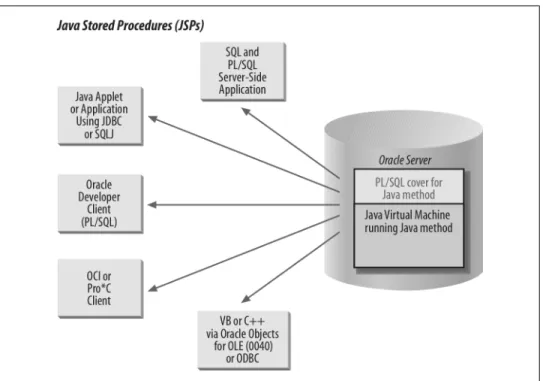
6. Call the PL/SQL programs from any one of a number of environments, as illustrated in Figure 27-1.
Figure 27-1. Accessing JSPs from within the Oracle database
Oracle offers a variety of components and commands to work with Java. Table 27-1 shows just a few of them.
Table 27-1. Oracle components and commands for Java
Component Description
“aurora” JVM The Java Virtual Machine (JVM) that Oracle implemented in its database server
loadjava An operating system command-line utility that loads your Java code elements (classes, .jar files, etc.) into the Oracle database
dropjava An operating system command-line utility that drops your Java code elements (classes, .jar files, etc.) from the Oracle database
CREATE JAVA DROP JAVA ALTER JAVA
DDL statements that perform some of the same tasks as loadjava and dropjava
The remainder of this chapter explains more about these steps and components. For more coverage of Java in the Oracle database, you might also want to look at Java Programming with Oracle JDBC by Donald Bales (O’Reilly). For more comprehensive Java information, see the documentation from Sun Microsystems as well as the O’Reilly Java series (as well as several other books I’ll recommend later in this chapter). For more detailed documentation on using Oracle and Java together, see Oracle Corpora-tion’s manuals.
Getting Ready to Use Java in Oracle
Before you can call Java methods from within your PL/SQL programs, you will need to do the following:
• Ensure that the Java option has been installed in your Oracle Database Server. • Build and load your Java classes and code elements.
• In some cases, have certain Java-specific permissions granted to your Oracle user account.
Installing Java
On the Oracle server, the Java features may or may not be installed, depending on what version of Oracle you are running and what choices your DBA made during the Oracle installation. You can check whether Java is installed by running this query:
SELECT COUNT(*) FROM all_objects
WHERE object_type LIKE 'JAVA%';
If the result is 0, Java is definitely not installed, and you can ask your DBA to run a script called $ORACLE_HOME/javavm/install/initjvm.sql.
As a developer, you will probably want to build and test Java programs on your own workstation, and that requires access to a Java Development Kit (JDK). You have two choices when installing the JDK: you can download it from http://java.sun.com/ your-self; or, if you are using a third-party IDE such as Oracle JDeveloper, you may be able to rely on its bundled JDK. Be warned: you may need to be cautious about matching the exact JDK version number.
When you download Java from the Sun site, you will have to choose from among lots of different acronyms and versions. Personally, I’ve had reasonably good luck with Java 2 Standard Edition (J2SE) using the Core Java package rather than the “Desktop” package, the latter of which includes a bunch of GUI-building stuff I don’t need. An-other choice is between the JDK and the Java Runtime Engine (JRE). Always pick the JDK if you want to compile anything! In terms of the proper version to download, I would look at your Oracle server’s version and try to match that.
Oracle version JDK version
Oracle8i Database (8.1.5) JDK 1.1.6 Oracle8i Database (8.1.6 or later) JDK 1.2 Oracle9i Database J2SE 1.3 Oracle Database 10g Release 1 J2SE 1.4.1 Oracle Database 10g Release 2 J2SE 1.4.2
If you have to support more than one version of the Oracle server, get the later one and be careful about what features you use.
One other unobvious thing you may need to know: if you can’t seem to get your Java program to compile, check to see that the environment variable CLASSPATH has been set to include your classes—and the Oracle-supplied classes as well.
Building and Compiling Your Java Code
Many PL/SQL developers (myself included) have little experience with object-oriented languages, so getting up to speed on Java can be a bit of a challenge. In the short time in which I have studied and used Java, I have come to these conclusions:
• It doesn’t take long to get a handle on the syntax needed to build simple classes in Java.
• It’s not at all difficult to start leveraging Java inside PL/SQL, but ...
• Writing real object-oriented applications using Java requires significant learning and rethinking for PL/SQL developers!
There are many (many, many, many) books available on various aspects of Java, and a number of them are excellent. I recommend that you check out the following: The Java Programming Language, by Ken Arnold, James Gosling, and David Holmes (Addison-Wesley)
James Gosling is the creator of Java, so you’d expect the book to be helpful. It is. Written in clear, simple terms, it gives you a strong grounding in the language. Java in a Nutshell, by David Flanagan (O’Reilly)
This very popular and often-updated book contains a short, but excellent primer to the language, followed by a quick reference to all of the major language elements, arranged in an easy-to-use and heavily cross-referenced fashion.
Thinking in Java, by Bruce Eckel (Prentice Hall)
A very readable and creative approach to explaining object-oriented concepts. It is also available in a free, downloadable format at http://www.mindview.net/Books/ TIJ/. If you like the feel of Oracle PL/SQL Programming, you will definitely enjoy Thinking in Java.
Later in this chapter, when I demonstrate how to call Java methods from within PL/SQL, I will also take you step by step through the creation of relatively simple classes. You will find that, in many cases, this discussion will be all you need to get the job done.
Setting Permissions for Java Development and Execution
Java security was handled differently prior to release 8.1.6 of the Oracle database, so we will look at the two models individually in the following sections.
Java security for Oracle through 8.1.5
Early releases of Oracle8i Database (before 8.1.6) supported a relatively simple model of Java security. There were basically two database roles that a DBA could grant: JAVAUSERPRIV
Grants relatively few Java permissions, including examining properties JAVASYSPRIV
Grants major permissions, including updating JVM-protected packages
So for example, if I want to allow Scott to perform any kind of Java-related operation, I would issue this command from a SYSDBA account:
GRANT JAVASYSPRIV TO scott;
If I want to place some restrictions on what he can do with Java, I might execute this grant instead:
GRANT JAVAUSERPRIV TO scott;
For example, to create a file through Java, I need the JAVASYSPRIV role; to read or write a file, I only need the JAVAUSERPRIV role. See Oracle’s Java Developer’s Guide from 8.1.7 (or later) for more details about which Java privileges correspond to which Oracle roles.
When the JVM is initialized, it installs an instance of java.lang.SecurityManager, the Java Security Manager. Oracle uses this, along with Oracle Database security, to de-termine who can call a particular Java method.
If a user lacking sufficient privileges tries to execute an illegal operation, the JVM will throw the java.lang.SecurityException. Here is what you would see in SQL*Plus:
ORA-29532: Java call terminated by uncaught Java exception: java.lang.SecurityException
When you run Java methods inside the database, different security issues can arise, particularly when interacting with the server-side filesystem or other operating system resources. Oracle follows the following two rules when checking I/O operations:
• If the dynamic ID has been granted JAVASYSPRIV, then Security Manager allows the operation to proceed.
• If the dynamic ID has been granted JAVAUSERPRIV, then Security Manager fol-lows the same rules that apply to the PL/SQL UTL_FILE package to determine if the operation is valid. In other words, the file must be in a directory (or subdirec-tory) specified by the UTL_FILE_DIR parameter in the database initialization file. Java security for Oracle from 8.1.6
Beginning with 8.1.6, Oracle’s JVM offered support for Java 2 security, in which per-missions are granted on a class-by-class basis. This is a much more sophisticated and fine-grained approach to security. This section offers some examples to give you a sense of the kind of security-related code you could write (check Oracle’s manuals for more details and examples).
Generally, you will use the DBMS_JAVA.GRANT_PERMISSION procedure to grant the appropriate permissions. Here is an example of calling that program to give the BATCH schema permission to read and write the lastorder.log file:
/* Must be connected as a dba */ BEGIN DBMS_JAVA.grant_permission( grantee => 'BATCH', permission_type => 'java.io.FilePermission', permission_name => '/apps/OE/lastorder.log', permission_action => 'read,write'); END; / COMMIT;
When making such a call, be sure to uppercase the grantee; otherwise, Oracle won’t be able to locate the account name.
Also note the COMMIT. It turns out that this DBMS_JAVA call is just writing permis-sion data to a table in Oracle’s data dictionary, but it does not commit automatically. And, by the way, you can query permission data through the views USER_JAVA_POLICY and DBA_JAVA_POLICY.
Here is a sequence of commands that first grants permission to access files in a directory, and then restricts permissions on a particular file:
BEGIN
/* First, grant read and write to everyone */ DBMS_JAVA.grant_permission(
'PUBLIC',
'java.io.FilePermission', '/shared/*',
'read,write');
/* Use the "restrict" built-in to revoke read & write | permission on one particular file from everyone */
DBMS_JAVA.restrict_permission( 'PUBLIC',
'java.io.FilePermission', '/shared/secretfile', 'read,write');
/* Now override the restriction so that one user can read and write | that file. */ DBMS_JAVA.grant_permission( 'BOB', 'java.io.FilePermission', '/shared/secretfile', 'read,write'); COMMIT; END;
Here are the predefined permissions that Oracle offers:
java.util.PropertyPermission java.io.SerializablePermission java.io.FilePermission java.net.NetPermission java.net.SocketPermission java.lang.RuntimePermission java.lang.reflect.ReflectPermission java.security.SecurityPermission oracle.aurora.rdbms.security.PolicyTablePermission oracle.aurora.security.JServerPermission
Oracle also supports the Java mechanisms for creating your own permissions; check Oracle’s Java Developer’s Guide for details.
A Simple Demonstration
Before diving into the details, let’s walk through all the steps needed to access Java from within PL/SQL. In the process, I’ll introduce the various pieces of technology you need to get the job done.
Say that I need to be able to delete a file from within PL/SQL. Prior to Oracle8i Database, I had the following options.
• In Oracle7 Database (7.3) (and above), I could send a message to a database pipe and then have a C listener program grab the message (“Delete file X”) and do all the work.
• In Oracle8 Database and later, I could set up a library that pointed to a C DLL or shared library, and then from within PL/SQL, call a program in that library to delete the file.
The pipe technique is handy, but it is a clumsy workaround. The external procedure implementation in Oracle8 Database is a better solution, but it is also less than straight-forward, especially if you don’t know the C language. So the Java solution looks as if
it might be the best one all around. Although some basic knowledge of Java is required, you don’t need the same level of skill that would be required to write the equivalent code in C. Java comes with prebuilt (foundation) classes that offer clean, easy-to-use APIs to a wide array of functionality, including file I/O.
Here are the steps that I will perform in this demonstration: 1. Identify the Java functionality I need to access.
2. Build a class of my own to make the underlying Java feature callable through PL/SQL.
3. Compile the class and load it into the database.
4. Build a PL/SQL program to call the class method I created. 5. Delete files from within PL/SQL.
Finding the Java Functionality
A while back, my O’Reilly editor, Deborah Russell, was kind enough to send me a whole bunch of their Java books, so I grabbed the big, fat Java Fundamental Classes Reference, by Mark Grand and Jonathan Knudsen, and looked up “File” in the index (sure, I could use online documentation, but I like books). The entry for “File class” caught my eye, and I hurried to the correct page.
There I found information about the class named java.io.File, namely, that it “provides a set of methods to obtain information about files and directories.” And it doesn’t just let you obtain information; it also contains methods (procedures and functions) to delete and rename files, make directories, and so on. I had come to the right place! Here is a portion of the API offered by the File class:
public class java.io.File { public boolean delete(); public boolean mkdir (); }
In other words, I will call a Boolean function in Java to delete a file. If the file is deleted, the function returns TRUE; otherwise, it returns FALSE.
Building a Custom Java Class
Now, you might be asking yourself why I had to build my own Java class on top of the File class. Why can’t I just call that function directly inside my PL/SQL wrapper? There are two reasons:
• A Java class method is typically executed for a specific object instantiated from the class. In PL/SQL I cannot instantiate a Java object and then call the method against that object; in other words, PL/SQL only allows the calling of static methods.
• Even though Java and PL/SQL both have Boolean datatypes (Java even offers a Boolean primitive and a Boolean class), they do not map to each other. I cannot pass a Boolean from Java directly to a PL/SQL Boolean.
As a direct consequence, I need to build my own class that will: • Instantiate an object from the File class
• Execute the delete method against that object • Return a value that PL/SQL interprets properly
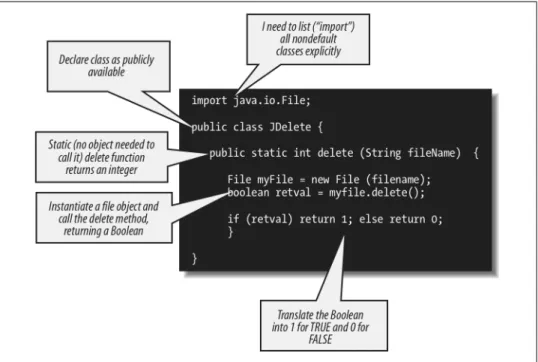
Here is the very simple class I wrote to take advantage of the File.delete method:
/* File on web: JDelete.java */ import java.io.File;
public class JDelete {
public static int delete (String fileName) { File myFile = new File (fileName); boolean retval = myFile.delete(); if (retval) return 1; else return 0; }
}
Figure 27-2 explains each of the steps in this code, but the main effect is clear: the JDelete.delete method simply instantiates a dummy File object for the specified file-name so that I can call the delete method for that file. By declaring my method to be static, I make that method available without the need to instantiate an object. Static methods are associated with the class, not with the individual instances of the objects of that class.
The JDelete class above highlights a number of differences between Java and PL/SQL that you should keep in mind:
• There are no BEGIN and END statements in Java for blocks, loops, or conditional statements. Instead, you use curly braces to delimit the block.
• Java is case-sensitive; “if ” is definitely not the same thing as “IF”.
• The assignment operator is a plain equals sign (=) rather than the compound sym-bol used in PL/SQL (:=).
• When you call a method that does not have any arguments (such as the delete method of the File class), you still must open and close the parentheses. Otherwise, the Java compiler will try to interpret the method as a class member or data structure.
Hey, that was easy! Of course, you didn’t watch me fumble around with Java for a day, getting over the nuisance of minor syntax errors, the agony of a case-sensitive language, and the confusion setting the CLASSPATH. I’ll leave all that to your imagination—and your own day of fumbling!
Compiling and Loading into Oracle
Now that my class is written, I need to compile it. On a Microsoft Windows machine, one way I could do this would be to open a console session on the directory where I have the source code, ensure that the Java compiler (javac.exe) is on my PATH, and do this:
C:\samples\java>javac JDelete.java
If successful, the compiler should generate a file called JDelete.class.
Now that it’s compiled, I realize that it would make an awful lot of sense to test the function before I stick it inside Oracle and try it from PL/SQL. You are always better off building and testing incrementally. Java gives us an easy way to do this: the “main” method. If you provide a void method (i.e., a procedure) called main in your class— and give it the right parameter list—you can then call the class, and this code will execute.
The main method is one example of how Java treats certain elements in a special way if they have the right signature. Another example is the toString method. If you add a method with this name to your class, it will automatically be called to display your custom description of the object. This is especially useful when your object consists of many ele-ments that make sense only when presented a certain way, or that oth-erwise require formatting to be readable.
So let’s add a simple main method to JDelete:
import java.io.File; public class JDelete {
public static int delete (String fileName) { File myFile = new File (fileName); boolean retval = myFile.delete(); if (retval) return 1; else return 0; }
public static void main (String args[]) {
System.out.println (
delete (args[0])
);
} }
The first element (0) in the “args” array represents the first argument supplied from the calling environment.
Next, I will recompile the class:
C:\samples\java>javac JDelete.java
And, assuming the “java” executable is on my PATH:
C:\samples\java>java JDelete c:\temp\te_employee.pks
1
C:\samples\java>java JDelete c:\temp\te_employee.pks
0
Notice that the first time I run the main method it displays 1 (TRUE), indicating that the file was deleted. So it will come as no surprise that when I run the same command again, main displays 0. It couldn’t delete a file that had already been deleted.
That didn’t take too much work or know-how, did it?
In another demonstration of the superiority of Java over PL/SQL, please note that while you have to type 20 characters in PL/SQL to display output (DBMS_OUTPUT.PUT_LINE), you needn’t type any more than 18 characters in Java (System.out.println). Give us a break, you language designers! Though Alex Romankeuich, one of our technical reviewers, notes that if you declare “private static final PrintStream o = Sys-tem.out;” at the beginning of the class, you can then display output in the class with the command “o.println”—only 9 characters in all!
Now that my class compiles, and I have verified that the delete method works, I can load it into the SCOTT schema of the Oracle database using Oracle’s loadjava com-mand. Oracle includes loadjava as part of its distribution, so it should be on your PATH if you have installed the Oracle server or client on your local machine.
C:\samples\java>loadjava -user scott/tiger -oci8 -resolve JDelete.class
I can even verify that the class is loaded by querying the contents of the USER_OBJECTS data dictionary via a utility I’ll introduce later in this chapter:
SQL> EXEC myjava.showobjects
Object Name Object Type Status Timestamp ---JDelete JAVA CLASS VALID 2005-05-06:15:01
That takes care of all the Java-specific steps, which means that it’s time to return to the cozy world of PL/SQL.
Building a PL/SQL Wrapper
I will now make it easy for anyone connecting to my database to delete files from within PL/SQL. To accomplish this goal, I will create a PL/SQL wrapper that looks like a PL/SQL function on the outside but is really nothing more than a pass-through to the underlying Java code.
/* File on web: fdelete.sf */ FUNCTION fDelete ( file IN VARCHAR2) RETURN NUMBER AS LANGUAGE JAVA NAME 'JDelete.delete ( java.lang.String) return int';
The implementation of the fdelete function consists of a string describing the Java method invocation. The parameter list must reflect the parameters of the method, but in place of each parameter, I specify the fully qualified datatype name. In this case, that means that I cannot simply say “String,” but instead must add the full name of the Java package containing the String class. The RETURN clause simply lists int for integer. The int is a primitive datatype, not a class, so that is the complete specification.
As a bit of an aside, I could also write a call spec for a procedure that invokes the JDelete.main method: PROCEDURE fDelete2 ( file IN VARCHAR2) AS LANGUAGE JAVA NAME 'JDelete.main(java.lang.String[])';
The main method is special; even though it accepts an array of Strings, you can define a call spec using any number of parameters.
Deleting Files from PL/SQL
So I compile the function and then prepare to perform my magical, previously difficult (if not impossible) feat:
SQL> @fdelete.sf
Function created.
SQL> EXEC DBMS_OUTPUT.PUT_LINE (fdelete('c:\temp\te_employee.pkb'))
And I get:
ERROR at line 1:
ORA-29532: Java call terminated by uncaught Java exception: java.security. AccessControlException: the
Permission (java.io.FilePermission c:\temp\te_employee.pkb delete) has not been granted to BOB. The PL/SQL
to grant this is dbms_java.grant_permission( 'BOB', 'SYS:java.io.FilePermission', 'c:\temp\te_employee.pkb', 'delete' )
ORA-06512: at "BOB.FDELETE", line 1 ORA-06512: at line 1
I forgot to give myself permission! But hey, look at that message—it’s pretty nice of Oracle to tell me not just what the problem is but also how to fix it. So I get my friendly DBA to run something like this (a slight variation of Oracle’s suggestion):
CALL DBMS_JAVA.grant_permission( 'BOB',
'SYS:java.io.FilePermission', 'c:\temp\*',
'read,write,delete' );
And now I get:
SQL> EXEC DBMS_OUTPUT.PUT_LINE (fdelete('c:\temp\te_employee.pkb'))
1
SQL> exec DBMS_OUTPUT.PUT_LINE (fdelete('c:\temp\te_employee.pkb'))
0
Yippee, it works!
I can also build utilities on top of this function. How about a procedure that deletes all of the files found in the rows of a nested table? Even better, how about a procedure that
accepts a directory name and filter (“all files like *.tmp,” for example) and deletes all files found in that directory that pass the filter?
In reality, of course, what I should do is build a package and then put all this great new stuff in there. And that is just what I will do later in this chapter. First, however, let’s take a closer look at each of the steps I just performed.
Using loadjava
The loadjava utility is an operating system command-line utility that uploads Java files into the database. The first time you run loadjava in a schema, it creates a number of objects in your local schema; although the exact list varies somewhat by Oracle version, you are likely to find at least the following in your default tablespace:
CREATE$JAVA$LOB$TABLE
A table created in each schema, containing Java code elements. Each new class you load using loadjava will generate one row in this table, putting the bytes of the class into a BLOB column.
SYS_C ... (exact name will vary) Unique index on the above table. SYS_IL ... (exact name will vary)
LOB index on the above table.
By the way, if you don’t have permissions or quota available to create these objects in your default tablespace, the load operation will fail.
Before executing the load, Oracle will check to see if the object being loaded already exists, and whether it has changed, thereby minimizing the need to reload and avoiding invalidation of dependent classes.*
The load operation then calls the DDL command CREATE JAVA to load the Java classes from the BLOB column of CREATE$JAVA$LOB$TABLE into the RDBMS as schema objects. This loading occurs only if:
• The class is being loaded for the first time. • The class has been changed.
• The -force option is supplied. Here is the basic syntax :
loadjava {-user | -u} username/password[@database] [option ...] filename [filename ]...
where filename is a Java source, sqlj, class, .jar, resource, properties, or .zip file. The following command, for example, loads the JFile class into the SCOTT schema:
C:> loadjava -user scott/tiger -oci8 -resolve JFile.class
Here are some things to keep in mind about loadjava. To display help text, use this syntax:
loadjava {-help | -h}
In a list of options or files, names must be separated only by spaces:
-force, -resolve, -thin // No -force -resolve -thin // Yes
In a list of users or roles, however, names must be separated only by commas:
SCOTT, PAYROLL, BLAKE // No SCOTT,PAYROLL,BLAKE // Yes
There are more than 40 command-line options on loadjava; some key options are mentioned in Table 27-2.
Table 27-2. Common loadjava options
Option Description
-debug Aids in debugging the loadjava script itself, not your code; rarely necessary.
-definer Specifies that the methods of uploaded classes will execute with the privileges of their definer, not their invoker. (By default, methods execute with the privileges of their invoker.) Different definers can have different privileges, and an application can have many classes, so programmers should make sure the methods of a given class execute only with the privileges they need.
-encoding Sets (or resets) the -encoding option in the database table JAVA$OPTIONS to the specified value, which must be the name of a standard JDK encoding scheme (the default is “latin1”). The compiler uses this value, so the encoding of uploaded source files must match the specified encoding. Refer to the section “GET_, SET_, and RESET_COM-PILER_OPTION: Getting and Setting (a Few) Compiler Options” on page 1151 for information on how this object is created and used.
-force Forces the loading of Java class files, whether or not they have changed since they were last loaded. Note that you cannot force the loading of a class file if you previously loaded the source file (or vice versa). You must drop the originally loaded object first.
-grant Grants the EXECUTE privilege on uploaded classes to the listed users or roles. (To call the methods of a class directly, users must have the EXECUTE privilege.)
This option is cumulative. Users and roles are added to the list of those having the EXECUTE privilege. To revoke the privilege, either drop and reload the schema object without specifying -grant, or use the SQL REVOKE statement. To grant the privilege on an object in another user’s schema, you must have the CREATE PROCEDURE WITH GRANT privilege.
-oci8 Directs loadjava to communicate with the database using the OCI JDBC driver. This option (the default) and -thin are mutually exclusive. When calling loadjava from a client-side computer that does not have Oracle installed on it, use the -thin option.
-resolve After all files on the command line are loaded and compiled (if necessary), resolves all external references in those classes. If this option is not specified, files are loaded but not compiled or resolved until runtime.
Option Description
Specify this option to compile and resolve a class that was loaded previously. You need not specify the -force option because resolution is done independently, after loading.
-resolver Binds newly created class schema objects to a user-defined resolver spec. Because it contains spaces, the resolver spec must be enclosed in double quotes. This option and -oracleresolver (the default) are mutually exclusive. -schema Assigns newly created Java schema objects to the specified schema. If this option is not specified, the logon schema
is used. You must have the CREATE ANY PROCEDURE privilege to load into another user’s schema.
-synonym Creates a public synonym for uploaded classes, making them accessible outside the schema into which they are loaded. To specify this option, you must have the CREATE PUBLIC SYNONYM privilege.
If you specify this option for source files, it also applies to classes compiled from those source files.
-thin Directs loadjava to communicate with the database using the thin JDBC driver. This option and -oci8 (the default) are mutually exclusive. When calling loadjava from a client-side computer that does not have Oracle installed on it, use the -thin option.
-verbose Enables the verbose mode, in which progress messages are displayed. Very handy!
As you can probably imagine, there are various nuances of using loadjava, such as whether to load individual classes or compressed groups of elements in a .zip or .jar file. The Oracle documentation contains more information about the loadjava com-mand.
Using dropjava
The dropjava utility reverses the action of loadjava. It converts filenames into the names of schema objects, then drops the schema objects and any associated data. Dropping a class invalidates classes that depend on it directly or indirectly. Dropping a source object also drops classes derived from it.
The syntax is nearly identical to loadjava syntax:
dropjava {-user | -u} username/password[@database] [option ...] filename [filename] ...
where option includes -oci8, -encoding, and -verbose.
Managing Java in the Database
This section explores in more detail issues related to the way that Java elements are stored in the database and how you can manage those elements.
The Java Namespace in Oracle
Oracle stores each Java class in the database as a schema object. The name of that object is derived from (but is not the same as) the fully qualified name of the class; this name
includes the names of any containing packages. The full name of the class OracleSim-pleChecker, for example, is as follows:
oracle.sqlj.checker.OracleSimpleChecker
In the database, however, the full name of the Java schema object would be:
oracle/sqlj/checker/OracleSimpleChecker
In other words, once stored in the Oracle database, slashes replace dots.
An object name in Oracle, whether the name of a database table or a Java class, cannot be longer than 30 characters. Java does not have this restriction; you can have much longer names. Oracle will allow you to load a Java class into the Oracle database with a name of up to 4,000 characters. If the Java element name has more than 30 characters, the database will automatically generate a valid alias (less than 31 characters) for that element.
But don’t worry! You never have to reference that alias in your stored procedures. You can instead continue to use the real name for your Java element in your code. Oracle will map that long name automatically to its alias (the schema name) when necessary.
Examining Loaded Java Elements
Once you have loaded Java source, class, and resource elements into the database, information about those elements is available in several different data dictionary views, as shown in Table 27-3.
Table 27-3. Class information in data dictionary views
View Description
USER_OBJECTS ALL_OBJECTS DBA_OBJECTS
Contains header information about your objects of JAVA SOURCE, JAVA CLASS, and JAVA RESOURCE types
USER_ERRORS ALL_ERRORS DBA_ERRORS
Contains any compilation errors encountered for your objects
USER_SOURCE Contains the source code for your Java source if you used the CREATE JAVA SOURCE command to create the Java schema object
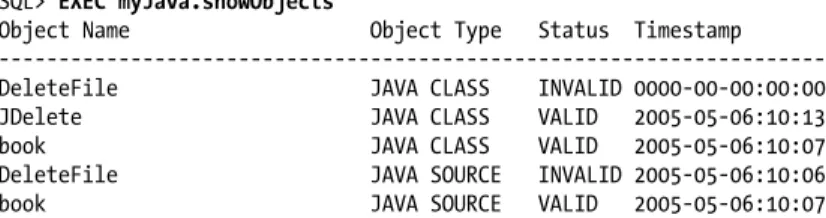
Here is a query that shows all of the Java-related objects in my schema:
/* Files on web: showjava.sql, myJava.pkg */ COLUMN object_name FORMAT A30
SELECT object_name, object_type, status, timestamp FROM user_objects
WHERE (object_name NOT LIKE 'SYS_%' AND object_name NOT LIKE 'CREATE$%'
AND object_name NOT LIKE 'JAVA$%' AND object_name NOT LIKE 'LOADLOB%') AND object_type LIKE 'JAVA %'
ORDER BY object_type, object_name;
The WHERE clause filters out those objects created by Oracle for managing Java ob-jects. You can build programs to access the information in a variety of useful ways. Here is some sample output from the myjava package, which you can find on the book’s web site:
SQL> EXEC myJava.showObjects
Object Name Object Type Status Timestamp ---DeleteFile JAVA CLASS INVALID 0000-00-00:00:00 JDelete JAVA CLASS VALID 2005-05-06:10:13 book JAVA CLASS VALID 2005-05-06:10:07 DeleteFile JAVA SOURCE INVALID 2005-05-06:10:06 book JAVA SOURCE VALID 2005-05-06:10:07
The following would let you see a list of all the Java elements whose names contain “Delete”:
SQL> EXEC myJava.showobjects ('%Delete%')
The column USER_OBJECTS.object_name contains the full names of Java schema objects, unless the name is longer than 30 characters or contains an untranslatable character from the Unicode character set. In both cases, the short name is displayed in the object_name column. To convert short names to full names, you can use the LONGNAME function in the utility package DBMS_JAVA, which is explored in the next section.
Using DBMS_JAVA
The Oracle built-in package DBMS_JAVA gives you access to and the ability to modify various characteristics of the Java Virtual Machine in the database.
The DBMS_JAVA package contains a large number of programs, many of which are intended for Oracle internal use only. Nevertheless, we can take advantage of a number of very useful programs; most can also be called within SQL statements. Table 27-4 summarizes some of the DBMS_JAVA programs. As noted earlier in the chapter, DBMS_JAVA also offers programs to manage security and permissions.
Table 27-4. Common DBMS_JAVA programs
Program Description
LONGNAME function Obtains the full (long) Java name for a given Oracle short name GET_COMPILER_OPTION function Looks up an option in the Java options table
SET_COMPILER_OPTION procedure Sets a value in the Java options table and creates the table, if one does not exist RESET_COMPILER_OPTION procedure Resets a compiler option in the Java options table
Program Description
SET_OUTPUT procedure Redirects Java output to the DBMS_OUTPUT text buffer EXPORT_SOURCE procedure Exports a Java source schema object into an Oracle LOB EXPORT_RESOURCE procedure Exports a Java resource schema object into an Oracle LOB EXPORT_CLASS procedure Exports a Java class schema object into an Oracle LOB
These programs are explored in more detail in the following sections.
LONGNAME: Converting Java Long Names
Java class names can easily exceed the maximum SQL identifier length of 30 characters. In such cases, Oracle creates a unique “short name” for the Java code element and uses that name for SQL- and PL/SQL-related access.
Use the following function to obtain the full (long) name for a given short name:
FUNCTION DBMS_JAVA.LONGNAME (shortname VARCHAR2) RETURN VARCHAR2
The following query displays the long names for all Java classes defined in the currently connected schema for which the long names and short names do not match:
/* File on web: longname.sql */ SELECT object_name shortname,
DBMS_JAVA.LONGNAME (object_name) longname FROM USER_OBJECTS
WHERE object_type = 'JAVA CLASS'
AND object_name != DBMS_JAVA.LONGNAME (object_name);
This query is also available inside the myJava package (found in the myJava.pkg file); its use is shown here. Suppose that I define a class with this name:
public class DropAnyObjectIdentifiedByTypeAndName {
That is too long for Oracle, and I can verify that Oracle creates its own short name as follows:
SQL> EXEC myJava.showlongnames
Short Name | Long Name
---Short: /247421b0_DropAnyObjectIdentif
Long: DropAnyObjectIdentifiedByTypeAndName
GET_, SET_, and RESET_COMPILER_OPTION: Getting and Setting (a Few)
Compiler Options
You can also set a few of the compiler option values in the database table JAVA$OP-TIONS (called the options table from here on). While there are currently about 40 command-line options, only three of them can be saved in the options table. They are:
encoding
Character-set encoding in which the source code is expressed. If not specified, the compiler uses a default, which is the result of the Java method System.getProp-erty(“file.encoding”); a sample value is ISO646-US.
online
True or false; applies only to SQLJ source. The default value of “true” enables online semantics checking.
debug
True or false; setting to true is like using javac -g. If not specified, the compiler defaults to true.
The compiler looks up options in the options table unless they are specified on the loadjava command line.
You can get and set these three options-table entries using the following DBMS_JAVA functions and procedures:
FUNCTION DBMS_JAVA.GET_COMPILER_OPTION ( what VARCHAR2, optionName VARCHAR2) PROCEDURE DBMS_JAVA.SET_COMPILER_OPTION (
what VARCHAR2, optionName VARCHAR2, value VARCHAR2) PROCEDURE DBMS_JAVA.RESET_COMPILER_OPTION (
what VARCHAR2, optionName VARCHAR2)
where: what
Is the name of a Java package, the full name of a class, or the empty string. After searching the options table, the compiler selects the row in which what most closely matches the full name of the schema object. If what is the empty string, it matches the name of any schema object.
optionName
Is the name of the option being set. Initially, a schema does not have an options table. To create one, use the procedure DBMS_JAVA.SET_COMPILER_OPTION to set a value. The procedure creates the table if it does not exist. Enclose param-eters in single quotes, as shown in the following example:
SQL> DBMS_JAVA.SET_COMPILER_OPTION ('X.sqlj', 'online', 'false');
SET_OUTPUT: Enabling Output from Java
When executed within the Oracle database, the System.out and System.err classes send their output to the current trace files, which are typically found in the server’s udump subdirectory. This is not a very convenient location if you simply want to test your code to see if it is working properly. DBMS_JAVA supplies a procedure you can call to
re-direct output to the DBMS_OUTPUT text buffer so that it can be flushed to your SQL*Plus screen automatically. The syntax of this procedure is:
PROCEDURE DBMS_JAVA.SET_OUTPUT (buffersize NUMBER);
Here is an example of how you might use this program:
/* File on web: ssoo.sql */ SET SERVEROUTPUT ON SIZE 1000000 CALL DBMS_JAVA.SET_OUTPUT (1000000);
Passing any integer to DBMS_JAVA.set_output will turn it on. Documentation on the interaction between these two commands is skimpy; my testing has uncovered the following behaviors:
• The minimum (and default) buffer size is a measly 2,000 bytes; the maximum size is 1,000,000 bytes, at least up through Oracle Database 10g Release 1. You can pass a number outside of that range without causing an error; unless the number is really big, the maximum will be set to 1,000,000.
• The buffer size specified by SET SERVEROUTPUT supersedes that of DBMS_JAVA.SET_OUTPUT. In other words, if you provide a smaller value for the DBMS_JAVA call, it will be ignored, and the larger size will be used.
• If you are running Oracle Database 10g Release 2 or later, and you have set SERV-EROUTPUT size to be UNLIMITED, the maximum size of the Java buffer is also unlimited.
• If your output in Java exceeds the buffer size, you will not receive the error you get with DBMS_OUTPUT, namely:
ORA-10027: buffer overflow, limit of nnn bytes
The output will instead be truncated to the buffer size specified, and execution of your code will continue.
As is the case with DBMS_OUTPUT, you will not see any output from your Java calls until the stored procedure through which they are called finishes executing.
EXPORT_SOURCE, EXPORT_RESOURCE, and EXPORT_CLASS: Exporting
Schema Objects
Oracle’s DBMS_JAVA package offers the following set of procedures to export source, resources, and classes:
PROCEDURE DBMS_JAVA.EXPORT_SOURCE ( name VARCHAR2 IN,
[ blob BLOB IN | clob CLOB IN ] );
PROCEDURE DBMS_JAVA.EXPORT_SOURCE ( name VARCHAR2 IN,
schema VARCHAR2 IN,
[ blob BLOB IN | clob CLOB IN ] );
PROCEDURE DBMS_JAVA.EXPORT_RESOURCE ( name VARCHAR2 IN,
[ blob BLOB IN | clob CLOB IN ] );
PROCEDURE DBMS_JAVA.EXPORT_RESOURCE ( name VARCHAR2 IN,
schema VARCHAR2 IN,
[ blob BLOB IN | clob CLOB IN ] );
PROCEDURE DBMS_JAVA.EXPORT_CLASS ( name VARCHAR2 IN,
blob BLOB IN );
PROCEDURE DBMS_JAVA.EXPORT_CLASS ( name VARCHAR2 IN,
schema VARCHAR2 IN, blob BLOB IN );
In all cases, name is the name of the Java schema object to be exported, schema is the name of the schema owning the object (if one is not supplied, the current schema is used), and blob | clob is the large object that receives the specified Java schema object. You cannot export a class into a CLOB, only into a BLOB. In addition, the internal representation of the source uses the UTF8 format, so that format is used to store the source in the BLOB as well.
The following prototype procedure offers an idea of how you might use the export programs to obtain source code of your Java schema objects, when appropriate:
/* File on web: showjava.sp */ PROCEDURE show_java_source (
NAME IN VARCHAR2, SCHEMA IN VARCHAR2 := NULL )
-- Overview: Shows Java source (prototype). Author: Vadim Loevski IS b CLOB; v VARCHAR2 (2000); i INTEGER; object_not_available EXCEPTION; PRAGMA EXCEPTION_INIT(object_not_available, −29532); BEGIN
/* Move the Java source code to a CLOB. */ DBMS_LOB.createtemporary(b, FALSE );
DBMS_JAVA.export_source(name, NVL(SCHEMA, USER), b); /* Read the CLOB to a VARCHAR2 variable and display it. */
i := 1000;
DBMS_lob.read(b, i, 1, v); DBMS_OUTPUT.put_line(v); EXCEPTION
/* If the named object does not exist, an exception is raised. */ WHEN object_not_available
THEN
IF DBMS_UTILITY.FORMAT_ERROR_STACK LIKE '%no such%object' THEN
DBMS_OUTPUT.put_line ('Java object cannot be found.' ); END IF;
END;
If I then create a Java source object using the CREATE JAVA statement as follows:
CREATE OR REPLACE JAVA SOURCE NAMED "Hello" AS
public class Hello {
public static String hello() { return "Hello Oracle World"; }
};
I can view the source code as shown here (assuming that DBMS_OUTPUT has been enabled):
SQL> EXEC show_java_source ('Hello')
public class Hello {
public static String hello() { return "Hello Oracle World"; }
};
Publishing and Using Java in PL/SQL
Once you have written your Java classes and loaded them into the Oracle database, you can call their methods from within PL/SQL (and SQL)—but only after you “pub-lish” those methods via a PL/SQL wrapper.
Call Specs
You need to build wrappers in PL/SQL only for those Java methods you want to make available through a PL/SQL interface. Java methods can access other Java methods in the Java Virtual Machine directly, without any need for a wrapper. To publish a Java method, you write a call spec—a PL/SQL program header (function or procedure) whose body is actually a call to a Java method via the LANGUAGE JAVA clause. This clause contains the following information about the Java method: its full name, its parameter types, and its return type. You can define these call specs as standalone functions or procedures, as programs within a package, or as methods in an object type:
CREATE [OR REPLACE] --If standalone (not in a package)
Standard PL/SQL procedure/function header
{IS | AS} LANGUAGE JAVA
NAME 'method_fullname (java_type[, java_type]...) [return java_type]';
where java_type is either the full name of a Java type, such as java.lang.String, or a primitive type, such as int. Note that you do not include the parameter names, only their types.
The NAME clause string uniquely identifies the Java method being wrapped. The full Java name and the call spec parameters, which are mapped by position, must corre-spond, one to one, with the parameters in the program. If the Java method takes no arguments, code an empty parameter list for it.
Here are a few examples:
• As shown earlier, here is a standalone function calling a method:
FUNCTION fDelete ( file IN VARCHAR2) RETURN NUMBER AS LANGUAGE JAVA NAME 'JDelete.delete ( java.lang.String) return int';
• A packaged procedure that passes an object type as a parameter:
PACKAGE nat_health_care IS
PROCEDURE consolidate_insurer (ins Insurer) AS LANGUAGE JAVA
NAME 'NHC_consolidation.process(oracle.sql.STRUCT)'; END nat_health_care;
• An object type method:
TYPE pet_t AS OBJECT ( name VARCHAR2(100),
MEMBER FUNCTION date_of_birth ( name_in IN VARCHAR2) RETURN DATE AS LANGUAGE JAVA
NAME 'petInfo.dob (java.lang.String) return java.sql.Timestamp' );
• A standalone procedure with an OUT parameter:
PROCEDURE read_out_file ( file_name IN VARCHAR2, file_line OUT VARCHAR2 )
AS
LANGUAGE JAVA
NAME 'utils.ReadFile.read(java.lang.String ,java.lang.String[])';
Some Rules for Call Specs
Note the following:
• A PL/SQL call spec and the Java method it publishes must reside in the same schema.
• A call spec exposes a Java method’s top-level entry point to Oracle. As a result, you can publish only public static methods, unless you are defining a member method of a SQL object type. In this case, you can publish instance methods as member methods of that type.
• You cannot provide default values in the parameter list of the PL/SQL program that will serve as a wrapper for a Java method invocation.
• A method in object-oriented languages cannot assign values to objects passed as arguments; the point of the method is to apply to the object to which it is attached. When you want to call a method from SQL or PL/SQL and change the value of an argument, you must declare it as an OUT or IN OUT parameter in the call spec. The corresponding Java parameter must then be a one-element array of the ap-propriate type.
You can replace the element value with another Java object of the ap-propriate type or (for IN OUT parameters only) modify the value if the Java type permits. Either way, the new value propagates back to the caller. For example, you might map a call spec OUT parameter of type NUMBER to a Java parameter declared as float[] p, and then assign a new value to p[0].
A function that declares OUT or IN OUT parameters cannot be called from SQL DML statements.
Mapping Datatypes
Earlier in this chapter, we saw a very simple example of a PL/SQL wrapper—a delete function that passed a VARCHAR2 value to a java.lang.String parameter. The Java method returned an int, which was then passed back through the RETURN NUMBER clause of the PL/SQL function. These are straightforward examples of datatype map-ping, that is, setting up a correspondence between a PL/SQL datatype and a Java da-tatype.
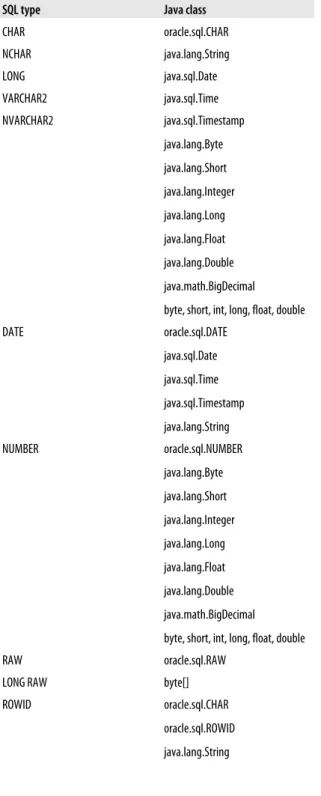
When you build a PL/SQL call spec, the PL/SQL and Java parameters, as well as the function result, are related by position and must have compatible datatypes. Ta-ble 27-5 lists all the datatype mappings currently allowed between PL/SQL and Java. If you rely on a supported datatype mapping, Oracle will convert from one to the other automatically.
Table 27-5. Legal datatype mappings
SQL type Java class
CHAR oracle.sql.CHAR NCHAR java.lang.String LONG java.sql.Date VARCHAR2 java.sql.Time NVARCHAR2 java.sql.Timestamp java.lang.Byte java.lang.Short java.lang.Integer java.lang.Long java.lang.Float java.lang.Double java.math.BigDecimal byte, short, int, long, float, double DATE oracle.sql.DATE java.sql.Date java.sql.Time java.sql.Timestamp java.lang.String NUMBER oracle.sql.NUMBER java.lang.Byte java.lang.Short java.lang.Integer java.lang.Long java.lang.Float java.lang.Double java.math.BigDecimal byte, short, int, long, float, double
RAW oracle.sql.RAW
LONG RAW byte[] ROWID oracle.sql.CHAR
oracle.sql.ROWID java.lang.String
SQL type Java class BFILE oracle.sql.BFILE BLOB oracle.sql.BLOB oracle.jdbc2.Blob CLOB oracle.sql.CLOB NCLOB oracle.jdbc2.Clob User-defined object type oracle.sql.STRUCT java.sql.Struct java.sql.SqlData oracle.sql.ORAData User-defined REF type oracle.sql.REF
java.sql.Ref oracle.sql.ORAData Opaque type (such as XMLType) oracle.sql.OPAQUE TABLE
VARRAY
oracle.sql.ARRAY
User-defined table or VARRAY type java.sql.Array oracle.sql.ORAData Any of the above SQL types oracle.sql.CustomDatum
oracle.sql.Datum
As you can see, Oracle supports only automatic conversion for SQL datatypes. Such PL/SQL-specific datatypes as BINARY_INTEGER, PLS_INTEGER, BOOLEAN, and associative array types are not supported. In those cases, you have to perform manual conversion steps to transfer data between these two execution environments. See the references in the section “Other Examples” on page 1167 for examples of nondefault mappings; see the Oracle documentation for even more detailed examples involving the use of JDBC.
Calling a Java Method in SQL
You can call PL/SQL functions of your own creation from within SQL DML statements. You can also call Java methods wrapped in PL/SQL from within SQL. However, these methods must conform to the following purity rules:
• If you call a method from a SELECT statement or a parallelized INSERT, UPDATE, MERGE, or DELETE statement, the method is not allowed to modify any database tables.
• If you call a method from an INSERT, UPDATE, MERGE, or DELETE statement, the method cannot query or modify any database tables modified by that state-ment.
• If you call a method from a SELECT, INSERT, UPDATE, MERGE, or DELETE statement, the method cannot execute SQL transaction control statements (such as COMMIT), session control statements (such as SET ROLE), or system control statements (such as ALTER SYSTEM). The method also cannot execute DDL statements because they automatically perform a commit in your session. Note that these restrictions are waived if the method is executed from within an auton-omous transaction PL/SQL block.
The objective of these restrictions is to control side effects that might disrupt your SQL statements. If you try to execute a SQL statement that calls a method violating any of these rules, you will receive a runtime error when the SQL statement is parsed.
Exception Handling with Java
On the one hand, the Java exception-handling architecture is very similar to that of PL/SQL. In Java-speak, you throw an exception and then catch it. In PL/SQL-speak, you raise an exception and then handle it.
On the other hand, exception handling in Java is much more robust. Java offers a foundation class called Exception. All exceptions are objects based on that class, or on classes derived from (extending) that class. You can pass exceptions as parameters and manipulate them pretty much as you would objects of any other class.
When a Java stored method executes a SQL statement and an exception is thrown, that exception is an object from a subclass of java.sql.SQLException. That subclass contains two methods that return the Oracle error code and error message: getErrorCode( ) and getMessage( ).
If a Java stored procedure called from SQL or PL/SQL throws an exception that is not caught by the JVM, the caller gets an exception thrown from a Java error message. This is how all uncaught exceptions (including non-SQL exceptions) are reported. Let’s take a look at the different ways of handling errors and the resulting output.
Suppose that I create a class that relies on JDBC to drop objects in the database (this is drawn from an example in the Oracle documentation):
/* File on web: DropAny.java */ import java.sql.*;
import java.io.*;
import oracle.jdbc.driver.*; public class DropAny {
public static void object (String object_type, String object_name) throws SQLException {
// Connect to Oracle using JDBC driver
// Build SQL statement
String sql = "DROP " + object_type + " " + object_name; Statement stmt = conn.createStatement(); try { stmt.executeUpdate(sql); } catch (SQLException e) { System.err.println(e.getMessage()); } finally { stmt.close(); } } }
This example traps and displays any SQLException using the highlighted code. The “finally” clause ensures that the close( ) method executes whether the exception is raised or not, in order to get the statement’s open cursor handled properly.
While it doesn’t really make any sense to rely on JDBC to drop objects because this can be done much more easily in native dynamic SQL, building it in Java makes the functionality available to other Java pro-grams without calling PL/SQL.
I load the class into the database using loadjava and then wrap this class inside a PL/SQL procedure as follows: PROCEDURE dropany ( tp IN VARCHAR2, nm IN VARCHAR2 ) AS LANGUAGE JAVA NAME 'DropAny.object ( java.lang.String, java.lang.String)';
When I attempt to drop a nonexistent object, I will see one of two outcomes:
SQL> CONNECT scott/tiger
Connected.
SQL> SET SERVEROUTPUT ON
SQL> BEGIN dropany ('TABLE', 'blip'); END; /
PL/SQL procedure successfully completed. SQL> CALL DBMS_JAVA.SET_OUTPUT (1000000);
Call completed.
SQL> BEGIN dropany ('TABLE', 'blip'); END; /
ORA-00942: table or view does not exist
What you see in these examples is a reminder that output from System.err.println will not appear on your screen until you explicitly enable it with a call to DBMS_JAVA.SET_OUTPUT. In either case, however, no exception was raised back to the calling block because it was caught inside Java. After the second call to dropany, you can see that the error message supplied through the getMessage( ) method is taken directly from Oracle.
If I comment out the exception handler in the DropAny.object( ) method, I will get something like this (assuming SERVEROUTPUT is enabled, as well as Java output):
SQL > BEGIN 2 dropany('TABLE', 'blip'); 3 EXCEPTION 4 WHEN OTHERS 5 THEN 6 DBMS_OUTPUT.PUT_LINE(SQLCODE); 7 DBMS_OUTPUT.PUT_LINE(SQLERRM); 8 END; 9 /
oracle.jdbc.driver.OracleSQLException: ORA-00942: table or view does not exist at oracle.jdbc.driver.T2SConnection.check_error(T2SConnection.java:120) at oracle.jdbc.driver.T2SStatement.check_error(T2SStatement.java:57) at oracle.jdbc.driver.T2SStatement.execute_for_rows(T2SStatement.java:486) at oracle.jdbc.driver.OracleStatement.doExecute WithTimeout(OracleStatement.java:1148) at oracle.jdbc.driver.OracleStatement.executeUpdate(OracleStatement.java:1705) at DropAny.object(DropAny:14) −29532
ORA-29532: Java call terminated by uncaught Java exception: java.sql.SQLException: ORA-00942: table or view does not exist
This takes a little explaining. Everything between:
java.sql.SQLException: ORA-00942: table or view does not exist
and:
−29532
represents an error stack dump generated by Java and sent to standard output, regard-less of how you handle the error in PL/SQL. In other words, even if my exception section looked like this:
EXCEPTION WHEN OTHERS THEN NULL;
I would still get all that output on the screen, and then processing in the outer block (if any) would continue. The last three lines of output displayed are generated by my calls to DBMS_OUTPUT.PUT_LINE.
Notice that the Oracle error is not ORA-00942, but instead is ORA-29532, a generic Java error. This is a problem. If you trap the error, how can you discover what the real error is? Looks like it’s time for Write-A-Utility Man!
It appears to me that the error returned by SQLERRM is of this form:
ORA-29532: Java call ...: java.sql.SQLException: ORA-NNNNN ...
So I can scan for the presence of java.sql.SQLException and then SUBSTR from there. The book’s web site contains a program in the getErrorInfo.sp file that returns the error code and message for the current error, building in the smarts to compensate for the Java error message format.
The main focus in the following sections is an expansion of the JDelete class into the JFile class, which will provide significant new file-related features in PL/SQL. Following that, we’ll explore how to write Java classes and PL/SQL programs around them to manipulate Oracle objects.
Extending File I/O Capabilities
Oracle’s UTL_FILE package (described in Chapter 22) is notable more for what it is missing than for what it contains. With UTL_FILE, you can read and write the contents of files sequentially. That’s it. At least before Oracle9i Database Release 2, you can’t delete files, change privileges, copy a file, obtain the contents of a directory, set a path, etc., etc. Java to the rescue! Java offers lots of different classes to manipulate files. You’ve already met the File class and seen how easy it is to add the “delete a file” capability to PL/SQL.
I will now take my lessons learned from JDelete and the rest of this chapter and create a new class called JFile, which will allow PL/SQL developers to answer the questions and take the actions listed here:
• Can I read from a file? Write to a file? Does a file exist? Is the named item a file or a directory?
• What is the number of bytes in a file? What is the parent directory of a file? • What are the names of all the files in a directory that match a specified filter? • How can I make a directory? Rename a file? Change the extension of a file? I won’t explain all the methods in the JFile class and its corresponding package; there is a lot of repetition, and most of the Java methods look just like the delete( ) function I built at the beginning of the chapter. I will instead focus on the unique issues addressed in different areas of the class and package. You can find the full definition of the code in the following files on the book’s web site:
JFile.java
A Java class that draws together various pieces of information about operating system files and offers it through an API accessible from PL/SQL.
xfile.pkg
The PL/SQL package that wraps the JFile class. Stands for “eXtra stuff for FILEs.”
Oracle9i Database Release 2 introduced an enhanced version of the UTL_FILE package that, among other things, allows you to delete a file using the UTL_FILE.FREMOVE procedure. It also supports file copy-ing (FCOPY) and file renamcopy-ing (FRENAME).
Polishing up the delete method
Before moving on to new and exciting stuff, we should make sure that what we’ve done so far is optimal. The way I defined the JDelete.delete( ) method and the delete_file function is far from ideal. Here’s the method code I showed you earlier:
public static int delete (String fileName) { File myFile = new File (fileName); boolean retval = myFile.delete(); if (retval) return 1; else return 0; }
And the associated PL/SQL:
FUNCTION fDelete (
file IN VARCHAR2) RETURN NUMBER AS LANGUAGE JAVA
NAME 'JDelete.delete (java.lang.String) return int';
So what’s the problem? The problem is that I have been forced to use clumsy, numeric representations for TRUE/FALSE values. As a result, I must write code like this:
IF fdelete ('c:\temp\temp.sql') = 1 THEN ...
and that is very ugly, hardcoded software. Not only that, but the person writing the PL/SQL code would be required to know about the values for TRUE and FALSE em-bedded within a Java class.
I would much rather define a delete_file function with this header:
FUNCTION fDelete (
file IN VARCHAR2) RETURN BOOLEAN;
So let’s see what it would take to present that clean, easy-to-use API to users of the xfile package.
First, I will rename the JDelete class to JFile to reflect its growing scope. Then, I will add methods that encapsulate the TRUE/FALSE values its other methods will return —and call those inside the delete( ) method. Here is the result:
/* File on web: JFile.java */ import java.io.File;
public static int tVal () { return 1; }; public static int fVal () { return 0; }; public static int delete (String fileName) { File myFile = new File (fileName); boolean retval = myFile.delete(); if (retval) return tVal(); else return fVal(); }
}
That takes care of the Java side of things; now it’s time to shift attention to my PL/SQL package. Here’s the first pass at the specification of xfile:
/* File on web: xfile.pkg */ PACKAGE xfile
IS
FUNCTION delete (file IN VARCHAR2) RETURN BOOLEAN;
END xfile;
So now we have the Boolean function specified. But how do we implement it? I have two design objectives:
• Hide the fact that I am relying on numeric values to pass back TRUE or FALSE. • Avoid hardcoding the 1 and 0 values in the package.
To achieve these objectives, I will define two global variables in my package to hold the numeric values:
/* File on web: xfile.pkg */ PACKAGE BODY xfile
IS
g_true INTEGER; g_false INTEGER;
And way down at the end of the package body, I will create an initialization section that calls these programs to initialize my globals. By taking this step in the initialization section, I avoid unnecessary calls (and overhead) to Java methods:
BEGIN
g_true := tval; g_false := fval; END xfile;
Back up in the declaration section of the package body, I will define two private func-tions whose only purpose is to give me access in my PL/SQL code to the JFile methods that have encapsulated the 1 and 0:
FUNCTION tval RETURN NUMBER AS LANGUAGE JAVA
NAME 'JFile.tVal () return int'; FUNCTION fval RETURN NUMBER
AS LANGUAGE JAVA
NAME 'JFile.fVal () return int';
I have now succeeded in softcoding the TRUE/FALSE values in the JFile package. To enable the use of a true Boolean function in the package specification, I create a private “internal delete” function that is a wrapper for the JFile.delete( ) method. It returns a number:
FUNCTION Idelete (file IN VARCHAR2) RETURN NUMBER AS LANGUAGE JAVA
NAME 'JFile.delete (java.lang.String) return int';
Finally, my public delete function can now call Idelete and convert the integer value to a Boolean by checking against the global variable:
FUNCTION delete (file IN VARCHAR2) RETURN BOOLEAN AS
BEGIN
RETURN Idelete (file) = g_true; EXCEPTION
WHEN OTHERS THEN
RETURN FALSE; END;
And that is how you convert a Java Boolean to a PL/SQL Boolean. You will see this method employed again and again in the xfile package body.
Obtaining directory contents
One of my favorite features of JFile is its ability to return a list of files found in a direc-tory. It accomplishes this feat by calling the File.list( ) method; if the string you used to construct a new File object is the name of a directory, it returns a array of String filenames found in that directory. Let’s see how I can make this information available as a collection in PL/SQL.
First, I create a collection type with which to declare these collections:
CREATE OR REPLACE TYPE dirlist_t AS TABLE OF VARCHAR2(512);
I next create a method called dirlist, which returns an oracle.sql.ARRAY:
/* File on web: JFile.java */ import java.io.File;
import java.sql.*; import oracle.sql.*; import oracle.jdbc.*; public class JFile { ...
public static oracle.sql.ARRAY dirlist (String dir) throws java.sql.SQLException
{
Connection conn = new OracleDriver().defaultConnection(); ArrayDescriptor arraydesc =
ArrayDescriptor.createDescriptor ("DIRLIST_T", conn); File myDir = new File (dir);
String[] filesList = myDir.list();
ARRAY dirArray = new ARRAY(arraydesc, conn, filesList); return dirArray;
} ...
This method first retrieves a “descriptor” of the user-defined type dirlist_t so that we can instantiate a corresponding object. After calling Java’s File.list() method, it copies the resulting list of files into the ARRAY object in the invocation of the constructor. Over on the PL/SQL side of the world, I then create a wrapper that calls this method:
FUNCTION dirlist (dir IN VARCHAR2) RETURN dirlist_t
AS
LANGUAGE JAVA
NAME 'myFile.dirlist(java.lang.String) return oracle.sql.ARRAY';
And here is a simple example of how it might be invoked:
DECLARE
tempdir dirlist_t; BEGIN
tempdir := dirlist('C:\temp'); FOR indx IN 1..tempdir.COUNT LOOP
DBMS_OUTPUT.PUT_LINE_(tempdir(indx)); END LOOP;
END;
You will find in the xfile package additional programs to do the following: retrieve filenames as a list rather than an array, limit files retrieved by designated wildcard filters, and change the extension of specified files. You will also find all of the entry points of the UTL_FILE package, such as FOPEN and PUT_LINE. I add those so that you can avoid the use of UTL_FILE for anything but declarations of file handles as UTL_FILE.FILE_TYPE and references to the exceptions declared in UTL_FILE.
Other Examples
On the book’s web site there are still more interesting examples of using Java to extend the capabilities of PL/SQL or perform more complex datatype mapping:
utlzip.sql
Courtesy of reviewer Vadim Loevski, this Java class and corresponding package make zip/compression functionality available in PL/SQL. They also use the CRE-ATE OR REPLACE JAVA statement to load a class directly into the database with-out relying on the loadjava command. Here is the header of the Java class creation statement:
/* File on web: utlzip.sql */ JAVA SOURCE NAMED "UTLZip" AS import java.util.zip.*; import java.io.*; public class utlzip
{ public static void compressfile(string infilename, string outfilename) ...
}
And here is the “cover” for the Java method:
PACKAGE utlzip IS
PROCEDURE compressfile (p_in_file IN VARCHAR2, p_out_file IN VARCHAR2) AS
LANGUAGE JAVA
NAME 'UTLZip.compressFile(java.lang.String, java.lang.String)';
END;
If you are running Oracle Database 10g or later, you may not find this quite as useful, because you can just use Oracle’s built-in package UTL_COMPRESS in-stead.
DeleteFile.java and deletefile.sql
Courtesy of reviewer Alex Romankeuich, this Java class and corresponding PL/SQL code demonstrate how to pass a collection (nested table or VARRAY) into an array in Java. The specific functionality implements the deletion of all files in the specified directory that have been modified since a certain date. To create the PL/SQL side of the equation, I first create a nested table of objects, and then pass that collection to Java through the use of the oracle.sql.ARRAY class:
CREATE TYPE file_details AS OBJECT ( dirname VARCHAR2 (30), deletedate DATE)
/
CREATE TYPE file_table AS TABLE OF file_details; /
CREATE OR REPLACE PACKAGE delete_files IS
FUNCTION fdelete (tbl IN file_table) RETURN NUMBER AS
LANGUAGE JAVA
NAME 'DeleteFile.delete(oracle.sql.ARRAY) return int'; END delete_files;
And here are the initial lines of the Java method. Note that Alex extracts the result set from the array structure and then iterates through that result set. See the De-leteFile.java script for the full implementation and extensive comments.
/* File on web: DeleteFile.java and deletfile.sql */ public class DeleteFile {
public static int delete(oracle.sql.ARRAY tbl) throws SQLException { try {