INSTALLATION GUIDE
HARDWIRED
CONTROL UNIT
9751 Hardwired Control Unit Installation Guide
This document applies to control panels using software versions 4.x. and 5.x. © Cooper Security Ltd. 2009
Every effort has been made to ensure that the contents of this book are correct. However, neither the authors nor Cooper Security Limited accept any liability for loss or damage caused or alleged to be caused directly or indirectly by this book. The contents of this book are subject to change without notice.
Contents
1. INTRODUCTION... 1
About this Manual ...1
Features of the Control Unit...2
Elements of the IAS ...3
9941 and 9943 Keypads ...5
Expanders ...5
Partitioned or Single System...7
User Control ...7
2. TECHNICAL DESCRIPTION ... 9
Control Unit Specification...9
General...9 Power Supply ...9 Outputs...10 Inputs...10 Fuses...10 Compatible Equipment...11
Control Unit PCB Layout...12
3. INSTALLATION... 13
Overview...13
Cabling for Keypads and Expanders...14
Fitting the System ...16
Fitting the Control Unit Case...16
Fitting a 9941 or 9943 Keypad...16
Wiring the Control Unit...17
Cable Entries ...17
Mains Connection ...17
Keypads...18
Connecting Sounders ...19
Connecting Detector Circuits to the Main PCB ...21
Connecting Expanders ...24
Programming Outputs...26
Wiring Keyswitches...27
Communicator ...28
Connecting the Communicator ...28
Statutory Information ...29
Safety Notice ...30
Connecting the Telephone Line ...32
Fitting a Plug-by Communicator...33
Fitting a Battery...35
Initial Start Up ...36
Contents 9751 Installation Guide
Page ii 11976798
List of Figures
Figure 1. Elements of an Intruder Alarm System...4
Figure 2. 9941 and 9943 Keypads ...5
Figure 3. Control Unit PCB Layout...12
Figure 4. Star and Bus Wiring for Keypads and Expanders ...14
Figure 5. Backplate of the 9941/9943 Keypad ...16
Figure 6. Mains Connection ...17
Figure 7. Keypad Connections...18
Figure 8. 9941, 9943 Panic Attack Connections ...18
Figure 9. Keypad Addressing...19
Figure 10. Sounder Connections ...20
Figure 11. CCL Connections (common tamper)...21
Figure 12. FSL Connections ...22
Figure 13. Colour Code for FSL Resistors ...22
Figure 14. Wiring Zones that use Anti-Masking...23
Figure 15. 9954 Expander ...24
Figure 16. RFX08/RFX16 Radio Expander ...25
Figure 17. Connecting an Expander ...25
Figure 18. Link Positions to Select Wiring Method ...26
Figure 19. Link Positions to Allocate Expanders to Zones ...26
Figure 20. Wiring Examples for Open Collector Outputs...27
Figure 21. Connecting a Keyswitch...27
Figure 22. SELV and TNV connectors ...31
Figure 23. Connecting the Internal Communicator...32
Figure 24. Plug-By Communicator Wiring ...33
Figure 25. Fitting a Plug-by Communicator...33
Figure 26. Fitting Control Unit PCB...34
1. INTRODUCTION
About this Manual
This manual is divided into three chapters:
1. Introduction: this describes the parts of an Intruder Alarm System (IAS) based on the 9751 control unit.
2. Technical description: this defines the operating parameters of the different parts of the system.
3. Installation: this explains the tasks involved in installing an IAS using the 9751 control unit.
The control unit is designed to be fully programmable to suit individual user and site requirements. Installers can program units either from a keypad or using a program called Downloader on a PC running Windows (Windows XP). When programming from a keypad, instructions are entered using the three-digit commands described in the Programming Guide.
1. Introduction 9751 Installation Guide
Page 2 11976798
Features of the Control Unit
The control unit provides:
° On-board connections for 8 Fully Supervised Loop (FSL) zones or 8 Closed Circuit Loop (CCL) zones with a common tamper.
Separate expander units enable a further 16 zones to be connected: a combination of wired and radio expanders can be used.
° Connections for 3 fully programmable outputs.
° A 4-wire bus for keypads and hardwired or radio expanders.
° Internal sounder loudspeaker output with Chime, Alarm, Fire and Entry/Exit tones (the volume of the Entry/Exit and Chime tones can be adjusted). ° Built-in communicator for reporting to an Alarm Receiving Centre (ARC). ° 8 programmable plug-by outputs (for connecting a standalone
communication device).
° Alarm Abort and Alarm Confirmation outputs (to reduce the likelihood of false alarms).
° Facility to download from a remote PC via a telephone line. ° Support for a range of European countries and languages. ° Fully programmable operation for zones, levels and partitions. ° Flexible reporting formats and communication configurations. ° Installer-programmable Engineer and Guard Codes.
° Support for up to 50 separate users. User facilities include:
° 4 different security levels, which can be programmed by the Installer either as a full set and 3 part sets, or as 4 independent partitions.
° Proximity tag reader for setting and unsetting the system.
° Dual key alarms from the keypads (Panic Alarm, Medical and Fire). ° Remote Panic Alarm input to 9941 or 9943 keypads.
° Remote set/unset when using a radio expander. ° User-programmable Duress Code.
Test facilities include: ° 700-entry event log. ° Output test commands. ° Engineer walk test command.
9751 Installation Guide 1. Introduction
Elements of the IAS
An IAS comprises a control unit in a shielded case, with 1 to 4 separate keypads and various detectors, transmitters and other devices connected to programmable zones. If required, a keyswitch can be connected to a zone. Each control unit has zone connectors on its printed circuit board (PCB). Separate expanders enable more zones to be connected: each hardwired expander adds up to 8 wired zones and each radio expander adds up to 8 or 16 wirefree zones (depending on the model used).
The control unit has 8 zones as standard, expandable to a maximum of 24. Figure 1 shows how these elements are connected. In this example, the control unit (14) is directly connected to 6 detectors and 2 door contacts. Further zones are then connected to it through a hardwired expander (9) and a radio expander (4). There are 4 keypads (7 and 11) on the bus.
1. Introduction 9751 Installation Guide Page 4 11976798 A B C D 1 2 3 4 5 6 7 8 9 0 A B C D 1 2 3 4 5 6 7 8 9 0 A B C D 1 2 3 4 5 6 7 8 9 0 A B C D 1 2 3 4 5 6 7 8 9 0
1. 723r EUR Telecommand 9. 9954 hardwired expander
2. 726r EUR PA 10. Passive Infra Red detectors
3. 714r EUR wirefree Passive Infra Red detectors 11. Keypads
4. RFX radio expander 12. Door contacts
5. 735r EUR universal transmitter 13. Keyswitch
6. 720r EUR smoke detector 14. Control unit
7. Keypads 15. Fused mains spur
8. Wired detectors
9751 Installation Guide 1. Introduction
9941 and 9943 Keypads
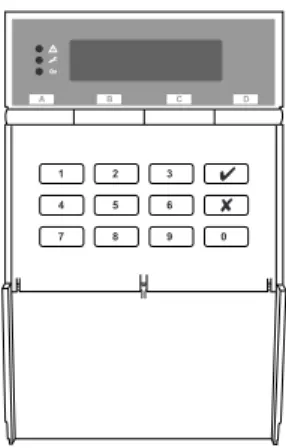
A B C D 1 2 3 4 5 6 7 8 9 0Figure 2. 9941 and 9943 Keypads
The control unit supports the connection of 9941 and 9943 keypads. The 9943 has a built-in wide-area proximity reader and connections for an external panic alarm switch. Both have a two-line 16-character Liquid Crystal Display (LCD) that can display alarm information, programming settings and other information. There are three LEDs that have the following functions.
Note: Depending on how the system is set up, the LEDs may not operate until a user code is presented.
Alert lamp – Flashes to highlight unacknowledged alert, glows for acknowledged conditions, and goes out when all conditions have been rectified.
s Service lamp – Glows if the system needs an installer reset.
a Mains lamp – Glows when using mains power. Flashes when using
the stand-by battery.
Expanders
You can attach up to two hardwired or radio expanders to the control unit to expand the number of zones to a maximum of 24. You can use a combination of the two types.
Hardwired Expanders
1. Introduction 9751 Installation Guide
Page 6 11976798
2. Two-wire Fully Supervised Loop (FSL).
Radio Expanders
° 703r. Four channel programmable transmitter, when used in two door
contact mode only.
° 710r. A compact, long range, two button PA transmitter.
° 713r and 714r. These are Passive Infra-Red (PIR) movement detectors. The 713r has a detection range of 10m and is pet tolerant (up to 25kg size animals). The 714r has a greater radio range, and has a detection range of at least 15m. The detectors have a three-minute lockout time after
detection, which lengthens battery life. ° 720r. A smoke detector.
° 722r/727r. A keyfob sized telecommand with two button PA transmitter (not PD6662 compliant). The 727r version uses encrypted codes.
° 723r/728r. Remote setting device (also known as a "telecommand") that can be used to full set, part set or unset the system. The 728r version uses encrypted codes.
° 726r. A hand held radio transmitter that can be used to start a PA. ° 734r. A universal transmitter that can be used as a door contact or for
connecting hardwired inputs.
° 738r. A Spyder shock sensor with transmitter.
° 739r. A radio transmitter that fits into a break-glass detector. The -00 version is the transmitter only. The -50 version comes with a break glass detector.
° 790r. A Radio Strength Monitor, which can be used in conjunction with a 734r.
The RFX08 radio expander can handle eight wireless detectors, while the RFX16 can handle 16 detectors. The units support eight Telecommands and/or PA transmitters in addition to the eight or 16 radio detectors.
The radio expanders communicate with the control unit using the same wiring as the keypads. The radio detectors operate on 868.6625MHz, which is a dedicated frequency for intruder alarms and reduces the possibility of interference from other radio services.
Each radio detector and remote setting device contains a digital identity code that the RFX unit "learns" during installation. The code is one of over 16 million possibilities. This ensures that the RFX unit will not respond to any other detectors or remote setting switches apart from the ones it has learned. For more information, refer to the appropriate "Installation and Programming Guide" for the radio expanders you are using.
9751 Installation Guide 1. Introduction
Partitioned or Single System
During installation, the Installer can configure the system as a single system or as a partitioned system.
In a single system, the control unit has one full set level (security level A) and three part set security levels (levels B, C and D). Users can set only one level at a time. Level A sets the whole system. Levels B, C and D set parts of the system. The Installer allocates zones to levels, but all keypads operate the entire system. There is only one sounder output for the whole system, and you can use a loud-speaker for setting tones and local alarms. All users belong to the whole system.
When working as a partitioned system, the control unit effectively provides four smaller alarm systems. Within a partitioned system:
• Each partition can be set, unset or in alarm independently of the others. • You can assign individual keypads to one or more partitions. The keypads
can only set or unset the partitions to which they are assigned. • Each partition can have its own Bell and Strobe Set output.
• Zones can be assigned to more than one partition; for example, an entry door zone may be shared by several companies using separate partitions. You can set up the control unit as a single or partitioned system using Command 98 (this will also restore the control unit to factory defaults). For an overview of the programming steps required to set up a partitioned system, see Chapter 4 in the Programming Guide.
User Control
The control unit provides 50 independent User access codes and a separate Duress Code. Users can change these codes at any time but cannot use them to program the system. During installation, the Installer can select whether access codes use four or six digits.
1. Introduction 9751 Installation Guide
2. TECHNICAL DESCRIPTION
Control Unit Specification
General
Environmental Class 2
Security EN50131-1 or PD6662 Grade 2
Operating temperature -10° to +55°C
Humidity 96% RH
Dimensions 235mm W, 245mm H, 90mm D
Weight 3.3 kg
Internal Clock ±10 minutes over one year (depending on the
accuracy of the mains supply frequency).
Radio detector differs 16,777,214 (224 -2)
Suitable for use in a system that is designed to comply with EN50131-1, ACPO-IAS Policy, NSI NACP14.
This equipment is compliant with EN 50136-2-1 and EN 50136-2-2. It allows the alarm transmission system to meet the performance requirements of prEN 50131-1: 2004 ATS 2 provided that:
a) It is installed in accordance with the installation instructions. b) The connected PSTN is functioning normally.
c) The ARC is adequately equipped.
Power Supply
All currents accurate to ±5%.
Mains power supply 230VAC +10%/-15%, 200mA max, 50Hz ±5%
System power supply Type A. 13.8VDC, 1.0A
Battery charge current limit 250mA
To comply with the requirements of EN50131, the total current taken from the power supply, not including the battery recharge current, but including auxiliary outputs and other devices, must not exceed 750mA.
Nominal power requirements (DC):
9751 130mA quiescent, 220mA active
9941 20mA quiescent, 60mA backlight on
9943 30mA quiescent, 70mA backlight on
9954 20mA typical, 30mA maximum
2. Technical Description 9751 Installation Guide
Page 10 11976798
Standby battery (not supplied) 12V rechargeable lead-acid, gel-type battery. Low battery voltage cutoff = 10V.
Recommended manufacturers: Yuassa, Yucel or Fiamm.
Note: Grade 1 and 2 compliance requires the control unit to continue for a minimum period of 12 hours on a standby battery. To calculate the minimum capacity battery to achieve this requirement, determine the total current taken by external devices and the control unit and multiply by 12. Cooper Security Ltd recommend that you fit at least a 7Ah battery. Note that a 17Ah battery cannot fit inside the case.
Outputs
OP 1, 2, 3 Open-collector transistor outputs, 500mA,
12VDC, negative applied.
LS Supports two parallel-connected, externally
mounted loudspeakers for internal sounder or
EE tones: minimum speaker impedance 16Ω.
AUX 500mA, 12VDC minimum, 13.8VDC
maximum, ripple ±2% maximum.
Communications outputs 12V logic outputs, negative applied in alarm
(positive removed), 50mA maximum.
Inputs
TR Tamper return for Bell
Tellback/Remote reset** +12V applied to operate reset.
Line Fault input** +12V applied to indicate line failure.
** These inputs appear as pins on the connector for the plug-by
communicator. See page 33.
Fuses
The control unit uses fast-acting polyswitch fuses for overcurrent protection:
F1 – 12V AUX output F2 – Battery output
F3 – Bus 1
Note: Polyswitch fuses automatically reset when the load is entirely removed. The control unit uses a T-250mA mains fuse.
9751 Installation Guide 2. Technical Description
Compatible Equipment
703rEUR-00 Programmable four channel transmitter
710rEUR-00 Long range, compact, dual button PA transmitter
713rEUR-00 Pet tolerant wireless PIR detector (10m range)
714rEUR-00 Wireless PIR detector (15m range)
720rEUR-00 Wireless Smoke Detector
722rEUR-00 Wireless, key fob, two button PA (PD6662:2004 non
compliant)
723rEUR-00 Wireless remote setting device (telecommand)
726rEUR-50/60 PA transmitter
727rEUR-00 Encrypted code, key fob, two button wireless PA
(PD6662:2004 non compliant)
728rEUR-00 Encrypted code wireless remote setting device
726rEUR-00 Two-button handheld wireless panic alarm (PA)
734rEUR-00 CC door contact transmitter
734rEUR-01 FSL door contact transmitter
738rEUR-00 Wireless Spyder shock sensor (-01 version brown case)
739EUR-00 Central break glass detector transmitter interface.
739EUR-50 Glass break detector transmitter
790rEUR-00 Radio strength monitor
Proxtagpk5 Pack of five proximity tags
958EUR-00 Windows Mk3 Downloader PC software
9941EN LCD keypad without PROX interface
9943EN LCD keypad with built in PROX detector
9954EN-00 Hardwired 8-Zone Expander (supports three-resistor
anti-masking)
RFX-08 868MHz "Class VI" Radio Expander (8 Zones)
RFX-16 868MHz "Class VI" Radio Expander (16 Zones)
XCELR Wireless PIR detector (12m range)
XCELRPT Wireless PIR detector (per tolerant)
XCELW Wired PIR detector (12m range)
2. Technical Description 9751 Installation Guide
Page 12 11976798
Control Unit PCB Layout
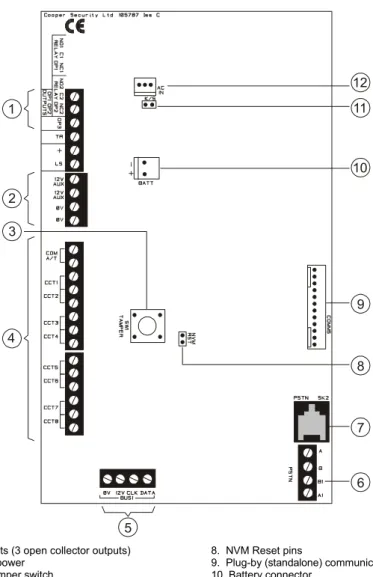
Figure 3 shows the layout of the PCB used in the control unit.
3 1 2 4 5 6 7 9 8 10 11 12
1. Outputs (3 open collector outputs) 8. NVM Reset pins
2. AUX power 9. Plug-by (standalone) communicator connector
3. Lid tamper switch 10. Battery connector
4. Zone connectors 11. Kick Start pins
5. Keypad and expander bus (bus 2 not fitted) 12. 21VAC from transformer
6. Telephone line terminals for built-in communicator 7. Telephone line socket for built-in communicator
3. INSTALLATION
Caution: Always remove mains power before opening the case lid. Do not work inside the control unit with mains power present.
Overview
A typical installation comprises the following main steps:
1. Survey the site and decide on positions for wired detectors, 9954 wired expanders, control unit, keypads, external and internal sounders. As part of the survey ask the users what facilities they need.
2. If you are going to use wirefree detectors, carry out a radio site survey and decide on positions for the wirefree detectors and the radio expanders. For more information, refer to the "Installation and Programming Guide" for the expander you are using.
3. Ensure that there is a suitable mains supply present at the site of the control unit.
4. If you are going to use a communicator, arrange for a PTT (Public Telephone and Telegraph) connection point near to the control unit. 5. Install the wired detectors and run cables to the site of the control unit or
9954 wired expanders. Connect each detector to its cable.
6. Run cables from the sites of the keypads, expanders, and external and internal sounders to the site of the control unit.
7. Install keypads and expanders, and connect them to their cabling. Ensure that each one has the correct address setting.
8. Install internal and external sounders and connect them to their cabling. 9. Install the control unit and connect it to the mains supply cabling. Do not
apply power at this point.
10. At the control unit, complete all connections to keypads, expanders and sounders.
11. Apply power and program the control unit.
12. Let the radio expanders learn the wirefree detectors and then install the detectors at their selected sites.
13. Test that the intruder alarm system operates as required.
14. If required, install a communicator, connect it to the PTT network and check that it operates correctly.
3. Installation 9751 Installation Guide
Page 14 11976798
Cabling for Keypads and Expanders
Cooper Security recommends that you use 8-core 7/0.2 or 16/0.2 alarm cable for wiring keypads and expanders. You can connect the keypads and
expanders in either a star or bus configuration (see Figure 4). If you intend to use long cable runs, Cooper Security recommends that you use star wiring with no more than 200m of cable per branch.
Control Unit
Keypads or expanders Distribute devices along
cable for better performance. 200m
200m 200m
200m 200m
Figure 4. Star and Bus Wiring for Keypads and Expanders
The maximum length of any one run from the control unit to the most remote keypad or expander depends on the number of items connected to the cable. You can double the maximum length for 7/0.2 cable by using two cores each for the 0V and 12V terminals or by using 16/0.2 cable. The table below shows the maximum recommended cable lengths in metres for 7/0.2 cable,
assuming that you connect all items at the end of a single cable run. (An item is either a keypad or an expander.) You may be able to improve on these figures by spreading items along the cable length (Figure 4).
8-core 7/0.2 cable
Number of items 1 core 2 cores on 0V and 12V
One 200 – Two 100 200 Three 65 130 Four 50 100 Five 40 80 Six 33 66 Seven 28 56 Eight 25 50
9751 Installation Guide 3. Installation
It is possible to extend the keypad cable run by using additional power supplies, but only up to the recommended maximum of 200m.
When carrying out the cabling, there are two important points to remember: 1. Do not connect anything other than keypads or expanders to the bus. The
keypad bus power supply is limited to a maximum of 400mA.
2. Check between 0V and 12V on the keypad bus at the point furthest from the control unit: the voltage must be at least 12.0VDC when all the keypad backlights are on.
Note: The following instructions assume that you have already run all the necessary cabling.
3. Installation 9751 Installation Guide
Page 16 11976798
Fitting the System
Fitting the Control Unit Case
1. Remove the control unit case from its packaging.
2. Remove the front screws and slide off the case lid.
3. The upper part of the case back has a central keyway. Mark and drill a
hole for the keyway. Temporarily fix the case back to the wall. Mark the position of two more fixing holes, remove the case back and drill the holes.
4. Refit the case back to the wall using screws no less than 30mm x No 8, with dome or pan heads.
Fitting a 9941 or 9943 Keypad
Note: If you are fitting more than one 9943 keypad to a control unit then make sure that there is at least 1m distance between individual 9943 keypads. Beware of mounting 9943’s back to back on opposite sides of a wall. When 9943 keypads are closer than 1m to each their prox tag readers interfere, and neither keypad can read prox tags.
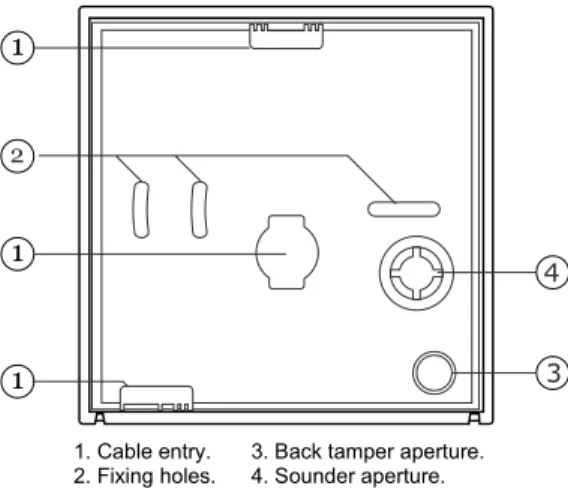
Figure 5 shows the backplate and the position of mounting holes.
3 4
1. Cable entry. 3. Back tamper aperture.
2. Fixing holes. 4. Sounder aperture.
Figure 5. Backplate of the 9941/9943 Keypad
Cooper Security recommend that you mount the keypad using No 8 or 6 screws (M4/M3.5) as follows:
1. Select which cable entry you are going to use and break out the appropriate plastic sections.
9751 Installation Guide 3. Installation
2. Hold the backplate in place against the wall and mark the position of one fixing hole.
3. Drill and plug the hole, and screw the backplate to the wall. Do not
tighten the screw completely home.
4. Make sure the backplate is level and mark, drill and plug another fixing
hole. Tighten the fixing screws.
6. Mount the front of the keypad (containing the keypad pcb) onto the backplate and make sure that the tamper switch operates.
Wiring the Control Unit
Cable Entries
The control unit case back provides several cable entries. It is designed to stand away from the wall to leave space for the cables.
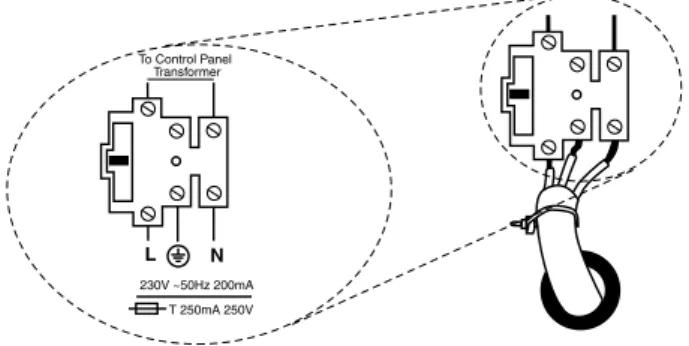
Mains Connection
Connect the control unit to a suitable supply using a double pole disconnect device in accordance with EN60950-1:2001 Clause 3.4.3. Connect the supply to the control unit using the 3-way terminal block located on the case back. Secure the cable to the case anchor point using the cable tie provided. Notes:
1. The control unit has a T-250mA internal mains fuse.
2. All electrical connections should be carried out by a qualified electrician. To Control Panel Transformer L N T 250mA 250V 230V ~50Hz 200mA
3. Installation 9751 Installation Guide
Page 18 11976798
Caution: Do not apply mains power at this point. Do not work inside the control unit case when mains power is present.
Keypads
Connecting Keypads
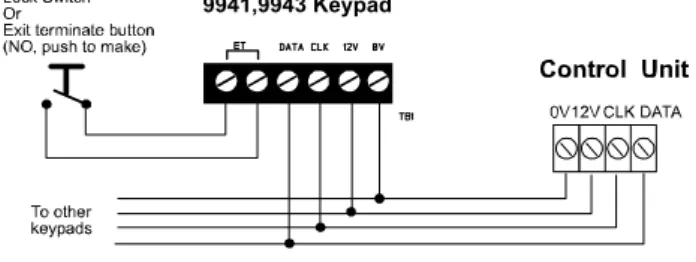
Figure 7 shows the connections for keypads. Use the "ET" connector terminals on the keypad PCB to connect an exit terminate button or lock switch. If you are using a lock switch, do not connect any other devices to these terminals.
9941,9943 Keypad
Figure 7. Keypad Connections
The 9943 keypad can be connected to an external panic attack button, as shown in Figure 8. If the panic attack does not contain a tamper switch, link the pair of "EXT TAMPER" terminals. Separately link both pairs of terminals if no panic button is used.
Figure 8. 9941, 9943 Panic Attack Connections
Note: Wired PA switches connected to the keypad work only with software version 4.03.05 onwards.
9751 Installation Guide 3. Installation Keypad Addressing
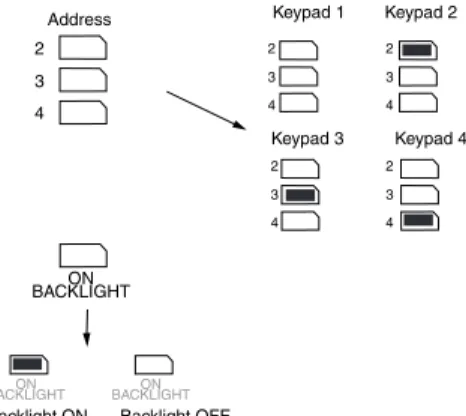
The control unit is supplied with one keypad. If you have fitted more keypads, each one must be given a separate "address". Links LK2 to LK4 set the keypad address, as shown in Figure 9.
2 3 4 ON BACKLIGHT 2 3 4 2 3 4 2 3 4 2 3 4 ON BACKLIGHT BACKLIGHTON Keypad 1 Address
Backlight ON Backlight OFF
Keypad 2 Keypad 3 Keypad 4
Figure 9. Keypad Addressing
Backlight
When supplied from the factory, the control unit is configured with the backlight On. To turn the backlight Off, remove the jumper from the "ON BACKLIGHT" link, shown in Figure 9.
Connecting Sounders
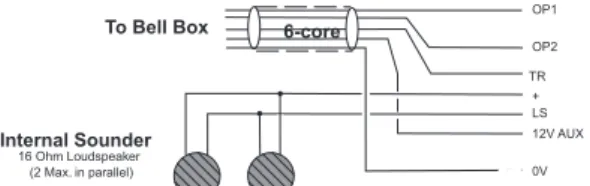
Figure 10 and the following tables show the wiring required to connect the external sounder (bell box) and optional internal sounders.
Note: If a 2k2 resistor is fitted at the tamper return (TR) terminal at the bell
box, use Command 59 to select this EOL mode of termination.
Note: The ST terminal on the control panel PCB is the Siren Test output for
France only. Do not connect it to the strobe input on the external sounder.
See Command 81 in the Programming Guide and the output wiring examples
3. Installation 9751 Installation Guide Page 20 11976798 To Bell Box 16 Ohm Loudspeaker (2 Max. in parallel) Internal Sounder 6-core OP1 OP2 12V AUX 0V TR LS +
Figure 10. Sounder Connections Lyntech Ltd - 120 LED/120 lexon
Control Unit Terminals
OP1 OP2 TR 12V AUX 0V
Bell-Box Terminals
TRG STRB HOLD +
Elmdene Rapier 300, 4000, 5000, 6000; Prima 100-600; Starlight 020
Control Unit Terminals
OP1 OP2 TR 12V AUX 0V
Bell-Box Terminals
-R -ST RTN +H -H
CQR Security - Sigma, Cequera, Plus and Ultima
Control Unit
Terminals OP1 OP2 TR 12V AUX 0V
Bell-Box
Terminals SIREN TRIG STROBE TRG A/T RET SIG HOLD OFF +VE HOLD OFF -VE
Ventcroft Security - Vision, Classic and Spirit
Control Unit Terminals
OP1 OP2 TR 12V AUX 0V
Bell-Box Terminals
TRIG - STB - RTN HOLD OFF +VE, STB +VE HOLD OFF -VE Flashguard - Xtra Control Unit Terminals
OP1 OP2 TR 12V AUX 0V
Bell-Box Terminals
TRIGGER STROB- SUPPLY - SUPPLY + STROBE + TAMP OUT Intellisense - AG3 Control Unit Terminals
OP1 OP2 TR 12V AUX 0V
Bell-Box Terminals
9751 Installation Guide 3. Installation
Connecting Detector Circuits to the Main PCB
The connectors for the detector circuits, or zones, are on the left-hand edge of the main PCB in the control unit. The table below summarises the number and type of zones that can connect to the main PCB of the control unit. Use Command 21 to specify which of these wiring types you are using. You cannot specify different wiring types for different zones.
If you require more zones, fit one or more expanders as explained on page 22). There can be up to 16 zones on expanders.
Control Unit Wiring Type Zones
8 four-wire CCL with common tamper
8 two-wire FSL
CCL Connections
Figure 11 shows how to connect four-wire CCL zones.
1 2 Zone 1 Zone 2 Global Anti-tamper Zone 3 Zone 4 Zone 5 Zone 6 Zone 7 Zone 8 Tamper loop Zone 1 Zone 2 Alarm contacts Alarm contacts
Figure 11. CCL Connections (common tamper)
NOTE: If you use CCL wiring then you must program zone 1 as Normal Alarm (see 9x5x Programming Manual) and fit a wire link to Zone 1 terminals in order to enable the global tamper.
FSL Connections
Each FSL zone is a "Fully Supervised Loop" using a two-wire closed loop. As shown in Figure 12, the loop uses resistors of different values to differentiate between "Circuit" and "Tamper" signals: a 2K2 resistor fitted in series at the end of the wired loop (EOL) and a 4K7 resistor fitted across the alarm contact. With the loop in a normal state and the alarm contacts closed (shorting out the 4K7 resistor), the total resistance of the loop is 2K2. When the alarm contacts open (removing the short from the 4K7 resistor), the resistance of the loop
3. Installation 9751 Installation Guide
Page 22 11976798
tamper device opens, the loop resistance becomes infinite (open circuit) and so the control unit detects a tamper signal.
To connect a detector to an FSL loop, you must wire suitable high-tolerance resistors to the detector. Always check resistor colour coding and tolerance before wiring resistors into circuit (see Figure 13).
The wiring resistance of the cable to the detector (including joints) should not exceed 100 ohms. The recommended maximum cable length within a zone is 200–300m. Zone 1 Zone 2 1 2 2K2 EOL 4K7 Alarm contacts Tamper contacts 2K2 EOL 4K7 Alarm contacts Tamper contacts Figure 12. FSL Connections Yellow Violet Red Gold 4k7 Red Red Red Gold 2k2
Figure 13. Colour Code for FSL Resistors
Anti-Masking Zone Connections
Note: Connecting an anti masking detector to the 9752 does NOT make the 9752 a Grade 3 control unit.
9751 Installation Guide 3. Installation
Some PIR detectors are fitted with an anti-masking facility to detect cases where the detector has been obscured. Depending on the type of detector, the masking status is conveyed by one of two methods:
• Method 1: Using two pairs of contacts at the sensor. One pair reports the
alarm/tamper status and the other reports the anti-masking status. This method requires two adjacent zones to be used at the 9751 control unit (one for each pair of contact at the sensor), with the highest zone number for anti-masking. For example, you could use zones 3 and 4, and in this case, zone 3 must connect to the alarm/tamper contacts, and 4 to the anti-masking contacts. The anti-anti-masking zone (zone 4 in this example) must be programmed as type "Anti-Mask". The alarm/tamper zone could, for example, be programmed as type "Normal Alarm".
The anti-masking contacts from the sensor can connect to the 9751 using the CCL, FSL or EOL connection method. In the case of FSL, there would be no in-line tamper contacts (just the 2K2 end-of-line resistor and the 4K7 resistor across the anti-masking contacts). In the case of CCL, the zone's tamper terminals at the 9751 must be shorted.
• Method 2: Applying a specified resistance value to a zone. The zone must
be wired as shown in Figure 14.
Note: Depending on the sensor, a 4K4 resistance means either
"masked" or "fault". Use command 88 to specify which reporting method to use. All sensors with anti-masking contacts must use a 4K4 resistance for the same meaning (masked or fault).
Short Circuit Tamper Alarm Open Circuit Tamper Alarm
Zone R e sistance Healthy Sensor failure/Fault/Masked Masked Alarm 9.1k 2.2k 4.4k 6.9k 2K2 2K2 2K2 2K2 4K7 4K7 Tamper Zone 1 Zone 2 Tamper Alarm Alarm Anti-mask Anti-mask
3. Installation 9751 Installation Guide
Page 24 11976798
Connecting Expanders
9954 Hardwired ExpanderThe 9954 hardwired expander provides connectors for eight CCL, FSL or EOL zones (EOL zones are not relevant for the 9751). Figure 15 shows the layout of the PCB. See the wiring diagram supplied with the 9954 hardwired expander for more details.
0V 12V CLK DATA FSL EOL AT5 AT6 CCT5 CCT6 AT7 AT8 CCT7 CCT8 2 3 4 AT1 AT2 CCT1 CCT2 AT3 AT4 CCT3 CCT4 FSL EOL Four-wire CC Two-wire FSL Two-wire EOL 1 2 3 4 5 7 6
1. Zone connectors 5. Address jumpers
2. Lid tamper switch 6. Zone connectors
3. Spare connectors (not connected) 7. CCL/FSL/EOL 4. Keypad bus
Figure 15. 9954 Expander
RFX08/RFX16 Radio Expander
The RFX08/RFX16 are Class VI radio expanders. Class VI is the grading given by the British standard for Wirefree Alarm Systems and is required for signalling systems that require a police response. It receives signals from the radio detectors on a frequency of 868.6625MHz.
The RFX08 radio expander supports eight wirefree zones, while the RFX16 supports 16. Figure 16 shows the layout of the PCB in both models.
9751 Installation Guide 3. Installation 0V 12V CLK DATA 12 14 15 11 8 10 7 9 13 5 6 3 4 2 1
1. Red "Fail" LED 9. Radio section
2. Green "Pass" LED 10. Learn sensor
3. Sounder 11. Supervision jumper
4. 2 x 7-segment display 12. Jamming response jumper
5. Select button 13. Address jumpers
6. Delete button 14. Bus connector
7. Built-in aerial 15. Cable entry
8. Tamper switch
Figure 16. RFX08/RFX16 Radio Expander
Refer to the "Installation and Programming Guide" of each version for more details.
Connecting an Expander
Figure 17 shows how to connect an expander to the control unit.
0V 12V CLK DATA To other keypads 12V 0V CLK Expander Control Unit
3. Installation 9751 Installation Guide
Page 26 11976798
When fitting a 9954 hardwired expander, make sure that you place the jumper link on the expander in the correct position to select either four-wire CCL, or two-wire FSL (see Figure 18).
FSL EOL
Four-wire CC Two-wire FSL
Figure 18. Link Positions to Select Wiring Method
Once you have connected an expander, refer to the instructions supplied with it for connecting hardwired detectors or "learning" radio detectors as
appropriate.
Addressing Expanders
If you fit expanders, you must allocate each expander to a specific range of zone numbers. Do not allocate two expanders to the same range of zones. Select the zone numbers by fitting a jumper link to one pair of the set of pins marked "Address" on the expander PCB, as shown in Figure 19.
2 3 4 2 3 4 Zones 9 to 16 Zones 17 to 24
Figure 19. Link Positions to Allocate Expanders to Zones Note: Other link positions are not valid for the control unit.
Programming Outputs
Control unit outputs can be programmed using the commands shown in the table below. Open collector outputs are of a "pull down" type that provides negative-applied control signals; the system adjusts the output polarity when you select the output type.
Output Type Command
OP1 open collector 81
OP2 open collector 82
OP3 open collector 83
Figure 20 shows some examples of applications for open collector outputs (OP3 is used in these examples).
9751 Installation Guide 3. Installation
OP3 +ve 12V Aux
Shock Sensor Reset
Use Command 83 4
VIPER +ve
0V OP3
+ve 12V Aux
Bell Follow Buzzer/Relay
Use Command 83 0 Relay energises/buzzer sounds when bell activates.
BUZZER/RELAY
OP3
PIR Set Latch/Walk Test
For:
Set Latch use Command 83 3 Walk Test use Command 83 5
PIR
Figure 20. Wiring Examples for Open Collector Outputs
Wiring Keyswitches
To allow a user to set and unset the system using a keyswitch, connect a fixed position or spring loaded (momentary) key switch to a zone input. When programming the control unit select zone type (KM) for momentary or (KF) for fixed position keyswitches. See Command 185 for keyswitch auto-reset. Figure 21 shows the connections for a keyswitch.
Fixed Keyswitch (KF)
Keyswitch CC FSL System
OFF Closed 2k2 Unset ON Open 6k9 Set Momentary Keyswitch (KM) Keyswitch CC FSL System Operate Close-Open-Close 2k2-6k9-2k2 Unset Operate Close-Open-Close 2k2-6k9-2k2 Set
Figure 21. Connecting a Keyswitch Note:
If you connect a keyswitch as a zone it can be used to set and unset the level to which the zone is assigned.
4k7
2k2
CC Wiring CCT(n)
CCT(n) FSL Wiring
3. Installation 9751 Installation Guide
Page 28 11976798
Communicator
Connecting the Communicator
The control unit has an internal communicator on its main PCB. This is an auto-dialling modem.
If necessary, a standalone communication device can be connected through a wiring harness to interface pins on the main PCB (this is known as a plug-by communicator).
The communicator can be used for:
• Transmitting alarm signals to alarm receiving equipment at a central monitoring station using Scancom Fast Format, Scancom SIA (Security Industry Association) or Contact ID (set with Command 103).
• Connecting to a PC based at a remote engineering centre. Using
Scantronic Downloader software, the remote PC can upload and download system parameters (including the event log and diagnostics), set and unset the alarm system, and carry out other special functions.
Telephone Line
Ideally, the internal communicator should be connected to an ex-directory line used exclusively for alarm communications.
If an exclusive line is not available and other apparatus is connected to the line (for example, an answer machine), the internal communicator provides a series connection with line divert for the other apparatus. When triggered, the communicator seizes the line and disconnects the other apparatus. When the communicator shuts down, it reconnects the other apparatus.
Three-way Calling
The control unit provides a three-way calling facility to make sure the internal communicator can always use a shared telephone line.
To use this facility, the local exchange must provide the three-way calling service on the customer's line.
Line Monitoring for the Internal Communicator
The control unit provides a line monitoring function to check that a telephone line connected directly to the control unit is working, and to indicate a line failure if it is not. While enabled, this function continually checks the line voltage to ensure that the line is connected. If it detects a failure, the system gives the Line Fault Response selected with Command 106.
9751 Installation Guide 3. Installation Test Calls
The control unit can be programmed to make test report calls to an ARC. "Static" test calls can be programmed to occur at set times or intervals. "Dynamic" test calls occur 24 hours after the last call made by the unit. See the Programming Guide for details on how to program these functions with Commands 105 and 108.
Statutory Information
ApplicationsThe built-in communicator is suitable for connection to the following types of networks:
(a) Direct exchange lines (PSTN) supporting DTMF (tone) dialling. (b) PABX exchanges (with or without secondary proceed indication). Note: The built-in communicator is not suitable for connection as an extension
to a pay-phone or to 1 + 1 carrier systems.
Approval
The built-in communicator is manufactured to meet all European Economic Area telecommunication networks requirements. However, due to differences between the individual PSTNs provided in different countries, the approval does not, of itself, give an unconditional assurance of successful operation on every PSTN network termination point.
The built-in communicator has been approved for the following usage: (a) Automatic call initialisation.
(b) Operation in absence of indication to proceed.
(c) Automatic dialling.
(d) Modem.
(e) Serial connection.
(f) Multiple repeat attempts.
(g) Line status monitoring.
Usage other than approved usage or failure to comply with the installation and programming instructions may invalidate any approval given to the apparatus if, as a result, the apparatus ceases to comply with the standards against which approval was granted. Note the approval label on the main PCB. In the event of problems you should contact your equipment supplier in the first instance.
3. Installation 9751 Installation Guide
Page 30 11976798
Ringer Equivalence Number
The Ringer Equivalence Number (REN) of the built-in communicator is 1. As a guide to the number of items that can be simultaneously connected to an exclusive line, the sum of the REN values should not exceed 4. A standard telephone (as provided, for example, by BT in the UK) has a REN value of 1.
Safety Notice
Figure 22 identifies connectors for Safety Extra-Low Voltage (SELV) and Telecommunications Network Voltage (TNV) circuits on the control unit's main PCB. These terms are used in accordance with the definitions in Safety Standard EN60 950.
The Installer must ensure that TNV terminals are connected only to other
circuits designated as TNV circuits (for example, the PTSN) and that SELV
terminals are connected only to other circuits designated as SELV circuits.
Strict adherence to the installation instructions will ensure that the equipment continues to comply with the safety regulations to which it was approved.
9751 Installation Guide 3. Installation 1 2 3 4 5 6 7
1. Main connector (SELV) 5. Wire in comms connector (SELV)
2. Keypad connector (SELV) 6. Battery connector (SELV)
3. Telephone line connector (TNV) 7. 21VAC from transformer (SELV)
4. RJ11 connector (TNV)
3. Installation 9751 Installation Guide
Page 32 11976798
Connecting the Telephone Line
Connecting the telephone line directly to the terminals on the internal
communicator, or indirectly through other apparatus, can produce hazardous conditions on the telephone network. Always seek advice from a competent telephone engineer if in any doubt about connecting to these terminals.
Example – connecting a line in the UK:
The internal communicator must be connected to the PABX system by: a) If the wiring is owned by British Telecom:
British Telecom.
b) If the wiring is not owned by British Telecom, one of: (i) British Telecom.
(ii) The authorised maintainer.
(iii) A professional Installer, after 14 days written notice to the authorised maintainer.
To connect the telephone line:
a) If the telephone line is already terminated with a suitable lead and plug: Insert the plug into the RJ11 connector.
b) Otherwise (see Figure 23):
(i) Using a two-core telephone cable, strip off 5mm and feed the cable through one of the entries in the rear of the control unit. Connect the two cores to terminals A and B on the main PCB.
(ii) Connect the other end of the two cores to the corresponding terminals on the BT master box.
(iii) If other apparatus is to share the telephone line with the internal communicator (in series), connect the main apparatus to the series switched line connections marked A1 and B1.
Caution: Only one such series apparatus is allowed to be connected between a main apparatus (such as a telephone) and the PSTN.
Ensure that the A and B lines are connected the right way around. The internal communicator continuously monitors the line for ringing tones.
5 or A 2 or B Primary Line Diverted Line A B B1 A1 BT master Box (Exclusive Line)
Telephone line to other equipment for example: Fax, answer machines.
9751 Installation Guide 3. Installation
Fitting a Plug-by Communicator
The control unit can be fitted with a communicator or speech dialler (for example, the Scantronic 8400, 8440, 660 or RedCare STU). Figure 24 shows the connections for the communications wiring harness.
Comms O/P1 (Brown) -ve applied (+ve removed) in alarm Comms O/P2 (Orange) -ve applied (+ve removed) in alarm Comms O/P3 (Yellow) -ve applied (+ve removed) in alarm Comms O/P4 (Green) -ve applied (+ve removed) in alarm Comms O/P5 (Blue) -ve applied (+ve removed) in alarm Comms O/P6 (Purple) -ve applied (+ve removed) in alarm Comms O/P7 (White) -ve applied (+ve removed) in alarm Comms O/P8 (Grey) -ve applied (+ve removed) in alarm Line Fail input (White/Brown) +12V applied to indicate telephone line fail Tell Back input (White/Orange) +12V applied to change from engineer to customer reset 0V (Black)
12V (Red)
Com Connector Cable, Part No. 485210
Figure 24. Plug-By Communicator Wiring
Note: Comms O/P4 will be active when the system is unset. This is normal, as a system being unset is equivalent to an alarm signal.
To fit a communicator, follow the instructions below.
Caution: Follow the instructions in the order shown, or you may damage the control unit and/or communicator.
1. Disconnect mains and battery power from the control unit and remove the case lid, if the system has already been installed.
2. Detach the main PCB from the support pillars in the control unit case, and lift the PCB carefully to the left. Fit the communicator between the PCB support pillars, making sure that the main PCB can fit back into position (see Figure 25).
3. Installation 9751 Installation Guide
Page 34 11976798
3. Make any necessary connections from the communicator to the
communication wiring harness. The default is a positive voltage when the output is inactive but this can be inverted if required using Command 159.
Refer to the next section if you are using a dual-path communicator.
4. Plug the Communication Wiring Harness onto the communications
connector on the main PCB.
5. Re-fit the PCB to the support pillars. Secure the PCB to the support
pillars with the screws provided (Figure 26). Make sure that the bottom left corner of the PCB is seated on its support pillar.
Figure 26. Fitting Control Unit PCB If the system has already been installed:
6. Re-connect the battery.
7. Fit the case lid.
8. Apply mains power.
9751 Installation Guide 3. Installation Line Monitoring for a Dual-Path Communicator
If a standalone dual-path (landline and mobile) communication device, such as a RedCARE STU, is connected to the plug-by connector, you need to do the following to obtain correct line fault reporting:
1. Wire a control unit output programmed as type "ATS Test" to the ATS Test input of the communicator. Invert the sense of the output at the control unit if a "positive applied" input sense is used at the communicator.
2. Wire the Line Fault output of the communicator to the Line Fault input of the plug-by connector. The communicator must provide +12Vdc to indicate a line fault (e.g. if the Line Fault output at the communicator uses a relay, connect the common terminal of the relay to +12Vdc and the normally-open terminal to the Line Fault input of the plug-by connector). The control unit will generate an "ATE L.F. Single" alert if only one of the networks is not available, or "ATE L.F. All" if both networks are not available.
Fitting a Battery
Fit a rechargeable battery into the back of the case. There is space in the case for a 12V 7Ah battery; make sure the battery terminals are oriented in the position shown in Figure 27.
Cooper Security Ltd recommend that you fit at least a 7Ah battery.
3. Installation 9751 Installation Guide
Page 36 11976798
Initial Start Up
Before applying power to the control unit, ensure that:
• All keypads and expanders have been addressed and connected. • All external and internal sounders are connected.
• All wired zone circuits are connected. Then:
1. Connect the battery to the control unit PCB.
2. Briefly short the Kick Start pins together (see Figure 3).
The internal sounder may sound. Ignore any display at this stage.
3. Key in the factory default User access code: 1234.
The internal sounder stops. Ignore any display or lamps.
4. Fit the case lid before applying mains power (this covers the live wiring
and closes the tamper switch).
5. Apply mains power.
6. Key in the factory default Engineer Code: 7890.
Notes:
1. With software versions earlier than 5.xx.xx key in 0 followed by the default Engineer Code 7890.
2. You do not have to remove the case lid.
The display shows: Installer Mode
You are now in installer (programming) mode.
The Programming Guide explains how to program the system. Cooper security recommend that at this point you return the system to its default
settings using Command 98. See Restoring Default Command Settings in
Chapter 1 of the Programming Guide.
Note: You will also need to let the expanders learn the wirefree detectors, and then install the detectors at their selected sites.
Index
9954 PCB layout...24 Access code...7, 36 Auxiliary output ...10 Battery fitting...35 specification...10 Bell tamper return...10 Bell-box connections...19 Break-glass detector...6, 11 CCL ...see Closed Circuit Loop Clock accuracy ...9Closed Circuit Loop (CCL)...5
zone connection ...21 Code access ...7, 36 Duress ...2, 7 Communication output...10 Communicator approval...29 connecting ...32 Connecting ...28 Dual-path...35
fitting a plug-by communicator...33
line monitoring...28, 35 telephone connection...28
three-way calling ...28
Control unit cable entries to case ...17
fitting the case ...16
PCB layout ...12
power requirements...9
Detector Passive Infra-Red...6, 11 smoke...6, 11 Dimensions of control unit case ...9
Downloader part number...11
Duress Code ...2, 7 Environmental standard...9
Exit Terminate button connecting ...18 Expander 9954 PCB layout ...24 addressing...26 hardwired...5, 24, 25 radio ...6, 11, 24 RFX08/RFX16 PCB layout...24
FSL...see Fully Supervised Loop Fully Supervised Loop (FSL) ...6
connections ...21 Fuses ...10, 17 Humidity ...9 Input line fault ...10 remote reset ...10 tamper ...10 connecting ...18 power requirements ...9 tamper switch ...16
Kick start pins...36
Learning wirefree detectors... 6, 13, 26 Line line fault input ...10
monitoring/faults ... 28, 35 Lock switch connecting ...18 Loudspeaker output...10 Mains connection ...17 Output auxiliary ...10 communication ...10 loudspeaker...10 panel...10
programming panel outputs ...26
PA transmitter... 6, 11 Panel output ...10
Panic Alarm...see PA Part numbers of compatible equipment...11
Partition creating...7 PCB layout 9954 expander ...24 RFX08/RFX16 expander...24 Personal Attack...see PA PIR ...see Detector:Passive Infra-Red Power connection ...17
requirements ...9
Proximity tag reader tag part number ...11
Radio strength monitor ... 6, 11 RedCare...see Remote reset Remote PC connection ...28
setting device ...6
setting device part number...11
REN...see Ringer Equivalence Number RFX08/RFX16 PCB layout ...24
Ringer Equivalence Number...30
Size of control unit case...9
Sounder connections ...19
Start up...36
Tamper return for Bell...10
Telecommand ...see also Remote setting device Telephone line ...28
connection ...32
sharing...32
Tellback...see Remote reset Temperature...9 Test
Index 9751 Installation Guide Page 38 11976798 Transmitter PA transmitter... 6, 11 universal ... 6, 11 Universal transmitter ... 6, 11 Weight ... 9 Zone CCL ... 21 FSL... 21 wiring... 21
Cooper Security Ltd. Security House
Vantage Point Business Village Mitcheldean
Gloucestershire GL17 0SZ www.scantronic.co.uk
Product Support (UK) Tel: +44 (0)1594 541979
Available between: 08:15-12:30 and 13:00-17:00 Monday to Friday. Product Support Fax: +44 (0)1594 545401
Part Number 11976798