ForceWare Graphics Drivers
Release 163 Notes
Version
163.75
for Windows XPNVIDIA Corporation
October 8, 2007
2701 San Tomas Expressway Santa Clara, CA 95050 Notice
ALL NVIDIA DESIGN SPECIFICATIONS, REFERENCE BOARDS, FILES, DRAWINGS, DIAGNOSTICS, LISTS, AND OTHER DOCUMENTS (TOGETHER AND SEPARATELY, “MATERIALS”) ARE BEING PROVIDED “AS IS.” NVIDIA MAKES NO WARRANTIES,
EXPRESSED, IMPLIED, STATUTORY, OR OTHERWISE WITH RESPECT TO THE MATERIALS, AND EXPRESSLY DISCLAIMS ALL IMPLIED WARRANTIES OF NONINFRINGEMENT, MERCHANTABILITY, AND FITNESS FOR A PARTICULAR PURPOSE.
Information furnished is believed to be accurate and reliable. However, NVIDIA Corporation assumes no responsibility for the consequences of use of such information or for any infringement of patents or other rights of third parties that may result from its use. No license is granted by implication or otherwise under any patent or patent rights of NVIDIA Corporation. Specifications mentioned in this publication are subject to change without notice. This publication supersedes and replaces all information previously supplied. NVIDIA Corporation products are not authorized for use as critical components in life support devices or systems without express written approval of NVIDIA Corporation.
Trademarks
NVIDIA, the NVIDIA logo, 3DFX, 3DFX INTERACTIVE, the 3dfx Logo, STB, STB Systems and Design, the STB Logo, the StarBox Logo, NVIDIA nForce, GeForce, NVIDIA Quadro, NVDVD, NVIDIA Personal Cinema, NVIDIA Soundstorm, Vanta, TNT2, TNT, RIVA, RIVA TNT, VOODOO, VOODOO GRAPHICS, WAVEBAY, Accuview Antialiasing, the Audio & Nth Superscript Design Logo, CineFX, the Communications & Nth Superscript Design Logo, Detonator, Digital Vibrance Control, DualNet, FlowFX, ForceWare, GIGADUDE, Glide, GOFORCE, the Graphics & Nth Superscript Design Logo, Intellisample, M-BUFFER, nfiniteFX, NV, NVChess, nView, NVKeystone, NVOptimizer, NVPinball, NVRotate, NVSensor, NVSync, the Platform & Nth Superscript Design Logo, PowerMizer, Quincunx Antialiasing, Sceneshare, See What You've Been Missing, StreamThru, SuperStability, T-BUFFER, The Way It's Meant to be Played Logo, TwinBank, TwinView and the Video & Nth Superscript Design Logo are registered trademarks or trademarks of NVIDIA Corporation in the United States and/or other countries. Other company and product names may be trademarks or registered trademarks of the respective owners with which they are associated.
Intel, Indeo, and Pentium are registered trademarks of Intel Corporation.Microsoft, Windows, Windows NT, Windows Vista, Direct3D, DirectDraw, and DirectX are trademarks or registered trademarks of Microsoft Corporation. OpenGL is a registered trademark of Silicon Graphics Inc. PCI Express, PCI-SIG, and the PCI-SIG design marks are registered trademarks and/or service marks of PCI-SIG.
Other company and product names may be trademarks or registered trademarks of the respective owners with which they are associated.
Copyright
1. Introduction to
Release 163
Notes
Structure of the Document . . . . 1
Changes in this Edition . . . . 1
2. Changes in the Release 163
Driver for Windows XP
Version 163.75 Highlights . . . . 4What’s New in Release 163 . . . . 4
What’s New in Version 163.75 . . . . 5
Changes in Version 163.75 . . . . 6
Fixed Issues–Windows XP 32-bit . . . . 6
Changes in Version 163.71 . . . . 7
Fixed Issues–Windows XP 32-bit . . . . 7
Changes in Version 163.69 . . . . 8
Fixed Issues–Windows XP 32-bit . . . . 8
Fixed Issues–Windows XP 64-bit . . . 10
Open Windows XP Issues in Version 163.75 . . 11
NVIDIA Recommendations. . . 11
NVIDIA Issues—Single GPU. . . 12
NVIDIA Issues—SLI Mode. . . 15
Windows XP 64-bit Issues . . . 18
Not NVIDIA Issues . . . 19
Application Issues . . . 19
Not NVIDIA Issues–SLI Mode . . . 27
Known Product Limitations . . . 30
GeForce 6 and 7 Series Cards Cannot Output Interlaced Signals in SLI Mode. . . 31
Image Sharpening Control not Available with GeForce 8 Series GPUs . . . 31
Display Output Selection not Available on “Bridgeless” SLI . . . 31
SLI Connector Requirement on NVIDIA Quadro SLI Cards. . . 31
DVD Playback Issues with Dual NVIDIA Quadro NVS Cards . . . 32
PowerDVD 5.0 Does Not Display Correctly in nView Span Mode . . . 32
DirectX Fails When Detaching/Reattaching Displays in Dualview Mode. . . 32
OpenGL Viewport Scaling Problem in Horizontal Span Mode . . . 32
Video Playback in nView Clone and Span Modes . . . 33
Applying Workstation Application Profiles . . 33
No Antialiasing of 3DMark03 Image Quality Screen Captures. . . 34
Medal of Honor Under Windows XP / Windows 2000 . . . 34
Windows XP/2000 Issue with Settings Tab Monitor Positioning. . . 35
Antialiasing Problems With Certain Applications 35 Poor Quality S-Video Output on Some TVs . 36 AGP and PCI-E Programs May Hang With AMD K7 and K8 Processors . . . 36
Desktop Manager Does Not Re-Center Logon Screen . . . 37
Issues with Video Mirror–Windows XP/2000 37
3. The Release 163 Driver for
Windows XP
Hardware and Software Support . . . 39Supported Operating Systems. . . 39
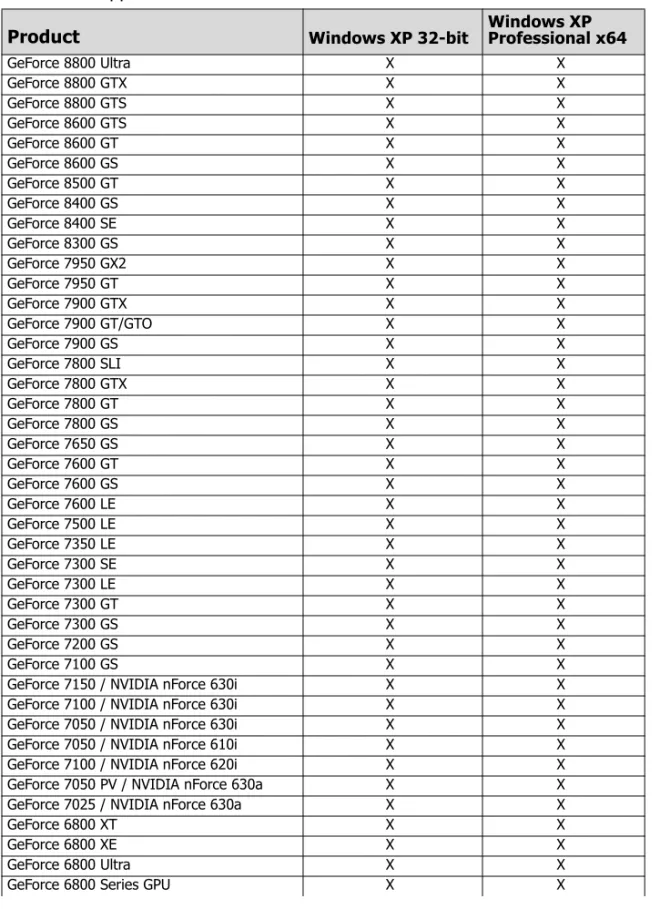
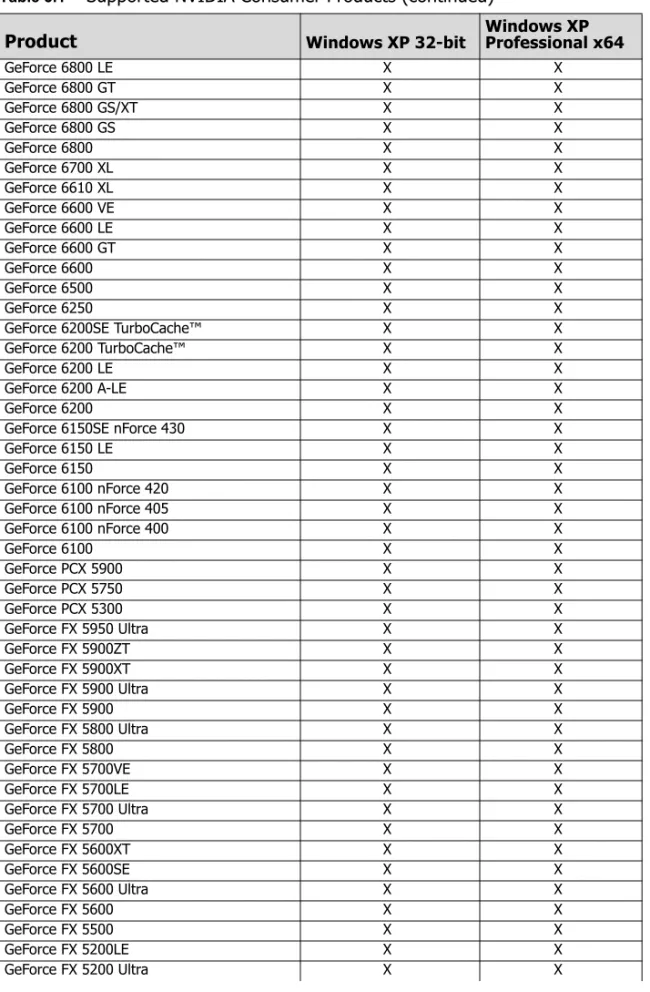
Supported NVIDIA Products. . . 40
Supported Languages. . . 43
Driver Installation . . . 44
System Requirements . . . 44
Installation Instructions . . . 44
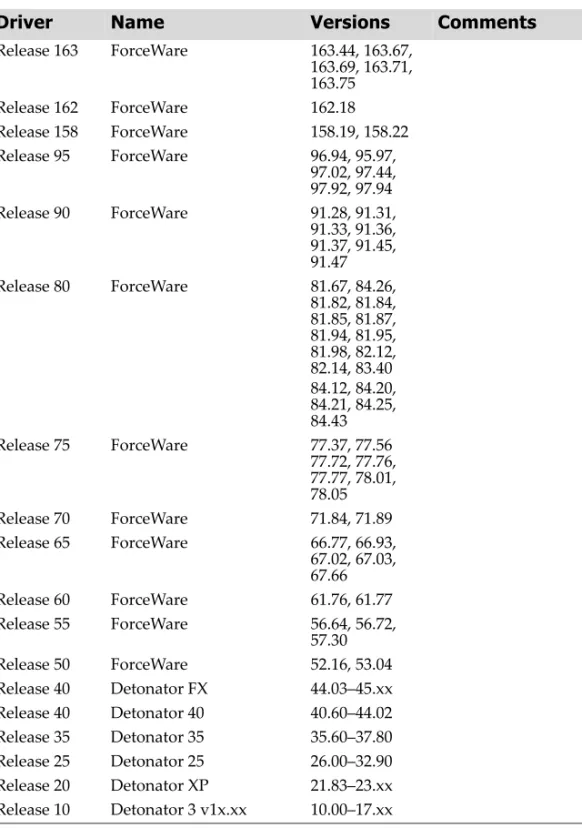
NVIDIA Driver History. . . 47
A. Mode Support for Windows
General Mode Support Information. . . 50Default Modes Supported by GPU for Windows XP 51 Understanding the Mode Format . . . 51
GeForce 8 Series, GeForce 7 Series, GeForce 6 Series, and GeForce FX Family GPUs . . 52
nForce 630a GPUs . . . 61
Modes Supported by DACs and TV Encoders . 67 External DAC Mode Support . . . 67
TV-Out Mode Support . . . 68
Table of Contents
C
H A P T E R
INTRODUCTION
TO
R
ELEASE
163 N
OTES
This edition of Release 163 Notes describes the Release 163 ForceWare Graphics Drivers and provides information applicable to all NVIDIA drivers. NVIDIA provides these notes to enable add‐in‐card (AIC) producers and original equipment manufacturers (OEMS) to monitor performance improvements and bug fixes in each documented version of the driver.
Structure of the Document
This document is organized in the following sections:
• “Changes in the Release 163 Driver for Windows XP” on page 3 gives a summary of changes, and fixed and open issues in this version.
• “The Release 163 Driver for Windows XP” on page 39 describes the NVIDIA products and languages supported by this driver, the system requirements, and how to install the driver.
• “Mode Support for Windows” on page 49 lists the default resolutions supported by the driver.
Changes in this Edition
This edition of the Release 163 Notes for Windows XP includes information about NVIDIA ForceWare graphics driver version 163.75, and lists changes made to the driver since version 162.18. These changes are discussed beginning with the chapter “Changes in the Release 163 Driver for Windows XP” on page 3.
C
H A P T E R
CHANGES
IN
THE R
ELEASE 163 D
RIVER
FOR
W
INDOWS
XP
This chapter describes open issues for version 163.75, and resolved issues and driver enhancements for versions of the Release 163 driver up to version 163.75. The chapter contains these sections:•
“Version 163.75 Highlights” on page 4
•
“Changes in Version 163.75” on page 6
•
“Changes in Version 163.71” on page 7
•
“Changes in Version 163.69” on page 8
•
“Open Windows XP Issues in Version 163.75” on page 11
•
“Not NVIDIA Issues” on page 19
•
“Known Product Limitations” on page 30
Version 163.75 Highlights
This section provides highlights of version 163.75 of the NVIDIA Release 163 Driver.
•
What’s New in Release 163
•
What’s New in Version 163.75
What’s New in Release 163
• Improved
compatibility
and
performance
for
NVIDIA
SLI™
technology
on
Microsoft®
DirectX®
9.0c
and
OpenGL®
2.1
applications.
• Improved
compatibility
for
The
Way
It’s
Meant
To
Be
Played™
game
titles:
BioShock,
Crysis,
Enemy
Territory:
Quake
Wars,
Hellgate:
London,
and
World
in
Conflict.
• Added
PureVideo™
HD
decode
acceleration
for
GeForce
8600,
8500
and
8400
series
GPUs.
• Improved
performance
of
the
graphics
memory
manager
on
GeForce
8
series
GPUs
running
DirectX
9
applications
in
single
‐
GPU
and
NVIDIA
SLI
configurations.
These improvements solve cases of reported performance slowdowns in some 3D applications
with high graphics settings and resolutions.
• Improved
compatibility
with
PT
Boats:
Knights
of
the
Sea
• Added
NVIDIA
SLI
profile
for
Team
Fortress
2
What’s New in Version 163.75
New Features
• Added
product
support
for:
• GeForce 7150 / NVIDIA nForce 630i • GeForce 7100 / NVIDIA nForce 630i • GeForce 7050 / NVIDIA nForce 630i • GeForce 7050 / NVIDIA nForce 610i • GeForce 7100 / NVIDIA nForce 620i
• Improved
compatibility
for
Half
‐
Life
2:
Episode
2
• Added
NVIDIA
SLI
profiles
for
Half
‐
Life
2:Episode
2,
Portal,
Clive
Barker
ʹ
s
Jericho,
SEGA
Rally
Revo,
NHL
08,
and
European
Street
Racing
Resolved Issues for Windows Vista
Changes in Version 163.75
The following sections list the changes made and issues resolved since driver versions 162.71.
• “Fixed Issues–Windows XP 32‐bit” on page 6 The NVIDIA bug number is provided for reference.
Fixed Issues–Windows XP 32-bit
Fixed SLI-Mode Issues
GeForce
6
Series
GPUs
• [SLI] GeForce 6 Series: At switching to 1280x1024, the monitor loses sync upon enabling SLI mode. [324474]
Changes in Version 163.71
The following sections list the changes made and issues resolved since driver versions 162.69.
• “Fixed Issues–Windows XP 32‐bit” on page 7 The NVIDIA bug number is provided for reference.
Fixed Issues–Windows XP 32-bit
Fixed SLI-Mode Issues
GeForce
7
Series
GPUs
Changes in Version 163.69
The following sections list the changes made and issues resolved since driver versions 162.18.
• “Fixed Issues–Windows XP 32‐bit” on page 8 • “Fixed Issues–Windows XP 64‐bit” on page 10 The NVIDIA bug number is provided for reference.
Fixed Issues–Windows XP 32-bit
Fixed Single-GPU Issues
All
GPUs
• HDCP cannot be enabled with the Dell 30” flat panel on resolutions higher than 1280x800, which prevents playback of HD DVDs or Blu‐ray discs. [328561] • NVIDIA Control Panel Category Pages: Japanese translation issues exist in the menu options.[257063] • Battlefield 2: Corruption and flickering occur in the grass when video settings are set to High.[272027]GeForce
8
Series
GPUs
• GeForce 8800 GTX: The system hangs after playing a Blu‐ray disc for awhile using PowerDVD. [318755] • GeForce 8800 GTX: nTune (5.05.38.00) GPU fan control settings are not available (grayed out). [308669] • GeForce 8800 GTX: nTune (5.05.38.00) GPU fan control settings revert to previous settings when applied.[308683] • GeForce 8800 GTX: Video frame freezes while audio continues when playing H.264 HD titles using PowerDVD.[325436] • GeForce 8600: Jaggies appear during de‐interlace video playback using Windows Media Player. [301769] • GeForce 8600 GT/GS: When attempting to set the HD mode to 576i, the resolution switches to 480i instead. [275079] • GeForce 8600: Rise of Nations:Rise of Legends–the game crashes to the desktop when the resolution is set to 1920x1200 and antialiasing is set to Medium from the game control panel.[298503]
GeForce
7
Series
GPUs
• GeForce 7800 GTX: There is no output on the HDTV. [296699]
• GeForce 7800 GTX: The NVIDIA Control Panel SLI rendering option is not available for the component‐out connection. [301841]
It is available when using the S‐Video connection.
• GeForce 7800 GTX: The NVIDIA Control Panel crashes if you change the HD format of the component‐out display under Dualview.[301752] • GeForce 7800 GTX: The driver cannot switch to another HD format after being set to 480i or 576i.[301828] • GeForce 7300 LE: NVIDIA Control panel fails to switch modes depending on the starting and target modes.[232009] • GeForce 7300 GT: Demo Medieval II : Total War–blue‐screen crash occurs while playing the game with Battle map resolution set to 2560x1600 and with 4x AA enabled. [317852]
GeForce
6
Series
GPUs
• GeForce 6600: Blue‐screen crash while playing WMV HD files after enabling DirectX VA. [316693] • GeForce 6600: The user cannot change HDTV formats after a first time switch to HDTV from the DVI or VGA display. [301293] • GeForce 6150/6100: Battlefield 2 has high frequency flicker of horizontal bands scanning across the screen on bright backgrounds.[191291]
Fixed SLI-Mode Issues
GeForce
8
Series
GPUs
• [SLI], GeForce 8800 GTX: The SLI visual indicators for some SLIAA modes do not match the NVIDIA Control Panel settings. [327393] • [SLI], GeForce 8800 GTX: The SLI visual indicators for SLI16xS antialiasing displays 16xQ antialiasing instead. [327398] • [SLI], GeForce 8600: The SLI Load Balancing indicator does not appear when invoked. [311894] • [SLI], GeForce 8500/8400/8300: Blue‐screen crash occurs when resuming from standby mode while an OpenGL demo is running. [317880]
GeForce
7
Series
GPUs
• [SLI], GeForce 7900 GTX: Direct3D applications have rolling/flickering corruption with SLI enabled on component/composite/S‐Video out. [301608]
This issue does not occur when using DVI output.
GeForce
6
Series
GPUs
• [SLI], GeForce 6800 GT: The desktop splits into two screen when the resolution is lower than 1280x800.[324342]
Fixed Issues–Windows XP 64-bit
• GeForce FX 5200, Windows XP x64: Display Properties Window corruption occurs while playing a .vob file in Windows Media Player, previewing 3D Flower Box screen saver, and then reverting from the preview. [234046]
Open Windows XP Issues in Version 163.75
As with every released driver, version 163.75 has open issues and enhancement requests associated with it. This section includes lists of issues that are either not fixed or not implemented in this version. Some problems listed may not have been thoroughly investigated and, in fact, may not be NVIDIA issues. Others may have workaround solutions.• “NVIDIA Recommendations” on page 11 • “NVIDIA Issues—Single GPU” on page 12 • “NVIDIA Issues—SLI Mode” on page 15 • “Windows XP 64‐bit Issues” on page 18 • “Application Issues” on page 19
NVIDIA Recommendations
• Single display modes such as TV only, DFP/LCD only or CRT only provide the best performance and quality from Windows Media Center Edition.
Dual display modes such as Dualview and nView Clone and Span modes are not
recommended.
• When using the trial version of WinDVD 6 from InterVideo.com, you may
experience TV or DVD playback problems in Windows Media Center if you change resolutions during video playback. This is most often seen when switching from windowed to full screen mode.
This problem does not occur with the latest full OEM versions of WinDVD or with other Windows Media Center qualified DVD decoders.
• If you perform a clean driver installation (no previous NVIDIA drivers installed), you must reboot your computer. If you do not reboot, the predefined application profiles will not be activated and you may experience application stability problems.[124320]
NVIDIA Issues—Single GPU
All GPUs
• The NVIDIA Control Panel Run Display Optimization Wizard back button does not work.[302285] • Star Wars: Republic Commando: Application crashes when starting a new game.[254010] • FEAR–reflection in the puddle flickers.[259670] • There is no display in Clone mode when TV is switched from Component to Composite.[259390]GeForce 8 Series GPUs
• GeForce 8 Series, GeForce 6600: HQV DVD shows corruption when played using Windows Media Player.[302235] • GeForce 8800 GTX: Blue‐screen crash occurs when changing resolutions while Direct3D, OpenGL, and video applications are open at the same time.[262074] • GeForce 8800 GTX: Sid Meierʹs Railroads!–during gameplay, the driver crashes or the application freezes.[297044] • GeForce 8800 GTX/GeForce 7900 GTX: Neverwinter Nights 2–the minimap loses its background when the resolution is changed.[273788] • GeForce 8800 GTX: Dungeon Siege 2–the mouse cursor is “laggy” and jittery when CSAA is enabled.[297301] • GeForce 8800 GTX: Changes in the NVIDIA Control Panel‐>Adjust Video Color settings has no effect on Blu‐ray disc videos. [273056] • GeForce 8600: There is corruption on the NVIDIA Control Panel‐>Resize HDTV Desktop page after clicking Apply. [348665] • GeForce 8600 GT: Call of Duty 2–the game crashes under the following settings: in‐ game settings of 1920x1200 resolution and 2x antialiasing, NVIDIA Control Panel enhanced antialiasing mode set to 16xQ. [312949] • GeForce 8600: Thief Deadly Shadows–there is texture corruption when using the game control panel default settings.[299579] • GeForce 8600: Serious Sam 2–performance drop at 1280x1024 with HDR and antialiasing enabled. [340691]
• GeForce 8600: Tiger Woods PGA Tour 2007–the game hangs with the default game settings during the loading screen. [333405] • GeForce 8500/8400/8300, GeForce 7300 GT: After switching from Dualview mode to VGA single‐display mode, the output appears on the DVI in single‐display mode. [327042] • GeForce 8500 GT, GeForce 7050 PV/7025: The nTune GPU Boost function fails. [346671]
GeForce 7 Series GPUs
• GeForce 7 Series: 709 color space is not present during playback of Blu‐ray discs or HD DVDs.[263124] • GeForce 7950 GX2, GeForce 7600 GT, NVIDIA Control Panel: When starting playback of a Blue‐ray disc or HD DVD while the Adjust Video Color Settings page is open, the ‘Incompatible graphics driver’ warning message appears.[261644] • GeForce 7950 GX2, NVIDIA Control Panel: ʺRestore Defaultʺ doesn’t affect some options in the Manage Custom Timing page.[260080 ] • GeForce 7950 GT, GeForce 7900 GT/GS, GeForce 7600 GT: Dragging the Cyberlink application between the primary and secondary Dualview displays results in Cyberlink error message.[251639] • GeForce 7950 GX2: Pirates of the Caribbean: The Legend of Jack Sparrow–edge of the screen glows when antialiasing is enabled.[243365] • GeForce 7950 GX2: Occasionally the HDTV desktop resize screen does not pop up after clicking the Resize Desktop tab.[232400] • GeForce 7900 GX2, NVIDIA Control panel: The Transparency AA and Gamma Correct AA settings do not restore to their default values.[239137] • GeForce 7900 GTX: There is color corruption in the intro clips of Happy Feet VC1 Blu‐ray disc with WinDVD. [321000] • GeForce 7900 GTX: Audio/video is out of sync when playing the H264 Blu‐ray disc “X‐Men: Last Stand” using WinDVD. [320737] • GeForce 7800 GTX: Clicking Cancel after starting the NVIDIA Control Panel ʺResize HDTV desktopʺ function reverts the settings to the default instead of the previous settings.[300995] • GeForce 7800/7900, 3D Stereo: 3DMark05–in the first test, return to proxycon, there is texture corruption in the tunnel.[226754] • GeForce 7800 GT/GTX, Windows XP Media Center Edition: Video skips intermittently when playing HD network transport streaming clips.[173324]
• GeForce 7800 GTX, Windows XP: Need for Speed Underground 2–when changing to a resolution higher than 1024x768 on a 1920x1200 widescreen flat panel, the game attempts to select the next higher resolution, which is 1280x960 and not supported by most flat panels.[171938]
A known workaround is to manually add the mode 1280x960 from NVIDIA's Custom Timings control panel and then continue to select the resolution needed.
• GeForce 7800 GTX Windows XP MCE 2005: Some artifacts appear when de‐ interlacing is enabled on 1920x1080i video clips. • GeForce 7600 GT: ʺThe Battle Of The Middle Earth IIʺ–corruption occurs when loading the game.[261274] • GeForce 7600 GT, NVIDIA Control Panel: Desktop Color settings are getting applied even after clicking Cancel.[261019] • GeForce 7600 GT, Dual‐link display: When playing a Blu‐ray disc at resolutions greater than 1280x800 on a dual‐link display, the Cyberlink warning message erroneously appears saying to reduce the resolution to less than 1920x1080.[260489] • GeForce 7600 GT: Several HD‐DVD titles do not display the PiP feature–ʺCharlie and the Chocolate Factoryʺ, ʺBatman Beginsʺ, and ʺTerminator 3ʺ. [260056 260054 257644] • GeForce 7600 GT: ʺTroyʺ HD‐DVD title doesn’t play using the Cyberlink application. [255684] • GeForce 7600 GT: “Constantine” HD‐DVD VC‐1 title shows corruption on the secondary stream.[245579] • GeForce 7300 GT: Test Drive Unlimited–blue‐screen crash occurs while changing antialiasing settings in the game. [317480] • GeForce 7300 GT: Command & Conquer 3 Tiberium Wars–some object are not rendered when using the high graphics setting. [316633] • GeForce 7300 GT: NVRotate is not able to rotate the display from normal mode to 180 degree rotated mode.[301341] • GeForce 7300 GT: There is corruption on the HDMI display when first switching to the HDMI after installing the driver. [332487] • GeForce 7070 PV/ 7025, GeForce 7600 GS: With HDMI and DVI connected in Dualview mode, there is no display on the DVI after hot‐unplugging the HDMI. [308318]
GeForce 6 Series GPUs
• GeForce 8 Series, GeForce 6600: HQV DVD shows corruption when played using Windows Media Player.[302235] • GeForce 6800: Star Wars Empire at War – the application crashes to the desktop after displaying the logo ʹpetroglyphʹ during launch. [344182] • GeForce 6600: The NVIDIA Control panel hangs when changing the resolution with SLI mode enabled. [334309] • GeForce 6200 128MB: The Television Setup wizard erroneously lets you change the display mode while playing a video file.[209367]NVIDIA Issues—SLI Mode
All GPUs
• [SLI], The NVIDIA Control Panel prompts you to reboot the system after enabling SLI while in Dualview mode.[220320] • [SLI], With SLI mode enabled, switching from DVI to analog display results in the wrong refresh rate being set.[258703] • [SLI], 3DMark 2005: Intermittent, horizontal, single‐pixel width lines are drawn on the screen during CPU Test 1. [272972]This issue does not occur with V-Sync enabled.
• [SLI]: Far Cry–flickering and shifting sky occurs in the Research level when SLI is enabled. [265091]
This issue does not occur with V-Sync enabled.
GeForce 8 Series GPUs
• [SLI], GeForce 8800 GTX: Stalker–with SLI mode enabled, the game performance does not improve by much.[306807] • [SLI], GeForce 8800 GTX: Half‐Life 2 Episode 1–with SLI mode enabled, purple textures appear with 16xQ CSAA enabled at 2560x1600 resolution.[302602] • [SLI], GeForce 8600: Roller Coaster Tycoon 3: Soaked–shadows flicker with the default game settings. [334311] • [SLI], GeForce 8600 GT: Far Cry–there are flickering patches when moving around within the game. [324450]
• [SLI], GeForce 8600: 3DMark06–the benchmark crashes to the desktop when run at 1600x1200 resolution and with 8x antialiasing enabled. [324430] • [SLI], GeForce 8600: Splinter Cell Double Agent–the game crashes to desktop at 1600x1200 resolution and with 32xQ SLIAA enabled.[306223] • [SLI], GeForce 8600: Half Life 2–white patches appear in the sky when 8xAA is enabled from the NVIDIA Control Panel (Enhanced mode) in conjunction with 2xMSAA enabled from the game control panel.[306259]
GeForce 7 Series GPUs
• [SLI], GeForce 7950 GX2, GeForce 7900 GX2: Grand Theft Auto: San Andreas–intro videos are slightly darker when SLI AA is enabled.[218773] • [SLI], GeForce 7950 GX2, GeForce 7900 GTX, SLI: Call of Duty 2–occasional corruption appears when Optimize for SLI is enabled.[231291] • [SLI], GeForce 7900/7600/7300: After installing a new driver, the analog display turns off, requiring a system reboot. [347600] • [SLI], GeForce 7900 GX2 Quad NVIDIA SLI: Tomb Raider: Legend– video playback is warped within an inch of the SLI mode split line.[232372] • [SLI], GeForce 7950 GX2, Quad NVIDIA SLI, NVIDIA Control Panel: The SLI performance mode option is visible for individual application profiles after SLI is disabled.[248074] • [SLI], GeForce 7950 GX2, Quad NVIDIA SLI, NVIDIA Control Panel: SLI performance mode setting on an application profile will not reset to defaults once a different option is selected.[248082] • [SLI], GeForce 7950 GX2 Quad NVIDIA SLI: Displays that are connected to the secondary card in a Quad SLI configuration are not visible in the NVIDIA Control Panel or nView pages.[238633] • [SLI], GeForce 7950/7900 GX2, Quad NVIDIA SLI: F.E.A.R.– the UI text occasionally remains on the screen after exiting the game when 16x SLIAA is enabled.[218338] • [SLI], GeForce 7950 GX2, Quad NVIDIA SLI: Prince of Persia: Warrior Within–the intro movie does not display after restarting a level if SLI and antialiasing are enabled.[225527] • [SLI], GeForce 7950/7900 GX2, SLI, Quad NVIDIA SLI: The Quake 4 custom color profiles are not effective and are not labeled correctly.[221708] • [SLI], GeForce 7950 GX2 Quad NVIDIA SLI: Rome:Total War–there is flickering and slow performance when playing the game.[242482]
• [SLI], GeForce 7950 GX2 Quad NVIDIA SLI: The Godfather–the intro videos flash.[242532]
You can correct the problem by disabling VSync.
• [SLI], GeForce 7950 GX2 Quad NVIDIA SLI: Lock On– slow performance in the game. [242488] • [SLI], GeForce 7950 GX2 Quad NVIDIA SLI: Black and White 2–there is flickering and water corruption. [242484/239460] • [SLI], GeForce 7900 GTX/GeForce 7950 GX2 Quad NVIDIA SLI: Civilization 4– game creation screens have text rendering artifacts with 8xS AA or 16x SLI AA enabled.[235471] • [SLI], GeForce 7950 GX2 Quad NVIDIA SLI: Prince of Persia: Warrior Within–with SLI mode enabled, there is a block of corruption.[225514] • [SLI], GeForce 7950 GX2 Quad NVIDIA SLI: Need for Speed: Most Wanted–with SLI mode enabled, textures on vehicles flicker.[233330] • [SLI], GeForce 7950 GX2 Quad NVIDIA SLI: Everquest 2–with SLI mode enabled, water ripples flicker. [233162] • [SLI], GeForce 7950 GX2 Quad NVIDIA SLI: Thief 3–the bottom half of the screen does not display when starting a new game.[225691] • [SLI], GeForce 7900/7600: There are no SLI visual indicators for component, composite, or S‐Video connections. [344229] • [SLI], GeForce 7 and 6 Series, SLI: Evolution GT–with SLI mode enabled under any AFR mode, flickering occurs. [237141 ] • [SLI], GeForce 7 and 6 Series, SLI: Tomb Raider–with SLI mode enabled, there is stuttering and banding corruption.[226727] • [SLI], GeForce 7600 GT/ 7600 GS: With some monitors connected via DVI, the user cannot enabled SLI mode. [
This issue does not occur with monitors connected to the VGA, S‐Video, or component
connections.
GeForce 6 Series GPUs
• [SLI], GeForce 6800: SLI mode cannot be enabled on a 30” DFP (native resolution 2560x1600 or 1280x800) when the display is set to a non‐native resolution. [350929/ 324474]
• [SLI], GeForce 6800 GTX: The desktop resolution falls back to 640x480x8bpp when enabling SLI mode. [339620]
• [SLI], GeForce 6800 GT: Test Drive Unlimited–the game crashes with an error message when SLI16x AA is enabled. [324046] • [SLI], GeForce 6800 256MB, SLI: Counter‐Strike–text in the in‐game control panel is corrupt when NVIDIA Control Panel antialiasing settings are enabled.[247877] • [SLI], GeForce 6800, SLI: The character portrait in Dungeon Siege 2 is corrupted.[196514] • [SLI], GeForce 6600, SLI: With SLI mode enabled, there are corrupt shadows in the Lost Coast benchmark when the application 2x antialiasing is enabled. [237598] • [SLI], GeForce 6600, SLI: with SLI mode enabled, horizontal segments of terrain in World of Warcraft are shifted out of position, and in other cases the foreground terrain intermittently fails to hide background objects.[237486] • [SLI], GeForce 6600, SLI, Windows XP: Lock On: Modern Air Combat has lower than expected performance at high resolutions with antialiasing enabled. [172920] • [SLI], GeForce 6600, SLI: City of Heroes–when SLI mode is enabled without the SLI connector connected, the screen is dark and textures in the clothing do not load.[226217] • [SLI], GeForce 6600 GT: 3DMark05 ‐ if SLI mode is enabled, a blue‐screen crash occurs after setting the resolution to 1600x1200, and enabling 4x antialiasing and trilinear filtering. [348160] • [SLI], GeForce 6600 w/TurboCache: The driver is unable to be installed with this hardware setup.[325700]
Windows XP 64-bit Issues
• GeForce 8600: CPU usage increases dramatically during WMV HD clip playback.[303153] • GeForce 8600: Serious Sam 2–performance drop at 1280x1024 with HDR and antialiasing enabled. [340691] • GeForce 8500/8400/8300: Parts of the NVIDIA Control Panel “Resize HDTV desktopʺ page are corrupt or missing.[297618] • GeForce 7950 GX2, Windows XP x64: The NVIDIA Control Panel crashes when trying to restore defaults in the 3D Settings pages. [230292] • GeForce 7900 GTX: Internet Explorer crashes when playing a Quicktime video in the browser.[341754] • [SLI], GeForce 7950 GX2 Quad NVIDIA SLI, Windows XP Professional Edition x64: The stained glass window in Elder Scrolls: Oblivion is corrupted when SLI is enabled. [244685]
Not NVIDIA Issues
This section lists issues that are not due to the NVIDIA driver. • “Application Issues” on page 19
Application Issues
All GPUs
• Dual Core CPU: Counter Strike 1.6 hangs if you play Cheating Death 4.33.4 at same time.
This application does not properly recognize dual-core CPUs.
• Counter‐Strike Source frame rate is jumpy.
Jittery/lagging movement has been seen when starting a game after running the Video
Stress Test.
Smooth movement is restored after exiting and then restarting the application. The issue
does not appear when creating a new game, disconnecting, and then creating another new
game.
• HQV DVD playback is bobbing when running in overlay mode.[272289]
This is not an NVIDIA bug, but rather an issue with the Intervideo decoder in WinDVD 8.
• During DVD and HD DVD/Blu‐ray playback, a white screen may appear over video when toggling from windowed to full‐screen mode. [263449]
This issue was reported in driver v96.94 as an NVIDIA driver issue, but now appears to be
an application issue with PowerDVD. NVIDIA is working with the application developer to
provide a fix.
• Sims 2–“Smooth Edges (AA)” option is not available with Release 100 drivers.[272477]
This occurs because of an incorrect driver version check in the application.
NVIDIA has worked around this issue in the operating system by changing the way the
driver version is reported to this application.
• Warhammer 40k Dawn of War (all versions) does not run with Release 100 drivers.[273154]
This occurs because of an incorrect driver version check in the application.
NVIDIA has worked around this issue in the operating system by changing the way the
• S.T.A.L.K.E.R. Shadow of Chernobyl: This application is not compatible with the Override any application setting or Enhance the application setting antialiasing modes from the NVIDIA Control Panel Manage 3D Settings page.
Please use the in‐game antialiasing options.
• Splinter Cell Double Agent crashes when loading a single player game.[270517]
This is an application issue. You can work around this issue by creating a shortcut to launch the game as follows:
1 Navigate to the game install directory, then change to the sub‐folder \SCDA‐Offline\system. 2 Create a shortcut to splintercell4.exe. 3 Add ʺ‐llʺ to the command line of the shortcut. 4 Use this shortcut to launch the single player version of the game. • HQV DVD playback is bobbing when running in overlay mode.[272289]
This is not an NVIDIA bug, but rather an issue with the Intervideo decoder in WinDVD 8.
• Age of Empires 3: Setting application to 1600x1200 with shader quality set to ‘very high’ causes menus and game to become corrupted.
This issue can be fixed by installing the v1.07 game patch.
• Company of Heroes: Dark transparent band appears when running the in‐game performance test.
This is an application issue and can be reproduced on NVIDIA GeForce 7900 and ATI
Radeon X1950 GPUs.
• Elder Scrolls 4 Oblivion: Running at 2560x1600 with NVIDIA Enhanced Application mode 16xQ, extremely rare 1‐2 second pauses occur during some fighting. [262685] This appears to be an application issue in how large textures are created during the in‐game
fighting.
• Far Cry: Water reflection on Archive level is not correct. [253431]
This appears to be an application issue. NVIDIA is working with the application developer
to try to patch their application
• Half‐Life 2 Lost Coast: Color corruption occurs in the video stress test after changing the display mode.
This is a known application issue.
• Half‐Life 2 Episode One: Gravity Gun has z‐fighting problems on certain portions of the gun. [263505]
• Quake4: Random pauses occur during gameplay. [260029]
This appears to be an application issue that affects testing on Quake4 with dual‐core
optimizations turned on. Turning off the SMP value in Quake4 eliminates this problem. • During DVD and HD DVD/Blu‐ray playback, a white screen may appear over video
when toggling from windowed to full‐screen mode.[263449]
This issue was reported in driver v96.94 as an NVIDIA driver issue, but now appears to be
an application issue with PowerDVD. NVIDIA is working with the application developer to
provide a fix.
Age of Empires 3: Vertical sliver appears near the right side of the intro videos. [221738]
• Battlefield 1942 hangs after playing for a few minutes.[265230] This is an application issue with dual‐core CPUs.
GeForce 8 Series GPUs
• Half‐Life 2 Lost Coast: GeForce 8800 GTX fog looks different than GeForce 7900 GTX fog, and dynamic shadows look solid black. [262215]
The GeForce 8800 GTX image quality matches the Microsoft Reference Rasterizer. This
issue may affect other Half‐Life 2 based engines such as Counter‐Strike Source and Half‐Life
Episode 1. NVIDIA is working with the application developer to try to patch their
application.
• GeForce 8500/8400/8300: Video corruption occurs when playing the Blu‐ray disc title ʺTom Cruise the Last Samuraiʺ in IVI. [321632]
This is not an NVIDIA bug, but rather an issue with the application.
• GeForce 8800 GTX: Star Wars: Battlefront 2–there is corruption during the training mission when played at high resolutions. [310721]
This is not an NVIDIA bug, but rather an issue with the application.
GeForce 7 Series GPUs
• GeForce 7900 256MB: WinDVD video is corrupt when playing a DivX file.
This is not an NVIDIA bug, but rather an issue with the application.
• GeForce 7 and 6 Series: Prey has non‐functioning application antialiasing when the desktop color depth is at 16 bpp.
This is an application issue and not an NVIDIA bug. Enabling 32-bpp desktop color depth fixes this problem.
• GeForce 7 Series, GeForce 6 Series GPUs: Textures are not rendered in Age of Empires 3 at 1600x1200 and higher resolutions.
This is an issue with the application.
• GeForce 7950 GX2, Quad NVIDIA SLI: World of Warcraft–Changing antialiasing modes in the NVIDIA control panel does not improve image quality.
This is not a bug, but an issue with the application’s “Glow” effect. When the Glow effect is enabled, the NVIDIA Control Panel antialiasing settings do not work. Please use in-game antialiasing.
• GeForce 7950 GX2, NVIDIA Control Panel: The Overclocking Configuration ‐ Test button does not appear to have any effect.
This is not a bug. The test is being performed, but there is no visual indicator.
• GeForce 7950 GX2: The Age of Empires intro video has a vertical sliver on the right side.
This is not an NVIDIA bug, but rather an issue with the application.
• GeForce 7800 GTX 512 MB: Windows Media Player 10 crashes after playing a DVD for a few minutes.
This is not an NVIDIA bug, but rather an issue with the application.
• GeForce 7800 GTX/GT: The Chronicles of Riddick does not render correctly at 2560x1600 on the Apple 30ʺ Cinema display.
This is an issue with the application.
• GeForce 7800 GTX, Windows XP Media Center Edition 2005 Update2: When running in window mode, there is tearing in the video on the top of the screen when playing MPEG‐2 high definition clips on HDTV output.
This is an application issue with Media Center and does not occur if you run Media Center in full-screen mode.
• GeForce 7800 GTX/GT: Transparency antialiasing does not work with Grand Theft Auto San Andreas.
The driver does not apply Transparency antialiasing to triangles that are alpha-blended. Applications with alpha blending do not benefit from Transparency antialiasing.
• GeForce 7800 GT/GTX: Graphics are corrupted at the title screen in Age of Empires 3.
This is not an NVIDIA bug, but an issue with the application.
• GeForce 7800 GT/GTX: F.E.A.R. Demo has blocky explosion effects.
This is not an NVIDIA bug, but an issue with the application.
• GeForce 7800 GTX: Age of Empires 3 demo fails to run when connected to a DVI flat panel.
This is not an NVIDIA bug, but an issue with the application. Demo versions of the
application attempt to set a mode that is not supported on the flat panel. To work around the issue, locate the file newprofile.xml and change the resolution setting to 1024x768.
This is fixed in final versions of the game.
• GeForce 7800 GTX/GT, GeForce 6800: Textures are not rendered in Age of Empires 3 at 1600x1200 and higher resolutions.
This is not an NVIDIA issue, but rather a bug in the application.
• GeForce 7800/GeForce 6800 GT: Shadow corruption/soft shadows appear after changing video settings in F.E.A.R.
This is an issue with the application and is documented as such in the demo’s release notes.Disabling antialiasing fixes the soft shadow corruption.
• GeForce 7800 GTX / GeForce 6 Series: The Chronicles of Riddick: Escape from Butcher Bay does not run under OpenGL.
This issue is resolved by downloading and installing the game's 1.1 patch available at http:/ /www.vugames.com/file_list.do?gamePlatformId=1839. This problem occurs as a result of the application checking the NVIDIA OpenGL driver for a version 1.5 instead of 2.0.
• GeForce 7800 GTX, GeForce 6800/6800 Ultra, GeForce 6600 GT: Explosion effects in the game Pariah result in full‐screen corruption.
This is an issue with the application. To work around the issue, set the variable
HasNvidiaTexM32Tex in the file pariah.ini to (1). ((0) is the default.)
• GeForce 7800 GTX / GeForce 6800 Ultra: Age of Empires 3 demo v1.0 has corruption on the title screen when running at high resolutions (1600x1200) with antialiasing set to Medium or High, Shader Quality set to Very High, and Shadow Quality set to Very High.
This is an issue with the application.
GeForce 6 Series GPUs
• GeForce 6600 128MB, Windows XP Media Center Edition 2005:The MCE screen does not appear when switched to full‐screen mode.
This is an issue with the application.
• GeForce 7 Series, GeForce 6 Series GPUs: Textures are not rendered in Age of Empires 3 at 1600x1200 and higher resolutions.
This is an issue with the application.
• GeForce 7800 GT/GTX, GeForce 6800/6800 Ultra/GT: When selecting Detect Optimal Frequencies in the control panel, the desktop refresh rate switches to 60Hz.
• GeForce 7800 GTX/GT, GeForce 6800/6600: Ground and water textures are corrupted when zooming out in Civilization 4. • GeForce 6800 PCI‐E: The top of the video tears when watching a transport stream clip in VMR mode with Windows Media Player. • GeForce 6800: Corruption occurs on certain vehicles in Joint Operations: Typhoon Rising. • GeForce 6800: Command and Conquer Generals: Zero Hour displays green tint. • GeForce 6800: Flickering corruption appears around the mouse cursor in Dungeon Siege 2. • GeForce 6800, Windows XP Media Center Edition: Blue‐screen crash occurs when dragging Windows Media Player 10 window from the primary to the secondary display. • GeForce 6800 PCI‐E: When played in Overlay mode, there is an initial hesitation during the Galaxy Quest menu ship flyby. • GeForce 7800 GTX / GeForce 6800 Ultra: Age of Empires 3 demo v1.0 has corruption on the title screen when running at high resolutions (1600x1200) with antialiasing set to Medium or High, Shader Quality set to Very High, and Shadow Quality set to Very High.
This is an issue with the application.
• GeForce 6800 / 6200: Battlefield 1942 has shimmering textures.
Battlefield 1942 uses negative LOD intensively in the game, but this should not be used in conjunction with anisotropic filtering.
To reduce shimmering, set the advanced option "negative LOD bias" to CLAMP, and then the image settings slider to High Quality.
• GeForce 7800/GeForce 6800 GT: Screen corruption may occur with F.E.A.R. when antialiasing and soft shadows are enabled.
This is an issue with the application and is documented as such in the demo’s release notes.Disabling antialiasing fixes the soft shadow corruption.
• GeForce 7800 GTX, GeForce 6800/6800 Ultra, GeForce 6600 GT: Explosion effects in the game Pariah result in full‐screen corruption.
This is an issue with the application. To work around the issue, set the variable
HasNvidiaTexM32Tex in the file pariah.ini to (1). ((0) is the default.)
• GeForce 6800: Shadows are not rendering correctly in Ground Control 2.
This is not an NVIDIA bug, but an issue with the application.
This is not an NVIDIA bug, but rather an issue with the application.
• GeForce 6800: Aspect ratio is incorrect when movie transitions from 4:3 to 16:9 playback using PowerDVD5 Trail (download from the Cyberlink Web site). This is an application issue, and does not occur with other DVD players.
• GeForce 6800 Ultra, Windows XP: Movies are choppy in Prince of Persia Warrior Within. However, gameplay is not affected.
This is not an NVIDIA bug, but rather an issue with the application.
• GeForce 6800 Ultra PCI‐E: Shadows are not rendering correctly in Ground Control 2.
• GeForce 6600/6800 (128MB): 3D Mark 2003 demo mode results in an out of memory error at 1600x1200x32 with 4x antialiasing enabled.
This is not a bug. The problem occurs because there is not enough memory to run 3D
Mark03 in this mode with a 128MB board.
• GeForce 6600: The 3D Pipes screen saver crashes when previewed with the desktop rotated 90 degrees and then switched back to 0 degrees (no rotation).
This is not an NVIDIA bug, but rather an issue with the application.
• GeForce 6600 GT: Antialiasing doesn’t work with Serious Sam II Demo.
This is not a bug. HDR in Serious Sam II is not supported by the NVIDIA control panel
antialiasing.
• GeForce 6600 (128 MB): The game Hitman—Contracts refuses to start with graphics options set to the maximum (1600x1200, 4x antialiasing, 16x anisotropic filtering). This is not an NVIDIA bug, but an issue with the application.
• GeForce 6600, GeForce FX 5600 Ultra: There is intermittent corruption on the first warning screen of some DVD titles.
A patch for this issue is available from Microsoft.
• GeForce 6600: Artifacts appear in the introduction videos and during game play in Tomb Raider: Angel of Darkness at 1600x1200 and with 4x antialiasing enabled. This is not an NVIDIA bug.
• GeForce 6200 256 MB: Windows Media Player 10 hangs when the desktop is rotated.
This is an application issue and not an NVIDIA bug.
• GeForce 6200 (16MB/32MB): Game‐loading errors occur with Tomb Raider Angel of Darkness.
This is an issue with the application. You can work around this issue by switching off the
video using the command line switch “-no_fmv”.
• GeForce 6200 with TurboCache (16MB): A Direct3D out‐of‐memory error occurs in Unreal Tournament 2003 when using the HardOCP Benchmark Utility version 2.1. This is not an NVIDIA bug.
• GeForce 6 Series: Stuttering occurs in the game EverQuest II. NVIDIA has optimized performance in the 77.72 drivers to reduce stuttering related to the GPU and drivers. However, in‐game stuttering can still occur as the result of the following system conditions: • Using high‐quality/maximum‐visual game settings on a PC with less than 1.5 GB of system memory—EverQuest IIʹs highest quality settings are extremely hardware intensive (graphics, memory, and CPU). • Misconfigured AGP aperture settings and fragmented hard disks can also contribute to in‐game stuttering. • GeForce 6 Series, Windows XP: There is no difference in lighting after turning the flashlight on and off a few times in Half‐Life 2, resulting in darkness even with the flashlight on.
This is not an NVIDIA bug, but rather an issue with the application.
GeForce FX Series GPUs
• GeForce FX 5950 Ultra: Call of Duty 2 crashes when ʺoptimal system settingsʺ is chosen in the game options menu.
This is not an NVIDIA bug, but an issue with the application. It is fixed with the full retail
version of Call of Duty 2.
• GeForce FX 5950 Ultra: Homeworld2 antialiased performance is slow.
This is not an NVIDIA bug, but is a known issue with the application. A game patch 1.1 is available at ftp://ftp.sierra.com/pub/sierra/homeworld2/updates/
homeworld2_update_en_10_11.exe .
• GeForce FX 5600 Ultra, GeForce 6600: There is intermittent corruption on the first warning screen of some DVD titles.
A patch for this issue is available from Microsoft.
• GeForce FX Series: Stuttering occurs in the game EverQuest II.
NVIDIA has optimized performance in the 77.72 drivers to reduce stuttering related to the GPU and drivers. However, in‐game stuttering can still occur as the result of the following system conditions:
• Using high‐quality/maximum‐visual game settings on a PC with less than 1.5 GB of system memory EverQuest IIʹs highest quality settings are extremely hardware intensive (graphics, memory, and CPU). • Misconfigured AGP aperture settings and fragmented hard disks can also contribute to in‐game stuttering.
Not NVIDIA Issues–SLI Mode
• [SLI], GeForce 8800 GTX: Neverwinter Nights 2– flickering occurs between screen transitions when SLI is enabled.[296352]
• GeForce 7950 GX2 Quad NVIDIA SLI, GeForce 7900, GeForce 6800: NHL 2006–with SLI mode enabled, the screen flickers several times when exiting back to the menu from gameplay.
This is not an NVIDIA bug, but rather an issue with the application.
• GeForce 7900 GT/GS, Dual‐Core System, SLI: With SLI mode enabled, the game Flat Out stops responding after starting a game.
This is not an NVIDIA bug, but an issue with the OS. To resolve the issue, install the
Windows Dual‐Core patches.
• GeForce 7800 GTX/GT, SLI: The load balancing line is corrupted when playing Civilizations 4 at 2560x1600.
This is not an NVIDIA bug, but a visual effect resulting from the interaction between the frame rate and the update rate of the split line.
• SLI mode does not appear capable of being enabled with City of Villains. This issue occurs because City of Heroes and City of Villains share the same executable
name.
You can work around this issue by either
• modifying the City of Heroes application profile (this will create a second City of Heroes
profile) to enable SLI AFR mode, or
• set AFR as the rendering mode in Global Profile.
For more information on customizing SLI profiles, visit www.slizone.com and navigate to
Learn More‐>How‐to Guides.
• GeForce 6 and 7 Series, SLI: SLI does not work with OpenGL applications when the SLI control panel page is open.
This is the correct behavior with SLI rendering. If you need to adjust SLI settings for an
OpenGL application you must adjust the NVIDIA control panel settings with the
• GeForce 6 and 7 Series, SLI, Windows XP: With SLI enabled, Call of Duty 2 performance appears to be slow.
For optimal SLI performance in Call of Duty 2, you must select ʹYESʹ for ʹOptimize for
SLIʹ in the Graphics section of System Settings.
• GeForce 6 and 7 Series, SLI, Windows XP: After selecting 'YESʹ for ʹOptimize for SLIʹ in the Graphics section of System Settings when playing Call of Duty 2, the setting resets to ‘No’ every time you restart the game.
The problem is that the setting does not get saved to the playerʹs config file. You must make
sure ʹYESʹ is selected each time you launch the application or you can ensure the setting
gets written to the config file in one of the following ways: •
Type "seta r_multiGpu 1" in the console, or
•Add "seta r_multiGpu 1" to the shortcut, or
•
Add "seta r_multiGpu 1" directly to your config.cfg and config_mp.cfg files in
your directory under the "main/players" folder.
• GeForce 6800, SLI: If SLI antialiasing is enabled, the regular antialiasing modes are not available after disabling SLI.
The regular antialiasing modes will be available if you disable SLI antialiasing before disabling SLI. This works as it is designed.
• With SLI enabled, the SLI split line does not appear when VSync is forced on. This is not a bug, and the applications are, in fact, running in SLI mode. The SLI split line/ load bar is not supposed to appear when Vsync is enabled in SLI mode.
• GeForce 6800/6600 GT: Slow performance with World of Warcraft in SLI mode. This is not an NVIDIA bug, but instead the result of a recent patch for World of Warcraft to
reduce mouse lag on slower computers by synchronizing the GPU(s). This change is
unnecessary for NVIDIA users, and particularly for users with SLI configurations. For optimal performance when playing World of Warcraft in SLI mode:
• Disable vertical sync within the World of Warcraft in‐game video options. • Enable ʺhardware mouseʺ acceleration and disable ʺsmooth mouseʺ within the
World of Warcraft in‐game video options.
ʺSmooth mouseʺ reduces mouse lag when the frame rate is low and ʺhardware mouseʺ is disabled.
Known Product Limitations
This section describes problems that will not be fixed. Usually, the source of the problem is beyond the control of NVIDIA. Following is the list of problems and where they are discussed in this document:
• “GeForce 6 and 7 Series Cards Cannot Output Interlaced Signals in SLI Mode” on page 31
• “Image Sharpening Control not Available with GeForce 8 Series GPUs” on page 31 • “Display Output Selection not Available on “Bridgeless” SLI” on page 31
• “SLI Connector Requirement on NVIDIA Quadro SLI Cards” on page 31 • “DVD Playback Issues with Dual NVIDIA Quadro NVS Cards” on page 32 • “PowerDVD 5.0 Does Not Display Correctly in nView Span Mode” on page 32 • “DirectX Fails When Detaching/Reattaching Displays in Dualview Mode” on
page 32
• “OpenGL Viewport Scaling Problem in Horizontal Span Mode” on page 32 • “Video Playback in nView Clone and Span Modes” on page 33
• “Applying Workstation Application Profiles” on page 33
• “No Antialiasing of 3DMark03 Image Quality Screen Captures” on page 34 • “Medal of Honor Under Windows XP / Windows 2000” on page 34
• “Windows XP/2000 Issue with Settings Tab Monitor Positioning” on page 35 • “Antialiasing Problems With Certain Applications” on page 35
• “Poor Quality S‐Video Output on Some TVs” on page 36
• “AGP and PCI‐E Programs May Hang With AMD K7 and K8 Processors” on page 36
• “Desktop Manager Does Not Re‐Center Logon Screen” on page 37 • “Issues with Video Mirror–Windows XP/2000” on page 37
GeForce 6 and 7 Series Cards Cannot Output Interlaced
Signals in SLI Mode
• Problem Rendering problems and instability occur when outputting interlaced modes (480i, 576i and 1080i) over the Y Pr Pb component and DVI outputs. • Explanation This is a hardware limitation in SLI mode only and cannot be fixed via a driver update. • Resolution Due to this issue, starting in driver version 162.18 in Windows XP, the driver will automatically disable SLI mode when using the 480i, 576i and 1080i modes over all connectors on the GeForce 6 and 7 series GPUs. To re‐enable SLI mode, you must choose a non‐interlaced output mode and reboot your computer. • GeForce 8 series GPUs do not have this hardware limitation and you can output all HDTV interlaced and progressive scan outputs in SLI mode. • The 480p, 576p, 720p, and 1080p progressive scan modes do not have this issue in SLI mode and are not affected by this change.
Image Sharpening Control not Available with GeForce 8
Series GPUs
With GeForce 8 Series graphics cards, the Image sharpening slider on the NVIDIA Control Panel‐> Display‐>Adjust Desktop Color Settings page is grayed out.
This control is intentionally disabled because image sharpening is not supported on GeForce 8 series GPUs.
Display Output Selection not Available on “Bridgeless” SLI
On graphics cards that can operate in SLI mode without the SLI connector (such as the GeForce 6600), you cannot select which monitor to display the output. On the SLI display property page, the option box to select the output display is not available.
SLI Connector Requirement on NVIDIA Quadro SLI Cards
The SLI connector that links two SLI cards is needed for proper SLI operation. However, the connector can be removed if you do not intend to enable SLI mode. If you remove the connector, then you must make sure that SLI mode is disabled from the NVIDIA control panel. Enabling SLI mode without the SLI connector installed will result in video corruption.
DVD Playback Issues with Dual NVIDIA Quadro NVS Cards
With both AGP and PCI NVIDIA Quadro NVS cards installed in the system, when attempting to play DVDs in full‐screen mode on the display connected to the PCI card, the screen is blank.
This is not an NVIDIA bug, but rather a problem with older point releases of PowerDVD and
WinDVD.
PowerDVD 5.0 Does Not Display Correctly in nView Span
Mode
With nView Horizontal Span mode enabled, when the PowerDVD 5.0 playback window is dragged to the second display and then stretched to fill the display, the right area of the display is corrupted.
This is not an NVIDIA bug, but a problem with PowerDVD.
DirectX Fails When Detaching/Reattaching Displays in
Dualview Mode
This problem can be duplicated as follows: 1 Enable both displays in Dualview mode. 2 Detach monitor 2 and apply settings. 3 Reattach monitor 2 and apply settings. DirectX runtime fails on monitor 1.This is not an NVIDIA bug, but a limitation in the operating system where DirectX does not
enumerate the second device. DirectX can be restored to both displays by rebooting the system
OpenGL Viewport Scaling Problem in Horizontal Span
Mode
With nView Horizontal Span mode enabled, when opening an OpenGL model in a viewport, the model image is scaled too large to fit in the viewport. The problem occurs with such applications as Maya 5.0 and 3D Studio MAX 4.26.
This is not an NVIDIA bug, but a limitation in the application’s ability to properly maintain
Video Playback in nView Clone and Span Modes
• Problem With nView Clone or Span mode enabled, video playback appears on only one display under the following conditions: • Under nView Clone mode, when full‐screen video mirror is not used. • Under nView Span mode, when full‐screen video mirror is not used and the video is positioned to span across both monitors. • Explanation With applications that render using the hardware overlay—such as DirectX applications—the default driver behavior is to enable the hardware overlay when nView Clone or Span mode is enabled.Because the driver supports only one hardware overlay, the video appears on only one
display.
Applying Workstation Application Profiles
• Application Profiles Should be Used
The workstation application profiles are software settings used by the NVIDIA Display Drivers to provide optimum performance when using a selected application. The profile also works around known application issues and bugs. If there is an available setting for an application, it should be used, otherwise incorrect behavior or reduced performance is likely to occur.
• Applying Application Profiles
If you make a configuration change while the application is open, you must exit and then re‐open the application for the change to take effect.
When an application is running it does not receive notification of configuration changes.
No Antialiasing of 3DMark03 Image Quality Screen
Captures
• Problem After enabling antialiasing from the NVIDIA Properties page, 3DMark03 screen captures—obtained using the application’s screen capture function—might not be antialiased. • Explanation This is not an NVIDIA bug, but rather a result of different methods used to render antialiased images. Depending on a combination of factors, the driver may take advantage of the NVIDIA hardware’s ability to bypass the front buffer while rendering an antialiased image. In this case, the front buffer does not contain antialiased data, so if an application takes data from the front buffer—as is the case with 3DMark03’s Image Quality screen captures—then the resulting image is not antialiased. To accommodate applications that request use of the front buffer, the NVIDIA software can provide the antialiased data in a buffer to the application. Since this negates the advantages of the NVIDIA hardware capability, this support is enabled only when antialiasing is enabled within the application, and not from the NVIDIA control panel.In all cases when antialiasing is enabled, screen images as well as screen captures obtained
using the Print Screen key are always antialiased.
Medal of Honor Under Windows XP / Windows 2000
• Problem The Electronic Arts game Medal of Honor uses a hard coded buffer to parse the OpenGL extension string. This can cause a system crash under Windows XP and Windows 2000. • Workaround NVIDIA has implemented Medal of Honor application detection to work around this extension string crash.