Computer Science
Learning Objectives:
2 2 2 2
2 2 2
What is a network?
At the end of this chapter the students will be able to: Learn about a network and its need
Understand the evolution of Networking, Internet , Interspace Learn about requirements of a network
Understand various communication terminologies – Nodes (Workstations)
– Server ( Dedicated and Non Dedicated) – Network Interface Unit(NIU)
Learn about commonly used switching techniques (Circuit and Packet) Understand various types of Networks (PAN , LAN , WAN , MAN) Know about various data communication terminologies
– Channel – Bandwidth
– Data Transfer Rate
Communication means to convey. In today's fast changing world, data needs to be transferred efficiently, frequently and speedily. To move data at a fast speed and that too with minimum data loss, networking plays an important role. Computer networks have made a major impact on the society as a whole. As we are moving ahead in the 21st century, the world seems to be converging. The merging of computers and communication technology has changed the very perspective of communication today. It has had a profound influence on the way the computer systems are organized and used today. The old model of a single computer serving all of the organization's computational needs has been replaced by one in which large number of separate but interconnected computers do the same job. These systems together form a computer network.
We often need peripheral devices and data to be shared among various computers. In fact, in your school's computer lab, you must have seen one printer which is connected to only one computer, serving to the needs of all the computers in the lab. How does this happen? This happens because all your lab's computers and peripherals are forming a network. They are interconnected with each other enabling you to send and receive data from one computer to another. Hence it can be said that two computers are interconnected if they are able to exchange information.
Computer Science
A network is any collection of independent computers that communicate with one another over a shared network medium. In simple terms, a computer network is a collection of two or more computers linked together for the purpose of sharing information and resources. When these computers are joined in a network, people can share files and peripherals such as modems, printers, backup drives, or CD-ROM drives. Each computer on the network is called a node and hence, a network is a series of points or nodes interconnected by communication paths (transmission media). A network can be as small and simple as two computers that share a printer or as complex as the world's largest network, the Internet. When networks at multiple locations are connected using services available from phone companies, people can send e-mail, share links to the global Internet, or conduct video conferences in real time with other remote users. As companies rely on applications like electronic mail and database management for core business operations, computer networking becomes increasingly more important.
Why has networking evolved as an indispensible part of technology today? To find answer to this question, let us have a look at the advantages of networking:
i) Sharing of files and software
A network enables users to share data files with each other. For e.g. different departments of an organization may be seperated physically, being at distant places, but their data could be stored on a central computer which can be accessed by computers located in different departments. In this way latest data can be made available at all times to all users. Files and folders can be backed up to local or remote shares. Software can be installed centrally rather than on each machine which proves to be much cheaper than buying licenses for every machine.
ii) Sharing Peripherals
Laser printers and large storage media are quite expensive. Networks enable us to share such resources and hence reduce the operational cost of any organization. For e.g. a company with about fifty computers can share resources such as printers, scanners, hard disks etc, thereby reducing the cost considerably. Even fax systems can be integrated within a network. Audio and video content can also be streamed to multiple devices.
iii) Sharing storage
On a network, one can access data from any machine. Hence storage can be distributed and thus database load can be shared on the network. This even proves to be cost effective. A file can even have copies on two or three machines.
A computer network can provide a powerful, fast and reliable communication medium among the Need for networking
1. Resource sharing - files and peripherals
Computer Science
different departments or different branches to prepare a presentation together in spite of being located in different cities. In fact the best example in this context can be of the use of internet (discussed later in the chapter). With the help of internet we can communicate efficiently and easily via email, instant messaging, chat rooms, telephone, video telephone calls, and video conferencing.
This is another major use of network. It is easy for an average person to access any remote database, say for example airline reservations and thereby book tickets. Likewise databases of trains, online universities, hotels etc can be accessed as per the requirement. Remote-control/access programs can be used to troubleshoot problems or show new users how to perform a task.
Like two sides of a coin, networking also has some disadvantages associated with it. The disadvantages are as follows:
1. Threat to data
A computer network may be used by unauthorized users to steal or corrupt the data and even to deploy computer viruses or computer worms on the network. File security has to be taken care of especially if connected to WANs.
2. Difficult to set up
The systems on a network are more sophisticated and complex to run. Sometimes setting up a network, especially larger networks may turn out to be a difficult task. If systems are badly managed services can become unusable. In addition to this, larger networks may also be very costly to set up and maintain. Often a specialist may be needed to run and maintain the network.
Networking started way back in 1969 with the development of the first network called the ARPANET. The U.S. department of defence sponsored a project named ARPANET (Advanced Research Projects Agency Network) whose goal was to connect computers at different universities and U.S. defence. Soon engineers, scientists, students and researchers who were part of this system began exchanging data and messages on it. Gradually they could play long distance games and also socialize with people. Hence ARPANET expanded rapidly. In mid 80s, the National Science Foundation created a new high capacity network called NSFnet which allowed only academic research on its network. So many private companies built their own networks, which were later interconnected along with ARPANET and NSFnet to form Internet - a network formed by linking two or more networks.
The Internet is a system of linked networks that are worldwide in scope and facilitate data communication services such as remote login, file transfer, electronic mail, the World Wide Web and newsgroups. The Internet is made up of many networks each run by a different companies and are interconnected at peering 3. Access to remote database
Evolution of Networking
points. It is really a network of networks spread across the globe, all of which are connected to each other. This super network is a glorified WAN in many respects. It connects many smaller networks together and allows all the computers to exchange information with each other through a common set of rules for communication. These rules are called protocols and the internet uses Transmission Control Protocol/Internet Protocol (TCP/IP). Programs such as web browsers, File Transfer Protocol (FTP) clients, and email clients are some of the most common ways through which the users work on the Internet.
With the meteoric rise in demand for connectivity, the Internet has become a communications highway for millions of users. The Internet was initially restricted to military and academic institutions, but now it is a full-fledged conduit for any and all forms of information and commerce. Internet websites now provide personal, educational, political and economic resources to every corner of the planet.
It is a client/server software program that allows multiple users to communicate online with real time audio, video and text chat in dynamic 3D environments.
It provides the most advanced form of communication technology available today. It is a vision of what internet will become tomorrow. The users will be able to communicate in multiple ways and from multiple sources instantly.
Every network includes:
At least two computers - Server or Client workstation. Network Interface Cards (NIC)
A connection medium, usually a wire or cable, although wireless communication between networked computers and peripherals is also possible.
Network Operating system software, such as Microsoft Windows NT or 2000, Novell NetWare, Unix and Linux.
Before continuing our study on networks let us first learn about some terminologies commonly used in networking.
i) Nodes (Workstations)
A computer becomes a node (also called a workstation) as soon as it is attached to a network. Each user on a network works on a workstation. If there are no nodes there would be no network.
ii) Server
A computer that facilitates sharing of data, software and hardware resources on the network is known as the server. A network can have more than one server also. Each server has a unique name by which it is identified by all the nodes on the network. Servers can be of two types:
Inter space
Requirements of a Network
2 2 2 2
Network Terminologies
Computer Science
a) Dedicated and
b) Non dedicated servers
Dedicated Servers: These are generally used on big network installations where one computer is reserved for server's job. It helps all nodes access data, software and hardware resources. Since it does not double up as a workstation but only manages the network, so it is known as a dedicated server and such type of networks are called master- slave networks.
Non dedicated servers: In small networks, a workstation can double up as a server. These servers are known as non dedicated servers. The small networks using such a server are known as Peer to Peer networks.
Also on a network there may be several servers that allow workstations to share specific resources - for example a file server which takes care of files related requests, a printer server taking care of printing requirements and a modem server that helps group of users to use a modem.
iii) Network Interface Unit (NIU)
A network interface unit is a device that is attached to each of the workstations and the server which helps to establish communication between the server and workstations. As soon as a standalone computer becomes a workstation, it needs an interface to help establish connection with the network because without this the workstations will not be able to share network resources or communicate with each other. The NIC basically acts like an interpreter and is also known as Terminal Access Point (TAP) or Network Interface card(NIC).The NIC manufacturer assigns a unique physical address to each NIC card and this physical address is known as the MAC address.
Switching techniques are used to efficiently transmit data across the network. The two types of switching techniques are employed nowadays to provide communication between two computers on a network are: Circuit Switching and Packet Switching
Circuit Switching
Circuit switching is a technique in which a dedicated and complete physical connection is established between two nodes and through this dedicated communication channel, the nodes may communicate. The circuit guarantees the full bandwidth of the channel and remains connected for the duration of the communication session. Even if no communication is taking place in a dedicated circuit, that channel still remains unavailable to other users (idle channels).
The defining example of a circuit-switched network is the early analogue telephone network. When a call is made from one telephone to another, switches within the telephone exchange create a continuous wire circuit between the two telephones, for as long as the call lasts.
Packet Switching
Packet switching is a switching technique in which packets (discrete blocks of data of fixed size and of any content, type or structure) are routed between nodes over data links shared with other traffic. The term "packets" refers to the fact that the data stream from your computer is broken up into packets of about 200 bytes (on average), which are then sent out onto the network. Each packet contains a "header" with information necessary for routing the packet from source to destination. Each packet in a data stream is independent.
The main advantage of packet-switching is that the packets from many different sources can share a line, allowing for very efficient use of the communication medium. With current technology, packets are generally accepted onto the network on a first-come,
first-served basis. If the network becomes overloaded, packets are delayed or discarded ("dropped"). This method of data transmission became the fundamental networking technology behind the internet and most Local Area Networks.
A network may be a small group of interlinked computers to a chain of a few hundred computers of different types (for example personal computers, minicomputers , mainframes etc.). These computers may be localised or spread around the world. Thus networks vary in terms of their size and complexity. Various types of networks are discussed below:
PAN (Personal Area Network)
A Personal Area Network is a computer network organized around an individual person. Personal area networks typically involve a mobile computer, a cell phone and/or a handheld computing device such as a PDA. You can use these networks to transfer files including email and calendar appointments, digital photos and music.
Personal area networks can be constructed with cables or be wireless. USB and FireWire technologies often link together a wired PAN, while wireless PANs typically use bluetooth or sometimes infrared connections. Bluetooth PANs generally cover a range of less than 10 meters (about 30 feet). PANs can be viewed as a special type (or subset) of local area network (LAN) that supports one person instead of a group.
LAN (Local Area Network)
In a LAN, network devices are connected over a relatively short distance. They are generally privately owned networks within a single building or campus, of up to a few kilometres in size. LANs can be small, linking as few as three computers, but often link hundreds of computers used by thousands of people. This means that many users can share expensive devices, such as laser printers, as well as data on the LAN. Users can also use the LAN to communicate with each other, by sending mails or engaging in chat sessions. Types of Networks:
Computer Science
Nowadays we also have WLAN (Wireless LAN) which is based on wireless network (covered in next chapter). One LAN can even be connected to other LANs over any distance via telephone lines and radio waves. However there is also a limit on the number of computers that can be attached to a single LAN. The development of standard networking protocols and media has resulted in worldwide proliferation of LANs throughout business and educational organizations.
MAN (Metropolitan Area Network)
This is basically a bigger version of LAN and normally uses similar technology. It might cover few buildings in a city and might either be private or public. This is a network which spans a physical area ( in the range of 5 and 50 km diameter) that is larger than a LAN but smaller than a WAN. MANs are usually characterized by very high-speed connections using optical fibres or other digital media and provides up-link services to wide area networks (WANs) and the Internet. For example in a city, a MAN, which can support both data and voice might even be related to local cable television network.
The MAN, its communications links and equipment are generally owned by either a consortium of users or by a single network provider who sells the service to the users. Since MAN adopts technologies from both LAN and WAN to serve its purpose, it is also frequently used to provide a shared connection to other networks using a link to a WAN.
WAN (Wide Area Network)
As the term implies, WAN spans a large geographical area, often a country or a continent and uses various commercial and private communication lines to connect computers. Typically, a WAN combines multiple LANs that are geographically separated. This is accomplished by connecting the different LANs using services such as dedicated leased phone lines, dial-up phone lines, satellite links, high speed fibre optic cables and data packet carrier services. Wide area networking can be as simple as a modem and remote access server for employees to dial into, or it can be as complex as hundreds of branch offices globally linked using special routing protocols and filters to minimize the expense of sending data sent over vast distances.
Let us take an example of your local telephone exchange which is a part of WAN. The computers at each telephone exchange connect to other exchanges to allow you to talk to people all over the world. The internet is the largest WAN , spanning the entire earth.
Before we proceed with our study of networks, let us learn about some data communication terminologies being used.
Channel: A communication channel is a medium that is used in the transmission of a message from one point to another. In simple terms we can say that it is a pathway over which data is transferred between remote devices. It may refer to the entire physical medium, such as a telephone line, optical fibre, coaxial Data Communication Terminologies
Computer Science
cable or twisted pair wire, or, it may refer to one of the several carrier frequencies transmitted simultaneously within the line.
Depending on their speed, we have three broad categories of communication channels - narrow band which is slow and used for telegraph lines and low speed terminals; voice band used for ordinary telephone communication and broad band which is fastest and is used for transmitting large volumes of data at high speeds.
Bandwidth: In electronic communication , bandwidth refers to the range of frequencies available for transmission of data. It is expressed as the difference in Hertz(Hz) between the highest frequency and the lowest frequency. For example , a typical voice signal has a bandwidth of approximately 3KHz. Wider the bandwidth of a communication system, greater is the capacity and hence greater is the amount of data that can be transmitted over a period of time.
In computer networking, bandwidth is often used as a synonym for data transfer rate about which you will read in the next subtopic.
The data transfer rate (DTR) is the amount of data in digital form that is moved from one place to another in a given time on a network. As studied before, the greater the bandwidth of a given medium, the higher is the data transfer rate. This can also be referred to as throughput, although data transfer rate applies specifically to digital data streams. Data transfer rate is often measured in bits per second (bps), although the unit baud , which is one bit per second is also used. It is commonly used to measure how fast data is transferred from one location to another. For example, your ISP may offer an Internet connection with a maximum data transfer rate of 4Mbps.
Computer Science
LET'S REVISE
2
2 2 2
2
2
2 2
2
2
2 2
2 2
Network: A collection of independent computers that communicate with one another over a shared network medium.
Node: A computer attached to a network.
Server: A computer that facilitates sharing of data, software and hardware resources on the network.
Network Interface Unit (NIU): A device that helps to establish communication between the server and workstations.
Circuit switching: A technique in which a dedicated and complete physical connection is established between two nodes for communication.
Packet switching: A switching technique in which packets are routed between nodes over data links shared with other traffic.
Personal Area Network (PAN): A computer network organized around an individual person.
Local Area Network (LAN): A network in which the devices are connected over a relatively short distance.
Metropolitan Area Network (MAN): A network which spans a physical area ( in the range of 5 and 50 km diameter) that is larger than a LAN but smaller than a WAN.
Wide Area Network (WAN): A network which spans a large geographical area, often a country or a continent.
Internet: It is a network of networks spread across the globe, all of which are connected to each other.
Interspace: A client/server software program that allows multiple users to communicate online with real time audio, video and text chat in dynamic 3D environments.
Channel: A medium that is used in the transmission of a message from one point to another.
EXERCISE
1. Fill in the blanks:a. Two or more computers connected to each other for information exchange form a _____________. b. The range of frequencies available for transmission of data is called____________.
c. _____________ is the network of networks.
d. A technique in which a dedicated and complete physical connection is established between two nodes for communication is ______________switching.
e. Any computer attached on the network is called a ____________. 2. Multiple Choice Questions:
1) Choose the option, which is not included in networking. a. Access to remote database
b. Resource sharing c. Power transferring d. Communication
2) Data transfer rate is often measured in a. Mbps
b. Kbps c. Bps d. gbps
3) Which one of the following is not in the category of communication channels? a. narrow band
b. broad band c. light band d. voice band
4) The greater the bandwidth of a given medium, the ________ is the data transfer rate a. higher
b. lower c. both a and b d. neither a nor b
Computer Science
5) What is the approximate bandwidth of a typical voice signal? a. 2KHz
b. 2MHz c. 3KHz d. 3MHz
3. What is a network? Give any two uses of having a network in your school computer lab. 4. Mention any two disadvantages of a network.
5. Two students in the same class sitting inside the same room have connected their laptops using Bluetooth for working on a group presentation. What kind of network have they formed?
6. Expand the following: a. ARPANET. b. PAN c. NIU d. MAN
7. What are the requirements for setting up a network?
8. How is a dedicated server different from a non dedicated server?
9. Two companies in different states wanted to transfer information. Which type of network will be used to implement the same?
10. Two schools in the same city wanted to transfer e-learning information. Which type of network will be used to implement the same?
11. Two teachers in the same school sitting in different labs wanted to transfer information. Which type of network will be used to implement the same?
12. Define a protocol. Name any two protocols used on Internet. 13. Differentiate between :
a. Internet and Interspace
b. Circuit Switching and Packet Switching technique c. LAN , WAN and MAN
14. Define a node and an NIU?
15. Define a channel. Name the three categories of communication channel. 16. What do you mean by bandwidth and DTR?
Computer Science
Learning Objectives:
2
2 2
Transmission Medium
Wired Transmission Media
1. Twisted Pair Cables
At the end of this chapter the students will be able to: Learn about transmission media
– Wired (Twisted Pair, Coaxial, Fibre Optic)
– Wireless(Infrared, Radio waves, Microwaves, Satellites) Understand Network Topologies (Bus, Star, Tree)
Learn about Network Devices (Modem, RJ-45, Ethernet Card, Switch, Repeater, Router, Gateway, Wi-Fi card)
A transmission medium (plural media) is one which carries a signal from one computer to another. It is also known as communication channel. Transmission medium can be wired or wireless. We also name them as Guided and Unguided Media respectively.
Wired transmission media includes twisted pair cable, Ethernet cable, coaxial cable and optical fibre whereas wireless transmission media includes microwave, radio wave, satellite, infrared, Bluetooth, WIFI etc.
The wired or guided transmission media physically connects the two computers. The data signal physically gets transferred from the transmitting computer to the receiving computer through the wired transmission medium. Some of the wired transmission media are discussed below:
This is one of the common forms of wiring in networks, especially in LANs and it consists of two insulated wires arranged in a regular spiral pattern (double helix). It is generally used for telephone communications in offices and also in modern Ethernet networks. For telephonic communication a Voice Grade Medium (VGM) cable is used but for LAN applications a higher quality cable known as Data Grade Medium (DGM) is used.
The twisting of wires reduces crosstalk which is the bleeding of a signal from one wire to another. This crosstalk can corrupt the signal and hence cause network errors. In addition to preventing internal crosstalk, the twisting of wires also protects the signal from external interference which affects both the wires and also creates unwanted signals.
Computer Science
A twisted pair cable
Advantages:
1. It is capable of carrying a signal over long distances without amplification. 2. It is simple, low weight, easy to install and easy to maintain.
3. It is an adequate and least expensive medium for low speed (up to 10 mbps) applications where the distance between the nodes is relatively small.
Disadvantages:
1. It can easily pick up noise signals.
2. Being thin in size, it is likely to break easily. 3. It is unsuitable for broadband applications.
Types of Twisted Pair Cables
There are two types of twisted pair cables available. These are: i) Shielded Twisted Pair(STP) Cable.
ii) Unshielded Twisted Pair(UTP) Cable
The STP cable comes with shielding of the individual pairs of wires, which further protects it from external interference and crosstalk. But STP is heavier and costlier than UTP and also requires proper grounding at both the ends.
http://btsadvancedcommunications.files.wordpress.com/2011/11/stputp.jpg
Computer Science
2. Coaxial Cables
It is the most commonly used transmission media for LANs. It consists of solid wire cores surrounded by one or more foil or wire shields, each separated by some kind of plastic insulator. The inner core carries the signal and the shield provides the ground. It has high electrical properties and is suitable for high speed communication. It is widely used for television signals and also by large corporations in building security systems. Multi channel television signals can be transmitted around metropolitan areas at considerably less cost.
http://upload.wikimedia.org/wikipedia/commons/thumb/f/f4/Coaxial_ cable_cutaway.svg/500px-Coaxial_cable_cutaway.svg.png
A coaxial cable
Advantages
1. Data transmission characteristics are better than that of twisted pair.
2. It can be used for broadband communication i.e. several channels can be transmitted simultaneously.
3. It offers high bandwidth (up to 400 mbps)
4. It can be used as the basis for shared cable network.
Disadvantages
1. It is expensive as compared to twisted pair cables
Types of coaxial cables:
The two most common types of cables are Thicknet and Thinnet. Whereas thicknet is thicker and its cable segments can be up to 500 metres long , the thinnet on the other hand is thinner and it can have a maximum segment length of 185 metres.
Plastic Jacket
Dielectric Insulator
Metallic Shield
Computer Science
3. Optical Fibres
These consists of thin strands of glass or glass like material which are so constructed that they carry light from a source at one end of the fibre to a detector at the other end. The light sources used are either light emitting diodes (LEDs) or laser diodes (LDs). The data to be transmitted is modulated onto a light beam using frequency modulation techniques. At the receiver's end, the signals are demodulated. Optical fibres offer a very high bandwidth and this makes it capable of multichannel communication.
The Optical fibre consists of three layers:
i) Core - glass or plastic through which the light travels
ii) Cladding - covering of the core that reflects the light back to the core
iii) Protective (Buffer) coating-protects the fibre cable from hostile environments
Layers of an Optical Fiber
Advantages
1. It is immune to electrical and magnetic interference. 2. It is highly suitable for harsh industrial environments.
3. It guarantees secure transmission and has a very high transmission capacity.
4. It can be used for broadband transmission where several channels can be handled in parallel.
Disadvantages
1. It is difficult to install and maintain since they are quite fragile. 2. It is most expensive of all cables.
3. Connecting two fibres together or even connecting the light source with the cable is a difficult process. Hence connection loss is a common problem
4. Light can reach the receiver out of phase.
Coating Core
Cladding
Computer Science
Fibre Optic cable can be of two types:
i) Single node fibre optic cable: It supports a segment length of up to 2kms and bandwidth of up to 100Mbps
ii) Multinode fibre optic cable: It has a segment length of 100kms and bandwidth of 2Gbps
Wireless or unbounded or unguided media transport electromagnetic waves without using a physical conductor. The signals are broadcasted through air or water and thus are available to anyone that has a device capable of receiving them. Some of the wireless media are:
Infrared is the frequency of light that is not visible to human eye. It has a range of wavelengths, just like visible light has wavelengths from red light to violet light. Far infrared waves are thermal. This is the reason we feel the heat from sunlight, a fire or a radiator. Shorter, near infrared waves are not hot at all - in fact we can't even feel them. These shorter wavelengths are the ones used by your TV remotes.
Infrared communication requires a transceiver (a combination of transmitter and receiver) in both devices that communicate. Infrared communication is playing an important role in wireless data communication due to the popularity of laptop computers , personal digital assistants(PDAs) , digital cameras , mobile phones , pagers and other devices but being a line-of-sight transmission , it is sensitive to fog and other atmospheric conditions.
Advantages
1. Since it is having short range of communication hence it is considered to be a secure mode of transmission.
2. It is quite inexpensive transmission medium.
Disadvantages
1. It can only be used for short range communication
2. Infrared wave transmission cannot pass through obstructions like walls, buildings etc.
We all are quite familiar with radios and their working. In case of radiowave transmission, certain radio frequencies are allocated to private/government organizations for direct voice communications. Each radio signal uses a different frequency and this differentiates it from others. The transmitter takes some message, encodes it and then transmits it with radio wave. The receiver on the other hand receives the radio waves and decodes it. Both the transmitter and the receiver use antennas to radiate and capture the radio signal. Radio transmission is widely used by delivery services, policemen, security personals etc.
Wireless Transmission Media
1. Infrared
Computer Science
Advantages
1. It is easy to communicate through radio waves in difficult terrains since there is no need of digging and laying cables.
2. Radio waves can travel through long distances in all directions. Also they can easily pass through obstacles like a building so they can be used for both indoor and outdoor communication.
Disadvantages
1. It is susceptible to weather effects like rain, thunderstorm etc. 2. Data transmitted through radiowaves is not secure.
Another popular transmission medium is the microwave which permits data transmission rates of about 16 gigabits per second. This type of transmission uses high frequency radio signals to transmit data through space. Like radio waves, microwaves can pass through obstacles viz. buildings, mountains etc. Microwaves offer a line of sight method of communication. A transmitter and receiver of a microwave system are mounted on very high towers and both should be visible to each other (line of sight) In case of microwave transmission, curvature of the earth, mountains and other structures often block the line of sight. Hence several repeater stations are required for long distance transmission thereby increasing the cost considerably. It is generally used for long distance telephonic communications.
Advantages
1. Microwave transmission does not require the expense of laying cables 2. It can carry 25000 voice channels at the same time.
3. Since no cables are to be laid down so it offers ease of communication over difficult terrains like hilly areas.
Disadvantages
1. Signals become weak after travelling a certain distance and so require amplification. To overcome this problem, repeaters are used at regular intervals (25-30 kms). The data signals are received, amplified and then retransmitted. This makes it a very expensive mode of communication
2. Installation and maintenance of microwave links turns out be a very expensive affair. 3. The transmission is affected by weather conditions like rain, thunderstorms etc.
Satellites are an essential part of telecommunications systems worldwide today. They can carry a large amount of data in addition to TV signals.
3. Microwaves
Computer Science
http://www.radio-electronics.com/info/satellite/communications_ satellite/communications_satellite.gif Fig: Satellite Communication
Satellite communication is a special use of microwave transmission system. A satellite is placed precisely at 36000 km above the equator where its orbit speed exactly matches the earth's rotation speed. Hence it always stays over the same point with respect to the earth. This allows the ground station to aim its antenna at a fixed point in the sky. The ground station consists of a satellite dish that functions as an antenna and communication equipment to transmit (called Uplink) and receive (called Downlink) data from satellites passing overhead. Such satellites can cost $60 million to build but only three of them are needed to cover the entire earth's surface. Capacity or number of channels used in satellite communications depends on the frequency used. Typical data transfer rates are 1 to 10 Mbps. Satellites are especially used for remote locations, which are difficult to reach with wired infrastructure. Also communication and data transfer on internet, is only possible through satellites.
Advantages
1. Satellite communication is very economical keeping in mind the fact that the area covered through satellite transmission is quite large. For e.g., satellites used for national transmission are visible from all parts of the country.
2. Transmission and reception costs are independent of the distance between the two points.
Disadvantages
1. Placing the satellite into its orbit involves very high cost.
2. Since signals sent to a satellite are broadcasted to all receivers, so necessary security measures have to be taken to prevent unauthorized tampering of data.
3. Transmission is affected by weather conditions like rain, thunderstorm etc. Receiving Earth Station Transmitting
Earth Station
Satellite
Uplink
Computer Science
Network Topologies
2 2 2
Bus Topology
Topology is the pattern of interconnection of nodes in a local area network(LAN). The topology used helps to select the communication medium and the other network devices. While choosing a topology, care has to be taken that the installation cost is minimum, the network so designed should be reliable and flexible. In simple terms the addition or reduction of nodes should be easy and also fault detection and removal should be simple. Before we talk about topologies in detail, let us learn about point to point link which has two ends transmitter and receiver. The main characteristic of Point to Point link is that each transmitter transmits to exactly one receiver and each receiver receives exactly form one transmitter. The transmission might occur on a single medium i.e. single wire or over separate wires.
Fig: Point to Point Link
Network topologies are categorized into the following basic types:
bus star tree
More complex networks can be built as hybrids of two or more of the above basic topologies. But right now let us study the above mentioned topologies:
Bus topology is also known as Linear Topology. In this type of topology, each node attaches directly to a common cable which acts as the backbone and therefore functions as a shared communication medium onto which various nodes are attached. A device wanting to communicate with another device on the network sends a broadcast message in both directions onto the wire that all other devices see, but only the intended recipient actually accepts and processes the message. Data is transmitted in small blocks called packets. Each packet has a header containing the destination address. When data is transmitted on the cable, the destination node identifies the address on the packet and thereby processes the data.
This topology most often serves as the backbone for a network. In some instances, such as in classrooms or labs, a bus will connect small workgroups
Ethernet bus topologies are relatively easy to install and don't require much cabling compared to the alternatives. 10Base-2 ("ThinNet") and 10Base-5 ("ThickNet") both were popular Ethernet cabling options many years ago for bus topologies. However, bus networks work best with a limited number of devices. If more than a few dozen computers are added to a network bus, performance problems are likely to occur. In addition, if the backbone cable fails, the entire network effectively becomes unusable.
Computer Science
http://compnetworking.about.com/library/graphics/topology_bus.gif Fig: Bus Topology
Advantages of Bus Topology
i) Since there is a single common data path connecting all the nodes, the bus topology uses a very short cable length which considerably reduces the installation cost.
ii) The linear architecture is very simple and reliable.
iii) Additional nodes can be easily connected to the existing bus network at any point along the length of the transmission medium.
Disadvantages of Bus topology
i) Fault detection and isolation is difficult. This is because control of the network is not centralized in any particular node. If a node is faulty on the bus, detection of fault may have to be performed at many points on the network. The faulty node has then to be rectified at that connection point.
ii) If the central bus length becomes too long, then repeaters might have to be used to amplify the signal. The use of repeaters makes reconfiguration necessary.
iii) Since each node is directly connected to the central bus, so there has to be some way of deciding who can use the network at any given time.
A star network features a central connection point called a "hub node" to which all other nodes are connected by a single path. Each node has a dedicated set of wires connecting it to a central network hub. Since all traffic passes through the hub, the hub becomes a central point for isolating network problems and gathering network statistics. This type of topology is used in most existing information networks involving data communications or voice communications. For example in IBM370 installations, multiple 3270 terminals are connected to the host system. Many home networks also use the star topology.
Computer Science
Compared to the bus topology, a star network generally requires more cable, but a failure in any star network cable will only take down one computer's network access and not the entire LAN. On the other hand if the hub fails, the entire network also fails.
http://compnetworking.about.com/od/networkdesign/ig/Computer -Network-Topologies/Star-Network-Topology-Diagram.htm
Fig: Star Topology
Advantages of Star Topology
i) Failure of a single connection does not affect the entire network. It just involves disconnecting one node from an otherwise fully functional network. This also helps in easy reconfiguration of the network. ii) Fault detection is easier.
iii) Access protocols being used in a Star network are very simple since the central node has the control of the transmission medium for data transmission
Disadvantages of Star Topology
i) Since every node is directly connected to the centre, so large amount of cable is needed which increases the installation cost of the network.
ii) The entire network is dependent on the central node. If the central node fails the entire network goes down.
Tree topology is a combination of bus and star topology. The network looks like an inverted tree with the central root branching and sub-branching down to the nodes. It integrates multiple star topologies together onto a bus. In its simplest form, only hub devices connect directly to the tree bus. This bus/star Tree Topology
Computer Science
hybrid approach supports future expandability of the network much better than a bus (limited in the number of devices due to the broadcast traffic it generates) or a star (limited by the number of hub connection points) alone. Data transmission takes place in the same way as in bus topology. When the signal reaches the end of the transmission medium, it is absorbed by the terminators. Tree topology is best suited for applications which have a hierarchical flow of data and control.
http://compnetworking.about.com/od/networkdesign/ig/Computer-Network-Topologies/Tree-Network-Topology-Diagram.htm
Fig: Tree Topology
For efficient working of any network, many devices are required. Some of the common network devices are discussed below:
A modem (Modulator - Demodulator) is a peripheral device that enables a computer to transmit data over, telephone or cable lines. The computers operate digitally using binary language (a series of zeros and ones), but transmission mediums are analogue. The digital signals when pass from one value to another, there is no middle or half way point, it's All or Nothing (one or zero). Conversely, analogue does not change "per step", it covers all the values, so you can have 0, 0.1, 0.2, 0.3 ...1.0 and all values in between. A modem converts between these two forms. It modulates an analogue carrier signal to encode digital information, and also demodulates such a carrier signal to decode the transmitted information. This is why modem is an acronym of MOdulator/DEModulator. The goal of this process of modulation - demodulation is to produce a signal that can be transmitted easily and decoded to reproduce the original digital data.
Network Devices
Computer Science
Fig: Working of a Modem
All these processes are performed by modem at extremely high speeds. The speed of the modem depends upon the number of available access lines and the technology of the modem. The amount of data that can be sent in a given unit of time, is usually expressed in bits per second (bps) or bytes per second(B/s).
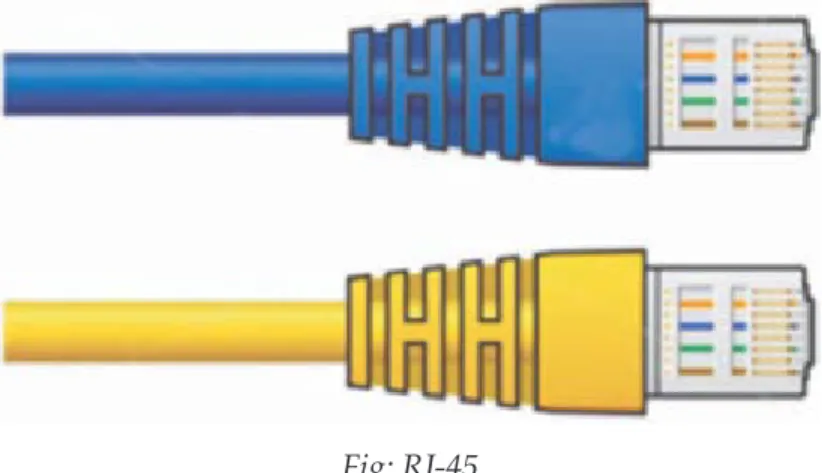
RJ-45 , short form of Registered Jack - 45 , is an eight wired connector that is used to connect computers on a local area network(LAN), especially Ethernet. RJ-45 connectors look similar to the RJ-11 connector used for connecting telephone equipment, but they are somewhat wider.
Fig: RJ-45
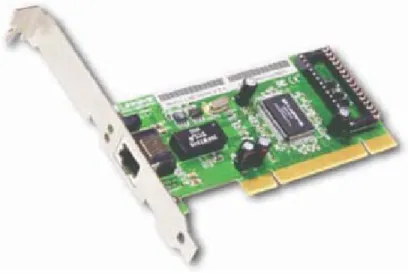
An Ethernet card is a kind of network adapter and is also known as Network Interface Card (NIC). These adapters support the Ethernet standard for high-speed network connections via cables. An Ethernet Card contains connections for either coaxial or twisted pair cables or even for fibre optic cable.
RJ-45
Ethernet Card
telephone line
analogue
SIGNAL
Computer Science
Newer Ethernet cards are installed usually by the manufacturer inside the desktop computers that resemble credit cards are readily available for laptop and other mobile computers. These insert conveniently into slots on the side or front of the device.
Fig: An Ethernet Card
Though they look more like small boxes than cards, external USB Ethernet adapters also exist. These are a convenient alternative to PCI cards for desktop computers and also commonly used with video game consoles and other consumer devices lacking expansion slots.
Ethernet cards may operate at different network speeds depending on the protocol standard they support. Old Ethernet cards were capable only of the 10 Mbps maximum speed offered by Ethernet originally. Modern Ethernet adapters can support the speed of upto100 Mbps. Fast Ethernet standards are also available now that offer speeds upto1 Gbps (Gigabit Ethernet ).
A switch is a device that is used to break a network into different sub-networks called subnet or LAN segments. This prevents traffic overloading on the network. Switches are another fundamental part of many networks because they speed things up. They allow different nodes of a network to communicate directly with one another in a smooth and efficient manner. In simple terms, a network switch is a small hardware device that joins multiple computers together within one local area network (LAN).
Network switches appear nearly identical to network hubs, but a switch generally contains more intelligence than a hub. We can say that a switch is an intelligent hub and is obviously more expensive than a hub. Unlike hubs, network switches are capable of inspecting data packets as they are received, determining the source and destination device of each packet, and forwarding them appropriately. By delivering messages only to the connected device intended, a network switch conserves network bandwidth and offers generally better performance than a hub.
Computer Science
Mainstream Ethernet network switches support either 10/100Mbps fast Ethernet or Gigabit Ethernet (10/100/1000) standards.
Switches that provide a separate connection for each node in a company's internal network are called LAN switches. Essentially, a LAN switch creates a series of instant networks that contain only the two devices communicating with each other at that particular moment.
Fig: Switches
Switches are commonly used in home networks and in small businesses. They need not be monitored or configured using external software applications. They are easy to set up and require only cable connections.
A repeater is an electronic device that receives a signal , amplifies it and then retransmits it on the network so that the signal can cover longer distances. Network repeaters regenerate incoming electrical, wireless or optical signals. An electrical signal in a cable gets weaker with the distance it travels, due to energy dissipated in conductor resistance and dielectric losses. Similarly a light signal travelling through an optical fibre suffers attenuation due to scattering and absorption. With physical media like Ethernet or WiFi, data transmissions can only span a limited distance before the quality of the signal degrades. Repeaters attempt to preserve signal integrity by periodically regenerating the signal and extend the distance over which data can safely travel.
http://jaringankomunikasi.wordpress.com/ Fig: A Repeater
Repeater
100 Meters
Repeater
Computer Science
Actual network devices that serve as repeaters usually have some other name. Active hubs, for example, are repeaters. Active hubs are sometimes also called "multiport repeaters," but more commonly they are just "hubs." In WiFi, access points may function as repeaters. A repeater cannot do the intelligent routing performed by bridges and routers. It cannot filter the traffic to ease congestion and also cannot work across multiple network architectures.
A Router is a network device that works like a bridge to establish connection between two networks but it can handle networks with different protocols. For example a router can link an Ethernet network to a mainframe or to internet. If the destination is unknown to the router, it sends the traffic to another router which knows the destination. The data is sent to the router which determines the destination address (using logical address) and then transmits the data accordingly. Hence routers are smarter than hubs and switches. Using a routing table that stores calculated paths, routers make sure that the data packets are travelling through the best possible paths to reach their destinations. If a link between two routers fails, the sending router can determine an alternate route to keep traffic moving. Routers provide connectivity inside enterprises, between enterprises and the Internet, and within an Internet Service Provider (ISP). Routers can be wireless or wired.
A gateway is a network device that establishes an intelligent connection between a local network and external networks with completely different structures i.e. it connects two dissimilar networks. In simple terms, it is a node on a network that serves as an entrance to another network.
The computers that control traffic within your company's network or at your local Internet Service Provider (ISP) are gateway nodes. A network gateway can be implemented completely in software, completely in hardware, or as a combination of both. In the network for an enterprise, a computer server acting as a gateway node is often also acting as a proxy server and a firewall server. Here a proxy server is a node that is not actually a server but just appears to be so and a firewall is a system designed to prevent unauthirised access to or from a private network. A gateway is often associated with both a router, which knows where to direct a given packet of data that arrives at the gateway, and a switch, which furnishes the actual path in and out of the gateway for a given packet. It expands the functionality of the router by performing data translation and protocol conversion.
You will sometimes see the term default gateway on network configuration screens in Microsoft Windows.
In computer networking, a default gateway is the device that passes traffic from the local subnet to devices on other subnets. The default gateway often connects a local network to the Internet, although internal gateways for local networks also exist.
Routers
Computer Science
Wi-Fi Card
Wi-Fi cards are small and portable cards that allow your desktop or laptop computer to connect to the internet through a wireless network. Wi-Fi transmission is through the use of radio waves. The antenna transmits the radio signals and these signals are picked up by Wi-Fi receivers such as computers and cell phones equipped with Wi-Fi cards. These devices have to be within the range of a Wi-Fi network to receive the signals. The Wi-Fi card then reads the signals and produces a wireless internet connection. Once a connection is established between user and the network, the user will be prompted with a login screen and password if the connection being established is a secure connection.
Wi-Fi cards can be external or internal. If a Wi-Fi card is not installed in your computer, you may purchase a USB antenna attachment and have it externally connected to your device. Many newer computers, mobile devices etc. are equipped with wireless networking capability and do not require a Wi-Fi card. However, it is important to understand that the Wi-Fi connection only exists between the device and the router. Most routers are further connected to a cable modem, which provides internet access to all connected devices.
Computer Science
LET'S REVISE
2 2 2 2 2 2 2 2 2 2
2 2 2
Transmission Medium: One which carries a signal from one computer to another.
Wired Transmission Media: Twisted Pair, Coaxial , Fibre Optic , Ethernet cable
Wireless Transmission Media: Radio waves , Microwaves, Bluetooth , WiFi, Satellites, Infrared
Topology: The pattern of interconnection of nodes in a LAN.
Network Topologies: Bus , Star, Tree
Modem: A device that enables a computer to transmit data over, telephone or cable lines.
RJ-45: An eight wired connector used to connect computers on a LAN.
Ethernet card: A kind of network adapter.
Switch: A small hardware device that joins multiple computers together within a LAN.
Repeater: An electronic device that amplifies the received signal and then retransmits it on the network
Router: A network device that connects two networks with different protocols.
Gateway: A network device that connects two dissimilar networks.
Wi-Fi card: A small, portable card that allow your computer to connect to the internet through a wireless network.
Computer Science
EXERCISE
1. What do you mean by a transmission medium? Differentiate between guided and unguided transmission media.
2. Explain the structure of a coaxial cable and a fibre optic cable. 3. What are advantages of fibre optic cable?
4. Differentiate between a radio wave transmission and a microwave transmission.
5. Explain satellite communication. What are the advantages and disadvantages of using satellite communication?
6. Define the term topology.
7. List any two advantages and any two disadvantages of Star topology. 8. How is Tree Topology different from Bus topology?
9. Identify the type of topology from the following. a. Each node is connected with the help of single cable.
b. Each node is connected with the help of independent cable with central switching. 10. What do you mean by a modem? Why is it used?
11. Explain the following devices: a. Switch
b. Repeater c. Router d. Gateway e. Wi-Fi Card
12. Show a network layout of star topology and bus topology to connect 4 computers.
13. Ms. Anjali Singh, in charge of Knowledge centre in ABC school, recently discovered that the communication between her centre and the primary block of the school is extremely slow and signals drop quite frequently. The distance between these two blocks is 140 meters.
a. Name the type of network.
b. Name the device which may be used for smooth communication.
14. ABC International School is planning to connect all computers, each spread over distance of 50 meters. Suggest an economic cable type having high speed data transfer to connect these computers.
Computer Science
15. Sahil wants to transfer data across two continents at very high speed. Write the name of the transmission medium that can be used to do the same. Write the type of network also.
16. Mayank wants to transfer data within a city at very high speed. Write the name of the wired transmission medium that he should use. Write the type of network also.
17. Mr. Akash wants to send/receive email through internet. Which protocol will be used for this purpose?
18. Answer the following questions in the context of a computer lab with 100 computers. a. Which device is used to connect all computers inside the lab?
b. Which device is used to connect all computers to the internet using telephone wire?
19. Name the device that establishes an intelligent connection between a local network and external network with completely different structures.
20. Name the network device that works like a bridge to establish connection between two networks but it can also handle networks with different protocols.
Computer Science
Learning Objectives:
2
2
2
2
Network Protocols
At the end of this chapter the students will be able to: Network protocols
– TCP/IP – FTP
– HTTP
– PPP
E-mail protocols
– SMTP
– POP3
Remote Access Protocol – Telnet
Chat and VOIP Protocol
In information technology, a protocol is the special set of rules that two or more machines on a network follow to communicate with each other. They are the standards that allow computers to communicate. A protocol defines how computers identify one another on a network, the form that the data should take in transit, and how this information is processed once it reaches its final destination. A protocol is needed every time we want to perform any task on a network. It may be transferring data or taking a printout on a network printer or accessing the central database.
Although each network protocol is different, they all share the same physical cabling. This common method of accessing the physical network allows multiple protocols to peacefully coexist over the network media, and allows the builder of a network to use common hardware for a variety of protocols. This concept is known as "Protocol Independence."
Some of the important protocols being used are as follows:
Transmission Control Protocol / Internet protocol(TCP/IP)
TCP/IP are the two protocols that are used together and together they form the backbone protocol of the internet. They can also be used for private networks i.e. intranets and extranets. When you are set up with direct access to the Internet, your computer is provided with a copy of the TCP/IP program
TCP/IP has two major components: TCP and IP.
Computer Science
The Transmission Control Protocol(TCP) breaks the data into packets that the network can handle efficiently. It manages the assembling of a message or file into smaller packets that are transmitted over the Internet. It verifies all the packets when they arrive at the destination computer and then reassembles them in proper order. Data can be lost in the intermediate network. So TCP adds support to detect errors or lost data and to trigger retransmission until the data is correctly and completely received.
The Internet Protocol(IP)handles the address part of each packet so that it reaches to the right destination. It gives distinct address (called IP address) to each data packet. Each gateway computer on the network checks this address to see where to forward the message. Even though some packets from the same message are routed differently than others, they'll be reassembled at the destination.
An IP address is a unique identifier for a node or host connection on an IP network. An IP address is a 32 bit binary number usually represented as 4 decimal values, each representing 8 bits, in the range 0 to 255 (known as octets) separated by decimal points. This is known as "dotted decimal" notation.
Example:
140.179.220.200
The Internet authorities assign ranges of numbers to different organizations. The organizations assign groups of their numbers to departments. IP operates on gateway machines that move data from department to organization to region and then around the world.
TCP/IP uses the client/server mode of communication in which a computer user (a client) makes a request and the server provides the requested service such as sending a Web page.Also TCP/IP communication is primarily point-to-point transmission of data which means each communication is from one computer in the network to another computer. TCP/IP and the higher-level applications that use it are collectively said to be "stateless" because each client request is considered a new request unrelated to any previous one.Till the time complete message or all packets in a message have been delivered, the connection between the two computers remains intact but after that the transmission path is available freely. So unlike ordinary phone conversations that require a dedicated connection for the entire call duration, no dedicated connection is required. This makes the network paths freely available for everyone to use.
This is the simplest and one of the oldest protocols designed for transferring files of any type(ASCII or binary) from one system to another on the internet. FTP is an application protocol that uses the Internet's TCP/IPprotocols.
FTP is based on Client/Server principle. By giving the ftp command with any remote address, the file transfer can be initiated. In any FTP interface, clients identify the FTP server either by its IP address (such as 192.168.0.1) or by its host name (such as ftp.about.com). It is an efficient means to send and receive files from a remote host. FTP establishes two connections between the hosts. One connection is used for data File Transfer protocol (FTP)
Computer Science
transfer and the other for control information. The control connection remains connected during the entire interactive FTP session while the data connection is opened and closed for each file transfer. As a user, you can use FTP with a simple command from the Windows MS-DOS Prompt window or with a commercial program that offers a graphical user interface. You can even download programs by making FTP requests through your web browser.By logging on to an FTP server, you can delete, rename, move, or copy files at a server. However, publicly available files are easily accessed using anonymous FTP.In such a case you need not formally sign-in to the FTP server to make a file transfer, instead you may be simply asked to enter your email address. But if you are using a private FTP server, you must sign in with a user name and password to initiate the exchange of data.
Basic FTP support is usually provided as part of a suite of programs that come with TCP/IP. However, any FTP client program with a graphical user interface usually has to be downloaded from the company that makes it.
As mentioned before FTP can transfer both ASCII i.e. plain text and binary files but the mode has to be set in the FTP client.If you attempt to transfer a binary file (such as a program or music file) while in text mode, the transferred file becomesunusable.
HTTP is the protocol that is used for transferring hypertext (i.e. text, graphic, image, sound, video etc.) between two computers and is particularly used on the World Wide Web. It is a TCP/IP based communication protocol and provides a standard for Web browsers and servers to communicate.
Hypertext is the text that is specially coded using a standard coding language called HyperTextMarkupLanguag(HTML) which basically creates hyperlinks and thereby controls how the World Wide Web works and how Web pages are formatted and displayed.
These hyperlinks can be in the form of text, graphic, image, sound or video and are used to "link "the user to some other file. HTTP defines how messages are formatted
and transmitted, and what actions Web servers and browsers should take in response to various commands. For example, when you enter a URL in your browser, this actually sends an HTTP command to the Web server directing it to fetch and transmit the requested Web page.
HTTP is based on Client/Server principle. Communication between the host and the client occurs through a request/response pair. A connection is established between two computers - out of which one is client (generally the browser)thatinitiates the request and the other is the server that responds to the request.Also HTTP identifies the resource that the client has requested for and informs the server about the action to be taken. When the user clicks on the hypertext link, the client program on their computer uses HTTP to contact the server, identify the resource and ask the server to respond with an action. The server accepts the request and then uses HTTP to respond to perform the action.
Computer Science
Although HTTP was designed for use in the web, it is being used in a much more general fashion because of increasing object oriented applications.
HTTP has three important features. Firstly, it is connectionless.After a request is made, the client disconnects from the server and waits for a response.To process the request, the server has to re-establish the connection with the client. Secondly, HTTP is media independent. This means any type of data(text , images , sound , video etc.) can be sent by HTTP as long as both the client and server know how to handle the data content. Thirdly HTTP is stateless.This is because the server and the client are aware of each other only during a request. Afterwards, they get disconnected.Hence neither the client nor the browser can retain information between different request across the web pages.
PPP (Point-to-Point Protocol) is usedfor communication between two computers using a serial interface, mostly a personal computer connected by phone line to a server. For example, an Internet ServiceProvider(ISP) may provide you with a PPP connection so that the ISP'sserver can respond to your requests, pass them on to the Internet, and forward your requested Internet responses back to you. It was basically designed to help communication between two systems through telephone lines as it supports transmission of network packets over a serial point to point link.
PPP is sometimes considered a member of the TCP/IP suite of protocols. Essentially, it encapsulates and packages your computer's TCP/IP packets into PPP frames and then forwards them to the server over serial transmission lines such as telephone lines, ISDN etc. PPP defines the format of frame to be exchanged between devices on one or multiple links and also defines the authenticity of the two devices. It supports various authentication schemes such as Password Authentication Protocol(PAP) and Challenge Handshake Authentication protocol(CHAP).
Simple Mail transfer protocol (SMTP)
SMTP stands for Simple Mail Transfer Protocol that allows transmission of email over the Internet. Most email software is designed to use SMTP for communication purposes when sending email. It only works for outgoing messages. So when an email has to be sent, the address of their Internet Service Provider's SMTP server has to be given. The actual mail transfer is done through Message Transfer Agents(MTA). So the client computer must have a client MTA and the server must have a server MTA. SMTP actually defines the MTA client and the server on the internet.
SMTP is a reliable and easy to set up protocol. Messages either get to a recipient, or there is an error message that explains why that wasn't possible. One of the purposes of an SMTP is that it simplifies the communication of email messages between servers. It allows the server to break up different parts of a message into categories the other server can understand. Any email message has a sender, a recipient or Point to Point Protocol (PPP)
Computer Science
the internet, everything is turned into strings of text. This text is separated by code words or numbers that identify the purpose of each section of an email. SMTP provides those codes, and email server software is designed to interpret these codes.
The other purpose of SMTP is to set up communication rules between servers. Every server has its own way to identify itself, define the mode of communication that they will follow, check for errors and handle them.In a typical SMTP transaction, a server will identify itself, and announce the kind of operation it is trying to perform. The other server will authorize the operation, and the message will be sent. If the recipient address is wrong, or if there is some other problem, the receiving server may reply with some error message.
SMTP has a major disadvantage that it is relatively easy to send a message with a fake sender address. This results in spread of many email-based viruses. Someone may receive a message that they think is coming from a friend, when someone else is actually sending it. Although attempts are being made to overcome this disadvantage but it still causes some problems.
Most servers these days actually us a slightly updated version of the SMTP protocol called ESMTP (Extended Simple Mail Transfer Protocol). This was created to allow transmission of multimedia through email. When someone sends a picture or music file through their email program, ESMTP communication codes are used to identify the kind of data being transferred.Mutipurpose Internet Mail Extension(MIME) is a supplementary protocol that allows non ASCII data to be sent through SMTP. Please note that MIME is not a protocol and cannot replace SMTP.
Post Office Protocol Version 3 (POP3)
Post Office Protocol 3 or POP3 is the third version of a widespread method of receiving email which receives and holds email for an individual until they pick it up. SMTP has a disadvantage that if the destination computer is not online, mails cannot be received.So the SMTP server receives the mail on behalf of every host and the respective host then interacts with the SMTP server to retrieve messages by using a client server protocol called POP3.
POP3 makes it easy for anyone to check their email if their email program is configured properly to work with the protocol. It is extremely common among most mail servers because of its simplicity and high success rate and minimumerrors. Also it can work with virtually any email program, as long as the email program is configured to host the protocol. Many popular email programs, including Microsoft Outlook, are automatically designed to work with POP3. Each POP3 mail server has a different address, which is usually provided to an individual by their web hosting company. This address must be entered into the email program so that the program can connect effectively with the protocol.The individuals receiving POP3 email will have to input their username and password in order to successfully receive email.