Oracle Data Integrator
Knowledge Modules Reference Guide10g Release 3 (10.1.3)
Oracle Data Integrator Knowledge Modules Reference Guide, 10g Release 3 (10.1.3)
Copyright © 2009, Oracle. All rights reserved.
The Programs (which include both the software and documentation) contain proprietary information; they are provided under a license agreement containing restrictions on use and disclosure and are also protected by copyright, patent, and other intellectual and industrial property laws. Reverse engineering, disassembly, or decompilation of the Programs, except to the extent required to obtain interoperability with other independently created software or as specified by law, is prohibited.
The information contained in this document is subject to change without notice. If you find any problems in the documentation, please report them to us in writing. This document is not warranted to be error‐free. Except as may be expressly permitted in your license agreement for these Programs, no part of these Programs may be reproduced or transmitted in any form or by any means, electronic or mechanical, for any purpose.
If the Programs are delivered to the United States Government or anyone licensing or using the Programs on behalf of the United States Government, the following notice is applicable:
U.S. GOVERNMENT RIGHTS Programs, software, databases, and related documentation and technical data delivered to U.S. Government customers are ʺcommercial computer softwareʺ or ʺcommercial technical dataʺ pursuant to the applicable Federal Acquisition Regulation and agency‐specific supplemental regulations. As such, use, duplication, disclosure, modification, and adaptation of the Programs, including documentation and technical data, shall be subject to the licensing restrictions set forth in the applicable Oracle license agreement, and, to the extent applicable, the additional rights set forth in FAR 52.227‐19, Commercial Computer Software‐‐Restricted Rights (June 1987). Oracle USA, Inc., 500 Oracle Parkway, Redwood City, CA 94065.
The Programs are not intended for use in any nuclear, aviation, mass transit, medical, or other inherently dangerous applications. It shall be the licenseeʹs responsibility to take all appropriate fail‐safe, backup, redundancy and other measures to ensure the safe use of such applications if the Programs are used for such purposes, and we disclaim liability for any damages caused by such use of the Programs.
Oracle, JD Edwards, PeopleSoft, and Siebel are registered trademarks of Oracle Corporation and/or its affiliates. Other names may be trademarks of their respective owners.
The Programs may provide links to Web sites and access to content, products, and services from third parties. Oracle is not responsible for the availability of, or any content provided on, third‐party Web sites. You bear all risks associated with the use of such content. If you choose to purchase any products or services from a third party, the relationship is directly between you and the third party. Oracle is not responsible for: (a) the quality of third‐party products or services; or (b) fulfilling any of the terms of the agreement with the third party, including delivery of products or services and warranty obligations related to purchased products or services. Oracle is not responsible for any loss or damage of any sort that you may incur from dealing with any third party.
Table of Contents
Introduction... 6
Files ... 7
Knowledge Modules ... 7
Generic SQL... 8
Knowledge Modules ... 8
Hyperion Essbase ... 12
Knowledge Modules ... 12
Platform Support... 12
Specific Requirements... 12
Hyperion Financial Management... 13
Knowledge Modules ... 13
Platform Support... 13
Specific Requirements... 13
Hyperion Planning ... 14
Knowledge Modules ... 14
Platform Support... 14
Specific Requirements... 14
Hypersonic SQL ... 15
Knowledge Modules ... 15
IBM DB2 UDB... 16
Knowledge Modules ... 16
Specific Requirements... 17
IBM DB2/400 ... 19
Knowledge Modules ... 19
Specific Requirements... 19
Informix... 22
Knowledge Modules ... 22
JD Edwards EnterpriseOne... 24
Introduction ... 24
Installation and Configuration ... 24
Working with Oracle Data Integrator JDE EnterpriseOne KMs ... 25
Knowledge Module Options Reference ... 28
JMS ... 32
Knowledge Modules ... 32
Microsoft Access ... 34
Knowledge Modules ... 34
Microsoft SQL Server ... 35
Specific Requirements... 37
Netezza ... 39
Knowledge Modules ... 39
Oracle Changed Data Capture Adapters ... 41
Introduction ... 41
Installation and Configuration ... 42
Working with the Oracle CDC KM ... 42
Knowledge Module Options Reference ... 44
Oracle Database ... 45
Knowledge Modules ... 45
Specific Requirements... 49
Oracle Data Quality ... 51
Specific Requirements... 51
Oracle E-Business Suite ... 52
Introduction ... 52
Installation and Configuration ... 53
Working with EBS KMs... 53
Knowledge Module Options Reference ... 58
Oracle Enterprise Service Bus ... 62
Introduction ... 62
Overview of the XREF KM Process... 63
Installation and Configuration ... 63
Working with XREF using the Oracle Data Integrator ESB Cross-References KMs ... 63
Knowledge Module Options Reference ... 65
Oracle GoldenGate ... 68
Introduction ... 68
Installation and Configuration ... 69
Working with the Oracle GoldenGate JKM... 69
Advanced Configuration ... 72
Knowledge Module Options Reference ... 73
Oracle OLAP ... 75
Introduction ... 75
Installation and Configuration ... 76
Working with Oracle OLAP KMs... 76
Knowledge Module Options Reference ... 78
Oracle PeopleSoft ... 81
Introduction ... 81
Installation and Configuration ... 81
Working with PeopleSoft KMs ... 81
Oracle Siebel CRM... 84
Introduction ... 84
Installation and Configuration ... 86
Working with the Siebel KMs ... 86
Knowledge Module Options Reference ... 88
SalesForce ... 91
Knowledge Modules ... 91
Specific Requirements... 91
SAP ABAP ERP ... 93
Introduction ... 93
Installation and Configuration ... 94
Installing and Configuring JCo... 96
Working with the SAP ABAP ERP KMs... 96
Knowledge Module Options Reference ... 102
SAP ABAP BW ... 106
Introduction ... 106
Installation and Configuration ... 107
Installing and Configuring JCo... 109
Working with the SAP ABAP BW KMs ... 110
Knowledge Module Options Reference ... 115
SAS ... 119
Knowledge Modules ... 119
Specific Requirements... 120
Sybase ASE ... 122
Knowledge Modules ... 122
Specific Requirements... 123
Sybase IQ... 124
Knowledge Modules ... 124
Specific Requirements... 125
Teradata ... 126
Knowledge Modules ... 126
Specific Requirements... 130
Introduction
This document lists the Knowledge Modules included with Oracle Data Integrator 10g Release 3 (10.1.3)
After importing a Knowledge Module into your project, please make sure to refer to the specific description for details of usage. Every Knowledge Module may contain restrictions and operating system / database specific commands. Please refer to the appropriate technology documentation set for further details.
Oracle Data Integrator includes Knowledge Modules that are not technology dependant. Knowledge Modules listed in sections: Generic SQL and JMS are designed to work on most databases and most JMS compliant middleware. However, we recommend using specific pre-built Knowledge Modules for one technology whenever the Knowledge Module exists for that technology.
Oracle Data Integrator uses JDBC Connectivity to access the different database. We recommend using Type 4 JDBC drivers whenever possible. JDBC drivers should be defined in the Java Class Path of each machine running the Oracle Data Integrator UIs or Agents. For your convenience, you can copy your drivers jar files into the /drivers sub-directory of your Oracle Data Integrator installation folder. Please refer to the documentation provided with your JDBC Driver for more information.
The preceding comment also applies to JMS specific clients and, in general, to any API required by a Knowledge Modules. All required Java Archive files (jar files) should be defined in the Java Class Path or alternatively copied into the /drivers directory.
Files
Knowledge Modules
Several Knowledge Modules are provided to export data to a target file or to read data from a source file. These Knowledge Modules are described in other sections. They are listed here for reference only. Reading from a File:
LKM File to SQL
LKM File to DB2 UDB (LOAD)
LKM File to MSSQL (BULK)
LKM File to Netezza (EXTERNAL TABLE)
LKM File to Netezza (NZLOAD)
LKM File to Oracle (EXTERNAL TABLE)
LKM File to Oracle (SQLLDR)
LKM File to SalesForce (Upsert)
LKM File to SAS
LKM File to Sybase IQ (LOAD TABLE)
IKM File to Teradata (TTUs)
LKM File to Teradata (TTUs)
Writing to a File:
IKM SQL to File Append
IKM Netezza To File (EXTERNAL TABLE)
IKM SalesForce to File (with filter)
IKM SalesForce to File (without filter)
IKM Teradata to File (TTUs)
Other Knowledge Modules for Files:
Type Knowledge Module Description
Reverse-Engineer
RKM File (FROM EXCEL) Retrieves file metadata from a Microsoft Excel spreadsheet. Consider using this KM if you plan to maintain the definition of your files structure in a separate Excel spreadsheet.
Reverse-Engineer
RKM Oracle Data Quality Retrieve file metadata from Oracle Data Quality DDX files. The DDX files are generated by Oracle Data Quality.
Generic SQL
Knowledge Modules
Knowledge Modules in this section apply to most popular SQL compliant databases, including Oracle, Microsoft SQL Server, Sybase ASE, IBM DB2, Teradata, PostgreSQL, MySQL, Derby etc. Additional Knowledge Modules are also provided for some of these particular databases to leverage the specific SQL and powerful loader utilities to maximize performance.
Type Knowledge Module Description
Check CKM SQL Checks data integrity against constraints defined on a Datastore. Rejects invalid records in the error table created dynamically. Can be used for static controls as well as flow controls.
Consider using this KM if you plan to check data integrity on a SQL compliant database. Use specific CKMs instead if available for your database.
Integrate IKM SQL Control Append Integrates data in any SQL compliant target table in
replace/append mode. When flow data needs to be checked using a CKM, this IKM creates a temporary staging table before invoking the CKM.
Consider using this IKM if you plan to load your SQL compliant target table in replace mode, with or without data integrity check.
To use this IKM, the staging area must be on the same data server as the target.
Integrate IKM SQL Incremental Update Integrates data in any SQL compliant target table in incremental update mode. This KM creates a temporary staging table to stage the data flow. It then compares its content to the target table to guess which records should be inserted and which others should be updated. It also allows performing data integrity check by invoking the CKM. Because not all databases support the same bulk update syntax, updates are done row by row. This KM is therefore not recommended for large volumes of data.
Consider using this KM if you plan to load your SQL compliant target table to insert missing records and to update existing ones. Use specific incremental update IKMs whenever possible as they are more optimized for performance. To use this IKM, the staging area must be on the same data server as the target.
Integrate IKM SQL Incremental Update (row by row)
Integrates data in any AINSI-SQL92 compliant database target table in incremental update mode with row by row logging. This KM is similar to the IKM SQL Incremental Update, and indicates in addition the state of each processed row. A log file can be created to record
the processing activities.
The following options are used for the logging mechanism:
• LOG_LEVEL: This option is used to set the granularity of the data logged.
The following log levels can be set:
o 0: nothing to log
o 1: any JDBC action will be indicated such as ‘select action’, ‘delete action’, ‘insert action’…
o 2: in addition to level 1, all records that generate an error will be logged
o 3: in addition to level 2, all processed records will be logged
• LOG_FILE_NAME: Full path to the log file used.
• MAX_ERRORS:Specify the maximum number of errors. The IKM process stops when the maximum number of errors specified in this option is reached.
Important Note: This Knowledge Module is NOT
RECOMMENDED when using LARGE VOLUMES. Other specific modules using Bulk utilities (SQL*LOADER, BULK INSERT...) or direct links (DBLINKS, Linked Servers...) are usually more efficient.
Integrate IKM SQL to File Append Integrates data in a target file from any SQL compliant staging area in replace mode.
Consider using this IKM if you plan to transform and export data to a target file. If your source datastores are located on the same data server, we recommend using this data server as staging area to avoid extra loading phases (LKMs) To use this IKM, the staging area must be different from the target.
Integrate IKM SQL to SQL Append Integrates data in a target SQL compliant table from any SQL compliant staging area in replace mode.
Consider using this IKM if you plan to use a staging area different from the target. If most of your source datastores are located on the same data server, we recommend using this data server as staging area to avoid extra loading phases (LKMs)
To use this IKM, the staging area must be different from the target.
Load LKM File to SQL Loads data from an ASCII or EBCDIC File to any SQL compliant database used as a staging area. This LKM uses the Agent to read selected data from the source file and write the result in the staging temporary table created dynamically. Consider using this LKM if one of your source datastores is an ASCII or EBCDIC file. Use specific LKMs for your target staging area whenever possible as they are more optimized for performance. For example, if you are loading to an Oracle database, use “LKM File to Oracle (SQLLDR)” or “LKM File to Oracle (EXTERNAL TABLE)” instead.
Load LKM SQL to SQL Loads data from a SQL compliant database to a SQL compliant staging area. This LKM uses the Agent to read selected data from the source database and write the result into the staging temporary table created dynamically.
Consider using this LKM if your source datastores are located on a SQL compliant database different from your staging area. Use specific LKMs for your source and target staging area whenever possible as they are more optimized for performance. For example, if you are loading from an Oracle source server to an Oracle staging area, use “LKM Oracle to Oracle (dblink)” instead.
Load LKM SQL to SQL (JYTHON) Loads data from a SQL compliant database to a SQL compliant staging area. This LKM uses Jython scripting to read selected data from the source database and write the result into the staging temporary table created dynamically. This LKM allows you to modify the default JDBC data types binding between the source database and the target staging area by editing the underlying Jython code provided.
Consider using this LKM if your source datastores are located on a SQL compliant database different from your staging area and if you plan to specify your own data type binding method. Use specific LKMs for your source and target staging area whenever possible as they are more optimized for
performance. For example, if you are loading from an Oracle source server to an Oracle staging area, use “LKM Oracle to Oracle (dblink)” instead.
Load LKM SQL to SQL (row by row) Loads data from any ISO-92 database to any ISO-92 compliant target database. This LKM uses a Jython script to read selected data from the database and write the result into the target temporary table, which is created dynamically. It loads data from a staging area to a target and indicates the state of each processed row.
The following options are used for the logging mechanism:
• LOG_LEVEL: This option is used to set the granularity of the data logged.
The following log levels can be set:
o 0: nothing to log
o 1: any JDBC action will be indicated such as ‘select action’, ‘delete action’, ‘insert action’…
o 2: in addition to level 1, all records that generate an error will be logged
o 3: in addition to level 2, all processed records will be logged
• LOG_FILE_NAME: Full path to the log file used.
• MAX_ERRORS:Specify the maximum number of errors. The IKM process stops when the maximum number of errors specified in this option is reached.
Important Note: This Knowledge Module is NOT
RECOMMENDED when using LARGE VOLUMES. Other specific modules using Bulk utilities (SQL*LOADER, BULK INSERT...) or direct links (DBLINKS, Linked Servers...) are
usually more efficient.
Reverse-Engineer
RKM SQL (JYTHON) Retrieves JDBC metadata for tables, views, system tables and columns from any SQL compliant database. This RKM may be used to specify your own strategy to convert JDBC metadata into Oracle Data Integrator metadata.
Consider using this RKM if you encounter problems with the standard JDBC reverse-engineering process due to some specificities of your JDBC driver. This RKM allows you to edit the underlying Jython code to make it match the specificities of your JDBC driver.
Web service
SKM SQL Generates data access Web services for SQL compliant databases. Data access services include data manipulation operations such as adding, removing, updating or filtering records as well as changed data capture operations such as retrieving changed data. Data manipulation operations are subject to integrity check as defined by the constraints of your datastores.
Consider using this SKM if you plan to generate and deploy data manipulation or changed data capture web services to your Service Oriented Architecture infrastructure. Use specific SKMs instead if available for your database
Hyperion Essbase
Knowledge Modules
Type Knowledge Module Description
Reverse-Engineer
RKM Hyperion Essbase Reverse-engineers Essbase applications and creates data models to use as targets or sources in Oracle Data Integrator interfaces
Integrate IKM SQL to Hyperion Essbase (DATA)
Integrates data into Essbase applications.
Integrate IKM SQL to Hyperion Essbase (METADATA)
Integrates metadata into Essbase applications
Load LKM Hyperion Essbase DATA to SQL
Loads data from an Essbase application to any SQL compliant database used as a staging area.
Load LKM Hyperion Essbase METADATA to SQL
Loads metadata from an Essbase application to any SQL compliant database used as a staging area.
Platform Support
The Oracle Data Integrator Hyperion Essbase Knowledge Modeules are certified for Hyperion 11.1.1.
Specific Requirements
Please refer to the following documentation detailing the specific requirements for the Hyperion Essbase KMs:
Oracle Data Integrator for Hyperion Essbase Readme
Oracle Data Integrator for Hyperion Essbase Getting Started
Oracle Data Integrator for Hyperion Essbase User’s Guide
The sample files listed in the Oracle Data Integrator for Hyperion Essbase Getting Started Guide are available in the /demo/hyperion/ sub-directory of the Oracle Data Integrator installation folder.
Hyperion Financial Management
Knowledge Modules
Type Knowledge Module Description
Reverse-Engineer
RKM Hyperion Financial Management
Reverse-engineers Financial Management applications and creates data models to use as targets or sources in Oracle Data Integrator interfaces.
Integrate IKM SQL to Hyperion Financial Management Data
Integrates data into Financial Management applications.
Integrate IKM SQL to Hyperion Financial Management Dimension
Integrates metadata into Financial Management applications.
Load LKM Hyperion Financial Management Data to SQL
Loads data from a Financial Management application to any SQL compliant database used as a staging area.
This Knowledge Module will not work if you change the column names of the HFMData data store reverse engineered by the RKM Hyperion Financial Management Knowledge Module.
Load LKM Hyperion Financial
Management Members To SQL
Loads member lists from a Financial Management application to any SQL compliant database used as a staging area.
Platform Support
The Oracle Data Integrator Hyperion Financial Management Knowledge Modeules are certified for Hyperion 11.1.1.
Specific Requirements
Please refer to the following documentation detailing the specific requirements for the Financial Management KMs:
Oracle Data Integrator Adapter for Hyperion Financial Management Readme
Oracle Data Integrator Adapter for Hyperion Financial Management Getting Started
Oracle Data Integrator Adapter for Hyperion Financial Management User's Guide
The sample files listed in the Oracle Data Integrator Adapter for Hyperion Financial Management Getting Started Guide are available in the /demo/hyperion/ sub-directory of the Oracle Data Integrator installation folder.
Hyperion Planning
Knowledge Modules
Type Knowledge Module Description
Reverse-Engineer
RKM Hyperion Planning Reverse-engineers Planning applications and creates data models to use as targets in Oracle Data Integrator
interfaces.
Each dimension (standard dimension and attribute
dimension) is reversed as a datastore with the same name as the dimension with appropriate columns. Creates a datastore named "UDA" for loading UDA's.
Integrate IKM SQL to Hyperion Planning Loads metadata and data into Planning applications.
Platform Support
The Oracle Data Integrator Hyperion Planning Knowledge Modeules are certified for Hyperion 11.1.1.
Specific Requirements
Please refer to the following documentation detailing the specific requirements for the Hyperion Planning KMs:
Oracle Data Integrator Adapter for Hyperion Planning Readme
Oracle Data Integrator Adapter for Hyperion Planning Getting Started
Oracle Data Integrator Adapter for Hyperion Planning User's Guide
The sample files listed in the Oracle Data Integrator Adapter for Hyperion Planning Getting Started Guide are available in the /demo/hyperion/ sub-directory of the Oracle Data Integrator installation folder.
Hypersonic SQL
Knowledge Modules
Refer to section “Generic SQL” for additional Knowledge Modules that work with this database.
Type Knowledge Module Description
Check CKM HSQL Checks data integrity against constraints defined on a Hypersonic SQL table. Rejects invalid records in the error table created dynamically. Can be used for static controls as well as flow controls.
Consider using this CKM if you plan to check data integrity on a Hypersonic SQL database.
This CKM is optimized for Hypersonic SQL.
Journalize JKM HSQL Consistent Creates the journalizing infrastructure for consistent journalizing on Hypersonic SQL tables using triggers. Enables consistent Changed Data Capture on Hypersonic SQL.
Journalize JKM HSQL Simple Creates the journalizing infrastructure for simple journalizing on Hypersonic SQL tables using triggers.
Enables simple Changed Data Capture on Hypersonic SQL. Web
service
SKM HSQL Generates data access Web services for Hypersonic SQL databases. Refer to “SKM SQL” in section “Generic SQL” for more details.
IBM DB2 UDB
Knowledge Modules
Refer to section “Generic SQL” for additional Knowledge Modules that work with this database.
Type Knowledge Module Description
Integrate IKM DB2 UDB Incremental Update Integrates data in an IBM DB2 UDB target table in incremental update mode. This IKM creates a temporary staging table to stage the data flow. It then compares its content to the target table to guess which records should be inserted and which others should be updated. It also allows performing data integrity check by invoking the CKM. Inserts and updates are done in bulk set-based processing to maximize performance. Therefore, this IKM is optimized for large volumes of data.
Consider using this IKM if you plan to load your IBM DB2 UDB target table to insert missing records and to update existing ones.
To use this IKM, the staging area must be on the same data server as the target.
Integrate IKM DB2 UDB Slowly Changing Dimension
Integrates data in an IBM DB2 UDB target table used as a Type II Slowly Changing Dimension in your Data
Warehouse. This IKM relies on the Slowly Changing
Dimension metadata set on the target datastore to figure out which records should be inserted as new versions or
updated as existing versions.
Because inserts and updates are done in bulk set-based processing, this IKM is optimized for large volumes of data. Consider using this IKM if you plan to load your IBM DB2 UDB target table as a Type II Slowly Changing Dimension. To use this IKM, the staging area must be on the same data server as the target and the appropriate Slowly Changing Dimension metadata needs to be set on the target datastore.
Journalize JKM DB2 UDB Consistent Creates the journalizing infrastructure for consistent journalizing on IBM DB2 UDB tables using triggers. Enables consistent Changed Data Capture on IBM DB2 UDB.
Journalize JKM DB2 UDB Simple Creates the journalizing infrastructure for simple journalizing on IBM DB2 UDB tables using triggers.
Load LKM DB2 UDB to DB2 UDB (EXPORT_IMPORT)
Loads data from an IBM DB2 UDB source database to an IBM DB2 UDB staging area database using the native EXPORT / IMPORT commands.
This module uses the EXPORT CLP command to extract data in a temporary file. Data is then loaded in the target staging DB2 UDB table using the IMPORT CLP command. This method if often more efficient than the standard “LKM SQL to SQL” when dealing with large volumes of data. Consider using this LKM if your source tables are located on a DB2 UDB database and your staging area is on a different DB2 UDB database.
Load LKM File to DB2 UDB (LOAD) Loads data from a File to a DB2 UDB staging area database using the native CLP LOAD Command.
Depending on the file type (Fixed or Delimited) this LKM will generate the appropriate LOAD script in a temporary directory. This script is then executed by the CLP LOAD command and automatically deleted at the end of the execution. Because this method uses the native IBM DB2 loaders, it is more efficient than the standard “LKM File to SQL” when dealing with large volumes of data.
Consider using this LKM if your source is a large flat file and your staging area is an IBM DB2 UDB database.
Load LKM SQL to DB2 UDB Loads data from any Generic SQL source database to an IBM DB2 UDB staging area. This LKM is similar to the standard “LKM SQL to SQL” described in section “Generic SQL” except that you can specify some additional specific IBM DB2 UDB parameters.
Load LKM SQL to DB2 UDB (LOAD) Loads data from any Generic SQL source database to an IBM DB2 UDB staging area using the CLP LOAD command. This LKM unloads the source data in a temporary file and calls the IBM DB2 native loader using the CLP LOAD command to populate the staging table. Because this method uses the native IBM DB2 loader, it is often more efficient than the “LKM SQL to SQL” or “LKM SQL to DB2 UDB” methods when dealing with large volumes of data. Consider using this LKM if your source data located on a generic database is large, and when your staging area is an IBM DB2 UDB database.
Web service
SKM IBM UDB Generates data access Web services for IBM DB2 UDB databases. Refer to “SKM SQL” in section “Generic SQL” for more details.
This SKM is optimized for the IBM DB2 UDB database.
Some of the Knowledge Modules for IBM DB2 UDB use operating system calls to invoke the IBM CLP command processor to perform efficient loads. The following restrictions apply when using such Knowledge Modules:
1. The IBM DB2 UDB Command Line Processor (CLP) as well as the DB2 UDB Connect Software must be installed on the machine running the Oracle Data Integrator Agent.
2. The server names defined in the Topology must match the IBM DB2 UDB connect strings used for these servers.
IBM DB2/400
Knowledge Modules
Refer to section “Generic SQL” for additional Knowledge Modules that work with this database.
Type Knowledge Module Description
Integrate IKM DB2 400 Incremental Update Integrates data in an IBM DB2/400 target table in incremental update mode. This KM creates a temporary staging table to stage the data flow. It then compares its content to the target table to guess which records should be inserted and which others should be updated. It also allows performing data integrity check by invoking the CKM. Inserts and updates are done in bulk set-based SQL processing to maximize performance. Therefore, this IKM is optimized for large volumes of data.
Consider using this IKM if you plan to load your IBM
DB2/400 target table to insert missing records and to update existing ones using SQL.
To use this IKM, the staging area must be on the same data server as the target.
Integrate IKM DB2 400 Incremental Update (CPYF)
Integrates data in an IBM DB2/400 target table in
incremental update mode. This IKM is similar to the “IKM DB2 400 Incremental Update” except that it uses the CPYF native OS/400 command to write to the target table, instead of set-based SQL operations. It can be more efficient in some particular cases.
Consider using this IKM if you plan to load your IBM
DB2/400 target table to insert missing records and to update existing ones using native OS/400 commands rather than set-based SQL.
Integrate IKM DB2 400 Slowly Changing Dimension
Integrates data in an IBM DB2/400 target table used as a Type II Slowly Changing Dimension in your Data
Warehouse. This IKM relies on the Slowly Changing
Dimension metadata set on the target datastore to figure out which records should be inserted as new versions or
updated as existing versions.
Because inserts and updates are done in bulk set-based processing, this IKM is optimized for large volumes of data. Consider using this IKM if you plan to load your IBM DB2/400 target table as a Type II Slowly Changing Dimension.
To use this IKM, the staging area must be on the same data server as the target and the appropriate Slowly Changing Dimension metadata needs to be set on the target
datastore.
Journalize JKM DB2 400 Consistent Creates the journalizing infrastructure for consistent journalizing on IBM DB2/400 tables using triggers. Enables consistent Changed Data Capture on IBM DB2/400.
Journalize JKM DB2 400 Simple Creates the journalizing infrastructure for consistent journalizing on IBM DB2/400 tables using triggers. Enables consistent Changed Data Capture on IBM DB2/400.
Load LKM DB2 400 to DB2 400 Loads data from an IBM DB2/400 source database to an IBM DB2/400 staging area database using the native CRTDDMF and CPYF commands.
This LKM uses CRTDDMF to create a DDM file on the target and transfers data from the source staging table to this DDM file using CPYF.
This method if often more efficient than the standard “LKM SQL to SQL” when dealing with large volumes of data. Consider using this LKM if your source tables are located on a DB2/400 database and your staging area is on a different DB2/400 database.
Load LKM SQL to DB2 400 (CPYFRMIMPF)
Loads data from any Generic SQL source database to an IBM DB2/400 staging area using the CPYFRMIMPF command.
This LKM unloads the source data in a temporary file and calls the IBM DB2/400 native loader using the
CPYFRMIMPF command to populate the staging table. Because this method uses the native IBM DB2/400 loader, it is often more efficient than the “LKM SQL to SQL” method when dealing with large volumes of data.
Consider using this LKM if your source data located on a generic database is large, and when your staging area is an IBM DB2/400 database.
Reverse-Engineer
RKM DB2 400 Retrieves IBM DB2/400 specific metadata. This RKM can be used to extract metadata for physical files, database tables, database views and unique keys. It accesses the underlying DB2/400 catalog tables and can be used to retrieve the physical 10 digits resource names rather than the standard long SQL resource names.
Consider using this RKM if your table names are longer than 10 digits and if you plan to use native commands on your OS/400.
Some of the Knowledge Modules for IBM DB2/400 use operating system calls to invoke the IBM iSeries commands to perform efficient loads. The following restrictions apply when using such Knowledge Modules:
1. OS/400 commands accept only 10 digits table names. Make sure to use the specific “RKM DB2/400” to retrieve the physical table names for your datastores rather than the SQL table names.
2. Oracle Data Integrator agent must be installed on the target iSeries machine. Refer to the installation guide for the appropriate procedure.
Informix
Knowledge Modules
Refer to section “Generic SQL” for additional Knowledge Modules that work with this database.
Type Knowledge Module Description
Integrate IKM Informix Incremental Update Integrates data in an IBM Informix target table in
incremental update mode. This IKM creates a temporary staging table to stage the data flow. It then compares its content to the target table to guess which records should be inserted and which others should be updated. It also allows performing data integrity check by invoking the CKM. Inserts and updates are done in bulk set-based processing to maximize performance. Therefore, this IKM is optimized for large volumes of data.
Consider using this IKM if you plan to load your IBM
Informix target table to insert missing records and to update existing ones.
To use this IKM, the staging area must be on the same data server as the target.
Journalize JKM Informix Consistent Creates the journalizing infrastructure for consistent journalizing on IBM Informix tables using triggers.
Enables consistent Changed Data Capture on IBM Informix. Journalize JKM Informix Simple Creates the journalizing infrastructure for simple journalizing
on IBM Informix tables using triggers.
Enables simple Changed Data Capture on IBM Informix. Load LKM Informix to Informix (SAME
SERVER)
Loads data from a source Informix database to a target Informix staging area located inside the same server. This LKM creates a view in the source database and a synonym in the staging area database. This method if often more efficient than the standard “LKM SQL to SQL” when dealing with large volumes of data.
Consider using this LKM if your source tables are located on an IBM Informix database and your staging area is on an IBM Informix database located in the same Informix server.
Reverse-Engineer
RKM Informix Retrieves IBM Informix specific metadata for tables, views, columns, primary keys and non unique indexes. This RKM accesses the underlying Informix catalog tables to retrieve metadata.
Consider using this RKM if you plan to extract additional metadata from your Informix catalog when it is not provided by the default JDBC reverse-engineering process.
Reverse-Engineer
RKM Informix SE Retrieves IBM Informix SE specific metadata for tables, views, columns, primary keys and non unique indexes. This RKM accesses the underlying Informix SE catalog tables to retrieve metadata.
Consider using this RKM if you plan to extract additional metadata from your Informix SE catalog when it is not provided by the default JDBC reverse-engineering process. Web
service
SKM Informix Generates data access Web services for IBM Informix databases. Refer to “SKM SQL” in section “Generic SQL” for more details.
JD Edwards EnterpriseOne
Introduction
JD Edwards (JDE) EnterpriseOne is an integrated applications suite of comprehensive ERP software that combines business value, standards-based technology, and deep industry experience into a business solution. This section provides an introduction and the methodology to work with the JD Edwards EnterpriseOne Knowledge Modules in Oracle Data Integrator.
JDE EnterpriseOne Knowledge Modules
The Oracle Data Integrator Knowledge Modules for JDE EnterpriseOne(JDE KMs) provide connectivity and integration of the JDE EnterpriseOne platform with any database application through Oracle Data Integrator.
The JDE KMs use mature database-level integration methods for JDE EnterpriseOne, in order to:
• Reverse-Engineer JDE EnterpriseOne data structures
• Read data from JDE EnterpriseOne (Direct Database Integration)
• Write data through the Z-tables to an JDE Application (Interface Table Integration) ODI provides two Knowledge Modules for handling JDE EnterpriseOne data:
Type Knowledge Module Description
Reverse-Engineer
RKM JDE Enterprise One Oracle Provides support to create datastore definitions by retrieving the metadata of the applications’ objects such as tables and interface tables from JDE EnterpriseOne installed on an Oracle database.
Integrate IKM JDE Enterprise One Control Append (UBE)
Provides support to load data from any source to JDE EnterpriseOne. Integrates data in EnterpriseOne Z-table in control append mode.
• Data can be controlled: invalid data is isolated in the Error Table and can be recycled
• The KM performs integration into JDE enterprise One with a RunUBE batch command
Platform Support
The JDE KMs are certified on the following platforms and versions:
• JDE EnterpriseOne 8.12, installed on an Oracle Database
Installation and Configuration
Working with Oracle Data Integrator JDE EnterpriseOne
KMs
To use JDE EnterpriseOne with the Oracle Data Integrator JDE KMs, you must: 1. Define the Topology
2. Set up the Project
3. Reverse-Engineer JDE tables
4. Use JDE datastores as sources or target in an integration interface
Defining the Topology
The steps to create the topology in Oracle Data Integrator, which are specific to projects using Oracle Data Integrator JDE KMs, are the following:
1. Connect to your master repository using Topology Manager.
2. Create a data server using the Oracle Server technology. This data server should point to the Oracle database instance that stores the JDE data.
3. Create a physical schema under this data server. This schema points to the Oracle schema database that contains the JDE tables you want to reverse-engineer.
4. Create a logical schema for this physical schema in the appropriate context. You can now perform a JDE Reverse-Engineering.
Note: The Oracle schema storing the JDE tables should never be defined as a work schema in the physical schema definition. Moreover, this schema or database must not be used as staging area for an interface.
Setting up the Project
Import the following KMs into your Oracle Data Integrator project:
• IKM JDE Enterprise One Control Append (UBE)
• RKM JDE Enterprise One Oracle
• Import in addition the standard Oracle LKMs and CKMs to perform data extraction and data quality checks with an Oracle database. See the Oracle Database section of this guide for a list of available KMs.
For more information about importing a KM, please refer to the Oracle Data Integrator User’s Guide.
Reverse-Engineering JDE Tables
The RKM JDE Enterprise One Oracle is able to reverse-engineer JDE tables. This RKM retrieves metadata from JDE objects such as tables and interface tables.
To perform a JDE Reverse-Engineering:
1. Create a model based on the Oracle Technology, and on the logical schema created when configuring the JDE Connection.
2. In this Model, select the Reverse tab and: 1. Select Customized
3. Set the RKM options as follows:
• JDE_CENTRAL_OBJECTS: Specify the Oracle Schema storing the JDE Central objects
• JDE_DATA_DICTIONARY: Specify the Oracle Schema storing the JDE data dictionary
• JDE_OBJECT_LIBRARIAN: Specify the Oracle schema storing the JDE Object librarian
• JDE_CONTROL_TABLES: Specify the Control Tables schema
Note: To find the schema required in the options JDE_CENTRAL_OBJECTS,
JDE_DATA_DICTIONARY, JDE_OBJECT_LIBRARIAN, and JDE_CONTROL_TABLES you can either ask your application manager or query the table F98611(Data Source Master).
• JDE_DATA_TABLES: Set this option to YES to reverse-engineer data tables
• JDE_Z_TABLES: Set this option to YES to reverse-engineer interface tables (Z-tables)
• JDE_MODULES: Indicate the JDE System Short Name, for example 00 for Foundation Environment, 01 for Address Book, and 02 for Electronic Mail.
• JDE_LANGUAGE: Indicate the language used for retrieving object descriptions, for example E for English, F for French, and S for Spanish.
4. Specify the reverse mask in the Mask field in order to select the tables to reverse. The Mask field, in the Reverse tab, filters reverse-engineered objects based on their name. The Mask field must not be empty and must contain at least the percentage symbol (%).
5. Click Apply, and then click Reverse.
6. You can follow the reverse-engineering process in the Execution Log.
Note: The reverse-engineering process may take several minutes. Please wait until the reversed datastores appear under the reversed module in the tree of the execution Log.
The reverse-engineering process returns the datastores grouped per module. You can then use these datastores as a source or a target of your interfaces.
Using JDE as a Source in an Integration Interface
After performing a reverse-engineering using the RKM JDE Enterprise One Oracle, you can use JDE data tables as a source of an interface to extract data from the JDE application and integrate them into another system (Data warehouse, other database...). Using JDE as a source in these conditions is the same as using Oracle database as a source in an interface. The standard Oracle KMs can be used for this purpose.
Using JDE Z-Tables as a Target in an Integration Interface
After performing a reverse-engineering using the RKM JDE Enterprise One Oracle, you can use JDE Z-tables as a target of an interface to load data from any system to the JDE application with the IKM JDE Enterprise One Control Append (UBE).
Integrating Data into JDE with the IKM JDE Enterprise One
Control Append (UBE)
The integration of data into JDE Enterprise One is performed in two steps: during the first step a set of Z-tables (staging table) is loaded, and during the second step the RunUBE command is launched to integrate the data from these Z-tables into JDE Enterprise One.
Oracle Data Integrator can automatically call the RunUBE command to write to JDE. The RunUBE call should be activated in the IKM only after loading the appropriate Z-table for populating JDE. The capability to load the Z-Tables, as well as the call of the RunUBE command is provided by the IKM JDE Enterprise One Control Append (UBE).
To integrate data into JDE with Oracle Data Integrator:
1. Create an integration interface with Z-tables as target datastores. 2. Create joins, filters, and mappings as usual.
3. In the Flow tab select the IKM JDE Enterprise One Control Append (UBE). 4. Specify the KM options as follows to run the RunUBE command:
1. Set the JDE_RUNUBE option to Yes.
2. Specify the JDE_DIRECTORY in which the RunUBE command is executed. 3. If you want to create a password file, set the password related options as follows:
• JDE_CREATE_PWD_FILE: Set to Yes.
Note: To enhance RunUBE security in a Unix or iSeries environment, when the RunUBE command is submitted, the system reads the text file specified in the JDE_PWD_FILE option and uses the JD Edwards EnterpriseOne user ID and password as indicated in the text file.
• JDE_PWD_FILE: Specify the absolute path of the password security file. This file contains the user id and password specified in the JDE_USER_ID and JDE_PWD options.
• JDE_DELETE_PWD_FILE: Enter D to delete the password file. Enter F to keep the password file.
Note: Even if the password file is removed after the execution of the command, the file should be kept in a secure location on the file system
• JDE_USER_ID: An JDE EnterpriseOne user ID. The user must have permissions to run the report.
• JDE_PWD: The EnterpriseOne password that corresponds to the user ID. 5. You also need to specify the following parameters for the RunUBE command:
• JDE_ENVIRONMENT: The JDE EnterpriseOne environment
• JDE_ROLE: The JDE EnterpriseOne role
• JDE_REPORT: The system name of the report that you want to process, such as the APS Outbound Processor (R34A400) and APS Inbound Processor (R34A410) for flat files, and the APS SCBM 2.0 Outbound Processor (R34A700) and APS Master Inbound Processor (R34A820) for XML files.
• JDE_VERSION: The name of the version of the report that you want to process, such as
XJDE0001. You must enter a version name; you cannot submit the template of a report.
• JDE_JOB_QUEUE: The name of the job queue to which the system should route the batch job, such as QBATCH.
• JDE_PROCESSING_MODE: The processing mode: Enter B to use batch processing. In this case, the system uses the Job Control Status Master table (F986110) to assign the report a place in the queue. Enter I to use the interactive mode. This mode runs the report immediately outside of the JDE EnterpriseOne queuing mechanism.
• JDE_HOLD_CODE: The hold code: Enter P to send the output to a printer immediately after the job completes. Enter H to hold the processed file without printing. You can print the job later
using the Work With Servers program (P986116), which is accessible from the System Administration Tools menu (GH9011).
• JDE_SAVE_CODE: The save code: Enter S to save the file after processing is complete. The delete option (D) is reserved for future use. Currently, the delete option is disabled.
Limitations of the IKM JDE Enterprise One Control Append (UBE)
• The TRUNCATE option cannot work if the target table is referenced by another table (foreign key).• When using the RECYCLE_ERRORS option, an Update Key must be set for your interface.
• When using this module with a journalized source table, data is automatically filtered to not include source deletions.
• The FLOW_CONTROL and STATIC_CONTROL options call the Check Knowledge Module to isolate invalid data (if no CKM is set, an error occurs). Both options must be set to No when an integration interface populates a TEMPORARY target datastore.
• The RunUBE command must be executed on the JDE server.
• The Oracle Data Integrator run-time agent must be installed on this server.
• Besides the information whether the RunUBE command has been started or not, the RunUBE command does not give any further details about the execution of the program. To know more about the execution of the program you can either view the log file created by the JDE server or connect to your JDE application and look for the application View Job Status (Application = P986110, Form = W986116A).
Knowledge Module Options Reference
RKM JDE Enterprise One Oracle
Option Values Mandatory Description
JDE_CENTRAL_OBJECTS PD812 Yes Oracle Schema storing the JDE Central
objects
JDE_DATA_DICTIONARY DD812 Yes Oracle Schema storing the JDE data
dictionary
JDE_OBJECT_LIBRARIAN OL812 Yes Oracle schema storing the JDE Object
librarian
JDE_CONTROL_TABLES PRODCTL Yes Control Tables schema
JDE_DATA_TABLES Yes|No Yes Flag to reverse data tables. If this option is
set to Yes, data tables are reversed
JDE_Z_TABLES Yes|No
Yes Flag to reverse interface tables. If this option is set to Yes, interface tables (Z-tables) are reversed.
JDE_MODULES 01
Yes Specify the JDE System Short Name of the JDE module based on the following mappings :
Short Name
Full Name00 Foundation Environment
01 Adress Book 02 Electronic Mail
03 Accounts Receivable
etc … Specify the percent sign (%) to reverse all JDE modules.You can also specify a list of modules. These modules must be between quotes and separated by commas, for example: '01','02','03'
JDE_LANGUAGE E|F|S
Yes Language of the object descriptions and comments.
Supported languages are for example :
E English F French S Spanish
IKM JDE Enterprise One Control Append (UBE)
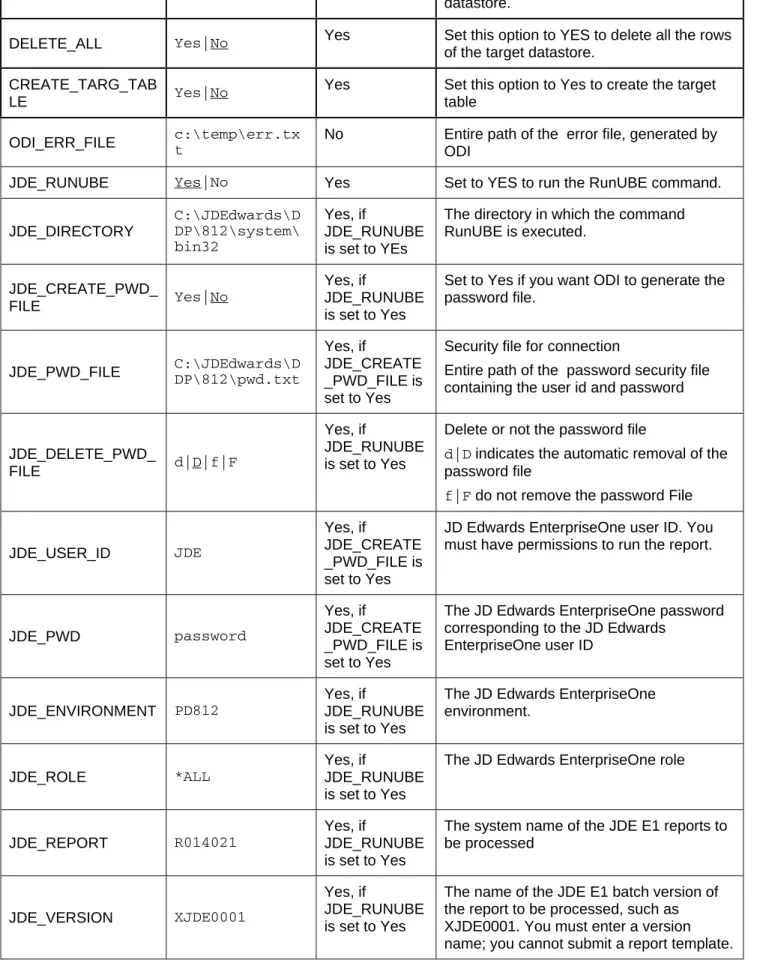
Option Values Mandatory Description
INSERT Yes|No Yes Automatically attempts to insert data into
the Target Datastore of the Interface
COMMIT Yes|No
Yes Post Integration Commit
Commit all data inserted in the target datastore.
FLOW_CONTROL Yes|No
Yes Activate Flow control
Set this option to Yes to perform flow control.
RECYCLE_ERRORS Yes|No
Yes Recycle previous errors
Set this option to Yes to recycle data rejected from a previous control.
STATIC_CONTROL Yes|No
Yes Post Integration Control
Set this option to Yes to control the target table after having inserted or updated target data.
TRUNCATE Yes|No Yes Truncate the target datastore
datastore.
DELETE_ALL Yes|No Yes Set this option to YES to delete all the rows
of the target datastore. CREATE_TARG_TAB
LE Yes|No
Yes Set this option to Yes to create the target table
ODI_ERR_FILE c:\temp\err.txt No Entire path of the error file, generated by ODI
JDE_RUNUBE Yes|No Yes Set to YES to run the RunUBE command.
JDE_DIRECTORY C:\JDEdwards\D DP\812\system\ bin32 Yes, if JDE_RUNUBE is set to YEs
The directory in which the command RunUBE is executed.
JDE_CREATE_PWD_
FILE Yes|No
Yes, if
JDE_RUNUBE is set to Yes
Set to Yes if you want ODI to generate the password file.
JDE_PWD_FILE C:\JDEdwards\DDP\812\pwd.txt
Yes, if
JDE_CREATE _PWD_FILE is set to Yes
Security file for connection
Entire path of the password security file containing the user id and password
JDE_DELETE_PWD_
FILE d|D|f|F
Yes, if
JDE_RUNUBE is set to Yes
Delete or not the password file
d|D indicates the automatic removal of the password file
f|F do not remove the password File
JDE_USER_ID JDE
Yes, if
JDE_CREATE _PWD_FILE is set to Yes
JD Edwards EnterpriseOne user ID. You must have permissions to run the report.
JDE_PWD password
Yes, if
JDE_CREATE _PWD_FILE is set to Yes
The JD Edwards EnterpriseOne password corresponding to the JD Edwards
EnterpriseOne user ID
JDE_ENVIRONMENT PD812
Yes, if
JDE_RUNUBE is set to Yes
The JD Edwards EnterpriseOne environment.
JDE_ROLE *ALL
Yes, if
JDE_RUNUBE is set to Yes
The JD Edwards EnterpriseOne role
JDE_REPORT R014021
Yes, if
JDE_RUNUBE is set to Yes
The system name of the JDE E1 reports to be processed
JDE_VERSION XJDE0001
Yes, if
JDE_RUNUBE is set to Yes
The name of the JDE E1 batch version of the report to be processed, such as XJDE0001. You must enter a version name; you cannot submit a report template.
JDE_JOB_QUEUE QBATCH
Yes, if
JDE_RUNUBE is set to Yes
The name of the JDE E1 job queue to which the system should route the batch job, such as QBATCH
JDE_PROCESSING_
MODE B|I
Yes, if
JDE_RUNUBE is set to Yes
The JDE E1 Interactive or batch processing mode. Enter B to use batch processing. In this case, the system assigns the report a place in the queue. Enter I for interactive mode, which runs the report immediately outside of the JD Edwards EnterpriseOne queuing mechanism.
JDE_HOLD_CODE H|P
Yes, if
JDE_RUNUBE is set to Yes
JDE E1 execute mode
The hold code. Enter P to send the output to a printer immediately after the job completes. Enter H to hold the processed file without printing. You can print the job later using the Work With Servers program
(P986116), which is accessible from the System Administration Tools menu (GH9011).
JDE_SAVE_CODE D|S
Yes, if
JDE_RUNUBE is set to Yes
JDE E1 Save or delete option
The save code. Enter S to save the file after processing is complete. Enter D to delete the file.
JMS
Knowledge Modules
Knowledge Modules in this section apply to most popular JMS compliant middleware, including Oracle JMS, Sonic MQ, IBM Websphere MQ and others. Most of these Knowledge Modules include transaction handling to ensure message delivery. All of them use the Oracle Data Integrator JDBC Driver for JMS. This JDBC driver includes a simplified SQL syntax to query message queues and topics. Therefore, a SQL select statement is translated by the driver into getting a set of JMS messages, and a SQL insert statement is translated into putting a set of JMS messages.
Type Knowledge Module Description
Integrate IKM SQL to JMS Append Integrates data into a JMS compliant message queue or topic in text or binary format from any SQL compliant staging area.
Consider using this IKM if you plan to transform and export data to a target JMS queue or topic. If most of your source datastores are located on the same data server, we recommend using this data server as staging area to avoid extra loading phases (LKMs)
To use this IKM, the staging area must be different from the target.
Integrate IKM SQL to JMS XML Append Integrated data into a JMS compliant message queue or topic in XML format from any SQL compliant staging area. Consider using this IKM if you plan to transform and export data to a target JMS queue or topic in XML format. If most of your source datastores are located on the same data server, we recommend using this data server as staging area to avoid extra loading phases (LKMs)
To use this IKM, the staging area must be different from the target.
Load LKM JMS to SQL Loads data from a text or binary JMS compliant message queue or topic to any SQL compliant database used as a staging area. This LKM uses the Agent to read selected messages from the source queue/topic and write the result in the staging temporary table created dynamically.
To ensure message delivery, the message consumer (or subscriber) does not commit the read until the data is actually integrated in the target by the IKM.
Consider using this LKM if one of your source datastores is a text or binary JMS message.
Load LKM JMS XML to SQL Loads data from a JMS compliant message queue or topic in XML to any SQL compliant database used as a staging area. This LKM uses the Agent to read selected messages
from the source queue/topic and write the result in the staging temporary table created dynamically.
To ensure message delivery, the message consumer (or subscriber) does not commit the read until the data is actually integrated in the target by the IKM.
Consider using this LKM if one of your source datastores is an XML JMS message.
Microsoft Access
Knowledge Modules
Refer to section “Generic SQL” for additional Knowledge Modules that work with this database.
Type Knowledge Module Description
Integrate IKM Access Incremental Update Integrates data in a Microsoft Access target table in incremental update mode. This IKM creates a temporary staging table to stage the data flow. It then compares its content to the target table to guess which records should be inserted and which others should be updated. It also allows performing data integrity check by invoking the CKM. Consider using this KM if you plan to load your Micrsoft Access target table to insert missing records and to update existing ones.
To use this IKM, the staging area must be on the same data server as the target.
Microsoft SQL Server
Knowledge Modules
Refer to section “Generic SQL” for additional Knowledge Modules that work with this database.
Type Knowledge Module Description
Integrate IKM MSSQL Incremental Update Integrates data in a Microsoft SQL Server target table in incremental update mode. This KM creates a temporary staging table to stage the data flow. It then compares its content to the target table to guess which records should be inserted and which others should be updated. It also allows performing data integrity check by invoking the CKM. Inserts and updates are done in bulk set-based processing to maximize performance. Therefore, this IKM is optimized for large volumes of data.
Consider using this IKM if you plan to load your Microsoft SQL Server target table to insert missing records and to update existing ones.
To use this IKM, the staging area must be on the same data server as the target.
Integrate IKM MSSQL Slowly Changing Dimension
Integrates data in a Microsoft SQL Server target table used as a Type II Slowly Changing Dimension in your Data Warehouse. This IKM relies on the Slowly Changing
Dimension metadata set on the target datastore to figure out which records should be inserted as new versions or
updated as existing versions.
Because inserts and updates are done in bulk set-based processing, this IKM is optimized for large volumes of data. Consider using this IKM if you plan to load your Microsoft SQL Server target table as a Type II Slowly Changing Dimension.
To use this IKM, the staging area must be on the same data server as the target and the appropriate Slowly Changing Dimension metadata needs to be set on the target datastore.
Journalize JKM MSSQL Consistent Creates the journalizing infrastructure for consistent journalizing on Microsoft SQL Server tables using triggers. Enables consistent Changed Data Capture on Microsoft SQL Server.
Journalize JKM MSSQL Simple Creates the journalizing infrastructure for simple journalizing on Microsoft SQL Server tables using triggers.
Enables simple Changed Data Capture on Microsoft SQL Server.
Load LKM File to MSSQL (BULK) Loads data from a File to a Microsoft SQL Server staging area database using the BULK INSERT SQL command. Because this method uses the native BULK INSERT command, it is more efficient than the standard “LKM File to SQL” when dealing with large volumes of data. However, the loaded file must be accessible from the Microsoft SQL Server machine.
Consider using this LKM if your source is a large flat file and your staging area is a Microsoft SQL Server database. Load LKM MSSQL to MSSQL (BCP) Loads data from a Microsoft SQL Server source database to
a Microsoft SQL Server staging area database using the native BCP out/BCP in commands.
This module uses the native BCP (Bulk Copy Program) command to extract data in a temporary file. Data is then loaded in the target staging Microsoft SQL Server table using the native BCP command again. This method if often more efficient than the standard “LKM SQL to SQL” when dealing with large volumes of data.
Consider using this LKM if your source tables are located on a Microsoft SQL Server instance and your staging area is on a different Microsoft SQL Server instance.
Load LKM MSSQL to MSSQL (LINKED SERVERS)
Loads data from a Microsoft SQL Server source database to a Microsoft SQL Server staging area database using the native linked servers feature.
This module uses the native linked servers feature to access the source data from the target Microsoft SQL server staging area. It doesn't create a staging file in the middle as with the BCP method. It relies on the MSDTC mechanism. It can be appropriate for large volumes of data. Consider using this LKM if your source tables are located on a Microsoft SQL Server instance and your staging area is on a different Microsoft SQL Server instance.
Load LKM MSSQL to Oracle (BCP/SQLLDR)
Loads data from a Microsoft SQL Server source database to an Oracle staging area using the MS SQL Server BCP
tool and the native SQL*LOADER command line utility. This LKM uses the MS SQL Server BCP tool to extract a user-defined data set to a flat file. The data from this flat file is then loaded with Oracle SQL*Loader (SQLLDR) into a temporary table (C$) within the stating area of target Oracle data server.
Other Oracle IKMs can then be used to finalize the loading of data into target data store.
Load LKM SQL to MSSQL Loads data from any Generic SQL source database to a Microsoft SQL Server staging area. This LKM is similar to the standard “LKM SQL to SQL” described in section “Generic SQL” except that you can specify some additional specific Microsoft SQL Server parameters.
Load LKM SQL to MSSQL (BULK) Loads data from any Generic SQL source database to a Microsoft SQL Server staging area database using the native BULK INSERT SQL command.
This LKM unloads the source data in a temporary file and calls the Microsoft SQL Server BULK INSERT SQL command to populate the staging table. Because this method uses the native BULK INSERT, it is often more efficient than the “LKM SQL to SQL” or “LKM SQL to MSSQL” methods when dealing with large volumes of data. Consider using this LKM if your source data located on a generic database is large, and when your staging area is a Microsoft SQL Server database.
Reverse-Engineer
RKM MSSQL Retrieves metadata for MSSQL objects: tables, views and synonyms, as well as columns and constraints. This RKM reverse-engineers columns that have a user defined data type and translates the user defined data type to the native data type.
Specific Requirements
Some of the Knowledge Modules for Microsoft SQL Server use specific features of this database. The following restrictions apply when using such Knowledge Modules. Refer to the Microsoft SQL Server documentation for additional information on these topics.
Using the BULK INSERT command
1. The file to be loaded by the BULK INSERT command needs to be accessible from the Microsoft SQL Server instance machine. It could be located on the file system of the server or reachable from a UNC (Unique Naming Convention) path.
2. UNC file paths are supported but not recommended as they may decrease performance.
3. For performance reasons, it is often recommended to install Oracle Data Integrator Agent on the target server machine.
Using the BCP command
1. The BCP utility as well as the Microsoft SQL Server Client Network Utility must be installed on the machine running the Oracle Data Integrator Agent.
2. The server names defined in the Topology must match the Microsoft SQL Server Client connect strings used for these servers.
3. White spaces in server names defined in the Client Utility are not supported.
4. UNC file paths are supported but not recommended as they may decrease performance. 5. The target staging area database must have option "select into/bulk copy"
6. Execution can remain pending if the file generated by the BCP program is empty.
7. For performance reasons, it is often recommended to install Oracle Data Integrator Agent on the target server machine.
1. The user defined in the Topology to connect to the Microsoft SQL Server instances must have the following privileges:
• It must be the 'db_owner' of the staging area databases
• It must have 'db_ddladmin' role
• For automatic link server creation, it must have 'sysdamin' privileges
2. The MSDTC Service must be started on both SQL Server instances (source and target). The following hints may help you configure this service:
• the 'Log On As' account for the MSDTC Service is a Network Service account (and not the 'LocalSystem' account)
• MSDTC should be enabled for network transactions
• Windows Firewall should be configured to allow the MSDTC service on the network. By default, the Windows Firewall blocks the MSDTC program.
• The Microsoft SQL Server must be started after MSDTC has completed its startup
• The links below can help you further configure you MSDTC Service:
Netezza
Knowledge Modules
Refer to section “Generic SQL” for additional Knowledge Modules that work with this database.
Type Knowledge Module Description
Check CKM Netezza Checks data integrity against constraints defined on a Netezza table. Rejects invalid records in the error table created dynamically. Can be used for static controls as well as flow controls.
Consider using this KM if you plan to check data integrity on a Netezza database.
This CKM is optimized for Netezza.
Integrate IKM Netezza Control Append Integrates data in a Netezza target table in replace/append mode. When flow data needs to be checked using a CKM, this IKM creates a temporary staging table before invoking the CKM.
Consider using this IKM if you plan to load your Netezza target table in replace mode, with or without data integrity check.
To use this IKM, the staging area must be on the same data server as the target.
Integrate IKM Netezza Incremental Update Integrates data in a Netezza target table in incremental update mode. This IKM creates a temporary staging table to stage the data flow. It then compares its content to the target table to guess which records should be inserted and which others should be updated. It also allows performing data integrity check by invoking the CKM.
Inserts and updates are done in bulk set-based processing to maximize performance. Therefore, this IKM is optimized for large volumes of data.
Consider using this IKM if you plan to load your Netezza target table to insert missing records and to update existing ones.
To use this IKM, the staging area must be on the same data server as the target.
Integrate IKM Netezza To File (EXTERNAL TABLE)
Integrates data in a target file from a Netezza staging area in replace mode. This IKM requires the staging area to be on Netezza It uses the native EXTERNAL TABLE feature of Netezza.
Consider using this IKM if you plan to transform and export data to a target file from your Netezza server.
target. It should be set to a Netezza location.
Load LKM File to Netezza (EXTERNAL TABLE)
Loads data from a File to a Netezza Server staging area database using the EXTERNAL TABLE feature (dataobject). Because this method uses the native EXTERNAL TABLE command, it is more efficient than the standard “LKM File to SQL” when dealing with large volumes of data. However, the loaded file must be accessible from the Netezza server machine.
Consider using this LKM if your source is a large flat file and your staging area is a Netezza server.
Load LKM File to Netezza (NZLOAD) Loads data from a File to a Netezza Server staging area database using the native NZLoad utility.
The nzload commmand is a wrapper to the nzsql CREATE EXTERNAL TABLE/INSERT INTO commands. It allows you to load data from the local host or a remote client.
Consider using this LKM if you want to manipulate the data prior to loading it.
Reverse-Engineer
RKM Netezza (JYTHON) Retrieves JDBC metadata from a Netezza database. This RKM may be used to specify your own strategy to convert Netezza JDBC metadata into Oracle Data Integrator metadata.
Consider using this RKM if you encounter problems with the standard JDBC reverse-engineering process due to some specificities of the Netezza JDBC driver.