Network+ Guide to Networks
5
thEdition
Chapter 14
Objectives
• Identify the characteristics of a network that keep
data safe from loss or damage
• Protect an enterprise-wide network from viruses
• Explain network- and system-level fault-tolerance
techniques
• Discuss issues related to network backup and
recovery strategies
• Describe the components of a useful disaster
recovery plan and the options for disaster
What Are Integrity and Availability?
• Integrity
– Network’s programs, data, services, devices, connections soundness
• Availability
– How consistently, reliably a file or system can be accessed
• By authorized personnel
• Both are compromised by:
What Are Integrity and Availability?
(cont’d.)
• User error
– Unintentional
• Harm data, applications, software configurations, hardware
– Intentional
• Administrators must take precautionary measures to protect network
• Cannot predict every vulnerability
Malware
• Program or code
– Designed to intrude upon or harm system and resources
• Examples: viruses, Trojan horses, worms, bots
• Virus
– Replicating program intent to infect more computers
• Through network connections, exchange of external storage devices
Types of Malware
• Categories based on location and propagation
– Boot sector viruses – Macro Virus – File-infector virus – Worm – Trojan horse – Network Virus – Bot
Malware Characteristics
• Making malware harder to detect and eliminate
– Encryption
• Used by viruses, worms, Trojan horses
• Thwart antivirus program’s attempts to detect it
– Stealth
• Malware hides itself to prevent detection
• Disguise themselves as legitimate programs, code
– Polymorphism
• Change characteristics every time they transfer to new system
Malware Characteristics (cont’d.)
• Making malware harder to detect and eliminate
(cont’d.)
– Time dependence
• Programmed to activate on particular date
• Can remain dormant, harmless until date arrives
• Logic bombs: programs designed to start when certain conditions met
Malware Protection
• Not just installing any virus-scanning program or
anti-malware software
• Requires:
– Choosing appropriate anti-malware program – Monitoring network
– Continually updating anti-malware program – Educating users
Anti-Malware Software
• Malware leaves evidence
– Some detectable only by anti-malware software – User viewable symptoms
• Unexplained file size increases
• Significant, unexplained system performance decline • Unusual error messages
• Significant, unexpected system memory loss • Periodic, unexpected rebooting
• Display quality fluctuations
Anti-Malware Software (cont’d.)
• Minimal anti-malware functions
– Detect malware through signature scanning
• Comparing file’s content with known malware signatures
– Detect malware through integrity checking
• Comparing current file characteristics against archived version
Anti-Malware Software (cont’d.)
• Minimal anti-malware functions (cont’d.)
– Detect malware by monitoring unexpected file changes
– Receive regular updates and modifications
– Consistently report only valid instances of malware
• Heuristic scanning: identifying malware by discovering “malware-like” behavior
• Anti-malware software implementation
– Dependent upon environment’s needs
Anti-Malware Policies (cont’d.)
• Malware prevention
– Apply technology, forethought
• Policies provide rules for:
– Using anti-malware software
– Installing programs, sharing files, using external disks
• Management should authorize and support policy
• Anti-malware policy guidelines
Hoaxes
• False alert rumor about:
– Dangerous, new virus
– Other malware causing workstation damage
• Ignore
– No realistic basis
– Attempt to create panic – Do not pass on
• Verification
– Use reliable Web page listing virus hoaxes
Fault Tolerance
• Capacity for system to continue performing
– Despite unexpected hardware, software malfunction
• Failure
– Deviation from specified system performance level
• Given time period
• Fault
– Malfunction of one system component – Can result in failure
Fault Tolerance (cont’d.)
• Realized in varying degrees
– Optimal level dependent on:
• Services
• File’s criticalness to productivity
– Highest level
Environment
• Sophisticated fault-tolerance technique
consideration
– Analyze physical environment
• Protect devices from:
– Excessive heat, moisture
• Purchase temperature, humidity monitors
– Break-ins
Power
• Blackout
– Complete power loss
• Brownout
– Temporary dimming of lights
• Causes
– Forces of nature
– Utility company maintenance, construction
• Solution
Power Flaws
• Not tolerated by networks
• Types:
– Surge
• Momentary increase in voltage
– Noise
• Fluctuation in voltage levels
– Brownout
• Momentary voltage decrease
– Blackout
UPSs (Uninterruptible Power Supplies)
• Battery-operated power source
• Directly attached to one or more devices
• Attached to a power supply
• Prevents
– Harm to device, service interruption
• Variances
– Power aberrations rectified – Time providing power
– Number of supported devices – Price
UPSs (cont’d.)
• Standby UPS (offline UPS)
– Continuous voltage
– Switch instantaneously to battery upon power loss – Restores power
– Problems
• Time to detect power loss
UPSs (cont’d.)
• Online UPS
– A/C power continuously charges battery – No momentary service loss risk
– Handles noise, surges, sags
• Before power reaches attached device
– More expensive than standby UPSs
UPSs (cont’d.)
Generators
• Powered by diesel, liquid propane, gas, natural gas,
or steam
• Do not provide surge protection
• Provide electricity free from noise
• Used in highly available environments
• Generator choice
– Calculate organization’s crucial electrical demands
Topology and Connectivity
• Before designing data links
– Assess network’s needs
• Fault tolerance in network design
– Supply multiple paths data
• Travel from any one point to another
– LAN: star topology and parallel backbone – WAN: full-mesh topology
– SONET technology
Topology and Connectivity (cont’d.)
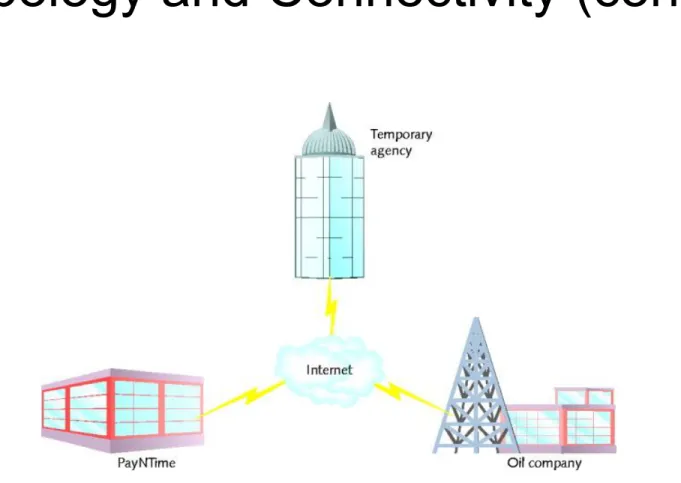
• Review PayNTime example
• Supply duplicate connection
– Use different service carriers – Use two different routes
• Critical data transactions must follow more than one possible path
• Network redundancy advantages
– Reduces network fault risk
Topology and Connectivity (cont’d.)
• Scenario: two critical links
– Capacity, scalability concerns – Solution
• Partner with ISP
• Establishing secure VPNs
Topology and Connectivity (cont’d.)
Topology and Connectivity (cont’d.)
• Scenario
– Devices connect one LAN, WAN segment to another
• Experience a fault
– VPN agreement with national ISP
• Bandwidth supports five customers
Topology and Connectivity (cont’d.)
Topology and Connectivity (cont’d.)
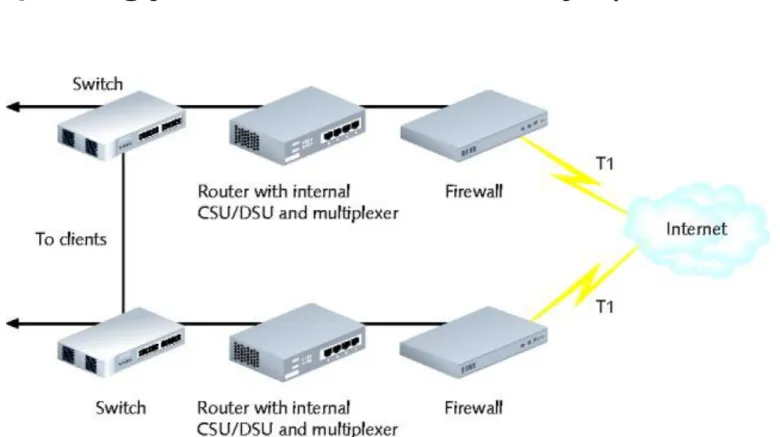
• Problem with Figure 14-4
– Many single points of failure
• T1 connection could incur fault
• Firewall, router, CSU/DSU, multiplexer, or switch might suffer faults in power supplies, NICs, or circuit boards
• Solution
– Redundant devices with automatic failover
• Immediately assume identical component duties
Topology and Connectivity (cont’d.)
• Failover capable or hot swappable components
– Desired for switches or routers supporting critical links – Adds to device cost
– Does not address all faults occurring on connection
• Faults might affect connecting links
• Load balancing
– Automatic traffic distribution to optimize response
Topology and Connectivity (cont’d.)
Servers
• Critical servers
– Contain redundant components
Server Mirroring
• Mirroring
– Fault-tolerance technique
– One device, component duplicates another's activities
• Server mirroring
– One server continually duplicates another's transactions, data storage
– Uses identical servers, components – High-speed link between servers – Synchronization software
Server Mirroring (cont’d.)
• Advantage
– Flexibility in server location
• Disadvantages
– Time delay for mirrored server to assume functionality – Toll on network as data copied between sites
• Hardware and software costs
Clustering
• Links multiple servers together
– Act as single server
• Clustered servers share processing duties
– Appear as single server to users
• Failure of one server
– Others take over
• For large networks
Clustering (cont’d.)
• Many advantages over mirroring
– Each clustered server
• Performs data processing • Always ready to take over
– Reduces ownership costs – Improves performance
Storage
• Data storage: also has issues of availability and fault
tolerance
– Different methods are available for making sure shared data and applications are never lost or irretrievable
RAID (Redundant Array of Independent
[or Inexpensive] Disks)
• Collection of disks
– Provide shared data, application fault tolerance
• Disk array (drive)
– Group of hard disks
• RAID drive (RAID array)
– Collection of disks working in a RAID configuration – Single logical drive
RAID (cont’d.)
• Hardware RAID
– Set of disks, separate disk controller
– RAID array managed exclusively by RAID disk controller
• Attached to server through server’s controller interface
• Software RAID
– Software implements, controls RAID techniques
• Any hard disk type
– Less expensive (no controller, disk array) – Performance rivals hardware RAID
RAID (cont’d.)
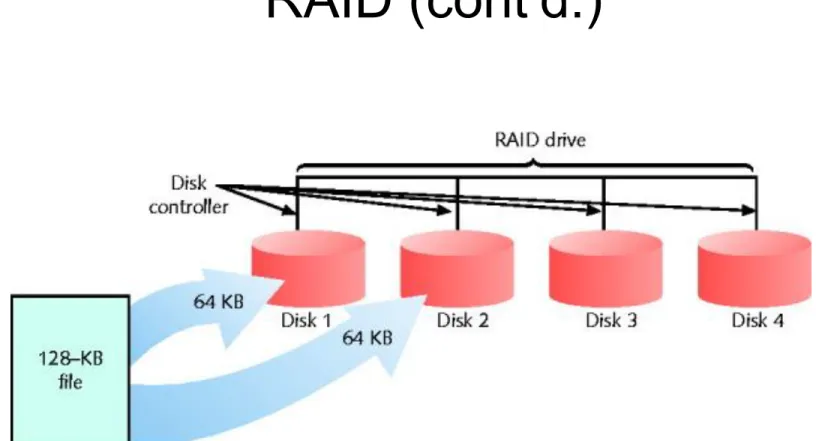
• RAID Level 0 - Disk Striping
– Simple RAID implementation
– Data written in 64-KB blocks equally across all disks – Not fault-tolerant
– Does not provide true redundancy
– Best RAID performance (in this chapter)
RAID (cont’d.)
RAID (cont’d.)
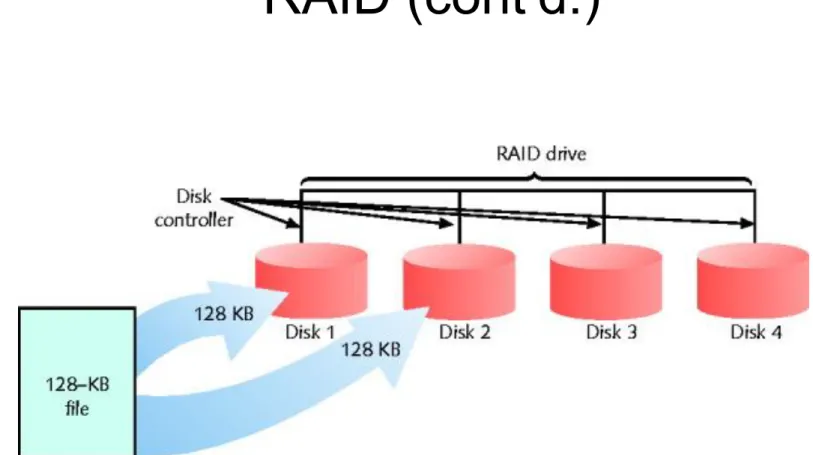
• RAID Level 1- Disk Mirroring
– Disk mirroring provides redundancy
• Data from one disk copied automatically to another disk
– Dynamic data backup
• Data continually saved to multiple locations
– Advantages
• Simplicity, automatic and complete data redundancy
– Disadvantages
RAID (cont’d.)
• Disk duplexing
– Related to disk mirroring
– Data continually copied from one disk to another – Separate disk controller used for each disk
RAID (cont’d.)
RAID (cont’d.)
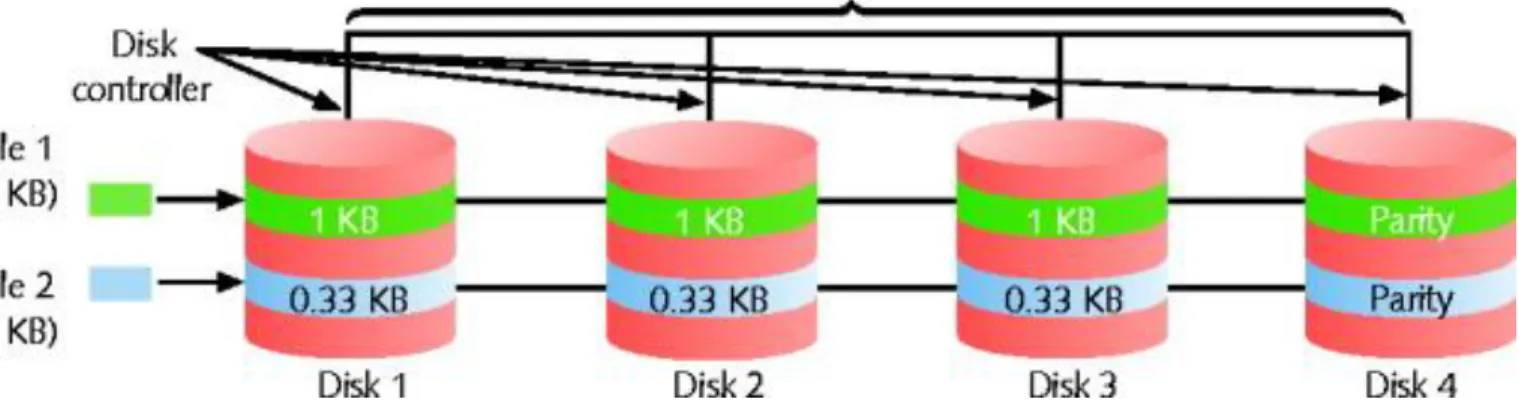
• RAID Level 3 - Disk Striping with Parity ECC
– ECC (error correction code)
• Algorithm to detect, correct errors
• Known as parity error correction code
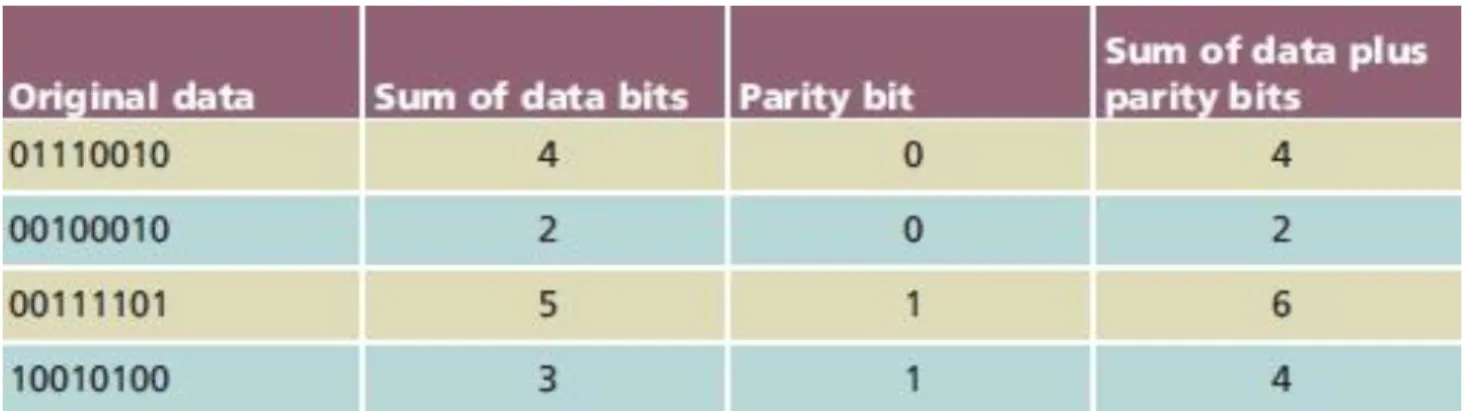
– Parity
• Mechanism to verify data integrity
– Number of bits in byte sum to odd, even number
• RAID Level 3 - Disk Striping with Parity ECC
(cont’d.)
– Parity tracks data integrity
• Not data type, protocol, transmission method, file size
– Parity error checking
• Process of comparing data parity
• RAID Level 3 - Disk Striping with Parity ECC
(cont’d.)
– Advantage
• High data transfer rate
– Disadvantage
RAID (cont’d.)
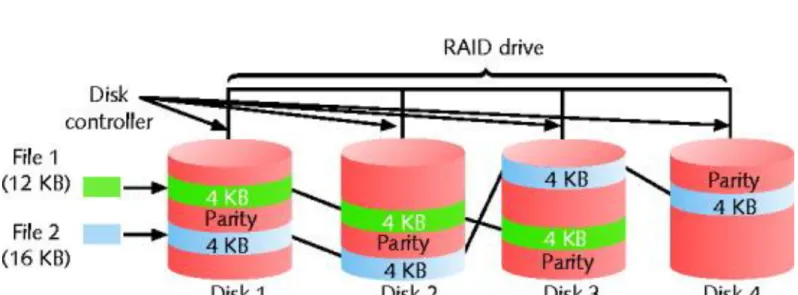
• RAID Level 5 - Disk Striping with Distributed Parity
– Most popular data storage technique
– Data written in small blocks across several disks
– Parity error checking information distributed among disks
– Advantages over RAID level 3
• Writes data more rapidly
• Uses several disks for parity information • Disk replacement causes little interruption
RAID (cont’d.)
RAID (cont’d.)
• RAID Level 5 - Disk Striping with Distributed Parity
– Hot spare (hot swappable component)
• Array disk, partition used only when one RAID disk fails
– Cold spare
• Duplicate component • Not installed
NAS (Network Attached Storage)
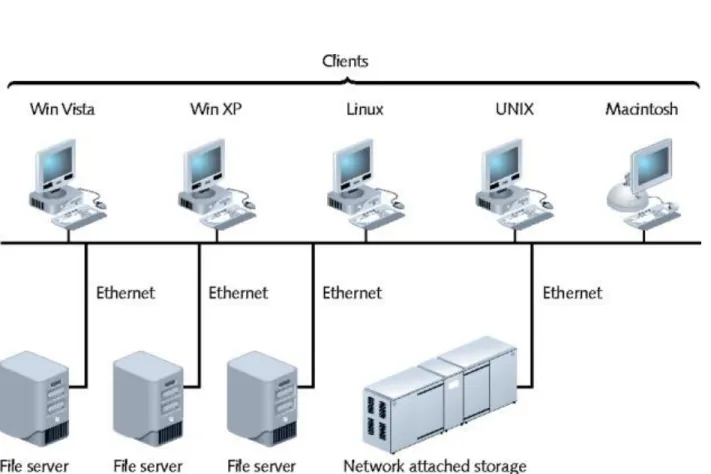
• Specialized storage device, storage device group
– Provides centralized fault-tolerant data storage
• Difference from RAID
NAS (cont’d.)
• Advantages
– NAS device contains own file system
• Optimized for saving, serving files • Reads, writes fast
– Easily expandable
• No service interruption
• Disadvantage
– No direct communication with network clients
• Use
NAS (cont’d.)
SANs (Storage Area Networks)
• Distinct networks of storage devices
• Communicate directly
– With each other, other networks
• Multiple storage devices
SANs (cont’d.)
• Advantages
– Fault tolerant – Fast
• Special transmission method
• Fiber-optic media, proprietary protocols • Example: Fibre Channel
– Install in location separate from LAN served
• Provides added fault tolerance
– Highly scalable
SANs (cont’d.)
• Drawbacks
– High cost
• Small SAN: $100,000
• Large SAN: several million dollars
– More complex than NAS, RAID
• Training, administration efforts required
• Use
– Environments with huge data quantities requiring quick availability
Data Backup
• Backup
– Copies of data or program files
• Created for archiving, safekeeping
– Store off site
• Without backup
– You risk losing everything
• Many backup options available
– Performed by different software and hardware – Use different storage media types
Backup Media and Methods
• Selecting backup media, methods
– Several approaches
• Each has advantages and disadvantages
Optical Media
• Media storing digitized data
• Uses laser to write data, read data
• Examples
– CDs, DVDs
• Backup requirements
– Recordable CD or DVD drive, software utility
• CD-R (compact disc-recordable)
– Written to once, stores 650 MB data
Optical Media (cont’d.)
• CD backups
– Simple to restore from
• Standard format
– Relatively low storage capacity
• Recordable DVD
– 4.7 GB on one single-layered side – Double-layered, two-sided DVD
• Store up to 17 GB of data
Optical Media (cont’d.)
• Disadvantage
– Writing data takes longer than other media – Requires more human intervention
Tape Backups
• Copying data to magnetic tape
• Relatively simple
• Stores very large data amounts
• Requirements
– Tape drive connected to network – Management software
Tape Backups (cont’d.)
• Small network
– Stand-alone tape drives attached to each server
• Large network
– One large, centralized tape backup device
• Manages all subsystems’ backups
• Extremely large environments
– Robots retrieve, circulate tapes from vault
• Tape storage library
External Disk Drives
• Removable disk drives
• Attached temporarily to computer
– USB, PCMCIA, FireWire, CompactFlash port
• Simple to use
– Save, share data
• Temporary drive appears like any other drive
• Large data amount requirements
– Backup control features, higher storage capacity, faster read-write access
Network Backups
• Save data to another place on network
– Different server, another WAN location – SAN, NAS storage device
• Online backup
– Saves data across Internet
• To another company’s storage array
– Implement strict security measures
– Automated backup, restoration processes – Online back up provider evaluation
Backup Strategy
• Goal
– Perform reliable backups providing maximum data protection
• Documented in common area
– Accessible by all IT staff
• Address various questions
• Archive bit
– File attribute
Backup Strategy (cont’d.)
• Backup methods use archive bit
– Full backup
• All data copied
• Uncheck archive bits
– Incremental backup
• Copy data changed since last full, incremental backup • Uncheck archive bits
– Differential backup
• Copy only data changed since last backup • All data marked for subsequent backup
Backup Strategy (cont’d.)
• Determine best backup rotation scheme
– Plan specifying when and how often backups occur – Goal
• Provide excellent data reliability without overtaxing network, requiring intervention
• Grandfather-Father-Son
– Uses backup sets
• Daily (son)
• Grandfather-Father-Son (cont’d.)
– Three backup types performed each month:
• Daily incremental (every Monday through Thursday) • Weekly full (every Friday)
Backup Strategy (cont’d.)
• Ensure backup activity recorded in backup log
– Backup date
– Tape identification
– Type of data backed up, – Type of backup
– Files backed up
– Site where tape stored
Disaster Recovery
• Disaster recovery
– Restoring critical functionality, data
• After enterprise-wide outage
• Affecting more than single system, limited group
• Consider possible extremes
– Not relatively minor outages, failures, security breaches, data corruption
Disaster Recovery Planning
• Accounts for worst-case scenarios
• Identifies disaster recovery team
• Provides contingency plans
– Restore and replace:
• Computer systems • Power
• Telephony systems • Paper-based files
Disaster Recovery Contingencies
• Cold site
– Components necessary to rebuild network exist
• Not appropriately configured, updated, or connected
• Warm site
– Components necessary to rebuild network exist
• Some appropriately configured, updated, and connected
• Hot site
– Components necessary to rebuild network exist
Summary
• System integrity and availability
• Malware issues
– Types, characteristics, protection mechanisms
• Fault tolerance issues and resolutions
– Physical environment, power techniques – Topology and connectivity techniques – Server and storage techniques