Rackspace Cloud Feeds™ Developer Guide
API v1.0 (2015-11-16)
©2015 Rackspace US, Inc.
This document is intended for software developers interested in developing applications using the Rackspace Cloud Feeds Application Programming Interface (API). The document is for informational purposes only and is provided “AS IS.”
RACKSPACE MAKES NO REPRESENTATIONS OR WARRANTIES OF ANY KIND, EXPRESS OR IMPLIED, AS TO THE ACCURACY OR COM-PLETENESS OF THE CONTENTS OF THIS DOCUMENT AND RESERVES THE RIGHT TO MAKE CHANGES TO SPECIFICATIONS AND PROD-UCT/SERVICES DESCRIPTION AT ANY TIME WITHOUT NOTICE. RACKSPACE SERVICES OFFERINGS ARE SUBJECT TO CHANGE WITH-OUT NOTICE. USERS MUST TAKE FULL RESPONSIBILITY FOR APPLICATION OF ANY SERVICES MENTIONED HEREIN. EXCEPT AS SET FORTH IN RACKSPACE GENERAL TERMS AND CONDITIONS AND/OR CLOUD TERMS OF SERVICE, RACKSPACE ASSUMES NO LIABILITY WHATSOEVER, AND DISCLAIMS ANY EXPRESS OR IMPLIED WARRANTY, RELATING TO ITS SERVICES INCLUDING, BUT NOT LIMITED TO, THE IMPLIED WARRANTY OF MERCHANTABILITY, FITNESS FOR A PARTICULAR PURPOSE, AND NONINFRINGEMENT.
Except as expressly provided in any written license agreement from Rackspace, the furnishing of this document does not give you any license to patents, trademarks, copyrights, or other intellectual property.
Rackspace®, Rackspace logo and Fanatical Support® are registered service marks of Rackspace US, Inc. All other product names and trademarks used in this document are for identification purposes only and are property of their respective owners.
Table of Contents
1. Overview ... 1
1.1. Document change history ... 1
1.2. Additional resources ... 1
1.3. Early Access Program ... 1
1.4. Pricing and service level ... 1
2. General API information ... 3
2.1. Authentication ... 3
2.1.1. Authorization roles required for Cloud Feeds access ... 3
2.1.2. RBAC permissions cross-reference to Cloud Feeds API operations ... 3
2.1.3. Rate limits ... 4
2.1.4. Authenticating by using token-based authentication ... 4
2.1.5. Authenticating by using basic authentication ... 6
2.2. Identity Service access/endpoints ... 6
2.3. Feeds catalog ... 7
2.4. Cloud Feeds concepts ... 9
2.4.1. Container elements ... 9
2.4.2. Cloud Feeds events ... 17
2.5. Cloud Feeds usage specifications and rules ... 25
2.5.1. Data format in Accept header ... 26
2.5.2. Date and time format ... 26
2.5.3. Pagination ... 26
2.5.4. Response codes for Cloud Feeds publishers and subscribers ... 27
3. Using Cloud Feeds ... 28
3.1. Reading a feed ... 28
3.2. Navigating through feeds ... 29
3.3. Cloud Feeds query parameters ... 31
3.4. Filtering entries by the using the marker parameter ... 32
3.5. Filtering entries by categories ... 32
3.5.1. Advanced filtering by using AND, OR, and NOT ... 32
3.6. Filtering by time stamp ... 33
3.7. Support for weak ETags ... 34
3.8. Cloud Feeds best practices ... 34
3.8.1. Best practices for consumers ... 34
4. Cloud Feeds Archiving ... 36
4.1. Archiving overview ... 36
4.2. Archiving Configuration API ... 37
4.2.1. Elements of the Archiving Configuration API ... 37
4.2.2. Archiving Configuration API service endpoints ... 38
4.2.3. RBAC Roles for the Archiving Configuration API ... 38
4.3. Configuring Cloud Feeds archiving settings ... 38
4.4. Working with archived feeds ... 40
4.4.1. Downloading archived feeds ... 40
4.4.2. Navigating archived feeds ... 41
4.4.3. RBAC roles for accessing archived feeds ... 41
4.4.4. Format of archived feeds ... 42
4.5. Archiving Configuration API operations ... 46
4.5.1. Get archiving preferences ... 48
5. API Operations ... 51
5.1. Cloud Backup ... 52
5.1.1. Get Feed ... 54
5.1.2. Get Cloud Backup Event ... 55
5.2. Cloud Big Data ... 64
5.2.1. Get Feed ... 65
5.2.2. Get Big Data Event ... 66
5.3. Cloud Block Storage ... 70
5.3.1. Get Feed ... 71
5.3.2. Get Cloud Block Storage Event ... 72
5.4. Cloud Databases ... 76
5.4.1. Get Feed ... 77
5.4.2. Get Cloud Database Event ... 78
5.5. Feeds User Access Events ... 83
5.5.1. Get Feed ... 84
5.5.2. Get User Access Event ... 85
5.6. Cloud Files ... 88
5.6.1. Get Feed ... 90
5.6.2. Get Cloud Files Event ... 91
5.7. Cloud Identity ... 96
5.7.1. Get Feed ... 97
5.7.2. Get CloudIdentity Event ... 98
5.8. Identity User Access Events ... 105
5.8.1. Get Feed ... 106
5.8.2. Get User Access Event ... 107
5.9. Cloud Load Balancers ... 110
5.9.1. Get Feed ... 112
5.9.2. Get Cloud Loadbalancers Event ... 113
5.10. Cloud Monitoring ... 126
5.10.1. Get Feed ... 127
5.10.2. Get Cloud Monitoring Event ... 128
5.11. Nova User Access Events ... 132
5.11.1. Get Feed ... 133
5.11.2. Get User Access Event ... 134
5.12. Cloud Queues ... 137
5.12.1. Get Feed ... 139
5.12.2. Get Cloud Queueus Event ... 140
5.13. Cloud Servers Legacy ... 144
5.13.1. Get Feed ... 145
5.13.2. Get Cloud Servers Event ... 146
5.13.3. Get RedHat Enterprise Linux Event ... 163
5.14. Cloud Servers Open Stack ... 165
5.14.1. Get Feed ... 166
List of Tables
2.1. RBAC Role Matrix ... 3
2.2. Regionalized service endpoints ... 7
2.3. Attributes for the product event node ... 19
2.4. CADF nodes ... 23
2.5. Elements of the CADF event node ... 23
2.6. Elements of the CADF initiator node ... 23
2.7. Elements of the CADF target node ... 24
2.8. Elements of the CADF attachment node ... 24
2.9. Elements of the CADF observer node ... 24
2.10. Elements of the CADF reason node ... 25
2.11. Elements of the auditData property ... 25
2.12. Data format in Accept header ... 26
2.13. Explanation of date and time format codes ... 26
2.14. Response codes for subscribers ... 27
3.1. Syntax elements ... 28
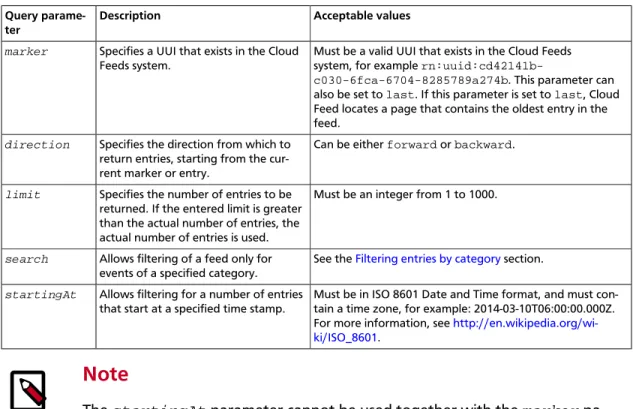
3.2. Query parameters ... 31
3.3. Category prefixes ... 35
4.1. Archiving Configuration API resources ... 37
4.2. Archiving Configuration API resources ... 37
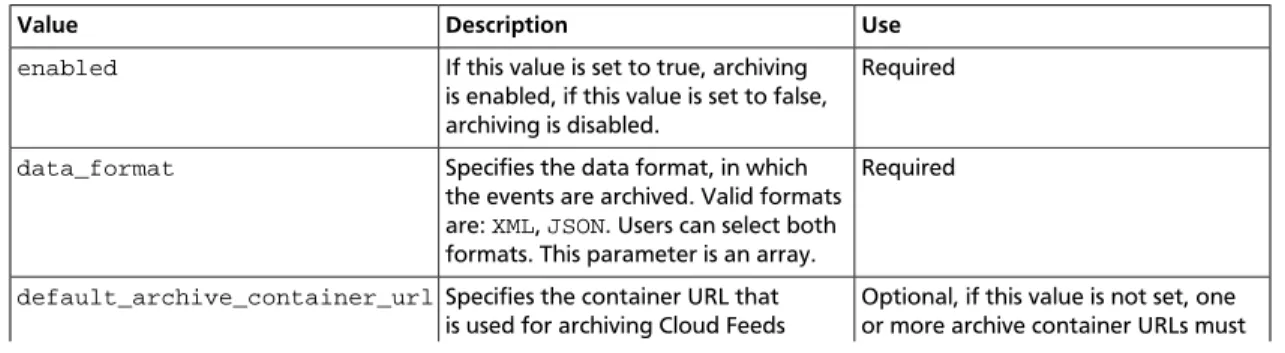
4.3. Archiving Configuration API elements ... 37
4.4. Archiving Configuration API endpoints ... 38
4.5. Archiving Configuration API endpoints ... 38
4.6. RBAC Role Matrix ... 38
4.7. Error codes ... 41
4.8. Cloud Files product roles and permissions ... 42
4.9. Multiproduct roles and permissions ... 42
4.10. Archive node in archived feeds ... 42
List of Examples
2.1. cURL authenticate request: XML ... 5
2.2. cURL authenticate request: JSON ... 5
2.3. Authentication request with multi-factor authentication credentials ... 5
2.4. Retrieve feeds catalog request - XML example ... 7
2.5. Retrieve feeds catalog request - JSON example ... 7
2.6. Retrieve feeds catalog request using basic authentication - XML example ... 7
2.7. Retrieve feeds catalog request using basic authentication - JSON example ... 8
2.8. Retrieve feeds catalog response - XML example ... 8
2.9. Retrieve feeds catalog response - JSON example ... 8
2.10. Atom feed element - XML example ... 10
2.11. Atom feed element - JSON example ... 11
2.12. Atom entry element - XML example ... 14
2.13. Atom entry element - JSON example ... 15
2.14. Atom content element - XML example ... 16
2.15. Atom content element - JSON example ... 16
2.16. Cloud feeds product events - XML example ... 17
2.17. Cloud feeds product events - JSON example ... 18
2.18. User access events - XML example ... 20
2.19. User access events - JSON example ... 21
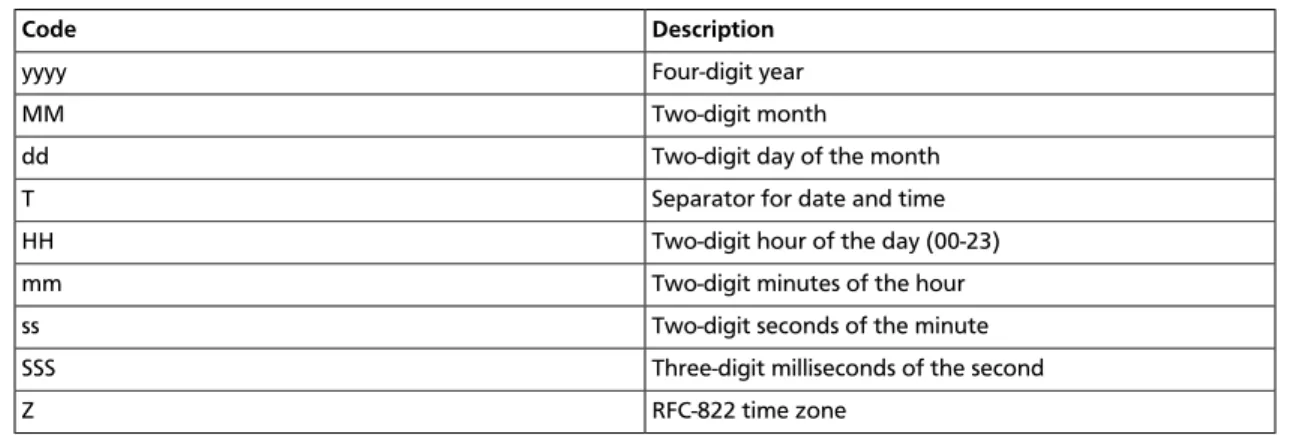
2.20. Cloud Feeds date and time format example ... 26
3.1. Filtering for multiple categories by using an AND statement ... 33
3.2. Filtering for multiple categories by using an OR statement ... 33
3.3. Filtering for a single category using a NOT statement ... 33
3.4. Filtering for multiple categories using an AND statement ... 33
4.1. Archived feed example - XML ... 42
4.2. Archived feed example - JSON ... 44
4.3. Get archiving preferences: JSON request ... 48
4.4. Get archiving preferences: JSON response ... 48
4.5. Upload archiving preferences: JSON request ... 50
4.6. Upload archiving preferences: JSON response ... 50
5.1. Specifies usage information for the inbound Cloud Backup bandwith, version 1 ... 55
5.2. Specifies the usage information for the outbound Cloud Backup bandwith,
ver-sion 1 ... 56
5.3. Specifies the periodic license event for Cloud Backup, version 1 ... 58
5.4. Specifies the periodic license event (version 2) for Cloud Backup, version 3 ... 60
5.5. Specifies the Cloud Files storage for Cloud Backup, version 1 ... 61
5.6. Specifies the usage message for a big data cluster, version 1 ... 66
5.7. Specifies the usage message for a big data cluster, version 2 ... 67
5.8. Specifies the usage fields that are specific to Cloud Block Storage related to the
snapshot, version 1 ... 72
5.9. Specifies the usage fields specific to Cloud Block Storage that are related to the
volume, version 1 ... 73
5.10. Specifies the user fields that are specific to Dbaas, version 1 ... 78
5.11. Specifies the Dbaas-specific user fields, version 2 ... 79
5.12. Specifies the Dbaas-specific user fields, version 3 ... 81
5.13. Specifies the message for a User Access Event ... 85
5.14. Specifies the bandwidth usage information for the Cloud Files account, version 1
... 91
5.15. Specifies the CDN usage information for the Cloud Files account, version 1 ... 92
5.16. Specifies the storage information for the Cloud Files account, version 1 ... 94
5.17. Specifies the invalidation event for the token, version 1 ... 98
5.18. Specifies the event surrounding the creation of a user token revocation record
(TRR) in the Identity system, version 1 ... 99
5.19. Specifies the identity user messages, version 1 ... 101
5.20. Specifies the identity user messages, version 2 ... 103
5.21. Specifies the message for a User Access Event ... 107
5.22. Deletes an event for LbaaS load balancers, version 1 ... 113
5.23. Specifies the health monitor events, version 1 ... 114
5.24. Specifies the system event for the load balancer, version 1 ... 116
5.25. Specifies the LbaaS node events, version 1 ... 119
5.26. Specifies the LbaaS virtual IP events, version 1 ... 121
5.27. Specifies the usage fields for the Cloud Load Balancer, version 1 ... 123
5.28. Specifies the usage fields that are specific to MaaS, version 1 ... 128
5.29. Specifies the MaaS-specific usage fields, version 2 ... 129
5.30. Specifies the message for a User Access Event ... 134
5.31. Specifies the usage message for a queue request count, version 1 ... 140
5.32. Specifies the usage message for queue bandwidth, version 1 ... 141
5.33. Specifies the usage message for slice bandwidth, version 1 ... 146
5.34. Specifies the heartbeat message for hypervisor QBs, version 1 ... 147
5.35. Specifies an image action event, version 1 ... 149
5.36. Specifies a usage event to associate an additional IP with a First Generation
Cloud Server, version 1 ... 151
5.37. Specifies a slice action event, version 1 ... 152
5.38. Specifies the usage message for a slice, version 1 ... 155
5.39. Specifies a server down event, version 1 ... 158
5.40. Specifies a server down event, version 2 ... 159
5.41. Specifies the usage message for a Red Hat License, version 1 ... 163
1. Overview
Rackspace Cloud Feeds™ enables customers on the public cloud to access near real-time
us-age and system events that can be used for analysis, monitoring, and automation. The
pur-pose of this document is explain how to access feeds by using the Rackspace Cloud Feeds
API. Cloud Feeds uses the following technologies:
• Atom Hopper (for more information, see
Atom Hopper
)
• Apache Abdera (for more information, see
Apache Abdera
)
• The Atom Publishing Protocol, RFC 5023 (for more information, see
RFC 5023
)
• Feed Paging and Archiving, RFC 5005 (for more information, see
RC 5005
)
• RESTful web services (for more information, see
RESTful web services
)
• HTTP/1.1 protocol (for more information, see
HTTP/1.1 protocol
)
• JSON and XML data serialization formats (for more information, see
JSON and XML
)
• Atom Syndication Format, RFC 4287 (for more information, see
JRFC 4287
1.1. Document change history
This version of the guide replaces and obsoletes all previous versions. The most recent
changes are described in the following table:
Revision Date Summary of Changes
October 1, 2013 • Published the initial internal release of the Cloud Feeds API Guide.
1.2. Additional resources
For information about getting started with the API, see the Cloud Feeds Getting Started
Guide at
http://docs.rackspace.com/
. The getting started guide contains a subset of the
in-formation that is provided in the Developer guide. All you need to start using Cloud Feeds
is the getting started guide, the developer guide, your Rackspace Cloud account, and at
least one cloud server.
Visit the
Product Feedback Forum
to tell us what you think about Cloud Feeds.
You can also follow Rackspace updates and announcements via Twitter at
http://
www.twitter.com/rackspace
.
This API uses standard HTTP/1.1 response codes as documented at
http://www.w3.org/
Protocols/rfc2616/rfc2616-sec10.html
.
1.3. Early Access Program
Cloud Feeds is currently available through the Cloud Feeds Early Access program. Use of
Cloud Feeds is subject to the Test Terms located at
http://www.rackspace.com/informa-tion/legal/cloud/tos
.
1.4. Pricing and service level
•
Pricing: Currently, Cloud Feeds is available at no cost for Rackspace service administrators
who are using the public cloud.
•
SLA: The Cloud Feeds SLA is for publishers and subscribers. The SLA provides a support
model that uses Nova as the first product to send events through Cloud Feeds. For
de-tailed information about the number of requests that can be made per role, see
Rate
lim-its
.
•
Uptime: The uptime goal for Cloud Feeds is 99.999 percent. If Cloud Feeds is down, all
publishers must continue to hold their events until Cloud Feeds is back up. Publishers
must queue events for a minimum of two days.
2. General API information
The Cloud Feeds API is implemented using a RESTful web service interface. Like other
prod-ucts in the Rackspace Cloud suite, the Cloud Feeds service shares a common token-based
authentication system that enables seamless access among products and services.
Note
All requests to authenticate against and operate the service are performed by
using SSL over HTTP (HTTPS) on TCP port 443.
2.1. Authentication
Cloud Feeds provides two methods to authenticate users who want to use the Cloud Feeds
API:
• Authentication by using an authentication token. For more information, see
Authenticat-ing by usAuthenticat-ing token-based authentication
.
• Basic Authentication by using a username and API key. For more information, see
Au-thenticating by using basic authentication
.
Note
The examples in this guide on how to use the Cloud Feeds API use token-based
authentication.
2.1.1. Authorization roles required for Cloud Feeds access
To read Cloud Feeds data for a single tenant (GET operations), a user must be assigned the
cloudfeeds:observer role.
2.1.2. RBAC permissions cross-reference to Cloud Feeds API
operations
Role Based Access Control (RBAC) restricts access to the capabilities of Rackspace Cloud
services, including the Cloud Feeds API, to authorized users only. RBAC enables Rackspace
Cloud customers to specify which account users of their Cloud account have access to which
Cloud Feeds API service capabilities, based on roles defined by Rackspace.
The following table shows the RBAC role matrix for Cloud Feeds:
Table 2.1. RBAC Role Matrix
Method
Role GET POST
Method
identity:user-admin YES NO
observer YES NO
cloudfeeds:observer YES NO
cloudfeeds:service-admin YES YES
any other roles NO NO
For more information about RBAC, read the
Detailed Permissions Matrix for Cloud Feeds
and
Permission Matrix for Role-Based Access Control
articles on the Rackspace Knowledge
Center.
2.1.3. Rate limits
Customers with the cloudfeeds:observer role can perform 10 GET requests per minutes on
all feeds they are authorized for.
2.1.4. Authenticating by using token-based authentication
To make calls against the Cloud Feeds API by using an authentication token, you must first
generate an authentication token. You provide this token in the X-Auth-Token header in
each Cloud Feeds API request.
The examples below demonstrate how to use cURL to obtain the authentication token and
your account number. You must provide both when making subsequent Cloud Feeds API
requests when you use token-based authentication.
Remember to replace the placeholder names in the following authentication request
exam-ples with your information:
•
yourUserName — Your common Rackspace Cloud username, as supplied during
registra-tion.
•
yourApiKey — Your API access key.
You can obtain the key from the Rackspace
Cloud Control Panel
) by accessing selecting
Account Settings from the yourAccount menu in the top-right corner of the window.
You can use the following endpoint to access the Authentication Service:
•
https://identity.api.rackspacecloud.com/v2.0/
Notice that you authenticate by using a special URL for the Cloud authentication service.
For example, you may use
https://identity.api.rackspacecloud.com/v2.0/
tokens
as shown in the following Authenticate Request examples. Note that the
v2.0
component in the URL indicates that you are using version 2.0 of the Cloud Authentication
API.
Example 2.1. cURL authenticate request: XML
curl -i -d \ '<?xml version="1.0" encoding="UTF-8"?> <auth> <apiKeyCredentials xmlns="http://docs.rackspace.com/identity/api/ext/RAX-KSKEY/v1.0" username="yourUserName" apiKey="yourApiKey"/> </auth>' \ -H 'Content-Type: application/xml' \ -H 'Accept: application/xml' \ 'https://identity.api.rackspacecloud.com/v2.0/tokens'Example 2.2. cURL authenticate request: JSON
curl -s https://identity.api.rackspacecloud.com/v2.0/tokens -X 'POST' \ -d '{"auth":{"RAX-KSKEY:apiKeyCredentials":{"username":"yourUserName", "apiKey":"yourApiKey"}}}' \
-H "Content-Type: application/json"
The authentication token
id
is returned along with an
expires
attribute that specifies
when the token expires.
Note
• If the authentication response returns a 401 response with a request for
addi-tional credentials, your account requires multi-factor authentication. To
com-plete the authentication process, submit a second POST token request with
these multi-factor authentication credentials:
• The session ID value returned in the
WWW-Authenticate: OS-MF
ses-sionId
header parameter included in the response to the initial
authenti-cation request.
• The passcode from the mobile phone associated with your user account.
Example 2.3. Authentication request with multi-factor
authentication credentials
$curl https://identity.api.rackspacecloud.com/v2.0/tokens \ -X POST \
-d '{"auth": {"RAX-AUTH:passcodeCredentials": {"passcode":"1411594"}}}'\ -H "X-SessionId: $SESSION_ID" \
-H "Content-Type: application/json" --verbose | python -m json.tool
For more information, see
Multi-factor authentication
in the Rackspace Cloud
Identity Client Developer Guide.
• The token, user, and service catalog information that you receive in your
re-sponses vary from the examples shown in this document because they are
specific to your account.
• The
expires
attribute denotes the time after which the token will
automat-ically expire. A token may be manually revoked before the time identified by
the expires attribute;
expires
predicts a token's maximum possible lifespan
but does not guarantee that it will reach that lifespan. Clients are
encour-aged to cache a token until it expires.
• Applications should be designed to re-authenticate after receiving a 401
(Unauthorized) response from a service endpoint.
• For more detailed authentication instructions and examples, see the
Quick
Start
in the Identity Client Developer Guide.
The actual account number is located after the final slash (/) in the
publicURL
field. You
must specify your account number on most of the Cloud Feeds API operations, wherever
you see the placeholder
tenantID
specified in the examples in this guide. A successful
au-thentication request returns the auau-thentication token, as well as the Identity Service
cata-log in the response.
2.1.5. Authenticating by using basic authentication
In addition to token-based authentication Cloud Feeds also supports basic authentication
by using your Rackspace cloud account username and API key.
Important
Basic authentication cannot be used for making requests against the
Archiving
Configuration API.
.
To make a request to the Cloud Feeds API with basic authentication, you need to issue a
cURL call directly against the requested end point by providing the username and API key
directly in the call as shown here:
curl -u <username:api-key> -X <method> https://endpointURL/
The following example shows how to retrieve the feeds catalog by using basic
authentica-tion:
curl -u username:user_api_key –X GET https://atom.test.ord1.us.ci.rackspace. net/
The following example show how to retrieve an event by using basic authentication:
curl -u username:user_api_key –X GET https://atom.test.ord1.us.ci.rackspace. net/usagesummary/bigdata/events2.2. Identity Service access/endpoints
The Identity Service catalog contains a list of product endpoints the user can access. It
in-cludes a list of Cloud Feeds endpoints in various regions.
The user can use the Cloud Feeds endpoint in a specific region to interact with each
indi-vidual feed. The user of the service is responsible for appropriate replication, caching, and
overall maintenance of Cloud Feeds data across regional boundaries to other Cloud Feeds
servers.
Note
The Identity Service catalog contains a link to the Cloud Feeds service catalog.
The Cloud Feeds service catalog lists all available feeds.
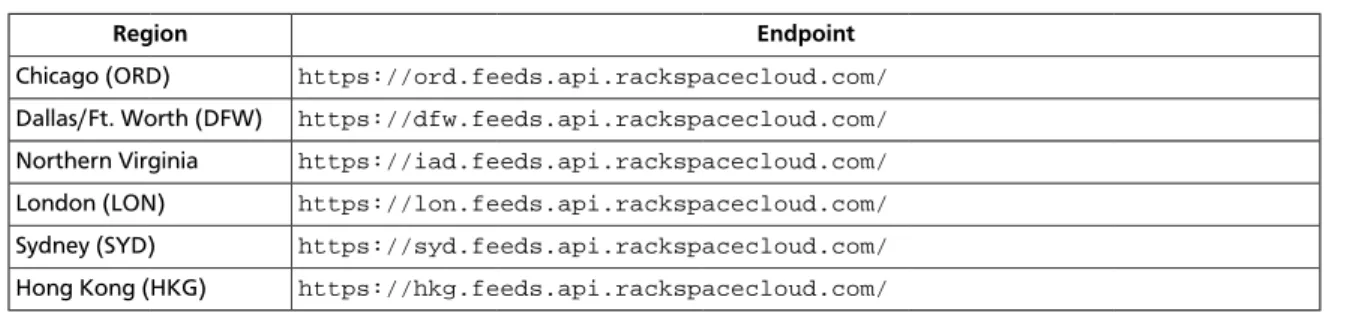
The following table shows the regionalized service endpoints for Cloud Feeds.
Table 2.2. Regionalized service endpoints
Region Endpoint
Chicago (ORD) https://ord.feeds.api.rackspacecloud.com/
Dallas/Ft. Worth (DFW) https://dfw.feeds.api.rackspacecloud.com/
Northern Virginia https://iad.feeds.api.rackspacecloud.com/
London (LON) https://lon.feeds.api.rackspacecloud.com/
Sydney (SYD) https://syd.feeds.api.rackspacecloud.com/
Hong Kong (HKG) https://hkg.feeds.api.rackspacecloud.com/
Note
• Choose the endpoint for the data center where your cloud resources are
lo-cated.
• The cloud server that you use must be located in the same data center where
your database resides.
• All examples in this guide assume that you are operating against the DFW
da-ta center. If you are using a different dada-tacenter, be sure to use the
associat-ed endpoint from the table instead.
• The endpoints provided in this sections are the base URL for accessing Cloud
Feeds. To access actual feeds, you need to provide additional information.
2.3. Feeds catalog
You can obtain a list of all the feeds that are available by submitting a GET request against
the Cloud Feeds endpoint as shown in the following examples:
Example 2.4. Retrieve feeds catalog request - XML example
curl -H "X-Auth-Token: authenticationToken" -X GET https:/ /endpointURL/tenantID/Example 2.5. Retrieve feeds catalog request - JSON example
curl –H "X-Auth-Token: authenticationToken" -H "Accept: application/vnd. rackspace.atomsvc+json" -X GET https://endpointURL/tenantID/
You can also use basic authentication to retrieve a catalog feed by using the following
syn-tax:
Example 2.6. Retrieve feeds catalog request using basic authentication - XML
example
Example 2.7. Retrieve feeds catalog request using basic authentication - JSON
example
curl -u username:api_key -H "Accept: application/vnd.rackspace.atomsvc+json" -X GET https://endpointURL/tenantID/
This operation returns a list of supported feeds as shown in the following examples:
Example 2.8. Retrieve feeds catalog response - XML example
<?xml version="1.0" encoding="UTF-8"?>
<service xmlns="http://www.w3.org/2007/app" xmlns:atom="http://www.w3.org/ 2005/Atom"> <workspace> <atom:title>backup_events_obs</atom:title> <collection href="https://ord.feeds.api.rackspacecloud.com/backup/ events/8492382"> <atom:title>backup_events_obs</atom:title> </collection> </workspace> <workspace> <atom:title>bigdata_events_obs</atom:title> <collection href="https://ord.feeds.api.rackspacecloud.com/bigdata/ events/8492382"> <atom:title>bigdata_events_obs</atom:title> </collection> </workspace> ... <workspace> <atom:title>ssl_usagesummary_events_obs</atom:title> <collection href="https://ord.feeds.api.rackspacecloud.com/ usagesummary/ssl/events/8492382"> <atom:title>ssl_usagesummary_events_obs</atom:title> </collection> </workspace>
<!-- Generated from schema version 1.60.1 --> </service>
Example 2.9. Retrieve feeds catalog response - JSON example
{ "service": { "workspace": [ { "collection": { "href": "https://ord.feeds.api.rackspacecloud.com/backup/ events/8492382", "title": "backup_events_obs" }, "title": "backup_events_obs" }, { "collection": { "href": "https://ord.feeds.api.rackspacecloud.com/bigdata/ events/8492382", "title": "bigdata_events_obs" }, "title": "bigdata_events_obs" }, {"collection": { "href": "https://ord.feeds.api.rackspacecloud.com/ usagesummary/ssl/events/8492382", "title": "ssl_usagesummary_events_obs" }, "title": "ssl_usagesummary_events_obs" } ] } }
2.4. Cloud Feeds concepts
Cloud Feeds uses AtomPub to publish different types of feeds. Feeds are composed of a
number of items called entries. Each entry has an extensible set of attached metadata.
AtomPub together with the Atom Syndication Format (ASF) provides a format for
imple-menting web feeds. Web feeds provide users with frequently updated content. AtomPub
is based on an HTTP transfer of Atom-formatted representations. The Atom format is
docu-mented in the Atom Syndication Format.
Cloud Feeds is an open-source AtomPub server for accessing, processing, and aggregating
Atom entries. Cloud Feeds was designed to make it easy to build both generalized and
spe-cialized persistence mechanisms for Atom XML data, based on the Atom Syndication
For-mat and the Atom Publishing Protocol.
Cloud Feeds works the following way:
1. Events are generated by a publisher and added to the database as entries. Events can be
usage events, system events or billing events.
2. Entries exist in Cloud Feeds for three days. After that time period they are deleted.
To read the official documentation for the Atom Syndication Format, see
RFC 4287
. For
more information about AtomPub, visit
http://atompub.org/
.
2.4.1. Container elements
An Atom feed consists of a series of container elements, which contain metadata or actual
content related to the feed.
The Atom Publishing Protocol supports the following container elements:
•
Atom feed element
•
Atom entry element
•
Atom content element
2.4.1.1. Atom feed element
An Atom
feed
element is a representation of an Atom feed, including metadata about the
feed, and some or all of the entries associated with it.
The Atom Feed element represents the top-level element of an Atom Feed Document. It
functions as a container for metadata and data associated with the feed. Its element
chil-dren consist of metadata elements that are followed by zero or more Atom Entry child
ele-ments.
Following is an XML example of an entire Atom
feed
element.
Example 2.10. Atom feed element - XML example
<feed xmlns="http://www.w3.org/2005/Atom"> <link href="https://ord.feeds.api.rackspacecloud.com/functest1/events/ 1234" rel="current" /> <link href="https://ord.feeds.api.rackspacecloud.com/functest1/events/ 1234" rel="self" /> <id>urn:uuidc9807298-fec2-4a39-bd8c-dfe4a6421757</id> <title type="text">functest1/events</title> <link href="https://ord.feeds.api.rackspacecloud.com/functest1/events/1234? marker=urn:uuid:e53d007a-fc23-1131-975c-cfa6b29bb814&limit=2&search=& amp;direction=forward" rel="previous"/> <link href="https://ord.feeds.api.rackspacecloud.com/functest1/events/1234? marker=urn:uuid:6fa234aea93f38c26fa234aea93f38c2&limit=2&search=& amp;direction=backward" rel="next"/> <link href="https://ord.feeds.api.rackspacecloud.com/functest1/events/1234? marker=last&limit=2&search=&direction=backward" rel="last"/> <updated>2015-05-07T15:10:59.333Z</updated> <atom:entry xmlns:atom="http://www.w3.org/2005/Atom" xmlns="http://www.w3. org/2001/XMLSchema" xmlns:xsd="http://www.w3.org/2001/XMLSchema"> <atom:id>urn:uuid:e53d007a-fc23-1131-975c-cfa6b29bb814</atom:id> <atom:category term="tid:1234"/> <atom:category term="rgn:DFW"/> <atom:category term="dc:DFW1"/> <atom:category term="rid:4a2b42f4-6c63-11e2-815b-7fcbcf67f549"/> <atom:category term="widget.explicit.widget.usage"/> <atom:category term="type:widget.explicit.widget.usage"/> <atom:title type="text">Widget</atom:title> <atom:content type="application/xml"><event xmlns="http://docs.rackspace.com/core/event" xmlns:sample= "http://docs.rackspace.com/usage/widget/explicit" dataCenter="DFW1" endTime= "2013-03-15T23:59:59Z" environment="PROD" id="e53d007a-fc23-1131-975c-cfa6b29bb814" region="DFW" resourceId="4a2b42f4-6c63-11e2-815b-7fcbcf67f549" startTime="2013-03-15T13:51:11Z" tenantId="1234" type="USAGE" version="1"> <sample:product dateTime="2013-09-26T15:32:00Z"
disabled="false" enumList="BEST BEST" label="sampleString" mid=
"6e8bc430-9c3a-11d9-9669-0800200c9a66" num_checks="1" resourceType="WIDGET" serviceCode="Widget" stringEnum="3.0.1" time="15:32:00Z" version="1"/> </event> </atom:content> <atom:link href="https://ord.feeds.api.rackspacecloud.com/functest1/ events/1234/entries/urn:uuid:e53d007a-fc23-1131-975c-cfa6b29bb814" rel="self"/ > <atom:updated>2015-05-07T15:10:39.991Z</atom:updated> <atom:published>2015-05-07T15:10:39.991Z</atom:published> </atom:entry> <atom:entry xmlns:atom="http://www.w3.org/2005/Atom" xmlns="http://www.w3. org/2001/XMLSchema" xmlns:xsd="http://www.w3.org/2001/XMLSchema"> <atom:id>urn:uuid:e53d007a-fc23-11e1-975c-cfa6b29bb814</atom:id> <atom:category term="tid:1234"/> <atom:category term="rgn:DFW"/> <atom:category term="dc:DFW1"/> <atom:category term="rid:4a2b42f4-6c63-11e1-815b-7fcbcf67f549"/> <atom:category term="widget.explicit.widget.usage"/> <atom:category term="type:widget.explicit.widget.usage"/>
<atom:title type="text">Widget</atom:title> <atom:content type="application/xml">
<event xmlns="http://docs.rackspace.com/core/event" xmlns:sample= "http://docs.rackspace.com/usage/widget/explicit" dataCenter="DFW1" endTime= "2013-03-15T23:59:59Z" environment="PROD" id="e53d007a-fc23-11e1-975c-cfa6b29bb814" region="DFW" resourceId="4a2b42f4-6c63-11e1-815b-7fcbcf67f549" startTime="2013-03-15T11:51:11Z" tenantId="1234" type="USAGE" version="1"> <sample:product dateTime="2013-09-26T15:32:00Z"
disabled="false" enumList="BEST BEST" label="sampleString" mid=
"6e8bc430-9c3a-11d9-9669-0800200c9a66" num_checks="1" resourceType="WIDGET" serviceCode="Widget" stringEnum="3.0.1" time="15:32:00Z" version="1"/> </event> </atom:content> <atom:link href="https://ord.feeds.api.rackspacecloud.com/functest1/ events/1234/entries/urn:uuid:e53d007a-fc23-11e1-975c-cfa6b29bb814" rel="self"/ > <atom:updated>2015-05-07T15:09:41.060Z</atom:updated> <atom:published>2015-05-07T15:09:41.060Z</atom:published> </atom:entry> </feed>
Following is a JSON example of an entire Atom
feed
element.
Example 2.11. Atom feed element - JSON example
{ "feed": { "@type": "http://www.w3.org/2005/Atom", "entry": [ { "category": [ { "term": "tid:1234" }, { "term": "rgn:DFW" }, { "term": "dc:DFW1" }, { "term": "rid:4a2b42f4-6c63-11e2-815b-7fcbcf67f549" }, { "term": "widget.explicit.widget.usage" }, { "term": "type:widget.explicit.widget.usage" } ], "content": { "event": { "@type": "http://docs.rackspace.com/core/event", "dataCenter": "DFW1", "endTime": "2013-03-15T23:59:59Z", "environment": "PROD", "id": "e53d007a-fc23-1131-975c-cfa6b29bb814", "product": { "@type": "http://docs.rackspace.com/usage/widget/ explicit","dateTime": "2013-09-26T15:32:00Z", "disabled": false,
"enumList": "BEST BEST", "label": "sampleString", "mid": "6e8bc430-9c3a-11d9-9669-0800200c9a66", "num_checks": 1, "resourceType": "WIDGET", "serviceCode": "Widget", "stringEnum": "3.0.1", "time": "15:32:00Z", "version": "1" }, "region": "DFW", "resourceId": "4a2b42f4-6c63-11e2-815b-7fcbcf67f549", "startTime": "2013-03-15T13:51:11Z", "tenantId": "1234", "type": "USAGE", "version": "1" } }, "id": "urn:uuid:e53d007a-fc23-1131-975c-cfa6b29bb814", "link": [ { "href": "https://ord.feeds.api.rackspacecloud.com/ functest1/events/1234/entries/urn:uuid:e53d007a-fc23-1131-975c-cfa6b29bb814", "rel": "self" } ], "published": "2015-05-07T15:10:39.991Z", "title": { "@text": "Widget", "type": "text" }, "updated": "2015-05-07T15:10:39.991Z" }, { "category": [ { "term": "tid:1234" }, { "term": "rgn:DFW" }, { "term": "dc:DFW1" }, { "term": "rid:4a2b42f4-6c63-11e1-815b-7fcbcf67f549" }, { "term": "widget.explicit.widget.usage" }, { "term": "type:widget.explicit.widget.usage" } ], "content": { "event": { "@type": "http://docs.rackspace.com/core/event", "dataCenter": "DFW1",
"endTime": "2013-03-15T23:59:59Z", "environment": "PROD", "id": "e53d007a-fc23-11e1-975c-cfa6b29bb814", "product": { "@type": "http://docs.rackspace.com/usage/widget/ explicit", "dateTime": "2013-09-26T15:32:00Z", "disabled": false,
"enumList": "BEST BEST", "label": "sampleString", "mid": "6e8bc430-9c3a-11d9-9669-0800200c9a66", "num_checks": 1, "resourceType": "WIDGET", "serviceCode": "Widget", "stringEnum": "3.0.1", "time": "15:32:00Z", "version": "1" }, "region": "DFW", "resourceId": "4a2b42f4-6c63-11e1-815b-7fcbcf67f549", "startTime": "2013-03-15T11:51:11Z", "tenantId": "1234", "type": "USAGE", "version": "1" } }, "id": "urn:uuid:e53d007a-fc23-11e1-975c-cfa6b29bb814", "link": [ { "href": "https://ord.feeds.api.rackspacecloud.com/ functest1/events/1234/entries/urn:uuid:e53d007a-fc23-11e1-975c-cfa6b29bb814", "rel": "self" } ], "published": "2015-05-07T15:09:41.060Z", "title": { "@text": "Widget", "type": "text" }, "updated": "2015-05-07T15:09:41.060Z" } ], "id": "urn:uuidc9807298-fec2-4a39-bd8c-dfe4a6421757", "link": [ { "href": "https://ord.feeds.api.rackspacecloud.com/functest1/ events/1234", "rel": "current" }, { "href": "https://ord.feeds.api.rackspacecloud.com/functest1/ events/1234", "rel": "self" }, { "href": "https://ord.feeds.api.rackspacecloud.com/functest1/ events/1234?marker=urn:uuid:e53d007a-fc23-1131-975c-cfa6b29bb814&limit=2& search=&direction=forward", "rel": "previous" },
{ "href": "https://ord.feeds.api.rackspacecloud.com/functest1/ events/1234?marker=urn:uuid:6fa234aea93f38c26fa234aea93f38c2&limit=2&search=& direction=backward", "rel": "next" }, { "href": "https://ord.feeds.api.rackspacecloud.com/functest1/ events/1234?marker=last&limit=2&search=&direction=backward", "rel": "last" } ], "title": { "@text": "functest1/events", "type": "text" }, "updated": "2015-05-07T15:10:59.333Z } }
2.4.1.2. Atom entry element
The Atom
entry
element represents exactly one Atom entry, outside of the context of an
Atom feed. It functions as a container for metadata and data associated with the entry.
This element can appear as a child of the Atom
feed
element, or it can appear as the
top-level element of a stand-alone Atom Entry Document.
Following is an XML example of an Atom
entry
element.
Example 2.12. Atom entry element - XML example
<atom:entry xmlns:atom="http://www.w3.org/2005/Atom" xmlns="http://www.w3.org/ 2001/XMLSchema" xmlns:xsd="http://www.w3.org/2001/XMLSchema"> <atom:id>urn:uuid:e53d007a-fc23-1131-975c-cfa6b29bb814</atom:id> <atom:category term="tid:1234"/> <atom:category term="rgn:DFW"/> <atom:category term="dc:DFW1"/> <atom:category term="rid:4a2b42f4-6c63-11e2-815b-7fcbcf67f549"/> <atom:category term="widget.explicit.widget.usage"/> <atom:category term="type:widget.explicit.widget.usage"/> <atom:title type="text">Widget</atom:title> <atom:content type="application/xml">
<event xmlns="http://docs.rackspace.com/core/event" xmlns:sample= "http://docs.rackspace.com/usage/widget/explicit" dataCenter="DFW1" endTime= "2013-03-15T23:59:59Z" environment="PROD" id="e53d007a-fc23-1131-975c-cfa6b29bb814" region="DFW" resourceId="4a2b42f4-6c63-11e2-815b-7fcbcf67f549" startTime="2013-03-15T13:51:11Z" tenantId="1234" type="USAGE" version="1"> <sample:product dateTime="2013-09-26T15:32:00Z"
disabled="false" enumList="BEST BEST" label="sampleString" mid=
"6e8bc430-9c3a-11d9-9669-0800200c9a66" num_checks="1" resourceType="WIDGET" serviceCode="Widget" stringEnum="3.0.1" time="15:32:00Z" version="1"/> </event> </atom:content> <atom:link href="https://ord.feeds.api.rackspacecloud.com/functest1/ events/1234/entries/urn:uuid:e53d007a-fc23-1131-975c-cfa6b29bb814" rel="self"/ > <atom:updated>2015-05-07T15:10:39.991Z</atom:updated> <atom:published>2015-05-07T15:10:39.991Z</atom:published> </atom:entry>
Following is a JSON example of an Atom
entry
element.
Example 2.13. Atom entry element - JSON example
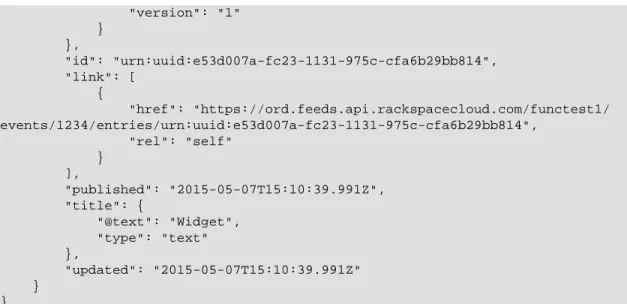
{ "entry": { "@type": "http://www.w3.org/2005/Atom", "category": [ { "term": "tid:1234" }, { "term": "rgn:DFW" }, { "term": "dc:DFW1" }, { "term": "rid:4a2b42f4-6c63-11e2-815b-7fcbcf67f549" }, { "term": "widget.explicit.widget.usage" }, { "term": "type:widget.explicit.widget.usage" } ], "content": { "event": { "@type": "http://docs.rackspace.com/core/event", "dataCenter": "DFW1", "endTime": "2013-03-15T23:59:59Z", "environment": "PROD", "id": "e53d007a-fc23-1131-975c-cfa6b29bb814", "product": { "@type": "http://docs.rackspace.com/usage/widget/ explicit", "dateTime": "2013-09-26T15:32:00Z", "disabled": false,"enumList": "BEST BEST", "label": "sampleString", "mid": "6e8bc430-9c3a-11d9-9669-0800200c9a66", "num_checks": 1, "resourceType": "WIDGET", "serviceCode": "Widget", "stringEnum": "3.0.1", "time": "15:32:00Z", "version": "1" }, "region": "DFW", "resourceId": "4a2b42f4-6c63-11e2-815b-7fcbcf67f549", "startTime": "2013-03-15T13:51:11Z", "tenantId": "1234", "type": "USAGE", "version": "1" } }, "id": "urn:uuid:e53d007a-fc23-1131-975c-cfa6b29bb814", "link": [ {
"href": "https://ord.feeds.api.rackspacecloud.com/functest1/ events/1234/entries/urn:uuid:e53d007a-fc23-1131-975c-cfa6b29bb814", "rel": "self" } ], "published": "2015-05-07T15:10:39.991Z", "title": { "@text": "Widget", "type": "text" }, "updated": "2015-05-07T15:10:39.991Z" } }
2.4.1.3. Atom content element
The Atom
content
element either contains or links to the content of an entry. The type
attribute specifies the MIME media
type
. If no
type
attribute is present, the content is
treated as
text
.
Following is an XML example of an Atom
content
element.
Example 2.14. Atom content element - XML example
<?xml version="1.0" encoding="UTF-8"?><content type="application/xml" xmlns="http://www.w3.org/2005/Atom" xmlns:cb-store="http://docs.rackspace.com/usage/cloudbackup/storage"> <event dataCenter="DFW1" endTime="2012-06-15T10:19:52Z" environment="PROD" id="8d89673c-c989-11e1-895a-0b3d632a8a89" region="DFW" resourceId="3863d42a-ec9a-11e1-8e12-df8baa3ca440" startTime="2012-06-14T10:19:52Z" tenantId="1234" type="USAGE" version="1"> <cb-store:product resourceType="AGENT" serverID="9445" serviceCode="CloudBackup" storage="99992827882" version="1" /> </event> </content>
Following is a JSON example of an Atom
content
element.
Example 2.15. Atom content element - JSON example
{ "content": { "event": { "@type": "http://docs.rackspace.com/core/event", "dataCenter": "DFW1", "endTime": "2012-06-15T10:19:52Z", "environment": "PROD", "id": "8d89673c-c989-11e1-895a-0b3d632a8a89", "product": {"@type": "http://docs.rackspace.com/usage/cloudbackup/ storage", "resourceType": "AGENT", "serverID": "9445", "serviceCode": "CloudBackup", "storage": 99992827882, "version": "1" }, "region": "DFW", "resourceId": "3863d42a-ec9a-11e1-8e12-df8baa3ca440", "startTime": "2012-06-14T10:19:52Z", "tenantId": "1234", "type": "USAGE", "version": "1" } } }
2.4.2. Cloud Feeds events
This section describes the event types that are supported by Cloud Feeds and where they
are placed in a feed.
Cloud Feeds supports the following event types:
•
Cloud Feeds Product events
•
User access events using the CADF standard
2.4.2.1. Cloud Feeds Product events
Cloud Feeds supports product events that contain information that is specific to a certain
product.
Product events are located in the
event
node as shown in the following examples.
Example 2.16. Cloud feeds product events - XML example
<atom:entry xmlns:atom="http://www.w3.org/2005/Atom" xmlns="http://www.w3.org/ 2001/XMLSchema" xmlns:xsd="http://www.w3.org/2001/XMLSchema"> <atom:id>urn:uuid:e53d007a-fc23-1131-975c-cfa6b29bb814</atom:id> <atom:category term="tid:1234"/> <atom:category term="rgn:DFW"/> <atom:category term="dc:DFW1"/> <atom:category term="rid:4a2b42f4-6c63-11e2-815b-7fcbcf67f549"/> <atom:category term="widget.explicit.widget.usage"/> <atom:category term="type:widget.explicit.widget.usage"/> <atom:title type="text">Widget</atom:title> <atom:content type="application/xml">
<event xmlns="http://docs.rackspace.com/core/event" xmlns:sample= "http://docs.rackspace.com/usage/widget/explicit" dataCenter="DFW1" endTime= "2013-03-15T23:59:59Z" environment="PROD" id="e53d007a-fc23-1131-975c-cfa6b29bb814" region="DFW" resourceId="4a2b42f4-6c63-11e2-815b-7fcbcf67f549" startTime="2013-03-15T13:51:11Z" tenantId="1234" type="USAGE" version="1"> <sample:product dateTime="2013-09-26T15:32:00Z"
disabled="false" enumList="BEST BEST" label="sampleString" mid=
"6e8bc430-9c3a-11d9-9669-0800200c9a66" num_checks="1" resourceType="WIDGET" serviceCode="Widget" stringEnum="3.0.1" time="15:32:00Z" version="1"/> </event>
</atom:content> <atom:link href="https://ord.feeds.api.rackspacecloud.com/functest1/ events/1234/entries/urn:uuid:e53d007a-fc23-1131-975c-cfa6b29bb814" rel="self"/ > <atom:updated>2015-05-07T15:10:39.991Z</atom:updated> <atom:published>2015-05-07T15:10:39.991Z</atom:published> </atom:entry>
Example 2.17. Cloud feeds product events - JSON example
{ "entry": { "@type": "http://www.w3.org/2005/Atom", "category": [ { "term": "tid:1234" }, { "term": "rgn:DFW" }, { "term": "dc:DFW1" }, { "term": "rid:4a2b42f4-6c63-11e2-815b-7fcbcf67f549" }, { "term": "widget.explicit.widget.usage" }, { "term": "type:widget.explicit.widget.usage" } ], "content": { "event": { "@type": "http://docs.rackspace.com/core/event", "dataCenter": "DFW1", "endTime": "2013-03-15T23:59:59Z", "environment": "PROD", "id": "e53d007a-fc23-1131-975c-cfa6b29bb814", "product": { "@type": "http://docs.rackspace.com/usage/widget/ explicit", "dateTime": "2013-09-26T15:32:00Z", "disabled": false,"enumList": "BEST BEST", "label": "sampleString", "mid": "6e8bc430-9c3a-11d9-9669-0800200c9a66", "num_checks": 1, "resourceType": "WIDGET", "serviceCode": "Widget", "stringEnum": "3.0.1", "time": "15:32:00Z", "version": "1" }, "region": "DFW", "resourceId": "4a2b42f4-6c63-11e2-815b-7fcbcf67f549", "startTime": "2013-03-15T13:51:11Z", "tenantId": "1234", "type": "USAGE",
"version": "1" } }, "id": "urn:uuid:e53d007a-fc23-1131-975c-cfa6b29bb814", "link": [ { "href": "https://ord.feeds.api.rackspacecloud.com/functest1/ events/1234/entries/urn:uuid:e53d007a-fc23-1131-975c-cfa6b29bb814", "rel": "self" } ], "published": "2015-05-07T15:10:39.991Z", "title": { "@text": "Widget", "type": "text" }, "updated": "2015-05-07T15:10:39.991Z" } }
The following table shows the attributes for the product event node.
Table 2.3. Attributes for the product event node
Name Description
dataCenter Optional. Specifies the data center of the event. If this attribute is not specified,
GLOBAL is assumed. GLOBAL implies that the resource is without an assigned data center.
endTime Optional. Specifies the time that the event ends. The format must be ISO 8601
format: yyyy-mm-ddThh:mm:ss.SSSZ (Z designates UTC). For an event of type EX-IST, the startTime and endTime reflect the event duration for the resource
in-stance. The end time is exclusive — that is, the event occurred up to, but not during the specified value. The end time must occur after the start time.
environment Specifies the environment from which the message originated. If this attribute
is not specified, PROD is assumed. This attribute is required for events of type USAGE_SNAPSHOT, but is optional for all other event types.
eventTime Optional. Specifies the time of the event, using ISO 8601 format and UTC. Use this
attribute instead of startTime and endTime in cases where the event does not
have a range.
id Required. Specifies the UUID for the event record. This value should be UUID
ver-sion 1, 2, or 4. For more information, see RFC 4122 at http://tools.ietf.org/html/ rfc4122.
referenceId Optional. Specifies a GUID that identifies the event record that this record is
updat-ing. This attribute should be used if this event is correcting another event.
region Specifies the region in which the event is located. If this attribute is not specified,
GLOBAL is assumed. GLOBAL implies that the resource is without an assigned re-gion.
resourceId Specifies the ID of the resource. This attribute is required if the resourceType
at-tribute is specified in the product node, but is optional otherwise.
resourceName Optional. Specifies the customer-defined name of the resource. resourceURI Optional. Specifies a URI that uniquely identifies the resource. rootAction Optional. Specifies the action that caused the event.
severity Optional. Specifies the severity of the event. Valid values are INFO, WARNING, and
CRITICAL. This is attribute is valid only for system events, not for usage events.
startTime Specifies the time that the event starts. The format must be ISO 8601 format:
yyyy-mm-ddThh:mm:ss.SSSZ (Z designates UTC). The start time is inclusive, which means that the event occurred starting at the start time, not after. This attribute is re-quired for events of type USAGE, but is optional for all other event types.
Name Description
tenantId Optional. Specifies the tenant Id of the feeds publisher
type Required. Specifies the type of event. If one of the existing event types fails to
pro-duce any feeds, set this attribute to EXTENDED and add an eventType attribute
to your product schema.
version Required. Specifies the version of the event record.
Note
Cloud Feeds evaluates all product events against their XML schemas.
2.4.2.2. User access events in CADF
Cloud Feeds supports the Cloud Auditing Data Federation (CADF) standard. CADF
pro-vides a standard for the submission and retrieval of normative audit event data from cloud
providers in the form of customized reports and logs.
For more information about CADF, see
Cloud Auditing Data Federation
.
Cloud Feeds defines a set of event types, which take different attributes.
The following examples show a user access event that is encoded as a CADF event . The
CADF event is located inside the
Atom content type
element.
Example 2.18. User access events - XML example
<?xml version="1.0" encoding="UTF-8"?> <?atom feed="functest1/events"?> <atom:entry xmlns:atom="http://www.w3.org/2005/Atom" xmlns:xsd="http://www.w3.org/2001/XMLSchema" xmlns="http://www.w3.org/2001/XMLSchema"> <atom:id>urn:uuid:6fa234aea93f38c26fa234aea93f38c2</atom:id> <atom:category term="tid:123456" /> <atom:category term="rgn:DFW" /> <atom:category term="dc:DFW1" /> <atom:category term="username:jackhandy" /> <atom:title type="text">UserAccessEvent</atom:title> <atom:content type="application/xml"> <cadf:event xmlns:cadf="http://schemas.dmtf.org/cloud/audit/1.0/event" xmlns:xsi='http://www.w3.org/2001/XMLSchema-instance' xmlns:ua="http://feeds.api.rackspacecloud.com/cadf/user-access-event" id="6fa234aea93f38c26fa234aea93f38c2" eventType="activity" typeURI="http://schemas.dmtf.org/cloud/audit/1.0/event" eventTime="2015-03-12T13:20:00-05:00" action="create/post" outcome="success"><cadf:initiator id="10.1.2.3" typeURI="network/node" name= "jackhandy">
<cadf:host address="10.1.2.3" agent="curl/7.8 (i386-redhat-linux-gnu) libcurl 7.8" />
</cadf:initiator>
<cadf:target id="x.x.x.x" typeURI="service" name="IDM" >
<cadf:host address="lon.identity.api.rackspacecloud.com" /> </cadf:target>
<cadf:attachments>
<cadf:content> <ua:auditData version="1"> <ua:region>DFW</ua:region> <ua:dataCenter>DFW1</ua:dataCenter> <ua:methodLabel>createToken</ua:methodLabel> <ua:requestURL>https://lon.identity.api. rackspacecloud.com/v2.0/tokens</ua:requestURL> <ua:queryString></ua:queryString> <ua:tenantId>123456</ua:tenantId> <ua:responseMessage>OK</ua:responseMessage> <ua:userName>jackhandy</ua:userName> <ua:roles>xxx</ua:roles> </ua:auditData> </cadf:content> </cadf:attachment> </cadf:attachments>
<cadf:observer id="IDM-1-1" name="repose-6.1.1.1" typeURI= "service/security"> <cadf:host address="repose" /> </cadf:observer> <cadf:reason reasonCode="200" reasonType="http://www.iana.org/assignments/http-status-codes/ http-status-codes.xml"/> </cadf:event> </atom:content> </atom:entry>
Example 2.19. User access events - JSON example
{ "entry" : { "@type" : "http://www.w3.org/2005/Atom", "id" : "urn:uuid:6fa234aea93f38c26fa234aea93f38c2", "category": [ { "term": "tid:123456" }, { "term": "rgn:DFW" }, { "term": "dc:DFW1" }, { "term": "username:jackhandy" }, ],"title" : "Identity User Access Event", "content" : { "event" : { "typeURI" : "http://schemas.dmtf.org/cloud/audit/1.0/event", "id" : "6fa234aea93f38c26fa234aea93f38c2", "eventType" : "activity", "eventTime" : "2015-03-12T13:20:00-05:00", "action" : "create/post", "outcome" : "success", "initiator" : { "id" : "10.1.2.3", "typeURI" : "network/node",
"name" : "jackhandy", "host" : {
"address" : "10.1.2.3",
"agent" : "curl/7.8 (i386-redhat-linux-gnu) libcurl 7.8" } }, "target" : { "id" : "x.x.x.x", "typeURI" : "service", "name" : "IDM", "host" : { "address" : "lon.identity.api.rackspacecloud.com" } }, "attachments" : [ { "name" : "auditData", "contentType" : "http://feeds.api.rackspacecloud.com/ cadf/user-access-event/auditData", "content" : { "auditData" : { "region" : "DFW", "dataCenter" : "DFW1", "methodLabel" : "createToken", "requestURL" : "https://lon.identity.api. rackspacecloud.com/v2.0/tokens", "queryString" : "", "tenantId" : "123456", "responseMessage" : "OK", "userName" : "jackhandy", "roles" : "xxx", "version" : "1" } } } ], "observer" : { "id" : "IDM-1-1", "name" : "repose-6.1.1.1", "typeURI" : "service/security", "host" : { "address" : "repose" } }, "reason" : { "reasonCode" : 200, "reasonType" : "http://www.iana.org/assignments/http-status-codes/http-status-codes.xml" } } } } }
Table 2.4. CADF nodes
Name Description
event
Specifies the CADF event node. Contains a set of attributes. For a de-tailed description of the CADF event attributes, see the "Attributes for CADF event node" table below.
initiator Specifies the CADF event initiator. Contains a set of attributes. For
a detailed description of the CADF initiator attributes, see the " At-tributes for CADF initiator node" table below.
target Specifies the target. Contains a set of attributes. For a detailed
de-scription of the CADF target attributes, see the "Attributes for CADF target node" table below.
attachments
•attachment
Specifies an array of extended or domain-specific information about the event or its context. The attachments node contains one or
more nodes of type attachment. For a detailed description of the
CADF event attributes, see the "Attributes for CADF target node" ta-ble below.
observer Specifies the observer. For example, this can be a security provider
or a service, such as Repose. Contains a set of attributes. For a de-tailed description of the CADF event attributes, see the "Attributes for CADF observer node" table below.
reason Contains a domain-specific reason code and policy data that provides
an additional level of detail to the outcome value. Contains a set of attributes. For a detailed description of the CADF event attributes, see the "Attributes for CADF reason node" table below.
The CADF events are located inside the CADF event node.
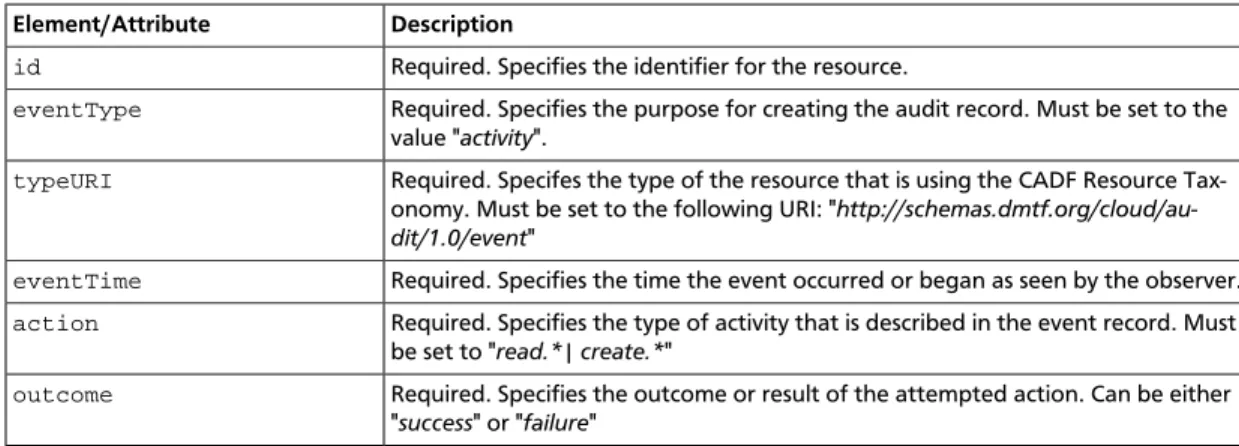
The following table shows the elements of the CADF event node.
Table 2.5. Elements of the CADF event node
Element/Attribute Description
id Required. Specifies the identifier for the resource.
eventType Required. Specifies the purpose for creating the audit record. Must be set to the
value "activity".
typeURI Required. Specifes the type of the resource that is using the CADF Resource
Tax-onomy. Must be set to the following URI: " http://schemas.dmtf.org/cloud/au-dit/1.0/event"
eventTime Required. Specifies the time the event occurred or began as seen by the observer. action Required. Specifies the type of activity that is described in the event record. Must
be set to "read.*| create.*"
outcome Required. Specifies the outcome or result of the attempted action. Can be either
"success" or "failure"
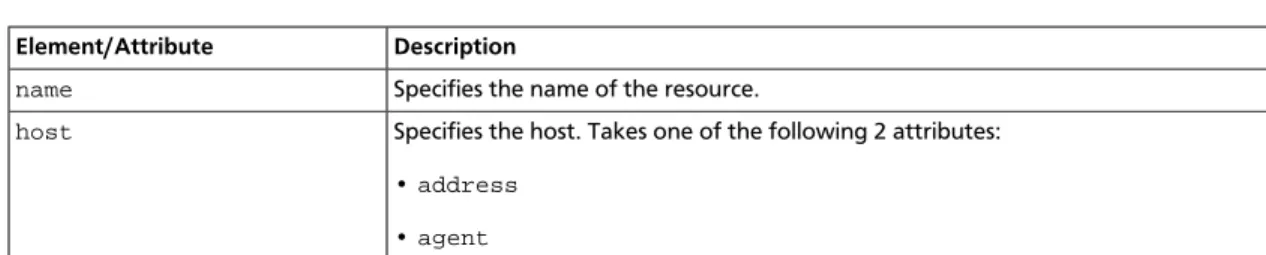
The following table shows the elements of the CADF initiator node.
Table 2.6. Elements of the CADF initiator node
Element/Attribute Description
id Required. Specifies the identifier for the resource.
typeURI Required. Specifes the type of the resource that is using the CADF Resource
Taxon-omy. Can have one of the following values:
• "service/security/account/user" for authorized requests • "network/node" for unauthorized requests
Element/Attribute Description
name Specifies the name of the resource.
host Specifies the host. Takes one of the following 2 attributes:
•address
•agent
The following table shows the elements of the CADF target node.
Table 2.7. Elements of the CADF target node
Element/Attribute Description
id Required. Specifies the identifier for the resource.
typeURI Required. Specifes the type of the resource that is using the CADF Resource
Taxon-omy. Can have one of the following values:
• "service/security/account/user" for authorized requests • "network/node" for unauthorized requests
name Specifies the name of the target.
host Specifies the host. Takes the following attribute:
•address
The following table shows the elements of the CADF attachment node.
Table 2.8. Elements of the CADF attachment node
Element/Attribute Description
name Specifies the name of the attachment, for eaxmple auditData. contentType Specifies the content type, for example ua:auditData.
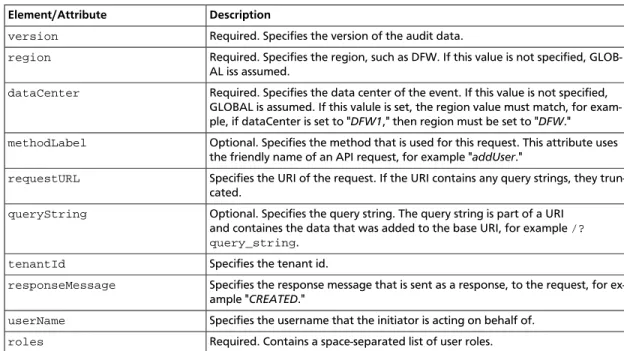
content Contains a set of elements that define the auditData property. auditData
con-tains attributes that define the user access event profile for Cloud Feeds. For a de-tailed description of the auditData property, see the "Attributes for auditData
property" table in User access events.
The following table shows the elements of the CADF observer node.
Table 2.9. Elements of the CADF observer node
Element/Attribute Description
id Required. Specifies the identifier for the resource.
typeURI Required. Specifes the type of the resource that is using the CADF Resource
Taxon-omy. Can have one of the following values:
• "service/security/account/user" for authorized requests • "network/node" for unauthorized requests
name Specifies the name.
host Specifies the host. Takes the following attribute:
•address