Short message service remotely mobile device control
Mustafa Gh. Saeed∗
University Research Center, Computer Science Department, Cihan University Sulaimaniya, Iraq.
E-mail: [email protected]
Kamaran HamaAli. A. Faraj
University Research Center, Computer Science Department, Cihan University Sulaimaniya and Lebanese French University, Iraq.
E-mail: [email protected]
Amin S. Mohammed
Information Technology Dept,
Lebanese French University, Erbil, Iraq.
E-mail: [email protected]
Azhee W. Muhamad
Computer Science Dept, Sulaimani University, Sulaimani, Iraq.
E-mail: [email protected]
Chiai Al-Atroshi
Information Technology Dept, Lebanese French University, Erbil, Iraq.
E-mail: [email protected]
Sherko H. Abdulrahman
Computer Science Dept, Sulaimani University, Sulaimani, Iraq.
E-mail: [email protected]
∗Corresponding author.
Abstract Nowadays; the use of mobile technology becomes part of the daily activity in our life. Its impossible the advantage of any mobile instruments without disadvantage. The disadvantage of unprotected mobile is creating various problems. The most popular problem is that on mobile. Once the mobile owner has stored any personal data into own mobile phone device. It might be the personal data needed at a time such as (Forgetting, lost) anywhere. Furthermore, this makes the phone owner worry about all personal data and data face real danger from someone else because of stored personal data. The mobile device might be forgotten at home, work or anywhere, and the owner of the device unable to control the phone and very hard to reach stored data such as (Photos, Videos, Document files, Contact numbers, etc.). Our proposed application solves the subject matter that mentioned the remote control of Mobile using short messaging service (SMS) instead of the use of the Internet just in case the internet facility is not always available but the SMS availability of SMS is higher than the internet facility to change some of the mobile features. The suggested mobile application was modeling to designed and implemented to control mobile through using SMS only. The application can change ringing mode or send SMS containing mobile last location or also can search for a specific name in the contact names and send it to another mobile by analysing the incoming messages if the message contains specific message format (pin code, Action, reply). The suggested application was build and tested in the android operating system and in the real mobile device.
Keywords. Mobile device control; Short message service; Broadcast receiver; Android permissions.
2010 Mathematics Subject Classification. 65L05, 34K06, 34K28.
1. Introduction
most serious one is related to the phone itself and the personal data inside it needed at a time such as (Forgetting, losing). A phone might get lost and this makes the phone and its data face real danger, or it might be forgotten at home, work or anywhere, and the user will be unable to control the phone and reach its data such as (Photos, Videos, Document files, Contact numbers, etc.). There are many ways that help in this case but they are not %100 effective, one of the ways is using internet, well not always a phone is connected to internet or maybe there is not an internet source at all, and even if it was connected still there is not much to do with that phone. The mobile phone is often available by Subscriber Identification Module Card (SIM Card) as default. It can be used to solve these problems, in addition to that; it makes the user unrestrained to a particular telecommunication company in any country. This paper aims to introduce a new mobile application to dell with situations that user may be facing:
(1) Forgot a phone at home and want to get a contact number to make an im-portant call.
• Just send an SMS to your phone with a contact name and you will get number back as an SMS.
(2) Change the sound profile of the phone from silent to normal mode so it can be found easily.
• ust send an SMS to your phone with a contact name and you will get number back as an SMS.
(3) Lost a phone want to know the location exactly.
• Get current location immediately through SMS message.
2. Android Application Components
Android is a software that was founded in Palo Alto of California in 2003, And it is a Linux based operating system it is designed primarily for touch screens mobile devices such as smart phones and tablet computers. In addition, it is one of the most widely used mobile OS these days. In the last 15 years, the operating system has developed a lot starting from black and white phones to recent smart phones or mini computers [5]. Android is an open source operating system for the smart phone [5,13]. The hardware that supports android software is based on ARM architecture platform [5], which is a family of reduced instruction set computing (RISC) architectures for computer processors [6]. However technologies and performance together plays important roles in real life developments [14]. Application components are the essential building blocks of an Android application. These components are loosely coupled by the application manifest file AndroidManifest.xml that describes each component of the application and how they interact. There are four main components in android [3,11]:
(1) Activities: It is a platform that appears to the user, which it handles the user interaction to the smart phone screen, and holds the UI components. (2) Services: They handle background processing associated with an application. (3) Broadcast Receivers: They handle communication between Android OS and
applications.
Figure 1. Adding Receiver element in Manifest [1].
Figure 2. Submit the Intent Filter [8].
Figure 3. Sending-SMS-message Permission in the Manifest.
between register broadcast receiver using Manifest-declared and Context-registered is in Manifest-declared the system package manager submits the receiver when the ap-plication is installed. The receiver then becomes an individual entry point into the application, which means that the system can start the app and deliver the broadcast if the app is not currently running, while in Context-registered the system package manager submits the receiver when the application in running mode only [8].
2.2. Android permissions. Android contains a permission system and predefined permissions for certain tasks. Every application can request required permissions. The cause of permission is to guard the privacy of an Android user. Android apps must ask permission to approach sensitive user data (such as contacts and SMS), as well as certain system features (such as camera and internet) [7, 13]. Depending on the feature, the system might give the permission automatically or might induce the user to accept the request. An application must announce the permissions it requires by containing ¡uses-permission¿ tags in the application manifest [7] as demonstrated in Figure3. For example, an app that needs to send SMS messages would have this line in the manifest [7,13]: There are two types of permissions (Normal, Dangerous):
(1) Normal permissions are those which are deemed harmless for the users privacy or the operation of other applications (For example the permission to set the time zone), Normal permissions are automatically granted to the application [7,8].
(2) Dangerous permissions affect the users private information, or could poten-tially affect his data or the operation of other application (For example, the ability to read the users contact data or SMS messages), only dangerous per-missions ask user acceptance. The way Android pose the user to grant dan-gerous permissions depends on the version of Android running on the user’s device, and it must be granted by the user at runtime of the app [7,8].
3. Framework Design
Figure 4. The requirements of propose application
the incoming Message and analyzes it, after analyzing it will respond to the request which was written in the Message, coming from client side, and performs some action according to that request as explained in Figure4Use case diagram to demonstrated the requirements of propose application.
3.1. The Messages Format. The message should be written in a special format so the Application can recognize it and differentiates it from other messages. Message format should include three parts:
(1) Pin code: For security purpose a pin code should be registered to the app by user and this pin placed at the beginning of the message, so only the authorized user can remote control this mobile.
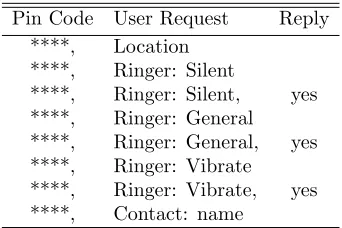
(2) User Order: in this part of a message the user should determine which action that the application perform and the action should be It must be predefined in the application as shown in Table1 message format parts.
(3) Reply: finally, this part is optional which is getting reply SMS from the phone. Some actions the App will automatically answer the user without asking for it, like if the pin code in the received message is right, but action part does not match the operations specified in the App, then App should reply to the sender that the message not accepted.
Table 1. Message format parts.
Pin Code User Request Reply ****, Location
****, Ringer: Silent
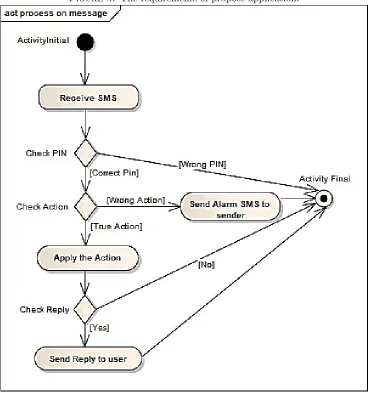
The application checks each and every Message that comes to the Mobile in sequence steps:
(1) Step one it looks for the PIN code, if the message doesnt start with the PIN it will ignore it, and if the Message was starting with the PIN then it will accept it and starts checking the rest of the Message body.
(2) Step two it will check the body looking for similar Orders that it already has inside the system, if it didnt recognize the order it will send an Alarm message back to the sender to correct his order, and if it recognized the order it will try to perform the requested Action.
(3) Finally, it checks the Reply part, if the user wanted it to reply it will send him the result of the action which it done it, and if the user doesnt ask for reply it will not reply. These steps are explained in Figure5by using activity diagram.
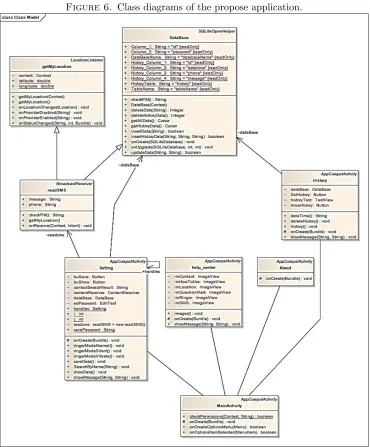
3.2. General Structure of the propose Application. The propose Application contains the following parts as demonstrated in Figure6:
• MainActivity class and form: as form it is the first thing that appears to the user, and as class it holds the permissions that appear to user to grant or not. • Setting class and form: it is responsible of setting the PIN code and save it
inside Database.
• History class and form: it is responsible of storing Date and Time of receiving SMS, Message Body and Phone Number of the Client User inside Database each time he sends Message.
• Help class and form: it helps the user by explaining how to use the App. • About class and form: it holds some information about the developer of the
App.
• readSMS class: it is a sub class of BroadcastReceiver class which is responsible of receiving SMS messages even if the Application is turned off.
• getMyLocation class: it is a sub class of Location listener class that is respon-sible of getting the location of the phone.
Database class: it is a sub class of SQLiteOpenHelper class (which is a class respon-sible of creating database inside Android Studio). Inside this class, there are tables, which saves data that have been send to it from other activities.
Figure 5. The requirements of propose application.
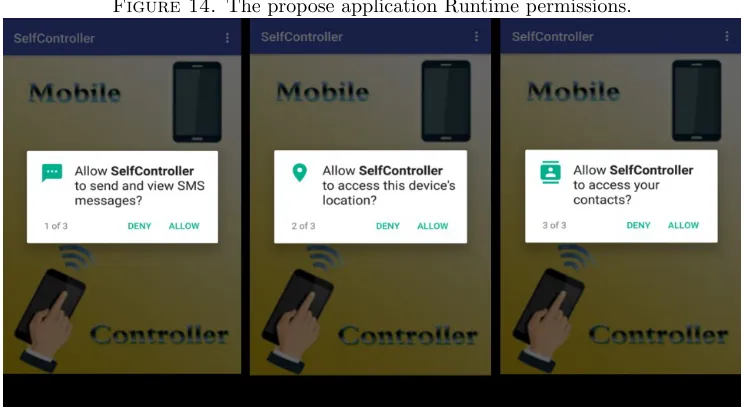
7 so in runtime of the application the user can grant permission to it , also, mobile location a dangerous permission it should be asked the user to grant the permission.
Figure 6. Class diagrams of the propose application.
Table 2. Application Permissions.
Permission Name Permission Code
Receive SMS ”android.permission.RECEIVE SMS” Read SMS ”android.permission.READ SMS”
Send SMS ”android.permission.SEND SMS”
Read Contact ”android.permission.READ CONTACTS” Get Contacts ”android.permission.GET ACCOUNTS”
Ringer mode ”android.permission.MODIFY AUDIO SETTINGS” Access Location ”android.permission.ACCESS FINE LOCATION”
Figure 7. Dangerous permissions inside onCreate function
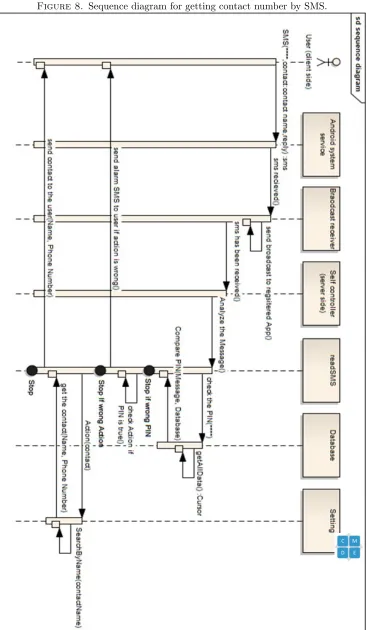
Phone number of the sender and the message body, then gets the PIN code from the Apps Database by getAllData() function and compares it with the messages PIN, if the PIN was not included in the beginning of the messages body the app will ignore the message and stop, and if the PIN was true it will check the rest of the body to perform the requested Action, and if the App didnt recognize the Action it will send an alarm message back to the sender to identify his action and it will stop, otherwise it will go to Setting class and checks the contact list of the server Phone and looks for the user which requested by the client user by SearchByName() function, then readSMS class brings the result of the search and sends it back to the user and finish the process then stops as explained in detail in Figure8.
3.5. Low Level Design Algorithms Of Propose Application. In this section contain the low-level design of propose application algorithms, which include four algorithms: analysis income messages algorithm, Changing Ringer mode algorithm, Getting Location algorithm, and Getting Contact algorithm
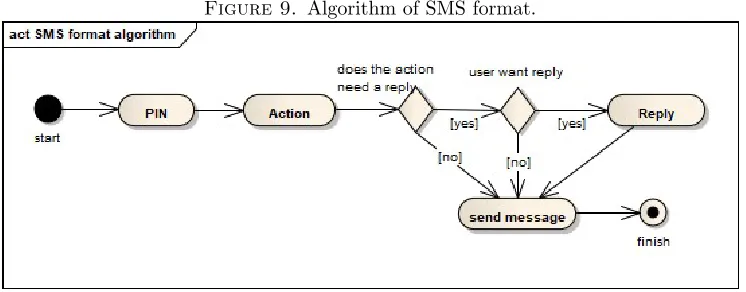
3.5.1. Analysis income messages algorithm. The SMS format is written in the client side and it will be analyzed in server side as demonstrate in Figure9: Client side: The SMS format should be written in the following sequence:
(1) First the client user writes the PIN and coma symbol (****,). (2) Then he declares the action that he wants from server side.
Figure 9. Algorithm of SMS format.
Server side:The mobiles System service receives income message and the propose application analysis the income message. First of all, checks the PIN code with the registered PIN inside the Applications database, if the PIN was wrong it will ignore, while if it was correct then it will analyze the action, if it didnt recognize the action it will send an alarm message back to the client user to identify his action, and if it recognized the action then it will answer to that action and check the message for reply, if the user wanted reply it will send him a message containing the result of the action, and if the user doesnt want reply it will stop as showed in Figure4.
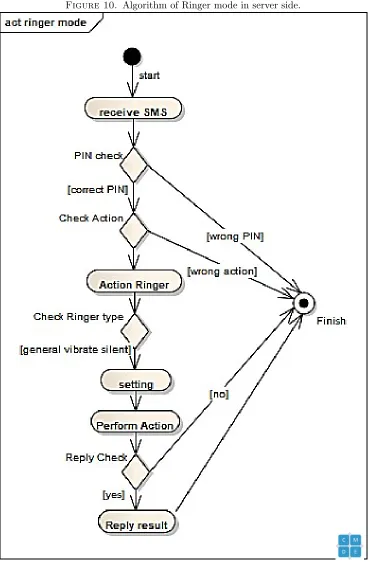
3.5.2. Changing Ringer Mode Algorithm. In order to change the ringer mode the following steps will happen in both client and server side:
Client side:
(1) Write PIN code and coma symbol.
(2) For ringer mode order user should write ringer:.
(3) There are three modes for ringer (General, Vibrate and Silent) so user should declare which mode he wants, he should write the mode (vibrate or silent or general).
(4) Ringer mode is one of those types of orders that do not reply the result automatically, so if the user wanted to see the result of the action he should write coma and yes.
Server Side:
(1) The application checks for the PIN code.
(2) In case the PIN was correct it will check the action.
(3) For action ringer it will check the type of the requested ringer as explained in detail in Figure10.
(4) Performs the requested action. (5) Check for reply.
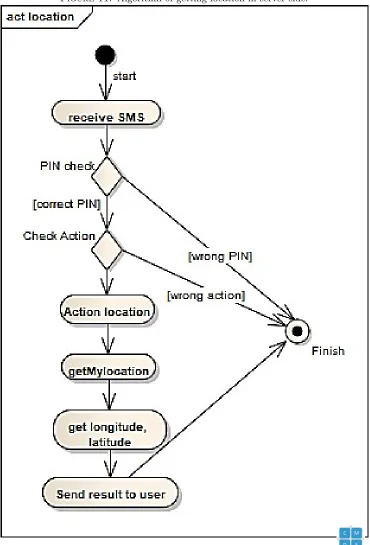
3.5.3. Getting Location algorithm. To get the location the following steps are happen in both client and server:
(1) Write PIN code and coma symbol.
(2) For location order user should write location
(3) For location order user doesnt have to write yes at the end of the message, the system will reply automatically. Server side.
Server side
(1) The application checks for the PIN code..
(2) In case the PIN was correct it will check the action.
(3) For action location it will go to getMyLocation class to get the location as shown in Figure11.
(4) Bring the location (longitude and latitude). (5) Send the location back to user by SMS.
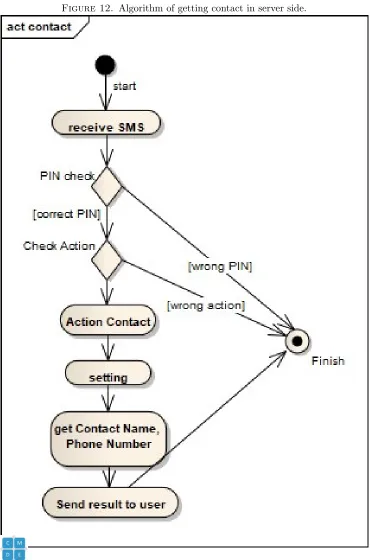
3.5.4. Getting Contact Algorithm. In order to get a Contact number the following steps happen in both client and server side as shown in Figure12: Client side:
(1) Write PIN code and coma symbol.
(2) For contact order user should write contact:contactName.
(3) In contact order, if the user doesnt have to write yes at the end of the message, the system will reply automatically. Server side.
Server side:
(1) The application checks for the PIN code.
(2) In case the PIN was correct it will check the action.
(3) For action contact it will go to setting class to get the requested contact as shown in Figure12.
(4) Bring the contact (Name and Phone Number). (5) Send the contact back to user.
4. IMPLEMENTATION AND TESTING
Figure 13. The propose Application user interface.
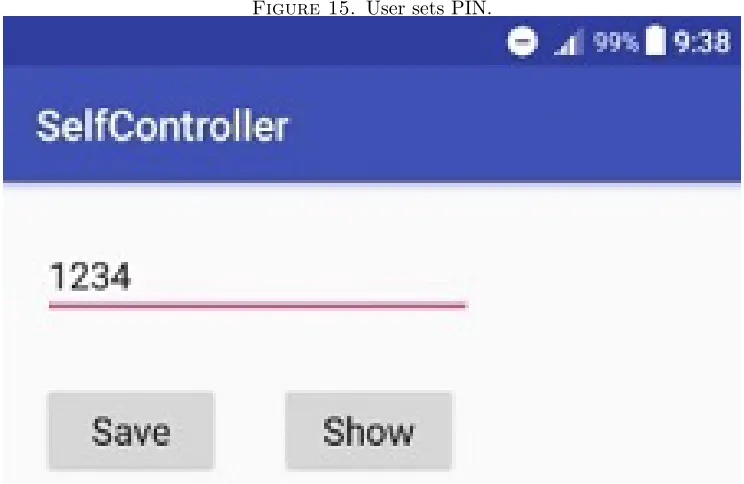
Figure 15. User sets PIN.
Figure 16. Change ringer mode from silent to vibrate.
5. Conclusion
Figure 17. Get contact number.
Figure 18. Help section, changing ringer mode guide.
Figure 19. History section.
• Not knowing the location of the mobile, this research solved this by getting last known location of the mobile phone and sending it to the user.
• Calling the mobile but it is in silent mode, this research solved this by con-trolling the ringer mode and changing it to Vibration or Normal (General) mode.
• Needing a specific contact number, this research solved this by getting the requested contact and sending it to the user.
6. Suggestions and Future Works
As a future work, the researcher has planned to add more actions to increase the abilities of the application to help user taking control of more stuff of his phone such as (control Camera, delete files, uninstall apps, change screen mode), and also to improve the quality of the app and help the user not losing money because of the SMS message cost, researcher suggests a backup way which is using other ways of messaging such as (Email, Facebook Messenger, Viber or any other messaging application).
References
[2] A. I. Wasserman and J. Ondrus, Software engineering issues for mobile application develop-ment., In Proceedings of the FSE/SDP workshop on Future of software engineering research ACM, (2010), 397-400.
[3] Website article,Android Application components, https://www.tutorialspoint.com , 10 March 2018 07:00 PM.
[4] Website article, Marziah K., What Is Google Android?, https://www.lifewire.com , 12 March 2018 08:15 PM.
[5] Website article, Tarun A.,What Everybody Ought to Know about Android: Introduction, Fea-tures and Applications, https://www.elprocus.com , 15 March 2018 08:10 PM
[6] Website article, Wikipedia,ARM architecture, https://en.wikipedia.org , 15 March 2018 08:30 PM
[7] Website article,Permissions Overview, https://developer.android.com , 18 March 2018 07:10 PM
[8] Website article,App Manifest Overview, https://developer.android.com , 19 March 2018 06:50 PM
[9] Website article,Broadcast Receivers, http://archive.oreilly.com , 20 March 2018 07:45 PM [10] Website article,Broadcasts overview, https://developer.android.com , 20 March 2018 08:30 PM [11] Website article,Android - Broadcast Receivers, https://www.tutorialspoint.com,20 March 2018
09:10 PM
[12] L. Robert and L. Nashelsky,Electronic devices and circuit theory, 8 the edition, Prentice Hall (Pearson Education Inc.), 2002.
[13] C. Onukwugha and P. Asagba, Remote control of home appliances using mobile phone: A polymorphous based system, African Journal of Computing and ICT,6(5) (2013), 81-90. [14] A. Faraj and M. Rebaz,Web Technologies Performance Analysis for Different Platforms and