University of New Orleans Theses and
Dissertations Dissertations and Theses
12-15-2006
Expressions as Data in Relational Data Base Management
Expressions as Data in Relational Data Base Management
Systems
Systems
Mahesh Saravanan University of New Orleans
Follow this and additional works at: https://scholarworks.uno.edu/td
Recommended Citation Recommended Citation
Saravanan, Mahesh, "Expressions as Data in Relational Data Base Management Systems" (2006). University of New Orleans Theses and Dissertations. 500.
https://scholarworks.uno.edu/td/500
Expressions as Data in Relational Data Base Management Systems
A Thesis
Submitted to the Graduate Faculty of the University of New Orleans in partial fulfillment of the requirements for the degree of
Master of Science In
The Department of Computer Science
By
Mahesh Saravanan
B.E., Madurai Kamaraj University, India, 2003
ACKNOWLEDGEMENT
I wish to express my gratitude to a number of people who became involved with this
thesis, one way or another.
I am deeply indebted to my Thesis Advisor, Dr. Nauman Chaudhry for the advice, help
and encouragement at the time of research and writing of this thesis. This work was
accomplished after one year of research and hard fought times of Hurricane Katrina.
In addition, I would like to thank Dr. Shengru Tu and Dr. Adlai DePano on
my thesis defense committee.
Finally, I would like to thank my family and friends for the continuous support and help
TABLE OF CONTENTS
Abstract... vii
1. Introduction ...1
1.1 Terminology Used ...4
2. Related Work...7
2.1 Expression Filter In Oracle 10 G ...7
2.1.1 Elements ...9
2.1.2 Expression Filter Usage Scenarios...9
2.1.4 Sample Queries ...10
2.1.5 Support By Other Vendors ...11
2.2 Differences Between Oracle’s And Our Approach ...13
3. The Expression Datatype And Expression Evaluation...15
3.1 Expression Grammar...15
3.2 Semantics Of Evaluation...16
3.3 Evaluation Cases...17
3.3.1 Predicate Level...17
3.3.2 Expression Level...18
3.4 Algorithm ...19
4. Implementation Of Expression Datatype...21
4.1 Data Structure...21
4.2 Mini Dbms - Features ...21
4.3 Storing Expressions: Predicate And Expression Tables ...24
4.2 Parsing The Expressions - LEX Parser ...26
4.3 Entering Sample Data - The Script File ...28
4.4 Execution Of Evaluation ...31
5. Sample Application: E-News ...39
5.1 E-News Architecture...40
5.2 Simulation Of E-News WITH And WITHOUT Expression Datatype...41
5.2.1 Before Approach – Without Using Expression Datatype ...42
5.2.1.1 Data Model...44
5.2.2 After Approach – With Expression Datatype ...51
5.2.2.1 Data Model...51
5.3 Comparison Between The Two Approaches...56
5.3.1 Expressivity ...56
5.3.2 Performance ...57
6. Future Development ...63
6.1 Indexing Expressions ...63
6.2 Supporting Expression As A Native Data Type ...63
6.3 Supporting EVALAUTE As A Native SQL Operator...64
7. Conclusion...65
References...66
LIST OF TABLES
Table 1 Consumer Table...8
Table 2 Car Table ...13
Table 3 Dealer Table ...13
Table 4 Evaluation Possibilities ...19
Table 5 Predicate Table ...25
Table 6 Expression Table...26
Table 7 Sample Link Table...43
LIST OF FIGURES
Figure 1 Data model – Expression datatype ...24
Figure 2 Script File ...29
Figure 3 Predicate Table Screenshot ...30
Figure 4 Expression Table Screenshot ...30
Figure 5 Compiling the Programs ...31
Figure 6 Executing db.c ...32
Figure 7 Directories and Files ...33
Figure 8 Tables Contents after the run ...33
Figure 9 Select statement ...34
Figure 10 Creating Expressions ...35
Figure 11 Table entrees after insertions...36
Figure 12 Evaluation 1...37
Figure 13 Evaluation 2...38
Figure 14 Mobile e-News - Architecture...40
Figure 15 e-News Architecture – Before Case ...44
Figure 16 Table contents – Before Case...48
Figure 17 Prepping and executing – Before Case ...49
Figure 18 Compiling – Before Case ...50
Figure 19 Architecture – After Case...51
Figure 20 Table creation – After Case...52
Figure 21 Expression Insertions – After Case...53
Figure 22 Profile Insertions – After Case ...54
Figure 23 Predicate Table Contents – After Case ...54
Figure 24 Expression Table Contents – After Case ...55
Figure 25 User Table Contents – After Case ...55
Figure 26 User Interests Table Contents – After Case ...55
Figure 27 Results – After Case ...56
Figure 28 Performance Comparisons – Before and After Case ...59
ABSTRACT
Numerous applications, such as publish/subscribe, website personalization,
applications involving continuous queries, etc., require that user’s interest be persistently
maintained and matched with the expected data. Conditional Expressions can be used to
maintain user interests. This thesis focuses on the support for expression data type in
relational database system, allowing storing of conditional expressions as ‘data’ in
columns of database tables and evaluating those expressions using an EVALUATE
operator. With this context, expressions can be interpreted as descriptions, queries, and
filters, and this significantly broadens the use of a relational database system to support
new types of applications. The thesis presents an overview of the expression data type,
storing the expressions, evaluating the stored expressions and shows how these
applications can be easily supported with improved functionality. A sample application is
also explained in order to show the importance of expressions in application context, with
1. INTRODUCTION
A wide-range of applications, including Publish/Subscribe [8], Workflow, and
Web-site Personalization [5], require maintaining user’s interest in expected data as conditional
expressions. The following example [8] shows a simple publish/subscribe application that
requires maintaining user’s interest in expected data.
Example:
Let us consider a transport system where an operator has many things going on at once.
• There may be buses following different routes with passengers who want to know the
status of their bus and when it will arrive at their stop.
• There may also be operators who need to know the status of the bus fleet from time to
time.
• More specifically the passengers would probably be interested in the current status of
their bus, when it will arrive at their stop, and what buses do and will stop at their
station. Most of what they will be interested in will be short-lived information. That is
information that is transient and has little or no value to them once the moment has
passed, since there will be more up-to-date information available or about to become
available.
The operators, on the other hand, would possibly be interested in where all the buses are at a
given time, whether they are on schedule or experiencing any delays, which buses have
problems, and whether there are any breakdowns within the fleet. Some of this information is
transient, but if it is retained it provides an historical picture of events that may be useful input
The transport provider would like to have all the information available to the different
consumers via Web pages where they can select what information they need. In another context,
the users could register their email addresses in web pages and select the information they need
at the time of registration. User’s email addresses and the user’s interests can be stored in terms
of conditional expressions. The information will arrive periodically in their inbox.
As the buses travel around their routes they need to log their position each time they stop,
get delayed, or breaks down. This information can then be made available to all consumers on
demand, or for subscribed users as alerts on delays, late schedules, etc.
Applications requiring continuous queries provide another motivation for use of
conditional expressions. According to [3], continuous queries [4] [9] [10] [11] allow users to
obtain new results from a database without having to issue the same query repeatedly.
Continuous queries are especially useful in an environment like the Internet that comprises of
large amounts of frequently changing information. A set of continuous queries can be modeled
as a collection of expressions that can be stored for later querying usage. This is done to avoid
redundant retrieval of results by consolidating a large set of queries to a smaller set of common
expressions thereby saving a lot of time in data retrieval.
The following is an example of how and why we use expressions.
Example:
Let us consider a Car Buy/Sell business. There may be many forms of user’s interests,
some of these modeling interests of sellers and others modeling interests of buyers. Some of them
• A buyer may be interested in one or more cars that match specific criteria, such as
price, model, etc.
• A car may be of interest to one or more buyers with matching criteria.
• A seller may be interested in buyers in particular income brackets.
To match incoming data about cars to relevant buyers, and to match new buyers and
sellers to each other, user interest may be modeled as conditional expressions that allow later
manipulations and easier information retrieval.
The information that are hence retrieved, may answer one of the following questions.
• What cars are of interest to each consumer?
• What sort of buyers are of interest to each seller?
• What kind of demand exists for each car? This can help to determine optimal pricing.
• Is there any unsatisfied demand? This can help to determine inventory requirements.
This thesis proposes to manage such expressions as data in Relational Database
Systems (RDBMS). This is accomplished 1) by allowing expressions to be stored in a column of
a database table and 2) by introducing a SQL EVALUATE operator to evaluate expressions for
given data. Expressions when combined with predicates on other forms of data in a database are
a flexible and powerful way of expressing interest in a data item. The ability to evaluate
expressions (via EVALUATE operator) in SQL, enables applications to take advantage of the
expressive power of SQL to support complex subscription models.
the approach taken in this thesis. Chapter 3 describes the expression datatype used in this thesis.
In the following chapter implementation of the expression datatype in a simulated mini Data
Base Management Systems (DBMS) is explained. Chapter 5 explains a sample application and
describes the data management aspect of the application both with and without the use of
expression data type. Chapter 6 outlines future enhancements and chapter 7 concludes the thesis.
1.1 TERMINOLOGY USED:
EXPRESSION:
An expression is a combination of identifiers, values, and operators that can be evaluated
to obtain a result. Expressions can be used, for example, as a search condition when looking for
data that meets a set of criteria. Expressions are a useful way to describe interests in expected
data.
Expressions are nothing but conditions. They evaluate to true or false depending on the
incoming data and the user’s interest.
Example:
Let us consider a table, Car, which has details about various cars such as model, price
year, color, mileage etc. A select statement against the table to select all cars less than 20000
dollars and manufactured in or after 2000 can be represented as follows.
Select * from Cars where Car.Price < 20000 and Car.Year >= 2000
Here, “Car.Price < 20000 and Car.Year >= 2000” is the expression.
PREDICATE:
Subparts of an expression are called predicates. A valid expression consists of one or
more simple conditions called predicates. The predicates in the expression are linked by the
logical operators AND and OR. In this thesis, however, only the AND operator is supported.
Example:
Let us consider the same example as in expression of a table, Car, and let us consider the
same expression. “Car.Price < 20000 and Car.Year >= 2000”. Here the predicates are
Predicate 1 - “Car.Price < 20000”
Predicate 2 - “Car.Year >= 2000”
Combining Predicates on other forms of data, like functions, in a database is just a
powerful way of expressing interest.
EVALUATE
The EVALUATE operator is used to compare stored expressions to incoming data items.
The EVALUATE operator returns a 1 for an expression that matches the data item, and returns a
0 for an expression that does not match the data item. For a given input data item, EVALUATE
operator checks if any Expressions evaluates to True. EVALUATE operator returns 1 if an
Expression is evaluated to True for a given input data-item. It will be discussed further in the
coming sections of this document.
DATA ITEM:
As described above, expressions model the condition part of queries in relational
considered analogous to tables against which queries are evaluated. An Expression evaluates to
True if the incoming data-item meets the user’s interest, and if the incoming data-item does not
meet the user’s interest then the Expression evaluates to False.
DATA ITEM CONSTITUENT:
The data item constituents are the sub parts of a data item. The relationship of data item
constituents to a data item is similar to the relationship of predicates to an expression.
Example:
Let us consider a data item for the expression example that is given under ‘expression’. A
data item may be of the form
“Car.Price = 15000 and Car.Mileage = 25000
The data item constituents for the above mentioned data item are
Data item constituent 1: Car.Price = 15000
Data item constituent 2: Car.Mileage = 25000
2. RELATED WORK
Major software vendors, such as Oracle, IBM, Microsoft, provide support for
conditional expressions. The approach taken by Oracle, described in [1], is most relevant to this
thesis and is discussed next. A description of the functionality provided by IBM and Microsoft is
given later in this chapter. The chapter concludes with a discussion, highlighting the differences
in the approach used in this thesis and the existing approaches.
2.1 EXPRESSION FILTER IN ORACLE 10 G
Conditional expressions can be used to describe interest in information. One could
consider expressions in isolation, as publish/subscribe systems generally do, or as part of a more
general description of message consumers. Expression Filter is a feature of the Oracle Database
10g that allows application developers to store, index, and evaluate conditional expressions in
one or more columns of a relational table. Expressions are a useful way to describe interest in
some expected data. Applications involving information distribution, demand analysis, and task
assignment can benefit from Expression Filter.
Oracle 10G Expression Filter matches expressions in a column with a data item passed
by a SQL statement or with data stored in one or more tables, and evaluates each expression to
be true or false.
Example:
Consider an application that matches buyers and sellers of cars. A table called
Consumer describes the buyers. This table consists of multiple columns, such as Name,
describes the kind of car the consumer wants to purchase, including make, model, year, mileage,
color, options, and price. A sample table is shown below.
Name ID Address Interests
John U2001 1, A Car.Model = Taurus and Car.Year = 2000 Ben U2003 2, B Car.Model = Toyota and Car.Price < 20000 Anna U2004 3, C Car.Model = Taurus and Car.Year > 2002
Table 1 Consumer Table
Expression Filter can match incoming data with conditional expressions stored in the
database to identify rows of interest. Specifically, a new SQL EVALUATE operator is provided
that matches the incoming data items with the expressions to find prospective buyers.
SELECT * FROM Consumers WHERE
EVALUATE (Consumer.Interest) …, <DATA ITEM>) = 1
This statement returns those rows for which the expressions match the values of the
data item. Data about cars for sale is included with the EVALUATE operator in the SQL
WHERE clause.
The previous example showed how incoming data is filtered based on subscriber
interest. With the addition of the expression data type in the relational database management
system, it also becomes easy for a publisher to filter recipients of information as the following
examples shows.
A publisher could issue a query to find rows that satisfy certain criteria, for example,
find every Customer who is located in a particular locality. The result set could be used to define
the consumers of particular data item. In this case the publisher determines the recipients with a
The SQL EVALUATE operator also enables batch processing of incoming data.
Data can be stored in a table called CARS and matched with expressions stored in the
CONSUMER table using a join between the two tables.
2.1.1 Elements
Expression Filter includes the following elements
• Expression datatype - a virtual datatype created through a constraint placed on a
VARCHAR column in a user table that stores expressions
• EVALUATE operator - an operator that evaluates expressions for each data item
• Administrative utilities - set of utilities that validate expressions and suggest optimal
index structure
• Expression indexing - enhances performance of the EVALUATE operator for large
expression sets. Expression indexing is available in Oracle Database Enterprise Edition
2.1.2 Expression Filter Usage Scenarios
1. To screen incoming data
• Find matches with expressed interests or conditions
o We have found an item that may be exactly what you’re looking for (based on
your personal preferences)
o A suspect has just entered the country (given the terrorist screening guidelines
provided by the authorities)
• Find non-matches
o This new piece of data does not meet one of (y)our standards
2. To screen existing data for new interests, conditions, standards or rules
• Because of this new EU regulation, we have to redesign these products
3. To dynamically bundle up multiple queries
2.1.3 Application Characteristics
Expression Filter is a good fit for applications where the data has the following
characteristics:
• A large number of data items exists to be evaluated
• Each data item has structured data attributes, for example VARCHAR, NUMBER, DATE,
XMLTYPE
• Incoming data is evaluated by a significant number of unique and persistent queries
containing expressions
• The expression (in SQLWHERE clause format) describes an interest in incoming data
items
• The expressions compare attributes to values using relational operators (=, !=, < , >, and
so on)
2.1.4 Sample Queries
Let us consider a situation where a user (in this case a car dealer) is interested in all consumers
interested in a Mustang car which was made in the year 2000 and which costs 18000 dollars and
has run 22000 miles. Assume that the consumer information is stored in the Consumer table
expressions. A query to cater such a dealer’s need in terms of Oracle’s expression filter would be
as follows:
SELECT * FROM Consumer WHERE
EVALUATE (Consumer.Interest, 'Model=>'Mustang'', Year=>2000, Price=>18000,
Mileage=>22000’) = 1;
2.1.5 Support by other vendors
Apart from Oracle, other vendors such as IBM, Microsoft etc have also contributed to
support this functionality. For example IBM developed GRYPHON, IBM: Gryphon [13] AND
Microsoft developed SCRIBE [2].
Gryphon was designed and implemented to provide content-based publish/subscribe
functionality using the fast, scalable routing algorithms. Clients access the system through
implementation of the Java Message Service (JMS) API.
Microsoft also supported a similar thing in SQL Server called SCRIBE (Notification
Services). Scribe is a topic-based system. Scribe is the premier platform for developing and
deploying highly scalable notification applications. Capitalizing on the Microsoft .NET
Framework and SQL Server, Notification Services provides an easy-to-use programming model
for generating and formatting notifications based on personal subscriptions. This
device-independent architecture can accept event data from any source and securely deliver it to a
variety of mobile devices, including personal digital assistants (PDAs), cellular telephones, and
Even though other vendors have support for publish/subscribe technology through
specific systems such as Gryphon and Scribe, the main difference between Oracle expression
data type is that, in Oracle, the functionality is built and implemented within the database. In
other words, the expressions are stored in a column of a table so that no extra resource / utility
needs to be installed separately.
Another advantage by using Oracle’s approach for publish/subscribe is that, by using
Oracle’s approach, both publish and subscribe can be implemented with the same methodology,
which means, it doesn’t have to be two different implementation approaches, one for publish and
the other for subscription.
One other important feature of the Oracle’s expression data type is the EVALUATE
operator which is not present in both Gryphon and the Scribe. The SQL EVALUATE operator
saves time by matching a set of expressions with incoming data. This saves labor by allowing
expressions to be inserted, updated, and deleted without changing the application and providing a
results set that can be manipulated in the same SQL statement, for instance to order or group
results. Storage of expressions as data also enables large expression sets to be indexed for
performance. In contrast, a procedural approach stores results in a temporary table that must be
queried for further processing, and those expressions cannot be indexed. As both Gryphon and
2.2 DIFFERENCES BETWEEN ORACLE’S AND OUR APPROACH
Though the expression filter from Oracle 10G is similar to the expression concept in
terms of evaluation from our approach, there is one main difference in terms of complexity.
Oracle 10G’s expression filter is applied over a single table, whereas, our approach of Evaluate
operator can be applied over multiple tables as shown by the following example.
Example:
Let us assume a web application where there are two tables Car and Dealer. One
table contains information about cars, including car price, car model, car year etc. (An example
is shown in table 2). Another table contains information about car dealers, including dealer
name, address, rating etc. (An example is shown in table 3). If a user is interested in buying a
car which is around $10000 but he wants to buy from a good dealer, an expression to cater such
a user’s interest would involve predicates that access data in both the tables car and dealer , and
later on when we apply the EVALUATE operator, it would be across both the tables. For
example in that case the expression would look something like this
Car.Price = 10000 AND Dealer.Rating = 10
# Model Year Price Color Mileage
1 Taurus 1999 10000 Blue 40000 2 Toyota 2000 13000 Black 20000 3 BMW 2001 20000 Silver 23000
Table 2 Car Table
# Name Address Zip Rating Cars
1 Toyota 1, A 10172 7 400
2 Auto Zeal 2, B 10183 5 200
3 Car Zone 3, C 11289 10 125
The above expression is with the assumption that a rating of 10 is the maximum rating
that can be assigned to a dealer.
One other difference between Oracle’s expression filter and this approach of expression
datatype lies in terms of implementation. In our approach, the expressions are stored in separate
tables as opposed to storing them in a column of the same table. This might be thought of as a
downside, because by storing expressions in a separate expression table, additional join can be
required between the expression table and the table with the user/customer info, but, having the
expressions in separate table will be a more Normalized form of representation because different
users might be interested in the same data item that might repeat many times in the user interests
3. THE EXPRESSION DATATYPE AND EXPRESSION
EVALUATION
This chapter describes the structure and semantics of expression datatype. The chapter
begins by providing the grammar for an expression in the BNF form. Evaluation semantics are
explained next which is followed by explaining how expressions are evaluated to true with an
algorithm.
3.1 EXPRESSION GRAMMAR
Any expression can be said to be composed of one or many atomic expressions which
are called Predicates. The BNF representation of the expression datatype is shown below.
Expression ::= Predicate | Predicate AND Expression
Predicate ::= Identifier Operator Constant | Constant Operator Identifier
Operator ::= < | > | = | <= | >=
Identifier ::= Table.Column
Example:
Let us consider the following expression
Car.Year = 2000 AND Car.Price < 20000
The above expression can be represented in the BNF form as follows. For ease of understanding
the grammar representation of the expression is shown from the identifier level.
Identifier1: Car.Year
Operator2: <
Constant1: 2000
Constant2: 20000
As per the grammar, Predicate1: Identifier1 Operator1 Constant1
Representing the our example in predicate form we have
Predicate1: Car.Year = 2000
Similarly we have Predicate 2 as
Predicate2: Car.Price < 20000
Also as per grammar, Expression: Predicate1 AND Expression
And bringing in the Predicate 2 gives, Expression = Predicate1 AND Predicate2 which is
simplified as Expression: Car.Year = 2000 AND Car.Price < 20000
Hence we have represented our sample expression in BNF form.
3.2 SEMANTICS OF EVALUATION
The EVALUATE operator is used to evaluate a data item against the stored
expressions. The EVALUATE operator accepts a set of data item constituents in a data item, and
those data item constituents are evaluated on all the stored expressions and in turn predicates.
This operator returns a list of stored expressions that were evaluated to true against the provided
data item.
If there are more than one predicates in an expression, all predicates have to be
Example:
Consider the expression
Car.Year > 1995 AND Car .Year < 2000
In this expression, there are two predicates.
Consider this expression is evaluated against the following data item Car.Year = 1998
In this case the expression would be evaluated to true because both the predicates are
evaluated to true.
Let us consider evaluation of one more data item
EVALUATE Car.Year = 2005
Now, even though the first predicate is evaluated to true, the second predicate is false
and hence the expression as a whole would be evaluated to false.
3.3 EVALUATION CASES
Based on the above discussion, we could frame three possibilities of evaluation at the
predicate level and at the expression level. They are given as follows.
3.3.1 Predicate Level
At the predicate level, there are three possible outcomes when each predicate of an
expression is evaluated for a data item.
• CASE 1 – PREDICATE EVALUATES TO TRUE
In this case a) the data item contains a constituent matching the identifier in the predicate,
Example:
Predicate: Car.Year > 1995
Data item constituent: Car.Year = 1999
• CASE 2 – PREDICATE EVALUATES TO FALSE
In this case a) the data item contains a constituent matching the identifier in the predicate,
and b) the predicate evaluates to false for the value in this data item constituent.
Example:
Predicate: Car.Year > 1995
Data item constituent: Car.Year = 1992
• CASE 3 – CANNOT EVALUATE PREDICATE
In this case the data item does not contain any constituent that matches the identifier in
the predicate.
Example:
Predicate: Car.Year > 1995
Data item: Car.Model = ‘TAURUS’ AND Car.Price = 20000.
3.3.2 Expression Level
The expression is a combination of one or more predicates. Therefore at the
expression level, there are three cases also. They are explained as follows.
1. Expression evaluates to true if ALL the predicates in the expression evaluate to true.
2. If at least one predicate in an expression evaluates to false, then the expression evaluates
to false.
3. If at least one predicate in an expression cannot be evaluated, then the expression
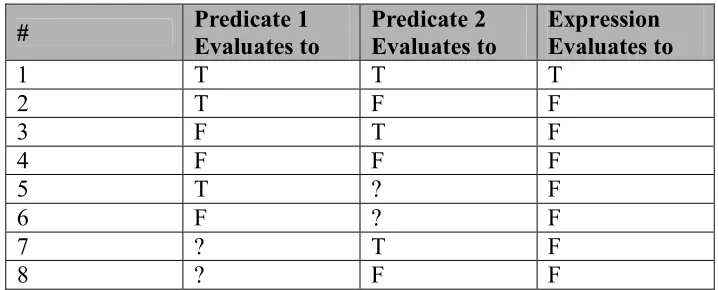
If we consider expressions with two predicates, the above can be enumerated as
follows. Note: ‘?’ refers to predicates that cannot be evaluated.
# Predicate 1 Evaluates to Predicate 2 Evaluates to Expression Evaluates to
1 T T T 2 T F F 3 F T F 4 F F F 5 T ? F 6 F ? F 7 ? T F 8 ? F F
Table 4 Evaluation Possibilities
3.4 ALGORITHM
The algorithm developed for evaluation of expressions is as follows. First the given
data item was taken and checked against all the predicates of all the conditional expressions to
get a list of predicates that are evaluated to true. So now, irrespective of the expressions we have
a set of predicates that are evaluated to true. Then, the list of predicates is compared with the
expressions to get the list of expressions that have those predicates evaluated to true. All of the
predicates in an expression have to be present in the list, which contains the list of predicates that
are evaluated to true. So the resultant set is a set of expressions that are evaluated to true. The
evaluation can be expressed in the following sequence of steps.
1. Parse the data item to split them to individual data item constituents
2. For each data item constituent
3. Traverse through all expressions
• If all the predicates of an expression are present in the ‘predicate out’ array, that
expression evaluates to true.
4. IMPLEMENTATION OF EXPRESSION DATATYPE
In order to implement the expression data type and to develop the
EVALUATE operator, a mini DBMS was implemented in C. The DBMS supports few features
that are essential for the testing of the expression data type and the EVALUATE operator.
4.1 DATA STRUCTURE
The data structure as such is simple because only a few features of a real DBMS were
implemented. Provisions are there to create a new database and to work on an existing database.
Tables and schemas are preserved for each database. All the table information is stored in flat
files with tab delimiters. All user table information is stored in a table called sys_tab. This is
again a flat file with the same data structure. The other two tables that are created when a
database is created are the Expression table and the Predicate table. These tables are explained
under section 4.3.
4.2 MINI DBMS - FEATURES
Expressions, or in general data, has to be inserted, deleted or selected into and from
the predicate tables and the expression tables for various purposes of testing and building the
EVALUATE operator. For this purpose some features were implemented. The features that are
implemented are: create a new database, work on an existing database, Create Table, Insert,
Create Table:
The create table feature creates a table with an entry in the sys_tab table. This feature
does not allow duplicate tables in a database. So every time a new table is created, the name of
the new table is validated against the entries in the sys_tab table. The code snippet for create
table is shown.
if (strcmp (arr[0],"create")==0) { table[0]='\0'; strcpy(table,arr[2]); strcat(table,".txt"); sys=fopen("sys_tab.txt","a+"); i=0; flag=0;
while (fscanf(sys,"%s",temp[i]) != EOF) { if(strcmp(temp[i],table)==0){
printf("\n Table already exists. "); flag=1; } i++; } fflush(sys); fclose(sys);
if(flag==0) {
sys=fopen("sys_tab.txt","a+"); fprintf(sys,"%s\t\n",table); tb=fopen(table,"a+"); for(i=4;i<ncmd;i+=3) fprintf(tb,"%s\t",arr[i]); fprintf(tb,"\n"); for(i=5;i<ncmd;i+=3) fprintf(tb,"%s\t",arr[i]); fprintf(tb,"\n"); fclose(tb);
printf("table created"); }
Example:
Let us consider an example where we have to create a table with two columns ‘id’ and ‘name’. In
the mini DBMS, the creation syntax is the same as any SQL create function. The example is
shown below.
CREATE TABLE employee (ID INT, NAME VARCHAR);
Select
The ‘select’ feature is a typical select feature with limited options. There are six cases
with which the select statement is built. They are listed below.
• Select *
1. Where clause contains ‘=’
2. Where clause contains ‘<’ or ‘<=’
3. Where clause contains ‘>’ or ‘>=
• Select columns
4. Where clause contains ‘=’
5. Where clause contains ‘<’ or ‘<=’
6. Where clause contains ‘>’ or ‘>=
Examples of selects from the previously created employee are shown below.
• SELECT * FROM Employee WHERE NAME = ‘JOHN’
• SELECT * FROM Employee WHERE ID < 1000
4.3 STORING EXPRESSIONS: PREDICATE AND EXPRESSION TABLES
This section describes how expressions are stored as predicates and how they are
referenced in forms of table rows. User’s Interests are considered as sets of expressions.
Expressions are said to be composed of one or more predicates. In this database, the predicates
are stored in a table called the PREDICATE TABLE, and the expressions, which compose the
predicates, are stored in another table called the EXPRESSION TABLE, with references to the
predicates in the predicate table making it a kind of foreign key relationship.
The data model diagram for the expression datatype, which shows the relation
between the Predicate table and the Expression table, is shown below.
Expression
PK Expression ID
Predicate ID Predicate
PK Predicate ID
Table Column Operator Constant
Figure 1 Data model – Expression datatype
The predicate table contains the following fields.
• Predicate ID
• Table
• Operator
• Constant
The expression table contains the following fields.
• Expression ID
• Predicate ID
An expression may consist of more than one predicate which implies that more than
one row in the expression table are part of the same expression.
Example:
For example let us consider the following two expressions with different number of
predicates, one with two and the other three. In this example, there are two tables Car and
Dealer that are involved. Let’s say that Car has columns such as Model, Year, Price, Color etc
and Dealer table has columns such as Name, Address, Rating, etc.
1. Car.Model = ‘Taurus’ AND Car.Year = 1998
2. Car.Model = ‘Mercedes’ AND Car.Year = 1998 AND Dealer.Rating = 10
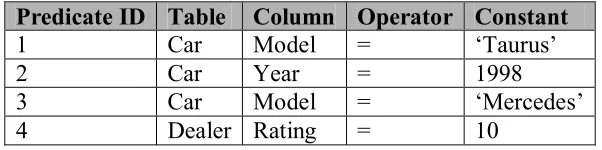
These two expressions are stored in the predicate table and the expression table as follows.
Predicate ID Table Column Operator Constant
1 Car Model = ‘Taurus’
2 Car Year = 1998
3 Car Model = ‘Mercedes’
Expression ID Predicate ID
1 1 1 2 2 3 2 2 2 4
Table 6 Expression Table
In the above example, there are two expressions one with two and the second with three
predicates that are stored. Hence there are totally five predicates when we consider both the
expressions. Even though there are totally five predicates in the two expressions, only four
entries are entered in the predicate table. This is because the predicate with predicate id 2 is
repeating in both the predicates and is stored only once. In other words, predicates that are
common among different expressions are stored only once.
As explained before, more than one table can be involved in this approach of expressions.
In other words, expressions can be specified over multiple tables.
4.2 PARSING THE EXPRESSIONS - LEX PARSER
A parser was developed using the LEX tool to parse the expressions and separate the
tokens to be stored in the predicate table. The tokens were table, column, operator and constant.
The parser was built in such a way that the expressions can be reversed, i.e. the column name can
come after the constant. For example
Car.Model = ‘Taurus’
(or)
Initial research was done on Lex parser through various books and papers. One such
book is [6]. The parser contains various segments, which check for a particular group of literals.
One such segment checks for alphabetical words and if there are any, stores the words in an
array. The code segment is shown below.
[a-zA-Z]*\.[a-zA-Z]+ { for (i=0;i<strlen(yytext);i++) if (yytext[i]=='.')
break; else temptable[i]=yytext[i]; temptable[i]=='\0'; k=0; for(j=i+1;j<strlen(yytext);j++) { tempcolumn[k]=yytext[j]; k++; } tempcolumn[k]='\0'; strcpy(column[v],tempcolumn); strcpy(table[u],temptable); u++; v++; }
If there are the words ‘and’ or ‘AND’ then the number of predicates are increased.
"AND" |
"and" {
prid++;}
The operators checked are as follows.
"=" |
"<" |
">=" {
strcpy(operator[w],yytext);
w++;
}
There are some special words such as EVALUATE, INSERT, EXPRESSION etc, which
are also checked, and corresponding actions are taken. The main token which is checked is the
‘;’, which denotes the end of a query or expression. Therefore if a ‘;’ is found then that is where
the actual processing starts to store the expression and predicates.
4.3 ENTERING SAMPLE DATA - THE SCRIPT FILE
In order to populate the expression table and the predicate table with sample values a
script was written. This script generates the given number of predicates and accordingly
expressions with provisions of sample values as input. With the sample values, random
combinations are generated to give a complete test set.
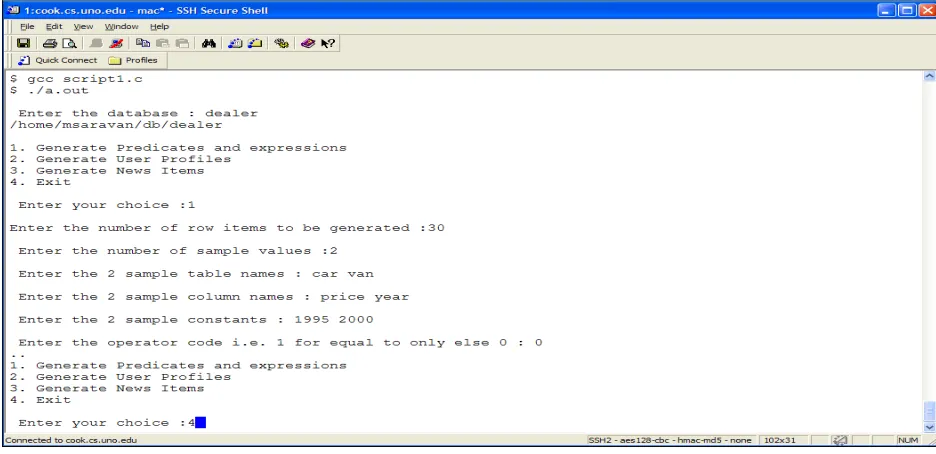
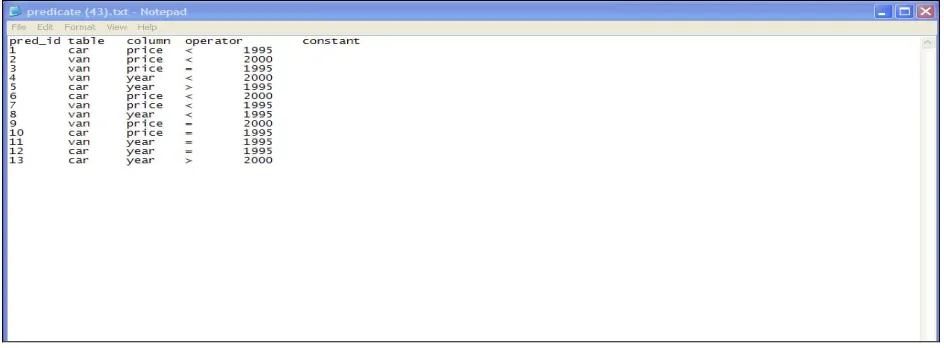
The script file is named as script1.c and the compilation and a sample run is shown in
Fig 2. The predicate table and the expression table generated as a result of the script file are also
shown in Fig 3 and 4respectively.
The expression file has predicate ids that are generated in the predicate tables. Also
The options that are present in under the script file are
1. Generate Predicates and Expressions
2. Generate user interests
3. Generate news items.
4. Exit
Option 1 generates predicates and expressions and populates them to the predicate and
expression tables correspondingly. Options 2 and 3 are used to populate user and user_interests
tables respectively which are explained in the next chapter.
Figure 2 Script File
The following figure shows some inserted values in the predicate table as a result of executing
Figure 3 Predicate Table Screenshot
And those predicates are created as part of expressions, which are inserted into the expression
table.
4.4 EXECUTION OF EVALUATION
The following screenshots show the compilation and execution of the programs. The
first screen below shows the directory structure before compilation, which has the three program
files script1.c, db.c and the lex parser, parse.l.
First in order to create a new database and start entering our commands, we compile
the db.c program using gcc compiler. Then the lex parser is compiled to form the intermediate
file, which is then compiled using the gcc compiler to get the executable object file “first”.
A list of the files after compilation is shown which includes the executable a.out for
the db.c and the intermediate C file lex.yy.c, which contains embedded lex file and the
Fig 7 shows the file structures after creating a new database dealer. We can see that by
default three files are created (in this case considered tables).
The three tables are
• Sys_tab
• Exp
• Predicate
The sys_tab table has information about all the tables in that particular database. The
exp table is used to store the expressions and the predicate table is used to store the predicates.
We can also see another table cardetails, which we created. Once we create the table cardetails,
an entry will be populated in sys_tab file with the table name cardetails.
Fig 8shows the various contents of the sys_tab, exp, predicate and the cardetails tables.
Figure 7 Directories and Files
The following screenshot shows the select statement feature in the mini DBMS. The
various options shown are selecting data using wildcards, using column names and using various
operators in the condition clause.
Figure 9 Select statement
Some execution examples of the select statements are shown in the figure 9. The
Figure 10 Creating Expressions
Insert statement, which is also a part of the mini DBMS is shown in figure 10. Insert
statement can also insert expressions. In that case the expression is broken down into individual
predicates and the predicates are inserted into the predicate table and the expressions are inserted
in expression table. The lex parser is used for parsing.
In Fig 10, the predicate Car.Model = Taurus repeats thrice in expressions 1, 2 and 6. But
still only one is stored as shown in the Fig 11. In the predicate table this is represented as
predicate id 1. In the expression table, Predicate id 1 is present in three places over multiple
The expressions and predicates from the back end is shown in the following figure
Figure 11 Table entrees after insertions
Having shown screenshots of table creation, selection of data, insertions (in Fig 10) etc,
we now move on to expression evaluation. The following two screenshots shows how to evaluate
The following screenshot (Figure 12) shows an evaluation for the data item Car.Model =
Taurus. The expressions that have predicates that match the data item are 1, 2 and 6. Even
though 2 and 6 have the predicate Car.Model = Taurus, those expressions are not evaluated to
true because as per rule, “all predicates in an expression” have to be evaluated to true for the
expression to be evaluated to true. Hence only expression 1 is evaluated to true.
Similarly, the following screenshots (Figure 13) show some evaluations of additional data
items along with expressions, which evaluate to true for the corresponding data items.
Additionally evaluation times in terms of microseconds are also shown for each evaluation.
5. SAMPLE APPLICATION: E-NEWS
Every Internet buff, on a daily basis has to browse quite a few web sites to get
information/news on some of his areas of interest. It could be Sports, Music or even Information
Technology. Time is a constraint that every person in this world has. So, obviously, it would be
very nice to have a single point to get all the news a person needs to know daily, or whenever
possible.
Mobile e-News (hereafter referred as e-News) is a Web Service based application that
was developed for a Palm device. E-News was developed previously as part of a class project
[12] in ‘Topics in Mobile Computing”. J2ME technology was the backbone of the application.
Mobile e-News is an application that provides news that is updated quite often. The content of
the news displayed depends on the user who is logged in. When users register themselves in the
e-News website, they would provide their interests in different categories. When they login to the
application from the mobile device, they would get updated news according to the registered
categories.
The categories were
• Music
• Sports
• Education
Some of the interests under each category were Rock, Jazz and Hip Hop under music,
Notice that e-News application requires storing a user’s interest and periodically
evaluating this interest against news items. This application is thus an excellent candidate for use
of expression data type.
In Section 5.1, the overall architecture of e-News application is described. Section 5.2
compares two approaches of implementing e-News. The first implementation doesn’t use
expression data type, while the second implementation makes use of the expression data type.
Section 5.3 compares the two implementations in terms of expressivity and performance.
5.1 E-NEWS ARCHITECTURE
The application was developed on a Web Services Model, using the architecture
suggested by Sun Microsystems in the Java Web Services Developer Pack 1.2. The
Application Server would communicate with a UDDI Registry to find out any relevant
Information Web Service Providers. Once this is ascertained, the Servlets would
communicate with various Web Services using SOAP and retrieve the relevant data before
populating the GUI for the user to view. User information is stored in a simple database
created in ORACLE.
5.2 SIMULATION OF E-NEWS WITH AND WITHOUT EXPRESSION
DATATYPE
This section compares and contrasts two approaches to implement e-News. Both the
approaches are not complete implementations of the e-News application. In both the approaches
only those features of the application are implemented that are necessary to contrast the
modeling of user interest and compare the performance. The first one, referred to as Before
Approach is a simulation of e-News using regular database joins, i.e., without using expression
datatype. The second approach referred to as After Approach is a simulation of e-News with
expression datatype.
In both approaches the interests of users are stored in a table called user_interest. In
the before approach, the user interest is a mapping between the user table which has all personal
information about the user (explained later in detail) to three other tables which store information
about the user interests by the use of regular database joins. In the after approach, the user
interest is a mapping between the same user table, which has personal information about the
5.2.1 Before Approach – Without Using Expression Datatype
We first describe how user interest is maintained and evaluated against the latest news
without using expression data type. This approach is referred to as Before Approach and is
similar to the database model used for the e-News class project.
In e-News class project, a first time user has to register his interests in the application.
During registration, the user chooses his area of interests from a list of available categories. The
available categories are music, sports, academics, etc. Within each category the user further
specifies characteristics of items that are of interest to him. The user interest is stored in tables
such as table, column, constant, user, user_interests etc. Details about these tables will be
explained in the next section. The user also enters their profile information such as address.
Other tables which were used are the ‘link’ table and the user ‘authentication’ table. Description
of these tables is given below.
Table 7 is a sample ‘link’ table. This table has two columns ‘metadata’ and ‘URL’.
The e-News application retrieves links to news items from different websites. URLs of these
items are stored in the ‘URL’ column. Metadata about the item pointed to by the URL is stored
in the ‘metadata’ column. This metadata is analogous to the data item which was already
explained before. More than one URL in the ‘link’ table may have the same metadata. E.g., in
the sample ‘link’ table there are two rows with metadata Subject.Sports = ‘Soccer.’ So if a user’s
interest included soccer, then these two URLs will appear in sports section of the screen shown
Metadata URL
Subject.Music = ‘Rock’ http://music.yahoo.com/read/news/35553567
Subject.Sports = ’Soccer’ http://sports.espn.go.com/sports/soccer/news/story?id=2571758 Subject.Sports = ’Soccer’ http://sports.espn.go.com/sports/soccer/wc/news/story?id=2569310 Car.Model = ‘Taurus’ http://www.cars.com/go/search/modelid=185/model=Taurus Car.Year = 2000 http://www.cars.com/go/search/year2000&
….. ……….
Table 7 Sample Link Table
Table 8 is a sample ‘authentication’ table, which contains all password information for
the users. This table has two columns ‘user_id’ and ‘password’. The user ids map to the user ids
in the user table.
User_ID Password
1 abc 2 def 4 ghi
….. ……….
Table 8 Sample Authentication Table
When a user logs on to e-News, first, authentication is performed by verifying the user
id against the password in the authentication table. Next, user’s interests are retrieved from the
database. These interests are matched with the rows in the links table and corresponding news
items are populated on the screen. This may be termed as “first time data retrieval”.
Additionally, periodic requests are sent by the application to the web server to get
more recent news and updated in the links table. Hence, when the user stays logged in the
application for a considerable amount of time say till after the periodic link table refresh is done,
and if the user refreshes his/her browser, he/she would see more updated news on their interest.
The tables links table and authentication table are functionally the same for both the
approaches. Hence, those tables are irrelevant for the comparison and are not implemented in
both the approaches.
The simulation of the before approach is done using DB2 as the database and C as the
interface language with embedded SQL in the program.
5.2.1.1 Data Model
The ER diagram for the before model is shown in the figure.
Table PK table_id table_name Constant PK Const_id Const_name Column1 PK column_id column_name User Interests User_id table_id column_id const_id User1 PK User_id name Address
Figure 15 e-News Architecture – Before Case
Table Creation and Data Insertion
In order to explain a user interest, some sample data is entered and the statements used
to create table and perform inserts are shown in the following paragraphs. The insert statements
are used to create the user interests by making inserts to the following tables: table, col, constant,
Table Creation SQLS
create table ls2user.tbl ( tbl_id varchar(20), tbl_name varchar(20));
create table ls2user.col ( col_id varchar(20), col_name varchar(20));
create table ls2user.const (const_id varchar(20), const_name varchar(20));
create table ls2user.user1 ( user_id varchar(20), user_name varchar(20), user_address
varchar(20));
create table ls2user.user_interests ( user_id varchar(20), tbl_id varchar(20), col_id varchar(20),
const_id varchar(20));
Table Insert SQLS
The insert statements are used to populate the user’s interests. Various categories,
columns, constants are populated in their respective tables. The unique id is also entered along
with the values. Insertions into the ‘user’ table will have a list of users with their user ids.
Finally, insertions into the table user_interest are done which populates mapping values from all
other tables.
The insert statements create the user’s interest by creating a mapping across the various
tables. For example, the first the first user’s interest is created for the user with user_id ‘1’
(‘john’) who is interested in the news items with table_id as ‘2’ (‘subject’), col id as ‘4’ (‘music’)
and constant as ‘1’ (‘rock’). So in plain words, it means John is interested in rock music and
The following insert statements populate the various tables that are available into the
table called ‘table’. Here the available tables are ‘car’ and ‘subject’.
insert into ls2user.tbl values ('1','car');
insert into ls2user.tbl values ('2','subject');
The following insert statements populate the table called ‘col’, which literally are the
attributes of the elements in the table ‘table’. The various attributes in our example are model,
price and year for car, and music, sports and acads for subject.
insert into ls2user.col values ('1','model');
insert into ls2user.col values ('2','price');
insert into ls2user.col values ('3','year');
insert into ls2user.col values ('4','music');
insert into ls2user.col values ('5','sports');
insert into ls2user.col values ('6','acads');
The following insert statements populate the table called ‘const’ which are the available
values for the elements in the table ‘col’. The various constants in our example are rock and jazz
for music, soccer and cricket for sports java for acads and 2000 for price or year.
insert into ls2user.const values ('1','rock');
insert into ls2user.const values ('2','soccer');
insert into ls2user.const values ('3','java');
insert into ls2user.const values ('5','cricket');
insert into ls2user.const values ('6','2000');
The following insert statements populate the table called ‘user1’ which creates the
information regarding the registered users. For example, the first insert statement below states
that ‘john’ has the user id as ‘1’ and lives in ‘111,aaa’ address.
insert into ls2user.user1 values ('1','john','111,aaa');
insert into ls2user.user1 values ('2','allan','222,bbb');
insert into ls2user.user1 values ('3','tom','333,ccc');
insert into ls2user.user1 values ('4','tim','444,ddd');
insert into ls2user.user1 values ('5','mary','555,eee');
The following insert statements create the actual mapping between the users with their
interests. They populate the table called ‘user_interests’. Here the third expression means that
Allan is interested in cars that were manufactured in the year 2000.
insert into ls2user.user_interests values ('1','2','4','1');
insert into ls2user.user_interests values ('1','2','5','5');
insert into ls2user.user_interests values ('2','1','2','6');
insert into ls2user.user_interests values ('3','2','4','1');
Screenshot of tables:
This screenshot is taken by issuing a select * from each of the tables as follows
select * from ls2user.tbl; select * from ls2user.col; select * from ls2user.const; select * from ls2user.user1;
select * from ls2user.user_interests;
Compilation and Program Execution:
• First step 'prep' creates the C file and the bind file. (sqcl part -> bind file, c part -> C file
are contained in the embedded sqc file)
• Second step 'bind' binds the file to the database.
• The 3rd step is compiling the C program created which is shown in the next screenshot
(VC++ to compile)
• The 'exe' file is created in the Debug directory.
• The fourth step is to run the executable 'before' with the arguments.
Figure 18 Compiling – Before Case
Output
The output evaluates the data item “subject.music = rock” The output is written to a file
‘before_out.txt’. The file gives the list of users interested in rock music. The contents of the file
in this case are as follows.
john 111,aaa
5.2.2 After Approach – With Expression Datatype
After Approach is a simulation of e-News with expression datatype and is
implemented using the mini DBMS. In the after case, the user’s interests are modeled in terms of
expressions rather than a mere mapping between various tables. An expression would contain the
table, column and constant information that was in the before case. Also an operator is present
which provides additional information and provides additional functionality in retrieving the
data. The expressions are stored in two tables the expression and the predicate table. The
user_interests table contains a mapping of expressions with users rather than table, column,
constant with users. The link and authentication table remain the same as the before approach
and are not implemented in the simulation
5.2.2.1 Data Model
The ER diagram for the after model is shown in the figure 19.
Expression
PK Expression ID
Predicate ID
Predicate
PK Predicate ID
Table Column Operator Constant User Interest User ID Expression ID User Info
PK User ID
Name Address
Table Creation and Data Insertion
In the After Approach, we have to add only two tables to the mini DBMS, user and
user_interests. The predicate table and the expression table have already been created when a
new database is created as explained in the previous chapters. In order to model a user interest,
some sample data is entered. Here the user interests entered is the same as the user interests
modeled in the before case.
Creating the two tables ‘user’ and ‘user_interests’ using the ‘Create’ statement from
the mini DBMS.
The following screenshot shows inserting data into the tables using Insert function of
mini DBMS. The insert statements are used to populate Expression and Predicate tables by
inserting expressions. It is also used to populate user table as well as user_interest table to create
user’s profiles.
Inserting data into the tables using Insert function of mini DBMS.
Figure 22 Profile Insertions – After Case
Screenshots of tables:
Expression table:
Figure 24 Expression Table Contents – After Case
User table:
Figure 25 User Table Contents – After Case
Execution using EVALUATE operator.
Figure 27 Results – After Case
5.3 COMPARISON BETWEEN THE TWO APPROACHES
A comparison between the before and after approaches is done in this section. The
comparison is done on two concerns, expressivity and performance.
5.3.1 Expressivity
In terms of expressivity the after approach, which is the approach with Expression
• Operator
In the before case, there is no operator that is involved in the predicate. However the
only operator that is specified ‘implicitly’ is in the data and that is an ‘=’ operator. In the after
case, the predicates stored can have relational operators. For example let us consider the
following example where the expression is as follows:
Car.Price < 10000
A data item, say Car.Price = 5000 will evaluate to true in the after case. In the before
case we cannot express this predicate in the database as it does not support the operator.
• More than one predicates over one data item
The before approach doesn’t allow creating conjunctions (i.e., ANDing) when
modeling user interest over one data item. E.g., with the before Approach it is possible to express
a profile of say ‘John’ who is interested in cars with ‘Model’ = ‘Taurus’ and also in those cars
for which ‘Year’ = 2000. However, the before approach doesn’t allow specification of user
interest only in those cars for which both ‘Model’ = ‘Taurus’ and ‘Year’ = 2000.
5.3.2 Performance
Different platforms are used for the before and after case. The before case is
implemented using DB2 which is full-fledged DBMS, while the after case is implemented on
Mini-DBMS, a stripped-down DBMS implemented to support expressions. Differences between
these platforms will have a large impact on the performance of the two approaches. Important
differences include the following:
• DB2 has indexing support, while Mini-DBMS doesn’t support indexing.
• DB2 has all the functionality of a DBMS, including query optimization layer,
buffer cache, transaction layer, etc. Mini-DBMS was implemented mainly to
support expressions and has none of these layers that are needed in a full-fledged
DBMS. Absence of all these layers will significantly boost the performance of
Mini-DBMS.
These platform differences make a fair experimental performance very difficult.
Below we first give experimental results that compare the performance of the two approaches.
We then discuss these results to interpret the experimental results.
Experiments were carried out to compare the performance of the two approaches
based on the speed of evaluation. Sample runs were executed for both before and after cases. The
before case with ‘n’ rows in the ‘user_interests’ table was compared to ‘n’ rows in the
‘expression’ table and the results are tabulated in micro seconds.
value of ‘n’
Before – microseconds After – microseconds
#
Run 1 Run 2 Run 3 Average Run 1 Run 2 Run 3 Average
1 10 0.270 0.254 0.266 0.263333 0.01 0.01 0.01 0.01
2 100 0.288 0.286 0.291 0.288333 0.11 0.11 0.11 0.11 3 1000 0.327 0.373 0.349 0.349667 0.12 0.12 0.12 0.12
Table 9 Performance Comparison – Before and After Case
Performance Comparison 0 0.05 0.1 0.15 0.2 0.25 0.3 0.35 0.4
10 100 1000
Value of 'n'
Ti m e ( m ic ro second s) Before After
Figure 28 Performance Comparisons – Before and After Case
In the before case the data was entered manually through “Table Insert SQLS” which
have already been explained in section 5.2, whereas in the after case data was entered using the
Figure 29 Script File
• We see a considerable increase in performance in the after case. The major cost in
database processing is due to I/O. We compare the amount of I/O in the two approaches
to understand if the cause of performance improvement is due to different amounts of I/O
for the two approaches or due to differences in the underlying platforms.
The SQL used to extract data in the before case is as follows:
select user_name, user_address
from ls2user.user_interests i
inner join ls2user.user1 u
on u.user_id = i.user_id

![table[0]='\0';](https://thumb-us.123doks.com/thumbv2/123dok_us/8938004.1848542/30.612.108.422.207.687/table.webp)