United States Educational Foundation in India, DRTC/Indian Statistical Institute,
DLIS/University of Mysore
Joint Workshop on Digital Libraries 12th – 16th March, 2001
Paper: D
Building Digital Libraries: Data
Capture
Jagdish Arora
Computer Applications Division, Central Library
Indian Institute of Technology, Delhi
1
Introduction
The computerization of the library during the past few decades has focused heavily on creation of surrogate records for printed documents held locally in a library or for providing computerized services through secondary databases held locally on CD ROM or magnetic tapes. The integrated library packages have served well in providing access to documents at bibliographic level. With rapid developments in information technology, particulary, the web technology, the world of digital information resources has expanded quickly and exponentially. Digital information resources include not only rapidly growing collections of electronic full text resources, but also images, video, sound, and even objects of virtual reality. The most significant shift in building digital collections is greater interoperability among information systems across the country and internationally. Building-up digital collections and infrastructure required to access them is a challenge that every library has to deal with.
Today’s digital libraries are built around Internet and web technologies with electronic journals as their building blocks. The increasing popularity of Internet and developments in web technologies is a catalyst to the concept of the digital library. Further, availability of computing power that allow parallel processing, multitasking, parallel consultation and parallel knowledge navigation, put together, creates a semblance of artificial intelligence and interactivity necessary for developing a digital library. Coinciding with availability of software, hardware and networking technology, the advent of world wide web (WWW), its ever increasing usage and highly evolved browsers have paved the way for the creation of a global digital library. Figure 1 is a pictorial representation of digital library infrastructure and services that can be generated from them.
This article delves into the technological evolution, cultural revolution and contents enrichment that led to the revolution in growth and development of digital libraries. The article has two distinct parts, while the first part deliberates upon various aspects of building, accessing and organizing digital resources and collection, the second part elaborates on the process, technology, formats, compression techniques and tools used in digital imaging. The article describes Optical Character Recognition (OCR) and advocates a hybrid solution for preservation of digital information.
2
Digital library: historical perspectives
Although the term digital library has gained popularity in recent years, they have evolved along the technological ladder for past thirty years. In the early 1970s, digital libraries were built around mini and main-frame computers providing remote access and online search and retrieval services to users using computer and communication technology available at that time. The earliest application of digital library concepts involved character-coded storage and full-text indexing of legal and scientific
Digital Resources
Collection Infrastructure
Acquire, Create, Convert and Access Collection Infrastructure
Acquire, Create, Convert and Access Access Infrastructure Search,Browse, ISR Portals Access Infrastructure Search,Browse, ISR Portals Computing & Network Infrastructure Computing & Network Infrastructure Digital Resource Technological And Cultural Changes Technological And Cultural Changes Modified Web-based Library Services
•OPAC to WebPAC
•CDROM to Web Databases
•Manual to Digital Reference Service
•Manual to Real-time Digital Reference Service
•Manual to Electronic Document Delivery Service
Modified Web-based Library Services •OPAC to WebPAC
•CDROM to Web Databases
•Manual to Digital Reference Service
•Manual to Real-time Digital Reference Service
•Manual to Electronic Document Delivery Service
New Web-based Library Services
•Virtual Library Tours
•Library Web Sites
•Library Portals
•Web-based User Education
•FAQ
New Web-based Library Services •Virtual Library Tours
•Library Web Sites
•Library Portals
•Web-based User Education
•FAQ
D i g i t a l C o l l e c t i o n
documents. The Legal Information through Electronics (LITE) System was first implemented by the US Air Force in 1967. Several software packages were released during the mid- and late-1970s for computer-based storage, indexing and retrieval of documents in character-coded form. Some of the better known text storage and retrieval packages included: IBM’s Storage and Information Retrieval System (STAIRS), Battelle Automated Search Information System (BASIS), INQUIRE, BRS/SEARCH, DOCU/MASTER, ASSASSIN, STATUS, CAIRS, etc. By the late 1980s, text storage and retrieval programs were available from dozens of vendors for major computing environments including main-frame, microcomputers and LAN.
Sophisticated information storage and retrieval systems were built during the 1980s using state-of-the-art technology of distributed database management system linking different remote systems. These online information retrieval services used data files generated in the process of electronic phototypesetting of printed abstracting and indexing services and other primary journals. As such, online hosts like DIALOG and STN were not only offering online databases but also full-text online journals for the past several years, although as a simple ASCII or text file without graphics and pictures. In 1989, there were almost 1,700 full-text sources in sixteen online systems. Availability of CD ROM in the late 1980s, as a media with high storage capacity, longitivity, and ease of transportation triggered production of several CD ROM information products that were earlier available through online vendors or as conventional abstracting and indexing services in printed format. Moreover, several full-text databases also started appearing in the late 1980s and early 1990s launching the beginning of the digital era. Some of the important full-text digital collections available on CD ROM include: ADONIS, IEEE / IEE Electronic Library (IEL), ABI/INFO, UMI’s International Business Database, UMI’s General Reference Periodicals, Espace World, US Patents, etc.
Digital document imaging system, which employs computer hardware and software to scan and store images of documents in digitized formats, were evolved in the early 1980s to overcome the limitation of text storage and retrieval systems which could only store textual information. The earliest application of a document imaging system was the “Optical Disk Pilot Project” at the Library of Congress. Several document imaging software packages are currently available in the market. OmniDoc (Newgen) and Datascan (Stacks India) are two important document imaging software from India.
Standard WWW clients such as Netscape Navigator and Internet Explorer are being upgraded regularly for added functionality such as e-mail client, support for JAVA and Active X and the ability to view important document formats without having to install plug-ins for them. These browsers solved the maintenance problem allowing developers to concentrate fully on the server side and not to bother with the client side. These browsers are available freely and are easy to use eliminating the need of extensive support and user’s training. The Internet and associated technologies, made it possible for digital libraries to include multimedia objects such as text, image, audio and video. These Internet and web technologies thus brought in the graphical components in digital library which was missing in earlier digital library implementation. There has thus been a steady move up the technological scale for the digital libraries from early low-end electronic publications available as ASCII files (late 1980s), to being organized and searchable on gophers (1992), and to being tagged and graphically viewable on World Wide Web sites (1994). Recent growth and development in digital libraires can be attributed to the availability of the Internet and web technology as a media of information presentation and delivery and the convenience it offers.
3
Building-up digital collections
The most important component of a digital library is the digital collection it holds or has access to. Viability and extent of usefulness of a digital library would depend upon the critical mass of digital collection that it has. A digital library can have a wide range of resources. It may contain both paper-based conventional documents or information contained in computer-processible form. Information contents of a digital library, depending on the media type it contains, may include a combination of structured / unstructured text, numerical data, scanned images, graphics, audio and video recordings. Different types of resources need to be handled differently in digital library. Rusbridge (1998) divided resources for a digital library in four distinct categories, i.e. legacy, transition, new and future.
New digital resources are designed with a particular use in mind employing new Internet and web technologies embodying a great variation and value addition. There is an increasingly wide range of digital resources from formally published electronic journals and electronic books through databases and datasets in many formats, i.e. bibliographic, full-text, image, audio, video, statistical and numeric datasets. Future resources may contain data sets which are not formally specified.
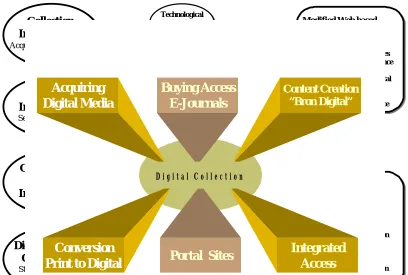
A digital library is not a single entity although it may have digital contents created in-house or acquired in digital formats stored locally on servers. A digital library may also act as portal site providing access to digital collections held elsewhere. The digital constituents of a digital library are shown in Figure 2 and are described below:
3.1. Acquisition of collections available in digital formats
Availability of CD ROM, and more recently DVD ROM, as a media with high-storage capacity, longitivity and ease of transportation, triggered production of several CD ROM-based information products including several bibliographic databases which were earlier available only through online vendors or as abstracting and indexing services in printed format. Thousands of CD ROM databases are currently available from a multitude of CD ROM producers including Silver Platter which alone produces more than 250 CD ROM information products. Moreover, several full-text databases also started appearing in the late 1980s and the early 1990s launching the beginning of a new digital era. Some of the important full-text digital collections available on CD ROM include: ADONIS, IEEE / IEE Electronic Library (IEL), ABI/INFO, UMI’s International Business Database, UMI’s General Reference Periodicals, Espace World, US Patents, etc. CD ROM networking technology is now available for providing web-based simultaneous access to CD ROM databases on the Local Area Network (LAN) as well as on Wide Area Network (WAN). More evolved technology allows caching of the contents of CD ROMs on to a server, which, in turn, provides web-based simultaneous and faster access to the information contents of CD ROMs. The libraries have an option to subscribe to these full-text databases as a part of their digital library. Silver Platter’s Electronic Reference Library (ERL) technology facilitate integrated access and search of ERL-complaint databases through an Intranet server.
3.2. Buying access to external digital collections
publishers now have their web-based interfaces to offer full-texts of their journals. The current electronic publishing market consists of traditional players offering electronic versions of their print journals as well as several new enterprises offering new products and services that are “born digital”. The market also has several subscription agents in their new role as aggregators. These players include:
3.2.1 Publishers and scholarly societies
Most well-known commercial publishers of traditional journals such as Elsevier Science, Kluwer Academic Press, Academic Press, Springer Verlag, Wiley InterScience and scholarly societies such as SIAM, ACM, IEEE / IEE are making their publications available online through their web sites. Several universities host specialized collections on their web sites. Several universities, as members to the Networked Digital Library of Theses and Dissertations (NDLTD) initiative, host doctoral dissertations submitted to their respective universities.
3.2.2 Aggregators
Third party aggregators provide access to numerous journals from a variety of
publishers. Aggregators include organizations like JSTOR that offer extensive backfiles for more than 100 academic journals and OCLC Electronic Collection Online which offer full-text access to more than two thousand titles via their First Search Service. Other aggregators like Lexis-Nexis, Bell and Howell (UMI) and Web of Science (ISI) offer searchable indexes with links to full-text journals on publisher’s site. EBSCOHost, IAC Trac SearchBank and Blackwell’s Electronic Journal Navigator (EJN) provide common search interface for the journals aggregated by them from an assortment of publishers. Growing number of susbcription agents are working with publishers to provide aggregated services for packages of titles or for full-text databases.
Total number of electronic journals, one of the corner stones of the digital library, available on the web has grown steadily from less than 10 in 1989 to 8500 in April, 2000. These journals are made available through the web at varying price models as mentioned below:
3.2.3 Pricing model
One of the major issues that the publishers are concerned with is to save their economic interest in the process of providing electronic access to their printed publications. The publishers make a significant investment in the process of production of a journal which involves activities like peer-review, administration, editing, layout design, production, subscription management and distribution. Most activities that are performed for
publishing a journal are common to both electronic and paper media, except for
Journals are made available through the web at varying price models. In a survey of 8001 peer reviewed electronic journals conducted by EBSCO, it was found that 50% of journals are free with their print journals, 34% require additional payment over their print subscription and 16% are available online only without their print counter-part. Overall, 84% of journals require a print subscription to journals as a prerequisite for online access to their electronic version. (Boteler, 2001). The prevalent pricing models are:
(i) Electronic subscription is linked to the print subscription
The electronic subscription to journals in most of the cases is linked to their printed counterparts, i.e. it may be offered free with print subscription (e.g. publications of American Society for Physics and AIChE) or priced at a fixed % over the print subscriptions (e.g. IEEE’s ASPP package).
(ii) Electronic subscription with campus licenses
Electronic publisher facilitate campus wide unlimited access to subscribed journals on payment of a fixed amount of platform fee. Example: Elsevier Science (ScienceDirect)
(iii) Electronic subscriptions are bundled
Several electronic publishers offer access to the entire range of their electronic journals and other publications bundled into one. For example IEEE / IEE Electronic Library (IEL) and ACM Digital Library offer access to their entire site on subscription. Access to individual journals or a subset is not permissible. Similarly, Academic Press offers all journals available on their site (Academic’s Project IDEAL) for 10% more than the print subscription to library consortia.
(iv) Pay-per-look
Publishers and aggregators have started experimenting with models wherein a user can search a database online for a modest usage fee, identify articles of interest, and then call up such articles in full-text on a per-look basis.
(v) Electronic only
A few publishers and aggregators have started offering only electronic versions of their journals providing a modest discount for those who forego print versions.
(vi) Consortium licensing
Consortia provide union strength to negotiate with electronic publishers for the best possible price and rights. Most publishers already have well-defined policies and offers for libraries subscribing as consortia . The consortia licensing is widely used the world over by the libraries. It is slowly picking up in India also.
National licenses can also be negotiated with electronic publishers for core collections. Singapore, Taiwan and UK have arranged national licenses for some of the important full-text resources.
Besides, electronic journals, there are several online databases that are now available through the web including Medline (several versions), AGRICOLA and ERIC (all free). Reference works like encyclopedia, dictionaries, handbooks, atlases, etc. are also making their electronic appearance on the web. However, amongst electronic resources created exclusively for the web, imbibing all features and facilities offered by the new technology, include web-based educational tutorials called “online courseware”. Online courseware are proliferating the web as a strong contender for distant education. Telecampus, Canada (www.telecampus.edu/) lists more than 12,000 online courseware available on the web. Moreover, highly specialized web sites are now coming-up in various disciplines which offer information in totality including all kinds of resources in electronic format, EI Engineering Village (http://www.ei.org/), ISI Electronic Library (http://www.isinet.com), IEEE / IEE Electronic Library (http://www.ieee.org/), Engineering Sciences Data Unit (http://www.esdu.com) are some of the important examples.
Electronic resources accessible on the web for free or for a fee are undeniably major and important constituents of a digital library.
3.3 Converting datasets that are “Born Digital”
The libraries or the institutions implementing digital libraries may have datasets that are originally created in digital format. Doctoral dissertations submitted to universities and research institutions are undisputedly highly valuable documents that qualify to be an important component of any digital library implementation. Moreover, institutions may have in-house journal(s), annual reports, technical reports, or other datasets, that may be included in digital collections. Items listed above are invariably composed in one of the word processing programme or in a desk-top publishing package.
The documents composed on word processing packages or desktop publishing packages can be converted into HTML, PostScript and PDF using tools like Acrobat 4.0 or Acrobat exchange. Online converters are also available through Adobe’s site. HTML, as a de facto language of the web and PDF as a de facto standard for online distribution of electronic information, can be used to facilitate transition from computer processible files to the web.
authors, keywords, etc. and browse the content pages of journals. Behind the web interface lies a relational database like Oracle that store SGML documents. Search and browse results in database-generated HTML pages (HTML-on-fly), which in turn, are linked to full-text documents mostly in PDF or PostScript and abstracts in HTML. While HTML is generated instantly from SGML documenta available in the database, PDFs or PostScript versions are generated as a by-product in the process of printing of the documents.
SGML is all about structure and contents. It serves as rich archive format and is used for preservation to be reused for generating additional services and products. SGML documents are also used for generating print version. The publishers use their publishing software tools like FrameMaker, Pagemaker, Wang System, Folio, Xy Vision, Quark Xpress, etc. to generate a print versions. PostScript and / or PDF versions are created in this process, which, in turn, are incorporated in the database along with SGML documents.
3.4 Conversion of existing print media into digital format
Capturing page image format is comparatively easy and inexpensive, it is a faithful reproduction of its original maintaining page integrity and originality. The scanned textual images, however, are not searchable unless it is OCRed, which, in itself, is highly error prone process especially when it involves scientific texts. The underlying technology used for converting printed pages into digital images in discussed in detail in this paper. The technology and process of digital imaging is dealt in detail later in this article.
3.5 Creating portal sites or gateways to the electronic collections available on the web
The web has become the most successful networked multimedia hypertext-based system that allows rapid access to a wide variety of networked information resources. The web, being a hypermedia-based system, allows linking amongst electronic resources stored on servers dispersed geographically on distant locations. The portal sites or gateways redirect a user to the holders of the original digital material. A gateway may provide its own indexing and search services and it may combine original resources from a number of different providers. The portal sites or the gateways restrict their operation to providing linkages to independent third party sources. Home pages of all the major education and research institutions, specially in developed world, provide an organized and structured guide to electronic resources available on the Internet. Some of the major portal sites or gateways that provide access to electronic resources on the Internet are as follows:
WWW Virtual Library http://www.edoc.com/
Internet Public Library http://www.ipl.org/
Michigan Electronic Library http://mel.lib.mi.us/
Penn Electronic Library http://www.library.upenn.edu/resources/
BUBL Information Service http://bubl.ac.uk/
Argus Clearing House http://www.clearinghouse.net/
Internet Index http://sunsite.berkeley.edu/InternetInd ex/
3.6 Providing integrated access interface
Digital libraries typically integrate multitude of resources and media types. Constituents of a digital library may have i) collection acquired in digital form; ii) collections digitized in-house; iii) buying access to electronic resources including e-journals; iv) Subject Gateways and the Library OPACs. In effect, a digital library may not only have multitude of resources but also multitude mechanism to access these resources. Most libraries having sizable collections in digital forms have adopted two-fold strategy that include i) providing access to resources through the Library Catalogue wherever possible; and ii) providing access to electronic resources and specialized collections through the Library home page.
links to full-text sources. Similarly, access to other specialized collections can also be provided through a sets of menu that serve as rough and ready finding aids. It is particularly useful for institutions that have not implemented web-based catalogues and cannot offer hypertext links from a catalog record. On the other hand, access to e-journals is separate from the online catalogue and other e-journals that are part of the library's collection. Web-based catalogues can enable users to connect directly to the full-text source via hypertext links in the catalogue record.
Acquisition of Endeavour’s Information System by the Elsevier Science, marks integration of Elsevier’s contents into Endeavour’s digital library technology. A new product called “ENCompass” from Endeavour would come up as a single, seamless search across disparate remote and local collections. (Science Direct Connections, 2000).
4
From print to digital: options for conversion
The digital imaging technology offers a number choices that can be adopted depending on the objective of scanning, end user, availability of finances, etc. There are four basic approaches that can be adapted to translate from print to digital:
4.1. Scanned as Image
4.2. OCR and Retaining Page Layout
4.3. Retaining Page Layout using Acrobat Capture; and 4.4. Re-keying the Data
4.1 Image only
Image only is the lowest cost option in which each page is an exact replica of the original source document. Since OCR is not carried out, the document is not searchable. Most scanning software generate TIFF format by default, which, can be converted in to PDF using a number of software tools. Scan to TIFF / PDF format is recommended only when the requirement of project is to make documents portable and accessible from any computing platform. The images can be browsed through a table of contents file composed in HTML providing link to scanned image objects.
4.2 Optical Character Recognition (OCR)
The latest versions of both Xerox’s TextBridge and Caere’s Omnipage incorporate technology that allow the option of maintaining text and graphics in their original layout as well as plain ASCII and word-processing formats. Output can also include HTML with attributes like bold, underline, and italic are retained.
4.2.1 Retaining layout after OCR
is saved. If one wish to edit anything subsequently, then the relevant paragraph box may need to be resized. However, Easy Edit facilitates editing of pages without the necessity of resizing the boxes although there is a greater chances of spillage over the page. Xerox Text Bridge offers similar feature called DocuRT which is broadly equivalent to True Page Easy edit. The process of OCR dismantles the page, OCRs it, and then reassembles it in such as way that all the component parts such as tabs, columns, table, graphics can be used in a text manipulation package such as a word processor.
There is a little doubt about the fact that OCR is less accurate than rekeying-in the data. At an accuracy ratio of 98%, a page have 1800 characters will have 36 error per page on an average. It is therefore, imperative to cleanup after OCR unless original scanned image will be viewed as page and OCR being used purely for creating a searchable index on the words that will be searched via a fuzzy retrieval engine like Excalibur which is highly tolerant to OCR errors.
Another possibility for cleaned-up OCR is use of specialist OCR system such as Prime Recognition. With production OCR in mind, Prime OCR licenses leading recognizing engine and passes the data through several of them using voting technology along with artificial intelligent algorithms. Although it takes longer initially but saves time in the long run, prime contends that it improves the result achieved by a single engine by 65 – 80 %. The technology is available at price depending upon number of search engine that one would like to incorporate. Michigan Digital Library production services used Prime OCR for placing more than two million pages of SGML-encoded text and the same number of page images on the web.
4.3 Retaining page layout using Acrobat capture
The Acrobat Capture 2.0 provides several options for retaining not only the page layout but also the fonts, and to fit text into the exact space occupied in the original, so that the scanned and OCRed copy never over- or under-shoots the page. Accordingly, it treats unrecognizable text as pasted-in images, which are perfectly readable by anyone looking at the PDF file, but which will be absent from the editable and searchable text file. In contrast, ordinary OCR programs treat unrecognized text as tildes or some other special character in the ASCII output. Acrobat Capture can be used to scan pages as images, image + text and as normal PDF, all the three options retain page layout.
i) Image only: Image only option has already been described in option 1.
larger than the corresponding PDF Normal files and pages will not display as quickly or cleanly on screen.
iii) PDF normal: PDF normal gives the clearest on-screen display, is searchable, and yet with significantly smaller file size than Image+Text. The result is not, however, an exact replica of the scanned page. While all graphics and formatting are preserved, substitute fonts may be used where direct matches are not possible. It is a good choice when files need to be posted to the web or otherwise delivered online. If, during the Capture and OCR process, a word cannot be recognized to the specified confidence level, Capture, by default, substitutes it with a small portion of the original bitmap image. Capture’ “best guess” of the suspect word lies behind the bitmap so that searching and indexing are still possible. However, one cannot guarantee that these bitmapped words are correctly guessed. In addition, the bitmap is somewhat obtrusive, detracting from the ‘look’ of the page. Further, Capture provides option to correct suspected errors left as bit-mapped image or leave them untouched.
4.4 Re-keying
A classic solution of this kind would comprise of keying-in the data and its verification. This involves a complete keying of the text, followed by a full rekeying by a different operator, the two keying-in operation might take place simultaneously. The two keyed-in files are compared and any errors or inconsistencies are corrected. This would guarantee at least 99.9% accuracy, but to reach 99.955% accuracy level, it would normally require full proof-reading of the keyed-in files, plus table lookups and dictionary spellchecks.
5
Digital imaging technology
Digital imaging is the process of converting paper documents including text, graphics, or pictures into digital images that can be made accessible over electronic networks. A digital image, in turn, is composed of a set of pixels (picture elements), arranged according to a pre-defined ratio of columns and rows. An images document file can be managed as regular computer file and can be retrieved, printed and modified using appropriate software. Further, textual images can be OCRed so as to make its contents searchable. Digital imaging is an inter-linked system of hardware, software image database and access sub-system with each having their own components. Digital systems are characterized by multiple core and peripheral systems that include:
• Hardware (Scanners, computers data storage and data output
peripherals)
• Software (image capturing, data compression)
• Network (data transmission)
The following four steps are involved in the process of digitization. Software, variably called document image processing (DIP), Electronic Filing System (EFS) and Document Management Systems (DMS) provides all or more of these functions:
5.1.1 Scanning
The process involves acquisition of an electronic image through its original that may be a photograph, text, manuscript, etc. into the computer using an electronic image scanner. An image is “read” or scanned at a predefined resolution and dynamic range. The resulting file, called “bit-map page image” is formatted (image formats described elsewhere) and tagged for storage and subsequent retrieval by the software package used for scanning. Acquisition of an image through fax card, electronic camera or other imaging devices is also feasible. However, image scanners are the most important and most commonly used component of an imaging system for transfer of normal paper-based documents.
5.1.2 Indexing
If converting a document into an image or text file is considered as the first step in the process of imaging, indexing these files comprises the second step. The process of indexing scanned image involves linking of database of scanned images to a text database. Scanned images are just like a set of pictures that need to be related to a text database describing them and their contents. An imaging system typically stores a large amount of unstructured data in a two file system for storing and retrieving scanned images. The first is traditional file that has a text description of the image along with a key to a second file. The second file contains the document location. The user selects a record from the first file using a search algorithm. Once the user selects a record, the application keys into the location index, finds the document and displays it.
Most of the document imaging software packages, through their menu driven or command driven interface, facilitate elaborate indexing of documents. While some document management system facilitate selection of indexing terms from the image file, others allow only manual keying in of indexing terms. Further, many DMS packages provide OCR capabilities for transforming the images into standard ASCII files. The OCRed text then serves as a database for full-text search of the stored images.
5.2 Store
drives allocated for image storage, larger document management systems use auto-changers such as optical jukeboxes and tape library systems. The storage required by the scanned image varies and depends upon factors such as scanning resolution, page size, compression ratio and page content. Further, the image storage device may be either remote or local to the retrieval workstation depending upon the imaging systems and document management system used.
5.3 Retrieve
Once scanned images and OCRed text documents have been saved as a file, a database is needed for selective retrieval of data contained in one or more fields within each record in the database. Typically, a document imaging system uses at least two files to store and retrieve documents. The first is a traditional file that has a text description of the image along with a key to the second file. The second file contains the document location. The user selects a record from the first-file using a search algorithm. Once the user selects a record, the application keys into the location index, finds the document and displays it. Most of the document management system provides elaborate search possibilities including use of Boolean and proximity operators (and, or, not) and wild cards. Users are also allowed to refine their search strategy. Once the required images have been identified their associated document image can quickly be retrieved from the image storage device for display or printed output.
5.2. Technology of digitization
Digital images, also called “bit-mapped page image” are “electronic photographs” composed or set of bits or pixels (picture elements) represented by “0” and “1”. A bit-mapped page image is a true representation of its original in terms of typefaces, illustrations, layout and presentation of scanned documents. As such information contents of “bit-mapped page image” cannot be searched or manipulated unlike text file documents (or ASCII). However, an ASCII file can be generated from a bit-mapped page image using an optical character recognition (OCR) software such as Xerox’s TextBridge and Caere’s OmniPage. The quality of digital image can be monitored at the time of its capture by the following factors:
5.21. Bit depth/dynamic range Resolution
Threshold Compression 5.25. Image enhancement
5.2.1 Bit depth or dynamic range
captured at varied density of bits per pixel depending upon i) the nature of source material or document to be scanned; ii) target audience or users; and iii) capabilities of the display and print subsystem that are to be used. Bitonal or black and white or binary scanning is generally employed in libraries to scan pages containing text or the drawings. Bitonal or binary scanning represents one bit per pixel [(either “0” (black) or “1” (white)]. Gray scale scanning is used for reliable reproduction of intermediate or continuous tones found in black and white photographs to represent shades of grey. Multiple numbers of bits ranging from 2-8 are assigned to each pixel to represent shades of grey in this process. Although each bit is either black or white, as in the case of bitonal images, but bits are combined to produce a level of grey in the pixel that is black, white or somewhere in between.
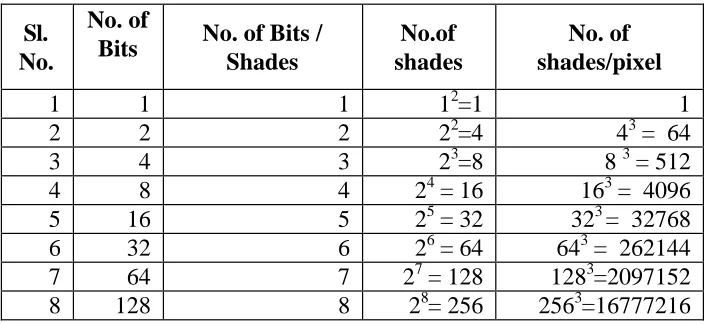
Lastly colour scanning can be employed to scan colour photographs. As in the case of grey-scale scanning, multiple bits per pixels typically 2 (lowest quality) to 8 (highest quality) per primary colour are used for representing colour. Colour images are evidently more complex than grey scale images, because, it involves encoding of shades of each of the three primary colours, i.e. red, green and blue (RGB). If a coloured image is captured at 2 bits per primary colour, each primary colour can have 22 or 4 shades and each pixel can have 44 shades for each of the three primary colour. Evidently, increase in bit depth increases the quality of image captured and the space required to store the resultant image. Generally speaking, 12 bits per pixel (4 bits per primary colour) is considered minimum pixel depth for good quality colour image. Most of today’s colour scanner can scan at 24-bit colour (8 bit per primary colour).
Table 1 provides binary calculation for no. of shades represented by bit depth.
Sl.
No.
No. of
Bits No. of Bits / Shades
No.of shades
No. of shades/pixel
1 1 1 12=1 1
2 2 2 22=4 43 = 64
3 4 3 23=8 8 3 = 512
4 8 4 24 = 16 163 = 4096
5 16 5 25 = 32 323 = 32768
6 32 6 26 = 64 643 = 262144
7 64 7 27 = 128 1283=2097152
8 128 8 28= 256 2563=16777216
Table 1: Binary Calculation for No. of Shades Represented by Bit Depth
The number of pixel (picture elements) in a given area defines the resolution of an image. It is measured in terms of dots per inch (dpi) in case of an image file and as the ratio of the number of pixels in the horizontal line x number of pixels in the vertical line in case of the display resolution of a monitor. Higher the dpi is set on the scanner, the better the resolution and quality of image and larger the image file.
Regardless of the resolution, image quality of an image can be improved by capturing an image in grayscale. The additional grayscale data can be processed electronically to sharpen edges, fill-in characters, remove extraneous dirt, remove unwanted page strains or discoloration, so as to create a much higher quality image than possible with binary scanning alone. A major drawback in gray scale is the large amount of data captured. Continuing increase in resolution will not result in any appreciable gain in image quality after some time, except for increase in file size. It is thus important to determine the point at which sufficient resolution has been used to capture all significant details present in the source document.
The black and white or bitonal images (textual) are scanned most commonly at 300 dpi that preserve 99.9% of the information contents of a page and can be considered as adequate access resolution. Some preservation projects scan at 600 dpi for better quality. A standard SVGA/VGA monitor has a resolution of 640 x 480 lines while the ultra-high monitors have a resolution of about 2048 x 1664 (about 150 dpi).
5.2.3 Threshold
The threshold setting in bitonal scanning defines the point on a scale, usually ranging from 0 to 255, at which gray values will be interpreted as black or white pixels. In bitonal scanning, resolution and threshold are the key determinants of image quality. Bitonal scanning is best suited to high-contrast documents, such as text and line drawings. For continuous tone or low contrast documents such as photographs, grayscale or colour scanning is required. In gray scale/colour scanning both resolution and bit depth combine to play significant roles in image quality.
5.2.4 Compression
5.2.4.1 Lossless compression
The conversion process converts repeated information as a mathematical algorithm that can decompressed without losing any details into the original image with absolute fidelity. No information is “lost” or “sacrificed” in the process of compression. Lossless compression is primarily used in bitonal images.
5.2.4.2 Lossy compression
Lossy compression process discards or averages details that are least significant or which may not make appreciable effect on the quality of image. This kind of compression is called “lossy” because when the image compressed using “lossy” compression techniques, is decompressed, it will not be an exact replica of the original image. Lossy compression is used with grayscale/colour scanning, and in particular with complicated images.
Compression is a necessary in digital imaging but more important is the ability to output uncompressed true replica of images. This is especially important when images are transferred from one platform to another or are handled by software packages under different operating systems.
Uncompressed images often work better than compressed images for different reasons. It is thus suggested that scanned images should be either stored as uncompressed images or at the most as lossless compressed images. Further, it is best to use one of the standard and widely supported compression protocols than a proprietary one, even if it offers efficient compression and better quality. Attributes of original documents may also be considered while selecting compression techniques. For example ITU G-4 is designed to compress text where as JPEG, GIF and ImagePAC are designed to compress pictures. It is important to ensure migration of images from one platform to another and from one hardware media to another. It may be noted that highly compressed files are more susceptible to corruption than uncompressed files.
5.2.4.3 Compression protocols
The following protocols are commonly used for bitonal, grayscale or colour compression:
i) ITU-G4
Image Group (JBIG) (ISO-11544) is another standard compression technique for bitonal images.
ii) JPEG (Joint Photographic Expert Group)
JPEG (Joint Photographic Expert Group) is an ISO-10918-I compression protocol that works by finding areas of the image that have same tone, shade, colour or other characteristics and representing this area by a code. Compression is achieved at loss of data. It is generally observed that compression of about 10 or 15 to one can be achieved without visible degradation of image quality.
iii) LZW (Lenpel-Ziv Welch)
LZW compression technique uses a table-based lookup algorithm invented by Abraham Lempel, Jacob Ziv, and Terry Welch. Two commonly-used file formats in which LZW compression is used are the Graphics Interchange Format (GIF) and the Tag Image File Format (TIFF). LZW compression is also suitable for compressing text files. A particular LZW compression algorithm takes each input sequence of binary digit of a given length (for example, 12 bits) and creates an entry in a table (sometimes called a "dictionary" or "codebook") for that particular bit pattern, consisting of the pattern itself and a shorter code. As input is read, any pattern that has been read before results in the substitution of the shorter code, effectively compressing the total amount of input to something smaller. The decoding program that uncompresses the file is able to build the table itself by using the algorithm as it processes the encoded input.
iv) Fractal and wavelet compression
Fractal, wavelet and flaxPix file formats offer advantages for providing access to digital images of oversized materials on the web. Unlike JPEG and LZW compression that maintain images as array of pixels, wavelet & fractal compression convert images into mathematical models in order to save storage space. Both compression techniques are lossy. Some applications are comb ination of both wavelet and fractal compression.
a) Wavelet compression
Wavelet compression can take a longer time to compress images due to the complex math involved. However, the time required to decompress wavelet or fractally encoded image is usually comparative to decompressing a JPG image. Wavelet compression is used in many varied digital applications, photographic images, audio and video recording, 2D & 3D rendering, multimedia, finger-prints imaging, medical imaging (radiography MRI, etc.), Satellite and remote sensing imaging, GIS, maps & document imaging. Multi Resolution Seamless Image Database (MrSID) from Lizard Tech uses wavelet compression technique.
b) Fractal compression
Mathematically, a fractal describes a structure that has many repeated forms regardless of scale. Fractal Compression works by using a variety of methods to identify features within an image and then breaking down the image into mathematically modeled series of repeating shapes and patterns. Compression ratio of upto 250:1 can be achieved using fractal compression depending upon the image being compressed. Fractal compression take longer time to compress images than wavelet compression but the decompression is relatively quick.
5.2.5 Image enhancement
Image enhancement process can be used to improve scanned images at the cost of image authenticity and fidelity. The process of image enhancement is, however, time consuming, it requires special skills and would invariably increase the cost of conversion. Typical image enhancement features available in a scanning or image editing software include filters, tonal reproduction, curves and colour management, touch, crop, image sharpening, contrast, transparent background, etc. In a page scanned in grayscale, the text /line art, and half tone areas can be decomposed and each area of the page can be filtered separately to maximize its quality. The text area on page can be treated with edge sharpening filters so as to clearly define the character edges, a second filter could be used to remove the high-frequency noise and finally another filter could fill-in characters. Grayscale area of the page could be processed with different filters to maximize the quality of the halftone.
5.3 File formats
Abbr eviat
Format File
Extention File Format for Unstructured Text
ASCII American Standard Code for Information
Interchange
.txt
File Format for Structured Text
SGML Standard Generalized Markup Language .sgml
HTML Hypertext Markup Language .html
XML Extended Markup Language .xml
PDF Portable Document Format (Adobe) .pdf
PostScript PostScript (Adobe) .ps
TEX Texture Format .txt
File Format for Images
PDF Portable Document Format .pdf
BMP Bit Map Page (Windows) .bmp
IMG Ventura Publisher .img
MPEG Joint Photographic Expert Group .mpg
JFIF JPEG File Format .jfif
PCP PC Paint (B&W Mode) .pcp
PCX PC Paint Brush (Color & B&W) .pcx
PSD Photoshop .psd
TGA True Vision Targa .tga
PNG Portable Network Graphic .png
TIFF Taged Image File Format .tif
TIFF-G4 Taged Image File Format with Group 4 Fax
Compression
.tif
SPIFF Still Picture Interchange File Format .spf
PCD Photo CD (Kodak) .pcd
Web-Compatible Image File Format
GIF Graphics Interchange Format .gif
JPEG Joint Photographic Experts Group .jpg
JFIF JPEG File Format .jff
Audio File Format
WAVE Waveform Audio (Microsoft) .wav
AIFF Audio Interchange Format .aif
VoC Creative Voice .voc
MIDI Musical Instrument Digital Interface .midi
SND Sound .snd
AU Audio (Sun Microsystems) .au
RA Real Audio Format (Progressive
Networks)
Table 2: File formats in digital libraries
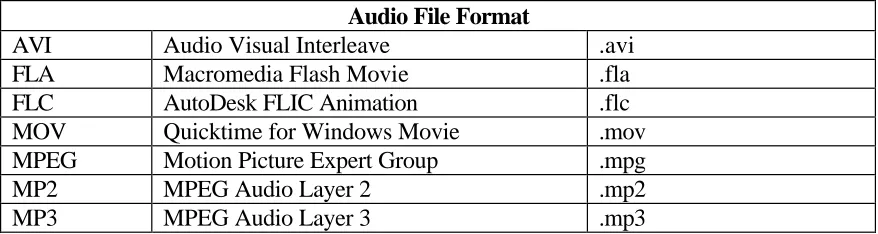
Most of the scanning software allow saving of scanned images in a number of formats. TIFF (Tagged Image File Format) is the most commonly used file format and is considered de facto standard for bitonal scanning. TIFF is a truly multi-platform protocol and is a good candidate for scanning projects. Some image formats are proprietary, developed and supported by a commercial vendor and require a specific software or hardware for displaying the scanned images. Table 2 lists file formats used for digital images.
It would be appropriate to store a high resolution image as a TIFF master (archival format) and distribute the image as JPEG / GIF file (access format). Software are now available that would generate a JPEG or GIF files “on the fly” from a master TIFF file.
5.4 Tools of digitization
An image scanning system may consist of a stand-alone workstation where most or all the work is done on the same workstation or as a part of a network of workstations with imaging work distributed and shared amongst various workstations. The network usually includes a scanning station, a server and one or more editing, retrieval stations. A typical scanning workstation for a small, production level project, could consist of the following:
• Microcomputer – Pentium III / Pentium IV
• Scanner and Scanning Software
• Storage System
• Network
• Display System
• Printer
This article would concentrate on scanners and scanning software as important components of a scanning workstation.
5.4.1 Scanners
Audio File Format
AVI Audio Visual Interleave .avi
FLA Macromedia Flash Movie .fla
FLC AutoDesk FLIC Animation .flc
MOV Quicktime for Windows Movie .mov
MPEG Motion Picture Expert Group .mpg
MP2 MPEG Audio Layer 2 .mp2
Digital scanners are used to capture a digital image from an analogue media such as printed page or a microfiche / microfilm at a predefined resolution and dynamic range (bit range). There are two types of image scanners: vector scanners and raster scanners. The vector scanners scan an image as a complex set of x,y coordinates. Vector images are generally used in geographical information systems (GIS). The display software for the vector image interprets the image as a function of coordinates and other included information to produce an electronic replica of the original drawing or photograph. Vector images can be zoomed in portion to display minute details of a drawing or a map. Maps, engineering drawings, and architectural blueprints are often scanned as vector images. Raster images are captured by raster scanners by passing lights (laser in some cases) down the page and digitally encoding it row by row. Multiple passes of lights may be required to capture basic colours in a coloured image. Raster scanners are used in libraries to convert printed publications into electronic forms. Majority of electronic imaging system generate raster images. The scanners used for digitizing analog images into digital images come in a variety of shapes and sizes. There are following types of Scanners:
• Flatbed Scanners – right angle, prism and overhead flatbed
• Sheet-Feed Scanners
• Drum Scanners
• Digital Cameras
• Slide Scanners
• Microfilm Scanner
• Video Frame Grabber
The type of scanner selected for an imaging project would be influenced by the type, size and source of documents to be scanned. Many scanners can handle only transparent material, whereas others can handle only reflective materials.
(i) Flatbed scanners: Flatbed scanners are the most common, and widely used
scanners that look like a photocopier and are used in much the same way. Source material, in a flatbed scanner is placed face down for scanning. The light source and CCD move beneath the platen, while the document remains stationary as in the case of photocopying machine. Flatbed scanner comes in various models like right-angle, prism and planetary/overhead to handle bound volumes and books.
Product examples: HP ScanJet 6300C, Ricoh IS420, Bell & Howell 1000FB Fujitsu 3097G, Minolta PS3000, Xerox Docu CS620. Flatbed scanners can accept both reflective as well as transparent media over a glass platen.
Product example: Kodak 500S, Tangent CCS300-SF
(iii) Drum scanners: Source material, in a drum scanner is wrapped on a drum, which is then rotated past a high-intensity light source to capture the image. Drum scanners offer superior image quality, but require flexible source material of limited sized that can be wrapped around the drum. Drum scanners are specially targeted for graphic art market. Drum scanners offer highest resolution for grey scale and colour scanning. Drum Scanner use Photo-Multiplier (Vacuum) Tubes (PMTs) instead of CCDs, which offer a greater bit depth (12 to 16 bits).
Product example: Juno CP-4000, Scan graphics ScanMate5000, ColorGetter.
(iv) Digital cameras: Digital cameras mounted on copy cradle resemble
microfilming stand. Source material is placed on the stand and the camera is cranked up or down in order to focus the material within the field of view. Digital cameras are most promising scanner development for library and archival applications.
Product example: Zeutschel OminiScan 3000, Minolta PS 3000.
(v) Slide scanner: Slide scanners have a slot in the side to accommodate a 35mm
slide. Inside the box the light passes through the slide to hit a CCD array behind the slide. Slide scanners can generally scan only 35mm transparent source materials.
Product example: Kodak PCD Scanner 4045, Nikon LS3510, Leaf Systems Leafscan 45.
(vi) Microfilm scanner: Specially targeted to library/archival application,
microfilm scanners have adapters to convert roll film, fiche, and aperture cards in the same model.
Product example: Mekel M500XL, SunRise SRI-50, Lenzpro 2000 Multimedia Digitiser.
Video frame grabber or VideoDigitizer: Video digitizers are circuit boards placed inside a computer, attached to a standard video camera. Any thing that is filmed by the video camera is digitized by the video digitizer.
5.4.2 Image capturing or scanning software
system or document management system, etc. A simple scanning software also comes with the scanners. Important document imaging software are:
• Altris Software (http://www.altris.com/)
• OPTIX (http://www.blueridge.com/)
• Documentum (http://www.documentum.com/)
• Poweroffice (http://www.expower.com/)
• FileNet (http://www.filenet.com/)
• LAVA Systems (http://www.lavasys.com/)
• NovaManage (http://www.novasoft.com/)
• LiveLink (http://www.opentext.com/livelink/index.html)
• Docs Open (http://www.pcdos.com/)
• Parlance Ambassador (http://www.xyvision.com/)
DMS products from India
• Data Scan (Stacks Software Pvt. Ltd.) (http:/www.stex.com/)
• OmniDocs (NewGen) (http://www.newgensoft.com/)
5.5 Organizing digital images
A disc full of digital images without any organization, browse and search options may have no meaning except for one who created it. Scanned images need to be organized in order to be useful. Moreover, images need to be linked to the associated metadata to facilitate their browsing and searching. The following three steps describe process of organizing the digital images:
5.5.1 Organize
The scanned image files into disc hierarchy that logically maps the physical organization of the document. For example, in a project on scanning of journals, create a folder for each journal, which, in turn, may have folder for each volume scanned. Each volume, in turn may have a subfolder for each issue. The folder for each issue, in turn, may contain scanned articles that appeared in the issue along with a contents page, composed in HTML providing links to articles in that issue.
5.5.2 Name
5.5.3 Describe
The scanned images file internally, using image header and externally using linked descriptive metadata files. Most software packages provide for storing “administrative data” regarding image, i.e. date of creation, format type & version, compression technique, name of creator, etc. in the image header. “Structured” or “descriptive” metadata for images are the keywords assigned to each image.
The simplest and least effective method for providing access is through a table of contents and links each item to its respective object / image. Contents pages of issues of journals, done in HTML, would offer browsing facility. Full-text search to HTML pages or OCRed pages can be achieved by installing one of the free Internet search engines like Oingo Free Search (http://www.oingo.com/oingo_free_search/products.html); Swish-E (http://www.berkeley.edu/SWISH-E/); WhatyoUseek (http://intra.whatuseek.com/); Excite (http://excite.com/) and Google (http://www.google.com).
Large scanning projects would, however, require a back-end database storing images or links to the images, metadata (descriptive / administrative). Back-end database used by most document management system holds the functionality required by most web applications. Important document management systems like File Net have now integrated their database with HTML conversion tools. Further, some of the document management systems have also signed up with Adobe to incorporate Acrobat and Acrobat capture into their web-based document management systems. These databases entertain queries from users through “HTML forms” and generate search results on the fly.
5.6 Optical Character Recognition (OCR)
A scanned document is nothing more than a picture of a printed page. It can not be edited or manipulated or managed based on their contents. In other words, scanned documents have to be referred to by their labels rather than characters in the documents. OCR (Optical Character Recognition) programs are software tools used to transform scanned textual page images into word processing file. OCR or text recognition is the process of electronically identifying text in a bit-mapped page image or set of images and generate a file containing that text in ASCII code or in a specified word processing format leaving the image intact in the process. The OCR is performed in order to make every word in a scanned document readable and fully searchable without having to key-in everythkey-ing key-in the computer manually. Once a bit-mapped page image has gone through the process of OCR, a document can be manipulated and managed by its contents, i.e. using the words available in the text.
Matrix / template matching: Compares each character with a template of the same character. Such a system is usually limited to a specific number of fonts, or must be “taught” to recognize a particular font.
Feature extraction: Can recognize a character from its structure and shape (angles, points, breaks, etc.) based on a set of rules. The process claims to recognize all fonts.
Structural analysis: Determines characters on the basis of density gradations or character darkness.
Neural networking: Neural networking is a form of artificial intelligence that attempts to mimic processes of the human mind. Combined with traditional OCR techniques plus pattern recognition, a neural network-based system can perform text recognition and “learn” from its success and failure. Referred to as “Intelligent Character Recognition”, a neural nerwork-based system are being used to recognize hand-written text as well as other traditionally difficult source material. Neural network ICR can contemplate characters in the context of an entire word. Newer ICR combines neural networking with fuzzy logic.
5.7 Hybrid solution
It would be imperative to consider producing a more reliable media like microfilm simultaneous to the process of digitization if archival preservation is one of the objectives. The process of microfilming produce a high-resolution image on the microfilm / microfiche that equates to approximately 1000 dpi in digital binary scanning. In comparison, a bitonal digital image can at best scan at 600 dpi for archival storage. The microfilm / microfiche can be used for conversion to electronic image format. Moreover, future improvements in scanning technology can be utilized by rescanning a microfilm to obtain high-resolution images. It is expected that ultimately electronic scanning will reach or exceed photographic quality. Durability and reliability of computers and storage media and formats used for electronic image files may also increase and stabilize.
6
Conclusion
numbers and variety of resources in the last category are expected to increase as the users respond to technologically advanced products and services. The meaning of digital library is in the process of evolution as it climbs along the technological ladder. It can thus be concluded that further advances in the area of digital libraries would rest upon further technological developments as well as conceptual foundation that is being laid down presently.
Unlike microfilming, digital imaging technologies present a preservation solution for the documents in libraries with increased accessibility over the electronic networks, high-quality output, OCRed text, electronic links to individual pages, etc. However, imaging technologies are still in a continuous flux of change. New standards and protocols are being defined on a regular basis for file formats, compression techniques, hardware components, network interfaces, etc. The librarian should be aware of constant threat of “techno-obsolescence” and transitory standards. Magnetic and optical discs as a physical media are re-engineered to store more and more data. There is a constant threat of backward compatibility for the products that were used in the past. Acquiring an imaging system with all its peripherals capable of enhancing access to the library resources is quite a simple task specially now that the cost of all computing systems and peripherals are crashing down. However, the libraries must be concerned with all aspects of imaging technologies, as well as new demands that the technology will place on them as an organization.
Digital images will have to be constantly migrated and converted to new formats computing devices, storage media and software as new forms of storage devices, updated formats and software and improved computing systems are released. Inspite of the fact that this constant migration and conversion of digital images would not only be expensive, it would also direct valuable manpower resources into a constant re-invention of wheel, it would be essential to do so otherwise valuable images data would be left behind an obsolete machinery which will eventually break down rendering data inaccessible.
7
References / readings
1. Association of research libraries. ARL Proceedings 126: Annual Meeting, 17-19, 1995. http://arl.cni.org/arl/proceedings/126/2-defn.html
2. BESSER (H) and TRANT (J). Introduction to imaging: issues in construction of an image database. Santa Monica, Gery Art History Information Program, 1995, 48 p.
3. BOTELER (J). An e-mail dated Feb. 28, 2001 to listserv
4. CONWAY (Paul). Preservation in digital world. Microform and Imaging Review,
25(4), 1997, pp. 156-171.
5. COX (John E). Publishers, publishing and the Internet: how journal publishing will survive and prosper in the electronic age. Electronic Library, 15(2), 1997, pp. 125-131.
7. FOX (E) and MARCHIONINI (Gary). Towards a worldwide digital library. Communication of the ACM, 41(4), 1998, pp. 29-32.
8. GUTHRIE (Kevin M). Jstor: from project to Independent organization. Dlib,
July/August,1997. http://www.dlib.org/dlib/july97/07guthrie.html
9. HULSER (Richard P). Digital library: content preservation in a digital world. DESIDOC Bulletin of Information Technology, 17(6), 1997, pp. 7-14.
10. LYNCH (Clifford) and HECTOR (Garcia-Molina). IITA Digital Library Workshop, Reston, VA, 18th –19th May, 1995.
11. KENNEY (A.R.) and CHAPMAN (S). Digital imaging for libraries and archives. New York, Cornell University, 1996. 198 p.
12. MARCHIONINI (G.), PLAISANT, (C.) and KOMLODI (A.). Interfaces and tools
for the Library of Congress National Digital Library Program. Information
Processing and Management, 34(5), 1998, pp. 535-555.
13. NOERR (P). The digital library toolkit. 2nd ed., Sun Systems : Palo Alto, 2000. 186 p.
14. PAEPCKE (A.), CHANG (C-C.K.), GARCIA-MOLINA (H.) and WINOGRAD (T.). Interoperability for digital libraries worldwide. Communications of the ACM, 41(4), 1998, pp. 33-43.
15. RUSBRIDGE (Chris). Towards the hybrid library. D-Lib Magazine, July / August, 1998. http://www.dlib.org/dlib/july98/rusbridge.html
16. PAYETTE (S.), BLANCHI, (C.), LAGOZE, (C.) and OVERLY, (E.A.) Interoperability for digital objects and repositories. D-Lib Magazine, 5(3), May, 1999. http://www.dlib.org/dlib/May99/payette/05payette.html
17. School of Scanning. 3-5 Nov., 1997, New York. Papers and presentations. Andover, MA, Northeast Document Conservation Center, 1997.
18. Science Server Software. Products and services from a company dedicated to innovative development of digital library software. McLean, ScienceServer LLC, 1999. http://www.scienceserver.com/
19. SLOAN (Bernard G). Services perspectives for the digital library: remote reference services. Library Trends, 47(2), 1998.
20. SMITH (T.R.) Meta information in digital libraries. Int.J.Digital libraries,1, 1997 pp. 105-107.
21. WATERS (D). Electronic technologies and preservation. European Research
Libraries Cooperation, 2(3), 1992, pp. 285-293.