Chapter 19
Service Oriented Architecture
and the Cloud
In This Chapter
▶Understanding service oriented architecture (SOA)
▶Defining loose coupling
▶Finding SOA components
▶Pairing SOA and cloud services
▶Benefiting from SOA and the cloud
A
cloud has some key characteristics: elasticity, self-service provision-ing, standards based interfaces, and pay as you go. This type of func-tionality has to be engineered into the software. To accomplish this type of engineering requires that the foundation for the cloud be well designed and well architected.What about cloud architecture makes this approach possible? The fact is that the services and structure behind the cloud should be based on a modular architectural approach. A modular, component-based architecture enables flexibility and reuse. A service oriented architecture (SOA) is what lies beneath this flexibility. In this chapter, we provide an overview of what SOA is and how it enables the characteristics of the cloud.
Defining Service Oriented Architecture
222
Part IV: Managing the Cloud
One of the key benefits of a service oriented approach is that software is designed to reflect best practices and business processes instead of making the business operate according to the rigid structure of a technical environment.
Combining the cloud and SOA
Cloud services benefit the business by taking the best practices and business process focus of SOA to the next level. These benefits apply to both cloud ser-vice providers and cloud serser-vice users. Cloud serser-vice providers need to archi-tect solutions by using a service-oriented approach to deliver services with the expected levels of elasticity and scalability. Companies that architect and govern business processes with reusable service-oriented components can more easily identify which components can be successfully moved to public and private clouds.
A service oriented architecture (SOA) is a software architecture for building business applications that implement business processes or services through a set of loosely coupled, black-box components orchestrated to deliver a well-defined level of service.
This approach lets companies leverage existing assets and create new busi-ness services that are consistent, controlled, more easily changed, and more easily managed. SOA is a business approach to designing efficient IT systems that support reuse and give the businesses the flexibility to react quickly to opportunities and threats.
Characterizing SOA
The principal characteristics of SOA are described in more detail here:
✓SOA is a black-box component architecture. The black box lets you reuse existing business applications; it simply adds a fairly simple adapter to them. You don’t need to know every detail of what’s inside each component; SOA hides the complexity whenever possible.
223
Chapter 19: Service Oriented Architecture, Loose Coupling, and Federation
A set of loosely coupled components does the same work that software components in tightly structured applications used to do, but with loose coupling you can combine and recombine the components in a bunch of ways. This makes a world of difference in the ability to make changes easily, accurately, and quickly. (See the next section for more informa-tion on loose coupling.)
✓SOA components are orchestrated to link through business processes to deliver a well-defined level of service. SOA creates a simple arrange-ment of components that, together, deliver a very complex business service. Simultaneously, SOA must provide acceptable service levels. To that end, the components ensure a dependable service level. Service level is tied directly to the best practices of conducting business, commonly referred to as business process management (BPM) — BPM focuses on effective design of business process and SOA allows IT to align with business processes.
Loosening Up on Coupling
In traditional software architecture, various software components are often highly dependent on each other. These software component dependencies make the process of application change management time consuming and complex. A change made to one software component may impact lots of other dependent software components, and if you don’t make all the right changes, your application (or related applications) may fail. One small change to an application can make its way through the whole application, wreaking havoc and leading to massive software code revision.
Loose coupling makes it simpler to put software components together and pull them apart. Because they aren’t codependent, you can mix and match components with other component services as needed. This mix-and-match capability allows you to quickly create new and different applications from existing software services.
For example, if a credit card–checking service is loosely coupled from an ecommerce application and you need to change it, you simply replace the old one with the new one without touching any of the other applications that use the service.
An important aspect of loose coupling is that the component services and the
224
Part IV: Managing the Cloud
If the notion of loose coupling sounds familiar to you, it should. It isn’t unlike interchangeable parts that sparked the industrial revolution. For example, many of the early factories used the concept of interchangeable parts to keep their machines running. When a part failed, they simply replaced it with another one. Automobile manufacturers have also used this concept. For example, the same steering column is used in many different car models. Some models may modify it, but the basic steering column doesn’t change. Because the steering column was designed to be used in different models, the power steering columns can be substituted for manual columns without alteration to the rest of the car. Most car manufacturers don’t view the basic steering mechanism as a significant differentiator or source of innovation. Likewise, a data service or an email ser-vice are not necessarily differentiators, but they may be used to build serser-vices that can help companies do lots of different things.
Making SOA Happen
In this section we highlight some of the key components of a service oriented architecture.
You can find lots more information on SOA, including the basics, technical details, and real-life company experiences and best practices in another book written by our team, Service Oriented Architecture For Dummies, Second Edition (Wiley).
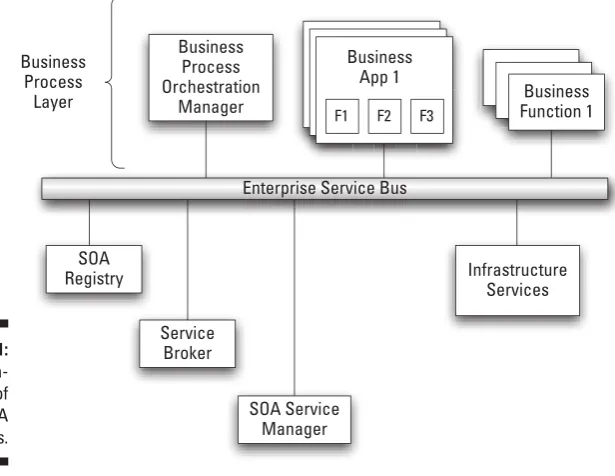
Figure 19-1 shows the main SOA components:
✓TheEnterprise Service Bus (ESB) makes sure that messages get passed back and forth between the components of an SOA implementation. ✓TheSOA Registry and Repository have important reference information
about where the SOA business services are located.
✓TheBusiness Process Orchestration Manager provides the technology to connect people to people, people to processes, and processes to processes.
✓TheService Broker connects services to services, which in the end enables business processes to flow.
✓TheSOA Service Manager makes sure that the technology underneath the SOA environment works in a consistent, predictable way.
225
Chapter 19: Service Oriented Architecture, Loose Coupling, and Federation
Figure 19-1:
Funda-mentals of SOA components.
Business App 1 Business
App 1
F1 F2 F3
Business Process Orchestration
Manager
Business App 1
Business Function 1 Enterprise Service Bus
SOA Registry
Service Broker
SOA Service Manager
Infrastructure Services Business
Process Layer
When all these component parts work together and sing the same tune, the result is dependable service levels. A finely tuned SOA helps guarantee service levels.
Catching the Enterprise Service Bus
In service oriented architectures, all the different pieces of software talk to each other by sending messages — a lot of messages. The messages are criti-cal to delivering end-to-end services — delivery from the service provider to the service consumer. They must be delivered quickly, and their arrival must be guaranteed. If that doesn’t happen, “end-to-end service” quickly becomes “lack of service.”
226
Part IV: Managing the Cloud
The ESB is a collection of software components that manage messaging from one software component to another. A software component connects to the ESB and passes it a message by using a specified format along with the address of the software component that needs to receive the message. The ESB completes the job, getting the message from the sending component to the receiving component.
Telling your registry from your repository
The self-contained and reusable software components that you create to carryout your important business processes are called business services. Business ser-vices are often made up of a group of component serser-vices, some of which may also have additional component services. Each service provides a function.
Simply, here’s the difference between the repository and the registry:
✓Repository: Central reference point for all the components within the software development environment from which services are built ✓Registry: Central reference point for definitions, rules, and descriptions
associated with every service within an SOA environment
Registry
Information describing the function of each reusable component is recorded in the SOA registry —a type ofelectronic catalog. The SOA registry has two roles:
✓One rooted in the operational environment: In the day-to-day working business computing environment, the SOA registry provides reference information about software components that are running or available for use. This information is of particular importance to the service broker — the software in a SOA framework that brings components together by using the rules associated with each component.
✓One rooted in the world of programmers and business analysts: For programmers and business analysts, on the other hand, the SOA registry acts as a reference that helps them select components and then connect them to create composite applications that represent business pro-cesses. It also stores information about how each component connects to other components. In other words, the SOA registry documents the rules and descriptionsassociated with every given component.
227
Chapter 19: Service Oriented Architecture, Loose Coupling, and Federation
The SOA registry is where you store definitions and other information about your software components so developers, business analysts, and even your customers and business partners can find the services they need. Business services are published in a registry to make them easier to find and use.
The idea of publishing Web services is critical to SOA. You can only reuse ser-vices that are available for reuse, which means they have to be published first.
Repository
Comparatively, the repository is like a central reference point within the software development environment. It stores the source code and the linking information used to build all the programs that run in the operational envi-ronment. The SOA repository feeds the service oriented architecture with changes and new components, working within the operational environment. It is the counterpart of the registry within the development environment.
Cataloging services
It isn’t enough to assemble all the key components and create a central refer-ence point for your business services. You need to plan for managing those services; otherwise, your SOA implementation won’t meet your expectations. Service catalogs provide a foundation for good service management.
If you want to create, use, change, or manage a service, then you need access to documentation about that service. These services may include business services that represent a company’s important business processes and they may include a range of IT services such as software services, networking ser-vices, communications serser-vices, or data services.
Many organizations are creating catalogs of business and IT services. These catalogs help companies standardize the approach to delivering and managing services across all units. Some organizations have merged catalogs of different types of services to improve their ability to manage and govern all the services delivered to the business.
A service catalog should be dynamic to keep pace with the changing needs of the business. A sample of the information included in the service catalog follows:
✓Whom to contact about a service
✓Who has authority to change the service
✓Which critical applications are related to the service
228
Part IV: Managing the Cloud
✓Information about the relationships among services
✓Documentation of all agreements between IT and the customer or user of the service
A banking institution’s service catalog, for example, may have information about its online banking service, the key performance indicators — measurement indi-cating the effectiveness of a process — for that service, and the service level agreements between IT and the online banking business. If an outage occurs, the bank’s IT service management team can read the service catalog to locate the root cause of problems with the service.
Understanding Services in the Cloud
When you have some of the background on what it means to take a service- oriented approach to architecting technology systems, you can begin to see the relationship between SOA and cloud computing. Services are important for cloud computing from both an infrastructure and an application perspective.
Service orientation permeates the cloud itself and the cloud serves as an environment that can host other services (either at technical or business levels). What does this mean?
✓On the one hand, cloud providers have built the cloud infrastructure on well-designed services with clearly defined black-box interfaces. These black-box services (think capacity, for example) allow the cloud to scale. The cloud infrastructure itself is service oriented.
✓On the other hand, companies building applications designed for the cloud tend to build them out as services; this makes it easier for custom-ers and partncustom-ers to use them. For example, Software as a Service provid-ers need an ecosystem of partnprovid-ers that provides either complementary components or full applications that are important to sustaining and growing their businesses. A service oriented architecture is the only way partners can economically build on these platforms.
In Part III of this book, we introduce you to the various elements of the cloud and describe the different cloud models — Infrastructure as a Service (IaaS), Platform as a Service (PaaS), and Software as a Service (SaaS). We illustrate how each of these models exhibits some important characteristics, like elas-ticity and self-service provisioning.
229
Chapter 19: Service Oriented Architecture, Loose Coupling, and Federation
Infrastructure as a Service (IaaS)
The Infrastructure as a Service layer offers storage and compute resources that developers and IT organizations can use to deliver custom business solu-tions. A cloud provider wants the provisioning capability associated with the IaaS to be designed as a modular service with published interfaces so it can be used for many different situations.
Say you have a group of applications that you want to run in a public cloud because you want capacity on demand. You sign up with an IaaS provider. Via your Web browser, you can buy this capacity and start running your applications on the service. The service is provisioning the capacity. While you’re running the application, the service provisions hardware to run it and then de-provisions the virtualized servers when you’re done.
As a user of this capacity provisioning service, you don’t need to know how the provider is making the service happen; it is a black box to you. If the cloud weren’t service oriented, you’d have to figure out how to provision your appli-cation to the environment. With the cloud, you can use a single provisioning service.
Platform as a Service (PaaS)
The Platform as a Service layer offers development environments that IT organizations can use to create cloud-ready business applications. This is offered as a set of black-box services that lets developers build applications on top of the compute infrastructure. This might include developer tools that are offered as a service to build services, or even data access and database services, or even billing services.
In these situations, the principles of SOA (such as loose coupling and reus-ability) have been applied to IT infrastructure components that are delivered as cloud services to PaaS users. Developers in your organization may locate the platform services they need by referencing a service catalog.
Software as a Service (SaaS)
With Software as a Service, the provider hosts the software for you so you don’t need to install it, manage it, or buy hardware for it. All you have to do is connect to it and use it.
230
Part IV: Managing the Cloud
Don’t confuse SOA with SaaS. SOA is software designed as a service; SaaS is software managed and distributed as a service.
In all these models, companies will use a set of well-defined services that they can access through interfaces. Companies can leverage these services in many different ways depending on what problems they are trying to solve.
Are all cloud providers totally committed to a SOA? Probably not. But any smart cloud provider wants to make sure that it can change and modify its offering to solve your problems. Service orientation is the most pragmatic way to achieve that goal.
Serving the Business with SOA and
Cloud Computing
Bringing IT and the business together to find ways to use technology to serve the needs of the business is a core concept for both service oriented archi-tecture and cloud computing. SOA is a business and technical approach used to architect your company’s business process as reusable, inter-changeable, black-box software components. Cloud computing is about delivering IT infra-structure (not just software, but hardware, storage, and IT services too) as efficient and reusable services according to the needs of the business.
Concepts like reusability and loose coupling that are central to SOA are also integral to the scalability of cloud services. The use of reusable and loosely coupled components makes scalability and elasticity a reality for cloud service providers. And, consider what might happen in the not-too-distant future. Say you have built a private cloud that deals with some of your company’s applica-tions and data, but you’re using a public cloud for some other applicaapplica-tions.
You don’t want these applications to be stove piped. They need to act together. If there are well-defined interfaces that enable you to share data, for example, between these applications (no matter where they are) you will be well served. If you are working with vendors where the platform has lots of dependencies that will lock you in, you will not be able to gain the business advantages you expect.