International Journal of Artificial Intelligence and Interactive Multimedia, Vol. 2, Nº 2.
Abstract — By using Augmented Reality applications, users
can get more information while interacting with real objects. The popularity of the Smartphones and the ubiquity of an Internet connection within modern devices, offer the best combination for these kind of applications, which can pull content from heterogeneous sources. The goal with this work is to show the architecture and a basic implementation of a prototype for an AR application that displays information (opinions) about physical places as comments overlaid to the place left there by other users, but that also encourage in-situ content creation for collaboration. These applications can also be used in order to improve the interaction between students and physical places, getting facts, or associating quizzes to a specific location; tourism guides, promotions of products, just to mention a few.
Keywords — Augmented Reality, Android, Interaction, Annotation, Visualization, Smartphones, Education
I. INTRODUCTION
UGMENTED Reality (AR) applications let the user get more information about a real object by overlaying computer generated content. This is different from a Virtual Reality approach in which both the world, and thus the objects are completely computer generated [2].
AR applications are not new and since the 1960’s there have been some investigations like the ones conducted by Ivan Sutherland [27], Jun Rekimoto [22], Hirokazu Kato and Mark Billinghurst [7] which began to lay the basis of what can possibly be achieved with the available hardware [3], [10].
Emmanuel Dubois proposed taxonomy for AR (Fig. 1) in which there can be two types of systems: Task Focus and Nature of Augmentation. The former refers to the object (real or virtual) involved in the user’s task, while the latter to the amount of actions can be done with the object (execution or evaluation).
Almost all AR systems available today have a main focus on annotating real objects, which is the main premise upon which applications like Layar [13], and this prototype are built. Users can get more information, but they not modify the object.
Fig. 1. Four types of AR Systems [5].
There are also applications like Expedition Schatzsuche [26] that displays virtual content over the real world and let the user interact with these objects, these are the basis for AR digital publications, like the one released by the German newspaper Süddeutsche Zeitung [12].
These image overlay has been used in museums like the Louvre [16] or in Wien [26] highlighting the role of education for AR applications. On the other hand, games like ARQuake [30] or Time Warp [6] highlight the use of the technology not within a room or a building, but in a city in which the user must use special hardware to “see” the augmented information available.
Nowadays both Smartphones and mobile Internet connections are mainstream; these two factors open the door to an improvement in the quality and quantity of the information available to the user depending on his/her location and which he/she is also capable of sharing, instantly, with others.
Modern lifestyle is related to ubiquity, expectation and the will to consume information immediately (Fig. 2); this is the reason all these mobile devices offer more ways to be on-line and let us, via a social web, share, consume and interact with other people.
Based on unknown surroundings, how can a person gather information of the place? How can this content be viewed?
Annotation and Visualization in Android: An
Application for Education and Real Time
Information
Renato Barahona Neri
1, Gustavo Millán García
1, Holman D. Bolibar Barón
2, Rubén González Crespo
11
Universidad Pontificia de Salamanca, Madrid, Spain
2Universidad Católica de Colombia, Bogotá, Colombia
How can the person can interact and/or generate this content? Since “technology becomes an important means of both constructing and revealing the reality of a contemporary city” there are “substantial potential of media architecture and interactive spaces to extend human perception” [28].
Context awareness let the user pre-fetch some information based on the physical location of a user, which is a great benefit for both outdoor and indoor AR Applications. Thanks to the information gathered from the sensors (WiFi, GPS) information can be presented to the user based on his/her surroundings.
Although there are context aware applications that let the user “discover” or get information of the surroundings, and also studies have been carried to define methods to gather data for an application to provide a service of interest for the user based on context information [1], the information lives within the scope of the application and it doesn’t overlap into the real objects.
One of the first attempts at displaying information to a user in which could be seen as a Mobile Augmented Reality (MAR) application in a city is the Touring Machine [8] which offered information to the users via an HUD. Most recently we have applications like Arbela Layers Uncovered [24], and, Astrid’s Steps[18], which rely on historical sites to let people undercover the secrets in the concrete places these applications are designed to work.
There have been advances in the way the information can be organized, maintained and fetched [23], how to get better identification of geotagged images [31][11], how to better navigate based between GPS locations [15][9], and also some example applications of how to use geotagged data in order to leverage the education in Architecture [25] or for virtual tourism [21].
Studies for user expectations on AR Systems and geo localized games [19][29][17] have yielded the importance not only in context awareness and useful information for the user, but also a sense of collaboration both between trusted contact and unknown contacts.
It is interesting to note that in most cases, users expressed the opinion for “creating personalized augmented views of the shopping centre, e.g., by making the environment more cheerful with decorations” or “interested in other users’ comments, specially the local people’s comments while abroad” [19].
Work done by De Michelis [4] and Ramírez [20] denotes the importance in the use of technology and reality augmentation for collaboration; the fact that the people could access the needed content (perhaps also based on a role, which is out of the scope of this prototype) is important for the collaboration (place annotation, touristic/academic/commercial knowledge base maintenance) to be as smooth as possible.
Applications like the ones mentioned, have specific roles for the people who create content and the ones who consume it, marking a clear line between the place in which the content is created and the actual physical place in which it is consumed.
Fig. 2. Real time information in Smartphones [14]
The goal of this work is to demonstrate the basic architecture for an outdoor AR application that encourages the user to annotate in-situ a place based on the GPS coordinates.
The basic annotation for the world will be represented as a yellow square (like a Post-it© note). That way another user can look at these notes and decide on whether the place is worthy of his/her time or not.
In some restaurant is commonplace to let the users mark the walls with comments, however this wouldn’t be acceptable in a museum or a store, and that’s why AR solves the problem, because all the notes won’t be physically attached to a place, but virtually to a location.
These kind of annotations could be viewed both as a mean to gather information, but also as an interactive art installations that “provokes social interactions and their potential to transform existing configurations of public space” [28]. The rest of the article is organized as follows: In Section II we select the development framework. In Section III the architecture for the prototype is described and in Section IV the implementation is showed. Finally Section V has the Conclusions and the future applications that can be based in the prototype.
II.DEVELOPMENT FRAMEWORK
There are quite some tools available for AR content; from the SDK for Android, up to the complex applications and ecosystems in which AR Browses live, fetch data and overlay it to the user.
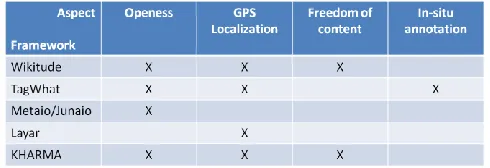
These tool are different and although the concept may seem the same, the way the information is showed to the user, the OS in which the applications can be used and the freedom to create content. For this prototype we evaluated several existing frameworks taking into consideration the following aspects:
International Journal of Artificial Intelligence and Interactive Multimedia, Vol. 2, Nº 2.
Location via GPS. Can the framework use the GPS information to know the location of the user?
Content Generation. Can the user generate his/her own content?
In-situ annotation. Can the user generate the content in the place he intends the content to be shown?
Based in these characteristics we evaluated the following frameworks: Wikitude, TagWhat, Metaio/Junaio, Layar, and KHARMA. The results can be summarized in the following table (Fig. 3):
Fig. 3. Frameworks
None of the evaluated frameworks offers the whole range of aspects needed to the development of the prototype, and although TagWhat and KHARMA were really close in what they offered, the former is only available in the US and the second is not available for the Android OS.
Since none of the evaluated frameworks could be used the SDK for the Android OS was the development tool chosen for the prototype based on the following:
• Most of the frameworks are closed. Content creations is based on on-line templates and the interaction is limited, because the user doesn’t have control over which he/she wishes to annotate.
• Most of the frameworks are capable of more than is needed for the application and, as in a closed system, they are dependent on third party DBs to get all the information.
• Developing a prototype without a framework is an opportunity to delve into the SDK and get to know all the tools available for the user; these knowledge can be used for future projects.
• Getting to know first-hand the way to implement all the requirements for the applications can be translated to solving similar problems in all kinds of applications for the OS.
• This prototype can be the groundwork for a bigger application, which could leverage the information to offer the user touristic information or an education tool for field trips.
III. ARCHITECTURE
In order to meet the goals of building the prototype of an AR application that let the user “annotate” places and interact with the notes, we must leverage the tools available in the SDK to communicate with the sensors, both location (GPS) and orientation, which are almost in every mobile phone.
The user will be able to, given his/her location, create a
place (in case it is not in the DB) and associate a note to the place. These notes will be visible to other users as yellow squares overlaid on the actual physical object. The user can also interact with the notes by reading them.
The proposed Architecture has five components which are grouped within the Model View Controller pattern (Fig. 4).
The Model includes all the relative information of the state of the system in any given moment. Within the Model we can find the Data Storage which can be hosted inside or outside the device. Ideally it should be in a server, in order for every user to access it. Here is where the information created by the user is stored.
For the prototype, this component will reside inside the mobile phone; however all the access methods are exposed via an interface, so we are decoupling the implementation, so these module could be implemented in a server without modifying the actual structure.
For the DB we used the SQLite DBMS, although as stated, any RDBMS can be used.
For each of the tables we defined a POJO (Plain Old Java Object) so we can translate the information in the DB into the Objects needed in the application.
The Location component has all the elements related to the orientation and location of the device, which are also part of the system’s state. When we speak of Location we are talking about the position of the device within Earth’s surface. This information is acquired via the GPS satellites. Based on the location, a user can define a new place, which would later be annotated.
As for the Orientation, it refers to the information regarding the way into which the user is pointing the device, in which direction the user is rotating it or holding it. This information is then used to let the notes be displayed as if they were really attached to the place.
Android has built-in interfaces for communication with the sensors. For the GPS we implement both a LocationListener and a GpsStatus.
Within the Android API there are some guidelines on the usage of these interfaces and also best practices, which let let the developers make the most efficient use of the both the date of the sensors, and the resource systems (i.e. the battery).
For the prototype, since the application should be location aware all the time, we are asking for a change in the position of the phone every moment. This is useful also if, in a future upgrade, a user wishes to record a walking route highlighting and annotating places as he/she walks.
For the orientation sensors the interface
Fig. 4. Proposed Architecture
This is important because it lets the application calculate how the notes should be presented, so the user can really think that they are sticked there. As we progressed with the development we found out that, since the sensor points to the top of the device, so pointing to the North in vertical position and the rotating the phone to a landscape mode, since the “top” of the phone would point to east or west we needed to make some corrections.
The View includes the Augmented Reality component and this is the one in which all the information is presented to the user and he/she can interact with it.
Based on the GPS information, a place is retrieved and in turn, all the notes are then displayed to the user. As the user pans his device through the place, the notes might be in place thanks to the information of the orientation sensors.
All this is within an Activity, base for all the screens in the Android OS. This Activity holds all the information of the sensors and starts a View based on the information captured in real time from the camera, via a SurfaceHolder.Callback interface.
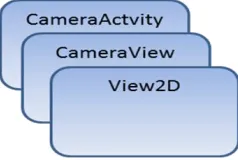
Fig. 5. AR Component overview
Once we can see what the camera sees, we can display our notes, 2D objects, with the possibility of using more complex ways of representing the notes, from images to 3D objects. In order to display all the objects the notes should extend from View and on the onDraw() method we define how the objects
should be rendered according to the position of the device. The way we use the layers for viewing and showing the context can be summarized in (Fig. 5)
As we can see, we are using two views, one over the other. This way, when the user touches the screen, the upper layer can detect the position of the finger and know if the user is touching a note or not. If he/she is indeed trying to interact with a note (for the prototype clicking on a note is the only way to read it) it triggers the actions defined by the programmers. With these approach we can guarantee that if the
user clicks on note “1”, then the content for such note will be available and not a random behavior.
Also the Activities (which are the name given in Android to all the screens) are enclosed within the View since they are part of the way the user communicates with the system.
Finally in the Controller we define a Utility component in which we group the common elements to all the applications and the actions which control the flow of information within the prototype.
Constants. Elements with a fixed value. Interfaces with static variables are used in order to be more efficient. We can find error messages, log messages, etc.
DataSharing. This is the solution to share information between Activities (screens). The most important information shared this way is the location information, that needs to be passed from the sensors to the new note or new place screen and then to the DB.
Listeners. They implement all the behavior for each button in the prototype. For each button an action is triggered and in this listener we can know the button that started the action and then trigger the correct action.
IV. IMPLEMENTATION
Once the prototype was ready, tests were made first to check that all the sensors worked OK and then two phases of tests were made; the first one was to correctly display (both in cmp MVC_English
View
Controller Model
Components::AR
Components:: Activ ities Components::Data Storage Components::Location
Components::Utilities
«flow»
International Journal of Artificial Intelligence and Interactive Multimedia, Vol. 2, Nº 2.
landscape and portrait mode) dummy information verifying: • Image display from the camera.
• Image rotation according to the device rotation. • Note overlay and interaction with the user input.
In these tests we found out that the notes weren’t correctly displayed since the information from the sensors wasn’t being correctly translated to the device.
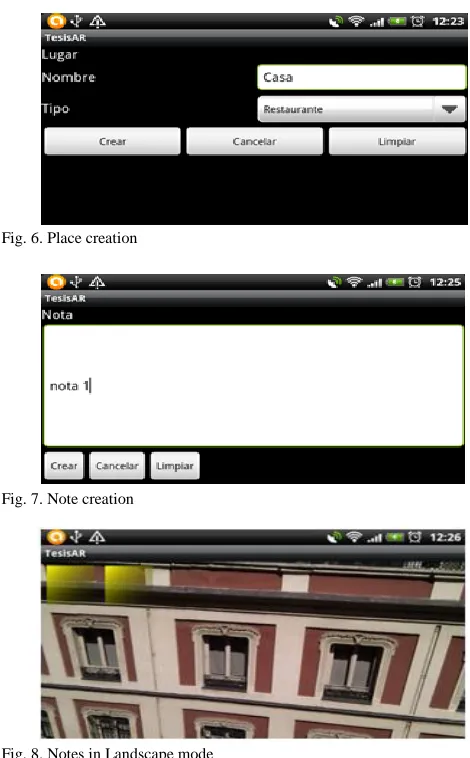
Fig. 6. Place creation
Fig. 7. Note creation
Fig. 8. Notes in Landscape mode
Since they are too fine grained and too sensitive, adjustments were made in order to make them less sensitive so the transition could be smooth enough for the user.
As for the image, corrections had to be made in order to correctly rotate the image, since we found out that we needed to rotate the image to correctly display it when the user switches from the landscape mode to the portrait mode.
For the final test we followed the following steps: • Creation of a New Place (Fig. 6).
• Creation of Notes for a Place (Fig. 7). • Overlaying of Notes to the Place (Fig. 8). • Interaction with the Notes.
All this actions were performed without a flaw. The Place was created, and notes were associated. Once the Notes were retrieved they seemed to be sticked to the walls and the interaction with the user was without a problem. For each note
that the user clicked on, the content of that note would appear before him/her.
V.CONCLUSIONS
AR applications are not limited to mobile devices, however is in this devices that lays the biggest potential to grow, since new SDKs and the popularity of this devices put them in the hands of avid users and developers.
From medical applications, games, collaboration tools and hardware development pave the way to just search an object and it’s properties just by looking at it; imagine getting to a store and realizing which size of clothes is the best for you, buying furniture for your house just placing a virtual object from an on-line catalog interacting with your living-room or in education by letting the students know more about objects that aren’t available in a common classroom or training new engineers or doctors on how to give maintenance to an engine, or give attention to a virtual patient.
This prototype uses the characteristics of a Smartphone not just to display information about a place, but encourages the user to generate in-situ such context that will be present to other people, and also, letting the user interact seamlessly with virtual objects in a real environment thanks to the touch screen.
The flexibility of the proposed prototype can be the base for a more complex application, for example a tourist guide, that let the user create content about interesting routes, facts about buildings and recommendations about a nice place to stay, eat or buy souvenirs.
Another application can be educational information about historic places, in which just by pointing the device to the desired location can give the student important information or make in-situ tests, letting them interact with real places leveraging the way they can understand and apply the information given to them.
The schema presented can take advantage of all the research done in the areas of data organization and is open to the use of external and static data sources for the AR content that complement the use of the user created content.
Even though in this case the information is stored locally, there’s room for improvement by letting query this knowledge from a server and making this information better and broader, and if it’s true that there are some applications that offer similar characteristics, AR can be a novel way to market them.
As applications like Google Glass move from the prototype phase to mass production and consumption, the fact that this pervasive technology is being made available to selected developers can give us a hint about a trend that will be even more popular as the time passes, and as with every technology, the hardware and software evolves, making us wonder what the future will bring to the AR.
REFERENCES
[1] Amato, A., B. D. Martino, et al.; "Semantic Brokering of Multimedia Contents for Smart Delivery of Ubiquitous Services in Pervasive Environments"; International Jorunal of Interactive Multimedia and Artificial Intelligence (2012) pp. 16-25
[2] Azuma Ronald; “A Survey of Augmented Reality”; Presence: Teleoperators and Virtual Environments 6, 4 (Agosto 1997); pp. 355 – 385
[3] Benefon; “Benefon Esc! NT 2002”; http://www.benefon.de/products/esc/ (accesed on 2013/04/30)
[4] De Michelis Gio, De Faoli Flavio, Pluchinotta Constanza y otros; “Weakly Augmented Reality: observing and designing the work-place of creative designers”; Proceedings of DARE 2000 on Designing augmented reality environments (2000); pp. 81-91
[5] Dubois Emmanuel, Nigay Laurence; “Augmented Reality: Which Augmentation for Which Reality?”; Proceeding of DARE 2000, Design Augmented Reality Environments, ACM (2000); pp. 165-166
[6] Herbst Iris, Braun Anne-Kathrin, McCall Rod y otros; “Time Warp: Interactive Time Travel with a Mobile Mixed Reality Game”; MobileHCI (Septiembre 2,5 2008); pp. 234-244
[7] Hirokazu Kato, Mark Billinghurst, "Marker Tracking and HMD Calibration for a Video-Based Augmented Reality Conferencing System"; 2nd IEEE and ACM International Workshop on Augmented Reality 1999; pp.85
[8] S. Feiner, B. MacIntyre, T. Höllerer y otros; “A touring machine: Prototyping 3D mobile augmented reality systems for exploring the urban environment”; Proceedings of First IEEE International Symposium on Wearable Computers (ISWC '97); 1997; pp 74–81
[9] García, C. M., and G. M. Ortega; "Route planning algorithms: Planific@ Project"; International Journal of Artificial Intelligence and Interactive Multimedia (2009); pp. 57-66
[10] Impress Corporation; “Ketai Watch: J-SH04”; http://k-tai.impress.co.jp/cda/article/showcase_top/3913.html (accesed on 2013/04/30)
[11] Jong-Seung Park, Ramesh Jain; “Identification of scene locations from geotagged images”; ACM Transactions on Multimedia Computing, Communications, and Applications (TOMCCAP) TOMCCAP Homepage archive (Volume 9 Issue 1, February 2013); Article No. 5
[12] Junaio/Metaio; “Press Release: SZ Magazin and metaio develop Mobile AR Special”; 2010; http://www.metaio.com/press/press-release/2010/sueddeutsche-zeitung-sz-magazin/ (accesed on 2013/04/30)
[13] Layar; “What is Layar?; 2012; http://layar.com/what-is-layar/ (accesed on 2013/04/30)
[14] Lee Rainie, Susannah Fox. Just-in-time Information through Mobile Connections. Pew Internet & American Life Project, May 7, 2012,
http://www.pewinternet.org/Reports/2012/Just-in-time/Main-Report/Findings.aspx (accessed on 2013/01/10)
[15] Magnusson Charlotte, Rassmus-Gröhn Kirsten, et al.; “Navigation by pointing to GPS locations”; Personal and Ubiquitous Computing archive, Volume 16 Issue 8 (December 2012); pp. 959-971
[16] Miyashita T, Meier P, Tachikawa T; “An Augmented Reality Museum Guide”; ISMAR ’08 Proceedings of the 7th IEEE/ACM International Symposium on Mixed and Augmented Reality (2008); pp. 103-106
[17] Neustaedter Carman, Tang Anthony, et al., “Creating scalable location-based games: lessons from Geocaching”; Personal and Ubiquitous Computing archive, Volume 17 Issue 2 (February 2013); pp. 335-349
[18] NilssonSusanna, Arvola Mattias, et. al “Exploring place and direction: mobile augmented reality in the Astrid Lindgren landscape”; OzCHI '12 Proceedings of the 24th Australian Computer-Human Interaction Conference (2012); pp. 411-419
[19] Olsson Thomas, Lagerstam Else, et al., “Expected user experience of mobile augmented reality services: a user study in the context of shopping centres”; Personal and Ubiquitous Computing archive, Volume 17 Issue 2 (February 2013); pp. 287-304
[20] Ramirez, J. J.; "Collaborative Geographic Information Systems for Business Intelligence"; International Journal of Artificial Intelligence and Interactive Multimedia (2009); pp. 94-97
[21] Realinho Valentín, Teresa Romão, et al; “Building mobile context-aware applications for leisure and entertainment”; ACE '11 Proceedings
of the 8th International Conference on Advances in Computer Entertainment Technology (2011), Article No. 29
[22] Rekimoto Jun, Nagao Katashi; “The World Through the Computer: Computer Augmented Interaction with Real World Environments”; Proceedings of UIST ’95 14-17 (Noviembre 1995) pp. 29-36 via [1]
[23] Rodríguez Sánchez, Martínez Romo, et al; “GAT: Platform for automatic context-aware mobile services for m-tourism”; Expert Systems with Applications: An International Journal archive. Volume 40 Issue 10, (August, 2013); pp. 4154-4163
[24] Rozhen Kamal Mohammed-Amin, Richard M. Levy, et al. “Mobile augmented reality for interpretation of archaeological sites”; PATCH '12 Proceedings of the second international ACM workshop on Personalized access to cultural heritage (2012); pp 11-14
[25] Sánchez Albert, Redondo Ernest, et al; “Developing an augmented reality application in the framework of architecture degree”; UXeLATE '12 Proceedings of the 2012 ACM workshop on User experience in e-learning and augmented technologies in education (2012); pp. 37-42
[26] Schmalstieg Dieter, Wagner Daniel; “Experiences with Handheld Augmented Reality”; Proceedings of the 2007 6th IEEE and ACM International Symposium on Mixed and Augmented Reality (2007); pp. 1 – 13
[27] Sutherland E. Ivan; “A head-mounted three dimensional display”; AFIPS ’68 Proceedings of the December 9-11, 1968, fall joint computer conference part I (1968); pp. 757-764
[28] Urbanowicz Katarzyna, Nyka Lucyna; “Media architecture: participation through the senses”; MAB '12 Proceedings of the 4th Media Architecture Biennale Conference: Participation (2012), pp. 51-54
[29] Ventä-Olkkonen Leena, Koskenranta Olli, et al., “User expectations of mobile mixed reality service content”; MUM '12 Proceedings of the 11th International Conference on Mobile and Ubiquitous Multimedia (2012); Article No. 52
[30] Wereable Computer Lab; “ARQuake: Interactive Outdoor Augmented Reality Collaboration System”; 2010; http://wearables.unisa.edu.au/projects/arquake/ (accesed on 2013/04/30)
[31] Yen-Ta Huang, Kuan-Ting Chen , et al; “Detecting the directions of viewing landmarks for recommendation by large-scale user-contributed photos”; MM '12 Proceedings of the 20th ACM international conference on Multimedia (2012); pp. 997-1000
JR. Barahona is a Software Analyst at a Software Consulting company in Madrid. Masters Degree from the Pontificial University of Salamanca (Madrid) in Software Engineering. His research interests include Mobile Devices, Visualization, Software Architecture, User Interfaces and Object-Oriented technology.
Millán Garcia, Gustavo is Computer Engineering from the Pontifical University of Salamanca, where is professor at the School of Computing (Madrid Campus) since 2003. His research interests include Software Architectures, model desing software , software patterns and software engineering.
Holman Diego Bolívar B. is a Lecturer in the Engineering Faculty of the Catholic University of Colombia. Doctoral Student. from the Pontifical University of Salamanca in Computer Science. His research interests include Immersive Learning, Intelligent Agents, Computer Graphics and Complexity Analysis.
![Fig. 1. Four types of AR Systems [5].](https://thumb-us.123doks.com/thumbv2/123dok_us/9715257.1954834/1.612.325.553.245.412/fig-four-types-of-ar-systems.webp)
![Fig. 2. Real time information in Smartphones [14]](https://thumb-us.123doks.com/thumbv2/123dok_us/9715257.1954834/2.612.321.555.101.228/fig-real-time-information-in-smartphones.webp)