Available Online At www.ijpret.com
INTERNATIONAL JOURNAL OF PURE AND
APPLIED RESEARCH IN ENGINEERING AND
TECHNOLOGY
A PATH FOR HORIZING YOUR INNOVATIVE WORK
MULTI-AUV INTERACTION NETWORKING MODULE
ROHAN KELKAR1, RAJESH LOHANI1
Faculty in Dept. of Electronics and Telecommunication Engineering, Goa College of
Engineering, Farmagudi, Ponda-Goa 403401
1.
Accepted Date:
27/02/2013
Publish Date:
01/04/2013
Keywords
AUV,
GUI,
Mission,
Planner,
Intelligent,
Client, Server
Corresponding Author Mr. Rohan Kelkar
Abstract
This paper addresses the problem of development of a module for
interacting with multiple Autonomous Underwater Vehicles (AUVs)
from a single console. The concepts related to each of the blocks
present in the AUV are introduced and a brief background on the
proposed work is given. We propose a revised client-server
architecture, a new intuitive graphic user interface (GUI) and an
intelligent mission planner to address the problem defined. Various
missions carried out previously by the AUV are also represented with
Available Online At www.ijpret.com
I. INTRODUCTION
National Institute of Oceanography (NIO),
Goa, is developing a small AUV `Maya' as a
tool for scientific and commercial
applications. The development was funded
by NIO and the Department of Information
Technology, New Delhi. Envisioned missions
of the AUV include oceanographic studies,
marine biology studies, water quality
studies in fresh water reservoirs/dams and
environmental monitoring of coastal waters
and estuaries, to name a few.
Operating a single AUV from a conventional
console is now a well-developed area.
However, the marine community needs a
platform from which multiple AUVs can be
programmed to perform a scientific
mission. For this reason, the main objective
was the development of a network
topology (server-client) for interfacing
multiple AUVs to one console. Having a
console for controlling multiple vehicles will
not only suffice the need of engineers but
also the end users of these robots i.e. the
scientists, who need not spend much time
in understanding the complexity of
engineering data. To complete the work, we
are also developing an intuitive GUI for the
console and simple intelligent algorithms
which will generate mission files for AUVs
based on the scientific inputs.
II. PROBLEM SOLUTION
In the current client-server architecture in
the Maya AUV, the AUV acts as a server and
the user is a client. As we need a system in
which a single user can control and
communicate with multiple AUVs, it is
desirable to have the user as the server and
AUVs initiate the communication as the
client. This will enable AUVs to connect to
the console as soon as they are powered up
rather than the user trying to establish the
connection. The client-server architecture
offers many advantages other than being
simple to integrate. Since all data and
transactions happen over a socket
connection, the instructions can be
executed from virtually anywhere
accessible over a TCP link. Acting as a
server, the user is capable of providing
services to many external systems (clients).
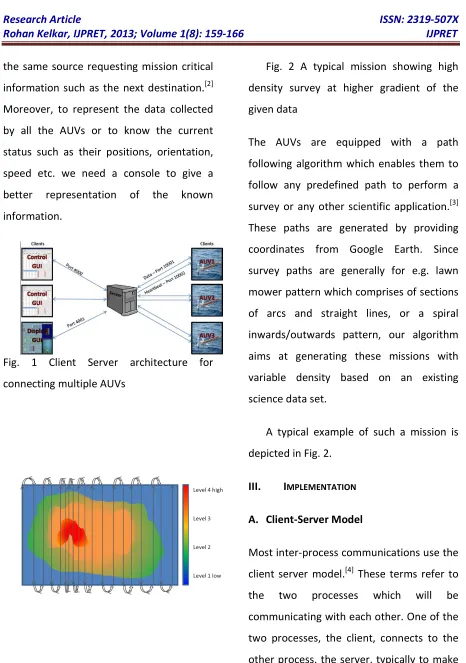
Block diagram of such a system is shown in
Fig. 1.[1] This architecture allows
Available Online At www.ijpret.com the same source requesting mission critical
information such as the next destination.[2]
Moreover, to represent the data collected
by all the AUVs or to know the current
status such as their positions, orientation,
speed etc. we need a console to give a
better representation of the known
information.
Fig. 1 Client Server architecture for
connecting multiple AUVs
Fig. 2 A typical mission showing high
density survey at higher gradient of the
given data
The AUVs are equipped with a path
following algorithm which enables them to
follow any predefined path to perform a
survey or any other scientific application.[3]
These paths are generated by providing
coordinates from Google Earth. Since
survey paths are generally for e.g. lawn
mower pattern which comprises of sections
of arcs and straight lines, or a spiral
inwards/outwards pattern, our algorithm
aims at generating these missions with
variable density based on an existing
science data set.
A typical example of such a mission is
depicted in Fig. 2.
III. IMPLEMENTATION
A. Client-Server Model
Most inter-process communications use the
client server model.[4] These terms refer to
the two processes which will be
communicating with each other. One of the
two processes, the client, connects to the
Available Online At www.ijpret.com a request for information. A good analogy is
a person who makes a phone call to
another person. The client needs to know of
the existence of and the address of the
server, but the server does not need to
know the address of (or even the existence
of) the client prior to the connection being
established. Once a connection is
established, both sides can send and
receive information.
a) Create a Socket with the socket() system
call
b) Connect the socket to the address of
the server using the connect() system
call
c) Send and receive data. There are a
number of ways to do this, but the
simplest is to use the read() and write()
system calls.
The steps involved in establishing a socket
on the server side are as follows:
a) Create a socket with the socket() system
call
b) Bind the socket to an address using the
bind() system call. For a server socket
on the Internet, an address consists of a
port number on the host machine.
c) Listen for connections with the listen()
system call
d) Accept a connection with the accept()
system call. This call typically blocks
until a client connects with the server.
e) Send and receive data
B. PPP Link on Serial Connection
The Point-to-Point Protocol (PPP) is an
industry standard method of utilizing
point-to-point links to transport multi-protocol
datagrams.
PPP (the Point to Point Protocol) is a
mechanism for creating and running IP (the
Internet Protocol) and other network
protocols over a serial link - be that a direct
serial connection (using a null-modem
cable), over a telnet established link, or a
link made using modems and telephone
lines (and of course using digital lines such
as ISDN). Using PPP, you can connect your
Linux PC to a PPP server and access the
resources of the network to which the
Available Online At www.ijpret.com directly connected to that network. You can
also set up your Linux PC as a PPP server, so
that other computers can dial into your
computer and access the resources on your
local PC and/or network. As PPP is a
peer-to-peer system, you can also use PPP on
two Linux PCs to link together two networks
(or a local network to the Internet), creating
a Wide Area Network (WAN). One major
difference between serial based PPP and an
Ethernet connection is of course speed - a
standard Ethernet connection operates at
10 Mbps (Mega - million bits per second) or
100 Mbps maximum theoretical
throughput, whereas an analogue modem
operates at speeds up to 56 kbps (kilo -
thousand bits per second). Also, depending
on the type of PPP connection, there may
be some limitations in usage of some
applications and services.
PPP is strictly a peer to peer
protocol;[5] there is (technically) no
difference between the machine that dials
in and the machine that is dialed into.
However, for clarity's sake, it is useful to
think in terms of servers and clients. When
you dial into a site to establish a PPP
connection, you are a client. The machine
to which you connect is the server. When
you are setting up a Linux box to receive
and handle dial-in PPP connections, you are
setting up a PPP server. Any Linux PC can be
both a PPP server and client - even
simultaneously if you have more than one
serial port (and modem if necessary). As
stated above, there is no real difference
between clients and servers as far as PPP is
concerned, once the connection is made.
On either side computers can ping each
other if the connection is active. If for any
reason the physical link connecting two pc's
is disconnected the two machines still try to
connect to each other on the same link.
When the physical link is restored the PPP
connection is setup again.
IV. SCREENSHOTS OF RESULTS
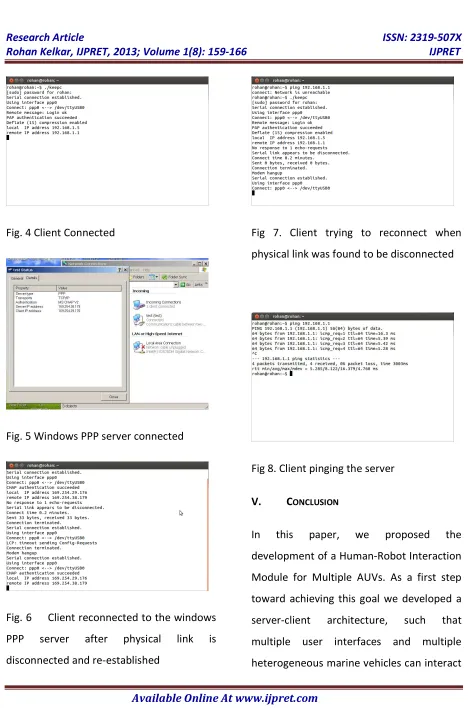
Available Online At www.ijpret.com Fig. 4 Client Connected
Fig. 5 Windows PPP server connected
Fig. 6 Client reconnected to the windows
PPP server after physical link is
disconnected and re-established
Fig 7. Client trying to reconnect when
physical link was found to be disconnected
Fig 8. Client pinging the server
V. CONCLUSION
In this paper, we proposed the
development of a Human-Robot Interaction
Module for Multiple AUVs. As a first step
toward achieving this goal we developed a
server-client architecture, such that
multiple user interfaces and multiple
Available Online At www.ijpret.com among each other. The communication
model is based on a PPP link. In an event of
disconnection client (a marine vehicle) tries
to re-establish connection by re-dialing to
the server thus regaining the control over
the vehicle. We tested the system in
laboratory by using a serial connection
between two computers. The test gave
promising results to move to the step for
developing the user interface. {-2in}Future
work involves building GUI client to interact
with multiple AUVs, particularly with
respect to configuration,
planning/re-planning and simulation, from a single
console. Also various kinds of data and
information gathered from multiple AUVs
needs to be displayed in a manner that is
easily and effectively assimilated by the end
user. The next step is to develop a mission
planner which generates scientific mission
for the AUVs using the previously acquired
sensor data.
ACKNOWLEDGEMENT
We would like to thank Pramod Maurya for
giving us opportunity to work on the project
AUV and providing us with the resources for
this project. We would also like to thank
him for his constant support and
encouragement .
REFERENCES
1. A. Tanenbaum, Computer Networks, 4th
ed. Prentice Hall Professional Technical
Reference, 2002
2. J. F. Im, M. Morissette and P. Felix, in
Flexible AUV Vision Framework. AUVSI’s
Unmanned Systems North America, 2007
3. P. Maurya, A. P. Aguiar and A. PAscoal,
“Marine Vehicle Path Following Using
Inner-Outer Loop Control”, in 8th IFAC
International Conference on Manoeuvring
and Control of Marine Craft, 2009
4. “Sockets Tutorial”,
http://www.linuxhowtos.org/C_C++/socket.
htm, accessed: 30/10/2012
5. “Linux PPP HOWTO”,