The Reload Learning Design tools.
Colin D. Milligan
Philip Beauvoir
University of Bolton, [email protected]
Paul Sharples
University of Bolton, [email protected]
This Article is brought to you for free and open access by the Institute for Educational Cybernetics at UBIR: University of Bolton Institutional Repository. It has been accepted for inclusion in Educational Cybernetics: Journal Articles (Peer-Reviewed) by an authorized administrator of UBIR:
Digital Commons Citation
Milligan, Colin D.; Beauvoir, Philip; and Sharples, Paul. "The Reload Learning Design tools.." (2005).Educational Cybernetics: Journal Articles (Peer-Reviewed).Paper 6.
Milligan, C.D., Beauvoir, P., & Sharples, P. (2005).
The Reload Learning Design Tools.
Journal of Interactive Media in Education 2005(06).
[jime.open.ac.uk/2005/06].
Colin D. Milligan, University of Strathclyde.
Phillip Beauvoir and Paul Sharples, University of Bolton. Page 1
1 July 2005
ISSN: 1365-893X
The Reload Learning Design Tools
Colin D. Milligan, Phillip Beauvoir, Paul Sharples
Abstract:
The Reload Learning Design Editor (LDE) is an Open Source, close-to-specification, tree-based Learning Design (LD) editor written in Java using the Eclipse platform. The editor tools are complemented by a LD Player, which provides a familiar and user-friendly interface to the CopperCore LD runtime engine. This paper will describe the history and design rationale underpinning the tools, show how they fit into the LD authoring tools framework devised by Griffiths et al. (2005) and consider their suitability to various user roles and design approaches. The paper will conclude by outlining future versions of the software and how these new developments should facilitate the creation and manipulation of Units of Learning by staff in all user roles.
Keywords:Java, Eclipse, Learning Design.
Interactive Demonstration:
The software tools described in this paper (the Reload Learning Design Editor and Reload Learning Design Player, both at version 2.0 as of May 27 2005) are available from the Reload project web site at http://www.reload.ac.ukCommentaries:
Page 2
1
Introduction
There is a recognised need for consensus in the design of the processes and tools which underpin eLearning. For example, agreement on how to describe educational resources aids discovery of content, whilst agreement on how that content is organised leads to interoperability between eLearning systems. To date, the Educational Technology community, through IMSi and other bodies has developed a number of specifications to promote interoperability and reuse. But these specifications are dense technical documents, intended for a technical audience. Whilst attractive in principle, if the specifications are difficult for the end user to adhere to, they will not be used.
The Reloadii project was initially funded to create software to encourage adoption of the IMS Content Packagingiii and Metadataiv specifications by non expert (largely non technical) users. The software tools created by the project (the Reload Content Package and Metadata (CP&M) Editor and SCORM 1.2 Player) have achieved wide uptake and have become the de facto tools for anyone working with the relevant IMS Specifications or the SCORM 1.2v Application Profile, providing a convenient visual to support creating and editing of the XML files at the core of these specifications.
This paper describes our development of a set of tools to similarly support the IMS Learning Design specificationvi and discusses their suitability to expected user roles and their position within the LD tools framework devised by Griffiths et al. (2005). The paper concludes with a discussion of future enhancements to the tools and how these should facilitate the uptake of this specification which is key to describing and sharing teaching practice.
2
History
The LD specification seeks to facilitate the unambiguous description of pedagogical scenarios in such a way that they can be efficiently re-used (Koper and Olivier, 2004). The IMS Learning Design specification was released in Spring 2003, but it was not until early 2005 that tools supporting its uptake started to become available. Although particularly complex, the Learning Design specification is closely related to the Content Package specification, with the <learning design> element attached to the organizations element of the Content Package imsmanifest.xml file.
The Reload Learning Design Tools
Journal of Interactive Media in Education, 2005 (06) Page 3 Milligan, et al. (2005)
editor, added as extra functionality to the original CP&M Editor, was planned in this way, but it soon became apparent that the complexity of the LD specification (specifically the complexities surrounding resource file dependencies) would make this approach inappropriate for all but the simplest Learning Designs. Indeed for Learning Design as a whole, the user deserves a richer experience than that of editing a complex XML file. As a result we took the decision to move on from the Schema driven approach and adopt a new architecture based on the Eclipse RCPvii architecture. In the new version, resource file dependencies are managed separately and the LD imsmanifest.xml is created only for export of the final Unit of Learning.
3
Design Rationale and Tool Summary
The Reload Learning Design Editor and Player complement each other to provide an environment for creating and previewing units of Learning. At present, they are implemented as separate tools and are treated as such below.
3.1 The Reload Learning Design Editor
Page 4
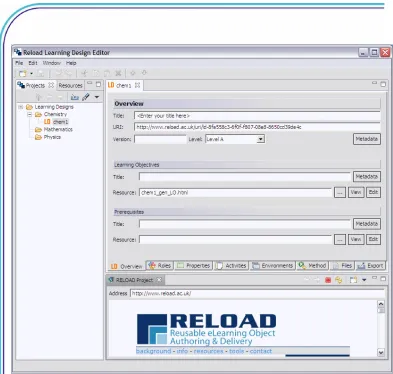
Figure 1: The Reload Learning Design Editor Workspace
The Reload Learning Design Tools
Journal of Interactive Media in Education, 2005 (06) Page 5 Milligan, et al. (2005)
case the process of creating a Learning Design primarily entails linking the resources together at the right time and with the right user roles. It is also possible to create a Learning Design with no pre-existing materials. In this case, resources (or at least placeholders for resources) can be created in parallel as the Learning Design is specified. As it is expected that most users will work on a number of Learning Designs in parallel, a Projects tab acts as a virtual organiser for all the Learning Designs created with the Reload LDE. The project nature of the tools also means that several related Learning Designs can be created in the same project folder, sharing their content files.
Typically, a user will work through the 6 LD tabs, first specifying general details about the Learning Design, then creating Roles, adding Activities and linking these to Environments. If the Learning Design is to include Level B elements, then the Properties tab is used. All elements of the Learning Design are integrated in the Method tab, where Conditions (for Level B Designs) and Notifications (for Level C Designs) can be added. Once all elements of the design have been added, the user chooses the Export tab, where they can perform simple checks on the integrity of the Learning Design before exporting a zipped Unit of Learning for viewing in the Reload LD Player. Creating a Learning Design is likely to be an iterative process, with a degree of re-design necessary at this stage. The same export tab is then used to prepare a UoL for delivery or storage in a repository.
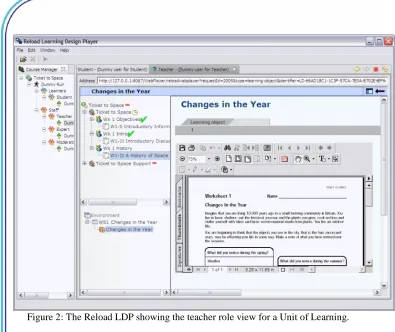
3.2 The Reload Learning Design Player
Page 6
Figure 2: The Reload LDP showing the teacher role view for a Unit of Learning.
4
Reload Tools and expected User Roles
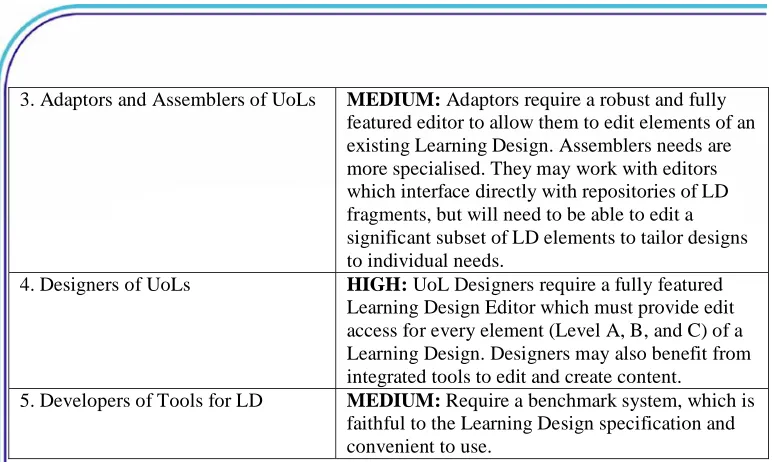
Griffiths et al (2005) described five typical user roles for specialised Learning Design tools and discussed the type of tools which they would need to fulfil their role. The user roles identified range from learners and teachers through to tool developers. Table 1 below summarises the utility of the current Reload tools with respect to the five user roles identified.
USER ROLE RELEVANCE OF RELOAD TOOLS
1. Learners and teachers participating in educational activities
2. Staff who set up UoLs to be run with learners
The Reload Learning Design Tools
Journal of Interactive Media in Education, 2005 (06) Page 7 Milligan, et al. (2005)
3. Adaptors and Assemblers of UoLs MEDIUM: Adaptors require a robust and fully featured editor to allow them to edit elements of an existing Learning Design. Assemblers needs are more specialised. They may work with editors which interface directly with repositories of LD fragments, but will need to be able to edit a significant subset of LD elements to tailor designs to individual needs.
4. Designers of UoLs HIGH: UoL Designers require a fully featured Learning Design Editor which must provide edit access for every element (Level A, B, and C) of a Learning Design. Designers may also benefit from integrated tools to edit and create content. 5. Developers of Tools for LD MEDIUM: Require a benchmark system, which is
faithful to the Learning Design specification and convenient to use.
Table 1: Reload and the five user roles identified by Griffiths et al (2005)
The Reload Tools are aimed primarily at UoL Designers, but would be also be suitable for use by Adaptors and Assemblers of Units of Learning. Indeed, at present, in the absence of tools which are more specialised, tools such as the Reload LDE provide the most efficient way to adapt pre-existing Units of Learning. As the tools adhere closely to the IMS LD specification, they may be of particular use as a benchmark to developers of other LD tools.
5
The Reload LDE and the LD tools
framework.
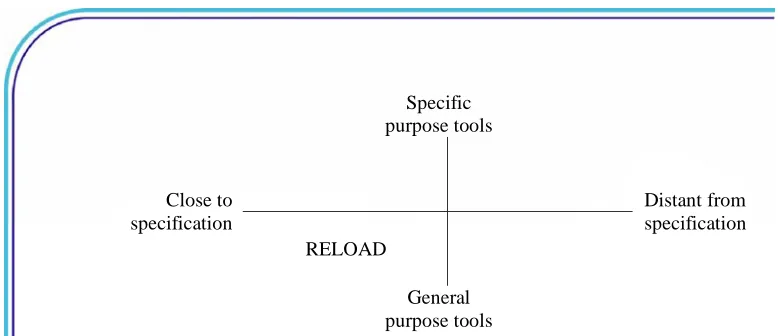
Griffiths et al (2005) devised a framework for Learning Design tools based on a survey of existing tools and their analysis of the different needs of the different user roles. Their framework identifies two key dimensions: the specificity of tools (general purpose or suited to a specific task), and how closely they follow the specification (are they designed for use in conjunction with the specification, or in a more general sense, as tools to assist in the design of learning). Tools can be categorised according to these two criteria and associated with the needs of specific user roles.
Page 8
purpose tools
Close to specification
RELOAD
Distant from specification
General purpose tools
Figure 3: Two dimensions of LD Tool Design (after Griffiths et al, 2005)
In user terms, the vertical axis separates those with a technical background (left half) from those who are primarily educators. The horizontal axis separates those who create Learning Designs or designing learning (bottom half) from those who adapt them (top half). As LD tools start to evolve, we will see specialised versions of the initial tools appearing as constrained LD editors in the upper left quadrant. As more LDs are created, and Learning Designs and fragments of Learning Designs become available (through repositories) we will see tools appearing in the upper right quadrant that facilitate adapting and assembling new LDs based on pre-existing Designs or building blocks. Finally, as we begin to see the benefit of the LD specification in providing a common language for discussing teaching practice, we will start to see very specialised tools aimed at educators which no longer use the terms of the LD specification, but provide terms and structures which are more relevant to the educator community.
6
The Future of the Reload LD tools
The Open Source MITix License under which all the Reload software has been developed encourages others to adapt and build on the code created by Reload. For the CP&M Editor, this has resulted in the development of new tools such as the Reload SCORM 2004 Editorx. The Reload LD tools could be adapted in similar ways.
The RELOAD LDE exposes all of the LD elements at levels A, B and C. Very little is hidden from the user. Given that we are now in a position to clearly see what is mandatory or optional and how the components inter-relate, we can now propose possible ways forward to modify the user interface to provide for the differing expected user roles outlined above by Griffiths et al.
The Reload Learning Design Tools
Journal of Interactive Media in Education, 2005 (06) Page 9 Milligan, et al. (2005)
software wizards that guide the user through a particular process. The one provided is designed to 'Create a new Learning Design'. Further use cases might be to allow the user to create a Play with a number of Acts, or populate an Act with Roles. This could be implemented as a high level GUI with graphical renditions of each component inter-relating by means of elements similar to those found in some UML editing tools. The necessary fields and attributes for each component could be edited by selecting a component and opening a 'Properties' View in the editor. This single, context sensitive, Properties View could be shown or hidden as required. Additionally, building on top of the existing LDE's 'Checklist' function, the user could be alerted to those fields that are mandatory or warned of incorrect references to other LD elements.
Another proposal is to allow the user to create parts of the UoL that could be saved as fragments of XML that could be re-used in a full UoL – an Environment for example. Thus the user could build up a personal repertoire of sections of Units of Learning that could be ultimately pieced together to create a full UoL. However, this may prove to be problematic if there are many dependencies on other components such as resources or roles.
Dispensing with the Java “Swing” interface and adopting the Eclipse RCP framework has opened up possibilities that we or others could leverage to provide a much richer user experience than already exists. This includes not just graphical frameworks but underlying model frameworks such as plug-in extensibility, ftp, webdav, file sharing or an interface to a repository of Learning Designs.
Ultimately, the Learning Design specification is exceedingly complex and working with the specification means providing values for attributes, so there will always be a need for 'close to specification' Editors such as Reload LDE which stay close to the specification and are not specialised to a specific task. The aim of the Reload tools is to make it easy to utilise the specification, and the Open Source nature of the tools makes them an ideal building block for other work to create the next generation tools.
7
References
Griffiths, D., Blat, J., Garcia, R., Vogten, H., and Kwong, K.L. (2005). Learning Design Tools. In: Koper, R and Tattersall, C, (eds) Learning Design, A Handbook on Modelling and Delivering Networked Education and Training. Springer-Verlag, Berlin Heidelberg, pp 109-135
Koper, R., and Olivier, B. (2004) Representing the Learning Design of Units of Learning. Educational Technology and Society 7(3)79-111
Page 10
8
Footnotes
i IMS Global Learning Consortium, Inc., Retrieved from
http://www.imsglobal.org/content/packaging/index.html#version1.1.3 May 27th 2005
ii ReLOAD: Reusable e-Learning Object Authoring and Delivery. This project is based at
the Universities of Bolton and Strathclyde and funded by JISC, the Joint Information Systems Committee.
iii IMS Content Packaging. Information Model, Best Practice and Implementation Guide,
XML Binding, Schemas. Version 1.1.3 Final Specification IMS Global learning Consortium, Inc. Retrieved from
http://www.imsglobal.org/content/packaging/index.html#version1.1.3 May 27th 2005
iv IMS Metadata. Information Model, Best Practice and Implementation Guide, XML
Binding, Schemas. Version 1.2.2 Final Specification IMS Global learning Consortium, Inc. Retrieved from http://www.imsglobal.org/metadata/index.html#version1.2.2 May 27th 2005
v
SCORM. Scaleable Content Object Reference Model, produced by ADL (Advanced Distributed Learning) is a specific implementation of the ISM Content Packaging and Metadata specifications which has been widely adopted. Retrieved from
http://www.adlnet.org/scorm/ May 27th 2005
vi
IMS Learning Design. Information Model, Best Practice and Implementation Guide, XML Binding, Schemas. Version 1.0 Final Specification IMS Global learning Consortium, Inc. Retrieved from http://www.imsglobal.org/learningdesign/May 27th 2005
vii Eclipse RCP. Eclipse Rich Client Platform architecture is a Java Application
Environment. The architecture supports rapid application development, improvements over core Java UI functionality and access to UI elements created by the large community of Eclipse developers worldwide.
viii CopperCore LD Runtime Engine. An Open Source (Gnu Public License) implementation
of a LD Runtime Engine. Retrieved from http://www.coppercore.org/ May 24th 2005
ix MIT License. Retrieved from http://www.opensource.org/licenses/mit-license.php May
27th 2005
x Reload SCORM 2004 Editor. Produced by ADL. Retrieved from