File Management
Files Files
Data collections created by users
The File System is one of the most important parts of the OS to a user
Desirable properties of files:
File Systems File Systems
Provide a means to store data organized as files as well as a collection of functions that can be performed on files
Maintain a set of attributes associated with the file
Typical operations include:
Create
Delete
Open
Close
Read
Write
File Structure
File Structure
File Structure
Files can be structured as a collection of records or as a sequence of bytes
UNIX, Linux, Windows, Mac OS’s consider files as a sequence of bytes
Other OS’s, notably many IBM mainframes,
adopt the collection-of-records approach; useful for DB
COBOL supports the collection-of-records file and can implement it even on systems that don’t
provide such files natively.
Structure Terms Structure Terms
Field
basic element of data
contains a single value
fixed or variable length
File
collection of related fields that can be treated as a unit by some application program
One field is the key – a unique identifier
Record Database
collection of similar records
treated as a single entity
may be referenced by name
access control
restrictions usually apply at the file level
collection of related data
relationships among elements of data are explicit
designed for use by a number of different applications
consists of one or more types of files
File Management File Management System Objectives System Objectives
Meet the data management needs of the user
Guarantee that the data in the file are valid
Optimize performance
Provide I/O support for a variety of storage device types
Minimize the potential for lost or destroyed data
Provide a standardized set of I/O interface routines to user processes
Provide I/O support for multiple users in the case of multiple-user systems
Minimal User Minimal User Requirements Requirements
Each user:
Typical Software Organization
File System Architecture
Notice that the top layer consists of a number of different file formats: pile, sequential,
indexed sequential, …
These file formats are consistent with the collection-of- records approach to files and determine how file data is accessed
Even in a byte-stream oriented file system it’s possible to build files with record-based
structures but it’s up to the application to
design the files and build in access methods,
indexes, etc.
Layered File System Architecture
File Formats – Access methods provide the interface to users
Logical I/O
Basic I/O
Basic file system
Device drivers
Device Drivers Device Drivers
Lowest level
Communicates directly with peripheral devices
Responsible for starting I/O operations on a device
Processes the completion of an I/O request
Considered to be part of the operating system
Basic File System Basic File System
Also referred to as the physical I/O level
Primary interface with the environment outside the computer system
Deals with blocks of data that are exchanged with disk or other mass storage devices.
placement of blocks on the secondary storage device
buffering blocks in main memory
Considered part of the operating system
Basic I/O Supervisor Basic I/O Supervisor
Responsible for all file I/O initiation and termination
Control structures that deal with device I/O, scheduling, and file status are maintained
Selects the device on which I/O is to be performed
Concerned with scheduling disk and tape accesses to optimize performance
I/O buffers are assigned and secondary memory is allocated at this level
Part of the operating system
Logical I/O
Logical I/O
Logical I/O Logical I/O
This level is the interface between the
logical commands issued by a
program and the physical details required by the disk.
Logical units of data versus physical blocks of data to match disk
requirements.
Access Method Access Method
Level of the file system closest to the user
Provides a standard interface between
applications and the file systems and devices that hold the data
Different access methods reflect different file structures and different ways of accessing
and
processing the data
Elements of File Elements of File
Management
Management
File Organization and Access File Organization and Access
File organization is the logical structuring of the records as determined by the way in which they are accessed
In choosing a file organization, several criteria are important:
short access time
ease of update
economy of storage
simple maintenance
reliability
Priority of criteria depends on the application that will use the file
File Organization Types
File Organization Types
The Pile
Least complicated form of file organization
Data are collected in the order they arrive
Each record consists of one burst of data
Purpose is simply to accumulate the mass of data and save it
Record access is by exhaustive search
The
Sequential File
Most common form of file structure
A fixed format is used for records
Key field uniquely
identifies the record &
determines storage order
Typically used in batch applications
Only organization that is easily stored on tape as well as disk
Indexed
Sequential File
Adds an index to the file to support
random access
Adds an overflow file
Greatly reduces the time required to
access a single record
Multiple levels of
indexing can be used to provide greater efficiency in access
Indexed File
Records are accessed only through their indexes
Variable-length records can be employed
Exhaustive index contains one entry for every record in the main file
Partial index contains entries to records where the field of interest exists
Used mostly in applications where timeliness of
information is critical
Examples would be airline reservation systems and inventory control systems
Direct or Hashed File Direct or Hashed File
Access directly any block of a known address
Makes use of hashing on the key value
Often used where:
very rapid access is required
fixed-length records are used
records are always accessed one at a time
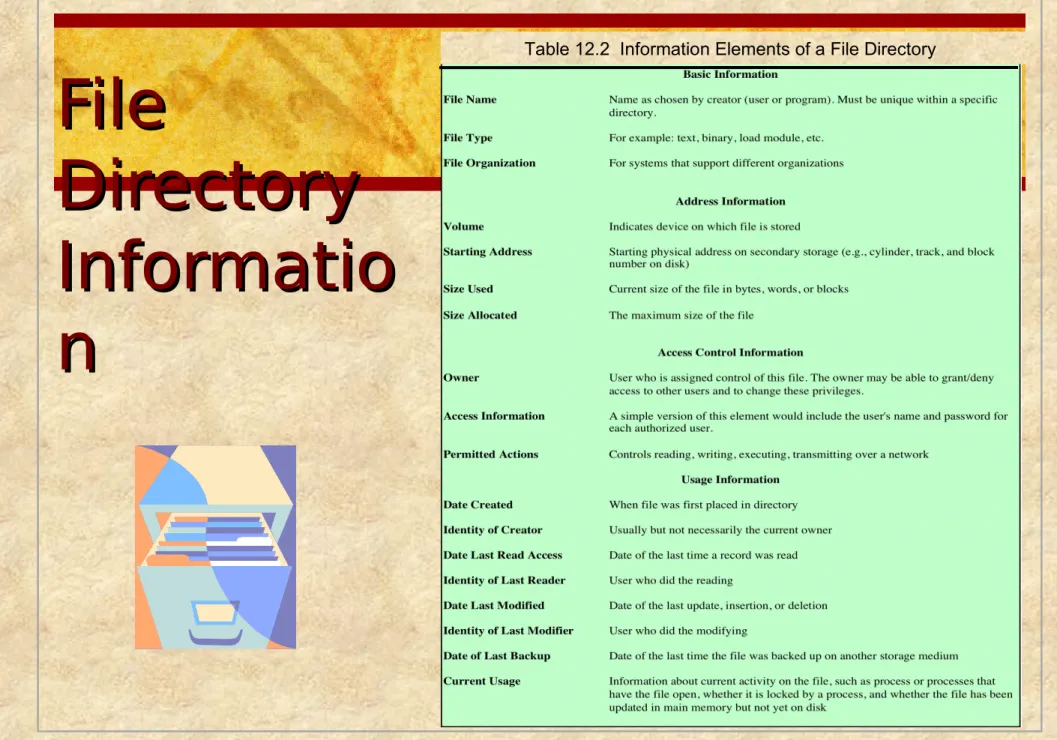
File File
Directory Directory
Informatio Informatio n n
Table 12.2 Information Elements of a File Directory
Operations Performed Operations Performed
on a Directory on a Directory
To understand the requirements for a file structure, it is helpful to consider the types of operations that may be performed on the directory:
Two-Level Scheme
Two-Level Scheme
Tree-
Structured Directory
Master
directory with user
directories underneath it
Each user
directory may have
subdirectories and files as entries
Example of Tree-
Structured
Directory
File Sharing
File Sharing
Access Access
Rights Rights
None
the user would not be allowed to read the user directory that includes the file
Knowledge
the user can determine that the file exists and who its owner is and can then petition the owner for additional access rights
Execution
the user can load and execute a program but cannot copy it
Reading
the user can read the file for any purpose, including
copying and execution
Appending
the user can add data to the file but cannot modify or delete any of the file’s contents
Updating
the user can modify, delete, and add to the file’s data
Changing protection
the user can change the access rights granted to other users
Deletion
the user can delete the file from the file system
User Access Rights
User Access Rights
Record Blocking Record Blocking
2)Variable-Length Spanned Blocking – variable-length records are packed into blocks with no unused space
3)Variable-Length Unspanned Blocking – variable-length records are used, but spanning is not
Blocks are the unit of I/O with secondary storage
for I/O to be
performed records must be organized as blocks
Given the size of ablock, three methods of blocking can be used:
1)Fixed-Length Blocking – fixed- length records are used, and an integral number of records (or bytes) are stored in a block Internal fragmentation –
unused space at the end of each block for records, but not for bytes
File Allocation File Allocation
Disks are divided into physical blocks (sectors on a track)
Files are divided into logical blocks (subdivisions of the file)
Logical block size = some multiple of a physical block size
The operating system or file management system is responsible for allocating blocks to files
Space is allocated to a file as one or more portions (contiguous set of allocated disk blocks). A portion is the logical block size
File allocation table (FAT)
data structure used to keep track of the portions assigned to a file
Preallocation vs Preallocation vs
Dynamic Allocation Dynamic Allocation
A preallocation policy requires that the maximum size of a file be declared at the time of the file creation request
For many applications it is difficult to estimate reliably the maximum potential size of the file
tends to be wasteful because users and application programmers tend to overestimate size
Dynamic allocation allocates space to a file in portions as needed
Portion Size Portion Size
In choosing a portion size there is a trade-off between efficiency from the point of view of a single file versus overall system
efficiency
Items to be considered:
1) contiguity of space increases performance, especially for Retrieve_Next operations, and greatly for transactions running in a transaction-oriented operating system
2) having a large number of small portions increases the size of tables needed to manage the allocation information
3) having fixed-size portions simplifies the reallocation of space
4) having variable-size or small fixed-size portions minimizes waste of unused storage due to overallocation
Summarizing the Summarizing the
Alternatives Alternatives
Two major alternatives:
File Allocation Methods
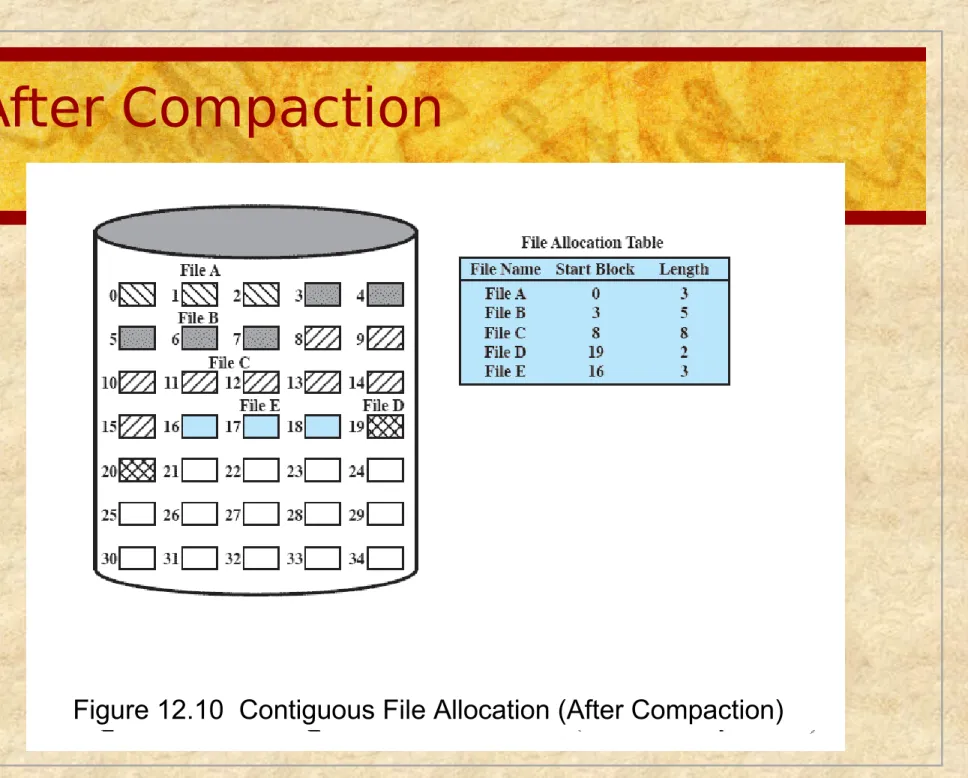
Contiguous File Allocation
A single
contiguous set of blocks is allocated to a file at the time of file creation
Preallocation strategy using variable-size portions
Is the best from the point of view of the individual sequential file
12.9
After Compaction
Figure 12.10 Contiguous File Allocation (After Compaction)
Chained Allocation
Allocation is on an individual block basis
Each block contains a pointer to the next block in the chain
The file allocation table needs just a single entry for each file
No external
fragmentation to worry about
Better for sequential
files 12.11
Chained Allocation After Consolidation
12.12
Indexed Allocation with Indexed Allocation with
Block Portions Block Portions
12.13
Indexed Allocation with Indexed Allocation with Variable Length Portions Variable Length Portions
12.14
Free Space Free Space Management Management
Just as allocated space must be managed, so must the unallocated space
To perform file allocation, it is necessary to know which blocks are available
A disk allocation table is needed in addition to a file allocation table
Bit Tables (Bit Bit Tables (Bit Vectors)
Vectors)
This method uses a vector containing one bit for each block on the disk
Each entry of a 0 corresponds to a free block, and each 1 corresponds to a block in use
Chained Free Portions Chained Free Portions
The free portions may be chained together by using a pointer and length value in each free portion
Negligible space overhead because there is no need for a disk allocation table
Suited to all file allocation methods
Indexing Indexing
Treats free space as a file and uses an index table as it would for file allocation
For efficiency, the index should be on the basis of variable-size portions rather than blocks
This approach provides efficient support for all of the file allocation methods
Free Block List
Free Block List
Review
File systems can support files organized as a sequence of bytes or as a sequence of records
Access methods depend on file organization
Disk storage of files can be contiguous, linked or indexed
Logical blocks of a file are mapped to one or more disk sectors to create physical blocks.
Directories map user names to internal names
File Allocation Tables map files to disk locations
Volumes Volumes
A collection of addressable sectors in
secondary memory that an OS or application can use for data storage
The sectors in a volume need not be
consecutive on a physical storage device
they need only appear that way to the OS or application
A volume may be the result of assembling
and merging smaller volumes
Access Control
In a system with multiple users, it’s important to
protect one user’s objects (files, directories) from other users.
Two levels of protections:
Logon verifications: guarantees you have the right to log onto the system
Access determination: guarantees you have permission to access a specific object
Access matrix, access lists, capability lists: techniques for determining access rights.
Access Matrix
The basic elements are:
subject – an entity capable of accessing objects
object – anything to which access is controlled
access right – the way in which an object is accessed by a subject
Access Control Lists
A matrix may be decomposed by columns, yielding
access control lists
The access control list lists users and their permitted access rights
Capabilit y Lists
Decomposition by rows yields
capability tickets
A capability ticket specifies authorized objects and operations for a user
UNIX File Management
In the UNIX file system, six types of files are
distinguished:
Inodes Inodes
All types of UNIX files are administered by the OS by means of inodes
An inode (index node) is a control structure that contains the key information needed by the operating system for a particular file
Several file names may be associated with a single inode
an active inode is associated with exactly one file
each file is controlled by exactly one inode
FreeBSD Inode and File
Structure
File Allocation File Allocation
File allocation is done on a block basis
Allocation is dynamic, as needed, rather than using preallocation
An indexed method is used to keep track of each file, with part of the index stored in the inode for the file
In all UNIX implementations the inode includes a number of direct pointers and three indirect pointers (single,
double, triple)
Capacity of a FreeBSD File with 4 Kbyte Block Size
Table 12.4
UNIX
Directories and Inodes
Directories are structured in a hierarchical tree
Each directory can contain files and/or other directories
A directory that is inside another directory is
referred to as a
subdirectory Figure 12.17
Volume Structure Volume Structure
A UNIX file system
resides on a single logical disk or disk partition and is laid out
with the
following
elements:
UNIX File Access Control
UNIX File Access Control
Access Control Lists Access Control Lists
in UNIX in UNIX
FreeBSD allows the administrator to assign a list of UNIX user IDs and groups to a file
Any number of users and groups can be associated with a file, each with three protection bits (read, write,
execute)
A file may be protected solely by the traditional UNIX file access mechanism
FreeBSD files include an additional protection bit that indicates whether the file has an extended ACL
Linux Virtual File System
(VFS)
Presents a single, uniform file system interface to user
processes
Defines a common file model that is capable of representing any conceivable file system’s general feature and behavior
Assumes files are objects that share basic properties
regardless of the target file system or the underlying processor hardware
The Role of VFS
Within the
Kernel
Primary Object Types in VFS
Primary Object Types in VFS
Windows File System Windows File System
The developers of Windows NT designed a new file
system, the New Technology File System (NTFS) which is intended to meet high-end requirements for workstations and servers
Key features of NTFS:
recoverability
security
large disks and large files
multiple data streams
journaling
compression and encryption
hard and symbolic links
NTFS Volume NTFS Volume
and File Structure and File Structure
NTFS makes use of the following disk storage
concepts:
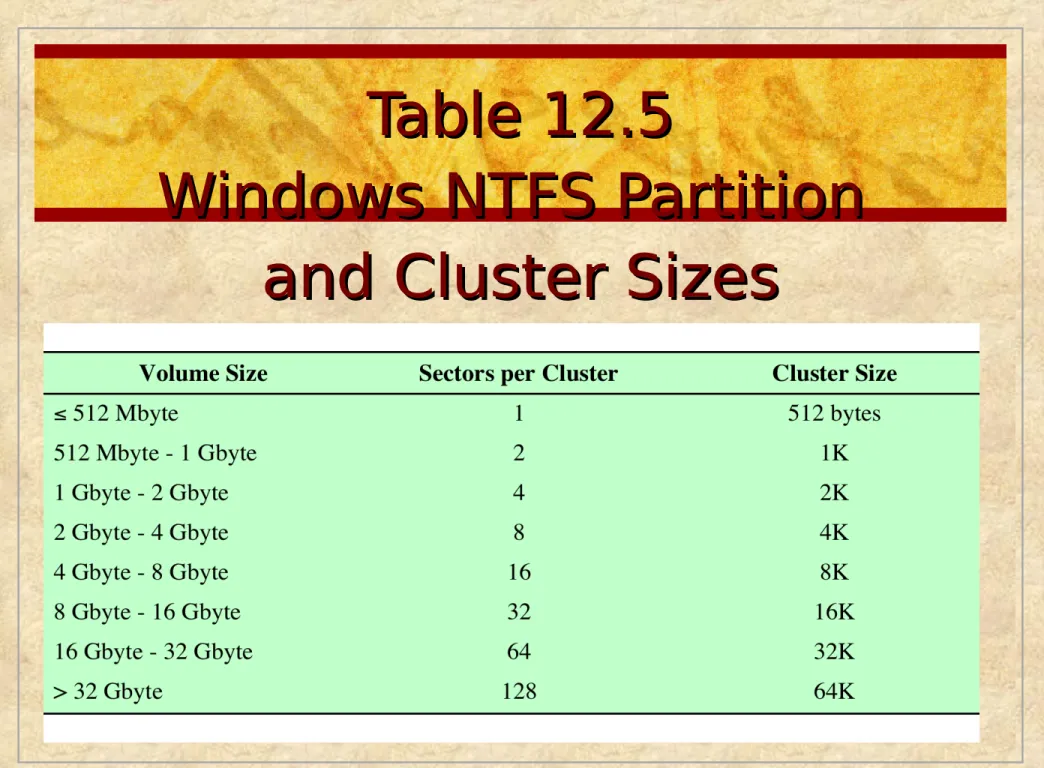
Table 12.5 Table 12.5
Windows NTFS Partition Windows NTFS Partition
and Cluster Sizes
and Cluster Sizes
NTFS Volume Layout
Every element on a volume is a file, and every file
consists of a collection of attributes
even the data contents of a file is treated as an attribute
Figure 12.21
Master File Table (MFT) Master File Table (MFT)
The heart of the Windows file system is the MFT
The MFT is organized as a table of 1,024-byte rows, called records
Each row describes a file on this volume, including the MFT itself, which is treated as a file
Each record in the MFT consists of a set of attributes that serve to define the file (or folder) characteristics and the file contents
Table 12.6
Table 12.6
Windows NTFS Components
Figure 12.22
Summary Summary
A file management system:
is a set of system software that provides services to users and applications in the use of files
is typically viewed as a system service that is served by the operating system
Files:
consist of a collection of records
if a file is primarily to be processed as a whole, a sequential file organization is the simplest and most appropriate
if sequential access is needed but random access to individual file is also desired, an indexed sequential file may give the best performance
if access to the file is principally at random, then an indexed file or hashed file may be the most appropriate
directory service allows files to be organized in a hierarchical fashion
Some sort of blocking strategy is needed
Key function of file management scheme is the management of disk space
strategy for allocating disk blocks to a file
maintaining a disk allocation table indicating which blocks are free