Applications
RODRIGUES, Marcos <http://orcid.org/0000-0002-6083-1303> and ROBINSON, Alan
Available from Sheffield Hallam University Research Archive (SHURA) at:
http://shura.shu.ac.uk/5306/
This document is the author deposited version. You are advised to consult the publisher's version if you wish to cite from it.
Published version
RODRIGUES, Marcos and ROBINSON, Alan (2009). Developing Interaction 3D Models for E-Learning Applications. In: MELLO, M, CARVALHO NETO, C and SPANHOL, F, (eds.) Hipermidias Interfaces Digitais em EAD. Sao Paulo, Brazil, Laborciencia ltd, 155-176.
Copyright and re-use policy
See http://shura.shu.ac.uk/information.html
Sheffield Hallam University Research Archive
DEVELOPING INTERACTIVE 3D MODELS FOR E-LEARNING
APPLICATIONS
1Marcos A Rodrigues and Alan Robinson
Geometric Modelling and Pattern Recognition Research Group Communications and Computing Research Centre
Sheffield Hallam University, Sheffield, UK {m.rodrigues, a.robinson}@shu.ac.uk
http://www.shu.ac.uk/gmpr
Abstract
Some issues concerning the development of interactive 3D models for e-learning applications are considered. Given that 3D data sets are normally large and interactive display demands high performance computation, a natural solution would be placing the computational burden on the client machine rather than on the server. Mozilla and Google opted for a combination of client-side languages, JavaScript and OpenGL, to handle 3D graphics in a web browser (Mozilla 3D and O3D respectively). Based on the O3D model, core web technologies are considered and an example of the full process involving the generation of a 3D model and their interactive visualization in a web browser is described. The challenging issue of creating realistic 3D models of objects in the real world is discussed and a method based on line projection for fast 3D reconstruction is presented. The generated model is then visualized in a web browser. The experiments demonstrate that visualization of 3D data in a web browser can provide quality user experience. Moreover, the development of web applications are facilitated by O3D JavaScript extension allowing web designers to focus on 3D contents generation.
1. Introduction
3D imaging has considerable potential for multimedia and e-learning applications as the visualization and interactive manipulation of 3D models can significantly enhance the learning experience. Some of the advantages of using 3D imaging in an e-learning scenario are identified as follows:
• The ability to produce realistic 3D models of objects that are instantly recognized as such by the users,
• A means to provide interactive visualization and manipulation of virtual objects on screen,
• It gives a sense of immersion in a 3D world,
• It provides a unique opportunity to explore objects and relationships,
• It gives control to the user over how objects are displayed,
• It provides a variety of interrogation dialogues as opposed to a fixed script,
• It provides a better recall of the learning experience from a visual and spatial environment.
1 Book chapter in M.T. de Mello, C.Z. Carvalho Neto, and F.J. Spanhol (Eds) "Hipermidias Interfaces
Normally, 3D models are created using a 3D modelling package such as 3ds Max or Maya or their open source equivalents -- although open source tend to be less sophisticated with fewer advanced features. A 3D scene model is created from primitive geometric objects such as rectangles, circles, spheres, cones, and cylinders. Extrusion is an essential editing operation as it allows one to create a cube for instance, from an arbitrarily drawn rectangular flat surface. Any 3D model surface can be mapped to a texture file (i.e. a digital photograph) so realistic scenes can be created. Once models are created they can be manipulated independently by a scripting method allowing the scene to be fully animated. Playing back and interacting with the 3D scene requires specialized software to harness the power of the underlying processor for quality user experience.
Considering that e-learning contents are normally embedded into hypermedia documents, one difficulty with such 3D scenes is their integration into HTML files such that other e-learning materials can be incorporated in the usual way. Web browsers are not yet designed to deal with the (normally large) 3D data files that require vast amount of computational resources and thus, palliative solutions are often used. For instance, a common option is to develop a Flash animation from a 3D scene but the price is that this is not fully interactive and not as immersive as provided by a standalone playback application. Other options exist such as producing “flat” 3D environments by taking several pictures covering 360 degrees (from the centre of a room for instance) and stitching them together and then playing back in the web browser. This is very limited as the end result is simply a series of pictures projected on the surface of a cylinder rotating around its centre axis.
It is clear that what we require is the ability to develop full 3D scenes that can be manipulated (rotated, translated, scaled) interactively using an input device such as a mouse and using a standard web browser. Standards for doing this do not yet exist and the technologies are evolving. We have had recent announcements from Mozilla in March 2009 that they are working on a specification to be released in early 2010 (CNET, 2009). Immediately after that, Google announced in April 2009 the release of their 3D API interface in a browser plug in (AJAXIAN, 2009). These followed earlier announcement from Opera releasing their 3D Canvas in November 2007 (AJAXIAN, 2007).
It takes some time and effort to digest such proposals and even longer to make an informed judgement on what standards might prevail. At this conjuncture, it seems that Mozilla and Google proposals are likely to be adopted as standards. Both base their specifications on the same underlying technologies: OpenGL interfaced with JavaScript. While Mozilla 3D is not available, Google's O3D API is available now (O3D API, 2009). We have tested the O3D API and an overview of core technologies from the point of view of a web designer who might not have deep knowledge of 3D modelling environments is presented in Section 2.
3D models using line projection from a 3D scanner. Therefore, Section 3 addresses the challenging issue of creating realistic 3D structures of complex objects from the real world (as opposed to stylised and fantasy worlds and characters such as avatars) by presenting a method for fast 3D reconstruction from a single image.
There is ample justification and need for such approach; for instance, modelling a human face using a 3D modelling package is a time consuming task that provides limited accuracy. For instance, it is unlikely that face proportions (size and shape of the nose, eyes, etc.) are the true proportions and likeness of the real person. If a model of another person is required, then the process must be repeated and very little can be re-used. Providing the ability to take pictures in 3D of arbitrary objects and incorporating such models into e-learning contents that can be visualized in a standard web browser is an appealing proposition.
Section 4 describes the process of including 3D models in a web application using the O3D JavaScript extension. It is shown that once created, 3D models can easily be incorporated into web applications. Some of the technologies seem to be ready, and it is now a challenge to the e-learning designer to develop 3D contents to be readily deployed. Finally, a discussion and conclusion is presented in Section 5.
2. Some Core Web Technologies to Handle 3D Graphics
Here we highlight only the core technologies of OpenGL, JavaScript and O3D. A full description is outside the scope of this paper and references are provided. These technologies depend, in turn, on a large number of other related technologies, which are not dealt with in any level of detail in this paper.
2.1 OpenGL
OpenGL stands for Open Graphics Library. The main source of information is the OpenGL web site (OpenGL, 2009), which contains news, specifications, tutorials, and downloads among other materials. OpenGL was developed by Silicon Graphics Inc. in 1992 and has become the industry standard for graphics applications throughout the world. Its application programming interface (API) is well developed and is being nurtured by the ARB (OpenGL Architecture Review Board) which is an industry consortium responsible for steering the evolution of the software (OpenGL, 2009).
The most appealing aspects of OpenGL are its high performance and portability or “device independence”. OpenGL comes pre-installed on all major operating systems (Windows, Linux, Unix, Mac) and applications can be developed to run in all platforms without the need to changing the code. The OpenGL API provides a set of rich and highly usable graphics functions allowing learners to produce stunning 3D simulations in a short time.
providing functionality to a large number of current 3D modelling packages and graphics and visualization applications.
While OpenGL provides the engine driving graphics applications, it requires a front-end program to handle the visualization. Unfortunately, web browsers do not understand and thus do not interface with OpenGL. Thus, a wrapper is required to interface with OpenGL and translate OpenGL graphics outputs into statements that the web browser can understand and display. Both Mozilla and Google have decided to develop such wrapper in JavaScript.
2.2 JavaScript
JavaScript is the most popular scripting language on the Internet. Its main purpose is to add interactivity to a web page by embedding JavaScript code into standard HTML pages. It is an interpreted lightweight programming language with very simple syntax and it is freely available. With JavaScript, web designers can perform a number of useful operations such as using dynamic text into an HTML page, write event-driven code such as reacting to mouse events, modify HTML elements, validate data before submitting to a server to alleviate server load, detect the user browser and load appropriate pages designed for that browser, create cookies by storing and retrieving information on the user’s computer and more (JavaScript Source, 2009; JavaScript Tutorial, 2009).
One of the most useful aspects of JavaScript is the ability to handle events. The JavaScript Event Reference lists 21 events that include the various mouse events (click, double click, mouse button down and up, mouse motion), keyboard events, window events (moved, get into focus, loses focus, resized), loading of a file is interrupted, the occurrence of an error, button is pressed, user exits the page and so on. Error handling is a strong feature of JavaScript and the designer can make use of try, throw and catch statements. Object oriented programming is also supported; in addition to the built-in JavaScript objects, it is also possible to access and manipulate all of the HTML DOM objects with JavaScript such as Document, Frame, Table, Image, Button, and so on.
To help designers writing compatible code for all browsers, JavaScript allows browser detection, such that particular code can be written for specific browsers. Creating and updating cookies and data validation such as checking whether or not an email is valid can also be performed in JavaScript before forwarding to a server. It is also possible to create animated images by setting events to load different images as the user hover the mouse over the page. Similarly, one can create an image map with several clickable areas on the image and define event handlers to react to user input.
language is not designed to interface with OpenGL so that an extension is required, and this is provided by O3D JavaScript – and, in the near future, by Mozilla 3D.
2.3 The O3D API
The O3D is an open-source JavaScript API that allows interactive 3D graphics visualization in a web browser (O3D API, 2009). Thus, O3D can be seen as an extension to JavaScript providing an API for 3D graphics using standard event processing and callback methods. Since it is not part of the standard JavaScript specification it requires the installation of a browser plug-in that is available for Windows, Macintosh, and Linux platforms.
An O3D JavaScript application is defined entirely within an HTML document that is loaded into a web browser. In principle, once the plug-in is installed, all that a web designer needs is a text editor to write JavaScript statements. The O3D interface takes care of the communication with the client’s graphics hardware through OpenGL or Direct3D libraries. The full power of the underlying graphics hardware is thus harnessed by O3D for a quality user experience.
O3D uses its own file format for describing 3D scenes. The file has the extension tgz (tar-gnu-zipped), which is a set of files that have been tarred (grouped) together such that they can be handle as a single file and then compressed using the GNU zip application. The specific file format of O3D (with extension o3dtgz) requires the original 3D scene to be defined in the COLLADA format (COLLADA, 2009). The COLLADA format has been developed by the Khronos Group (2009) and is an open standard to facilitate the use and interchange of 3D assets. COLLADA format is supported by all major content creation applications including 3ds Max, Maya, SketchUp and others. The O3D API provides a converter from COLLADA to o3dtgz format that can be run from the command line.
Thus, the concept of visualizing interactive 3D contents in a web browser is accomplished as follows: produce the 3D assets and save in COLLADA format, then convert from COLLADA to o3dtgz format and load into the browser using JavaScript statements embedded into an HTML code. While the next Section describes ways in which 3D models are created in the first place, Section 4 describes the process of integrating such 3D assets into HTML files.
3. Generating 3D Models
There are a number of ways in which a 3D model can be generated. Some options include:
• Using a 3D modelling package,
• Using transform graphs,
• Using a 3D scanner,
We briefly discuss the use of modelling packages and transform graphs. The main subject of our research is focused on 3D reconstruction, feature extraction, representation, and recognition. Our research into methods for fast 3D reconstruction has lead to the development of a 3D scanner using line projection and this is discussed in more details in Section 3.3.
3.1 Generating 3D Models Using a 3D Modelling Package
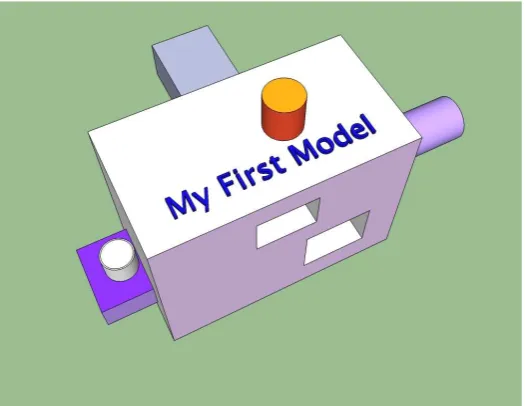
[image:7.595.165.428.327.530.2]A 3D scene can be generated using a number of different tools such as StudioMax, Maya, AutoCAD among others. Here we describe a simple 3D model generated with Google SketchUP. The application can be downloaded from Google SketchUp website (SKETCHUP, 2009). The simplest way of creating a 3D model involves the drawing of primitive geometric shapes (triangle, rectangle, circle) and then extruding these in a desired direction. Extrusion is an important operation in 3D modelling and all modelling packages have this functionality. A simple 3D model can be created in a couple of minutes such as the one depicted in Figure 1.
Figure 1: A simple 3D model created using a 3D modelling package.
3.2 Generating 3D Models Using Transform Graphs
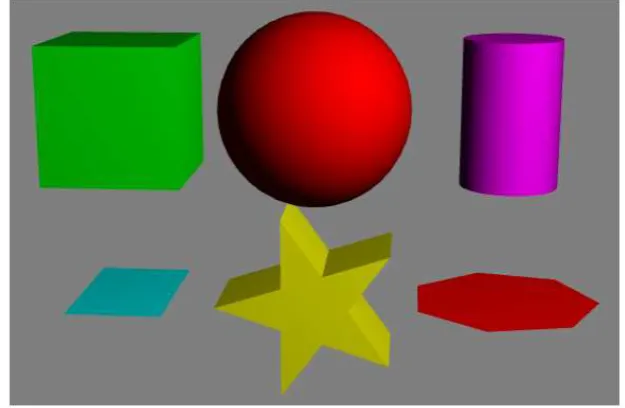
For instance, a 3D model of a cube can be defined in OpenGL by specifying the position of 8 vertices in space. An example in shown below where one of its vertices coincides with the origin and the length of each side of the cube is 1:
Figure 2: Example of models derived from primitive shapes and transform graphs.
glBegin(GL QUADS);
glColor3f(0.0,1.0,0.0); // A Green Cube
glVertex3f( 0.0, 0.0, 0.0); glVertex3f( 0.0, 1.0, 0.0); glVertex3f( 1.0, 1.0, 0.0); glVertex3f( 1.0, 0.0, 0.0); glVertex3f( 0.0, 0.0, 1.0); glVertex3f( 0.0, 1.0, 1.0); glVertex3f( 1.0, 1.0, 1.0); glVertex3f( 1.0, 0.0, 1.0); glEnd();
Constructing a similar cube using the O3D JavaScript extension allows one to work at a higher level than the OpenGL version above. The reason is that O3D provides a wrapping around some basic OpenGL functions so many low level functions can be encapsulated into a higher-level call. The code for creating the 3D cube using O3D would look like:
function createShapes() {
var cube = o3djs.primitives.createCube( g pack,
createPhongMaterial([0,1,0,1]), // A green shaded material.
Math.sqrt(2)); // The length of each side of the cube.
}
This is much simpler to write and maintain than the OpenGL version. This is so because O3D is object-oriented and contains classes to construct a number of primitive objects by simply instantiating o3djs.primitives as in the function example above.
4. Fast 3D Reconstruction using Line Projection
projection (e.g. ROBINSON et al., 2004; RODRIGUES et al., 2006, 2007, 2008; BRINK et al., 2008). The method is based on projecting a pattern of lines on the target surface and processing the captured 2D image from a single shot into a point cloud of vertices in 3D space. The reconstructed models are realistic and capture the real Euclidean measurements of the object and are useful to a large number of applications including biometric facial recognition, industrial inspection, reverse engineering and multimedia applications such as e-learning among others.
[image:9.595.89.515.276.473.2]The projected pattern consists of evenly spaced white stripes, and the deformation of the stripes onto the surface of the object is recorded by a video camera placed in a fixed geometric relationship to the stripe projector. The camera and projector axes meet at a place in space defined as the calibration plane; this intersection also marks the origin of the coordinate system for 3D reconstruction. A camera and projector configuration is depicted in Figure 3.
Figure 3: Camera and projector configuration.
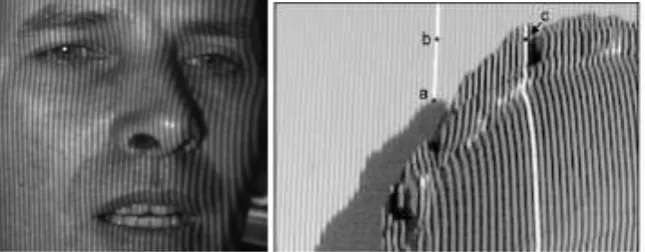
[image:9.595.139.462.648.774.2]Figure 4: Left, detail from a bitmap showing the stripes deforming across the face. Right, large discontinuities can lead to un-resolvable ambiguities.
[image:10.595.108.486.245.468.2]Despite such difficulties, the advantage of line projection over stereovision methods (MARR, 1979) is that the stripe pattern provides an explicitly connected mesh of vertices, so that the polyhedral surface can be rendered without the need for surface reconstruction algorithms. Also, a smoothly undulating and featureless surface can be more easily measured by structured light than by stereovision methods. These advantages for single frame scanning are even more important for 4D applications such as animation and immersive environments.
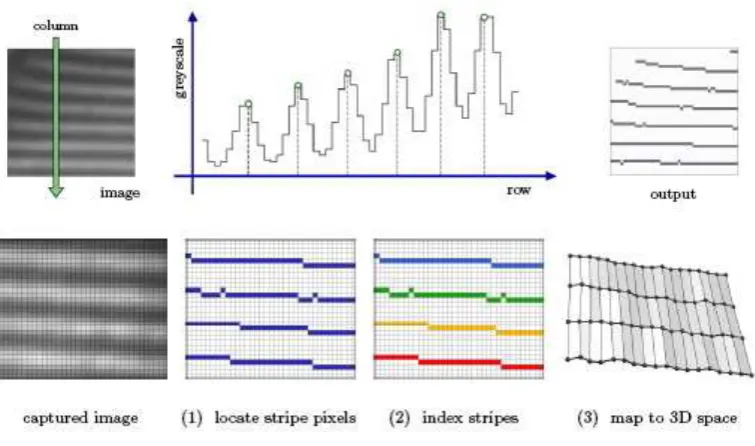
Figure 5: Mapping stripe indices from projector to camera space. Different colours mean different indices.
The main issue in 3D reconstruction using our method is to achieve the correct indexing of stripes as depicted in Figure 5 above. We have developed a number of algorithms to deal with index mapping as described in (ROBINSON et al., 2004;
BRINK et al., 2008). Once this mapping is achieved, a 3D point cloud is calculated
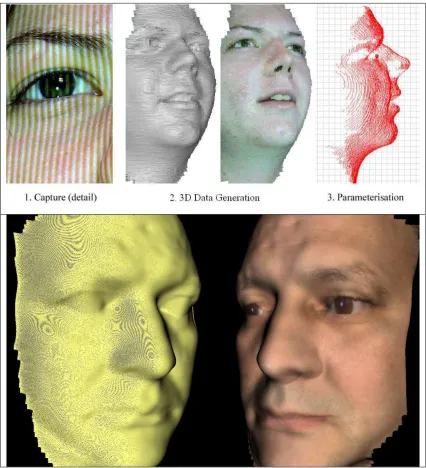
and the output is triangulated using the connectivity of the vertices as depicted in Figure 5 (bottom row). This results in a mesh defining objects in the real world with sub-millimetre accuracy.
Figure 6. Top row: an input image on the left is transformed into the 3D model and parameterized. Bottom, detail of a 3D model rendered as wire mesh and with texture mapping.
4. Integrating Interactive 3D Models into a Web Application
In this way, all model components are properly referenced and can be successfully retrieved by the web browser.
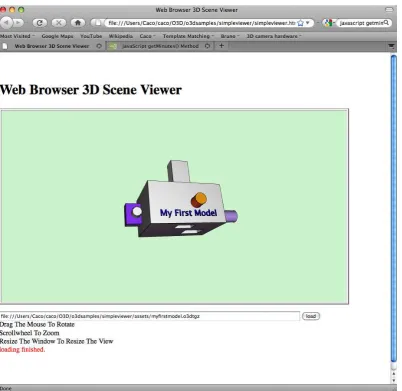
For the sake of clarity, in the code below we hide all necessary O3D JavaScript initializations and mouse callback procedures. A code fragment of the necessary O3D JavaScript statements that would be embedded into HTML to load a file for display would look like:
function initLoadFile(clientElements) {
var path = window.location.href; var index = path.lastIndexOf(’/’);
path = path.substring(0, index+1)+’assets/myfirstmodel.o3dtgz’;
var url = document.getElementById("url").value = path;
g loadingElement = document.getElementById(’loading’);
[image:12.595.100.503.306.697.2]... }
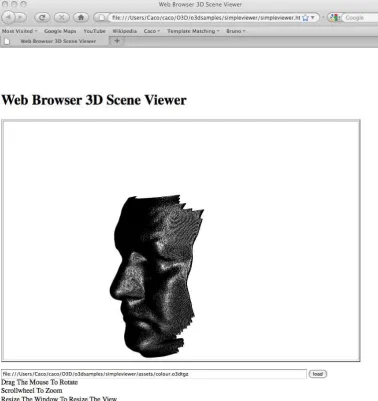
Figure 8: The 3D face model visualized in the web browser.
The 3D scene model resides in a URL relative folder such that is loaded by function initLoadFile above with the file path set to assets/myfirstmodel.o3dtgz. In order to deal with mouse events and other intricacies of the O3D API, web designers can make use of design patterns provided by the many API examples. By adapting existing code to the required interactivity, simple applications such as the example discussed here can be built in just a few minutes.
application indeed shows that OpenGL provides high performance and quality user experience.
Equally, the large face model can be visualized in a web browser by exporting to COLLADA format and then converting to o3dgtz. Figure 8 depicts the face model in a web browser. It is interesting to note that the original OBJ file was 13.4MB and the final compressed o3dtgz file was only slightly reduced to 9.8MB. This suggests that considerable amount of research is still needed to compress 3D data to small files.
5. Discussion and Conclusion
This paper has addressed the development of 3D contents for e-learning where visualization is provided by a standard web browser. First, the current state of technology was considered. While technologies are evolving and standards do not yet exist, both Mozilla and Google have opted for JavaScript, a client-side scripting language, to interface with OpenGL. This solution provides event handling in a web browser by JavaScript combined with the power of OpenGL driving the 3D graphics objects. While Mozilla will release their specification in early 2010, Google have already released their O3D JavaScript extension.
We have shown through examples how 3D contents can be created and integrated into an HTML page using embedded O3D JavaScript statements. As a whole, O3D works well and large and complex scenes can be loaded and visualized in a web browser with quality user experience provided by OpenGL’s high performance graphics. Our major criticism at this point relates to the extra burden of converting file formats, which can become a very convoluted experience, as various converters may be required. A minor aspect is that, since O3D is a plug-in, it requires downloading and installing. An ideal configuration would be one that the web browser natively understands 3D formats while standard JavaScript would contain all required functionality to load and visualize such models. Mozilla 3D might score highly on those aspects when released.
We also considered the issue of generating realistic 3D models from complex objects in the real world as opposed to models constructed from primitive geometric objects. We have described our approach to 3D reconstruction using line projection, which allows the generation of 3D models from a single 2D image. An overview of the method was presented together with samples of generated 3D models. The method can reconstruct models with sub-millimetre accuracy and recover the real Euclidean measurements of the modelled object. The method is thus, a powerful addition to the arsenal of tools for building realistic 3D scenes.
It is likely that Mozilla 3D will be standardized to COLLADA file format, therefore future work concerning our 3D reconstruction method includes the development of file exporters to COLLADA and o3dtgz to facilitate HTML integration. Moreover, research is required into compression techniques for 3D models; we are investigating partial differential equations and will report on the method in the near future.
References
AJAXIAN News, 2007.
3D Canvas in Opera. http://ajaxian.com/archives/3d-canvas-in-opera, November 2007.
AJAXIAN News, 2009.
O3D: Google releases 3D API in a Browser plug-in. http://ajaxian.com/archives/o3d-google-releases-3d-api-in-a-browser-plugin 21 April 2009.
BRINK et al., 2008. W. Brink, A. Robinson, M. Rodrigues:
Indexing Uncoded Stripe Patterns in Structured Light Systems by Maximum Spanning Trees, British Machine Vision Conference BMVC 2008, Leeds, UK, 1-4 Sep 2008.
CNET News, 2009.
Mozilla, graphics group seek to build 3D Web. http://news.cnet.com/8301-17939_109-10203458-2.html, 24 March 2009.
COLLADA, 2009.
Digital Asset and FX Exchange Schema, https://collada.org
JavaScript Tutorial, 2009.
W3Schools Online Web Tutorials, http://www.w3schools.com
JavaScript Source, 2009.
The JavaScript Source, http://javascript.internet.com/
JOGL, 2009.
Java Bindings for OpenGL API. The JOGL API Project https://jogl.dev.java.net/
KHRONOS GROUP, 2009.
Open Standards for Media Authoring and Acceleration. http://www.khronos.org/
MARR, 1979. D. Marr and T. Poggio.
A computational theory of human stereo vision, Proceedings of the Royal Society of London, B:301--328, 1979.
O3D API, 2009.
Google Code O3D API, home page at http://code.google.com/apis/o3d/
OpenGL, 2009.
The Industry’s Foundation for High Performance Graphics, http://www.opengl.org/
ROBINSON, et a.l., 2004. A. Robinson, L. Alboul and M.A. Rodrigues:
RODRIGUES et al., 2006. M. Rodrigues, A. Robinson, L. Alboul, W. Brink:
3D Modelling and Recognition, WSEAS Transactions on Information Science and Applications, Issue 11, Vol 3, 2006, pp 2118-2122.
RODRIGUES et al., 2007. M.A. Rodrigues, A. Robinson, W. Brink:
Issues in Fast 3D Reconstruction from Video Sequences, Lecture Notes in Signal Science, Internet and Education, Proceedings of 7th WSEAS International Conference on MULTIMEDIA, INTERNET and VIDEO TECHNOLOGIES (MIV '07), Beijing, China, September 15-17, 2007, pp 213-218.
RODRIGUES et al., 2008. M.A. Rodrigues, A. Robinson, W. Brink:
Fast 3D Reconstruction and Recognition, in New Aspects of Signal Processing, Computational Geometry and Artificial Vision, 8th WSEAS ISCGAV, Rhodes, 2008, p15-21.
SKETCHUP, 2009.