PROGRAMMER'S
REFERENCE
• RUN·TIME LIBRARY
• COMMAND·lINE COMPILER
• ERROR MESSAGES
• COMPILER DIRECTIVES
Turbo PascafB>
Version 7.0
c
o
N
T
Introduction 1
What's in this manual? ... 1
How to contact Borland . . . .. 2
Chapter 1 Library reference 5 Sample procedure . . . .. 5
Abs function ... 6
Addr function ... 6
Append procedure . . . .. 6
ArcCoordsType type ... 7
Arc procedure . . . .. 8
ArcTan function ... 8
Assign procedure ... 9
AssignCrt procedure ... 10
Assigned function . . . .. 10
Bar constants . . . .. 11
Bar procedure ... 11
Bar3D procedure ... 12
BitBlt operators .. . . .. 12
BlockRead procedure . . . .. 13
BlockWrite procedure ... 14
Break procedure ... 15
ChDir procedure ... " ... 15
CheckBreak variable ... 16
CheckEOF variable . . . .. 16
CheckSnow variable ... ~ ". 16 Chr function ... 17
Circle procedure ... 17
ClearDevice procedure ... 18
ClearViewPort procedure ... 19
Clipping conshints ... 19
Close procedure ... 20
CloseGraph procedure . . . .. 20
ClrEol procedure ... 21
ClrScr procedure ... '.' . . . .. 21
E
N
T
Color constants for SetRGBPalette ... . Concat function ... . Continue procedure ... . Copy function ... . Cos function ... . CreateDir procedure ... . Crt mode constants ... . CSeg function ... . DateTime type .... ~ ... . Dec procedure ... . Delay procedure ... . Delete procedure ... . DelLine procedure ... . DetectGraph procedure ... . DirectVideo variable ... . DiskFree function ... . DiskSize function ... . Dispose procedure ... . DosError variable ... . DosExitCode function ... ; ... . Dos Version function ... ; ... . DrawPoly procedure ... . Driver and mode constants ... . DSeg function ... . Ellipse procedure ... " .. EnvCount function ... . EnvStr function ... . Eof function (text files) ... . Eof function (typed, untyped files) .... . Eoln function ... . Erase procedure ... . ErrorAddr variable ... . Exclude procedure ... . Exec procedure ... . Exit procedure ... .ExitProc variable . . . .. 41
Exp function ... ;... 42
fcXXXX flag constants ... 42
FExpand function ... ' 42
File attribute constants . . . .. 43
File name length constants ... 43
FileExpand function . . . .. 44
File-handling string types ... 44
FileMode variable . . . .. 45
FilePos function ... 45
FileRec type . . . ... . . .. 46
FileSearch function . . . .. 46
FileSize function ... . . . .. 47
FileSplit function. '.' ... : 47
Fill pattern constants ... 48
FillChar procedure ... . . .. 49
FillEllipse procedure .. ' ... 49
FillPatternType type . . . .. 50
FillPoly procedure ... 50
FillSettingsType type ... 51
FindFirst procedure ... 51
FindNext procedure . . . .. 52
Flag constants ... 53
FloodFill procedure ... 53
Flush procedure ... 54
fmXXXX constants ... 55
Font control constants ... 55
F~ac function ... : . . . . .. 55
FreeList variable ... 56
FreeMem procedure . . . .. .. . . .. 56
FSearchfunction . . . .. 57
FSplit procedure ... 57
GetArcCoords procedure ... , 58
GetArgCount function . . . .. 59
GetArgStr function . . . . .. . . .. 59
GetAspectRatio procedure ... 59
GetBkColor function ... 60
GetCBreak procedure. . . .. 61
GetColor function . . . .. 62
GetCurDir function ... 62
GetDate procedure . . . .. 63
GetDefaultPalette function ... 63
GetDir procedure ... 64
GetDriverName function. . . .. 64
GetEnv function ... 65
GetEnvVar function. . . .. 66
GetFAttr procedure ... 66
GetFillPattern procedure . . . .. 67
GetFillSettings procedure . " ... 67
GetFTime procedure ... 68
GetGraphMode function . . . .. 69
GetImage procedure ... 70
GetIntVec procedure ... 71
GetLineSettings procedure ... 71
GetMaxColor function . . . .. 72
GetMaxMode function. . . .. 72
GetMaxX'function ... ; ... 73
GetMax Y function ... 74
GetMem procedure ... 74
GetModeName function ... 75
GetModeRange procedure ... 75
GetPalette procedure ... 76
GetPaletteSize function ... 77
GetPixel function ... 77
GetTextSettings procedure ... 78
GetTime procedure ... 78
GetVerify procedure ... 79
GetViewSettings procedure ... 79
GetX function ... 80
GetY function ... 81
GotoXYprocedure ... 81
GraphDefaults procedure ... 82
GraphErrorMsg function. . . .. 82
GraphFreeMemPtr variable ... 83
GraphGetMemPtr variable ... 83
GraphResult function. . . . .. . . .. 84
grXXXX constants ... 85
Halt procedure ... 85
HeapEnd variable . . . .. 86
i-IeapError variable. . . .. 86
HeapOrg variable . . . .. 86
HeapPtr variable. . . .. 87
Hi function ... 87
High function ... 87
High Video procedure ... 88
ImageSize function ... 'c.' • • • • • • • • • • • 88 Inc procedure ... .89
InitGraph procedure ... 90
InOutRes variable . . . .. 92
Input variable ... 92
Insert procedure ... 93
InsLine procedure ... 93
InstallUserDriver function ... 94
InstallUserFont function ... 96
Int function ... 97
Intr procedure ... 97
IOResult function ... 98
Justification constants ... 99
Keep procedure. . . .. 99
Key Pressed function ... 99
LastMode variable ... 100
Length function . . . .. 100
Line procedure ... 100
Line style constants ... 101
LineRelprocedure ... 102
LineSettingsType type ... 103
LineTo procedure ... 103
Ln function ... 104
Lo function ... 104
Low function . . . .. 104
LowVideo procedure ... 105
Lst variable ... 106
MaxAvail function ... 106
MaxColors constant ... 107
MemAvail function ... 107
MkDir procedure ... 108
Move procedure ... 108
MoveRelprocedure ... 109
MoveTo procedure . . . .. 110
MsDos procedure ... 110
New procedure ... 111
NormVideo procedure ... 111
NoSound procedure ... 112
Odd function . . . .. 112
Ofs function . . . .. 112
Ord function ... 112
Output variable . . . .. 113
OutText procedure ... 113
OutTextXYprocedure ... 115
OvrClearBuf procedure, ... 116
OvrDebugPtr variable ... 117
OvrDosHandle variable . ~ ... 117
OvrEmsHandle variable ... 117
OvrFileMode variable ... 118
OvrGetBuf function ... 118
OvrGetRetry function ... 118
OvrHeapEnd variable ... 119
OvrHeapOrg variable ... 119
OvrHeapPtr variable ... 120
OvrHeapSize variable ... 120
OvrInit procedure. . . .. 120
OvrInitEMS procedure ... 121
OvrLoadCount variable. . . .. 122
OvrLoadList variable . . . .. 122
OvrReadBuf variable ... . . . .. 123
OvrResult variable ... . . . .. 123
OvrSetBuf procedure . . . .. 123
OvrSetRetry procedure ... 124
OvrTrapCount variable . . . .. 125
ovrXXXX constants. . . .. 125
PackTime procedure ... 125
PaletteType type . . . .. 126
ParamCount function ... 126
ParamStr function . . . .. 127
Pi function . . . .. 127
PieSlice procedure ... 127
PointType type ... 128
Pos function . . . .. 128
Pred function . . . .. 129
PrefixSeg variable . . . .. 129
Ptr function ... 129
PutImage procedure. . . .. 130
PutPixel procedure . . . .. 132
Random function ... 132
Randomize procedure ... 133
RandSeed variable ... 133
Read procedure (text files) ... ,. 133
Read procedure (typed files) ... 135
ReadKey function . . . .. 135
Readln procedure ... 136
Rectangle procedure ... 136
RegisterBGIdriver function . . . .. 137
RemoveDir procedure ... 141
Rename procedure ... 142
Reset procedure ... 142
RestoreCrtMode procedure ... 143
Rewrite procedure ... 144
RmDir procedure ... 145
Round function . . . .. 145
RunError procedure ... 146
SavelntXX variables ... 146
SearchRec type ... 147
Sector procedure . . . .. 148
Seek procedure ... 149
SeekEof function . . . .. 149
SeekEoln function . . . .. 149
Seg function ... ; 150
Seg0040 variable ... 150
SegAOOO variable ... 150
SegBOOO variable . . . .. 151
SegB800 variable . . . .. 151
SelectorInc variable ... 151
SetActivePage procedure ... 152
SetAllPalette procedure . . . .. 152
SetAspectRatio procedure ... 154
SetBkColor procedure ... 155
SetCBreak procedure ... 155
SetColor procedure ... 156
SetCurDir procedure ... 156
SetDate procedure ... 157
SetFAttr procedure ... 157
SetFillPattern procedure ... 158
SetFillStyle procedure ... 159
SetFTime procedure . . . .. 160
SetGraphBufSize procedure ... 160
SetGraphMode procedure . . . .. 160
SetIntVec procedure. . . . .. . . .. . . . .. 161
SetLineStyle procedure ... 162
SetPaletteprocedure ... 163
SetRGBPalette procedure ... 164
SetTextBuf procedure ... 168
SetTextJustify procedure ... 169
SetTextStyle procedure ... 169
SetTime procedure ... ~ . . . .. 171
Set U serCharSize procedure ... 171
SetVerify procedure ... 172
SetViewPort procedure ... 172
SetVisualPage procedure. . . .. 173
SetWriteMode procedure ... 174
Sin function ... 175
SizeOf function . . . .. 176
Sound procedure ... 176
SPtr function ... 177
Sqr function ... 177
Sqrt function ... 177
SSeg function ... 177
StackLimit variable. . . .. 177
Str procedure ... 178
StrCat function ... 178
StrComp function . . . .. 179
StrCopy function ... 179
StrDispose function ... 180
StrECopy function ... 180
StrEnd function ... " 181 StrIComp function ... 181
StrLCat function ... : .. 181
StrLComp function ... 182
StrLCopy function ... 182
StrLen function ... 183
StrLIComp function . . . .. 183
StrLower function ... 184
StrMove function ... 184
StrNew function ... 185
StrPas function ... 185
StrPCopy function ... 186
StrPos function ... 186
StrRScan function . . . .. 187
StrScan function ... 187
StrUpper function ... 188
Succ function . . . .. 188
Swap function . . . .. 188
Swap Vectors procedure. . . .. 189
TDateTime type ... ... . . .. 189
Test8086 variable ... 190
Test8087 variable ... 190
TextAttr variable. . . .. 191
Text color constants ... 192
TextBackground procedure ... 192
TextColor procedure ... 193
TextMode procedure ... 194
TextRec type ... 195
TextSettingsType type ... 196
TextWidth function ... 196
TFileRec type . . . .. . .. 197
TRegisters type ... 198
Trunc function . . . .. 198
Truncate procedure ... 198
TSearchRec type ... 199
TTextRec type ... 199
TypeOf function ... 200
UnpackTime procedure ... 200
UpCase function . . . .. 200
Valprocedure ... 201
View PortType type ... 202
WhereX function. . . ... 202
Where Y function . . . .. 202
WindMax and WindMin variables .... 203
Window procedure ... 203
Write procedure (text files) ... 204
Write procedure (typed files) ... 206
Writeln procedure ... 206
Chapter 2 Compiler directives 209 Align data ... 211
Boolean evaluation ... ; ... 211
Debug information . . . .. 212
DEFINE directive ... 212
ELSE directive ... 213
Emulation ... 213
ENDIF directive ... 213
Extended syntax ... 214
Force far calls. . . .. 214
Generate 80286 Code ... 215
IFDEF directive . . . .. 215
IFNDEF directive ... 215
IFOPT directive ... 215
Include file . . . .. 216
Input/output checking. . . .. 216
Link object file . . . .. 216
Local symbol information ... 217
Memory allocation sizes ... 218
Numeric coprocessor ... 218
Overflow checking ... 219
Overlay code generation ... 219
Overlay unit name ... 220
Range checking . . . .. 220
Stack-overflow checking ... 221
Symbol reference information ... 221
Type-checked pointers . . . .. 222
UNDEF directive ... 222
Var-string checking ... 222
Using conditional compilation directives ... 223
Conditional symbols ... 224
Chapter 3 Command-line compiler 227 Command-line compiler options .. . . .. 228
Compiler directive options ... 229
The switch directive option . . . .. 229
The conditional defines option .... 230
Compiler mode options . . . .. 230
The make (1M) option ... 231
The build all (lB) option ... 231
The find error (IF) option ... 231
The link buffer (lL) option ... 232
The quiet (I Q) option ... 232
Directory options ... 233
The TPL & CFG directory (IT) option ... 233
The EXE & TPU directory (IE) option ... 234
The include directories (IE) option. 234 The unit directories (lU) option . .. 234
The object files directories (I 0) option ... 234
Debug options . . . .. 234
The map file (I G) option . . . .. 234
The debugging (IV) option . . . .. 235
The TPC.CFG file ... 235
Chapter 4 Error messages' 237 Compiler error messages ... 237
Run-time errors ... 257
DOS errors . . . .. 258
I/O errors ... 260
Fatal errors. . . .. 261 Appendix B Compiler directives quick
Appendix A Editor reference 265 reference 271
Editor commands in depth ... 269 Appendix C Reserved words and
Searching with regular expressions . . .. 270 standard directives 275
Appendix 0 ASCII characters 277
T
A
B
L
E
s
N T R
See the User's Guide for an oveNiew of the entire Turbo Pascal documentation set. Read its introduction to find out how to use the Turbo Pascal m'anuals most
effectively.
o
Du
c
To
NThis manual is a reference that you can keep nearby when you're programming. Use it when you want to
• Look up the details of a particular run-time library procedure, function, variable, type, or constant and find out how to use it
• Understand what each compiler directive does, how it works, and how to use it
• Learn how to use the command-line compiler • Find out what an error message means • Look up editor commands
• Look up compiler directives in a quick reference table • Review a list of reserved words and standard compiler
directives
• Look up ASCII alphanumeric characters, symbols, and control instructions
What's in this manual?
See the Language Guide for an oveNiew of the units found in Turbo Pascal's run-time library.
This manual has four reference chapters and four appendixes.
Chapter 1: Library reference is an alphabetized lookup of all the procedures, functions, variables, types, constants, and typed constants found in the units that make up the run-time library.
Chapter 2: Compiler directives explains how to use the three types of compiler directives and presents a detailed, alphabetized lookup of all the directives.
Chapter 3: Command-line compiler explains how to use the command-line compiler.
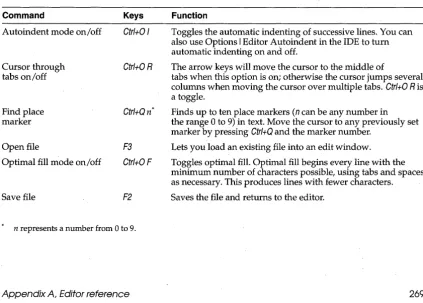
Appendix A: Editor reference explains the key combinations and commands you can use while editing your code. .
Appendix B: Compiler directives quick reference lists all the compiler directives, their command-line equivalents, and brief descriptions. To find more detailed explanations, read Chapter 2.
Appendix C: Reserved words and standard directives lists all the reserved words and standard directives in Turbo Pascal.
Appendix D: ASCII characters lists all the American Standard Code for Information Interchange (ASCII) characters.
How to contact Borland
Borland offers a variety of services to answer your questions about Turbo Pascal.
1111" Be sure to send in the registration card; registered owners are entitled to technical support and may receive information on upgrades and supplementary products.
Tech Fax
800-822-4269 (voice) TechFax is a 24-hour automated service that sends free technical information to your fax machine. You can use your touch-tone phone to request up to three documents per call.
408-439-9096 (modem) up to 9600 Baud
Borland Download BBS
The Borland Dowriload BBS has sample files, applications, and technical information you can download with your modem. No special setup is required.
Online informotion services
Online information services
408-467 -9744 6 a.m. to 5 p.m. PT
900-555- 7007 6 a.m. to 5 p.m. PT
Service Command
CompuServe GO BORLAND
BIX JOIN BORLAND
GEnie BORLAND
Address electronic messages to Sysop or All. Don't include your serial number; messages are in public view unless sent by a service's private mail system. Include as much information on the question as possible; the support staff will reply to the message within one working day.
Borland Technical Support
Borland Technical Support is available weekdays from 6:00 a.m. to 5:00 p.m. Pacific time to answer technical questions about Borland products. Please call from a telephone near your computer, with the program running and the following information available:
• Product name, serial number, and version number • Brand and model of the hardware in your system
• Operating system and version number-use the operating system's VER command to find the version number • Contents of your AUTOEXEC.BAT and CONFIG.SYS files
(located in the root directory (\) of your computer's boot disk) • Contents of your WIN.INI and SYSTEM.INI files (located in
your Windows directory)
• Daytime phone number where you can be reached
If the call concerns a software problem, please be able to describe the steps that will reproduce the problem.
Borland Technical Support also publishes technical information sheets on a variety of topics.
Borland Advisor Line
The Borland Advisor Line is a service for users who need immediate access to advice on Turbo Pascal issues.
Borland Customer Service
408-467-9000 (voice) Borland Customer Service is available weekdays from 7:00 a.m. to
7 a.m. to 5 p.m. PT 5:00 p.m. Pacific time to answer nontechnical questions about
c
H A p T E R1
Library reference
This chapter contains a detailed description of all Turbo Pascal procedures, functions, variables, types, and constants. At the beginning of each alphabetically listed entry is the name of the unit or units containing the data element or routine, followed by the purpose, the declaration format, and any remarks specifically related to that entry. If any special restrictions apply, these are also described. The cross-referenced entries and examples provide additional information about how to use the specified entry. The first sample procedure illustrates this format.
Sample procedure
Unit it occupies
Purpose Description of purpose.
Declaration How the data element or routine is declared; user-defined entries are italicized. Tables instead of declarations are used to illustrate constants whose values cannot be changed.
Remarks Specific information about this entry.
Restrictions Special requirements that relate to this entry.
See also Related variables, constants, types, procedures, and functions that are also described in this chapter.
Abs function
unit (for example, the Dos and WinDos units), separate program examples are listed only if significant differences exist between the two versions.
Abs function
Returns the absolute value of the argument.
function Abs (X) ;
System
Purpose Declaration
Remarks X is an integer-type or real-type expression. The result, of the same type as X, is the absolute value of X.
Example var
r: Real; i: Integer; begin
r := Abs(-2.3); i : = Abs (-157) ; end.
{ 2.3 } { 157 }
Addr function
System
Purpose Returns the address of a specified object.
Declaration function Addr (X): Pointer;
Remarks X is any variable, or a procedure or function identifier. The result is a pointer that points to X. Like nil, the result of Addr is assignment compatible with all pointer types.
See also Dfs, Ptr, Seg
Example var P: Pointer; begin
P : = Addr (P) ; end.
Append procedure
Purpose Opens an existing file for appending.
Declaration procedure Append(var F: Text);
{ Now points to itself }
System
Append procedure
Append opens the existing external file with the name assigned to F. An error occurs if no external file of the given name exists. If F is already open, it is closed, then reopened. The current file position is set to the end of the file.
If a Ctrl+Z (ASCII 26) is present in the last 128-byte block of the file, the current file position is set to overwrite the first Ctrl+Z in the block. In this way, text can be appended to a file that terminates with a Ctrl+l.
If F was assigned an empty name, such as Assign(F, "), then, after the call to Append, F refers to the standard output file (standard handle number 1).
After a call to Append, F becomes write-only, and the file pointer is at end-of-file.
With {$I-}, IOResult returns 0 if the operation was successful; otherwise, it returns a nonzero error code.
See also Assign, Close, Reset, Rewrite
Example var F:Text; begin
Assign{F, 'TEST.TXT');
Rewrite (F) ; { Create new file }
Writeln{F, 'original text'); Close (F) ;
Append (F) ;
Writeln{F, 'appended text'); Close (F) ;
end.
ArcCoordsType type
{ Close file, save changes } { Add more text onto end }
{ Close file, save changes }
Graph
Purpose Used by GetArcCoords to retrieve information about the last call to Arc or Ellipse.
Declaration type
ArcCoordsType = record
X, Y: Integer;
Xstart, Ystart: Integer; Xend, Yend: Integer; end;
See also GetArcCoords
Arc procedure
Arc procedure
Purpose Draws a circular arc from a starting angle to an ending angle.
i
Declaration procedure Arc (X, Y: Integer; StAngle, ,EndAngle, Radius: Word);
Graph
Remarks Draws a circular arc around (X, Y), with a radius of Radius from StAngle to EndAngle in the current drawing color.
Each graphics driver contains an aspect ratio used by Circle, Are, and PieS lice. A start angle of 0 and an end angle of 360 draws a complete circle. The angles for Are, Ellipse, and PieS lice are counterclockwise with 0
degrees at 3 0' clock, 90 degrees at 12 0' clock, and so on. Information about
the last call to Arc can be retrieved by GetArcCoords.
Restrictions Must be in graphics mode.
See also ' Circle, Ellipse, FillEllipse, GetArcCoords, GetAspectRatio, PieS lice, Sector, SetAspectRatio
Example uses Graph; var
Gd, Gm: Integer; Radius: Integer; begin
Gd := Detect;
InitGraph(Gd, Gm, "); if GraphResult <> grOk then
Halt(l) ;
for Radius := 1 to 5 do
Arc(100, 100, 0, 90, Radius * 10);
Readln; CloseGraph; end.
ArcTan function
Purpose Returns the arctangent of the argument.
Declaration function ArcTan (x: Real): Real;
System
Remarks X is a real-type expression. The result is the principal value, in radians, of the arctangent of X.
ArcTan function
Example var R: Real; begin
R := ArcTan (Pi) ; end.
Assign procedure
System
Purpose Assigns the name of an external file to a file variable.
Declaration procedure Assign(var F; Name);
Remarks F is a file variable of any file type, and Name is a string-type expression or an expression of type PChar if extended syntax is enabled. All further operations on F operate on the external file with the file name Name.
After a call to Assign, the association between F and the external file continues to exist until another Assign is done on F.
A file name consists of a path of zero or more directory names separated by backslashes, followed by the actual file name:
Drive:\DirName\ .. . \ DirName\ Fi1 eName
If the path begins with a backslash, it starts in the root directory; otherwise, it starts in the current directory.
Drive is a disk drive identifier (A-Z). If Drive and the colon are omitted, the default drive is used. \DirName\ ... \ DirName is the root directory and subdirectory path to the file name. FileName consists of a name of up to eight characters, optionally followed by a period and an extension of up to three characters. The maximum length of the entire file name is 79
characters.
A special case arises when Name is an empty string, that is, when
Length(Name) is zero. In that case, F becomes associated with the standard input or standard output file. These special files allow a program to utilize the I/O redirection feature of the DOS operating system. If assigned an empty name, then after a call to Reset(F), F refers to the standard input file, and after a call to Rewrite(F), F refers to the standard output file.
Restrictions Never use Assign on an open file.
See also Append, Close, Lst, Reset, Rewrite
Example {Try redirecting this program from DOS to PRN, disk file, etc. } var F: Text;
begin
Assign procedure
Rewrite (F) ;
Writeln(F, 'standard output ... '); Close(F);
end.
AssignCrt procedure,
Crt
Purpose Associates a text file with the CRT.
Declaration procedure AssignCrt (var F: Text);
Remarks AssignC~t works exactly like the Assign standard procedure except that no file name is specified. Instead, the text file is associated with the CRT.
This allows faster output (and input) than would normally be possible using standard output (or input).
Example uses Crt; var F: Text; begin
Write('Output to screen or printer [S, P]? ');
if UpCase(ReadKey) = 'P' then
Assign(F, 'PRN') else
{ Output to printer }
AssignCrt(F); { Output to screen, use fast CRT routines}
Rewrite (F) ;
Writeln(F, 'Fast output via CRT routines ... '); Close(F);
end.
Assigned function
System
Purpose Tests to determine if a pointer or procedural variable is nil.
Declaration function Assigned(var P): Boolean;
Remarks P must be a variable reference of a pointer or procedural type. Assigned returns True if P is not nil, or False if nil. Assigned(P) corresponds to the test P <> nil for a pointer variable, and @P <> nil for a procedural variable.
Example var P: Pointer; begin
P := nil;
if Assigned(P) then Writeln('You won't see this'); P := @P;
Bar constants
Bar constants
Graph
Purpose Constants that control the drawing of a 3-D top on a bar.
Remarks Used by the Bar3D procedure to control whether to draw a top on' 3-D bars.
Constant
Top On TopOf!
See also Bar3D
Value
True False
Bar procedure
Graph
Purpose Draws a bar using the current fill style and color.
Declaration procedure Bar(Xl, Yl, X2, Y2: Integer) i
Remarks Draws a filled-in rectangle (used in bar charts, for example). Uses the pattern and color defined by SetFillStyle or SetFillPattern. To draw an outlined bar, call Bar3D with a depth of zero.
Restrictions Must be in graphics mode.
See also Bar3D, GraphResult, SetFillStyle, SetFillPattern, SetLineStyle
Example uses Graphi
var
Gd; Gm: Integeri I, Width: Integeri begin
Gd := Detecti
InitGraph(Gd, Gm, ")i
if GraphResult <> grOk then Halt(l) ;
Width := 10i
for I := 1 to 5 do
Bar(I * width, I * 10, Suce(I) * Width, 200) i
Readln; CloseGraph; end.
Bar3D procedure
Bar3D procedure
Graph
Purpose Draws a 3-D bar using the current fill style and color.
Declaration procedure Bar3D(X1, Yl, X2, Y2: Integer; Depth: Word; Top: Boolean);
Remarks Draws a filled-in, three-dimensional bar using the pattern and color defined by SetFillStyle or SetFillPattern. The 3-D outline of the bar is drawn in the current line style and color as set by SetLineStyle and SetColor. Depth is the length in pi~els of the 3-D outline. If Top is TopOn, a 3-D top is put on the bar; if Top is TopOff, no top is put on the bar (making it possible to stack several bars on top of one another).
A typical depth could be calculated by taking 25% of the width of the bar:
Bar3D(Xl, Yl, X2, Y2, (X2 - Xl + 1) div 4, TopOn);
Restrictions Must be in graphics mode.
See also Bar, GraphResult, SetFillPattern, SetFillStyle, SetLineStyle
Example uses Graph; var
Gd, Gm: Integer;
YO, Yl, Y2, Xl, X2: Integer; begin
Gd := Detect;
InitGraph(Gd, Gm, ");
if GraphResult <> grOk then Halt(l);
YO := 10; Yl := 60; Y2 : = 110; Xl := 10; X2 := 50;
Bar3D(Xl, YO, X2, Yl, 10, TopOn); Bar3D(Xl, Yl, X2, Y2, 10, TopOff); Readln;
CloseGraph; end.
BitBlt operators
Graph
Purpose BitBlt operators used with PutImage and SetWriteMode.
BitBlt operators
Constant
CopyPut XORPut
Value
o
(mov) 1 (xor)These BitBlt constants are used by PutImage only:
OrPut 2(or)
AndPut 3 (and)
NotPut 4 (not)
BlockRead procedure
System
Purpose Reads one or more records into a variable.
Declaration procedure BlockRead(var F: file; var Buf; Count: Word [ ; var Result: Word 1 );
Remarks F is an untyped file variable, Buf is any variable, Count is an expression of type Word, and Result is a variable of type Word.
BlockRead reads Count or fewer records from the file F into memory, starting at the first byte occupied by Buf. The actual number of complete records read (less than or equal to Count) is returned in the optional parameter Result. If Result is not specified, an I/O error occurs if the number read is not equal to Count.
The entire transferred block occupies at most Count * RecSize bytes, where RecSize is the record size specified when the file was opened (or 128 if the record size was unspecified). An error occurs if Count
*
RecSize is greater than 65,535 (64K).Result is an optional parameter. If the entire block was transferred, Result will be equal to Count on return. Otherwise, if Result is less than Count, the end of the file was reached before the transfer was completed. In that case, if the file's record size is greater than 1, Result returns the number of complete records read; that is, a possible last partial record is not included in Result.
The current file position is advanced by Result records as an effect of BlockRead.
With {$I-}, IOResult returns 0 if the operation succeeded; otherwise, it returns a nonzero error code.
Restrictions File must be open.
See also BlockWrite
BlockRead prc;>cedure
Example program CopyFile;
{ Simple, fast file copy program with NO error-checking } var
FromF, ToF: file;. NumRead, NumWritten: Word; Buf: array[1 .. 2048] of Char; begin
Assign (FromF, ParamStr(l)); Reset (FromF, 1);
Assign(ToF, ParamStr(2)); Rewrite (ToF, 1);
Writeln('Copying " FileSize(FromF), , bytes ... '); repeat
BlockRead(FromF, Buf, SizeOf(Buf), NumRead); BlockWrite(ToF, Buf, NumRead, NumWritten); until (NumRead = 0) or (NumWritten <> NumRead); Close (FromF) ;
Close (ToF) ; end.
{ Open input file }
{ Record size = 1 }
{ Open output file } {. Record size = 1 }
BlockWrite procedure
System
Purpose Writes one or more records from a variable.
Declaration procedure BlockWrite(var F: file; var Buf; Count: Word [ ; var Result: Word] );
Remarks F is an untyped file variable, Buf is any variable, Count is an expression of type Word, and Result is a variable of type Word.
BlockWrite writes Count or fewer records to the file F from memory, starting at the first byte occupied by Buf. The actual number of complete records written (less than or equal to Count) is returned in the optional parameter Result. If Result is not specified, an I/O error occurs if the number written is not equal to Count.
The entire block transferred occupies at Il)ost Count * RecSize bytes, where RecSize is the record size specified when the file was opened (or 128 if the record size was unspecified). An error occurs if Count * RecSize is greater than 65,535 (64K).
BlockWrite procedure
The current file position is advanced by Result records as an effect of the BlockWrite.
Witl). {$I-}, IOResult returns 0 if the operation succeeded; otherwise, it returns a nonzero error code.
Restrictions File must be open.
See also BlockRead
Example See example for BlockRead.
Break procedure
System
Purpose Terminates a for, while, or repeat statement.
Declaration procedure Break;
Remarks Break exits the innermost enclosing for, while, or repeat statement immediately. Break is analogous to a goto statement addressing a label just after the end of the innermost enclosing repetitive statement. The compiler reports an error if Break is not enclosed by a for, while, or repeat
statement.
See also Continue, Exit, Halt
Example var 8: string; begin
while True do begin
Readln(S) ;
if S = I I then Break;
Writeln(S); end;
end.
ChDir procedure
System
Purpose Changes the current directory.
Declaration procedure ChDir (8: String);
Remarks The string-type expression changes the current directory to the path specified by S. If S specifies a drive letter, the current drive is also changed.
ChOir procedure
With {$I-}, IOResult returns 0 if the operation was successful; otherwise, it returns a nonzero error code.
See also GetDir, MkDir, RmDir. SetCurDir performs the same function, but it takes a null-terminated string as an argument rather than a Pascal-style string.
Example begin {$I-}
{ Get directory n~me from command line }
ChDir(ParamStr(l)); ,
if IOResult <> 0 then
Writeln(/Cannot find directory/); end.
CheckBreak variable
Purpose Enables and disables checks for Ctrl+Break.
Declaration var CheckBreak: Boolean;
Crt
Remarks When CheckBreak is True, pressing Ctrl+Break aborts the program when it next writes to the display. When CheckBreak is False, pressing Ctrl+Break,
has no effect. CheckBreak is True by default. (At run time, Crt stores the old
Ctrl+Break interrupt veCtor, $lB, in a global pointer variable called
SavelntlB.) /
See also KeyPressed, ReadKey, SavelntlB
CheckEOF variable
Crt
Purpose Enables and disables the end-of-file character.
Declaration var CheckEOF: Boolean;
Remarks When CheckEOF is True, an end-of-file character is generated if you press
Ctrl+Zwhile reading from a file assigned to the screen. When CheckEOF is False, pressing Ctrl+Zhas no effect. CheckEOF is False by default.
CheckSnow variable
Crt
Purpose Enables and disables "snow-checking" on eGA video adapters.
CheckSnow variable
Remarks On most CGAs, interference will result if characters are stored in video memory outside the horizontal retrace intervals. This does not occur with monochrome adapters, EGAs, or VGAs.
When a color text mode is selected, CheckS now is set to True, and direct video-memory writes will occur only during the horizontal retrace intervals. If you are running on a newer CGA, you might want to set CheckS now to False at the beginning of your program and after each call to TextMode. This will disable snow-checking, resulting in significantly higher output speeds.
Restrictions CheckS now has no effect when Direct Video is False.
See also Direct Video
Chr function
System
Purpose Returns a character with a specified ordinal number.
Declaration function Chr (X: Byte): Chari
Remarks Returns the character with the ordinal value (ASCII value) of the byte-type expression, X.
See also Ord
Example var I: Integer i
begin
for I := 32 to 255 do Write(Chr(I))i end.
Circle procedure
Graph
Purpose Draws a circle using (X, Y) as the center point.
Declaration procedure Circle (X, Y: Integer i Radius: Word) i
Remarks Draws a circle in the current color set by SetColor. Each graphics driver contains an aspect ratio used by Circle, Arc, and PieS lice.
Restrictions Must be in graphics mode.
See also Arc, Ellipse, FillEllipse, GetArcCoords, GetAspectRatio, PieS lice, Sector, SetAspectRatio
Circle procedure
Example uses Graph; var
Gd, Gm: Integer; Radius: Integer; begin
Gd := Detect;
InitGraph(Gd, Gm, "); if GraphResult <> grOk then
Halt (1);
for Radius
:=
1 to 5 doCircle(100, 100, Radius * 10);
Readlni CloseGraph; end.
ClearDevice procedure
Graph
Purpose Clears the graphics screen and prepares it for output.
Declaration procedure ClearDevice;
Remarks ClearDevice moves the current pointer to (0,0), clears the screen using th~
background color set by SetBkColor, and prepares it for output.
Restrictions Must be in graphics mode.
See also Clear ViewPort, CloseGraph, GraphDefaults, InitGraph, RestoreCrtMode, SetGraphMode
Example uses Crt, Graph;
var Gd, Gm: Inte~er;
begin
Gd := Detect;
InitGraph(Gd, Gm, "); if GraphResult <> grOk then
Halt(l); Randomize; repeat
LineTo(Random(200), Random(200)); until KeyPressed;
ClearViewPort procedure
ClearViewPort procedure
Graph
Purpose Clears the current viewport.
Declaration procedure ClearViewPort;
Remarks Sets the fill color to the background color (Palette[O]) and moves the current pointer to (0, 0).
Restrictions Must be in graphics mode.
See also ClearDevice, GetViewsettings, Set ViewPort
Example uses Graph;
var Gd, Gm: Integer; begin
Gd := Detect;
InitGraph(Gd, Gm, "); if GraphResult <> grOk then
Halt (1);
Rectangle (19, 19, GetMaxX - 19, GetMaxY - 19);
SetViewPort(20, 20, GetMaxX - 20, GetMaxY - 20, ClipOn); OutTextXY(O, 0, '<ENTER> clears viewport:');
Readln; ClearViewPort;
OutTextXY(O, 0, '<ENTER> to quit:'); Readln;
CloseGraph; end.
Clipping constants
Graph
Purpose Constants that control clipping; used with SetViewPort.
Remarks With clipping on, graphics output is clipped at the viewport boundaries:
Constant
ClipOn ClipOfJ
See also Set ViewPort
Value
True
False
Close procedure
Close procedure
System
Purpose Closes an open file.
Declaration procedure Close (var F);
Remarks F is a file variable of any file type previously opened with Reset, Rewrite, or Append. The external file associated with F is completely updated and then closed, freeing its DOS file handle for reuse.
With {$I-}, IOResult returns
a
if the operation was successful; otherwise, it returns a nonzero error code.See also Append, Assign, Reset, Rewrite
Example var F: file; begin
Assign(F, '\AUTOEXEC.BAT'); Reset(F,l);
Writeln('File size = " FileSize(F));
Close(F); end.
{ Open file }
{ Close file }
CloseGraph procedure
Graph
Purpose Shuts down the graphics system.
Declaration procedure CloseGraph;
Remarks CloseGraph restores the original screen mode before graphics was initialized and frees the memory allocated on the heap for the graphics scan buffer. Close Graph also de allocates driver and font memory buffers if
they were allocated by calls to GraphGetMem and GraphFreeMem.
Restrictions Must be in graphics mode.
See also DetectGraph, GetGraphMode, InitGraph, RestoreCrtMode, SetGraphMode
Example uses Graph;
var Gd, Gm: Integer; begin
Gd := Detect;
InitGraph(Gd, Gm, "); if GraphResult <> grOk then
Halt (1) ;
CloseGraph procedure
Readlni CloseGraphi end.
{ Shut down graphics}
I!IIII
ClrEol procedure
Purpose Clears all characters from the cursor position to the end of the line without moving the cursor.
Declaration procedure ClrEol i
Crt
Remarks All character positions are set to blanks with the currently defined text attributes. Thus, if TextBaekground is not black, the current cursor position to the right edge becomes the background color.
ClrEol is window-relative. The following program lines define a text window and clear the current line from the cursor position (1, 1) to the right edge of the active window (60, 1).
Window(I, I, 60, 20)i
ClrEoli
See also ClrSer, Window
Example uses Crt i
begin
TextBackground(LightGray) i
ClrEoli { Changes cleated columns to LightGray background}
end.
ClrScr procedure
Crt
Purpose Clears the active window and places the cursor in the upper left corner.
Declaration procedure ClrScr i
ClrScr procedure
ClrSer is window-relative. The following program lines define a text window and clear a 60x20 rectangle beginning at (1,1).
Window(l, 1, 60, 20); ClrScr;
See also ClrEol, Window
Example uses Crt; begin
TextBackground(LightGray);
ClrScr; { Changes entire window to LightGray background }
end.
Color constants
Graph
Purpose Color constants used by SetPalette and SetAllPalette.
Remarks
Constant Value
Black 0
Blue 1
Green 2
Cyan 3
Red 4
AJagenta 5
Brown 6
LightGray 7
DarkGray 8
LightBlue 9
LightGreen 10
LightCyan 11
LightRed 12
LightAJagenta 13
Yellow 14
White 15
See also SetAllPalette, SetPalette, SetColor
Color.constants
for SetRGBPalette
Graph
Purpose Constants that can be used with SetRGBPalette to select the standard EGA colors on an IBM 8514 graphics adapter.
Color constants for SetRGBPalette Constant EGABlack EGABlue EGAGreen EGACyan EGARed EGAMagenta EGABrown EGALightGray EGADarkGray EGALightBlue
E GALight Green
EGALightCyan EGALightRed EGALightMagenta EGAYellow EGA White
See also SetRGBPalette
Concat function
Value
o
(dark colors)1 2 3 4 5 20 7
56 (light colors)
57 58 59 60 61 62 63
Purpose Concatenates a sequence of strings.
Declaration function Concat (Sl [ , S2' ... , SN l: String): String;
System
Remarks Each parameter is a string-type expression. The result is the concatenation of all the string parameters. If the resulting string is longer than 255 characters, it is truncated after the 255th character. Using the plus (+) operator returns the same result as using the Concat function:
S := 'ABC' + 'DEF';
See also Copy, Delete, Insert, Length, Pos
Example var S: String; begin
S := Concat('ABC', 'DEF'); end.
Continue procedure
Purpose Continues a for, while, or repeat statement.
Declaration procedure Continue;
{ , ABCDEF' }
System
Continue procedure
Remarks
See also Example
Continue causes the innermost enclosing for, while, or repeat statement to immediately proceed with the next iteration. The compiler will report an error if a call to Continue is not enclosed by a for, while, or repeat
statement.
Break, Exit, Halt
var
I: Integer; Name: string[79]; F: file;
begin
for I := 1 to ParamCount do
begin
Name := ParamStr(I);
Assign(F, Name); {$I-}
Reset(F,l); {$It}
if IOResult <> 0 then begin
Writeln('File not found: ' Name); Continue;
end;
Writeln(Name, ': " FileSize(F) , ' bytes'); Close(F) ;
end; end.
Copy function
System
Purpose Returns a substring of a string.
Declaration function Copy (S: String; Index: Integer; Count: Integer): String;
Remarks S is a string-type expression. Index and Count are integer-type expressions. Copy returns a string containing Count characters starting with the Indexth character in S. If Index is larger than the length of S, Copy returns an empty string. If Count specifies more characters than remain starting at the Indexth position, only the remainder of the string is returned.
Copy function
Example var S: string; begin
S : =: 'ABCDEF';
S := Copy(S, 2, 3);
end.
{ 'BCD' }
Cos function
System
Purpose Returns the cosine of the argument.
Declaration function Cos (X: Real): Real;
Remarks X is a real-type expression. The result is the cosine of X where X represents an angle in radians.
See also ArcTan, Sin
Example var R: Real; begin
R := Cos(Pi); end.
CreateDir procedure
WinDos
Purpose Creates a new subdirectory.
Declaration procedure CreateDir (Dir: PChar);
Remarks The subdirectory to be created is specified in Dir. Errors are reported in DosError. MkDir performs the same function as CreateDir, but it takes a Pascal-style string as an argument rather than a null-terminated string.
See also GetCurDir, SetCurDir, RemoveDir
Crt mode constants
Crt
Purpose Used to represent Crt text and line modes.
Remarks· BW40, C040, BW80, and C080 represent the four color text modes supported by the IBM PC Color/Graphics Adapter (CGA). The Mono constant represents the single black-and-white text mode supported by the IBM PC Monochrome Adapter. Font8x8 represents EGA/VGA 43- and 50-line modes and is used with C080 or LastMode. LastMode returns to the last active text mode after using graphics.
Crt mode constants
Constant
BW40 BWBO
Mono
C040 COBO
FontBxB
C40 CBO
See also TextMode
Value
o
27
1
3
256 C040 C080
Description
40x25 B /W on color adapter
80x25 B /W on color adapter
80x25 B/W on monochrome adapter
40x25 color on color adapter 80x25 color on color adapter For EGA/VGA 43 and 50 line For Turbo Pascal 3.0 compatibility For Turbo Pascal3.0 compatibility
CSeg function
System
Purpose Returns the current value of the CS register.
Declaration function CSeg: Word;
Remarks The result of type Word is the segment address of the code segment within which CSeg was called.
See also DSeg, SSeg
. DateTime type
Dos
Purpose UnpackTime and PackTime use variables of DateTime type to examine and construct 4-:byte, packed date-and-time values for the GetFTime, SetFTime, FindFirst, and FindNext procedures.
Declaration type
DateTirne = record
Year, Month, Day, Hour, Min, Sec: Word; end;
Remarks Valid ranges are Year 1980 .. 2099, Month 1..12, Day 1..31, Hour 0 .. 23, Min 0 . .59, and Sec 0 . .59.
Dec procedure
Dec procedure
System
Purpose Decrements a variable.
Declaration procedure Dec (var X [ ; N: Longint 1 );
Remarks X is an ordinal-type variable or a variable of type PChar if the extended syntax is enabled, and N is an integer-type expression. X is decremented by 1, or by N if N is specified; that is, Dee(X) corresponds to X := X-I, and Dee(X, N) corresponds to X := X - N.
See also
Example
Dec generates optimized code and is especially useful in a tight loop.
Inc, Pred, Suee
var
IntVar: Integer; LongintVar: Longint; begin
Dec (IntVar) ; Dec (LongintVar, 5); end.
{ IntVar := IntVar - 1 { LongintVar := LongintVar - 5
Delay procedure
Crt
Purpose Delays a specified number of milliseconds.
Declaration procedure Delay (Ms: Word);
Remarks Ms specifies the number of milliseconds to wait.
Delay is an approximation, so the delay period will not last exactly Ms milliseconds.
Delete procedure
System
Purpose Deletes a substring from a string.
Declaration procedure Delete (var S: String; Index: Integer; Count: Integer);
Remarks 5 is a string-type variable. Index and Count are integer-type expressions. Delete deletes Count characters from 5 starting at the Indexth position. If
Index is larger than the length of 5, no characters are deleted. If Count
Delete procedure
specifies more characters than remain starting at the Indexth position, the remainder of the string is deleted.
See also Concat, Copy, Insert, Length, Pos
DelUne procedure
Crt
Purpose Deletes the line containing the cursor:
Declaration procedure DelLine i
Remarks The line containing the cursor is deleted, and all lines below are moved one line up (using the BIOS scroll routine). A new line is added at the bottom.
All charader positions .are set to blanks with the currently defined text attributes. Thus, if TextBackground is not black, the new line becomes the background color.
Example DelLine is window-relative. The following example will delete the first line in the window, which is the tenth line on the screen.
Window(l, 10, 60, 20) i DelLinei
See also InsLine, Window
DetectGraph procedure
Graph
Purpose Checks the hardware and determines which graphics driver and mode to use.
Declaration procedure DetectGraph (var GraphDriver, GraphMode: Integer) i
Remarks Returns the detected driver and mode value that can be passed to
InitGraph, which will then load the correct driver. If no graphics hardware was detected, the GraphDriver parameter and GraphResult returns a value of grNotDetected. See page 33 for a list of driver and mode constants.
Unless instructed otherwise, In it Graph calls DetectGraph, finds and loads the correct driver, and initializes the graphics system. The only reason to call DetectGraph directly is to override the driver that DetectGraph recom-mends. The example that follows identifies the system as a 64K or 256K EGA, and loads the CGA driver instead. When you pass InitGraph a GraphDriver other than Detect/you must also pass in a valid GraphMode for
DetectGraph procedure
Restrictions You should not use DetectGraph (or Detect with InitGraph) with the IBM 8514 unless you want the emulated VGA mode.
See also CloseGraph, Driver and mode, GraphResult, InitGraph
Example uses Graph;
var GraphDriverl GraphMode: Integer; begin
DetectGraph(GraphDriverl GraphMode);
if (GraphDriver = EGA) or
(GraphDriver = EGA64) then
begin
GraphDriver := CGA;
GraphMode := CGAHi;
end;
InitGraph(GraphDriverl GraphModel II);
if GraphResult <> grOk then Halt (1);
Line(OI 01 GetMaxX I GetMaxY);
Readln; CloseGraph; end.
DirectVideo variable
Crt
Purpose Enables and disables direct memory access for Write and Writeln statements that output to the screen.
Declaration var DirectVideo: . Boolean;
Remarks When DirectVideo is True, Writes and Writelns to files associated with the CRT will store characters directly in video memory instead of calling the BIOS to display them. When DirectVideo is False, all characters are written through BIOS calls, which is a significantly slower process.
DirectVideo always defaults to True. If, for some reason, you want characters displayed through BIOS calls, set DirectVideo to False at the beginning of your program and after each call to TextMode.
See also CheckS now
DiskFree function
DiskFree function
Dos, WinDos
Purpose Returns the number of free bytes on a specified disk drive.
Declaration function DiskFree(Drive: Byte): Longinti
Remarks A Drive of D indicates the default drive, 1 indicates drive Af 2 indicates Bf and so on. DiskFree returns -1 if the drive number is invalid.
See also DiskSize, GetDir
Example uses Dos i
begin
Writeln(DiskFree(O) div 1024, , Kbytes free')i
end.
{ or WinDos }
DiskSize function
Dos, WinDos
Purpose Returns the total size in bytes on a specified disk drive.
Declaration function DiskSize(Drive: Byte): Longinti
Remarks A Drive ofD indicates the default drive, 1 indicates drive Af 2 indicates Bf and so on. DiskSize returns -1 if the drive number is invalid.
See also DiskFreef GetDir
Example uses Dos i begin
Writeln(DiskSize(O) div 1024, , Kbytes capacity') i
end.
{ or WinDos }
Dispose procedure
System
Purpose Disposes of a dynamic variable.
Declaration procedure Dispose (var, P: ,Pointer [ , Destructor] ) i
Remarks P is a variable of any pointer type previously assigned by the New procedure or assigned a meaningful value by an assignment statement. Dispose destroys the variable referenced by P and returns its memory region to the heap. After a call to Dispose, the value of P becomes , undefined and it is an error to subsequently reference PA.
Dispose procedure
to an object type, and Destructor is a call to the destructor of that object type.
Restrictions If P does not point to a memory region in the heap, a run-time error occurs.
For a complete discussion of this topic, see "The heap manager" in Chapter 19 of the Language Guide.
See also FreeMem, GetMem, New
Example type Str18 = string[18]; var P: "Str18;
begin New(P) ;
P" := INow you see it .. . 1;
Dispose(P) ; { Now you don/t ... }
end.
DosError variable.
Dos, WinDos
Purpose Used by many Dos and WinDos routines to report errors.
Declaration var DosError: Integer;
Remarks The values stored in DosError are DOS error codes. A value of 0 indicates no error; other possible error codes include the following:
DOS error code
2
3
5
6
8 10
11
18
Meaning
File not found Path not found Access denied Invalid file handle Not enough memory Invalid environment Invalid format No more files
See Chapter 4, "Error messages/' for a detailed description of DOS error messages.
See also CreateDir, Exec, FindFirst, FindNext, GetCurDir, GetFAttr, GetFTime, RemoveDir, SetCurDir, SetFAttr, SetFTime
DosExitCode fun~tion
DosExitCode function
Dos
Purpose Returns the exit code of a subprocess.
Declaration function DosExi tCode: Wo~d;
Remarks The low byte is the code sent by the terminating process. The high byte is set to
• 0 for normal termination • 1 if terminated by Ctr/+C
.2 if terminated due to a device error • 3 if terminated by the Keep procedure
See also Exec, Keep
DosVersionfunction
Purpose Returns the DOS version number.
Declaration function DosVersion: Word;
Dos, WinDos
Remarks Dos Version returns the DOS version number. The low byte of the result is the major version number, and the high byte is the minor version number. For example, DOS 3.20 returns 3 in the low byte, and 20 in the high byte.
Example uses Dos; var Ver: Word; begin
Ver := DosVersion;
Writeln('This is DOS version', Lo(Ver), end.
See also Hi, Lo
DrawPoly procedure
{ or WinDos }
Hi (Ver));
Graph
Purpose Draws the outline of a polygon using the current line style and color.
Declaration procedure DrawPoly (NumPoints: Word; var PolyPoints);
DrawPoly procedure
DrawPoly uses the current line style and color. Use SetWriteMode to determine whether the polygon is copied to or XORed to the screen. Note that in order to draw a closed figure with N vertices, you must pass
N + 1 coordinates to DrawPoly, where
PolyPoints[N + 1]
=
PolyPoints[l]In order to draw a triangle, for example, four coordinates must be passed to DrawPoly.
Restrictions Must be in graphics mode.
See also FillPoly, GetLineSettings, GraphResult, SetColor, SetLineStyle, SetWriteMode
Example uses Graph; const
Triangle: array [1. .4] of PointType = ((X: 50; Y: 100), (X: 100; Y: 100),
(X: 150; Y: 150), (X: 50; Y: 100));
var Gd, Gm: Integer; begin
Gd := Detect;
InitGraph(Gd, Gm, "); if GraphResult <> grOk then
Halt (1);
DrawPoly(SizeOf(Triangle) div SizeOf(PointType), Triangle); Readln;
{ 4 }
CloseGraph; end.
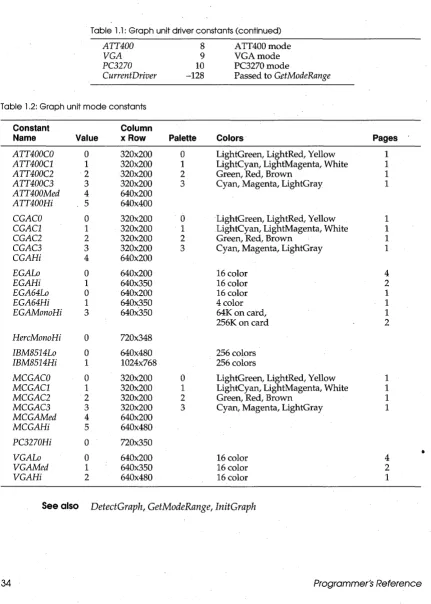
Driver and mode constants
Purpose Used with routines that call graphics drivers and color palettes.
Remarks The following tables list graphics drivers and color palettes.
Table 1.1 Graph unit driver
constants
Driver Constant
Detect CGA MCGA EGA EGA64 EGAMono IBM8514 HercMono
Value Meaning
0 Requests autodetection
1 CGAmode
2 MCGAmode
3 EGA mode
4 EGA64 mode
5 EGAMono mode
6 IBM8514 mode
7 HercMono mode
Graph
Driver and mode constants
Table 1.1: Graph unit driver constants (continued)
ATT400 8 ATT400mode
VGA 9 VGAmode
PC3270 10 PC3270mode
CurrentDriver -128 Passed to GetModeRange
Table 1 .2: Graph unit mode constants
Constant Column
Name Value x Row Palette Colors Pages
ATT400CO 0 320x200 0 LightGreen, LightRed, Yellow 1
ATT400Cl 1 320x200 1 LightCyan, LightMagenta, White 1
ATT400C2 2 320x200 2 Green, Red, Brown 1
ATT400C3 3 320x200 3 Cyan, Magenta, LightGray 1
ATT400Med 4 640x200
ATT400Hi 5 640x400
CGACO 0 320x200 ·0 LightGreen, LightRed, Yellow 1
CGACl 1 320x200 1 LightCyan, LightMagenta, White 1
CGAC2 2 320x200 2 Green, Red, Brown 1
CGAC3 3 320x200 3 Cyan, Magenta, LightGray 1
CGAHi 4 640x200
EGALo 0 640x200 16 color 4
EGAHi 1 640x350 16 color 2
EGA64Lo 0 640x200 16 color 1
EGA64Hi 1 640x350 4 color 1
EGAMonoHi 3 640x350 64Kon catd, 1
256K on card 2
HercMonoHi 0 720x348
IBM8514Lo 0 640x480 256 colors
IBM8514Hi 1 1024x768 256 colors
MCGACO 0 320x200 0 LightGreen, LightRed, Yellow 1
MCGACl 1 320x200 1 LightCyan, LightMagenta, White 1
MCGAC2 2 320x200 2 Green, Red, Brown 1
MCGAC3 3 320x200 3 Cyan, Magenta, LightGray 1
MCGAMed 4 640x200
MCGAHi 5 640x480
PC3270Hi 0 720x350
•
VGALo 0 640x200 16 color 4
VGAMed 1 640x350 16 color 2
VGAHi 2 640x480 16 color 1
[image:45.505.46.477.32.636.2]DSeg function
DSeg function
System
Purpose Returns the current value of the DS register.
Declaration function DSeg: Word;
Remarks The result of type Word is the segment address of the data segment.
See also CSeg, SSeg
Ellipse procedure
Graph
Purpose Draws an elliptical arc from start angle to end angle, using (X, Y) as the center point.
Declaration procedure Ellipse(X, Y: Integer; StAngle, EndAngle: Word; YRadius, YRadius: Word);
Remarks Draws an elliptical arc in the current color using (X, Y) as a center point, and XRadius and YRadius as the horizontal and vertical axes travelling from StAngle to EndAngle.
A start angle of 0 and an end angle of 360 draws a complete oval. The angles for Are, Ellipse, and PieS lice are counterclockwise with 0 degrees at 3 o'clock, 90 degrees at 12 0' clock, and so on. Information about the last
call to Ellipse can be retrieved by GetArcCoords.
Restrictions Must be in graphics mode.
See also Are, Circle, FillEllipse, GetArcCoords, GetAspectRatio, PieS lice, Sector, SetAspectRatio
Example uses Graph;
var Gd, Gm: Integer; begin
Gd := Detect;
InitGraph(Gd, Gm, "); if GraphResult <> grOk then
Halt (1);
Ellipse(100, lOa, a, 360, 30, 50); Ellipse(100, lOa, a, 180, 50, 30); Readln;
CloseGraph; end.
EnvCount function
EnvCount function
Dos
Purpose Returns the number of strings contained in the DOS environment.
Declaration function EnvCount: Integer i
Remarks EnvCount returns the number of strings contained in the DOS
environment. Each environment string is of the form V AR= V ALUE. The strings can be examined with the EnvStr function.
For more information about the DOS environment, see your DOS manuals.
See also EnvStr, GetEnv
Example uses Dos i
var I: Integeri begin
for I := 1 to EnvCount do Writeln(EnvStr(I)) i
end.
EnvStr function
Purpose Returns a specified environment string.
Declaration function EnvStr (Index: Integer): String i
Dos
Remarks EnvStr returns a specified string from the DOS environment. The string
EnvStr returns is of the form VAR= VALUE. The index of the first string is one. If Index is less than one or greater than EnvCount, EnvStr returns an empty string.
For more information about the DOS environment, see your DOS manuals.
See also EnvCount, GetEnv
Eaf function (text files)
System
Purpose Returns the end-of-file status of a text file.
Declaration function Eof [ (var F: Text) l: Booleani
Eof function (text files)
beyond the last character of the file or if the file contains no components; otherwise, Eof(F) returns False.
With {$I-}, IOResult returns 0 if the operation was successful; otherwise, it returns a nonzero error code.
See also Example
Eoln,SeekEof
var F: Text; Ch: Char; begin
{ Get file to read from command line } Assign(F, ParamStr(l));
Reset(F);
while not Eof(F) do begin
Read (F, Ch); Write (Ch) ; end;
{ Dump text file }
end.
Eof function (typed, untyped files)
System
Purpose Returns the end-of-file status of a typed or untyped file.
Declaration function Eof (var F): Boolean;
Remarks F is a file variable. Eof(F) returns True if the current file position is beyond the last component of the file or if the file contains no components; otherwise, Eof(F) returns False.
With {$I-}, IOResult returns 0 if the operation was successful; otherwise, it returns a nonzero error code.
Eoln function
System
Purpose Returns the end-of-line status of a text file.
Declaration function Eoln [(var F: Text) 1: Boolean;
Remarks F, if specified, is a text file variable. If F is omitted, the standard file variable Input is assumed. Eoln(F) returns True if the current file position is at an end-of-line marker or if Eof(F) is True; otherwise, Eoln(F) returns False.